A new article has been published at prMac.
appFigures Launches Native iOS App - Published on 06/02/15
appFigures, Inc. today introduces appFigures 1.0.1, its fully native iPhone app. The ideal complementary tool for app makers, appFigures for iPhone helps users keep a finger on the pulse of their app business with an intuitive dashboard and flexible reports such as total revenue, downloads, ads and App Store reviews. Powerful and flexible reports display important info at a glance with the ability to filter and drill down by app/in-app, country, store and network.
New York, New York - appFigures, Inc., an app store intelligence platform helping developers successfully grow their business through powerful app analytics, today is proud to announce the release and immediate availability of appFigures 1.0.1, its fully native iPhone app. The perfect companion to any appFigures plan, the app can be downloaded for free on the App Store or via appFigures online. The ideal complementary tool for app makers, appFigures for iPhone helps users keep a finger on the pulse of their app business with an intuitive dashboard and flexible reports such as total revenue (from app sales, in-app purchases and ads), downloads, ads and App Store reviews.
The app features:
* A simple interface, designed from the ground up for the iPhone
* Powerful and flexible reports display important info at a glance with the ability to filter and drill down by app/in-app, country, store & network
* Beautiful charts, custom built for clarity and style
* Automatic review translation
* Delightful conveniences such as offline mode, login with iCloud Keychain, easy sharing and more
* Compatibility with all iPhone models
"We set out to create an intuitive mobile analytics experience that brings important information to the forefront without sacrificing flexibility," said Ariel Michaeli, CEO and co-founder of appFigures. "To do that, we built most interface components from the ground up, which allowed us to create a unique experience that we think will delight our users."
About appFigures:
appFigures delivers actionable insights through comprehensive reports of an app's performance in order to make better data-driven decisions. Featuring an intuitive user interface and easy-to-use tools that offer developers the flexibility to customize how their data is delivered, appFigures brings the most important app store metrics under one roof and gives developers a complete snapshot of their apps' performance. Beautiful and powerful reports, an open API and complete security and control over private app data make appFigures the ultimate solution for app developers.
Device Requirements:
* iPhone, iPad, and iPod touch
* Optimized for iPhone 5, iPhone 6/6 Plus
* Requires iOS 7.0 or later
* 13.0 MB
Pricing and Availability:
appFigures for iPhone 1.0.1 is a free app and available worldwide exclusively through the App Store in the Business category. For more information, visit appFigures online.
appFigures: https://appfigures.com/
appFigures for iPhone 1.0.1: https://appfigures.com/app
Direct Download Link: https://itunes.apple.com/app/id962408539
Screenshot: http://a4.mzstatic.com/us/r30/Purple7/v4/82/3c/28/823c28be-153c-4b0a-5bf8-53423e093921/screen322x572.jpeg
App Icon: http://a5.mzstatic.com/us/r30/Purple2/v4/ee/f1/ea/eef1ea63-2d3a-848e-600a-59dee1100728/icon175x175.jpeg
appFigures, Inc. is the largest multi-store app analytics platform in the universe, giving mobile developers the tools necessary to keep tabs on all their mobile products across a variety of platforms. The easy-to-use appFigures website simplifies complicated data, clarifying it with gorgeous graphs and making it super accessible with an API. For developers who are serious about tracking their products, appFigures is indispensable. Copyright (C) 2015 appFigures, Inc. All Rights Reserved. Apple, Mac, the Apple logo, iPhone, iPod and iPad are registered trademarks of Apple Inc. in the U.S. and/or other countries. All other trademarks and trade names are the property of their respective owners.
*******
Link To Article: http://prmac.com/release-id-75228.htm
*******
---------------------------------------------------------------------------------
Note that you can alter delivered distributions at any time.
Login to your account on prMac to alter your channel selection, or to opt-out at any time.


It's Not Water, It's Words! available on the App Store
A new article has been published at prMac.
It's Not Water, It's Words! available on the App Store - Published on 06/02/15
La Dentelliere Digital Publisher announces It's Not Water, It's Words! 1.4 for iPad. In this original story, words literally flow into the children's lives. Little readers play with the ribbons of phrases, pushing them into the rain gutter, or making them fly. After the story, the word fun continues with two games that encourage a love of reading. This app is edutainment that makes learning fun. It is for children who are learning to read on their own.
Paris, France - La Dentelliere Digital Publisher today is proud to announce the release of It's Not Water, It's Words! 1.4, an update to their educational app for iPad. In this original story, words literally flow into the children's lives. Little readers play with the ribbons of phrases, pushing them into the rain gutter, or making them fly. After the story, the word fun continues with two games that encourage a love of reading. This app is edutainment that makes learning fun. It is for children who are learning to read on their own.
This original story is written by Marc Solal, illustrated by Marie-Paule Prot with a soundtrack by Alexis Collin. The members of this team of creative individuals come from all walks of life and don't necessarily work in the digital domain. La Dentelliere Digital Publisher gave them carte blanche. Version 1.4 includes support for English and French languages.
"This story is more than just a book that is read on the iPad - it's an interactive, visual, touch and sound experience. Because children are very sensitive to the artistry inherent in storytelling and also because they are at ease with, and attracted to technology in general, we are confident that there is much ground left to be explored in partnership with our young readers. Technology by itself is not what dreams are made of. Instead, magic happens when imagination of both artists and developers intersect," said Myriam Prot-Poilvet, founder of La Dentelliere Digital Publisher.
Supported Languages:
* English and French
Device Requirements:
* Compatible with iPad
* Requires iOS 7.0 or later
* 85.6 MB
Pricing and Availability:
It's Not Water, It's Words! 1.4 is $3.99 USD (or equivalent amount in other currencies) and available worldwide exclusively through the App Store in the Education category.
La Dentelli�re Digital Publisher: http://www.ladentelliere.net
It's Not Water, It's Words! 1.4: http://www.ladentelliere.net/its-not-water-its-words
Purchase and Download: https://itunes.apple.com/app/cest-pas-de-leau-cest-des-mots-!/id951343362
Media Assets: http://www.ladentelliere.net/press-blog/2015/5/29/its-not-water-its-words
Located near Paris, France, La Dentelliere Digital Publisher was founded in 2014 by Myriam Prot-Poilvet. It creates stories that are both works of art and technologically innovating. All Material and Software (C) Copyright 2015 La Dentelliere Editions Numeriques. All Rights Reserved. Apple, the Apple logo, iPhone, iPod and iPad are registered trademarks of Apple Inc. in the U.S. and/or other countries. Other trademarks and registered trademarks may be the property of their respective owners.
*******
Link To Article: http://prmac.com/release-id-75225.htm
*******
---------------------------------------------------------------------------------
Note that you can alter delivered distributions at any time.
Login to your account on prMac to alter your channel selection, or to opt-out at any time.
It's Not Water, It's Words! available on the App Store - Published on 06/02/15
La Dentelliere Digital Publisher announces It's Not Water, It's Words! 1.4 for iPad. In this original story, words literally flow into the children's lives. Little readers play with the ribbons of phrases, pushing them into the rain gutter, or making them fly. After the story, the word fun continues with two games that encourage a love of reading. This app is edutainment that makes learning fun. It is for children who are learning to read on their own.
Paris, France - La Dentelliere Digital Publisher today is proud to announce the release of It's Not Water, It's Words! 1.4, an update to their educational app for iPad. In this original story, words literally flow into the children's lives. Little readers play with the ribbons of phrases, pushing them into the rain gutter, or making them fly. After the story, the word fun continues with two games that encourage a love of reading. This app is edutainment that makes learning fun. It is for children who are learning to read on their own.
This original story is written by Marc Solal, illustrated by Marie-Paule Prot with a soundtrack by Alexis Collin. The members of this team of creative individuals come from all walks of life and don't necessarily work in the digital domain. La Dentelliere Digital Publisher gave them carte blanche. Version 1.4 includes support for English and French languages.
"This story is more than just a book that is read on the iPad - it's an interactive, visual, touch and sound experience. Because children are very sensitive to the artistry inherent in storytelling and also because they are at ease with, and attracted to technology in general, we are confident that there is much ground left to be explored in partnership with our young readers. Technology by itself is not what dreams are made of. Instead, magic happens when imagination of both artists and developers intersect," said Myriam Prot-Poilvet, founder of La Dentelliere Digital Publisher.
Supported Languages:
* English and French
Device Requirements:
* Compatible with iPad
* Requires iOS 7.0 or later
* 85.6 MB
Pricing and Availability:
It's Not Water, It's Words! 1.4 is $3.99 USD (or equivalent amount in other currencies) and available worldwide exclusively through the App Store in the Education category.
La Dentelli�re Digital Publisher: http://www.ladentelliere.net
It's Not Water, It's Words! 1.4: http://www.ladentelliere.net/its-not-water-its-words
Purchase and Download: https://itunes.apple.com/app/cest-pas-de-leau-cest-des-mots-!/id951343362
Media Assets: http://www.ladentelliere.net/press-blog/2015/5/29/its-not-water-its-words
Located near Paris, France, La Dentelliere Digital Publisher was founded in 2014 by Myriam Prot-Poilvet. It creates stories that are both works of art and technologically innovating. All Material and Software (C) Copyright 2015 La Dentelliere Editions Numeriques. All Rights Reserved. Apple, the Apple logo, iPhone, iPod and iPad are registered trademarks of Apple Inc. in the U.S. and/or other countries. Other trademarks and registered trademarks may be the property of their respective owners.
*******
Link To Article: http://prmac.com/release-id-75225.htm
*******
---------------------------------------------------------------------------------
Note that you can alter delivered distributions at any time.
Login to your account on prMac to alter your channel selection, or to opt-out at any time.
Emulsion - The New Photo Library for your Mac
A new article has been published at prMac.
Emulsion - The New Photo Library for your Mac - Published on 06/02/15
The Escapers today introduces Emulsion, a brand new photo library app for Mac OS X. Powerful, fast and flexible, Emulsion helps anyone manage their photos, apply filters, fix dust spots, adjust metadata and so much more. You can apply stunning filters, subtle adjustments, and create multiple versions of your important images. Emulsion makes full use of the powerful GPU available in modern Macs, with many effects being applied in real time. Filters can be applied to many images at once.
Melbourne, Australia - The Escapers today is proud to announce the release of Emulsion, a brand new photo library app for Mac OS X. Powerful, fast and flexible, Emulsion helps anyone manage their photos, apply filters, fix dust spots, adjust metadata and so much more. You can apply stunning filters, subtle adjustments, and create multiple versions of your important images.
Emulsion puts you in control all your image metadata, allowing you to apply changes to 1000's of images at time, including being able to correct metadata when a legacy lens is used on a modern camera. Geotagging is also supported, so you can see all your images on a Map, and even apply GPS information to images that don't already have it. Emulsion makes full use of the powerful GPU available in modern Macs, with many effects being applied in real time. Filters can be applied to many images at once.
Emulsion is perfect for film photographers. You can clone out dust spots, and even apply the film type to image collections. Scans can easily be straighten and flipped. RAW images (including DNG) are supported along with JPEG and TIFF. Search is fast and flexible, and you can save frequently used searches right into your Catalog.
System Requirements:
Emulsion requires Mac OS X Yosemite, and Retina displays are fully supported.
Pricing and Availability:
Emulsion is $49.99 (USD) for a limited time, and is available as a 30 day trial.
Emulsion: http://emulsionapp.com
Download Emulsion: http://emulsionapp.s3.amazonaws.com/EmulsionV1.zip
Purchase: https://www.e-junkie.com/ecom/gb.php?c=cart&i=1433342&cl=33073&ejc=2
Screenshot 1: http://emulsionapp.com/images/AdjustmentSets.jpg
Screenshot 2: http://emulsionapp.com/images/adj.jpg
With a commitment to providing the highest quality software, The Escapers was founded in 2007 by two brothers for the purpose of publishing personal productivity software solutions expressly for the Mac platform, with a major emphasis on total customer satisfaction. Copyright (C) 2007-2015 The Escapers. All Rights Reserved. Apple, the Apple logo, Mac OS X and Macintosh are registered trademarks of Apple Computer in the U.S. and/or other countries.
*******
Link To Article: http://prmac.com/release-id-75227.htm
*******
---------------------------------------------------------------------------------
Note that you can alter delivered distributions at any time.
Login to your account on prMac to alter your channel selection, or to opt-out at any time.
Emulsion - The New Photo Library for your Mac - Published on 06/02/15
The Escapers today introduces Emulsion, a brand new photo library app for Mac OS X. Powerful, fast and flexible, Emulsion helps anyone manage their photos, apply filters, fix dust spots, adjust metadata and so much more. You can apply stunning filters, subtle adjustments, and create multiple versions of your important images. Emulsion makes full use of the powerful GPU available in modern Macs, with many effects being applied in real time. Filters can be applied to many images at once.
Melbourne, Australia - The Escapers today is proud to announce the release of Emulsion, a brand new photo library app for Mac OS X. Powerful, fast and flexible, Emulsion helps anyone manage their photos, apply filters, fix dust spots, adjust metadata and so much more. You can apply stunning filters, subtle adjustments, and create multiple versions of your important images.
Emulsion puts you in control all your image metadata, allowing you to apply changes to 1000's of images at time, including being able to correct metadata when a legacy lens is used on a modern camera. Geotagging is also supported, so you can see all your images on a Map, and even apply GPS information to images that don't already have it. Emulsion makes full use of the powerful GPU available in modern Macs, with many effects being applied in real time. Filters can be applied to many images at once.
Emulsion is perfect for film photographers. You can clone out dust spots, and even apply the film type to image collections. Scans can easily be straighten and flipped. RAW images (including DNG) are supported along with JPEG and TIFF. Search is fast and flexible, and you can save frequently used searches right into your Catalog.
System Requirements:
Emulsion requires Mac OS X Yosemite, and Retina displays are fully supported.
Pricing and Availability:
Emulsion is $49.99 (USD) for a limited time, and is available as a 30 day trial.
Emulsion: http://emulsionapp.com
Download Emulsion: http://emulsionapp.s3.amazonaws.com/EmulsionV1.zip
Purchase: https://www.e-junkie.com/ecom/gb.php?c=cart&i=1433342&cl=33073&ejc=2
Screenshot 1: http://emulsionapp.com/images/AdjustmentSets.jpg

Screenshot 2: http://emulsionapp.com/images/adj.jpg

With a commitment to providing the highest quality software, The Escapers was founded in 2007 by two brothers for the purpose of publishing personal productivity software solutions expressly for the Mac platform, with a major emphasis on total customer satisfaction. Copyright (C) 2007-2015 The Escapers. All Rights Reserved. Apple, the Apple logo, Mac OS X and Macintosh are registered trademarks of Apple Computer in the U.S. and/or other countries.
*******
Link To Article: http://prmac.com/release-id-75227.htm
*******
---------------------------------------------------------------------------------
Note that you can alter delivered distributions at any time.
Login to your account on prMac to alter your channel selection, or to opt-out at any time.
Wrist Pics brings Reddit image browsing to Apple Watch
A new article has been published at prMac.
Wrist Pics brings Reddit image browsing to Apple Watch - Published on 06/02/15
Steve Weintraut LLC today introduces Wrist Pics 1.1, the first Apple Watch app that allows users to browse images posted on the popular social media, news and entertainment site, Reddit. Wrist Pics was designed with a basic set of features to allow for quick loading of the app. It comes installed with a list of some of the most popular image subreddits on Reddit. A companion app for the iPhone allows users to add their own favorite subreddits too.
Sicklerville, New Jersey - Steve Weintraut LLC today is proud to announce the release of Wrist Pics 1.1 for Apple Watch(TM). Wrist Pics is the first Apple Watch(TM) app that allows users to browse images posted on the popular social media, news and entertainment site Reddit. Whether you are waiting for a train, sitting in a doctor's office, or waiting for your kids to get done after-school soccer practice, Wrist Pics is a fun and enjoyable way to enjoy your Apple Watch(TM). Wrist Pics was designed with a basic set of features to allow for quick loading of the app. It comes installed with a list of some of the most popular image subreddits on Reddit.
A companion app for the iPhone(TM) allows users to add their own favorite subreddits too. By simply tapping your finger, you can quickly see the latest image postings that have been made. And you can switch between subreddits quickly by using a long tap on your Apple Watch(TM) screen. Wrist Pics is under rapid development, and more features will be added soon, including saving favorites for offline viewing, support for the Apple Watch(TM) glance feature, and many others.
Device Requirements:
* iPhone, iPad, and iPod touch
* Optimized for iPhone 5, iPhone 6/6 Plus
* Requires iOS 8.3 or later
* 0.2 MB
Pricing and Availability:
Wrist Pics 1.1 is Free and available worldwide exclusively through the App Store in the Photo & Video category. User feedback for new features and bug fixes are always welcome and encouraged.
Wrist Pics 1.1: https://itunes.apple.com/app/wrist-pics/id995705748
Screenshot: http://www.quotemakerpro.com/watch1.png
App Icon: http://a5.mzstatic.com/us/r30/Purple7/v4/3f/93/57/3f935772-2e90-0026-9422-fcac29029cac/icon175x175.jpeg
Based in Sicklerville, New Jersey, indie developer Steve Weintraut founded his company in 2011. Steve Weintraut LLC is devoted to making high quality apps for Apple iOS devices. The founder, Steve Weintraut, has over 25 years of experience in software development. Copyright (C) 2015 Steve Weintraut LLC. All Rights Reserved. Apple, the Apple logo, iPhone, iPod and iPad are registered trademarks of Apple Inc. in the U.S. and/or other countries. Other trademarks and registered trademarks may be the property of their respective owners.
*******
Link To Article: http://prmac.com/release-id-75226.htm
*******
---------------------------------------------------------------------------------
Note that you can alter delivered distributions at any time.
Login to your account on prMac to alter your channel selection, or to opt-out at any time.
Wrist Pics brings Reddit image browsing to Apple Watch - Published on 06/02/15
Steve Weintraut LLC today introduces Wrist Pics 1.1, the first Apple Watch app that allows users to browse images posted on the popular social media, news and entertainment site, Reddit. Wrist Pics was designed with a basic set of features to allow for quick loading of the app. It comes installed with a list of some of the most popular image subreddits on Reddit. A companion app for the iPhone allows users to add their own favorite subreddits too.
Sicklerville, New Jersey - Steve Weintraut LLC today is proud to announce the release of Wrist Pics 1.1 for Apple Watch(TM). Wrist Pics is the first Apple Watch(TM) app that allows users to browse images posted on the popular social media, news and entertainment site Reddit. Whether you are waiting for a train, sitting in a doctor's office, or waiting for your kids to get done after-school soccer practice, Wrist Pics is a fun and enjoyable way to enjoy your Apple Watch(TM). Wrist Pics was designed with a basic set of features to allow for quick loading of the app. It comes installed with a list of some of the most popular image subreddits on Reddit.
A companion app for the iPhone(TM) allows users to add their own favorite subreddits too. By simply tapping your finger, you can quickly see the latest image postings that have been made. And you can switch between subreddits quickly by using a long tap on your Apple Watch(TM) screen. Wrist Pics is under rapid development, and more features will be added soon, including saving favorites for offline viewing, support for the Apple Watch(TM) glance feature, and many others.
Device Requirements:
* iPhone, iPad, and iPod touch
* Optimized for iPhone 5, iPhone 6/6 Plus
* Requires iOS 8.3 or later
* 0.2 MB
Pricing and Availability:
Wrist Pics 1.1 is Free and available worldwide exclusively through the App Store in the Photo & Video category. User feedback for new features and bug fixes are always welcome and encouraged.
Wrist Pics 1.1: https://itunes.apple.com/app/wrist-pics/id995705748
Screenshot: http://www.quotemakerpro.com/watch1.png

App Icon: http://a5.mzstatic.com/us/r30/Purple7/v4/3f/93/57/3f935772-2e90-0026-9422-fcac29029cac/icon175x175.jpeg

Based in Sicklerville, New Jersey, indie developer Steve Weintraut founded his company in 2011. Steve Weintraut LLC is devoted to making high quality apps for Apple iOS devices. The founder, Steve Weintraut, has over 25 years of experience in software development. Copyright (C) 2015 Steve Weintraut LLC. All Rights Reserved. Apple, the Apple logo, iPhone, iPod and iPad are registered trademarks of Apple Inc. in the U.S. and/or other countries. Other trademarks and registered trademarks may be the property of their respective owners.
*******
Link To Article: http://prmac.com/release-id-75226.htm
*******
---------------------------------------------------------------------------------
Note that you can alter delivered distributions at any time.
Login to your account on prMac to alter your channel selection, or to opt-out at any time.
Korean Dictionary 12.0 Released with Apple Watch Support
A new article has been published at prMac.
Korean Dictionary 12.0 Released with Apple Watch Support - Published on 06/02/15
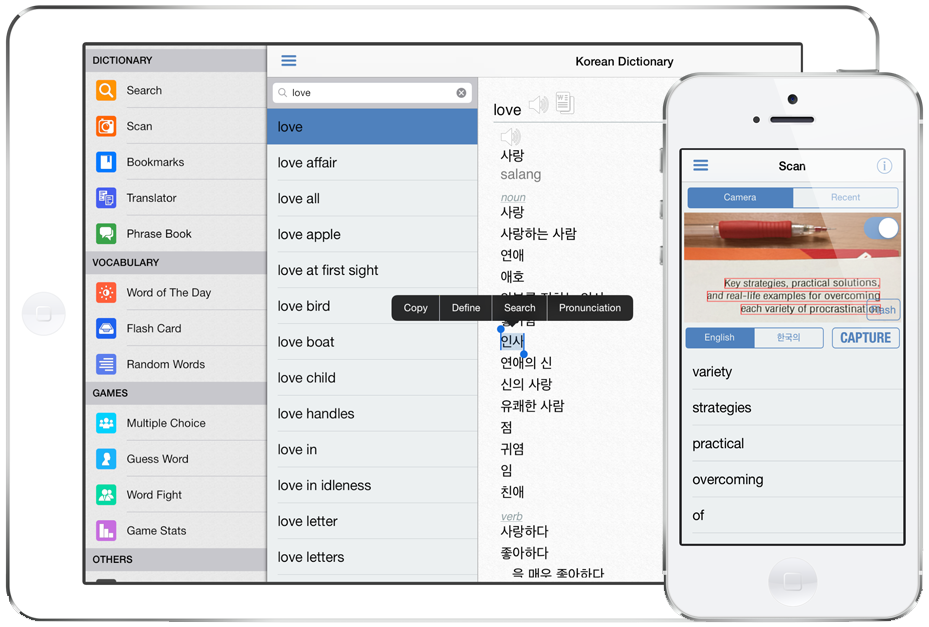
iThinkdiff today announces Korean Dictionary 12.0, an update to their popular bilingual dictionary app for iOS devices. Featuring a large database, Pronunciation, Online Translator, Phrase Book, Flash cards and games help both students and travelers to translate nearly anything from Korean into English and vice versa. Version 12.0 introduces Apple Watch support. Now anyone can quickly see recent search history, bookmarked words, translation, phrases and word of the day in their watch.
Melaka, Malaysia - iThinkdiff today is proud to announce the release of Korean Dictionary 12.0, an update to their popular bilingual dictionary app for iOS devices. Featuring a large database, Pronunciation, Online Translator, Phrase Book, Flash cards and games help both students and travelers to translate nearly anything from Korean into English and vice versa. Version 12.0 introduces Apple Watch support. Now anyone can quickly see recent search history, bookmarked words, translation, phrases and word of the day in their watch.
The leading iPhone, iPad, and iPod touch bilingual dictionary translates between English and Korean now extremely useful for Apple Watch support. Lead developer Mahmud Ahsan said, "Now the dictionary will be more useful with the new Apple watch feature. Both students and travelers can use Korean Dictionary to translate nearly anything from Korean into English or vice versa.
Over 77 million people speak Korean, and it is my hope that this dictionary will make communication between Korean speakers and English speakers easier than ever before" continues Mr. Ahsan, "so it was important for us to help users look up words quickly without having to transliterate them into Latin [English] characters first."
Key Features:
* Translate individual words, phrases, or whole sentences
* Scan text in image by pointing your device camera to search in dictionary
* Cross search feature. Touch a word for a while for the menu [Copy | Define | Search | Pronunciation]
* Bookmark and Recent History for instant recall
* Multiple games to help students improve their English or Korean vocabulary
* Online & Offline Pronunciation for English & Korean text
* Flash Card & Word of the Day for vocabulary learning
* Phrase Book
* Apple Watch supported for quick access of saved and recent search words, phrases, translation and word of the day
"Korean Dictionary was designed for both students and travelers. You can use it as a phrase book for a short trip, or you can use it to learn a language for life. And, it is free to download in the App Store." said Mr. Ahsan.
Korean Dictionary's core translation function works offline. But when the user's device is online, several extra features become available, such as an online scoring system which helps students earn Achievements for using app features, plus a vocabulary Leaderboard which rewards the most effective students.
English words link to their Wiktionary page to help users discover the history behind words, and built-in app connections let users send their translations to other apps on their device, such as Facebook, Twitter, Email, and SMS.
All current iPhones, iPads, iPod touch and Apple Watch are supported. Devices with a Retina display will find Spanish Dictionary automatically optimizes itself for high-resolution text display so users don't need to squint.
Device Requirements:
* iPhone, iPad, iPod touch and Apple Watch
* Optimized for iPhone 5, iPhone 6 and iPhone 6 Plus
* Requires iOS 7.0 or later
* Universal app optimized for display on all iOS devices
* 53.6 MB
Pricing and Availability:
Korean Dictionary 12.0 is free and available worldwide exclusively through the App Store in the Education category. Some pro features can be enabled by in app purchase.
iThinkdiff: http://ithinkdiff.net
Korean Dictionary 12.0: http://ithinkdiff.net/iphone-applications/korean-dictionary/
Download from iTunes: https://itunes.apple.com/app/korean-dictionary-translator/id501709193
Screenshot: http://2a2cc343f5995d2fb948-5cc402153e846059e29478934321d3c6.r70.cf1.rackcdn.com/2012/01/korean-dic1.png
App Icon: http://a2.mzstatic.com/us/r30/Purple5/v4/b6/bd/8e/b6bd8e29-c4c9-b1b0-69ba-59c44aee0ad4/icon350x350.jpeg
Founded in 2010 by programmer Mahmud Ahsan, iThinkdiff is a leading creator of educational and entertainment apps for iPhones, iPads, and other Apple iOS devices. With over 8 million total downloads, thousands of five-star reviews, and 15 million monthly ad impressions, iThinkdiff games and translation apps are frequently featured on the Apple iTunes homepage. Copyright (C) 2010-2015 iThinkdiff. All Rights Reserved. Apple, the Apple logo, iPhone, iPad, iPad mini, iPod touch, and Mac are registered trademarks of Apple Inc. in the U.S. and/or other countries. Other trademarks and registered trademarks may be the property of their respective owners.
*******
Link To Article: http://prmac.com/release-id-75224.htm
*******
---------------------------------------------------------------------------------
Note that you can alter delivered distributions at any time.
Login to your account on prMac to alter your channel selection, or to opt-out at any time.
Korean Dictionary 12.0 Released with Apple Watch Support - Published on 06/02/15
iThinkdiff today announces Korean Dictionary 12.0, an update to their popular bilingual dictionary app for iOS devices. Featuring a large database, Pronunciation, Online Translator, Phrase Book, Flash cards and games help both students and travelers to translate nearly anything from Korean into English and vice versa. Version 12.0 introduces Apple Watch support. Now anyone can quickly see recent search history, bookmarked words, translation, phrases and word of the day in their watch.
Melaka, Malaysia - iThinkdiff today is proud to announce the release of Korean Dictionary 12.0, an update to their popular bilingual dictionary app for iOS devices. Featuring a large database, Pronunciation, Online Translator, Phrase Book, Flash cards and games help both students and travelers to translate nearly anything from Korean into English and vice versa. Version 12.0 introduces Apple Watch support. Now anyone can quickly see recent search history, bookmarked words, translation, phrases and word of the day in their watch.
The leading iPhone, iPad, and iPod touch bilingual dictionary translates between English and Korean now extremely useful for Apple Watch support. Lead developer Mahmud Ahsan said, "Now the dictionary will be more useful with the new Apple watch feature. Both students and travelers can use Korean Dictionary to translate nearly anything from Korean into English or vice versa.
Over 77 million people speak Korean, and it is my hope that this dictionary will make communication between Korean speakers and English speakers easier than ever before" continues Mr. Ahsan, "so it was important for us to help users look up words quickly without having to transliterate them into Latin [English] characters first."
Key Features:
* Translate individual words, phrases, or whole sentences
* Scan text in image by pointing your device camera to search in dictionary
* Cross search feature. Touch a word for a while for the menu [Copy | Define | Search | Pronunciation]
* Bookmark and Recent History for instant recall
* Multiple games to help students improve their English or Korean vocabulary
* Online & Offline Pronunciation for English & Korean text
* Flash Card & Word of the Day for vocabulary learning
* Phrase Book
* Apple Watch supported for quick access of saved and recent search words, phrases, translation and word of the day
"Korean Dictionary was designed for both students and travelers. You can use it as a phrase book for a short trip, or you can use it to learn a language for life. And, it is free to download in the App Store." said Mr. Ahsan.
Korean Dictionary's core translation function works offline. But when the user's device is online, several extra features become available, such as an online scoring system which helps students earn Achievements for using app features, plus a vocabulary Leaderboard which rewards the most effective students.
English words link to their Wiktionary page to help users discover the history behind words, and built-in app connections let users send their translations to other apps on their device, such as Facebook, Twitter, Email, and SMS.
All current iPhones, iPads, iPod touch and Apple Watch are supported. Devices with a Retina display will find Spanish Dictionary automatically optimizes itself for high-resolution text display so users don't need to squint.
Device Requirements:
* iPhone, iPad, iPod touch and Apple Watch
* Optimized for iPhone 5, iPhone 6 and iPhone 6 Plus
* Requires iOS 7.0 or later
* Universal app optimized for display on all iOS devices
* 53.6 MB
Pricing and Availability:
Korean Dictionary 12.0 is free and available worldwide exclusively through the App Store in the Education category. Some pro features can be enabled by in app purchase.
iThinkdiff: http://ithinkdiff.net
Korean Dictionary 12.0: http://ithinkdiff.net/iphone-applications/korean-dictionary/
Download from iTunes: https://itunes.apple.com/app/korean-dictionary-translator/id501709193
Screenshot: http://2a2cc343f5995d2fb948-5cc402153e846059e29478934321d3c6.r70.cf1.rackcdn.com/2012/01/korean-dic1.png
App Icon: http://a2.mzstatic.com/us/r30/Purple5/v4/b6/bd/8e/b6bd8e29-c4c9-b1b0-69ba-59c44aee0ad4/icon350x350.jpeg

Founded in 2010 by programmer Mahmud Ahsan, iThinkdiff is a leading creator of educational and entertainment apps for iPhones, iPads, and other Apple iOS devices. With over 8 million total downloads, thousands of five-star reviews, and 15 million monthly ad impressions, iThinkdiff games and translation apps are frequently featured on the Apple iTunes homepage. Copyright (C) 2010-2015 iThinkdiff. All Rights Reserved. Apple, the Apple logo, iPhone, iPad, iPad mini, iPod touch, and Mac are registered trademarks of Apple Inc. in the U.S. and/or other countries. Other trademarks and registered trademarks may be the property of their respective owners.
*******
Link To Article: http://prmac.com/release-id-75224.htm
*******
---------------------------------------------------------------------------------
Note that you can alter delivered distributions at any time.
Login to your account on prMac to alter your channel selection, or to opt-out at any time.
uKind - iOS App to acknowledge acts of kindness and express gratitude
A new article has been published at prMac.
uKind - iOS App to acknowledge acts of kindness and express gratitude - Published on 06/01/15
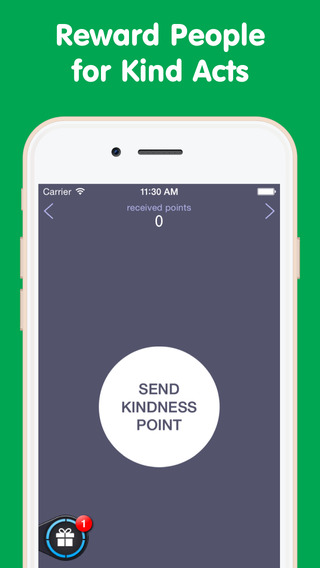
uKind, Inc today announces uKind 1.1, a first-of-its kind social networking app for iOS devices. Free and requiring no registration, uKind allows anyone tp express gratitude to people around them for any act of kindness by sending a "Kindness Point" from a list of Facebook friends, Twitter followers, via email or a phone number. Users receive and accumulate Kindness Points from others for their acts of kindness and can redeem them for gift cards and other goods via mPOINTS within the app.
Marina del Rey, California - uKind, Inc today is proud to announce the release of uKind 1.1 in the App Store. This application is the first of its kind. Free and requiring no registration, uKind allows anyone to express gratitude to people around them for any act of kindness. A user can express gratitude and acknowledge kind acts by sending a "Kindness Point" from a list of Facebook friends, Twitter followers, via email or a phone number. Along with the "Kindness Point" the user sends a gratitude message that she/he either chooses from a list of canned thank you phrases or types her/his own.
Once the "Kindness Point" is sent the user has a choice to make her/his thank you message (or a description of the kind act) available for public release on the Kindness Wall within the application. Messages can also be made available on Facebook or Twitter. "Kindness Points" are accumulated by the recipient within the application and their number is seen in parentheses next to the user's name on the Kindness Wall. The sender of "Kindness Points" receives one "Kindness Point" back for every 10 points that she/he sends. The more "Kindness Points" a user receives, the higher her/his aptitude for kindness. Accumulated "Kindness Points" can also be redeemed for gift cards and other goods from major retailers like Amazon, Best Buy, Starbucks and others via mPOINTS application integrated within uKind.
In addition to making someone happy by acknowledging her/his kind act, the sender of the "Kindness Point" engages in a so-called happiness-boosting activity by expressing gratitude. Research in positive psychology recognizes that happiness-boosting activities, such as expression of gratitude, have a long-lasting effect on an individual's well-being, promote her/his mental and physical health, and have antidepressant effect.
uKind Features:
* Facebook integration with access to friends
* Twitter integration with access to followers
* Address book integration with access to phone numbers and emails
* Option to send Kindness Points and post thank you messages on Facebook
* Option to send Kindness Points and tweet thank you messages in Twitter
* Option to send Kindness Points and thank you messages via email
* Option to send Kindness Points and thank you messages via phone SMS
* Search for friends in Facebook
* Search for followers in Twitter
* Search for people in phone's address book
* Search for individual's emails in phone's address book
* mPOINTS integration
* Option to redeem Kindness Points for gift cards via mPOINTS
* Access to review acts of kindness described by other users
Device Requirements:
* iOS 7.0 or later
* iPhone, iPad, and iPod touch
* Optimized for iPhone 5, iPhone 6/6 Plus
* Requires iOS 7.0 or later
* 14.3 MB
Pricing and Availability:
uKind 1.1 is Free and available worldwide exclusively through the App Store in the Social Networking category.
uKind 1.1: http://www.ukindpoints.com/
Download from iTunes: https://itunes.apple.com/app/ukind/id925479136
Screenshot: http://a1.mzstatic.com/us/r30/Purple1/v4/8e/dd/f1/8eddf1d1-1ab9-bf8d-9097-c24c24db3e57/screen568x568.jpeg
App Icon: http://a2.mzstatic.com/us/r30/Purple7/v4/d0/11/67/d01167c0-58c9-b543-af92-59ec8e9029a4/icon175x175.jpeg
uKind, Inc was founded by Andre Mirzoyan and Sergei Tatishchev. Andre Mirzoyan is successful iOS game developer. All Material and Software (C) Copyright 2015 uKind, Inc. All Rights Reserved. Apple, the Apple logo, iPhone, iPod and iPad are registered trademarks of Apple Inc. in the U.S. and/or other countries. Other trademarks and registered trademarks may be the property of their respective owners.
*******
Link To Article: http://prmac.com/release-id-75223.htm
*******
---------------------------------------------------------------------------------
Note that you can alter delivered distributions at any time.
Login to your account on prMac to alter your channel selection, or to opt-out at any time.
uKind - iOS App to acknowledge acts of kindness and express gratitude - Published on 06/01/15
uKind, Inc today announces uKind 1.1, a first-of-its kind social networking app for iOS devices. Free and requiring no registration, uKind allows anyone tp express gratitude to people around them for any act of kindness by sending a "Kindness Point" from a list of Facebook friends, Twitter followers, via email or a phone number. Users receive and accumulate Kindness Points from others for their acts of kindness and can redeem them for gift cards and other goods via mPOINTS within the app.
Marina del Rey, California - uKind, Inc today is proud to announce the release of uKind 1.1 in the App Store. This application is the first of its kind. Free and requiring no registration, uKind allows anyone to express gratitude to people around them for any act of kindness. A user can express gratitude and acknowledge kind acts by sending a "Kindness Point" from a list of Facebook friends, Twitter followers, via email or a phone number. Along with the "Kindness Point" the user sends a gratitude message that she/he either chooses from a list of canned thank you phrases or types her/his own.
Once the "Kindness Point" is sent the user has a choice to make her/his thank you message (or a description of the kind act) available for public release on the Kindness Wall within the application. Messages can also be made available on Facebook or Twitter. "Kindness Points" are accumulated by the recipient within the application and their number is seen in parentheses next to the user's name on the Kindness Wall. The sender of "Kindness Points" receives one "Kindness Point" back for every 10 points that she/he sends. The more "Kindness Points" a user receives, the higher her/his aptitude for kindness. Accumulated "Kindness Points" can also be redeemed for gift cards and other goods from major retailers like Amazon, Best Buy, Starbucks and others via mPOINTS application integrated within uKind.
In addition to making someone happy by acknowledging her/his kind act, the sender of the "Kindness Point" engages in a so-called happiness-boosting activity by expressing gratitude. Research in positive psychology recognizes that happiness-boosting activities, such as expression of gratitude, have a long-lasting effect on an individual's well-being, promote her/his mental and physical health, and have antidepressant effect.
uKind Features:
* Facebook integration with access to friends
* Twitter integration with access to followers
* Address book integration with access to phone numbers and emails
* Option to send Kindness Points and post thank you messages on Facebook
* Option to send Kindness Points and tweet thank you messages in Twitter
* Option to send Kindness Points and thank you messages via email
* Option to send Kindness Points and thank you messages via phone SMS
* Search for friends in Facebook
* Search for followers in Twitter
* Search for people in phone's address book
* Search for individual's emails in phone's address book
* mPOINTS integration
* Option to redeem Kindness Points for gift cards via mPOINTS
* Access to review acts of kindness described by other users
Device Requirements:
* iOS 7.0 or later
* iPhone, iPad, and iPod touch
* Optimized for iPhone 5, iPhone 6/6 Plus
* Requires iOS 7.0 or later
* 14.3 MB
Pricing and Availability:
uKind 1.1 is Free and available worldwide exclusively through the App Store in the Social Networking category.
uKind 1.1: http://www.ukindpoints.com/
Download from iTunes: https://itunes.apple.com/app/ukind/id925479136
Screenshot: http://a1.mzstatic.com/us/r30/Purple1/v4/8e/dd/f1/8eddf1d1-1ab9-bf8d-9097-c24c24db3e57/screen568x568.jpeg
App Icon: http://a2.mzstatic.com/us/r30/Purple7/v4/d0/11/67/d01167c0-58c9-b543-af92-59ec8e9029a4/icon175x175.jpeg

uKind, Inc was founded by Andre Mirzoyan and Sergei Tatishchev. Andre Mirzoyan is successful iOS game developer. All Material and Software (C) Copyright 2015 uKind, Inc. All Rights Reserved. Apple, the Apple logo, iPhone, iPod and iPad are registered trademarks of Apple Inc. in the U.S. and/or other countries. Other trademarks and registered trademarks may be the property of their respective owners.
*******
Link To Article: http://prmac.com/release-id-75223.htm
*******
---------------------------------------------------------------------------------
Note that you can alter delivered distributions at any time.
Login to your account on prMac to alter your channel selection, or to opt-out at any time.
Built for Gear Geeks: Gearizer is an App for Getting your Gear Organized
A new article has been published at prMac.
Built for Gear Geeks: Gearizer is an App for Getting your Gear Organized - Published on 06/01/15
VR2L today introduces Gearizer 1.0.2, a new gear organizer for IOS devices. Using a simple visual user interface, users can easily keep track of their personal inventory and organize their gear into collections. A social component lets users discover new gear which has been tried and tested by other enthusiasts. Users can add items from a database of over 500 popular products. And with its powerful search capabilities, Gearizer makes it easy for anyone to keep track of everything.
Melbourne, Australia - Having many hobbies, app developer Vincent Cheong found he had accumulated a substantial amount of gear for his various past times. While there were a number of apps to take care of stuff, he was unable to find a suitable app to help him organise his gear. According to the Vincent, "Your gear is the essential equipment and tools for work, play and adventures. Stuff, on the other hand are just things taking up space." This distinction led him to build an app specifically for gear enthusiasts.
The new application named Gearizer is designed especially for managing your gear. Using a simple visual user interface, users can easily keep track of their personal inventory and organize their gear into collections. Furthermore, a social component lets users discover new gear which has been tried and tested by other enthusiasts.
Feature Highlights:
* Beautiful UI - A slick visual interface to your gear inventory
* Powerful Search - Search capabilities make it easy to keep track of your gear
* Organise by Collections - Easily create collections of your gear for different usage situations
* Discover New Gear - Explore collections from other gear enthusiasts and get inspired
* Gear Database - Add items from our database of over 500+ popular products
* Cloud backup - Your gear will always be backed up and accessible from wherever you are
How You Can Use Gearizer:
* Everyday Carry - Show off EDC gear and check out what other people are carrying.
* Photographer -Create different configurations of lenses, flashes and other equipment.
* Traveller - Create packing lists before you travel.
* Collector -Keep track of your prized possessions and share your collections with others.
* Prepper - Organize your bug out bag and survival kits for when SHTF.
* Gear Tracker - Track every item you lend out to friends.
Device Requirements:
* iPhone, iPad, and iPod touch
* Optimized for iPhone 5, iPhone 6/6 Plus
* Requires iOS 7.0 or later
* 15.7 MB
Pricing and Availability:
Gearizer - Gear Organizer App 1.0.2 is Free and available worldwide exclusively through the App Store in the Productivity category. Please visit the Gearizer website for more information, and to download a press kit with screenshots.
Gearizer - Gear Organizer App 1.0.2: http://www.gearizer.com
Download from iTunes: https://itunes.apple.com/app/id981781751
YouTube Video: https://www.youtube.com/watch?v=7KTGGfwkqY8
Screenshots (zip): http://www.gearizer.com/press/gearizer-images.zip
App Icon: http://www.gearizer.com/press/gearizer-appicon.png
Press Kit (zip): http://www.gearizer.com/press/Gearizer-PRKit.zip
VR2L founded by Vincent Cheong is an app development company with published apps used by tens of thousands of people worldwide. All Material and Software (C) Copyright 2015 VR2L. All Rights Reserved. Apple, the Apple logo, iPhone, iPod and iPad are registered trademarks of Apple Inc. in the U.S. and/or other countries. Other trademarks and registered trademarks may be the property of their respective owners.
*******
Link To Article: http://prmac.com/release-id-75222.htm
*******
---------------------------------------------------------------------------------
Note that you can alter delivered distributions at any time.
Login to your account on prMac to alter your channel selection, or to opt-out at any time.
Built for Gear Geeks: Gearizer is an App for Getting your Gear Organized - Published on 06/01/15
VR2L today introduces Gearizer 1.0.2, a new gear organizer for IOS devices. Using a simple visual user interface, users can easily keep track of their personal inventory and organize their gear into collections. A social component lets users discover new gear which has been tried and tested by other enthusiasts. Users can add items from a database of over 500 popular products. And with its powerful search capabilities, Gearizer makes it easy for anyone to keep track of everything.
Melbourne, Australia - Having many hobbies, app developer Vincent Cheong found he had accumulated a substantial amount of gear for his various past times. While there were a number of apps to take care of stuff, he was unable to find a suitable app to help him organise his gear. According to the Vincent, "Your gear is the essential equipment and tools for work, play and adventures. Stuff, on the other hand are just things taking up space." This distinction led him to build an app specifically for gear enthusiasts.
The new application named Gearizer is designed especially for managing your gear. Using a simple visual user interface, users can easily keep track of their personal inventory and organize their gear into collections. Furthermore, a social component lets users discover new gear which has been tried and tested by other enthusiasts.
Feature Highlights:
* Beautiful UI - A slick visual interface to your gear inventory
* Powerful Search - Search capabilities make it easy to keep track of your gear
* Organise by Collections - Easily create collections of your gear for different usage situations
* Discover New Gear - Explore collections from other gear enthusiasts and get inspired
* Gear Database - Add items from our database of over 500+ popular products
* Cloud backup - Your gear will always be backed up and accessible from wherever you are
How You Can Use Gearizer:
* Everyday Carry - Show off EDC gear and check out what other people are carrying.
* Photographer -Create different configurations of lenses, flashes and other equipment.
* Traveller - Create packing lists before you travel.
* Collector -Keep track of your prized possessions and share your collections with others.
* Prepper - Organize your bug out bag and survival kits for when SHTF.
* Gear Tracker - Track every item you lend out to friends.
Device Requirements:
* iPhone, iPad, and iPod touch
* Optimized for iPhone 5, iPhone 6/6 Plus
* Requires iOS 7.0 or later
* 15.7 MB
Pricing and Availability:
Gearizer - Gear Organizer App 1.0.2 is Free and available worldwide exclusively through the App Store in the Productivity category. Please visit the Gearizer website for more information, and to download a press kit with screenshots.
Gearizer - Gear Organizer App 1.0.2: http://www.gearizer.com
Download from iTunes: https://itunes.apple.com/app/id981781751
YouTube Video: https://www.youtube.com/watch?v=7KTGGfwkqY8
Screenshots (zip): http://www.gearizer.com/press/gearizer-images.zip
App Icon: http://www.gearizer.com/press/gearizer-appicon.png

Press Kit (zip): http://www.gearizer.com/press/Gearizer-PRKit.zip
VR2L founded by Vincent Cheong is an app development company with published apps used by tens of thousands of people worldwide. All Material and Software (C) Copyright 2015 VR2L. All Rights Reserved. Apple, the Apple logo, iPhone, iPod and iPad are registered trademarks of Apple Inc. in the U.S. and/or other countries. Other trademarks and registered trademarks may be the property of their respective owners.
*******
Link To Article: http://prmac.com/release-id-75222.htm
*******
---------------------------------------------------------------------------------
Note that you can alter delivered distributions at any time.
Login to your account on prMac to alter your channel selection, or to opt-out at any time.
Subscribe to:
Posts (Atom)