A new article has been published at prMac.
100 Balls 3D Tests Reaction Using a Realistic Physics Engine - Published on 06/03/15
Based on the worldwide hit 100 Balls, which ranked No. 1 in over 70 countries, Giedrius Talzunas has launched 100 Balls 3D 1.0 for iOS, which challenges users to keep falling balls from hitting the ground by catching them in a cycling series of cups. Once their cup is filled to the top, it automatically cycles back to the top of the container and dumps its contents. The app features stunning 3D graphics, great music and sound, and a realistic physics engine that adds lifelike responsiveness.
Cupertino, California - Users around the world who can't stop playing Giedrius Talzunas' addictive and fun app 100 Balls - which has been downloaded over 13 million times and ranked No. 1 in over 70 countries - can take their gaming experience to new heights by downloading the much-anticipated 100 Balls 3D, which is now available in the App Store at no-cost.
Like its enormously popular predecessor, 100 Balls 3D is simple to grasp but difficult to master. Here's how it's played: users tap their screen to open a kind of "trap door" on the bottom of a container. Since the container is suspended in the air, the balls are pulled by gravity towards the ground. So in gameplay terms: the balls are falling from the top of the screen to the bottom.
Users have to prevent these falling balls from hitting the ground by catching them in their cup. Once their cup is filled to the top, it automatically cycles back to the top of the container and dumps its contents. Users then get a brand new, empty cup with which to catch yet more balls.
Notably, while all cups work the same, they aren't all created equal. Colored cups (e.g. blue, green and pink) produce colored balls, which are worth more. There are also cool balls like "magnet balls", which as the name suggests, attract other balls - which could either be a good thing or a bad thing, depending on how much room is left in a cup.
And as can be expected, each level is slightly more challenging than the one before as the cups speed up. However, unlike some other games, higher levels aren't impossible or frustrating, and getting an impressive score within a few hours of playing is realistic.
Speaking of realistic: aside from the stunning graphics with crisp colors and fine attention to detail, what makes 100 Balls 3D stand out is the realistic physics engine. The responsiveness is lifelike, which is important because the game is essentially based on reactions, reflexes and timing. Anything less than precision would create a sloppy gaming experience where luck was as valuable as skill. That's definitely not the case with 100 Balls 3D.
Other 100 Balls 3D special features include:
A scoreboard that tracks best games
* Leaderboard integration to compete with friends
* Multiple game options, including short games (less than 5 minutes)
* Exceptional music and sound effects
* A pause button for those who want a break in the action
"100 Balls has a loyal following of addicted fans across the world," commented Giedrius Talzunas. "However, I always felt that the game could be even better and more fun if the graphics were 3D. Well, after months of hard work and testing, that dream has become a reality!"
Device Requirements:
* iPhone, iPad, and iPod touch
* Requires iOS 8.0 or later
* 27.6 MB
Pricing and Availability:
100 Balls 3D 1.0, the fun and addictive new no-cost app that tests reaction using a realistic physics engine, is available worldwide exclusively through the App Store in the Games category.
Giedrius Talzunas : http://git-apps.com/
100 Balls 3D 1.0: http://apps.appshout.com/100-balls-3d/
Download from iTunes : https://itunes.apple.com/app/100-balls-3d/id979285255
Blip Video (Demo): http://blip.tv/stateoftech/100-balls-3d-iphone-app-demo-state-of-tech-7194018
Screenshot: http://a1.mzstatic.com/us/r30/Purple1/v4/62/55/a6/6255a6de-d135-b2e2-7e89-8eebac7aedfc/screen568x568.jpeg
App Icon : http://apps.appshout.com/100-balls-3d/images/icon.png
Giedrius Talzunas is an indie developer from the small, but very nice country of Lithuania. With a passion for designing and developing apps for Apple devices, Giedrius has been publishing apps since 2012. Focussing on fun-to-play games for players of all ages, Giedrius has a growing portfolio of apps which has been ranked No. 1 in over 70 countries and amassed over 13 million downloads. All Material and Software (C) Copyright 2015 Giedrius Talzunas. All Rights Reserved. Apple, the Apple logo, iPhone, iPod and iPad are registered trademarks of Apple Inc. in the U.S. and/or other countries. Other trademarks and registered trademarks may be the property of their respective owners.
*******
Link To Article: http://prmac.com/release-id-75191.htm
*******
---------------------------------------------------------------------------------
Note that you can alter delivered distributions at any time.
Login to your account on prMac to alter your channel selection, or to opt-out at any time.



Named the Best App for Parents at CES 2015, Yuggler is Going Free
A new article has been published at prMac.
Named the Best App for Parents at CES 2015, Yuggler is Going Free - Published on 06/03/15
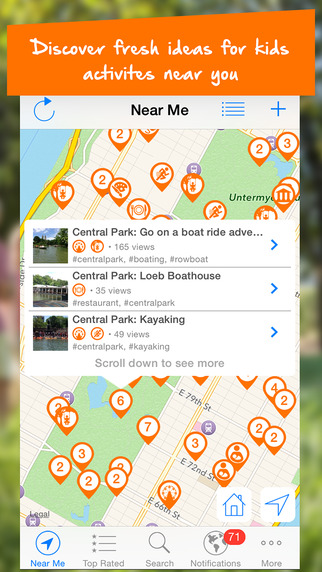
Yuggler has announced that its awardwinning App for defeating family boredom will be free now and forever. Bringing you everything that kids love, Yuggler revolutionizes discovering, planning, and enjoying kids activities. Discover kids activities in seconds, anytime, anywhere, with the largest, award winning mobile resource of things to do for kids. Parents, grandparents, and caregivers recognize Yuggler as the go-to community for new activity ideas for an active, fun family life.
Cupertino, California - Yuggler has announced that its awardwinning App for defeating family boredom in seconds will be free now and forever. There are tons of apps for life before we have kids: We date on Match, have regrettable hookups on Tinder and find the best brunch places to cure our hangovers on Yelp. Then we have kids. And then what? If you aren't looking to offload your kids with Sittercity, what do you do? What if you just want to find something awesome to do with your whole family? That's where Yuggler comes in!
Many parents, including Yuggler's CoFounder, Thomas Bodenski, know how hard it is to find new ideas for family activities. As he remembers, "Nineteen months ago, I asked my brother Stefan for help. It was so difficult and timeconsuming for me to find fresh ideas for kids activities that I can do with my son. Within the blink of an eye, my whole family and a team of developers around the world were involved in building Yuggler, the community for family fun."
Today, Yuggler is revolutionizing the way parents discover, share and organize ideas for family fun. Zoos, classes, parades, shows, museums, music lessons, and so much more Yuggler has it all! Parents can find kids activities in seconds anytime, anywhere and save money (up to 70%!). Additionally, customizable notifications ensure that parents (and their children) never miss the action in their local area.
"Yuggler offers so many more features. But the only additional thing we want you to take away is: Yuggler is a community! We connect people and enable full collaboration focused on family fun 50,000 parents enjoy Yuggler already in the New York metropolitan area," concludes co-founder Stefan Bodenski.
Together with friends, family, and the power of a global community, parents around the world are able to share and discover the best, coolest, and most fun activities near them. Yuggler enables simple, fast, and mobile access to this vast knowledge base. Yuggler is today's must-have App for families! Made by parents, for parents and now always free it is the most convenient way to get active and have fun with the whole family. With this App, the words "I'm bored" will be forever banished from kids' vocabulary!
"Stefan and I are on a mission to maximize family fun! We made it our mission to simplify the busy and hectic lives of parents, and enable them to spend quality time with their kids," explains Thomas Bodenski.
Therefore, effective today, all functionality related to discovering kids activities will always be free in Yuggler! Parents that need to save even more time can optimize the way they plan and organize family fun with additional in-App purchases, such as organizing todos, best of lists or even entire itineraries with bookmarks.
Device Requirements:
* iPhone, iPad, and iPod touch
* Optimized for iPhone 5, iPhone 6/6 Plus
* Requires iOS 7.0 or later
* 17.7 MB
Pricing and Availability:
Yuggler 1.5.3 is Free and available worldwide exclusively through the App Store in the Lifestyle category.
Yuggler 1.5.3: http://www.yuggler.com/
More Info: http://apps.appshout.com/yuggler/
Download from iTunes : https://itunes.apple.com/app/yuggler-fun-activities-for/id741597223
Screenshot : http://a5.mzstatic.com/us/r30/Purple1/v4/7d/e7/1f/7de71f8e-139b-2aaa-2998-5e82e44957b0/screen322x572.jpeg
App Icon : http://apps.appshout.com/yuggler/images/icon.png
Yuggler enables the discovery of fresh ideas for kids activities in seconds anytime, anywhere with the largest, awardwinning mobile resource of things to do for kids. Bringing you everything that kids love, Yuggler revolutionizes discovering, planning, and enjoying kids activities. As featured at the International CES 2015 (Best App for Parents in the Mobile Apps Showdown), parents, grandparents, and caregivers recognize Yuggler as the goto community for an active, fun family life. All Material and Software (C) Copyright 2015 Yuggler LLC. All Rights Reserved. Apple, the Apple logo, iPhone, iPod and iPad are registered trademarks of Apple Inc. in the U.S. and/or other countries. Other trademarks and registered trademarks may be the property of their respective owners.
*******
Link To Article: http://prmac.com/release-id-75190.htm
*******
---------------------------------------------------------------------------------
Note that you can alter delivered distributions at any time.
Login to your account on prMac to alter your channel selection, or to opt-out at any time.
Named the Best App for Parents at CES 2015, Yuggler is Going Free - Published on 06/03/15
Yuggler has announced that its awardwinning App for defeating family boredom will be free now and forever. Bringing you everything that kids love, Yuggler revolutionizes discovering, planning, and enjoying kids activities. Discover kids activities in seconds, anytime, anywhere, with the largest, award winning mobile resource of things to do for kids. Parents, grandparents, and caregivers recognize Yuggler as the go-to community for new activity ideas for an active, fun family life.
Cupertino, California - Yuggler has announced that its awardwinning App for defeating family boredom in seconds will be free now and forever. There are tons of apps for life before we have kids: We date on Match, have regrettable hookups on Tinder and find the best brunch places to cure our hangovers on Yelp. Then we have kids. And then what? If you aren't looking to offload your kids with Sittercity, what do you do? What if you just want to find something awesome to do with your whole family? That's where Yuggler comes in!
Many parents, including Yuggler's CoFounder, Thomas Bodenski, know how hard it is to find new ideas for family activities. As he remembers, "Nineteen months ago, I asked my brother Stefan for help. It was so difficult and timeconsuming for me to find fresh ideas for kids activities that I can do with my son. Within the blink of an eye, my whole family and a team of developers around the world were involved in building Yuggler, the community for family fun."
Today, Yuggler is revolutionizing the way parents discover, share and organize ideas for family fun. Zoos, classes, parades, shows, museums, music lessons, and so much more Yuggler has it all! Parents can find kids activities in seconds anytime, anywhere and save money (up to 70%!). Additionally, customizable notifications ensure that parents (and their children) never miss the action in their local area.
"Yuggler offers so many more features. But the only additional thing we want you to take away is: Yuggler is a community! We connect people and enable full collaboration focused on family fun 50,000 parents enjoy Yuggler already in the New York metropolitan area," concludes co-founder Stefan Bodenski.
Together with friends, family, and the power of a global community, parents around the world are able to share and discover the best, coolest, and most fun activities near them. Yuggler enables simple, fast, and mobile access to this vast knowledge base. Yuggler is today's must-have App for families! Made by parents, for parents and now always free it is the most convenient way to get active and have fun with the whole family. With this App, the words "I'm bored" will be forever banished from kids' vocabulary!
"Stefan and I are on a mission to maximize family fun! We made it our mission to simplify the busy and hectic lives of parents, and enable them to spend quality time with their kids," explains Thomas Bodenski.
Therefore, effective today, all functionality related to discovering kids activities will always be free in Yuggler! Parents that need to save even more time can optimize the way they plan and organize family fun with additional in-App purchases, such as organizing todos, best of lists or even entire itineraries with bookmarks.
Device Requirements:
* iPhone, iPad, and iPod touch
* Optimized for iPhone 5, iPhone 6/6 Plus
* Requires iOS 7.0 or later
* 17.7 MB
Pricing and Availability:
Yuggler 1.5.3 is Free and available worldwide exclusively through the App Store in the Lifestyle category.
Yuggler 1.5.3: http://www.yuggler.com/
More Info: http://apps.appshout.com/yuggler/
Download from iTunes : https://itunes.apple.com/app/yuggler-fun-activities-for/id741597223
Screenshot : http://a5.mzstatic.com/us/r30/Purple1/v4/7d/e7/1f/7de71f8e-139b-2aaa-2998-5e82e44957b0/screen322x572.jpeg
App Icon : http://apps.appshout.com/yuggler/images/icon.png

Yuggler enables the discovery of fresh ideas for kids activities in seconds anytime, anywhere with the largest, awardwinning mobile resource of things to do for kids. Bringing you everything that kids love, Yuggler revolutionizes discovering, planning, and enjoying kids activities. As featured at the International CES 2015 (Best App for Parents in the Mobile Apps Showdown), parents, grandparents, and caregivers recognize Yuggler as the goto community for an active, fun family life. All Material and Software (C) Copyright 2015 Yuggler LLC. All Rights Reserved. Apple, the Apple logo, iPhone, iPod and iPad are registered trademarks of Apple Inc. in the U.S. and/or other countries. Other trademarks and registered trademarks may be the property of their respective owners.
*******
Link To Article: http://prmac.com/release-id-75190.htm
*******
---------------------------------------------------------------------------------
Note that you can alter delivered distributions at any time.
Login to your account on prMac to alter your channel selection, or to opt-out at any time.
New HR Flowcharts Solution Now Available for ConceptDraw PRO v10
A new article has been published at prMac.
New HR Flowcharts Solution Now Available for ConceptDraw PRO v10 - Published on 06/02/15
CS Odessa today announces a new HR Flowcharts Solution in ConceptDraw Solution Park. The HR Flowcharts Solution turns ConceptDraw PRO into an effective diagramming tool that can be used to represent a wide variety of HR processes and workflows, such as recruitment, hiring, payroll, and employee development. Based on ConceptDraw PRO's powerful vector drawing features, the HR Flowcharts Solution is comprised of 7 libraries which contain 387 vector objects.
San Jose, California - CS Odessa has announced today the availability of a new HR Flowcharts Solution in ConceptDraw Solution Park. The solution, based on ConceptDraw PRO's powerful vector drawing features allows you to build diagrams in an instant; the solution cost is only for $25 dollars for current owners of ConceptDraw PRO v10. The HR Flowcharts Solution is comprised of 7 libraries which contain 387 vector objects.
The HR Flowcharts Solution turns ConceptDraw PRO into an effective diagramming tool that can be used to represent a wide variety of HR processes and workflows, such as recruitment, hiring, payroll, and employee development. The solution also includes many drawn samples that represent HR activities in all organizations. All of the graphics are attention-grabbing and have the visual power to convey a workflow meaning in seconds.
The HR Flowcharts Solution is available for professionals and consultants who design and implement systems that involve HR interaction. ConceptDraw PRO is compatible with Apple OS X and Microsoft Windows. ConceptDraw PRO retails for $199 USD. ConceptDraw PRO v10 is now included in ConceptDraw Office v3 which retails for $499 USD
ConceptDraw Office v3 is an integrated set of visualization products and document exchange technologies. ConceptDraw Office consists of a diagramming platform, a mind mapping tool, and a project management tool. These tools are essential to generate business diagrams, mind maps, project plans, dashboards, presenta tions, schematics, and any other business visualizations.
ConceptDraw Solution Park is an online collection of visual solutions for knowledge workers designed to provide productivity increasing solutions for all ConceptDraw products. ConceptDraw Solution Park contains many subject areas for professional applications. It delivers solutions for Project Management, Business Productivity, Universal Diagramming and Collaboration. Find out more about ConceptDraw Products and Solutions at CS Odessa online.
ConceptDraw PRO v10: http://www.conceptdraw.com/products/drawing-tool
ConceptDraw Solution Park: http://www.conceptdraw.com/solution-park/
ConceptDraw HR Flowcharts Solution: http://www.conceptdraw.com/solution-park/management-hr-flowcharts
Purchase: https://my.conceptdraw.com/buy/pricing_purchasing.php
Download Free Trial: https://my.conceptdraw.com/registration/
Screenshot: http://www.conceptdraw.com/samples_2015/resource/images/solutions//MANAGEMENT-HR-Flowchart-Competency-Based-Management.png
Founded in 1993, Computer Systems Odessa supplies cross-platform productivity tools and graphic technologies to professional and corporate users around the world. From their headquarters in Odessa, Ukraine, and offices in San Jose, CA, and Boston, MA, CS Odessa sells internationally in over 150 countries, both directly and through resellers. The ConceptDraw Productivity Line has won numerous awards and is used by hundreds of thousands, including Fortune 500 companies, U.S. Federal Government agencies, small and medium businesses, and students and educators around the globe. Computer Systems Odessa. ConceptDraw is a registered trademark, and ConceptDraw Office, ConceptDraw Solution Park, ConceptDraw PRO, ConceptDraw MINDMAP, ConceptDraw PROJECT, and ConceptDraw Solution Browser are trademarks of CS Odessa. All other trademarks and registered trademarks are the properties of their respective owners.
*******
Link To Article: http://prmac.com/release-id-75247.htm
*******
---------------------------------------------------------------------------------
Note that you can alter delivered distributions at any time.
Login to your account on prMac to alter your channel selection, or to opt-out at any time.
New HR Flowcharts Solution Now Available for ConceptDraw PRO v10 - Published on 06/02/15
CS Odessa today announces a new HR Flowcharts Solution in ConceptDraw Solution Park. The HR Flowcharts Solution turns ConceptDraw PRO into an effective diagramming tool that can be used to represent a wide variety of HR processes and workflows, such as recruitment, hiring, payroll, and employee development. Based on ConceptDraw PRO's powerful vector drawing features, the HR Flowcharts Solution is comprised of 7 libraries which contain 387 vector objects.
San Jose, California - CS Odessa has announced today the availability of a new HR Flowcharts Solution in ConceptDraw Solution Park. The solution, based on ConceptDraw PRO's powerful vector drawing features allows you to build diagrams in an instant; the solution cost is only for $25 dollars for current owners of ConceptDraw PRO v10. The HR Flowcharts Solution is comprised of 7 libraries which contain 387 vector objects.
The HR Flowcharts Solution turns ConceptDraw PRO into an effective diagramming tool that can be used to represent a wide variety of HR processes and workflows, such as recruitment, hiring, payroll, and employee development. The solution also includes many drawn samples that represent HR activities in all organizations. All of the graphics are attention-grabbing and have the visual power to convey a workflow meaning in seconds.
The HR Flowcharts Solution is available for professionals and consultants who design and implement systems that involve HR interaction. ConceptDraw PRO is compatible with Apple OS X and Microsoft Windows. ConceptDraw PRO retails for $199 USD. ConceptDraw PRO v10 is now included in ConceptDraw Office v3 which retails for $499 USD
ConceptDraw Office v3 is an integrated set of visualization products and document exchange technologies. ConceptDraw Office consists of a diagramming platform, a mind mapping tool, and a project management tool. These tools are essential to generate business diagrams, mind maps, project plans, dashboards, presenta tions, schematics, and any other business visualizations.
ConceptDraw Solution Park is an online collection of visual solutions for knowledge workers designed to provide productivity increasing solutions for all ConceptDraw products. ConceptDraw Solution Park contains many subject areas for professional applications. It delivers solutions for Project Management, Business Productivity, Universal Diagramming and Collaboration. Find out more about ConceptDraw Products and Solutions at CS Odessa online.
ConceptDraw PRO v10: http://www.conceptdraw.com/products/drawing-tool
ConceptDraw Solution Park: http://www.conceptdraw.com/solution-park/
ConceptDraw HR Flowcharts Solution: http://www.conceptdraw.com/solution-park/management-hr-flowcharts
Purchase: https://my.conceptdraw.com/buy/pricing_purchasing.php
Download Free Trial: https://my.conceptdraw.com/registration/
Screenshot: http://www.conceptdraw.com/samples_2015/resource/images/solutions//MANAGEMENT-HR-Flowchart-Competency-Based-Management.png

Founded in 1993, Computer Systems Odessa supplies cross-platform productivity tools and graphic technologies to professional and corporate users around the world. From their headquarters in Odessa, Ukraine, and offices in San Jose, CA, and Boston, MA, CS Odessa sells internationally in over 150 countries, both directly and through resellers. The ConceptDraw Productivity Line has won numerous awards and is used by hundreds of thousands, including Fortune 500 companies, U.S. Federal Government agencies, small and medium businesses, and students and educators around the globe. Computer Systems Odessa. ConceptDraw is a registered trademark, and ConceptDraw Office, ConceptDraw Solution Park, ConceptDraw PRO, ConceptDraw MINDMAP, ConceptDraw PROJECT, and ConceptDraw Solution Browser are trademarks of CS Odessa. All other trademarks and registered trademarks are the properties of their respective owners.
*******
Link To Article: http://prmac.com/release-id-75247.htm
*******
---------------------------------------------------------------------------------
Note that you can alter delivered distributions at any time.
Login to your account on prMac to alter your channel selection, or to opt-out at any time.
LinkOptimizer 4.9.44 for Adobe InDesign Improves Color Profiles Handling
A new article has been published at prMac.
LinkOptimizer 4.9.44 for Adobe InDesign Improves Color Profiles Handling - Published on 06/02/15
Zevrix Solutions announces LinkOptimizer 4.9.44, a maintenance update to its workflow automation solution for Adobe InDesign. LinkOptimizer allows users to reduce the size of InDesign links and speed up processing by automatically eliminating excess image data, performing essential image adjustments and converting file formats. The new version recognizes profiles in user's ColorSync folder, improves alpha channels handling during format conversion and introduces other bug fixes and improvements.
Toronto, Canada - Zevrix Solutions today announces the release of LinkOptimizer 4.9.44, a maintenance update to its workflow automation solution for Adobe InDesign. Awarded 4 out of 5 stars by Computer Arts magazine, LinkOptimizer automates complex image manipulation tasks allowing to significantly reduce the size of InDesign links, save processing time and reduce production costs.
The new version offers the following fixes and improvements:
* LinkOptimizer now recognizes color profiles in user's ColorSync folders, in addition to other color profile locations supported in previous versions
* Fixed an issue in which processing could be interrupted when converting images with alpha channels into formats that don't support alpha channels
* Removed the "Page #" token that erroneously appeared in the folder's name field when saving images for external use
* Fixed an issue in which LinkOptimizer could ask users to locate a helper app on launch under some rare conditions
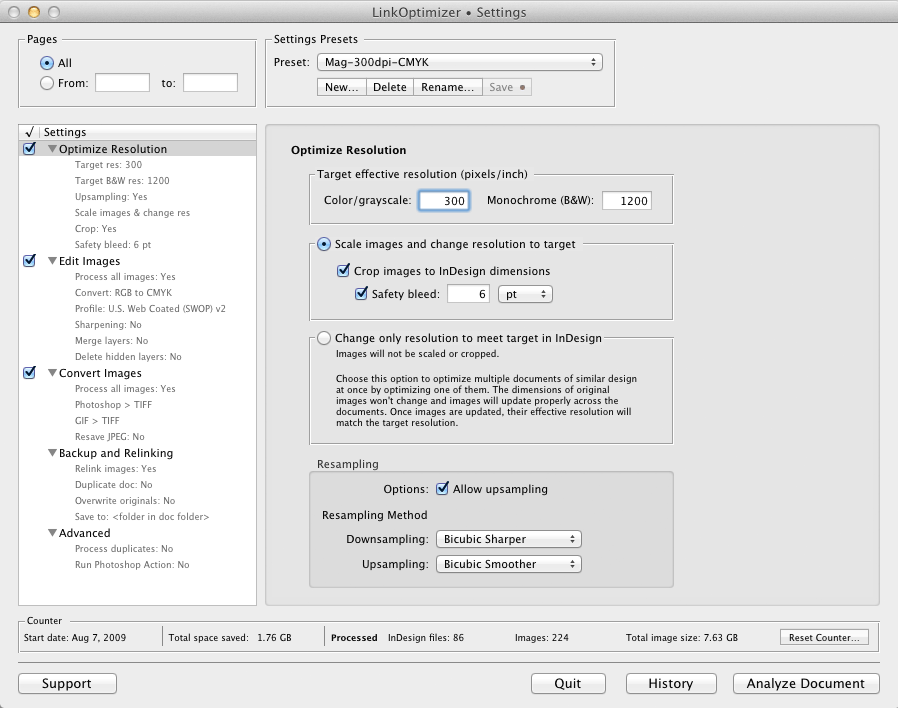
LinkOptimizer works automatically with Photoshop to eliminate the excess image data of InDesign links, perform essential image adjustments and convert image formats. For example, with just a click of a button users can: Scale and crop images to match their dimensions in InDesign, change resolution to 300 dpi, convert RGB images to specific CMYK profile, resave JPEG images as PSD, or run a Photoshop Action on each image.
At the end of processing, LinkOptimizer will re-import images to InDesign at 100% in their precise position. As a result, users can save gigabytes of disk space, accelerate document output, reduce job turnaround and cut costs through faster processing.
System Requirements:
* Mac OS X 10.6 or above
* Adobe InDesign and Photoshop CS3-CC 2014
Pricing and Availability:
LinkOptimizer 4.9.44 is available for purchase from the Zevrix website for $259.95 USD (Light version: $179.95) as well as from authorized resellers and Adobe Exchange. A trial version is also available for download. The update is free for LinkOptimizer 4.x users and is a $130 to upgrade from previous versions.
Zevrix Solutions: http://zevrix.com
LinkOptimizer 4.9.44: http://zevrix.com/LinkOptimizer.php
Download: http://zevrix.com/LinkOptimizer.dmg
Purchase: http://zevrix.com/store.php
Screenshot: http://zevrix.com/screenshots/lo4/optres-win.gif
Located in Toronto, Canada, Zevrix Solutions provides automation and productivity solutions for Adobe Creative Cloud and Creative Suite software, PDF workflows, graphic file diagnostics and Microsoft Office output on Mac OS X. Zevrix is dedicated to help professionals increase their profits through automating everyday tasks, producing error-free documents, saving disk space and cutting production costs. For more information, visit their website. Copyright (C) 2014 Zevrix Solutions. All Rights Reserved. Apple, the Apple logo, Macintosh and Mac OS X are registered trademarks of Apple Inc. in the U.S. and/or other countries. Other trademarks and registered trademarks may be the property of their respective owners.
*******
Link To Article: http://prmac.com/release-id-75246.htm
*******
---------------------------------------------------------------------------------
Note that you can alter delivered distributions at any time.
Login to your account on prMac to alter your channel selection, or to opt-out at any time.
LinkOptimizer 4.9.44 for Adobe InDesign Improves Color Profiles Handling - Published on 06/02/15
Zevrix Solutions announces LinkOptimizer 4.9.44, a maintenance update to its workflow automation solution for Adobe InDesign. LinkOptimizer allows users to reduce the size of InDesign links and speed up processing by automatically eliminating excess image data, performing essential image adjustments and converting file formats. The new version recognizes profiles in user's ColorSync folder, improves alpha channels handling during format conversion and introduces other bug fixes and improvements.
Toronto, Canada - Zevrix Solutions today announces the release of LinkOptimizer 4.9.44, a maintenance update to its workflow automation solution for Adobe InDesign. Awarded 4 out of 5 stars by Computer Arts magazine, LinkOptimizer automates complex image manipulation tasks allowing to significantly reduce the size of InDesign links, save processing time and reduce production costs.
The new version offers the following fixes and improvements:
* LinkOptimizer now recognizes color profiles in user's ColorSync folders, in addition to other color profile locations supported in previous versions
* Fixed an issue in which processing could be interrupted when converting images with alpha channels into formats that don't support alpha channels
* Removed the "Page #" token that erroneously appeared in the folder's name field when saving images for external use
* Fixed an issue in which LinkOptimizer could ask users to locate a helper app on launch under some rare conditions
LinkOptimizer works automatically with Photoshop to eliminate the excess image data of InDesign links, perform essential image adjustments and convert image formats. For example, with just a click of a button users can: Scale and crop images to match their dimensions in InDesign, change resolution to 300 dpi, convert RGB images to specific CMYK profile, resave JPEG images as PSD, or run a Photoshop Action on each image.
At the end of processing, LinkOptimizer will re-import images to InDesign at 100% in their precise position. As a result, users can save gigabytes of disk space, accelerate document output, reduce job turnaround and cut costs through faster processing.
System Requirements:
* Mac OS X 10.6 or above
* Adobe InDesign and Photoshop CS3-CC 2014
Pricing and Availability:
LinkOptimizer 4.9.44 is available for purchase from the Zevrix website for $259.95 USD (Light version: $179.95) as well as from authorized resellers and Adobe Exchange. A trial version is also available for download. The update is free for LinkOptimizer 4.x users and is a $130 to upgrade from previous versions.
Zevrix Solutions: http://zevrix.com
LinkOptimizer 4.9.44: http://zevrix.com/LinkOptimizer.php
Download: http://zevrix.com/LinkOptimizer.dmg
Purchase: http://zevrix.com/store.php
Screenshot: http://zevrix.com/screenshots/lo4/optres-win.gif
Located in Toronto, Canada, Zevrix Solutions provides automation and productivity solutions for Adobe Creative Cloud and Creative Suite software, PDF workflows, graphic file diagnostics and Microsoft Office output on Mac OS X. Zevrix is dedicated to help professionals increase their profits through automating everyday tasks, producing error-free documents, saving disk space and cutting production costs. For more information, visit their website. Copyright (C) 2014 Zevrix Solutions. All Rights Reserved. Apple, the Apple logo, Macintosh and Mac OS X are registered trademarks of Apple Inc. in the U.S. and/or other countries. Other trademarks and registered trademarks may be the property of their respective owners.
*******
Link To Article: http://prmac.com/release-id-75246.htm
*******
---------------------------------------------------------------------------------
Note that you can alter delivered distributions at any time.
Login to your account on prMac to alter your channel selection, or to opt-out at any time.
RetweePic Helps Users Get More Retweets On Twitter
A new article has been published at prMac.
RetweePic Helps Users Get More Retweets On Twitter - Published on 06/02/15
Phenom Studios announces the release of RetweePic 1.0 for iOS devices. Do you like Twitter? Then boost your Tweets' popularity with thousands of new retweets. A Picture is worth a thousand words, and RetweePic will help you get more retweets! With a simple swipe to the right, you retweet what interests you, swipe left and you skip the tweet to go on to the next. You can also earn coins to promote your own picture tweets. Tweet more pictures! Get more retweets on Twitter.
Mebourne, Australia - Phenom Studios is proud to announce the release and immediate availability of RetweePic 1.0 for iOS. Do you like Twitter? then boost your Tweets' popularity with thousands of new retweets. A Picture is worth a thousand words, and RetweePic will help you get retweets! There are a number of Twitter booster apps out there, but none are as appealing and easy to use as RetweePic - Become more popular. Tweet more pictures! Get more retweets on Twitter.
Tweets using pictures are 94% More Likely to be Retweeted. RetweePic helps you get those retweets. RetweePic is easy to use. With a simple swipe to the right, you retweet what interests you, swipe left and you skip the tweet to go on to the next. You can also earn coins to promote your own picture tweets.
Simple and easy to use:
1. Swipe right to perform a Retweet
2. Earn coins to promote your own tweets that contain pictures
3. Swipe left to skip tweets you are not interested in
Features:
* Retina Graphics (iPhone)
* Neat and simple mechanics
* Video Gifting
Device Requirements:
* iPhone, iPad, and iPod touch
* Requires iOS 7.0 or later
* 4.5 MB
Pricing and Availability:
RetweePic 1.0 is Free and available worldwide exclusively through the App Store in the Social Networking category.
Phenom Studios: http://www.phenomstudios.com
RetweePic 1.0: https://itunes.apple.com/app/retweepic-get-more-retweets/id959218945
Download: https://itunes.apple.com/app/retweepic-get-more-retweets/id959218945
Screenshot: http://a1.mzstatic.com/us/r30/Purple1/v4/61/e8/6f/61e86fc9-b5db-f7c9-8c19-da843e06792d/screen568x568.jpeg
App Icon: http://a4.mzstatic.com/us/r30/Purple7/v4/6e/f0/6e/6ef06e3b-aab3-c87f-71d6-f07cbd280872/icon512x512.jpeg
Phenom Studios is a solo company run by Edinson Mejia dedicated to the world of apps and games. Phenom Studios goal is to create the most diverse and interactive content allowing unique experiences. All Material and Software (C) Copyright 2015 Phenom Studios. All Rights Reserved. Apple, the Apple logo, iPhone, iPod and iPad are registered trademarks of Apple Inc. in the U.S. and/or other countries. Other trademarks and registered trademarks may be the property of their respective owners.
*******
Link To Article: http://prmac.com/release-id-75244.htm
*******
---------------------------------------------------------------------------------
Note that you can alter delivered distributions at any time.
Login to your account on prMac to alter your channel selection, or to opt-out at any time.
RetweePic Helps Users Get More Retweets On Twitter - Published on 06/02/15
Phenom Studios announces the release of RetweePic 1.0 for iOS devices. Do you like Twitter? Then boost your Tweets' popularity with thousands of new retweets. A Picture is worth a thousand words, and RetweePic will help you get more retweets! With a simple swipe to the right, you retweet what interests you, swipe left and you skip the tweet to go on to the next. You can also earn coins to promote your own picture tweets. Tweet more pictures! Get more retweets on Twitter.
Mebourne, Australia - Phenom Studios is proud to announce the release and immediate availability of RetweePic 1.0 for iOS. Do you like Twitter? then boost your Tweets' popularity with thousands of new retweets. A Picture is worth a thousand words, and RetweePic will help you get retweets! There are a number of Twitter booster apps out there, but none are as appealing and easy to use as RetweePic - Become more popular. Tweet more pictures! Get more retweets on Twitter.
Tweets using pictures are 94% More Likely to be Retweeted. RetweePic helps you get those retweets. RetweePic is easy to use. With a simple swipe to the right, you retweet what interests you, swipe left and you skip the tweet to go on to the next. You can also earn coins to promote your own picture tweets.
Simple and easy to use:
1. Swipe right to perform a Retweet
2. Earn coins to promote your own tweets that contain pictures
3. Swipe left to skip tweets you are not interested in
Features:
* Retina Graphics (iPhone)
* Neat and simple mechanics
* Video Gifting
Device Requirements:
* iPhone, iPad, and iPod touch
* Requires iOS 7.0 or later
* 4.5 MB
Pricing and Availability:
RetweePic 1.0 is Free and available worldwide exclusively through the App Store in the Social Networking category.
Phenom Studios: http://www.phenomstudios.com
RetweePic 1.0: https://itunes.apple.com/app/retweepic-get-more-retweets/id959218945
Download: https://itunes.apple.com/app/retweepic-get-more-retweets/id959218945
Screenshot: http://a1.mzstatic.com/us/r30/Purple1/v4/61/e8/6f/61e86fc9-b5db-f7c9-8c19-da843e06792d/screen568x568.jpeg

App Icon: http://a4.mzstatic.com/us/r30/Purple7/v4/6e/f0/6e/6ef06e3b-aab3-c87f-71d6-f07cbd280872/icon512x512.jpeg

Phenom Studios is a solo company run by Edinson Mejia dedicated to the world of apps and games. Phenom Studios goal is to create the most diverse and interactive content allowing unique experiences. All Material and Software (C) Copyright 2015 Phenom Studios. All Rights Reserved. Apple, the Apple logo, iPhone, iPod and iPad are registered trademarks of Apple Inc. in the U.S. and/or other countries. Other trademarks and registered trademarks may be the property of their respective owners.
*******
Link To Article: http://prmac.com/release-id-75244.htm
*******
---------------------------------------------------------------------------------
Note that you can alter delivered distributions at any time.
Login to your account on prMac to alter your channel selection, or to opt-out at any time.
PlugSpy 2 - Monitor Your Mac to Protect From Unauthorized Access
A new article has been published at prMac.
PlugSpy 2 - Monitor Your Mac to Protect From Unauthorized Access - Published on 06/02/15
Celmaro today announces PlugSpy 2, a major update to their first grade observation tool for Mac. PlugSpy protects the Mac from unauthorized access or in case of unexpected occurrences. PlugSpy lives in the OS X system menu, ready to monitor your Mac. Made for OS X Yosemite, version 2 of PlugSpy introduces a beautiful crafted activation panel and the ability to define rule based action-sets to trigger Boxcar and Pushover notifications, iSight snapshots and Twitter messages.
Pereybere, Mauritius - Celmaro today is proud to announce PlugSpy 2, a major update to their first grade observation tool for Mac. First released in 2011, Plug Spy offers an additional way to protect Mac computers from unauthorized access, or in case of unexpected occurrences. Plug Spy 2 is an all-new application which perfectly integrates with OS X Yosemite. The new version introduces a beautifully crafted activation panel and the ability to define rule based action-sets to trigger Boxcar and Pushover notifications, iSight snapshots and Twitter messages.
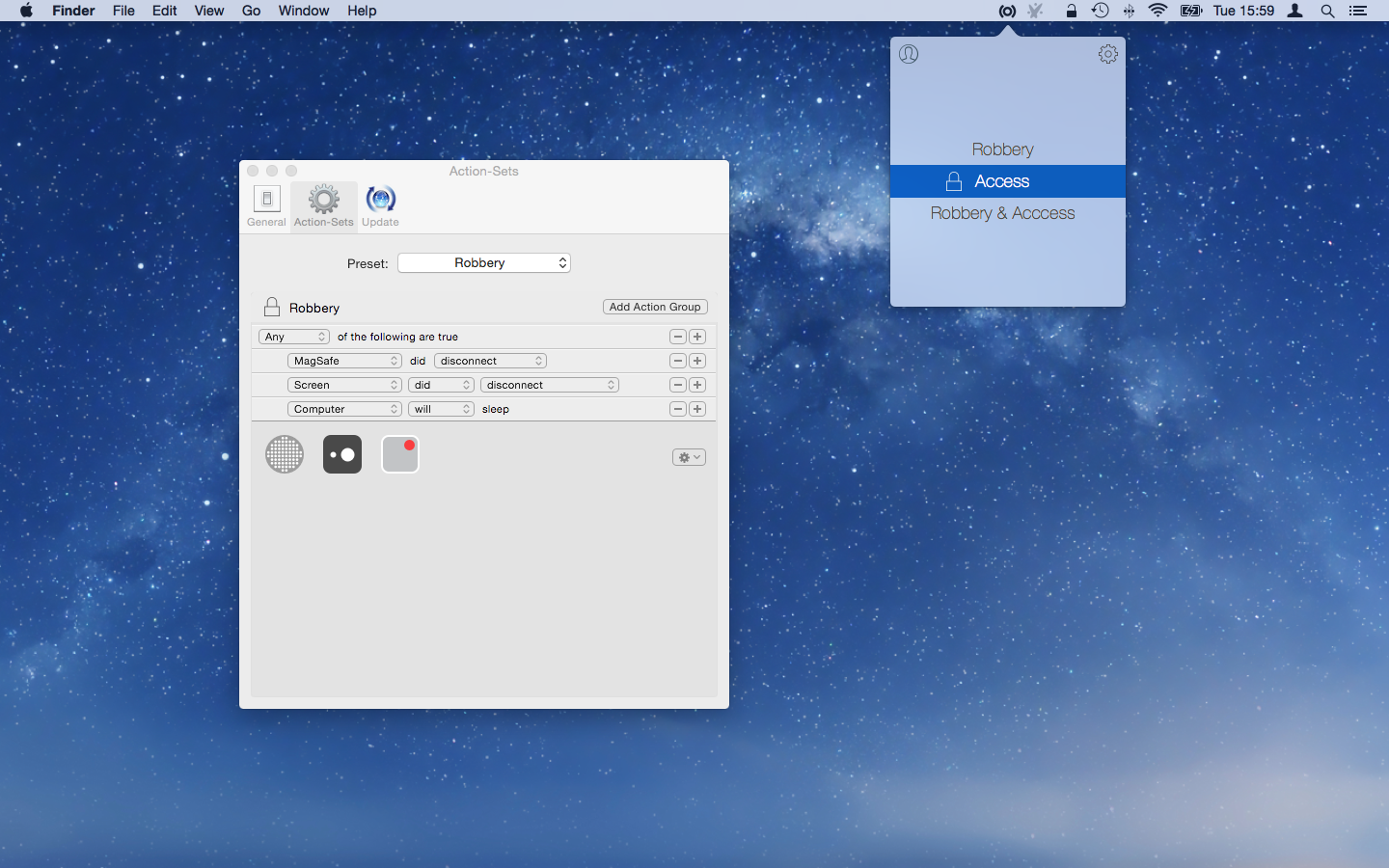
PlugSpy lives in the OS X system menu, ready to observe your Mac. Select one of the Action-Sets and you are done. PlugSpy will activate it's sensors on screen lock and trigger actions based on predefined rules. Action-Sets are based on sensors, user-defined rules and resulting activities. No matter if you want to know who is waking your Mac or entering a wrong password in your absence, PlugSpy can trigger actions dependent on your requirements.
Feature Highlights in PlugSpy 2:
* Easy setup
* Seamless system integration
* Automatic Activation
* Rule based action sets
* Sensors for MagSafe, external displays, power state, login panel
* Actions for iSight snapshots, Sound, Notification Center, Boxcar, Pushover, Twitter
System Requirements:
* OS X 10.10 or later.
* 64-bit processor
* Mac with integrated iSight
Pricing and Availability:
PlugSpy 2 is $1.99 USD (or equivalent amount in other currencies) and is available worldwide through the Mac App Store in the Lifestyle category. The sale price of $1.99 is for a limited time only. The full price will be $4.99. Existing PlugSpy users can upgrade to PlugSpy 2 free of charge. A free trial is available for download from the Celmaro website.
Celmaro: http://www.celmaro.com
PlugSpy 2.0: http://www.celmaro.com/plugspy
Direct Download: http://www.celmaro.com/files/plugspy2/PlugSpy.zip
Purchase and Download (MAS): https://itunes.apple.com/app/plugspy-2/id994836482
Screenshot: http://www.celmaro.com/distributed/plugspy2/plugSpySnapshot.png
App Icon: http://www.celmaro.com/distributed/plugspy2/plugSpyIcon512.png
Celmaro Ltd is based in Mauritius, a tiny island in the Indian Ocean. Founded in 2006 by Anique Teichmann, Celmaro is focused on creating software for Mac OS X and iOS. The intention is to create intuitive and powerful applications to simplify the day, increase the productivity and make life more enjoyable for our user. Copyright (C) 2006-2015 Celmaro. All Rights Reserved. Apple, the Apple logo and Macintosh are registered trademarks of Apple Computer Inc. in the U.S. and/or other countries.
*******
Link To Article: http://prmac.com/release-id-75245.htm
*******
---------------------------------------------------------------------------------
Note that you can alter delivered distributions at any time.
Login to your account on prMac to alter your channel selection, or to opt-out at any time.
PlugSpy 2 - Monitor Your Mac to Protect From Unauthorized Access - Published on 06/02/15
Celmaro today announces PlugSpy 2, a major update to their first grade observation tool for Mac. PlugSpy protects the Mac from unauthorized access or in case of unexpected occurrences. PlugSpy lives in the OS X system menu, ready to monitor your Mac. Made for OS X Yosemite, version 2 of PlugSpy introduces a beautiful crafted activation panel and the ability to define rule based action-sets to trigger Boxcar and Pushover notifications, iSight snapshots and Twitter messages.
Pereybere, Mauritius - Celmaro today is proud to announce PlugSpy 2, a major update to their first grade observation tool for Mac. First released in 2011, Plug Spy offers an additional way to protect Mac computers from unauthorized access, or in case of unexpected occurrences. Plug Spy 2 is an all-new application which perfectly integrates with OS X Yosemite. The new version introduces a beautifully crafted activation panel and the ability to define rule based action-sets to trigger Boxcar and Pushover notifications, iSight snapshots and Twitter messages.
PlugSpy lives in the OS X system menu, ready to observe your Mac. Select one of the Action-Sets and you are done. PlugSpy will activate it's sensors on screen lock and trigger actions based on predefined rules. Action-Sets are based on sensors, user-defined rules and resulting activities. No matter if you want to know who is waking your Mac or entering a wrong password in your absence, PlugSpy can trigger actions dependent on your requirements.
Feature Highlights in PlugSpy 2:
* Easy setup
* Seamless system integration
* Automatic Activation
* Rule based action sets
* Sensors for MagSafe, external displays, power state, login panel
* Actions for iSight snapshots, Sound, Notification Center, Boxcar, Pushover, Twitter
System Requirements:
* OS X 10.10 or later.
* 64-bit processor
* Mac with integrated iSight
Pricing and Availability:
PlugSpy 2 is $1.99 USD (or equivalent amount in other currencies) and is available worldwide through the Mac App Store in the Lifestyle category. The sale price of $1.99 is for a limited time only. The full price will be $4.99. Existing PlugSpy users can upgrade to PlugSpy 2 free of charge. A free trial is available for download from the Celmaro website.
Celmaro: http://www.celmaro.com
PlugSpy 2.0: http://www.celmaro.com/plugspy
Direct Download: http://www.celmaro.com/files/plugspy2/PlugSpy.zip
Purchase and Download (MAS): https://itunes.apple.com/app/plugspy-2/id994836482
Screenshot: http://www.celmaro.com/distributed/plugspy2/plugSpySnapshot.png
App Icon: http://www.celmaro.com/distributed/plugspy2/plugSpyIcon512.png

Celmaro Ltd is based in Mauritius, a tiny island in the Indian Ocean. Founded in 2006 by Anique Teichmann, Celmaro is focused on creating software for Mac OS X and iOS. The intention is to create intuitive and powerful applications to simplify the day, increase the productivity and make life more enjoyable for our user. Copyright (C) 2006-2015 Celmaro. All Rights Reserved. Apple, the Apple logo and Macintosh are registered trademarks of Apple Computer Inc. in the U.S. and/or other countries.
*******
Link To Article: http://prmac.com/release-id-75245.htm
*******
---------------------------------------------------------------------------------
Note that you can alter delivered distributions at any time.
Login to your account on prMac to alter your channel selection, or to opt-out at any time.
appFigures Launches Native iOS App
A new article has been published at prMac.
appFigures Launches Native iOS App - Published on 06/02/15
appFigures, Inc. today introduces appFigures 1.0.1, its fully native iPhone app. The ideal complementary tool for app makers, appFigures for iPhone helps users keep a finger on the pulse of their app business with an intuitive dashboard and flexible reports such as total revenue, downloads, ads and App Store reviews. Powerful and flexible reports display important info at a glance with the ability to filter and drill down by app/in-app, country, store and network.
New York, New York - appFigures, Inc., an app store intelligence platform helping developers successfully grow their business through powerful app analytics, today is proud to announce the release and immediate availability of appFigures 1.0.1, its fully native iPhone app. The perfect companion to any appFigures plan, the app can be downloaded for free on the App Store or via appFigures online. The ideal complementary tool for app makers, appFigures for iPhone helps users keep a finger on the pulse of their app business with an intuitive dashboard and flexible reports such as total revenue (from app sales, in-app purchases and ads), downloads, ads and App Store reviews.
The app features:
* A simple interface, designed from the ground up for the iPhone
* Powerful and flexible reports display important info at a glance with the ability to filter and drill down by app/in-app, country, store & network
* Beautiful charts, custom built for clarity and style
* Automatic review translation
* Delightful conveniences such as offline mode, login with iCloud Keychain, easy sharing and more
* Compatibility with all iPhone models
"We set out to create an intuitive mobile analytics experience that brings important information to the forefront without sacrificing flexibility," said Ariel Michaeli, CEO and co-founder of appFigures. "To do that, we built most interface components from the ground up, which allowed us to create a unique experience that we think will delight our users."
About appFigures:
appFigures delivers actionable insights through comprehensive reports of an app's performance in order to make better data-driven decisions. Featuring an intuitive user interface and easy-to-use tools that offer developers the flexibility to customize how their data is delivered, appFigures brings the most important app store metrics under one roof and gives developers a complete snapshot of their apps' performance. Beautiful and powerful reports, an open API and complete security and control over private app data make appFigures the ultimate solution for app developers.
Device Requirements:
* iPhone, iPad, and iPod touch
* Optimized for iPhone 5, iPhone 6/6 Plus
* Requires iOS 7.0 or later
* 13.0 MB
Pricing and Availability:
appFigures for iPhone 1.0.1 is a free app and available worldwide exclusively through the App Store in the Business category. For more information, visit appFigures online.
appFigures: https://appfigures.com/
appFigures for iPhone 1.0.1: https://appfigures.com/app
Direct Download Link: https://itunes.apple.com/app/id962408539
Screenshot: http://a4.mzstatic.com/us/r30/Purple7/v4/82/3c/28/823c28be-153c-4b0a-5bf8-53423e093921/screen322x572.jpeg
App Icon: http://a5.mzstatic.com/us/r30/Purple2/v4/ee/f1/ea/eef1ea63-2d3a-848e-600a-59dee1100728/icon175x175.jpeg
appFigures, Inc. is the largest multi-store app analytics platform in the universe, giving mobile developers the tools necessary to keep tabs on all their mobile products across a variety of platforms. The easy-to-use appFigures website simplifies complicated data, clarifying it with gorgeous graphs and making it super accessible with an API. For developers who are serious about tracking their products, appFigures is indispensable. Copyright (C) 2015 appFigures, Inc. All Rights Reserved. Apple, Mac, the Apple logo, iPhone, iPod and iPad are registered trademarks of Apple Inc. in the U.S. and/or other countries. All other trademarks and trade names are the property of their respective owners.
*******
Link To Article: http://prmac.com/release-id-75228.htm
*******
---------------------------------------------------------------------------------
Note that you can alter delivered distributions at any time.
Login to your account on prMac to alter your channel selection, or to opt-out at any time.
appFigures Launches Native iOS App - Published on 06/02/15
appFigures, Inc. today introduces appFigures 1.0.1, its fully native iPhone app. The ideal complementary tool for app makers, appFigures for iPhone helps users keep a finger on the pulse of their app business with an intuitive dashboard and flexible reports such as total revenue, downloads, ads and App Store reviews. Powerful and flexible reports display important info at a glance with the ability to filter and drill down by app/in-app, country, store and network.
New York, New York - appFigures, Inc., an app store intelligence platform helping developers successfully grow their business through powerful app analytics, today is proud to announce the release and immediate availability of appFigures 1.0.1, its fully native iPhone app. The perfect companion to any appFigures plan, the app can be downloaded for free on the App Store or via appFigures online. The ideal complementary tool for app makers, appFigures for iPhone helps users keep a finger on the pulse of their app business with an intuitive dashboard and flexible reports such as total revenue (from app sales, in-app purchases and ads), downloads, ads and App Store reviews.
The app features:
* A simple interface, designed from the ground up for the iPhone
* Powerful and flexible reports display important info at a glance with the ability to filter and drill down by app/in-app, country, store & network
* Beautiful charts, custom built for clarity and style
* Automatic review translation
* Delightful conveniences such as offline mode, login with iCloud Keychain, easy sharing and more
* Compatibility with all iPhone models
"We set out to create an intuitive mobile analytics experience that brings important information to the forefront without sacrificing flexibility," said Ariel Michaeli, CEO and co-founder of appFigures. "To do that, we built most interface components from the ground up, which allowed us to create a unique experience that we think will delight our users."
About appFigures:
appFigures delivers actionable insights through comprehensive reports of an app's performance in order to make better data-driven decisions. Featuring an intuitive user interface and easy-to-use tools that offer developers the flexibility to customize how their data is delivered, appFigures brings the most important app store metrics under one roof and gives developers a complete snapshot of their apps' performance. Beautiful and powerful reports, an open API and complete security and control over private app data make appFigures the ultimate solution for app developers.
Device Requirements:
* iPhone, iPad, and iPod touch
* Optimized for iPhone 5, iPhone 6/6 Plus
* Requires iOS 7.0 or later
* 13.0 MB
Pricing and Availability:
appFigures for iPhone 1.0.1 is a free app and available worldwide exclusively through the App Store in the Business category. For more information, visit appFigures online.
appFigures: https://appfigures.com/
appFigures for iPhone 1.0.1: https://appfigures.com/app
Direct Download Link: https://itunes.apple.com/app/id962408539
Screenshot: http://a4.mzstatic.com/us/r30/Purple7/v4/82/3c/28/823c28be-153c-4b0a-5bf8-53423e093921/screen322x572.jpeg

App Icon: http://a5.mzstatic.com/us/r30/Purple2/v4/ee/f1/ea/eef1ea63-2d3a-848e-600a-59dee1100728/icon175x175.jpeg

appFigures, Inc. is the largest multi-store app analytics platform in the universe, giving mobile developers the tools necessary to keep tabs on all their mobile products across a variety of platforms. The easy-to-use appFigures website simplifies complicated data, clarifying it with gorgeous graphs and making it super accessible with an API. For developers who are serious about tracking their products, appFigures is indispensable. Copyright (C) 2015 appFigures, Inc. All Rights Reserved. Apple, Mac, the Apple logo, iPhone, iPod and iPad are registered trademarks of Apple Inc. in the U.S. and/or other countries. All other trademarks and trade names are the property of their respective owners.
*******
Link To Article: http://prmac.com/release-id-75228.htm
*******
---------------------------------------------------------------------------------
Note that you can alter delivered distributions at any time.
Login to your account on prMac to alter your channel selection, or to opt-out at any time.
Subscribe to:
Posts (Atom)