A new article has been published at prMac.
IdeaPlaces - Where your Ideas and Places connect - for Evernote, Dropbox - Published on 06/06/15
IdeaPlaces, Inc. has announced IdeaPlaces 2.0.7, a landmark update designed to organize notes and pictures by location with Evernote and Dropbox integration. Travellers can plan trips by highlighting points of interest and setting location-based reminders with Google Places and Foursquare integration. Version 2.0.7 now includes an In-App tutorial, location based reminders, new Notes view, Evernote offline improvements, faster loading maps and improvements, as well as minor bug fixes.
Montreal, Canada - IdeaPlaces, Inc. has announced the release and immediate availability of IdeaPlaces 2.0.7, a landmark update for the first app designed to organize notes and pictures by location with Evernote and Dropbox integration. This is the next evolution in note taking; helping users pin notes on a map for easier search, greater accuracy, and practical storing. Using Foursquare and Google Places data and quick sharing options, IdeaPlaces will improve collaboration and ultimately drive productivity.
"We noticed many travellers and professionals working in the field did not have a simple, efficient and cost-effective tool to track their notes and pictures by location, explained Ciprian Rarau, CEO of Montreal based IdeaPlaces, Inc. "This is why we built IdeaPlaces. To provide a user-friendly yet powerful way to manage your notes with location information."
IdeaPlaces aims to optimize productivity for busy professionals who often work in the field. It is designed for use on sales visits, location scouting, and in completing site-specific tasks quickly and easily by allowing users to:
* Set location based reminders
* View notes geographically
* Create and sync notes and photos
* Fully integrate notes with Evernote
* Search and filter across Evernote & Dropbox
With IdeaPlaces, travellers can plan trips by highlighting points of interest and setting location-based reminders with Google Places and Foursquare integration. Users are able to take photos within the app and create and access notes on the go. Being able to view all this information on a map makes it easy to recall the details of a trip when you get home.
User data, including pictures, notes, maps and more, are seamlessly integrated with users' existing Evernote content. Designed to be accessible to everyone, IdeaPlaces makes it easy for independent workers looking for productivity tools to be more efficient. No back-office integration is required.
About IdeaPlaces:
IdeaPlaces is the only app that integrates your notes and pictures with Evernote and Dropbox using location-based information. It is designed for mobile professionals and travellers alike.
Recent Achievements
* 15,000 users
* 50,000 downloads
* 4.6 star AppStore rating
* Evernote featured (Travel section)
Device Requirements:
* iPhone, iPad, and iPod touch
* Optimized for iPhone 5, iPhone 6/6 Plus
* Requires iOS 8.0 or later
* 21.9 MB
Pricing and Availability:
IdeaPlaces 2.0.7 is Free and available worldwide exclusively through the App Store in the Productivity category. The app offers an optional subscription package IdeaPlaces Plus ($2.99/month or $29/year). Some of the features provided by the Plus package are access to Evernote offline and Linked notebooks and all map modes (Google Maps, offline maps and satellite/hybrid views).
IdeaPlaces 2.0.7: http://ideaplaces.com
More Info: http://blog.ideaplaces.com/
Download from iTunes: https://itunes.apple.com/app/id835446337
Vimeo Video (Demo): http://www.vimeo.com/118992399
Screenshot: http://www.ideaplaces.com/images/WebSitePhone.png
App Icon: http://i.imgur.com/TsYHxYR.png
Headquartered in Montreal, Canada and established in 2014, IdeaPlaces, Inc. aims to improve and enhance the note taking experience for all Evernote users. The IdeaPlaces team is comprised of three individuals with expertise developing and bringing to market novel technologies. IdeaPlaces is a registered trademark of IdeaPlaces, Inc. All Material and Software (C) Copyright 2015 IdeaPlaces, Inc. All Rights Reserved. Apple, the Apple logo, iPhone, iPod and iPad are registered trademarks of Apple Inc. in the U.S. and/or other countries. Other trademarks and registered trademarks may be the property of their respective owners.
*******
Link To Article: http://prmac.com/release-id-75254.htm
*******
---------------------------------------------------------------------------------
Note that you can alter delivered distributions at any time.
Login to your account on prMac to alter your channel selection, or to opt-out at any time.


BoomBar for iPhone, iPod touch and Apple Watch
A new article has been published at prMac.
BoomBar for iPhone, iPod touch and Apple Watch - Published on 06/06/15
Brisbane based Dasvibes Digital has announced BoomBar 1.0.1, a forward thinking iOS application aimed at relieving users of the burden of having to carry around all the barcode cards people use in their daily life. By saving them into different categories, anyone can use their cards by presenting the barcode from their iPhone, iPod touch or Apple Watch. BoomBar can also backup all of the barcodes to iCloud Drive, ensuring a user's personal information is 100% private and secure.
Brisbane, Australia - Dasvibes Digital has announced the release of BoomBar 1.0.1, their new lifestyle app developed for iPhone, iPad and iPod touch. BoomBar is a forward thinking application aimed at recording barcodes from various cards used in people's daily life and saving them into different categories, so that anyone can use their cards by presenting the barcode from their iPhone, iPod touch or Apple Watch.
With the release of Apple Watch and the popularity of the iPhone and iPod touch, who still wants to carry a heavy wallet everywhere? BoomBar adopts advanced technology, providing a user-friendly interface, that's easy to learn and use. With BoomBar, your smart lifestyle is only a few taps away. 3 Easy Steps: Scan, Save and Use with your iPhone or Apple Watch.
With the user's permission, BoomBar can backup all the saved barcodes to the their personal iCloud Drive, which means BoomBar's creators and any third-parties do not have access to any data uploaded by the users, which ensures users' information is 100% private and secure. Stop carrying dozens of loyalty and reward cards around! Get BoomBar.
Key Features Include:
* No Ads
* Backup your barcodes to your own iCloud Drive
* No third-party backup of your barcode data
* No tracking of your usage of products and barcodes
Languages:
* English, German, Japanese, Simplified Chinese and Traditional Chinese
Device Requirements:
* Compatible with iPhone, iPad, iPod touch, and Apple Watch
* Requires iOS 7.0 or later
* Optimized for iPhone 5, iPhone 6/6 Plus
* 5.2 MB
Pricing and Availability:
BoomBar 1.0.1 is Free and is available worldwide exclusively through the App Store in the Lifestyle category.
Dasvibes Digital: http://digital.dasvibes.com/
BoomBar 1.0.1: http://www.boombarapp.com
Download from iTunes: https://itunes.apple.com/app/boombar/id981493783
Screenshot: http://digital.dasvibes.com/wp-content/uploads/2015/04/iOS-Simulator-Screen-Shot-20-Apr-2015-9.40.48-pm-209x371.png
Screenshot: http://digital.dasvibes.com/wp-content/uploads/2015/04/iOS-Simulator-Screen-Shot-20-Apr-2015-9.41.17-pm-209x371.png
App Icon: http://a1.mzstatic.com/us/r30/Purple5/v4/a2/3f/b0/a23fb021-75ac-5b3f-5c25-b1c440c88226/icon1024x1024.jpeg
Dasvibes Digital is a Jamaican and Australian based company. The business specializes in creating a vast range of apps. In addition, Dasvibes Digital offers a comprehensive range of services to help people develop their own apps. From the consultation and planning to the distribution and marketing, our company works with our clients all of the way. All Material and Software (C) Copyright 2015 Dasvibes Digital. All Rights Reserved. Apple, the Apple logo, iPhone, iPod and iPad are registered trademarks of Apple Inc. in the U.S. and/or other countries. Other trademarks and registered trademarks may be the property of their respective owners.
*******
Link To Article: http://prmac.com/release-id-75253.htm
*******
---------------------------------------------------------------------------------
Note that you can alter delivered distributions at any time.
Login to your account on prMac to alter your channel selection, or to opt-out at any time.
BoomBar for iPhone, iPod touch and Apple Watch - Published on 06/06/15
Brisbane based Dasvibes Digital has announced BoomBar 1.0.1, a forward thinking iOS application aimed at relieving users of the burden of having to carry around all the barcode cards people use in their daily life. By saving them into different categories, anyone can use their cards by presenting the barcode from their iPhone, iPod touch or Apple Watch. BoomBar can also backup all of the barcodes to iCloud Drive, ensuring a user's personal information is 100% private and secure.
Brisbane, Australia - Dasvibes Digital has announced the release of BoomBar 1.0.1, their new lifestyle app developed for iPhone, iPad and iPod touch. BoomBar is a forward thinking application aimed at recording barcodes from various cards used in people's daily life and saving them into different categories, so that anyone can use their cards by presenting the barcode from their iPhone, iPod touch or Apple Watch.
With the release of Apple Watch and the popularity of the iPhone and iPod touch, who still wants to carry a heavy wallet everywhere? BoomBar adopts advanced technology, providing a user-friendly interface, that's easy to learn and use. With BoomBar, your smart lifestyle is only a few taps away. 3 Easy Steps: Scan, Save and Use with your iPhone or Apple Watch.
With the user's permission, BoomBar can backup all the saved barcodes to the their personal iCloud Drive, which means BoomBar's creators and any third-parties do not have access to any data uploaded by the users, which ensures users' information is 100% private and secure. Stop carrying dozens of loyalty and reward cards around! Get BoomBar.
Key Features Include:
* No Ads
* Backup your barcodes to your own iCloud Drive
* No third-party backup of your barcode data
* No tracking of your usage of products and barcodes
Languages:
* English, German, Japanese, Simplified Chinese and Traditional Chinese
Device Requirements:
* Compatible with iPhone, iPad, iPod touch, and Apple Watch
* Requires iOS 7.0 or later
* Optimized for iPhone 5, iPhone 6/6 Plus
* 5.2 MB
Pricing and Availability:
BoomBar 1.0.1 is Free and is available worldwide exclusively through the App Store in the Lifestyle category.
Dasvibes Digital: http://digital.dasvibes.com/
BoomBar 1.0.1: http://www.boombarapp.com
Download from iTunes: https://itunes.apple.com/app/boombar/id981493783
Screenshot: http://digital.dasvibes.com/wp-content/uploads/2015/04/iOS-Simulator-Screen-Shot-20-Apr-2015-9.40.48-pm-209x371.png

Screenshot: http://digital.dasvibes.com/wp-content/uploads/2015/04/iOS-Simulator-Screen-Shot-20-Apr-2015-9.41.17-pm-209x371.png

App Icon: http://a1.mzstatic.com/us/r30/Purple5/v4/a2/3f/b0/a23fb021-75ac-5b3f-5c25-b1c440c88226/icon1024x1024.jpeg

Dasvibes Digital is a Jamaican and Australian based company. The business specializes in creating a vast range of apps. In addition, Dasvibes Digital offers a comprehensive range of services to help people develop their own apps. From the consultation and planning to the distribution and marketing, our company works with our clients all of the way. All Material and Software (C) Copyright 2015 Dasvibes Digital. All Rights Reserved. Apple, the Apple logo, iPhone, iPod and iPad are registered trademarks of Apple Inc. in the U.S. and/or other countries. Other trademarks and registered trademarks may be the property of their respective owners.
*******
Link To Article: http://prmac.com/release-id-75253.htm
*******
---------------------------------------------------------------------------------
Note that you can alter delivered distributions at any time.
Login to your account on prMac to alter your channel selection, or to opt-out at any time.
Apple Watch eGuide - Tips Guidebook for Apple Watch Released
A new article has been published at prMac.
Apple Watch eGuide - Tips Guidebook for Apple Watch Released - Published on 06/06/15
UK based Stopframe has released their new Apple Watch eGuide, an in-depth eBook available in the iBookstore that's packed with Apple Watch tips, tutorials and knowledge. Readers will learn how Apple Watch is made, discover in-depth guides to each and every app, how to make the most of its unique operating system and much more. Written by bestselling author T A Rudderham, it's the perfect guidebook for anyone who wants to make the most of their brand new Apple Watch.
Bournemouth, United Kingdom - Stopframe has announced the release of Apple Watch eGuide, an in-depth eBook available in the iBookstore that's packed with Apple Watch tips, tutorials and knowledge. Written by bestselling author T A Rudderham, and priced just $2.99, it's the perfect guidebook for anyone who wants to make the most of their brand new Apple Watch.
Apple Watch is an incredible timekeeping device, made from the most beautiful elements known to man, and fashioned with a precise finish staggering to behold. But it also contains some amazing new technologies, such as haptic feedback, a flexible Retina display, the Digital Crown and a heart rate monitor. All of this technology is contained in a minute device that learns your daily routine, monitors your health and lets you stay in touch with friends and family like never before.
Apple Watch eGuide is here to explain how this amazing device works. Readers will learn how Apple Watch is made, discover in-depth guides to each and every app, how to make the most of its unique operating system and much more. Packed with concise knowledge and colorful images, Apple Watch eGuide is the perfect guidebook for anyone who wants to learn about Apple Watch.
Device Requirements:
* Available on iPhone, iPad, iPod touch, and Mac:
* iOS device with iBooks 1.5 or later and iOS 4.3.3 or later
* Mac with iBooks 1.0 or later and OS X 10.9 or later
* Print Length: 157 Pages
Pricing and Availability:
Apple Watch eGuide is $2.99 USD (or equivalent amount in other currencies) and available worldwide exclusively through the App Store in the Computers category.
Stopframe: http://www.stopframe.co.uk/
Apple Watch eGuide: https://itunes.apple.com/book/apple-watch-eguide/id999331685
Book Cover: http://www.stopframe.co.uk/files/Apple_Watch_eGuide%20Cover.jpg
Press Kit (zip): http://www.stopframe.co.uk/files/guide_to_apple_watch_screenshots.zip
Launched in 2013, Stopframe publishes eBooks and interactive apps that teach users how to use their iOS devices. Stopframe's most notable books to date include iPad Air Guide, The Complete Guide to iOS 7 and iPhone 6 Guide. Copyright (C) 2015 Stopframe. All Rights Reserved. Apple, the Apple logo, iPhone, iPod and iPad are registered trademarks of Apple Inc. in the U.S. and/or other countries. Other trademarks and registered trademarks may be the property of their respective owners.
*******
Link To Article: http://prmac.com/release-id-75252.htm
*******
---------------------------------------------------------------------------------
Note that you can alter delivered distributions at any time.
Login to your account on prMac to alter your channel selection, or to opt-out at any time.
Apple Watch eGuide - Tips Guidebook for Apple Watch Released - Published on 06/06/15
UK based Stopframe has released their new Apple Watch eGuide, an in-depth eBook available in the iBookstore that's packed with Apple Watch tips, tutorials and knowledge. Readers will learn how Apple Watch is made, discover in-depth guides to each and every app, how to make the most of its unique operating system and much more. Written by bestselling author T A Rudderham, it's the perfect guidebook for anyone who wants to make the most of their brand new Apple Watch.
Bournemouth, United Kingdom - Stopframe has announced the release of Apple Watch eGuide, an in-depth eBook available in the iBookstore that's packed with Apple Watch tips, tutorials and knowledge. Written by bestselling author T A Rudderham, and priced just $2.99, it's the perfect guidebook for anyone who wants to make the most of their brand new Apple Watch.
Apple Watch is an incredible timekeeping device, made from the most beautiful elements known to man, and fashioned with a precise finish staggering to behold. But it also contains some amazing new technologies, such as haptic feedback, a flexible Retina display, the Digital Crown and a heart rate monitor. All of this technology is contained in a minute device that learns your daily routine, monitors your health and lets you stay in touch with friends and family like never before.
Apple Watch eGuide is here to explain how this amazing device works. Readers will learn how Apple Watch is made, discover in-depth guides to each and every app, how to make the most of its unique operating system and much more. Packed with concise knowledge and colorful images, Apple Watch eGuide is the perfect guidebook for anyone who wants to learn about Apple Watch.
Device Requirements:
* Available on iPhone, iPad, iPod touch, and Mac:
* iOS device with iBooks 1.5 or later and iOS 4.3.3 or later
* Mac with iBooks 1.0 or later and OS X 10.9 or later
* Print Length: 157 Pages
Pricing and Availability:
Apple Watch eGuide is $2.99 USD (or equivalent amount in other currencies) and available worldwide exclusively through the App Store in the Computers category.
Stopframe: http://www.stopframe.co.uk/
Apple Watch eGuide: https://itunes.apple.com/book/apple-watch-eguide/id999331685
Book Cover: http://www.stopframe.co.uk/files/Apple_Watch_eGuide%20Cover.jpg

Press Kit (zip): http://www.stopframe.co.uk/files/guide_to_apple_watch_screenshots.zip
Launched in 2013, Stopframe publishes eBooks and interactive apps that teach users how to use their iOS devices. Stopframe's most notable books to date include iPad Air Guide, The Complete Guide to iOS 7 and iPhone 6 Guide. Copyright (C) 2015 Stopframe. All Rights Reserved. Apple, the Apple logo, iPhone, iPod and iPad are registered trademarks of Apple Inc. in the U.S. and/or other countries. Other trademarks and registered trademarks may be the property of their respective owners.
*******
Link To Article: http://prmac.com/release-id-75252.htm
*******
---------------------------------------------------------------------------------
Note that you can alter delivered distributions at any time.
Login to your account on prMac to alter your channel selection, or to opt-out at any time.
Remote Media Manager Pro 1.5 - View and Manage Media with any iOS Device
A new article has been published at prMac.
Remote Media Manager Pro 1.5 - View and Manage Media with any iOS Device - Published on 06/06/15
Macsoftex has announced Remote Media Manager Pro 1.5, its new easy-to-use file manager and viewer app for iOS devices. With Remote Media Manager Pro, anyone can wirelessly view, copy, move, stream, and manage files between their iOS device and computers, servers, drives and cloud storage, without the need to install any other software. For big screen viewing, users can also stream audio and video from their iOS devices to an HDTV via their Apple TV.
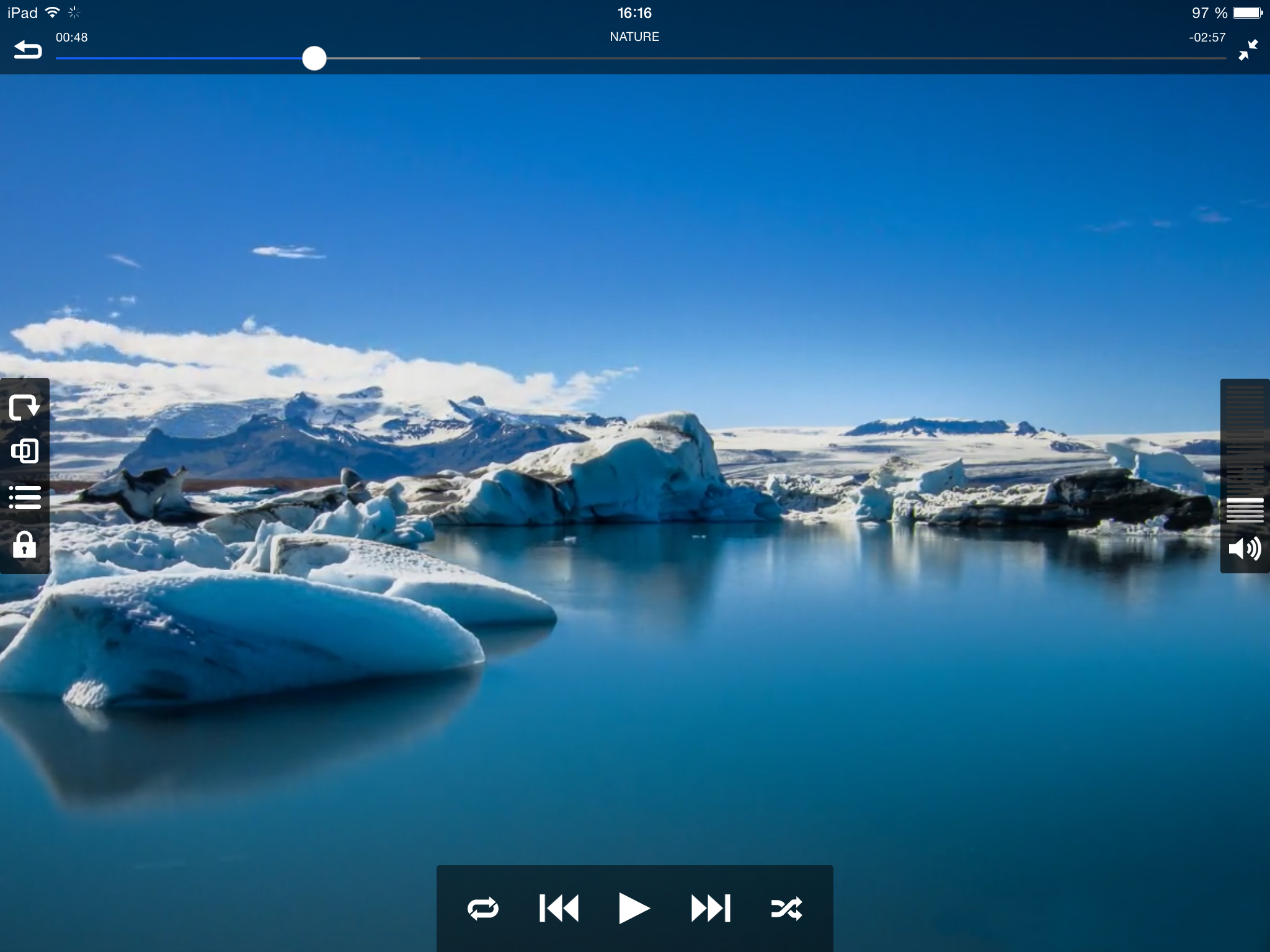
Vitebsk, Belarus - Developer Macsoftex has announced the release of Remote Media Manager Pro 1.5 for iOS, an intuitive and easy-to-use file manager and viewer compatible with all iOS devices. Remote Media Manager Pro can view, copy, move, stream, and manage files between computers, servers, NAS drives and cloud storage in either direction, without the need to install any other software. This useful app scans and locates devices on any network, and connects in seconds.
Remote Media Manager Pro can play video files, without the need for any type of file conversion. While users can copy files to and from their device if they'd prefer, there is no need to as the app also allows streaming of audio and video from any computer or iOS device on the network. Users can even stream video and audio to their HDTV via an Apple TV.
"Users find themselves jumping through hoops just to view video, or listen to music on their iOS devices," explained Alex Baturski, CEO of Macsoftex. "Remote Media Manager Pro 1.5 gives them the flexibility to watch video or listen to audio no matter where their favorite content is stored on their network or the Internet."
Features:
* Play all video formats without conversion, including: avi, mkv, wmv, mpg, mp4, mov and others
* True streaming audio and video on a network without copying files
* Connect to FTP, SFTP, SMB, WebDAV, and Cloud services
* Wirelessly transfer files from any network device
* Stream music, videos and photos from Dropbox, Google Drive, Box, and Yandex.Disk
* Watch online television, and listen to Internet radio. (M3U playlists support)
* Stream audio and video to an HDTV via an Apple TV device
* Access media library stored on the iOS device (Music, Video, Photos)
* Control volume and playback using simple screen gestures, or on-screen icons
Remote Media Manager Pro can connect to computers running Mac OS X, Windows and Linux, and can also access files stored on an Apple Time Capsule, FTP, SFTP, SMB, NAS, and WebDAV services, as well as cloud-based services such as Dropbox, Box, and Google Drive. Wirelessly transfer files from any network device, via an easy to use web-based uploading system that allows users to transfer files from their computer or other storage device as simply as loading a web page.
"While many users are content to watch video content on the smaller screen of their iOS devices, there are still those who prefer the big screen," continued Baturski. "For those users, we include the convenient feature of being able to stream both video and audio from an iPhone or iPad to a big screen HDTV, via an Apple TV."
Using AirPlay, users of Remote Media Manager Pro can stream any audio or video content to their HDTV connected device with the tap of an icon. No matter which size screen users are viewing their content on; they can control playback and volume with easy to use screen gestures. Swipe right to fast-forward, swipe left to rewind, swipe up and down to control the volume. If preferred, the usual VCR-like icon controls are also available to control playback.
Customer Jared Shook loves Remote Media Manager Pro's ease of use: "There are so many apps on the App Store that serve the same purpose as this app, but this one in particular does it the best. It offers you access to your local network storage hosted on your Windows PC as well as virtually anywhere on the net. I would recommend this app to anyone looking for the easiest way to access their Network Attached Storage (NAS) from their iPhone, iPad, or iPod because it is truly the easiest to use."
Supported Languages:
Remote Media Manager Pro supports English, Dutch, French, German, Greek, Italian, Japanese, Portuguese, Russian, Spanish, Swedish, Thai and Turkish languages.
Device Requirements:
* iPhone, iPad, and iPod touch
* Optimized for iPhone 5, iPhone 6/6 Plus
* Requires iOS 7.1 or later
* 52.3 MB
Pricing and Availability:
Remote Media Manager Pro 1.5 is $4.99 USD (or equivalent amount in other currencies) and is available worldwide exclusively through the App Store in the Entertainment category. Review copies are available upon request.
Macsoftex: http://www.macsoftex.by
Remote Media Manager Pro 1.5: http://www.macsoftex.by/#!remote-media-manager-en/c1e2f
Purchase and Download: https://itunes.apple.com/app/remote-media-manager-pro-access/id984424713
Screenshot 1: http://macsoftex.com/ams/images/5-ipad_en.jpg
Screenshot 2: http://macsoftex.com/ams/images/4-ipad_en.jpg
App Icon: http://a5.mzstatic.com/us/r30/Purple1/v4/d0/e2/d9/d0e2d92a-daae-ac6a-6169-86c76581454f/icon175x175.jpeg
Established in 2009, Macsoftex was founded by Alex Baturski with the main goal of creating helpful, user-friendly applications. Macsoftex pays utmost attention to the functionality of the apps it creates, striving for high usability and top quality content. Since 2009, Macsoftex has created applications of various types; among them art galleries, music apps, and video apps featuring their proprietary player. Copyright (C) 2015 Macsoftex. All Rights Reserved. Apple, the Apple logo, iPhone and iPod are registered trademarks of Apple Inc. in the U.S. and/or other countries.
*******
Link To Article: http://prmac.com/release-id-75251.htm
*******
---------------------------------------------------------------------------------
Note that you can alter delivered distributions at any time.
Login to your account on prMac to alter your channel selection, or to opt-out at any time.
Remote Media Manager Pro 1.5 - View and Manage Media with any iOS Device - Published on 06/06/15
Macsoftex has announced Remote Media Manager Pro 1.5, its new easy-to-use file manager and viewer app for iOS devices. With Remote Media Manager Pro, anyone can wirelessly view, copy, move, stream, and manage files between their iOS device and computers, servers, drives and cloud storage, without the need to install any other software. For big screen viewing, users can also stream audio and video from their iOS devices to an HDTV via their Apple TV.
Vitebsk, Belarus - Developer Macsoftex has announced the release of Remote Media Manager Pro 1.5 for iOS, an intuitive and easy-to-use file manager and viewer compatible with all iOS devices. Remote Media Manager Pro can view, copy, move, stream, and manage files between computers, servers, NAS drives and cloud storage in either direction, without the need to install any other software. This useful app scans and locates devices on any network, and connects in seconds.
Remote Media Manager Pro can play video files, without the need for any type of file conversion. While users can copy files to and from their device if they'd prefer, there is no need to as the app also allows streaming of audio and video from any computer or iOS device on the network. Users can even stream video and audio to their HDTV via an Apple TV.
"Users find themselves jumping through hoops just to view video, or listen to music on their iOS devices," explained Alex Baturski, CEO of Macsoftex. "Remote Media Manager Pro 1.5 gives them the flexibility to watch video or listen to audio no matter where their favorite content is stored on their network or the Internet."
Features:
* Play all video formats without conversion, including: avi, mkv, wmv, mpg, mp4, mov and others
* True streaming audio and video on a network without copying files
* Connect to FTP, SFTP, SMB, WebDAV, and Cloud services
* Wirelessly transfer files from any network device
* Stream music, videos and photos from Dropbox, Google Drive, Box, and Yandex.Disk
* Watch online television, and listen to Internet radio. (M3U playlists support)
* Stream audio and video to an HDTV via an Apple TV device
* Access media library stored on the iOS device (Music, Video, Photos)
* Control volume and playback using simple screen gestures, or on-screen icons
Remote Media Manager Pro can connect to computers running Mac OS X, Windows and Linux, and can also access files stored on an Apple Time Capsule, FTP, SFTP, SMB, NAS, and WebDAV services, as well as cloud-based services such as Dropbox, Box, and Google Drive. Wirelessly transfer files from any network device, via an easy to use web-based uploading system that allows users to transfer files from their computer or other storage device as simply as loading a web page.
"While many users are content to watch video content on the smaller screen of their iOS devices, there are still those who prefer the big screen," continued Baturski. "For those users, we include the convenient feature of being able to stream both video and audio from an iPhone or iPad to a big screen HDTV, via an Apple TV."
Using AirPlay, users of Remote Media Manager Pro can stream any audio or video content to their HDTV connected device with the tap of an icon. No matter which size screen users are viewing their content on; they can control playback and volume with easy to use screen gestures. Swipe right to fast-forward, swipe left to rewind, swipe up and down to control the volume. If preferred, the usual VCR-like icon controls are also available to control playback.
Customer Jared Shook loves Remote Media Manager Pro's ease of use: "There are so many apps on the App Store that serve the same purpose as this app, but this one in particular does it the best. It offers you access to your local network storage hosted on your Windows PC as well as virtually anywhere on the net. I would recommend this app to anyone looking for the easiest way to access their Network Attached Storage (NAS) from their iPhone, iPad, or iPod because it is truly the easiest to use."
Supported Languages:
Remote Media Manager Pro supports English, Dutch, French, German, Greek, Italian, Japanese, Portuguese, Russian, Spanish, Swedish, Thai and Turkish languages.
Device Requirements:
* iPhone, iPad, and iPod touch
* Optimized for iPhone 5, iPhone 6/6 Plus
* Requires iOS 7.1 or later
* 52.3 MB
Pricing and Availability:
Remote Media Manager Pro 1.5 is $4.99 USD (or equivalent amount in other currencies) and is available worldwide exclusively through the App Store in the Entertainment category. Review copies are available upon request.
Macsoftex: http://www.macsoftex.by
Remote Media Manager Pro 1.5: http://www.macsoftex.by/#!remote-media-manager-en/c1e2f
Purchase and Download: https://itunes.apple.com/app/remote-media-manager-pro-access/id984424713
Screenshot 1: http://macsoftex.com/ams/images/5-ipad_en.jpg

Screenshot 2: http://macsoftex.com/ams/images/4-ipad_en.jpg
App Icon: http://a5.mzstatic.com/us/r30/Purple1/v4/d0/e2/d9/d0e2d92a-daae-ac6a-6169-86c76581454f/icon175x175.jpeg

Established in 2009, Macsoftex was founded by Alex Baturski with the main goal of creating helpful, user-friendly applications. Macsoftex pays utmost attention to the functionality of the apps it creates, striving for high usability and top quality content. Since 2009, Macsoftex has created applications of various types; among them art galleries, music apps, and video apps featuring their proprietary player. Copyright (C) 2015 Macsoftex. All Rights Reserved. Apple, the Apple logo, iPhone and iPod are registered trademarks of Apple Inc. in the U.S. and/or other countries.
*******
Link To Article: http://prmac.com/release-id-75251.htm
*******
---------------------------------------------------------------------------------
Note that you can alter delivered distributions at any time.
Login to your account on prMac to alter your channel selection, or to opt-out at any time.
Rockstar Rampage - an eccentric rockstar wrecking hotel rooms
A new article has been published at prMac.
Rockstar Rampage - an eccentric rockstar wrecking hotel rooms - Published on 06/05/15
Games Of The Universe GmbH today introduces Rockstar Rampage 1.1 for iOS, a game about a freaky rockstar on world tour wrecking an arcade of hotel rooms. Inspired by the original Rampage in which huge monsters destroy cities or fighting games like Final Fight, the game takes this kind of old school gaming to a new level in a comical, rock music- and celebrity scandals-themed game. Featuring simple and intuitive touchscreen controls, a high popularity score unlocks extraordinary weapons.
2502 Biel, Switzerland - A game made for arcade players, preferably with old school gaming skills but also for the average boy or girl who just wants to do a hotel room rampage for fun. It plays like a 2D-beatem up with digitized characters and is optimized for touchscreen controls. Your style of play is relevant as after every hotel room a jury of celebrities rates your actions for popularity score. A high popularity score unlocks extraordinary weapons. Developed by a fresh switzerland-based studio called Games Of The Universe, this unconventional action game is available now on the App Store.
Features
* 25 game level hotel rooms to wreck
* Progressing story-mode or free-mode
* 5 boss level fights versus very upset hotel managers
* Unlock 25 extraordinary rockalicious weapons
* Every level performance is rated by a jury of celebrity-parody characters
* Various bonus stages (arm wrestling, beer drinking, jailbreak and more)
* Localized in English, Spanish, German, French
* Digitized lifelike characters
* 100+ moves and objects to use
* Simple and intuitive touchscreen controls
* Devices/Platforms: iPhone (OpenGL ES 2.0 required), iPad, iPod third generation
* Playable in landscape and portrait orientation
Game design, Graphics and Soundtrack:
The graphics are a mix of digitized actors and illustrated artwork, similar to games like the original Mortal Combat or Pit Fighter. The game graphics have a cartoon-like look which adds to the comedic nature of the game. The illustrated artwork of the objects combined with the digitized characters creates a unique look, rarely used in videogames. The soundtrack is exclusively produced for the game and features various smash hits like "Demolition Dance," "Eye Of The Camel" or "Temple Of Boom."
Game Controls:
The player controls the Rockstar in a "click and do"-manner using multitouch functionalities like tapping, drawing a line, drawing a circle or pinching, somehow similar to classic games like "The Sims" or "The Secret Of Monkey Island."
Device Requirements:
* iPhone, iPad, and iPod touch
* Requires iOS 4.3 or later
* 266 MB
Pricing and Availability:
Rockstar Rampage 1.1 has several bugs fixed and a tuned user interface. It is free and available worldwide exclusively through the AppStore in the Games category. Now it's your turn - let there be rampage!
Rockstar Rampage 1.1: http://www.gamesoftheuniverse.com
Download from iTunes: https://itunes.apple.com/app/rockstar-rampage/id670733636
YouTube Video (Trailer): https://www.youtube.com/watch?v=-9mKQ9enpK4
Screenshot: http://a4.mzstatic.com/us/r30/Purple2/v4/3d/53/5f/3d535fda-00b2-2a9f-2cc5-62ee6c9ceff6/screen480x480.jpeg
App Icon: http://a3.mzstatic.com/us/r30/Purple3/v4/ee/91/1d/ee911da0-9795-ed7b-523f-9a377de7f8af/icon175x175.jpeg
Games of the Universe is a swiss-based game development company, founded in 2013. Their mission is to create original and out of the ordinary game experiences - games of the universe for the universe. Headquarters are in Biel/Bienne, canton of Bern, Switzerland. All Material and Software (C) Copyright 2015 Games Of The Universe GmbH. All Rights Reserved. Apple, the Apple logo, iPhone, iPod and iPad are registered trademarks of Apple Inc. in the U.S. and/or other countries. Other trademarks and registered trademarks may be the property of their respective owners.
*******
Link To Article: http://prmac.com/release-id-75280.htm
*******
---------------------------------------------------------------------------------
Note that you can alter delivered distributions at any time.
Login to your account on prMac to alter your channel selection, or to opt-out at any time.
Rockstar Rampage - an eccentric rockstar wrecking hotel rooms - Published on 06/05/15
Games Of The Universe GmbH today introduces Rockstar Rampage 1.1 for iOS, a game about a freaky rockstar on world tour wrecking an arcade of hotel rooms. Inspired by the original Rampage in which huge monsters destroy cities or fighting games like Final Fight, the game takes this kind of old school gaming to a new level in a comical, rock music- and celebrity scandals-themed game. Featuring simple and intuitive touchscreen controls, a high popularity score unlocks extraordinary weapons.
2502 Biel, Switzerland - A game made for arcade players, preferably with old school gaming skills but also for the average boy or girl who just wants to do a hotel room rampage for fun. It plays like a 2D-beatem up with digitized characters and is optimized for touchscreen controls. Your style of play is relevant as after every hotel room a jury of celebrities rates your actions for popularity score. A high popularity score unlocks extraordinary weapons. Developed by a fresh switzerland-based studio called Games Of The Universe, this unconventional action game is available now on the App Store.
Features
* 25 game level hotel rooms to wreck
* Progressing story-mode or free-mode
* 5 boss level fights versus very upset hotel managers
* Unlock 25 extraordinary rockalicious weapons
* Every level performance is rated by a jury of celebrity-parody characters
* Various bonus stages (arm wrestling, beer drinking, jailbreak and more)
* Localized in English, Spanish, German, French
* Digitized lifelike characters
* 100+ moves and objects to use
* Simple and intuitive touchscreen controls
* Devices/Platforms: iPhone (OpenGL ES 2.0 required), iPad, iPod third generation
* Playable in landscape and portrait orientation
Game design, Graphics and Soundtrack:
The graphics are a mix of digitized actors and illustrated artwork, similar to games like the original Mortal Combat or Pit Fighter. The game graphics have a cartoon-like look which adds to the comedic nature of the game. The illustrated artwork of the objects combined with the digitized characters creates a unique look, rarely used in videogames. The soundtrack is exclusively produced for the game and features various smash hits like "Demolition Dance," "Eye Of The Camel" or "Temple Of Boom."
Game Controls:
The player controls the Rockstar in a "click and do"-manner using multitouch functionalities like tapping, drawing a line, drawing a circle or pinching, somehow similar to classic games like "The Sims" or "The Secret Of Monkey Island."
Device Requirements:
* iPhone, iPad, and iPod touch
* Requires iOS 4.3 or later
* 266 MB
Pricing and Availability:
Rockstar Rampage 1.1 has several bugs fixed and a tuned user interface. It is free and available worldwide exclusively through the AppStore in the Games category. Now it's your turn - let there be rampage!
Rockstar Rampage 1.1: http://www.gamesoftheuniverse.com
Download from iTunes: https://itunes.apple.com/app/rockstar-rampage/id670733636
YouTube Video (Trailer): https://www.youtube.com/watch?v=-9mKQ9enpK4
Screenshot: http://a4.mzstatic.com/us/r30/Purple2/v4/3d/53/5f/3d535fda-00b2-2a9f-2cc5-62ee6c9ceff6/screen480x480.jpeg

App Icon: http://a3.mzstatic.com/us/r30/Purple3/v4/ee/91/1d/ee911da0-9795-ed7b-523f-9a377de7f8af/icon175x175.jpeg

Games of the Universe is a swiss-based game development company, founded in 2013. Their mission is to create original and out of the ordinary game experiences - games of the universe for the universe. Headquarters are in Biel/Bienne, canton of Bern, Switzerland. All Material and Software (C) Copyright 2015 Games Of The Universe GmbH. All Rights Reserved. Apple, the Apple logo, iPhone, iPod and iPad are registered trademarks of Apple Inc. in the U.S. and/or other countries. Other trademarks and registered trademarks may be the property of their respective owners.
*******
Link To Article: http://prmac.com/release-id-75280.htm
*******
---------------------------------------------------------------------------------
Note that you can alter delivered distributions at any time.
Login to your account on prMac to alter your channel selection, or to opt-out at any time.
Cities in Motion Collection Launches on Mac App Store With 50% Discount
A new article has been published at prMac.
Cities in Motion Collection Launches on Mac App Store With 50% Discount - Published on 06/05/15
MacPlay today announced that Colossal Order's classic hit title, Cities in Motion Collection, is now available on the Mac App Store. Cities in Motion is a city-based mass transportation simulator. Players operate their own transportation company, building a public network with a variety of vehicle types, including buses, trams, and subway trains. By meeting the needs of city residents, the player tries to make as much profit as possible. 50% off the regular price during the month of June.
Dallas, Texas - MacPlay today announced that Colossal Order's classic hit title, Cities in Motion Collection, is now available for the first time on Apple's Mac App Store. To celebrate the release, Cites in Motion Collection is available during the month of June for 50% off the regular price.
Cities in Motion Collection includes the Cities in Motion and all DLC and cities in one amazing grand collection!
Cities in Motion is a city-based mass transportation simulator. Players operate their own transportation company, building a public network with a variety of vehicle types, including buses, trams, and subway trains. By meeting the needs of city residents, the player tries to make as much profit as possible. Observing the changing and growing city, as well as the different types of people in it, is key to building a successful and efficient network.
Features:
* Engage in a campaign with 12 scenarios, as well as a sandbox mode where all campaign cities are playable
* Experience realistic 3D graphics with more than 100 unique, highly detailed buildings
* Use the advanced map editor to create your own cities
* Immerse yourself in an advanced economic simulator as you struggle with banks and shifting economic trends
* Play through 100 years of transportation history throughout four eras, spanning from 1920 to 2020
* Choose between more than 30 different vehicles based on real-life models of buses, trams, water buses, helicopters, and subways, complete with an underground view
* Meet residents' travel needs as 7 different social groups exhibit different passenger behaviors
* Experience a real-time city and traffic simulator as each location's bustling population commutes between their homes, jobs, and leisure sites
System Requirements:
* OS: OS X Snow Leopard 10.6.3, or later
* Processor: 2 GHz Dual Core or higher
* Memory: 2GB RAM
* Hard Disk Space: 2GB
* Video Card: NVIDIA GeForce 8800/ATI Radeon HD 3850 or higher with 512 MB RAM, OpenGL 3.0
Pricing and Availability:
Cities In Motion Collection 1.0.0 is available immediately through the Mac App Store for $24.99 USD, a savings of 50% off the regular price of $49.99.
MacPlay: http://www.macplay.com/
Cities In Motion Collection 1.0.0: http://www.macplay.com/games/cities-in-motion-collection/
Purchase and Download (MAS): https://itunes.apple.com/app/cities-in-motion-collection/id999210226
Screenshot: http://a2.mzstatic.com/us/r30/Purple1/v4/7c/d1/0b/7cd10b58-dd0e-d1d5-d6f8-8e9da6cc25db/screen800x500.jpeg
Application Icon: http://a4.mzstatic.com/us/r30/Purple7/v4/40/36/f8/4036f82e-b507-4fc5-8169-0587d539c2bc/icon128-2x.png
MacPlay's 3.0 mission is to provide publishers and developers an exciting and profitable way of distributing their games on the Mac App Store and other platforms. All Material and Software (C) Copyright 2015 MacPlay. All Rights Reserved. Apple, the Apple logo, iPhone, iPod and iPad are registered trademarks of Apple Inc. in the U.S. and/or other countries. Other trademarks and registered trademarks may be the property of their respective owners.
*******
Link To Article: http://prmac.com/release-id-75279.htm
*******
---------------------------------------------------------------------------------
Note that you can alter delivered distributions at any time.
Login to your account on prMac to alter your channel selection, or to opt-out at any time.
Cities in Motion Collection Launches on Mac App Store With 50% Discount - Published on 06/05/15
MacPlay today announced that Colossal Order's classic hit title, Cities in Motion Collection, is now available on the Mac App Store. Cities in Motion is a city-based mass transportation simulator. Players operate their own transportation company, building a public network with a variety of vehicle types, including buses, trams, and subway trains. By meeting the needs of city residents, the player tries to make as much profit as possible. 50% off the regular price during the month of June.
Dallas, Texas - MacPlay today announced that Colossal Order's classic hit title, Cities in Motion Collection, is now available for the first time on Apple's Mac App Store. To celebrate the release, Cites in Motion Collection is available during the month of June for 50% off the regular price.
Cities in Motion Collection includes the Cities in Motion and all DLC and cities in one amazing grand collection!
Cities in Motion is a city-based mass transportation simulator. Players operate their own transportation company, building a public network with a variety of vehicle types, including buses, trams, and subway trains. By meeting the needs of city residents, the player tries to make as much profit as possible. Observing the changing and growing city, as well as the different types of people in it, is key to building a successful and efficient network.
Features:
* Engage in a campaign with 12 scenarios, as well as a sandbox mode where all campaign cities are playable
* Experience realistic 3D graphics with more than 100 unique, highly detailed buildings
* Use the advanced map editor to create your own cities
* Immerse yourself in an advanced economic simulator as you struggle with banks and shifting economic trends
* Play through 100 years of transportation history throughout four eras, spanning from 1920 to 2020
* Choose between more than 30 different vehicles based on real-life models of buses, trams, water buses, helicopters, and subways, complete with an underground view
* Meet residents' travel needs as 7 different social groups exhibit different passenger behaviors
* Experience a real-time city and traffic simulator as each location's bustling population commutes between their homes, jobs, and leisure sites
System Requirements:
* OS: OS X Snow Leopard 10.6.3, or later
* Processor: 2 GHz Dual Core or higher
* Memory: 2GB RAM
* Hard Disk Space: 2GB
* Video Card: NVIDIA GeForce 8800/ATI Radeon HD 3850 or higher with 512 MB RAM, OpenGL 3.0
Pricing and Availability:
Cities In Motion Collection 1.0.0 is available immediately through the Mac App Store for $24.99 USD, a savings of 50% off the regular price of $49.99.
MacPlay: http://www.macplay.com/
Cities In Motion Collection 1.0.0: http://www.macplay.com/games/cities-in-motion-collection/
Purchase and Download (MAS): https://itunes.apple.com/app/cities-in-motion-collection/id999210226
Screenshot: http://a2.mzstatic.com/us/r30/Purple1/v4/7c/d1/0b/7cd10b58-dd0e-d1d5-d6f8-8e9da6cc25db/screen800x500.jpeg

Application Icon: http://a4.mzstatic.com/us/r30/Purple7/v4/40/36/f8/4036f82e-b507-4fc5-8169-0587d539c2bc/icon128-2x.png

MacPlay's 3.0 mission is to provide publishers and developers an exciting and profitable way of distributing their games on the Mac App Store and other platforms. All Material and Software (C) Copyright 2015 MacPlay. All Rights Reserved. Apple, the Apple logo, iPhone, iPod and iPad are registered trademarks of Apple Inc. in the U.S. and/or other countries. Other trademarks and registered trademarks may be the property of their respective owners.
*******
Link To Article: http://prmac.com/release-id-75279.htm
*******
---------------------------------------------------------------------------------
Note that you can alter delivered distributions at any time.
Login to your account on prMac to alter your channel selection, or to opt-out at any time.
Is Your Phone Slowly Killing You? This New App Can Help
A new article has been published at prMac.
Is Your Phone Slowly Killing You? This New App Can Help - Published on 06/05/15
Boston based Atlantia Software today introduces The No Phone Challenge 1.0 for iOS, its new app that aims to liberate you from your smart phone addiction by coaching you through a 30 day challenge. Open the app every day and you'll find a grid of days showing your current progress. Tap on a day in order to start a session, the app will force you to put your phone face down for the duration of the session and will give you audio feedback when you've reached the allotted time.
Boston, Massachusetts - Our smart phones, we truly love them. They help us stay connected, be productive, and keep us perpetually entertained. But is there a dark side to all that high-tech goodness? According to a new app, the answer is a resounding "yes." Released today by Atlantia Software, The No Phone Challenge is a new app that aims to liberate you from your smart phone addiction by coaching you through a 30 day challenge. The premise is simple, it's impossible to completely ditch your beloved device, so instead, just put it down for an hour each day, for 30 days. Open the app every day and you'll find a grid of days showing your current progress. Tap on a day in order to start a session, the app will force you to put your phone face down for the duration of the session and will give you audio feedback when you've reached the allotted time. Pick up your phone before the time is up and you fail the challenge, succeed and the app will let you share your achievement with friends
via standard iOS sharing options.
"I'm obviously a huge fan of smart phones, I make my living writing software for them" said Nick Bonatsakis, developer at Atlantia Software and the app's creator. "But, I started to notice that tons of people just can't step away from their devices, opting to obsessively check Facebook and E-mail over enjoying in-person conversation", he added. He went on to say, "After coming across a number of interesting pieces of research that demonstrated quantitative adverse physical and menal effects of smart phone over-use, I decided I wanted to do something about it, so I created this app. There are a bunch of other apps that track your phone usage, but I've found that an approach which treats the problem as more of a fitness goal just makes more sense." Finally, he remarked, "To me, it's really not just about putting down your phone, but also about doing something human while it's away. So, the app encourages you to take baby steps, by only stepping away for 60 minutes per day, and giving
you suggestions for things you may want to do to fill that time, like sharing a meal with a loved one or reading a book."
Feature Highlights:
* Easily track your No Phone progress at a glance
* Challenge timer and movement detection to help ensure you keep your phone face down
* Social sharing of challenge milestones
* Helpful tips and articles regarding risks of smart phone over-use
Device Requirements:
* iPhone, and iPod touch
* Optimized for iPhone 5, iPhone 6/6 Plus
* Requires iOS 8.0 or later
Pricing and Availability
Available right now, The No Phone Challenge 1.0 is $1.99 and available worldwide exclusively through the App Store in the Health & Fitness category.
The No Phone Challenge 1.0.0: http://atlantiasoftware.com/nophone/
App Store Direct Download: https://itunes.apple.com/app/apple-store/id979089718?pt=10174&ct=press_release_1&mt=8&at=11l32CC
Screenshots: http://atlantiasoftware.com/nophone/img/main.png
App Icon: http://atlantiasoftware.com/nophone/img/AppIcon.png
Located in Boston, Massachusetts, Atlantia Software is a private development company dedicated to the creation of high quality software products, with a primary focus on iOS, OS X, and Web. The company strives to produce applications that are easy to use, and rich in functionality. Their position as a small organization allows them to interact with thir customers at a more intimate level, providing first rate support and an ever-open ear. Atlantia has released several highly acclaimed apps as well as countless beautifully designed websites. Check out their apps or hire them for your next software project. Copyright (C) 2015 Atlantia Software LLC. All Rights Reserved. Apple, the Apple logo, iPhone, iPad, iPad mini, iPod touch, and Mac are registered trademarks of Apple Inc. in the U.S. and/or other countries. Other trademarks and registered trademarks may be the property of their respective owners.
*******
Link To Article: http://prmac.com/release-id-75277.htm
*******
---------------------------------------------------------------------------------
Note that you can alter delivered distributions at any time.
Login to your account on prMac to alter your channel selection, or to opt-out at any time.
Is Your Phone Slowly Killing You? This New App Can Help - Published on 06/05/15
Boston based Atlantia Software today introduces The No Phone Challenge 1.0 for iOS, its new app that aims to liberate you from your smart phone addiction by coaching you through a 30 day challenge. Open the app every day and you'll find a grid of days showing your current progress. Tap on a day in order to start a session, the app will force you to put your phone face down for the duration of the session and will give you audio feedback when you've reached the allotted time.
Boston, Massachusetts - Our smart phones, we truly love them. They help us stay connected, be productive, and keep us perpetually entertained. But is there a dark side to all that high-tech goodness? According to a new app, the answer is a resounding "yes." Released today by Atlantia Software, The No Phone Challenge is a new app that aims to liberate you from your smart phone addiction by coaching you through a 30 day challenge. The premise is simple, it's impossible to completely ditch your beloved device, so instead, just put it down for an hour each day, for 30 days. Open the app every day and you'll find a grid of days showing your current progress. Tap on a day in order to start a session, the app will force you to put your phone face down for the duration of the session and will give you audio feedback when you've reached the allotted time. Pick up your phone before the time is up and you fail the challenge, succeed and the app will let you share your achievement with friends
via standard iOS sharing options.
"I'm obviously a huge fan of smart phones, I make my living writing software for them" said Nick Bonatsakis, developer at Atlantia Software and the app's creator. "But, I started to notice that tons of people just can't step away from their devices, opting to obsessively check Facebook and E-mail over enjoying in-person conversation", he added. He went on to say, "After coming across a number of interesting pieces of research that demonstrated quantitative adverse physical and menal effects of smart phone over-use, I decided I wanted to do something about it, so I created this app. There are a bunch of other apps that track your phone usage, but I've found that an approach which treats the problem as more of a fitness goal just makes more sense." Finally, he remarked, "To me, it's really not just about putting down your phone, but also about doing something human while it's away. So, the app encourages you to take baby steps, by only stepping away for 60 minutes per day, and giving
you suggestions for things you may want to do to fill that time, like sharing a meal with a loved one or reading a book."
Feature Highlights:
* Easily track your No Phone progress at a glance
* Challenge timer and movement detection to help ensure you keep your phone face down
* Social sharing of challenge milestones
* Helpful tips and articles regarding risks of smart phone over-use
Device Requirements:
* iPhone, and iPod touch
* Optimized for iPhone 5, iPhone 6/6 Plus
* Requires iOS 8.0 or later
Pricing and Availability
Available right now, The No Phone Challenge 1.0 is $1.99 and available worldwide exclusively through the App Store in the Health & Fitness category.
The No Phone Challenge 1.0.0: http://atlantiasoftware.com/nophone/
App Store Direct Download: https://itunes.apple.com/app/apple-store/id979089718?pt=10174&ct=press_release_1&mt=8&at=11l32CC
Screenshots: http://atlantiasoftware.com/nophone/img/main.png

App Icon: http://atlantiasoftware.com/nophone/img/AppIcon.png

Located in Boston, Massachusetts, Atlantia Software is a private development company dedicated to the creation of high quality software products, with a primary focus on iOS, OS X, and Web. The company strives to produce applications that are easy to use, and rich in functionality. Their position as a small organization allows them to interact with thir customers at a more intimate level, providing first rate support and an ever-open ear. Atlantia has released several highly acclaimed apps as well as countless beautifully designed websites. Check out their apps or hire them for your next software project. Copyright (C) 2015 Atlantia Software LLC. All Rights Reserved. Apple, the Apple logo, iPhone, iPad, iPad mini, iPod touch, and Mac are registered trademarks of Apple Inc. in the U.S. and/or other countries. Other trademarks and registered trademarks may be the property of their respective owners.
*******
Link To Article: http://prmac.com/release-id-75277.htm
*******
---------------------------------------------------------------------------------
Note that you can alter delivered distributions at any time.
Login to your account on prMac to alter your channel selection, or to opt-out at any time.
Subscribe to:
Posts (Atom)