A new article has been published at prMac.
Project Planning Pro, the best Task Management App featured by appPicker - Published on 06/15/15
Project Planning Pro, one of the most popular task management app on the iOS, was recently featured by appPicker in its prestigious list of "Best iPhone Apps for Task Management." Developed by i2e Consulting LLC, Project Planning Pro is a simple and easy to use tool to plan and manage any kind of project. Create a project plan in no time by entering tasks, duration and start dates. Use the interactive Gantt chart to edit and update the tasks with simple iPad Gestures.
WaterFord, Connecticut - appPicker, one of the most popular iOS app review and news site that helps users discover interesting apps recently released its Annual List of "The best iPhone apps for task management." appPicker reviewed various apps in the Business and Productivity domain and finally shortlisted a list of 11 Apps that are a couple of notches ahead of their competitors in the domain. The list includes the award winning apps like Project Planning Pro, Wunderlist, 2Do and Clear, to name a few. appPicker occasionally comes up with its list of best apps in specific domains to help users discover the best iOS and OSX apps rightly suited for their requirements.
Developed by i2e Consulting LLC, Project Planning Pro is an extremely popular Task and Project Management app, developed as per the specific needs of the iOS users. Since its inception a few years ago, the app has managed to receive over 700,000 Downloads, which is fairly large in the business app category in iOS. The app has also won a couple of prestigious awards, such as the Best App Ever Awards, Tabby Awards and the Appsters Award.
appPicker recommends, "Project Planning Pro is ideal when a project requires things to be done in a specific order:
* Use this to plan any type of project either for business or personal use
* The app is user-friendly
* Add the tasks, the duration, and the start date for each one
* Input of the tasks is quick and simple
According to Sudhir Karanth, Director, Sales and Marketing at i2e Consulting LLC, "We are extremely happy with the achievement of Project Planning Pro. We realize that getting featured in the esteemed list of 'The Best iPhone Apps for Task Management' is not an everyday occurrence and are thankful to appPicker for it. Project Planning Pro is proud and humbled with this achievement and will continue advancing the tool further."
Language Support:
* English, Dutch, French, German, Italian, Japanese, Portuguese, Russian, Simplified Chinese and Spanish
Device Requirements:
* Compatible with iPad
* Requires iOS 6.0 or later
* 13.2 MB
* Rated 4+
Pricing and Availability:
Project Planning Pro 1.7.7 is Free and available worldwide exclusively through the App Store in the Business category.
Project Planning Pro 1.7.7: http://planningproapp.com
appPicker Article: http://www.apppicker.com/applists/24708/the-best-iphone-apps-for-task-management
Download from iTunes: http://itunes.apple.com/app/id509886186?mt=8&pt=493166&at=11l6nt&ct=pr-ap-pp
Media Assets: http://planningproapp.com/media/
Based in WaterFord, Connecticut, i2e Consulting is a software services company providing innovative Enterprise solutions to clients across the Globe. i2e Consulting is a Microsoft Certified partner with niche in Portfolio Project Management. i2e Consulting Mobile division is developing on iOS, Android and Windows Apps. Copyright (C) 2015 i2e Consulting LLC. All Rights Reserved. Apple, the Apple logo, iPhone, iPod and iPad are registered trademarks of Apple Inc. in the U.S. and/or other countries. Microsoft and Microsoft Project are registered trademarks of Microsoft Corporation in the U.S. and/or other countries.
*******
Link To Article: http://prmac.com/release-id-75392.htm
*******
---------------------------------------------------------------------------------
Note that you can alter delivered distributions at any time.
Login to your account on prMac to alter your channel selection, or to opt-out at any time.

KeepSolid Launches A New Security App, WiFi Hotspot Protector, On iOS
A new article has been published at prMac.
KeepSolid Launches A New Security App, WiFi Hotspot Protector, On iOS - Published on 06/15/15
KeepSolid today releases WiFi Hotspot Protector 1.0, its new online protector for iOS devices. Always on guard for safety and security of users' sensitive information, WiFi Hotspot Protector helps anyone stay safe while surfing the web in airports, cafes, hotels & malls. The app scans public WiFi hotspots when connecting to them, notifies about possible security problems and guards activity and online communication. Through June 17th only, customers can get 30 days of the service free of charge.
New York, New York - KeepSolid, the company known for its security and productivity solutions, today is proud to announce the release of WiFi Hotspot Protector 1.0, its new iOS app. This is an online protector, always on guard for safety and security of users' sensitive information. It helps them stay safe while surfing the web in airports, cafes, hotels and malls. Through June 17th only, customers can get 30 days of the service absolutely free of charge. Please note that only customers with new KeepSolid ID can take advantage of this deal. Hurry to download this app and rest assured your credit card details, e-mails, passwords and pictures are protected each time you are using public WiFi hotspots!
Your sensitive information is an easy prey for cyber criminals in public places. It can take less than a minute to steal your identity. With one easy step, you keep all hackers away. WiFi Hotspot Protector scans public WiFi hotspots when you connect to them, notifies you about possible security problems and guards your activity and online communication. Using the most recent and advanced encryption methods, its main task is to provide maximum protection against hackers, identity thefts and data leaks, thus restoring your online security.
Key Features:
* Protects your data in public WiFi hotspots
* Detects potential security threats and notifies when you are near them
* Ensures the highest level of online security and safety in cafes, hotels, airports and malls
* Encrypts all the traffic you send and receive over the Internet
* Guards your passwords, pictures, credit card details and conversations from data leaks, identity thefts and hackers
* Automatically connects to the fastest and nearest server available for the best browsing experience
Turn WiFi Hotspot Protector on and never worry about the safety of your personal data, photos and correspondence. There is no need to manually activate this app every time you go out. Whenever you are near a public WiFi hotspot, the app is ready to protect your activity.
This app is for anyone who is using public WiFi hotspots. Whether you're a traveler, connecting all the time to WiFi networks in airports, hotels and bars, or a freelancer, using public hotspots in parks, co-working spaces and cafes, this app is specially designed for you. Are you a remote worker or a student? Or maybe just want to go out and probably use a public WiFi to chat online. KeepSolid got you covered.
Device Requirements:
* iPhone, iPad, and iPod touch
* Optimized for iPhone 5, iPhone 6/6 Plus
* Requires iOS 7.0 or later
* 9.3 MB
Pricing and Availability:
For a limited time, WiFi Hotspot Protector 1.0 is Free and available worldwide exclusively through the App Store in the Utilities category. Through June 17th only, customers can get 30 days of the service absolutely free of charge. For more information, visit WiFi Hotspot Protector's official website.
KeepSolid: https://www.keepsolid.com
WiFi Hotspot Protector 1.0: https://wifihotspotprotector.keepsolid.com/
Download from iTunes: https://itunes.apple.com/app/wifi-hotspot-protector/id985556483
Media Assets: https://www.keepsolid.com/press
KeepSolid is a New York based product development company with headquarter in New York, USA. We offer a wide range of solutions and services from improved productivity to data protection and internet security for both individual and corporate clients. Quality and reliability of our products are our competitive edge. We continually work to improve our offering to provide the best user experience possible. The users of iDevices know well the company's products including VPN Unlimited, Photo Transfer WiFi, Private Browser and To Do Checklist. Copyright (C) 2015 KeepSolid Inc. All Rights Reserved. Apple, the Apple logo, iPhone, iPad, iPad mini, iPod touch, and Mac are registered trademarks of Apple Inc. in the U.S. and/or other countries. Other trademarks and registered trademarks may be the property of their respective owners.
*******
Link To Article: http://prmac.com/release-id-75391.htm
*******
---------------------------------------------------------------------------------
Note that you can alter delivered distributions at any time.
Login to your account on prMac to alter your channel selection, or to opt-out at any time.
KeepSolid Launches A New Security App, WiFi Hotspot Protector, On iOS - Published on 06/15/15
KeepSolid today releases WiFi Hotspot Protector 1.0, its new online protector for iOS devices. Always on guard for safety and security of users' sensitive information, WiFi Hotspot Protector helps anyone stay safe while surfing the web in airports, cafes, hotels & malls. The app scans public WiFi hotspots when connecting to them, notifies about possible security problems and guards activity and online communication. Through June 17th only, customers can get 30 days of the service free of charge.
New York, New York - KeepSolid, the company known for its security and productivity solutions, today is proud to announce the release of WiFi Hotspot Protector 1.0, its new iOS app. This is an online protector, always on guard for safety and security of users' sensitive information. It helps them stay safe while surfing the web in airports, cafes, hotels and malls. Through June 17th only, customers can get 30 days of the service absolutely free of charge. Please note that only customers with new KeepSolid ID can take advantage of this deal. Hurry to download this app and rest assured your credit card details, e-mails, passwords and pictures are protected each time you are using public WiFi hotspots!
Your sensitive information is an easy prey for cyber criminals in public places. It can take less than a minute to steal your identity. With one easy step, you keep all hackers away. WiFi Hotspot Protector scans public WiFi hotspots when you connect to them, notifies you about possible security problems and guards your activity and online communication. Using the most recent and advanced encryption methods, its main task is to provide maximum protection against hackers, identity thefts and data leaks, thus restoring your online security.
Key Features:
* Protects your data in public WiFi hotspots
* Detects potential security threats and notifies when you are near them
* Ensures the highest level of online security and safety in cafes, hotels, airports and malls
* Encrypts all the traffic you send and receive over the Internet
* Guards your passwords, pictures, credit card details and conversations from data leaks, identity thefts and hackers
* Automatically connects to the fastest and nearest server available for the best browsing experience
Turn WiFi Hotspot Protector on and never worry about the safety of your personal data, photos and correspondence. There is no need to manually activate this app every time you go out. Whenever you are near a public WiFi hotspot, the app is ready to protect your activity.
This app is for anyone who is using public WiFi hotspots. Whether you're a traveler, connecting all the time to WiFi networks in airports, hotels and bars, or a freelancer, using public hotspots in parks, co-working spaces and cafes, this app is specially designed for you. Are you a remote worker or a student? Or maybe just want to go out and probably use a public WiFi to chat online. KeepSolid got you covered.
Device Requirements:
* iPhone, iPad, and iPod touch
* Optimized for iPhone 5, iPhone 6/6 Plus
* Requires iOS 7.0 or later
* 9.3 MB
Pricing and Availability:
For a limited time, WiFi Hotspot Protector 1.0 is Free and available worldwide exclusively through the App Store in the Utilities category. Through June 17th only, customers can get 30 days of the service absolutely free of charge. For more information, visit WiFi Hotspot Protector's official website.
KeepSolid: https://www.keepsolid.com
WiFi Hotspot Protector 1.0: https://wifihotspotprotector.keepsolid.com/
Download from iTunes: https://itunes.apple.com/app/wifi-hotspot-protector/id985556483
Media Assets: https://www.keepsolid.com/press
KeepSolid is a New York based product development company with headquarter in New York, USA. We offer a wide range of solutions and services from improved productivity to data protection and internet security for both individual and corporate clients. Quality and reliability of our products are our competitive edge. We continually work to improve our offering to provide the best user experience possible. The users of iDevices know well the company's products including VPN Unlimited, Photo Transfer WiFi, Private Browser and To Do Checklist. Copyright (C) 2015 KeepSolid Inc. All Rights Reserved. Apple, the Apple logo, iPhone, iPad, iPad mini, iPod touch, and Mac are registered trademarks of Apple Inc. in the U.S. and/or other countries. Other trademarks and registered trademarks may be the property of their respective owners.
*******
Link To Article: http://prmac.com/release-id-75391.htm
*******
---------------------------------------------------------------------------------
Note that you can alter delivered distributions at any time.
Login to your account on prMac to alter your channel selection, or to opt-out at any time.
Axtremex Micro SSD - Rapid USB 3.1 USB-C External Drive Launch
A new article has been published at prMac.
Axtremex Micro SSD - Rapid USB 3.1 USB-C External Drive Launch - Published on 06/15/15
Axtremex today announced its 45-day Indiegogo campaign to complete the development of their light and speedy Micro SSD. Made from solid zinc and weighing just 58 grams, the Axtremex Micro SSD is twice as fast as a standard USB 3.0 drive, twenty times faster than a USB 2.0 drive and holds up to a terabyte of data in a package no bigger than a credit card. Perfect for Apple's newly-released Retina MacBook, the Axtremex Micro SSD embraces the future by shipping with USB Type-C as standard.
London, United Kingdom - Today, Axtremex begins it's 45-day, $115,000 USD indiegogo campaign to complete the development of their light and speedy Micro SSD. Made from solid zinc and weighing just 58 grams, the Axtremex Micro SSD is twice as fast as a standard USB 3.0 drive, twenty times faster than a USB 2.0 drive and holds up to a terabyte of data in a package no bigger than a credit card.
**Perfect for Apple's newly-released Retina MacBook, Google's updated Chromebook Pixel, the Axtremex Micro SSD embraces the future by shipping with USB Type-C as standard.**
The Axtremex Micro SSD comes highly recommended, with Macworld Magazine giving the pre-production model 5 stars and it's Editors Choice award. PC Advisor awarded the Micro SSD 4.5 stars.
Yameen Malik, the creator of the Axtremex MicroSSD, says "As soon as I saw USB 3.1 Type-C I knew it was the future. Rather than just waiting for someone else to create a product I wanted now, I took matters into my own hands and built the Micro SSD for me. Hopefully with this indiegogo campaign everyone else will get to enjoy this technology too."
Upon a successful campaign, Axtremex will take the Micro SSD to mass market.
Axtremex Micro SSD: http://www.axtremex.com/
Indiegogo Campaign: https://www.indiegogo.com/projects/axtremex-micro-ssd-usb-3-1-usb-c-external-drive
Macworld UK Review: http://www.macworld.co.uk/review/storage/axtremex-micro-ssd-256-gb-review-3481161/
PC Advisor UK Review: http://www.pcadvisor.co.uk/review/portable-storage/axtremex-micro-ssd-review-3462325/
Media Assets: https://www.dropbox.com/sh/45ti4rrtw16k3yz/AAA354WlbbgdwFaAuO_TBVs0a?dl=0
Axtremex Technology is young UK-based company that is engaged in innovative product developments and supply of IT electronics products. We have a team of talents in the UK and aboard who have wide range of skills and product development experience with major industry partners. Axtremex is a energetic company, offering customers a range of storage products such as memory cards, solid state disk, multifunctional card readers and plug and play flash drives. All Material and Software (C) Copyright 2015 Axtremex Technology. All Rights Reserved. Apple, the Apple logo, Macintosh and Mac OS X are registered trademarks of Apple Inc. in the U.S. and/or other countries. Other trademarks and registered trademarks may be the property of their respective owners.
*******
Link To Article: http://prmac.com/release-id-75390.htm
*******
---------------------------------------------------------------------------------
Note that you can alter delivered distributions at any time.
Login to your account on prMac to alter your channel selection, or to opt-out at any time.
Axtremex Micro SSD - Rapid USB 3.1 USB-C External Drive Launch - Published on 06/15/15
Axtremex today announced its 45-day Indiegogo campaign to complete the development of their light and speedy Micro SSD. Made from solid zinc and weighing just 58 grams, the Axtremex Micro SSD is twice as fast as a standard USB 3.0 drive, twenty times faster than a USB 2.0 drive and holds up to a terabyte of data in a package no bigger than a credit card. Perfect for Apple's newly-released Retina MacBook, the Axtremex Micro SSD embraces the future by shipping with USB Type-C as standard.
London, United Kingdom - Today, Axtremex begins it's 45-day, $115,000 USD indiegogo campaign to complete the development of their light and speedy Micro SSD. Made from solid zinc and weighing just 58 grams, the Axtremex Micro SSD is twice as fast as a standard USB 3.0 drive, twenty times faster than a USB 2.0 drive and holds up to a terabyte of data in a package no bigger than a credit card.
**Perfect for Apple's newly-released Retina MacBook, Google's updated Chromebook Pixel, the Axtremex Micro SSD embraces the future by shipping with USB Type-C as standard.**
The Axtremex Micro SSD comes highly recommended, with Macworld Magazine giving the pre-production model 5 stars and it's Editors Choice award. PC Advisor awarded the Micro SSD 4.5 stars.
Yameen Malik, the creator of the Axtremex MicroSSD, says "As soon as I saw USB 3.1 Type-C I knew it was the future. Rather than just waiting for someone else to create a product I wanted now, I took matters into my own hands and built the Micro SSD for me. Hopefully with this indiegogo campaign everyone else will get to enjoy this technology too."
Upon a successful campaign, Axtremex will take the Micro SSD to mass market.
Axtremex Micro SSD: http://www.axtremex.com/
Indiegogo Campaign: https://www.indiegogo.com/projects/axtremex-micro-ssd-usb-3-1-usb-c-external-drive
Macworld UK Review: http://www.macworld.co.uk/review/storage/axtremex-micro-ssd-256-gb-review-3481161/
PC Advisor UK Review: http://www.pcadvisor.co.uk/review/portable-storage/axtremex-micro-ssd-review-3462325/
Media Assets: https://www.dropbox.com/sh/45ti4rrtw16k3yz/AAA354WlbbgdwFaAuO_TBVs0a?dl=0
Axtremex Technology is young UK-based company that is engaged in innovative product developments and supply of IT electronics products. We have a team of talents in the UK and aboard who have wide range of skills and product development experience with major industry partners. Axtremex is a energetic company, offering customers a range of storage products such as memory cards, solid state disk, multifunctional card readers and plug and play flash drives. All Material and Software (C) Copyright 2015 Axtremex Technology. All Rights Reserved. Apple, the Apple logo, Macintosh and Mac OS X are registered trademarks of Apple Inc. in the U.S. and/or other countries. Other trademarks and registered trademarks may be the property of their respective owners.
*******
Link To Article: http://prmac.com/release-id-75390.htm
*******
---------------------------------------------------------------------------------
Note that you can alter delivered distributions at any time.
Login to your account on prMac to alter your channel selection, or to opt-out at any time.
BatchOutput PDF 2.2.14 Improves Print Workflow Flexibility
A new article has been published at prMac.
BatchOutput PDF 2.2.14 Improves Print Workflow Flexibility - Published on 06/15/15
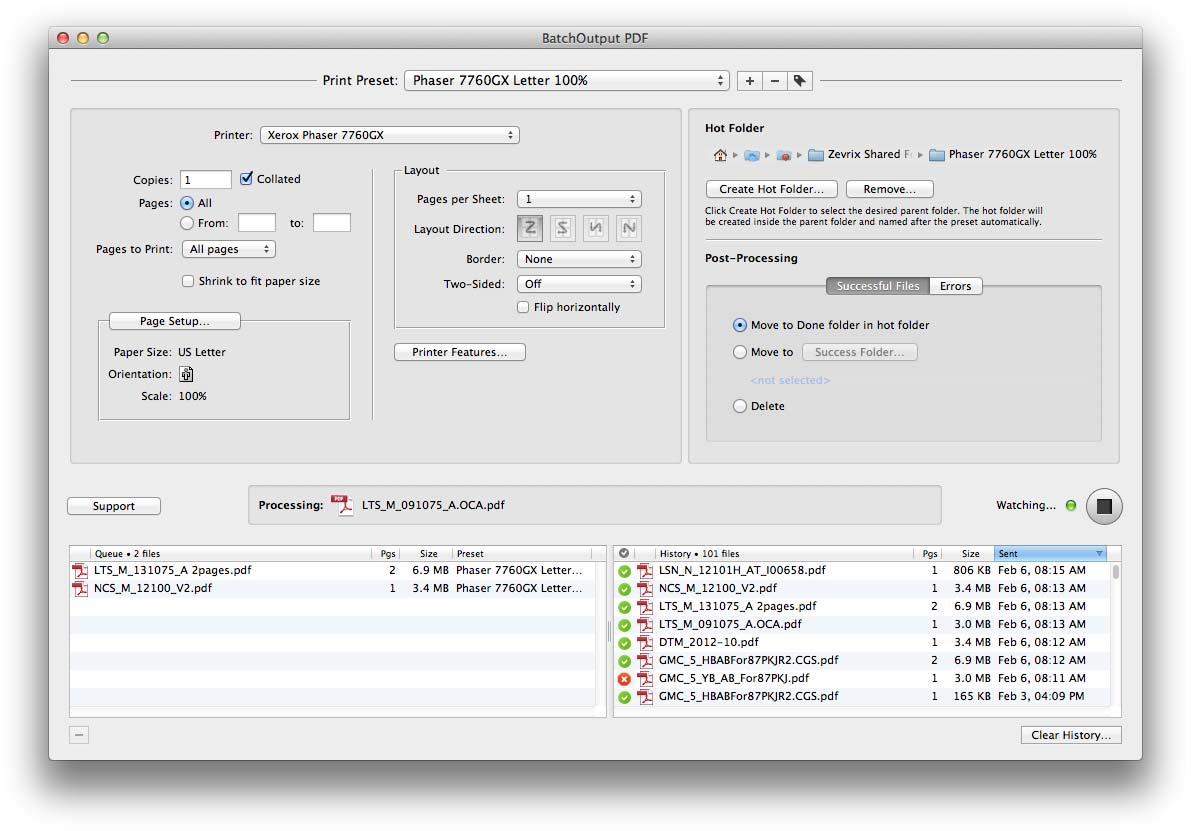
Zevrix Solutions releases BatchOutput PDF 2.2.14, a feature update to its solution to automate PDF printing with watched hot folders on OS X. With BatchOutput PDF, users only need to drop PDFs into hot folders and the files will be printed automatically using the assigned output preset, saving users the time and effort of printing the files manually. The new version adds an option to process files under workflows where PDF files initially arrive to hot folders with an alternative file extension.
Toronto (ON) Canada - Zevrix Solutions today is proud to announce the release of BatchOutput PDF 2.2.14, a feature update to its PDF printing automation solution for Mac OS X. The software allows users to print PDF files from watched hot folders, saving the time and effort of opening and printing each document manually.
The new version adds a preference to move non-PDF files to the errors folder or leave them in hot folder. The latter option lets users utilize workflows where PDF files initially arrive to hot folders with an alternative file extension, which can happen when remote workers upload PDF files via an FTP connection.
"This is one of those apps that you never knew you needed until you spend a day using it," says Glen Saville, a designer from Hornchurch, UK. "If you handle a large number of PDFs daily, this will save you a lot of time, without a doubt."
BatchOutput PDF offers reliable, robust and affordable solution for users of any trade, whether it's print, publishing, graphic design, education or financial sector:
* Print PDF files automatically from watched hot folders
* Create hot folders for different print settings
* Work with other programs while BatchOutput PDF runs in the background
* Detailed output history
* Specify password for encrypted PDFs
* Save time and hassle of printing each PDF manually
In addition to the single-user version of the program, Zevrix also offers BatchOutput PDF Server that can serve unlimited users on a network.
Pricing and Availability:
BatchOutput PDF can be purchased from Zevrix website for $24.95 USD (Server version $99.95), as well as from authorized resellers and Mac Apple Store. The update is free for licensed users of version 2. Trial is also available for download. BatchOutput PDF requires Mac OS X 10.5-10.10 (some features require Mac OS X 10.7 or later).
Zevrix Solutions: http://zevrix.com
BatchOutput PDF 2.2.14: http://zevrix.com/BatchOutputPDF.php
Download: http://zevrix.com/BatchOutputPDF.dmg
Purchase: http://zevrix.com/store.php
Screenshot: http://zevrix.com/screenshots/bo-pdf/bopdf2-main.jpg
Located in Toronto, Canada, Zevrix Solutions provides automation and productivity solutions for Adobe Creative Cloud and Creative Suite software, PDF workflows, graphic file diagnostics and Microsoft Office output on Mac OS. Zevrix is dedicated to help professionals increase their profits through automating everyday tasks, producing error-free documents, saving disk space and cutting production costs. For more information, visit their website. Copyright (C) 2015 Zevrix Solutions. All Rights Reserved. Other trademarks and registered trademarks may be the property of their respective owners.
*******
Link To Article: http://prmac.com/release-id-75389.htm
*******
---------------------------------------------------------------------------------
Note that you can alter delivered distributions at any time.
Login to your account on prMac to alter your channel selection, or to opt-out at any time.
BatchOutput PDF 2.2.14 Improves Print Workflow Flexibility - Published on 06/15/15
Zevrix Solutions releases BatchOutput PDF 2.2.14, a feature update to its solution to automate PDF printing with watched hot folders on OS X. With BatchOutput PDF, users only need to drop PDFs into hot folders and the files will be printed automatically using the assigned output preset, saving users the time and effort of printing the files manually. The new version adds an option to process files under workflows where PDF files initially arrive to hot folders with an alternative file extension.
Toronto (ON) Canada - Zevrix Solutions today is proud to announce the release of BatchOutput PDF 2.2.14, a feature update to its PDF printing automation solution for Mac OS X. The software allows users to print PDF files from watched hot folders, saving the time and effort of opening and printing each document manually.
The new version adds a preference to move non-PDF files to the errors folder or leave them in hot folder. The latter option lets users utilize workflows where PDF files initially arrive to hot folders with an alternative file extension, which can happen when remote workers upload PDF files via an FTP connection.
"This is one of those apps that you never knew you needed until you spend a day using it," says Glen Saville, a designer from Hornchurch, UK. "If you handle a large number of PDFs daily, this will save you a lot of time, without a doubt."
BatchOutput PDF offers reliable, robust and affordable solution for users of any trade, whether it's print, publishing, graphic design, education or financial sector:
* Print PDF files automatically from watched hot folders
* Create hot folders for different print settings
* Work with other programs while BatchOutput PDF runs in the background
* Detailed output history
* Specify password for encrypted PDFs
* Save time and hassle of printing each PDF manually
In addition to the single-user version of the program, Zevrix also offers BatchOutput PDF Server that can serve unlimited users on a network.
Pricing and Availability:
BatchOutput PDF can be purchased from Zevrix website for $24.95 USD (Server version $99.95), as well as from authorized resellers and Mac Apple Store. The update is free for licensed users of version 2. Trial is also available for download. BatchOutput PDF requires Mac OS X 10.5-10.10 (some features require Mac OS X 10.7 or later).
Zevrix Solutions: http://zevrix.com
BatchOutput PDF 2.2.14: http://zevrix.com/BatchOutputPDF.php
Download: http://zevrix.com/BatchOutputPDF.dmg
Purchase: http://zevrix.com/store.php
Screenshot: http://zevrix.com/screenshots/bo-pdf/bopdf2-main.jpg
Located in Toronto, Canada, Zevrix Solutions provides automation and productivity solutions for Adobe Creative Cloud and Creative Suite software, PDF workflows, graphic file diagnostics and Microsoft Office output on Mac OS. Zevrix is dedicated to help professionals increase their profits through automating everyday tasks, producing error-free documents, saving disk space and cutting production costs. For more information, visit their website. Copyright (C) 2015 Zevrix Solutions. All Rights Reserved. Other trademarks and registered trademarks may be the property of their respective owners.
*******
Link To Article: http://prmac.com/release-id-75389.htm
*******
---------------------------------------------------------------------------------
Note that you can alter delivered distributions at any time.
Login to your account on prMac to alter your channel selection, or to opt-out at any time.
Mac Backup Guru 5.0 Offers Improved Data Backup Options for Mac OS X
A new article has been published at prMac.
Mac Backup Guru 5.0 Offers Improved Data Backup Options for Mac OS X - Published on 06/15/15
Auckland based MacDaddy today announces Mac Backup Guru 5.0, an important update to their innovative backup app for Mac OS X. Mac Backup Guru offers direct drive cloning, synchronization, and incremental snapshots of data. Users can backup small amounts of files and data, or entire drives full of data. Version 5.0 offers an improved interface, faster and more stable cloning ability, more intuitive scheduling, improved incremental snapshots, and better performing background synchronization.
Auckland, New Zealand - MacDaddy is pleased to announce the release of Mac Backup Guru 5.0, an important update to their innovative backup app for Mac OS X. Offering direct cloning, synchronization, and incremental snapshots, all 3 functions can handle backups from small amounts of files and data or entire drives full of data. The version 5.0 update brings an improved interface, faster and more stable cloning ability, more intuitive scheduling, improved incremental snapshots, and better performing background synchronization to the app.
"Mac Backup Guru was developed simply because of our own needs for a backup utility like this," explained Ben Slaney of MacDaddy. "We couldn't find anything like this on the market, so we decided to create it ourselves. The result is an easy to use, yet flexible backup utility that offers more features than other utilities of its type for Mac OS X."
Direct Cloning:
The Direct Cloning function creates an exact duplicate of a folder or disk. Direct Cloning easily makes a direct copy of anything a user tells it to copy. Users who have attempted to make a backup of their System folder by simply dragging & dropping the folder to another drive know that method simply doesn't work. Mac Backup Guru can easily make an exact copy of anything marked for backup, whether it's terabytes of data, or the complex folder hierarchy of the System folder.
Synchronization:
Synchronization is the answer if a user already has a partial backup of their data and wants to make sure that all of the folders and files that are different between the source and destination are included in the backup. Synchronization performs this by only copying the files that have changed. If it finds any files on the destination disk that are no longer on the source disk, it moves them to the trash. The result is a clone of the source directory,
Incremental Snapshots:
If a user were to make a complete backup of a 500GB hard drive each time, it would require a multiple terabyte capacity backup drive to hold even just a few backups. Incremental Snapshots allow users to store multiple backups of their drive by storing only fresh copies of the files that have been changed since the previous backup, and the rest are hardlinks to the previous backup. This allows multiple backups using only a fraction of the space needed for a full backup each time, while appearing as a full backup. If you browse through an incremental snapshot in the Finder it looks just like a full disk duplicate. If you were to do a "Get Info" on 10 of them they'll tell you they're using 10TB of space - for a 1TB drive. That's what makes Incremental Snapshots so useful. Users can have multiple "full" backups of their drives, yet use only a fraction of the actual space on their backup drive.
Features:
* Simple, reliable utility to create copies of files
* Incremental Snapshots, which use about one tenth of the space of a standard backup and are about 10X faster
* Copy & Paste a bootable drive in the Finder (OS X 10.10 and higher)
* Easy to use, animated user interface
* Resumable Backups - Interrupt and start your backups again at any time
* Automatic Backups - Backing up a hard drive becomes simply a matter of plugging in a backup drive
* Synchronized Backups - Any new items are copied to the backup; any items not on the source are moved to the destination drive's trash
In OS X 10.10 or higher, Mac Backup Guru offers its own improved version of Copy & Paste in Finder's contextual menu. This allows users to copy an entire bootable volume and then paste it to another HFS+ volume, creating a bootable volume. All metadata and permissions are kept fully intact, and the Copy & Paste functions are also resumable.
Update Highlights:
* Improved Interface
* Improved incremental snapshots
* Faster and more reliable cloning ability
* More intuitive scheduling
* Better performing background synchronization
Mac Backup Guru makes keeping important files backed up easier than ever. It will run in the background, making bootable backups of the Mac file system, while users work on other things. No more waiting for a backup to finish before getting back to work. The app can even run scheduled backups so there's no need to worry about remembering to backup any new work. A backup can be scheduled for any time of day, and Mac Backup Guru will run a backup of the selected data at the scheduled time. If the app isn't running at the scheduled backup time, Mac Backup Guru will start up in the background and begin the backup.
Making bootable backups with Mac Backup Guru is a breeze. Simply select a volume to backup, and then select the destination volume. The app will make a bootable copy of that volume. Anyone can boot their Mac from an external backup by simply holding down the Option key while their Mac boots up. Users can then select the external drive, and boot their Mac from it.
Mac Backup Guru is intelligent. If the backup drive isn't attached to the Mac when it's time for a scheduled backup, it's no problem. Backup Guru will automatically run the next time that drive is attached. Backup Guru will also notify you if there is a pending backup when it opens. Restoring is even easier; simply select the backup to restore from, and then select the drive to restore to. Mac Backup Guru does the rest of the work, quickly restoring all of the data to the destination drive.
"We have striven to make using Mac Backup Guru as easy as possible, while also working to offer the most comprehensive backup system available for the Mac today," continued Slaney. "We think version 5.0 is the best version yet, and we think our customers will agree."
System Requirements:
* Mac OS X 10.9 or later
* 64-bit processor
* 5.3 MB
Pricing and Availability:
Mac Backup Guru 5.0 is $39.00 (USD) and is available directly from the publisher's website. A free trial download is also available. Review copies are available on request.
Mac Daddy: http://macdaddy.io/
Mac Backup Guru 5.0: http://macdaddy.io/mac-backup-software/
Direct Download: http://macdaddy.io/MacBackupGuru.zip
Animated Gif (Copy): http://macdaddy.io/wp-content/uploads/2012/12/MacBackupGuruCopyPasteBootableVolume.gif
Screenshot 1: http://macdaddy.io/wp-content/uploads/2012/12/MacBackupGuruIncrementalSnapshotsSpaceSaving.png
Screenshot 2: http://macdaddy.io/wp-content/uploads/2012/12/MacBackupGuruScreenshot.png
MacDaddy, a subsidiary of Mac OSX File Recovery, aims to bring the most powerful but easy to use disk utilities for OS X to the public. MacDaddy is dedicated to making extremely powerful low-level software that is ridiculously easy to use. All Material and Software (C) Copyright 2015 MacDaddy. All Rights Reserved. Apple, the Apple logo, Macintosh and Mac OS X are registered trademarks of Apple Inc. in the U.S. and/or other countries. Other trademarks and registered trademarks may be the property of their respective owners.
*******
Link To Article: http://prmac.com/release-id-75386.htm
*******
---------------------------------------------------------------------------------
Note that you can alter delivered distributions at any time.
Login to your account on prMac to alter your channel selection, or to opt-out at any time.
Mac Backup Guru 5.0 Offers Improved Data Backup Options for Mac OS X - Published on 06/15/15
Auckland based MacDaddy today announces Mac Backup Guru 5.0, an important update to their innovative backup app for Mac OS X. Mac Backup Guru offers direct drive cloning, synchronization, and incremental snapshots of data. Users can backup small amounts of files and data, or entire drives full of data. Version 5.0 offers an improved interface, faster and more stable cloning ability, more intuitive scheduling, improved incremental snapshots, and better performing background synchronization.
Auckland, New Zealand - MacDaddy is pleased to announce the release of Mac Backup Guru 5.0, an important update to their innovative backup app for Mac OS X. Offering direct cloning, synchronization, and incremental snapshots, all 3 functions can handle backups from small amounts of files and data or entire drives full of data. The version 5.0 update brings an improved interface, faster and more stable cloning ability, more intuitive scheduling, improved incremental snapshots, and better performing background synchronization to the app.
"Mac Backup Guru was developed simply because of our own needs for a backup utility like this," explained Ben Slaney of MacDaddy. "We couldn't find anything like this on the market, so we decided to create it ourselves. The result is an easy to use, yet flexible backup utility that offers more features than other utilities of its type for Mac OS X."
Direct Cloning:
The Direct Cloning function creates an exact duplicate of a folder or disk. Direct Cloning easily makes a direct copy of anything a user tells it to copy. Users who have attempted to make a backup of their System folder by simply dragging & dropping the folder to another drive know that method simply doesn't work. Mac Backup Guru can easily make an exact copy of anything marked for backup, whether it's terabytes of data, or the complex folder hierarchy of the System folder.
Synchronization:
Synchronization is the answer if a user already has a partial backup of their data and wants to make sure that all of the folders and files that are different between the source and destination are included in the backup. Synchronization performs this by only copying the files that have changed. If it finds any files on the destination disk that are no longer on the source disk, it moves them to the trash. The result is a clone of the source directory,
Incremental Snapshots:
If a user were to make a complete backup of a 500GB hard drive each time, it would require a multiple terabyte capacity backup drive to hold even just a few backups. Incremental Snapshots allow users to store multiple backups of their drive by storing only fresh copies of the files that have been changed since the previous backup, and the rest are hardlinks to the previous backup. This allows multiple backups using only a fraction of the space needed for a full backup each time, while appearing as a full backup. If you browse through an incremental snapshot in the Finder it looks just like a full disk duplicate. If you were to do a "Get Info" on 10 of them they'll tell you they're using 10TB of space - for a 1TB drive. That's what makes Incremental Snapshots so useful. Users can have multiple "full" backups of their drives, yet use only a fraction of the actual space on their backup drive.
Features:
* Simple, reliable utility to create copies of files
* Incremental Snapshots, which use about one tenth of the space of a standard backup and are about 10X faster
* Copy & Paste a bootable drive in the Finder (OS X 10.10 and higher)
* Easy to use, animated user interface
* Resumable Backups - Interrupt and start your backups again at any time
* Automatic Backups - Backing up a hard drive becomes simply a matter of plugging in a backup drive
* Synchronized Backups - Any new items are copied to the backup; any items not on the source are moved to the destination drive's trash
In OS X 10.10 or higher, Mac Backup Guru offers its own improved version of Copy & Paste in Finder's contextual menu. This allows users to copy an entire bootable volume and then paste it to another HFS+ volume, creating a bootable volume. All metadata and permissions are kept fully intact, and the Copy & Paste functions are also resumable.
Update Highlights:
* Improved Interface
* Improved incremental snapshots
* Faster and more reliable cloning ability
* More intuitive scheduling
* Better performing background synchronization
Mac Backup Guru makes keeping important files backed up easier than ever. It will run in the background, making bootable backups of the Mac file system, while users work on other things. No more waiting for a backup to finish before getting back to work. The app can even run scheduled backups so there's no need to worry about remembering to backup any new work. A backup can be scheduled for any time of day, and Mac Backup Guru will run a backup of the selected data at the scheduled time. If the app isn't running at the scheduled backup time, Mac Backup Guru will start up in the background and begin the backup.
Making bootable backups with Mac Backup Guru is a breeze. Simply select a volume to backup, and then select the destination volume. The app will make a bootable copy of that volume. Anyone can boot their Mac from an external backup by simply holding down the Option key while their Mac boots up. Users can then select the external drive, and boot their Mac from it.
Mac Backup Guru is intelligent. If the backup drive isn't attached to the Mac when it's time for a scheduled backup, it's no problem. Backup Guru will automatically run the next time that drive is attached. Backup Guru will also notify you if there is a pending backup when it opens. Restoring is even easier; simply select the backup to restore from, and then select the drive to restore to. Mac Backup Guru does the rest of the work, quickly restoring all of the data to the destination drive.
"We have striven to make using Mac Backup Guru as easy as possible, while also working to offer the most comprehensive backup system available for the Mac today," continued Slaney. "We think version 5.0 is the best version yet, and we think our customers will agree."
System Requirements:
* Mac OS X 10.9 or later
* 64-bit processor
* 5.3 MB
Pricing and Availability:
Mac Backup Guru 5.0 is $39.00 (USD) and is available directly from the publisher's website. A free trial download is also available. Review copies are available on request.
Mac Daddy: http://macdaddy.io/
Mac Backup Guru 5.0: http://macdaddy.io/mac-backup-software/
Direct Download: http://macdaddy.io/MacBackupGuru.zip
Animated Gif (Copy): http://macdaddy.io/wp-content/uploads/2012/12/MacBackupGuruCopyPasteBootableVolume.gif
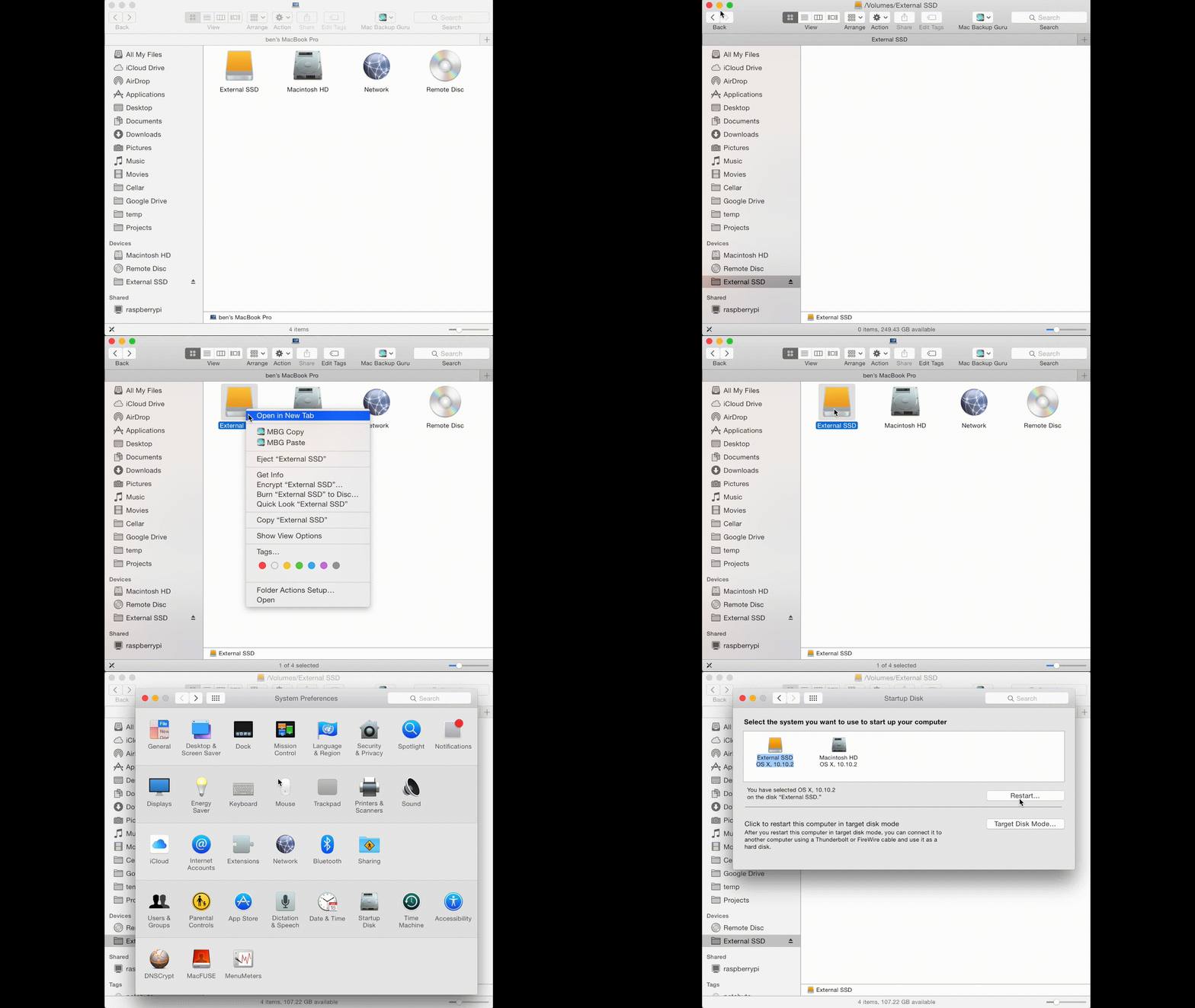
Screenshot 1: http://macdaddy.io/wp-content/uploads/2012/12/MacBackupGuruIncrementalSnapshotsSpaceSaving.png
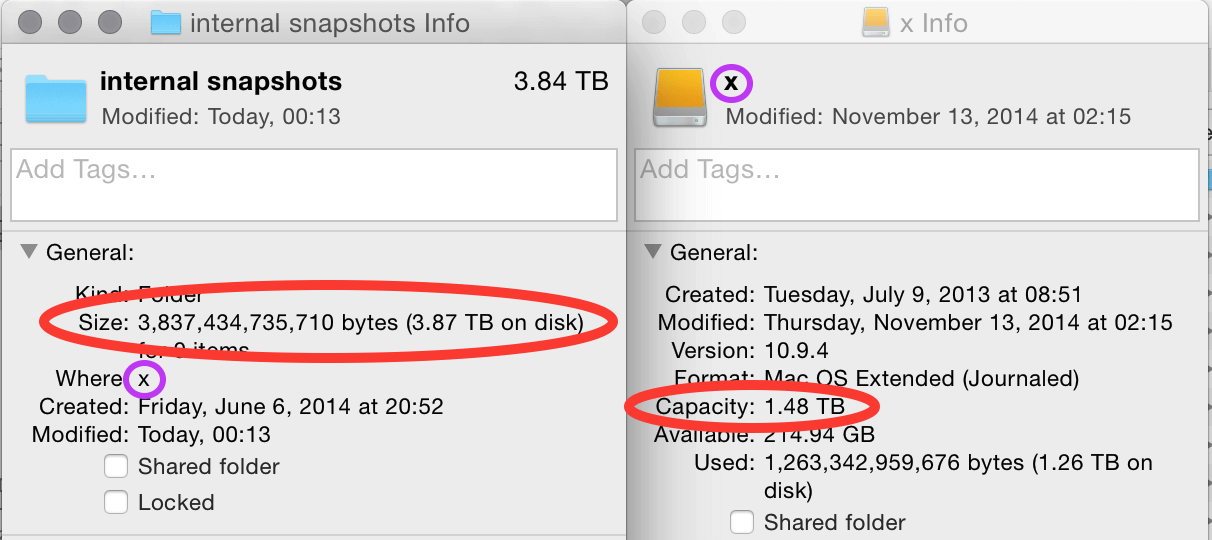
Screenshot 2: http://macdaddy.io/wp-content/uploads/2012/12/MacBackupGuruScreenshot.png
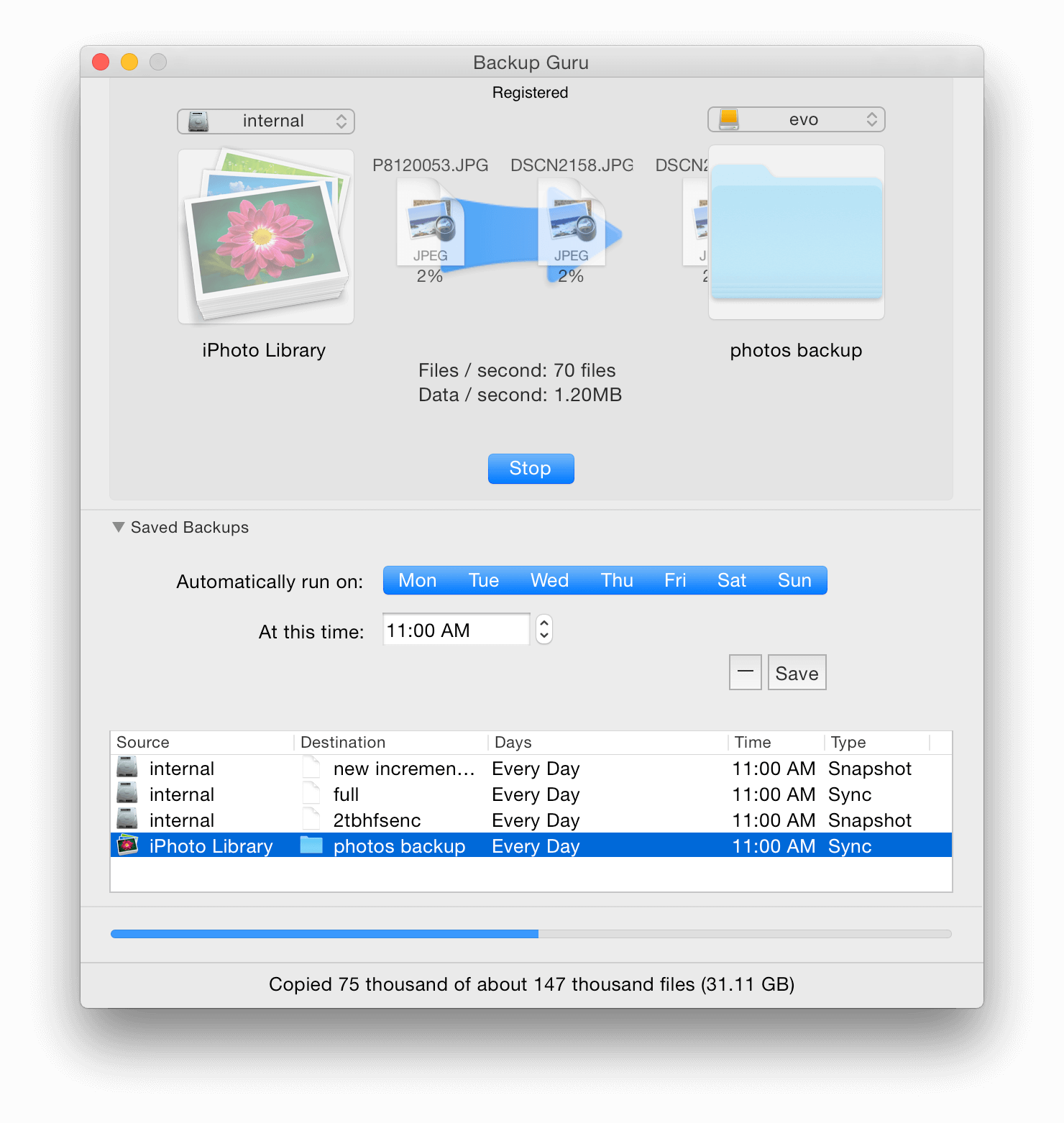
MacDaddy, a subsidiary of Mac OSX File Recovery, aims to bring the most powerful but easy to use disk utilities for OS X to the public. MacDaddy is dedicated to making extremely powerful low-level software that is ridiculously easy to use. All Material and Software (C) Copyright 2015 MacDaddy. All Rights Reserved. Apple, the Apple logo, Macintosh and Mac OS X are registered trademarks of Apple Inc. in the U.S. and/or other countries. Other trademarks and registered trademarks may be the property of their respective owners.
*******
Link To Article: http://prmac.com/release-id-75386.htm
*******
---------------------------------------------------------------------------------
Note that you can alter delivered distributions at any time.
Login to your account on prMac to alter your channel selection, or to opt-out at any time.
MileBug LITE 3.1 for iOS adds Push Notifications and Cloud Stability
A new article has been published at prMac.
MileBug LITE 3.1 for iOS adds Push Notifications and Cloud Stability - Published on 06/15/15
Izatt Apps today announces MileBug LITE 3.1, an update to the free version of their popular GPS mile tracker for iOS. Perfect for the mobile professional and entrepreneur, MileBug is a beautiful GPS mile tracker app that makes it easy to track your tax-deductible mileage on your mobile device. Version 3.1 LITE for iOS adds Push Notifications and brings greater stability to the MileBug Cloud, a cloud solution that will allow iOS and Android devices to share and sync data.
American Fork, Utah - Izatt Apps today is proud to announce the 3.1 release of its flagship app, MileBug - Mileage Log LITE, which adds Push Notifications and a bit of polish to the new MileBug Cloud and updated UI. MileBug Cloud is not iCloud, but a Parse cloud solution that will allow iOS and Android devices to share and sync data. While iOS is first, Android will soon follow.
MileBug Cloud is available as a $.99 (USD) In-App Purchase. The user then creates a MileBug Cloud account which can be accessed on any other supported device at no additional charge. Through MileBug Cloud, users can easily transfer data to the full version of MileBug.
The benefits of MileBug Cloud include:
1) Data Backup and Storage
2) Data syncing across multiple devices (e.g. iPhone and iPad)
3) Data sharing between spouses or business partners
4) Changing phones (eventually even iOS to Android, and vice versa)
MileBug is a beautiful mile tracker app that makes it easy to track your tax-deductible mileage on your iPhone, iPod touch, and iPad devices. This next great addition of the MileBug Cloud will provide data storage, data syncing, and cross-platform data sharing.
MileBug first hit the Apple App Store in August 2008. At the time, MileBug was one of less than 2700 apps in the store. By January 2010 it had risen to be a Top 10 Finance app, where it has regularly appeared since. In January 2014, MileBug hit the #1 Finance spot for the first time and has returned there multiple times since, including twice this month.
Device Requirements:
* iPhone, iPad, and iPod touch
* Requires iOS 7.1 or later
* 9.2 MB
Pricing and Availability:
MileBug LITE - Mileage Log & Expense Tracker for Tax Deduction 3.1 is Free (with in-app purchase) and available worldwide through the Apple App Store in the Finance category.
MileBug LITE 3.1: http://milebug.com/
Download from iTunes: https://itunes.apple.com/app/milebug-lite-mileage-log-expense/id294164208
Screenshot (MileBug Cloud): http://milebug.com/wp-content/uploads/2015/01/cloud-iphone5-ad.png
App Icon: http://milebug.com/wp-content/uploads/2014/03/milebuglite.512x512.jpg
Izatt International is a mobile application (iOS, Android) development company in American Fork, UT. Izatt develops applications internally and accepts outside development projects. Copyright 2008-2015 Izatt International. All Rights Reserved. Apple, the Apple logo, iPhone, iPod touch, iPad and iPad Mini are registered trademarks of Apple Computer in the U.S. and/or other countries.
*******
Link To Article: http://prmac.com/release-id-75385.htm
*******
---------------------------------------------------------------------------------
Note that you can alter delivered distributions at any time.
Login to your account on prMac to alter your channel selection, or to opt-out at any time.
MileBug LITE 3.1 for iOS adds Push Notifications and Cloud Stability - Published on 06/15/15
Izatt Apps today announces MileBug LITE 3.1, an update to the free version of their popular GPS mile tracker for iOS. Perfect for the mobile professional and entrepreneur, MileBug is a beautiful GPS mile tracker app that makes it easy to track your tax-deductible mileage on your mobile device. Version 3.1 LITE for iOS adds Push Notifications and brings greater stability to the MileBug Cloud, a cloud solution that will allow iOS and Android devices to share and sync data.
American Fork, Utah - Izatt Apps today is proud to announce the 3.1 release of its flagship app, MileBug - Mileage Log LITE, which adds Push Notifications and a bit of polish to the new MileBug Cloud and updated UI. MileBug Cloud is not iCloud, but a Parse cloud solution that will allow iOS and Android devices to share and sync data. While iOS is first, Android will soon follow.
MileBug Cloud is available as a $.99 (USD) In-App Purchase. The user then creates a MileBug Cloud account which can be accessed on any other supported device at no additional charge. Through MileBug Cloud, users can easily transfer data to the full version of MileBug.
The benefits of MileBug Cloud include:
1) Data Backup and Storage
2) Data syncing across multiple devices (e.g. iPhone and iPad)
3) Data sharing between spouses or business partners
4) Changing phones (eventually even iOS to Android, and vice versa)
MileBug is a beautiful mile tracker app that makes it easy to track your tax-deductible mileage on your iPhone, iPod touch, and iPad devices. This next great addition of the MileBug Cloud will provide data storage, data syncing, and cross-platform data sharing.
MileBug first hit the Apple App Store in August 2008. At the time, MileBug was one of less than 2700 apps in the store. By January 2010 it had risen to be a Top 10 Finance app, where it has regularly appeared since. In January 2014, MileBug hit the #1 Finance spot for the first time and has returned there multiple times since, including twice this month.
Device Requirements:
* iPhone, iPad, and iPod touch
* Requires iOS 7.1 or later
* 9.2 MB
Pricing and Availability:
MileBug LITE - Mileage Log & Expense Tracker for Tax Deduction 3.1 is Free (with in-app purchase) and available worldwide through the Apple App Store in the Finance category.
MileBug LITE 3.1: http://milebug.com/
Download from iTunes: https://itunes.apple.com/app/milebug-lite-mileage-log-expense/id294164208
Screenshot (MileBug Cloud): http://milebug.com/wp-content/uploads/2015/01/cloud-iphone5-ad.png

App Icon: http://milebug.com/wp-content/uploads/2014/03/milebuglite.512x512.jpg

Izatt International is a mobile application (iOS, Android) development company in American Fork, UT. Izatt develops applications internally and accepts outside development projects. Copyright 2008-2015 Izatt International. All Rights Reserved. Apple, the Apple logo, iPhone, iPod touch, iPad and iPad Mini are registered trademarks of Apple Computer in the U.S. and/or other countries.
*******
Link To Article: http://prmac.com/release-id-75385.htm
*******
---------------------------------------------------------------------------------
Note that you can alter delivered distributions at any time.
Login to your account on prMac to alter your channel selection, or to opt-out at any time.
Escape the Void - an exciting new endless-flyer for iPhone and iPad
A new article has been published at prMac.
Escape the Void - an exciting new endless-flyer for iPhone and iPad - Published on 06/15/15
Berlin based indie-software developer, Patrik Budenz today announces Escape the Void 1.0.2, his minimalistic new endless-flyer game designed for iOS devices. Set in a minimalistically designed world, players pilot a tiny spacecraft through fast approaching barriers and obstacles. As the spacecraft's speed increases, players have to react faster and faster. In order to keep things interesting, there are five game modes, different Game Center Leaderboards and many Game Center Achievements.
Berlin, Germany - Indie-software developer, Patrik Budenz today is proud to announce the release of Escape the Void 1.0.2, his minimalistic new endless-flyer game designed for iPhone, iPad and iPod touch devices. Players must navigate past fast approaching barriers by rotating and tilting their device, thus both requiring fast reactions and sensitiveness.
In most games, players navigate by tapping their fingers on the device. Escape the Void instead makes use of the device's tilting sensors for navigation: Set in a minimalistically designed world, players pilot a tiny spacecraft through fast approaching barriers and obstacles. As the spacecraft's speed increases, players have to react faster and faster. At the same time, players' ability to subtly manipulate their device is tested - too fast or strong movements will result in a crash!
Players can collect bonuses in order to slow down the pace of the game (for a short while), to get farther or to increase their score. In order to keep things interesting, there are five game modes, different Game Center Leaderboards and many Game Center Achievements.
Future updates will introduce new game modes (e.g. a time trial mode in which players should try to go as far as possible in a given time), extra lives and new bonuses that help to get farther.
Device Requirements:
* iPhone 4S or later, iPad 2 or later, and iPod touch
* Optimized for iPhone 5, iPhone 6/6 Plus
* Requires iOS 8.0 or later
* 29.8 MB
Pricing and Availability:
Escape the Void 1.0.2 is only $0.99 USD (or equivalent amount in other currencies) and available worldwide exclusively through the App Store in the Games category.
Patrik Budenz: http://patrikbudenz.de
Escape the Void 1.0.2: http://escape-the-void.com
Purchase and Download: https://itunes.apple.com/us/app/escape-the-void/id965020184
Media Assets: http://escape-the-void.com/press
App Icon: http://escape-the-void.com/material/EscapeTheVoid-Icon512-Square.png
Patrik Budenz is an independent developer and based in Berlin, Germany. Since 1998, Patrik has been working as a software developer (websites, cms, apps and database programming). From 2011 to 2013 he is also collaborated with Ghostwriters Entertainment from Berlin/Germany. All Material and Software (C) 2015 Patrik Budenz/ All Rights Reserved. Apple, the Apple logo, iPhone, iPod and iPad are registered trademarks of Apple Inc. in the U.S. and/or other countries. Other trademarks and registered trademarks may be the property of their respective owners.
*******
Link To Article: http://prmac.com/release-id-75387.htm
*******
---------------------------------------------------------------------------------
Note that you can alter delivered distributions at any time.
Login to your account on prMac to alter your channel selection, or to opt-out at any time.
Escape the Void - an exciting new endless-flyer for iPhone and iPad - Published on 06/15/15
Berlin based indie-software developer, Patrik Budenz today announces Escape the Void 1.0.2, his minimalistic new endless-flyer game designed for iOS devices. Set in a minimalistically designed world, players pilot a tiny spacecraft through fast approaching barriers and obstacles. As the spacecraft's speed increases, players have to react faster and faster. In order to keep things interesting, there are five game modes, different Game Center Leaderboards and many Game Center Achievements.
Berlin, Germany - Indie-software developer, Patrik Budenz today is proud to announce the release of Escape the Void 1.0.2, his minimalistic new endless-flyer game designed for iPhone, iPad and iPod touch devices. Players must navigate past fast approaching barriers by rotating and tilting their device, thus both requiring fast reactions and sensitiveness.
In most games, players navigate by tapping their fingers on the device. Escape the Void instead makes use of the device's tilting sensors for navigation: Set in a minimalistically designed world, players pilot a tiny spacecraft through fast approaching barriers and obstacles. As the spacecraft's speed increases, players have to react faster and faster. At the same time, players' ability to subtly manipulate their device is tested - too fast or strong movements will result in a crash!
Players can collect bonuses in order to slow down the pace of the game (for a short while), to get farther or to increase their score. In order to keep things interesting, there are five game modes, different Game Center Leaderboards and many Game Center Achievements.
Future updates will introduce new game modes (e.g. a time trial mode in which players should try to go as far as possible in a given time), extra lives and new bonuses that help to get farther.
Device Requirements:
* iPhone 4S or later, iPad 2 or later, and iPod touch
* Optimized for iPhone 5, iPhone 6/6 Plus
* Requires iOS 8.0 or later
* 29.8 MB
Pricing and Availability:
Escape the Void 1.0.2 is only $0.99 USD (or equivalent amount in other currencies) and available worldwide exclusively through the App Store in the Games category.
Patrik Budenz: http://patrikbudenz.de
Escape the Void 1.0.2: http://escape-the-void.com
Purchase and Download: https://itunes.apple.com/us/app/escape-the-void/id965020184
Media Assets: http://escape-the-void.com/press
App Icon: http://escape-the-void.com/material/EscapeTheVoid-Icon512-Square.png

Patrik Budenz is an independent developer and based in Berlin, Germany. Since 1998, Patrik has been working as a software developer (websites, cms, apps and database programming). From 2011 to 2013 he is also collaborated with Ghostwriters Entertainment from Berlin/Germany. All Material and Software (C) 2015 Patrik Budenz/ All Rights Reserved. Apple, the Apple logo, iPhone, iPod and iPad are registered trademarks of Apple Inc. in the U.S. and/or other countries. Other trademarks and registered trademarks may be the property of their respective owners.
*******
Link To Article: http://prmac.com/release-id-75387.htm
*******
---------------------------------------------------------------------------------
Note that you can alter delivered distributions at any time.
Login to your account on prMac to alter your channel selection, or to opt-out at any time.
Subscribe to:
Posts (Atom)