A new article has been published at prMac.
i.Business Magazine CTIA Super Mobility Distributed Edition Book Today - Published on 06/16/15
i.Business Magazine will be one of the official media sponsors of the CTIA Super Mobility Show in Las Vegas on September 9-11, 2015. They will have a Special Magazine Edition that will be distributed at the Show and all Registered Attendees. The explosive growth of mobile innovation in the United States has transformed the wireless landscape profoundly. i.Business Magazine is the distinct choice for business end-users that are currently using Apple technology or are interested in switching.
Cape Coral, Florida - i.Business Magazine will be one of the official media sponsors of the CTIA Super Mobility Show in Las Vegas on September 9-11, 2015. The company will have a Special Magazine Edition that will be distributed at the Show and all Registered Attendees.
The explosive growth of mobile innovation in the United States has transformed the wireless landscape profoundly. Reflecting that transformation is the mobile industry's largest and most influential trade event in the Western Hemisphere, CTIA Super Mobility 2015.
The company is offering a special intro pricing rate for parties interested in advertising in the magazine. The following bundles and special pricing for this edition:
* Full Page Advertisement & Full Page Product Review with Product Mentioned on Magazine Cover Only $4,000.00 - Only 2 Spots Available
* Full Page Advertisement & Full Page Product Review - Only $2,500.00 - Only 3 Spots Available
* Full Page Advertisement & Half Page Product Review Only $2,000.00 - Only 2 Spots Available
* Inside Front Cover - $2,500.00 - Only 1 Spot Available
* Full Page Advertisement Only $1,500.00
* Half Page Advertisement - Only $750.00
Artwork Due Date: July 30, 2015.
i.Business Magazine is the distinct choice for business end-users that are currently using Apple technology or are interested in switching. Unlike any other magazine, we focus on providing information about business and enterprise solutions running on Apple technologies. i.Business Magazine highlights what Apple can do for business and enterprise.
Publisher of i.Business Magazine Carmine DeSanto says "We have set ourselves apart by focusing on business/enterprise solutions for all Apple technologies." "We are the only Apple based business and enterprise magazine on the market." Medical/Healthcare, Legal, Retail, Real Estate, Finance, Automotive, Manufacturing, Security and small business success stories to name a few are some of the articles you will find in our issues.
i.Business Magazine: http://www.ibusinessmag.com
Editorial Calendar: http://d19cgyi5s8w5eh.cloudfront.net/eml/eveeghyRRCmeifmctA8ixw?e=results10%40me.com&a=kYaiZ7ihT8a5LAUBx7HxeA&f=&t=1
Subscribe: http://ibusinessmag.com/i.Business_New/Subscribe.html
Cover Stories Available: http://www.ibusinessmag.com/cover/Cover/Magazine_Cover.html
Media Kit (pdf): http://www.ibusinessmag.com/mediakit2015.pdf
The team behind i.Business Magazine have decades of experience in the Apple Business & Education communities. The magazine also looks to cater to those Windows users looking to switch over to Apple technology for their business needs. We strive to cover as many vertical markets as possible, which include but are not limited to, Retail, Hospitality, ERP, CAD, Real Estate, Legal, Scientific Computing, Medical/Healthcare, Government, Automotive, Manufacturers, Accounting/Finance, Print & Graphics and Security & Surveillance. Our articles take a solutions-based approach to productivity, workflow management and tips & tricks. The magazine articles come from the industry leaders with years of experience and proven track records. Copyright (C) 2015 i.Business Magazine. All Rights Reserved. Apple, the Apple logo, iPhone, iPod and iPad are registered trademarks of Apple Inc. in the U.S. and/or other countries.
*******
Link To Article: http://prmac.com/release-id-75422.htm
*******
---------------------------------------------------------------------------------
Note that you can alter delivered distributions at any time.
Login to your account on prMac to alter your channel selection, or to opt-out at any time.

Mobile 3D Modeling App Verto Studio 3D 2.1 launches Verto Studio Cloud
A new article has been published at prMac.
Mobile 3D Modeling App Verto Studio 3D 2.1 launches Verto Studio Cloud - Published on 06/16/15
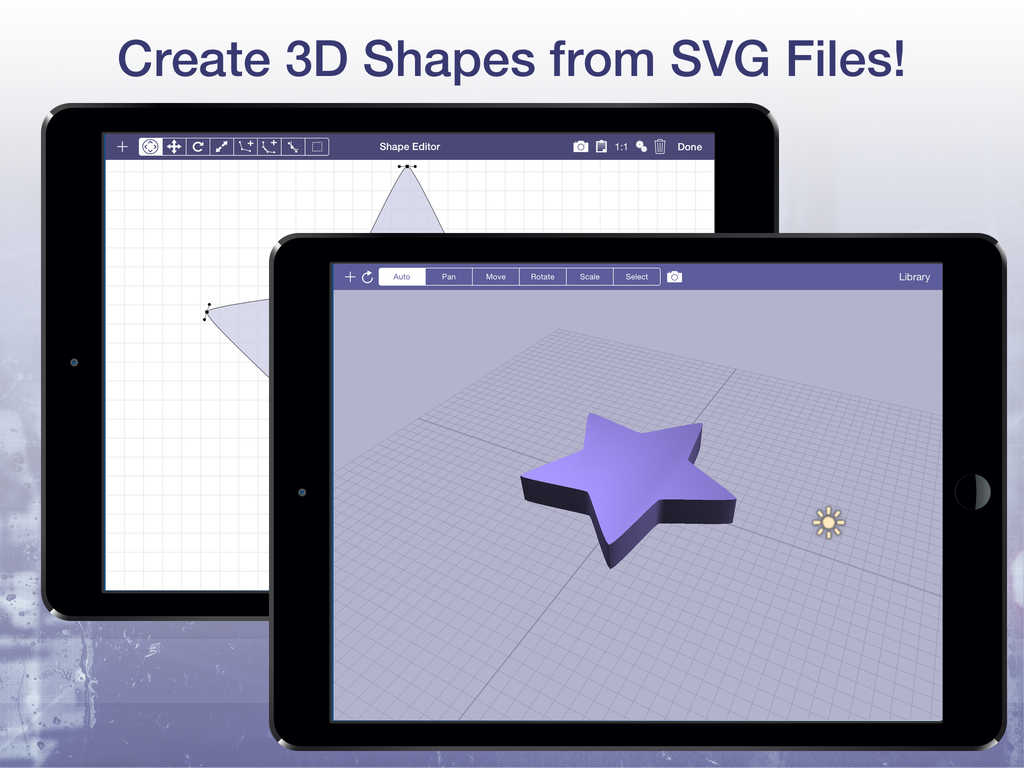
Single-developer company Verto Studio LLC launches its revolutionary 3D cloud service for free to all users of desktop and mobile Verto Studio 3D. Now, all Verto Studio scenes can be published to the web, viewable by anyone else in the world within a web browser. Additionally, an easy-to-use shape editor has also been added to Verto Studio which supports the importing and 3D extrusion of SVG files.
San Diego, California - Independent developer and sole owner of Verto Studio LLC, Michael L. Farrell is thrilled to announce the launch of Verto Studio Cloud, a revolutionary, scalable 3D cloud service for free to all users of Verto Studio 3D 2.1. Serving as a one-stop platform for development and sharing of 3D content, Verto Studio Cloud is expected to be a big hit among users of the already-popular 3D mobile modeling software. Verto Studio Cloud allows 3D artists and mobile game developers to rapidly share designs, proof-of-concept work, or final assets with team members all over the world with just a single tap.
Users take advantage of the cloud upload service simply by tapping the cloud icon on any of their existing documents, and publishing their work to the cloud. Within seconds, the published 3D scene becomes available to the millions of users of on the mobile web either by browsing the cloud service, or directly via sharing of Verto Studio Cloud links.
In addition to the Verto Studio Cloud launch, the 2.1 update of Verto Studio includes an "app within an app"; a shape editor feature which serves as a fully functional system for creating precision 2D shapes with features such as snap-to-grid, bezier curve manipulation, background image tracing, and SVG import. This allows artists that are more familiar with 2D design, an easy entry into the world of 3D modeling by designing shapes in a familiar 2D setting, and converting these shapes into polygonal 3D meshes. Additionally, this aids the increasing industry trend of all-mobile work pipelines allowing users to create 2D artwork in their favorite vector drawing graphics apps on the iPad and exporting their work directly to Verto Studio 3D via SVG import.
As a proof-of-concept of Verto Studio 3D's powerful capability, this year, Michael L. Farrell used Verto Studio 3D to develop and launch a 3D desktop game entirely on his own. In a 6 month period, all of the importing, modeling, texturing, and shader development needed by the game project was completed using Verto Studio 3D on the iPad and on the Mac. "I wanted to prove that this product is anything but a typical mobile app ... So, I figured the easiest way to accomplish that was to develop an entire game using the technology", stated Farrell.
Lastly, Verto Studio 3D 2.1 for iOS adds import support for all of the file formats listed below:
Collada (.dae), Blender 3D (.blend), 3ds Max 3DS (.3ds), 3ds Max, ASE (.ase), Wavefront Object (.obj), Stanford Polygon Library (.ply), AutoCAD DXF (.dxf), LightWave (.lwo), Modo (.lxo), Stereolithography (.stl), AC3D (.ac), Milkshape 3D (.ms3d), TrueSpace (.cob,.scn), Valve Model (.smd,.vta), Quake I Mesh (.mdl), Quake II Mesh (.md2), Quake III Mesh (.md3), Quake III BSP (.pk3), Return to Castle Wolfenstein (.mdc), Doom 3 (.md5*), Biovision BVH (.bvh), CharacterStudio Motion (.csm), DirectX X (.x), BlitzBasic 3D (.b3d), Quick3D (.q3d, .q3s), Ogre XML (.mesh.xml), Irrlicht Mesh (.irrmesh), Irrlicht Scene (.irr), Neutral File Format (.nff), Sense8 WorldToolKit (.nff), Object File Format (.off), PovRAY Raw (.raw), Terragen Terrain (.ter), 3D GameStudio (.mdl), 3D GameStudio Terrain (.hmp), and Izware Nendo (.ndo)
Verto Studio 3D: http://www.vertostudio.com/
Verto Studio Cloud: http://www.vertostudio.com/cloud
Verto Studio for iOS: http://www.vertostudio.com/ios.php
Purchase and Download (iOS): https://itunes.apple.com/app/verto-studio-3d/id417187334
Screenshot: http://a3.mzstatic.com/us/r30/Purple7/v4/a8/1e/a5/a81ea59b-22ab-09ec-877c-0fa1d5af8440/screen1024x1024.jpeg
Screenshot 2: http://a2.mzstatic.com/us/r30/Purple1/v4/06/21/30/06213036-38fd-437f-8fac-0e1e767873a5/screen1024x1024.jpeg
Located in beautiful San Diego, California, Michael L. Farrell is an indedpendent developer with over 10 years experience developing games on the Mac platform. His main focus is developing up to date, educational software tools for the iPhone and iPad platforms. Copyright (C) 2015 Michael L Farrell. All Rights Reserved. Apple, the Apple logo and iPad are registered trademarks of Apple Inc. in the U.S. and/or other countries.
*******
Link To Article: http://prmac.com/release-id-75417.htm
*******
---------------------------------------------------------------------------------
Note that you can alter delivered distributions at any time.
Login to your account on prMac to alter your channel selection, or to opt-out at any time.
Mobile 3D Modeling App Verto Studio 3D 2.1 launches Verto Studio Cloud - Published on 06/16/15
Single-developer company Verto Studio LLC launches its revolutionary 3D cloud service for free to all users of desktop and mobile Verto Studio 3D. Now, all Verto Studio scenes can be published to the web, viewable by anyone else in the world within a web browser. Additionally, an easy-to-use shape editor has also been added to Verto Studio which supports the importing and 3D extrusion of SVG files.
San Diego, California - Independent developer and sole owner of Verto Studio LLC, Michael L. Farrell is thrilled to announce the launch of Verto Studio Cloud, a revolutionary, scalable 3D cloud service for free to all users of Verto Studio 3D 2.1. Serving as a one-stop platform for development and sharing of 3D content, Verto Studio Cloud is expected to be a big hit among users of the already-popular 3D mobile modeling software. Verto Studio Cloud allows 3D artists and mobile game developers to rapidly share designs, proof-of-concept work, or final assets with team members all over the world with just a single tap.
Users take advantage of the cloud upload service simply by tapping the cloud icon on any of their existing documents, and publishing their work to the cloud. Within seconds, the published 3D scene becomes available to the millions of users of on the mobile web either by browsing the cloud service, or directly via sharing of Verto Studio Cloud links.
In addition to the Verto Studio Cloud launch, the 2.1 update of Verto Studio includes an "app within an app"; a shape editor feature which serves as a fully functional system for creating precision 2D shapes with features such as snap-to-grid, bezier curve manipulation, background image tracing, and SVG import. This allows artists that are more familiar with 2D design, an easy entry into the world of 3D modeling by designing shapes in a familiar 2D setting, and converting these shapes into polygonal 3D meshes. Additionally, this aids the increasing industry trend of all-mobile work pipelines allowing users to create 2D artwork in their favorite vector drawing graphics apps on the iPad and exporting their work directly to Verto Studio 3D via SVG import.
As a proof-of-concept of Verto Studio 3D's powerful capability, this year, Michael L. Farrell used Verto Studio 3D to develop and launch a 3D desktop game entirely on his own. In a 6 month period, all of the importing, modeling, texturing, and shader development needed by the game project was completed using Verto Studio 3D on the iPad and on the Mac. "I wanted to prove that this product is anything but a typical mobile app ... So, I figured the easiest way to accomplish that was to develop an entire game using the technology", stated Farrell.
Lastly, Verto Studio 3D 2.1 for iOS adds import support for all of the file formats listed below:
Collada (.dae), Blender 3D (.blend), 3ds Max 3DS (.3ds), 3ds Max, ASE (.ase), Wavefront Object (.obj), Stanford Polygon Library (.ply), AutoCAD DXF (.dxf), LightWave (.lwo), Modo (.lxo), Stereolithography (.stl), AC3D (.ac), Milkshape 3D (.ms3d), TrueSpace (.cob,.scn), Valve Model (.smd,.vta), Quake I Mesh (.mdl), Quake II Mesh (.md2), Quake III Mesh (.md3), Quake III BSP (.pk3), Return to Castle Wolfenstein (.mdc), Doom 3 (.md5*), Biovision BVH (.bvh), CharacterStudio Motion (.csm), DirectX X (.x), BlitzBasic 3D (.b3d), Quick3D (.q3d, .q3s), Ogre XML (.mesh.xml), Irrlicht Mesh (.irrmesh), Irrlicht Scene (.irr), Neutral File Format (.nff), Sense8 WorldToolKit (.nff), Object File Format (.off), PovRAY Raw (.raw), Terragen Terrain (.ter), 3D GameStudio (.mdl), 3D GameStudio Terrain (.hmp), and Izware Nendo (.ndo)
Verto Studio 3D: http://www.vertostudio.com/
Verto Studio Cloud: http://www.vertostudio.com/cloud
Verto Studio for iOS: http://www.vertostudio.com/ios.php
Purchase and Download (iOS): https://itunes.apple.com/app/verto-studio-3d/id417187334
Screenshot: http://a3.mzstatic.com/us/r30/Purple7/v4/a8/1e/a5/a81ea59b-22ab-09ec-877c-0fa1d5af8440/screen1024x1024.jpeg

Screenshot 2: http://a2.mzstatic.com/us/r30/Purple1/v4/06/21/30/06213036-38fd-437f-8fac-0e1e767873a5/screen1024x1024.jpeg
Located in beautiful San Diego, California, Michael L. Farrell is an indedpendent developer with over 10 years experience developing games on the Mac platform. His main focus is developing up to date, educational software tools for the iPhone and iPad platforms. Copyright (C) 2015 Michael L Farrell. All Rights Reserved. Apple, the Apple logo and iPad are registered trademarks of Apple Inc. in the U.S. and/or other countries.
*******
Link To Article: http://prmac.com/release-id-75417.htm
*******
---------------------------------------------------------------------------------
Note that you can alter delivered distributions at any time.
Login to your account on prMac to alter your channel selection, or to opt-out at any time.
CPPlay is Number 1 Developer Tool on Mac App Store Austria
A new article has been published at prMac.
CPPlay is Number 1 Developer Tool on Mac App Store Austria - Published on 06/16/15
YAWMOO Limited announces that CPPlay 1.1 for the Mac, its C/C++ interpreted environment with OpenGL integration, has become the top developer tool on the Mac App Store in Austria. CPPlay allows developers to enter code and immediately see the results, much like Apple's Swift Playground feature in Xcode. Forget edit/compile/link/run cycles. Just edit the code and then press the Run button. "I am pleased and excited about this," said Alessandro Pistocchi, developer of CPPlay.
Brighton, United Kingdom - YAWMOO Limited is pleased to announce that CPPlay 1.1 for the Mac, its C/C++ interpreted environment with OpenGL integration, has become the top developer tool on the Mac App Store in Austria. CPPlay allows developers to enter code and immediately see the results, much like Apple's Swift Playground feature in Xcode. Forget edit/compile/link/run cycles. Just edit the code and then press the Run button.
"I am pleased and excited about this. I put a lot of effort in conceiving and writing CPPlay, working in the evenings and weekends," said Alessandro Pistocchi, developer of CPPlay. "I have daytime duties as a software developer, so I cannot dedicate as much time as I would want to developing CPPlay. I never thought I could get this kind of response. I guess that the hard work is starting to show its fruits."
Features:
* Uses an interpreter in place of a compiler to run code instantly
* Allows C and C++ developers to avoid lengthy compiling sessions during testing
* Enter your code, immediately see the result
* Swift-like Playground capabilities for C and C++ code
* Totally customizable environment. See what you want, where you want
* Windowed environment allows viewing of source code, the console, notes, and web-based information
* CPPlay allows you to call standard library code, OpenGL and OpenAL code
"CPPlay is going to continue to evolve as a development environment. I really do believe that interpreters are great developer tools when it comes to learning and being creative. Today's compilers tend to be focused on producing final products and they are getting better and better for that. However I think in computers we lost that immediate feedback loop that allowed us to just be creative and have fun," continued Pistocchi. "It is similar to painting. You enjoy a studio with all the right tools and a huge canvas but you also need the random pencil and notebook to take with you everywhere and sketch something with. CPPlay represents that. I hope people CPPlay will help people learn to have fun with computer programming again."
System Requirements:
* OS X 10.10 Yosemite or later
* 64-bit Intel processor
* Requires Xcode and Xcode command line tools
* 20.4 MB
Pricing and Availability:
CPPlay 1.1 is only $6.99 USD (or equivalent amount in other currencies) and is available worldwide exclusively through the App Store in the Developer Tools category. Promo codes are available upon request.
CPPlay 1.1: http://www.yawmoo.com
Purchase and Download (MAS): https://itunes.apple.com/app/cpplay/id989345754
Screenshot: http://a3.mzstatic.com/us/r30/Purple7/v4/d2/5f/4e/d25f4e20-5e6f-703d-4487-d2a31b1cd753/screen800x500.jpeg
Application Icon: http://a2.mzstatic.com/us/r30/Purple7/v4/f5/a2/46/f5a2466c-9146-0a8f-4ff7-ab63de76f080/icon128-2x.png
Headquartered in Brighton, United Kingdom, YAWMOO Limited is a small software development and consulting company founded by Alessandro Pistocchi. The company has worked with clients on art and fashion, games, mobile apps, 3D, augmented reality, video live streaming apps and server backends. All Material and Software (C) Copyright 2015 YAWMOO Limited. All Rights Reserved. Apple, the Apple logo, Macintosh and Mac OS X are registered trademarks of Apple Inc. in the U.S. and/or other countries. Other trademarks and registered trademarks may be the property of their respective owners.
*******
Link To Article: http://prmac.com/release-id-75421.htm
*******
---------------------------------------------------------------------------------
Note that you can alter delivered distributions at any time.
Login to your account on prMac to alter your channel selection, or to opt-out at any time.
CPPlay is Number 1 Developer Tool on Mac App Store Austria - Published on 06/16/15
YAWMOO Limited announces that CPPlay 1.1 for the Mac, its C/C++ interpreted environment with OpenGL integration, has become the top developer tool on the Mac App Store in Austria. CPPlay allows developers to enter code and immediately see the results, much like Apple's Swift Playground feature in Xcode. Forget edit/compile/link/run cycles. Just edit the code and then press the Run button. "I am pleased and excited about this," said Alessandro Pistocchi, developer of CPPlay.
Brighton, United Kingdom - YAWMOO Limited is pleased to announce that CPPlay 1.1 for the Mac, its C/C++ interpreted environment with OpenGL integration, has become the top developer tool on the Mac App Store in Austria. CPPlay allows developers to enter code and immediately see the results, much like Apple's Swift Playground feature in Xcode. Forget edit/compile/link/run cycles. Just edit the code and then press the Run button.
"I am pleased and excited about this. I put a lot of effort in conceiving and writing CPPlay, working in the evenings and weekends," said Alessandro Pistocchi, developer of CPPlay. "I have daytime duties as a software developer, so I cannot dedicate as much time as I would want to developing CPPlay. I never thought I could get this kind of response. I guess that the hard work is starting to show its fruits."
Features:
* Uses an interpreter in place of a compiler to run code instantly
* Allows C and C++ developers to avoid lengthy compiling sessions during testing
* Enter your code, immediately see the result
* Swift-like Playground capabilities for C and C++ code
* Totally customizable environment. See what you want, where you want
* Windowed environment allows viewing of source code, the console, notes, and web-based information
* CPPlay allows you to call standard library code, OpenGL and OpenAL code
"CPPlay is going to continue to evolve as a development environment. I really do believe that interpreters are great developer tools when it comes to learning and being creative. Today's compilers tend to be focused on producing final products and they are getting better and better for that. However I think in computers we lost that immediate feedback loop that allowed us to just be creative and have fun," continued Pistocchi. "It is similar to painting. You enjoy a studio with all the right tools and a huge canvas but you also need the random pencil and notebook to take with you everywhere and sketch something with. CPPlay represents that. I hope people CPPlay will help people learn to have fun with computer programming again."
System Requirements:
* OS X 10.10 Yosemite or later
* 64-bit Intel processor
* Requires Xcode and Xcode command line tools
* 20.4 MB
Pricing and Availability:
CPPlay 1.1 is only $6.99 USD (or equivalent amount in other currencies) and is available worldwide exclusively through the App Store in the Developer Tools category. Promo codes are available upon request.
CPPlay 1.1: http://www.yawmoo.com
Purchase and Download (MAS): https://itunes.apple.com/app/cpplay/id989345754
Screenshot: http://a3.mzstatic.com/us/r30/Purple7/v4/d2/5f/4e/d25f4e20-5e6f-703d-4487-d2a31b1cd753/screen800x500.jpeg

Application Icon: http://a2.mzstatic.com/us/r30/Purple7/v4/f5/a2/46/f5a2466c-9146-0a8f-4ff7-ab63de76f080/icon128-2x.png

Headquartered in Brighton, United Kingdom, YAWMOO Limited is a small software development and consulting company founded by Alessandro Pistocchi. The company has worked with clients on art and fashion, games, mobile apps, 3D, augmented reality, video live streaming apps and server backends. All Material and Software (C) Copyright 2015 YAWMOO Limited. All Rights Reserved. Apple, the Apple logo, Macintosh and Mac OS X are registered trademarks of Apple Inc. in the U.S. and/or other countries. Other trademarks and registered trademarks may be the property of their respective owners.
*******
Link To Article: http://prmac.com/release-id-75421.htm
*******
---------------------------------------------------------------------------------
Note that you can alter delivered distributions at any time.
Login to your account on prMac to alter your channel selection, or to opt-out at any time.
Pin Your World! for iOS - Collect Visited Places as Your Travel
A new article has been published at prMac.
Pin Your World! for iOS - Collect Visited Places as Your Travel - Published on 06/16/15
Kubbar ehf. announces the release of Pin Your World! 1.0 for iOS devices. The app allows users to collect or pin visited places and map them. Users open the app when they go to a new country, city or a place like a museum or a restaurant and the app grabs the name of the place and stores it. Anyone can share their travel history with a world map on Facebook, Twitter, or other social media. Users can create their own world map with visited places. Pin your world! is your ultimate travel buddy.
Reykjavik, Iceland - Kubbar ehf. is pleased to announce the release of Pin Your World! 1.0 for iOS devices. Pin Your World! allows users to collect or pin visited places and map them. Users open the app when they go to a new country, city, or a place like a museum or a restaurant, and the app grabs the name of the place and stores it. Anyone can share their travel history with a world map on Facebook, Twitter or other social media. Users can create their own world map with visited places.
Anyone can view their daily, monthly, annual or total history and share the total history with their friends. Pin your world! is your ultimate travel buddy. Always remember to open the app when visiting somewhere to collect the places!
When users go to a new country and open up the app, they immediately see the country and city they are in. When they walk around and sit down to have a coffee, they can collect their coffee shop by just opening the app. The app collects museums, parks, restaurants, hotels, theaters, airports, central stations and many other types of places. The app colors a world map with all visited countries and users can browse in cities and the places they have visited within each city. The share button uploads the history to a webpage that friends can view.
Device Requirements:
* iPhone, iPad, and iPod touch
* Optimized for iPhone 5, iPhone 6, and iPhone 6 Plus
* Requires iOS 8.1 or later
* 5.0 MB
Pricing and Availability:
Pin Your World! 1.0 is free, and is available worldwide exclusively through the App Store in the Travel category. An Android version is coming soon.
Kubbar ehf: http://www.kubbar.is
Pin Your World! 1.0: http://pinyourworld.co
Download: https://itunes.apple.com/app/pin-your-world!/id1001475840
Screenshot 1: http://pinyourworld.co/presskit/image_1.png
Screenshot 2: http://pinyourworld.co/presskit/image_4.png
App Icon: http://a3.mzstatic.com/us/r30/Purple1/v4/30/0c/01/300c0157-831c-6c34-7698-51b718856689/icon175x175.jpeg
Kubbar ehf. is based in Iceland and has been in business since 2003. There is over 14 years experience in the field of GIS and web maps within the company​​. Copyright (C) 2015 Kubbar ehf. All Rights Reserved. Apple, the Apple logo, iPhone, iPad and iPod are registered trademarks of Apple Inc. in the U.S. and/or other countries.
*******
Link To Article: http://prmac.com/release-id-75420.htm
*******
---------------------------------------------------------------------------------
Note that you can alter delivered distributions at any time.
Login to your account on prMac to alter your channel selection, or to opt-out at any time.
Pin Your World! for iOS - Collect Visited Places as Your Travel - Published on 06/16/15
Kubbar ehf. announces the release of Pin Your World! 1.0 for iOS devices. The app allows users to collect or pin visited places and map them. Users open the app when they go to a new country, city or a place like a museum or a restaurant and the app grabs the name of the place and stores it. Anyone can share their travel history with a world map on Facebook, Twitter, or other social media. Users can create their own world map with visited places. Pin your world! is your ultimate travel buddy.
Reykjavik, Iceland - Kubbar ehf. is pleased to announce the release of Pin Your World! 1.0 for iOS devices. Pin Your World! allows users to collect or pin visited places and map them. Users open the app when they go to a new country, city, or a place like a museum or a restaurant, and the app grabs the name of the place and stores it. Anyone can share their travel history with a world map on Facebook, Twitter or other social media. Users can create their own world map with visited places.
Anyone can view their daily, monthly, annual or total history and share the total history with their friends. Pin your world! is your ultimate travel buddy. Always remember to open the app when visiting somewhere to collect the places!
When users go to a new country and open up the app, they immediately see the country and city they are in. When they walk around and sit down to have a coffee, they can collect their coffee shop by just opening the app. The app collects museums, parks, restaurants, hotels, theaters, airports, central stations and many other types of places. The app colors a world map with all visited countries and users can browse in cities and the places they have visited within each city. The share button uploads the history to a webpage that friends can view.
Device Requirements:
* iPhone, iPad, and iPod touch
* Optimized for iPhone 5, iPhone 6, and iPhone 6 Plus
* Requires iOS 8.1 or later
* 5.0 MB
Pricing and Availability:
Pin Your World! 1.0 is free, and is available worldwide exclusively through the App Store in the Travel category. An Android version is coming soon.
Kubbar ehf: http://www.kubbar.is
Pin Your World! 1.0: http://pinyourworld.co
Download: https://itunes.apple.com/app/pin-your-world!/id1001475840
Screenshot 1: http://pinyourworld.co/presskit/image_1.png

Screenshot 2: http://pinyourworld.co/presskit/image_4.png

App Icon: http://a3.mzstatic.com/us/r30/Purple1/v4/30/0c/01/300c0157-831c-6c34-7698-51b718856689/icon175x175.jpeg

Kubbar ehf. is based in Iceland and has been in business since 2003. There is over 14 years experience in the field of GIS and web maps within the company​​. Copyright (C) 2015 Kubbar ehf. All Rights Reserved. Apple, the Apple logo, iPhone, iPad and iPod are registered trademarks of Apple Inc. in the U.S. and/or other countries.
*******
Link To Article: http://prmac.com/release-id-75420.htm
*******
---------------------------------------------------------------------------------
Note that you can alter delivered distributions at any time.
Login to your account on prMac to alter your channel selection, or to opt-out at any time.
iOSRegion Releases Algerian Live Radio 2.0 for iOS
A new article has been published at prMac.
iOSRegion Releases Algerian Live Radio 2.0 for iOS - Published on 06/16/15
iOSRegion announces the release of Algerian Live Radio 2.0, an update to their music app for the iPhone, iPad and iPod touch. Users can listen to radio broadcasts containing state-of-the-art music, diverse programs, interesting news, sport news, educational programs as well as weather forecasts from all over the globe. This innovative app offers a vast number of Radio Stations which are available for listening pleasure in any country.
Yerevan, Armenia - IOSRegion company is proud to announce the release of Algerian Live Radio 2.0, an update to their music app for the iPhone, iPad and iPod touch. This exclusive application serves the premium Radio Stations feasible in any country. So, pamper yourself to get acquainted with a comprehensive range of entertainment options. You are granted an ideal opportunity to listen to the contemporary music of acclaimed singers, spectacular programs as well as curious information about diverse events anywhere and anytime due to its broadband connection.
Features:
* Share favorite songs, news or any kind of program with friends via Facebook, Twitter, YouTube, Dropbox, email and more
* Regular updates and various servings
* All the Radio Stations work in a proper way.
* Displays information about the song title and the author of the song currently playing
Listeners can bury themselves in an Algerian culture and we encourage them to scrutinize it thoroughly. We really believe that users will be delighted with all the extra features that have been included in this version. The quality of the app is absolutely reliable since it is always tested and updated by the sophisticated and discerning professionals who always have an interest in sustainable development of pioneering applications.
Device Requirements:
* iPhone, iPad, and iPod touch
* Requires iOS 7.0 or later
* 17.4 MB
Pricing and Availability:
Algerian Live Radio 2.0 is Free and available worldwide exclusively through the App Store in the Music category.
iOSRegion: http://iosregion.com/
Algerian Live Radio 2.0: https://itunes.apple.com/app/algeria-radio-live/id879770126
Screenshot: http://a2.mzstatic.com/us/r30/Purple3/v4/9b/03/d7/9b03d7a1-4d6d-9994-e742-8ea251548a6a/screen568x568.jpeg
App Icon: http://a1.mzstatic.com/us/r30/Purple/v4/d6/e7/2b/d6e72b87-6845-f5f2-7d94-7e65c3f75b4d/icon175x175.png
iOSRegion offers a complete spectrum of services - from envisioning and business consulting to mobile-based business solutions, intellectual property-based mobile technology solutions, mobile technology services (mobile application development and maintenance, mobile testing services), and industry-focused mobility solutions. Copyright (C) 2015 iOSRegion All Rights Reserved. Apple, the Apple logo, iPhone, iPad and iPod are registered trademarks of Apple Inc. in the U.S. and/or other countries.
*******
Link To Article: http://prmac.com/release-id-75404.htm
*******
---------------------------------------------------------------------------------
Note that you can alter delivered distributions at any time.
Login to your account on prMac to alter your channel selection, or to opt-out at any time.
iOSRegion Releases Algerian Live Radio 2.0 for iOS - Published on 06/16/15
iOSRegion announces the release of Algerian Live Radio 2.0, an update to their music app for the iPhone, iPad and iPod touch. Users can listen to radio broadcasts containing state-of-the-art music, diverse programs, interesting news, sport news, educational programs as well as weather forecasts from all over the globe. This innovative app offers a vast number of Radio Stations which are available for listening pleasure in any country.
Yerevan, Armenia - IOSRegion company is proud to announce the release of Algerian Live Radio 2.0, an update to their music app for the iPhone, iPad and iPod touch. This exclusive application serves the premium Radio Stations feasible in any country. So, pamper yourself to get acquainted with a comprehensive range of entertainment options. You are granted an ideal opportunity to listen to the contemporary music of acclaimed singers, spectacular programs as well as curious information about diverse events anywhere and anytime due to its broadband connection.
Features:
* Share favorite songs, news or any kind of program with friends via Facebook, Twitter, YouTube, Dropbox, email and more
* Regular updates and various servings
* All the Radio Stations work in a proper way.
* Displays information about the song title and the author of the song currently playing
Listeners can bury themselves in an Algerian culture and we encourage them to scrutinize it thoroughly. We really believe that users will be delighted with all the extra features that have been included in this version. The quality of the app is absolutely reliable since it is always tested and updated by the sophisticated and discerning professionals who always have an interest in sustainable development of pioneering applications.
Device Requirements:
* iPhone, iPad, and iPod touch
* Requires iOS 7.0 or later
* 17.4 MB
Pricing and Availability:
Algerian Live Radio 2.0 is Free and available worldwide exclusively through the App Store in the Music category.
iOSRegion: http://iosregion.com/
Algerian Live Radio 2.0: https://itunes.apple.com/app/algeria-radio-live/id879770126
Screenshot: http://a2.mzstatic.com/us/r30/Purple3/v4/9b/03/d7/9b03d7a1-4d6d-9994-e742-8ea251548a6a/screen568x568.jpeg

App Icon: http://a1.mzstatic.com/us/r30/Purple/v4/d6/e7/2b/d6e72b87-6845-f5f2-7d94-7e65c3f75b4d/icon175x175.png

iOSRegion offers a complete spectrum of services - from envisioning and business consulting to mobile-based business solutions, intellectual property-based mobile technology solutions, mobile technology services (mobile application development and maintenance, mobile testing services), and industry-focused mobility solutions. Copyright (C) 2015 iOSRegion All Rights Reserved. Apple, the Apple logo, iPhone, iPad and iPod are registered trademarks of Apple Inc. in the U.S. and/or other countries.
*******
Link To Article: http://prmac.com/release-id-75404.htm
*******
---------------------------------------------------------------------------------
Note that you can alter delivered distributions at any time.
Login to your account on prMac to alter your channel selection, or to opt-out at any time.
OnSwitch releases Lightning simulation for Philips Hue and LIFX bulbs
A new article has been published at prMac.
OnSwitch releases Lightning simulation for Philips Hue and LIFX bulbs - Published on 06/16/15
California based ndie developer, David Pewzner today announces OnSwitch 1.1.19 for iOS, the latest update to the popular smart lighting app for Philips Hue and LIFX bulbs. OnSwitch lets Philips Hue and LIFX owners chose from a multitude of lighting moods and simulations. Version 1.1.19 adds new Lightning and Aurora simulations to the selection, landscape orientation support on the iPad, and the ability to control animated light scenes from multiple devices.
San Francisco, California - Indie developer, David Pewzner today is proud to announce the release of OnSwitch 1.1.19 for iOS, the latest update to the popular smart lighting app for Philips Hue and LIFX bulbs. OnSwitch lets Philips Hue and LIFX owners chose from a multitude of lighting moods and simulations. OnSwitch has become one of the most popular apps among smart bulb owners because of its large selection of professionally designed lighting moods, as well as its simplicity.
Version 1.1.19 adds new Lightning and Aurora simulations to the selection. These scenes were developed by request of OnSwitch users, with those two ideas becoming the most popular ideas in the OnSwitch community, with thousands of votes each, as users can suggest and vote for new simulations and features from within the app.
Both the Lightning and Aurora scenes were developed by carefully watching videos, pictures, and analyzing the causes and physics of those natural phenomenons, in order to get the right colors and sounds required to replicate the feeling of a Lightning storm and an Aurora. This update also adds 2 popular requests from users: landscape orientation support on the iPad, and the ability to control animated light scenes from multiple devices.
What's New:
* Lightning simulation
* Aurora simulation
* Support for landscape orientation (iPad)
* OnSwitch sync: control your lights from multiple devices running OnSwitch
OnSwitch was launched in April of 2014, and has been downloaded over 150,000 times since. The app lets Philips Hue and LIFX smart bulb owners pick from a selection of professionally designed lighting moods and simulations. It is one of the most popular apps among smart bulb owners, and has consistently received very high rating from its users.
Device Requirements:
* Philips Hue or LIFX lights
* iPhone, iPad, and iPod touch
* Requires iOS 7.0 or later
* 57.6 MB
Pricing and Availability:
OnSwitch 1.1.19 is Free and available worldwide exclusively through the App Store in the Lifestyle category.
OnSwitch 1.1.19: http://www.getonswitch.com/
Download from iTunes: https://itunes.apple.com/app/onswitch-for-philips-hue-lifx/id853520339
YouTube Video (Lightning): https://www.youtube.com/watch?v=eIy6RTNQad0
YouTube Video (Aurora): https://www.youtube.com/watch?v=dvaDTasv5-k
Screenshot: http://static1.squarespace.com/static/532f8dc4e4b0b8555ae5c003/t/5570f70fe4b0ff54626451d1/1433466642020/?format=750w
Press Kit (zip): http://www.getonswitch.com/s/OnSwitch-Lightning.zip
Based in San Francisco, California, David Pewzner is an independent developer whose focus is on the iOS platform. All Material and Software (C) Copyright 2015 David Pewzner. All Rights Reserved. Apple, the Apple logo, iPhone, iPod and iPad are registered trademarks of Apple Inc. in the U.S. and/or other countries. Other trademarks and registered trademarks may be the property of their respective owners.
*******
Link To Article: http://prmac.com/release-id-75408.htm
*******
---------------------------------------------------------------------------------
Note that you can alter delivered distributions at any time.
Login to your account on prMac to alter your channel selection, or to opt-out at any time.
OnSwitch releases Lightning simulation for Philips Hue and LIFX bulbs - Published on 06/16/15
California based ndie developer, David Pewzner today announces OnSwitch 1.1.19 for iOS, the latest update to the popular smart lighting app for Philips Hue and LIFX bulbs. OnSwitch lets Philips Hue and LIFX owners chose from a multitude of lighting moods and simulations. Version 1.1.19 adds new Lightning and Aurora simulations to the selection, landscape orientation support on the iPad, and the ability to control animated light scenes from multiple devices.
San Francisco, California - Indie developer, David Pewzner today is proud to announce the release of OnSwitch 1.1.19 for iOS, the latest update to the popular smart lighting app for Philips Hue and LIFX bulbs. OnSwitch lets Philips Hue and LIFX owners chose from a multitude of lighting moods and simulations. OnSwitch has become one of the most popular apps among smart bulb owners because of its large selection of professionally designed lighting moods, as well as its simplicity.
Version 1.1.19 adds new Lightning and Aurora simulations to the selection. These scenes were developed by request of OnSwitch users, with those two ideas becoming the most popular ideas in the OnSwitch community, with thousands of votes each, as users can suggest and vote for new simulations and features from within the app.
Both the Lightning and Aurora scenes were developed by carefully watching videos, pictures, and analyzing the causes and physics of those natural phenomenons, in order to get the right colors and sounds required to replicate the feeling of a Lightning storm and an Aurora. This update also adds 2 popular requests from users: landscape orientation support on the iPad, and the ability to control animated light scenes from multiple devices.
What's New:
* Lightning simulation
* Aurora simulation
* Support for landscape orientation (iPad)
* OnSwitch sync: control your lights from multiple devices running OnSwitch
OnSwitch was launched in April of 2014, and has been downloaded over 150,000 times since. The app lets Philips Hue and LIFX smart bulb owners pick from a selection of professionally designed lighting moods and simulations. It is one of the most popular apps among smart bulb owners, and has consistently received very high rating from its users.
Device Requirements:
* Philips Hue or LIFX lights
* iPhone, iPad, and iPod touch
* Requires iOS 7.0 or later
* 57.6 MB
Pricing and Availability:
OnSwitch 1.1.19 is Free and available worldwide exclusively through the App Store in the Lifestyle category.
OnSwitch 1.1.19: http://www.getonswitch.com/
Download from iTunes: https://itunes.apple.com/app/onswitch-for-philips-hue-lifx/id853520339
YouTube Video (Lightning): https://www.youtube.com/watch?v=eIy6RTNQad0
YouTube Video (Aurora): https://www.youtube.com/watch?v=dvaDTasv5-k
Screenshot: http://static1.squarespace.com/static/532f8dc4e4b0b8555ae5c003/t/5570f70fe4b0ff54626451d1/1433466642020/?format=750w
Press Kit (zip): http://www.getonswitch.com/s/OnSwitch-Lightning.zip
Based in San Francisco, California, David Pewzner is an independent developer whose focus is on the iOS platform. All Material and Software (C) Copyright 2015 David Pewzner. All Rights Reserved. Apple, the Apple logo, iPhone, iPod and iPad are registered trademarks of Apple Inc. in the U.S. and/or other countries. Other trademarks and registered trademarks may be the property of their respective owners.
*******
Link To Article: http://prmac.com/release-id-75408.htm
*******
---------------------------------------------------------------------------------
Note that you can alter delivered distributions at any time.
Login to your account on prMac to alter your channel selection, or to opt-out at any time.
Truly ephemeral, encrypted, screenshot protected messaging now available
A new article has been published at prMac.
Truly ephemeral, encrypted, screenshot protected messaging now available - Published on 06/16/15
Sovereign Share LLC has announced invisi 1.0.7, its new private messaging app for iOS devices. invisi uses a proprietary encryption protocol that protects messages and allows the sender to control when the message self destructs, how many times it can be viewed, how long it can be viewed and enable screenshot protection. Ensuring private, secure communication, invisi is the first easy-to-use app to offer this level of security with all the fun features of social messaging.
Elm Grove, Wisconsin - Sovereign Share LLC has announced the release of invisi 1.0.7, its new private messaging app developed for iPhone, iPad and iPod touch devices. By design, invisi does not require the systematic cooperation of a recipient device to revoke access to a message. Additionally, invisi messages are only stored on Sovereign Share's servers in encrypted form until the recipient device retrieves it, at which point the encrypted message is permanently deleted from the server.
Under the covers invisi uses a minimum 4096bit RSA / 256bit symmetric encryption wrapper, twice, to protect each message. This level of security is already well above most messaging platforms, but invisi takes it a step further. Before a message is in transit, it is further encrypted using 256bit symmetric encryption and our servers' 4096bit public key. Finally, it is transmitted over SSL which provides yet another layer of protection. Some might call that overkill, but with recently discovered vulnerabilities in SSL, we don't take any chances.
Of course the user doesn't have to understand the technical workings and all this security is afforded them through a very intuitive, easy-to-use interface. invisi features all the bells and whistles we have come to expect with a truly security-centric design.
"invisi will never change in a way that would comprimise our users' privacy and security," stated Adam Rivera, CEO and founder of Elm Grove based Sovereign Share LLC. "We don't want your data. By design, even if we were compelled to do so, your data would be impossible for us to decrypt. Unfortunately, in an age of frequent hacking and government surveillance, this is the kind of software it takes to keep your data private."
Device Requirements:
* iPhone, iPad, and iPod touch
* Optimized for iPhone 5, iPhone 6/6 Plus
* Requires iOS 8.0 or later
* 9.5 MB
Pricing and Availability:
invisi 1.0.7 is Free and available worldwide exclusively through the App Store in the Social Networking category. Coming soon to Android.
invisi 1.0.7: http://invisiapp.com
Download from iTunes: https://itunes.apple.com/us/app/invisi/id975792583
Screenshot: http://invisiapp.com/wp/wp-content/uploads/2015/06/iOS-Simulator-Screen-Shot-May-3-2015-10.52.26-AM.png
App Icon: http://invisiapp.com/wp/wp-content/uploads/2015/06/ios-icon-rounded-256.png
invisi is a product of Sovereign Share LLC, specializing in secure software solutions. The company was founded in response to the NSA revelations regarding the erosion of our privacy as United States Citizens. Sovereign Share LLC is headquartered in Elm Grove Wisconsin as has been operational since December 2013, although product development preceded that date by at least a year. All Material and Software (C) Copyright 2015 Sovereign Share LLC. All Rights Reserved. Apple, the Apple logo, iPhone, iPod and iPad are registered trademarks of Apple Inc. in the U.S. and/or other countries. Other trademarks and registered trademarks may be the property of their respective owners.
*******
Link To Article: http://prmac.com/release-id-75379.htm
*******
---------------------------------------------------------------------------------
Note that you can alter delivered distributions at any time.
Login to your account on prMac to alter your channel selection, or to opt-out at any time.
Truly ephemeral, encrypted, screenshot protected messaging now available - Published on 06/16/15
Sovereign Share LLC has announced invisi 1.0.7, its new private messaging app for iOS devices. invisi uses a proprietary encryption protocol that protects messages and allows the sender to control when the message self destructs, how many times it can be viewed, how long it can be viewed and enable screenshot protection. Ensuring private, secure communication, invisi is the first easy-to-use app to offer this level of security with all the fun features of social messaging.
Elm Grove, Wisconsin - Sovereign Share LLC has announced the release of invisi 1.0.7, its new private messaging app developed for iPhone, iPad and iPod touch devices. By design, invisi does not require the systematic cooperation of a recipient device to revoke access to a message. Additionally, invisi messages are only stored on Sovereign Share's servers in encrypted form until the recipient device retrieves it, at which point the encrypted message is permanently deleted from the server.
Under the covers invisi uses a minimum 4096bit RSA / 256bit symmetric encryption wrapper, twice, to protect each message. This level of security is already well above most messaging platforms, but invisi takes it a step further. Before a message is in transit, it is further encrypted using 256bit symmetric encryption and our servers' 4096bit public key. Finally, it is transmitted over SSL which provides yet another layer of protection. Some might call that overkill, but with recently discovered vulnerabilities in SSL, we don't take any chances.
Of course the user doesn't have to understand the technical workings and all this security is afforded them through a very intuitive, easy-to-use interface. invisi features all the bells and whistles we have come to expect with a truly security-centric design.
"invisi will never change in a way that would comprimise our users' privacy and security," stated Adam Rivera, CEO and founder of Elm Grove based Sovereign Share LLC. "We don't want your data. By design, even if we were compelled to do so, your data would be impossible for us to decrypt. Unfortunately, in an age of frequent hacking and government surveillance, this is the kind of software it takes to keep your data private."
Device Requirements:
* iPhone, iPad, and iPod touch
* Optimized for iPhone 5, iPhone 6/6 Plus
* Requires iOS 8.0 or later
* 9.5 MB
Pricing and Availability:
invisi 1.0.7 is Free and available worldwide exclusively through the App Store in the Social Networking category. Coming soon to Android.
invisi 1.0.7: http://invisiapp.com
Download from iTunes: https://itunes.apple.com/us/app/invisi/id975792583
Screenshot: http://invisiapp.com/wp/wp-content/uploads/2015/06/iOS-Simulator-Screen-Shot-May-3-2015-10.52.26-AM.png

App Icon: http://invisiapp.com/wp/wp-content/uploads/2015/06/ios-icon-rounded-256.png

invisi is a product of Sovereign Share LLC, specializing in secure software solutions. The company was founded in response to the NSA revelations regarding the erosion of our privacy as United States Citizens. Sovereign Share LLC is headquartered in Elm Grove Wisconsin as has been operational since December 2013, although product development preceded that date by at least a year. All Material and Software (C) Copyright 2015 Sovereign Share LLC. All Rights Reserved. Apple, the Apple logo, iPhone, iPod and iPad are registered trademarks of Apple Inc. in the U.S. and/or other countries. Other trademarks and registered trademarks may be the property of their respective owners.
*******
Link To Article: http://prmac.com/release-id-75379.htm
*******
---------------------------------------------------------------------------------
Note that you can alter delivered distributions at any time.
Login to your account on prMac to alter your channel selection, or to opt-out at any time.
Subscribe to:
Posts (Atom)