A new article has been published at prMac.
CariCartoon turns selfie into realistic cartoon caricatures is on Sale - Published on 06/22/15
Miinu Limited today announces a 67% price drop of CariCartoon 1.0 for iOS devices. CariCartoon lets anyone create uniquely funny cartoon caricatures from their selfies, and the customize & share it in a few simple steps. Offering multiple editing tools and diverse design templates that enable users to beautify their cartoon caricatures, the app ensures selfies stand apart from the crowd in grand fashion with ease. CariCartoon focuses in 3 main strength which are quality, speed, and simplicity.
New York, New York - Miinu Limited, an imaginative mobile software developer focused on developing entertaining apps such as a big hit My sketch with more than 10 million users, has announced a massive 67% price drop of CariCartoon 1.0 for the iPhone, iPad, and iPod touch devices running on iOS 7.1 or later. CariCartoon lets users create uniquely funny colorized caricatures, customize and share it on popular social media and messaging in just a few simple steps.
Offering multiple editing tools and the most accurate beautiful Colored face Cartoonizer on the App Store today that enables users beautify their caricatures. App ensures user's caricatures will stand apart from the crowd in grand fashion with ease. The Cartoon caricature results will surprise many people because it looks like it was being handdrawn by professional artists. Effective immediately CariCartoon will now be available for only $0.99 and is currently available for download on the Apple App Store in the Entertainment category.
The highlight of the app is a truly revolutionary "sophisticated face conversion algorithm" that is developed by CariCartoon that turns any selfies to "cartoonized" version instantly & allows users edit mobile photos with the same results as if they were editing on a sophisticated software on computer or even being handdrawn by artists.
Using CariCartoon app users can utilize a uniquely simple-to-use menu to throw in effects into almost any selfies they've created on their device. With CariCartoon, everyone can turn their selfies with one of the 4 Skin colors, 40 hairstyles, select hair & lips color, choose out of 150+ different props, 70+ scenarios, 40 background themes and much more. As socially minded as it is geared towards recreation, CariCartoon gives allows users to share their caricatures instantly with anyone they want to via social media networks including Instagram, Facebook, Twitter, Email, Whatsapp, Tumblr, and Snapchat!
Boasting a highly intuitive interface, app enables users to focus on creation and innovation above all else. With CariCartoon, the caricature creation process takes mere Seconds! With an additional discount available since June 20 & featuring revolutionary caricature algorithm, CariCartoon becomes a must-buy caricature app for all iOS shoppers.
Device Requirements:
* iPhone, iPad, and iPod touch
* Optimized for iPhone 5, iPhone 6/6 Plus
* Requires iOS 7.1 or later
* 87.8 MB
Pricing and Availability:
CariCartoon 1.0, the ultimate cartoonizer app that turn your selfies to realistic and beautiful looking cartoon caricatures, is now only $0.99 USD (or equivalent amount in other currencies) and available worldwide exclusively through the App Store in the Entertainment category.
Miinu: http://miinu.com/
CariCartoon 1.0: https://itunes.apple.com/app/caricartoon/id972169659
Knowledge Base: http://miinu.uservoice.com/
Screenshot: http://a3.mzstatic.com/us/r30/Purple5/v4/f0/48/12/f04812ab-b96c-fa57-1c63-adf17d0f07e7/screen322x572.jpeg
App Icon: http://a3.mzstatic.com/us/r30/Purple7/v4/15/73/01/157301fd-21d6-6f21-3170-f0b24c57666c/icon175x175.png
Miinu Limited is a mobile development studio committed to producing functional photography and lifestyle solutions geared to bring iOS app users into greater harmony with their mobile devices. (C) Miinu Limited 2015. All Rights Reserved. Apple, the Apple logo, iPhone, iPod and iPad are registered trademarks of Apple Inc. in the U.S. and/or other countries.
*******
Link To Article: http://prmac.com/release-id-75489.htm
*******
---------------------------------------------------------------------------------
Note that you can alter delivered distributions at any time.
Login to your account on prMac to alter your channel selection, or to opt-out at any time.


Flavours 2 Lite Brings Themes to Yosemite
A new article has been published at prMac.
Flavours 2 Lite Brings Themes to Yosemite - Published on 06/22/15
Interacto Labs Inc. today announces Flavours 2 Lite for OS X Yosemite. Featuring a hand picked fine selection of 128 themes and their variants, Flavours 2 Lite is a Mac application to change the OS X appearance in a fast, easy and safe way. Flavours 2 Lite was designed and built from the ground up for OS X Yosemite. It features a completely rethought User Experience through a new elegant UI, and introduces a new lightweight, fast and safe theming engine.
Belize City/Belize - Interacto Labs Inc. is proud to the announce the availability of Flavours 2 Lite, a fine selection of 128 themes for OS X Yosemite. Flavours is a Mac application to change the OS X appearance, in a fast, easy and safe way. Flavours 2 Lite was designed and built from the ground up for OS X Yosemite. It features a completely rethought User Experience through a new elegant UI, and introduces a new lightweight, fast and safe theming engine. Applying a theme is at the distance of a mouse click. Flavours is bundled with a hand picked fine selection of 128 themes (+variations).
What's new in Flavours 2 Lite:
* OS X Yosemite support
* New UI
* Themes: bundled with a hand picked fine selection of 128 themes (+variants) for OS X Yosemite
* Variants: choose from multiple artistic variations
New Theming Engine:
* Light: lightweight engine with overall better system performance
* Fast: fast theme generation, fast theming engine, and apply themes instantly (no need to logout to see changes)
* Safe: seamless system integration, no system files modified on disk
System Requirements:
* Yosemite (10.10)
Pricing and Availability:
Flavours is available at the price of $5 USD, and can be downloaded from the Flavours website.
Flavours 2 Lite: http://flavours.interacto.net/
Download Flavours: http://flavours.interacto.net/#download
Purchase: http://sites.fastspring.com/interacto/product/flavours2
Newsletter: http://flavours.interacto.net/#newsletter
Flavours is developed by Interacto Labs Inc., a software development company funded in 2013. Formerly known as Interacto, the company has a long and solid background in Mac theming, having released UNO - The Unified GUI for OS X Tiger, back in 2005, and Flavours in 2013. Interacto Labs Inc. was founded in 2013 by Nuno Grilo and Pedro Grilo. All Material and Software (C) 2015 Interacto Labs Inc. All Rights Reserved. Apple, the Apple logo, Mac OS X and Macintosh, are registered trademarks of Apple Computer in the U.S. and/or other countries.
*******
Link To Article: http://prmac.com/release-id-75491.htm
*******
---------------------------------------------------------------------------------
Note that you can alter delivered distributions at any time.
Login to your account on prMac to alter your channel selection, or to opt-out at any time.
Flavours 2 Lite Brings Themes to Yosemite - Published on 06/22/15
Interacto Labs Inc. today announces Flavours 2 Lite for OS X Yosemite. Featuring a hand picked fine selection of 128 themes and their variants, Flavours 2 Lite is a Mac application to change the OS X appearance in a fast, easy and safe way. Flavours 2 Lite was designed and built from the ground up for OS X Yosemite. It features a completely rethought User Experience through a new elegant UI, and introduces a new lightweight, fast and safe theming engine.
Belize City/Belize - Interacto Labs Inc. is proud to the announce the availability of Flavours 2 Lite, a fine selection of 128 themes for OS X Yosemite. Flavours is a Mac application to change the OS X appearance, in a fast, easy and safe way. Flavours 2 Lite was designed and built from the ground up for OS X Yosemite. It features a completely rethought User Experience through a new elegant UI, and introduces a new lightweight, fast and safe theming engine. Applying a theme is at the distance of a mouse click. Flavours is bundled with a hand picked fine selection of 128 themes (+variations).
What's new in Flavours 2 Lite:
* OS X Yosemite support
* New UI
* Themes: bundled with a hand picked fine selection of 128 themes (+variants) for OS X Yosemite
* Variants: choose from multiple artistic variations
New Theming Engine:
* Light: lightweight engine with overall better system performance
* Fast: fast theme generation, fast theming engine, and apply themes instantly (no need to logout to see changes)
* Safe: seamless system integration, no system files modified on disk
System Requirements:
* Yosemite (10.10)
Pricing and Availability:
Flavours is available at the price of $5 USD, and can be downloaded from the Flavours website.
Flavours 2 Lite: http://flavours.interacto.net/
Download Flavours: http://flavours.interacto.net/#download
Purchase: http://sites.fastspring.com/interacto/product/flavours2
Newsletter: http://flavours.interacto.net/#newsletter
Flavours is developed by Interacto Labs Inc., a software development company funded in 2013. Formerly known as Interacto, the company has a long and solid background in Mac theming, having released UNO - The Unified GUI for OS X Tiger, back in 2005, and Flavours in 2013. Interacto Labs Inc. was founded in 2013 by Nuno Grilo and Pedro Grilo. All Material and Software (C) 2015 Interacto Labs Inc. All Rights Reserved. Apple, the Apple logo, Mac OS X and Macintosh, are registered trademarks of Apple Computer in the U.S. and/or other countries.
*******
Link To Article: http://prmac.com/release-id-75491.htm
*******
---------------------------------------------------------------------------------
Note that you can alter delivered distributions at any time.
Login to your account on prMac to alter your channel selection, or to opt-out at any time.
iPursue - An Intuitive Items And Tasks Manager iOS App
A new article has been published at prMac.
iPursue - An Intuitive Items And Tasks Manager iOS App - Published on 06/22/15
Massachusetts based Cloud Nine Apps, LLC announces iPursue 1.1, an update to their task management app for iOS devices. iPursue was developed specifically to help manage items and tasks more effectively and intuitively. The app offers a unique way of organizing items into appropriate views. There is no need to have a cluttered list of items. Version 1.1 introduces new them colors, search items, as well as the ability to archive previously completed or cancelled items and so much more.
Lexington, Massachusetts - Do you have too many things on mind - right from scheduled tasks, to running out items, to your wish lists? Not to forget the random items that get dropped into your ever busy routine. The list goes on and on. And you wish you could manage all of these in one place? That's precisely the goal of iPursue - a simple mobile App to manage items and tasks more effectively and intuitively. With iPursue there is no need to have a cluttered list of items. iPursue offers a unique way of organizing items into the following:
* Items that you are running out on or have less time
* Random items or tasks that are dropped into your routine
* Items or tasks that you have already planned for (with an optional recurring schedule)
* Items that you desire
Each of the above views is tailored to present the items in an intuitive manner, highlighting the important ones. A convenient toolbar makes it easy to act on an item (such as, edit it or mark it completed or even make a copy). iPursue offers several other interesting features to be able to manage a large list of items effectively, such as, search items, archive of previous items and edit reminders/notifications.
Personalization is at the heart of iPursue. iPursue provides multiple Theme Colors to personalize the App per user's preference. iPursue also offers several useful settings with reasonable defaults so that the App can be configured, if need be. iPursue offers easy categorization of scheduled tasks and wishlists to organize items more effectively. There are several commonly used built-in categories. However, users can always add their own custom categories to meet their needs.
Device Requirements:
* iPhone, iPad, and iPod touch
* Requires iOS 7.0 or later
* 2.6 MB
Pricing and Availability:
iPursue 1.1 is only $0.99 USD (or equivalent amount in other currencies) and available worldwide exclusively through the App Store in the Productivity category.
Cloud Nine Apps: http://www.cloudnineapps.com/?ref=ss_prmac
iPursue 1.1: http://cloudnineapps.com/products/iPursue?ref=ss_prmac
Purchase and Download: https://itunes.apple.com/us/app/ipursue-intuitive-errands/id940971954
App Preview Videos: http://cloudnineapps.com/products/iPursue/videos.jsp?ref=ss_prmac
Screenshots: http://cloudnineapps.com/products/iPursue/screenshots.jsp?ref=ss_prmac
App Icon: http://cloudnineapps.com/images/products/iPursue/iPursue.png
Located in Lexington, Massachusetts, Cloud Nine Apps, LLC was founded in 2014 by Nitin Patil. As someone who worked for 20 years designing and developing Enterprise software applications, working closely with end users to ensure these applications deliver value, with Cloud Nine Apps, his goal is to bring this experience to the consumer mobile apps. All Material and Software (C) 2014-2015 Cloud Nine Apps, LLC. All Rights Reserved. pple, the Apple logo, iPhone, iPod and iPad are registered trademarks of Apple Inc. in the U.S. and/or other countries. Other trademarks and registered trademarks may be the property of their respective owners.
*******
Link To Article: http://prmac.com/release-id-75488.htm
*******
---------------------------------------------------------------------------------
Note that you can alter delivered distributions at any time.
Login to your account on prMac to alter your channel selection, or to opt-out at any time.
iPursue - An Intuitive Items And Tasks Manager iOS App - Published on 06/22/15
Massachusetts based Cloud Nine Apps, LLC announces iPursue 1.1, an update to their task management app for iOS devices. iPursue was developed specifically to help manage items and tasks more effectively and intuitively. The app offers a unique way of organizing items into appropriate views. There is no need to have a cluttered list of items. Version 1.1 introduces new them colors, search items, as well as the ability to archive previously completed or cancelled items and so much more.
Lexington, Massachusetts - Do you have too many things on mind - right from scheduled tasks, to running out items, to your wish lists? Not to forget the random items that get dropped into your ever busy routine. The list goes on and on. And you wish you could manage all of these in one place? That's precisely the goal of iPursue - a simple mobile App to manage items and tasks more effectively and intuitively. With iPursue there is no need to have a cluttered list of items. iPursue offers a unique way of organizing items into the following:
* Items that you are running out on or have less time
* Random items or tasks that are dropped into your routine
* Items or tasks that you have already planned for (with an optional recurring schedule)
* Items that you desire
Each of the above views is tailored to present the items in an intuitive manner, highlighting the important ones. A convenient toolbar makes it easy to act on an item (such as, edit it or mark it completed or even make a copy). iPursue offers several other interesting features to be able to manage a large list of items effectively, such as, search items, archive of previous items and edit reminders/notifications.
Personalization is at the heart of iPursue. iPursue provides multiple Theme Colors to personalize the App per user's preference. iPursue also offers several useful settings with reasonable defaults so that the App can be configured, if need be. iPursue offers easy categorization of scheduled tasks and wishlists to organize items more effectively. There are several commonly used built-in categories. However, users can always add their own custom categories to meet their needs.
Device Requirements:
* iPhone, iPad, and iPod touch
* Requires iOS 7.0 or later
* 2.6 MB
Pricing and Availability:
iPursue 1.1 is only $0.99 USD (or equivalent amount in other currencies) and available worldwide exclusively through the App Store in the Productivity category.
Cloud Nine Apps: http://www.cloudnineapps.com/?ref=ss_prmac
iPursue 1.1: http://cloudnineapps.com/products/iPursue?ref=ss_prmac
Purchase and Download: https://itunes.apple.com/us/app/ipursue-intuitive-errands/id940971954
App Preview Videos: http://cloudnineapps.com/products/iPursue/videos.jsp?ref=ss_prmac
Screenshots: http://cloudnineapps.com/products/iPursue/screenshots.jsp?ref=ss_prmac
App Icon: http://cloudnineapps.com/images/products/iPursue/iPursue.png

Located in Lexington, Massachusetts, Cloud Nine Apps, LLC was founded in 2014 by Nitin Patil. As someone who worked for 20 years designing and developing Enterprise software applications, working closely with end users to ensure these applications deliver value, with Cloud Nine Apps, his goal is to bring this experience to the consumer mobile apps. All Material and Software (C) 2014-2015 Cloud Nine Apps, LLC. All Rights Reserved. pple, the Apple logo, iPhone, iPod and iPad are registered trademarks of Apple Inc. in the U.S. and/or other countries. Other trademarks and registered trademarks may be the property of their respective owners.
*******
Link To Article: http://prmac.com/release-id-75488.htm
*******
---------------------------------------------------------------------------------
Note that you can alter delivered distributions at any time.
Login to your account on prMac to alter your channel selection, or to opt-out at any time.
Unleash your music power by Everlisten - Music Listening Application
A new article has been published at prMac.
Unleash your music power by Everlisten - Music Listening Application - Published on 06/22/15
Indie developer, Tomoyoshi Natsui today releases Everlisten - Lite Edition 1.9, an update to his music listening app for iOS devices. With Everlisten, you can listen to the main portion of a song track, one after another. This app plays a song from the Start Position, and playing it for a set Playback Duration. You can fast forward and backward as well as pan the artwork displayed on the screen toward right or left. Version 1.9 adds a new MAX to playback duration and a long press feature.
Tokyo, Japan - Indie developer, Tomoyoshi Natsui today is proud to announce the release of Everlisten - Lite Edition 1.9, an update to his music listening app developed for iPhone, iPad and iPod touch devices. Are you making the best of your music files? Using Everlisten, you can listen to the main portion of a song track, one after another.
With Everlisten, users can add music from their iPod library to playlist managed by this application. This application plays a song, from the "Start Position," and playing it for a set "Playback Duration." You can fast forward and backward as well as pan the artwork displayed on the screen toward right or left.
For example, if you made a setup playback 30 seconds respectively, you can listen to 100 songs in 50 minutes of commuting time. And you may discover a new charm which you have never known. Since it corresponds to background playback, you can listen to the music while doing some work, and the efficiency of the work may increase.
Version 1.9 adds a new MAX to playback duration at right edge, as well as adds a long press feature on back and forward buttons.
Device Requirements:
* iPhone, iPad, and iPod touch
* Requires iOS 8.0 or later
* 2.4 MB
Pricing and Availability:
Everlisten - Lite Edition 1.9 is Free and available worldwide exclusively through the App Store in the Music category. The Lite edition allows to only create one playlist, and you can register only 10 songs to the playlist. There is also a paid version of Everlisten available with no restrictions.
Tomoyoshi Natsui: http://hrathnir.info
Everlisten - Lite Edition 1.9: https://itunes.apple.com/app/everlisten-lite-edition/id630294442
Screenshot 1: http://a2.mzstatic.com/us/r30/Purple7/v4/c2/77/c0/c277c002-1563-a0dc-cf28-a96fe7cb275d/screen480x480.jpeg
Screenshot 2: http://a1.mzstatic.com/us/r30/Purple1/v4/6b/e8/e4/6be8e488-883c-6a1d-2e28-e4c4e3177a87/screen480x480.jpeg
App Icon: http://a3.mzstatic.com/us/r30/Purple7/v4/ce/9a/50/ce9a5028-fb49-fbd2-1dc4-fbb1b46e286f/icon175x175.png
Located in Tokyo, Japan, indie developer Tomoyoshi Natsui creates apps for the mobile market. All Material and Software (C) Copyright 2015 Tomoyoshi Natsui. All Rights Reserved. Apple, the Apple logo, iPhone, iPod and iPad are registered trademarks of Apple Inc. in the U.S. and/or other countries. Other trademarks and registered trademarks may be the property of their respective owners.
*******
Link To Article: http://prmac.com/release-id-75487.htm
*******
---------------------------------------------------------------------------------
Note that you can alter delivered distributions at any time.
Login to your account on prMac to alter your channel selection, or to opt-out at any time.
Unleash your music power by Everlisten - Music Listening Application - Published on 06/22/15
Indie developer, Tomoyoshi Natsui today releases Everlisten - Lite Edition 1.9, an update to his music listening app for iOS devices. With Everlisten, you can listen to the main portion of a song track, one after another. This app plays a song from the Start Position, and playing it for a set Playback Duration. You can fast forward and backward as well as pan the artwork displayed on the screen toward right or left. Version 1.9 adds a new MAX to playback duration and a long press feature.
Tokyo, Japan - Indie developer, Tomoyoshi Natsui today is proud to announce the release of Everlisten - Lite Edition 1.9, an update to his music listening app developed for iPhone, iPad and iPod touch devices. Are you making the best of your music files? Using Everlisten, you can listen to the main portion of a song track, one after another.
With Everlisten, users can add music from their iPod library to playlist managed by this application. This application plays a song, from the "Start Position," and playing it for a set "Playback Duration." You can fast forward and backward as well as pan the artwork displayed on the screen toward right or left.
For example, if you made a setup playback 30 seconds respectively, you can listen to 100 songs in 50 minutes of commuting time. And you may discover a new charm which you have never known. Since it corresponds to background playback, you can listen to the music while doing some work, and the efficiency of the work may increase.
Version 1.9 adds a new MAX to playback duration at right edge, as well as adds a long press feature on back and forward buttons.
Device Requirements:
* iPhone, iPad, and iPod touch
* Requires iOS 8.0 or later
* 2.4 MB
Pricing and Availability:
Everlisten - Lite Edition 1.9 is Free and available worldwide exclusively through the App Store in the Music category. The Lite edition allows to only create one playlist, and you can register only 10 songs to the playlist. There is also a paid version of Everlisten available with no restrictions.
Tomoyoshi Natsui: http://hrathnir.info
Everlisten - Lite Edition 1.9: https://itunes.apple.com/app/everlisten-lite-edition/id630294442
Screenshot 1: http://a2.mzstatic.com/us/r30/Purple7/v4/c2/77/c0/c277c002-1563-a0dc-cf28-a96fe7cb275d/screen480x480.jpeg

Screenshot 2: http://a1.mzstatic.com/us/r30/Purple1/v4/6b/e8/e4/6be8e488-883c-6a1d-2e28-e4c4e3177a87/screen480x480.jpeg

App Icon: http://a3.mzstatic.com/us/r30/Purple7/v4/ce/9a/50/ce9a5028-fb49-fbd2-1dc4-fbb1b46e286f/icon175x175.png

Located in Tokyo, Japan, indie developer Tomoyoshi Natsui creates apps for the mobile market. All Material and Software (C) Copyright 2015 Tomoyoshi Natsui. All Rights Reserved. Apple, the Apple logo, iPhone, iPod and iPad are registered trademarks of Apple Inc. in the U.S. and/or other countries. Other trademarks and registered trademarks may be the property of their respective owners.
*******
Link To Article: http://prmac.com/release-id-75487.htm
*******
---------------------------------------------------------------------------------
Note that you can alter delivered distributions at any time.
Login to your account on prMac to alter your channel selection, or to opt-out at any time.
LinkOptimizer for Adobe InDesign Now Supports Creative Cloud 2015
A new article has been published at prMac.
LinkOptimizer for Adobe InDesign Now Supports Creative Cloud 2015 - Published on 06/22/15
Zevrix Solutions announces LinkOptimizer 4.9.45, a compatibility update to its workflow automation solution for Adobe InDesign. LinkOptimizer allows to reduce the size of InDesign links and speed up processing by eliminating excess image data. The software also performs image adjustments, converts file formats and helps repurpose InDesign files for web and mobile devices. The new version makes LinkOptimizer compatible with the 2015 release of InDesign CC featured as part of Adobe Creative Cloud.
Toronto (ON) Canada - Zevrix Solutions today is proud to announce the release of LinkOptimizer 4.9.45, a compatibility update to its workflow automation solution for Adobe InDesign. Awarded 4 out of 5 stars by Computer Arts magazine, LinkOptimizer automates complex image manipulation tasks and allows to significantly reduce the size of InDesign links, save processing time and reduce production costs.
The new version makes LinkOptimizer compatible with the recently announced 2015 release of InDesign CC, featured as part of Adobe Creative Cloud. The update is offered free of charge to LinkOptimizer users. The same version of LinkOptimizer can be used with any version of InDesign and Photoshop from CS3 and later.
"This is the best extension I ever purchased for any design app," says Wayne Guy of Edge Graphics in Van Nuys, California. "It saves hours of time, tediously replacing linked images, resizing, batch processing. Worth every penny... It's a must have tool for a designer who works with large inDesign files with lots of images, like catalogs or magazines."
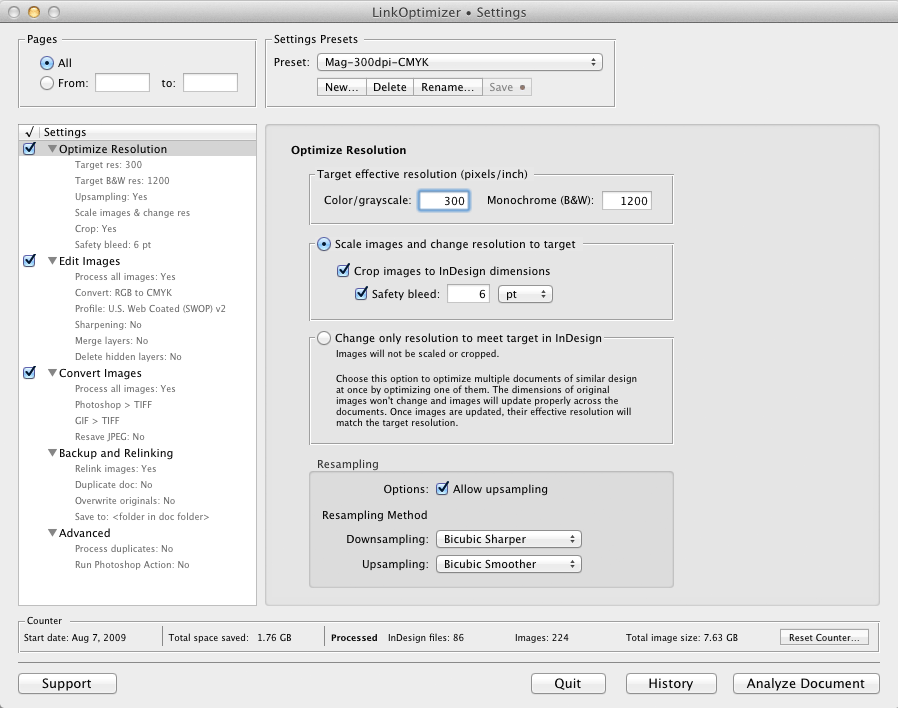
LinkOptimizer works automatically with Photoshop to eliminate the excess image data of InDesign links, perform essential image adjustments and convert image formats. For example, with just a click of a button users can:
* Scale and crop images to match their dimensions in InDesign
* Change their resolution to 300 dpi
* Convert RGB images to CMYK
* Resave JPEG files as TIFF
* Run a Photoshop Action on each image
At the end of processing, LinkOptimizer reimports images to InDesign at 100% in their precise position. As a result, users can save gigabytes of disk space, accelerate document output, reduce job turnaround and cut costs through faster processing.
Pricing and Availability:
LinkOptimizer can be purchased from Zevrix website for $259.95 USD (Light version: $179.95) as well as from Adobe Exchange and authorized resellers. Trial is also available for download. The update is free for LinkOptimizer 4.x users and $130 to upgrade from previous versions. LinkOptimizer requires Mac OS X 10.6-10.10 and Adobe InDesign and Photoshop CS3-CC 2015.
Zevrix Solutions: http://zevrix.com
LinkOptimizer 4.9.45: http://zevrix.com/LinkOptimizer.php
Download LinkOptimizer: http://zevrix.com/LinkOptimizer.dmg
Purchase: http://zevrix.com/store.php
Screenshot: http://zevrix.com/screenshots/lo4/optres-win.gif
Located in Toronto, Canada, Zevrix Solutions provides automation and productivity solutions for Adobe Creative Cloud and Creative Suite software, PDF workflows, graphic file diagnostics and Microsoft Office output on Mac OS. Zevrix is dedicated to help professionals increase their profits through automating everyday tasks, producing error-free documents, saving disk space and cutting production costs. For more information, visit their website. Copyright (C) 2015 Zevrix Solutions. All Rights Reserved. Other trademarks and registered trademarks may be the property of their respective owners.
*******
Link To Article: http://prmac.com/release-id-75486.htm
*******
---------------------------------------------------------------------------------
Note that you can alter delivered distributions at any time.
Login to your account on prMac to alter your channel selection, or to opt-out at any time.
LinkOptimizer for Adobe InDesign Now Supports Creative Cloud 2015 - Published on 06/22/15
Zevrix Solutions announces LinkOptimizer 4.9.45, a compatibility update to its workflow automation solution for Adobe InDesign. LinkOptimizer allows to reduce the size of InDesign links and speed up processing by eliminating excess image data. The software also performs image adjustments, converts file formats and helps repurpose InDesign files for web and mobile devices. The new version makes LinkOptimizer compatible with the 2015 release of InDesign CC featured as part of Adobe Creative Cloud.
Toronto (ON) Canada - Zevrix Solutions today is proud to announce the release of LinkOptimizer 4.9.45, a compatibility update to its workflow automation solution for Adobe InDesign. Awarded 4 out of 5 stars by Computer Arts magazine, LinkOptimizer automates complex image manipulation tasks and allows to significantly reduce the size of InDesign links, save processing time and reduce production costs.
The new version makes LinkOptimizer compatible with the recently announced 2015 release of InDesign CC, featured as part of Adobe Creative Cloud. The update is offered free of charge to LinkOptimizer users. The same version of LinkOptimizer can be used with any version of InDesign and Photoshop from CS3 and later.
"This is the best extension I ever purchased for any design app," says Wayne Guy of Edge Graphics in Van Nuys, California. "It saves hours of time, tediously replacing linked images, resizing, batch processing. Worth every penny... It's a must have tool for a designer who works with large inDesign files with lots of images, like catalogs or magazines."
LinkOptimizer works automatically with Photoshop to eliminate the excess image data of InDesign links, perform essential image adjustments and convert image formats. For example, with just a click of a button users can:
* Scale and crop images to match their dimensions in InDesign
* Change their resolution to 300 dpi
* Convert RGB images to CMYK
* Resave JPEG files as TIFF
* Run a Photoshop Action on each image
At the end of processing, LinkOptimizer reimports images to InDesign at 100% in their precise position. As a result, users can save gigabytes of disk space, accelerate document output, reduce job turnaround and cut costs through faster processing.
Pricing and Availability:
LinkOptimizer can be purchased from Zevrix website for $259.95 USD (Light version: $179.95) as well as from Adobe Exchange and authorized resellers. Trial is also available for download. The update is free for LinkOptimizer 4.x users and $130 to upgrade from previous versions. LinkOptimizer requires Mac OS X 10.6-10.10 and Adobe InDesign and Photoshop CS3-CC 2015.
Zevrix Solutions: http://zevrix.com
LinkOptimizer 4.9.45: http://zevrix.com/LinkOptimizer.php
Download LinkOptimizer: http://zevrix.com/LinkOptimizer.dmg
Purchase: http://zevrix.com/store.php
Screenshot: http://zevrix.com/screenshots/lo4/optres-win.gif
Located in Toronto, Canada, Zevrix Solutions provides automation and productivity solutions for Adobe Creative Cloud and Creative Suite software, PDF workflows, graphic file diagnostics and Microsoft Office output on Mac OS. Zevrix is dedicated to help professionals increase their profits through automating everyday tasks, producing error-free documents, saving disk space and cutting production costs. For more information, visit their website. Copyright (C) 2015 Zevrix Solutions. All Rights Reserved. Other trademarks and registered trademarks may be the property of their respective owners.
*******
Link To Article: http://prmac.com/release-id-75486.htm
*******
---------------------------------------------------------------------------------
Note that you can alter delivered distributions at any time.
Login to your account on prMac to alter your channel selection, or to opt-out at any time.
Track Your Daily Reading Habits With Many Pages for iOS
A new article has been published at prMac.
Track Your Daily Reading Habits With Many Pages for iOS - Published on 06/21/15
Independent developer Julio C. Fausto announces the release of Many Pages 1.0.3 for iOS devices. The app aids users in teaching themselves better reading habits. Many Pages allows users to track their daily reading habits and view analytics on it. This app is made for those who are concerned about their own education and want to continuously improve it. No need to deal with complex setup or signup forms. Just set up the user credentials and start using it.
Florianopolis, Brazil - Independent developer Julio C. Fausto is proud to announce the release of Many Pages 1.0.3 for iOS devices. The app helps users teach themselves better reading habits. If a user doesn't remember how many pages they read this week, Many Pages will help them with that. Many Pages allows users to track their daily reading habits and view analytics on it. This app is made for those who are concerned about their own education and want to continuously improve it.
One of the most simple way to improve any habit is to measure it and track it on a daily basis. Many Pages allows users to do that, acquiring more culture and knowledge. It is a super simple iPhone app intended only to help anyone improve their reading habits. No need to deal with complex setup or signup forms. Just set up the user credentials and start using it.
Features:
* Track daily reading habits
* Assess Progress for the week
* See analytics for the week, month and year
We appreciate any feedback. Write us back if you have suggestions for new features that could be implemented in future versions of Many Pages.
Device Requirements:
* iPhone, iPad, and iPod touch
* Optimized for iPhone 5, iPhone 6, and iPhone 6 Plus
* Requires iOS 8.2 or later
* 11.4 MB
Pricing and Availability:
Many Pages 1.0.3 is $0.99 USD (or equivalent amount in other currencies) and is available worldwide exclusively through the App Store in the Lifestyle category.
Julio Caesar Fausto: http://jcfausto.com/
Many Pages 1.0.3: http://manypagesapp.com
Purchase and Download on iTunes: https://itunes.apple.com/app/many-pages/id989575342
Screenshot: http://manypagesapp.com/img/slide-mocks/login@2x.png
App Icon: http://a1.mzstatic.com/us/r30/Purple5/v4/5c/d1/13/5cd113e9-ea11-9146-c7c3-c2ba6667a65d/icon175x175.jpeg
Julio C. Fausto is an independent software developer that creates mobile and web apps. Copyright (C) 2015 Julio C. Fausto. All Rights Reserved. Apple, the Apple logo, iPhone, iPad and iPod are registered trademarks of Apple Inc. in the U.S. and/or other countries.
*******
Link To Article: http://prmac.com/release-id-75485.htm
*******
---------------------------------------------------------------------------------
Note that you can alter delivered distributions at any time.
Login to your account on prMac to alter your channel selection, or to opt-out at any time.
Track Your Daily Reading Habits With Many Pages for iOS - Published on 06/21/15
Independent developer Julio C. Fausto announces the release of Many Pages 1.0.3 for iOS devices. The app aids users in teaching themselves better reading habits. Many Pages allows users to track their daily reading habits and view analytics on it. This app is made for those who are concerned about their own education and want to continuously improve it. No need to deal with complex setup or signup forms. Just set up the user credentials and start using it.
Florianopolis, Brazil - Independent developer Julio C. Fausto is proud to announce the release of Many Pages 1.0.3 for iOS devices. The app helps users teach themselves better reading habits. If a user doesn't remember how many pages they read this week, Many Pages will help them with that. Many Pages allows users to track their daily reading habits and view analytics on it. This app is made for those who are concerned about their own education and want to continuously improve it.
One of the most simple way to improve any habit is to measure it and track it on a daily basis. Many Pages allows users to do that, acquiring more culture and knowledge. It is a super simple iPhone app intended only to help anyone improve their reading habits. No need to deal with complex setup or signup forms. Just set up the user credentials and start using it.
Features:
* Track daily reading habits
* Assess Progress for the week
* See analytics for the week, month and year
We appreciate any feedback. Write us back if you have suggestions for new features that could be implemented in future versions of Many Pages.
Device Requirements:
* iPhone, iPad, and iPod touch
* Optimized for iPhone 5, iPhone 6, and iPhone 6 Plus
* Requires iOS 8.2 or later
* 11.4 MB
Pricing and Availability:
Many Pages 1.0.3 is $0.99 USD (or equivalent amount in other currencies) and is available worldwide exclusively through the App Store in the Lifestyle category.
Julio Caesar Fausto: http://jcfausto.com/
Many Pages 1.0.3: http://manypagesapp.com
Purchase and Download on iTunes: https://itunes.apple.com/app/many-pages/id989575342
Screenshot: http://manypagesapp.com/img/slide-mocks/login@2x.png

App Icon: http://a1.mzstatic.com/us/r30/Purple5/v4/5c/d1/13/5cd113e9-ea11-9146-c7c3-c2ba6667a65d/icon175x175.jpeg

Julio C. Fausto is an independent software developer that creates mobile and web apps. Copyright (C) 2015 Julio C. Fausto. All Rights Reserved. Apple, the Apple logo, iPhone, iPad and iPod are registered trademarks of Apple Inc. in the U.S. and/or other countries.
*******
Link To Article: http://prmac.com/release-id-75485.htm
*******
---------------------------------------------------------------------------------
Note that you can alter delivered distributions at any time.
Login to your account on prMac to alter your channel selection, or to opt-out at any time.
Blink Comparator for iOS - A Useful Tool for Amateur Astronomers
A new article has been published at prMac.
Blink Comparator for iOS - A Useful Tool for Amateur Astronomers - Published on 06/21/15
Independent developer Roberto De Lorenzo announces the release of Blink Comparator 1.0 for the iPhone and iPad. Blink Comparator alternates the vision of two shots obtained at different times, allowing users to compare two images of the same area taken at different times. If there are changes, they are highlighted by the blinking of any object (star, asteroid, comet, etc.) visible in one of the images only, or that changed position between a shot and the other.
Ostuni, Italy - Independent developer Roberto De Lorenzo is proud to announce the release of Blink Comparator 1.0 for the iPhone and iPad. The app allows users to compare two images of the same area taken at different times, to see if there are changes, highlighted by the blinking of any object (star, asteroid, etc.) that only appears in one of the images or that changed position or brightness between a shot and the other.
After shooting pictures of stars clusters, nebulae, galaxies and so on, often users would check if there are changes compared to the "normal" appearance of the photographed area. To do so, they would have to search for a picture (or map) of the same area and check brightness and location of each object.
Blink Comparator alternates the vision of two shots obtained at different times, which allows users to detect and highlight changes or transient phenomena (comets, variable stars, novae and supernovae, asteroids etc.). In the comparator, the sample image and the reference are shown alternately after being aligned with each other. If an object is present in only one of the pictures, it blinks and can be easily found and marked. If an object has changed position between two consecutive shots, during the animation it bounces back and forth, showing the path traveled.
Features:
* Load pictures from the local Photo Gallery or from Dropbox
* Easily align the two images: Just mark the same three stars on each picture and press a button
* Set blinking time interval
* Zoom and pan the animation to frame a specific area or to examine in detail the images
* Insert a mark to highlight an object
* Add a label to describe subject, date and time of shooting etc.
* Save animations as short movies in your local Photo Gallery
* Save movies converted to negative
Device Requirements:
* iPhone, iPad, and iPod touch
* Optimized for iPhone 5, iPhone 6, and iPhone 6 Plus
* Requires iOS 8.0 or later
* 0.6 MB
Pricing and Availability:
Blink Comparator 1.0 is free and is available worldwide exclusively through the App Store in the Utilities category.
Blink Comparator 1.0: http://www.impararegiocando.it/blinkcomparator.htm
Purchase and Download from iTunes: https://itunes.apple.com/WebObjects/MZStore.woa/wa/viewSoftware?id=993580529&mt=8
Screenshot: http://a5.mzstatic.com/us/r30/Purple1/v4/1e/7c/33/1e7c3336-c0cd-2051-0fe2-dc325c4e980b/screen322x572.jpeg
App Icon: http://a1.mzstatic.com/us/r30/Purple1/v4/33/d9/4f/33d94f6b-e606-a05e-12a0-a9e0d6b67349/icon175x175.jpeg
Roberto De Lorenzo is a Computer Programmer and an App Developer. He lives in South Italy. Copyright (C) 2015 Roberto De Lorenzo. All Rights Reserved. Apple, the Apple logo, iPhone, iPad and iPod are registered trademarks of Apple Inc. in the U.S. and/or other countries.
*******
Link To Article: http://prmac.com/release-id-75484.htm
*******
---------------------------------------------------------------------------------
Note that you can alter delivered distributions at any time.
Login to your account on prMac to alter your channel selection, or to opt-out at any time.
Blink Comparator for iOS - A Useful Tool for Amateur Astronomers - Published on 06/21/15
Independent developer Roberto De Lorenzo announces the release of Blink Comparator 1.0 for the iPhone and iPad. Blink Comparator alternates the vision of two shots obtained at different times, allowing users to compare two images of the same area taken at different times. If there are changes, they are highlighted by the blinking of any object (star, asteroid, comet, etc.) visible in one of the images only, or that changed position between a shot and the other.
Ostuni, Italy - Independent developer Roberto De Lorenzo is proud to announce the release of Blink Comparator 1.0 for the iPhone and iPad. The app allows users to compare two images of the same area taken at different times, to see if there are changes, highlighted by the blinking of any object (star, asteroid, etc.) that only appears in one of the images or that changed position or brightness between a shot and the other.
After shooting pictures of stars clusters, nebulae, galaxies and so on, often users would check if there are changes compared to the "normal" appearance of the photographed area. To do so, they would have to search for a picture (or map) of the same area and check brightness and location of each object.
Blink Comparator alternates the vision of two shots obtained at different times, which allows users to detect and highlight changes or transient phenomena (comets, variable stars, novae and supernovae, asteroids etc.). In the comparator, the sample image and the reference are shown alternately after being aligned with each other. If an object is present in only one of the pictures, it blinks and can be easily found and marked. If an object has changed position between two consecutive shots, during the animation it bounces back and forth, showing the path traveled.
Features:
* Load pictures from the local Photo Gallery or from Dropbox
* Easily align the two images: Just mark the same three stars on each picture and press a button
* Set blinking time interval
* Zoom and pan the animation to frame a specific area or to examine in detail the images
* Insert a mark to highlight an object
* Add a label to describe subject, date and time of shooting etc.
* Save animations as short movies in your local Photo Gallery
* Save movies converted to negative
Device Requirements:
* iPhone, iPad, and iPod touch
* Optimized for iPhone 5, iPhone 6, and iPhone 6 Plus
* Requires iOS 8.0 or later
* 0.6 MB
Pricing and Availability:
Blink Comparator 1.0 is free and is available worldwide exclusively through the App Store in the Utilities category.
Blink Comparator 1.0: http://www.impararegiocando.it/blinkcomparator.htm
Purchase and Download from iTunes: https://itunes.apple.com/WebObjects/MZStore.woa/wa/viewSoftware?id=993580529&mt=8
Screenshot: http://a5.mzstatic.com/us/r30/Purple1/v4/1e/7c/33/1e7c3336-c0cd-2051-0fe2-dc325c4e980b/screen322x572.jpeg

App Icon: http://a1.mzstatic.com/us/r30/Purple1/v4/33/d9/4f/33d94f6b-e606-a05e-12a0-a9e0d6b67349/icon175x175.jpeg

Roberto De Lorenzo is a Computer Programmer and an App Developer. He lives in South Italy. Copyright (C) 2015 Roberto De Lorenzo. All Rights Reserved. Apple, the Apple logo, iPhone, iPad and iPod are registered trademarks of Apple Inc. in the U.S. and/or other countries.
*******
Link To Article: http://prmac.com/release-id-75484.htm
*******
---------------------------------------------------------------------------------
Note that you can alter delivered distributions at any time.
Login to your account on prMac to alter your channel selection, or to opt-out at any time.
Subscribe to:
Posts (Atom)