A new article has been published at prMac.
Calci - A More Organized Approach to Calculation on The Mac - Published on 06/25/15
iLifeTouch announces the release of Calci 1.0 for Mac. Calci is a visual calculator that makes day to day calculations easier to complete using the visual aids provided with Calci. The calculator displays the features that make a calculator truly useful. Calci takes advantage of the big screen of the Mac and has the added feature of a pathway view of all calculations. It automatically saves every calculation and stores them. Users can share their calculations via the available sharing options.
Kolkata, India - iLifeTouch is pleased to announce the release of Calci 1.0 for Mac. Calci is a visual calculator that makes day to day calculations easier to complete using the visual aids provided with Calci. The calculator displays the features that make a calculator truly useful.
Calci takes advantage of the big screen of the Mac and has the added feature of a pathway view of all calculations. Users can understand the math easily. It also allows users to add a tag before every numeral to make the calculation more understandable. It automatically saves every calculation and stores them for future reference. Users can also share your calculation through the available sharing options.
Features:
* Resizable display of calculations. Not just the solution
* Edit numbers and add tags
* Save calculations in history
* Define title for each calculation
* Easy to manage history list
* Share calculations via email
* Mark calculations as Favorite to find them in a dedicated section
* Search bar helps anyone to quickly find calculations
* Change currency of a number easily and use them in the calculations
* iCloud sync
Calci is a more organized approach to calculation on the Mac. Download Calci now and start experiencing a new visual approach to calculating.
System Requirements:
* Requires OS X 10.10 or later
* 64-bit Processor
Pricing and Availability:
Calci 1.0 is $4.99 USD (or equivalent amount in other currencies) and is available worldwide exclusively through the Mac App Store in the Finance category.
iLifeTouch: http://www.ilifetouch.com/home.php
Calci 1.0: http://www.ilifetouch.com/Calci
Purchase and Download (MAS): https://itunes.apple.com/app/calci/id983990915
Screenshot: http://a5.mzstatic.com/us/r30/Purple7/v4/65/56/d2/6556d2bd-59fa-4b11-7343-c2b5cb5a9aff/screen800x500.jpeg
Application Icon: http://a5.mzstatic.com/us/r30/Purple1/v4/6a/2d/73/6a2d737a-97b8-23b5-ae82-6dff91f0b46c/icon256.png
iLifeTouch treats all their apps as if they belonged to the end users. Not only do they hope for feedback, they actively encourage users to tell them what they want and to inform them if they are missing something they would love to see built into our apps. We are eagerly awaiting your input and we are here to make your lives easier using our apps. All Material and Software (C) Copyright 2015 iLifeTouch. All Rights Reserved. Apple, the Apple logo, Macintosh and Mac OS X are registered trademarks of Apple Inc. in the U.S. and/or other countries. Other trademarks and registered trademarks may be the property of their respective owners.
*******
Link To Article: http://prmac.com/release-id-75561.htm
*******
---------------------------------------------------------------------------------
Note that you can alter delivered distributions at any time.
Login to your account on prMac to alter your channel selection, or to opt-out at any time.



Digital World Studio releases the first ever VR Tank Training
A new article has been published at prMac.
Digital World Studio releases the first ever VR Tank Training - Published on 06/25/15
Digital World Studio Ltd today introduces VR Tank Training 1.0, its new virtual reality tank training for iOS and Android devices. VR Tank Training offers a great 3D gameplay experience and can be played exclusively with 360 head movements and the focus on the targets is achieved only with your eyes. Played in a beautiful desert battlefield surrounded by tropical trees and impressive visuals, your mission is to destroy as many targets as possible, while driving your tank to the next checkpoint.
Limassol, Cyprus - Digital World Studio Ltd today is proud to announce the worldwide release and availability of VR Tank Training, the first ever Virtual Reality Tank Training for iOS & Android. VR Tank Training offers a great 3D gameplay experience and can be played exclusively with 360 head movements and the focus on the targets is achieved only with your eyes. The game has already ranked in top categories in several countries on both platforms.
Played in a beautiful desert battlefield surrounded by tropical trees and impressive visuals, your mission is to destroy as many targets as possible, while driving your tank to the next checkpoint. The Tank is designed to provide you a real-time feel of the training by introducing intelligent modelling technique based on mesh blending simulation just the way you have experienced in Battlefield 3, Battlefield 4 and other larger AAA PC games. Enjoy this auditory sensation of natural sounds of war with stereo 3D and immersive audio features.
Salient Features:
* Global leaderboards integrated
* It works perfectly with Google Cardboard and other similar VR glasses (headsets).
* We recommend you to use headphones, for the best immersion.
* No magnetic switch or NFC needed!
iOS Requirements:
* Compatible with iPhone and iPod touch
* Requires iOS 8.0 or later
* 90.2 MB
Android Requirements:
* Requires Android 4 or later
* 49.6 MB
Pricing and Availability:
VR Tank Training 1.0 is available for $1.99 on Apple App Store, Google Play Store and Amazon App Store. Digital World Studio is currently offering the game for 50% discount before our big update which will include new levels, new enemy tanks, planes, fighter jets, tower defence and many more to battle.
Digital World Studio : http://www.digitalworldstudio.com/
VR Tank Training 1.0: https://itunes.apple.com/app/vr-tank-training-for-google/id999943714
Download from Google Play : https://play.google.com/store/apps/details?id=com.dws.tankvr
Download from Amazon: http://www.amazon.com/Digital-World-Studio-Training-Cardboard/dp/B00W47MB7W/ref=sr_1_1?s=mobile-apps&ie=UTF8&qid=1435007129&sr=1-1&pebp=1435007128567&perid=0DNSKF308CB1KAMG3MSV
Screenshot: http://www.digitalworldstudio.com/uploads/4/8/5/9/485987/8015964.jpg?954
App Icon: http://www.digitalworldstudio.com/uploads/4/8/5/9/485987/5448364_orig.png
Digital World Studio Ltd is an independent game development studio based in Cyprus, consisted of high caliber team of experts from several countries around the world with many years of experience in the game development industry. Digital World Studio selectively develop top quality, clever and entertaining games with an aim to become a significant contributor in the game development industry. All Material and Software (C) Copyright 2015 Digital World Studio Ltd. All Rights Reserved. Apple, the Apple logo, iPhone, iPod and iPad are registered trademarks of Apple Inc. in the U.S. and/or other countries. Other trademarks and registered trademarks may be the property of their respective owners.
*******
Link To Article: http://prmac.com/release-id-75556.htm
*******
---------------------------------------------------------------------------------
Note that you can alter delivered distributions at any time.
Login to your account on prMac to alter your channel selection, or to opt-out at any time.
Digital World Studio releases the first ever VR Tank Training - Published on 06/25/15
Digital World Studio Ltd today introduces VR Tank Training 1.0, its new virtual reality tank training for iOS and Android devices. VR Tank Training offers a great 3D gameplay experience and can be played exclusively with 360 head movements and the focus on the targets is achieved only with your eyes. Played in a beautiful desert battlefield surrounded by tropical trees and impressive visuals, your mission is to destroy as many targets as possible, while driving your tank to the next checkpoint.
Limassol, Cyprus - Digital World Studio Ltd today is proud to announce the worldwide release and availability of VR Tank Training, the first ever Virtual Reality Tank Training for iOS & Android. VR Tank Training offers a great 3D gameplay experience and can be played exclusively with 360 head movements and the focus on the targets is achieved only with your eyes. The game has already ranked in top categories in several countries on both platforms.
Played in a beautiful desert battlefield surrounded by tropical trees and impressive visuals, your mission is to destroy as many targets as possible, while driving your tank to the next checkpoint. The Tank is designed to provide you a real-time feel of the training by introducing intelligent modelling technique based on mesh blending simulation just the way you have experienced in Battlefield 3, Battlefield 4 and other larger AAA PC games. Enjoy this auditory sensation of natural sounds of war with stereo 3D and immersive audio features.
Salient Features:
* Global leaderboards integrated
* It works perfectly with Google Cardboard and other similar VR glasses (headsets).
* We recommend you to use headphones, for the best immersion.
* No magnetic switch or NFC needed!
iOS Requirements:
* Compatible with iPhone and iPod touch
* Requires iOS 8.0 or later
* 90.2 MB
Android Requirements:
* Requires Android 4 or later
* 49.6 MB
Pricing and Availability:
VR Tank Training 1.0 is available for $1.99 on Apple App Store, Google Play Store and Amazon App Store. Digital World Studio is currently offering the game for 50% discount before our big update which will include new levels, new enemy tanks, planes, fighter jets, tower defence and many more to battle.
Digital World Studio : http://www.digitalworldstudio.com/
VR Tank Training 1.0: https://itunes.apple.com/app/vr-tank-training-for-google/id999943714
Download from Google Play : https://play.google.com/store/apps/details?id=com.dws.tankvr
Download from Amazon: http://www.amazon.com/Digital-World-Studio-Training-Cardboard/dp/B00W47MB7W/ref=sr_1_1?s=mobile-apps&ie=UTF8&qid=1435007129&sr=1-1&pebp=1435007128567&perid=0DNSKF308CB1KAMG3MSV
Screenshot: http://www.digitalworldstudio.com/uploads/4/8/5/9/485987/8015964.jpg?954

App Icon: http://www.digitalworldstudio.com/uploads/4/8/5/9/485987/5448364_orig.png

Digital World Studio Ltd is an independent game development studio based in Cyprus, consisted of high caliber team of experts from several countries around the world with many years of experience in the game development industry. Digital World Studio selectively develop top quality, clever and entertaining games with an aim to become a significant contributor in the game development industry. All Material and Software (C) Copyright 2015 Digital World Studio Ltd. All Rights Reserved. Apple, the Apple logo, iPhone, iPod and iPad are registered trademarks of Apple Inc. in the U.S. and/or other countries. Other trademarks and registered trademarks may be the property of their respective owners.
*******
Link To Article: http://prmac.com/release-id-75556.htm
*******
---------------------------------------------------------------------------------
Note that you can alter delivered distributions at any time.
Login to your account on prMac to alter your channel selection, or to opt-out at any time.
A new update to OfficeSuite for iPhone and iPad users is now available
A new article has been published at prMac.
A new update to OfficeSuite for iPhone and iPad users is now available - Published on 06/25/15
MobiSystems today announces OfficeSuite 4.1, the latest update to its leading mobile office app for iPhone and iPad. Offering the most feature-rich solution available, OfficeSuite is the unquestioned leader for effortless viewing, editing, creating and sharing Word, Excel, PowerPoint documents and converting them to/from PDF files. Version 4.1 features numerous new updates and improvements, with improved localization, audio dictation, document provider extension, templates and so much more.
San Diego, California - Today MobiSystems announced the latest update to its leading mobile office app for iPhone and iPad, OfficeSuite. With extensive development and numerous improvements implemented over the last 3 months, OfficeSuite 4.1 is the unquestioned leader for effortless viewing, editing, creating and sharing Word, Excel, PowerPoint documents and converting them to/from PDF files.
Using the experience that has made OfficeSuite for Android the No. 1 app in Google Play's Business category, MobiSystems is proud to further enhance its feature-rich mobile office package for iPhone and iPad. The leading business word processing app continues to overwhelm the competition and impress customers in Apple's App Store.
"Having delivered all advanced OfficeSuite features to Apple users, we are now looking at improving customer satisfaction and proving a more reliable app", says Steve Gogov, Co-Founder and Vice President at MobiSystems, Inc. "Accessibility and usability are key to us, as we strive towards bringing the ultimate desktop-inspired office to your mobile device."
What's new in OfficeSuite 4.1?
* Updates to Dropbox, Box and iCloud for faster access to your files
* Document Provider extension - share your documents via iCloud Drive
* A gallery of Word, Excel and PowerPoint templates
* Audio dictation of menus and file contents allows people of all abilities to take full advantage of OfficeSuite
* Open ODF files
* Improved localization of the app across various territories
* Fixed problems with Thai font support
* Numerous fixes to increase app stability, usability and reliability
* Even more advanced Word, Excel, PowerPoint and PDF features
Document Updates:
* New! Support for document templates
* New! Open .odt files
Spreadsheet Updates:
* New! Support for spreadsheet templates
* New! Open .ods files
* New! Support for Scatter chart type
* New! Conditional formatting
* New! Insert chart as new sheet
Presentation Updates:
* New! Support for presentation templates
* New! Open .odp files
* New! Create and edit transitions
PDF Updates:
* New! Continuous page view
OfficeSuite lets users effortlessly view, edit, and create Word, Excel, PowerPoint and PDF documents all from the most feature-rich solution available. With more than 1.2 billion people (or 1 in 7 people on the planet) using Microsoft Office*, OfficeSuite supports all Microsoft Office file formats, as well as ODF documents. OfficeSuite turns your device into a highly functional, efficient and portable productivity solution.
* Source: Microsoft
About OfficeSuite:
The latest version of OfficeSuite brings the power and capability of a desktop app to the iPhone and iPad like never before with many improved features. OfficeSuite's desktop-inspired user interface combines familiarity and mobile productivity for a fast and easy to use word processing app.
Differentiators:
* Extremely fast and easy to use
* Familiar desktop-inspired user interface
* No storage cloud lock-in. Supports Google Drive, Dropbox, Box, OneDrive and iCloud. No complex synchronizations - direct opening and saving to/from the cloud
* Full editor for Microsoft Word, Excel and PowerPoint documents
* View and edit Adobe PDF documents
* View and edit RTF and CSV file formats
* Supports all Microsoft Office file formats
* Printing support
* Auto-correct while typing
* New! Open ODF files
* New! A gallery of Word, Excel and PowerPoint templates
User Reviews:
"After viewing the video demo, I was hesitating to download it, because it sounded too good to be true. However, a few days later, I realized that I cannot leave it off. OfficeSuite is absolutely amazing and really more than just an office app. Keep it up!"
"You get the full power of Microsoft Office with this app!"
"OfficeSuite app allows me to perform all my daily office tasks on the fly. Now, I am more flexible and don't need to stick in the office all day. Thanks you guys!! You made my life easier!"
OfficeSuite offers Pro/Premium versions, which include additional features, such as the ability convert PDFs to Word/Excel, make changes, insert notes and comments, then save PDF document without losing the formatting. OfficeSuite apps are available on iTunes, requires iOS 7.0 or later and is fully compatible with iPhone, iPad and iPod touch. For more information, or to set up a briefing, please contact Steve Gogov.
MobiSystems: http://www.mobisystems.com/
OfficeSuite : http://www.mobisystems.com/ios/officesuite-8-free/
OfficeSuite Free: https://itunes.apple.com/app/apple-store/id924005506?pt=37682&ct=PR%20OfficeSuite%20Free%204.1&mt=8
OfficeSuite Pro: https://itunes.apple.com/app/apple-store/id675054186?pt=37682&ct=PR%20OfficeSuite%20Pro%204.1&mt=8
OfficeSuite Premium: https://itunes.apple.com/app/apple-store/id968303067?pt=37682&ct=PR%20OfficeSuite%20Premium%204.1&mt=8
Promo Code: http://www.appcodes.com/d/officesuite-premium-for-microsoft-office-word-excel-powerpoint-pdf-documents-editing
Founded in 2001, MobiSystems has been a leading provider of mobile productivity and business apps ever since. As the developer of the award winning mobile app OfficeSuite, MobiSystems serves over 200 million individual and enterprise users in 205 countries. It is a Google Play Editor's Choice, and the top app in the business category with over 350,000 reviews. OfficeSuite is also PC Magazine's Editor's Choice and InfoWorld's Best Office App for Android. All Material and Software (C) Copyright 2015 MobiSystems, Inc. All Rights Reserved. Apple, the Apple logo, iPhone, iPod and iPad are registered trademarks of Apple Inc. in the U.S. and/or other countries. Other trademarks and registered trademarks may be the property of their respective owners.
*******
Link To Article: http://prmac.com/release-id-75558.htm
*******
---------------------------------------------------------------------------------
Note that you can alter delivered distributions at any time.
Login to your account on prMac to alter your channel selection, or to opt-out at any time.
A new update to OfficeSuite for iPhone and iPad users is now available - Published on 06/25/15
MobiSystems today announces OfficeSuite 4.1, the latest update to its leading mobile office app for iPhone and iPad. Offering the most feature-rich solution available, OfficeSuite is the unquestioned leader for effortless viewing, editing, creating and sharing Word, Excel, PowerPoint documents and converting them to/from PDF files. Version 4.1 features numerous new updates and improvements, with improved localization, audio dictation, document provider extension, templates and so much more.
San Diego, California - Today MobiSystems announced the latest update to its leading mobile office app for iPhone and iPad, OfficeSuite. With extensive development and numerous improvements implemented over the last 3 months, OfficeSuite 4.1 is the unquestioned leader for effortless viewing, editing, creating and sharing Word, Excel, PowerPoint documents and converting them to/from PDF files.
Using the experience that has made OfficeSuite for Android the No. 1 app in Google Play's Business category, MobiSystems is proud to further enhance its feature-rich mobile office package for iPhone and iPad. The leading business word processing app continues to overwhelm the competition and impress customers in Apple's App Store.
"Having delivered all advanced OfficeSuite features to Apple users, we are now looking at improving customer satisfaction and proving a more reliable app", says Steve Gogov, Co-Founder and Vice President at MobiSystems, Inc. "Accessibility and usability are key to us, as we strive towards bringing the ultimate desktop-inspired office to your mobile device."
What's new in OfficeSuite 4.1?
* Updates to Dropbox, Box and iCloud for faster access to your files
* Document Provider extension - share your documents via iCloud Drive
* A gallery of Word, Excel and PowerPoint templates
* Audio dictation of menus and file contents allows people of all abilities to take full advantage of OfficeSuite
* Open ODF files
* Improved localization of the app across various territories
* Fixed problems with Thai font support
* Numerous fixes to increase app stability, usability and reliability
* Even more advanced Word, Excel, PowerPoint and PDF features
Document Updates:
* New! Support for document templates
* New! Open .odt files
Spreadsheet Updates:
* New! Support for spreadsheet templates
* New! Open .ods files
* New! Support for Scatter chart type
* New! Conditional formatting
* New! Insert chart as new sheet
Presentation Updates:
* New! Support for presentation templates
* New! Open .odp files
* New! Create and edit transitions
PDF Updates:
* New! Continuous page view
OfficeSuite lets users effortlessly view, edit, and create Word, Excel, PowerPoint and PDF documents all from the most feature-rich solution available. With more than 1.2 billion people (or 1 in 7 people on the planet) using Microsoft Office*, OfficeSuite supports all Microsoft Office file formats, as well as ODF documents. OfficeSuite turns your device into a highly functional, efficient and portable productivity solution.
* Source: Microsoft
About OfficeSuite:
The latest version of OfficeSuite brings the power and capability of a desktop app to the iPhone and iPad like never before with many improved features. OfficeSuite's desktop-inspired user interface combines familiarity and mobile productivity for a fast and easy to use word processing app.
Differentiators:
* Extremely fast and easy to use
* Familiar desktop-inspired user interface
* No storage cloud lock-in. Supports Google Drive, Dropbox, Box, OneDrive and iCloud. No complex synchronizations - direct opening and saving to/from the cloud
* Full editor for Microsoft Word, Excel and PowerPoint documents
* View and edit Adobe PDF documents
* View and edit RTF and CSV file formats
* Supports all Microsoft Office file formats
* Printing support
* Auto-correct while typing
* New! Open ODF files
* New! A gallery of Word, Excel and PowerPoint templates
User Reviews:
"After viewing the video demo, I was hesitating to download it, because it sounded too good to be true. However, a few days later, I realized that I cannot leave it off. OfficeSuite is absolutely amazing and really more than just an office app. Keep it up!"
"You get the full power of Microsoft Office with this app!"
"OfficeSuite app allows me to perform all my daily office tasks on the fly. Now, I am more flexible and don't need to stick in the office all day. Thanks you guys!! You made my life easier!"
OfficeSuite offers Pro/Premium versions, which include additional features, such as the ability convert PDFs to Word/Excel, make changes, insert notes and comments, then save PDF document without losing the formatting. OfficeSuite apps are available on iTunes, requires iOS 7.0 or later and is fully compatible with iPhone, iPad and iPod touch. For more information, or to set up a briefing, please contact Steve Gogov.
MobiSystems: http://www.mobisystems.com/
OfficeSuite : http://www.mobisystems.com/ios/officesuite-8-free/
OfficeSuite Free: https://itunes.apple.com/app/apple-store/id924005506?pt=37682&ct=PR%20OfficeSuite%20Free%204.1&mt=8
OfficeSuite Pro: https://itunes.apple.com/app/apple-store/id675054186?pt=37682&ct=PR%20OfficeSuite%20Pro%204.1&mt=8
OfficeSuite Premium: https://itunes.apple.com/app/apple-store/id968303067?pt=37682&ct=PR%20OfficeSuite%20Premium%204.1&mt=8
Promo Code: http://www.appcodes.com/d/officesuite-premium-for-microsoft-office-word-excel-powerpoint-pdf-documents-editing
Founded in 2001, MobiSystems has been a leading provider of mobile productivity and business apps ever since. As the developer of the award winning mobile app OfficeSuite, MobiSystems serves over 200 million individual and enterprise users in 205 countries. It is a Google Play Editor's Choice, and the top app in the business category with over 350,000 reviews. OfficeSuite is also PC Magazine's Editor's Choice and InfoWorld's Best Office App for Android. All Material and Software (C) Copyright 2015 MobiSystems, Inc. All Rights Reserved. Apple, the Apple logo, iPhone, iPod and iPad are registered trademarks of Apple Inc. in the U.S. and/or other countries. Other trademarks and registered trademarks may be the property of their respective owners.
*******
Link To Article: http://prmac.com/release-id-75558.htm
*******
---------------------------------------------------------------------------------
Note that you can alter delivered distributions at any time.
Login to your account on prMac to alter your channel selection, or to opt-out at any time.
Hue Lights v1.7 Offers Advanced Weather Simulator for Philips Hue
A new article has been published at prMac.
Hue Lights v1.7 Offers Advanced Weather Simulator for Philips Hue - Published on 06/25/15
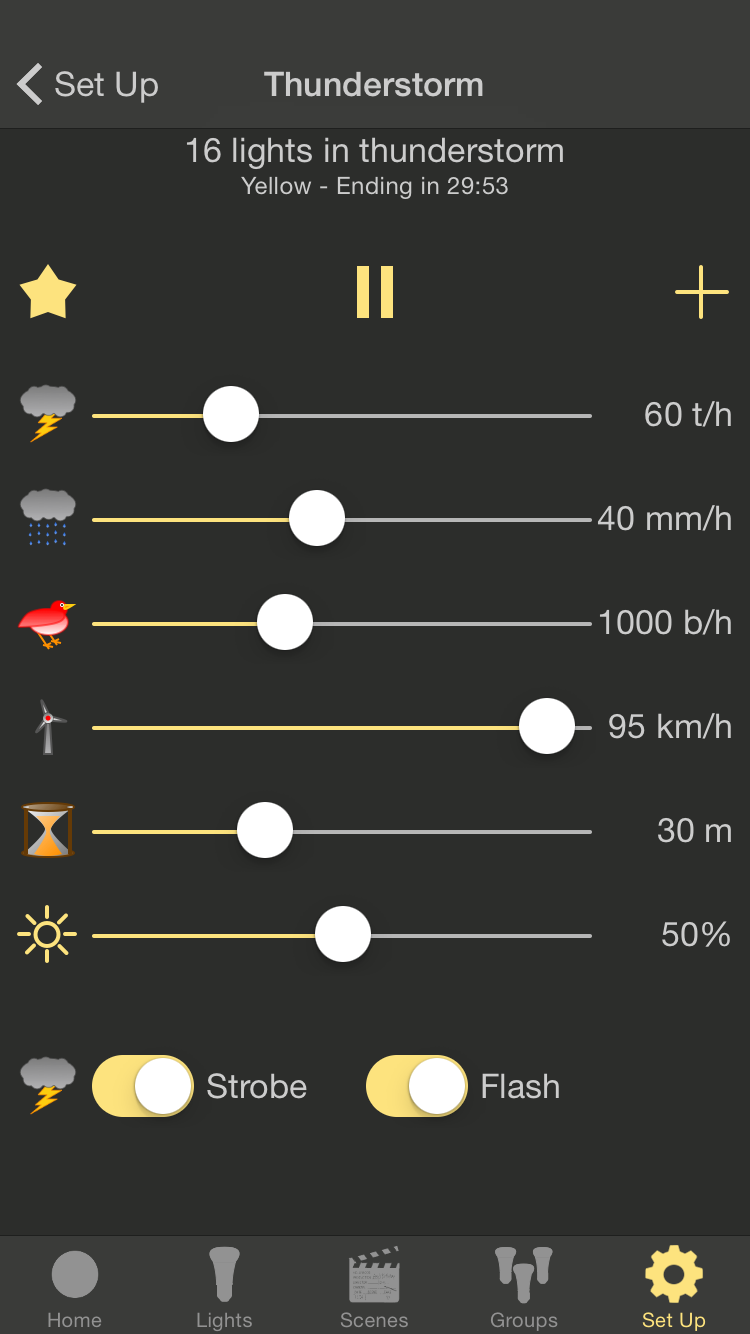
California based LapApps, LLC today announces Hue Lights 1.7, an update to its popular lifestyle app for iOS devices. Version 1.7 brings unprecedented weather simulations to smart LED bulbs. Experience realistic storms with customized controls for lightning strikes, rain density, bird songs, wind speed, sleep timer, brightness and sky color. Watch lights gently change as the storm progresses. Lights will shift positions, colors and brightness to create a relaxing ambiance.
San Jose, California - LapApps, LLC has released an update to its popular Hue Lights app for iOS devices, bringing unprecedented weather simulations to smart LED bulbs. Experience realistic storms with customized controls for lightning strikes, rain density, bird songs, wind speed, sleep timer, brightness and sky color. Watch lights gently change as the storm progresses. Lights will shift positions, colors and brightness to create a relaxing ambiance.
Thunder and lightning are synchronized to keep observers in the eye of the storm. The frequency of lightning strikes, rainfall and bird songs can be adjusted in real-time to immediately see the results. Birds appear in millions of different locations, near and far, as the app moves them through space using advanced soundscape algorithms. Brightness, color, animation speed and volume can all be adjusted to create a personalized storm. A sleep timer is included to facilitate easing into a peaceful night. Fall asleep to the gentle sound of rain and peaceful birds. Lighting, thunder, rain and birds can be individually adjusted or disabled to create a wide variety of storm conditions.
The weather simulator is available as the "Thunderstorm" In-App purchase. No other In-App purchase is needed to use the weather simulator. Once purchased all lights recognized by the Philips Hue bridge can be included in the storm. The thunderstorm effect works best with Philips Hue bulbs including A19, BR30 and GU10 bulbs with color support. To use the experimental strobe feature the bulbs must be Philips Hue bulbs.
Hue Lights was first launched in December 2013 and has seen steady growth from a worldwide user base. The latest version of the app includes Apple Watch support, scene and group activation from a fast widget, native Philips hub scheduling, dynamic lighting and a large selection of custom scenes. Every screen supports portrait or landscape mode on iPhone, iPad and iPod touch devices. The app is optimized for iPhone 5, iPhone 6, iPhone 6 Plus and iPad devices running iOS 7.0 or later. The Hue Lights app requires a "Hue Personal Wireless Lighting Starter Set" to operate.
Device Requirements:
* Hue Personal Wireless Lighting Starter Set
* iPhone, iPad, and iPod touch
* Optimized for iPhone 5, iPhone 6/6 Plus
* Requires iOS 7.0 or later
* 24.0 MB
Pricing and Availability:
Hue Lights 1.7 is Free and available worldwide exclusively through the App Store in the Lifestyle category. Follow @HueLights on Twitter for the latest news and updates. Visit Hue Lights official website for more documentation and supported hardware.
Hue Lights 1.7: http://huelights.com
Frequently Asked Questions: http://huelights.com/faq.html
Download from iTunes: https://itunes.apple.com/us/app/hue-lights/id762009425
Screenshot: http://huelights.com/img/v1.7/iPhone-4.7-S7.png
App Icon: http://huelights.com/img/AppIcon.png
LapApps, LLC, is a California Limited Liability Company based in San Jose, California. It was founded by Mark Snycerski in September 2013 and specializes in app development. All Material and Software (C) Copyright 2015 LapApps, LLC. All rights reserved. Apple Watch, iPad, iPhone and iPod touch are trademarks of Apple Inc., registered in the U.S. and other countries. iOS is a trademark or registered trademark of Cisco in the U.S. and other countries and is used under license. Hue Personal Wireless Lighting is a trademark owned by Koninklijke Philips Electronics N.V. LapApps, LLC is in no way affiliated with the Philips organization. Other product and company names mentioned herein may be trademarks of their respective companies.
*******
Link To Article: http://prmac.com/release-id-75557.htm
*******
---------------------------------------------------------------------------------
Note that you can alter delivered distributions at any time.
Login to your account on prMac to alter your channel selection, or to opt-out at any time.
Hue Lights v1.7 Offers Advanced Weather Simulator for Philips Hue - Published on 06/25/15
California based LapApps, LLC today announces Hue Lights 1.7, an update to its popular lifestyle app for iOS devices. Version 1.7 brings unprecedented weather simulations to smart LED bulbs. Experience realistic storms with customized controls for lightning strikes, rain density, bird songs, wind speed, sleep timer, brightness and sky color. Watch lights gently change as the storm progresses. Lights will shift positions, colors and brightness to create a relaxing ambiance.
San Jose, California - LapApps, LLC has released an update to its popular Hue Lights app for iOS devices, bringing unprecedented weather simulations to smart LED bulbs. Experience realistic storms with customized controls for lightning strikes, rain density, bird songs, wind speed, sleep timer, brightness and sky color. Watch lights gently change as the storm progresses. Lights will shift positions, colors and brightness to create a relaxing ambiance.
Thunder and lightning are synchronized to keep observers in the eye of the storm. The frequency of lightning strikes, rainfall and bird songs can be adjusted in real-time to immediately see the results. Birds appear in millions of different locations, near and far, as the app moves them through space using advanced soundscape algorithms. Brightness, color, animation speed and volume can all be adjusted to create a personalized storm. A sleep timer is included to facilitate easing into a peaceful night. Fall asleep to the gentle sound of rain and peaceful birds. Lighting, thunder, rain and birds can be individually adjusted or disabled to create a wide variety of storm conditions.
The weather simulator is available as the "Thunderstorm" In-App purchase. No other In-App purchase is needed to use the weather simulator. Once purchased all lights recognized by the Philips Hue bridge can be included in the storm. The thunderstorm effect works best with Philips Hue bulbs including A19, BR30 and GU10 bulbs with color support. To use the experimental strobe feature the bulbs must be Philips Hue bulbs.
Hue Lights was first launched in December 2013 and has seen steady growth from a worldwide user base. The latest version of the app includes Apple Watch support, scene and group activation from a fast widget, native Philips hub scheduling, dynamic lighting and a large selection of custom scenes. Every screen supports portrait or landscape mode on iPhone, iPad and iPod touch devices. The app is optimized for iPhone 5, iPhone 6, iPhone 6 Plus and iPad devices running iOS 7.0 or later. The Hue Lights app requires a "Hue Personal Wireless Lighting Starter Set" to operate.
Device Requirements:
* Hue Personal Wireless Lighting Starter Set
* iPhone, iPad, and iPod touch
* Optimized for iPhone 5, iPhone 6/6 Plus
* Requires iOS 7.0 or later
* 24.0 MB
Pricing and Availability:
Hue Lights 1.7 is Free and available worldwide exclusively through the App Store in the Lifestyle category. Follow @HueLights on Twitter for the latest news and updates. Visit Hue Lights official website for more documentation and supported hardware.
Hue Lights 1.7: http://huelights.com
Frequently Asked Questions: http://huelights.com/faq.html
Download from iTunes: https://itunes.apple.com/us/app/hue-lights/id762009425
Screenshot: http://huelights.com/img/v1.7/iPhone-4.7-S7.png
App Icon: http://huelights.com/img/AppIcon.png

LapApps, LLC, is a California Limited Liability Company based in San Jose, California. It was founded by Mark Snycerski in September 2013 and specializes in app development. All Material and Software (C) Copyright 2015 LapApps, LLC. All rights reserved. Apple Watch, iPad, iPhone and iPod touch are trademarks of Apple Inc., registered in the U.S. and other countries. iOS is a trademark or registered trademark of Cisco in the U.S. and other countries and is used under license. Hue Personal Wireless Lighting is a trademark owned by Koninklijke Philips Electronics N.V. LapApps, LLC is in no way affiliated with the Philips organization. Other product and company names mentioned herein may be trademarks of their respective companies.
*******
Link To Article: http://prmac.com/release-id-75557.htm
*******
---------------------------------------------------------------------------------
Note that you can alter delivered distributions at any time.
Login to your account on prMac to alter your channel selection, or to opt-out at any time.
Recosoft ships PDF2ID v4.5: Convert PDF to InDesign CC, CC 2014 and 2015
A new article has been published at prMac.
Recosoft ships PDF2ID v4.5: Convert PDF to InDesign CC, CC 2014 and 2015 - Published on 06/25/15
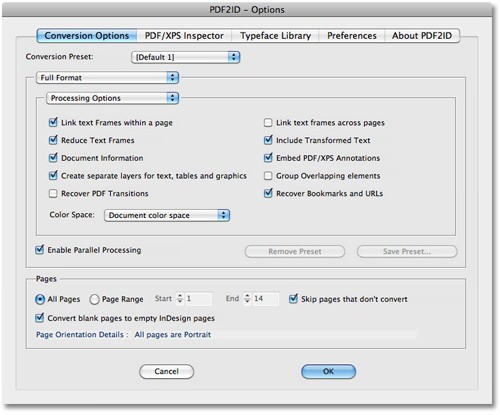
Recosoft Corporation releases PDF2ID 4.5, the newest PDF-to-InDesign and XPS-to-InDesign conversion plug-in for InDesign Creative Cloud 2015. Version 4.5 has been enhanced to support Adobe InDesign CC 2015, the latest release of InDesign for both the Mac and Windows platforms. PDF2ID Standard and PDF2ID Professional v4.5 now support batch-converting PDF files to InDesign format. Additionally, PDF2ID natively recognizes Adobe Illustrator files files easing Illustrator-to-InDesign file conversion.
Osaka, Japan - Recosoft Corporation, the developers of PDF conversion applications and Adobe InDesign conversion solutions, has started shipping PDF2ID v4.5 the newest PDF-to-InDesign and XPS-to-InDesign conversion plug-in for InDesign Creative Cloud 2015. PDF2ID v4.5 has been enhanced to support Adobe InDesign CC 2015, the latest release of InDesign for both the Mac and Windows platforms. PDF2ID Standard and PDF2ID Professional v4.5 now support batch-converting PDF files to InDesign (indd) format. Additionally, PDF2ID v4.5 natively recognizes Adobe Illustrator files (.ai) files easing Illustrator-to-InDesign file conversion.
"PDF2ID is continuously enhanced with every major release of InDesign for both Mac and Windows platforms. We are pleased to deliver the latest edition of the PDF to InDesign conversion tool that supports InDesign CC 2015"- Paramjit Chadha, MD, Recosoft Corporation"
PDF2ID converts PDF and Windows XPS files into fully editable InDesign files allowing PDF and XPS file content recovery and reuse within InDesign. PDF2ID is the de-facto PDF conversion plug-in for InDesign, allowing anyone to open, convert and edit PDF and XPS documents in InDesign; eliminating the need to acquire additional PDF and XPS conversion tools. PDF2ID v4.5 enhances workflow automation providing huge cost savings in both time and expense.
Key New Features:
InDesign Creative Cloud 2015 support:
PDF2ID v4.5 has been enhanced to support InDesign CC 2015. InDesign CC and CC 2014 are supported as well.
Batch Conversion:
You can now select multiple files and convert them at once. PDF2ID Standard allows converting 5 files at once. PDF2ID Professional allows converting 20 files at once.
Native recognition of Illustrator (.ai) files:
PDF2ID has been enhanced to recognize and accept Illustrator (.ai) files saved with the PDF compatibility option.
Layout Reconstruction Core Enhancement:
The layout reconstruction core has been enhanced in several areas improving stability and resulting in even more accurate conversions.
System Requirements:
* Mac OS: Mac OS X 10.6.8 and higher
* Hardware: Intel based Mac
* Application: InDesign CC, CC 2014, CC 2015
* Windows: Windows 7, Windows 8 or higher
* Hardware: Pentium III computer
* Application: InDesign CC, CC 2014, CC 2015
Pricing and Availability:
PDF2ID v4.5 is available immediately in the following configurations from the Recosoft web store (per license):
PDF2ID Standard v4.5 US $199.00
PDF2ID Professional v4.5 US $299.00
PDF2ID Standard v4.5 Upgrade US $99.00
PDF2ID Professional v4.5 Upgrade US $149.00
Recosoft: http://www.recosoft.com
PDF2ID 4.5: http://www.recosoft.com/products/pdf2id
Download Trial: http://www.recosoft.com/trial-software/
Screenshot: http://recosoft.com/wp-content/uploads/2011/11/PDF2IDMain.jpg
Recosoft Corporation is the developer of PDF2Office, the de-facto PDF-to-Excel, PDF-to-Word, PDF-to-PowerPoint conversion utility; PDF2Office for iWork, the only PDF-to-Keynote, PDF-to-Numbers and PDF-to-Pages conversion application; ID2Office, the InDesign-to-Word, InDesign-to-PowerPoint converter; and PDF2ID the utility to convert PDF-to-InDesign files. The company is a leader in designing and delivering PDF converters and file conversion software solutions enhancing workflow automation and productivity. ID2Office, PDF2Office, PDF2ID, PDFtoID are trademarks or registered trademarks of Recosoft Corporation in the United States and/or other countries. Microsoft, Excel, PowerPoint, Word and the Office logo are trademarks or registered trademarks of Microsoft Corporation in the United States and/or other countries. Adobe and InDesign are either registered trademarks or trademarks of Adobe System Incorporated in the United States and/or other countries. Apple, Macintosh, Mac, the Mac
logo, Numbers, Keynote, Pages, iWork, iPod, iPhone, iOS, iPad are either trademarks or registered trademarks of Apple, Inc. in the United States and or other countries. All other trademarks are recognized and are the property of their respective owners.
*******
Link To Article: http://prmac.com/release-id-75554.htm
*******
---------------------------------------------------------------------------------
Note that you can alter delivered distributions at any time.
Login to your account on prMac to alter your channel selection, or to opt-out at any time.
Recosoft ships PDF2ID v4.5: Convert PDF to InDesign CC, CC 2014 and 2015 - Published on 06/25/15
Recosoft Corporation releases PDF2ID 4.5, the newest PDF-to-InDesign and XPS-to-InDesign conversion plug-in for InDesign Creative Cloud 2015. Version 4.5 has been enhanced to support Adobe InDesign CC 2015, the latest release of InDesign for both the Mac and Windows platforms. PDF2ID Standard and PDF2ID Professional v4.5 now support batch-converting PDF files to InDesign format. Additionally, PDF2ID natively recognizes Adobe Illustrator files files easing Illustrator-to-InDesign file conversion.
Osaka, Japan - Recosoft Corporation, the developers of PDF conversion applications and Adobe InDesign conversion solutions, has started shipping PDF2ID v4.5 the newest PDF-to-InDesign and XPS-to-InDesign conversion plug-in for InDesign Creative Cloud 2015. PDF2ID v4.5 has been enhanced to support Adobe InDesign CC 2015, the latest release of InDesign for both the Mac and Windows platforms. PDF2ID Standard and PDF2ID Professional v4.5 now support batch-converting PDF files to InDesign (indd) format. Additionally, PDF2ID v4.5 natively recognizes Adobe Illustrator files (.ai) files easing Illustrator-to-InDesign file conversion.
"PDF2ID is continuously enhanced with every major release of InDesign for both Mac and Windows platforms. We are pleased to deliver the latest edition of the PDF to InDesign conversion tool that supports InDesign CC 2015"- Paramjit Chadha, MD, Recosoft Corporation"
PDF2ID converts PDF and Windows XPS files into fully editable InDesign files allowing PDF and XPS file content recovery and reuse within InDesign. PDF2ID is the de-facto PDF conversion plug-in for InDesign, allowing anyone to open, convert and edit PDF and XPS documents in InDesign; eliminating the need to acquire additional PDF and XPS conversion tools. PDF2ID v4.5 enhances workflow automation providing huge cost savings in both time and expense.
Key New Features:
InDesign Creative Cloud 2015 support:
PDF2ID v4.5 has been enhanced to support InDesign CC 2015. InDesign CC and CC 2014 are supported as well.
Batch Conversion:
You can now select multiple files and convert them at once. PDF2ID Standard allows converting 5 files at once. PDF2ID Professional allows converting 20 files at once.
Native recognition of Illustrator (.ai) files:
PDF2ID has been enhanced to recognize and accept Illustrator (.ai) files saved with the PDF compatibility option.
Layout Reconstruction Core Enhancement:
The layout reconstruction core has been enhanced in several areas improving stability and resulting in even more accurate conversions.
System Requirements:
* Mac OS: Mac OS X 10.6.8 and higher
* Hardware: Intel based Mac
* Application: InDesign CC, CC 2014, CC 2015
* Windows: Windows 7, Windows 8 or higher
* Hardware: Pentium III computer
* Application: InDesign CC, CC 2014, CC 2015
Pricing and Availability:
PDF2ID v4.5 is available immediately in the following configurations from the Recosoft web store (per license):
PDF2ID Standard v4.5 US $199.00
PDF2ID Professional v4.5 US $299.00
PDF2ID Standard v4.5 Upgrade US $99.00
PDF2ID Professional v4.5 Upgrade US $149.00
Recosoft: http://www.recosoft.com
PDF2ID 4.5: http://www.recosoft.com/products/pdf2id
Download Trial: http://www.recosoft.com/trial-software/
Screenshot: http://recosoft.com/wp-content/uploads/2011/11/PDF2IDMain.jpg
Recosoft Corporation is the developer of PDF2Office, the de-facto PDF-to-Excel, PDF-to-Word, PDF-to-PowerPoint conversion utility; PDF2Office for iWork, the only PDF-to-Keynote, PDF-to-Numbers and PDF-to-Pages conversion application; ID2Office, the InDesign-to-Word, InDesign-to-PowerPoint converter; and PDF2ID the utility to convert PDF-to-InDesign files. The company is a leader in designing and delivering PDF converters and file conversion software solutions enhancing workflow automation and productivity. ID2Office, PDF2Office, PDF2ID, PDFtoID are trademarks or registered trademarks of Recosoft Corporation in the United States and/or other countries. Microsoft, Excel, PowerPoint, Word and the Office logo are trademarks or registered trademarks of Microsoft Corporation in the United States and/or other countries. Adobe and InDesign are either registered trademarks or trademarks of Adobe System Incorporated in the United States and/or other countries. Apple, Macintosh, Mac, the Mac
logo, Numbers, Keynote, Pages, iWork, iPod, iPhone, iOS, iPad are either trademarks or registered trademarks of Apple, Inc. in the United States and or other countries. All other trademarks are recognized and are the property of their respective owners.
*******
Link To Article: http://prmac.com/release-id-75554.htm
*******
---------------------------------------------------------------------------------
Note that you can alter delivered distributions at any time.
Login to your account on prMac to alter your channel selection, or to opt-out at any time.
Space Platform 1.0 released for iOS - Slow Paced First Person Platformer
A new article has been published at prMac.
Space Platform 1.0 released for iOS - Slow Paced First Person Platformer - Published on 06/25/15
Indie developer, Muse Tools today introduces Space Platform 1.0, a slow paced first person platformer for iOS devices. Set in a post apocalyptic future, Space Platform relies on knowing your surroundings and figuring out your next move. The player must manipulate switches, learn platform patterns and traverse many obstacles to collect the artifacts needed to resurrect humanity. The game's unique platform puzzles and touch sensitive jumps will challenge players to the maximum.
Giza, Egypt - Indie developer, Muse Tools today is proud to announce the release of Space Platform 1.0 for iOS. Space Platform is a slow paced first person platformer that relies on knowing your surroundings and figuring out your next move. The game's unique platform puzzles and touch sensitive jumps will challenge players to the maximum.
Space Platform is set in a post apocalyptic future after the extinction of mankind. The player is the last human survivor. To beat the game, the player must manipulate switches, learn platform patterns and traverse many obstacles to collect the artifacts needed to resurrect humanity. With 20 distinctive levels, top notch graphics and intense game play, Space Platform takes the player on an unparalleled journey through the galaxies.
The developer says, "I'm excited to launch my game on iOS. It has taken me much time to design the game to bring a new experience to iOS gaming. I'm very proud of the final outcome of the game. Space Platform is an adventurous game with many interesting twists." He further added, "I hope gamers will enjoy playing the game, as much as I enjoyed making it"
Device Requirements:
* iPhone and iPad
* Optimized for iPhone 5, iPhone 6/6 Plus
* Requires iOS 6.1 or later
* 91.7 MB
Pricing and Availability:
Space Platform 1.0 is $2.99 USD (or equivalent amount in other currencies) and available worldwide exclusively through the App Store in the Games category.
Space Platform 1.0: http://musetools.net/index.php/2015-01-28-01-06-57/the-new/item/85-space-platformgold
Purchase and Download: https://itunes.apple.com/app/id981648423
YouTube Video (Gameplay): https://www.youtube.com/watch?v=zLlZiLys8S4
Screenshot: http://musetools.net/images/SpacePlatform/Screenshot.jpg
App Icon: http://musetools.net/images/SpacePlatform/SPicon256.png
Press Kit (zip): http://musetools.net/Space%20Platform%20PressKit.zip
Muse Tools is an indie developer from Egypt. The company was created in 2012 with the goal of providing gamers with spectacular and innovative titles. The company has already released five games on iOS, Android and Amazon. Muse Tools mission is to make better games and extend its game creation to new platforms in the future. Copyright (C) 2015 Muse Tools. All Rights Reserved. Apple, the Apple logo, iPhone, iPad, iPad mini, iPod touch, and Mac are registered trademarks of Apple Inc. in the U.S. and/or other countries. Other trademarks and registered trademarks may be the property of their respective owners.
*******
Link To Article: http://prmac.com/release-id-75549.htm
*******
---------------------------------------------------------------------------------
Note that you can alter delivered distributions at any time.
Login to your account on prMac to alter your channel selection, or to opt-out at any time.
Space Platform 1.0 released for iOS - Slow Paced First Person Platformer - Published on 06/25/15
Indie developer, Muse Tools today introduces Space Platform 1.0, a slow paced first person platformer for iOS devices. Set in a post apocalyptic future, Space Platform relies on knowing your surroundings and figuring out your next move. The player must manipulate switches, learn platform patterns and traverse many obstacles to collect the artifacts needed to resurrect humanity. The game's unique platform puzzles and touch sensitive jumps will challenge players to the maximum.
Giza, Egypt - Indie developer, Muse Tools today is proud to announce the release of Space Platform 1.0 for iOS. Space Platform is a slow paced first person platformer that relies on knowing your surroundings and figuring out your next move. The game's unique platform puzzles and touch sensitive jumps will challenge players to the maximum.
Space Platform is set in a post apocalyptic future after the extinction of mankind. The player is the last human survivor. To beat the game, the player must manipulate switches, learn platform patterns and traverse many obstacles to collect the artifacts needed to resurrect humanity. With 20 distinctive levels, top notch graphics and intense game play, Space Platform takes the player on an unparalleled journey through the galaxies.
The developer says, "I'm excited to launch my game on iOS. It has taken me much time to design the game to bring a new experience to iOS gaming. I'm very proud of the final outcome of the game. Space Platform is an adventurous game with many interesting twists." He further added, "I hope gamers will enjoy playing the game, as much as I enjoyed making it"
Device Requirements:
* iPhone and iPad
* Optimized for iPhone 5, iPhone 6/6 Plus
* Requires iOS 6.1 or later
* 91.7 MB
Pricing and Availability:
Space Platform 1.0 is $2.99 USD (or equivalent amount in other currencies) and available worldwide exclusively through the App Store in the Games category.
Space Platform 1.0: http://musetools.net/index.php/2015-01-28-01-06-57/the-new/item/85-space-platformgold
Purchase and Download: https://itunes.apple.com/app/id981648423
YouTube Video (Gameplay): https://www.youtube.com/watch?v=zLlZiLys8S4
Screenshot: http://musetools.net/images/SpacePlatform/Screenshot.jpg

App Icon: http://musetools.net/images/SpacePlatform/SPicon256.png

Press Kit (zip): http://musetools.net/Space%20Platform%20PressKit.zip
Muse Tools is an indie developer from Egypt. The company was created in 2012 with the goal of providing gamers with spectacular and innovative titles. The company has already released five games on iOS, Android and Amazon. Muse Tools mission is to make better games and extend its game creation to new platforms in the future. Copyright (C) 2015 Muse Tools. All Rights Reserved. Apple, the Apple logo, iPhone, iPad, iPad mini, iPod touch, and Mac are registered trademarks of Apple Inc. in the U.S. and/or other countries. Other trademarks and registered trademarks may be the property of their respective owners.
*******
Link To Article: http://prmac.com/release-id-75549.htm
*******
---------------------------------------------------------------------------------
Note that you can alter delivered distributions at any time.
Login to your account on prMac to alter your channel selection, or to opt-out at any time.
Kimico Releases MovieBuddy - Raising the Movie Management Bar
A new article has been published at prMac.
Kimico Releases MovieBuddy - Raising the Movie Management Bar - Published on 06/25/15
Kimico today releases MovieBuddy, a new app designed specifically for the iPhone and iPod touch to give users full control of their movie collection directly on their device. Providing a rich set of features, MovieBuddy users can build their entire movie library by scanning the barcodes printed on their movies. Once the library is created, users can personalize it by classifying movies into categories, adding tags, marking favorite movies for quick access, and adding notes for any given movie.
Herzeliya, Israel - Kimico Ltd., a leading provider of high quality applications for iPhone and iPod touch, today proudly announces the release and immediate availability of MovieBuddy 7.5.0, a powerful movie management application. MovieBuddy is designed specifically for the iPhone and iPod touch to give users full control of their movie collection directly on their iPhone device. No additional desktop application or online service is required. With this release, users can access their entire movie catalog anywhere using their iPhone or iPod touch.
MovieBuddy is built on the same infrastructure as its sister app BookBuddy, providing a rich set of features, right from its initial launch.
MovieBuddy users can build their entire movie library by scanning the barcodes printed on their movies. This process takes only minutes to complete utilizing the advanced scanning technology integrated into MovieBuddy. Once the library is created, users can personalize it by classifying movies into categories, adding tags, marking favorite movies for quick access, and adding notes for any given movie. Users can manage their own wish list, share movies using Facebook and Twitter, and import, export, and back up data online using the popular Dropbox file hosting service.
"Following the huge success of BookBuddy, we decided to create MovieBuddy with the same powerful features," said Mr. Yoash Adato, President and Founder of Kimico, Ltd. "Movie collectors and fans can now instantly scan their entire movie library into MovieBuddy using the built-in scanner, view complete movie information, watch movie trailers, explore additional movie info using the IMDb app, and ensure they never lose track of loaned movies."
MovieBuddy is designed specifically for iPhone and iPod touch to give users full control of their movie collection directly on their iPhone device. No additional desktop application or online service is required.
Pricing and Availability:
MovieBuddy Pro 7.5.0 is $4.99 USD (or equivalent amount in other currencies) and is available worldwide exclusively through the App Store. MovieBuddy 7.5.0 (50 movie storage limit) is available free. Review copies are available on request.
Kimico: http://www.kimicoapps.com/
MovieBuddy 7.5.0: https://itunes.apple.com/app/id965645508
Screenshot: http://a1.mzstatic.com/us/r30/Purple7/v4/cc/60/2c/cc602c78-b8cc-2094-8a62-3b35bcfc60e8/screen568x568.jpeg
App Icon: https://dl.dropboxusercontent.com/u/23669328/Image%20Hosting/MB-ICON-1024X1024.png
Based in Herzeliya, Israel, Yoash Adato founded Kimico in 2010. Kimico is a software development company focused on bringing state-of-the-art applications to iPhone and iPod touch. The company's main goal is to create high-quality applications that will enrich lifestyles and improve productivity while being easy and fun to use. Copyright (C) 2010-2015 Kimico Ltd. All Rights Reserved. Apple, the Apple logo, iPhone, and iPod are registered trademarks of Apple Inc. in the U.S. and/or other countries. Other trademarks and registered trademarks may be the property of their respective owners.
*******
Link To Article: http://prmac.com/release-id-75555.htm
*******
---------------------------------------------------------------------------------
Note that you can alter delivered distributions at any time.
Login to your account on prMac to alter your channel selection, or to opt-out at any time.
Kimico Releases MovieBuddy - Raising the Movie Management Bar - Published on 06/25/15
Kimico today releases MovieBuddy, a new app designed specifically for the iPhone and iPod touch to give users full control of their movie collection directly on their device. Providing a rich set of features, MovieBuddy users can build their entire movie library by scanning the barcodes printed on their movies. Once the library is created, users can personalize it by classifying movies into categories, adding tags, marking favorite movies for quick access, and adding notes for any given movie.
Herzeliya, Israel - Kimico Ltd., a leading provider of high quality applications for iPhone and iPod touch, today proudly announces the release and immediate availability of MovieBuddy 7.5.0, a powerful movie management application. MovieBuddy is designed specifically for the iPhone and iPod touch to give users full control of their movie collection directly on their iPhone device. No additional desktop application or online service is required. With this release, users can access their entire movie catalog anywhere using their iPhone or iPod touch.
MovieBuddy is built on the same infrastructure as its sister app BookBuddy, providing a rich set of features, right from its initial launch.
MovieBuddy users can build their entire movie library by scanning the barcodes printed on their movies. This process takes only minutes to complete utilizing the advanced scanning technology integrated into MovieBuddy. Once the library is created, users can personalize it by classifying movies into categories, adding tags, marking favorite movies for quick access, and adding notes for any given movie. Users can manage their own wish list, share movies using Facebook and Twitter, and import, export, and back up data online using the popular Dropbox file hosting service.
"Following the huge success of BookBuddy, we decided to create MovieBuddy with the same powerful features," said Mr. Yoash Adato, President and Founder of Kimico, Ltd. "Movie collectors and fans can now instantly scan their entire movie library into MovieBuddy using the built-in scanner, view complete movie information, watch movie trailers, explore additional movie info using the IMDb app, and ensure they never lose track of loaned movies."
MovieBuddy is designed specifically for iPhone and iPod touch to give users full control of their movie collection directly on their iPhone device. No additional desktop application or online service is required.
Pricing and Availability:
MovieBuddy Pro 7.5.0 is $4.99 USD (or equivalent amount in other currencies) and is available worldwide exclusively through the App Store. MovieBuddy 7.5.0 (50 movie storage limit) is available free. Review copies are available on request.
Kimico: http://www.kimicoapps.com/
MovieBuddy 7.5.0: https://itunes.apple.com/app/id965645508
Screenshot: http://a1.mzstatic.com/us/r30/Purple7/v4/cc/60/2c/cc602c78-b8cc-2094-8a62-3b35bcfc60e8/screen568x568.jpeg

App Icon: https://dl.dropboxusercontent.com/u/23669328/Image%20Hosting/MB-ICON-1024X1024.png

Based in Herzeliya, Israel, Yoash Adato founded Kimico in 2010. Kimico is a software development company focused on bringing state-of-the-art applications to iPhone and iPod touch. The company's main goal is to create high-quality applications that will enrich lifestyles and improve productivity while being easy and fun to use. Copyright (C) 2010-2015 Kimico Ltd. All Rights Reserved. Apple, the Apple logo, iPhone, and iPod are registered trademarks of Apple Inc. in the U.S. and/or other countries. Other trademarks and registered trademarks may be the property of their respective owners.
*******
Link To Article: http://prmac.com/release-id-75555.htm
*******
---------------------------------------------------------------------------------
Note that you can alter delivered distributions at any time.
Login to your account on prMac to alter your channel selection, or to opt-out at any time.
Subscribe to:
Posts (Atom)