A new article has been published at prMac.
New Alfie Atkins app for kids out today on the App Store - Published on 06/26/15
Good-game-experience studio, Gro Play has announced Find Adventure, Alfie Atkins 1.0 , their new kids play app for iPhone, iPad and iPod touch devices. Developed for ages 2-6 years, Find Adventure, Alfie Atkins is a colourful and creative playground where children can create, play, and explore a world filled with small surprises and events. This cute educational app is filled with exciting possibilities that open up an imaginary world that children can explore again and again.
Stockholm, Sweden - The good-game-experience studio Gro Play has launched Find Adventure, Alfie Atkins 1.0, their new kids play app for iPhone, iPad and iPod touch devices. "Find Adventure, Alfie Atkins" is a colourful and creative playground where children 2-6 years old can create, play, and explore a world filled with small surprises and events, which might be reality, or maybe they only exist in the imaginary world of Alfie and the kids. You can't tell for sure, can you?
Together with Alfie, you and your kids can craft crazy helicopters and weird boats. Also you can travel into unexplored territories and fly around among stars and planets. You can play with Alfie's friends and together you can go treasure hunting. Lifetime friends Milly, Victor and Dad help out of course, but here and there you'll also run into other funny characters from the author Gunilla Bergstrom's books. "Find Adventure, Alfie Atkins" is filled with exciting possibilities that open up an imaginary world that children can explore again and again.
Features:
* Multi-touch - play together simultaneously
* Build, craft, paint, play and explore
* Explore an enormous world and outer space
* Kid-friendly interface
* No third-party advertising
* No in-app purchases
The app "Find Adventure, Alfie Atkins" is based on the Scandinavian children's book classic "Very Tricky, Alfie Atkins" by the author Gunilla Bergstrom. In this app kids can continue the imaginary trip in the book and open up their DYI minds in order to join the creating culture. We believe that kids and we as parents can appreciate everyday items that surround ourselves and not always look for the next new thing. Stop for a moment, create something, and lose yourself in a make-believe world and experience amazing things.
Device Requirements:
* iPhone, iPad, and iPod touch
* Optimized for iPhone 5, iPhone 6/6 Plus
* Requires iOS 6.0 or later
* 65.9 MB
Pricing and Availability:
Find Adventure, Alfie Atkins 1.0 is $2.99 USD (or equivalent amount in other currencies) and available worldwide exclusively through the App Store in the Education category.
Gro Play: http://www.groplay.com
Find Adventure, Alfie Atkins 1.0: http://www.groplay.com/apps/find-adventure-alfie-atkins/
Purchase and Download: https://itunes.apple.com/app/find-adventure-alfie-atkins/id998188837
YouTube Video (Preview): https://www.youtube.com/watch?v=uBp2_0gM2AE
Instagram Gallery: http://www.instagr.am/groplay
Press Kit (zip): https://dl.dropboxusercontent.com/u/2856682/Alfie_Atkins_Screenshots.zip
Gro Play is an independent creative studio that makes eco-educational toys, games and content for children. Gro Play creates Good Game experiences in order to entertain and inspire children and their families to learn more about health, wellbeing and sustainable living. We believe that Play is not only the most fun but also the most powerful way of learning. By entertaining and inspiring children and their parents, together we are shaping a healthier and more sustainable future. Gro Play is part of STING - Stockholm Innovation & Growth, Speedup Europe and Impact Hub Scaling. Gro Play is a proud winner of the Swedish Living Green award 2012. Copyright (C) 2010-2015 Gro Play Digital AB. All Rights Reserved. Apple, the Apple logo, iPhone, iPad, iPad mini, iPod touch, and Mac are registered trademarks of Apple Inc. in the U.S. and/or other countries. Other trademarks and registered trademarks may be the property of their respective owners.
*******
Link To Article: http://prmac.com/release-id-75524.htm
*******
---------------------------------------------------------------------------------
Note that you can alter delivered distributions at any time.
Login to your account on prMac to alter your channel selection, or to opt-out at any time.

Eltima Software releases Typeeto 1.1 for OS X - Bluetooth Keyboard
A new article has been published at prMac.
Eltima Software releases Typeeto 1.1 for OS X - Bluetooth Keyboard - Published on 06/26/15
Eltima Software has announced Typeeto 1.1, an update to their popular keyboard controller for OS X. Typeeto provides real-time access to a full-scale Mac keyboard for easier interaction and typing on other devices, such as iOS, Android, Game Consoles and other gadgets. Connect as many devices as you need to your Mac and switch between them in one click. No additional applications need to be installed on your device. The version 1.1 release boasts a number of improvements.
Frankfurt, Germany - The popularity of Typeeto by Eltima has been growing ever since it appeared on the market. This app turns a Mac into a Bluetooth keyboard that can be used with multiple devices, such as iOS, Android, Game Consoles and other gadgets. Our developers keep working on Typeeto and we are pleased to announce that a new version of the app is now available for download, says Eltima.
Highlights of the new release:
Easy setup:
Turn Bluetooth On Mac and a device you'd like to use Mac's keyboard on, connect and pair them. Once you launch Typeeto on your Mac, you can start typing right away. Your device does not need any additional apps.
Convenient typing:
Typing is much easier than tapping, especially if you need to enter a lengthy message. Else, you can use copy-paste functionality - from your Mac to the device.
Multiple devices support:
The number of devices supported by Typeeto is virtually unlimited. All it takes to connect them to your Mac is a click. Typeeto also enables you to set a combination of keys to connect to a particular device.
Intuitive Interface:
Handy functionality is complemented by a sleek easy-to-navigate interface. Entertaining animation and a wide range of themes will only enhance your experience.
System Requirements:
* Mac OS X 10.9 or later
* 3.1 MB of hard disk space
Pricing and Availability:
Typeeto 1.1 is $9.99 (USD) available worldwide exclusively through the Mac App Store in the Utilities category. Review copies are available on request. If you would like to know more, please contact Eltima Software online.
Typeeto: remote full size bluetooth keyboard 1.1: http://mac.eltima.com/bluetooth-keyboard.html
Purchase and Download (MAS): https://itunes.apple.com/us/app/typeeto-remote-full-size-bluetooth/id970502923?mt=12
Screenshot: http://mac.eltima.com/submit/typeetoscreen.png
Application Icon: http://mac.eltima.com/submit/typeetoico.png
Eltima Software is a global software Development Company, specializing primarily in serial communication, mobile and flash software for Mac OS and Windows. Eltima Software delivers top-notch solutions having a friendly team of 40 professionals. Copyright (C) 2015 Eltima Software. All Rights Reserved. Apple, the Apple logo and Macintosh are registered trademarks of Apple Inc. in the U.S. and/or other countries.
*******
Link To Article: http://prmac.com/release-id-75523.htm
*******
---------------------------------------------------------------------------------
Note that you can alter delivered distributions at any time.
Login to your account on prMac to alter your channel selection, or to opt-out at any time.
Eltima Software releases Typeeto 1.1 for OS X - Bluetooth Keyboard - Published on 06/26/15
Eltima Software has announced Typeeto 1.1, an update to their popular keyboard controller for OS X. Typeeto provides real-time access to a full-scale Mac keyboard for easier interaction and typing on other devices, such as iOS, Android, Game Consoles and other gadgets. Connect as many devices as you need to your Mac and switch between them in one click. No additional applications need to be installed on your device. The version 1.1 release boasts a number of improvements.
Frankfurt, Germany - The popularity of Typeeto by Eltima has been growing ever since it appeared on the market. This app turns a Mac into a Bluetooth keyboard that can be used with multiple devices, such as iOS, Android, Game Consoles and other gadgets. Our developers keep working on Typeeto and we are pleased to announce that a new version of the app is now available for download, says Eltima.
Highlights of the new release:
Easy setup:
Turn Bluetooth On Mac and a device you'd like to use Mac's keyboard on, connect and pair them. Once you launch Typeeto on your Mac, you can start typing right away. Your device does not need any additional apps.
Convenient typing:
Typing is much easier than tapping, especially if you need to enter a lengthy message. Else, you can use copy-paste functionality - from your Mac to the device.
Multiple devices support:
The number of devices supported by Typeeto is virtually unlimited. All it takes to connect them to your Mac is a click. Typeeto also enables you to set a combination of keys to connect to a particular device.
Intuitive Interface:
Handy functionality is complemented by a sleek easy-to-navigate interface. Entertaining animation and a wide range of themes will only enhance your experience.
System Requirements:
* Mac OS X 10.9 or later
* 3.1 MB of hard disk space
Pricing and Availability:
Typeeto 1.1 is $9.99 (USD) available worldwide exclusively through the Mac App Store in the Utilities category. Review copies are available on request. If you would like to know more, please contact Eltima Software online.
Typeeto: remote full size bluetooth keyboard 1.1: http://mac.eltima.com/bluetooth-keyboard.html
Purchase and Download (MAS): https://itunes.apple.com/us/app/typeeto-remote-full-size-bluetooth/id970502923?mt=12
Screenshot: http://mac.eltima.com/submit/typeetoscreen.png

Application Icon: http://mac.eltima.com/submit/typeetoico.png

Eltima Software is a global software Development Company, specializing primarily in serial communication, mobile and flash software for Mac OS and Windows. Eltima Software delivers top-notch solutions having a friendly team of 40 professionals. Copyright (C) 2015 Eltima Software. All Rights Reserved. Apple, the Apple logo and Macintosh are registered trademarks of Apple Inc. in the U.S. and/or other countries.
*******
Link To Article: http://prmac.com/release-id-75523.htm
*******
---------------------------------------------------------------------------------
Note that you can alter delivered distributions at any time.
Login to your account on prMac to alter your channel selection, or to opt-out at any time.
let's FLUX: block released for iOS - Addictive Puzzle Game
A new article has been published at prMac.
let's FLUX: block released for iOS - Addictive Puzzle Game - Published on 06/26/15
Independent game developers, Oana Dura and Adrian Dumitru have announced let's FLUX: block, a very addictive puzzle game. Players pair up all the matching dots on the board by dragging a single continuous line between them while avoiding the blocks. The line cannot branch off or cross over each other. The game includes 750 puzzles and 10 board sizes. let's FLUX: block includes Game Center integration and is for the iPhone, iPad and iPod touch and is free to download in the App Store.
Pitesti, Romania - Independent game developers, Oana Dura and Adrian Dumitru have announced let's FLUX: block, a modified version of the game known as numberlink/arukone. But what really makes the game stand out is the minimalistic user interface, with clean graphics. You can easily find what you're looking for, whether it's the level packs, the settings or the store.
The game is free to download and it has 750 free levels organized by board size (from 5x5 to 14x14) and difficulty levels (easy, medium, hard). Hints are available if you ever get stuck. You get 10 free hints when you install the game. The game includes 10 Game Center achievements with a total of 610 points.
How to play:
* Pair up all the matching dots on the board by dragging a single continuous line between them
* Line cannot branch off or cross over each other
* Lines must avoid the blocks on the board
* Cover the entire board to solve each puzzle
Features:
* 750 free puzzles
* 10 different board sizes
* Night mode on/off
* No time limit
* Game Center achievements as you complete packs
* Look & Feel
* Smooth, polished touch interaction
* Colorful UI
* Fun sound effects
* Clean animations
* Labels available for color impaired players
* Support Universal App
Device Requirements:
* iPhone, iPad, and iPod touch
* Requires iOS 6.1 or later
* 7.8 MB
Pricing and Availability:
let's FLUX: block 1.0 is free and available worldwide exclusively through the App Store in the Games category.
let's FLUX: block 1.0: https://www.facebook.com/pages/Connect-Classic/1478446175712008
Download from iTunes: https://itunes.apple.com/app/lets-flux-block/id1003040950
Screenshot: http://a3.mzstatic.com/us/r30/Purple7/v4/f6/4b/07/f64b0710-9c9a-c53a-37c0-9db13bfb35be/screen322x572.jpeg
App Icon: http://a5.mzstatic.com/us/r30/Purple1/v4/74/4d/09/744d09e3-d1d4-8db1-5e88-5c80fcc6bfa0/icon175x175.png
Independent game developers, Oana Dura and Adrian Dumitru, are from Romania. They started to create mobile games in 2014 and this is their main domain of activity. All Material and Software (C) Copyright 2015 Oana Dura and Adrian Dumitru. All Rights Reserved. Apple, the Apple logo, iPhone, iPod and iPad are registered trademarks of Apple Inc. in the U.S. and/or other countries. Other trademarks and registered trademarks may be the property of their respective owners.
*******
Link To Article: http://prmac.com/release-id-75522.htm
*******
---------------------------------------------------------------------------------
Note that you can alter delivered distributions at any time.
Login to your account on prMac to alter your channel selection, or to opt-out at any time.
let's FLUX: block released for iOS - Addictive Puzzle Game - Published on 06/26/15
Independent game developers, Oana Dura and Adrian Dumitru have announced let's FLUX: block, a very addictive puzzle game. Players pair up all the matching dots on the board by dragging a single continuous line between them while avoiding the blocks. The line cannot branch off or cross over each other. The game includes 750 puzzles and 10 board sizes. let's FLUX: block includes Game Center integration and is for the iPhone, iPad and iPod touch and is free to download in the App Store.
Pitesti, Romania - Independent game developers, Oana Dura and Adrian Dumitru have announced let's FLUX: block, a modified version of the game known as numberlink/arukone. But what really makes the game stand out is the minimalistic user interface, with clean graphics. You can easily find what you're looking for, whether it's the level packs, the settings or the store.
The game is free to download and it has 750 free levels organized by board size (from 5x5 to 14x14) and difficulty levels (easy, medium, hard). Hints are available if you ever get stuck. You get 10 free hints when you install the game. The game includes 10 Game Center achievements with a total of 610 points.
How to play:
* Pair up all the matching dots on the board by dragging a single continuous line between them
* Line cannot branch off or cross over each other
* Lines must avoid the blocks on the board
* Cover the entire board to solve each puzzle
Features:
* 750 free puzzles
* 10 different board sizes
* Night mode on/off
* No time limit
* Game Center achievements as you complete packs
* Look & Feel
* Smooth, polished touch interaction
* Colorful UI
* Fun sound effects
* Clean animations
* Labels available for color impaired players
* Support Universal App
Device Requirements:
* iPhone, iPad, and iPod touch
* Requires iOS 6.1 or later
* 7.8 MB
Pricing and Availability:
let's FLUX: block 1.0 is free and available worldwide exclusively through the App Store in the Games category.
let's FLUX: block 1.0: https://www.facebook.com/pages/Connect-Classic/1478446175712008
Download from iTunes: https://itunes.apple.com/app/lets-flux-block/id1003040950
Screenshot: http://a3.mzstatic.com/us/r30/Purple7/v4/f6/4b/07/f64b0710-9c9a-c53a-37c0-9db13bfb35be/screen322x572.jpeg

App Icon: http://a5.mzstatic.com/us/r30/Purple1/v4/74/4d/09/744d09e3-d1d4-8db1-5e88-5c80fcc6bfa0/icon175x175.png

Independent game developers, Oana Dura and Adrian Dumitru, are from Romania. They started to create mobile games in 2014 and this is their main domain of activity. All Material and Software (C) Copyright 2015 Oana Dura and Adrian Dumitru. All Rights Reserved. Apple, the Apple logo, iPhone, iPod and iPad are registered trademarks of Apple Inc. in the U.S. and/or other countries. Other trademarks and registered trademarks may be the property of their respective owners.
*******
Link To Article: http://prmac.com/release-id-75522.htm
*******
---------------------------------------------------------------------------------
Note that you can alter delivered distributions at any time.
Login to your account on prMac to alter your channel selection, or to opt-out at any time.
Cascable - A professional remote control for your WiFi-enabled camera
A new article has been published at prMac.
Cascable - A professional remote control for your WiFi-enabled camera - Published on 06/26/15
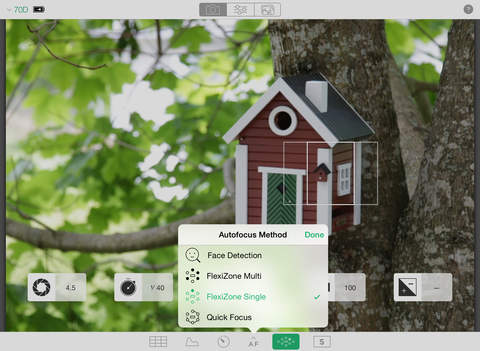
Cascable AB has announced Cascable 1.0 for iOS, the best tool available for working with your camera in the field. Primary exposure adjustments and focus/shutter release are front and centre, and advanced autofocus, timer and drive controls are just a tap away. Cascable supports downloading and exporting full resolution photos, including RAW files, from your camera, and with second screen support via AirPlay or HDMI, you can view your photos on the big screen.
Stockholm, Sweden - Cascable is the best tool available for working with your camera in the field. Whether it's taking perfect group shots with your family using the included Apple Watch app or nailing that hard-to-reach shot in your latest photoshoot, Cascable will prove to be an essential part of your photography toolkit for the amateur and professional photographer alike.
Cascable provides a powerful and fast user interface whether you're on iPad, iPhone, or iPod touch. Primary exposure adjustments and focus/shutter release are front and centre, and advanced autofocus, timer and drive controls are just a tap away. Unlike other apps, Cascable supports downloading and exporting full resolution photos - including RAW files - from your camera, and with second screen support via AirPlay or HDMI you can view your photos on the big screen. Other innovations include an Apple Watch app that puts your camera's shutter right on your wrist and a set of calculators to help with the tricky exposure calculations needed for astrophotography and neutral density filters.
"Until now, the WiFi features on professional-grade cameras were seen as 'nice to have' at best. With Cascable, we intend to change that by unlocking the potential of these cameras the way a modern, Internet-connected app should." said Daniel Kennett, CEO of Cascable AB. "I can't wait to see Cascable grow with the help of photographers around the world."
Device Requirements:
* iPhone, iPad, and iPod touch
* Optimized for iPhone 5, iPhone 6/6 Plus
* Requires iOS 8.0 or later
* 8.9 MB
Pricing and Availability:
Cascable 1.0 is offered for the promotional launch price of $19.99 USD (or equivalent amount in other currencies) and available worldwide exclusively through the App Store in the Photo & Video category. Please visit Cascable's official website for more information on Cascable, including screenshots, photographs and detailed user guides.
Cascable 1.0: http://cascable.se/
Purchase and Download: https://itunes.apple.com/app/id974193500?mt=8&at=1010l4JU&ct=prmac
Screenshot 1: http://a2.mzstatic.com/us/r30/Purple1/v4/db/53/f0/db53f0b5-69bc-2c5f-f342-0ef65655bd78/screen480x480.jpeg
Screenshot 2: http://a2.mzstatic.com/us/r30/Purple7/v4/a1/a7/56/a1a756ea-f3d8-22eb-0016-596997947a42/screen480x480.jpeg
App Icon: http://a5.mzstatic.com/us/r30/Purple5/v4/11/c8/d0/11c8d0bd-f24b-bcb0-c2b2-44f23a8b18d2/icon175x175.jpeg
Press Kit (zip): https://cascable.se/press/Cascable10PressKit.zip
Cascable AB is a small mobile development company founded in Stockholm, Sweden in 2015. All Material and Software (C) Copyright 2015 Cascable AB. All Rights Reserved. Apple, the Apple logo, iPhone, iPod and iPad are registered trademarks of Apple Inc. in the U.S. and/or other countries. Other trademarks and registered trademarks may be the property of their respective owners.
*******
Link To Article: http://prmac.com/release-id-75521.htm
*******
---------------------------------------------------------------------------------
Note that you can alter delivered distributions at any time.
Login to your account on prMac to alter your channel selection, or to opt-out at any time.
Cascable - A professional remote control for your WiFi-enabled camera - Published on 06/26/15
Cascable AB has announced Cascable 1.0 for iOS, the best tool available for working with your camera in the field. Primary exposure adjustments and focus/shutter release are front and centre, and advanced autofocus, timer and drive controls are just a tap away. Cascable supports downloading and exporting full resolution photos, including RAW files, from your camera, and with second screen support via AirPlay or HDMI, you can view your photos on the big screen.
Stockholm, Sweden - Cascable is the best tool available for working with your camera in the field. Whether it's taking perfect group shots with your family using the included Apple Watch app or nailing that hard-to-reach shot in your latest photoshoot, Cascable will prove to be an essential part of your photography toolkit for the amateur and professional photographer alike.
Cascable provides a powerful and fast user interface whether you're on iPad, iPhone, or iPod touch. Primary exposure adjustments and focus/shutter release are front and centre, and advanced autofocus, timer and drive controls are just a tap away. Unlike other apps, Cascable supports downloading and exporting full resolution photos - including RAW files - from your camera, and with second screen support via AirPlay or HDMI you can view your photos on the big screen. Other innovations include an Apple Watch app that puts your camera's shutter right on your wrist and a set of calculators to help with the tricky exposure calculations needed for astrophotography and neutral density filters.
"Until now, the WiFi features on professional-grade cameras were seen as 'nice to have' at best. With Cascable, we intend to change that by unlocking the potential of these cameras the way a modern, Internet-connected app should." said Daniel Kennett, CEO of Cascable AB. "I can't wait to see Cascable grow with the help of photographers around the world."
Device Requirements:
* iPhone, iPad, and iPod touch
* Optimized for iPhone 5, iPhone 6/6 Plus
* Requires iOS 8.0 or later
* 8.9 MB
Pricing and Availability:
Cascable 1.0 is offered for the promotional launch price of $19.99 USD (or equivalent amount in other currencies) and available worldwide exclusively through the App Store in the Photo & Video category. Please visit Cascable's official website for more information on Cascable, including screenshots, photographs and detailed user guides.
Cascable 1.0: http://cascable.se/
Purchase and Download: https://itunes.apple.com/app/id974193500?mt=8&at=1010l4JU&ct=prmac
Screenshot 1: http://a2.mzstatic.com/us/r30/Purple1/v4/db/53/f0/db53f0b5-69bc-2c5f-f342-0ef65655bd78/screen480x480.jpeg
Screenshot 2: http://a2.mzstatic.com/us/r30/Purple7/v4/a1/a7/56/a1a756ea-f3d8-22eb-0016-596997947a42/screen480x480.jpeg

App Icon: http://a5.mzstatic.com/us/r30/Purple5/v4/11/c8/d0/11c8d0bd-f24b-bcb0-c2b2-44f23a8b18d2/icon175x175.jpeg

Press Kit (zip): https://cascable.se/press/Cascable10PressKit.zip
Cascable AB is a small mobile development company founded in Stockholm, Sweden in 2015. All Material and Software (C) Copyright 2015 Cascable AB. All Rights Reserved. Apple, the Apple logo, iPhone, iPod and iPad are registered trademarks of Apple Inc. in the U.S. and/or other countries. Other trademarks and registered trademarks may be the property of their respective owners.
*******
Link To Article: http://prmac.com/release-id-75521.htm
*******
---------------------------------------------------------------------------------
Note that you can alter delivered distributions at any time.
Login to your account on prMac to alter your channel selection, or to opt-out at any time.
Neogen 1.0 - Add Your Own Music To The Glorious Graphics of The Game
A new article has been published at prMac.
Neogen 1.0 - Add Your Own Music To The Glorious Graphics of The Game - Published on 06/25/15
FredBear Games announces the release of Neogen Fallout 1.0 for the iOS and Android devices. Players match the neon figures with the cells in the bottom and test their reaction in the abstract city of neon lights, shadows and glorious effects. Slide the shapes left and right to match them with the destination cells at the bottom of the screen. The "YOUR MUSIC TRACK" function allows players to play and feel the interaction of music and gameplay with each song on their device.
Sutton Coldfield, United Kingdom - FredBear Games is pleased to announce the release of Neogen Fallout 1.0 for the iOS and Android devices. Players match the neon figures with the cells in the bottom and test their reaction in the abstract city of neon lights, shadows and glorious effects. Slide the shapes left and right to match them with the destination cells at the bottom of the screen.
We've integrated a "YOUR MUSIC TRACK" Function. Now players can play and feel the interaction of music and gameplay with each song on their device. Just choose the preferred one in the Game Menu. Note: the music tracks must be stored in the internal directory of the Device. Players can play with their own music tracks and tell us, and other users, which music is the best fit for our game.
Features:
* Absorbing interaction of music and game objects
* Abstract city of shapes and neons
* Realtime dynamic changing of colors
* Optimized for high resolution screens
* Leaderboard, Achievements, Share
* Ost by NubbyCakums and Brenticus
Device Requirements:
* iPhone, iPad, and iPod touch
* Universal App
* Optimized for iPhone 5, iPhone 6, and iPhone 6 Plus
* Requires iOS 6.0 or later
* 54.3 MB
Pricing and Availability:
Neogen Fallout 1.0 is free, and is available worldwide through the App Store in the Games category. An Android version is available through the Google Play Store.
FredBear Games: http://www.fredbeargames.com
Neogen Fallout 1.0: https://itunes.apple.com/app/neogen-fallout/id1006249367
Download from iTunes: https://itunes.apple.com/app/neogen-fallout/id1006249367
Download from Google Play: https://play.google.com/store/apps/details?id=com.fredbearsgames.Neogen&hl=en
Screenshot: http://a3.mzstatic.com/us/r30/Purple7/v4/03/dd/45/03dd457a-8f4d-ef2c-0f04-ba6e0b052a1e/screen322x572.jpeg
App Icon: http://a3.mzstatic.com/us/r30/Purple5/v4/d5/67/95/d567955e-5d02-abf4-8110-e8b824473aaa/icon175x175.png
FredBear Games, creating addictive mobile games, is located in Sutton Coldfield, United Kingdom. All Material and Software (C) Copyright 2015 FredBear Games. All Rights Reserved. Apple, the Apple logo, iPhone, iPod and iPad are registered trademarks of Apple Inc. in the U.S. and/or other countries. Other trademarks and registered trademarks may be the property of their respective owners.
*******
Link To Article: http://prmac.com/release-id-75569.htm
*******
---------------------------------------------------------------------------------
Note that you can alter delivered distributions at any time.
Login to your account on prMac to alter your channel selection, or to opt-out at any time.
Neogen 1.0 - Add Your Own Music To The Glorious Graphics of The Game - Published on 06/25/15
FredBear Games announces the release of Neogen Fallout 1.0 for the iOS and Android devices. Players match the neon figures with the cells in the bottom and test their reaction in the abstract city of neon lights, shadows and glorious effects. Slide the shapes left and right to match them with the destination cells at the bottom of the screen. The "YOUR MUSIC TRACK" function allows players to play and feel the interaction of music and gameplay with each song on their device.
Sutton Coldfield, United Kingdom - FredBear Games is pleased to announce the release of Neogen Fallout 1.0 for the iOS and Android devices. Players match the neon figures with the cells in the bottom and test their reaction in the abstract city of neon lights, shadows and glorious effects. Slide the shapes left and right to match them with the destination cells at the bottom of the screen.
We've integrated a "YOUR MUSIC TRACK" Function. Now players can play and feel the interaction of music and gameplay with each song on their device. Just choose the preferred one in the Game Menu. Note: the music tracks must be stored in the internal directory of the Device. Players can play with their own music tracks and tell us, and other users, which music is the best fit for our game.
Features:
* Absorbing interaction of music and game objects
* Abstract city of shapes and neons
* Realtime dynamic changing of colors
* Optimized for high resolution screens
* Leaderboard, Achievements, Share
* Ost by NubbyCakums and Brenticus
Device Requirements:
* iPhone, iPad, and iPod touch
* Universal App
* Optimized for iPhone 5, iPhone 6, and iPhone 6 Plus
* Requires iOS 6.0 or later
* 54.3 MB
Pricing and Availability:
Neogen Fallout 1.0 is free, and is available worldwide through the App Store in the Games category. An Android version is available through the Google Play Store.
FredBear Games: http://www.fredbeargames.com
Neogen Fallout 1.0: https://itunes.apple.com/app/neogen-fallout/id1006249367
Download from iTunes: https://itunes.apple.com/app/neogen-fallout/id1006249367
Download from Google Play: https://play.google.com/store/apps/details?id=com.fredbearsgames.Neogen&hl=en
Screenshot: http://a3.mzstatic.com/us/r30/Purple7/v4/03/dd/45/03dd457a-8f4d-ef2c-0f04-ba6e0b052a1e/screen322x572.jpeg

App Icon: http://a3.mzstatic.com/us/r30/Purple5/v4/d5/67/95/d567955e-5d02-abf4-8110-e8b824473aaa/icon175x175.png
FredBear Games, creating addictive mobile games, is located in Sutton Coldfield, United Kingdom. All Material and Software (C) Copyright 2015 FredBear Games. All Rights Reserved. Apple, the Apple logo, iPhone, iPod and iPad are registered trademarks of Apple Inc. in the U.S. and/or other countries. Other trademarks and registered trademarks may be the property of their respective owners.
*******
Link To Article: http://prmac.com/release-id-75569.htm
*******
---------------------------------------------------------------------------------
Note that you can alter delivered distributions at any time.
Login to your account on prMac to alter your channel selection, or to opt-out at any time.
MacPlay Releases Shelter 2 for Mac App Store
A new article has been published at prMac.
MacPlay Releases Shelter 2 for Mac App Store - Published on 06/25/15
Developed by Might and Delight and released on the Mac App Store by MacPlay, Shelter 2 is a unique game in which you play a powerful Lynx. Follow a Lynx through vast open landscapes. Give birth to your cubs, raise and strengthen them by mastering your skills for hunting prey. Explore the wild beauty of nature and do everything possible to prepare your family for the vicious entities dwelling on the cold tundra. There are several maternal and hunting features in this unique game.
Dallas, Texas - Shelter 2, a unique game in which you play a powerful Lynx, is now available on the Mac App Store. Follow a Lynx through vast open landscapes. Give birth to your cubs, raise and strengthen them by mastering your skills for hunting prey. Explore the wild beauty of nature and do everything possible to prepare your family for the vicious entities dwelling on the cold tundra.
Developed by Might and Delight and released on the Mac App Store by MacPlay, Shelter 2 follows the life of a mother lynx, starting as a pregnant animal, giving birth and continuing in to a journey of parenthood where nurturing her cubs is paramount for survival. Shelter 2 includes more elaborate gameplay features than its predecessor, such as stamina, different types of movements, jumps and a variety of prey to kill. Besides hunting there are several maternal and hunting features, such as calling the cubs closer, smell for prey, making sure they drink water from rivers and lifting and carrying your cubs from harm's way.
A vast wilderness awaits:
Environments in Shelter 2 are much bigger than its predecessor and allow a lot more freedom than ever before, allowing players to find favorite spots to return to. This time weather and seasons change, harsh winters and bloomy summers awaits you! The music is once again presented by Retro Family, awarded for their work on the Pid Soundtrack, and the visuals have been reinvented by adding dense atmosphere and lighting to the patterned graphical art style.
System Requirements:
* OS: Mac OS X Lion 10.7 or later
* Processor: 2.6 GHz single core
* Memory: 2 GB RAM
* Graphics: OpenGL 2.0 compatible video card with 256 MB shared or dedicated RAM (ATI or NVIDIA)
* Hard Drive: 2 GB available space
Pricing and Availability:
Shelter 2 (v1.0.0) is now available worldwide on Apple's Mac App Store for $14.99 (USD) in the Games category.
MacPlay: http://www.macplay.com
Shelter 2 (v1.0.0): https://itunes.apple.com/app/shelter-2/id1000028809
Screenshot: http://cdn.akamai.steamstatic.com/steam/apps/275100/ss_ad240fb81d0b44e75c0b488a3cd109df0113a1c6.1920x1080.jpg?t=1431447267
Application Icon: http://a5.mzstatic.com/us/r30/Purple7/v4/23/0e/3c/230e3c8a-99ad-88bb-85dc-912e6366074f/icon256.png
MacPlay's 3.0 mission is to provide publishers and developers an exciting and profitable way of distributing their games on the Mac App Store and other platforms. All Material and Software (C) Copyright 2015 MacPlay. All Rights Reserved. Apple, the Apple logo, iPhone, iPod and iPad are registered trademarks of Apple Inc. in the U.S. and/or other countries. Other trademarks and registered trademarks may be the property of their respective owners.
*******
Link To Article: http://prmac.com/release-id-75568.htm
*******
---------------------------------------------------------------------------------
Note that you can alter delivered distributions at any time.
Login to your account on prMac to alter your channel selection, or to opt-out at any time.
MacPlay Releases Shelter 2 for Mac App Store - Published on 06/25/15
Developed by Might and Delight and released on the Mac App Store by MacPlay, Shelter 2 is a unique game in which you play a powerful Lynx. Follow a Lynx through vast open landscapes. Give birth to your cubs, raise and strengthen them by mastering your skills for hunting prey. Explore the wild beauty of nature and do everything possible to prepare your family for the vicious entities dwelling on the cold tundra. There are several maternal and hunting features in this unique game.
Dallas, Texas - Shelter 2, a unique game in which you play a powerful Lynx, is now available on the Mac App Store. Follow a Lynx through vast open landscapes. Give birth to your cubs, raise and strengthen them by mastering your skills for hunting prey. Explore the wild beauty of nature and do everything possible to prepare your family for the vicious entities dwelling on the cold tundra.
Developed by Might and Delight and released on the Mac App Store by MacPlay, Shelter 2 follows the life of a mother lynx, starting as a pregnant animal, giving birth and continuing in to a journey of parenthood where nurturing her cubs is paramount for survival. Shelter 2 includes more elaborate gameplay features than its predecessor, such as stamina, different types of movements, jumps and a variety of prey to kill. Besides hunting there are several maternal and hunting features, such as calling the cubs closer, smell for prey, making sure they drink water from rivers and lifting and carrying your cubs from harm's way.
A vast wilderness awaits:
Environments in Shelter 2 are much bigger than its predecessor and allow a lot more freedom than ever before, allowing players to find favorite spots to return to. This time weather and seasons change, harsh winters and bloomy summers awaits you! The music is once again presented by Retro Family, awarded for their work on the Pid Soundtrack, and the visuals have been reinvented by adding dense atmosphere and lighting to the patterned graphical art style.
System Requirements:
* OS: Mac OS X Lion 10.7 or later
* Processor: 2.6 GHz single core
* Memory: 2 GB RAM
* Graphics: OpenGL 2.0 compatible video card with 256 MB shared or dedicated RAM (ATI or NVIDIA)
* Hard Drive: 2 GB available space
Pricing and Availability:
Shelter 2 (v1.0.0) is now available worldwide on Apple's Mac App Store for $14.99 (USD) in the Games category.
MacPlay: http://www.macplay.com
Shelter 2 (v1.0.0): https://itunes.apple.com/app/shelter-2/id1000028809
Screenshot: http://cdn.akamai.steamstatic.com/steam/apps/275100/ss_ad240fb81d0b44e75c0b488a3cd109df0113a1c6.1920x1080.jpg?t=1431447267

Application Icon: http://a5.mzstatic.com/us/r30/Purple7/v4/23/0e/3c/230e3c8a-99ad-88bb-85dc-912e6366074f/icon256.png

MacPlay's 3.0 mission is to provide publishers and developers an exciting and profitable way of distributing their games on the Mac App Store and other platforms. All Material and Software (C) Copyright 2015 MacPlay. All Rights Reserved. Apple, the Apple logo, iPhone, iPod and iPad are registered trademarks of Apple Inc. in the U.S. and/or other countries. Other trademarks and registered trademarks may be the property of their respective owners.
*******
Link To Article: http://prmac.com/release-id-75568.htm
*******
---------------------------------------------------------------------------------
Note that you can alter delivered distributions at any time.
Login to your account on prMac to alter your channel selection, or to opt-out at any time.
ZomBehead! 1.0 for iOS released - It's a variation of clicker games
A new article has been published at prMac.
ZomBehead! 1.0 for iOS released - It's a variation of clicker games - Published on 06/25/15
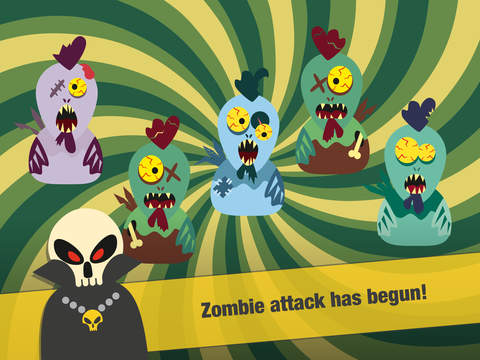
Pappu Games today introduces ZomBehead! 1.0 for iOS devices. ZomBehead! is a combination of Behead and Zombie. A variation of clicker games, ZomBehead! features 18 non-stop game levels, funny characters, bonuses and surprises, with a cool story line and original mechanics not seen in other clickers. Gamer must have good concentration and fast reflexes. ZomBehead! features four types of bonuses player can collect, along with four types of heroes and more.
Riga, Latvia - Indie developer, Pappu Games today is proud to announce the release and immediate availability of ZomBehead! 1.0 for iOS devices. A variation of clicker games, ZomBehead! features 18 non-stop game levels, funny characters, bonuses and surprises, with a cool story line and original mechanics not seen in other clickers. ZomBehead! is a combination of Behead and Zombie (Behead the Zombie!). Said aloud, it sounds like Zombie Head.
Gamer must have good concentration and fast reflexes. At first level, you have to tap on zombies or bonuses or coins appearing in one location (trap made by farmers) of the screen, and not tapping on a chickens appearing at the same positions. As game progresses, number of traps increases, so the game requires more and more skills and concentration.
There are 4 types of bonuses player can collect:
* Mallet - protects against a Zombie bite, loss of lives and points
* Helmet - protects chickens from beheading. If you accidentally hit a Chicken, you won't lose lives or points, and no new Zombies will appear
* Life - extra lives help you complete the game but don't guarantee that your points will remain intact for a high score
* Coins - by accumulating coins, you will be able to access a new hero
There are 4 types of heroes: Farmer is starter hero. The gamer has 5 lives + 5 anti-zombie mallets + 5 protective helmets for Chickens. All other heroes are exta heroes: Hunter, Knight, Ninja - they have more lives, mallets and helmets. As you can see, game mechanics is really advanced!
Supported Languages:
* English, Japanese, Chinese, French, Portuguese, Spanish, German and Russian
Device Requirements:
* iPhone, iPad, and iPod touch
* Optimized for iPhone 5, iPhone 6/6 Plus
* Universal Application
* Requires iOS 7.0 or later
* Age restriction: 9
* 23.8 MB
Pricing and Availability:
ZomBehead! 1.0 is free-to-play game and is available worldwide exclusively via the App Store in the Games category.
ZomBehead! 1.0: http://pappu.lv/?section=zombehead
Download from iTunes: https://itunes.apple.com/app/id965825149
Screenshot: http://a4.mzstatic.com/us/r30/Purple1/v4/21/0c/aa/210caae0-bb6d-bc76-d073-80158e3ebeb2/screen480x480.jpeg
App Icon: http://a3.mzstatic.com/us/r30/Purple3/v4/82/55/e9/8255e983-1f7e-a52e-b372-8ac446f28e9f/icon175x175.jpeg
Press Kit (zip): https://www.dropbox.com/s/0zv6bwggagmb001/ZomBehead%21_press_kit.zip?dl=0
Pappu Games are independent developer from Riga, Latvia. Our team consists of five different people who are united by a common goal. The company was created in 2011. The company has already released eight games on iOS. All Material and Software (C) Copyright 2015 Pappu Games. All Rights Reserved. Apple, the Apple logo, iPhone, iPad and iPod are registered trademarks of Apple Inc. in the U.S. and/or other countries.
*******
Link To Article: http://prmac.com/release-id-75567.htm
*******
---------------------------------------------------------------------------------
Note that you can alter delivered distributions at any time.
Login to your account on prMac to alter your channel selection, or to opt-out at any time.
ZomBehead! 1.0 for iOS released - It's a variation of clicker games - Published on 06/25/15
Pappu Games today introduces ZomBehead! 1.0 for iOS devices. ZomBehead! is a combination of Behead and Zombie. A variation of clicker games, ZomBehead! features 18 non-stop game levels, funny characters, bonuses and surprises, with a cool story line and original mechanics not seen in other clickers. Gamer must have good concentration and fast reflexes. ZomBehead! features four types of bonuses player can collect, along with four types of heroes and more.
Riga, Latvia - Indie developer, Pappu Games today is proud to announce the release and immediate availability of ZomBehead! 1.0 for iOS devices. A variation of clicker games, ZomBehead! features 18 non-stop game levels, funny characters, bonuses and surprises, with a cool story line and original mechanics not seen in other clickers. ZomBehead! is a combination of Behead and Zombie (Behead the Zombie!). Said aloud, it sounds like Zombie Head.
Gamer must have good concentration and fast reflexes. At first level, you have to tap on zombies or bonuses or coins appearing in one location (trap made by farmers) of the screen, and not tapping on a chickens appearing at the same positions. As game progresses, number of traps increases, so the game requires more and more skills and concentration.
There are 4 types of bonuses player can collect:
* Mallet - protects against a Zombie bite, loss of lives and points
* Helmet - protects chickens from beheading. If you accidentally hit a Chicken, you won't lose lives or points, and no new Zombies will appear
* Life - extra lives help you complete the game but don't guarantee that your points will remain intact for a high score
* Coins - by accumulating coins, you will be able to access a new hero
There are 4 types of heroes: Farmer is starter hero. The gamer has 5 lives + 5 anti-zombie mallets + 5 protective helmets for Chickens. All other heroes are exta heroes: Hunter, Knight, Ninja - they have more lives, mallets and helmets. As you can see, game mechanics is really advanced!
Supported Languages:
* English, Japanese, Chinese, French, Portuguese, Spanish, German and Russian
Device Requirements:
* iPhone, iPad, and iPod touch
* Optimized for iPhone 5, iPhone 6/6 Plus
* Universal Application
* Requires iOS 7.0 or later
* Age restriction: 9
* 23.8 MB
Pricing and Availability:
ZomBehead! 1.0 is free-to-play game and is available worldwide exclusively via the App Store in the Games category.
ZomBehead! 1.0: http://pappu.lv/?section=zombehead
Download from iTunes: https://itunes.apple.com/app/id965825149
Screenshot: http://a4.mzstatic.com/us/r30/Purple1/v4/21/0c/aa/210caae0-bb6d-bc76-d073-80158e3ebeb2/screen480x480.jpeg
App Icon: http://a3.mzstatic.com/us/r30/Purple3/v4/82/55/e9/8255e983-1f7e-a52e-b372-8ac446f28e9f/icon175x175.jpeg

Press Kit (zip): https://www.dropbox.com/s/0zv6bwggagmb001/ZomBehead%21_press_kit.zip?dl=0
Pappu Games are independent developer from Riga, Latvia. Our team consists of five different people who are united by a common goal. The company was created in 2011. The company has already released eight games on iOS. All Material and Software (C) Copyright 2015 Pappu Games. All Rights Reserved. Apple, the Apple logo, iPhone, iPad and iPod are registered trademarks of Apple Inc. in the U.S. and/or other countries.
*******
Link To Article: http://prmac.com/release-id-75567.htm
*******
---------------------------------------------------------------------------------
Note that you can alter delivered distributions at any time.
Login to your account on prMac to alter your channel selection, or to opt-out at any time.
Subscribe to:
Posts (Atom)