A new article has been published at prMac.
Kyber and IFTTT simplify your life through machine-to-human messaging - Published on 07/08/15
Kyber and IFTTT announce the new Kyber channel on IFTTT to support their mission of simplifying people's lives. Kyber's unique approach to contextual messaging helps you make things happen with the people you care about. Messages are synced to a recipient's to-do list or calendar, saving time and ensuring tasks are completed. With the IFTTT integration, Kyber extends its messaging and productivity platform to popular Internet services and connected devices, making it the hub of your life.
San Francisco, California - Kyber, an innovative messaging and productivity app available on Apple App Store, and IFTTT (If This Then That) have partnered to release the Kyber channel on IFTTT to support their joint mission of simplifying people's lives. Kyber uniquely brings context to messaging by integrating it with calendars, reminders, to-dos and maps to help you make things happen with the people you care about. With the IFTTT integration, Kyber extends its messaging and productivity platform to many popular Internet services and connected devices, making it the hub of our lives.
"Every day we are inundated by messages asking us to do or plan something; it happens at home, at work, with friends, with clients. On top of that, we have our personal to-dos and events to track and organize," said Paolo Perazzo, founder of Kyber. "Even if we use the help of apps, we constantly need to switch and manually transfer information between them. It's inefficient, it doesn't help. This is why we built Kyber."
With Kyber, messages get directly synced to a recipient's to-do list or calendar, saving time and ensuring tasks are completed and not forgotten. These messages also incorporate contextual information such as time, location, or checklist. This enables users to set remote reminders, to automatically find the best time to meet, to access maps with one tap, and to collaborate on checklists, all while typing the message itself. Users are then informed when a task is updated or completed, easily keeping everyone in the loop. As a receiver, incoming messages can be organized along with personal to-dos, reminders and calendars to have everything in one place. Couples, families, small businesses and teams have replaced basic text messaging and multiple productivity apps with just Kyber to collaborate more efficiently and have their busy lives under control.
The integration with IFTTT allows Kyber to further extend its messaging and productivity capabilities, enabling new experiences for its users. "We're excited to welcome Kyber to the IFTTT platform and look forward to seeing the creative ways people will use the Channel," said Linden Tibbets, CEO of IFTTT. "Services like Kyber share our vision of making your day-to-day life simpler and we're thrilled to support them."
With IFTTT and Kyber, you can, for example, easily create reminders from emails on Gmail, log your work hours on a calendar based on your location or automatically build an Evernote journal based on your daily to-dos and meetings. You can also receive anticipatory messages directly from... the Internet: a reminder in the morning to bring an umbrella if the forecast calls for rain; a to-do to buy an item online after a price drop and a following one to pick it up when delivered; or a timely message to read the latest article trending on the New York Times. Any connected device can now message you: your car to check the engine light, your plants to water them, or your tray when you are running low on eggs.
Device Requirements:
* iPhone, iPad, and iPod touch
* Requires iOS 7.0 or later
* 23.1 MB
Pricing and Availability:
Kyber 0.7 is Free and available worldwide exclusively through the App Store in the Productivity category. IFTTT makes anything possible, Kyber makes it happen.
Kyber 0.7: http://kyber.me
Kyber Calendars and Reminders Channel: https://ifttt.com/kyber
Download from iTunes: https://itunes.apple.com/us/app/kyber-make-things-happen/id898004872?mt=8&uo=4&pt=1865746&at=1l3vpA6&ct=PRmac
Screenshot: http://a3.mzstatic.com/us/r30/Purple5/v4/8e/e3/9c/8ee39ccf-0bda-67db-0f03-3de577f1b7da/screen568x568.jpeg
App Icon: http://a1.mzstatic.com/us/r30/Purple1/v4/36/31/ae/3631aed0-7432-0d88-17e3-ca6ef17c6788/icon175x175.png
Press Kit (zip): http://kyber.me/press-kit.zip
Kyber is a product of Companyons, Inc., an exciting startup in San Francisco, CA. Companyons' mission is to use artificial intelligence to enhance, not replace, humans. The journey starts with Kyber, a messaging and productivity app which uses contextual information, sensors and intelligence in the cloud to help you make things happen with the people you care about. All Material and Software (C) Copyright 2015 Companyons, Inc. All Rights Reserved. Apple, the Apple logo, iPhone, iPod and iPad are registered trademarks of Apple Inc. in the U.S. and/or other countries. Other trademarks and registered trademarks may be the property of their respective owners.
*******
Link To Article: http://prmac.com/release-id-75749.htm
*******
---------------------------------------------------------------------------------
Note that you can alter delivered distributions at any time.
Login to your account on prMac to alter your channel selection, or to opt-out at any time.


Thug Life Maker 1.8 Brings Unique Video Editing Features to iOS
A new article has been published at prMac.
Thug Life Maker 1.8 Brings Unique Video Editing Features to iOS - Published on 07/08/15
Indie Developer, Maruf Nebil announces the release of Thug Life Maker 1.8, an update to his popular entertainment app developed for iPhone, iPad and iPod touch devices. Thug Life Maker is a video editing app which allows users to create photos & videos of the web trend, Thug Life. With Thug Life Maker, users can make their own Thug Life videos, just like the most popular ones. Version 1.8 now offers 6 photo and video editing modes, a Wasted Video Maker, and a Video & Video Meme Combiner.
Adana, Turkey - Indie developer, Maruf Nebil today is proud to announce the release and immediate availability of Thug Life Maker 1.8, an update to his popular entertainment app for iPhone, iPad and iPod touch devices. Thug Life Maker is a video editing app which allows users to create photos and videos of the web trend, Thug Life. What's more, Thug Life Maker now presents unique video editing modes and moves its direction to #1 video editing app.
Thug Life is a series of videos that typically begin with home movies of preadolescents using overly confrontational or expletive language, followed by a freeze-frame at a close-up image of the subject and an instrumental fade out to Dr. Dre's 1992 gangsta rap song "Nuthin' But a G Thang." With Thug Life Maker, users can make their own Thug Life video like the most popular ones. The app gives a number of image and song options which lets users make unlimited combinations.
"Wasted" is a slang term indicating that a person has been killed which is displayed on screen in the open world video game series Grand Theft Auto if a player runs out of health. Wasted theme is getting used on fail videos and loved by a huge audience. With Thug Life Maker users can create Wasted videos just like in GTA effortlessly.
Uh Huh! This My Sh*t videos are very popular on Vine. It features something that would lead in to a looping of something beating something in synch to the opening of Hollaback Girl. With Thug Life Maker you can create Uh Huh! This My Sh*t videos in seconds.
Combining your video with popular video memes like Bruh or Jesus Christ Kid is very popular on Vine. Thug Life Maker lets you combine videos with popular video memes allowing users to create hilarious videos. With 1.8 update, Thug Life Maker has 6 amazing photo and video editing modes:
* Thug Life Photo, Video, Slideshow Maker
* Wasted Video Maker
* Uh Huh! This My Sh*t Video Maker
* Video and Video Meme Combiner
Device Requirements:
* iPhone, iPad, and iPod touch
* Universal App
* Requires iOS 6.0 or later
* 44.0 MB
Pricing and Availability:
Thug Life Maker 1.8 is free and available worldwide exclusively through the App Store in the Entertainment category.
Thug Life Maker 1.8: http://www.thuglifemaker.net
Download from iTunes: https://itunes.apple.com/app/thug-life-maker-become-gangsta/id961420875
YouTube Video: https://www.youtube.com/watch?v=XGQL0wRBl5c
Instagram Fan Page: https://instagram.com/thug_life_maker/
Vine Fan Page: https://vine.co/u/1180282240413151232
App Icon: http://thuglifemaker.net/images/icon512.jpg
Maruf Nebil is an indie iOS developer from Adana, Turkey. Maruf Nebil creates world class apps for the iOS and Android. All Material and Software Copyright (C) 2015 Maruf Nebil. All Rights Reserved. Apple, the Apple logo, iPhone, iPod and iPad are registered trademarks of Apple Inc. in the U.S. and/or other countries. Other trademarks and registered trademarks may be the property of their respective owners.
*******
Link To Article: http://prmac.com/release-id-75748.htm
*******
---------------------------------------------------------------------------------
Note that you can alter delivered distributions at any time.
Login to your account on prMac to alter your channel selection, or to opt-out at any time.
Thug Life Maker 1.8 Brings Unique Video Editing Features to iOS - Published on 07/08/15
Indie Developer, Maruf Nebil announces the release of Thug Life Maker 1.8, an update to his popular entertainment app developed for iPhone, iPad and iPod touch devices. Thug Life Maker is a video editing app which allows users to create photos & videos of the web trend, Thug Life. With Thug Life Maker, users can make their own Thug Life videos, just like the most popular ones. Version 1.8 now offers 6 photo and video editing modes, a Wasted Video Maker, and a Video & Video Meme Combiner.
Adana, Turkey - Indie developer, Maruf Nebil today is proud to announce the release and immediate availability of Thug Life Maker 1.8, an update to his popular entertainment app for iPhone, iPad and iPod touch devices. Thug Life Maker is a video editing app which allows users to create photos and videos of the web trend, Thug Life. What's more, Thug Life Maker now presents unique video editing modes and moves its direction to #1 video editing app.
Thug Life is a series of videos that typically begin with home movies of preadolescents using overly confrontational or expletive language, followed by a freeze-frame at a close-up image of the subject and an instrumental fade out to Dr. Dre's 1992 gangsta rap song "Nuthin' But a G Thang." With Thug Life Maker, users can make their own Thug Life video like the most popular ones. The app gives a number of image and song options which lets users make unlimited combinations.
"Wasted" is a slang term indicating that a person has been killed which is displayed on screen in the open world video game series Grand Theft Auto if a player runs out of health. Wasted theme is getting used on fail videos and loved by a huge audience. With Thug Life Maker users can create Wasted videos just like in GTA effortlessly.
Uh Huh! This My Sh*t videos are very popular on Vine. It features something that would lead in to a looping of something beating something in synch to the opening of Hollaback Girl. With Thug Life Maker you can create Uh Huh! This My Sh*t videos in seconds.
Combining your video with popular video memes like Bruh or Jesus Christ Kid is very popular on Vine. Thug Life Maker lets you combine videos with popular video memes allowing users to create hilarious videos. With 1.8 update, Thug Life Maker has 6 amazing photo and video editing modes:
* Thug Life Photo, Video, Slideshow Maker
* Wasted Video Maker
* Uh Huh! This My Sh*t Video Maker
* Video and Video Meme Combiner
Device Requirements:
* iPhone, iPad, and iPod touch
* Universal App
* Requires iOS 6.0 or later
* 44.0 MB
Pricing and Availability:
Thug Life Maker 1.8 is free and available worldwide exclusively through the App Store in the Entertainment category.
Thug Life Maker 1.8: http://www.thuglifemaker.net
Download from iTunes: https://itunes.apple.com/app/thug-life-maker-become-gangsta/id961420875
YouTube Video: https://www.youtube.com/watch?v=XGQL0wRBl5c
Instagram Fan Page: https://instagram.com/thug_life_maker/
Vine Fan Page: https://vine.co/u/1180282240413151232
App Icon: http://thuglifemaker.net/images/icon512.jpg

Maruf Nebil is an indie iOS developer from Adana, Turkey. Maruf Nebil creates world class apps for the iOS and Android. All Material and Software Copyright (C) 2015 Maruf Nebil. All Rights Reserved. Apple, the Apple logo, iPhone, iPod and iPad are registered trademarks of Apple Inc. in the U.S. and/or other countries. Other trademarks and registered trademarks may be the property of their respective owners.
*******
Link To Article: http://prmac.com/release-id-75748.htm
*******
---------------------------------------------------------------------------------
Note that you can alter delivered distributions at any time.
Login to your account on prMac to alter your channel selection, or to opt-out at any time.
SCSC Releases Scannerz 1.9.9.75 with Phoenix for Mac OS X, Version 2.0
A new article has been published at prMac.
SCSC Releases Scannerz 1.9.9.75 with Phoenix for Mac OS X, Version 2.0 - Published on 07/08/15
Software and Computer System Company has released Scannerz Version 1.9.9.75 for the Mac OS X operating system. Scannerz employs advanced hard drive and SSD analysis algorithms not employed by any other hard drive scanning tool available on the market. The new version of Scannerz now includes the new Phoenix Version 2.0 as well as Performance Probe and FSE. This new release is fully Yosemite compatible and remains compatible with previous Mac OS X down through Snow Leopard (MacOS 10.6).
Reston, Virginia - Software and Computer Systems Company, LLC, (SCSC) has released Scannerz 1.9.9.75 for the Mac OS X Operating System. This version includes the newly released version of Phoenix for Mac OS X which now features a file recovery mode that may be able to recover files from a damaged hard drive. The update also improves the graphical user interface of Scannerz making it easier for users to navigate more complicated Apple RAID and Core Storage drive configurations.
Scannerz is a set of hard drive, SSD, and system analysis tools utilizing advanced diagnostic algorithms developed by SCSC. It can be used to analyze not only hard drives and SSDs, but the circuitry supporting drives as well as isolate system problems, such as RAM or logic board problems. The package also includes the recently released Phoenix for Mac OS X, version 2.0, which is capable of attempting recovery of files on a damaged hard drive as well as creating emergency boot volumes and performing basic cloning operations.
Other applications in the package include the file system events monitor, FSE, as well as the company's performance monitor named Performance Probe. FSE can help isolate malware, detect possible system intrusions, and help isolate applications that are overly I/O bound. Performance Probe can help identify applications that are bottlenecking the system.
"The biggest deal in this release is probably the update to Phoenix," stated Bill Wagner, the company owner. "Phoenix can now attempt to recover damaged files from a failing hard drive. Adding this feature to Phoenix was just common sense, after all a lot of our customers are getting the product to evaluate what they suspect are bad drives. This new feature in Phoenix may be able to recover some of these files, even though their recovery using other, simple means may well fail. In addition to this, the user interface to Scannerz has been modified to make it easier for users using Apple RAID or Core Storage configurations to more easily show the relationship of the physical drives making up the virtual volumes to the actual virtual drives themselves."
Product Availability:
Current users of the product will be notified by the company in the next few days for update instructions. The update will be free for all current users of fully featured versions of Scannerz. Scannerz 1.9.9.75 for Mac OS X is fully supported by SCSC in the U.S. for registered users.
Software and Computer Systems Company: http://scsc-online.com
Scannerz with FSE-Lite for Mac OS X: http://scsc-online.com/Scannerz.html
Phoenix for Mac OS X: http://scsc-online.com/Phoenix.html
Purchase: http://shop.scsc-online.com
Screenshots: http://scsc-online.com/ScannerzScreenShots.html
Software and Computer Systems Company, LLC (SCSC) was formed in 2005. It is legally licensed to do business as a limited liability company in accordance with the laws of the State of Virginia. Originally, SCSC focussed on producing its own line of cross platform software tools using Java. The applications consisted of performance enhancing application tools, engineering and scientific tools, and tools for the medical sciences. In 2008, SCSC changed its focus and became dedicated primarily to developing products for use on the Mac OS X and IOS operating systems. SCSC's product line up for Mac OS X currently consists of Scannerz with FSE, Scannerz with FSE-Lite, FSE, and SpotOff with Spot-O-Meter. Scannerz is a hard drive scanning tool, FSE is a file system events monitor, and FSE-Lite is a less capable version of FSE and is included in all base versions of Scannerz. SpotOff and Spot-O-Meter allow a user to control and monitor Spotlight activity. Copyright (C) 2005-2015 Software and
Computer Systems Company, LLC. All Rights Reserved. Apple, the Apple logo and Mac OS X platforms are trademarks of Apple Inc. in the U.S. and/or other countries.
*******
Link To Article: http://prmac.com/release-id-75746.htm
*******
---------------------------------------------------------------------------------
Note that you can alter delivered distributions at any time.
Login to your account on prMac to alter your channel selection, or to opt-out at any time.
SCSC Releases Scannerz 1.9.9.75 with Phoenix for Mac OS X, Version 2.0 - Published on 07/08/15
Software and Computer System Company has released Scannerz Version 1.9.9.75 for the Mac OS X operating system. Scannerz employs advanced hard drive and SSD analysis algorithms not employed by any other hard drive scanning tool available on the market. The new version of Scannerz now includes the new Phoenix Version 2.0 as well as Performance Probe and FSE. This new release is fully Yosemite compatible and remains compatible with previous Mac OS X down through Snow Leopard (MacOS 10.6).
Reston, Virginia - Software and Computer Systems Company, LLC, (SCSC) has released Scannerz 1.9.9.75 for the Mac OS X Operating System. This version includes the newly released version of Phoenix for Mac OS X which now features a file recovery mode that may be able to recover files from a damaged hard drive. The update also improves the graphical user interface of Scannerz making it easier for users to navigate more complicated Apple RAID and Core Storage drive configurations.
Scannerz is a set of hard drive, SSD, and system analysis tools utilizing advanced diagnostic algorithms developed by SCSC. It can be used to analyze not only hard drives and SSDs, but the circuitry supporting drives as well as isolate system problems, such as RAM or logic board problems. The package also includes the recently released Phoenix for Mac OS X, version 2.0, which is capable of attempting recovery of files on a damaged hard drive as well as creating emergency boot volumes and performing basic cloning operations.
Other applications in the package include the file system events monitor, FSE, as well as the company's performance monitor named Performance Probe. FSE can help isolate malware, detect possible system intrusions, and help isolate applications that are overly I/O bound. Performance Probe can help identify applications that are bottlenecking the system.
"The biggest deal in this release is probably the update to Phoenix," stated Bill Wagner, the company owner. "Phoenix can now attempt to recover damaged files from a failing hard drive. Adding this feature to Phoenix was just common sense, after all a lot of our customers are getting the product to evaluate what they suspect are bad drives. This new feature in Phoenix may be able to recover some of these files, even though their recovery using other, simple means may well fail. In addition to this, the user interface to Scannerz has been modified to make it easier for users using Apple RAID or Core Storage configurations to more easily show the relationship of the physical drives making up the virtual volumes to the actual virtual drives themselves."
Product Availability:
Current users of the product will be notified by the company in the next few days for update instructions. The update will be free for all current users of fully featured versions of Scannerz. Scannerz 1.9.9.75 for Mac OS X is fully supported by SCSC in the U.S. for registered users.
Software and Computer Systems Company: http://scsc-online.com
Scannerz with FSE-Lite for Mac OS X: http://scsc-online.com/Scannerz.html
Phoenix for Mac OS X: http://scsc-online.com/Phoenix.html
Purchase: http://shop.scsc-online.com
Screenshots: http://scsc-online.com/ScannerzScreenShots.html
Software and Computer Systems Company, LLC (SCSC) was formed in 2005. It is legally licensed to do business as a limited liability company in accordance with the laws of the State of Virginia. Originally, SCSC focussed on producing its own line of cross platform software tools using Java. The applications consisted of performance enhancing application tools, engineering and scientific tools, and tools for the medical sciences. In 2008, SCSC changed its focus and became dedicated primarily to developing products for use on the Mac OS X and IOS operating systems. SCSC's product line up for Mac OS X currently consists of Scannerz with FSE, Scannerz with FSE-Lite, FSE, and SpotOff with Spot-O-Meter. Scannerz is a hard drive scanning tool, FSE is a file system events monitor, and FSE-Lite is a less capable version of FSE and is included in all base versions of Scannerz. SpotOff and Spot-O-Meter allow a user to control and monitor Spotlight activity. Copyright (C) 2005-2015 Software and
Computer Systems Company, LLC. All Rights Reserved. Apple, the Apple logo and Mac OS X platforms are trademarks of Apple Inc. in the U.S. and/or other countries.
*******
Link To Article: http://prmac.com/release-id-75746.htm
*******
---------------------------------------------------------------------------------
Note that you can alter delivered distributions at any time.
Login to your account on prMac to alter your channel selection, or to opt-out at any time.
Subtitles Viewer PRO - Great news for Hearing Impaired
A new article has been published at prMac.
Subtitles Viewer PRO - Great news for Hearing Impaired - Published on 07/08/15
Interactive Coconut today announces Subtitles Viewer 2.0, an update to their movie utility for iOS. Use Subtitles Viewer PRO to download subtitles/captions and then view them on your iPhone/iPad synchronized with TV or movies at home or at the cinema. The pro version gives you unlimited downloads of subtitles from the vast database of OpenSubtitles. Version 2.0 is now translated into over 14 languages, and has many new features including support for uploading your own subtitles via Dropbox.
Melbourne, Australia - Interactive Coconut today is proud to announce the release of Subtitles Viewer 2.0, an update to their movie utility for iPhone, iPad and iPod touch. Ever been to the movies in a foreign country and it's dubbed in the local language? Frustrating! Or how about the hearing impaired? A cinema experience can be impossible when no captioning is available. Subtitles Viewer PRO works to solve this problem.
Subtitles Viewer PRO is the pro version of Subtitles Viewer, and allows unlimited downloads of subtitles/captions. Users can then view subtitles on their iOS device synchronized with television or movies at home, or at the cinema. Subtitles Viewer PRO make use of the vast database of subtitles at OpenSubtitles.org, with subtitles available for downloading in over 20 languages.
Subtitles Viewer is ideal for a number of situations, for example:
* Travelling/living abroad - the cinema has audio in another language, and there are no subtitles
* The hearing impaired can enjoy going to the cinema
* Resolving arguments at home about which language the subtitles should be in
"I'm always really pleased to see an app that serves the handicapped, and Subtitles Viewer makes a strong contribution to this category of iOS owner." commented Mel Martin of TUAW. "It's also useful for people struggling with a new language and want to view movies and TV in their native language."
Version 2.0 of Subtitles Viewer/Subtitles Viewer PRO is now localized into 14 languages and has a huge number of improvements, including:
* New dark design
* New player design
* New player control - slider to skip to time-code (much requested)
* New player control - eye to show subtitles in red
* New functionality to upload subtitles via Dropbox
* Added movie posters to search results
* Added television options(season, episode) to search page
Since its launch, Subtitles Viewer has generated multiple 5-star reviews from impressed users who have commented that the app is a "must have", "really improves my life", and is "a life saver."
Device Requirements:
* iPhone, iPad, and iPod touch
* Requires iOS 7 or later
* 14 MB
Pricing and Availability:
Subtitles Viewer PRO 2.0 is $9.99 USD (or equivalent amount in other currencies) and available worldwide exclusively through the App Store in the Utilities category.
Interactive Coconut: http://www.interactivecoconut.com
Subtitles Viewer 2.0: http://www.subtitlesviewer.com
Purchase and Download: https://itunes.apple.com/app/subtitles-viewer-pro/id1003894106
Screenshot: http://a1.mzstatic.com/us/r30/Purple7/v4/1e/a6/d6/1ea6d644-5d9a-ffac-7fea-5556111588c9/screen568x568.jpeg
App Icon: http://a3.mzstatic.com/us/r30/Purple7/v4/19/f7/a4/19f7a4be-2344-e351-05fa-3010adc68721/icon175x175.png
Located in Melbourne, Australia, Interactive Coconut is an independent app developer in the App Store. Owner Craig Grummitt has been a member of interactive landscape for over 15 years. All Material and Software (C) Copyright 2015 Interactive Coconut. All Rights Reserved. Apple, the Apple logo, iPhone, iPod and iPad are registered trademarks of Apple Inc. in the U.S. and/or other countries. Other trademarks and registered trademarks may be the property of their respective owners.
*******
Link To Article: http://prmac.com/release-id-75745.htm
*******
---------------------------------------------------------------------------------
Note that you can alter delivered distributions at any time.
Login to your account on prMac to alter your channel selection, or to opt-out at any time.
Subtitles Viewer PRO - Great news for Hearing Impaired - Published on 07/08/15
Interactive Coconut today announces Subtitles Viewer 2.0, an update to their movie utility for iOS. Use Subtitles Viewer PRO to download subtitles/captions and then view them on your iPhone/iPad synchronized with TV or movies at home or at the cinema. The pro version gives you unlimited downloads of subtitles from the vast database of OpenSubtitles. Version 2.0 is now translated into over 14 languages, and has many new features including support for uploading your own subtitles via Dropbox.
Melbourne, Australia - Interactive Coconut today is proud to announce the release of Subtitles Viewer 2.0, an update to their movie utility for iPhone, iPad and iPod touch. Ever been to the movies in a foreign country and it's dubbed in the local language? Frustrating! Or how about the hearing impaired? A cinema experience can be impossible when no captioning is available. Subtitles Viewer PRO works to solve this problem.
Subtitles Viewer PRO is the pro version of Subtitles Viewer, and allows unlimited downloads of subtitles/captions. Users can then view subtitles on their iOS device synchronized with television or movies at home, or at the cinema. Subtitles Viewer PRO make use of the vast database of subtitles at OpenSubtitles.org, with subtitles available for downloading in over 20 languages.
Subtitles Viewer is ideal for a number of situations, for example:
* Travelling/living abroad - the cinema has audio in another language, and there are no subtitles
* The hearing impaired can enjoy going to the cinema
* Resolving arguments at home about which language the subtitles should be in
"I'm always really pleased to see an app that serves the handicapped, and Subtitles Viewer makes a strong contribution to this category of iOS owner." commented Mel Martin of TUAW. "It's also useful for people struggling with a new language and want to view movies and TV in their native language."
Version 2.0 of Subtitles Viewer/Subtitles Viewer PRO is now localized into 14 languages and has a huge number of improvements, including:
* New dark design
* New player design
* New player control - slider to skip to time-code (much requested)
* New player control - eye to show subtitles in red
* New functionality to upload subtitles via Dropbox
* Added movie posters to search results
* Added television options(season, episode) to search page
Since its launch, Subtitles Viewer has generated multiple 5-star reviews from impressed users who have commented that the app is a "must have", "really improves my life", and is "a life saver."
Device Requirements:
* iPhone, iPad, and iPod touch
* Requires iOS 7 or later
* 14 MB
Pricing and Availability:
Subtitles Viewer PRO 2.0 is $9.99 USD (or equivalent amount in other currencies) and available worldwide exclusively through the App Store in the Utilities category.
Interactive Coconut: http://www.interactivecoconut.com
Subtitles Viewer 2.0: http://www.subtitlesviewer.com
Purchase and Download: https://itunes.apple.com/app/subtitles-viewer-pro/id1003894106
Screenshot: http://a1.mzstatic.com/us/r30/Purple7/v4/1e/a6/d6/1ea6d644-5d9a-ffac-7fea-5556111588c9/screen568x568.jpeg

App Icon: http://a3.mzstatic.com/us/r30/Purple7/v4/19/f7/a4/19f7a4be-2344-e351-05fa-3010adc68721/icon175x175.png

Located in Melbourne, Australia, Interactive Coconut is an independent app developer in the App Store. Owner Craig Grummitt has been a member of interactive landscape for over 15 years. All Material and Software (C) Copyright 2015 Interactive Coconut. All Rights Reserved. Apple, the Apple logo, iPhone, iPod and iPad are registered trademarks of Apple Inc. in the U.S. and/or other countries. Other trademarks and registered trademarks may be the property of their respective owners.
*******
Link To Article: http://prmac.com/release-id-75745.htm
*******
---------------------------------------------------------------------------------
Note that you can alter delivered distributions at any time.
Login to your account on prMac to alter your channel selection, or to opt-out at any time.
YesNoChat 1.1: Get the Answer You Need Quickly, Easily and Efficiently
A new article has been published at prMac.
YesNoChat 1.1: Get the Answer You Need Quickly, Easily and Efficiently - Published on 07/08/15
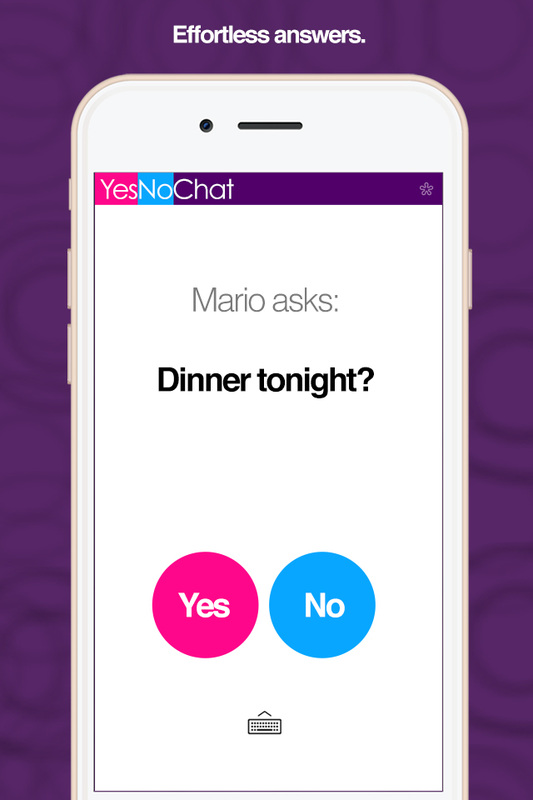
Mimo Films, a Mario Pochat start-up, today announces YesNoChat 1.1, an update to their popular social networking tool for iOS devices. YesNoChat reduces confusion and quickens the time it takes to answer questions with a set up that directs respondents to answer with a clear "Yes" or "No." Users have the ability to send photos and converse through mini chat in greater detail. Find friends by phone number or sync contacts and easily invite friends for quick, clear and productive communication.
Vancouver, Canada - Mimo Films, a Mario Pochat company, today is proud to announce the release of YesNoChat 1.1, an update to their popular social networking app for iPhone, iPad, and iPod touch devices. Developed specifically to optimize communication between family, friends, and co-workers, YesNoChat takes the legwork, and the guesswork, out of long lengthy conversations, leaving users with clearly guided answers to questions. The app enables users to sync their contact list and invite anyone to a conversation with enhanced attributes, like photo embedding and mini-chats.
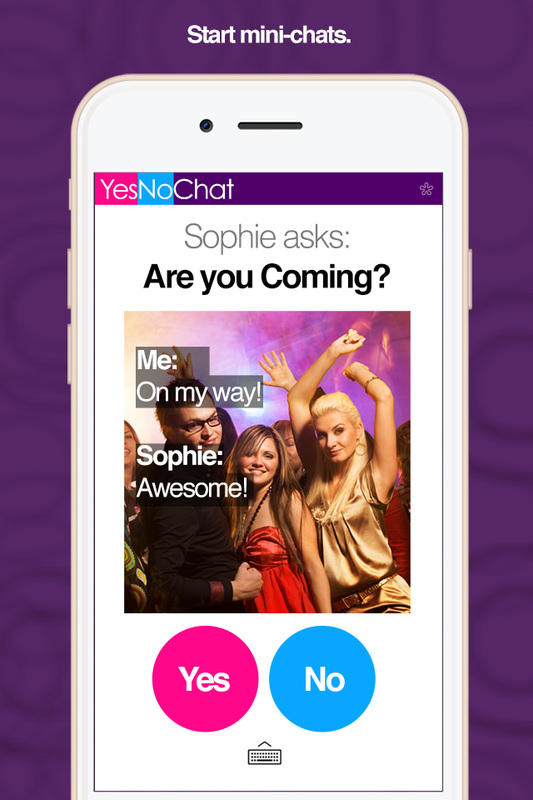
Choose a contact from a drop down list and fire away with questions that would typically promote a "Yes" or "No" answer. A photo can be added to the question by clicking a convenient on-screen camera button, which allows real-time photos or one from the users existing photo library. A mini chat can commence within a question for more detailed information, like ETA, location, grocery list, or just about anything else that needs to be addressed as a follow up to a query.
YesNoChat is perfect for study buddies that need to get right to the point, friends that want to stay in touch, or parents delegating chores or checking on their teenagers. The busy professional will also reap the benefits of efficient communication, instead of wasting time pulling apart lengthy emails and voicemails that require a quick decision. This app enables co-workers to cover more ground without placing important projects on hold until a decision has been made. YesNoChat is great for networking within an organization and creating a team dynamic built on less formalities and more productivity.
Feature Highlights:
* No advertisements
* Syncs with existing contact list
* Set up is quick and effortless
* Add picture to message
* Take a picture on the spot or choose from existing library
* Address questions for a quick 'yes' or 'no' response
* Ability to have mini conversations to relay extra details
* Upbeat color scheme and easy functionality
Users can sync contacts from an existing library. Also, the 1.1 update allows users to reach further and find fellow YesNoChatters via their associated phone number. Once a contact is selected from the drop down menu, users have the option of clicking on a plus sign to send an iMessage, prompting the chosen person to sign up for YesNoChat. Once the app is downloaded, set up takes less than a minute. Users can log onto the product page for FAQ's.
With notifications that alert users right on their iOS device dashboards, they'll never miss an important update from a colleague or a lunch date from a long missed friend. Like any other messaging program, YesNoChat alerts users once a new message has arrived or a question has been answered.
"As a CEO, I only have an hour to go through a long list of emails each day. If I see a long email, I skip it and put it to the side," said Mario Pochat, co-Founder of YesNoChat. "In an ideal world, our goal is to address issues as fast as we can, but if the core information of a sender's message is hidden in a long string of text, it slows down productivity, and it's very time consuming too. When observing communication between people of any age or gender, we noticed that a 'Yes' or 'No' was a natural, lightweight and effortless answer. So, we've developed a fantastic app to bring you speed, clarity and to set you free."
Device Requirements:
* iPhone, iPad, or iPod touch
* Requires iOS 6.0 or later
* 1.4 MB
Pricing and Availability:
YesNoChat 1.1 is free and available worldwide exclusively through the App Store in the Social Networking category. Must be 13 years of age or older to use this service. Complete information about countries, cities, categories and subcategories, units and currencies the application contains can be found on YesNoChat's homepage.
YesNoChat 1.1: http://yesnochat.com
Download from iTunes: https://itunes.apple.com/app/yesnochat/id920908485
Screenshot 1: http://yesnochat.com/uploads/3/4/9/2/3492566/7384971_orig.jpg
Screenshot 2: http://yesnochat.com/uploads/3/4/9/2/3492566/4454041_orig.jpg
App Icon: http://a3.mzstatic.com/us/r30/Purple3/v4/21/6f/d3/216fd32c-1db0-35ab-bab9-4b4107155b53/icon175x175.png
Based in Vancouver, Canada, Mimo Films is part of Mario Pochat's portfolio of start-ups. Mimo Films is focused on enhancing the collective life of the public by creating award winning entertainment, and apps to optimize communication. The company finds inspiration in everyday activities, such as nature, workflow, and past-times to build practical and entertaining apps. Mario Pochat has been recognized for his planning and design of blockbuster films, video game projects, and animated short films. Mario Pochat has also been recognized for opening the first cloud based school in Canada and expanding eLearning capabilities to traditional schools, among many other achievements. His team's extensive knowledge and business savvy gives them the insight to successfully produce entertainment, productivity and time management apps. Copyright (C) 2014 - 2015 Mario Pochat. All Rights Reserved. Apple, the Apple logo, iPhone, iPad, and iPod are registered trademarks of Apple Inc. in the U.S.
and/or other countries.
*******
Link To Article: http://prmac.com/release-id-75722.htm
*******
---------------------------------------------------------------------------------
Note that you can alter delivered distributions at any time.
Login to your account on prMac to alter your channel selection, or to opt-out at any time.
YesNoChat 1.1: Get the Answer You Need Quickly, Easily and Efficiently - Published on 07/08/15
Mimo Films, a Mario Pochat start-up, today announces YesNoChat 1.1, an update to their popular social networking tool for iOS devices. YesNoChat reduces confusion and quickens the time it takes to answer questions with a set up that directs respondents to answer with a clear "Yes" or "No." Users have the ability to send photos and converse through mini chat in greater detail. Find friends by phone number or sync contacts and easily invite friends for quick, clear and productive communication.
Vancouver, Canada - Mimo Films, a Mario Pochat company, today is proud to announce the release of YesNoChat 1.1, an update to their popular social networking app for iPhone, iPad, and iPod touch devices. Developed specifically to optimize communication between family, friends, and co-workers, YesNoChat takes the legwork, and the guesswork, out of long lengthy conversations, leaving users with clearly guided answers to questions. The app enables users to sync their contact list and invite anyone to a conversation with enhanced attributes, like photo embedding and mini-chats.
Choose a contact from a drop down list and fire away with questions that would typically promote a "Yes" or "No" answer. A photo can be added to the question by clicking a convenient on-screen camera button, which allows real-time photos or one from the users existing photo library. A mini chat can commence within a question for more detailed information, like ETA, location, grocery list, or just about anything else that needs to be addressed as a follow up to a query.
YesNoChat is perfect for study buddies that need to get right to the point, friends that want to stay in touch, or parents delegating chores or checking on their teenagers. The busy professional will also reap the benefits of efficient communication, instead of wasting time pulling apart lengthy emails and voicemails that require a quick decision. This app enables co-workers to cover more ground without placing important projects on hold until a decision has been made. YesNoChat is great for networking within an organization and creating a team dynamic built on less formalities and more productivity.
Feature Highlights:
* No advertisements
* Syncs with existing contact list
* Set up is quick and effortless
* Add picture to message
* Take a picture on the spot or choose from existing library
* Address questions for a quick 'yes' or 'no' response
* Ability to have mini conversations to relay extra details
* Upbeat color scheme and easy functionality
Users can sync contacts from an existing library. Also, the 1.1 update allows users to reach further and find fellow YesNoChatters via their associated phone number. Once a contact is selected from the drop down menu, users have the option of clicking on a plus sign to send an iMessage, prompting the chosen person to sign up for YesNoChat. Once the app is downloaded, set up takes less than a minute. Users can log onto the product page for FAQ's.
With notifications that alert users right on their iOS device dashboards, they'll never miss an important update from a colleague or a lunch date from a long missed friend. Like any other messaging program, YesNoChat alerts users once a new message has arrived or a question has been answered.
"As a CEO, I only have an hour to go through a long list of emails each day. If I see a long email, I skip it and put it to the side," said Mario Pochat, co-Founder of YesNoChat. "In an ideal world, our goal is to address issues as fast as we can, but if the core information of a sender's message is hidden in a long string of text, it slows down productivity, and it's very time consuming too. When observing communication between people of any age or gender, we noticed that a 'Yes' or 'No' was a natural, lightweight and effortless answer. So, we've developed a fantastic app to bring you speed, clarity and to set you free."
Device Requirements:
* iPhone, iPad, or iPod touch
* Requires iOS 6.0 or later
* 1.4 MB
Pricing and Availability:
YesNoChat 1.1 is free and available worldwide exclusively through the App Store in the Social Networking category. Must be 13 years of age or older to use this service. Complete information about countries, cities, categories and subcategories, units and currencies the application contains can be found on YesNoChat's homepage.
YesNoChat 1.1: http://yesnochat.com
Download from iTunes: https://itunes.apple.com/app/yesnochat/id920908485
Screenshot 1: http://yesnochat.com/uploads/3/4/9/2/3492566/7384971_orig.jpg
Screenshot 2: http://yesnochat.com/uploads/3/4/9/2/3492566/4454041_orig.jpg
App Icon: http://a3.mzstatic.com/us/r30/Purple3/v4/21/6f/d3/216fd32c-1db0-35ab-bab9-4b4107155b53/icon175x175.png

Based in Vancouver, Canada, Mimo Films is part of Mario Pochat's portfolio of start-ups. Mimo Films is focused on enhancing the collective life of the public by creating award winning entertainment, and apps to optimize communication. The company finds inspiration in everyday activities, such as nature, workflow, and past-times to build practical and entertaining apps. Mario Pochat has been recognized for his planning and design of blockbuster films, video game projects, and animated short films. Mario Pochat has also been recognized for opening the first cloud based school in Canada and expanding eLearning capabilities to traditional schools, among many other achievements. His team's extensive knowledge and business savvy gives them the insight to successfully produce entertainment, productivity and time management apps. Copyright (C) 2014 - 2015 Mario Pochat. All Rights Reserved. Apple, the Apple logo, iPhone, iPad, and iPod are registered trademarks of Apple Inc. in the U.S.
and/or other countries.
*******
Link To Article: http://prmac.com/release-id-75722.htm
*******
---------------------------------------------------------------------------------
Note that you can alter delivered distributions at any time.
Login to your account on prMac to alter your channel selection, or to opt-out at any time.
Forecast and Target your iPhone Battery Life with Battery Forecaster 2
A new article has been published at prMac.
Forecast and Target your iPhone Battery Life with Battery Forecaster 2 - Published on 07/08/15
InvenCode today releases Battery Forecaster 2, an update to their smart battery app for iOS. Combining the most intelligent & simple innovations, BF2 is tailored specifically to an individual's usage patterns to forecast battery life as well as offering a target time feature to further customize & manage the life of the iPhone battery. It is also equipped with a watch guide feature that monitors the user's patterns and provides guidelines about usage to reach the targeted time with Apple Watch.
Seoul, Korea - InvenCode today is delighted to announce the release and immediate availability of Battery Forecaster 2 (v2.4.3), a smart battery app that combines the most intelligent and simple innovations. BF2 is tailored specifically to an individual's usage patterns to forecast battery life as well as offering a target time feature to further customize and manage the life of the iPhone battery. It is also equipped with a watch guide feature that monitors the user's patterns and provides guidelines about usage to reach the targeted time with Apple Watch.
Improvements in Battery Forecaster 2 include more accurate battery life estimation, and an all-new feature that tells you how to extend battery life until your own preset target time. The user interface has also been totally revamped, making it even more accessible than before!
Main Features:
* Set How Long You Want Your Battery to Last - A feature unique to Battery Forecaster -the Time Target- allows you to specify a time for you battery to last until. Once you set the target time, all you have to do is follow the instructions and your battery will last until the specified time.
* App-Specific Battery Conservation Guide - Battery Forecaster 2 will let you know which apps are safe to use so that your iPhone's battery will last until the user specified target time. All of your apps will be displayed as three different levels of usage available: blue (usage okay), to yellow (reduce usage), to red (stop usage). This tells you how to manage apps to ensure your battery lasts until your target time. This isn't just basic advice that tells you which apps to stop using because they consume a lot of battery; it's based on real-time battery consumption rates that let you use your apps more efficiently. Even an app with high battery usage, for instance, will be shown as blue (usage okay) if it's possible to use it without worry until the target time. Reversely, even an app with low battery usage will be shown as red (stop usage) if it lowers the possibility of your battery lasting until the target time.
* Apple Watch Support - Using your Apple Watch you can check at a glance if your iPhone (even if it's in your pocket!) is ready for use. This also helps to prevent wasting your iPhone's battery and achieve a blue (usage okay) status faster.
* Optimized for User-Specific Usage Patterns - The estimated battery life or target times from Battery Forecaster aren't merely a simple calculation based on the amount of battery remaining, but rather a much more accurate value based on analyzing a user's usage trends and device used.
Other Features:
* Reliable Battery Indicator - The iOS battery indicator consistently shows battery drain too slow when the battery is near 100%, and too fast when it's closer to 0%. Battery Forecaster tries to suppress this issue as much as possible, giving you more reliable battery level.
* Estimated Battery Life - The amount of battery remaining is displayed in the form of a straightforward clock. Estimate accuracy has also been significantly improved since the previous version of Battery Forecaster.
* Battery Usage Monitor - This feature displays the user's battery usage stats and trends in straightforward graphs and text.
Device Requirements:
* iPhone, iPad, and iPod touch
* Optimized for iPhone 5, iPhone 6/6 Plus
* Requires iOS 8.0 or later
* 71.4 MB
Pricing and Availability:
Battery Forecaster 2 (v2.4.3) has been utilized in the Japanese market and has launched globally including the U.S. It it currently available for download in the App Store for Free(In-App purchases) in the Productivity category.
Battery Forecaster 2 (v2.4.3): https://itunes.apple.com//app/battery-forecaster-2/id441519687
Download from iTunes: https://itunes.apple.com//app/battery-forecaster-2/id441519687
YouTube Video (Preview): https://youtu.be/vHbq5aoRqic
Screenshot 1: http://www.invencode.com/screenshot/BF2EN/bf2en_pr4.jpg
Screenshot 2: http://www.invencode.com/screenshot/BF2EN/bf2en_pr3.jpg
Screenshot 3: http://www.invencode.com/screenshot/BF2EN/bf2en_pr5.jpg
InvenCode has developed and released several battery management apps in the Japanese market and introduced new technology of battery forecasting with BFRT and time targeting with BFRD and BF2. InvenCode is redefining the meaning of battery management applications. All Material and Software (C) Copyright 2015 InvenCode. All Rights Reserved. Apple, the Apple logo, iPhone, iPod and iPad are registered trademarks of Apple Inc. in the U.S. and/or other countries. Other trademarks and registered trademarks may be the property of their respective owners.
*******
Link To Article: http://prmac.com/release-id-75719.htm
*******
---------------------------------------------------------------------------------
Note that you can alter delivered distributions at any time.
Login to your account on prMac to alter your channel selection, or to opt-out at any time.
Forecast and Target your iPhone Battery Life with Battery Forecaster 2 - Published on 07/08/15
InvenCode today releases Battery Forecaster 2, an update to their smart battery app for iOS. Combining the most intelligent & simple innovations, BF2 is tailored specifically to an individual's usage patterns to forecast battery life as well as offering a target time feature to further customize & manage the life of the iPhone battery. It is also equipped with a watch guide feature that monitors the user's patterns and provides guidelines about usage to reach the targeted time with Apple Watch.
Seoul, Korea - InvenCode today is delighted to announce the release and immediate availability of Battery Forecaster 2 (v2.4.3), a smart battery app that combines the most intelligent and simple innovations. BF2 is tailored specifically to an individual's usage patterns to forecast battery life as well as offering a target time feature to further customize and manage the life of the iPhone battery. It is also equipped with a watch guide feature that monitors the user's patterns and provides guidelines about usage to reach the targeted time with Apple Watch.
Improvements in Battery Forecaster 2 include more accurate battery life estimation, and an all-new feature that tells you how to extend battery life until your own preset target time. The user interface has also been totally revamped, making it even more accessible than before!
Main Features:
* Set How Long You Want Your Battery to Last - A feature unique to Battery Forecaster -the Time Target- allows you to specify a time for you battery to last until. Once you set the target time, all you have to do is follow the instructions and your battery will last until the specified time.
* App-Specific Battery Conservation Guide - Battery Forecaster 2 will let you know which apps are safe to use so that your iPhone's battery will last until the user specified target time. All of your apps will be displayed as three different levels of usage available: blue (usage okay), to yellow (reduce usage), to red (stop usage). This tells you how to manage apps to ensure your battery lasts until your target time. This isn't just basic advice that tells you which apps to stop using because they consume a lot of battery; it's based on real-time battery consumption rates that let you use your apps more efficiently. Even an app with high battery usage, for instance, will be shown as blue (usage okay) if it's possible to use it without worry until the target time. Reversely, even an app with low battery usage will be shown as red (stop usage) if it lowers the possibility of your battery lasting until the target time.
* Apple Watch Support - Using your Apple Watch you can check at a glance if your iPhone (even if it's in your pocket!) is ready for use. This also helps to prevent wasting your iPhone's battery and achieve a blue (usage okay) status faster.
* Optimized for User-Specific Usage Patterns - The estimated battery life or target times from Battery Forecaster aren't merely a simple calculation based on the amount of battery remaining, but rather a much more accurate value based on analyzing a user's usage trends and device used.
Other Features:
* Reliable Battery Indicator - The iOS battery indicator consistently shows battery drain too slow when the battery is near 100%, and too fast when it's closer to 0%. Battery Forecaster tries to suppress this issue as much as possible, giving you more reliable battery level.
* Estimated Battery Life - The amount of battery remaining is displayed in the form of a straightforward clock. Estimate accuracy has also been significantly improved since the previous version of Battery Forecaster.
* Battery Usage Monitor - This feature displays the user's battery usage stats and trends in straightforward graphs and text.
Device Requirements:
* iPhone, iPad, and iPod touch
* Optimized for iPhone 5, iPhone 6/6 Plus
* Requires iOS 8.0 or later
* 71.4 MB
Pricing and Availability:
Battery Forecaster 2 (v2.4.3) has been utilized in the Japanese market and has launched globally including the U.S. It it currently available for download in the App Store for Free(In-App purchases) in the Productivity category.
Battery Forecaster 2 (v2.4.3): https://itunes.apple.com//app/battery-forecaster-2/id441519687
Download from iTunes: https://itunes.apple.com//app/battery-forecaster-2/id441519687
YouTube Video (Preview): https://youtu.be/vHbq5aoRqic
Screenshot 1: http://www.invencode.com/screenshot/BF2EN/bf2en_pr4.jpg

Screenshot 2: http://www.invencode.com/screenshot/BF2EN/bf2en_pr3.jpg

Screenshot 3: http://www.invencode.com/screenshot/BF2EN/bf2en_pr5.jpg

InvenCode has developed and released several battery management apps in the Japanese market and introduced new technology of battery forecasting with BFRT and time targeting with BFRD and BF2. InvenCode is redefining the meaning of battery management applications. All Material and Software (C) Copyright 2015 InvenCode. All Rights Reserved. Apple, the Apple logo, iPhone, iPod and iPad are registered trademarks of Apple Inc. in the U.S. and/or other countries. Other trademarks and registered trademarks may be the property of their respective owners.
*******
Link To Article: http://prmac.com/release-id-75719.htm
*******
---------------------------------------------------------------------------------
Note that you can alter delivered distributions at any time.
Login to your account on prMac to alter your channel selection, or to opt-out at any time.
Townapps Launch 46 Free Town and City Guide Apps in North America
A new article has been published at prMac.
Townapps Launch 46 Free Town and City Guide Apps in North America - Published on 07/08/15
Townapps announces the release of 46 turn-key travel guide apps for small, vibrant towns and cities across Canada and the United States. Available for free download, users can access up-to-date local news feeds, weather forecasts and redeem exclusive special offers from great local businesses. Using geolocation, users can easily find places of interest near them, get directions and contact local businesses directly through the app.
Athlone, Ireland - Townapps, world leaders in the area of app development for towns and local communities, is proud to announce the release of 46 turn-key travel guide apps for small vibrant towns and cities across Canada and the United States. Available for free download, users can access up-to-date local news feeds, weather forecasts and redeem exclusive special offers from local businesses. Using geolocation users can easily find places of interest near them, get directions and contact local businesses directly through the app. No WIFI? No problem. Once downloaded, users can access listings information offline.
To take these local information apps to the next level, Townapps are seeking local partners who are committed to promoting the local area and building a unique business. Townapps is the ideal solution for Local Government, Tourism Organizations, Business Organizations or Associations, Local Media (Print/Radio/Website) or Community Groups seeking to establish a mobile guide for their community without incurring any development costs. Using the Townapps pre-built platform, a town or community can be up and running with its own town guide app in a matter of weeks.
Feature Highlights:
* Local news - Handpicked community social feeds
* What to do - Top attractions, activities and events
* Where to eat - Restaurants, cafes and local bars
* Where to shop - Find shops and boutiques
* Where to stay - Hotels, Hostels and Guesthouses
* Local Services - Professional/Essential business listings
* Offers - Exclusive offers and promotions
* A-Z Search - Find listings quickly
* Geolocation - See what's near you
* Local weather - Seven day local forecast
Device Requirements:
* iPhone, iPad, iPod touch
* Requires iOS 7 or later
* 4.8 MB
Pricing and Availability:
Townapps apps are free and available to download through the App Store in the Travel category.
Townapps: http://townapps.ca/
Travel Guide Apps: http://townapps.ca/apps/
Download from iTunes: https://itunes.apple.com/ie/artist/townapps-ltd/id581485176
Screenshot: http://townapps.ca/wp-content/uploads/2015/06/iphone6-mock-up.png
App Icon: http://townapps.ca/wp-content/uploads/2015/05/ic_launcher_Duncan.png
Based in Canada and Ireland, Townapps are a mobile app development company dedicated to creating engaging mobile apps that connect local businesses to local consumers in a way that's simple for everyone. All Material and Software (C) Copyright 2015 Townapps Ltd. All Rights Reserved. Apple, the Apple logo, iPhone, iPod and iPad are registered trademarks of Apple Inc. in the U.S. and/or other countries. Other trademarks and registered trademarks may be the property of their respective owners.
*******
Link To Article: http://prmac.com/release-id-75747.htm
*******
---------------------------------------------------------------------------------
Note that you can alter delivered distributions at any time.
Login to your account on prMac to alter your channel selection, or to opt-out at any time.
Townapps Launch 46 Free Town and City Guide Apps in North America - Published on 07/08/15
Townapps announces the release of 46 turn-key travel guide apps for small, vibrant towns and cities across Canada and the United States. Available for free download, users can access up-to-date local news feeds, weather forecasts and redeem exclusive special offers from great local businesses. Using geolocation, users can easily find places of interest near them, get directions and contact local businesses directly through the app.
Athlone, Ireland - Townapps, world leaders in the area of app development for towns and local communities, is proud to announce the release of 46 turn-key travel guide apps for small vibrant towns and cities across Canada and the United States. Available for free download, users can access up-to-date local news feeds, weather forecasts and redeem exclusive special offers from local businesses. Using geolocation users can easily find places of interest near them, get directions and contact local businesses directly through the app. No WIFI? No problem. Once downloaded, users can access listings information offline.
To take these local information apps to the next level, Townapps are seeking local partners who are committed to promoting the local area and building a unique business. Townapps is the ideal solution for Local Government, Tourism Organizations, Business Organizations or Associations, Local Media (Print/Radio/Website) or Community Groups seeking to establish a mobile guide for their community without incurring any development costs. Using the Townapps pre-built platform, a town or community can be up and running with its own town guide app in a matter of weeks.
Feature Highlights:
* Local news - Handpicked community social feeds
* What to do - Top attractions, activities and events
* Where to eat - Restaurants, cafes and local bars
* Where to shop - Find shops and boutiques
* Where to stay - Hotels, Hostels and Guesthouses
* Local Services - Professional/Essential business listings
* Offers - Exclusive offers and promotions
* A-Z Search - Find listings quickly
* Geolocation - See what's near you
* Local weather - Seven day local forecast
Device Requirements:
* iPhone, iPad, iPod touch
* Requires iOS 7 or later
* 4.8 MB
Pricing and Availability:
Townapps apps are free and available to download through the App Store in the Travel category.
Townapps: http://townapps.ca/
Travel Guide Apps: http://townapps.ca/apps/
Download from iTunes: https://itunes.apple.com/ie/artist/townapps-ltd/id581485176
Screenshot: http://townapps.ca/wp-content/uploads/2015/06/iphone6-mock-up.png

App Icon: http://townapps.ca/wp-content/uploads/2015/05/ic_launcher_Duncan.png

Based in Canada and Ireland, Townapps are a mobile app development company dedicated to creating engaging mobile apps that connect local businesses to local consumers in a way that's simple for everyone. All Material and Software (C) Copyright 2015 Townapps Ltd. All Rights Reserved. Apple, the Apple logo, iPhone, iPod and iPad are registered trademarks of Apple Inc. in the U.S. and/or other countries. Other trademarks and registered trademarks may be the property of their respective owners.
*******
Link To Article: http://prmac.com/release-id-75747.htm
*******
---------------------------------------------------------------------------------
Note that you can alter delivered distributions at any time.
Login to your account on prMac to alter your channel selection, or to opt-out at any time.
Subscribe to:
Posts (Atom)