A new article has been published at prMac.
DAG: Drinking Arcade Game for the iPad and iPhone - Published on 07/13/15
Introducing DAG: Drinking Arcade Game 1.0 by Canadian indie-game developer Denny Kurien. To play this game, you will need an ample supply of vodka, whiskey, wine, beer, champagne, water, and a straw. Combining the game play of a Super-Mario style platform game with the roll-the-dice drinking challenges, this game can get you and your friends very drunk, very fast! Great for parties and bar-scenes, as long as you don't spill any drinks on your device.
Toronto, Canada - Wanna get plastered with your friends? Well now there's an app for that. Introducing "DAG: Drinking Arcade Game" by indie game developer Denny Kurien. Combining the game play of a Super-Mario style platform game with the roll-the-dice drinking challenges .. this game can get you very drunk, very fast! Great for parties and bar-scenes, as long as you don't spill any drinks on your device.
To play this game, you will need an ample supply of vodka, whiskey, wine, beer, champagne, water (very important), and a straw. Players take turn controlling Dag (a smooth-talking, walking stein of beer) across the bar counter of a pub while avoiding pitfalls, bombs, and buzz killers (party-poopers who disapprove of you drinking alcohol). Complete the level succesfully, your whole team moves on to the next stage with the next player in your group lined up to play. Fail the level, and either you or your entire team will have to perform a drinking challenge - like taking a shot of vodka, or all the girls in your group having 1 round of champagne.
The game was developed by Canadian indie-game developer Denny Kurien over the past 6 months in Toronto. Just like all his other apps, he came up with the original concept, and did all the graphics, animation, programming, and voice-over work for it go get it ready for the app store. His reason for making it was that he simply wanted a unique way of entertaining his friends for Canada Day (July 1st).
Device Requirements:
* iPhone, iPad, and iPod touch
* Optimized for iPhone 5, iPhone 6/6 Plus
* Requires iOS 6.0 or later
* 36.4 MB
Pricing and Availability:
DAG: Drinking Arcade Game 1.0 is only $0.99 USD (or equivalent amount in other currencies) and available worldwide exclusively through the App Store in the Games category. If you're looking for the ultimate party game then look no further. Get ready to DAG!
DAG: Drinking Arcade Game 1.0: http://dkurien.wix.com/drinkingarcade
Purchase and Download: https://itunes.apple.com/app/dag-drinking-arcade-game/id1011976420
Screenshot: http://a5.mzstatic.com/us/r30/Purple5/v4/cf/30/28/cf3028f8-df17-b912-6c3c-3acab8ebab54/screen480x480.jpeg
App Icon: http://a2.mzstatic.com/us/r30/Purple1/v4/44/e0/54/44e054f5-faf7-8964-d604-c427b4e2252f/icon175x175.png
Denny Kurien is an indie game developer, illustrator, animator, and graphic designer residing in Toronto, Canada. "DAG : Drinking Arcade Game" is his 3rd app for the iOS. Copyright (C) 2015 Denny Kurien. All Rights Reserved. Apple, the Apple logo, iPhone, iPod and iPad are registered trademarks of Apple Inc. in the U.S. and/or other countries.
*******
Link To Article: http://prmac.com/release-id-75825.htm
*******
---------------------------------------------------------------------------------
Note that you can alter delivered distributions at any time.
Login to your account on prMac to alter your channel selection, or to opt-out at any time.



Trial of DCommander 2.7.1 File Manager for Mac OS X Now Available
A new article has been published at prMac.
Trial of DCommander 2.7.1 File Manager for Mac OS X Now Available - Published on 07/13/15
DevStorm Apps announces the release of DCommander 2.7.1, an advanced two-pane file manager for Mac OS X. Optimized for quick access and user-friendliness, DCommander gives you full control over your computer's filesystem as soon as it's started. With syncing, searching and seamless FTP/SCP, the app provides a perfect file management companion for new Mac users transitioning from other operating systems, as well as advanced power users that demand more control of their computer.
Cluj-Napoca, Romania - DevStorm Apps is proud to announce the release of DCommander 2.7.1 for Mac OS X, their two-pane file manager app that gives you full control over your computer's filesystem. Optimized for quick access and user-friendliness, DCommander provides a perfect companion for new Mac users transitioning from other operating systems, as well as advanced power users that demand more control of their computer.
"The long list of hotkeys coupled with its customizable user interface, applications shortcuts and Lynx-like navigation system, make DCommander one of the best dual-pane file managers on the OS X platform." - softpedia.com
"DCommander is a worthy utility for those bored with the standard Finder." - mac360.com
Features:
* Two side by side file windows
* Name, size, kind and date sorting of files and folders
* View hidden files and folders
* Tabs support with full keyboard navigation
* File search with sub-folder recursive searching
* Full support for drag&drop operations
* Fine-grained item selection control
* Lynx-like folder navigation (using arrow keys)
* Quick access to native Terminal, Console, Activity Monitor and Disk Utility applications
* Customisable color schemes
* Customisable font type, size and color
* Quick file viewer with text and hex viewing mode
* Full keyboard navigation
* Ability to browse ZIP, JAR, EAR, WAR, XPI and ODT archives like normal folders
* Seamless FTP and SCP support
* Folder compare and synchronization
* Quick search files in the current folder
* Quick look integration
* Terminal integration and custom terminal support
* Ability to create new folders and new empty files
* Support for external drives
* Mount network drives
* Ability to compress files and folders
* Ability to selectively unpack files and folders from archives
* Fast file copy and moving
* Retina display support
* Fullscreen support
* Fast load time
* Tutorials and tips
* Support for OSX 10.6 and newer
* German, French, Polish and Czech translations
* FREE updates for all versions
System Requirements:
* Intel, 64-bit processor
* OS X 10.6.6 or later
* 5.5 MB
Pricing and Availability:
DCommander is $29.99 USD (or equivalent amount in other currencies) on the DevStorm website and the Mac App Store worldwide through the Utilities category. A 30-day fully-featured trial is available on the DevStorm website.
DevStorm Apps: http://www.devstorm-apps.com
DCommander 2.71 -Trial: http://www.devstorm-apps.com/dc/
Direct Download (ZIP): http://www.devstorm-apps.com/apps/DCommander.app.zip
Purchase and Download: https://pay.paddle.com/checkout/491048
Screenshot: http://devstorm-apps.com/dc/gfx/sss/2.png
Application Icon: http://devstorm-apps.com/dc/gfx/dcLogo.png
DevStorm Apps is an indie development studio based in Cluj-Napoca, Romania. Our objective is delivering high quality applications on the iPhone, iPad and Mac platforms. All Material and Software Copyright (C) 2013-2015 DevStorm Apps. All Rights Reserved. Apple, the Apple logo, Macintosh and Mac OS X are registered trademarks of Apple Inc. in the U.S. and/or other countries. Other trademarks and registered trademarks may be the property of their respective owners.
*******
Link To Article: http://prmac.com/release-id-75824.htm
*******
---------------------------------------------------------------------------------
Note that you can alter delivered distributions at any time.
Login to your account on prMac to alter your channel selection, or to opt-out at any time.
Trial of DCommander 2.7.1 File Manager for Mac OS X Now Available - Published on 07/13/15
DevStorm Apps announces the release of DCommander 2.7.1, an advanced two-pane file manager for Mac OS X. Optimized for quick access and user-friendliness, DCommander gives you full control over your computer's filesystem as soon as it's started. With syncing, searching and seamless FTP/SCP, the app provides a perfect file management companion for new Mac users transitioning from other operating systems, as well as advanced power users that demand more control of their computer.
Cluj-Napoca, Romania - DevStorm Apps is proud to announce the release of DCommander 2.7.1 for Mac OS X, their two-pane file manager app that gives you full control over your computer's filesystem. Optimized for quick access and user-friendliness, DCommander provides a perfect companion for new Mac users transitioning from other operating systems, as well as advanced power users that demand more control of their computer.
"The long list of hotkeys coupled with its customizable user interface, applications shortcuts and Lynx-like navigation system, make DCommander one of the best dual-pane file managers on the OS X platform." - softpedia.com
"DCommander is a worthy utility for those bored with the standard Finder." - mac360.com
Features:
* Two side by side file windows
* Name, size, kind and date sorting of files and folders
* View hidden files and folders
* Tabs support with full keyboard navigation
* File search with sub-folder recursive searching
* Full support for drag&drop operations
* Fine-grained item selection control
* Lynx-like folder navigation (using arrow keys)
* Quick access to native Terminal, Console, Activity Monitor and Disk Utility applications
* Customisable color schemes
* Customisable font type, size and color
* Quick file viewer with text and hex viewing mode
* Full keyboard navigation
* Ability to browse ZIP, JAR, EAR, WAR, XPI and ODT archives like normal folders
* Seamless FTP and SCP support
* Folder compare and synchronization
* Quick search files in the current folder
* Quick look integration
* Terminal integration and custom terminal support
* Ability to create new folders and new empty files
* Support for external drives
* Mount network drives
* Ability to compress files and folders
* Ability to selectively unpack files and folders from archives
* Fast file copy and moving
* Retina display support
* Fullscreen support
* Fast load time
* Tutorials and tips
* Support for OSX 10.6 and newer
* German, French, Polish and Czech translations
* FREE updates for all versions
System Requirements:
* Intel, 64-bit processor
* OS X 10.6.6 or later
* 5.5 MB
Pricing and Availability:
DCommander is $29.99 USD (or equivalent amount in other currencies) on the DevStorm website and the Mac App Store worldwide through the Utilities category. A 30-day fully-featured trial is available on the DevStorm website.
DevStorm Apps: http://www.devstorm-apps.com
DCommander 2.71 -Trial: http://www.devstorm-apps.com/dc/
Direct Download (ZIP): http://www.devstorm-apps.com/apps/DCommander.app.zip
Purchase and Download: https://pay.paddle.com/checkout/491048
Screenshot: http://devstorm-apps.com/dc/gfx/sss/2.png
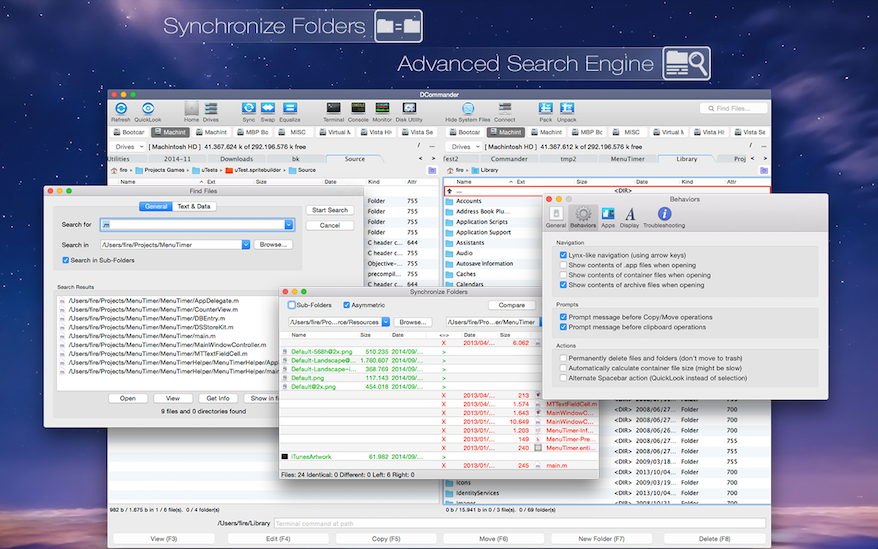
Application Icon: http://devstorm-apps.com/dc/gfx/dcLogo.png

DevStorm Apps is an indie development studio based in Cluj-Napoca, Romania. Our objective is delivering high quality applications on the iPhone, iPad and Mac platforms. All Material and Software Copyright (C) 2013-2015 DevStorm Apps. All Rights Reserved. Apple, the Apple logo, Macintosh and Mac OS X are registered trademarks of Apple Inc. in the U.S. and/or other countries. Other trademarks and registered trademarks may be the property of their respective owners.
*******
Link To Article: http://prmac.com/release-id-75824.htm
*******
---------------------------------------------------------------------------------
Note that you can alter delivered distributions at any time.
Login to your account on prMac to alter your channel selection, or to opt-out at any time.
Funbox Media and Threee Girls Studio Proudly Present Cosmic Buddies
A new article has been published at prMac.
Funbox Media and Threee Girls Studio Proudly Present Cosmic Buddies - Published on 07/13/15
Funbox Media and Threee Girls Studio announce the release of Cosmic Buddies 1.0 for iOS and Android devices. Cosmic Buddies is an exciting, addictive, colorful game where kids can join the lovable characters from the planet Titius: Ned, Lili, Grutius & Rox, Bobotius Jr. and Goratius. Each character will teach amazing different values which are essential for every little person. Therefore this is not only an exciting game - this is also a powerful educational tool for kids.
Cheltenham, United Kingdom - Funbox Media and Threee Girls Studio are proud to announce the release of Cosmic Buddies 1.0 for iOS and Android devices. Cosmic Buddies is an exciting, addictive, colorful game where kids can join the lovable characters from the planet Titius. Each character will teach amazing different values which are essential for every little person. They will teach how to always see the positive side in life, how to grow up and take risks when needed, how to balance the learning and playing, and many many more. Therefore this is not only an exciting game - this is also a very powerful educational tool which will be used by kids with great joy and excitement.
We are sure that this exciting game will be loved and appreciated by many. There is a sequel planned to be launched very soon, therefore this is only the starting point into the journey around the world with the fantastic Cosmic Buddies; Ned, Lili, Grutius & Rox, Bobotius Jr. and Goratius.
Features:
* 2 game modes - survival and time track
* 5 playable characters
* 13 beautiful backgrounds
* Colorful Settings
* Plenty of mini games with increasing difficulty
* Amazing HD Graphics
* New inseparable friends that little kids can identify with
Threee Girls Studio generates successful experiences with creative communication strategies. We think and plan campaigns using social and digital amplification, bringing entertainment content and purchase intent by the user. Our company is specialised in New Media Marketing & Social Media Marketing. We integrate the digital advertising process in its entirety. Threee Girls Studio exploit the full potential of diffusion which feature digital technologies.
Device Requirements:
* iPhone, iPad, and iPod touch
* Universal App
* Optimized for iPhone 5, iPhone 6, and iPhone 6 Plus
* Requires iOS 6.0 or later
* 60.4 MB
Pricing and Availability:
Cosmic Buddies 1.0 is free, and is available worldwide through the App Store in the Games category. An Android version is also available in the Google Play Store.
Cosmic Buddies 1.0: http://www.cosmicbuddies.com
Funbox Media Ltd: http://www.funboxmedia.co.uk/
Threee Girls Studio: http://www.threeegirlstudio.com
Download From iTunes: http://itunes.apple.com/app/id923028245
Download from Google Play: https://play.google.com/store/apps/details?id=com.nyxdigital.funbox.CosmicBuddies
Media Assets: https://www.dropbox.com/sh/k828eesvd2ezvvg/AADGFfG-KwpGyRAj74BpMxwwa?dl=0
Funbox Media, located in Sheffield UK, is a third-party publisher for all video and mobile gaming platforms. Originally focusing on casual, affordable games, Funbox strengthened its catalog by bringing to market established brands such as the hit TV game show the Cube, alongside its existing impressive portfolio of titles. Distributing to all PAL territories and with over 50 years of combined experience, Funbox Media Ltd is an established and reliable partner in the industry. Copyright (C) 2015 Funbox Media. All Rights Reserved. Apple, the Apple logo, iPhone, iPad and iPod are registered trademarks of Apple Inc. in the U.S. and/or other countries.
*******
Link To Article: http://prmac.com/release-id-75823.htm
*******
---------------------------------------------------------------------------------
Note that you can alter delivered distributions at any time.
Login to your account on prMac to alter your channel selection, or to opt-out at any time.
Funbox Media and Threee Girls Studio Proudly Present Cosmic Buddies - Published on 07/13/15
Funbox Media and Threee Girls Studio announce the release of Cosmic Buddies 1.0 for iOS and Android devices. Cosmic Buddies is an exciting, addictive, colorful game where kids can join the lovable characters from the planet Titius: Ned, Lili, Grutius & Rox, Bobotius Jr. and Goratius. Each character will teach amazing different values which are essential for every little person. Therefore this is not only an exciting game - this is also a powerful educational tool for kids.
Cheltenham, United Kingdom - Funbox Media and Threee Girls Studio are proud to announce the release of Cosmic Buddies 1.0 for iOS and Android devices. Cosmic Buddies is an exciting, addictive, colorful game where kids can join the lovable characters from the planet Titius. Each character will teach amazing different values which are essential for every little person. They will teach how to always see the positive side in life, how to grow up and take risks when needed, how to balance the learning and playing, and many many more. Therefore this is not only an exciting game - this is also a very powerful educational tool which will be used by kids with great joy and excitement.
We are sure that this exciting game will be loved and appreciated by many. There is a sequel planned to be launched very soon, therefore this is only the starting point into the journey around the world with the fantastic Cosmic Buddies; Ned, Lili, Grutius & Rox, Bobotius Jr. and Goratius.
Features:
* 2 game modes - survival and time track
* 5 playable characters
* 13 beautiful backgrounds
* Colorful Settings
* Plenty of mini games with increasing difficulty
* Amazing HD Graphics
* New inseparable friends that little kids can identify with
Threee Girls Studio generates successful experiences with creative communication strategies. We think and plan campaigns using social and digital amplification, bringing entertainment content and purchase intent by the user. Our company is specialised in New Media Marketing & Social Media Marketing. We integrate the digital advertising process in its entirety. Threee Girls Studio exploit the full potential of diffusion which feature digital technologies.
Device Requirements:
* iPhone, iPad, and iPod touch
* Universal App
* Optimized for iPhone 5, iPhone 6, and iPhone 6 Plus
* Requires iOS 6.0 or later
* 60.4 MB
Pricing and Availability:
Cosmic Buddies 1.0 is free, and is available worldwide through the App Store in the Games category. An Android version is also available in the Google Play Store.
Cosmic Buddies 1.0: http://www.cosmicbuddies.com
Funbox Media Ltd: http://www.funboxmedia.co.uk/
Threee Girls Studio: http://www.threeegirlstudio.com
Download From iTunes: http://itunes.apple.com/app/id923028245
Download from Google Play: https://play.google.com/store/apps/details?id=com.nyxdigital.funbox.CosmicBuddies
Media Assets: https://www.dropbox.com/sh/k828eesvd2ezvvg/AADGFfG-KwpGyRAj74BpMxwwa?dl=0
Funbox Media, located in Sheffield UK, is a third-party publisher for all video and mobile gaming platforms. Originally focusing on casual, affordable games, Funbox strengthened its catalog by bringing to market established brands such as the hit TV game show the Cube, alongside its existing impressive portfolio of titles. Distributing to all PAL territories and with over 50 years of combined experience, Funbox Media Ltd is an established and reliable partner in the industry. Copyright (C) 2015 Funbox Media. All Rights Reserved. Apple, the Apple logo, iPhone, iPad and iPod are registered trademarks of Apple Inc. in the U.S. and/or other countries.
*******
Link To Article: http://prmac.com/release-id-75823.htm
*******
---------------------------------------------------------------------------------
Note that you can alter delivered distributions at any time.
Login to your account on prMac to alter your channel selection, or to opt-out at any time.
LaunchCode App instills the human interface into your iPhone
A new article has been published at prMac.
LaunchCode App instills the human interface into your iPhone - Published on 07/13/15
Intelligent Apps LLC today announces LaunchCode Shortcut with Notification Center 1.1 for iOS, an intelligent productivity app that streamlines daily tasks and instills human interface into your phone. Humans communicate nonverbally in ways, such as with gestures, numbers, letters and symbols, and now can communicate with the iPhone the same way. Users assign custom symbols for the most used tasks on the main app screen. The current version can launch more than 1800 tasks.
Raleigh, North Carolina - Intelligent Apps releases version 1.3 of LaunchCode Shortcut with Notification Center. Our world is an integration of thousands of languages and cultures. But there is a nonverbal language that every human being uses and understands; gestures! Humans use gestures as an integral part of their daily communication and now can communicate with an iPhone the same way.
iPhone users will now have a single place from which to launch apps, websites, and actions with gestures. Intelligent Apps' crown jewel LaunchCode App is THE productivity solution to help iPhone users whiz through the daily tasks on their phone and manage their busy schedule in an effortless, efficient and productive way. And LaunchCode's innovative design promises to change the way people use their iPhone for good.
The ultimate goal of LaunchCode Shortcut with Notification Center is for users to use their iPhone as an extension of themselves and not as the focal point of their attention. They will be able to complete tasks, call contacts, listen to their favorite radio station, and even open Maps with directions to their home all without looking at their phone. Muscle memory will take over. All that is required is for one to draw their symbol on the screen and the phone will obey their command.
With the ease of this user interface, this is the only app iPhone users will ever need in their iPhone dock. Unlike other productivity apps, LaunchCode injects the human interface into the iPhone. Humans communicate nonverbally in ways such as with gestures, letters and symbols, and now can communicate with an iPhone the same way.
Users assign custom symbols for the most used tasks on the main app screen. Once the app is opened, they will handwrite symbols, numbers or alphabets to launch their tasks. The current version at this time can launch more than 1800 tasks. All the shortcuts are visible on the main screen and accessible by drawing the symbol on the screen or clicking on the shortcut icon. In addition, users can launch shortcuts from the Notification Center. Icons for the shortcuts can be customized. The user can even use their contact photo for the shortcut icon.
Intelligent Apps plans to release two versions of LaunchCode. A free version which users can program with up to 5 app shortcuts and 5 action shortcuts and a paid version with which users can program unlimited app shortcuts and action shortcuts. For more LaunchCode information, including more features, screenshots and videos, visit Intelligent Apps online.
Device Requirements:
* iPhone and iPod touch
* Requires iOS 6.0 or later
* Size: 40 MB
Pricing and Availability:
Full version is available for $3.99 (USD) while the lite version is available for Free. Both apps are available worldwide exclusively through the App Store in the Productivity category.
Intelligent Apps: http://www.intelligentappsinc.com/Launch/
Purchase and Download: http://itunes.apple.com/app/id971351045
Download from iTunes: http://itunes.apple.com/app/id971342029
YouTube Video (Demo): http://youtu.be/qN9QmvZqtJI
Screenshot: http://www.intelligentappsinc.com/assets/img/gallery1@2x.jpg
App Icon: http://www.intelligentappsinc.com/images/Icon.png
Intelligent Apps is a North Carolina based software design firm dedicated to delivering innovative technology solutions for solving everyday problems. Driven by the passion of constantly inventing new technology, the company offers excellent, high-quality technology products to meet the needs of everyday problems. All Material and Software (C) Copyright 2015 Intelligent Apps, LLC. All Rights Reserved. Apple, the Apple logo, iPhone, iPod and iPad are registered trademarks of Apple Inc. in the U.S. and/or other countries. Other trademarks and registered trademarks may be the property of their respective owners.
*******
Link To Article: http://prmac.com/release-id-75821.htm
*******
---------------------------------------------------------------------------------
Note that you can alter delivered distributions at any time.
Login to your account on prMac to alter your channel selection, or to opt-out at any time.
LaunchCode App instills the human interface into your iPhone - Published on 07/13/15
Intelligent Apps LLC today announces LaunchCode Shortcut with Notification Center 1.1 for iOS, an intelligent productivity app that streamlines daily tasks and instills human interface into your phone. Humans communicate nonverbally in ways, such as with gestures, numbers, letters and symbols, and now can communicate with the iPhone the same way. Users assign custom symbols for the most used tasks on the main app screen. The current version can launch more than 1800 tasks.
Raleigh, North Carolina - Intelligent Apps releases version 1.3 of LaunchCode Shortcut with Notification Center. Our world is an integration of thousands of languages and cultures. But there is a nonverbal language that every human being uses and understands; gestures! Humans use gestures as an integral part of their daily communication and now can communicate with an iPhone the same way.
iPhone users will now have a single place from which to launch apps, websites, and actions with gestures. Intelligent Apps' crown jewel LaunchCode App is THE productivity solution to help iPhone users whiz through the daily tasks on their phone and manage their busy schedule in an effortless, efficient and productive way. And LaunchCode's innovative design promises to change the way people use their iPhone for good.
The ultimate goal of LaunchCode Shortcut with Notification Center is for users to use their iPhone as an extension of themselves and not as the focal point of their attention. They will be able to complete tasks, call contacts, listen to their favorite radio station, and even open Maps with directions to their home all without looking at their phone. Muscle memory will take over. All that is required is for one to draw their symbol on the screen and the phone will obey their command.
With the ease of this user interface, this is the only app iPhone users will ever need in their iPhone dock. Unlike other productivity apps, LaunchCode injects the human interface into the iPhone. Humans communicate nonverbally in ways such as with gestures, letters and symbols, and now can communicate with an iPhone the same way.
Users assign custom symbols for the most used tasks on the main app screen. Once the app is opened, they will handwrite symbols, numbers or alphabets to launch their tasks. The current version at this time can launch more than 1800 tasks. All the shortcuts are visible on the main screen and accessible by drawing the symbol on the screen or clicking on the shortcut icon. In addition, users can launch shortcuts from the Notification Center. Icons for the shortcuts can be customized. The user can even use their contact photo for the shortcut icon.
Intelligent Apps plans to release two versions of LaunchCode. A free version which users can program with up to 5 app shortcuts and 5 action shortcuts and a paid version with which users can program unlimited app shortcuts and action shortcuts. For more LaunchCode information, including more features, screenshots and videos, visit Intelligent Apps online.
Device Requirements:
* iPhone and iPod touch
* Requires iOS 6.0 or later
* Size: 40 MB
Pricing and Availability:
Full version is available for $3.99 (USD) while the lite version is available for Free. Both apps are available worldwide exclusively through the App Store in the Productivity category.
Intelligent Apps: http://www.intelligentappsinc.com/Launch/
Purchase and Download: http://itunes.apple.com/app/id971351045
Download from iTunes: http://itunes.apple.com/app/id971342029
YouTube Video (Demo): http://youtu.be/qN9QmvZqtJI
Screenshot: http://www.intelligentappsinc.com/assets/img/gallery1@2x.jpg

App Icon: http://www.intelligentappsinc.com/images/Icon.png

Intelligent Apps is a North Carolina based software design firm dedicated to delivering innovative technology solutions for solving everyday problems. Driven by the passion of constantly inventing new technology, the company offers excellent, high-quality technology products to meet the needs of everyday problems. All Material and Software (C) Copyright 2015 Intelligent Apps, LLC. All Rights Reserved. Apple, the Apple logo, iPhone, iPod and iPad are registered trademarks of Apple Inc. in the U.S. and/or other countries. Other trademarks and registered trademarks may be the property of their respective owners.
*******
Link To Article: http://prmac.com/release-id-75821.htm
*******
---------------------------------------------------------------------------------
Note that you can alter delivered distributions at any time.
Login to your account on prMac to alter your channel selection, or to opt-out at any time.
MessengerApp for Facebook - Mac App to Chat via Facebook Messenger
A new article has been published at prMac.
MessengerApp for Facebook - Mac App to Chat via Facebook Messenger - Published on 07/13/15
Idea2Inspire announces the release of MessengerApp for Facebook 1.0 for Mac OS X. MessengerApp for Facebook allows users to easily chat with their Facebook contacts on the Mac. It comes with some other helpful features that make it more efficient to chat on this app. Along with being able to chat with Facebook contacts, users get more control over Messenger through this app. For example, it has implemented a quick way to toggle between conversations when it is on a small window.
Pensacola, Florida - Idea2Inspire is excited to announce the release of MessengerApp for Facebook 1.0 for Mac OS X. MessengerApp for Facebook allows users to easily chat with their Facebook contacts on the Mac. It comes with some other helpful features that make it more efficient to chat on this app. For example, it has implemented a quick way to toggle between conversations when it is on a small window.
Users need to click on the left edge of the app to open up the conversation list from where it becomes very easy to go to another conversation without stretching the window to a bigger size. The notification feature is one of the aspects of the app that really makes it useful. It sends notifications to the Notification Center on every new message. Its so light and fast that it can be used along with other programs through the whole day without causing any lag.
Features:
* Complete Messenger App with useful features
* Open at log in
* Control app opacity
* Open app from Status Menu Bar
* Hide Dock icon
* Open Multiple windows to chat simultaneously with different people
* Set up Hot Key to open app faster
* Download attachments within the app itself
* Get Notification on Notification Center on new message
System Requirements:
OS X 10.10 or later
64-bit processor
Size: 1.1 MB
Pricing and Availability:
MessengerApp for Facebook 1.0 is $1.99 USD (or equivalent amount in other currencies) and is available worldwide exclusively through the Mac App Store in the Business category. For more information please contact Idea2Inspire.
Idea2Inspire: http://idea2inspire.com/index.html
MessengerApp for Facebook 1.0: http://idea2inspire.com/index.html
Purchase and Download (MAS): https://itunes.apple.com/app/messengerapp-for-facebook/id1014458904
Screenshot 1: http://a3.mzstatic.com/us/r30/Purple7/v4/ad/ae/68/adae6896-c994-3e63-2ae6-09fd9d1e8c5a/screen800x500.jpeg
Screenshot 2: http://a1.mzstatic.com/us/r30/Purple7/v4/bb/6d/ee/bb6dee30-3d4c-c707-725a-6449570b7937/screen800x500.jpeg
Application Icon: http://a1.mzstatic.com/us/r30/Purple5/v4/6a/bd/97/6abd9722-11e0-339f-0a89-5d3de6aac0ba/icon256.png
Idea2Inspire is an app development studio, based in FL, USA. We are specialized in creating quality iOS and Mac apps for the users to make life easier. Idea2Inspire is a bunch of passionate developer that thrives for excellence. We always try to shape our inventory of ideas through our apps. We develop apps that simplify as well as inspire your life. Our dedicated team is really committed in making quality apps. We ensure we achieve our goals in the highly competitive app space. We have several apps in the app store with good ratings and got featured in a number of top charts. All Material and Software (C) Copyright 2015 Idea2Inspire. All Rights Reserved. Apple, the Apple logo, iPhone, iPad and iPod are registered trademarks of Apple Inc. in the U.S. and/or other countries.
*******
Link To Article: http://prmac.com/release-id-75822.htm
*******
---------------------------------------------------------------------------------
Note that you can alter delivered distributions at any time.
Login to your account on prMac to alter your channel selection, or to opt-out at any time.
MessengerApp for Facebook - Mac App to Chat via Facebook Messenger - Published on 07/13/15
Idea2Inspire announces the release of MessengerApp for Facebook 1.0 for Mac OS X. MessengerApp for Facebook allows users to easily chat with their Facebook contacts on the Mac. It comes with some other helpful features that make it more efficient to chat on this app. Along with being able to chat with Facebook contacts, users get more control over Messenger through this app. For example, it has implemented a quick way to toggle between conversations when it is on a small window.
Pensacola, Florida - Idea2Inspire is excited to announce the release of MessengerApp for Facebook 1.0 for Mac OS X. MessengerApp for Facebook allows users to easily chat with their Facebook contacts on the Mac. It comes with some other helpful features that make it more efficient to chat on this app. For example, it has implemented a quick way to toggle between conversations when it is on a small window.
Users need to click on the left edge of the app to open up the conversation list from where it becomes very easy to go to another conversation without stretching the window to a bigger size. The notification feature is one of the aspects of the app that really makes it useful. It sends notifications to the Notification Center on every new message. Its so light and fast that it can be used along with other programs through the whole day without causing any lag.
Features:
* Complete Messenger App with useful features
* Open at log in
* Control app opacity
* Open app from Status Menu Bar
* Hide Dock icon
* Open Multiple windows to chat simultaneously with different people
* Set up Hot Key to open app faster
* Download attachments within the app itself
* Get Notification on Notification Center on new message
System Requirements:
OS X 10.10 or later
64-bit processor
Size: 1.1 MB
Pricing and Availability:
MessengerApp for Facebook 1.0 is $1.99 USD (or equivalent amount in other currencies) and is available worldwide exclusively through the Mac App Store in the Business category. For more information please contact Idea2Inspire.
Idea2Inspire: http://idea2inspire.com/index.html
MessengerApp for Facebook 1.0: http://idea2inspire.com/index.html
Purchase and Download (MAS): https://itunes.apple.com/app/messengerapp-for-facebook/id1014458904
Screenshot 1: http://a3.mzstatic.com/us/r30/Purple7/v4/ad/ae/68/adae6896-c994-3e63-2ae6-09fd9d1e8c5a/screen800x500.jpeg

Screenshot 2: http://a1.mzstatic.com/us/r30/Purple7/v4/bb/6d/ee/bb6dee30-3d4c-c707-725a-6449570b7937/screen800x500.jpeg

Application Icon: http://a1.mzstatic.com/us/r30/Purple5/v4/6a/bd/97/6abd9722-11e0-339f-0a89-5d3de6aac0ba/icon256.png

Idea2Inspire is an app development studio, based in FL, USA. We are specialized in creating quality iOS and Mac apps for the users to make life easier. Idea2Inspire is a bunch of passionate developer that thrives for excellence. We always try to shape our inventory of ideas through our apps. We develop apps that simplify as well as inspire your life. Our dedicated team is really committed in making quality apps. We ensure we achieve our goals in the highly competitive app space. We have several apps in the app store with good ratings and got featured in a number of top charts. All Material and Software (C) Copyright 2015 Idea2Inspire. All Rights Reserved. Apple, the Apple logo, iPhone, iPad and iPod are registered trademarks of Apple Inc. in the U.S. and/or other countries.
*******
Link To Article: http://prmac.com/release-id-75822.htm
*******
---------------------------------------------------------------------------------
Note that you can alter delivered distributions at any time.
Login to your account on prMac to alter your channel selection, or to opt-out at any time.
ArtOptimizer for Adobe Illustrator Now Supports Creative Cloud 2015
A new article has been published at prMac.
ArtOptimizer for Adobe Illustrator Now Supports Creative Cloud 2015 - Published on 07/13/15
Zevrix Solutions announces ArtOptimizer 2.7.7, a compatibility update to its workflow automation solution for Adobe Illustrator. ArtOptimizer allows to reduce Illustrator link size and speed up processing by automatically eliminating excess image data and performing essential image adjustments. The software lets users save gigabytes of disk space, accelerate file output and cut costs through faster processing. The new version makes ArtOptimizer compatible with the 2015 release of Illustrator CC.
Toronto (ON) Canada - Zevrix Solutions today is pleased to announce the release of ArtOptimizer 2.7.7, a compatibility update to its workflow automation solution for Adobe Illustrator. The only tool of its kind on the market, ArtOptimizer eliminates the excess image data of picture links and performs essential image adjustments, thereby helping users save disk space, accelerate document output and cut overall production costs.
The new version makes ArtOptimizer compatible with the recently announced 2015 release of Illustrator CC featured as part of Adobe Creative Cloud. The update is offered free of charge to the licensed ArtOptimizer users. The same version of ArtOptimizer can be used with any version of Illustrator from CS3 and later.
ArtOptimizer is a powerful automation solution for users of any trade, whether it's print, prepress, web design or publishing on mobile devices. For example, with just a click of a button users can:
* Scale image links in Photoshop to match their dimensions in Illustrator
* Change image resolution to 300 dpi
* Convert RGB files to CMYK
* Apply sharpening filters
* Merge layers or delete hidden ones
* Run a Photoshop Action on each image
In the end of the processing ArtOptimizer reimports images to Illustrator at 100% in their precise position. As a result users can save gigabytes of disk space and countless hours of optimizing images manually, accelerate document printing and exporting to PDF, speed up file transfer to service providers, reduce job turnaround and cut costs through faster processing.
Pricing and Availability:
ArtOptimizer can be purchased from Zevrix web site for $119.95 (USD), as well as from authorized resellers. Trial is also available for download. ArtOptimizer requires Mac OS X 10.5-10.10 and Adobe Illustrator and Photoshop CS3-CC 2015.
Zevrix Solutions: http://zevrix.com
ArtOptimizer 2.7.7: http://zevrix.com/ArtOptimizer.php
Download ArtOptimizer: http://zevrix.com/ArtOptimizer.dmg
Purchase: http://zevrix.com/store.php
Screenshot: http://zevrix.com/screenshots/ao2/ao2-680-599-web.jpg
Located in Toronto, Canada, Zevrix Solutions provides automation and productivity solutions for Adobe Creative Cloud and Creative Suite software, PDF workflows, graphic file diagnostics and Microsoft Office output on Mac OS. Zevrix is dedicated to help professionals increase their profits through automating everyday tasks, producing error-free documents, saving disk space and cutting production costs. For more information, visit their website. Copyright (C) 2015 Zevrix Solutions. All Rights Reserved. Other trademarks and registered trademarks may be the property of their respective owners.
*******
Link To Article: http://prmac.com/release-id-75809.htm
*******
---------------------------------------------------------------------------------
Note that you can alter delivered distributions at any time.
Login to your account on prMac to alter your channel selection, or to opt-out at any time.
ArtOptimizer for Adobe Illustrator Now Supports Creative Cloud 2015 - Published on 07/13/15
Zevrix Solutions announces ArtOptimizer 2.7.7, a compatibility update to its workflow automation solution for Adobe Illustrator. ArtOptimizer allows to reduce Illustrator link size and speed up processing by automatically eliminating excess image data and performing essential image adjustments. The software lets users save gigabytes of disk space, accelerate file output and cut costs through faster processing. The new version makes ArtOptimizer compatible with the 2015 release of Illustrator CC.
Toronto (ON) Canada - Zevrix Solutions today is pleased to announce the release of ArtOptimizer 2.7.7, a compatibility update to its workflow automation solution for Adobe Illustrator. The only tool of its kind on the market, ArtOptimizer eliminates the excess image data of picture links and performs essential image adjustments, thereby helping users save disk space, accelerate document output and cut overall production costs.
The new version makes ArtOptimizer compatible with the recently announced 2015 release of Illustrator CC featured as part of Adobe Creative Cloud. The update is offered free of charge to the licensed ArtOptimizer users. The same version of ArtOptimizer can be used with any version of Illustrator from CS3 and later.
ArtOptimizer is a powerful automation solution for users of any trade, whether it's print, prepress, web design or publishing on mobile devices. For example, with just a click of a button users can:
* Scale image links in Photoshop to match their dimensions in Illustrator
* Change image resolution to 300 dpi
* Convert RGB files to CMYK
* Apply sharpening filters
* Merge layers or delete hidden ones
* Run a Photoshop Action on each image
In the end of the processing ArtOptimizer reimports images to Illustrator at 100% in their precise position. As a result users can save gigabytes of disk space and countless hours of optimizing images manually, accelerate document printing and exporting to PDF, speed up file transfer to service providers, reduce job turnaround and cut costs through faster processing.
Pricing and Availability:
ArtOptimizer can be purchased from Zevrix web site for $119.95 (USD), as well as from authorized resellers. Trial is also available for download. ArtOptimizer requires Mac OS X 10.5-10.10 and Adobe Illustrator and Photoshop CS3-CC 2015.
Zevrix Solutions: http://zevrix.com
ArtOptimizer 2.7.7: http://zevrix.com/ArtOptimizer.php
Download ArtOptimizer: http://zevrix.com/ArtOptimizer.dmg
Purchase: http://zevrix.com/store.php
Screenshot: http://zevrix.com/screenshots/ao2/ao2-680-599-web.jpg

Located in Toronto, Canada, Zevrix Solutions provides automation and productivity solutions for Adobe Creative Cloud and Creative Suite software, PDF workflows, graphic file diagnostics and Microsoft Office output on Mac OS. Zevrix is dedicated to help professionals increase their profits through automating everyday tasks, producing error-free documents, saving disk space and cutting production costs. For more information, visit their website. Copyright (C) 2015 Zevrix Solutions. All Rights Reserved. Other trademarks and registered trademarks may be the property of their respective owners.
*******
Link To Article: http://prmac.com/release-id-75809.htm
*******
---------------------------------------------------------------------------------
Note that you can alter delivered distributions at any time.
Login to your account on prMac to alter your channel selection, or to opt-out at any time.
Quotes Alarm 1.0 for iOS - Beautiful Quotes App Now on the App Store
A new article has been published at prMac.
Quotes Alarm 1.0 for iOS - Beautiful Quotes App Now on the App Store - Published on 07/13/15
Independent developer, Mohit Singh introduces Quotes Alarm 1.0, a beautiful alarm app for iOS devices that wakes users up with, and allows them to browse, amazing picture quotes. This free app is full of beautiful picture quotes and assorted powerful sayings that will push users forward, inspire them to do more in life and make them feel motivated and uplifted. Quotes Alarm will jumpstart your day, pumped up with the awaited motivation in your life.
New Delhi, India - Independent developer, Mohit Singh is delighted to announce the release of Quotes Alarm 1.0, a beautiful alarm app for iOS devices that wakes users up with, and allows them to browse, amazing picture quotes! This app is serious about happiness, it has just one goal, one purpose and that is - making people happy! Quotes Alarm will not only wake users at the right time but also make sure that they jumpstart their day pumped up with the awaited motivation in their life!
The app is full of beautiful picture quotes and assorted powerful sayings that will inspire you to do more in life, help you fight everyday hurdles (big or small) and help you fulfill all your desires. Every day you'll be presented with a fresh new picture quote that you would have never seen before. This will act as the daily dose of happiness and motivation in your life, which you'll soon get addicted to!
The moment you view your first quote, you may start craving for more. You need not worry Quotes Alarm has the "Random Quotes" section where you'll find lots of picture quotes. Quote of the day quotes never appear in the "Random Quotes" section and thus, you'll receive a fresh unique quote every single day of your life.
As these picture quotes are especially hand crafted keeping the user in mind, you'll definitely love them and want to share with friends and relatives. Share these quotes on Facebook and Twitter directly from within the app. Want more? Hit the share button to grab the picture quote and then paste in any app you want.
Features:
* Quote of the Day! - Every day users are presented with a fresh new picture quote that they would have never seen before. A daily doze of happiness and motivation, which they'll soon get addicted to!
* Random Quotes - Jump to "Random Quotes" section where there are more exclusive picture quotes. Quote of the day quotes never appear here!
* Social Sharing - Our picture quotes are awesome. Tap the cute Facebook and Twitter buttons and enjoy instant likes and retweets!. Want more? Hit the share button to grab the picture quote and then paste in any app you want!
* Unlimited Alarms - Oh yeah! Set as many alarms as you want, no limits! Moreover, alarms can be scheduled to repeat on chosen days. All alarms are sorted in chronological order for easy access!
* Refreshing Interface - This is another feature you wouldn't have seen before! Every time you open Quotes Alarm, you'll be greeted with a fresh new interface! That's true! Try it, and you'll know.
* Customization - Lots of customization options are available for your convenience. Features like Silent Mode, Time Format, Snooze, Volume, Vibration, Screen Flash etc can be configured from settings page.
* Happy UI - Quotes Alarm is serious about happiness. Its beautiful interface was designed keeping you in mind. All the cute interface elements and UI sounds try their best to put up a smile on your cute face :)
Note: Quotes Alarm works with "Do Not Disturb" mode and "silent switch" as long as it is run in the night mode (device can be locked). Click on "About Night Mode" in the settings page inside the app to learn more.
Device Requirements:
* iPhone, iPad, and iPod touch
* Universal App
* Optimized for iPhone 5, iPhone 6, and iPhone 6 Plus
* Requires iOS 8.0 or later
* 66.0 MB
Pricing and Availability:
Quotes Alarm 1.0 is free, and is available exclusively worldwide through the App Store in the Utilities category. Android and Windows Phone versions will soon be available.
Quotes Alarm 1.0: http://www.quotesalarm.com/explore
Download From iTunes: https://itunes.apple.com/app/quotes-alarm-wake-up-happy/id998087160
Screenshot: http://a1.mzstatic.com/us/r30/Purple7/v4/74/97/21/74972134-215f-94bc-e88e-b2a16cef9230/screen640x640.jpeg
App Icon: http://a2.mzstatic.com/us/r30/Purple7/v4/19/3e/b7/193eb7ff-2b8b-5d43-770f-6dd3043cf3d0/icon175x175.jpeg
Media Assets: https://www.dropbox.com/sh/5rayjcugvc5j8ls/AAATJuZsWmhBzOHs9Qu6NFxqa?dl=0&s=so
Mohit Singh is a software engineer from India. Quotes Alarm is the first app developed by him for iPhone and iPad. Copyright (C) 2015 Mohit Singh. All Rights Reserved. Apple, the Apple logo, iPhone, iPad and iPod are registered trademarks of Apple Inc. in the U.S. and/or other countries.
*******
Link To Article: http://prmac.com/release-id-75803.htm
*******
---------------------------------------------------------------------------------
Note that you can alter delivered distributions at any time.
Login to your account on prMac to alter your channel selection, or to opt-out at any time.
Quotes Alarm 1.0 for iOS - Beautiful Quotes App Now on the App Store - Published on 07/13/15
Independent developer, Mohit Singh introduces Quotes Alarm 1.0, a beautiful alarm app for iOS devices that wakes users up with, and allows them to browse, amazing picture quotes. This free app is full of beautiful picture quotes and assorted powerful sayings that will push users forward, inspire them to do more in life and make them feel motivated and uplifted. Quotes Alarm will jumpstart your day, pumped up with the awaited motivation in your life.
New Delhi, India - Independent developer, Mohit Singh is delighted to announce the release of Quotes Alarm 1.0, a beautiful alarm app for iOS devices that wakes users up with, and allows them to browse, amazing picture quotes! This app is serious about happiness, it has just one goal, one purpose and that is - making people happy! Quotes Alarm will not only wake users at the right time but also make sure that they jumpstart their day pumped up with the awaited motivation in their life!
The app is full of beautiful picture quotes and assorted powerful sayings that will inspire you to do more in life, help you fight everyday hurdles (big or small) and help you fulfill all your desires. Every day you'll be presented with a fresh new picture quote that you would have never seen before. This will act as the daily dose of happiness and motivation in your life, which you'll soon get addicted to!
The moment you view your first quote, you may start craving for more. You need not worry Quotes Alarm has the "Random Quotes" section where you'll find lots of picture quotes. Quote of the day quotes never appear in the "Random Quotes" section and thus, you'll receive a fresh unique quote every single day of your life.
As these picture quotes are especially hand crafted keeping the user in mind, you'll definitely love them and want to share with friends and relatives. Share these quotes on Facebook and Twitter directly from within the app. Want more? Hit the share button to grab the picture quote and then paste in any app you want.
Features:
* Quote of the Day! - Every day users are presented with a fresh new picture quote that they would have never seen before. A daily doze of happiness and motivation, which they'll soon get addicted to!
* Random Quotes - Jump to "Random Quotes" section where there are more exclusive picture quotes. Quote of the day quotes never appear here!
* Social Sharing - Our picture quotes are awesome. Tap the cute Facebook and Twitter buttons and enjoy instant likes and retweets!. Want more? Hit the share button to grab the picture quote and then paste in any app you want!
* Unlimited Alarms - Oh yeah! Set as many alarms as you want, no limits! Moreover, alarms can be scheduled to repeat on chosen days. All alarms are sorted in chronological order for easy access!
* Refreshing Interface - This is another feature you wouldn't have seen before! Every time you open Quotes Alarm, you'll be greeted with a fresh new interface! That's true! Try it, and you'll know.
* Customization - Lots of customization options are available for your convenience. Features like Silent Mode, Time Format, Snooze, Volume, Vibration, Screen Flash etc can be configured from settings page.
* Happy UI - Quotes Alarm is serious about happiness. Its beautiful interface was designed keeping you in mind. All the cute interface elements and UI sounds try their best to put up a smile on your cute face :)
Note: Quotes Alarm works with "Do Not Disturb" mode and "silent switch" as long as it is run in the night mode (device can be locked). Click on "About Night Mode" in the settings page inside the app to learn more.
Device Requirements:
* iPhone, iPad, and iPod touch
* Universal App
* Optimized for iPhone 5, iPhone 6, and iPhone 6 Plus
* Requires iOS 8.0 or later
* 66.0 MB
Pricing and Availability:
Quotes Alarm 1.0 is free, and is available exclusively worldwide through the App Store in the Utilities category. Android and Windows Phone versions will soon be available.
Quotes Alarm 1.0: http://www.quotesalarm.com/explore
Download From iTunes: https://itunes.apple.com/app/quotes-alarm-wake-up-happy/id998087160
Screenshot: http://a1.mzstatic.com/us/r30/Purple7/v4/74/97/21/74972134-215f-94bc-e88e-b2a16cef9230/screen640x640.jpeg

App Icon: http://a2.mzstatic.com/us/r30/Purple7/v4/19/3e/b7/193eb7ff-2b8b-5d43-770f-6dd3043cf3d0/icon175x175.jpeg

Media Assets: https://www.dropbox.com/sh/5rayjcugvc5j8ls/AAATJuZsWmhBzOHs9Qu6NFxqa?dl=0&s=so
Mohit Singh is a software engineer from India. Quotes Alarm is the first app developed by him for iPhone and iPad. Copyright (C) 2015 Mohit Singh. All Rights Reserved. Apple, the Apple logo, iPhone, iPad and iPod are registered trademarks of Apple Inc. in the U.S. and/or other countries.
*******
Link To Article: http://prmac.com/release-id-75803.htm
*******
---------------------------------------------------------------------------------
Note that you can alter delivered distributions at any time.
Login to your account on prMac to alter your channel selection, or to opt-out at any time.
Subscribe to:
Posts (Atom)