A new article has been published at prMac.
Movavi Mac Cleaner Improves System Performance and Saves Disc Space - Published on 07/17/15
Movavi announces the release of Mac Cleaner 1.3 for Mac OS X, Movavi�s new affordable OS X utility that helps Mac users keep their computers running at optimum speed with plenty of storage space by regularly removing junk files without the risk of data loss. Movavi Mac Cleaner effectively and efficiently restores your Mac's performance: it scans the entire computer, recognizing files that are not, (or no longer), needed while leaving alone personal files.
Saint Louis, MO - Movavi is proud to announce the release of Mac Cleaner 1.3 for Mac OS X. Movavi Mac Cleaner effectively and efficiently restores your Mac's performance: it scans the entire computer, recognizing files that are not (or no longer) needed while leaving alone personal files.
Users would be surprised at how much of their Mac's hard drive space is occupied by files that serve no useful purpose. Movies and music they've forgotten about, system cache files, unused applications, old games, duplicate photos - all this takes up multiple gigabytes of valuable storage space and significantly slows down system performance. The free demo version is available for download from the Movavi website.
Here are the kinds of content Mac Cleaner will safely dispose of:
* iPhoto backup copies
* Unused OS X localizations
* Unused and/or unremovable applications
* Trash bins
* System logs
* Cache files
* Large and old files
According to Movavi product manager Yuri Latyshev, "Our research has shown us that regular system cleaning can free up at least 1GB of disc space every day. Even a new Mac contains about 2.5 GB of files that the average user will never use. So we wanted to help people solve this problem while not deleting anything the system or the user really needs. We designed this cleaning software to do just that - and it's 100% safe."
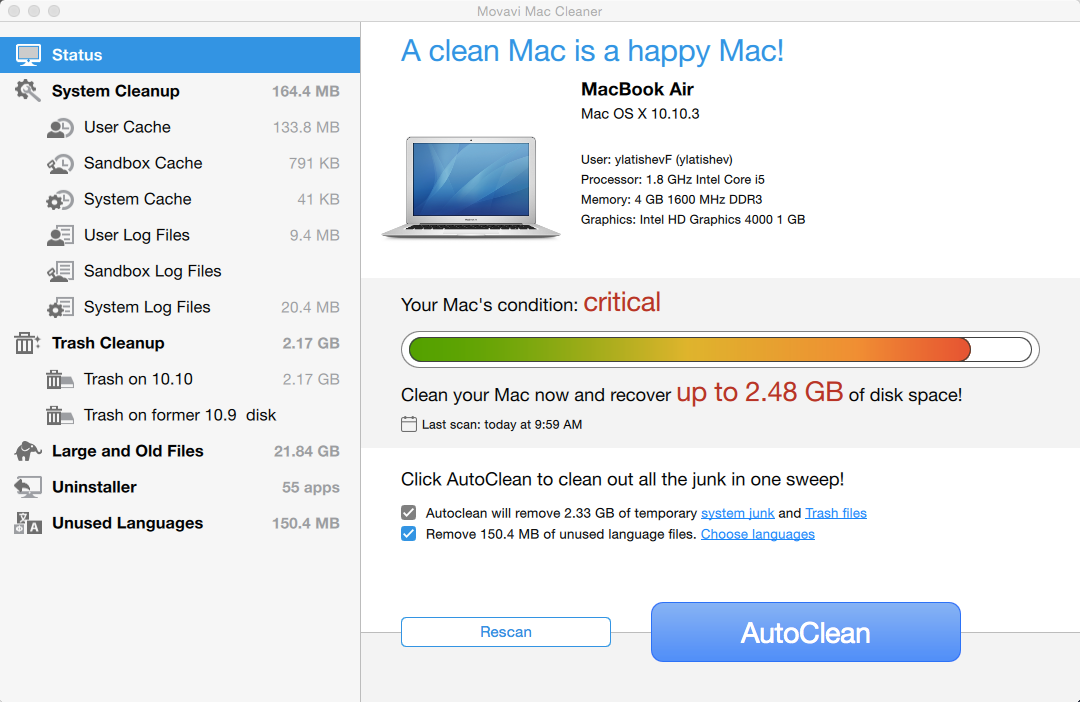
Once the computer has been scanned, the data is categorized into different areas: System Cleanup, Trash Cleanup, Large and Old Files, Unused languages, and other useful sections. This approach enables users to delete unnecessary files manually section by section, but if they don't want to wade through everything, they can just hit the AutoClean button to remove all unnecessary files.
Another helpful tool included in Mac Cleaner is the Uninstaller; this handy program can completely removes unused programs, including OS X applications like Chess, Calendar, and Mail from any Mac, along with their system folders. This process will free up gigabytes of space occupied by applications that normally cannot be removed. By restoring disc space and removing unused programs, Uninstaller can dramatically improve a Mac's performance.
Mac Cleaner is continuously updated as part of the license fee to ensure the latest tools can be recognized and addressed appropriately. The next round of enhancements will include:
* RAM cleaning to prevent slowdowns
* Deletion of duplicate files
* File shredder for permanent, unrestorable file deletion
Pricing and Availability:
The full version of Mac Cleaner 1.3 is available from Movavi's official website for $29.95. The trial version of Movavi Mac Cleaner has no time limits, but the cumulative volume of junk files is limited to 500 MB.
Movavi: http://www.movavi.com
Mac Cleaner 1.3: http://www.movavi.com/mac-cleaner/
Download: http://www.movavi.com/download-maccleaner
Purchase: http://www.movavi.com/buy-maccleaner
Screenshot: http://img.movavi.com/movavi.com.12/screens/mac-cleaner/1.3/1.png
Product Shot: http://img.movavi.com/movavi.com.12/boxes/mac-cleaner/box_669x896.png
Movavi produces a wide range of multimedia programs to make sure you have fun with your videos, music, and photos on any platform and any device. Along with over 20 standalone applications, Movavi produces a complete multimedia Suite, which includes tools for video conversion, PC screen capturing, video editing and playback, photo editing, online sharing and disc burning. Since its establishment in 2004, Movavi has grown from a small startup run by just three enthusiasts who produced and supported two products, to a full-scale business with more than 100 employees and an expanding product range for PC and Mac, sold in 150 countries. The company's US office is located in Saint Louis, Missouri, USA. Copyright (C) 2015 Movavi. All Rights Reserved. Apple, the Apple logo, iPhone, iPad and iPod are registered trademarks of Apple Inc. in the U.S. and/or other countries.
*******
Link To Article: http://prmac.com/release-id-75888.htm
*******
---------------------------------------------------------------------------------
Note that you can alter delivered distributions at any time.
Login to your account on prMac to alter your channel selection, or to opt-out at any time.

mimiCopy upadated to Ver.1.5 - The Standard Musician's App
A new article has been published at prMac.
mimiCopy upadated to Ver.1.5 - The Standard Musician's App - Published on 07/17/15
ART Teknika, Inc. today announces mimiCopy 1.5.0, an update to their popular music app for iOS devices. Geared at guitarists and other musicians alike, mimiCopy allows anyone to record & copy sections of audio by ear. Playback speed can be toggled without changing the musical interval, allowing for easy repeat listening and learning. The app can also be used in scenes like language learning & dance training. The latest upgrade includes a range of performance enhancements based on user feedback.
Tokyo, Japan - The gold standard for musicians, mimiCopy, an audio player for ear training, is now updated! Software developer and content creation firm ART Teknika, Inc. (headquarters in Shibuya-ku, Tokyo) is updating its iOS app, mimiCopy, to version 1.5 on the iTunes App Store. mimiCopy is geared at guitarists and other musicians and allows them to record and copy sections of audio by ear.
mimiCopy has enjoyed the support of numerous musicians and has become the go-to app for those training by ear. Playback speed can be toggled without changing the musical interval, and select clips of a track can be played in a loop, allowing for easy repeat listening and learning. The app is also enjoyed use in scenes like language learning and dance training. The latest upgrade includes a range of performance enhancements based on user feedback:
* Select up to three loop positions. You can focus on the intro, hook, and guitar solo, to name a few possibilities, and drill down to those areas for repeat listening.
* Volume can now be controlled within mimiCopy, instead of just system-wide. This lets you toggle volume in more detail when using the app in conjunction with other tools.
* mimiCopy now offers flexible audio routing settings that let you control which audio channels you listen to. Selectively listen to the right channel, mix both left and right channels while outputting just the right channel to headphones, and more. You can now listen to clips in a much easier manner.
* Folder playback. You can arrange multiple tracks in playlist format and replay them. This is ideal not only for learning a piece of music, but when studying a subject.
* Note-taking. Add a text memo to each track. Take down the chord or melody of a song on the spot.
The app has also been optimized for iOS7/8, iPhone 6, and iPhone 6 Plus, as well as designed to offer support for 64-bit CPUs. The app also features user registration. By registering as a member, you are entitled to free upgrades to new features as they are added to the app. The latest upgrade contains special bonuses for registered users, so signing up is recommended.
About mimiCopy:
This music player is designed for musicians wanting to train a piece of music by ear. The UI is designed for maximum usability, and high-quality audio playback can be controlled to modify the speed and key in which the audio is output.
Device Requirements:
* iPhone, iPad, and iPod touch
* Optimized for iPhone 5, iPhone 6/6 Plus
* Universal Application
* Requires iOS 6.0 or later
* 19.4 MB
Pricing and Availability:
mimiCopy 1.5.0 is $4.99 USD (or equivalent amount in other currencies) and available worldwide exclusively through the App Store in the Music category.
mimiCopy 1.5.0: http://mimicopy.artteknika.com/index_eng.html
Purchase and Download: http://itunes.apple.com/app/id405894824
Screenshot: http://mimicopy.artteknika.com/iPhone_Screen.PNG
App Icon: http://a3.mzstatic.com/us/r30/Purple3/v4/2d/4e/dd/2d4edd91-6147-9755-2732-572daf135fa0/icon175x175.png
Founded in 1994. Under the motto of "Computing power for Audio, Visual and Communications", ART Teknika has experience in a wide variety of fields, from technical development in audiovisual fields and content production. Also involved in development and proposal of systems utilizing iPhones and iPads. Copyright (C) 1994-2015 ART Teknika. All Rights Reserved. Apple, the Apple logo, iPhone, iPod and iPad are registered trademarks of Apple Inc. in the U.S. and/or other countries.
*******
Link To Article: http://prmac.com/release-id-75886.htm
*******
---------------------------------------------------------------------------------
Note that you can alter delivered distributions at any time.
Login to your account on prMac to alter your channel selection, or to opt-out at any time.
mimiCopy upadated to Ver.1.5 - The Standard Musician's App - Published on 07/17/15
ART Teknika, Inc. today announces mimiCopy 1.5.0, an update to their popular music app for iOS devices. Geared at guitarists and other musicians alike, mimiCopy allows anyone to record & copy sections of audio by ear. Playback speed can be toggled without changing the musical interval, allowing for easy repeat listening and learning. The app can also be used in scenes like language learning & dance training. The latest upgrade includes a range of performance enhancements based on user feedback.
Tokyo, Japan - The gold standard for musicians, mimiCopy, an audio player for ear training, is now updated! Software developer and content creation firm ART Teknika, Inc. (headquarters in Shibuya-ku, Tokyo) is updating its iOS app, mimiCopy, to version 1.5 on the iTunes App Store. mimiCopy is geared at guitarists and other musicians and allows them to record and copy sections of audio by ear.
mimiCopy has enjoyed the support of numerous musicians and has become the go-to app for those training by ear. Playback speed can be toggled without changing the musical interval, and select clips of a track can be played in a loop, allowing for easy repeat listening and learning. The app is also enjoyed use in scenes like language learning and dance training. The latest upgrade includes a range of performance enhancements based on user feedback:
* Select up to three loop positions. You can focus on the intro, hook, and guitar solo, to name a few possibilities, and drill down to those areas for repeat listening.
* Volume can now be controlled within mimiCopy, instead of just system-wide. This lets you toggle volume in more detail when using the app in conjunction with other tools.
* mimiCopy now offers flexible audio routing settings that let you control which audio channels you listen to. Selectively listen to the right channel, mix both left and right channels while outputting just the right channel to headphones, and more. You can now listen to clips in a much easier manner.
* Folder playback. You can arrange multiple tracks in playlist format and replay them. This is ideal not only for learning a piece of music, but when studying a subject.
* Note-taking. Add a text memo to each track. Take down the chord or melody of a song on the spot.
The app has also been optimized for iOS7/8, iPhone 6, and iPhone 6 Plus, as well as designed to offer support for 64-bit CPUs. The app also features user registration. By registering as a member, you are entitled to free upgrades to new features as they are added to the app. The latest upgrade contains special bonuses for registered users, so signing up is recommended.
About mimiCopy:
This music player is designed for musicians wanting to train a piece of music by ear. The UI is designed for maximum usability, and high-quality audio playback can be controlled to modify the speed and key in which the audio is output.
Device Requirements:
* iPhone, iPad, and iPod touch
* Optimized for iPhone 5, iPhone 6/6 Plus
* Universal Application
* Requires iOS 6.0 or later
* 19.4 MB
Pricing and Availability:
mimiCopy 1.5.0 is $4.99 USD (or equivalent amount in other currencies) and available worldwide exclusively through the App Store in the Music category.
mimiCopy 1.5.0: http://mimicopy.artteknika.com/index_eng.html
Purchase and Download: http://itunes.apple.com/app/id405894824
Screenshot: http://mimicopy.artteknika.com/iPhone_Screen.PNG

App Icon: http://a3.mzstatic.com/us/r30/Purple3/v4/2d/4e/dd/2d4edd91-6147-9755-2732-572daf135fa0/icon175x175.png

Founded in 1994. Under the motto of "Computing power for Audio, Visual and Communications", ART Teknika has experience in a wide variety of fields, from technical development in audiovisual fields and content production. Also involved in development and proposal of systems utilizing iPhones and iPads. Copyright (C) 1994-2015 ART Teknika. All Rights Reserved. Apple, the Apple logo, iPhone, iPod and iPad are registered trademarks of Apple Inc. in the U.S. and/or other countries.
*******
Link To Article: http://prmac.com/release-id-75886.htm
*******
---------------------------------------------------------------------------------
Note that you can alter delivered distributions at any time.
Login to your account on prMac to alter your channel selection, or to opt-out at any time.
Tembo 2.0 - Easy and effective file search helper
A new article has been published at prMac.
Tembo 2.0 - Easy and effective file search helper - Published on 07/17/15
Houdah Software today announces Tembo 2.0, a major upgrade to their file search helper for Mac OS X. Tembo is an easy-to-use file search tool that builds upon the existing Spotlight index. Tembo does one thing well: find files. Version 2.0 has been updated with a fresh user interface. It is faster, adds new features, and remains as easy to use as ever. To celebrate its release, single user and single family licences are 53% off until July 31, 2015.
Luxembourg - Houdah Software today is proud to announce the immediate availability of Tembo 2.0 for OS X Yosemite. Tembo is a super-efficient, organized file search tool. The job of Tembo is to make searching (and finding) of files, mail messages, bookmarks, photos, etc. as easy as possible. Tembo puts the spotlight on your files.
Tembo is a desktop search tool based upon the powerful Spotlight engine. Tembo's strength is its easy to use interface. It's signature feature are the context-sensitive filters to narrow down search results. In first pass, Tembo groups search results by file type categories. For each group the top 10 matches are displayed. Preferences allow for groups to be enabled, disabled and reordered.
The real power and convenience of Tembo is revealed on drill-down into a group. Here Tembo lists up to 10'00 search results. Next the results are context-relevant filters. These make it easy to break down longs search results lists. E.g. a sidebar in the Documents group lists file types of found files. A single click reduces Documents search results to only Word files.
Each result category has its own dedicated filters:
* Bookmarks & History: Type, URL Domain
* Documents: File Type
* Fonts: File Type
* Images: Resolution, File Type
* Messages: Subject, From, To
* Movies: File Type, Codec
* Music: Artist, File Type
* PDF Documents: Author
* Source Code: File Type
Enhancements brought by Tembo 2.0 include:
* Actions: rename, tag, or trash files from search results
* Sharing: send files by Mail, Messages, Facebook, etc.
* File Info window: easy-to-read overview of important file properties
* View options: font size, date format, grid of icons or previews
* Menu bar button and global keyboard shortcuts
* Up to 10'000 results in each group (up from 2'500)
* Collapsible groups: hide seldomly visited groups
* Improved performance
* Option to hand a search over to HoudahSpot
System Requirements:
* OS X Version 10.10 or higher
* Spotlight indexing enabled
* 10 MB of disk space
Pricing and Availability:
Tembo 2.0 is available for download from the Houdah Software web site. The demo version is fully functional. It hwoever shows a message and adds a delay when opening files from search results.
A single-user license is priced at USD $15 + tax for a single-user license. A family license is available for $22. Upgrades from previous versions are priced $6.95 and $9.95 respectively. Upgrades are available through the store built into the demo version of Tembo 2.0.
Tembo 2.0 is also available through the Mac App Store at USD $14.99 + tax (or local equivalent). The version of Tembo available on the App Store is confined to the to the OS X application sandbox. The sandbox requires Tembo to ask for explicit permission before it can access files or folders. It also restricts interactions between applications. Thus some features are available only in the direct download version of Tembo.
To celebrate the launch of Tembo 2.0, full licenses are sold at a 53% discount through July 31, 2015.
Houdah Software: http://www.houdah.com/
Tembo 2.0: http://www.houdah.com/tembo
Download Tembo: http://www.houdah.com/tembo/download.html
Purchase Tembo: http://www.houdah.com/tembo/buy.html
Screenshot: http://www.houdah.com/tembo/Tembo-Screenshot.jpg
Application Icon: http://www.houdah.com/tembo/Tembo-Icon.png
Founded in 2005 by Pierre Bernard, Houdah Software is a small company based in Luxembourg, Europe. Houdah Software specializes in quality software for Mac, iPhone and Apple iPad. Our mission is to pair quality products with excellent customer support. Copyright (C) 2005-2015 Houdah Software s. r.l. All Rights Reserved. Apple, the Apple logo, Mac OS X, iPhone, iPod, iPad and Macintosh are registered trademarks of Apple Inc. in the U.S. and/or other countries.
*******
Link To Article: http://prmac.com/release-id-75885.htm
*******
---------------------------------------------------------------------------------
Note that you can alter delivered distributions at any time.
Login to your account on prMac to alter your channel selection, or to opt-out at any time.
Tembo 2.0 - Easy and effective file search helper - Published on 07/17/15
Houdah Software today announces Tembo 2.0, a major upgrade to their file search helper for Mac OS X. Tembo is an easy-to-use file search tool that builds upon the existing Spotlight index. Tembo does one thing well: find files. Version 2.0 has been updated with a fresh user interface. It is faster, adds new features, and remains as easy to use as ever. To celebrate its release, single user and single family licences are 53% off until July 31, 2015.
Luxembourg - Houdah Software today is proud to announce the immediate availability of Tembo 2.0 for OS X Yosemite. Tembo is a super-efficient, organized file search tool. The job of Tembo is to make searching (and finding) of files, mail messages, bookmarks, photos, etc. as easy as possible. Tembo puts the spotlight on your files.
Tembo is a desktop search tool based upon the powerful Spotlight engine. Tembo's strength is its easy to use interface. It's signature feature are the context-sensitive filters to narrow down search results. In first pass, Tembo groups search results by file type categories. For each group the top 10 matches are displayed. Preferences allow for groups to be enabled, disabled and reordered.
The real power and convenience of Tembo is revealed on drill-down into a group. Here Tembo lists up to 10'00 search results. Next the results are context-relevant filters. These make it easy to break down longs search results lists. E.g. a sidebar in the Documents group lists file types of found files. A single click reduces Documents search results to only Word files.
Each result category has its own dedicated filters:
* Bookmarks & History: Type, URL Domain
* Documents: File Type
* Fonts: File Type
* Images: Resolution, File Type
* Messages: Subject, From, To
* Movies: File Type, Codec
* Music: Artist, File Type
* PDF Documents: Author
* Source Code: File Type
Enhancements brought by Tembo 2.0 include:
* Actions: rename, tag, or trash files from search results
* Sharing: send files by Mail, Messages, Facebook, etc.
* File Info window: easy-to-read overview of important file properties
* View options: font size, date format, grid of icons or previews
* Menu bar button and global keyboard shortcuts
* Up to 10'000 results in each group (up from 2'500)
* Collapsible groups: hide seldomly visited groups
* Improved performance
* Option to hand a search over to HoudahSpot
System Requirements:
* OS X Version 10.10 or higher
* Spotlight indexing enabled
* 10 MB of disk space
Pricing and Availability:
Tembo 2.0 is available for download from the Houdah Software web site. The demo version is fully functional. It hwoever shows a message and adds a delay when opening files from search results.
A single-user license is priced at USD $15 + tax for a single-user license. A family license is available for $22. Upgrades from previous versions are priced $6.95 and $9.95 respectively. Upgrades are available through the store built into the demo version of Tembo 2.0.
Tembo 2.0 is also available through the Mac App Store at USD $14.99 + tax (or local equivalent). The version of Tembo available on the App Store is confined to the to the OS X application sandbox. The sandbox requires Tembo to ask for explicit permission before it can access files or folders. It also restricts interactions between applications. Thus some features are available only in the direct download version of Tembo.
To celebrate the launch of Tembo 2.0, full licenses are sold at a 53% discount through July 31, 2015.
Houdah Software: http://www.houdah.com/
Tembo 2.0: http://www.houdah.com/tembo
Download Tembo: http://www.houdah.com/tembo/download.html
Purchase Tembo: http://www.houdah.com/tembo/buy.html
Screenshot: http://www.houdah.com/tembo/Tembo-Screenshot.jpg

Application Icon: http://www.houdah.com/tembo/Tembo-Icon.png

Founded in 2005 by Pierre Bernard, Houdah Software is a small company based in Luxembourg, Europe. Houdah Software specializes in quality software for Mac, iPhone and Apple iPad. Our mission is to pair quality products with excellent customer support. Copyright (C) 2005-2015 Houdah Software s. r.l. All Rights Reserved. Apple, the Apple logo, Mac OS X, iPhone, iPod, iPad and Macintosh are registered trademarks of Apple Inc. in the U.S. and/or other countries.
*******
Link To Article: http://prmac.com/release-id-75885.htm
*******
---------------------------------------------------------------------------------
Note that you can alter delivered distributions at any time.
Login to your account on prMac to alter your channel selection, or to opt-out at any time.
Realore Announces Soft Launch of Flying Empire
A new article has been published at prMac.
Realore Announces Soft Launch of Flying Empire - Published on 07/17/15
Realore today announces Flying Empire 1.2, a soft-launch of its brand new multiplayer strategy game for iOS devices. Set in a fantasy post-apocalyptic universe, players master the technology to build ships that can fly and construct magnificent cities in the sky. The world where the game is set is dying and people are forced to build flying islands to escape their doom. The title is now available in Australia, Canada, South Africa, Taiwan, New Zealand, Philippines, Vietnam and Singapore.
Klaipeda, Lithuania - Today Realore proudly announces a soft-launch of its brand new strategy MMO game - Flying Empire. The title is now available in Australia, Canada, South Africa, Taiwan, New Zealand, Philippines, Vietnam and Singapore. Flying Empire can be downloaded from the Apple App Store and is now playable on iPads with an iPhone release coming up shortly.
Flying Empire is a multiplayer strategy game set in a fantasy post-apocalyptic universe. The world where the game is set is dying and people are forced to build flying islands to escape their doom. They master the technology to build ships that can fly and construct magnificent cities in the sky. A series of betrayals of the common folk by the corrupt nobility leads to a civil war that now takes place above the clouds.
In the beginning of the game players are offered the role of a leader of a small flying island. Their mission is to erect an impregnable fortress and take an active part in the war. In order to do so they will have to gain resources either by the means of technology and trade or by raiding the enemy bases. The success of the raids depends on a careful balance of building powerful fleet and hiring an army. This interplay between the strengths and weaknesses of the ships and the troops provides the game with multi-layered strategic depth. Careful balance of managing and arming the fleet is a key to victory in Flying Empire.
Strategic planning of the raids takes place on a beautiful map of the sky-sea. Every corner of this world is filled with enemies to fight, secret treasures to find and uncharted island waiting to be discovered.
Gameplay of Flying Empire encourages cooperation among the players. Forming powerful clans and alliances eases the task of protecting each other and provides opportunities for coordinated attacks of the enemy. Flying Empire features an in-game chat in order to make the communications between the players fast and simple. Stripped down interface of Flying Empire makes the game accessible for the newcomers of the MMO strategies, but still stays familiar for the battle-hardened veterans of the genre.
The graphics of the game combines the elements of fantasy and steampunk creating a colorful and believable world. Each ship, building or unit is expertly drawn with attention to detail in order to make the world of the game more beautiful and immersive.
Device Requirements:
* Compatible with iPad
* Requires iOS 6.0 or later
* 87.7 MB
Pricing and Availability:
Flying Empire 1.2 is Free and currently available in Australia, Canada, South Africa, Taiwan, New Zealand, Philippines, Vietnam and Singapore through the App Store in the Games category.
Realore: http://realore.com/
Flying Empire 1.2: http://flyingempire.com/
Download from iTunes: https://itunes.apple.com/au/app/flying-empire/id938734727
YouTube Video (Trailer): https://www.youtube.com/watch?v=D-mN83OO56U
Screenshot 1: http://dl02.realore.com/affiliates/marketing/750x1334ss-80_(2).png
Screenshot 2: http://dl02.realore.com/affiliates/marketing/750x1334ss-80_(3).png
Realore is a software company that has been creating and publishing casual, social games, games for mobile phones and other platforms (flash, Mac, Pocket PC, Nintendo DS, iPhone, iPad, Android) since 2002. The company has published more than 60 titles and won fans all over the world. Today Realore is known as a successful developer and publisher that provides a full range of services including games' production, distribution and marketing. Its ultimate mission is to create high quality entertainment software that will bring fun and relaxation to players of all ages. Copyright (C) 2002-2015 Realore. All Rights Reserved. Apple, the Apple logo, iPhone, iPod and iPad are registered trademarks of Apple Inc. in the U.S. and/or other countries.
*******
Link To Article: http://prmac.com/release-id-75884.htm
*******
---------------------------------------------------------------------------------
Note that you can alter delivered distributions at any time.
Login to your account on prMac to alter your channel selection, or to opt-out at any time.
Realore Announces Soft Launch of Flying Empire - Published on 07/17/15
Realore today announces Flying Empire 1.2, a soft-launch of its brand new multiplayer strategy game for iOS devices. Set in a fantasy post-apocalyptic universe, players master the technology to build ships that can fly and construct magnificent cities in the sky. The world where the game is set is dying and people are forced to build flying islands to escape their doom. The title is now available in Australia, Canada, South Africa, Taiwan, New Zealand, Philippines, Vietnam and Singapore.
Klaipeda, Lithuania - Today Realore proudly announces a soft-launch of its brand new strategy MMO game - Flying Empire. The title is now available in Australia, Canada, South Africa, Taiwan, New Zealand, Philippines, Vietnam and Singapore. Flying Empire can be downloaded from the Apple App Store and is now playable on iPads with an iPhone release coming up shortly.
Flying Empire is a multiplayer strategy game set in a fantasy post-apocalyptic universe. The world where the game is set is dying and people are forced to build flying islands to escape their doom. They master the technology to build ships that can fly and construct magnificent cities in the sky. A series of betrayals of the common folk by the corrupt nobility leads to a civil war that now takes place above the clouds.
In the beginning of the game players are offered the role of a leader of a small flying island. Their mission is to erect an impregnable fortress and take an active part in the war. In order to do so they will have to gain resources either by the means of technology and trade or by raiding the enemy bases. The success of the raids depends on a careful balance of building powerful fleet and hiring an army. This interplay between the strengths and weaknesses of the ships and the troops provides the game with multi-layered strategic depth. Careful balance of managing and arming the fleet is a key to victory in Flying Empire.
Strategic planning of the raids takes place on a beautiful map of the sky-sea. Every corner of this world is filled with enemies to fight, secret treasures to find and uncharted island waiting to be discovered.
Gameplay of Flying Empire encourages cooperation among the players. Forming powerful clans and alliances eases the task of protecting each other and provides opportunities for coordinated attacks of the enemy. Flying Empire features an in-game chat in order to make the communications between the players fast and simple. Stripped down interface of Flying Empire makes the game accessible for the newcomers of the MMO strategies, but still stays familiar for the battle-hardened veterans of the genre.
The graphics of the game combines the elements of fantasy and steampunk creating a colorful and believable world. Each ship, building or unit is expertly drawn with attention to detail in order to make the world of the game more beautiful and immersive.
Device Requirements:
* Compatible with iPad
* Requires iOS 6.0 or later
* 87.7 MB
Pricing and Availability:
Flying Empire 1.2 is Free and currently available in Australia, Canada, South Africa, Taiwan, New Zealand, Philippines, Vietnam and Singapore through the App Store in the Games category.
Realore: http://realore.com/
Flying Empire 1.2: http://flyingempire.com/
Download from iTunes: https://itunes.apple.com/au/app/flying-empire/id938734727
YouTube Video (Trailer): https://www.youtube.com/watch?v=D-mN83OO56U
Screenshot 1: http://dl02.realore.com/affiliates/marketing/750x1334ss-80_(2).png
.png)
Screenshot 2: http://dl02.realore.com/affiliates/marketing/750x1334ss-80_(3).png
.png)
Realore is a software company that has been creating and publishing casual, social games, games for mobile phones and other platforms (flash, Mac, Pocket PC, Nintendo DS, iPhone, iPad, Android) since 2002. The company has published more than 60 titles and won fans all over the world. Today Realore is known as a successful developer and publisher that provides a full range of services including games' production, distribution and marketing. Its ultimate mission is to create high quality entertainment software that will bring fun and relaxation to players of all ages. Copyright (C) 2002-2015 Realore. All Rights Reserved. Apple, the Apple logo, iPhone, iPod and iPad are registered trademarks of Apple Inc. in the U.S. and/or other countries.
*******
Link To Article: http://prmac.com/release-id-75884.htm
*******
---------------------------------------------------------------------------------
Note that you can alter delivered distributions at any time.
Login to your account on prMac to alter your channel selection, or to opt-out at any time.
Toy Defense for Mac offers Revolutionary Changes
A new article has been published at prMac.
Toy Defense for Mac offers Revolutionary Changes - Published on 07/17/15
Melesta Games today announces Toy Defense 1.23, an update to its bestselling game for Mac OS X. Put your defense and strategic skills to the ultimate test. Experience a totally explosive gameplay in this tower defense game in a WWI setting. Now users are able to play on several devises without losing their progress. A brand new tournament mode with new rules is sure to entertain all players. Special offers, improved performance and stable gameplay will make playing the game even more exciting.
Seattle, Washington - Melesta Games today is happy to announce the release of Toy Defense 1.23, an amazing fresh update of its bestselling game on the Mac App Store. This classic tower defense strategy game in a World War I setting now introduces lots of fantastic features for its fans. As before, the main goal of this tower defense strategy hit is to put players defense and strategic skills to the ultimate test but now not only in a wide range of exciting missions but also in the new Tournament Mode. They are suggested to defend base from the never ending waves of enemies and compete with their friends in weekly tournaments and play for as long as they can survive.
As of this update, all players will compete with other people from all over the world in a brand new tournament mode. It currently has several leagues with great rewards. All players will have to show their winning tactics and strategy, protect their base, reach the top 3 and advance in the champions' league.
One more great and wanted feature has also been added. Now all users can transfer their entire game progress from one device to another. They can play on several devices and keep the current progress. As always, the game suggests amazing bonus offers and gives many opportunities for exciting battles with an improved performance and stable gameplay.
Supported Languages:
Toy Defense supports English, Dutch, French, German, Italian, Japanese, Korean, Portuguese, Russian, Simplified Chinese, Spanish and Swedish languages.
System Requirements:
* OS X 10.8 or later
* 99.8 MB
Pricing and Availability:
Toy Defense 1.23 is Free and available worldwide through the Mac App Store in the Games category.
Melesta Games: http://www.melesta-games.com
Toy Defense 1.23: http://www.melesta-games.com/toy-defense.html
Download from the Mac App Store: http://itunes.apple.com/app/id839497903
Screenshot 1: http://a4.mzstatic.com/us/r30/Purple1/v4/a0/6f/a8/a06fa8dc-7c5c-7ea1-345c-986da5702447/screen800x500.jpeg
Screenshot 2: http://a2.mzstatic.com/us/r30/Purple1/v4/9a/5e/60/9a5e6058-a884-c236-bb88-b2c6441c2902/screen800x500.jpeg
App icon: http://a3.mzstatic.com/us/r30/Purple5/v4/9c/aa/ae/9caaaebd-3fcf-86a0-05b3-7f49c11dbc11/icon128-2x.png
Melesta Games is a premier game development company developing casual games across multiple platforms for more than 5 years. Company's product portfolio includes more than 30 successful titles which top world game charts. Our games have been localized into more than 20 languages and are available in 60 countries worldwide. Copyright (C) 2007-2015 MELSOFT. Melesta is a registered trademark of MELSOFT, used to identify the company's products. Melesta trademark is protected by Trademark Law. All Rights Reserved. Apple, the Apple logo, Mac OS X, iPhone, iPod and Macintosh are registered trademarks of Apple Inc. in the U.S. and/or other countries. Other trademarks and registered trademarks may be the property of their respective owners.
*******
Link To Article: http://prmac.com/release-id-75880.htm
*******
---------------------------------------------------------------------------------
Note that you can alter delivered distributions at any time.
Login to your account on prMac to alter your channel selection, or to opt-out at any time.
Toy Defense for Mac offers Revolutionary Changes - Published on 07/17/15
Melesta Games today announces Toy Defense 1.23, an update to its bestselling game for Mac OS X. Put your defense and strategic skills to the ultimate test. Experience a totally explosive gameplay in this tower defense game in a WWI setting. Now users are able to play on several devises without losing their progress. A brand new tournament mode with new rules is sure to entertain all players. Special offers, improved performance and stable gameplay will make playing the game even more exciting.
Seattle, Washington - Melesta Games today is happy to announce the release of Toy Defense 1.23, an amazing fresh update of its bestselling game on the Mac App Store. This classic tower defense strategy game in a World War I setting now introduces lots of fantastic features for its fans. As before, the main goal of this tower defense strategy hit is to put players defense and strategic skills to the ultimate test but now not only in a wide range of exciting missions but also in the new Tournament Mode. They are suggested to defend base from the never ending waves of enemies and compete with their friends in weekly tournaments and play for as long as they can survive.
As of this update, all players will compete with other people from all over the world in a brand new tournament mode. It currently has several leagues with great rewards. All players will have to show their winning tactics and strategy, protect their base, reach the top 3 and advance in the champions' league.
One more great and wanted feature has also been added. Now all users can transfer their entire game progress from one device to another. They can play on several devices and keep the current progress. As always, the game suggests amazing bonus offers and gives many opportunities for exciting battles with an improved performance and stable gameplay.
Supported Languages:
Toy Defense supports English, Dutch, French, German, Italian, Japanese, Korean, Portuguese, Russian, Simplified Chinese, Spanish and Swedish languages.
System Requirements:
* OS X 10.8 or later
* 99.8 MB
Pricing and Availability:
Toy Defense 1.23 is Free and available worldwide through the Mac App Store in the Games category.
Melesta Games: http://www.melesta-games.com
Toy Defense 1.23: http://www.melesta-games.com/toy-defense.html
Download from the Mac App Store: http://itunes.apple.com/app/id839497903
Screenshot 1: http://a4.mzstatic.com/us/r30/Purple1/v4/a0/6f/a8/a06fa8dc-7c5c-7ea1-345c-986da5702447/screen800x500.jpeg

Screenshot 2: http://a2.mzstatic.com/us/r30/Purple1/v4/9a/5e/60/9a5e6058-a884-c236-bb88-b2c6441c2902/screen800x500.jpeg

App icon: http://a3.mzstatic.com/us/r30/Purple5/v4/9c/aa/ae/9caaaebd-3fcf-86a0-05b3-7f49c11dbc11/icon128-2x.png

Melesta Games is a premier game development company developing casual games across multiple platforms for more than 5 years. Company's product portfolio includes more than 30 successful titles which top world game charts. Our games have been localized into more than 20 languages and are available in 60 countries worldwide. Copyright (C) 2007-2015 MELSOFT. Melesta is a registered trademark of MELSOFT, used to identify the company's products. Melesta trademark is protected by Trademark Law. All Rights Reserved. Apple, the Apple logo, Mac OS X, iPhone, iPod and Macintosh are registered trademarks of Apple Inc. in the U.S. and/or other countries. Other trademarks and registered trademarks may be the property of their respective owners.
*******
Link To Article: http://prmac.com/release-id-75880.htm
*******
---------------------------------------------------------------------------------
Note that you can alter delivered distributions at any time.
Login to your account on prMac to alter your channel selection, or to opt-out at any time.
Pinnate Makes it Twice as Fast for Groups to Choose Meeting Dates
A new article has been published at prMac.
Pinnate Makes it Twice as Fast for Groups to Choose Meeting Dates - Published on 07/17/15
Pinadate 2.0 from Lafarelle makes it easier and faster for groups of two or more people to choose mutually suitable meeting dates, and completely avoid sending time consuming and tedious emails and phone calls back and forth. The intuitive menus and navigation make it easy for anyone to schedule a personal, social or business event with a group of any size. This new no-cost scheduling and productivity app is available for iPhone and iPad on the App Store, and for Android devices on Google Play.
Cupertino, California - Business professionals, students, friends and all others who want to make it dramatically easier and twice as fast to choose mutually suitable meeting dates - and completely avoid sending emails and phone calls back and forth - can now head to the App Store or Google Play and download the must-have new no-cost app Pinadate.
Developed by Lafarelle, Pinadate is a streamlined and elegant scheduling and productivity app that does not require a formal login, which is welcome news to users who are concerned about safeguarding their privacy.
Here's how Pinadate works:
1. Users launch the app and choose various possible times and dates for an event.
2. Next, they add a description of their event. They can also add a photo by taking a picture with their device, or uploading one from their library.
3. From there, they're taken to their event's specific page, which also features a private discussion board that can only be accessed by the event's creator and those who are invited.
4. After that, they send out invitations to friends or colleagues, who then "vote" on the best time/date for the event. Invitees who don't have the app can be notified by email, SMS, IM, Facebook or Twitter.
5. The event's creator can then see which particular time/date suits everyone (or at least the greatest number of people).
6. Each attendee then receives a notification of the event.
In total, the above process takes only a minute or two, and the intuitive menus and navigation make it easy for anyone to schedule a personal, social or business event with a group of any size - from tiny to massive. In addition, Pinadate automatically populates a user's contact list, which saves even more time.
"While technology is supposed to make life simpler," commented Sylvain Geron of Lafarelle, "everyone has experienced how inconvenient, time consuming, tedious, and stressful it can be to send emails and voicemails back and forth in an attempt to get two or more people to select a mutually suitable time and date to hold a business conference, have a party, plan a get together, or schedule any other professional, personal or social meeting. However, that unpleasant experience is now in the past thanks to the innovative Pinadate!"
Device Requirements:
* iPhone, iPad, and iPod touch
* Optimized for iPhone 5, iPhone 6/6 Plus
* Requires iOS 7.0 or later
* 6.5 MB
Pricing and Availability:
Pinadate 2.0, the new no-cost app that is the faster and easier way for groups to choose mutually suitable meeting dates, is available worldwide through the App Store in the Business category. There is also an Android version available on Google Play.
Pinadate 2.0: http://pinadate.net
More Info: http://apps.appshout.com/pinadate/
Download from iTunes: https://itunes.apple.com/app/asknchat/id857737897
Download from Google Play: https://play.google.com/store/apps/details?id=com.tactfactory.asknchat
Blip Video (Demo): http://blip.tv/dailyappshow/pinadate-iphone-app-demo-dailyappshow-7102688
App Icon: http://apps.appshout.com/pinadate/images/icon.png
Based in Paris, Lafarelle is headed by Sylvain Geron who already launched and developed several innovative multi-million dollar businesses in telecoms and IT. All Material and Software (C) Copyright 2015 Lafarelle. All Rights Reserved. Apple, the Apple logo, iPhone, iPod and iPad are registered trademarks of Apple Inc. in the U.S. and/or other countries. Other trademarks and registered trademarks may be the property of their respective owners.
*******
Link To Article: http://prmac.com/release-id-75882.htm
*******
---------------------------------------------------------------------------------
Note that you can alter delivered distributions at any time.
Login to your account on prMac to alter your channel selection, or to opt-out at any time.
Pinnate Makes it Twice as Fast for Groups to Choose Meeting Dates - Published on 07/17/15
Pinadate 2.0 from Lafarelle makes it easier and faster for groups of two or more people to choose mutually suitable meeting dates, and completely avoid sending time consuming and tedious emails and phone calls back and forth. The intuitive menus and navigation make it easy for anyone to schedule a personal, social or business event with a group of any size. This new no-cost scheduling and productivity app is available for iPhone and iPad on the App Store, and for Android devices on Google Play.
Cupertino, California - Business professionals, students, friends and all others who want to make it dramatically easier and twice as fast to choose mutually suitable meeting dates - and completely avoid sending emails and phone calls back and forth - can now head to the App Store or Google Play and download the must-have new no-cost app Pinadate.
Developed by Lafarelle, Pinadate is a streamlined and elegant scheduling and productivity app that does not require a formal login, which is welcome news to users who are concerned about safeguarding their privacy.
Here's how Pinadate works:
1. Users launch the app and choose various possible times and dates for an event.
2. Next, they add a description of their event. They can also add a photo by taking a picture with their device, or uploading one from their library.
3. From there, they're taken to their event's specific page, which also features a private discussion board that can only be accessed by the event's creator and those who are invited.
4. After that, they send out invitations to friends or colleagues, who then "vote" on the best time/date for the event. Invitees who don't have the app can be notified by email, SMS, IM, Facebook or Twitter.
5. The event's creator can then see which particular time/date suits everyone (or at least the greatest number of people).
6. Each attendee then receives a notification of the event.
In total, the above process takes only a minute or two, and the intuitive menus and navigation make it easy for anyone to schedule a personal, social or business event with a group of any size - from tiny to massive. In addition, Pinadate automatically populates a user's contact list, which saves even more time.
"While technology is supposed to make life simpler," commented Sylvain Geron of Lafarelle, "everyone has experienced how inconvenient, time consuming, tedious, and stressful it can be to send emails and voicemails back and forth in an attempt to get two or more people to select a mutually suitable time and date to hold a business conference, have a party, plan a get together, or schedule any other professional, personal or social meeting. However, that unpleasant experience is now in the past thanks to the innovative Pinadate!"
Device Requirements:
* iPhone, iPad, and iPod touch
* Optimized for iPhone 5, iPhone 6/6 Plus
* Requires iOS 7.0 or later
* 6.5 MB
Pricing and Availability:
Pinadate 2.0, the new no-cost app that is the faster and easier way for groups to choose mutually suitable meeting dates, is available worldwide through the App Store in the Business category. There is also an Android version available on Google Play.
Pinadate 2.0: http://pinadate.net
More Info: http://apps.appshout.com/pinadate/
Download from iTunes: https://itunes.apple.com/app/asknchat/id857737897
Download from Google Play: https://play.google.com/store/apps/details?id=com.tactfactory.asknchat
Blip Video (Demo): http://blip.tv/dailyappshow/pinadate-iphone-app-demo-dailyappshow-7102688
App Icon: http://apps.appshout.com/pinadate/images/icon.png

Based in Paris, Lafarelle is headed by Sylvain Geron who already launched and developed several innovative multi-million dollar businesses in telecoms and IT. All Material and Software (C) Copyright 2015 Lafarelle. All Rights Reserved. Apple, the Apple logo, iPhone, iPod and iPad are registered trademarks of Apple Inc. in the U.S. and/or other countries. Other trademarks and registered trademarks may be the property of their respective owners.
*******
Link To Article: http://prmac.com/release-id-75882.htm
*******
---------------------------------------------------------------------------------
Note that you can alter delivered distributions at any time.
Login to your account on prMac to alter your channel selection, or to opt-out at any time.
Fun Pick-Up-And-Play Soccer Game Kukaball Launches For iOS Devices
A new article has been published at prMac.
Fun Pick-Up-And-Play Soccer Game Kukaball Launches For iOS Devices - Published on 07/17/15
Independent developer, Arda Kaan Alpman introduces KUKABALL 1.0 for iOS devices, a fun game that players of all ages can pick-up-and play in seconds. Gamers must creatively use their fingers to dribble and shoot the ball to score goals, and score as many as they can against the clock. Players have to be creative with their interactions with the ball to score goals; dribble the ball to certain angles then shoot, pass off screen borders or shoot off screen borders and more.
Cupertino, California - Developed by Arda Kaan Alpman and launching for iOS Devices, Kukaball is an innovative soccer game app that places the player physically in the game through physical interactions with the ball using fingers. Kukaball aims to entertain people in short breaks (45 seconds total game duration) while enforcing imagination and creativity. The player has to come up with quick creative moves to score against the Kuka (goalie).
In Kukaball, players can have fun interactions using their fingers with a soccerball/football (dribbling, shooting, passing) with the ultimate aim of scoring as many goals as they can against the Kuka (the Turkish name for a cone) in 45 seconds. Players have to be creative with their interactions with the ball to score goals (dribble the ball to certain angles then shoot, pass off screen borders or shoot off screen borders etc,). As a benchmark, users can try to beat the developer's highest score of 21 goals in 45 seconds. Or anyone who doesn't want to be competitive can simply just play it for fun and make creative plays to defeat the Kuka.
Scoring a good number of goals against the Kuka (goalie) requires that the player develop the necessary skills to handle the ball with his fingers in appropriate ways (as is the case when people learn to play soccer with their feet). So the player is challenged in a fun way to improve ball handling and shooting skills to be able to score more goals against the Kuka. Mostly, the Kuka will not conceed a goal from a straightforward shot and the player needs to make creative plays (i.e. dribble to an appropriate angle and shoot, make passes of the screen borders and then shoot). As ball handling skills of the player improves, the player becomes capable of scoring more goals however the Kuka is also adaptive to the skill level of the player and its performance as goalie also improves.
Device Requirements:
* iPhone, iPad, and iPod touch
* Requires iOS 8.0 or later
* 2.8 MB
Pricing and Availability:
KUKABALL 1.0, the fun soccer game anyone can pick-up and play in seconds, is Free and available worldwide exclusively through the App Store in the Games category.
KUKABALL 1.0: http://apps.appshout.com/kukaball/
Download from iTunes: https://itunes.apple.com/app/kukaball/id1000870521
Blip Video (Demo): http://blip.tv/dailyappshow/kukaball-iphone-app-demo-state-of-tech-7202841
Screenshot: http://a4.mzstatic.com/us/r30/Purple1/v4/a1/7f/40/a17f4050-41e9-306a-d135-761fe496caa8/screen480x480.jpeg
App Icon: http://apps.appshout.com/kukaball/images/icon.png
Based in Turkey and with over 15 years as a corporate finance professional, Arda Kaan Alpman's interest in software has lead him to using technology to solve problems in his financial career. As a hobby, and as a means to explore the world of app development, Arda has developed Kukaball for iOS devices - a fun app based on a childhood soccer game of using your fingers to kick a small soccer ball. All Material and Software (C) Copyright 2015 Arda Kaan Alpman. All Rights Reserved. Apple, the Apple logo, iPhone, iPod and iPad are registered trademarks of Apple Inc. in the U.S. and/or other countries. Other trademarks and registered trademarks may be the property of their respective owners.
*******
Link To Article: http://prmac.com/release-id-75881.htm
*******
---------------------------------------------------------------------------------
Note that you can alter delivered distributions at any time.
Login to your account on prMac to alter your channel selection, or to opt-out at any time.
Fun Pick-Up-And-Play Soccer Game Kukaball Launches For iOS Devices - Published on 07/17/15
Independent developer, Arda Kaan Alpman introduces KUKABALL 1.0 for iOS devices, a fun game that players of all ages can pick-up-and play in seconds. Gamers must creatively use their fingers to dribble and shoot the ball to score goals, and score as many as they can against the clock. Players have to be creative with their interactions with the ball to score goals; dribble the ball to certain angles then shoot, pass off screen borders or shoot off screen borders and more.
Cupertino, California - Developed by Arda Kaan Alpman and launching for iOS Devices, Kukaball is an innovative soccer game app that places the player physically in the game through physical interactions with the ball using fingers. Kukaball aims to entertain people in short breaks (45 seconds total game duration) while enforcing imagination and creativity. The player has to come up with quick creative moves to score against the Kuka (goalie).
In Kukaball, players can have fun interactions using their fingers with a soccerball/football (dribbling, shooting, passing) with the ultimate aim of scoring as many goals as they can against the Kuka (the Turkish name for a cone) in 45 seconds. Players have to be creative with their interactions with the ball to score goals (dribble the ball to certain angles then shoot, pass off screen borders or shoot off screen borders etc,). As a benchmark, users can try to beat the developer's highest score of 21 goals in 45 seconds. Or anyone who doesn't want to be competitive can simply just play it for fun and make creative plays to defeat the Kuka.
Scoring a good number of goals against the Kuka (goalie) requires that the player develop the necessary skills to handle the ball with his fingers in appropriate ways (as is the case when people learn to play soccer with their feet). So the player is challenged in a fun way to improve ball handling and shooting skills to be able to score more goals against the Kuka. Mostly, the Kuka will not conceed a goal from a straightforward shot and the player needs to make creative plays (i.e. dribble to an appropriate angle and shoot, make passes of the screen borders and then shoot). As ball handling skills of the player improves, the player becomes capable of scoring more goals however the Kuka is also adaptive to the skill level of the player and its performance as goalie also improves.
Device Requirements:
* iPhone, iPad, and iPod touch
* Requires iOS 8.0 or later
* 2.8 MB
Pricing and Availability:
KUKABALL 1.0, the fun soccer game anyone can pick-up and play in seconds, is Free and available worldwide exclusively through the App Store in the Games category.
KUKABALL 1.0: http://apps.appshout.com/kukaball/
Download from iTunes: https://itunes.apple.com/app/kukaball/id1000870521
Blip Video (Demo): http://blip.tv/dailyappshow/kukaball-iphone-app-demo-state-of-tech-7202841
Screenshot: http://a4.mzstatic.com/us/r30/Purple1/v4/a1/7f/40/a17f4050-41e9-306a-d135-761fe496caa8/screen480x480.jpeg

App Icon: http://apps.appshout.com/kukaball/images/icon.png

Based in Turkey and with over 15 years as a corporate finance professional, Arda Kaan Alpman's interest in software has lead him to using technology to solve problems in his financial career. As a hobby, and as a means to explore the world of app development, Arda has developed Kukaball for iOS devices - a fun app based on a childhood soccer game of using your fingers to kick a small soccer ball. All Material and Software (C) Copyright 2015 Arda Kaan Alpman. All Rights Reserved. Apple, the Apple logo, iPhone, iPod and iPad are registered trademarks of Apple Inc. in the U.S. and/or other countries. Other trademarks and registered trademarks may be the property of their respective owners.
*******
Link To Article: http://prmac.com/release-id-75881.htm
*******
---------------------------------------------------------------------------------
Note that you can alter delivered distributions at any time.
Login to your account on prMac to alter your channel selection, or to opt-out at any time.
Subscribe to:
Posts (Atom)