A new article has been published at prMac.
Dare Do Be Announces Beta Test of Pendilly - Unique Messaging App - Published on 07/20/15
Dare Do Be today announces open beta testing of Pendilly, an up-and-coming new messaging app for iOS devices. The company is inviting everyone to beta test Pendilly, and get in on the fun of the app before it goes public. Pendilly lets anyone type a message, or capture or import a photo or video, and choose a future time to deliver the message. The recipient then receives a notification telling them a message is on the way, but not what the message is, who it's from, or even when it will arrive.
Paris, France - Dare Do Be today is proud to announce open beta testing of Pendilly, an up-and-coming messaging app for iPhone, iPad, and iPod touch devices. Pendilly allows anyone to type a message, or capture or import a photo or video, and then choose a specific future time to deliver the message. The recipient then receives a notification letting them know a message is on the way, but doesn't tell them who sent it, or when it will arrive! The company is inviting everyone to beta test Pendilly, and get in on the fun of the app before it goes public.
How Do Users Make a Pendilly?
1. Anyone can simply type a message, or take a photo (or import one from the camera roll), or capture a video (or import one from the camera roll) to send to the lucky recipient. Photos and videos add to the mystery and enjoyment of a Pendilly message.
2. Select a specific time in the future to deliver the Pendilly. Delivery times can range from a minimum of 1 hour, all the way up to a maximum delay of 1 month. The recipient will receive a notification that a Pendilly message is on its way, but they won't be told who it's from, or what the message is about.
3. Optional "Why" tags add to the fun! Why tags are sent to the Pendilly recipient to view before the delivery date. The recipient won't know anything else about the upcoming Pendilly message before it is delivered. Be creative, drive the recipient crazy with curiosity with hints about the message via the Why tags.
4. Send the Pendilly directly to the recipient to be delivered at the scheduled time. Their anticipation will continue to build until the Pendilly is finally delivered. After the recipient reads the Pendilly, it's almost guaranteed to receive a great reaction!
Dare Do Be is inviting iOS users ages 15 to 25 who are interested in beta testing Pendilly, to get in on the fun of the app before it is is released to the general public. The ideal beta tester is well connected on social networks, with at least 3 to 4 friends who would be willing to test the apps along with them. Users with an active social life, and who are involved in their local community are the exact type of testers Pendilly is looking for!
The development phase is nearing the end, and Pendilly is ready to meet its new beta users during July. Since the end of 2014, more than 6,000 people have signed up. Unfortunately, Pendilly can only welcome 1,000 members to join this exciting beta phase of the adventure. The first 1,000 qualified users who confirm will become official beta testers of Pendilly.
"From day one, our focus is to use time to bring emotional value to our users. This is just the beginning and we are already cooking much more," says Pendilly founder Samy Allaham. "Pendilly is looking for users who have plenty of experience in the social networking biosphere and willing to create their day, week or month, in a simple way. Our mission is to help people create their near future in a simple, yet powerful and effective way. It can be as simple as sending a Pendilly to a friend to have fun, give a special someone your attention, help anticipate an event, remember a moment, or surprise a friend."
iOS users who have an iPhone 4S or newer device, running iOS 8.0 or higher are welcome to apply for the Pendilly beta test at the Pendilly website. While there, users are invited to share the beta test news with friends and family on Twitter, Facebook, and Google+.
Pendilly 1.0: http://www.pendilly.com
Screenshot 1: http://d2r8jqmejizzox.cloudfront.net/159221-341285-291x595-whyscreen.png
Screenshot 2: http://d2r8jqmejizzox.cloudfront.net/159221-341213-388x617-iPhone5BlackWhiteMockUp.png
Pendilly was founded by Dare Do Be, a French based startup which dares day-in and day-out to build a new temporal experience in messaging, and remains laser-focused on delivering ever-increasing emotional value to its community. Pendilly dares to do things out of the ordinary and believes sharing differently can add more value to messages, pictures and videos. The company aims at empowering people who dare to create the future, by using time and tags to send messages into the future with more emotions and more fun. Time is a precious and powerful emotional medium and we use it to connects us on a deeper level. Copyright (C) 2015 Dare Do Be. All Rights Reserved. Apple, the Apple logo, iPhone and iPod are registered trademarks of Apple Inc. in the U.S. and/or other countries.
*******
Link To Article: http://prmac.com/release-id-75911.htm
*******
---------------------------------------------------------------------------------
Note that you can alter delivered distributions at any time.
Login to your account on prMac to alter your channel selection, or to opt-out at any time.


Perfection! 3: The Chain - The Third Entry in The Popular Puzzler Series
A new article has been published at prMac.
Perfection! 3: The Chain - The Third Entry in The Popular Puzzler Series - Published on 07/19/15
Independent publisher Stuart McLean announces Perfection! 3: The Chain 1.0 for iOS devices, the next chapter in the popular Perfection! series of puzzle games. Perfection! 3: The Chain keeps the style of the previous games but completely changes the gameplay to make this an all new, fast paced, strategy game. Select a starting tile and watch it zoom off to collide with any other tiles in the indicated path. Chain together as many of the tiles on the game board as possible to build up a score.
Glenrothes, Scotland - Independent publisher Stuart McLean is delighted to announce the release of Perfection! 3: The Chain 1.0 for the iPhone, iPad and iPod touch. Perfection! 3 is a fast action, high score chasing, strategic puzzle game that focuses on fun and fast thinking. Offering an entirely different style of game to the previous entries in the series and a novel gameplay mechanic not seen in other games gives Perfection! 3 a fresh feel and a unique gaming experience.
Select a starting tile and watch it zoom off to collide with any other tiles in the indicated path. Chain together as many of the tiles on the game board as possible to build up a score. If a red tile is hit as part of the chain, players don't just lose a life, the score that had been chained together is subtracted from the overall score instead of added and a life is lost. The chance of achieving a perfect level is also gone if a red tile is hit. Handily, including a green tile in the chain will cancel out the effects of red tiles.
It all sounds so simple, and it is. Simple, but not as easy as it sounds. Tying it all up with a tight time limit for each level, brings a fun and challenging experience together.
Features:
* Full iCloud support. Keeping the game in sync across all devices
* Universal iPhone, iPad and iPod touch app
* Game Center Leaderboards, Challenges and Achievements.
* Designed to take full advantage of every device including the new iPhone 6 and 6 Plus screen sizes
* An endless game with varied level targets, board sizes and progressive difficulty
* Day and night mode for late night perfectionism
* Designed with our color blind friends in mind. Specific patterns identify the red and green tiles
Device Requirements:
* iPhone, iPad or iPod touch
* Universal App
* Optimized for iPhone 5, iPhone 6, and iPhone 6 Plus
* Requires iOS 7.1 or later
Pricing and Availability: Perfection! 3: The Chain 1.0 is $1.99 USD (or an equivalent amount in other currencies) and is available worldwide exclusively through the Apple App Store in the Games category.
WiteNoiz: http://witenoiz.com
Perfection! 3: The Chain 1.0: http://witenoiz.com/?page_id=353
Download From iTunes: https://itunes.apple.com/app/perfection!-3-the-chain/id966850699
Screenshot: http://witenoiz.com/wp-content/uploads/2015/07/StoreScreen-1.png
App Icon: http://witenoiz.com/wp-content/uploads/2015/07/iTunesArtwork@2x3.png
Stuart McLean is an independent app developer. Self taught after an accident left him disabled and unemployable, he works far too many hours for the love of the game. Stuart McLean develops and publishes games and apps exclusively for the iOS platform. Copyright (C) 2015 Stuart McLean. All Rights Reserved. Apple, the Apple logo, iPhone, iPad and iPod are registered trademarks of Apple Inc. in the U.S. and/or other countries.
*******
Link To Article: http://prmac.com/release-id-75909.htm
*******
---------------------------------------------------------------------------------
Note that you can alter delivered distributions at any time.
Login to your account on prMac to alter your channel selection, or to opt-out at any time.
Perfection! 3: The Chain - The Third Entry in The Popular Puzzler Series - Published on 07/19/15
Independent publisher Stuart McLean announces Perfection! 3: The Chain 1.0 for iOS devices, the next chapter in the popular Perfection! series of puzzle games. Perfection! 3: The Chain keeps the style of the previous games but completely changes the gameplay to make this an all new, fast paced, strategy game. Select a starting tile and watch it zoom off to collide with any other tiles in the indicated path. Chain together as many of the tiles on the game board as possible to build up a score.
Glenrothes, Scotland - Independent publisher Stuart McLean is delighted to announce the release of Perfection! 3: The Chain 1.0 for the iPhone, iPad and iPod touch. Perfection! 3 is a fast action, high score chasing, strategic puzzle game that focuses on fun and fast thinking. Offering an entirely different style of game to the previous entries in the series and a novel gameplay mechanic not seen in other games gives Perfection! 3 a fresh feel and a unique gaming experience.
Select a starting tile and watch it zoom off to collide with any other tiles in the indicated path. Chain together as many of the tiles on the game board as possible to build up a score. If a red tile is hit as part of the chain, players don't just lose a life, the score that had been chained together is subtracted from the overall score instead of added and a life is lost. The chance of achieving a perfect level is also gone if a red tile is hit. Handily, including a green tile in the chain will cancel out the effects of red tiles.
It all sounds so simple, and it is. Simple, but not as easy as it sounds. Tying it all up with a tight time limit for each level, brings a fun and challenging experience together.
Features:
* Full iCloud support. Keeping the game in sync across all devices
* Universal iPhone, iPad and iPod touch app
* Game Center Leaderboards, Challenges and Achievements.
* Designed to take full advantage of every device including the new iPhone 6 and 6 Plus screen sizes
* An endless game with varied level targets, board sizes and progressive difficulty
* Day and night mode for late night perfectionism
* Designed with our color blind friends in mind. Specific patterns identify the red and green tiles
Device Requirements:
* iPhone, iPad or iPod touch
* Universal App
* Optimized for iPhone 5, iPhone 6, and iPhone 6 Plus
* Requires iOS 7.1 or later
Pricing and Availability: Perfection! 3: The Chain 1.0 is $1.99 USD (or an equivalent amount in other currencies) and is available worldwide exclusively through the Apple App Store in the Games category.
WiteNoiz: http://witenoiz.com
Perfection! 3: The Chain 1.0: http://witenoiz.com/?page_id=353
Download From iTunes: https://itunes.apple.com/app/perfection!-3-the-chain/id966850699
Screenshot: http://witenoiz.com/wp-content/uploads/2015/07/StoreScreen-1.png

App Icon: http://witenoiz.com/wp-content/uploads/2015/07/iTunesArtwork@2x3.png

Stuart McLean is an independent app developer. Self taught after an accident left him disabled and unemployable, he works far too many hours for the love of the game. Stuart McLean develops and publishes games and apps exclusively for the iOS platform. Copyright (C) 2015 Stuart McLean. All Rights Reserved. Apple, the Apple logo, iPhone, iPad and iPod are registered trademarks of Apple Inc. in the U.S. and/or other countries.
*******
Link To Article: http://prmac.com/release-id-75909.htm
*******
---------------------------------------------------------------------------------
Note that you can alter delivered distributions at any time.
Login to your account on prMac to alter your channel selection, or to opt-out at any time.
Text On Photo 3.0 for Mac OS X - Quickly and Easily Add Text on Photos
A new article has been published at prMac.
Text On Photo 3.0 for Mac OS X - Quickly and Easily Add Text on Photos - Published on 07/19/15
Abdul Rahim Khurram announces the release of Text On Photo 3.0 for Mac OS X, an update to their simple and easy application for adding texts to pictures. Simply upload a photo or take a new photo (or select a background). Add some text, a caption. or any words to match the photo. Save it on the Mac to share on Facebook, Twitter, Instagram or Email later. The version 3.0 update offers new support for a number of languages, as well as a number of bug fixes.
Karachi, Pakistan - Abdul Rahim Khurram is pleased to announce the release of Text On Photo 3.0 for Mac OS X, an update to their simple and easy application for adding texts to pictures. Just post a photo with colorful and stylish texts to match your mood, your car, your dress or the weather. This lightweight app is optimized to minimize the energy impact to save your Mac's battery life.
Text On Photo is easy to use. Simply upload a photo or take a new photo (or select a background). Add some text, a caption. or any words to match the photo. Select any font color or style. Drag the text around the photo. Save it on the Mac to share on Facebook, Twitter, Instagram or Email later. Double Tap to Remove any caption from the photo.
Features:
* Upload one photo from the album or instantly take a new photo
* As many as 1.6 million font color combinations are available
* More Than 300 font styles are available
* Add text very easily and quickly
* Resize and move text
* Change the text color, size, and font
* Add text captions to photos (for free!)
* Text size is changeable
* Text color is changeable
* Text's background color is changeable
* More Than 900 plus text backgrounds are available
* Resize Text easily
* Move the text around the image to find the perfect position
* Simple and easy to use
* No ads
* No need to download fonts or themes
* No character limits
* Use not only pictures, but also plain images to write text
* Arrange the position of multiple texts at once by dragging the text on image
Device Requirements:
* OS X 10.8 or later
* 64-bit processor
* 0.3 MB
Pricing and Availability:
Text On Photo 3.0 is $5.99 USD (or equivalent amount in other currencies) and available worldwide exclusively through the Mac Store in the Graphics and Design category.
Text On Photo 3.0: https://itunes.apple.com/app/text-on-photo-add-text-on/id960994234
Screenshot 1: http://a5.mzstatic.com/us/r30/Purple1/v4/e1/8c/45/e18c4531-cdc9-8a2b-8873-995dd923cbee/screen800x500.jpeg
Screenshot 2: http://a3.mzstatic.com/us/r30/Purple3/v4/37/ef/80/37ef8085-9791-a35e-f03d-2c4cae6922a2/screen800x500.jpeg
Application Icon: http://a3.mzstatic.com/us/r30/Purple7/v4/30/bc/07/30bc07dd-ad52-2d9c-f6a8-fb4d07b727ed/icon128-2x.png
Abdul Rahim Khurram's company was launched in 2013 as a company focusing on building the high quality applications and games for mobile platforms. We are a team of highly motivated professional iOS developers and designers. Copyright (C) 2015 Abdul Rahim Khurram. All Rights Reserved. Apple, the Apple logo, iPhone, iPad and iPod are registered trademarks of Apple Inc. in the U.S. and/or other countries.
*******
Link To Article: http://prmac.com/release-id-75908.htm
*******
---------------------------------------------------------------------------------
Note that you can alter delivered distributions at any time.
Login to your account on prMac to alter your channel selection, or to opt-out at any time.
Text On Photo 3.0 for Mac OS X - Quickly and Easily Add Text on Photos - Published on 07/19/15
Abdul Rahim Khurram announces the release of Text On Photo 3.0 for Mac OS X, an update to their simple and easy application for adding texts to pictures. Simply upload a photo or take a new photo (or select a background). Add some text, a caption. or any words to match the photo. Save it on the Mac to share on Facebook, Twitter, Instagram or Email later. The version 3.0 update offers new support for a number of languages, as well as a number of bug fixes.
Karachi, Pakistan - Abdul Rahim Khurram is pleased to announce the release of Text On Photo 3.0 for Mac OS X, an update to their simple and easy application for adding texts to pictures. Just post a photo with colorful and stylish texts to match your mood, your car, your dress or the weather. This lightweight app is optimized to minimize the energy impact to save your Mac's battery life.
Text On Photo is easy to use. Simply upload a photo or take a new photo (or select a background). Add some text, a caption. or any words to match the photo. Select any font color or style. Drag the text around the photo. Save it on the Mac to share on Facebook, Twitter, Instagram or Email later. Double Tap to Remove any caption from the photo.
Features:
* Upload one photo from the album or instantly take a new photo
* As many as 1.6 million font color combinations are available
* More Than 300 font styles are available
* Add text very easily and quickly
* Resize and move text
* Change the text color, size, and font
* Add text captions to photos (for free!)
* Text size is changeable
* Text color is changeable
* Text's background color is changeable
* More Than 900 plus text backgrounds are available
* Resize Text easily
* Move the text around the image to find the perfect position
* Simple and easy to use
* No ads
* No need to download fonts or themes
* No character limits
* Use not only pictures, but also plain images to write text
* Arrange the position of multiple texts at once by dragging the text on image
Device Requirements:
* OS X 10.8 or later
* 64-bit processor
* 0.3 MB
Pricing and Availability:
Text On Photo 3.0 is $5.99 USD (or equivalent amount in other currencies) and available worldwide exclusively through the Mac Store in the Graphics and Design category.
Text On Photo 3.0: https://itunes.apple.com/app/text-on-photo-add-text-on/id960994234
Screenshot 1: http://a5.mzstatic.com/us/r30/Purple1/v4/e1/8c/45/e18c4531-cdc9-8a2b-8873-995dd923cbee/screen800x500.jpeg

Screenshot 2: http://a3.mzstatic.com/us/r30/Purple3/v4/37/ef/80/37ef8085-9791-a35e-f03d-2c4cae6922a2/screen800x500.jpeg

Application Icon: http://a3.mzstatic.com/us/r30/Purple7/v4/30/bc/07/30bc07dd-ad52-2d9c-f6a8-fb4d07b727ed/icon128-2x.png

Abdul Rahim Khurram's company was launched in 2013 as a company focusing on building the high quality applications and games for mobile platforms. We are a team of highly motivated professional iOS developers and designers. Copyright (C) 2015 Abdul Rahim Khurram. All Rights Reserved. Apple, the Apple logo, iPhone, iPad and iPod are registered trademarks of Apple Inc. in the U.S. and/or other countries.
*******
Link To Article: http://prmac.com/release-id-75908.htm
*******
---------------------------------------------------------------------------------
Note that you can alter delivered distributions at any time.
Login to your account on prMac to alter your channel selection, or to opt-out at any time.
Get photo edit inspirations from Designer with Creative Shape 2.0
A new article has been published at prMac.
Get photo edit inspirations from Designer with Creative Shape 2.0 - Published on 07/18/15
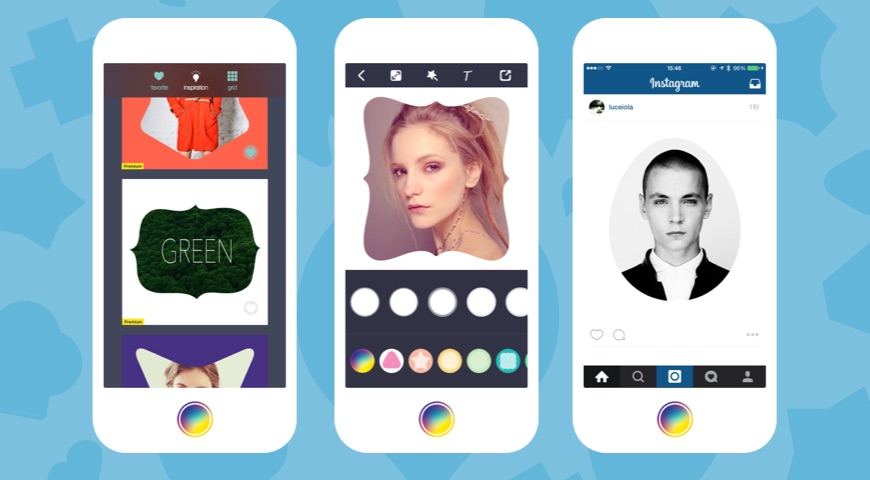
G-Power released their brand-new design of Creative Shape 2.0. One big change is the regularly updated photo inspirations to help with users' creation. The other is the favorite function to let users add their loved templates to Favorites. So you found your pictures are not as beautiful as others? Learn from the designer. There are fine-selected preset shape templates, collage frames, awesome filters, text effects and background patterns. Users will find making an outstanding photo so easy.
Xi'an, China - G-Power today is proud to announce the release of Creative Shaper 2.0, an update to its photo creation tool developed for iPhone and iPad. Creative Shaper helps you create unique images with amazing shape templates and share to Instagram, Facebook, Flickr, Tumblr, Twitter and more.
In version 2.0, it now has the regularly updated photo inspirations section on Homepage. One big change is the regularly updated photo inspirations to help with users' creation. The other is the favorite function to let users add their loved templates to Favorites. So you found your pictures are not as beautiful as others? Let the designer inspires you by leveraging their included creations.
There are fine-selected preset shape templates, collage frames, awesome filters, text effects and background patterns. Anything that one needs to edit and decorate their photos could be found in Creative Shaper. Users will find making an outstanding photo so easy, and it will gain more likes and attractions when posting to Instagram, Facebook etc.
Feature highlights:
* 40+ and regularly updated shape templates by designer
* 300+ custom shapes in 13 different groups
* Predefined templates include numbers, letters, symbols and geometric shapes
* Favorite section to let you save your loved templates to one place.
* Zoom in or zoom out the shapes' size
* Amazing filters to add effects to your photos
* Tap texts to add on photos, choose colors and fonts
* Add background color and pattern to photo
* Easy to post your photo creations to Instagram, Facebook etc.
Users choose freestyle or preset templates to start with. To freestyle, users choose their photo and any shape template they'd like to use. If users choose the preset templates by designers, they will directly go to the shape templates used and edited by designer, then they can edit based on that.
After the shape template choose, users will go to the effects and enhancements apply process. Awesome filters to select from, add texts in a variety of colors and fonts to the image. Additionally, Creative Shaper offers a large selection of unique patterns that could be applied to the cut-out portion of the image. Users can also set what percentage of the cut-out image should be displayed. Edit photo scale and texts through pinching and move your fingers. It's easy and fun. Finally, save or post your finished photo creation to Instagram, Facebook and other social medias. It will definitely help you gain more likes and attractions.
What users say:
* "My opinion on this app is amazing becauz u can use different shapes to make ur picture cool! That's why I rate it a 5 star."
* "This app is perfect for simple and aesthetically pleasing edits without damaging the resolution of your photos. Easy to use and great features."
Support Languages:
Creative Shaper supports English, French, German, Italian, Japanese, Korean, Malay, Portuguese, Russian, Simplified Chinese and Spanish languages.
Device Requirements:
* iPhone and iPod touch
* Requires iPhone OS 7.0 or later
* Optimized for iPhone 6 and iPhone 6 Plus
* 29.4 MB
Pricing and Availability:
Creative Shaper 2.0 is Free and available worldwide exclusively through the App Store in the Reference category.
G-Power: http://gpower.co/
Creative Shaper 2.0: http://gpower.co/shape.html
Download from iTunes: https://itunes.apple.com/app/creative-shaper-amazing-photo/id743266937
Screenshot: http://media.gpowers.net/PromotionAds/promotion_shape.jpg
App Icon: http://media.gpowers.net/PromotionAds/shape2.png
Based in Xi'An, China, G-Power is a development studio founded by Prince Ge in 2012. The G-Power Team is committed to develop image processing, photo editing and social media mobile apps. We aimed to let every user has the chance to be an artist, record, pass on and share their beautiful moments via their apps. Copyright (C) 2015 G-Power. All Rights Reserved. Apple, the Apple logo, iPhone, and iPod are registered trademarks of Apple Inc. in the U.S. and/or other countries. Other trademarks and registered trademarks may be the property of their respective owners.
*******
Link To Article: http://prmac.com/release-id-75907.htm
*******
---------------------------------------------------------------------------------
Note that you can alter delivered distributions at any time.
Login to your account on prMac to alter your channel selection, or to opt-out at any time.
Get photo edit inspirations from Designer with Creative Shape 2.0 - Published on 07/18/15
G-Power released their brand-new design of Creative Shape 2.0. One big change is the regularly updated photo inspirations to help with users' creation. The other is the favorite function to let users add their loved templates to Favorites. So you found your pictures are not as beautiful as others? Learn from the designer. There are fine-selected preset shape templates, collage frames, awesome filters, text effects and background patterns. Users will find making an outstanding photo so easy.
Xi'an, China - G-Power today is proud to announce the release of Creative Shaper 2.0, an update to its photo creation tool developed for iPhone and iPad. Creative Shaper helps you create unique images with amazing shape templates and share to Instagram, Facebook, Flickr, Tumblr, Twitter and more.
In version 2.0, it now has the regularly updated photo inspirations section on Homepage. One big change is the regularly updated photo inspirations to help with users' creation. The other is the favorite function to let users add their loved templates to Favorites. So you found your pictures are not as beautiful as others? Let the designer inspires you by leveraging their included creations.
There are fine-selected preset shape templates, collage frames, awesome filters, text effects and background patterns. Anything that one needs to edit and decorate their photos could be found in Creative Shaper. Users will find making an outstanding photo so easy, and it will gain more likes and attractions when posting to Instagram, Facebook etc.
Feature highlights:
* 40+ and regularly updated shape templates by designer
* 300+ custom shapes in 13 different groups
* Predefined templates include numbers, letters, symbols and geometric shapes
* Favorite section to let you save your loved templates to one place.
* Zoom in or zoom out the shapes' size
* Amazing filters to add effects to your photos
* Tap texts to add on photos, choose colors and fonts
* Add background color and pattern to photo
* Easy to post your photo creations to Instagram, Facebook etc.
Users choose freestyle or preset templates to start with. To freestyle, users choose their photo and any shape template they'd like to use. If users choose the preset templates by designers, they will directly go to the shape templates used and edited by designer, then they can edit based on that.
After the shape template choose, users will go to the effects and enhancements apply process. Awesome filters to select from, add texts in a variety of colors and fonts to the image. Additionally, Creative Shaper offers a large selection of unique patterns that could be applied to the cut-out portion of the image. Users can also set what percentage of the cut-out image should be displayed. Edit photo scale and texts through pinching and move your fingers. It's easy and fun. Finally, save or post your finished photo creation to Instagram, Facebook and other social medias. It will definitely help you gain more likes and attractions.
What users say:
* "My opinion on this app is amazing becauz u can use different shapes to make ur picture cool! That's why I rate it a 5 star."
* "This app is perfect for simple and aesthetically pleasing edits without damaging the resolution of your photos. Easy to use and great features."
Support Languages:
Creative Shaper supports English, French, German, Italian, Japanese, Korean, Malay, Portuguese, Russian, Simplified Chinese and Spanish languages.
Device Requirements:
* iPhone and iPod touch
* Requires iPhone OS 7.0 or later
* Optimized for iPhone 6 and iPhone 6 Plus
* 29.4 MB
Pricing and Availability:
Creative Shaper 2.0 is Free and available worldwide exclusively through the App Store in the Reference category.
G-Power: http://gpower.co/
Creative Shaper 2.0: http://gpower.co/shape.html
Download from iTunes: https://itunes.apple.com/app/creative-shaper-amazing-photo/id743266937
Screenshot: http://media.gpowers.net/PromotionAds/promotion_shape.jpg
App Icon: http://media.gpowers.net/PromotionAds/shape2.png

Based in Xi'An, China, G-Power is a development studio founded by Prince Ge in 2012. The G-Power Team is committed to develop image processing, photo editing and social media mobile apps. We aimed to let every user has the chance to be an artist, record, pass on and share their beautiful moments via their apps. Copyright (C) 2015 G-Power. All Rights Reserved. Apple, the Apple logo, iPhone, and iPod are registered trademarks of Apple Inc. in the U.S. and/or other countries. Other trademarks and registered trademarks may be the property of their respective owners.
*******
Link To Article: http://prmac.com/release-id-75907.htm
*******
---------------------------------------------------------------------------------
Note that you can alter delivered distributions at any time.
Login to your account on prMac to alter your channel selection, or to opt-out at any time.
4PSA Adds Security Feedback To VoipNow Mobile 2.0 for iOS
A new article has been published at prMac.
4PSA Adds Security Feedback To VoipNow Mobile 2.0 for iOS - Published on 07/18/15
4PSA announces the release of VoipNow Mobile 2.0 for iOS devices, a major new update of their enterprise PBX VoipNow mobile client. VoipNow Mobile is designed for companies of all sizes who want to increase employee mobility while not sacrificing security. VoipNow Mobile is a BYOD solution that allows organizations to increase employee productivity with less spending on infrastructure. The new version adds support for video calls, high-definition audio and security feedback features.
Panama City, Florida - 4PSA is proud to announce the launch of VoipNow Mobile 2.0 for the iPhone, iPad, and iPod touch, a major new update of their enterprise PBX VoipNow mobile client. VoipNow Mobile is designed for companies of all sizes who want to increase employee mobility while not sacrificing security. VoipNow Mobile is a BYOD solution that allows organizations to increase employee productivity with less spending on infrastructure.
"While many people have become aware about the value of encryption when using HTTP based services, not the same can be said about phone calls. This is dangerous because many phone calls made using the Internet are vulnerable to eavesdropping. VoipNow Mobile provides visual real-time information about the security of each call and companies can restrict the completion of calls that are not properly encrypted and cryptographically authenticated." stated Elena Carstoiu, 4PSA's COO.
The new version adds support for video calls, high-definition audio and security feedback features. Video calls are also encrypted and users will enjoy a good quality even over 3G networks. The new version is further optimized to provide an exceptional good audio quality on poor wireless networks. In testing conditions, the voice quality was not substantially degraded on networks that experienced up to 30% packet loss.
VoipNow Mobile is a BYOD solution that allows organizations to increase employee productivity with less spending on infrastructure. "There are no more phone devices to buy, install, configure, manage and monitor. The user should install the application on his smartphone, provide his credentials and the phone is ready to use. It is not necessary to make complicated and error-prone configurations, everything is done automatically. No user training is required," added Ms. Carstoiu.
Service providers can start offering VoipNow Mobile immediately by joining the Service Provider program. Carriers can also opt for a white label solution. End-users can download VoipNow Mobile for free from the App Store and do the setup on their own in less than 3 minutes, without any training or documentation.
VoipNow is the most technically advanced Unified Communications platform for service providers. It comes with rapid set-up and deployment, a comprehensive set of features, integrated charging and billing engine, and competitive pay-as-you-grow pricing - even when deployed on partner premises. VoipNow Mobile, its mobile client, replaces desktop phones and brings manageable and secure BYOD.
Hubgets increases team fusion and customer satisfaction. It provides business communication channels that reduce collaboration overhead and increase company productivity. We simplify finding and sharing knowledge while limiting interruptions and empowering collaboration.
For more information, please visit the 4PSA website.
Device Requirements:
* iPhone, iPad, and iPod touch
* Universal App
* Optimized for iPhone 5, iPhone 6, and iPhone 6 Plus
* Requires iOS 7.1 or later
* 19.0 MB
Pricing and Availability:
VoipNow Mobile 2.0 is free, and is available worldwide exclusively through the App Store in the Productivity category.
Website: https://www.4psa.com
VoipNow Mobile 2.0: https://itunes.apple.com/ro/app/voipnow-mobile/id943416754
Screenshot: http://a2.mzstatic.com/eu/r30/Purple1/v4/f1/56/df/f156df23-a0ae-967c-2228-f072fe610cf9/screen322x572.jpeg
App Icon: http://a4.mzstatic.com/eu/r30/Purple5/v4/c5/6d/50/c56d5094-bd91-8c48-dc8d-b85a7d8ddd47/icon175x175.png
4PSA accelerates communication and team collaboration. For 10+ years, we have been engineering technology that enables service providers to deliver cloud services to SMBs and large organizations - automation, enterprise PBX, voice, video, instant messaging, and mobility. We care for more than 10,000 brilliant partners who help businesses around the world take control of their communication channels. Copyright (C) 2015 4PSA. All Rights Reserved. Apple, the Apple logo, iPhone, iPad and iPod are registered trademarks of Apple Inc. in the U.S. and/or other countries.
*******
Link To Article: http://prmac.com/release-id-75894.htm
*******
---------------------------------------------------------------------------------
Note that you can alter delivered distributions at any time.
Login to your account on prMac to alter your channel selection, or to opt-out at any time.
4PSA Adds Security Feedback To VoipNow Mobile 2.0 for iOS - Published on 07/18/15
4PSA announces the release of VoipNow Mobile 2.0 for iOS devices, a major new update of their enterprise PBX VoipNow mobile client. VoipNow Mobile is designed for companies of all sizes who want to increase employee mobility while not sacrificing security. VoipNow Mobile is a BYOD solution that allows organizations to increase employee productivity with less spending on infrastructure. The new version adds support for video calls, high-definition audio and security feedback features.
Panama City, Florida - 4PSA is proud to announce the launch of VoipNow Mobile 2.0 for the iPhone, iPad, and iPod touch, a major new update of their enterprise PBX VoipNow mobile client. VoipNow Mobile is designed for companies of all sizes who want to increase employee mobility while not sacrificing security. VoipNow Mobile is a BYOD solution that allows organizations to increase employee productivity with less spending on infrastructure.
"While many people have become aware about the value of encryption when using HTTP based services, not the same can be said about phone calls. This is dangerous because many phone calls made using the Internet are vulnerable to eavesdropping. VoipNow Mobile provides visual real-time information about the security of each call and companies can restrict the completion of calls that are not properly encrypted and cryptographically authenticated." stated Elena Carstoiu, 4PSA's COO.
The new version adds support for video calls, high-definition audio and security feedback features. Video calls are also encrypted and users will enjoy a good quality even over 3G networks. The new version is further optimized to provide an exceptional good audio quality on poor wireless networks. In testing conditions, the voice quality was not substantially degraded on networks that experienced up to 30% packet loss.
VoipNow Mobile is a BYOD solution that allows organizations to increase employee productivity with less spending on infrastructure. "There are no more phone devices to buy, install, configure, manage and monitor. The user should install the application on his smartphone, provide his credentials and the phone is ready to use. It is not necessary to make complicated and error-prone configurations, everything is done automatically. No user training is required," added Ms. Carstoiu.
Service providers can start offering VoipNow Mobile immediately by joining the Service Provider program. Carriers can also opt for a white label solution. End-users can download VoipNow Mobile for free from the App Store and do the setup on their own in less than 3 minutes, without any training or documentation.
VoipNow is the most technically advanced Unified Communications platform for service providers. It comes with rapid set-up and deployment, a comprehensive set of features, integrated charging and billing engine, and competitive pay-as-you-grow pricing - even when deployed on partner premises. VoipNow Mobile, its mobile client, replaces desktop phones and brings manageable and secure BYOD.
Hubgets increases team fusion and customer satisfaction. It provides business communication channels that reduce collaboration overhead and increase company productivity. We simplify finding and sharing knowledge while limiting interruptions and empowering collaboration.
For more information, please visit the 4PSA website.
Device Requirements:
* iPhone, iPad, and iPod touch
* Universal App
* Optimized for iPhone 5, iPhone 6, and iPhone 6 Plus
* Requires iOS 7.1 or later
* 19.0 MB
Pricing and Availability:
VoipNow Mobile 2.0 is free, and is available worldwide exclusively through the App Store in the Productivity category.
Website: https://www.4psa.com
VoipNow Mobile 2.0: https://itunes.apple.com/ro/app/voipnow-mobile/id943416754
Screenshot: http://a2.mzstatic.com/eu/r30/Purple1/v4/f1/56/df/f156df23-a0ae-967c-2228-f072fe610cf9/screen322x572.jpeg

App Icon: http://a4.mzstatic.com/eu/r30/Purple5/v4/c5/6d/50/c56d5094-bd91-8c48-dc8d-b85a7d8ddd47/icon175x175.png

4PSA accelerates communication and team collaboration. For 10+ years, we have been engineering technology that enables service providers to deliver cloud services to SMBs and large organizations - automation, enterprise PBX, voice, video, instant messaging, and mobility. We care for more than 10,000 brilliant partners who help businesses around the world take control of their communication channels. Copyright (C) 2015 4PSA. All Rights Reserved. Apple, the Apple logo, iPhone, iPad and iPod are registered trademarks of Apple Inc. in the U.S. and/or other countries.
*******
Link To Article: http://prmac.com/release-id-75894.htm
*******
---------------------------------------------------------------------------------
Note that you can alter delivered distributions at any time.
Login to your account on prMac to alter your channel selection, or to opt-out at any time.
Reader for Craigslist - A Seamless Craigslist Experience on iOS
A new article has been published at prMac.
Reader for Craigslist - A Seamless Craigslist Experience on iOS - Published on 07/18/15
Impala Studios announces the release of Reader for Craigslist 1.3 for iOS devices, an important update to the app that offers users a seamless Craigslist experience. Browsing Classifieds aside, the app allows users to perform multi-city searches, search ads nearby on a map and get directions to the advertisers' address. The app boasts quite a few impressive features that go beyond the limits of Craigslist.org. The update offers improved performance, a tweaked layout, and small bug fixes.
Colorado, United States - Impala Studios is proud to announce the release of Reader for Craigslist 1.3 for the iPhone, iPad, and iPod touch, an important update to the app, which offers a comprehensive Craigslist experience on iOS. When opening the app, it's clear that the rather basic design of Craigslist.org has been respected - yet redesigned in a 21st century look and feel. Whereas most Craigslist apps available are merely web wrappers for the site, Reader for Craigslist boasts quite a few impressive features that go beyond the limits of Craigslist.org.
Users can allow the app to use their current location, so that it's easy to browse ads nearby. A secure log-in and the option to post advertisements is especially convenient. To every posted ad, a maximum of 24 pictures from a device can be added. Contacting advertisers directly from the app is possible via text, e-mail or phone, depending on the information provided in the advertisement.
Version 1.3 allows users to search for ads in multiple cities at the same time, and features a full-screen image viewer. Much attention is paid to comprehensive filter and sort options and the ability to store advertisements. A low bandwidth mode and a parental control option are also present.
"We wanted to reinvent the Craigslist experience," says Peter Schotvanger, Chief Commercial Officer at Impala Studios. "The strength of Craigslist.org lies in its simplicity. which is something we maintained in the sleek design of the app. Our strength lies in creating usability. With Reader for Craigslist, we created a perfect combination of the two."
Device Requirements:
* iPhone, iPad, and iPod touch
* Optimized for iPhone 5, iPhone 6, and iPhone 6 Plus
* Requires iOS 7.1 or later
* 76.9 MB
Pricing and Availability:
Reader for Craigslist 1.3 is free and is available worldwide exclusively through the App Store in the Lifestyle category.
Impala Studios: http://impalastudios.com/
Reader for Craigslist 1.3: http://impalastudios.com/apps/reader-for-craigslist
Download from iTunes: https://itunes.apple.com/app/reader-for-craigslist-classifieds/id962368305
Youtube Video: https://www.youtube.com/watch?v=9NaoJviZ2DU
Screenshot: http://a4.mzstatic.com/us/r30/Purple7/v4/de/95/6a/de956a6a-cd03-4434-e56b-048d40c24ed2/screen322x572.jpeg
App Icon: http://a4.mzstatic.com/us/r30/Purple5/v4/ed/ee/ab/edeeab58-43e4-ca36-23c1-ca408fbe0286/icon175x175.png
Impala Studios is a mobile development company founded in 2008 in The Netherlands and with an office in Colorado, USA. Impala Studios is known for various high-ranking Utility Apps, such as Weather, Calculator for iPad and VideoTube. Copyright (C) 2015 Impala Studios. All Rights Reserved. Apple, the Apple logo, iPhone, iPad and iPod are registered trademarks of Apple Inc. in the U.S. and/or other countries.
*******
Link To Article: http://prmac.com/release-id-75896.htm
*******
---------------------------------------------------------------------------------
Note that you can alter delivered distributions at any time.
Login to your account on prMac to alter your channel selection, or to opt-out at any time.
Reader for Craigslist - A Seamless Craigslist Experience on iOS - Published on 07/18/15
Impala Studios announces the release of Reader for Craigslist 1.3 for iOS devices, an important update to the app that offers users a seamless Craigslist experience. Browsing Classifieds aside, the app allows users to perform multi-city searches, search ads nearby on a map and get directions to the advertisers' address. The app boasts quite a few impressive features that go beyond the limits of Craigslist.org. The update offers improved performance, a tweaked layout, and small bug fixes.
Colorado, United States - Impala Studios is proud to announce the release of Reader for Craigslist 1.3 for the iPhone, iPad, and iPod touch, an important update to the app, which offers a comprehensive Craigslist experience on iOS. When opening the app, it's clear that the rather basic design of Craigslist.org has been respected - yet redesigned in a 21st century look and feel. Whereas most Craigslist apps available are merely web wrappers for the site, Reader for Craigslist boasts quite a few impressive features that go beyond the limits of Craigslist.org.
Users can allow the app to use their current location, so that it's easy to browse ads nearby. A secure log-in and the option to post advertisements is especially convenient. To every posted ad, a maximum of 24 pictures from a device can be added. Contacting advertisers directly from the app is possible via text, e-mail or phone, depending on the information provided in the advertisement.
Version 1.3 allows users to search for ads in multiple cities at the same time, and features a full-screen image viewer. Much attention is paid to comprehensive filter and sort options and the ability to store advertisements. A low bandwidth mode and a parental control option are also present.
"We wanted to reinvent the Craigslist experience," says Peter Schotvanger, Chief Commercial Officer at Impala Studios. "The strength of Craigslist.org lies in its simplicity. which is something we maintained in the sleek design of the app. Our strength lies in creating usability. With Reader for Craigslist, we created a perfect combination of the two."
Device Requirements:
* iPhone, iPad, and iPod touch
* Optimized for iPhone 5, iPhone 6, and iPhone 6 Plus
* Requires iOS 7.1 or later
* 76.9 MB
Pricing and Availability:
Reader for Craigslist 1.3 is free and is available worldwide exclusively through the App Store in the Lifestyle category.
Impala Studios: http://impalastudios.com/
Reader for Craigslist 1.3: http://impalastudios.com/apps/reader-for-craigslist
Download from iTunes: https://itunes.apple.com/app/reader-for-craigslist-classifieds/id962368305
Youtube Video: https://www.youtube.com/watch?v=9NaoJviZ2DU
Screenshot: http://a4.mzstatic.com/us/r30/Purple7/v4/de/95/6a/de956a6a-cd03-4434-e56b-048d40c24ed2/screen322x572.jpeg

App Icon: http://a4.mzstatic.com/us/r30/Purple5/v4/ed/ee/ab/edeeab58-43e4-ca36-23c1-ca408fbe0286/icon175x175.png

Impala Studios is a mobile development company founded in 2008 in The Netherlands and with an office in Colorado, USA. Impala Studios is known for various high-ranking Utility Apps, such as Weather, Calculator for iPad and VideoTube. Copyright (C) 2015 Impala Studios. All Rights Reserved. Apple, the Apple logo, iPhone, iPad and iPod are registered trademarks of Apple Inc. in the U.S. and/or other countries.
*******
Link To Article: http://prmac.com/release-id-75896.htm
*******
---------------------------------------------------------------------------------
Note that you can alter delivered distributions at any time.
Login to your account on prMac to alter your channel selection, or to opt-out at any time.
Business ToDo 1.0 - The Easy to Use Task Manager For The Mac
A new article has been published at prMac.
Business ToDo 1.0 - The Easy to Use Task Manager For The Mac - Published on 07/18/15
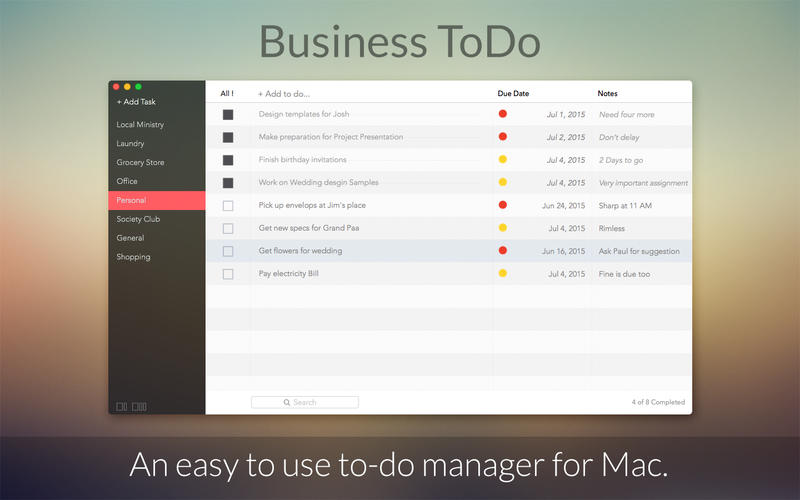
Idea2Inspire announces the release of Business ToDo 1.0 for Mac OS X, an easy way to manage your tasks. Users can open and create ToDos in categories of their choice, keeping notes so that they can make them happen. Anyone can simply add tasks and keep track of all of them. The app also includes a feature to mark tasks that have already been accomplished. Business ToDo backs up notes in iCloud, allowing access from anywhere. Tasks can also be shared with friends and colleagues.
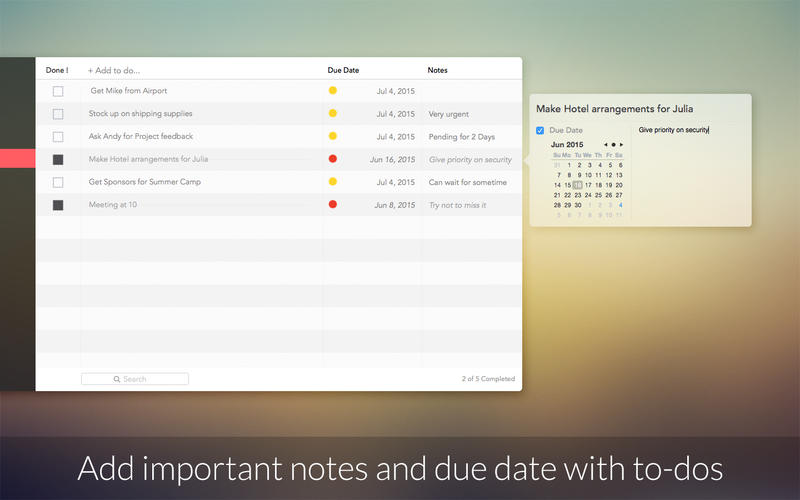
Pensacola, Florida - Idea2Inspire is happy to announce the release of Business ToDo 1.0 for Mac OS X, an easy way to manage your tasks, which you want to execute in the days to come. Users can open and create ToDos in categories of their choice and write their thoughts in them so that they can make them happen. Anyone can simply add tasks and keep track of all of them. To have a better understanding of tasks, users can easily add notes with them. The app also includes a feature to mark tasks that have already been accomplished.
The best way to learn how to use Business ToDo is to try it. Users can back up their notes in iCloud and synchronize them automatically, so that they can take the notes with them where ever they go. Share tasks with friends and colleagues using a number of sharing options available in this app.
Features:
* Quick and easy to launch the app
* Easy to create categories and add tasks
* Take notes with tasks
* iCloud syncing
* Mark tasks that are done
* Beautiful and intuitive design
* Multiple sharing options
System Requirements:
* OS X 10.10 or later
* 64-bit processor
* 0.7 MB
Pricing and Availability:
Business ToDo 1.0 is $0.99 USD (or equivalent amount in other currencies) and is available worldwide exclusively through the Mac App Store in the Business category. For more information please contact Idea2Inspire.
Idea2Inspire: http://idea2inspire.com/index.html
Business ToDo 1.0: http://idea2inspire.com/index.html
Purchase and Download (MAS): https://itunes.apple.com/app/business-todo/id1016182559
Screenshot 1: http://a3.mzstatic.com/us/r30/Purple1/v4/30/51/22/305122ce-25e2-dca1-1584-5cc8618c6bee/screen800x500.jpeg
Screenshot 2: http://a1.mzstatic.com/us/r30/Purple1/v4/e2/32/64/e23264e7-6c3f-44fe-554c-ad3fdf31c099/screen800x500.jpeg
Application Icon: http://a4.mzstatic.com/us/r30/Purple7/v4/54/27/c1/5427c168-253b-0e28-39e7-0cadc2ee05fa/icon256.png
Idea2Inspire is an app development studio, based in FL, USA. We are specialized in creating quality iOS and Mac apps for the users to make life easier. Idea2Inspire is a bunch of passionate developer that thrives for excellence. We always try to shape our inventory of ideas through our apps. We develop apps that simplify as well as inspire your life. Our dedicated team is really committed in making quality apps. We ensure we achieve our goals in the highly competitive app space. We have several apps in the app store with good ratings and got featured in a number of top charts. All Material and Software (C) Copyright 2015 Idea2Inspire. Apple, the Apple logo, iPhone, iPod and iPad are registered trademarks of Apple Inc. in the U.S. and/or other countries.
*******
Link To Article: http://prmac.com/release-id-75893.htm
*******
---------------------------------------------------------------------------------
Note that you can alter delivered distributions at any time.
Login to your account on prMac to alter your channel selection, or to opt-out at any time.
Business ToDo 1.0 - The Easy to Use Task Manager For The Mac - Published on 07/18/15
Idea2Inspire announces the release of Business ToDo 1.0 for Mac OS X, an easy way to manage your tasks. Users can open and create ToDos in categories of their choice, keeping notes so that they can make them happen. Anyone can simply add tasks and keep track of all of them. The app also includes a feature to mark tasks that have already been accomplished. Business ToDo backs up notes in iCloud, allowing access from anywhere. Tasks can also be shared with friends and colleagues.
Pensacola, Florida - Idea2Inspire is happy to announce the release of Business ToDo 1.0 for Mac OS X, an easy way to manage your tasks, which you want to execute in the days to come. Users can open and create ToDos in categories of their choice and write their thoughts in them so that they can make them happen. Anyone can simply add tasks and keep track of all of them. To have a better understanding of tasks, users can easily add notes with them. The app also includes a feature to mark tasks that have already been accomplished.
The best way to learn how to use Business ToDo is to try it. Users can back up their notes in iCloud and synchronize them automatically, so that they can take the notes with them where ever they go. Share tasks with friends and colleagues using a number of sharing options available in this app.
Features:
* Quick and easy to launch the app
* Easy to create categories and add tasks
* Take notes with tasks
* iCloud syncing
* Mark tasks that are done
* Beautiful and intuitive design
* Multiple sharing options
System Requirements:
* OS X 10.10 or later
* 64-bit processor
* 0.7 MB
Pricing and Availability:
Business ToDo 1.0 is $0.99 USD (or equivalent amount in other currencies) and is available worldwide exclusively through the Mac App Store in the Business category. For more information please contact Idea2Inspire.
Idea2Inspire: http://idea2inspire.com/index.html
Business ToDo 1.0: http://idea2inspire.com/index.html
Purchase and Download (MAS): https://itunes.apple.com/app/business-todo/id1016182559
Screenshot 1: http://a3.mzstatic.com/us/r30/Purple1/v4/30/51/22/305122ce-25e2-dca1-1584-5cc8618c6bee/screen800x500.jpeg
Screenshot 2: http://a1.mzstatic.com/us/r30/Purple1/v4/e2/32/64/e23264e7-6c3f-44fe-554c-ad3fdf31c099/screen800x500.jpeg
Application Icon: http://a4.mzstatic.com/us/r30/Purple7/v4/54/27/c1/5427c168-253b-0e28-39e7-0cadc2ee05fa/icon256.png

Idea2Inspire is an app development studio, based in FL, USA. We are specialized in creating quality iOS and Mac apps for the users to make life easier. Idea2Inspire is a bunch of passionate developer that thrives for excellence. We always try to shape our inventory of ideas through our apps. We develop apps that simplify as well as inspire your life. Our dedicated team is really committed in making quality apps. We ensure we achieve our goals in the highly competitive app space. We have several apps in the app store with good ratings and got featured in a number of top charts. All Material and Software (C) Copyright 2015 Idea2Inspire. Apple, the Apple logo, iPhone, iPod and iPad are registered trademarks of Apple Inc. in the U.S. and/or other countries.
*******
Link To Article: http://prmac.com/release-id-75893.htm
*******
---------------------------------------------------------------------------------
Note that you can alter delivered distributions at any time.
Login to your account on prMac to alter your channel selection, or to opt-out at any time.
Subscribe to:
Posts (Atom)