A new article has been published at prMac.
Ibidex release Petri on the Mac App Store - Published on 08/24/15
UK based Ibidex today introduces Petri 0.8 for Mac OS X, a local multi-player shooting game using smartphones as controllers. Suitable for all ages, Petri is available to play with up to 16 players. Running on the Ibidex platform, Petri and Ibidex combine to provide the most chaotic maelstrom of fun imaginable. Using Ibidex's unique multi-player connectivity, anyone with the free universal Ibidex iOS or Android controller app can join the game.
London, United Kingdom - Ibidex today is proud to announce the release of Petri 0.8 for Mac OS X, a local multi-player shooting game using smartphones as controllers. Suitable for all ages, Petri is available to play with up to 16 players. Petri runs on the Ibidex platform. Using Ibidex's unique multi-player connectivity, anyone with the free universal Ibidex controller app (iOS or Android) can join the game.
Unlike the video game parties of yore, where friends had to wait their turn to race or battle, Petri allows everyone to join in. Petri and Ibidex combine to provide the most chaotic maelstrom of fun imaginable. Fire away at your opponents, shrink them down to size, and then gobble them up before they get you!
"We wanted to build something that allows large groups of friends to play together. Not strangers," says Steve Olesansky, CEO of Ibidex. "The solution was simple, once we thought about it. Why not use smartphones - the most accessible controller in the world? Ibidex multi-player technology uses your own device to draw everyone in the room into an inclusive and shared experience."
System Requirements:
* OS X 10.9 or later
* 64-bit processor
* 64.6 MB
Pricing and Availability:
For a limited period of time, Petri 0.8 is Free and available worldwide through the Mac App Store in the Games category. It will be priced at $6.99 (USD) / GBP 4.99 thereafter. The Ibidex controller app is available for free on the App Store and Google Play Store.
Ibidex: http://www.ibidex.com/
Petri 0.8: https://itunes.apple.com/app/id1018610884
YouTube Video: https://www.youtube.com/watch?v=ZtL0Le9Juoo
Screenshot: https://dl.dropboxusercontent.com/u/152523712/MacStore_screenshot_1.png
App Icon: https://dl.dropboxusercontent.com/u/152523712/icon_512x512%402x.png
Ibidex was founded in 2014 in London as a spin-off company from creative software development company, DeepSine. The patent-pending Ibidex platform allows an unlimited number of people to interact together, for games and B2B marketing solutions. All Material and Software (C) Copyright 2015 Ibidex. All Rights Reserved. Apple, the Apple logo, iPhone, iPod and iPad are registered trademarks of Apple Inc. in the U.S. and/or other countries. Other trademarks and registered trademarks may be the property of their respective owners.
*******
Link To Article: http://prmac.com/release-id-76374.htm
*******
---------------------------------------------------------------------------------
Note that you can alter delivered distributions at any time.
Login to your account on prMac to alter your channel selection, or to opt-out at any time.


InSili.co introduces iSwift - Objective-C to Swift converter for OSX
A new article has been published at prMac.
InSili.co introduces iSwift - Objective-C to Swift converter for OSX - Published on 08/24/15
InSili.co today introduces iSwift, the first Objective-C to Swift converter for Mac. Developed exclusively for Mac OS X, iSwift offers automatic as-you-type conversion of your Objective-C sources to Apple's Swift language along with a full-featured Objective-C editor. Featuring an intuitive, easy-to-use interface, iSwift is the best way to convert and translate your existing Objective-C files, Cocoa or iOS, to Swift on the fly, making Xcode project migration a lot easier.
Granada, Spain - InSili.co today is thrilled to introduce iSwift, the first Objective-C to Swift converter for Mac-based developers. Developed exclusively for Mac OS X, iSwift offers automatic as-you-type conversion of your Objective-C sources to Apple's Swift language along with a full-featured Objective-C editor. Featuring an easy-to-use interface, iSwift is the best way to convert and translate your existing Objective-C files, Cocoa or iOS, to Swift on the fly, making Xcode project migration a lot easier.
iSwift, with its intuitive approach, can help minimize the time needed for converting old Objective-C projects to the new Swift language, or simply make learning Swift fun. "Every OSX or iOS developer has loads of code and libraries written in Objective-C and this is holding back lots of us from fully converting to Swift," said InSili.co's Chief Software Architect, Ioannis Zafeiropoulos, "and that's why I decided to make this whole process a lot easier. By creating what Apple has obviously missed from its latest Xcode releases: a tool which helps to automatically convert Objective-C to Swift."
Features:
* Easy-to-use, intuitive UI
* Batteries-included: You don't need to install anything - It just works
* Ultra fast: Automatic as-you-type live conversion from Objective-C to Swift
* Drag'n'Drop: Drop your Objective-C source onto the App icon, import the file and have it instantly converted
* Advanced: Syntax Highlighting, Autocompletion, Live Syntax Checking & Error Reporting and Lots of Advanced editing options - powered by Peppermint
* Sophisticated: deep syntax recognition (including Objective-C 2.0)
System Requirements:
* OS X 10.7 (Lion) or later
* Intel 32/64-bit processor
* 18.7 MB available disk space
Pricing and Availability:
iSwift 1.2 is available for $9.99 USD (or equivalent amount in other currencies - VAT, where applicable, not included) and is available worldwide through the iSwift website.
iSwift 1.2: http://iswift.org
Download iSwift: https://s3.amazonaws.com/iswift/iSwift-1.2b228.zip
Purchase: https://pay.paddle.com/checkout/501219
Screenshot: http://iswift.org/iswift_screenshot.png
App Icon: http://iswift.org/iswift_icon.png
Located in Granada,Spain, InSili.co was founded in 2011 by Ioannis Zafeiropoulos, and is focused on building beautiful apps for OSX and iOS. All Material and Software (C) 2011-2015 InSili.co. All Rights Reserved. Apple, the Apple logo, iPhone, iPad and iPod are registered trademarks of Apple Inc. in the U.S. and/or other countries.
*******
Link To Article: http://prmac.com/release-id-76365.htm
*******
---------------------------------------------------------------------------------
Note that you can alter delivered distributions at any time.
Login to your account on prMac to alter your channel selection, or to opt-out at any time.
InSili.co introduces iSwift - Objective-C to Swift converter for OSX - Published on 08/24/15
InSili.co today introduces iSwift, the first Objective-C to Swift converter for Mac. Developed exclusively for Mac OS X, iSwift offers automatic as-you-type conversion of your Objective-C sources to Apple's Swift language along with a full-featured Objective-C editor. Featuring an intuitive, easy-to-use interface, iSwift is the best way to convert and translate your existing Objective-C files, Cocoa or iOS, to Swift on the fly, making Xcode project migration a lot easier.
Granada, Spain - InSili.co today is thrilled to introduce iSwift, the first Objective-C to Swift converter for Mac-based developers. Developed exclusively for Mac OS X, iSwift offers automatic as-you-type conversion of your Objective-C sources to Apple's Swift language along with a full-featured Objective-C editor. Featuring an easy-to-use interface, iSwift is the best way to convert and translate your existing Objective-C files, Cocoa or iOS, to Swift on the fly, making Xcode project migration a lot easier.
iSwift, with its intuitive approach, can help minimize the time needed for converting old Objective-C projects to the new Swift language, or simply make learning Swift fun. "Every OSX or iOS developer has loads of code and libraries written in Objective-C and this is holding back lots of us from fully converting to Swift," said InSili.co's Chief Software Architect, Ioannis Zafeiropoulos, "and that's why I decided to make this whole process a lot easier. By creating what Apple has obviously missed from its latest Xcode releases: a tool which helps to automatically convert Objective-C to Swift."
Features:
* Easy-to-use, intuitive UI
* Batteries-included: You don't need to install anything - It just works
* Ultra fast: Automatic as-you-type live conversion from Objective-C to Swift
* Drag'n'Drop: Drop your Objective-C source onto the App icon, import the file and have it instantly converted
* Advanced: Syntax Highlighting, Autocompletion, Live Syntax Checking & Error Reporting and Lots of Advanced editing options - powered by Peppermint
* Sophisticated: deep syntax recognition (including Objective-C 2.0)
System Requirements:
* OS X 10.7 (Lion) or later
* Intel 32/64-bit processor
* 18.7 MB available disk space
Pricing and Availability:
iSwift 1.2 is available for $9.99 USD (or equivalent amount in other currencies - VAT, where applicable, not included) and is available worldwide through the iSwift website.
iSwift 1.2: http://iswift.org
Download iSwift: https://s3.amazonaws.com/iswift/iSwift-1.2b228.zip
Purchase: https://pay.paddle.com/checkout/501219
Screenshot: http://iswift.org/iswift_screenshot.png

App Icon: http://iswift.org/iswift_icon.png

Located in Granada,Spain, InSili.co was founded in 2011 by Ioannis Zafeiropoulos, and is focused on building beautiful apps for OSX and iOS. All Material and Software (C) 2011-2015 InSili.co. All Rights Reserved. Apple, the Apple logo, iPhone, iPad and iPod are registered trademarks of Apple Inc. in the U.S. and/or other countries.
*******
Link To Article: http://prmac.com/release-id-76365.htm
*******
---------------------------------------------------------------------------------
Note that you can alter delivered distributions at any time.
Login to your account on prMac to alter your channel selection, or to opt-out at any time.
Kids learn to tell the time with Bamba Clock
A new article has been published at prMac.
Kids learn to tell the time with Bamba Clock - Published on 08/24/15
Mezmedia announces Bamba Clock 1.0.0, the eleventh in the Bamba series of educational apps for kids. In Bamba Clock, kids learn to tell the time on an analog clock via a pirate-themed adventures. Kids learn to tell the time step-by-step, they start with the hours and then the minutes. Completing each clock challenge advances the story. Players chase Captain Birdbeard across the seven seas, hunt for hidden treasures and finally test their mettle with the Clock Quiz.
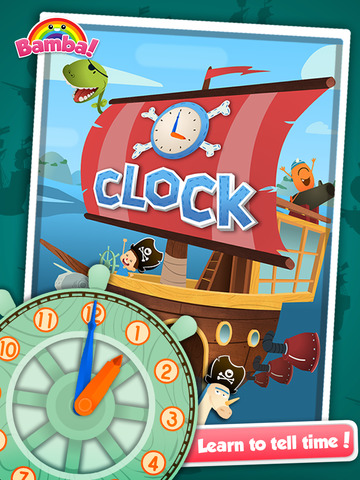
Singapore - Mezmedia is proud to announce Bamba Clock 1.0.0, the eleventh in the Bamba series of educational apps for kids. Aimed at kids four and older, Bamba Clock teaches children how to read an analog clock through pirate-themed adventure stories.
Kids learn to tell the time step-by-step, they start with the hour hand, then the minute hand and then finally both hands. Completing each clock challenge advances the story. In one such challenge, players unlock Captain Birdbeard's treasure chest by moving the hands of the clock to the correct time. Whenever the clock hands are moved, the time is told (narrated in English) so kids will learn what the minute and hour hands do. The goal is for kids to learn how to read the clock through fun and interactive play.
There are four adventures to choose from - players chase Captain Birdbeard across the Seven Seas, take part in a sea race through treacherous thunderstorms, hunt for hidden treasures on Mystery Island and finally test their mettle with the Clock Quiz.
At the start of every story, kids choose a companion character to join them on their adventures. Kids who are fans of the Bamba series will be familiar with these characters, such as Unidonk the Unicorn/Donkey or Ellie-Anne the Zombie Girl.
After completing each quest, kids will be rewarded with a surprise trophy. They can view all their rewards in the treasure room on board the pirate ship.
"Developing an app for kids to learn how to tell the time was very challenging. All those numbers can get really dull. I think that's why there aren't many good apps out in the market that can do this while retaining that fun factor. I like to think we've solved that problem with Bamba Clock."
"Besides, reading the clock is a very important skill all kids should get early. We know this too well, when as parents we are setting limits on play time for our children and so on," said John Ng, co-founder of Mezmedia.
Supported Languages
* English
Device Requirements:
* iPhone and iPad
* Requires iOS 7.0 or later
* Universal Application
Pricing and Availability:
Bamba Clock 1.0.0 is US$2.99. It is available worldwide exclusively through the App Store in the Education category, for Kids 4 . The makers of Bamba apps take privacy very seriously and serves no third-party ads or third party in-app purchases. All external links (if any) are blocked by a Parental Gate so parents can rest assured that their children will have a safe experience with Bamba Clock.
Bamba Clock 1.0.0: http://www.bambatown.com/app/bamba-clock/
Download from iTunes: https://itunes.apple.com/app/bamba-clock-learn-to-tell-time/id1017620167
YouTube Video (Trailer): https://www.youtube.com/watch?v=5mHlvn8i3HI
Screenshot: http://a1.mzstatic.com/us/r30/Purple1/v4/c0/75/ad/c075addc-2ee1-8e9b-8519-a0ce124d6f6f/screen480x480.jpeg
App Icon: http://a2.mzstatic.com/us/r30/Purple7/v4/09/05/bf/0905bf23-88f6-9feb-a1de-0d0691cbe61d/icon175x175.png
Mezmedia is an interactive studio based in Singapore. Under the Bamba brand, we create fun interactive toys for kids. It is our belief that interactive toys offer a new and exciting way to educate young children, learning through play. Our apps are designed to stimulate a child's imagination and creativity. Copyright (C) 2015 Mezmedia Pte Ltd. All Rights Reserved. Apple, the Apple logo, iPhone, iPod and iPad are registered trademarks of Apple Inc. in the U.S. and/or other countries.
*******
Link To Article: http://prmac.com/release-id-76364.htm
*******
---------------------------------------------------------------------------------
Note that you can alter delivered distributions at any time.
Login to your account on prMac to alter your channel selection, or to opt-out at any time.
Kids learn to tell the time with Bamba Clock - Published on 08/24/15
Mezmedia announces Bamba Clock 1.0.0, the eleventh in the Bamba series of educational apps for kids. In Bamba Clock, kids learn to tell the time on an analog clock via a pirate-themed adventures. Kids learn to tell the time step-by-step, they start with the hours and then the minutes. Completing each clock challenge advances the story. Players chase Captain Birdbeard across the seven seas, hunt for hidden treasures and finally test their mettle with the Clock Quiz.
Singapore - Mezmedia is proud to announce Bamba Clock 1.0.0, the eleventh in the Bamba series of educational apps for kids. Aimed at kids four and older, Bamba Clock teaches children how to read an analog clock through pirate-themed adventure stories.
Kids learn to tell the time step-by-step, they start with the hour hand, then the minute hand and then finally both hands. Completing each clock challenge advances the story. In one such challenge, players unlock Captain Birdbeard's treasure chest by moving the hands of the clock to the correct time. Whenever the clock hands are moved, the time is told (narrated in English) so kids will learn what the minute and hour hands do. The goal is for kids to learn how to read the clock through fun and interactive play.
There are four adventures to choose from - players chase Captain Birdbeard across the Seven Seas, take part in a sea race through treacherous thunderstorms, hunt for hidden treasures on Mystery Island and finally test their mettle with the Clock Quiz.
At the start of every story, kids choose a companion character to join them on their adventures. Kids who are fans of the Bamba series will be familiar with these characters, such as Unidonk the Unicorn/Donkey or Ellie-Anne the Zombie Girl.
After completing each quest, kids will be rewarded with a surprise trophy. They can view all their rewards in the treasure room on board the pirate ship.
"Developing an app for kids to learn how to tell the time was very challenging. All those numbers can get really dull. I think that's why there aren't many good apps out in the market that can do this while retaining that fun factor. I like to think we've solved that problem with Bamba Clock."
"Besides, reading the clock is a very important skill all kids should get early. We know this too well, when as parents we are setting limits on play time for our children and so on," said John Ng, co-founder of Mezmedia.
Supported Languages
* English
Device Requirements:
* iPhone and iPad
* Requires iOS 7.0 or later
* Universal Application
Pricing and Availability:
Bamba Clock 1.0.0 is US$2.99. It is available worldwide exclusively through the App Store in the Education category, for Kids 4 . The makers of Bamba apps take privacy very seriously and serves no third-party ads or third party in-app purchases. All external links (if any) are blocked by a Parental Gate so parents can rest assured that their children will have a safe experience with Bamba Clock.
Bamba Clock 1.0.0: http://www.bambatown.com/app/bamba-clock/
Download from iTunes: https://itunes.apple.com/app/bamba-clock-learn-to-tell-time/id1017620167
YouTube Video (Trailer): https://www.youtube.com/watch?v=5mHlvn8i3HI
Screenshot: http://a1.mzstatic.com/us/r30/Purple1/v4/c0/75/ad/c075addc-2ee1-8e9b-8519-a0ce124d6f6f/screen480x480.jpeg
App Icon: http://a2.mzstatic.com/us/r30/Purple7/v4/09/05/bf/0905bf23-88f6-9feb-a1de-0d0691cbe61d/icon175x175.png

Mezmedia is an interactive studio based in Singapore. Under the Bamba brand, we create fun interactive toys for kids. It is our belief that interactive toys offer a new and exciting way to educate young children, learning through play. Our apps are designed to stimulate a child's imagination and creativity. Copyright (C) 2015 Mezmedia Pte Ltd. All Rights Reserved. Apple, the Apple logo, iPhone, iPod and iPad are registered trademarks of Apple Inc. in the U.S. and/or other countries.
*******
Link To Article: http://prmac.com/release-id-76364.htm
*******
---------------------------------------------------------------------------------
Note that you can alter delivered distributions at any time.
Login to your account on prMac to alter your channel selection, or to opt-out at any time.
Take control of your meeting notes with for Meetings for iPad
A new article has been published at prMac.
Take control of your meeting notes with for Meetings for iPad - Published on 08/24/15
Imperative Software Pty Ltd today introduces for Meetings 1.0, their new business app for iPad. Purpose built, for Meetings enables the recording of notes, agenda items, actions, remarks & more. for Meetings takes a fresh approach to representing and editing meeting notes. Select content by swiping down the side of the page to effortlessly move, copy, delete or indent using simple gestures. Visualise attendees around a table. Drag to connect them to content or mark them as an apology or absent.
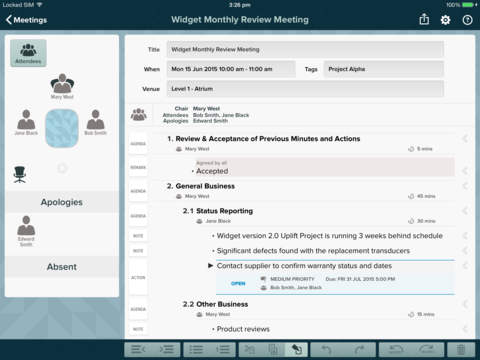
Melbourne, Australia - Imperative Software Pty Ltd today is proud to announce the release of for Meetings 1.0, their new business app developed exclusively for iPad(R) tablets. Purpose built, for Meetings enables the recording of notes, agenda items, actions, remarks and more. for Meetings takes a fresh approach to representing and editing meeting notes. Select content by swiping down the side of the page to effortlessly move, copy, delete or indent using simple gestures. Visualise attendees around a table. Drag to connect them to content or mark them as an apology or absent.
for Meetings Features
* Structure content using bullet points and numbered lists
* Record notes, agenda items, actions, motions and more
* Visualise attendees around a table, apologies and absentees
* Drag attendees to connect them to content
* Update multiple lines with a single tap
* Publish content as an agenda, notes or minutes
* Use tags to organise meetings
* Import meetings from the calendar
* Use an existing meeting as a template
* Search meetings by tags, attendees, actions, content or any combination
* Common searches can be saved as presets for fast selection
Device Requirements:
* Compatible with iPad
* Requires iOS 8.0 or later
* 7.6 MB
Pricing and Availability:
for Meetings 1.0 is Free and available worldwide exclusively through the App Store in the Business category. While the free app has a limit of 20 meetings, customers may make a one time in-app purchase of $24.95 (USD) to remove the meetings limit.
for Meetings 1.0: http://formeetingsapp.com
Download from iTunes: http://itunes.apple.com/app/id969369377
Vimeo Video (for Meetings in action): https://player.vimeo.com/video/135158118
Screenshot: http://a2.mzstatic.com/us/r30/Purple1/v4/bf/9a/00/bf9a006f-9ae9-19f1-43d2-85a0fa30ecb2/screen480x480.jpeg
App Icon: http://www.formeetingsapp.com/presskit/App%20Icon/App-icon-1024x1024.png
Press Kit (zip): http://formeetingsapp.com/presskit.zip
Imperative Software Pty Ltd is an small, independent studio established in 2009 based in Melbourne, Australia. All Material and Software (C) Copyright 2015 Imperative Software Pty Ltd. All Rights Reserved. Apple, the Apple logo, iPhone, iPod and iPad are registered trademarks of Apple Inc. in the U.S. and/or other countries. Other trademarks and registered trademarks may be the property of their respective owners.
*******
Link To Article: http://prmac.com/release-id-76363.htm
*******
---------------------------------------------------------------------------------
Note that you can alter delivered distributions at any time.
Login to your account on prMac to alter your channel selection, or to opt-out at any time.
Take control of your meeting notes with for Meetings for iPad - Published on 08/24/15
Imperative Software Pty Ltd today introduces for Meetings 1.0, their new business app for iPad. Purpose built, for Meetings enables the recording of notes, agenda items, actions, remarks & more. for Meetings takes a fresh approach to representing and editing meeting notes. Select content by swiping down the side of the page to effortlessly move, copy, delete or indent using simple gestures. Visualise attendees around a table. Drag to connect them to content or mark them as an apology or absent.
Melbourne, Australia - Imperative Software Pty Ltd today is proud to announce the release of for Meetings 1.0, their new business app developed exclusively for iPad(R) tablets. Purpose built, for Meetings enables the recording of notes, agenda items, actions, remarks and more. for Meetings takes a fresh approach to representing and editing meeting notes. Select content by swiping down the side of the page to effortlessly move, copy, delete or indent using simple gestures. Visualise attendees around a table. Drag to connect them to content or mark them as an apology or absent.
for Meetings Features
* Structure content using bullet points and numbered lists
* Record notes, agenda items, actions, motions and more
* Visualise attendees around a table, apologies and absentees
* Drag attendees to connect them to content
* Update multiple lines with a single tap
* Publish content as an agenda, notes or minutes
* Use tags to organise meetings
* Import meetings from the calendar
* Use an existing meeting as a template
* Search meetings by tags, attendees, actions, content or any combination
* Common searches can be saved as presets for fast selection
Device Requirements:
* Compatible with iPad
* Requires iOS 8.0 or later
* 7.6 MB
Pricing and Availability:
for Meetings 1.0 is Free and available worldwide exclusively through the App Store in the Business category. While the free app has a limit of 20 meetings, customers may make a one time in-app purchase of $24.95 (USD) to remove the meetings limit.
for Meetings 1.0: http://formeetingsapp.com
Download from iTunes: http://itunes.apple.com/app/id969369377
Vimeo Video (for Meetings in action): https://player.vimeo.com/video/135158118
Screenshot: http://a2.mzstatic.com/us/r30/Purple1/v4/bf/9a/00/bf9a006f-9ae9-19f1-43d2-85a0fa30ecb2/screen480x480.jpeg
App Icon: http://www.formeetingsapp.com/presskit/App%20Icon/App-icon-1024x1024.png

Press Kit (zip): http://formeetingsapp.com/presskit.zip
Imperative Software Pty Ltd is an small, independent studio established in 2009 based in Melbourne, Australia. All Material and Software (C) Copyright 2015 Imperative Software Pty Ltd. All Rights Reserved. Apple, the Apple logo, iPhone, iPod and iPad are registered trademarks of Apple Inc. in the U.S. and/or other countries. Other trademarks and registered trademarks may be the property of their respective owners.
*******
Link To Article: http://prmac.com/release-id-76363.htm
*******
---------------------------------------------------------------------------------
Note that you can alter delivered distributions at any time.
Login to your account on prMac to alter your channel selection, or to opt-out at any time.
Toy Defense 2 for iOS - Cult Tower Defense Game has gone Free
A new article has been published at prMac.
Toy Defense 2 for iOS - Cult Tower Defense Game has gone Free - Published on 08/24/15
Melesta Games today announced that their cult tower defense game, Toy Defense 2, has gone free! More then 200 challenging missions in a range of theaters of war were unlocked with a view to find the best commanders among users from all over the world. The game encourages users to compete with other commanders in the Tournament mode, and face competitors on Arena. The full version of Toy Defense 2 is now available for free on the Apple App Store and in Google Play.
Seattle, Washington - Melesta Games today is proud to announce that a cult tower defence game, Toy Defense 2, has gone free now! From this time, users who download a full version of Toy Defense 2 from the Apple App Store and Google Play, receive all the features and missions absolutely for free.
More than 200 challenging levels on a variety of World War II maps were unlocked for brave commanders and their powerful armies. During 2 years, these missions have being developed and polished to provide gamers with the best experience ever. Now they are available to enjoy for all tower defense fans!
Toy Defense 2 is ready for the rush of the strongest players! The game encourages users to compete with other commanders in the Tournament mode, and to close quarters with competitors on Arena with a view to find the best commanders among the gamers from all over the world.
What is available in Toy Defense 2:
* Classic tower defense gameplay with an excellent level design and stunning artwork
* Over 200 missions on a variety of World War II maps
* PvP Mode
* Tournament Mode
* A set of unique combat units for each world inspired by real weapons and vehicles used in WW2
Device Requirements:
* iPhone, iPad, and iPod touch
* Requires iOS 7.0 or later
* 93.2 MB
Pricing and Availability:
Toy Defense 2 (v2.2) is Toy Defense 2 (v2.2) and available worldwide through the App Store in the Games category. There is also an Android version available on Google Play.
Melesta Games: http://www.melesta-games.com/
Toy Defense 2 (v2.2): http://www.melesta-games.com/toy-defense-2.html
Download from iTunes: http://itunes.apple.com/app/toy-defense-2-strategy/id618983524
Screenshot 1: http://a3.mzstatic.com/us/r30/Purple7/v4/5b/d8/f7/5bd8f7da-8b4b-4af1-9750-b5737de47e2f/screen520x924.jpeg
Screenshot 2: http://a3.mzstatic.com/us/r30/Purple7/v4/ad/33/41/ad3341bf-04f7-d326-d103-c752c98e236b/screen520x924.jpeg
App Icon: http://a5.mzstatic.com/us/r30/Purple7/v4/a8/c1/15/a8c115b5-08bc-8f0a-8c7a-0f7ded7b77f9/icon175x175.jpeg
Melesta Games is a premier game development company developing casual games across multiple platforms for more than 5 years. Company's product portfolio includes more than 30 successful titles which top world game charts. Our games have been localized into more than 20 languages and are available in 60 countries worldwide. Copyright (C) 2007-2015 MELSOFT. Melesta is a registered trademark of MELSOFT, used to identify the company's products. Melesta trademark is protected by Trademark Law. All Rights Reserved. Apple, the Apple logo, iPhone, and iPod are registered trademarks of Apple Inc. in the U.S. and/or other countries. Other trademarks and registered trademarks may be the property of their respective owners.
*******
Link To Article: http://prmac.com/release-id-76362.htm
*******
---------------------------------------------------------------------------------
Note that you can alter delivered distributions at any time.
Login to your account on prMac to alter your channel selection, or to opt-out at any time.
Toy Defense 2 for iOS - Cult Tower Defense Game has gone Free - Published on 08/24/15
Melesta Games today announced that their cult tower defense game, Toy Defense 2, has gone free! More then 200 challenging missions in a range of theaters of war were unlocked with a view to find the best commanders among users from all over the world. The game encourages users to compete with other commanders in the Tournament mode, and face competitors on Arena. The full version of Toy Defense 2 is now available for free on the Apple App Store and in Google Play.
Seattle, Washington - Melesta Games today is proud to announce that a cult tower defence game, Toy Defense 2, has gone free now! From this time, users who download a full version of Toy Defense 2 from the Apple App Store and Google Play, receive all the features and missions absolutely for free.
More than 200 challenging levels on a variety of World War II maps were unlocked for brave commanders and their powerful armies. During 2 years, these missions have being developed and polished to provide gamers with the best experience ever. Now they are available to enjoy for all tower defense fans!
Toy Defense 2 is ready for the rush of the strongest players! The game encourages users to compete with other commanders in the Tournament mode, and to close quarters with competitors on Arena with a view to find the best commanders among the gamers from all over the world.
What is available in Toy Defense 2:
* Classic tower defense gameplay with an excellent level design and stunning artwork
* Over 200 missions on a variety of World War II maps
* PvP Mode
* Tournament Mode
* A set of unique combat units for each world inspired by real weapons and vehicles used in WW2
Device Requirements:
* iPhone, iPad, and iPod touch
* Requires iOS 7.0 or later
* 93.2 MB
Pricing and Availability:
Toy Defense 2 (v2.2) is Toy Defense 2 (v2.2) and available worldwide through the App Store in the Games category. There is also an Android version available on Google Play.
Melesta Games: http://www.melesta-games.com/
Toy Defense 2 (v2.2): http://www.melesta-games.com/toy-defense-2.html
Download from iTunes: http://itunes.apple.com/app/toy-defense-2-strategy/id618983524
Screenshot 1: http://a3.mzstatic.com/us/r30/Purple7/v4/5b/d8/f7/5bd8f7da-8b4b-4af1-9750-b5737de47e2f/screen520x924.jpeg

Screenshot 2: http://a3.mzstatic.com/us/r30/Purple7/v4/ad/33/41/ad3341bf-04f7-d326-d103-c752c98e236b/screen520x924.jpeg

App Icon: http://a5.mzstatic.com/us/r30/Purple7/v4/a8/c1/15/a8c115b5-08bc-8f0a-8c7a-0f7ded7b77f9/icon175x175.jpeg

Melesta Games is a premier game development company developing casual games across multiple platforms for more than 5 years. Company's product portfolio includes more than 30 successful titles which top world game charts. Our games have been localized into more than 20 languages and are available in 60 countries worldwide. Copyright (C) 2007-2015 MELSOFT. Melesta is a registered trademark of MELSOFT, used to identify the company's products. Melesta trademark is protected by Trademark Law. All Rights Reserved. Apple, the Apple logo, iPhone, and iPod are registered trademarks of Apple Inc. in the U.S. and/or other countries. Other trademarks and registered trademarks may be the property of their respective owners.
*******
Link To Article: http://prmac.com/release-id-76362.htm
*******
---------------------------------------------------------------------------------
Note that you can alter delivered distributions at any time.
Login to your account on prMac to alter your channel selection, or to opt-out at any time.
Scene & Heard 3 delivers enhanced communication support with new tools
A new article has been published at prMac.
Scene & Heard 3 delivers enhanced communication support with new tools - Published on 08/24/15
Therapy Box's popular app, Scene & Heard has been updated with its biggest release to date. The addition of a printable communication book and an interactive visual timetable with task prompting feature, means that the app is now a 24/7 communication tool, catering to the full range of communication tasks for people who use the app. In addition, the editing feature has been tailored to be smarter, quicker and easier - making it a must have app for people with communication difficulties.
London, United Kingdom - Therapy Box today is pleased to announce the release of Scene & Heard 3.0, a major update to their award winning scene-based Alternative and Augmentative Communication aid. The latest release features a brand new look, as well as a range of new and rather innovative features.
Scene & Heard allows you to create visual scenes for context based communication or create new learning aids with interactive features. Whether you are a parent, therapist or carer, the easy-to-use interface will help you import photos and allocate actions to any scene. Personalise each scene with fun and interactive options including audio messages, video clips and Widgit symbols. Use scene links to transition to a new scene and tell a story within the app.
This latest release builds on the success of the app with the inclusion of new features. The app now lets you create custom communication books to share and print. With easy to use tabs and all the features of a real book, this feature makes Scene & Heard a truly universal communication aid. High tech and low tech AAC - all in one!
In the latest update to the app, Therapy Box have also introduced an all-new task prompting feature, so you can now create pages giving clear step by step instructions for any task. You can use video clips or audio to explain each step, and once complete, the app will move onto the next hotspot. A step-timer has also been built in for actions (such as brushing teeth) that need to be undertaken for a set length of time.
Finally, you now have the option of schedule a task using the new visual schedule display. Set a page to appear at a given time, and the app will not only provide a notification when the scene is due to appear: it will also put it into a smart, easy to read calendar, so that you know what's happening and when.
Rebecca Bright, co-founder of Therapy Box explains: "With Scene & Heard 3, we've tried to think about the 24/7 use of AAC. Designing the communication book feature not only means that people using the app have a low-tech back up, but it opened up a new way of presenting visual scenes on the iPad", explains Rebecca Bright, Therapy Box cofounder. "The new task prompting and visual timetable features really take Scene & Heard to the point of being a 360degree communication app".
An Assistive Technology Specialist who uses the app adds "It's versatility lends itself to satisfying many communication needs to users of a variety of levels."
Other new features include:
* Paint and draw your own scene
* Share your scenes via Facebook or Twitter
* Easier creation and editing tools
* iOS voice integration
* Export/import your scenes via Dropbox
Device Requirements:
* iPhone, iPad, and iPod touch
* Requires iOS 7.0 or later
* 237 MB
Pricing and Availability:
Scene & Heard 3.0 is $49.99 USD (or equivalent amount in other currencies) and available worldwide exclusively through the App Store in the Education category.
Scene & Heard 3.0: http://therapy-box.co.uk/scene_and_heard.aspx
Purchase and Download: https://itunes.apple.com/app/scene-heard/id423528276
Screenshot 1: http://a5.mzstatic.com/us/r30/Purple6/v4/53/f9/c0/53f9c001-1146-b2e5-92ed-178e6d1b9f71/screen480x480.jpeg
Screenshot 2: http://a4.mzstatic.com/us/r30/Purple4/v4/72/27/50/722750ec-38d2-308d-7eb7-8d8aaefd492b/screen480x480.jpeg
Screenshot 3: http://a1.mzstatic.com/us/r30/Purple6/v4/28/d5/37/28d5378a-1460-eb2a-fa79-12da941f589f/screen480x480.jpeg
App Icon: http://a2.mzstatic.com/us/r30/Purple/v4/eb/7c/74/eb7c7470-6df7-609a-60e1-58c5daea8c7c/icon175x175.jpeg
Therapy Box is a communication technology business specialising in creative and affordable communication and therapy apps for people of all ages and abilities. Its flagship products are Predictable, an award-winning app designed to provide a voice to someone who is unable to use their own, and ChatAble, an app that allows users to create symbol based-grids to aid communication, primarily for those with difficulties including autism, aphasia, motor neurone disease and apraxia. Therapy Box was founded in 2010 by speech therapist Rebecca Bright and telecoms and communications expert Swapnil Gadgil Therapy Box has been the recipient of numerous awards including a 2014 Queen's Award for Enterprise (Innovation), a 2014 Appsters Most Innovative App Award and a winner of the WIRED2014 Start Up Pitch. All Material and Software (C) Copyright 2015 Therapy Box. All Rights Reserved. Apple, the Apple logo, iPhone, iPod and iPad are registered trademarks of Apple Inc. in the U.S. and/or other
countries. Other trademarks and registered trademarks may be the property of their respective owners.
*******
Link To Article: http://prmac.com/release-id-76335.htm
*******
---------------------------------------------------------------------------------
Note that you can alter delivered distributions at any time.
Login to your account on prMac to alter your channel selection, or to opt-out at any time.
Scene & Heard 3 delivers enhanced communication support with new tools - Published on 08/24/15
Therapy Box's popular app, Scene & Heard has been updated with its biggest release to date. The addition of a printable communication book and an interactive visual timetable with task prompting feature, means that the app is now a 24/7 communication tool, catering to the full range of communication tasks for people who use the app. In addition, the editing feature has been tailored to be smarter, quicker and easier - making it a must have app for people with communication difficulties.
London, United Kingdom - Therapy Box today is pleased to announce the release of Scene & Heard 3.0, a major update to their award winning scene-based Alternative and Augmentative Communication aid. The latest release features a brand new look, as well as a range of new and rather innovative features.
Scene & Heard allows you to create visual scenes for context based communication or create new learning aids with interactive features. Whether you are a parent, therapist or carer, the easy-to-use interface will help you import photos and allocate actions to any scene. Personalise each scene with fun and interactive options including audio messages, video clips and Widgit symbols. Use scene links to transition to a new scene and tell a story within the app.
This latest release builds on the success of the app with the inclusion of new features. The app now lets you create custom communication books to share and print. With easy to use tabs and all the features of a real book, this feature makes Scene & Heard a truly universal communication aid. High tech and low tech AAC - all in one!
In the latest update to the app, Therapy Box have also introduced an all-new task prompting feature, so you can now create pages giving clear step by step instructions for any task. You can use video clips or audio to explain each step, and once complete, the app will move onto the next hotspot. A step-timer has also been built in for actions (such as brushing teeth) that need to be undertaken for a set length of time.
Finally, you now have the option of schedule a task using the new visual schedule display. Set a page to appear at a given time, and the app will not only provide a notification when the scene is due to appear: it will also put it into a smart, easy to read calendar, so that you know what's happening and when.
Rebecca Bright, co-founder of Therapy Box explains: "With Scene & Heard 3, we've tried to think about the 24/7 use of AAC. Designing the communication book feature not only means that people using the app have a low-tech back up, but it opened up a new way of presenting visual scenes on the iPad", explains Rebecca Bright, Therapy Box cofounder. "The new task prompting and visual timetable features really take Scene & Heard to the point of being a 360degree communication app".
An Assistive Technology Specialist who uses the app adds "It's versatility lends itself to satisfying many communication needs to users of a variety of levels."
Other new features include:
* Paint and draw your own scene
* Share your scenes via Facebook or Twitter
* Easier creation and editing tools
* iOS voice integration
* Export/import your scenes via Dropbox
Device Requirements:
* iPhone, iPad, and iPod touch
* Requires iOS 7.0 or later
* 237 MB
Pricing and Availability:
Scene & Heard 3.0 is $49.99 USD (or equivalent amount in other currencies) and available worldwide exclusively through the App Store in the Education category.
Scene & Heard 3.0: http://therapy-box.co.uk/scene_and_heard.aspx
Purchase and Download: https://itunes.apple.com/app/scene-heard/id423528276
Screenshot 1: http://a5.mzstatic.com/us/r30/Purple6/v4/53/f9/c0/53f9c001-1146-b2e5-92ed-178e6d1b9f71/screen480x480.jpeg

Screenshot 2: http://a4.mzstatic.com/us/r30/Purple4/v4/72/27/50/722750ec-38d2-308d-7eb7-8d8aaefd492b/screen480x480.jpeg

Screenshot 3: http://a1.mzstatic.com/us/r30/Purple6/v4/28/d5/37/28d5378a-1460-eb2a-fa79-12da941f589f/screen480x480.jpeg

App Icon: http://a2.mzstatic.com/us/r30/Purple/v4/eb/7c/74/eb7c7470-6df7-609a-60e1-58c5daea8c7c/icon175x175.jpeg

Therapy Box is a communication technology business specialising in creative and affordable communication and therapy apps for people of all ages and abilities. Its flagship products are Predictable, an award-winning app designed to provide a voice to someone who is unable to use their own, and ChatAble, an app that allows users to create symbol based-grids to aid communication, primarily for those with difficulties including autism, aphasia, motor neurone disease and apraxia. Therapy Box was founded in 2010 by speech therapist Rebecca Bright and telecoms and communications expert Swapnil Gadgil Therapy Box has been the recipient of numerous awards including a 2014 Queen's Award for Enterprise (Innovation), a 2014 Appsters Most Innovative App Award and a winner of the WIRED2014 Start Up Pitch. All Material and Software (C) Copyright 2015 Therapy Box. All Rights Reserved. Apple, the Apple logo, iPhone, iPod and iPad are registered trademarks of Apple Inc. in the U.S. and/or other
countries. Other trademarks and registered trademarks may be the property of their respective owners.
*******
Link To Article: http://prmac.com/release-id-76335.htm
*******
---------------------------------------------------------------------------------
Note that you can alter delivered distributions at any time.
Login to your account on prMac to alter your channel selection, or to opt-out at any time.
Hit the Spot 1.2 for iOS Offers Retro Style and Fast Moving Gameplay
A new article has been published at prMac.
Hit the Spot 1.2 for iOS Offers Retro Style and Fast Moving Gameplay - Published on 08/24/15
Indie developer, Sebastian Huehn today announces Hit the Spot 1.2, an important update to his deceivingly simple, yet challenging game for iOS devices. With its retro style & fast moving gameplay, Hit the Spot provides a challenge to gamers of any level. The game is easy to learn, yet challenging to master. Players must follow one rule: Hit the green spot. It's a test of any player's visual skills and reflexes. Version 1.2 brings improved gameplay, a new leaderboard, and a "More Games" option.
Oldenburg, Germany - Independent developer, Sebastian Huehn today is proud to announce the release and immediate availability of Hit the Spot 1.2, an important update to his popular retro-style arcade game for iPhone, iPad, and iPod touch devices. Hit the Spot is a simple, yet fun and challenging game, which will test even the most skilled player's reflexes, visual skills, and hand-eye coordination. Players will find themselves drawn in by the game's simple premise, yet constantly challenged by its ever changing gameplay.
Hit the Spot is easy to learn, as there is one rule, and one rule only: Hit the green spot and nothing else! However, as easy as that single play mechanic may sound, players will find themselves continually challenged as they attempt to follow this simple rule. Contestants will be faced with an ever-growing array of disappearing and reappearing shapes and colors. Within this jumbled playing field lies a green spot that must be tapped with a finger before time runs out.
While it seems like it would be exceedingly simple to just tap a green spot, contestants will soon discover that the challenge, (and their frustration), continues to increase. As the rounds advance, a continually expanding amount of other shapes, such as stars, triangles, boxes, and yes, even spots, appear in a variety of colors. Players can't just look for a green color on the screen, they have to find the green spot. Tap the green spot within just a few seconds, or start the game all over again at zero!
What's New in Version 1.2:
* Made some minor improvements
* Merged Game Center Leaderboard for the upcoming Make Me Rich app
* Added "More Games" option
"I've always been a fan of retro arcade games, as well as the 'whack-a-mole' games I played as a child," says developer Sebastian Huehn. "I designed Hit the Spot to offer players the best of both worlds, offering simple yet colorful graphics, mesmerizingly moving objects, and challenging tap-to-clear gameplay. While contestants will become frustrated, they'll also be compelled to play 'just one more round!'"
Players can also challenge friends and family to play Hit the Spot by posting their high scores via the game's Twitter, Facebook, and Game Center integration features. As well as posting a player's high score, a link to the game is included so other players can accept the challenge to beat their friend's high scores.
Features:
* Improvement of visual perception and reflexes
* Training of hand-eye coordination
* Simple but challenging gameplay
* Easy to learn
* Compete with friends
* Charming retro style
Playing Hit the Spot can help improve a player's hand-eye coordination, as well as sharpen their reflexes. Finding the green spot and tapping it before time runs out, while faced with the continually increasing number of shapes and colors, will provide a challenge to even the most skilled arcade champion. Hit the Spot is a game that can be played as a quick two-minute time killer while waiting in line, or to board a plane - or a player can engage in a marathon "all-nighter" session while they attempt to beat their best score.
Device Requirements:
* iPhone, iPad, and iPod touch
* Requires iOS 7.1 or later
* Universal Application
* 13.6 MB
Pricing and Availability:
Hit the Spot 1.2 is free, and available worldwide exclusively through the App Store in the Games category. Members of the press please contact Sebastian for more information, or visit Hit the Spot!'s official website.
Hit the Spot! 1.2: http://www.hit-the-spot.net/
Download from iTunes: https://itunes.apple.com/app/hit-the-spot!/id889704611
Screenshot: http://a2.mzstatic.com/us/r30/Purple6/v4/56/ee/c9/56eec9be-7bc7-deb6-a50c-4b6fd45e6722/screen480x480.jpeg
App Icon: http://apps.appshout.com/hit-the-spot/images/icon.png
Sebastian Huehn is an independent software developer based in Oldenburg, Germany who concentrates his efforts on developing entertaining apps for the iOS platform. Sebastian is constantly working to hone his development skills in an effort to bring the best in handheld gaming to iOS users around the globe. Copyright (C) 2015 Sebastian Huehn. All Rights Reserved. Apple, the Apple logo, iPhone, iPod and iPad are registered trademarks of Apple Inc. in the U.S. and/or other countries. Other trademarks and registered trademarks may be the property of their respective owners.
*******
Link To Article: http://prmac.com/release-id-76334.htm
*******
---------------------------------------------------------------------------------
Note that you can alter delivered distributions at any time.
Login to your account on prMac to alter your channel selection, or to opt-out at any time.
Hit the Spot 1.2 for iOS Offers Retro Style and Fast Moving Gameplay - Published on 08/24/15
Indie developer, Sebastian Huehn today announces Hit the Spot 1.2, an important update to his deceivingly simple, yet challenging game for iOS devices. With its retro style & fast moving gameplay, Hit the Spot provides a challenge to gamers of any level. The game is easy to learn, yet challenging to master. Players must follow one rule: Hit the green spot. It's a test of any player's visual skills and reflexes. Version 1.2 brings improved gameplay, a new leaderboard, and a "More Games" option.
Oldenburg, Germany - Independent developer, Sebastian Huehn today is proud to announce the release and immediate availability of Hit the Spot 1.2, an important update to his popular retro-style arcade game for iPhone, iPad, and iPod touch devices. Hit the Spot is a simple, yet fun and challenging game, which will test even the most skilled player's reflexes, visual skills, and hand-eye coordination. Players will find themselves drawn in by the game's simple premise, yet constantly challenged by its ever changing gameplay.
Hit the Spot is easy to learn, as there is one rule, and one rule only: Hit the green spot and nothing else! However, as easy as that single play mechanic may sound, players will find themselves continually challenged as they attempt to follow this simple rule. Contestants will be faced with an ever-growing array of disappearing and reappearing shapes and colors. Within this jumbled playing field lies a green spot that must be tapped with a finger before time runs out.
While it seems like it would be exceedingly simple to just tap a green spot, contestants will soon discover that the challenge, (and their frustration), continues to increase. As the rounds advance, a continually expanding amount of other shapes, such as stars, triangles, boxes, and yes, even spots, appear in a variety of colors. Players can't just look for a green color on the screen, they have to find the green spot. Tap the green spot within just a few seconds, or start the game all over again at zero!
What's New in Version 1.2:
* Made some minor improvements
* Merged Game Center Leaderboard for the upcoming Make Me Rich app
* Added "More Games" option
"I've always been a fan of retro arcade games, as well as the 'whack-a-mole' games I played as a child," says developer Sebastian Huehn. "I designed Hit the Spot to offer players the best of both worlds, offering simple yet colorful graphics, mesmerizingly moving objects, and challenging tap-to-clear gameplay. While contestants will become frustrated, they'll also be compelled to play 'just one more round!'"
Players can also challenge friends and family to play Hit the Spot by posting their high scores via the game's Twitter, Facebook, and Game Center integration features. As well as posting a player's high score, a link to the game is included so other players can accept the challenge to beat their friend's high scores.
Features:
* Improvement of visual perception and reflexes
* Training of hand-eye coordination
* Simple but challenging gameplay
* Easy to learn
* Compete with friends
* Charming retro style
Playing Hit the Spot can help improve a player's hand-eye coordination, as well as sharpen their reflexes. Finding the green spot and tapping it before time runs out, while faced with the continually increasing number of shapes and colors, will provide a challenge to even the most skilled arcade champion. Hit the Spot is a game that can be played as a quick two-minute time killer while waiting in line, or to board a plane - or a player can engage in a marathon "all-nighter" session while they attempt to beat their best score.
Device Requirements:
* iPhone, iPad, and iPod touch
* Requires iOS 7.1 or later
* Universal Application
* 13.6 MB
Pricing and Availability:
Hit the Spot 1.2 is free, and available worldwide exclusively through the App Store in the Games category. Members of the press please contact Sebastian for more information, or visit Hit the Spot!'s official website.
Hit the Spot! 1.2: http://www.hit-the-spot.net/
Download from iTunes: https://itunes.apple.com/app/hit-the-spot!/id889704611
Screenshot: http://a2.mzstatic.com/us/r30/Purple6/v4/56/ee/c9/56eec9be-7bc7-deb6-a50c-4b6fd45e6722/screen480x480.jpeg

App Icon: http://apps.appshout.com/hit-the-spot/images/icon.png

Sebastian Huehn is an independent software developer based in Oldenburg, Germany who concentrates his efforts on developing entertaining apps for the iOS platform. Sebastian is constantly working to hone his development skills in an effort to bring the best in handheld gaming to iOS users around the globe. Copyright (C) 2015 Sebastian Huehn. All Rights Reserved. Apple, the Apple logo, iPhone, iPod and iPad are registered trademarks of Apple Inc. in the U.S. and/or other countries. Other trademarks and registered trademarks may be the property of their respective owners.
*******
Link To Article: http://prmac.com/release-id-76334.htm
*******
---------------------------------------------------------------------------------
Note that you can alter delivered distributions at any time.
Login to your account on prMac to alter your channel selection, or to opt-out at any time.
Subscribe to:
Posts (Atom)