A new article has been published at prMac.
BlockJockey - The best Tool to explore the Bitcoin Blockchain on iPhone - Published on 08/25/15
Hamburg based Gryphos GmbH has introduced BlockJockey 1.0, the first release of its Bitcoin blockchain navigator and information tool. BlockJockey is an educational tool for iPhone and Apple Watch that makes exploring the Bitcoin blockchain fast and easy. The app features an intuitive user interface to navigate and search the entire blockchain and provides the most interesting statistical information regarding the blockchain in beautiful chart form.
Hamburg, Germany - Gryphos GmbH has announced the release of BlockJockey version 1.0, the first release of its Bitcoin blockchain navigator and information tool. Starting to understand the blockchain can be a daunting task for anybody learning about the technology underlying Bitcoin for the first time. BlockJockey helps to smoothen the learning curve by providing an easy and enjoyable way of experiencing the blockchain hands-on without the need for deep technical expertise.
BlockJockey provides an intuitive interface to scroll through the Bitcoin blockchain, to see detailed information of the block headers and to mark specific blocks for later investigation. Single and multiple blocks can be searched based on their block height using a simple but powerful wildcard search. Newly mined blocks are automatically added to the blockchain navigator while the app is in use.
A wide range of statistical information regarding the blockchain is provided by the app in beautiful chart form. This includes Bitcoin price and trading volume, market capitalization, transaction volume, miners' revenue as well as mining power. The underlying data for the charts is provided for each day, starting from the beginning of the Bitcoin network until today. The time period and the zoom level of the chart can be selected and the chart can be scrolled to the area of interest. The date selection can be changed directly in the chart or by swiping at the bottom of the screen.
Features of version 1.0:
* Interactive blockchain navigation
* Starring of blocks for later investigation
* Searching blocks based on the block height
* Statistics information for the blockchain
* Beautiful interactive charts
Device requirements:
* iPhone (and Apple Watch)
* iOS 8.3 (or later)
* 5.5 MB
Pricing and availability:
BlockJockey 1.0 for iPhone and Apple Watch is available for $1.99 (USD), or the local equivalent, on the iTunes App Store. Review copies are available upon request.
BlockJockey 1.0: http://blockjockey.com
Purchase and Download: http://itunes.apple.com/app/id1028308702
Screenshots: http://blockjockey.com/screenshots.html
App Icon: http://blockjockey.com/images/Icon_1024x1024.png
Founded in 2007, Gryphos GmbH is a small consulting and development company located in Hamburg, Germany. Since 2011 we are focussing on educational and utility software for iOS. Copyright (C) 2011-2015 Gryphos GmbH / All Rights Reserved. Apple, the Apple logo, iPhone, iPod, iPad and Apple Watch are registered trademarks of Apple Inc. in the U.S. and/or other countries. All other trademarks are the property of their respective owners.
*******
Link To Article: http://prmac.com/release-id-76343.htm
*******
---------------------------------------------------------------------------------
Note that you can alter delivered distributions at any time.
Login to your account on prMac to alter your channel selection, or to opt-out at any time.


Ice Flap Penguin Tournament gives away hundreds in iTunes Gift Cards
A new article has been published at prMac.
Ice Flap Penguin Tournament gives away hundreds in iTunes Gift Cards - Published on 08/25/15
Pers has announced that the second Ice Flap Penguin Tournament has begun! Unleash Elemental Powers and find out how far can you fly in this addictive polar game. Inspired by the Flappy Bird phenomenon, Ice Flap Penguin features moving obstacles, underwater levels, incredible powers, costumes, social sharing and more. Unlock Animated Costumes for Pookie the Penguin. Participate in our second tournament for a chance to win one several iTunes Gift Cards.
Santa Clara, California - Pers has announced that the Second Ice Flap Penguin Tournament has begun! Ice Flap Penguin, a game inspired by the Flappy Bird phenomenon, has moving obstacles, underwater levels, incredible powers, costumes, social sharing and it is based on characters from "Best New Children's Book Of The Year" "Pookie and Tushka find a little piano".
Download Ice Flap Penguin for Free and participate in our Second Tournament for a chance to win one several iTunes Gift Cards!
You can find all the details at their Facebook profile.
Feature Highlights:
* Fly through static and Moving Icicles
* Unleash the power of the Elemental Dreamsparks
* Reach the Hidden Underwater Level
* Unlock Animated Costumes for Pookie the Penguin(TM)
* Unlock 11 Achievements and take Pookie the Penguin all the way from Cadet to Admiral
* Compete against your friends via Game Center and Facebook
The Story:
Pookie, the penguin, traveled to the magical Icelands(TM) in search of happiness. Atop the world, he discovered a land where everything is possible, if you wish it strongly enough ... Magical snowflakes, known as "Dreamsparks," give Pookie the ability to fly, while the rare "Elemental Dreamsparks" give Pookie incredible powers that will help him in his quest.
The Elemental Dreamsparks:
EARTH Elemental Dreamspark (unlocks at Icicle #5):
* Covers your body in gold which gives you protection for 1 hit
* Long duration power-up
WATER Elemental Dreamspark (unlocks at Icicle #10):
* Creates a force field of water that will protect you for 1 hit and give you a few seconds of recovery
* Medium duration power-up
AIR Elemental Dreamspark (unlocks at Icicle #20):
* Makes your body intangible and creates a mini-cyclone that will push you through icicles
* Short duration power-up
FIRE Elemental Dreamspark (unlocks at Icicle #30):
* Generates heat waves that will melt icicles to give you more room to maneuver
* Medium duration power-up
VOID Elemental Dreamspark (unlocks at Icicle #40):
* Creates a wormhole that absorbs Dreamsparks and teleports you to random areas
* Short duration power-up
Pookie and Tushka(TM) is the WINNER of "BEST 10 TECHNOLOGY OF THE YEAR" and "BEST NEW CHILDREN'S BOOK OF THE YEAR"
"Ice Flap Penguin: Unleash Elemental Powers! Fans of "flappy games": get ready to test your skills against the ultimate polar challenge!" stated Ivonne Roalcaba of Pers. "Best of all, you can get it FREE!"
Device Requirements:
* For iOS: iPhone 4S/5/6, iPod touch (4th/5th generation), iPad
* For Android, Kindle, Nook: Devices with ARMv7 and above, running Android 2.2 and higher
* Universal app optimized for display on all iOS devices and Android devices
* 45.6 MB
Pricing and Availability:
Ice Flap Penguin 1.6 is free (ad supported) and available worldwide through the App Store, Google Play, and Amazon App Store in the Games category. A Premium, ad-free version is available for $0.99 (USD) for iOS and Nook. Also available are versions for Nook and Kindle. Review copies are available on request.
Pers: http://www.pers.com/
Ice Flap Penguin 1.6: http://www.facebook.com/iceflappenguin
Download from iTunes: http://itunes.apple.com/app/ice-flap-penguin/id820598401
YouTube Video (Preview): https://www.youtube.com/watch?v=3YjwVmPfskY
Screenshot: http://www.pers.com/a/ifp/screen.jpg
App Icon: http://www.pers.com/a/ifp/icon.jpg
Based in Lima, Peru, Pers was founded by Jorge Tello Aliaga in 2003. While living in the U.S., Jorge was a UI Designer at Apple and a Design Manager at Adobe Systems. Pers publishes books, develops software, and manufactures plush toys. The company is committed to using the latest developments in technology to create unique and inspiring entertainment of the highest quality. Its "Pookie and Tushka" and "Blobbies" toylines have won dozens of international awards, including Toy of the Year for the "Blobbiemorphers" and Best New Children's Book of the Year for its print book "Pookie and Tushka find a little piano." Copyright (C) 2003-2015 Pers. All Rights Reserved. Apple, the Apple logo, iPhone, and iPod are registered trademarks of Apple Inc. in the U.S. and/or other countries. Ice Math Ninja (TM), House of Ice (TM), Icelands (TM), Pookie (TM), Tuksha (TM) and their distinctive likenesses are trademarks of Pers Corporation. Other trademarks and registered trademarks may be the
property of their respective owners.
*******
Link To Article: http://prmac.com/release-id-76342.htm
*******
---------------------------------------------------------------------------------
Note that you can alter delivered distributions at any time.
Login to your account on prMac to alter your channel selection, or to opt-out at any time.
Ice Flap Penguin Tournament gives away hundreds in iTunes Gift Cards - Published on 08/25/15
Pers has announced that the second Ice Flap Penguin Tournament has begun! Unleash Elemental Powers and find out how far can you fly in this addictive polar game. Inspired by the Flappy Bird phenomenon, Ice Flap Penguin features moving obstacles, underwater levels, incredible powers, costumes, social sharing and more. Unlock Animated Costumes for Pookie the Penguin. Participate in our second tournament for a chance to win one several iTunes Gift Cards.
Santa Clara, California - Pers has announced that the Second Ice Flap Penguin Tournament has begun! Ice Flap Penguin, a game inspired by the Flappy Bird phenomenon, has moving obstacles, underwater levels, incredible powers, costumes, social sharing and it is based on characters from "Best New Children's Book Of The Year" "Pookie and Tushka find a little piano".
Download Ice Flap Penguin for Free and participate in our Second Tournament for a chance to win one several iTunes Gift Cards!
You can find all the details at their Facebook profile.
Feature Highlights:
* Fly through static and Moving Icicles
* Unleash the power of the Elemental Dreamsparks
* Reach the Hidden Underwater Level
* Unlock Animated Costumes for Pookie the Penguin(TM)
* Unlock 11 Achievements and take Pookie the Penguin all the way from Cadet to Admiral
* Compete against your friends via Game Center and Facebook
The Story:
Pookie, the penguin, traveled to the magical Icelands(TM) in search of happiness. Atop the world, he discovered a land where everything is possible, if you wish it strongly enough ... Magical snowflakes, known as "Dreamsparks," give Pookie the ability to fly, while the rare "Elemental Dreamsparks" give Pookie incredible powers that will help him in his quest.
The Elemental Dreamsparks:
EARTH Elemental Dreamspark (unlocks at Icicle #5):
* Covers your body in gold which gives you protection for 1 hit
* Long duration power-up
WATER Elemental Dreamspark (unlocks at Icicle #10):
* Creates a force field of water that will protect you for 1 hit and give you a few seconds of recovery
* Medium duration power-up
AIR Elemental Dreamspark (unlocks at Icicle #20):
* Makes your body intangible and creates a mini-cyclone that will push you through icicles
* Short duration power-up
FIRE Elemental Dreamspark (unlocks at Icicle #30):
* Generates heat waves that will melt icicles to give you more room to maneuver
* Medium duration power-up
VOID Elemental Dreamspark (unlocks at Icicle #40):
* Creates a wormhole that absorbs Dreamsparks and teleports you to random areas
* Short duration power-up
Pookie and Tushka(TM) is the WINNER of "BEST 10 TECHNOLOGY OF THE YEAR" and "BEST NEW CHILDREN'S BOOK OF THE YEAR"
"Ice Flap Penguin: Unleash Elemental Powers! Fans of "flappy games": get ready to test your skills against the ultimate polar challenge!" stated Ivonne Roalcaba of Pers. "Best of all, you can get it FREE!"
Device Requirements:
* For iOS: iPhone 4S/5/6, iPod touch (4th/5th generation), iPad
* For Android, Kindle, Nook: Devices with ARMv7 and above, running Android 2.2 and higher
* Universal app optimized for display on all iOS devices and Android devices
* 45.6 MB
Pricing and Availability:
Ice Flap Penguin 1.6 is free (ad supported) and available worldwide through the App Store, Google Play, and Amazon App Store in the Games category. A Premium, ad-free version is available for $0.99 (USD) for iOS and Nook. Also available are versions for Nook and Kindle. Review copies are available on request.
Pers: http://www.pers.com/
Ice Flap Penguin 1.6: http://www.facebook.com/iceflappenguin
Download from iTunes: http://itunes.apple.com/app/ice-flap-penguin/id820598401
YouTube Video (Preview): https://www.youtube.com/watch?v=3YjwVmPfskY
Screenshot: http://www.pers.com/a/ifp/screen.jpg

App Icon: http://www.pers.com/a/ifp/icon.jpg

Based in Lima, Peru, Pers was founded by Jorge Tello Aliaga in 2003. While living in the U.S., Jorge was a UI Designer at Apple and a Design Manager at Adobe Systems. Pers publishes books, develops software, and manufactures plush toys. The company is committed to using the latest developments in technology to create unique and inspiring entertainment of the highest quality. Its "Pookie and Tushka" and "Blobbies" toylines have won dozens of international awards, including Toy of the Year for the "Blobbiemorphers" and Best New Children's Book of the Year for its print book "Pookie and Tushka find a little piano." Copyright (C) 2003-2015 Pers. All Rights Reserved. Apple, the Apple logo, iPhone, and iPod are registered trademarks of Apple Inc. in the U.S. and/or other countries. Ice Math Ninja (TM), House of Ice (TM), Icelands (TM), Pookie (TM), Tuksha (TM) and their distinctive likenesses are trademarks of Pers Corporation. Other trademarks and registered trademarks may be the
property of their respective owners.
*******
Link To Article: http://prmac.com/release-id-76342.htm
*******
---------------------------------------------------------------------------------
Note that you can alter delivered distributions at any time.
Login to your account on prMac to alter your channel selection, or to opt-out at any time.
Custom Remote KeyPad 1.0 released for iOS - Control a Mac Wirelessly
A new article has been published at prMac.
Custom Remote KeyPad 1.0 released for iOS - Control a Mac Wirelessly - Published on 08/25/15
California based DopplerThePom has introduced Custom Remote KeyPad 1.0, its new flagship app for iOS devices. KeyPad allows the user to design elaborate and beautiful custom control panels and use them to control a Mac wirelessly. For example, with a dial gesture on the iPad one changes brush size in Photoshop; or swipe on an iPhone to rotate a 3D model in Cinema 4D; single taps can issue any menu command in any app, or enter entire paragraphs of text, or run custom scripts.
Claremont, California - DopplerThePom has released its flagship app, Custom Remote KeyPad, for iPhone/iPad/iPod. The app is now available for download from the App Store at the introductory price of $0.99.
KeyPad was originally released for iOS 2 in 2008. After over 25,000 downloads and rave reviews, it was discontinued with the release of iOS 7 for technical reasons. The app has now been entirely rewritten for iOS 8+ using Apple�s new Swift language and adopting the latest iOS technologies.
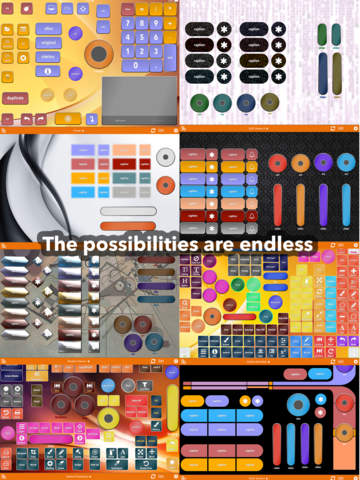
Renamed Custom Remote KeyPad, the new release allows the user to design elaborate and beautiful custom control panels and use them to control a Mac wirelessly. Leveraging Apple�s new Peer-to-Peer network technology, it uses WiFi and Bluetooth to seamlessly connect an iOS device to the Mac. Custom control panels then send keystroke shortcuts, text, and custom instructions to the Mac. For example, you can dial on the iPad to change brush size in Photoshop; or swipe on an iPhone to rotate a 3D model in Cinema 4D; single taps can issue any menu command in any app, or enter entire paragraphs of text, or run custom Automator scripts. "The possibilities are endless� quoting from a review of the previous version of the app.
The new KeyPad app sells for $0.99 and is now available for download for iOS 8+. In addition to designing your own keypads, professionally made control panels can also be bought through the app for $0.99 each, as well as beautiful themes that can be used in your own creations. The app also provides access to the KeyPad Exchange, a community repository of keypads that can be downloaded for free.
The developper promises release of many new pro keypads. Keypads for Photoshop and Illustrator are already available, and keypads for Aperture, AutoCAD, Elements, Excel, Final Cut, iMovie, InDesign, iPhoto, Lightroom, Modo, Powerpoint, Premiere, SketchUp, Word, and many more are coming soon.
Custom Remote KeyPad aims to become the ultimate remote app on iOS. Currently, Mac OX 10.10+ is supported. Windows and Linux support is planned for the future.
Custom Remote KeyPad 1.0: http://keypad.dopplerthepom.com
Purchase and Download: https://itunes.apple.com/app/custom-remote-keypad/id1014634823
Vimeo Video: https://vimeo.com/channels/customremotekeypad
Screenshot: http://a3.mzstatic.com/us/r30/Purple5/v4/3b/de/c7/3bdec781-e5cf-9391-4929-a8e6071677dc/screen480x480.jpeg
App Icon: http://keypad.dopplerthepom.com/icon.png
DopplerThePom was founded by Vatche Sahakian in 2008 with the release of iOS 2.0 and has since released 7 apps for iOS, the latests being Custom Remote Keypad and KeyKit. DopplerThePom is based in Claremont, California. All Material and Software (C) Copyright 2008-2015 DopplerThePom. All Rights Reserved. Apple, the Apple logo, iPhone, iPod and iPad are registered trademarks of Apple Inc. in the U.S. and/or other countries. Other trademarks and registered trademarks may be the property of their respective owners.
*******
Link To Article: http://prmac.com/release-id-76341.htm
*******
---------------------------------------------------------------------------------
Note that you can alter delivered distributions at any time.
Login to your account on prMac to alter your channel selection, or to opt-out at any time.
Custom Remote KeyPad 1.0 released for iOS - Control a Mac Wirelessly - Published on 08/25/15
California based DopplerThePom has introduced Custom Remote KeyPad 1.0, its new flagship app for iOS devices. KeyPad allows the user to design elaborate and beautiful custom control panels and use them to control a Mac wirelessly. For example, with a dial gesture on the iPad one changes brush size in Photoshop; or swipe on an iPhone to rotate a 3D model in Cinema 4D; single taps can issue any menu command in any app, or enter entire paragraphs of text, or run custom scripts.
Claremont, California - DopplerThePom has released its flagship app, Custom Remote KeyPad, for iPhone/iPad/iPod. The app is now available for download from the App Store at the introductory price of $0.99.
KeyPad was originally released for iOS 2 in 2008. After over 25,000 downloads and rave reviews, it was discontinued with the release of iOS 7 for technical reasons. The app has now been entirely rewritten for iOS 8+ using Apple�s new Swift language and adopting the latest iOS technologies.
Renamed Custom Remote KeyPad, the new release allows the user to design elaborate and beautiful custom control panels and use them to control a Mac wirelessly. Leveraging Apple�s new Peer-to-Peer network technology, it uses WiFi and Bluetooth to seamlessly connect an iOS device to the Mac. Custom control panels then send keystroke shortcuts, text, and custom instructions to the Mac. For example, you can dial on the iPad to change brush size in Photoshop; or swipe on an iPhone to rotate a 3D model in Cinema 4D; single taps can issue any menu command in any app, or enter entire paragraphs of text, or run custom Automator scripts. "The possibilities are endless� quoting from a review of the previous version of the app.
The new KeyPad app sells for $0.99 and is now available for download for iOS 8+. In addition to designing your own keypads, professionally made control panels can also be bought through the app for $0.99 each, as well as beautiful themes that can be used in your own creations. The app also provides access to the KeyPad Exchange, a community repository of keypads that can be downloaded for free.
The developper promises release of many new pro keypads. Keypads for Photoshop and Illustrator are already available, and keypads for Aperture, AutoCAD, Elements, Excel, Final Cut, iMovie, InDesign, iPhoto, Lightroom, Modo, Powerpoint, Premiere, SketchUp, Word, and many more are coming soon.
Custom Remote KeyPad aims to become the ultimate remote app on iOS. Currently, Mac OX 10.10+ is supported. Windows and Linux support is planned for the future.
Custom Remote KeyPad 1.0: http://keypad.dopplerthepom.com
Purchase and Download: https://itunes.apple.com/app/custom-remote-keypad/id1014634823
Vimeo Video: https://vimeo.com/channels/customremotekeypad
Screenshot: http://a3.mzstatic.com/us/r30/Purple5/v4/3b/de/c7/3bdec781-e5cf-9391-4929-a8e6071677dc/screen480x480.jpeg
App Icon: http://keypad.dopplerthepom.com/icon.png

DopplerThePom was founded by Vatche Sahakian in 2008 with the release of iOS 2.0 and has since released 7 apps for iOS, the latests being Custom Remote Keypad and KeyKit. DopplerThePom is based in Claremont, California. All Material and Software (C) Copyright 2008-2015 DopplerThePom. All Rights Reserved. Apple, the Apple logo, iPhone, iPod and iPad are registered trademarks of Apple Inc. in the U.S. and/or other countries. Other trademarks and registered trademarks may be the property of their respective owners.
*******
Link To Article: http://prmac.com/release-id-76341.htm
*******
---------------------------------------------------------------------------------
Note that you can alter delivered distributions at any time.
Login to your account on prMac to alter your channel selection, or to opt-out at any time.
QuickerTek Creates Solar Power Option for 2015 Type-C MacBook
A new article has been published at prMac.
QuickerTek Creates Solar Power Option for 2015 Type-C MacBook - Published on 08/25/15
Wichita based QuickerTek has announced the 30 Watt 2015 Type-C MacBook Solar Panel. This solar power charger features a USB 3.1 adaptor cable which powers and charges the 2015 Apple 12-inch MacBook. New MacBook users are no longer limited where they choose to enjoy their computer, and, gain the satisfaction of protecting the environment. This new solar product powers the MacBook battery for use even while charging the internal battery.
Wichita, Kansas - QuickerTek, the technology leader in mobile power and wireless networking products for Apple computers, has announced the 30 Watt 2015 Type-C MacBook Solar Panel. This solar power charger is the only in the world to feature the USB 3.1 adaptor cable which powers and charges the 2015 Apple 12-inch MacBook. New MacBook users are no longer limited where they choose to enjoy their computer, and, gain the satisfaction of protecting the environment.
This new solar product powers the MacBook battery for use even while charging the internal battery. Other photovoltaic products can't offer this same advanced capability. Even when the MacBook battery is completely dead, the QuickerTek solar panel charges and powers the laptop simultaneously.
The Type-C MacBook Solar Panel is made with thin film photovoltaic creating a lightweight, foldable design. At only a hair over 11 inches x 6.5 inches folded, and at only 1.3 pounds, it is light and mobile user ready. It is also powerful enough to charge the MacBook as quickly as an Apple AC charger, minimizing downtime.
30 Watt 2015 Type-C MacBook Solar Panel Features:
* Compliant with USB Type-C 12-inch MacBook
* Charges and powers simultaneously
* Foldable and lightweight solar panel
* Charges the MacBook as fast as an Apple AC charger
Specifications:
* Dimensions Folded: 11 1/32 inches x 6.5 inches [280mm x 165mm]
* Dimensions Unfolded: 30 inches x 31 11/16 inches [762mm x 805mm]
* Weight: 1.3 pound
Includes:
* 30 Watt Thin Film Solar Panel
* USB Type-C Adaptor Cable
* Female 12 Volt Cigarette Lighter Adaptor
Coming Soon:
CJuicz External Battery, Cigarette Lighter Charger, and USB Expander.
QuickerTek: http://www.quickertek.com/
MacBook Solar Panel Charger: http://www.quickertek.com/products/cjuicz.html
High Resolution Pictures: http://www.quickertek.com/media.html
QuickerTek has been a recognized leading innovator of power/solar products, antennas and RF products for the Apple community. QuickerTek products can be purchased online and from authorized resellers. Copyright (C) 2009-2015 QuickerTek. All Rights Reserved. Apple, and the Apple logo, and MacBook Pro are registered trademarks of Apple Computer Inc. in the U.S. and/or other countries.
*******
Link To Article: http://prmac.com/release-id-76340.htm
*******
---------------------------------------------------------------------------------
Note that you can alter delivered distributions at any time.
Login to your account on prMac to alter your channel selection, or to opt-out at any time.
QuickerTek Creates Solar Power Option for 2015 Type-C MacBook - Published on 08/25/15
Wichita based QuickerTek has announced the 30 Watt 2015 Type-C MacBook Solar Panel. This solar power charger features a USB 3.1 adaptor cable which powers and charges the 2015 Apple 12-inch MacBook. New MacBook users are no longer limited where they choose to enjoy their computer, and, gain the satisfaction of protecting the environment. This new solar product powers the MacBook battery for use even while charging the internal battery.
Wichita, Kansas - QuickerTek, the technology leader in mobile power and wireless networking products for Apple computers, has announced the 30 Watt 2015 Type-C MacBook Solar Panel. This solar power charger is the only in the world to feature the USB 3.1 adaptor cable which powers and charges the 2015 Apple 12-inch MacBook. New MacBook users are no longer limited where they choose to enjoy their computer, and, gain the satisfaction of protecting the environment.
This new solar product powers the MacBook battery for use even while charging the internal battery. Other photovoltaic products can't offer this same advanced capability. Even when the MacBook battery is completely dead, the QuickerTek solar panel charges and powers the laptop simultaneously.
The Type-C MacBook Solar Panel is made with thin film photovoltaic creating a lightweight, foldable design. At only a hair over 11 inches x 6.5 inches folded, and at only 1.3 pounds, it is light and mobile user ready. It is also powerful enough to charge the MacBook as quickly as an Apple AC charger, minimizing downtime.
30 Watt 2015 Type-C MacBook Solar Panel Features:
* Compliant with USB Type-C 12-inch MacBook
* Charges and powers simultaneously
* Foldable and lightweight solar panel
* Charges the MacBook as fast as an Apple AC charger
Specifications:
* Dimensions Folded: 11 1/32 inches x 6.5 inches [280mm x 165mm]
* Dimensions Unfolded: 30 inches x 31 11/16 inches [762mm x 805mm]
* Weight: 1.3 pound
Includes:
* 30 Watt Thin Film Solar Panel
* USB Type-C Adaptor Cable
* Female 12 Volt Cigarette Lighter Adaptor
Coming Soon:
CJuicz External Battery, Cigarette Lighter Charger, and USB Expander.
QuickerTek: http://www.quickertek.com/
MacBook Solar Panel Charger: http://www.quickertek.com/products/cjuicz.html
High Resolution Pictures: http://www.quickertek.com/media.html
QuickerTek has been a recognized leading innovator of power/solar products, antennas and RF products for the Apple community. QuickerTek products can be purchased online and from authorized resellers. Copyright (C) 2009-2015 QuickerTek. All Rights Reserved. Apple, and the Apple logo, and MacBook Pro are registered trademarks of Apple Computer Inc. in the U.S. and/or other countries.
*******
Link To Article: http://prmac.com/release-id-76340.htm
*******
---------------------------------------------------------------------------------
Note that you can alter delivered distributions at any time.
Login to your account on prMac to alter your channel selection, or to opt-out at any time.
1st iOS Keyboard App with Per-Key Customization
A new article has been published at prMac.
1st iOS Keyboard App with Per-Key Customization - Published on 08/24/15
Perkee is the first iOS Keyboard App that allows for "per-key" customization, giving users full control over their keyboards, down to the individual size, shape, appearance and sound of each and every key. This free app comes equipped with with 13 keyboards, 6 themes and 7 backgrounds which are pre-populated in the Perkee keyboard library. The utimate iPhone/iPad keyboard customization app, you can use the Basic or Advanced Editors to unleash your inner keyboard artist.
Rutland, Massachusetts - Sokat Studios today is proud to announce the release of Perkee 1.0, the first iOS Keyboard App that allows for "Per-Key" Customization. Available now, newcomer Perkee gives users full control over their keyboards, down to the individual size, shape, appearance, and sound of each and every key. As if that's not enough, the app is also easy to use and free.
Perkee was developed specifically for its wide range of users - whether young, old, technologically challenged, or disabled. What started off as a small Swift training project, when iOS 8 came out in September 2014, evolved into a full-scale application that highlights the realm of possibilities in the world of custom keyboard creators.
To help spark some creativity, the app is currently equipped with thirteen keyboards, six themes, and seven backgrounds which are pre-populated in the Perkee keyboard library and are available as free downloads. The library includes such keyboards as Xylophone, for the musically inclined, or Jungle, a playful keyboard for kids.
When creating Keyboards from scratch, users can choose between the Basic and Advanced Editor, depending on their desired degree of customization:
* The Basic Editor offers a simple way to change the background, key look, and sound collection of the keyboard. This is more or less equivalent to the level of functionality that other keyboard apps currently have. This editor is ideal for those in search of a unique keyboard, but lacking enough time to create one from scratch.
* The Advanced Editor is recommended for users who have some time to spare and would like to put their imagination to use. This is where users have complete control to alter the size, shape and location of individual keys on the keyboard and even to choose custom layouts. Aside from traditional keyboards, users are even able to create non-QWERTY keyboards, like a Morse code machine or a musical piano.
Once a keyboard has been created through either the Basic or Advanced editors, users can also share entire keyboards, or keyboard elements, through some of the most popular social networks like Facebook and twitter.
"We believe we have just scratched the surface and have many more keyboard design features in the works," says Perkee developer and Sokat Studios CEO Tim Burr and adds, "With the amount of time many people spend interacting with their mobile keyboards daily, it should be a fun and individualistic experience. I urge you to try out Perkee and based on your experience, send us your feedback."
Device Requirements:
* iPhone, iPad, and iPod touch
* Optimized for iPhone 5, iPhone 6/6 Plus
* Requires iOS 8.0 or later
* 60.0 MB
Pricing and Availability:
Perkee Keyboard 1.0 is Free and available worldwide exclusively through the App Store in the Entertainment category.
Sokat Studios: http://scopicsoftware.com
Perkee Keyboard 1.0: http://www.sokatstudios.com/perkee/
Download from iTunes: https://itunes.apple.com/app/perkee-keyboard/id993983733
Screenshot: http://www.sokatstudios.com/perkee/img/header/phone.png
App Icon: http://a3.mzstatic.com/us/r30/Purple5/v4/d7/a4/ef/d7a4ef04-bc21-3474-6be9-40a3bdc56061/icon175x175.png
Sokat Studios is a mobile app development firm and the sister company to Scopic Software, a global leader in quality, economical custom solutions for web, desktop and mobile apps that scale seamlessly across platforms and devices. For visually engaging, unique, and compelling software solutions, visit Scopic Software's website. All Material and Software (C) Copyright 2013 Scopic Software. All Rights Reserved. Apple, the Apple logo, iPhone, iPod and iPad are registered trademarks of Apple Inc. in the U.S. and/or other countries. Other trademarks and registered trademarks may be the property of their respective owners.
*******
Link To Article: http://prmac.com/release-id-76385.htm
*******
---------------------------------------------------------------------------------
Note that you can alter delivered distributions at any time.
Login to your account on prMac to alter your channel selection, or to opt-out at any time.
1st iOS Keyboard App with Per-Key Customization - Published on 08/24/15
Perkee is the first iOS Keyboard App that allows for "per-key" customization, giving users full control over their keyboards, down to the individual size, shape, appearance and sound of each and every key. This free app comes equipped with with 13 keyboards, 6 themes and 7 backgrounds which are pre-populated in the Perkee keyboard library. The utimate iPhone/iPad keyboard customization app, you can use the Basic or Advanced Editors to unleash your inner keyboard artist.
Rutland, Massachusetts - Sokat Studios today is proud to announce the release of Perkee 1.0, the first iOS Keyboard App that allows for "Per-Key" Customization. Available now, newcomer Perkee gives users full control over their keyboards, down to the individual size, shape, appearance, and sound of each and every key. As if that's not enough, the app is also easy to use and free.
Perkee was developed specifically for its wide range of users - whether young, old, technologically challenged, or disabled. What started off as a small Swift training project, when iOS 8 came out in September 2014, evolved into a full-scale application that highlights the realm of possibilities in the world of custom keyboard creators.
To help spark some creativity, the app is currently equipped with thirteen keyboards, six themes, and seven backgrounds which are pre-populated in the Perkee keyboard library and are available as free downloads. The library includes such keyboards as Xylophone, for the musically inclined, or Jungle, a playful keyboard for kids.
When creating Keyboards from scratch, users can choose between the Basic and Advanced Editor, depending on their desired degree of customization:
* The Basic Editor offers a simple way to change the background, key look, and sound collection of the keyboard. This is more or less equivalent to the level of functionality that other keyboard apps currently have. This editor is ideal for those in search of a unique keyboard, but lacking enough time to create one from scratch.
* The Advanced Editor is recommended for users who have some time to spare and would like to put their imagination to use. This is where users have complete control to alter the size, shape and location of individual keys on the keyboard and even to choose custom layouts. Aside from traditional keyboards, users are even able to create non-QWERTY keyboards, like a Morse code machine or a musical piano.
Once a keyboard has been created through either the Basic or Advanced editors, users can also share entire keyboards, or keyboard elements, through some of the most popular social networks like Facebook and twitter.
"We believe we have just scratched the surface and have many more keyboard design features in the works," says Perkee developer and Sokat Studios CEO Tim Burr and adds, "With the amount of time many people spend interacting with their mobile keyboards daily, it should be a fun and individualistic experience. I urge you to try out Perkee and based on your experience, send us your feedback."
Device Requirements:
* iPhone, iPad, and iPod touch
* Optimized for iPhone 5, iPhone 6/6 Plus
* Requires iOS 8.0 or later
* 60.0 MB
Pricing and Availability:
Perkee Keyboard 1.0 is Free and available worldwide exclusively through the App Store in the Entertainment category.
Sokat Studios: http://scopicsoftware.com
Perkee Keyboard 1.0: http://www.sokatstudios.com/perkee/
Download from iTunes: https://itunes.apple.com/app/perkee-keyboard/id993983733
Screenshot: http://www.sokatstudios.com/perkee/img/header/phone.png

App Icon: http://a3.mzstatic.com/us/r30/Purple5/v4/d7/a4/ef/d7a4ef04-bc21-3474-6be9-40a3bdc56061/icon175x175.png

Sokat Studios is a mobile app development firm and the sister company to Scopic Software, a global leader in quality, economical custom solutions for web, desktop and mobile apps that scale seamlessly across platforms and devices. For visually engaging, unique, and compelling software solutions, visit Scopic Software's website. All Material and Software (C) Copyright 2013 Scopic Software. All Rights Reserved. Apple, the Apple logo, iPhone, iPod and iPad are registered trademarks of Apple Inc. in the U.S. and/or other countries. Other trademarks and registered trademarks may be the property of their respective owners.
*******
Link To Article: http://prmac.com/release-id-76385.htm
*******
---------------------------------------------------------------------------------
Note that you can alter delivered distributions at any time.
Login to your account on prMac to alter your channel selection, or to opt-out at any time.
newMacgadgets Introduced Universal Countertop Mounts For The iPad
A new article has been published at prMac.
newMacgadgets Introduced Universal Countertop Mounts For The iPad - Published on 08/24/15
California based newMacgadgets today introduces the Universal Countertop Mount, a new and secure way to hold any tablet in a stylish all-acrylic base. Made for retail, trade-shows, businesses, conferences and more, the Universal Countertop Mounts offer a new way to hold the iPad, iPad Air and iPad mini on a tapered acrylic base, combining style and security all-in-one. Heavy-duty 1" adhesive tabs secure the tablet to the acrylic base to provide a strong bond not easily removed.
San Diego, California - newMacgadgets introduces the Universal Countertop Mount, a new and secure way to hold any tablet in a stylish all-acrylic base. Ideal for the iPad, iPad Air and iPad mini. Made for retail, trade-shows, businesses, conferences and more, newMacgadgets Universal Countertop Mount is designed to combine security and elegance all-in-one.
Heavy-duty 1" adhesive tabs secure the tablet to the acrylic base to provide a strong bond not easily removed. The solid clear acrylic 4" x 4" base is 2" high in the rear and tapers to 1" in the front to provide the optimum viewing angle. Depending on your preference tablets can be positioned in either the landscape or portrait position. The Mount secures to the countertop with screws or adhesive strips, both provided. The charging cord secures under the base to prevent removal. Once in place, the tablet looks suspended in air several inches above the countertop giving it a clean look, unlike other bulky solutions.
The Universal Countertop Mount offers businesses a low cost anti-theft solution for displaying tablets in open environments. In addition to holding the iPad line of tablets, the Universal Countertop mount can support any tablet including the Galaxy and Nexus line. Priced at $49.95 each. For additional details and to see their full-line of security solutions for the iPad please visit newMacgadgets online.
Universal Tablet Mounts: http://newpcgadgets.com/products/countertop_tablet_mounts/
Image (Universal Tablet Mount) : http://newpcgadgets.com/products/countertop_tablet_mounts/images/lrg_1.jpg
Image (Universal Tablet Mount Acrylic Design): http://newpcgadgets.com/products/countertop_tablet_mounts/images/lrg_2.jpg
Image (Universal Tablet Mount Holding iPad): http://newpcgadgets.com/products/countertop_tablet_mounts/images/lrg_3.jpg
Image (Universal Tablet Mount For Smaller Tablets): http://newpcgadgets.com/products/countertop_tablet_mounts/images/lrg_4.jpg
Image (Universal Tablet Mount Holding iPad Air): http://newpcgadgets.com/products/countertop_tablet_mounts/images/lrg_5.jpg
newMacgadgets a division of newPCgadgets, designs innovative products and accessories for Apple and PC computers, laptops and mobile devices. With over 20 years of experience they have designed over 150 products for large companies like Apple, IBM and Epson. Copyright (C) 2015 newMacgadgets. All Rights Reserved. Apple, the Apple logo, iPhone, iPod and iPad are registered trademarks of Apple Inc. in the U.S. and/or other countries.
*******
Link To Article: http://prmac.com/release-id-76384.htm
*******
---------------------------------------------------------------------------------
Note that you can alter delivered distributions at any time.
Login to your account on prMac to alter your channel selection, or to opt-out at any time.
newMacgadgets Introduced Universal Countertop Mounts For The iPad - Published on 08/24/15
California based newMacgadgets today introduces the Universal Countertop Mount, a new and secure way to hold any tablet in a stylish all-acrylic base. Made for retail, trade-shows, businesses, conferences and more, the Universal Countertop Mounts offer a new way to hold the iPad, iPad Air and iPad mini on a tapered acrylic base, combining style and security all-in-one. Heavy-duty 1" adhesive tabs secure the tablet to the acrylic base to provide a strong bond not easily removed.
San Diego, California - newMacgadgets introduces the Universal Countertop Mount, a new and secure way to hold any tablet in a stylish all-acrylic base. Ideal for the iPad, iPad Air and iPad mini. Made for retail, trade-shows, businesses, conferences and more, newMacgadgets Universal Countertop Mount is designed to combine security and elegance all-in-one.
Heavy-duty 1" adhesive tabs secure the tablet to the acrylic base to provide a strong bond not easily removed. The solid clear acrylic 4" x 4" base is 2" high in the rear and tapers to 1" in the front to provide the optimum viewing angle. Depending on your preference tablets can be positioned in either the landscape or portrait position. The Mount secures to the countertop with screws or adhesive strips, both provided. The charging cord secures under the base to prevent removal. Once in place, the tablet looks suspended in air several inches above the countertop giving it a clean look, unlike other bulky solutions.
The Universal Countertop Mount offers businesses a low cost anti-theft solution for displaying tablets in open environments. In addition to holding the iPad line of tablets, the Universal Countertop mount can support any tablet including the Galaxy and Nexus line. Priced at $49.95 each. For additional details and to see their full-line of security solutions for the iPad please visit newMacgadgets online.
Universal Tablet Mounts: http://newpcgadgets.com/products/countertop_tablet_mounts/
Image (Universal Tablet Mount) : http://newpcgadgets.com/products/countertop_tablet_mounts/images/lrg_1.jpg

Image (Universal Tablet Mount Acrylic Design): http://newpcgadgets.com/products/countertop_tablet_mounts/images/lrg_2.jpg

Image (Universal Tablet Mount Holding iPad): http://newpcgadgets.com/products/countertop_tablet_mounts/images/lrg_3.jpg

Image (Universal Tablet Mount For Smaller Tablets): http://newpcgadgets.com/products/countertop_tablet_mounts/images/lrg_4.jpg

Image (Universal Tablet Mount Holding iPad Air): http://newpcgadgets.com/products/countertop_tablet_mounts/images/lrg_5.jpg

newMacgadgets a division of newPCgadgets, designs innovative products and accessories for Apple and PC computers, laptops and mobile devices. With over 20 years of experience they have designed over 150 products for large companies like Apple, IBM and Epson. Copyright (C) 2015 newMacgadgets. All Rights Reserved. Apple, the Apple logo, iPhone, iPod and iPad are registered trademarks of Apple Inc. in the U.S. and/or other countries.
*******
Link To Article: http://prmac.com/release-id-76384.htm
*******
---------------------------------------------------------------------------------
Note that you can alter delivered distributions at any time.
Login to your account on prMac to alter your channel selection, or to opt-out at any time.
Turn any offhand song idea into various original songs, effortlessly
A new article has been published at prMac.
Turn any offhand song idea into various original songs, effortlessly - Published on 08/24/15
Tunedra Inc. today introduces MelodyMiner 1.0, their new music creation app developed for iPhone, iPad and iPod touch devices. MelodyMiner enables anyone who hit upon a song idea to have multiple well-organized songs, with ease. Simply sing out your original melody and MelodyMiner generates multiple songs with unlimited sets of chord progression in different tempos. In each generated song, your voice will automatically be tuned to match the chords and instruments will play along.
Seoul, Korea - Tunedra Inc. today is thrilled to announce the release of MelodyMiner 1.0, their new music creation app developed for iPhone, iPad and iPod touch devices. MelodyMiner enables anyone who hit upon a song idea to have multiple well-organized songs, with ease. Simply sing out your original melody and MelodyMiner generates multiple songs with unlimited sets of chord progression in different tempos. In each generated song, your voice will automatically be tuned to match the chords and instruments will play along.
MelodyMiner is a great tool for songwriters in an idea developing phase. Besides ease of song-prototyping, it will even bring you new inspiration by generated songs. Transfer output vocal as a MIDI or an audio file and continue working on your masterpiece on other applications seamlessly.
Features Highlighted:
* Edit chord progression manually
* Change tempo after recording
* Change the level of vocal-tuning from Off to High
* Choose any combination of piano, guitar, and drums with bass for backing music
* Share vocal track as MP3, AIFF, or MIDI file via Email, AudioCopy, or other installed apps that support specified file format
Device Requirements:
* iPhone, iPad or iPod touch
* Requires iOS 8.0 or later
* 24.4 MB
Pricing and Availability:
MelodyMiner 1.0 is available for $2.99 (USD) from the Apple App Store (in the Music category).
Tunedra: http://www.tunedra.com
MelodyMiner 1.0: http://melodyminer.co
Purchase and Download: https://itunes.apple.com/app/melodyminer-song-idea-turns/id1030667318
Screenshot 1: http://a2.mzstatic.com/us/r30/Purple7/v4/37/32/6b/37326b3b-4434-0960-7d38-6a7e47866ca7/screen480x480.jpeg
Screenshot 2: http://a1.mzstatic.com/us/r30/Purple7/v4/0f/fc/e1/0ffce169-f9ca-7bd5-6605-d922e19c36b6/screen480x480.jpeg
App Icon: http://a3.mzstatic.com/us/r30/Purple69/v4/78/9c/da/789cda81-f2b3-2343-56f9-ed19e4b54dcd/icon175x175.jpeg
At Tunedra Inc., our mission is to create innovative music tools that address the needs of both professional and amateur musicians. Tunedra Inc. was founded in 2013 and is located in Seoul, Korea. Copyright (C) 2013-2015 Tunedra Inc. All Rights Reserved. Apple, the Apple logo, iPhone, iPod, and iPad are registered trademarks of Apple Inc. in the U.S. and/or other countries. Other trademarks and registered trademarks may be the property of their respective owners.
*******
Link To Article: http://prmac.com/release-id-76382.htm
*******
---------------------------------------------------------------------------------
Note that you can alter delivered distributions at any time.
Login to your account on prMac to alter your channel selection, or to opt-out at any time.
Turn any offhand song idea into various original songs, effortlessly - Published on 08/24/15
Tunedra Inc. today introduces MelodyMiner 1.0, their new music creation app developed for iPhone, iPad and iPod touch devices. MelodyMiner enables anyone who hit upon a song idea to have multiple well-organized songs, with ease. Simply sing out your original melody and MelodyMiner generates multiple songs with unlimited sets of chord progression in different tempos. In each generated song, your voice will automatically be tuned to match the chords and instruments will play along.
Seoul, Korea - Tunedra Inc. today is thrilled to announce the release of MelodyMiner 1.0, their new music creation app developed for iPhone, iPad and iPod touch devices. MelodyMiner enables anyone who hit upon a song idea to have multiple well-organized songs, with ease. Simply sing out your original melody and MelodyMiner generates multiple songs with unlimited sets of chord progression in different tempos. In each generated song, your voice will automatically be tuned to match the chords and instruments will play along.
MelodyMiner is a great tool for songwriters in an idea developing phase. Besides ease of song-prototyping, it will even bring you new inspiration by generated songs. Transfer output vocal as a MIDI or an audio file and continue working on your masterpiece on other applications seamlessly.
Features Highlighted:
* Edit chord progression manually
* Change tempo after recording
* Change the level of vocal-tuning from Off to High
* Choose any combination of piano, guitar, and drums with bass for backing music
* Share vocal track as MP3, AIFF, or MIDI file via Email, AudioCopy, or other installed apps that support specified file format
Device Requirements:
* iPhone, iPad or iPod touch
* Requires iOS 8.0 or later
* 24.4 MB
Pricing and Availability:
MelodyMiner 1.0 is available for $2.99 (USD) from the Apple App Store (in the Music category).
Tunedra: http://www.tunedra.com
MelodyMiner 1.0: http://melodyminer.co
Purchase and Download: https://itunes.apple.com/app/melodyminer-song-idea-turns/id1030667318
Screenshot 1: http://a2.mzstatic.com/us/r30/Purple7/v4/37/32/6b/37326b3b-4434-0960-7d38-6a7e47866ca7/screen480x480.jpeg

Screenshot 2: http://a1.mzstatic.com/us/r30/Purple7/v4/0f/fc/e1/0ffce169-f9ca-7bd5-6605-d922e19c36b6/screen480x480.jpeg

App Icon: http://a3.mzstatic.com/us/r30/Purple69/v4/78/9c/da/789cda81-f2b3-2343-56f9-ed19e4b54dcd/icon175x175.jpeg

At Tunedra Inc., our mission is to create innovative music tools that address the needs of both professional and amateur musicians. Tunedra Inc. was founded in 2013 and is located in Seoul, Korea. Copyright (C) 2013-2015 Tunedra Inc. All Rights Reserved. Apple, the Apple logo, iPhone, iPod, and iPad are registered trademarks of Apple Inc. in the U.S. and/or other countries. Other trademarks and registered trademarks may be the property of their respective owners.
*******
Link To Article: http://prmac.com/release-id-76382.htm
*******
---------------------------------------------------------------------------------
Note that you can alter delivered distributions at any time.
Login to your account on prMac to alter your channel selection, or to opt-out at any time.
Subscribe to:
Posts (Atom)