A new article has been published at prMac.
DoNYC App Answers The Question Of What should we do? - Published on 09/28/15
DoStuff Media, LLC announces the official launch of DoNYC DoStuff 1.0.6 for iOS. The DoNYC App is the essential tool for seamlessly planning a night in New York, and the 15 other cities across North America in the growing DoStuff Network. The free app features the same comprehensive event listings and expert local guides found on DoNY's website, but introduces new mobile-optimized features such as a map view and a redesigned profile page.
New York, New York - DoStuff Media, LLC is proud to announce the official launch of DoNYC DoStuff 1.0.6 for iOS. The DoNYC App is the essential tool for seamlessly planning a night (or several) in New York, and the 15 other cities across North America in the growing DoStuff Network. The free app features the same comprehensive event listings and expert local guides found on DoNY's website, but introduces new mobile-optimized features such as a map view and a redesigned profile page.
"The DoNYC App is the perfect way to navigate around everything Louisville has to offer," said Kelly Bruce, General Manager of DoNYC. "DoNYC is already a force for people that want to get out and experience the best our city has to offer, and this app makes it easier than ever to discover what is happening around you, or the ability to enter any DoStuff city and immediately hold the key to a great time in the palm of your hand."
Just like on DoNYC, the new app includes the same content from the desktop platform, but with a sleek new UX and features such as:
* Map View: Immediately find what's going on around you using the map view; Browse event categories by your current location, or zoom in on a place in the map to find the best stuff going on in a particular neighborhood
* Discover Tab: Try something new! Uncover event recommendations, curated city guides, and the latest in local music, art, and culture - all from local experts
* Redesigned profile: Add upcoming events to your personal calendar; follow your favorite artists to receive notifications about show announcements, and save your lists and articles to check out later
* All of DoStuff in One App: Get the same local experience while you're on the road. Switch between cities in the DoStuff Network such as Austin, Portland, New York, LA, Toronto, Mexico City, and more
We're celebrating the big launch this month in all of our cities with the help of Goose Island by throwing parties in each DoStuff city. In NYC, we kicked things off with a massive bash on Monday, September 21st headlined by Robert DeLong and The Kickdrums at Brooklyn Bowl, along with 600 of our closest friends, clients, and Tastemakers. Check out photos from the event online.
About DoNYC:
DoNYC the New York City edition of DoStuff Media. We've become the go-to place for finding out what to do in New York City. From concerts to comedy, film to food, and charity events to book readings, DoNYC is the one-stop destination for planning your week. We are constantly giving away free tickets, backstage passes, and exclusive prizes to our active and outspoken users. Signing up is free and allows users to discover and promote events, share their picks with others, buy tickets online, and be the first to know about all the awesome happenings throughout the five boroughs. Every week we bring you the best in local arts and culture as curated by the on-the-ground NYC-based team and the national DoStuff Network.
Device Requirements:
* iPhone, iPad, and iPod touch
* Requires iOS 8.0 or later
* 52.0 MB
Pricing and Availability:
DoNYC DoStuff 1.0.6 is Free and available worldwide exclusively through the App Store in the Lifestyle category. The Android version will be coming Q4 2015. Please feel free to contact Kelly Bruce if you have any questions, need quotes, screenshots, images, or if there's anything else that we can do to be helpful.
DoStuff Media: http://dostuffmedia.com
DoNYC DoStuff 1.0.6: http://donyc.com
More Information: http://donyc.com/p/app
Download from iTunes: https://itunes.apple.com/us/app/dostuff-official-app-dostuff/id970122355
Photos from DoNYC's LaunchParty: http://donyc.com/donycapplaunchparty
Screenshot: http://a2.mzstatic.com/us/r30/Purple7/v4/fe/ec/07/feec0708-3af3-3085-2d9b-06220c755e88/screen322x572.jpeg
DoStuff is a network of local media properties for people looking to do awesome thing. We emphasize experience and filter out the noise so that you can enjoy the best music, drinks, and good times your city has to offer. To do this right, we believe in and are committed to doing things locally. We're natives of every city we're in - the entrepreneurs, promoters, musicians, and venue owners who live and breathe the scene. All Material and Software (C) Copyright 2015 DoStuff Media, LLC. All Rights Reserved. Apple, the Apple logo, iPhone, iPod and iPad are registered trademarks of Apple Inc. in the U.S. and/or other countries. Other trademarks and registered trademarks may be the property of their respective owners.
*******
Link To Article: http://prmac.com/release-id-76875.htm
*******
---------------------------------------------------------------------------------
Note that you can alter delivered distributions at any time.
Login to your account on prMac to alter your channel selection, or to opt-out at any time.


Dashwood 360VR Toolbox Beta Now Available for Download on FxFactory
A new article has been published at prMac.
Dashwood 360VR Toolbox Beta Now Available for Download on FxFactory - Published on 09/28/15
Now available on FxFactory: Dashwood 360VR Toolbox offers real-time 360 degree VR headset monitoring while editing, and a full-featured plugin suite for Premiere Pro, After Effects, and Final Cut Pro. The latest patent-pending features have now been revealed in the public beta of 360VR Toolbox. These include full stereoscopic 3D support, reorientation of equirectangular "LatLong" panoramic footage, output of "pan and scan" mono or stereoscopic video, and so much more.
Toronto, Canada - Now available on FxFactory: Dashwood 360VR Toolbox(TM) offers real-time 360 degree VR headset monitoring while editing, and a full-featured plugin suite for Premiere Pro, After Effects, and Final Cut Pro.
360VR Toolbox literally turned heads during IBC in Amsterdam with its ability to preview 360 degree spherical footage in the Oculus Rift while playing from an edited sequence in Apple Final Cut Pro, Adobe Premiere Pro or Adobe After Effects. The latest patent-pending features have now been revealed in the public beta of 360VR Toolbox. These include full stereoscopic 3D support, reorientation of equirectangular "LatLong" panoramic footage, output of "pan and scan" mono or stereoscopic video, placement of 2D elements inside spherical footage, support for equirectangular, stereographic or cubic projections, and "seamless" 360 degree filters like blur, sharpen, glow and noise reduction.
"360VR Toolbox had an incredible reception during IBC and has already been downloaded thousands of times." said Tim Dashwood, founder of Dashwood Cinema Solutions. "We honed the feature set through feedback from our stellar beta test group of VR professionals, and are excited to put the public beta in the hands of the masses. I am very proud to say that 360VR Toolbox is already in the post-pipeline of numerous 360 degree content producers, including industry leaders JauntVR, Immersive Media, and Al Jazeera Media Network."
"The immediacy of our 360 degree video content means a very fast turn-around from capture to delivery." said Ousama Itani, Senior Officer, Innovation, Al Jazeera Media Network. "Dashwood's 360VR Toolbox gives us the tools to edit and finish our VR content with the same ease as traditional broadcast video. The real-time HMD preview feature immensely speeds up the story editing process, and tasks like superimposing graphics or lower-third titles become simple."
Dashwood demonstrated new features in 360VR Toolbox during IBC2015 in Amsterdam at IBC Future Zone, FCP EXPO and the CPUG Supermeet. Photos from events available upon request.
Dashwood 360VR Toolbox Free Trial and Purchase Information:
The 360VR Toolbox public beta is available for download and installation now on the FxFactory plugin store. A permanent license can be purchased at a 50% discounted price of $599 USD through September 30th. The public beta may be used as a free watermarked trial without purchase. Features are subject to change in future releases.
360VR Toolbox Feature Highlights:
* Supports both 2D and stereoscopic 3D 360 degree video
* Oculus Rift DK2 real-time monitoring of host timeline
* Reorientation of 360 degree spherical equirectangular "LatLong" video
* 180 degree fisheye to 360 degree spherical equirectangular "LatLong" video
* Supports many output projections including 2:1 "LatLong" equirectangular, "Little Planet" 1:1 stereographic, and "Skybox" 4:3 cubic
* Output to "flat" mono or stereoscopic 3D "pan and scan" of 360 degree spherical video at any desired field of view and keyframeable orientation
* Preview head mounted display (HMD) point of view in the canvas or front/back facing dome with artificial horizon
* "Seamless" spherical blur, sharpen, glow and noise reduction filters
About Dashwood Cinema Solutions:
A member of the FxFactory Development Partner Program since 2009, Dashwood Cinema Solutions' mandate is to find software solutions to common problems in film production and post-production. Their award-winning flagship products, Stereo3D Toolbox and Stereo3D CAT are utilized by post-production houses around the world for easy stereoscopic 3D mastering on the Mac platform. For more information about Dashwood or FxFactory please visit www.Dashwood3D.com or www.fxfactory.com, respectively. 360VR Toolbox(TM) is a trademark of Dashwood Cinema Solutions, a division of 11 Motion Pictures Limited. All other trademarks, registered trademarks and products mentioned herein belong to their respective owners.
FxFactory: https://fxfactory.com
360VR Toolbox: http://dashwood360.com
YouTube Video (Demo): https://www.youtube.com/watch?v=vlBdyLQsdEE
Image (VR Editing): https://dl.dropboxusercontent.com/u/2434169/Dashwood/360%20VR%20editing%20with%20Oculus%20Rift.jpg
Screenshot: https://dl.dropboxusercontent.com/u/2434169/Dashwood/hmd_on_timeline.png
Logo: https://dl.dropboxusercontent.com/u/2434169/Dashwood/360VR_icon_for_web.png
Established in 2004, Boston, Massachusetts-based Noise Industries is an innovative developer of visual effects tools for the post-production and broadcast community. Their products are integrated with popular non-linear editing and compositing products from Apple and Adobe. Copyright (C) 2015 Noise Industries. All Rights Reserved. Apple, the Apple logo, Mac OS X, and Macintosh are registered trademarks of Apple Inc. in the U.S. and/or other countries.
*******
Link To Article: http://prmac.com/release-id-76874.htm
*******
---------------------------------------------------------------------------------
Note that you can alter delivered distributions at any time.
Login to your account on prMac to alter your channel selection, or to opt-out at any time.
Dashwood 360VR Toolbox Beta Now Available for Download on FxFactory - Published on 09/28/15
Now available on FxFactory: Dashwood 360VR Toolbox offers real-time 360 degree VR headset monitoring while editing, and a full-featured plugin suite for Premiere Pro, After Effects, and Final Cut Pro. The latest patent-pending features have now been revealed in the public beta of 360VR Toolbox. These include full stereoscopic 3D support, reorientation of equirectangular "LatLong" panoramic footage, output of "pan and scan" mono or stereoscopic video, and so much more.
Toronto, Canada - Now available on FxFactory: Dashwood 360VR Toolbox(TM) offers real-time 360 degree VR headset monitoring while editing, and a full-featured plugin suite for Premiere Pro, After Effects, and Final Cut Pro.
360VR Toolbox literally turned heads during IBC in Amsterdam with its ability to preview 360 degree spherical footage in the Oculus Rift while playing from an edited sequence in Apple Final Cut Pro, Adobe Premiere Pro or Adobe After Effects. The latest patent-pending features have now been revealed in the public beta of 360VR Toolbox. These include full stereoscopic 3D support, reorientation of equirectangular "LatLong" panoramic footage, output of "pan and scan" mono or stereoscopic video, placement of 2D elements inside spherical footage, support for equirectangular, stereographic or cubic projections, and "seamless" 360 degree filters like blur, sharpen, glow and noise reduction.
"360VR Toolbox had an incredible reception during IBC and has already been downloaded thousands of times." said Tim Dashwood, founder of Dashwood Cinema Solutions. "We honed the feature set through feedback from our stellar beta test group of VR professionals, and are excited to put the public beta in the hands of the masses. I am very proud to say that 360VR Toolbox is already in the post-pipeline of numerous 360 degree content producers, including industry leaders JauntVR, Immersive Media, and Al Jazeera Media Network."
"The immediacy of our 360 degree video content means a very fast turn-around from capture to delivery." said Ousama Itani, Senior Officer, Innovation, Al Jazeera Media Network. "Dashwood's 360VR Toolbox gives us the tools to edit and finish our VR content with the same ease as traditional broadcast video. The real-time HMD preview feature immensely speeds up the story editing process, and tasks like superimposing graphics or lower-third titles become simple."
Dashwood demonstrated new features in 360VR Toolbox during IBC2015 in Amsterdam at IBC Future Zone, FCP EXPO and the CPUG Supermeet. Photos from events available upon request.
Dashwood 360VR Toolbox Free Trial and Purchase Information:
The 360VR Toolbox public beta is available for download and installation now on the FxFactory plugin store. A permanent license can be purchased at a 50% discounted price of $599 USD through September 30th. The public beta may be used as a free watermarked trial without purchase. Features are subject to change in future releases.
360VR Toolbox Feature Highlights:
* Supports both 2D and stereoscopic 3D 360 degree video
* Oculus Rift DK2 real-time monitoring of host timeline
* Reorientation of 360 degree spherical equirectangular "LatLong" video
* 180 degree fisheye to 360 degree spherical equirectangular "LatLong" video
* Supports many output projections including 2:1 "LatLong" equirectangular, "Little Planet" 1:1 stereographic, and "Skybox" 4:3 cubic
* Output to "flat" mono or stereoscopic 3D "pan and scan" of 360 degree spherical video at any desired field of view and keyframeable orientation
* Preview head mounted display (HMD) point of view in the canvas or front/back facing dome with artificial horizon
* "Seamless" spherical blur, sharpen, glow and noise reduction filters
About Dashwood Cinema Solutions:
A member of the FxFactory Development Partner Program since 2009, Dashwood Cinema Solutions' mandate is to find software solutions to common problems in film production and post-production. Their award-winning flagship products, Stereo3D Toolbox and Stereo3D CAT are utilized by post-production houses around the world for easy stereoscopic 3D mastering on the Mac platform. For more information about Dashwood or FxFactory please visit www.Dashwood3D.com or www.fxfactory.com, respectively. 360VR Toolbox(TM) is a trademark of Dashwood Cinema Solutions, a division of 11 Motion Pictures Limited. All other trademarks, registered trademarks and products mentioned herein belong to their respective owners.
FxFactory: https://fxfactory.com
360VR Toolbox: http://dashwood360.com
YouTube Video (Demo): https://www.youtube.com/watch?v=vlBdyLQsdEE
Image (VR Editing): https://dl.dropboxusercontent.com/u/2434169/Dashwood/360%20VR%20editing%20with%20Oculus%20Rift.jpg

Screenshot: https://dl.dropboxusercontent.com/u/2434169/Dashwood/hmd_on_timeline.png

Logo: https://dl.dropboxusercontent.com/u/2434169/Dashwood/360VR_icon_for_web.png

Established in 2004, Boston, Massachusetts-based Noise Industries is an innovative developer of visual effects tools for the post-production and broadcast community. Their products are integrated with popular non-linear editing and compositing products from Apple and Adobe. Copyright (C) 2015 Noise Industries. All Rights Reserved. Apple, the Apple logo, Mac OS X, and Macintosh are registered trademarks of Apple Inc. in the U.S. and/or other countries.
*******
Link To Article: http://prmac.com/release-id-76874.htm
*******
---------------------------------------------------------------------------------
Note that you can alter delivered distributions at any time.
Login to your account on prMac to alter your channel selection, or to opt-out at any time.
Maintain Releases Cocktail 9.0 (El Capitan Edition)
A new article has been published at prMac.
Maintain Releases Cocktail 9.0 (El Capitan Edition) - Published on 09/28/15
Maintain today announces Cocktail 9.0 (El Capitan Edition), a new edition of Cocktail for users running OS X El Capitan 10.11. Cocktail is a general purpose utility for OS X that lets users clean, repair and optimize their Macs. This version adds OS X El Capitan 10.11 and addresses compatibility issues with OS X Server 5, Adobe Photoshop Lightroom 6 and Microsoft Office 2016. It also contains many other bug fixes and overall performance improvements.
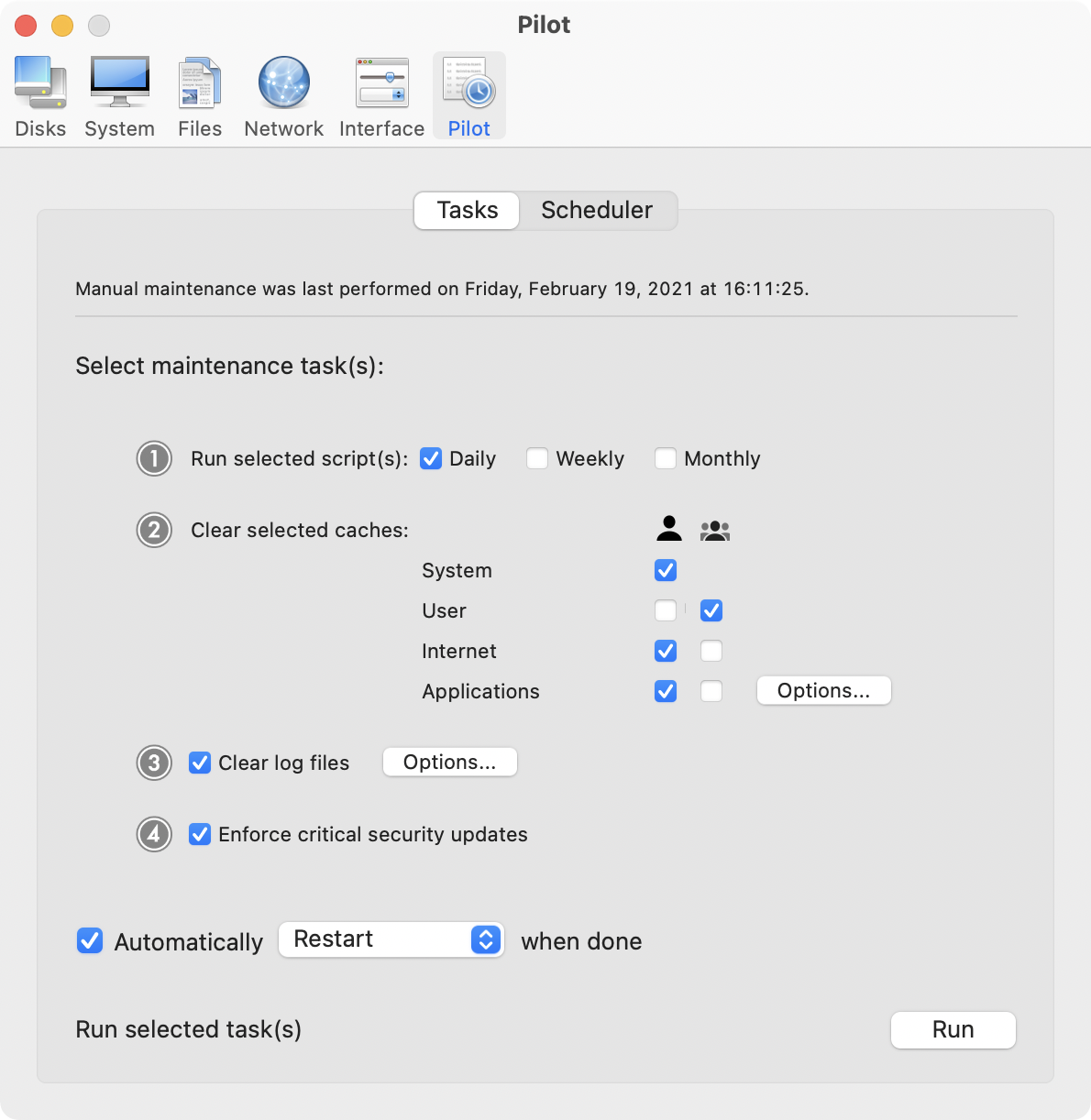
Ekero, Sweden - Maintain today is proud to announce the release of Cocktail 9.0 (El Capitan Edition), a new edition of Cocktail for users running OS X El Capitan 10.11. Cocktail is a general purpose utility for OS X that lets you clean, repair and optimize your Mac. The application serves up a perfect mix of maintenance tools and tweaks, all accessible through a clean and easy to use interface. Cocktail's features are arranged into five categories that helps you manage various aspects of your computer. It also comes with an automatic Pilot mode that allows you to simply press a button and relax, knowing that Cocktail will take care of the rest.
Disk
* Automatically check S.M.A.R.T. status of disks
* Enable or disable journaling
* Set disk sleep (spindown) time
* Modify standby delay
* Change other disk sleep settings
* Force eject CD/DVD
System
* Run periodic maintenance scripts
* Purge inactive memory and optimize virtual memory usage
* Manage Spotlight indexing
* Erase Spotlight indexes
* Modify Time Machine settings
* Rebuild Launch Services and Help databases
* Rebuild Mail's Envelope Index
* Update locate and whatis databases
* Force empty the Trash
* Change startup mode or set startup delay
* Disable startup sound
* Disable Notification Center and App Nap
Files
* Clear system caches
* Clear user caches
* Clear font caches
* Clear virtual memory swap files
* Clear temporary files
* Clear Internet caches
* Clear cookies, download lists, form values and history files
* Clear Adobe Flash Player caches and cookies
* Clear applications caches
* Search for corrupted preference files
* Delete unnecessary localization (language resources) files
* Clear and manage (view, print and save) log files
* Delete invisible DS Store files
* Delete locked or inaccessible items
Network
* Change speed, duplex and MTU of network cards
* Easily optimize network settings for common connection types
* Modify IP configuration parameters
* Configure File Sharing settings
Interface
* Customize look and features of Finder, Dock, login window and other system services
* Modify hidden settings of Safari, QuickTime X and iTunes
What's New:
* Added OS X El Capitan 10.11 compatibility
* Addresses an issue in which Cocktail may fail to gather disk information
* Addresses an issue in which Cocktail may report problems with mdutil
* Addresses an issue in which which network optimization for Fiber connection type could not be applied
* Addresses an issue in which check of the S.M.A.R.T. status may fail
* Addresses compatibility issues with OS X Server 5, Adobe Photoshop Lightroom 6, and Microsoft Office 2016
* Resolves an issue in which the uninstaller may fail to reset network settings to their default values
* Overall performance improvements
* Other minor bug fixes
System Requirements:
Cocktail 9.0 (El Capitan Edition) requires OS X El Capitan 10.11 to run. Cocktail (Yosemite Edition) for OS X 10.10, Cocktail (Mavericks Edition) for OS X 10.9, Cocktail (Mountain Lion Edition) for OS X 10.8 and Cocktail (Lion Edition) for OS X 10.7 are available for download from Maintain website.
Pricing and Availability:
Cocktail is $19.00 (USD) for a single user license and available for purchase from the Maintain website. When unregistered, Cocktail runs in demo mode and will expire after the tenth launch.
Cocktail: http://www.maintain.se/cocktail
Download Cocktail 9.0 (El Capitan Edition): http://usa.maintain.se/CocktailECE.dmg
Vimeo Video: https://vimeo.com/109816714
Screenshot: http://www.maintain.se/downloads/screenshots/screenshot1.png
Application Icon: http://www.maintain.se/downloads/screenshots/icon.png
Maintain develops tailored applications for Mac users. We work towards creating technical solutions which maintain your computer and make it as efficient and easy to use as possible. In addition, we offer comprehensive consultancy and support services which cover everything from operation of existing systems to purchase and implementation of new technical solutions. Among our clients are: Major League Baseball, Puma, The New York Times, Sony Pictures, Ericsson, Fortum, The City Of Calgary, Peak Performance, Loreal, Harvard University, Los Angeles Times, Swedish Film Institute, Weber, ESPN, Business Week, Swedish National Police Board, Norwegian Broadcasting Corporation, Getty Images, University of Texas, South Park Studios, CompUSA, bwin, Lockheed Martin, Defense Intelligence Agency, University of Michigan and hundred of thousands of Mac users around the world. Copyright (C) 2015 Maintain. All Rights Reserved. Apple, the Apple logo and Mac are registered trademarks of Apple Inc. in
the U.S. and/or other countries.
*******
Link To Article: http://prmac.com/release-id-76873.htm
*******
---------------------------------------------------------------------------------
Note that you can alter delivered distributions at any time.
Login to your account on prMac to alter your channel selection, or to opt-out at any time.
Maintain Releases Cocktail 9.0 (El Capitan Edition) - Published on 09/28/15
Maintain today announces Cocktail 9.0 (El Capitan Edition), a new edition of Cocktail for users running OS X El Capitan 10.11. Cocktail is a general purpose utility for OS X that lets users clean, repair and optimize their Macs. This version adds OS X El Capitan 10.11 and addresses compatibility issues with OS X Server 5, Adobe Photoshop Lightroom 6 and Microsoft Office 2016. It also contains many other bug fixes and overall performance improvements.
Ekero, Sweden - Maintain today is proud to announce the release of Cocktail 9.0 (El Capitan Edition), a new edition of Cocktail for users running OS X El Capitan 10.11. Cocktail is a general purpose utility for OS X that lets you clean, repair and optimize your Mac. The application serves up a perfect mix of maintenance tools and tweaks, all accessible through a clean and easy to use interface. Cocktail's features are arranged into five categories that helps you manage various aspects of your computer. It also comes with an automatic Pilot mode that allows you to simply press a button and relax, knowing that Cocktail will take care of the rest.
Disk
* Automatically check S.M.A.R.T. status of disks
* Enable or disable journaling
* Set disk sleep (spindown) time
* Modify standby delay
* Change other disk sleep settings
* Force eject CD/DVD
System
* Run periodic maintenance scripts
* Purge inactive memory and optimize virtual memory usage
* Manage Spotlight indexing
* Erase Spotlight indexes
* Modify Time Machine settings
* Rebuild Launch Services and Help databases
* Rebuild Mail's Envelope Index
* Update locate and whatis databases
* Force empty the Trash
* Change startup mode or set startup delay
* Disable startup sound
* Disable Notification Center and App Nap
Files
* Clear system caches
* Clear user caches
* Clear font caches
* Clear virtual memory swap files
* Clear temporary files
* Clear Internet caches
* Clear cookies, download lists, form values and history files
* Clear Adobe Flash Player caches and cookies
* Clear applications caches
* Search for corrupted preference files
* Delete unnecessary localization (language resources) files
* Clear and manage (view, print and save) log files
* Delete invisible DS Store files
* Delete locked or inaccessible items
Network
* Change speed, duplex and MTU of network cards
* Easily optimize network settings for common connection types
* Modify IP configuration parameters
* Configure File Sharing settings
Interface
* Customize look and features of Finder, Dock, login window and other system services
* Modify hidden settings of Safari, QuickTime X and iTunes
What's New:
* Added OS X El Capitan 10.11 compatibility
* Addresses an issue in which Cocktail may fail to gather disk information
* Addresses an issue in which Cocktail may report problems with mdutil
* Addresses an issue in which which network optimization for Fiber connection type could not be applied
* Addresses an issue in which check of the S.M.A.R.T. status may fail
* Addresses compatibility issues with OS X Server 5, Adobe Photoshop Lightroom 6, and Microsoft Office 2016
* Resolves an issue in which the uninstaller may fail to reset network settings to their default values
* Overall performance improvements
* Other minor bug fixes
System Requirements:
Cocktail 9.0 (El Capitan Edition) requires OS X El Capitan 10.11 to run. Cocktail (Yosemite Edition) for OS X 10.10, Cocktail (Mavericks Edition) for OS X 10.9, Cocktail (Mountain Lion Edition) for OS X 10.8 and Cocktail (Lion Edition) for OS X 10.7 are available for download from Maintain website.
Pricing and Availability:
Cocktail is $19.00 (USD) for a single user license and available for purchase from the Maintain website. When unregistered, Cocktail runs in demo mode and will expire after the tenth launch.
Cocktail: http://www.maintain.se/cocktail
Download Cocktail 9.0 (El Capitan Edition): http://usa.maintain.se/CocktailECE.dmg
Vimeo Video: https://vimeo.com/109816714
Screenshot: http://www.maintain.se/downloads/screenshots/screenshot1.png
Application Icon: http://www.maintain.se/downloads/screenshots/icon.png

Maintain develops tailored applications for Mac users. We work towards creating technical solutions which maintain your computer and make it as efficient and easy to use as possible. In addition, we offer comprehensive consultancy and support services which cover everything from operation of existing systems to purchase and implementation of new technical solutions. Among our clients are: Major League Baseball, Puma, The New York Times, Sony Pictures, Ericsson, Fortum, The City Of Calgary, Peak Performance, Loreal, Harvard University, Los Angeles Times, Swedish Film Institute, Weber, ESPN, Business Week, Swedish National Police Board, Norwegian Broadcasting Corporation, Getty Images, University of Texas, South Park Studios, CompUSA, bwin, Lockheed Martin, Defense Intelligence Agency, University of Michigan and hundred of thousands of Mac users around the world. Copyright (C) 2015 Maintain. All Rights Reserved. Apple, the Apple logo and Mac are registered trademarks of Apple Inc. in
the U.S. and/or other countries.
*******
Link To Article: http://prmac.com/release-id-76873.htm
*******
---------------------------------------------------------------------------------
Note that you can alter delivered distributions at any time.
Login to your account on prMac to alter your channel selection, or to opt-out at any time.
Create Booklet 1.2 for OS X - popular booklet app adds new pro features
A new article has been published at prMac.
Create Booklet 1.2 for OS X - popular booklet app adds new pro features - Published on 09/28/15
TheKeptPromise is pleased to announce the release of Create Booklet 1.2, an update to its popular booklet printing app for Mac OS X. Create Booklet allows anyone to create a booklet from almost any file from within almost any software. Thanks to the manual duplex feature, the user saves money, time and paper when printing many pages. MacUpdate's most downloaded booklet app adds requested features like Page Numbering and Creep Compensation, as well as an improved layout and help.
Ratingen, Germany - TheKeptPromise is pleased to announce the release of Create Booklet 1.2 for Mac OS X, an update to its app and PDF service. The app allows the user to create a booklet from almost any file from within almost any software. Create Booklet is the standard solution for creating booklets since 2005, with over 100,000 users.
New in 1.2:
* Straight Order
* Page Numbering
* Creep Compensation
* Auto help when you need it
When version 1.1 came to the App Store, it was the first app to allow printing duplex booklets on any printer, using the manual duplex method. After the release, TheKeptPromise listened very carefully to their user's requests. As a result, Create Booklet 1.2 added numerous small improvements as well as features like Page Numbering, Creep Compensation as well as an improved layout and an extended help section.
Thanks to the new help section, tips show up automatically at the very points the user needs it.
Create Booklet is ready for Mac OS X El Capitan.
Features:
* Straight Order
* Manual Duplex: Print duplex, even with a non-duplex printer
* Create a booklet from any app: Open Create Booklet directly from the print panel
* Direct PDF editing: Add Empty pages, add images, add complete PDFs, reorder pages, remove unneeded pages
* Page Numbering
* Creep Compensation
* Auto help when you need it
* Save a booklet to a new PDF
* Select output print format and orientation
* Layout your PDF to the final output size using zoom and position setting
* Reverse booklet page order (allows right to left documents usage!)
* Split thick booklets into multiple thin ones
* Easily staple booklets: Create Booklet adds staple marks on the first and last page
Why did we develop Create Booklet? "When you have to print a lot of pages, a booklet is much more fun to hold and read. So we decided to create a tool that elegantly integrates with whatever the users intend to print, thereby saving them time, money and paper. Any booklet is just a click away with Create Booklet. It's really that easy", says Christoph Vogelbusch, CEO of TheKeptPromise.
See what our customers have to say about Create Booklet:
"Wow. I wish this existed years ago, or that I'd known about it. I've just used Create Booklet to make the first ever books for the Bumthang people in their own language. Thank YOU." - Mark
"THANK YOU for Create Booklet! I have used it several times now to print out playbills for my children's various school plays, and it has been an absolute lifesaver." - William W. Lin
"I was desperately looking for a quick and easy way of making a Christmas Carol booklet. I came across this site, and it was almost like a Christmas miracle ;-) Thanks so much for making and sharing Create Booklet. It works perfectly and really helped me out." - Dan
System Requirements:
* OS X 10.7 or later
* 64-bit processor
Pricing and Availability:
Create Booklet 1.2 is available worldwide in the Mac App Store for $9.99 (USD) in the Utilities category.
TheKeptPromise: http://www.thekeptpromise.com
Create Booklet 1.2: http://www.thekeptpromise.com/CreateBooklet/
Purchase and Download (MAS): https://itunes.apple.com/app/create-booklet/id943029046
Screenshot: http://a4.mzstatic.com/us/r30/Purple7/v4/37/e0/f6/37e0f6c2-c27e-99b0-adf8-fc1eb5000c29/screen800x500.jpeg
Application Icon: http://a1.mzstatic.com/us/r30/Purple69/v4/45/c4/3d/45c43d0c-ffd4-c1a3-098d-76f832bd9ac2/icon256.png
TheKeptPromise creates software that lives up to its promise. The company develops solutions in those areas they feel the customer needs are not met. TheKeptPromise is a start up of award winning professionals who have published scientific papers, have had photos selected by National Geographic, 1px and more. All Material and Software (C) Copyright 2015 TheKeptPromise. All Rights Reserved. Apple, the Apple logo, Macintosh and Mac OS X are registered trademarks of Apple Inc. in the U.S. and/or other countries. Other trademarks and registered trademarks may be the property of their respective owners.
*******
Link To Article: http://prmac.com/release-id-76870.htm
*******
---------------------------------------------------------------------------------
Note that you can alter delivered distributions at any time.
Login to your account on prMac to alter your channel selection, or to opt-out at any time.
Create Booklet 1.2 for OS X - popular booklet app adds new pro features - Published on 09/28/15
TheKeptPromise is pleased to announce the release of Create Booklet 1.2, an update to its popular booklet printing app for Mac OS X. Create Booklet allows anyone to create a booklet from almost any file from within almost any software. Thanks to the manual duplex feature, the user saves money, time and paper when printing many pages. MacUpdate's most downloaded booklet app adds requested features like Page Numbering and Creep Compensation, as well as an improved layout and help.
Ratingen, Germany - TheKeptPromise is pleased to announce the release of Create Booklet 1.2 for Mac OS X, an update to its app and PDF service. The app allows the user to create a booklet from almost any file from within almost any software. Create Booklet is the standard solution for creating booklets since 2005, with over 100,000 users.
New in 1.2:
* Straight Order
* Page Numbering
* Creep Compensation
* Auto help when you need it
When version 1.1 came to the App Store, it was the first app to allow printing duplex booklets on any printer, using the manual duplex method. After the release, TheKeptPromise listened very carefully to their user's requests. As a result, Create Booklet 1.2 added numerous small improvements as well as features like Page Numbering, Creep Compensation as well as an improved layout and an extended help section.
Thanks to the new help section, tips show up automatically at the very points the user needs it.
Create Booklet is ready for Mac OS X El Capitan.
Features:
* Straight Order
* Manual Duplex: Print duplex, even with a non-duplex printer
* Create a booklet from any app: Open Create Booklet directly from the print panel
* Direct PDF editing: Add Empty pages, add images, add complete PDFs, reorder pages, remove unneeded pages
* Page Numbering
* Creep Compensation
* Auto help when you need it
* Save a booklet to a new PDF
* Select output print format and orientation
* Layout your PDF to the final output size using zoom and position setting
* Reverse booklet page order (allows right to left documents usage!)
* Split thick booklets into multiple thin ones
* Easily staple booklets: Create Booklet adds staple marks on the first and last page
Why did we develop Create Booklet? "When you have to print a lot of pages, a booklet is much more fun to hold and read. So we decided to create a tool that elegantly integrates with whatever the users intend to print, thereby saving them time, money and paper. Any booklet is just a click away with Create Booklet. It's really that easy", says Christoph Vogelbusch, CEO of TheKeptPromise.
See what our customers have to say about Create Booklet:
"Wow. I wish this existed years ago, or that I'd known about it. I've just used Create Booklet to make the first ever books for the Bumthang people in their own language. Thank YOU." - Mark
"THANK YOU for Create Booklet! I have used it several times now to print out playbills for my children's various school plays, and it has been an absolute lifesaver." - William W. Lin
"I was desperately looking for a quick and easy way of making a Christmas Carol booklet. I came across this site, and it was almost like a Christmas miracle ;-) Thanks so much for making and sharing Create Booklet. It works perfectly and really helped me out." - Dan
System Requirements:
* OS X 10.7 or later
* 64-bit processor
Pricing and Availability:
Create Booklet 1.2 is available worldwide in the Mac App Store for $9.99 (USD) in the Utilities category.
TheKeptPromise: http://www.thekeptpromise.com
Create Booklet 1.2: http://www.thekeptpromise.com/CreateBooklet/
Purchase and Download (MAS): https://itunes.apple.com/app/create-booklet/id943029046
Screenshot: http://a4.mzstatic.com/us/r30/Purple7/v4/37/e0/f6/37e0f6c2-c27e-99b0-adf8-fc1eb5000c29/screen800x500.jpeg

Application Icon: http://a1.mzstatic.com/us/r30/Purple69/v4/45/c4/3d/45c43d0c-ffd4-c1a3-098d-76f832bd9ac2/icon256.png

TheKeptPromise creates software that lives up to its promise. The company develops solutions in those areas they feel the customer needs are not met. TheKeptPromise is a start up of award winning professionals who have published scientific papers, have had photos selected by National Geographic, 1px and more. All Material and Software (C) Copyright 2015 TheKeptPromise. All Rights Reserved. Apple, the Apple logo, Macintosh and Mac OS X are registered trademarks of Apple Inc. in the U.S. and/or other countries. Other trademarks and registered trademarks may be the property of their respective owners.
*******
Link To Article: http://prmac.com/release-id-76870.htm
*******
---------------------------------------------------------------------------------
Note that you can alter delivered distributions at any time.
Login to your account on prMac to alter your channel selection, or to opt-out at any time.
Offline Igbo to English Language Dictionary 3.0 for iOS
A new article has been published at prMac.
Offline Igbo to English Language Dictionary 3.0 for iOS - Published on 09/28/15
LastThink announces the release of Offline Igbo to English Language Dictionary 3.0, an important update to their highly customizable Dictionary application for iOS devices. Users can seek and find any word's translation and synonyms anytime and anywhere from their iOS devices. The dictionary offers users a huge collection of words with their translations as well as definitions and synonyms, with well over five hundred thousand synonym variants. Version 3.0 offers improved search capabilities.
Yerevan, Armenia - LastThink is proud to announce the release of Offline Igbo to English Language Dictionary 3.0, an important update to their highly customizable Dictionary application developed for iPhone, iPad, and iPod touch devices. You can seek and find any word's translation and synonyms anytime and anywhere from your Apple devices.
Features:
* Tremendous range of synonyms and antonyms with well over five hundred thousand synonym variants
* Information about the discipline of structural linguistics by suggesting vital enough sentences
* Appropriate translations of colloquial and formal words as well as conjugation of verbs and declension of nouns
* Availability of various word definitions which will exactly influence on your understanding of a Foreign Language in a detailed way
* A distinction of a section named "Favorites" with the possibility of saving as many unknown words as you wish
* Thorough analysis of parts of speech (noun, verb, adjective, adverb) and their grammatical functions (subject, object, etc.)
* A possibility of the following application usage without an internet demand
* Existence of contemporary words such as "Woot", "OMG", "Crunk" and many others
In our new updated version we grant you a chance of typing the unknown word either in capitals or in small letters and the app will bring all the possible variants and definitions of the dictionary entries saved both in capital and small letters.
If you however experience any issues, please do not hesitate to contact us if you'd like to share your experience with Offline Dictionaries, or provide suggestions on how we could improve the product further. We will be more than happy to get in touch.
NOTE: We have selected data from the internet and if any assembly or constitution doesn't want us to show the content of the unit, please recommend us to remove it.
Device Requirements:
* iPhone, iPad, and iPod touch
* Optimized for iPhone 5, iPhone 6, and iPhone 6 Plus
* Requires iOS 6.0 or later
* Universal Application
* 102 MB
Pricing and Availability:
Offline Igbo to English Language Dictionary 3.0 is free and available worldwide exclusively through the App Store in the Education category.
LastThink: http://lastthink.com/
Offline Igbo to English Language Dictionary 3.0: https://www.facebook.com/OfflineDictionary/timeline/
Download From iTunes: https://itunes.apple.com/app/offline-igbo-to-english-language/id1008714248
Screenshot: http://a4.mzstatic.com/us/r30/Purple7/v4/dd/ee/8b/ddee8bd3-4dc5-c31f-1fda-98fb5f6ce2b5/screen322x572.jpeg
App Icon: http://a2.mzstatic.com/us/r30/Purple3/v4/02/ea/44/02ea4478-60d9-f92e-a41e-b4e502c96d41/icon175x175.png
LastThink is an IT company with a focus on mobile development. It has extended its list of services since 2012 to offer high-end business process management, system integration, as well as up-to-date communication solutions. LastThink's mission is to deliver maximum business value to its customers by designing, developing, implementing and maintaining efficient and high quality software solutions aligned with their most essential business needs. Their team will always do its best to meet client expectations. Copyright (C) 2015 LastThink LLC. All Rights Reserved. Apple, the Apple logo, iPhone, iPad and iPod are registered trademarks of Apple Inc. in the U.S. and/or other countries.
*******
Link To Article: http://prmac.com/release-id-76872.htm
*******
---------------------------------------------------------------------------------
Note that you can alter delivered distributions at any time.
Login to your account on prMac to alter your channel selection, or to opt-out at any time.
Offline Igbo to English Language Dictionary 3.0 for iOS - Published on 09/28/15
LastThink announces the release of Offline Igbo to English Language Dictionary 3.0, an important update to their highly customizable Dictionary application for iOS devices. Users can seek and find any word's translation and synonyms anytime and anywhere from their iOS devices. The dictionary offers users a huge collection of words with their translations as well as definitions and synonyms, with well over five hundred thousand synonym variants. Version 3.0 offers improved search capabilities.
Yerevan, Armenia - LastThink is proud to announce the release of Offline Igbo to English Language Dictionary 3.0, an important update to their highly customizable Dictionary application developed for iPhone, iPad, and iPod touch devices. You can seek and find any word's translation and synonyms anytime and anywhere from your Apple devices.
Features:
* Tremendous range of synonyms and antonyms with well over five hundred thousand synonym variants
* Information about the discipline of structural linguistics by suggesting vital enough sentences
* Appropriate translations of colloquial and formal words as well as conjugation of verbs and declension of nouns
* Availability of various word definitions which will exactly influence on your understanding of a Foreign Language in a detailed way
* A distinction of a section named "Favorites" with the possibility of saving as many unknown words as you wish
* Thorough analysis of parts of speech (noun, verb, adjective, adverb) and their grammatical functions (subject, object, etc.)
* A possibility of the following application usage without an internet demand
* Existence of contemporary words such as "Woot", "OMG", "Crunk" and many others
In our new updated version we grant you a chance of typing the unknown word either in capitals or in small letters and the app will bring all the possible variants and definitions of the dictionary entries saved both in capital and small letters.
If you however experience any issues, please do not hesitate to contact us if you'd like to share your experience with Offline Dictionaries, or provide suggestions on how we could improve the product further. We will be more than happy to get in touch.
NOTE: We have selected data from the internet and if any assembly or constitution doesn't want us to show the content of the unit, please recommend us to remove it.
Device Requirements:
* iPhone, iPad, and iPod touch
* Optimized for iPhone 5, iPhone 6, and iPhone 6 Plus
* Requires iOS 6.0 or later
* Universal Application
* 102 MB
Pricing and Availability:
Offline Igbo to English Language Dictionary 3.0 is free and available worldwide exclusively through the App Store in the Education category.
LastThink: http://lastthink.com/
Offline Igbo to English Language Dictionary 3.0: https://www.facebook.com/OfflineDictionary/timeline/
Download From iTunes: https://itunes.apple.com/app/offline-igbo-to-english-language/id1008714248
Screenshot: http://a4.mzstatic.com/us/r30/Purple7/v4/dd/ee/8b/ddee8bd3-4dc5-c31f-1fda-98fb5f6ce2b5/screen322x572.jpeg

App Icon: http://a2.mzstatic.com/us/r30/Purple3/v4/02/ea/44/02ea4478-60d9-f92e-a41e-b4e502c96d41/icon175x175.png

LastThink is an IT company with a focus on mobile development. It has extended its list of services since 2012 to offer high-end business process management, system integration, as well as up-to-date communication solutions. LastThink's mission is to deliver maximum business value to its customers by designing, developing, implementing and maintaining efficient and high quality software solutions aligned with their most essential business needs. Their team will always do its best to meet client expectations. Copyright (C) 2015 LastThink LLC. All Rights Reserved. Apple, the Apple logo, iPhone, iPad and iPod are registered trademarks of Apple Inc. in the U.S. and/or other countries.
*******
Link To Article: http://prmac.com/release-id-76872.htm
*******
---------------------------------------------------------------------------------
Note that you can alter delivered distributions at any time.
Login to your account on prMac to alter your channel selection, or to opt-out at any time.
Easily Watermark Photos with PhotoMarks 2.0 for iPhone & iPad
A new article has been published at prMac.
Easily Watermark Photos with PhotoMarks 2.0 for iPhone & iPad - Published on 09/28/15
Bits&Coffee announces the release of PhotoMarks 2.0 for iOS devices, an important update to their app that applies text and logo watermarks to photos and then shares them on Instagram, Facebook, Twitter, or via Email. The text marks (watermarks) are fully customizable with a wide selection of fonts, a great color palette, and effects like: shadow, stroke, and adjustable transparency. The text can be easily placed, scaled, or rotated with simple taps.
Bucharest, Romania - Bits&Coffee is proud to announce the release of PhotoMarks 2.0 for iPhone, iPad, and iPod touch devices, an important update to their app that applies text and logo watermarks to photos and then shares them on Instagram, Facebook, Twitter, or via Email.
The text marks (watermarks) are fully customizable with a wide selection of fonts, a great color palette, and effects like: shadow, stroke, and adjustable transparency. The text can be easily placed, scaled, or rotated with simple taps, and the rotation algorithm will snap to 90-degree increments for convenience.
The logo marks can be any image from the device (e.g. a custom logo) and can be customized with adjustable transparency and a shadow effect. As with the text marks, the logo can be easily placed, scaled and rotated with simple taps.
Working with multiple layers is an easy and visually pleasing experience in PhotoMarks, especially with the added support of undo/redo for every editing operation. Photos can be added from the device's library and the resulting images can be saved in full resolution to Camera Roll or easily shared on Instagram, Facebook, Twitter, or sent via Email.
What's New in Version 2.0
* Updated for iOS 9 with support for the iPhone 6s, 6s Plus, and iPad Pro
* New user interface with slidable options for marks
* New Menu section, Share menu, and Notifications
* Other improvements and bug fixes
Device Requirements:
* iPhone, iPad, and iPod touch
* Requires iOS 7.0 or later
* Universal Application
* 3.5 MB
Pricing and Availability:
PhotoMarks 2.0 is $2.99 USD (or equivalent amounts in other currencies) and is available worldwide exclusively through the App Store in the Photo and Video category.
PhotoMarks 2.0: http://www.photomarksapp.com/ios.html
Purchase and Download from iTunes: https://itunes.apple.com/app/photomarks/id616003945
Screenshot: http://a3.mzstatic.com/us/r30/Purple3/v4/88/71/6f/88716f77-f4d5-19e6-c12b-2fe3dd7607f8/screen322x572.jpeg
App Icon: http://a5.mzstatic.com/us/r30/Purple6/v4/52/d5/7d/52d57d5b-1754-339b-8589-544d0137b6dc/icon175x175.png
Since 2007, Bits&Coffee has been developing and marketing apps on iOS, Mac, and Windows. In addition to PhotoMarks for iOS the company also offers ActivityTracker, VideoSound, PhotoVideoCollage, VideoStory, and the Rainbow keyboard. Copyright (C) 2015 Bits&Coffee. All Rights Reserved. Apple, the Apple logo, iPhone, iPad and iPod are registered trademarks of Apple Inc. in the U.S. and/or other countries.
*******
Link To Article: http://prmac.com/release-id-76871.htm
*******
---------------------------------------------------------------------------------
Note that you can alter delivered distributions at any time.
Login to your account on prMac to alter your channel selection, or to opt-out at any time.
Easily Watermark Photos with PhotoMarks 2.0 for iPhone & iPad - Published on 09/28/15
Bits&Coffee announces the release of PhotoMarks 2.0 for iOS devices, an important update to their app that applies text and logo watermarks to photos and then shares them on Instagram, Facebook, Twitter, or via Email. The text marks (watermarks) are fully customizable with a wide selection of fonts, a great color palette, and effects like: shadow, stroke, and adjustable transparency. The text can be easily placed, scaled, or rotated with simple taps.
Bucharest, Romania - Bits&Coffee is proud to announce the release of PhotoMarks 2.0 for iPhone, iPad, and iPod touch devices, an important update to their app that applies text and logo watermarks to photos and then shares them on Instagram, Facebook, Twitter, or via Email.
The text marks (watermarks) are fully customizable with a wide selection of fonts, a great color palette, and effects like: shadow, stroke, and adjustable transparency. The text can be easily placed, scaled, or rotated with simple taps, and the rotation algorithm will snap to 90-degree increments for convenience.
The logo marks can be any image from the device (e.g. a custom logo) and can be customized with adjustable transparency and a shadow effect. As with the text marks, the logo can be easily placed, scaled and rotated with simple taps.
Working with multiple layers is an easy and visually pleasing experience in PhotoMarks, especially with the added support of undo/redo for every editing operation. Photos can be added from the device's library and the resulting images can be saved in full resolution to Camera Roll or easily shared on Instagram, Facebook, Twitter, or sent via Email.
What's New in Version 2.0
* Updated for iOS 9 with support for the iPhone 6s, 6s Plus, and iPad Pro
* New user interface with slidable options for marks
* New Menu section, Share menu, and Notifications
* Other improvements and bug fixes
Device Requirements:
* iPhone, iPad, and iPod touch
* Requires iOS 7.0 or later
* Universal Application
* 3.5 MB
Pricing and Availability:
PhotoMarks 2.0 is $2.99 USD (or equivalent amounts in other currencies) and is available worldwide exclusively through the App Store in the Photo and Video category.
PhotoMarks 2.0: http://www.photomarksapp.com/ios.html
Purchase and Download from iTunes: https://itunes.apple.com/app/photomarks/id616003945
Screenshot: http://a3.mzstatic.com/us/r30/Purple3/v4/88/71/6f/88716f77-f4d5-19e6-c12b-2fe3dd7607f8/screen322x572.jpeg

App Icon: http://a5.mzstatic.com/us/r30/Purple6/v4/52/d5/7d/52d57d5b-1754-339b-8589-544d0137b6dc/icon175x175.png

Since 2007, Bits&Coffee has been developing and marketing apps on iOS, Mac, and Windows. In addition to PhotoMarks for iOS the company also offers ActivityTracker, VideoSound, PhotoVideoCollage, VideoStory, and the Rainbow keyboard. Copyright (C) 2015 Bits&Coffee. All Rights Reserved. Apple, the Apple logo, iPhone, iPad and iPod are registered trademarks of Apple Inc. in the U.S. and/or other countries.
*******
Link To Article: http://prmac.com/release-id-76871.htm
*******
---------------------------------------------------------------------------------
Note that you can alter delivered distributions at any time.
Login to your account on prMac to alter your channel selection, or to opt-out at any time.
Tropical Software Announces TopXNotes Freemium Suite for iOS
A new article has been published at prMac.
Tropical Software Announces TopXNotes Freemium Suite for iOS - Published on 09/28/15
Florida based Tropical Software announced today that its TopXNotes for iOS is now a Freemium Suite comprised of TopXNotes Free, TopXNotes, and TopXNotes Pro. TopXNotes Free contains 4-way sorting in the NoteOrganizer. The TopXNotes family will keep your notes synchronized between TopXNotes for Mac and TopXNotes Touch for iPhone, iPad and iPod touch. TopXNotes Free for iOS offers major improvements to its WiFi based NoteSync process developed for TopXNotes.
Atlantic Beach, Florida - Tropical Software is thrilled to announce that its TopXNotes for iOS is now a "Freemium Suite" comprised of TopXNotes Free, TopXNotes, and TopXNotes Pro. Today we are announcing the availability of TopXNotes Free with WiFi NoteSync to TopXNotes for Mac
TopXNotes Free for iOS (iPhone, iPad and iPod touch) is now available free in the Apple iTunes store. TopXNotes Free contains 4-way sorting in the NoteOrganizer. The TopXNotes family will keep your notes synchronized between TopXNotes for Mac and TopXNotes Touch for iPhone, iPad and iPod touch.
TopXNotes Free for iOS has the major improvements to our WiFi based NoteSync process developed for TopXNotes including improved better efficiency, stability and performance including improved handling of large files, files with many notes and other conditions.
TopXNotes Free also checks for compatible NoteSync services between Mac and iOS devices and will not attempt sync between incompatible versions. If you suspect a problem be sure you have the latest versions on iOS and Mac.
TopXNotes Free features note creation and editing in landscape and portrait modes, emailing a note, clickable hot links, and note synchronization (NoteSync) with TopXNotes for Mac. Now you can also have your notes "on the go," create new notes, edit notes, delete notes and keep them in sync with your Mac's notes.
NoteOrganizer allows sorting by note title or date, ascending or descending for either. NoteOrganizer list titles, list dates, search, email, and the default note font are the preferred iOS family font (Helvetica.) TopXNotes Free has more changes to accommodate retina display and new screen sizes in iPhone and iPad.
TopXNotes Free for iOS, with retina graphics, compliments the latest release of TopXNotes Mac, the latest update to its award-winning personal note manager for Macintosh. When combined with TopXNotes for Mac customers can synchronize notes between one Mac and multiple devices running TopXNotes touch including iPhone, iPod touch and/or iPad.
TopXNotes Free for iOS also works perfectly with Apple's latest iOS and TopXNotes Free for iOS even supports the latest iOS spell checking.
This release is the latest advance in a series of companion products we plan to release for Apple touch devices. Be sure to also try our note organizing solution for Mac notes, TopXNotes for Mac, today.
Device Requirements:
* iPhone, iPad, or iPod touch
* Requires iOS 6.0 or later
* 7.0 MB
Pricing and Availability:
TopXNotes Free for iOS 1.5 is free and available worldwide exclusively through the App Store in the Productivity category.
TopXNotes Free: http://www.tropic4.com/topxnotestouch.html
Purchase and Download: https://itunes.apple.com/us/developer/tropical-software-inc./id368084880
Reviews and Awards: http://www.tropic4.com/reviews.html
Screenshot 1: http://a3.mzstatic.com/us/r1000/074/Purple/02/19/32/mzl.iqazsnxq.320x480-75.jpg
Screenshot 2: http://a4.mzstatic.com/us/r1000/081/Purple/44/70/3e/mzl.gsnaoame.320x480-75.jpg
App Icon: http://www.tropic4.com/images/GetOrganizedNoReflect.png
Tropical Software makes the award-winning TopXNotes, a modern personal note manager with state of the art proprietary encryption technology for the ultimate in securing personal information. Located in Atlantic Beach, Florida, Tropical Software is owned and operated by former Apple employee James Lee, and is dedicated to improving the lives of its customers by offering easy to use productivity software for Macs and Apple touch devices including iPhone, iPod touch and iPad. Copyright (C) 2015 Tropical Software. All Rights Reserved. Apple, the Apple logo, iPhone, iPod, iPad and Macintosh are registered trademarks of Apple Inc. in the U.S. and/or other countries.
*******
Link To Article: http://prmac.com/release-id-76869.htm
*******
---------------------------------------------------------------------------------
Note that you can alter delivered distributions at any time.
Login to your account on prMac to alter your channel selection, or to opt-out at any time.
Tropical Software Announces TopXNotes Freemium Suite for iOS - Published on 09/28/15
Florida based Tropical Software announced today that its TopXNotes for iOS is now a Freemium Suite comprised of TopXNotes Free, TopXNotes, and TopXNotes Pro. TopXNotes Free contains 4-way sorting in the NoteOrganizer. The TopXNotes family will keep your notes synchronized between TopXNotes for Mac and TopXNotes Touch for iPhone, iPad and iPod touch. TopXNotes Free for iOS offers major improvements to its WiFi based NoteSync process developed for TopXNotes.
Atlantic Beach, Florida - Tropical Software is thrilled to announce that its TopXNotes for iOS is now a "Freemium Suite" comprised of TopXNotes Free, TopXNotes, and TopXNotes Pro. Today we are announcing the availability of TopXNotes Free with WiFi NoteSync to TopXNotes for Mac
TopXNotes Free for iOS (iPhone, iPad and iPod touch) is now available free in the Apple iTunes store. TopXNotes Free contains 4-way sorting in the NoteOrganizer. The TopXNotes family will keep your notes synchronized between TopXNotes for Mac and TopXNotes Touch for iPhone, iPad and iPod touch.
TopXNotes Free for iOS has the major improvements to our WiFi based NoteSync process developed for TopXNotes including improved better efficiency, stability and performance including improved handling of large files, files with many notes and other conditions.
TopXNotes Free also checks for compatible NoteSync services between Mac and iOS devices and will not attempt sync between incompatible versions. If you suspect a problem be sure you have the latest versions on iOS and Mac.
TopXNotes Free features note creation and editing in landscape and portrait modes, emailing a note, clickable hot links, and note synchronization (NoteSync) with TopXNotes for Mac. Now you can also have your notes "on the go," create new notes, edit notes, delete notes and keep them in sync with your Mac's notes.
NoteOrganizer allows sorting by note title or date, ascending or descending for either. NoteOrganizer list titles, list dates, search, email, and the default note font are the preferred iOS family font (Helvetica.) TopXNotes Free has more changes to accommodate retina display and new screen sizes in iPhone and iPad.
TopXNotes Free for iOS, with retina graphics, compliments the latest release of TopXNotes Mac, the latest update to its award-winning personal note manager for Macintosh. When combined with TopXNotes for Mac customers can synchronize notes between one Mac and multiple devices running TopXNotes touch including iPhone, iPod touch and/or iPad.
TopXNotes Free for iOS also works perfectly with Apple's latest iOS and TopXNotes Free for iOS even supports the latest iOS spell checking.
This release is the latest advance in a series of companion products we plan to release for Apple touch devices. Be sure to also try our note organizing solution for Mac notes, TopXNotes for Mac, today.
Device Requirements:
* iPhone, iPad, or iPod touch
* Requires iOS 6.0 or later
* 7.0 MB
Pricing and Availability:
TopXNotes Free for iOS 1.5 is free and available worldwide exclusively through the App Store in the Productivity category.
TopXNotes Free: http://www.tropic4.com/topxnotestouch.html
Purchase and Download: https://itunes.apple.com/us/developer/tropical-software-inc./id368084880
Reviews and Awards: http://www.tropic4.com/reviews.html
Screenshot 1: http://a3.mzstatic.com/us/r1000/074/Purple/02/19/32/mzl.iqazsnxq.320x480-75.jpg

Screenshot 2: http://a4.mzstatic.com/us/r1000/081/Purple/44/70/3e/mzl.gsnaoame.320x480-75.jpg

App Icon: http://www.tropic4.com/images/GetOrganizedNoReflect.png

Tropical Software makes the award-winning TopXNotes, a modern personal note manager with state of the art proprietary encryption technology for the ultimate in securing personal information. Located in Atlantic Beach, Florida, Tropical Software is owned and operated by former Apple employee James Lee, and is dedicated to improving the lives of its customers by offering easy to use productivity software for Macs and Apple touch devices including iPhone, iPod touch and iPad. Copyright (C) 2015 Tropical Software. All Rights Reserved. Apple, the Apple logo, iPhone, iPod, iPad and Macintosh are registered trademarks of Apple Inc. in the U.S. and/or other countries.
*******
Link To Article: http://prmac.com/release-id-76869.htm
*******
---------------------------------------------------------------------------------
Note that you can alter delivered distributions at any time.
Login to your account on prMac to alter your channel selection, or to opt-out at any time.
Subscribe to:
Posts (Atom)