A new article has been published at prMac.
CS Odessa Releases a Paid Australia Map Solution for ConceptDraw PRO v10 - Published on 09/29/15
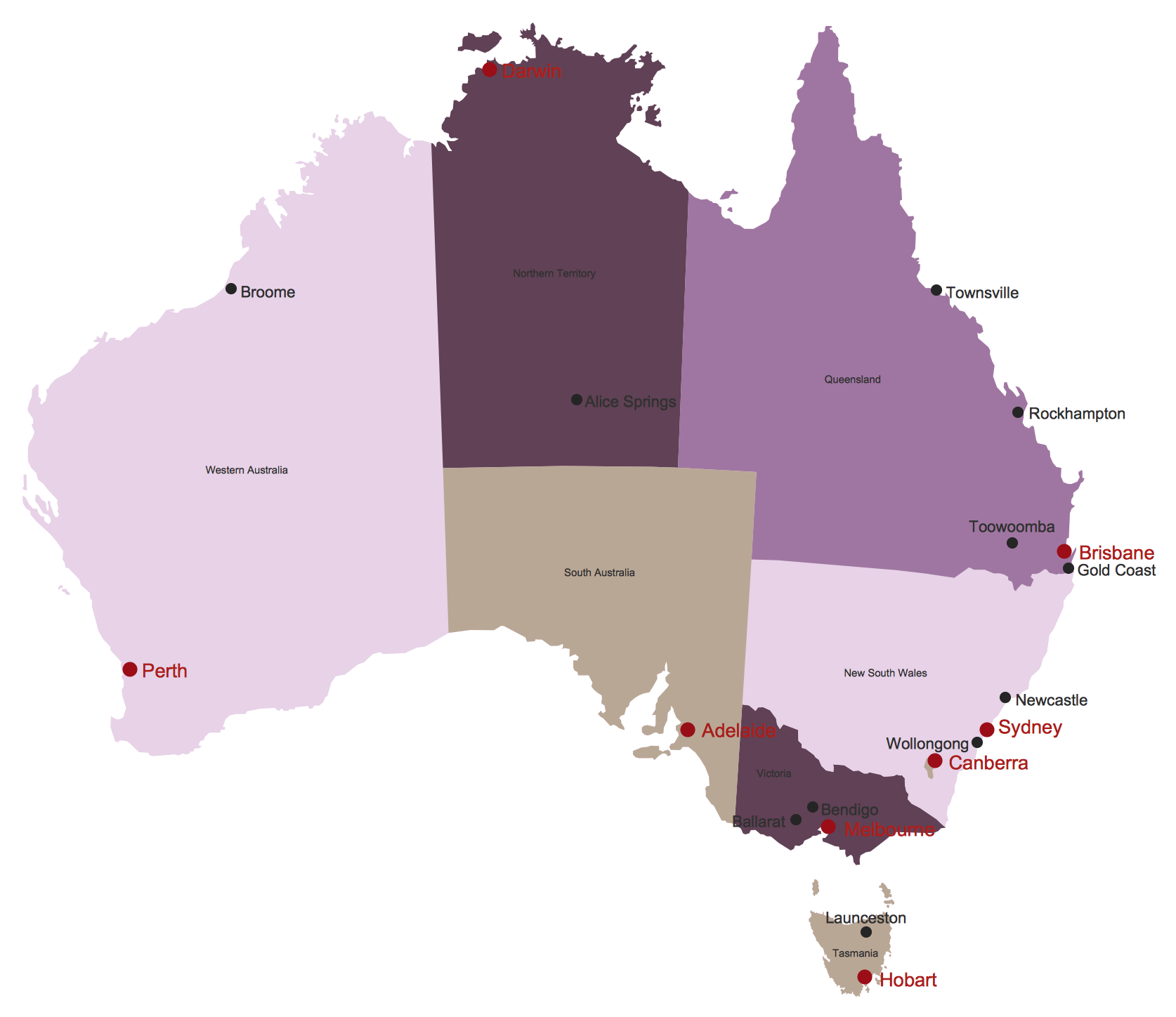
CS Odessa today releases the Australia Map Solution for ConceptDraw PRO v10. The collection of library objects, templates, and example drawings for ConceptDraw PRO make short work of drawing maps that contain county information. The newest addition to ConceptDraw Solution Park, the Australia Map Solution for ConceptDraw PRO offers optional levels of detail, showing sub-divisions of territory and local government areas, along with major cities and capitals.
San Jose, California - CS Odessa's newest addition to ConceptDraw Solution Park is designed to assist individuals who are looking for Australian map content to be represented in maps they draw. The collection of library objects, templates, and example drawings for ConceptDraw PRO make short work of drawing maps that contain county information. The ConceptDraw PRO Australia Map Solution is available for a $25 charge to users of ConceptDraw PRO v10 and ConceptDraw Office v3, via ConceptDraw Solution Park. ConceptDraw PRO and ConceptDraw Office work with the latest versions of both Apple OS X and Microsoft Windows.
The Australia Map Solution for ConceptDraw PRO offers optional levels of detail, showing sub-divisions of territory and local government areas, along with major cities and capitals.
ConceptDraw PRO is well-known for its ability to exchange documents with Microsoft Visio - the de facto standard in business graphics documents. ConceptDraw PRO can open and save documents that can be used by Visio users. It is supported by the powerful business solutions located in ConceptDraw Solution Park, and retails for only $199 per end user license.
ConceptDraw Solution Park is an online collection of visual solutions for knowledge workers designed to provide productivity increasing solutions for all ConceptDraw products. ConceptDraw Solution Park contains many subject areas for professional applications. It delivers solutions for Project Management, Business Productivity, Universal Diagramming and Collaboration.
ConceptDraw Office v3 is an integrated set of visualization products and document exchange technologies. ConceptDraw Office consists of a diagramming platform, a mind mapping tool, and a project management tool. These tools are essential to generate business diagrams, mind maps, project plans, dashboards, presentations, schematics, and any other business visualizations.
ConceptDraw Office v3 is the third generation suite of ConceptDraw products that uses ConceptDraw InGyre3 integration technology to share data between its applications, allowing you to switch gears for different tasks more quickly. ConceptDraw Office v3 includes ConceptDraw MINDMAP v8, ConceptDraw PROJECT v7, ConceptDraw PRO v10, and the ConceptDraw Solution Park with more than 130 Solutions to power you through difficult and time consuming tasks. ConceptDraw Office retails for $499 and can be purchased directly from CS Odessa or their resellers. The ConceptDraw Office suite is designed for knowledge workers, project managers, managers, and academics. Find out more about Products and Solutions at ConceptDraw online.
ConceptDraw Productivity Line: http://www.conceptdraw.com
ConceptDraw Australia Map Solution: http://www.conceptdraw.com/solution-park/maps-australia-map
Download: https://my.conceptdraw.com/registration/
Purchase: https://my.conceptdraw.com/buy/pricing_purchasing.php
Screenshot (Design Elements): http://www.conceptdraw.com/solution-park/resource/images/solutions/maps-australia-map/Maps-Australia-Map-Design-elements-Australia.png
Screenshot (Australia Map): http://www.conceptdraw.com/solution-park/resource/images/solutions/maps-australia-map/Maps-Australia-Map.png
Founded in 1993, Computer Systems Odessa supplies cross-platform productivity tools and graphic technologies to professional and corporate users around the world. With headquarters in Odessa, Ukraine, and an U.S. office in San Jose, California, CS Odessa sells products internationally through resellers in over 30 countries. The ConceptDraw line of products has won numerous awards and is used by hundreds of thousands of people all over the world. ConceptDraw is a registered trademark, and ConceptDraw Office, ConceptDraw Solution Park, ConceptDraw PRO, ConceptDraw MINDMAP, ConceptDraw PROJECT, and ConceptDraw Solution Browser are trademarks of CS Odessa. All other trademarks and registered trademarks are the properties of their respective owners.
*******
Link To Article: http://prmac.com/release-id-76898.htm
*******
---------------------------------------------------------------------------------
Note that you can alter delivered distributions at any time.
Login to your account on prMac to alter your channel selection, or to opt-out at any time.


SecuritySpy 3.4.8: Update to Mac OS X Video Surveillance Software
A new article has been published at prMac.
SecuritySpy 3.4.8: Update to Mac OS X Video Surveillance Software - Published on 09/29/15
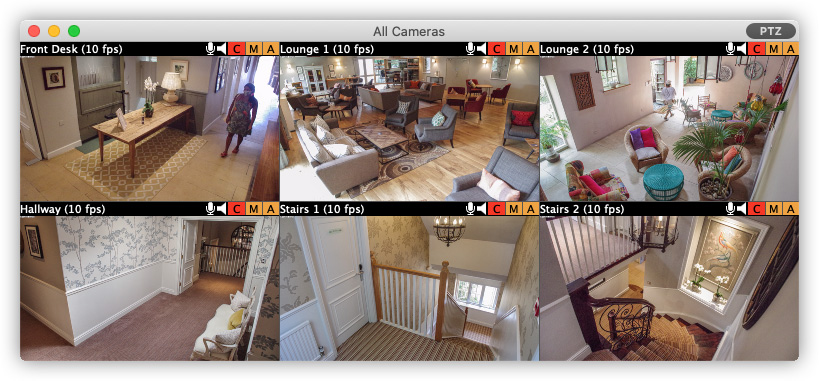
Ben Software today announced the release of SecuritySpy 3.4.8, an update to the premier multi-camera CCTV software for the Mac. With features such as motion detection, flexible video/audio capture, and remote monitoring and configuration, SecuritySpy is designed for demanding video surveillance applications. New features in this version include Mac OS X 10.11 "El Capitan" compatibility, support for more network cameras and performance improvements.
London, United Kingdom - Ben Software today announced the release of SecuritySpy 3.4.8, an update to the premier multi-camera CCTV software for the Mac. With features such as motion detection, flexible video/audio capture, and remote monitoring and configuration, SecuritySpy is designed for demanding video surveillance applications. New features in this version include Mac OS X 10.11 "El Capitan" compatibility, support for more network cameras, and performance improvements.
"This update represents our ongoing commitment to maintaining top-quality NVR software and responding to our customers' feedback" said Ben Bird, the developer of SecuritySpy. "Mac users are always quick to adopt new operating systems, and our customers can be confident knowing that SecuritySpy is compatible with El Capitan, Apple's latest version of OS X."
The main features of SecuritySpy are as follows:
* Displays and records multiple cameras simultaneously
* Supports all major brands of IP cameras, including ONVIF-compatible cameras
* Supports all industry-standard media formats: JPEG, MPEG-4, MxPEG, H.264, AAC
* Wide protocol support for maximum camera compatibility: HTTP, RTSP, RTP, TCP, UDP
* Extensively threaded to take full advantage of multi-core computers
* Built-in secure web server for remote viewing and administration
* Pan/Tilt/Zoom (PTZ) support
* Sophisticated motion detection
SecuritySpy supports a wide range of network cameras and video servers, including the popular Axis, Dahua, Canon, Sony, Foscam, Hikvision and Vivotek ranges. SecuritySpy features sophisticated motion detection, which can be used to trigger recording as well as email alerts, audio alarms, iOS push notifications and external devices. The built-in secure web server allows remote monitoring of live feeds and captured footage, as well as configuration of the software, from over the internet using a web browser or a mobile device such as an iPhone or iPad.
Pricing is in British Pounds, Euros or US Dollars and depends on the number of cameras used, ranging from GBP 29.90 (approx. USD $50) for the single-camera version, to GBP 649.00 (approx. $1050) for the unlimited-camera version. SecuritySpy supports any Intel Mac running OS X 10.5 "Leopard" through 10.11 "El Capitan". A 30-day fully-featured trial of SecuritySpy is available for download.
Ben Software: http://www.bensoftware.com/
SecuritySpy 3.4.8: http://www.bensoftware.com/securityspy/
Download SecuritySpy: http://www.bensoftware.com/securityspy/SecuritySpy.dmg
Purchase: http://www.bensoftware.com/purchase/
Screenshot: http://www.bensoftware.com/img/allcameras.jpg
Application Icon: http://www.bensoftware.com/securityspy/manual/manualfiles/mainlogo.png
Ben Software is an independent software development house focused on providing high-quality video-related software for the Macintosh platform. Copyright (C) 2015 Ben Software. All Rights Reserved. Apple, the Apple logo, Mac OS X, and Macintosh are registered trademarks of Apple Inc. in the U.S. and/or other countries.
*******
Link To Article: http://prmac.com/release-id-76897.htm
*******
---------------------------------------------------------------------------------
Note that you can alter delivered distributions at any time.
Login to your account on prMac to alter your channel selection, or to opt-out at any time.
SecuritySpy 3.4.8: Update to Mac OS X Video Surveillance Software - Published on 09/29/15
Ben Software today announced the release of SecuritySpy 3.4.8, an update to the premier multi-camera CCTV software for the Mac. With features such as motion detection, flexible video/audio capture, and remote monitoring and configuration, SecuritySpy is designed for demanding video surveillance applications. New features in this version include Mac OS X 10.11 "El Capitan" compatibility, support for more network cameras and performance improvements.
London, United Kingdom - Ben Software today announced the release of SecuritySpy 3.4.8, an update to the premier multi-camera CCTV software for the Mac. With features such as motion detection, flexible video/audio capture, and remote monitoring and configuration, SecuritySpy is designed for demanding video surveillance applications. New features in this version include Mac OS X 10.11 "El Capitan" compatibility, support for more network cameras, and performance improvements.
"This update represents our ongoing commitment to maintaining top-quality NVR software and responding to our customers' feedback" said Ben Bird, the developer of SecuritySpy. "Mac users are always quick to adopt new operating systems, and our customers can be confident knowing that SecuritySpy is compatible with El Capitan, Apple's latest version of OS X."
The main features of SecuritySpy are as follows:
* Displays and records multiple cameras simultaneously
* Supports all major brands of IP cameras, including ONVIF-compatible cameras
* Supports all industry-standard media formats: JPEG, MPEG-4, MxPEG, H.264, AAC
* Wide protocol support for maximum camera compatibility: HTTP, RTSP, RTP, TCP, UDP
* Extensively threaded to take full advantage of multi-core computers
* Built-in secure web server for remote viewing and administration
* Pan/Tilt/Zoom (PTZ) support
* Sophisticated motion detection
SecuritySpy supports a wide range of network cameras and video servers, including the popular Axis, Dahua, Canon, Sony, Foscam, Hikvision and Vivotek ranges. SecuritySpy features sophisticated motion detection, which can be used to trigger recording as well as email alerts, audio alarms, iOS push notifications and external devices. The built-in secure web server allows remote monitoring of live feeds and captured footage, as well as configuration of the software, from over the internet using a web browser or a mobile device such as an iPhone or iPad.
Pricing is in British Pounds, Euros or US Dollars and depends on the number of cameras used, ranging from GBP 29.90 (approx. USD $50) for the single-camera version, to GBP 649.00 (approx. $1050) for the unlimited-camera version. SecuritySpy supports any Intel Mac running OS X 10.5 "Leopard" through 10.11 "El Capitan". A 30-day fully-featured trial of SecuritySpy is available for download.
Ben Software: http://www.bensoftware.com/
SecuritySpy 3.4.8: http://www.bensoftware.com/securityspy/
Download SecuritySpy: http://www.bensoftware.com/securityspy/SecuritySpy.dmg
Purchase: http://www.bensoftware.com/purchase/
Screenshot: http://www.bensoftware.com/img/allcameras.jpg
Application Icon: http://www.bensoftware.com/securityspy/manual/manualfiles/mainlogo.png

Ben Software is an independent software development house focused on providing high-quality video-related software for the Macintosh platform. Copyright (C) 2015 Ben Software. All Rights Reserved. Apple, the Apple logo, Mac OS X, and Macintosh are registered trademarks of Apple Inc. in the U.S. and/or other countries.
*******
Link To Article: http://prmac.com/release-id-76897.htm
*******
---------------------------------------------------------------------------------
Note that you can alter delivered distributions at any time.
Login to your account on prMac to alter your channel selection, or to opt-out at any time.
Ivory Coast Radio Online 1.0 for iOS
A new article has been published at prMac.
Ivory Coast Radio Online 1.0 for iOS - Published on 09/29/15
LastThink announces the release of Ivory Coast Radio Online 1.0, their highly customizable Radio app for iOS devices. Users can Listen to the most popular Ivory Coast Music, Talk Shows and News on your iPhone, iPad, iPod touch with our Ivory Coast Live Radio, which is definitely the best one among Free Radio Station. The app offers event channels, news and media channels, events and music channels, weather programs, daily news, latest hits and also contemporary commercials.
Yerevan, Armenia - LastThink is proud to announce the release of Ivory Coast Radio Online 1.0, their highly customizable Radio application developed for iPhone, iPad, and iPod touch devices. From now on you don't have to tune to the right station you want, as finding your favorite station is simply a click away.
Features:
* You have any doubts concerning the quality and the effectiveness of our Ivory Coast Live Radio? Believe us all our Radio stations work properly. Moreover, they are always tested by our highly qualified professionals.
* You discover a new song, but you don't know the name of it? This application solves that problem and provides you the adequate information about the song you are listening to.
* You want to share your preferable songs or whatever you listen to with your friends or relatives? That's not a matter of concern as long as you are with us. Our innovative application will grant you an opportunity of sharing anything you like right from the app on your Facebook, Twitter or any other web-page.
* You are easily bored by the same radio stations? Our frequent updates, new features and diverse stations will not let you get disappointed.
We grant you a chance of enjoying event channels, news and media channels, events and music channels, which provide its listeners with weather programs, daily news, latest hits and also contemporary commercials.
If you however experience any issues, please do not hesitate to contact us if you'd like to share your experience with Online Radio Stations, or provide suggestions on how we could improve the product further. We will be more than happy to get in touch.
NOTE: We have selected data from the internet and if any assembly or constitution doesn't want us to show the content of the unit, please recommend us to remove it.
Device Requirements:
* iPhone, iPad, and iPod touch
* Requires iOS 7.0 or later
* Universal Application
* 21.5 MB
Pricing and Availability:
Ivory Coast Radio Online 1.0 is $1.99 and available worldwide exclusively through the App Store in the Music category.
LastThink: http://lastthink.com/
Ivory Coast Radio Online 1.0: https://www.facebook.com/IphoneRegion
Purchase and Download from iTunes: https://itunes.apple.com/app/ivory-coast-radio-online-live/id1039687456
Screenshot: http://a2.mzstatic.com/us/r30/Purple3/v4/1b/86/42/1b86426d-506c-7ff7-9c8d-9579e915cfd7/screen322x572.jpeg
App Icon: http://a2.mzstatic.com/us/r30/Purple3/v4/2d/7c/b1/2d7cb15a-68a8-6459-1934-6538b45592a4/icon175x175.png
LastThink is an IT company with a focus on mobile development. It has extended its list of services since 2012 to offer high-end business process management, system integration, as well as up-to-date communication solutions. LastThink's mission is to deliver maximum business value to its customers by designing, developing, implementing and maintaining efficient and high quality software solutions aligned with their most essential business needs. Their team will always do its best to meet client expectations. Copyright (C) 2015 LastThink LLC. All Rights Reserved. Apple, the Apple logo, iPhone, iPad and iPod are registered trademarks of Apple Inc. in the U.S. and/or other countries.
*******
Link To Article: http://prmac.com/release-id-76896.htm
*******
---------------------------------------------------------------------------------
Note that you can alter delivered distributions at any time.
Login to your account on prMac to alter your channel selection, or to opt-out at any time.
Ivory Coast Radio Online 1.0 for iOS - Published on 09/29/15
LastThink announces the release of Ivory Coast Radio Online 1.0, their highly customizable Radio app for iOS devices. Users can Listen to the most popular Ivory Coast Music, Talk Shows and News on your iPhone, iPad, iPod touch with our Ivory Coast Live Radio, which is definitely the best one among Free Radio Station. The app offers event channels, news and media channels, events and music channels, weather programs, daily news, latest hits and also contemporary commercials.
Yerevan, Armenia - LastThink is proud to announce the release of Ivory Coast Radio Online 1.0, their highly customizable Radio application developed for iPhone, iPad, and iPod touch devices. From now on you don't have to tune to the right station you want, as finding your favorite station is simply a click away.
Features:
* You have any doubts concerning the quality and the effectiveness of our Ivory Coast Live Radio? Believe us all our Radio stations work properly. Moreover, they are always tested by our highly qualified professionals.
* You discover a new song, but you don't know the name of it? This application solves that problem and provides you the adequate information about the song you are listening to.
* You want to share your preferable songs or whatever you listen to with your friends or relatives? That's not a matter of concern as long as you are with us. Our innovative application will grant you an opportunity of sharing anything you like right from the app on your Facebook, Twitter or any other web-page.
* You are easily bored by the same radio stations? Our frequent updates, new features and diverse stations will not let you get disappointed.
We grant you a chance of enjoying event channels, news and media channels, events and music channels, which provide its listeners with weather programs, daily news, latest hits and also contemporary commercials.
If you however experience any issues, please do not hesitate to contact us if you'd like to share your experience with Online Radio Stations, or provide suggestions on how we could improve the product further. We will be more than happy to get in touch.
NOTE: We have selected data from the internet and if any assembly or constitution doesn't want us to show the content of the unit, please recommend us to remove it.
Device Requirements:
* iPhone, iPad, and iPod touch
* Requires iOS 7.0 or later
* Universal Application
* 21.5 MB
Pricing and Availability:
Ivory Coast Radio Online 1.0 is $1.99 and available worldwide exclusively through the App Store in the Music category.
LastThink: http://lastthink.com/
Ivory Coast Radio Online 1.0: https://www.facebook.com/IphoneRegion
Purchase and Download from iTunes: https://itunes.apple.com/app/ivory-coast-radio-online-live/id1039687456
Screenshot: http://a2.mzstatic.com/us/r30/Purple3/v4/1b/86/42/1b86426d-506c-7ff7-9c8d-9579e915cfd7/screen322x572.jpeg

App Icon: http://a2.mzstatic.com/us/r30/Purple3/v4/2d/7c/b1/2d7cb15a-68a8-6459-1934-6538b45592a4/icon175x175.png

LastThink is an IT company with a focus on mobile development. It has extended its list of services since 2012 to offer high-end business process management, system integration, as well as up-to-date communication solutions. LastThink's mission is to deliver maximum business value to its customers by designing, developing, implementing and maintaining efficient and high quality software solutions aligned with their most essential business needs. Their team will always do its best to meet client expectations. Copyright (C) 2015 LastThink LLC. All Rights Reserved. Apple, the Apple logo, iPhone, iPad and iPod are registered trademarks of Apple Inc. in the U.S. and/or other countries.
*******
Link To Article: http://prmac.com/release-id-76896.htm
*******
---------------------------------------------------------------------------------
Note that you can alter delivered distributions at any time.
Login to your account on prMac to alter your channel selection, or to opt-out at any time.
NeoFinder 6.8 released for Mac OS X 10.11 (El Capitan)
A new article has been published at prMac.
NeoFinder 6.8 released for Mac OS X 10.11 (El Capitan) - Published on 09/29/15
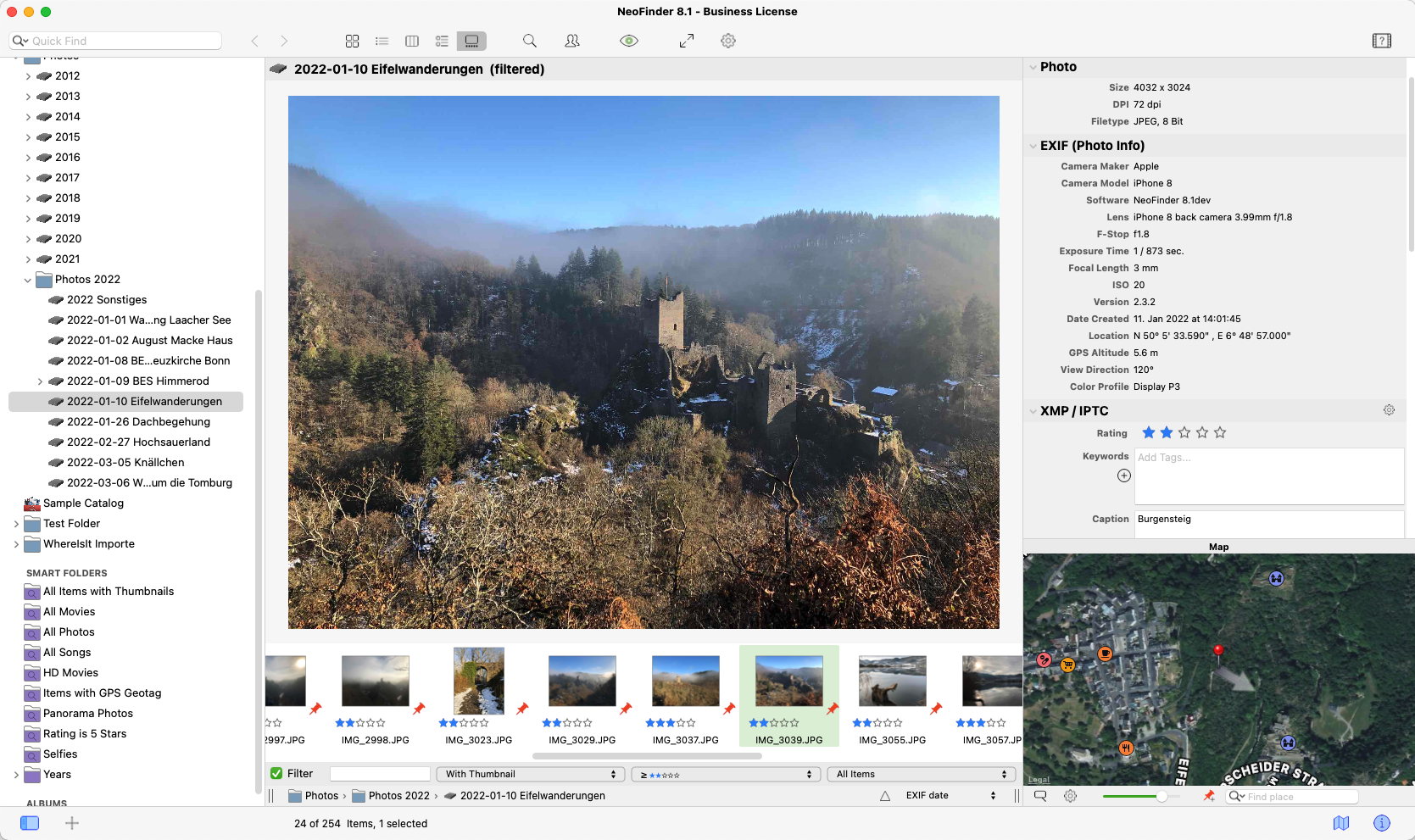
Norbert M. Doerner today releases NeoFinder for Mac 6.8 for Mac OS X. Keep track of your digital files, photos, songs, movies, fonts on hard drives, USB sticks, servers, Blu-ray disks, DVD-ROMs, CDROMs, and any other digital media. NeoFinder generates thumbnails and metadata of your files, for powerful search possibilities. The new NeoFinder 6.8 is certified for Mac OS X 10.11 (El Capitan), can write Finder Tags for files and folders, and finds faster.
Langenhahn, Germany - Norbert M. Doerner today is pleased to announce the release of NeoFinder 6.8 (formerly known as CDFinder). Keep track of your digital files, photos, songs, movies, fonts on hard drives, USB sticks, servers, Blu-ray disks, DVD-ROMs, CDROMs, and any other digital media. NeoFinder generates thumbnails and metadata of your files, for powerful search possibilities, smart folders, albums, and more.
The new NeoFinder 6.8 is certified to run Apples brand new Mac OS X 10.11 (El Capitan). Also, NeoFinder 6.8 now can write Finder Tags for files and folders, and finds faster.
New Features in NeoFinder 6.8:
* NeoFinder 6.8 is certified to run in Mac OS X 10.11 El Capitan!
* You can now add or change keywords (Finder Tags) to all files and folders! NeoFinder will not only store these keywords/tags in its catalog, but also attaches them to your original files and folders, just like Apples Finder does
* Find performance is now faster in Yosemite and El Capitan (that is a serious bug from Apple, and we worked around it)
* New Find Editor parameter: "Has no Tag"
* Cataloging Adobe XMP data will now give precedence to XMP over possible IPTC tags in a file
* NeoFinder now recognizes ExFAT volume types
* Fixes several memory problems during cataloging
* Fixes a problem in the "Any Text doesn't contain" Find Editor parameter
* Fixes a problem with the regex Find parameter
* Fixes a possible problem when cataloging certain malformed MOV video files. NeoFinder will no longer seem to "hang" in that case
* Fixes a problem in the "Find All Files in this Folder" context menu command
* Fixes a problem when cataloging the textual content of certain PDF files
* Fixes a problem when finding in a very large, very busy database folder in a network setup
NeoFinder Highlights:
Metadata - NeoFinder catalogs metadata of songs, movies, fonts, and photos, including the MP3-Tags of several audio file formats, EXIF, GPS, and IPTC data of photos, and also Adobe XMP data. All these are arranged clearly in the user interface, and can be extensively searched. For numerous photo and video formats, fonts, and text files, NeoFinder generates thumbnails during cataloging, displaying them in all list and icon views.
Integration - Offering a tight connection to major productivity tools, such as Adobe Creative Suite, Microsoft Office, Roxio Toast, FileMaker Pro, Apples Spotlight and Finder, and the extensive support of drag&drop into other applications, NeoFinder can support many workflow scenarios.
Geotagging - Only NeoFinder offers the integrated GeoFinder, which searches for photos taken near a spot, or the KMZ export for coordinates and photo thumbnails as a way to give geolocated photos to friends. NeoFinder can even geotag photos itself, no other software needed. And only NeoFinder displays amazing facts about any geolocation in the unique Wikipedia Inspector.
Networking - Store your catalog database on a server for access from all Macs in the network, and with the sidekick product abeMeda (was CDWinder for Windows) even from Microsoft Windows.
Mobile - Keep your NeoFinder database with you on your iPhone or iPad with the separate NeoFinder for iOS app.
Since the initial release of CDFinder 1.0 in 1995, more than 62,000 customers in 98 countries around the world are using CDFinder and now NeoFinder to organise their digital library, and manage their data archive and backups, including NASA, IKEA, BBC, Mattel, Rand McNally, Pfizer, Random House, Oracle, and Warner Bros.
Language Support:
* German, English, French, Swedish, Italian, Spanish, Dutch, and Japanese
System Requirements:
* Requires Mac OS X v10.6.8, 10.7, 10.8, 10.9, 10.10, or 10.11 El Capitan
* Previous CDFinder and NeoFinder versions for older Mac OS versions are still available
* Separate app for iOS (iPhone and iPad) is available, too
Pricing and Availability:
NeoFinder 6 is a paid update to licensed users of CDFinder, update price starting at 19 Euros. Cross-grades for users of competing applications (DiskLibrary, FileFinder, CatFinder, Canto Cumulus, Disk Tracker, DiskCatalogMaker, Atomic View, iView Media Pro, and more) are available. A free NeoFinder demo version can be downloaded from the NeoFinder website, the price for new users starts at 29,00 (EUR). Multiple user packs are available for network users. NeoFinder 6.8 is a free update to all NeoFinder customers.
NeoFinder 6.8: http://www.cdfinder.de/
Download NeoFinder: http://www.cdfinder.de/neofinder.zip
Purchase: http://www.cdfinder.de/en/order.html
Screenshot: http://www.cdfinder.de/main-screenshot.jpg
Application Icon: http://www.cdfinder.de/rw_common/images/NeoFinder%20Icon%20128%20px%20Alpha.png
Norbert M. Doerner is a computer scientist with a love for integration and cool products. He develops great Macintosh software since 1991. Popular products include the disk cataloger NeoFinder (was CDFinder), various plugins for the Finder, iPhoto and Aperture, and the audio transcription software F5.app. Copyright (C) 1991-2015 Norbert M. Doerner. Apple, the Apple logo, Mac and Macintosh are registered trademarks of Apple Inc. in the U.S. and/or other countries. Other trademarks and registered trademarks may be the property of their respective owners.
*******
Link To Article: http://prmac.com/release-id-76882.htm
*******
---------------------------------------------------------------------------------
Note that you can alter delivered distributions at any time.
Login to your account on prMac to alter your channel selection, or to opt-out at any time.
NeoFinder 6.8 released for Mac OS X 10.11 (El Capitan) - Published on 09/29/15
Norbert M. Doerner today releases NeoFinder for Mac 6.8 for Mac OS X. Keep track of your digital files, photos, songs, movies, fonts on hard drives, USB sticks, servers, Blu-ray disks, DVD-ROMs, CDROMs, and any other digital media. NeoFinder generates thumbnails and metadata of your files, for powerful search possibilities. The new NeoFinder 6.8 is certified for Mac OS X 10.11 (El Capitan), can write Finder Tags for files and folders, and finds faster.
Langenhahn, Germany - Norbert M. Doerner today is pleased to announce the release of NeoFinder 6.8 (formerly known as CDFinder). Keep track of your digital files, photos, songs, movies, fonts on hard drives, USB sticks, servers, Blu-ray disks, DVD-ROMs, CDROMs, and any other digital media. NeoFinder generates thumbnails and metadata of your files, for powerful search possibilities, smart folders, albums, and more.
The new NeoFinder 6.8 is certified to run Apples brand new Mac OS X 10.11 (El Capitan). Also, NeoFinder 6.8 now can write Finder Tags for files and folders, and finds faster.
New Features in NeoFinder 6.8:
* NeoFinder 6.8 is certified to run in Mac OS X 10.11 El Capitan!
* You can now add or change keywords (Finder Tags) to all files and folders! NeoFinder will not only store these keywords/tags in its catalog, but also attaches them to your original files and folders, just like Apples Finder does
* Find performance is now faster in Yosemite and El Capitan (that is a serious bug from Apple, and we worked around it)
* New Find Editor parameter: "Has no Tag"
* Cataloging Adobe XMP data will now give precedence to XMP over possible IPTC tags in a file
* NeoFinder now recognizes ExFAT volume types
* Fixes several memory problems during cataloging
* Fixes a problem in the "Any Text doesn't contain" Find Editor parameter
* Fixes a problem with the regex Find parameter
* Fixes a possible problem when cataloging certain malformed MOV video files. NeoFinder will no longer seem to "hang" in that case
* Fixes a problem in the "Find All Files in this Folder" context menu command
* Fixes a problem when cataloging the textual content of certain PDF files
* Fixes a problem when finding in a very large, very busy database folder in a network setup
NeoFinder Highlights:
Metadata - NeoFinder catalogs metadata of songs, movies, fonts, and photos, including the MP3-Tags of several audio file formats, EXIF, GPS, and IPTC data of photos, and also Adobe XMP data. All these are arranged clearly in the user interface, and can be extensively searched. For numerous photo and video formats, fonts, and text files, NeoFinder generates thumbnails during cataloging, displaying them in all list and icon views.
Integration - Offering a tight connection to major productivity tools, such as Adobe Creative Suite, Microsoft Office, Roxio Toast, FileMaker Pro, Apples Spotlight and Finder, and the extensive support of drag&drop into other applications, NeoFinder can support many workflow scenarios.
Geotagging - Only NeoFinder offers the integrated GeoFinder, which searches for photos taken near a spot, or the KMZ export for coordinates and photo thumbnails as a way to give geolocated photos to friends. NeoFinder can even geotag photos itself, no other software needed. And only NeoFinder displays amazing facts about any geolocation in the unique Wikipedia Inspector.
Networking - Store your catalog database on a server for access from all Macs in the network, and with the sidekick product abeMeda (was CDWinder for Windows) even from Microsoft Windows.
Mobile - Keep your NeoFinder database with you on your iPhone or iPad with the separate NeoFinder for iOS app.
Since the initial release of CDFinder 1.0 in 1995, more than 62,000 customers in 98 countries around the world are using CDFinder and now NeoFinder to organise their digital library, and manage their data archive and backups, including NASA, IKEA, BBC, Mattel, Rand McNally, Pfizer, Random House, Oracle, and Warner Bros.
Language Support:
* German, English, French, Swedish, Italian, Spanish, Dutch, and Japanese
System Requirements:
* Requires Mac OS X v10.6.8, 10.7, 10.8, 10.9, 10.10, or 10.11 El Capitan
* Previous CDFinder and NeoFinder versions for older Mac OS versions are still available
* Separate app for iOS (iPhone and iPad) is available, too
Pricing and Availability:
NeoFinder 6 is a paid update to licensed users of CDFinder, update price starting at 19 Euros. Cross-grades for users of competing applications (DiskLibrary, FileFinder, CatFinder, Canto Cumulus, Disk Tracker, DiskCatalogMaker, Atomic View, iView Media Pro, and more) are available. A free NeoFinder demo version can be downloaded from the NeoFinder website, the price for new users starts at 29,00 (EUR). Multiple user packs are available for network users. NeoFinder 6.8 is a free update to all NeoFinder customers.
NeoFinder 6.8: http://www.cdfinder.de/
Download NeoFinder: http://www.cdfinder.de/neofinder.zip
Purchase: http://www.cdfinder.de/en/order.html
Screenshot: http://www.cdfinder.de/main-screenshot.jpg
Application Icon: http://www.cdfinder.de/rw_common/images/NeoFinder%20Icon%20128%20px%20Alpha.png

Norbert M. Doerner is a computer scientist with a love for integration and cool products. He develops great Macintosh software since 1991. Popular products include the disk cataloger NeoFinder (was CDFinder), various plugins for the Finder, iPhoto and Aperture, and the audio transcription software F5.app. Copyright (C) 1991-2015 Norbert M. Doerner. Apple, the Apple logo, Mac and Macintosh are registered trademarks of Apple Inc. in the U.S. and/or other countries. Other trademarks and registered trademarks may be the property of their respective owners.
*******
Link To Article: http://prmac.com/release-id-76882.htm
*******
---------------------------------------------------------------------------------
Note that you can alter delivered distributions at any time.
Login to your account on prMac to alter your channel selection, or to opt-out at any time.
Keep Close Contact Version 1.1 for iPad and iPhone Released
A new article has been published at prMac.
Keep Close Contact Version 1.1 for iPad and iPhone Released - Published on 09/29/15
Wyari Pty Ltd announces the release of Keep Close Contact 1.1, an important update to their remote assistance solution for iOS devices. Keep Close Contact is the app that assists people who care for others when they are unable to be physically with them. The app provides "Touch Free" Video calls, a large "Help! Call Me Now" button, extra large text messages, scheduled reminders for medication, auto alerts if messages are not acknowledged, and more. Version 1.1 has been optimized for iOS 9.
Sydney, Australia - Wyari Pty Ltd is proud to announce the release of Keep Close Contact 1.1, an important update to their remote assistance solution for iPhone, iPad, and iPod touch devices. Keep Close Contact allows people who are caring for others to keep in touch with them in a minimally intrusive manner when they cannot physically be with them.
As the aged populations of many countries are getting larger it is essential that we create some tools to assist carers (usually the adult children) to easily keep in contact with people they are caring for and have peace of mind that they are OK when they cannot be there, as they usually have busy lives looking after their families and working.
Features:
* Start secure private video calls - all the person being cared for needs to do is speak, no button pushing or hunting for the phone, getting out of the chair etc.
* Send reminder messages for regular events such as medication, meal times, appointments. These can be scheduled or ad-hoc
* Define alerts if messages are not responded to within pre-set times, critical when you need to know if someone is up and moving or has taken their medication
* Remotely upload cherished pictures to create a digital picture frame whilst there are no messages being displayed
* Keep updated and in control from their iPhone or iPad anywhere in the world where they have internet access
The app user interface is designed for people unfamiliar with modern technology, once operating it only has two "buttons".
Once the app is downloaded the carer subscribes using iTunes In-App Purchase and an account on the Keep Close Contact servers is created. All the settings are then made via the "Designed for Mobile" web pages so the career can choose to use whatever device they are most comfortable using. To provide extra security two separate secure connections that follow different paths are maintained between the device running the app and the Keep Close Contact servers.
Device Requirements:
* iPhone, iPad, and iPod touch
* Requires iOS 8.0 or later
* Universal Application
* 4.8 MB
Pricing and Availability:
Keep Close Contact 1.1 is free, and is available worldwide exclusively through the App Store in the Utilities category.
Keep Close Contact 1.1: http://keepclosecontact.com
Download From iTunes: https://itunes.apple.com/app/keep-close-contact/id1024954055
Screenshot: http://www.keepclosecontact.com/wp-content/uploads/2015/09/ipad_medication.jpg
App Icon: http://www.keepclosecontact.com/wp-content/uploads/2015/09/hands_square.jpg
Wyari Pty Ltd is a consultancy and software development organization that has been operating in Australia for 30 years. In that time Wyari has provided services to many organizations of all sizes globally. Wyari's team has a very wide range of skills in system development and management gained from real world experience. Copyright (C) 2015 Wyari Pty Ltd. All Rights Reserved. Apple, the Apple logo, iPhone, iPad and iPod are registered trademarks of Apple Inc. in the U.S. and/or other countries.
*******
Link To Article: http://prmac.com/release-id-76895.htm
*******
---------------------------------------------------------------------------------
Note that you can alter delivered distributions at any time.
Login to your account on prMac to alter your channel selection, or to opt-out at any time.
Keep Close Contact Version 1.1 for iPad and iPhone Released - Published on 09/29/15
Wyari Pty Ltd announces the release of Keep Close Contact 1.1, an important update to their remote assistance solution for iOS devices. Keep Close Contact is the app that assists people who care for others when they are unable to be physically with them. The app provides "Touch Free" Video calls, a large "Help! Call Me Now" button, extra large text messages, scheduled reminders for medication, auto alerts if messages are not acknowledged, and more. Version 1.1 has been optimized for iOS 9.
Sydney, Australia - Wyari Pty Ltd is proud to announce the release of Keep Close Contact 1.1, an important update to their remote assistance solution for iPhone, iPad, and iPod touch devices. Keep Close Contact allows people who are caring for others to keep in touch with them in a minimally intrusive manner when they cannot physically be with them.
As the aged populations of many countries are getting larger it is essential that we create some tools to assist carers (usually the adult children) to easily keep in contact with people they are caring for and have peace of mind that they are OK when they cannot be there, as they usually have busy lives looking after their families and working.
Features:
* Start secure private video calls - all the person being cared for needs to do is speak, no button pushing or hunting for the phone, getting out of the chair etc.
* Send reminder messages for regular events such as medication, meal times, appointments. These can be scheduled or ad-hoc
* Define alerts if messages are not responded to within pre-set times, critical when you need to know if someone is up and moving or has taken their medication
* Remotely upload cherished pictures to create a digital picture frame whilst there are no messages being displayed
* Keep updated and in control from their iPhone or iPad anywhere in the world where they have internet access
The app user interface is designed for people unfamiliar with modern technology, once operating it only has two "buttons".
Once the app is downloaded the carer subscribes using iTunes In-App Purchase and an account on the Keep Close Contact servers is created. All the settings are then made via the "Designed for Mobile" web pages so the career can choose to use whatever device they are most comfortable using. To provide extra security two separate secure connections that follow different paths are maintained between the device running the app and the Keep Close Contact servers.
Device Requirements:
* iPhone, iPad, and iPod touch
* Requires iOS 8.0 or later
* Universal Application
* 4.8 MB
Pricing and Availability:
Keep Close Contact 1.1 is free, and is available worldwide exclusively through the App Store in the Utilities category.
Keep Close Contact 1.1: http://keepclosecontact.com
Download From iTunes: https://itunes.apple.com/app/keep-close-contact/id1024954055
Screenshot: http://www.keepclosecontact.com/wp-content/uploads/2015/09/ipad_medication.jpg

App Icon: http://www.keepclosecontact.com/wp-content/uploads/2015/09/hands_square.jpg

Wyari Pty Ltd is a consultancy and software development organization that has been operating in Australia for 30 years. In that time Wyari has provided services to many organizations of all sizes globally. Wyari's team has a very wide range of skills in system development and management gained from real world experience. Copyright (C) 2015 Wyari Pty Ltd. All Rights Reserved. Apple, the Apple logo, iPhone, iPad and iPod are registered trademarks of Apple Inc. in the U.S. and/or other countries.
*******
Link To Article: http://prmac.com/release-id-76895.htm
*******
---------------------------------------------------------------------------------
Note that you can alter delivered distributions at any time.
Login to your account on prMac to alter your channel selection, or to opt-out at any time.
Allies Act Through Embassies in Haypi Kingdom: The Return of the King
A new article has been published at prMac.
Allies Act Through Embassies in Haypi Kingdom: The Return of the King - Published on 09/29/15
Haypi announces the release of Haypi Kingdom: The Return of the King 1.1.1, an important update to their Massive Multiplayer Online Strategy War Game for iOS devices. Set in the Middle Age, things are restless in this kingdom of magic and darkness. The Rebels are rising, the Orcs are causing havoc, the Demons are pulverizing things on their path, and other Lords are coveting your resources. Version 1.1.1 brings Marching to Oasis, Embassy building, "Guard Your City" activity, bug fixes, and more.
Shanghai, China - Haypi is proud to announce the release of Haypi Kingdom: The Return of the King 1.1.1, an important update to their Massive Multiplayer Online Strategy War Game for iPhone, iPad, and iPod touch devices. Set in the Middle Age, things are restless in this kingdom of magic and darkness. The Rebels are rising, the Orcs are causing havoc, the Demons are pulverizing things on their path, and other Lords are coveting your resources.
All Haypi games are known among players as super enjoyable, challenging and balanced games. This good reputation is stable due to the noticeable care, with which the programming teams carry out the development of each game. Constant updates ensure that the players are entertained and cared for. The continuous polishing provides for the fairness of the gameplay.
Now further optimizations contribute to the fun with the last update of Haypi Kingdom: The Return of the King. The 1.1.1 patch has just hit the App Store! The mobile game is a great MMO, a brother version of Haypi's emblematic superhit Haypi Kingdom.
In the new 1.1.1 version of Haypi Kingdom: The Return of the King, there is a new way of mutual protection among Alliance members. A new building "Embassy" can be built in Home City and all players are recommended to build it. When enemy's troops are on their way, the attacked players can tap on the Embassy to send a request for help from other members. All players in the Alliance will see the call for help in their Embassies. So they will decide whether they can send troops through their own Embassies to go and help the city in need. All troops sent by all helpful members will go to the raided city to protect it. This is Haypi's great innovative way of player interaction. It is fun, and encourages more communication and actual help within the Allies. All Haypi games have always offered ways to interact in individual level, Alliance level and World Level. That's why the game Haypi Kingdom: The Return of the King is so much fun! It actually offers a platform for communication and
mutual support!
Now, Haypi Kingdom: The Return of the King 1.1.1 also offers a new fun activity for the members within an Alliance. In the new version, the Alliance leader or Vice Leader can activate a "Guard Your City" Activity, which puts all allies in defense from an automatic AI attack. The troops altogether will protect the whole alliance against the raid. At the end, everyone will get rewards. This is a great activity because it can further befriend the players in the Haypi community. Alliances form real friendships!
Haypi Kingdom: The Return of the King is even better and more intriguing than before. New features and optimizations have been made, and the game is more mature now. To name a few, in the College building, now players can develop a new technology "Marching to Oasis". It can significantly reduce the time for the troops to reach an Oasis. Apart from that, the game encourages the use of the latest game feature - Royal Spot. For further support of players using the feature, there has been a decrease in the army's crop consumption in Royal Spot. Thus, players can freely enjoy this feature and its benefits. Besides, the anti-scouting feature is much supported, too. For example, in the new version of the game, when the defender uses anti-scouting, and the attacker's troops counts is less than one tenth of the defender's, the attacker won't get the troops info of the defender in scout report. Last, but not least, further optimizations and polishing has made the game even smoother.
Haypi Co., Ltd. provides endless fun for players from all walks of life. The creative developer has released quite a few great hits among the MMOs. Haypi Kingdom: The Return of the King has turned into an emblematic game of the successful developer. The millions of downloads continue to prove the great quality of the game. The iOS hit is free to download from the App Store. Everyone is welcome to join the Haypi Community of Fun!
Device Requirements:
* iPhone, iPad, and iPod touch
* Requires iOS 6.0 or later
* Universal Application
* 43.0 MB
Pricing and Availability:
Haypi Kingdom: The Return of the King 1.1.1 is free, and is available exclusively through the App Store in the Games category. Convenient in-app purchases are available.
Haypi Kingdom: The Return of the King 1.1.1: http://www.haypi.com/rotk/index.htm
Download from iTunes: https://itunes.apple.com/app/haypi-kingdom-return-king/id904874944
Screenshot 1: http://a4.mzstatic.com/us/r30/Purple3/v4/e7/c2/2a/e7c22a5c-27d0-dee7-d518-625b89f6f3a6/screen568x568.jpeg
Screenshot 2: http://a1.mzstatic.com/us/r30/Purple3/v4/40/bf/10/40bf10f4-50ae-fca4-fb05-d21492aa3b9b/screen568x568.jpeg
Screenshot 3: http://a4.mzstatic.com/us/r30/Purple1/v4/c7/7f/a4/c77fa421-1c8d-9264-800e-84fd90f56fc2/screen568x568.jpeg
App Icon: http://a5.mzstatic.com/us/r30/Purple3/v4/96/ad/6c/96ad6c6b-c698-3ba8-7dae-937addef5a34/icon175x175.jpeg
Haypi Co., Ltd. is a private company founded in 2008 and based in China. Haypi is the creator of Haypi Kingdom, Haypi Dragon and Haypi Monster, three popular MMORPGs downloaded over several million times by players from around the world. Copyright (C) 2015 Haypi Inc. All Rights Reserved. Apple, the Apple logo, iPhone, iPod and iPad are registered trademarks of Apple Inc. in the U.S. and/or other countries.
*******
Link To Article: http://prmac.com/release-id-76894.htm
*******
---------------------------------------------------------------------------------
Note that you can alter delivered distributions at any time.
Login to your account on prMac to alter your channel selection, or to opt-out at any time.
Allies Act Through Embassies in Haypi Kingdom: The Return of the King - Published on 09/29/15
Haypi announces the release of Haypi Kingdom: The Return of the King 1.1.1, an important update to their Massive Multiplayer Online Strategy War Game for iOS devices. Set in the Middle Age, things are restless in this kingdom of magic and darkness. The Rebels are rising, the Orcs are causing havoc, the Demons are pulverizing things on their path, and other Lords are coveting your resources. Version 1.1.1 brings Marching to Oasis, Embassy building, "Guard Your City" activity, bug fixes, and more.
Shanghai, China - Haypi is proud to announce the release of Haypi Kingdom: The Return of the King 1.1.1, an important update to their Massive Multiplayer Online Strategy War Game for iPhone, iPad, and iPod touch devices. Set in the Middle Age, things are restless in this kingdom of magic and darkness. The Rebels are rising, the Orcs are causing havoc, the Demons are pulverizing things on their path, and other Lords are coveting your resources.
All Haypi games are known among players as super enjoyable, challenging and balanced games. This good reputation is stable due to the noticeable care, with which the programming teams carry out the development of each game. Constant updates ensure that the players are entertained and cared for. The continuous polishing provides for the fairness of the gameplay.
Now further optimizations contribute to the fun with the last update of Haypi Kingdom: The Return of the King. The 1.1.1 patch has just hit the App Store! The mobile game is a great MMO, a brother version of Haypi's emblematic superhit Haypi Kingdom.
In the new 1.1.1 version of Haypi Kingdom: The Return of the King, there is a new way of mutual protection among Alliance members. A new building "Embassy" can be built in Home City and all players are recommended to build it. When enemy's troops are on their way, the attacked players can tap on the Embassy to send a request for help from other members. All players in the Alliance will see the call for help in their Embassies. So they will decide whether they can send troops through their own Embassies to go and help the city in need. All troops sent by all helpful members will go to the raided city to protect it. This is Haypi's great innovative way of player interaction. It is fun, and encourages more communication and actual help within the Allies. All Haypi games have always offered ways to interact in individual level, Alliance level and World Level. That's why the game Haypi Kingdom: The Return of the King is so much fun! It actually offers a platform for communication and
mutual support!
Now, Haypi Kingdom: The Return of the King 1.1.1 also offers a new fun activity for the members within an Alliance. In the new version, the Alliance leader or Vice Leader can activate a "Guard Your City" Activity, which puts all allies in defense from an automatic AI attack. The troops altogether will protect the whole alliance against the raid. At the end, everyone will get rewards. This is a great activity because it can further befriend the players in the Haypi community. Alliances form real friendships!
Haypi Kingdom: The Return of the King is even better and more intriguing than before. New features and optimizations have been made, and the game is more mature now. To name a few, in the College building, now players can develop a new technology "Marching to Oasis". It can significantly reduce the time for the troops to reach an Oasis. Apart from that, the game encourages the use of the latest game feature - Royal Spot. For further support of players using the feature, there has been a decrease in the army's crop consumption in Royal Spot. Thus, players can freely enjoy this feature and its benefits. Besides, the anti-scouting feature is much supported, too. For example, in the new version of the game, when the defender uses anti-scouting, and the attacker's troops counts is less than one tenth of the defender's, the attacker won't get the troops info of the defender in scout report. Last, but not least, further optimizations and polishing has made the game even smoother.
Haypi Co., Ltd. provides endless fun for players from all walks of life. The creative developer has released quite a few great hits among the MMOs. Haypi Kingdom: The Return of the King has turned into an emblematic game of the successful developer. The millions of downloads continue to prove the great quality of the game. The iOS hit is free to download from the App Store. Everyone is welcome to join the Haypi Community of Fun!
Device Requirements:
* iPhone, iPad, and iPod touch
* Requires iOS 6.0 or later
* Universal Application
* 43.0 MB
Pricing and Availability:
Haypi Kingdom: The Return of the King 1.1.1 is free, and is available exclusively through the App Store in the Games category. Convenient in-app purchases are available.
Haypi Kingdom: The Return of the King 1.1.1: http://www.haypi.com/rotk/index.htm
Download from iTunes: https://itunes.apple.com/app/haypi-kingdom-return-king/id904874944
Screenshot 1: http://a4.mzstatic.com/us/r30/Purple3/v4/e7/c2/2a/e7c22a5c-27d0-dee7-d518-625b89f6f3a6/screen568x568.jpeg

Screenshot 2: http://a1.mzstatic.com/us/r30/Purple3/v4/40/bf/10/40bf10f4-50ae-fca4-fb05-d21492aa3b9b/screen568x568.jpeg

Screenshot 3: http://a4.mzstatic.com/us/r30/Purple1/v4/c7/7f/a4/c77fa421-1c8d-9264-800e-84fd90f56fc2/screen568x568.jpeg

App Icon: http://a5.mzstatic.com/us/r30/Purple3/v4/96/ad/6c/96ad6c6b-c698-3ba8-7dae-937addef5a34/icon175x175.jpeg

Haypi Co., Ltd. is a private company founded in 2008 and based in China. Haypi is the creator of Haypi Kingdom, Haypi Dragon and Haypi Monster, three popular MMORPGs downloaded over several million times by players from around the world. Copyright (C) 2015 Haypi Inc. All Rights Reserved. Apple, the Apple logo, iPhone, iPod and iPad are registered trademarks of Apple Inc. in the U.S. and/or other countries.
*******
Link To Article: http://prmac.com/release-id-76894.htm
*******
---------------------------------------------------------------------------------
Note that you can alter delivered distributions at any time.
Login to your account on prMac to alter your channel selection, or to opt-out at any time.
MacXDVD Software Gets Overhaul with Support for iPhone 6S and iPad Pro
A new article has been published at prMac.
MacXDVD Software Gets Overhaul with Support for iPhone 6S and iPad Pro - Published on 09/29/15
MacXDVD has completed a major overhaul of its best-of-breed MacX DVD Ripper Pro and MacX Video Converter Pro with as many as 20 new profiles added. Customers are welcome to update to the latest versions for better support of all the latest devices in the spotlight, covering iPhone 6S (Plus), iPad Pro, iPad Mini 4, the New Apple TV, Samsung Galaxy Note 5 and more. MacX Video Converter Pro supports over 370 audio/video codecs - convert any video to any format on Mac.
Chengdu, China - MacXDVD Software leads the industry in instant and comprehensive support of the newly released Apple, Samsung and Sony devices. Its flagship app, MacX DVD Ripper Pro and MacX Video Converter Pro have undergone a major overhaul, presenting a significant leap forward in the scope of DVD ripping and video converting, in particular for the latest iPhone 6S (Plus), iPad Pro, iPad Mini 4 and the new Apple TV 4.
"Customer response to the iPhone 6S and iPhone 6S Plus has been incredibly positive." Said Apple marketing chief Phil Schiller. He was also convinced that preorders of the new models are on pace to beat the record-breaking 10 million iPhone 6 last year. If the information pans out, demand over iPhone 6S-compatible DVD video tools is expected to be on the rise as well. The new overhaul of DVD ripper and video converter that MacXDVD is rolling out is right in time for the increasing needs of building a bridge between videos and the fresh devices.
MacX DVD Ripper Pro is a top-notch DVD ripper specifically designed for Mac OS, covering the newly released El Capitan. It is revamped to be the most up-to-minute with the following highlights:
Copy any DVD, be it homemade, region-encoded or copy-protected, to ISO image, DVD folder and MPEG2 file with selected or all subtitle tracks; digitize DVDs into video/audio files like MP4, AVI, H.264, MOV, WMV, MPEG, FLV, MKV, MP3, etc.; convert DVD movies for playback on over 350 profiles, including iPhone 6S (Plus), iPad Pro, iPad Mini 4, the new Apple TV 4, Samsung Galaxy S6, Galaxy Note 5, Android HTC, Microsoft WP8, Surface Pro 3, Xbox One, Nexus mobiles and tablets, etc.
MacX Video Converter Pro ups the ante in the range of mobile support and is in a state of full readiness as below:
Support 370+ audio/video codecs, including the breathtaking HEVC; convert any video to any format on Mac (El Capitan included), e.g. MKV to MP4, MP4 to MP3, WMV to MOV, AVI to MP4, YouTube to MP3, H.265 to H.264, etc; change video resolutions with no quality degradation, like 8k/4k (2160p) to 1080p HD, 1080p to 720p, etc; simplifies the conversion from 4K UHD, multi-track HD and SD videos to Apple, Android, Microsoft, Google mobiles and tablets, 400 output profiles included; download online videos from YouTube, Facebook, Vimeo, and another 300 video sites; Work as a slideshow maker, video editor and screen recorder.
"We are proud to lead the industry in our fifth consecutive and instant support for every iPhone release and continues our trend with the timely support of the brand-new iPhone 6S, along with other fresh iOS devices, including iPad Pro. Apple users will be facilitated with good video enjoyment to make their new gadgets more usable than ever." Said Jack, CEO of MacXDVD Software. "One more thing, the major upgrade ushers in the flawless support of the attention-getting Samsung Galaxy S6 Edge, Galaxy Note 5, Sony Experia Z4, Z5, C4 and M4." He added.
Pricing and Availability:
MacX DVD Ripper Pro and MacX Video Converter Pro, originally priced at $59.95 and $49.95 for single-user license, are open to all existing users for free update, despite of the history-making update. Others crying for the latest versions can get them at surprisingly 50% off discount by taking advantages of MacXDVD 2015 autumn promotion.
MacX DVD Ripper Pro: http://www.macxdvd.com/mac-dvd-ripper-pro/
MacX Video Converter Pro: http://www.macxdvd.com/mac-video-converter-pro/
2015 Autumn Promo: http://www.macxdvd.com/special-offer/
MacXDVD Software is a division of Digiarty Software Company, owns a professional multimedia software development team, providing a range of products for Macintosh Computer users, including MacX Video Converter, MacX DVD Ripper, DVD Author, DVD backup tools, etc, series of apps for Apple video player, and iPhone, iPad 2D and 3D video games. Copyright (C) 2015 MacXDVD Software. All Rights Reserved. Apple, the Apple logo and Macintosh are registered trademarks of Apple Inc. in the U.S. and/or other countries.
*******
Link To Article: http://prmac.com/release-id-76881.htm
*******
---------------------------------------------------------------------------------
Note that you can alter delivered distributions at any time.
Login to your account on prMac to alter your channel selection, or to opt-out at any time.
MacXDVD Software Gets Overhaul with Support for iPhone 6S and iPad Pro - Published on 09/29/15
MacXDVD has completed a major overhaul of its best-of-breed MacX DVD Ripper Pro and MacX Video Converter Pro with as many as 20 new profiles added. Customers are welcome to update to the latest versions for better support of all the latest devices in the spotlight, covering iPhone 6S (Plus), iPad Pro, iPad Mini 4, the New Apple TV, Samsung Galaxy Note 5 and more. MacX Video Converter Pro supports over 370 audio/video codecs - convert any video to any format on Mac.
Chengdu, China - MacXDVD Software leads the industry in instant and comprehensive support of the newly released Apple, Samsung and Sony devices. Its flagship app, MacX DVD Ripper Pro and MacX Video Converter Pro have undergone a major overhaul, presenting a significant leap forward in the scope of DVD ripping and video converting, in particular for the latest iPhone 6S (Plus), iPad Pro, iPad Mini 4 and the new Apple TV 4.
"Customer response to the iPhone 6S and iPhone 6S Plus has been incredibly positive." Said Apple marketing chief Phil Schiller. He was also convinced that preorders of the new models are on pace to beat the record-breaking 10 million iPhone 6 last year. If the information pans out, demand over iPhone 6S-compatible DVD video tools is expected to be on the rise as well. The new overhaul of DVD ripper and video converter that MacXDVD is rolling out is right in time for the increasing needs of building a bridge between videos and the fresh devices.
MacX DVD Ripper Pro is a top-notch DVD ripper specifically designed for Mac OS, covering the newly released El Capitan. It is revamped to be the most up-to-minute with the following highlights:
Copy any DVD, be it homemade, region-encoded or copy-protected, to ISO image, DVD folder and MPEG2 file with selected or all subtitle tracks; digitize DVDs into video/audio files like MP4, AVI, H.264, MOV, WMV, MPEG, FLV, MKV, MP3, etc.; convert DVD movies for playback on over 350 profiles, including iPhone 6S (Plus), iPad Pro, iPad Mini 4, the new Apple TV 4, Samsung Galaxy S6, Galaxy Note 5, Android HTC, Microsoft WP8, Surface Pro 3, Xbox One, Nexus mobiles and tablets, etc.
MacX Video Converter Pro ups the ante in the range of mobile support and is in a state of full readiness as below:
Support 370+ audio/video codecs, including the breathtaking HEVC; convert any video to any format on Mac (El Capitan included), e.g. MKV to MP4, MP4 to MP3, WMV to MOV, AVI to MP4, YouTube to MP3, H.265 to H.264, etc; change video resolutions with no quality degradation, like 8k/4k (2160p) to 1080p HD, 1080p to 720p, etc; simplifies the conversion from 4K UHD, multi-track HD and SD videos to Apple, Android, Microsoft, Google mobiles and tablets, 400 output profiles included; download online videos from YouTube, Facebook, Vimeo, and another 300 video sites; Work as a slideshow maker, video editor and screen recorder.
"We are proud to lead the industry in our fifth consecutive and instant support for every iPhone release and continues our trend with the timely support of the brand-new iPhone 6S, along with other fresh iOS devices, including iPad Pro. Apple users will be facilitated with good video enjoyment to make their new gadgets more usable than ever." Said Jack, CEO of MacXDVD Software. "One more thing, the major upgrade ushers in the flawless support of the attention-getting Samsung Galaxy S6 Edge, Galaxy Note 5, Sony Experia Z4, Z5, C4 and M4." He added.
Pricing and Availability:
MacX DVD Ripper Pro and MacX Video Converter Pro, originally priced at $59.95 and $49.95 for single-user license, are open to all existing users for free update, despite of the history-making update. Others crying for the latest versions can get them at surprisingly 50% off discount by taking advantages of MacXDVD 2015 autumn promotion.
MacX DVD Ripper Pro: http://www.macxdvd.com/mac-dvd-ripper-pro/
MacX Video Converter Pro: http://www.macxdvd.com/mac-video-converter-pro/
2015 Autumn Promo: http://www.macxdvd.com/special-offer/
MacXDVD Software is a division of Digiarty Software Company, owns a professional multimedia software development team, providing a range of products for Macintosh Computer users, including MacX Video Converter, MacX DVD Ripper, DVD Author, DVD backup tools, etc, series of apps for Apple video player, and iPhone, iPad 2D and 3D video games. Copyright (C) 2015 MacXDVD Software. All Rights Reserved. Apple, the Apple logo and Macintosh are registered trademarks of Apple Inc. in the U.S. and/or other countries.
*******
Link To Article: http://prmac.com/release-id-76881.htm
*******
---------------------------------------------------------------------------------
Note that you can alter delivered distributions at any time.
Login to your account on prMac to alter your channel selection, or to opt-out at any time.
Subscribe to:
Posts (Atom)