A new article has been published at prMac.
RationalPlan 4.12 - Gantt Charts, Timesheets and Working Calendars - Published on 11/12/15
Stand By Soft is pleased to announce the release of RationalPlan 4.12. The update comes with a significant improvement for online project planning. Users can now manage their projects directly from a web-browser. In just a few minutes everything is set including project details, working calendars, task planning and scheduling, resource definition and work allocation and the final step: time and cost tracking.
Craiova, Romania - Stand By Soft is pleased to announce the release of RationalPlan 4.12. The update comes with a significant improvement for online project planning. Users can now manage their projects directly from a web-browser. In just a few minutes everything is set including project details, working calendars, task planning and scheduling, resource definition and work allocation and the final step: time and cost tracking.
RationalPlan started as an easy to use and straightforward project management software but it evolved into an embedded and powerful system that is now available even as a project management cloud service both for individuals and for companies that need a distributed solution with concurrent access from multiple users. There are important changes for this version.
For the online and server side segment the users will get:
* Improved web-based project management module
* Timesheets with work and cost distribution
* Calendars to define the working time
* Possibility to add links and attach documents on tasks
* Possibility to import projects
Changes for the stand alone products:
* HDPI images for Windows
* Support for Retina display on Mac
* Faster speed for computing the project critical path
* Added baseline columns
* Work with multiple rates per resource
* Improved integration with MS� Project 2013 files
Doing project management online has the advantage of making things easier with a web-based interface. There is no need to install and configure anything and users have access to the system from any browser as long as they have an Internet connection. All it requires is to create an account.
Within the new version RationalPlan offers some powerful features! Users have the possibility to import existing projects: no need to re-create them, just import them and continue your work.
For special cases of projects there is a real need to define custom working calendars either for certain resources or for the work that is going to be performed on certain tasks. There is nothing easier than defining them in RationalPlan. Just check the working days of the week and for each day establish the working intervals.
Working calendar
Once defined the working calendar and the resources get assigned to their activities RationalPlan users should be able to track the amount of work or the costs as it gets distributed in time. The newly added Timesheets offers to project managers this overview. Even more the problems like overtime costs or even worst the overallocation issues can be easily spotted (yellow � overtime; red � overallocation):
Timesheet
One major improvement was made to the critical path algorithm. The computations are significantly faster even for large projects that expand over several years.
Previous versions added support for high DPI resolution screens. Unfortunately the images were not correctly resized to take into account the resolution. But this version comes to fix these issues for such screens on Windows operating systems. On the other hand for Mac OS X computers RationalPlan offers now support for Retina ready displays.
When it comes to opening Microsoft Project files, things are not that easy because the .mpp file format is a binary one. However current version offers better support for 2013 files.
At users requests, baselines related columns were added. This way users can compare different stages of the project to see the evolution of it not only using the charts but also using values (dates, numbers�).
There are certain cases especially when freelancing when the resources may work with different rates. These rates depend on the project and the type of work performed. It is now possible to define multiple rates for a resource (human or equipment) and for each individual assignment to establish the right cost (e.g. coding or design related work is better paid in IT than support related work).
RationalPlan suite is made of these products:
* RationalPlan Single Project � an alternative to Microsoft Project and the perfect solution for novice or accidental project managers
* RationalPlan Multi Project � project management software for multiple projects, projects that are interconnected through dependencies and share common resource
* RationalPlan Project Viewer � free project management software viewer, the solution for anyone (from project stakeholders to team workers) to view projects details
* RationalPlan Project Server � a centralized place to manage the company�s projects while offering concurrent access to different users
RationalPlan: http://www.rationalplan.com
RationalPlan Products: http://www.rationalplan.com/project-management-products.php
Download RationalPlan: http://rationalplan.com/download.php
Purchase RationalPlan: http://rationalplan.com/purchase.php
Stand By Soft was founded in 2003 as a software company specialized in building desktop applications and components. RationalPlan is a project management software that follows the general recommended guidelines from project management domain. It has been developed to help small and middle sized companies to plan and manage their projects. Our goal is to make the process of planning projects as short and as straightforward as possible, guiding novice project managers through each step but offering enough tools to those more experienced. All Material and Software (C) Copyright 2015 Stand By Soft. All Rights Reserved. Apple, the Apple logo, Macintosh and Mac OS X are registered trademarks of Apple Inc. in the U.S. and/or other countries. Other trademarks and registered trademarks may be the property of their respective owners.
*******
Link To Article: http://prmac.com/release-id-77516.htm
*******
---------------------------------------------------------------------------------
Note that you can alter delivered distributions at any time.
Login to your account on prMac to alter your channel selection, or to opt-out at any time.

What Should We Watch? New Apple TV App Helps You Decide
A new article has been published at prMac.
What Should We Watch? New Apple TV App Helps You Decide - Published on 11/12/15
Atlantia Software today introduces moviElect 1.0.0, its all-new Apple TV & iOS app. Multiple users at once can browse through movie cards on their own iPhone and then swipe up to send them directly to the moviElect app running on a central Apple TV. After a number of movies have been added, moviElect will randomly choose a winner with the click of a button. Users can start with a list of movies from the iTunes top charts or specific genres, as well as search and add any film available on iTunes.
Boston, Massachusetts - Atlantia Software today took the covers off its all new Apple TV and iOS app, moviElect. Attempting to answer the age old question "what movie should we watch tonight?", the app arrives in the form of an Apple TV app with companion iPhone app. Multiple users at once can browse through movie cards on their own iPhone and then swipe up to send them directly to the moviElect app running on a central Apple TV. After a number of movies have been added, moviElect will randomly choose a winner with the click of a button. Additionally, the iPhone app allows users to start with a list of movies from the iTunes top charts or specific genres, as well as search and add any film available on iTunes.
"As soon as the Apple TV SDK arrived, I knew I wanted to create something different," said app developer and sole proprietor of Atlantia Software Nick Bonatsakis. "When I started thinking about problems people have while sitting in front of the TV, the one that kept coming to mind was deciding what to watch. You're sitting there with your spouse or friends, and it just takes forever to figure it out. I just thought it would be cool to add an entertaining mechanic to the whole process and ultimately make it easier for people by allowing a computer to make the decision for them."
Feature Highlights:
* Apple TV and iPhone app to help decide what to watch
* Connect with multiple iPhones at once over local WiFi
* Source movie options from iTunes top charts and search
Device Requirements:
* Apple TV 4th Generation
* iPhone, and iPod touch
* Optimized for iPhone 5, iPhone 6/6 Plus
* Requires iOS & tvOS 9.0 or later
Pricing and Availability:
moviElect 1.0.0 is Free and available worldwide exclusively through the App Store in the Entertainment category.
moviElect 1.0.0: http://atlantiasoftware.com/movielect
Download from iTunes: https://itunes.apple.com/us/app/id1052606332?at=11l32CC&ct=movielect_press
YouTube Video: https://www.youtube.com/watch?v=IXrMHXzQ1Rs
Screenshot 1: http://atlantiasoftware.com/movielect/img/screen1.png
Screenshot 2: http://atlantiasoftware.com/movielect/img/screen2.png
App Icon: http://atlantiasoftware.com/movielect/img/AppIcon.png
Located in Boston, Massachusetts, Atlantia Software is a private development company dedicated to the creation of high quality software products, with a primary focus on iOS, OS X, and Web. The company strives to produce applications that are easy to use, and rich in functionality. Their position as a small organization allows them to interact with thir customers at a more intimate level, providing first rate support and an ever-open ear. Atlantia has released several highly acclaimed apps as well as countless beautifully designed websites. Check out their apps or hire them for your next software project. Copyright (C) 2015 Atlantia Software LLC. All Rights Reserved. Apple, the Apple logo, iPhone, iPad, iPad mini, iPod touch, and Mac are registered trademarks of Apple Inc. in the U.S. and/or other countries. Other trademarks and registered trademarks may be the property of their respective owners.
*******
Link To Article: http://prmac.com/release-id-77515.htm
*******
---------------------------------------------------------------------------------
Note that you can alter delivered distributions at any time.
Login to your account on prMac to alter your channel selection, or to opt-out at any time.
What Should We Watch? New Apple TV App Helps You Decide - Published on 11/12/15
Atlantia Software today introduces moviElect 1.0.0, its all-new Apple TV & iOS app. Multiple users at once can browse through movie cards on their own iPhone and then swipe up to send them directly to the moviElect app running on a central Apple TV. After a number of movies have been added, moviElect will randomly choose a winner with the click of a button. Users can start with a list of movies from the iTunes top charts or specific genres, as well as search and add any film available on iTunes.
Boston, Massachusetts - Atlantia Software today took the covers off its all new Apple TV and iOS app, moviElect. Attempting to answer the age old question "what movie should we watch tonight?", the app arrives in the form of an Apple TV app with companion iPhone app. Multiple users at once can browse through movie cards on their own iPhone and then swipe up to send them directly to the moviElect app running on a central Apple TV. After a number of movies have been added, moviElect will randomly choose a winner with the click of a button. Additionally, the iPhone app allows users to start with a list of movies from the iTunes top charts or specific genres, as well as search and add any film available on iTunes.
"As soon as the Apple TV SDK arrived, I knew I wanted to create something different," said app developer and sole proprietor of Atlantia Software Nick Bonatsakis. "When I started thinking about problems people have while sitting in front of the TV, the one that kept coming to mind was deciding what to watch. You're sitting there with your spouse or friends, and it just takes forever to figure it out. I just thought it would be cool to add an entertaining mechanic to the whole process and ultimately make it easier for people by allowing a computer to make the decision for them."
Feature Highlights:
* Apple TV and iPhone app to help decide what to watch
* Connect with multiple iPhones at once over local WiFi
* Source movie options from iTunes top charts and search
Device Requirements:
* Apple TV 4th Generation
* iPhone, and iPod touch
* Optimized for iPhone 5, iPhone 6/6 Plus
* Requires iOS & tvOS 9.0 or later
Pricing and Availability:
moviElect 1.0.0 is Free and available worldwide exclusively through the App Store in the Entertainment category.
moviElect 1.0.0: http://atlantiasoftware.com/movielect
Download from iTunes: https://itunes.apple.com/us/app/id1052606332?at=11l32CC&ct=movielect_press
YouTube Video: https://www.youtube.com/watch?v=IXrMHXzQ1Rs
Screenshot 1: http://atlantiasoftware.com/movielect/img/screen1.png

Screenshot 2: http://atlantiasoftware.com/movielect/img/screen2.png

App Icon: http://atlantiasoftware.com/movielect/img/AppIcon.png

Located in Boston, Massachusetts, Atlantia Software is a private development company dedicated to the creation of high quality software products, with a primary focus on iOS, OS X, and Web. The company strives to produce applications that are easy to use, and rich in functionality. Their position as a small organization allows them to interact with thir customers at a more intimate level, providing first rate support and an ever-open ear. Atlantia has released several highly acclaimed apps as well as countless beautifully designed websites. Check out their apps or hire them for your next software project. Copyright (C) 2015 Atlantia Software LLC. All Rights Reserved. Apple, the Apple logo, iPhone, iPad, iPad mini, iPod touch, and Mac are registered trademarks of Apple Inc. in the U.S. and/or other countries. Other trademarks and registered trademarks may be the property of their respective owners.
*******
Link To Article: http://prmac.com/release-id-77515.htm
*******
---------------------------------------------------------------------------------
Note that you can alter delivered distributions at any time.
Login to your account on prMac to alter your channel selection, or to opt-out at any time.
HoudahSpot 4.1 - File Search Tool Gets Upgrade and French Localization
A new article has been published at prMac.
HoudahSpot 4.1 - File Search Tool Gets Upgrade and French Localization - Published on 11/12/15
Houdah Software today announces HoudahSpot 4.1, a major update to the popular file search utility for OS X. HoudahSpot is an essential tool for Mac users who work with thousands or hundreds of thousands of files. It builds upon Spotlight and adds a powerful criteria editor, customizable results display, search templates, preview of text matches and more. HoudahSpot 4.1 brings new features and a French localization. HoudahSpot is now availble in English, German and French language versions.
Luxembourg, Luxembourg - Houdah Software today announces HoudahSpot 4.1, a major update to the popular file search utility for OS X. It builds upon Spotlight and adds a powerful criteria editor, customizable results display, search templates, preview of text matches, and more. HoudahSpot is a must-have for "professional" Mac users: Those who work with thousands or hundred of thousands of files. Those who need to look up the exact document, mail message, photo, video, artwork etc. to work with. Those who regularly search for files that match a variety of criteria.
Mac OS X Spotlight does an excellent job at indexing user files of all kinds. This makes searching fast. The default Spotlight interface, however, has grown over the years to become the go-to place for all sorts of searches. File search has taken a backseat. Users who work with larger number of files, need to look up files from yesteryear, or frequently search by multiple criteria quickly outgrow the capabilities of Spotlight and Finder.
HoudahSpot, on the other hand, focusses on file search. It searches the same Spotlight index, but adds essential features such as easy building and saving of advanced searches. When Spotlight and Finder file searches produce seemingly endless search results, HoudahSpot will help you get to the files you are looking for.
HoudahSpot looks and works the way you expect a file search tool to work: Fill in search criteria. Specify the folders you want to search. Refine by adding and combining criteria. Add columns to better sort and explore search results. Preview files and text matches. Work with the files you have found.
HoudahSpot is highly customizable. Set up search criteria, search locations, exclusions, sort order, result display options, etc. and save these as default settings for new searches. Create templates for recurring searches. Stop spending time looking for files, pictures, and messages when you could be using them.
Feature Highlights:
* Find files by name, text, content kind, author, recipient, image dimensions, and more
* Create precise searches that pinpoint the files that you are looking for
* Combine criteria in groups to find files that match any, all or none of the criteria
* Search several folders at once. Exclude others
* Set HoudahSpot to open with a defined set of criteria, search locations and result columns
* Set up templates for recurring searches
New in HoudahSpot 4.1:
* HoudahSpot searches can now be exported as Finder Smart Folders
* Individual search criteria can now be disabled temporarily. This is particularly useful in combination with templates: have different criteria preconfigured, enable as needed
* Text preview now has arrow buttons to navigate between highlighted matches
* Grid view now shows full names and additional information on hover
* Added more options for searching by file extension or kind
* Added a sample template that searches for HD video files
* Added French localization
New in HoudahSpot 4.0:
* Quick search field: start a search by typing just a few words
* Improved criteria editor: set up and combine search criteria faster than ever before
* Snippets: sets of frequently used search criteria. Use as building blocks
* Details pane: Quick Look and text previews within the main window
* Info pane: concise information on your files
* Filters: reduce the number of results shown by selecting values in the Info pane
* Sidebar: provides quick access to templates, snippets and tags
* Tabs: our most requested feature
HoudahSpot draws from more than nine years of customer feedback. In eleven months of development, HoudahSpot 4.0 was rebuilt from the ground up with a focus on productivity and ease of use. It has been showered with praises from customers:
* "HoudahSpot is absolutely both a necessity and critical in making my workflow life manageable!"
* "I found its power to be unparalleled. Simply put, it finds everything, and it does so remarkably quickly."
* "For me a true killer app since years - helped me so often finding long missed info fast and easy..."
* "Great new version. This is Spotlight done right. You can built complex searches in an easy way"
* "HoudahSpot gives you nice tools to actually do something with the results of your search"
System Requirements:
* OS X 10.10 Yosemite or 10.11 El Capitan
* Spotlight enabled
* 11 MB of disk space
Pricing and Availability:
HoudahSpot 4.1 is priced at $29 (USD) for a single-user license. A full-featured trial version is available. Licenses can be purchased from the Houdah Software store. A family license is available for $44. Upgrades are priced $17 and $26 respectively. HoudahSpot licenses purchased on or after November 1, 2014 are valid for both HoudahSpot 3.x and 4.x versions.
Houdah Software: https://www.houdah.com/
HoudahSpot 4.1: https://www.houdah.com/houdahSpot/
Download HoudahSpot: https://www.houdah.com/houdahSpot/download_assets/HoudahSpot4.1.zip
Screenshot: https://www.houdah.com/houdahSpot/HoudahSpot-Screenshot.png
Application Icon: https://www.houdah.com/houdahSpot/HoudahSpot-Icon.png
Press Kit (zip): https://www.houdah.com/houdahSpot/assets/HoudahSpot-Press-Kit.zip
Founded in 2005 by Pierre Bernard, Houdah Software is a small company based in Luxembourg, Europe. Houdah Software specializes in quality software for Mac, iPhone and Apple iPad. Our mission is to pair quality products with excellent customer support. Copyright (C) 2005-2015 Houdah Software s. r.l. All Rights Reserved. Apple, the Apple logo, Macintosh, Mac, Spotlight, iPhone, iPod and iPad are registered trademarks of Apple Inc. in the U.S. and/or other countries.
*******
Link To Article: http://prmac.com/release-id-77514.htm
*******
---------------------------------------------------------------------------------
Note that you can alter delivered distributions at any time.
Login to your account on prMac to alter your channel selection, or to opt-out at any time.
HoudahSpot 4.1 - File Search Tool Gets Upgrade and French Localization - Published on 11/12/15
Houdah Software today announces HoudahSpot 4.1, a major update to the popular file search utility for OS X. HoudahSpot is an essential tool for Mac users who work with thousands or hundreds of thousands of files. It builds upon Spotlight and adds a powerful criteria editor, customizable results display, search templates, preview of text matches and more. HoudahSpot 4.1 brings new features and a French localization. HoudahSpot is now availble in English, German and French language versions.
Luxembourg, Luxembourg - Houdah Software today announces HoudahSpot 4.1, a major update to the popular file search utility for OS X. It builds upon Spotlight and adds a powerful criteria editor, customizable results display, search templates, preview of text matches, and more. HoudahSpot is a must-have for "professional" Mac users: Those who work with thousands or hundred of thousands of files. Those who need to look up the exact document, mail message, photo, video, artwork etc. to work with. Those who regularly search for files that match a variety of criteria.
Mac OS X Spotlight does an excellent job at indexing user files of all kinds. This makes searching fast. The default Spotlight interface, however, has grown over the years to become the go-to place for all sorts of searches. File search has taken a backseat. Users who work with larger number of files, need to look up files from yesteryear, or frequently search by multiple criteria quickly outgrow the capabilities of Spotlight and Finder.
HoudahSpot, on the other hand, focusses on file search. It searches the same Spotlight index, but adds essential features such as easy building and saving of advanced searches. When Spotlight and Finder file searches produce seemingly endless search results, HoudahSpot will help you get to the files you are looking for.
HoudahSpot looks and works the way you expect a file search tool to work: Fill in search criteria. Specify the folders you want to search. Refine by adding and combining criteria. Add columns to better sort and explore search results. Preview files and text matches. Work with the files you have found.
HoudahSpot is highly customizable. Set up search criteria, search locations, exclusions, sort order, result display options, etc. and save these as default settings for new searches. Create templates for recurring searches. Stop spending time looking for files, pictures, and messages when you could be using them.
Feature Highlights:
* Find files by name, text, content kind, author, recipient, image dimensions, and more
* Create precise searches that pinpoint the files that you are looking for
* Combine criteria in groups to find files that match any, all or none of the criteria
* Search several folders at once. Exclude others
* Set HoudahSpot to open with a defined set of criteria, search locations and result columns
* Set up templates for recurring searches
New in HoudahSpot 4.1:
* HoudahSpot searches can now be exported as Finder Smart Folders
* Individual search criteria can now be disabled temporarily. This is particularly useful in combination with templates: have different criteria preconfigured, enable as needed
* Text preview now has arrow buttons to navigate between highlighted matches
* Grid view now shows full names and additional information on hover
* Added more options for searching by file extension or kind
* Added a sample template that searches for HD video files
* Added French localization
New in HoudahSpot 4.0:
* Quick search field: start a search by typing just a few words
* Improved criteria editor: set up and combine search criteria faster than ever before
* Snippets: sets of frequently used search criteria. Use as building blocks
* Details pane: Quick Look and text previews within the main window
* Info pane: concise information on your files
* Filters: reduce the number of results shown by selecting values in the Info pane
* Sidebar: provides quick access to templates, snippets and tags
* Tabs: our most requested feature
HoudahSpot draws from more than nine years of customer feedback. In eleven months of development, HoudahSpot 4.0 was rebuilt from the ground up with a focus on productivity and ease of use. It has been showered with praises from customers:
* "HoudahSpot is absolutely both a necessity and critical in making my workflow life manageable!"
* "I found its power to be unparalleled. Simply put, it finds everything, and it does so remarkably quickly."
* "For me a true killer app since years - helped me so often finding long missed info fast and easy..."
* "Great new version. This is Spotlight done right. You can built complex searches in an easy way"
* "HoudahSpot gives you nice tools to actually do something with the results of your search"
System Requirements:
* OS X 10.10 Yosemite or 10.11 El Capitan
* Spotlight enabled
* 11 MB of disk space
Pricing and Availability:
HoudahSpot 4.1 is priced at $29 (USD) for a single-user license. A full-featured trial version is available. Licenses can be purchased from the Houdah Software store. A family license is available for $44. Upgrades are priced $17 and $26 respectively. HoudahSpot licenses purchased on or after November 1, 2014 are valid for both HoudahSpot 3.x and 4.x versions.
Houdah Software: https://www.houdah.com/
HoudahSpot 4.1: https://www.houdah.com/houdahSpot/
Download HoudahSpot: https://www.houdah.com/houdahSpot/download_assets/HoudahSpot4.1.zip
Screenshot: https://www.houdah.com/houdahSpot/HoudahSpot-Screenshot.png

Application Icon: https://www.houdah.com/houdahSpot/HoudahSpot-Icon.png

Press Kit (zip): https://www.houdah.com/houdahSpot/assets/HoudahSpot-Press-Kit.zip
Founded in 2005 by Pierre Bernard, Houdah Software is a small company based in Luxembourg, Europe. Houdah Software specializes in quality software for Mac, iPhone and Apple iPad. Our mission is to pair quality products with excellent customer support. Copyright (C) 2005-2015 Houdah Software s. r.l. All Rights Reserved. Apple, the Apple logo, Macintosh, Mac, Spotlight, iPhone, iPod and iPad are registered trademarks of Apple Inc. in the U.S. and/or other countries.
*******
Link To Article: http://prmac.com/release-id-77514.htm
*******
---------------------------------------------------------------------------------
Note that you can alter delivered distributions at any time.
Login to your account on prMac to alter your channel selection, or to opt-out at any time.
Carbo 1.2 gets iPad Pro/Apple Pencil drawing feature
A new article has been published at prMac.
Carbo 1.2 gets iPad Pro/Apple Pencil drawing feature - Published on 11/12/15
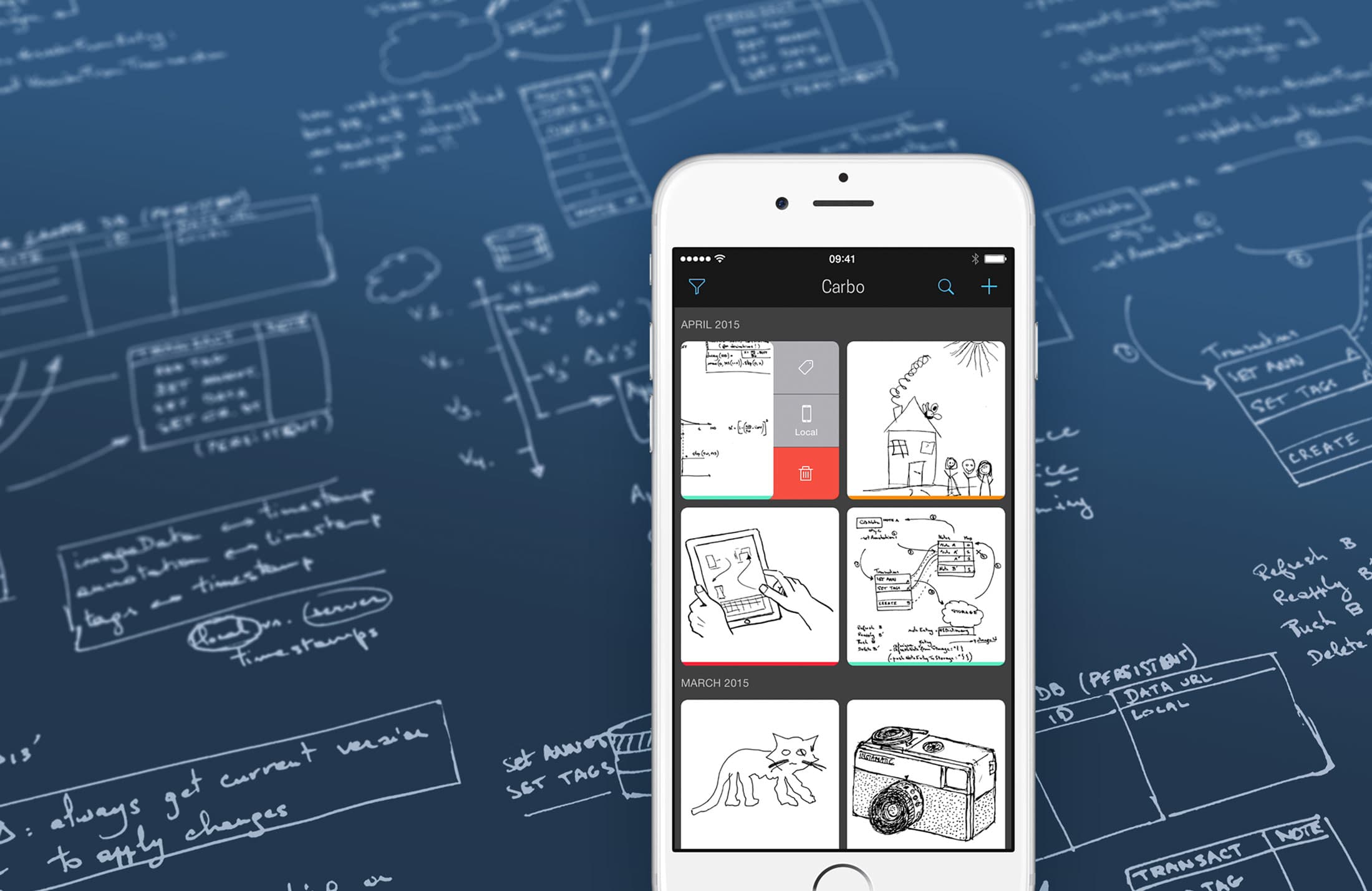
Creaceed today announces Carbo 1.2 an update to its popular productivity app developed for iOS devices. Carbo lets you capture and organize handwritten notes and sketches, bringing handwriting into the digital age. Easily collect notes, design sketches, whiteboard drawings, tag and annotate your notes for easy retrieval, and store them either on the device itself or in the cloud. Version 1.2 is specifically optimized for iPad Pro/Apple Pencil, and iPhone 6s pressure sensitive display.
Mons, Belgium - Creaceed today releases Carbo 1.2 today with new drawing capabilities. This new version is specifically optimized for iPad Pro / Apple Pencil, and iPhone 6s pressure sensitive display. Carbo lets you capture and organize handwritten notes and sketches, bringing handwriting in the digital age.
Carbo's innovative scanning & visualization technology sets you free from pixel artefacts, while preserving all expressiveness of your original drawings. With version 1.2, Carbo brings a new pen tool that allows creating new notes or editing existing ones. Carbo's pen tool reacts to a number of input features of Apple Pencil such as pressure, velocity, tilt angle to provide variable thickness strokes. When not using Apple Pencil, Carbo reverts to using pressure (iPhone 6s) & velocity to provide a natural drawing experience.
New Features:
* Sketching notes directly within Carbo is now possible, using either finger, styluses or Apple Pencil. This highly accurate drawing technology reacts to velocity, pressure and more
* Creation of empty notes
* New 'Pen' tool for drawing
Hardware Support:
* Support for iPad Pro & Apple Pencil, including sensitivity to velocity, pressure, input angle, as well as improved accuracy over touch
* iPad Multitasking
* Support for iPhone 6s / 6s Plus pressure sensitive 3D Touch display
* Other devices without pressure sensitivity: support for variable thickness based on drawing velocity
Device Requirements:
* Universal application (iPhone, iPad) requiring iOS 9.0 or higher
* Any iPhone or iPad with at least a 5-MP camera (iPhone 4S and newer models, iPad 3 and newer models, iPad mini)
Pricing and availability:
Carbo 1.2 for iOS 9 is available worldwide on the App Store in 11 languages (English, German, Dutch, French, Italian, Portuguese, Norwegian, Russian, Japanese, Simplified Chinese and Traditional Chinese). Carbo 1.2 price is $7.99 (USD) and a free upgrade for existing owners.
Carbo 1.2: http://www.creaceed.com/carbo
More Info: https://medium.com/@creaceed/carbo-1-2-let-s-draw-something-9d4e2c56821d
Purchase and Download: https://itunes.apple.com/app/id956811074
Vimeo Video (Trailer): https://vimeo.com/126504678
Vimeo Video (Preview): https://vimeo.com/126478864
Screenshot: http://www.creaceed.com/images/carbo/carbo_intro.jpg
Creaceed is a Belgian company based in Mons with a passionate team experienced in app development and image processing. Creaceed makes the following award-winning applications: Hydra for HDR, 32MP and low-noise imaging on iPhone and iPad; Morph Age, for morphing and warping images and movies; Emulsio, for stabilizing shaky movies on iPhone and iPad; and Prizmo, for scanning documents OCR with a digital camera or scanner. Prizmo was recently featured in Oct. 2014 Apple keynote by Phil Schiller during iPad Air 2 introduction, to demonstrate iPad camera capabilities, and Hydra was selected as part of the 'Shot on iPhone 6' Apple campaign. Copyright 2008-2015 Creaceed. All Rights Reserved. Apple, the Apple logo, Macintosh, iOS, OS X, iPhone, iPad are registered trademarks of Apple Computer in the U.S. and/or other countries.
*******
Link To Article: http://prmac.com/release-id-77513.htm
*******
---------------------------------------------------------------------------------
Note that you can alter delivered distributions at any time.
Login to your account on prMac to alter your channel selection, or to opt-out at any time.
Carbo 1.2 gets iPad Pro/Apple Pencil drawing feature - Published on 11/12/15
Creaceed today announces Carbo 1.2 an update to its popular productivity app developed for iOS devices. Carbo lets you capture and organize handwritten notes and sketches, bringing handwriting into the digital age. Easily collect notes, design sketches, whiteboard drawings, tag and annotate your notes for easy retrieval, and store them either on the device itself or in the cloud. Version 1.2 is specifically optimized for iPad Pro/Apple Pencil, and iPhone 6s pressure sensitive display.
Mons, Belgium - Creaceed today releases Carbo 1.2 today with new drawing capabilities. This new version is specifically optimized for iPad Pro / Apple Pencil, and iPhone 6s pressure sensitive display. Carbo lets you capture and organize handwritten notes and sketches, bringing handwriting in the digital age.
Carbo's innovative scanning & visualization technology sets you free from pixel artefacts, while preserving all expressiveness of your original drawings. With version 1.2, Carbo brings a new pen tool that allows creating new notes or editing existing ones. Carbo's pen tool reacts to a number of input features of Apple Pencil such as pressure, velocity, tilt angle to provide variable thickness strokes. When not using Apple Pencil, Carbo reverts to using pressure (iPhone 6s) & velocity to provide a natural drawing experience.
New Features:
* Sketching notes directly within Carbo is now possible, using either finger, styluses or Apple Pencil. This highly accurate drawing technology reacts to velocity, pressure and more
* Creation of empty notes
* New 'Pen' tool for drawing
Hardware Support:
* Support for iPad Pro & Apple Pencil, including sensitivity to velocity, pressure, input angle, as well as improved accuracy over touch
* iPad Multitasking
* Support for iPhone 6s / 6s Plus pressure sensitive 3D Touch display
* Other devices without pressure sensitivity: support for variable thickness based on drawing velocity
Device Requirements:
* Universal application (iPhone, iPad) requiring iOS 9.0 or higher
* Any iPhone or iPad with at least a 5-MP camera (iPhone 4S and newer models, iPad 3 and newer models, iPad mini)
Pricing and availability:
Carbo 1.2 for iOS 9 is available worldwide on the App Store in 11 languages (English, German, Dutch, French, Italian, Portuguese, Norwegian, Russian, Japanese, Simplified Chinese and Traditional Chinese). Carbo 1.2 price is $7.99 (USD) and a free upgrade for existing owners.
Carbo 1.2: http://www.creaceed.com/carbo
More Info: https://medium.com/@creaceed/carbo-1-2-let-s-draw-something-9d4e2c56821d
Purchase and Download: https://itunes.apple.com/app/id956811074
Vimeo Video (Trailer): https://vimeo.com/126504678
Vimeo Video (Preview): https://vimeo.com/126478864
Screenshot: http://www.creaceed.com/images/carbo/carbo_intro.jpg
Creaceed is a Belgian company based in Mons with a passionate team experienced in app development and image processing. Creaceed makes the following award-winning applications: Hydra for HDR, 32MP and low-noise imaging on iPhone and iPad; Morph Age, for morphing and warping images and movies; Emulsio, for stabilizing shaky movies on iPhone and iPad; and Prizmo, for scanning documents OCR with a digital camera or scanner. Prizmo was recently featured in Oct. 2014 Apple keynote by Phil Schiller during iPad Air 2 introduction, to demonstrate iPad camera capabilities, and Hydra was selected as part of the 'Shot on iPhone 6' Apple campaign. Copyright 2008-2015 Creaceed. All Rights Reserved. Apple, the Apple logo, Macintosh, iOS, OS X, iPhone, iPad are registered trademarks of Apple Computer in the U.S. and/or other countries.
*******
Link To Article: http://prmac.com/release-id-77513.htm
*******
---------------------------------------------------------------------------------
Note that you can alter delivered distributions at any time.
Login to your account on prMac to alter your channel selection, or to opt-out at any time.
DEVONagent 3.9.3 with new scripts and updated for El Capitan
A new article has been published at prMac.
DEVONagent 3.9.3 with new scripts and updated for El Capitan - Published on 11/12/15
DEVONtechnologies, LLC updates all editions of its Internet search and research tool DEVONagent. Available in three editions, DEVONagent is a smart internet search agent. It queries search engines and crawls web sites. It then post-filters the results and presents the results in a multitude of ways. The new version adds new Safari scripts for DEVONagent Pro, plays videos fullscreen, and updates two plugins. The updates are free and recommended for all users.
Coeur d'Alene, Idaho - DEVONtechnologies, LLC updates all editions of its Internet search and research tool DEVONagent. The new version adds new Safari scripts for DEVONagent Pro, plays videos fullscreen, and updates two plugins. The updates are free and recommended for all users. OS X El Capitan adds some technologies for enhanced security. DEVONagent Pro and Express 3.9.3 bring support for the new App Transport Security. The updates add some important compatibility fixes for the latest Mac operating system, too.
Three new scripts for Safari let users easily download images and other linked items using DEVONagent Pro. Tabs can also be opened with DEVONagent Pro via the global Scripts menu. Switching between the two browsers during research has never been easier.
In addition, DEVONagent Pro plays videos embedded into web pages also fullscreen. Links in PDF reports don't rely on data detectors anymore and version 3.9.3 is more compatible to some modern web sites. All three editions of DEVONagent update also the Stack Overflow and EUR-Lex plugins. The visually impaired will like the improved VoiceOver support. DEVONagent Express and Pro prevent the Mac from sleeping while they're conducting a search.
DEVONagent is a smart internet search agent. It queries search engines and crawls web sites. It then post-filters the results and presents the results in a multitude of ways. DEVONagent is available in three editions from Pro for serious research to Lite for the casual search from the menu bar.
"The global Scripts menu is one of the many underrated features of the Mac. It lets third-parties transparently add functionality to applications without interfering with their inner clockworks. DEVONthink Pro has always used it and now DEVONagent Pro adds its own scripts to integrate with Safari, too. That's what we like about the Mac: it's smart extensibility," remarks DEVONtechnologies' President, Eric Bohnisch-Volkmann.
Pricing and Availability:
All editions of DEVONagent require an Intel-based Mac and OS X 10.8.5 or later. They can be downloaded from www.devontechnologies.com and be test-driven for free before they need to be properly licensed. All editions of DEVONagent are also available in the App Store; DEVONagent Pro and Express can be bought as part of attractive bundles together with DEVONthink in DEVONtechnologies' online shop.
* DEVONagent Pro: US $49.95 (App Store: $49.99)
* DEVONagent Express: US $4.95 (App Store: $4.99)
* DEVONagent Lite: free
DEVONtechnologies: http://www.devontechnologies.com
DEVONagent 3.9.3: http://www.devontechnologies.com/redirect.php?id=product-da
Download DEVONagent: http://www.devontechnologies.com/redirect.php?id=download
Online Shop: http://www.devontechnologies.com/redirect.php?id=shop
Devonian Blog: http://www.devontechnologies.com/redirect.php?id=blog
App Icon: http://www.devontechnologies.com/typo3temp/pics/2aeaed5be4.png
DEVONtechnologies LLC creates end-user and server applications for the Mac and iOS platforms that enhance productivity, organization, and user experience with unique artificial intelligence technology. All applications are focused on both ease of use and satisfying the needs of even the most savvy users. The underlying DEVONtechnology is a flexible and versatile foundation that can be used for a large range of purposes from databases, data mining, and information retrieval to human-computer interfaces. DEVONtechnologies LLC was founded 2002 and incorporated 2004, and is today headquartered in Coeur d'Alene, Idaho, USA. All Material and Software (C) Copyright 2015 DEVONtechnologies LLC. All Rights Reserved. Apple, the Apple logo, Macintosh and Mac OS X are registered trademarks of Apple Inc. in the U.S. and/or other countries. Other trademarks and registered trademarks may be the property of their respective owners.
*******
Link To Article: http://prmac.com/release-id-77512.htm
*******
---------------------------------------------------------------------------------
Note that you can alter delivered distributions at any time.
Login to your account on prMac to alter your channel selection, or to opt-out at any time.
DEVONagent 3.9.3 with new scripts and updated for El Capitan - Published on 11/12/15
DEVONtechnologies, LLC updates all editions of its Internet search and research tool DEVONagent. Available in three editions, DEVONagent is a smart internet search agent. It queries search engines and crawls web sites. It then post-filters the results and presents the results in a multitude of ways. The new version adds new Safari scripts for DEVONagent Pro, plays videos fullscreen, and updates two plugins. The updates are free and recommended for all users.
Coeur d'Alene, Idaho - DEVONtechnologies, LLC updates all editions of its Internet search and research tool DEVONagent. The new version adds new Safari scripts for DEVONagent Pro, plays videos fullscreen, and updates two plugins. The updates are free and recommended for all users. OS X El Capitan adds some technologies for enhanced security. DEVONagent Pro and Express 3.9.3 bring support for the new App Transport Security. The updates add some important compatibility fixes for the latest Mac operating system, too.
Three new scripts for Safari let users easily download images and other linked items using DEVONagent Pro. Tabs can also be opened with DEVONagent Pro via the global Scripts menu. Switching between the two browsers during research has never been easier.
In addition, DEVONagent Pro plays videos embedded into web pages also fullscreen. Links in PDF reports don't rely on data detectors anymore and version 3.9.3 is more compatible to some modern web sites. All three editions of DEVONagent update also the Stack Overflow and EUR-Lex plugins. The visually impaired will like the improved VoiceOver support. DEVONagent Express and Pro prevent the Mac from sleeping while they're conducting a search.
DEVONagent is a smart internet search agent. It queries search engines and crawls web sites. It then post-filters the results and presents the results in a multitude of ways. DEVONagent is available in three editions from Pro for serious research to Lite for the casual search from the menu bar.
"The global Scripts menu is one of the many underrated features of the Mac. It lets third-parties transparently add functionality to applications without interfering with their inner clockworks. DEVONthink Pro has always used it and now DEVONagent Pro adds its own scripts to integrate with Safari, too. That's what we like about the Mac: it's smart extensibility," remarks DEVONtechnologies' President, Eric Bohnisch-Volkmann.
Pricing and Availability:
All editions of DEVONagent require an Intel-based Mac and OS X 10.8.5 or later. They can be downloaded from www.devontechnologies.com and be test-driven for free before they need to be properly licensed. All editions of DEVONagent are also available in the App Store; DEVONagent Pro and Express can be bought as part of attractive bundles together with DEVONthink in DEVONtechnologies' online shop.
* DEVONagent Pro: US $49.95 (App Store: $49.99)
* DEVONagent Express: US $4.95 (App Store: $4.99)
* DEVONagent Lite: free
DEVONtechnologies: http://www.devontechnologies.com
DEVONagent 3.9.3: http://www.devontechnologies.com/redirect.php?id=product-da
Download DEVONagent: http://www.devontechnologies.com/redirect.php?id=download
Online Shop: http://www.devontechnologies.com/redirect.php?id=shop
Devonian Blog: http://www.devontechnologies.com/redirect.php?id=blog
App Icon: http://www.devontechnologies.com/typo3temp/pics/2aeaed5be4.png

DEVONtechnologies LLC creates end-user and server applications for the Mac and iOS platforms that enhance productivity, organization, and user experience with unique artificial intelligence technology. All applications are focused on both ease of use and satisfying the needs of even the most savvy users. The underlying DEVONtechnology is a flexible and versatile foundation that can be used for a large range of purposes from databases, data mining, and information retrieval to human-computer interfaces. DEVONtechnologies LLC was founded 2002 and incorporated 2004, and is today headquartered in Coeur d'Alene, Idaho, USA. All Material and Software (C) Copyright 2015 DEVONtechnologies LLC. All Rights Reserved. Apple, the Apple logo, Macintosh and Mac OS X are registered trademarks of Apple Inc. in the U.S. and/or other countries. Other trademarks and registered trademarks may be the property of their respective owners.
*******
Link To Article: http://prmac.com/release-id-77512.htm
*******
---------------------------------------------------------------------------------
Note that you can alter delivered distributions at any time.
Login to your account on prMac to alter your channel selection, or to opt-out at any time.
Moo! Choo Choo Farm is now available in the App Store
A new article has been published at prMac.
Moo! Choo Choo Farm is now available in the App Store - Published on 11/12/15
Manila based Choo Choo Apps today introduces Choo Choo Farm 1.0.0, an educational app developed exclusively for iPhone, iPad and iPod touch devices. Choo Choo Farm is all about inspiring creativity and encouraging discovery among children. It starts with a black and white scene that every child can make the scene come to life by colouring all the different elements and Choo Choo characters. Interact with familiar objects you can see in a farm like animals, crops, barns and more!
Manila, Philippines - Choo Choo Apps today is proud to announce the release and immediate availability of Choo Choo Farm 1.0.0, an educational app developed exclusively for iPhone, iPad and iPod touch devices. Welcome to Choo Choo Farm! Choo Choo Farm is all about inspiring creativity and encouraging discovery among kids. It starts with a familiar black and white scene of a farm and every child can make the scene come to life by colouring all the different elements and characters. Interact with objects in the farm like trees, barns, hills and more! Drag and drop objects within the scene to rearrange them or discover how they interact with each other. There's just so much to explore in Choo Choo Farm!
Create:
Create a vivid and wonderful farm by colouring each of the elements using the Crayon Rack. There are 14 basic crayons to choose from. Want to add a bush or another Choo Choo character? Just open the Object Rack and grab one! Move and rearrange objects within the scene.
Discover:
Drag the Choo Choo characters into the different objects in the scene and see what happens! Find out what happens when you drag a character into the swing or the tree. Drag characters into the barn and watch them show their favorite dance moves. Feel like riding a cow today? Just drag a character into any of the animals to experiment!
Share:
Snap a picture of your child's masterpiece and share them to others!
Device Requirements:
* iPhone, iPad, and iPod touch
* Requires iOS 6.0 or later
* Optimized for iPad Pro
* 7.1 MB
Pricing and Availability:
Choo Choo Farm 1.0.0 is $1.99 USD (or equivalent amount in other currencies) and available worldwide exclusively through the App Store in the Education category.
Choo Choo Apps: http://www.choochooapps.com/
Choo Choo Farm 1.0.0: http://www.choochooapps.com/p/choo-choo-farm-letter.html
Purchase and Download: https://itunes.apple.com/app/choo-choo-farm/id1042855111
Screenshot: https://blogger.googleusercontent.com/img/b/R29vZ2xl/AVvXsEg6tcBCFAdMbbOGiWBhfz68wH4-ftDcfgIjiAoSsk4lpu9o2KlmKrsGzsbBEorFOenJFwyhBFycSRzxsYL3FYLFLGR0xQMfqB064MT32eOm8HxlG8LbSctwrqeN4BZ-VCKcAsHDC_uMPg/s1600/ccfarm_forparents_header.png
App Icon: http://a2.mzstatic.com/us/r30/Purple6/v4/07/ff/9a/07ff9a59-9321-1b48-6156-8aab8ddfdb59/icon175x175.jpeg
Choo Choo Apps is a small startup based in Manila, Philippines that creates educational apps and digital toys for kids. All Material and Software (C) Copyright 2015 Choo Choo Apps. All Rights Reserved. Apple, the Apple logo, iPhone, iPod and iPad are registered trademarks of Apple Inc. in the U.S. and/or other countries. Other trademarks and registered trademarks may be the property of their respective owners.
*******
Link To Article: http://prmac.com/release-id-77511.htm
*******
---------------------------------------------------------------------------------
Note that you can alter delivered distributions at any time.
Login to your account on prMac to alter your channel selection, or to opt-out at any time.
Moo! Choo Choo Farm is now available in the App Store - Published on 11/12/15
Manila based Choo Choo Apps today introduces Choo Choo Farm 1.0.0, an educational app developed exclusively for iPhone, iPad and iPod touch devices. Choo Choo Farm is all about inspiring creativity and encouraging discovery among children. It starts with a black and white scene that every child can make the scene come to life by colouring all the different elements and Choo Choo characters. Interact with familiar objects you can see in a farm like animals, crops, barns and more!
Manila, Philippines - Choo Choo Apps today is proud to announce the release and immediate availability of Choo Choo Farm 1.0.0, an educational app developed exclusively for iPhone, iPad and iPod touch devices. Welcome to Choo Choo Farm! Choo Choo Farm is all about inspiring creativity and encouraging discovery among kids. It starts with a familiar black and white scene of a farm and every child can make the scene come to life by colouring all the different elements and characters. Interact with objects in the farm like trees, barns, hills and more! Drag and drop objects within the scene to rearrange them or discover how they interact with each other. There's just so much to explore in Choo Choo Farm!
Create:
Create a vivid and wonderful farm by colouring each of the elements using the Crayon Rack. There are 14 basic crayons to choose from. Want to add a bush or another Choo Choo character? Just open the Object Rack and grab one! Move and rearrange objects within the scene.
Discover:
Drag the Choo Choo characters into the different objects in the scene and see what happens! Find out what happens when you drag a character into the swing or the tree. Drag characters into the barn and watch them show their favorite dance moves. Feel like riding a cow today? Just drag a character into any of the animals to experiment!
Share:
Snap a picture of your child's masterpiece and share them to others!
Device Requirements:
* iPhone, iPad, and iPod touch
* Requires iOS 6.0 or later
* Optimized for iPad Pro
* 7.1 MB
Pricing and Availability:
Choo Choo Farm 1.0.0 is $1.99 USD (or equivalent amount in other currencies) and available worldwide exclusively through the App Store in the Education category.
Choo Choo Apps: http://www.choochooapps.com/
Choo Choo Farm 1.0.0: http://www.choochooapps.com/p/choo-choo-farm-letter.html
Purchase and Download: https://itunes.apple.com/app/choo-choo-farm/id1042855111
Screenshot: https://blogger.googleusercontent.com/img/b/R29vZ2xl/AVvXsEg6tcBCFAdMbbOGiWBhfz68wH4-ftDcfgIjiAoSsk4lpu9o2KlmKrsGzsbBEorFOenJFwyhBFycSRzxsYL3FYLFLGR0xQMfqB064MT32eOm8HxlG8LbSctwrqeN4BZ-VCKcAsHDC_uMPg/s1600/ccfarm_forparents_header.png

App Icon: http://a2.mzstatic.com/us/r30/Purple6/v4/07/ff/9a/07ff9a59-9321-1b48-6156-8aab8ddfdb59/icon175x175.jpeg

Choo Choo Apps is a small startup based in Manila, Philippines that creates educational apps and digital toys for kids. All Material and Software (C) Copyright 2015 Choo Choo Apps. All Rights Reserved. Apple, the Apple logo, iPhone, iPod and iPad are registered trademarks of Apple Inc. in the U.S. and/or other countries. Other trademarks and registered trademarks may be the property of their respective owners.
*******
Link To Article: http://prmac.com/release-id-77511.htm
*******
---------------------------------------------------------------------------------
Note that you can alter delivered distributions at any time.
Login to your account on prMac to alter your channel selection, or to opt-out at any time.
Woodpost 2.0: 3 new product lines, free Express Shipping for orders >$65
A new article has been published at prMac.
Woodpost 2.0: 3 new product lines, free Express Shipping for orders >$65 - Published on 11/12/15
Not A Basement Studio today announces Woodpost by Fuzel 2.0, the next major update to its App Store Editors' Choice lifestyle app that allows anyone to print photos on wood. Woodpost helps you to share with everyone that special feeling of holding your photos in your hand, in the form of a unique, and beautiful wooden postcard, posters, trays or even coasters. Version 2.0 adds a wide range of unique products, including poster, coaster, and trays; all of which are made out of natural rubberwood.
Ho Chi Minh, Viet Nam - Not A Basement Studio today is delighted to announce the release and immediate availability of Woodpost by Fuzel 2.0, the next major update to its App Store Editors' Choice lifestyle app that allows anyone to print photos on wood. Woodpost helps you to share with everyone that special feeling of holding your photos in your hand, in the form of a unique, and beautiful wooden postcard, poster, tray or even coaster.
This major update adds 3 new product lines: poster, coaster, and trays. The poster is made from rubberwood, available in 2 shapes (square or rectangular), and 3 sizes (large, medium, small). The coasters are available in set of 4, with 3 different shapes (round, square, honeycomb) and preset designs, and made from rubberwood. The tray, similar to the coasters, also comes with preset designs and made from rubberwood. New designs for both coasters & trays will be added periodically over time.
Woodprinting, Made For Mobile:
Everything, from the beautiful & unique wooden products, to the simple & straightforward ordering process brings you the best way to print your photos on wood.
Wide Range Of Products:
* Posters - Brighten up any walls or corners
* Postcard - For a special someone, on any occasions
* Coasters - Add a playful touch to the coffee table
* Tray - Perfect for drinks, fruits, or anything else
The Imperfection Makes It Perfect:
Each piece of wood comes with its own imperfection and uniqueness. That poses a significant challenge when it comes to printing your photos on wood. After countless test prints and playing around with different types of ink & printing techniques, we have managed to get the colors & details of the photos come out just right.
Eco-Friendly Materials:
All Woodpost products are made from rubberwood from the Para rubber trees in southern Vietnam. When the rubber trees no longer produce sap - usually after 25-30 years - the old trees are then chopped down and new ones are planted in their place. This makes rubberwood, besides maple, the most ecologically-friendly material around.
The Little Things That Matter:
* Each order comes with Free standard worldwide shipping
* For faster shipping, you can choose FedEx Express
* 100% money back guarantee
* 24-hour customer support
Device Requirements:
* iPhone 4/4S/5/5C/5S, iPod touch 5th Generation - All iPad devices (except iPad 1)
* Require iOS 8.0 or later
* Universal Application
* Size: 85.3 MB
Pricing and Availability:
Woodpost by Fuzel 2.0 is free to download as an universal app and available worldwide in the iTunes App Store in the Lifestyle category. The company also partners with FedEx to offer Worldwide Express Shipping (5-7 days). All orders over $65 (USD) will be eligible for Free Express Shipping. During the launch period, the first 500 orders with the promo code "launch20" will receive 20% Off.
Woodpost by Fuzel 2.0: http://woodpost.com/
Download from iTunes: https://itunes.apple.com/app/woodpost-by-fuzel-print-your/id959840354
Vimeo Video (Promo): https://vimeo.com/144095428
Media Assets: https://www.dropbox.com/sh/f5pp4dfv7q8hgzm/AAAZNxx6xk9mPE75wUOqxoe-a?dl=0
Not A Basement Studio is mobile app company based in Ho Chi Minh City, Vietnam. We're a group of young, passionate people who love to build awesome products. We work hard to make products that are beautifully designed, fun to use, and add real value to our user's life. Millions of people have downloaded our apps, and Apple featured our flagship photo app Fuzel as "Best apps of 2012", "Editors' Choice" in 2014 & 2015, and "New & Noteworthy Apps" multiple times. We have also appeared on Tech Crunch, Wall Street Journal, TheNextWeb, Cult of Mac, CNET, Forbes Vietnam and others. All Material and Software (C) Copyright 2015 Not A Basement Studio. All Rights Reserved. Apple, the Apple logo, iPhone, iPod and iPad are registered trademarks of Apple Inc. in the U.S. and/or other countries. Other trademarks and registered trademarks may be the property of their respective owners.
*******
Link To Article: http://prmac.com/release-id-77510.htm
*******
---------------------------------------------------------------------------------
Note that you can alter delivered distributions at any time.
Login to your account on prMac to alter your channel selection, or to opt-out at any time.
Woodpost 2.0: 3 new product lines, free Express Shipping for orders >$65 - Published on 11/12/15
Not A Basement Studio today announces Woodpost by Fuzel 2.0, the next major update to its App Store Editors' Choice lifestyle app that allows anyone to print photos on wood. Woodpost helps you to share with everyone that special feeling of holding your photos in your hand, in the form of a unique, and beautiful wooden postcard, posters, trays or even coasters. Version 2.0 adds a wide range of unique products, including poster, coaster, and trays; all of which are made out of natural rubberwood.
Ho Chi Minh, Viet Nam - Not A Basement Studio today is delighted to announce the release and immediate availability of Woodpost by Fuzel 2.0, the next major update to its App Store Editors' Choice lifestyle app that allows anyone to print photos on wood. Woodpost helps you to share with everyone that special feeling of holding your photos in your hand, in the form of a unique, and beautiful wooden postcard, poster, tray or even coaster.
This major update adds 3 new product lines: poster, coaster, and trays. The poster is made from rubberwood, available in 2 shapes (square or rectangular), and 3 sizes (large, medium, small). The coasters are available in set of 4, with 3 different shapes (round, square, honeycomb) and preset designs, and made from rubberwood. The tray, similar to the coasters, also comes with preset designs and made from rubberwood. New designs for both coasters & trays will be added periodically over time.
Woodprinting, Made For Mobile:
Everything, from the beautiful & unique wooden products, to the simple & straightforward ordering process brings you the best way to print your photos on wood.
Wide Range Of Products:
* Posters - Brighten up any walls or corners
* Postcard - For a special someone, on any occasions
* Coasters - Add a playful touch to the coffee table
* Tray - Perfect for drinks, fruits, or anything else
The Imperfection Makes It Perfect:
Each piece of wood comes with its own imperfection and uniqueness. That poses a significant challenge when it comes to printing your photos on wood. After countless test prints and playing around with different types of ink & printing techniques, we have managed to get the colors & details of the photos come out just right.
Eco-Friendly Materials:
All Woodpost products are made from rubberwood from the Para rubber trees in southern Vietnam. When the rubber trees no longer produce sap - usually after 25-30 years - the old trees are then chopped down and new ones are planted in their place. This makes rubberwood, besides maple, the most ecologically-friendly material around.
The Little Things That Matter:
* Each order comes with Free standard worldwide shipping
* For faster shipping, you can choose FedEx Express
* 100% money back guarantee
* 24-hour customer support
Device Requirements:
* iPhone 4/4S/5/5C/5S, iPod touch 5th Generation - All iPad devices (except iPad 1)
* Require iOS 8.0 or later
* Universal Application
* Size: 85.3 MB
Pricing and Availability:
Woodpost by Fuzel 2.0 is free to download as an universal app and available worldwide in the iTunes App Store in the Lifestyle category. The company also partners with FedEx to offer Worldwide Express Shipping (5-7 days). All orders over $65 (USD) will be eligible for Free Express Shipping. During the launch period, the first 500 orders with the promo code "launch20" will receive 20% Off.
Woodpost by Fuzel 2.0: http://woodpost.com/
Download from iTunes: https://itunes.apple.com/app/woodpost-by-fuzel-print-your/id959840354
Vimeo Video (Promo): https://vimeo.com/144095428
Media Assets: https://www.dropbox.com/sh/f5pp4dfv7q8hgzm/AAAZNxx6xk9mPE75wUOqxoe-a?dl=0
Not A Basement Studio is mobile app company based in Ho Chi Minh City, Vietnam. We're a group of young, passionate people who love to build awesome products. We work hard to make products that are beautifully designed, fun to use, and add real value to our user's life. Millions of people have downloaded our apps, and Apple featured our flagship photo app Fuzel as "Best apps of 2012", "Editors' Choice" in 2014 & 2015, and "New & Noteworthy Apps" multiple times. We have also appeared on Tech Crunch, Wall Street Journal, TheNextWeb, Cult of Mac, CNET, Forbes Vietnam and others. All Material and Software (C) Copyright 2015 Not A Basement Studio. All Rights Reserved. Apple, the Apple logo, iPhone, iPod and iPad are registered trademarks of Apple Inc. in the U.S. and/or other countries. Other trademarks and registered trademarks may be the property of their respective owners.
*******
Link To Article: http://prmac.com/release-id-77510.htm
*******
---------------------------------------------------------------------------------
Note that you can alter delivered distributions at any time.
Login to your account on prMac to alter your channel selection, or to opt-out at any time.
Subscribe to:
Posts (Atom)