A new article has been published at prMac.
Pattern Soup App Enables Users to Create Unique Collages and Patterns - Published on 01/08/16
Ultralab Apps has announced Pattern Soup 1.0 their new creative toolkit developed exclusively for iOS devices. Pattern Soup makes it possible to create unique patterns by melding user photography with artworks of contemporary designers. The variety of editing options and backgrounds make sure you create the Pattern Soup of your taste. This release also marks the collaboration between Ultralab Apps and modern artists from France, Belarus, Japan and the USA.
Minsk, Belarus - Ultralab Apps has announced the availability of Pattern Soup 1.0, an app that stands out from hundreds of collage-making apps on the App Store. By combining photo fragments with abstract backgrounds users can create unusual posts for Instagram and Tumblr and print designs for posters, T-shirts and the like.
Pattern Soup serves as an introduction into the works of contemporary artists. The first version of the app includes exciting patterns by Specialedition.co - a group of designers from Kansas; illustrations by Yoko Honda distinguished by neon hues and unmistakable 80s aesthetics; and pieces by Alain Vonck whose art is inspired by the digital culture of the 90s.
A unique pattern in Pattern Soup is created following an intuitive sequence of steps:
* Cutting out a photo fragment
* Applying a stylish grid
* Selecting an abstract background
Pattern Soup features Ultrastore - a unique service for promoting and selling digital creative assets including photos, sketches, and illustrations. By launching the store and opening access for creative individuals to submit their art, Ultralab Apps hopes to facilitate the development of mobile design community and inspire people to pursue their creative work.
Ultralab Apps team hopes Pattern Soup will be of much inspiration to iPhone users by introducing them to the works of contemporary artists and by giving them an opportunity to create artworks of their own.
Device requirements:
* Compatible with iPhone, iPad and iPod touch
* Requires iOS 8.0 or later
* 14.8 MB
Pricing and Availability:
Pattern Soup 1.0 is free with additional packs offered as in-app purchases and is available worldwide exclusively through the App Store in the Photo & Video category.
Ultralab: http://ultralabapps.com
Pattern Soup 1.0: https://itunes.apple.com/app/pattern-soup/id1048789436
Screenshot: http://apphunters.co/patternsoup/screen.jpg
App Icon: http://apphunters.co/patternsoup/icon.png
Founded in 2012, Ultralab is a community of talented developers, illustrators and marketers committed to the idea of creating apps and games that inspire, empower and entertain. All Material and Software (C) Copyright 2015 Ultralab. All Rights Reserved. Apple, the Apple logo, iPhone, iPod and iPad are registered trademarks of Apple Inc. in the U.S. and/or other countries. Other trademarks and registered trademarks may be the property of their respective owners.
*******
Link To Article: http://prmac.com/release-id-78254.htm
*******
---------------------------------------------------------------------------------
Note that you can alter delivered distributions at any time.
Login to your account on prMac to alter your channel selection, or to opt-out at any time.


Export Messages - Save Print Backup Recover Text, SMS and iMessages
A new article has been published at prMac.
Export Messages - Save Print Backup Recover Text, SMS and iMessages - Published on 01/08/16
Aadi Zetta Techsoft Pvt Ltd has announced Export Messages app exclusively for iPhone and iPod touch. Export Messages allows you to backup iMessages and SMS from your device to a Mac or PC in XLS/CSV/HTML format. Using Export Messages, you can archive and maintain records of all your messages at a single location in a Excel file. Browse all backup messages in the .xls file very easily. You can filter messages by sender or sort messages by time and date.
Hyderabad, India - Aadi Zetta Techsoft Pvt Ltd has announced its new app, Export Messages. The texts on your iPhone are now one of your most important forms of communication with your friends, family, loved ones. It is impossible to recover messages once your phone gets lost, broken, etc. Maybe your boy/girl friend's text messages that you want to save or maybe you need to make a backup of a text for legal purposes or may be running low on storage space.
Export Messages App lets you access and save your iPhone's Text messages on your Mac or PC in most widely used excel, CSV & HTML format. No need to worry about loosing important messages on your iPhone. By using Export Messages app anyone can preserve all messages in Excel,CSV/HTML file. You can sort & filter your messages based on multiple criteria, leveraging the sorting feature of a tabular format. With Export Messages App, you can now save your messages rather than delete them to free up some memory on your iOS devices.
Feature Highlights:
* Save exported messages directly to your computer
* Backup messages are saved in .xls format
* Email the backup messages in excel file format
* Browse all backup messages in the .xls file very easily - You can filter messages by sender or sort messages by time & date
* Easy to search for any message in your backup file
* You can export SMS or iMessages of Multiple devices into multiple excel files
* Detailed help guide available within the app
* Free Desktop apps provided to the iOS users for quick backup from Mac or PC
Export Messages App is listed in Top 20 charts of Entertainment category in the US.
Device Requirements:
* iPhone, iPad and iPod touch
* Requires iOS 8.0 or later
* Optimized for iPhone 5,6,6s,6 Plus & 6s Plus
* 7.3 MB
Pricing and Availability:
Available the wonderful feature-rich Export Messages 1.1 is $4.99 (USD) worldwide from the App Store under the Entertainment category.
Aadi Zetta Techsoft: http://www.backupsms.weebly.com
Export Messages 1.1: https://itunes.apple.com/app/export-messages-save-print/id952632588
Screenshot 1: http://a4.mzstatic.com/us/r30/Purple3/v4/ea/36/51/ea365118-18cb-478a-92ed-49dd86e943c7/screen568x568.jpeg
Screenshot 2: http://a3.mzstatic.com/us/r30/Purple3/v4/95/f0/61/95f06109-bd34-d1d6-0ceb-3254518c543a/screen568x568.jpeg
App Icon: http://a3.mzstatic.com/us/r30/Purple1/v4/31/02/93/3102931b-d373-a34f-fba5-d15d3c1e1b20/icon175x175.png
Aadi Zetta Techsoft Pvt Ltd is a pioneer in the mobile development arena, releasing applications that are swift, visually appealing, and highly intuitive. Copyright (C) 2015 Aadi Zetta Techsoft Pvt Ltd. All Rights Reserved. Apple, the Apple logo, iPhone, iPad, iPad mini, iPod touch, and Mac are registered trademarks of Apple Inc. in the U.S. and/or other countries. Other trademarks and registered trademarks may be the property of their respective owners.
*******
Link To Article: http://prmac.com/release-id-78253.htm
*******
---------------------------------------------------------------------------------
Note that you can alter delivered distributions at any time.
Login to your account on prMac to alter your channel selection, or to opt-out at any time.
Export Messages - Save Print Backup Recover Text, SMS and iMessages - Published on 01/08/16
Aadi Zetta Techsoft Pvt Ltd has announced Export Messages app exclusively for iPhone and iPod touch. Export Messages allows you to backup iMessages and SMS from your device to a Mac or PC in XLS/CSV/HTML format. Using Export Messages, you can archive and maintain records of all your messages at a single location in a Excel file. Browse all backup messages in the .xls file very easily. You can filter messages by sender or sort messages by time and date.
Hyderabad, India - Aadi Zetta Techsoft Pvt Ltd has announced its new app, Export Messages. The texts on your iPhone are now one of your most important forms of communication with your friends, family, loved ones. It is impossible to recover messages once your phone gets lost, broken, etc. Maybe your boy/girl friend's text messages that you want to save or maybe you need to make a backup of a text for legal purposes or may be running low on storage space.
Export Messages App lets you access and save your iPhone's Text messages on your Mac or PC in most widely used excel, CSV & HTML format. No need to worry about loosing important messages on your iPhone. By using Export Messages app anyone can preserve all messages in Excel,CSV/HTML file. You can sort & filter your messages based on multiple criteria, leveraging the sorting feature of a tabular format. With Export Messages App, you can now save your messages rather than delete them to free up some memory on your iOS devices.
Feature Highlights:
* Save exported messages directly to your computer
* Backup messages are saved in .xls format
* Email the backup messages in excel file format
* Browse all backup messages in the .xls file very easily - You can filter messages by sender or sort messages by time & date
* Easy to search for any message in your backup file
* You can export SMS or iMessages of Multiple devices into multiple excel files
* Detailed help guide available within the app
* Free Desktop apps provided to the iOS users for quick backup from Mac or PC
Export Messages App is listed in Top 20 charts of Entertainment category in the US.
Device Requirements:
* iPhone, iPad and iPod touch
* Requires iOS 8.0 or later
* Optimized for iPhone 5,6,6s,6 Plus & 6s Plus
* 7.3 MB
Pricing and Availability:
Available the wonderful feature-rich Export Messages 1.1 is $4.99 (USD) worldwide from the App Store under the Entertainment category.
Aadi Zetta Techsoft: http://www.backupsms.weebly.com
Export Messages 1.1: https://itunes.apple.com/app/export-messages-save-print/id952632588
Screenshot 1: http://a4.mzstatic.com/us/r30/Purple3/v4/ea/36/51/ea365118-18cb-478a-92ed-49dd86e943c7/screen568x568.jpeg

Screenshot 2: http://a3.mzstatic.com/us/r30/Purple3/v4/95/f0/61/95f06109-bd34-d1d6-0ceb-3254518c543a/screen568x568.jpeg

App Icon: http://a3.mzstatic.com/us/r30/Purple1/v4/31/02/93/3102931b-d373-a34f-fba5-d15d3c1e1b20/icon175x175.png

Aadi Zetta Techsoft Pvt Ltd is a pioneer in the mobile development arena, releasing applications that are swift, visually appealing, and highly intuitive. Copyright (C) 2015 Aadi Zetta Techsoft Pvt Ltd. All Rights Reserved. Apple, the Apple logo, iPhone, iPad, iPad mini, iPod touch, and Mac are registered trademarks of Apple Inc. in the U.S. and/or other countries. Other trademarks and registered trademarks may be the property of their respective owners.
*******
Link To Article: http://prmac.com/release-id-78253.htm
*******
---------------------------------------------------------------------------------
Note that you can alter delivered distributions at any time.
Login to your account on prMac to alter your channel selection, or to opt-out at any time.
Diet Hero app kills calorie counting
A new article has been published at prMac.
Diet Hero app kills calorie counting - Published on 01/08/16
Barracuda Partners has announced Diet Hero 1.1.1, a weight loss app for iPhone, iPad, and iPod touch that tells you what and how much to eat. Diet Hero can create a new eating plan every day, with portion sizes listed for each food. No calorie counting needed. Users won't have to force-feed themselves with foods that they don't want to eat. Diet Hero takes into consideration the user's food preferences, the foods that are available in the kitchen, and information about a user's weight loss goals.
Chicago, Illinois - Barracuda Partners has announced the launch of Diet Hero, a weight loss app for iPhone, iPad, and iPod touch that tells you what and how much to eat. No calorie counting needed. Users won't have to force-feed themselves with foods that they don't want to eat as Diet Hero takes into consideration the user's food preferences, the foods that are available in the kitchen, and information about a user's weight loss goals.
"Losing weight has always been a challenge, especially with people becoming increasingly busy. Our mission was to create a product that makes following a healthy eating approach as easy as possible" said Todd Musgrove, Managing Director of Barracuda Partners. "We received lots of feedback from nutritionists and dietitians that customized meal planning is something their client's would really value, so we knew we were on to something big with Diet Hero."
Features:
* Generator: Creates a new eating plan every day, with portion sizes listed for each food
* Food Swaps: Customize any meal with easy refreshes and single-food swaps
* Meal Reminders: Built-in timers for 5 well-balanced meals
* Shopping List: Automatically generates shopping list based on foods you need
* BMI Calculator: Built-in calculator shows your ideal weight loss range
* Water Tracker: Track your water intake - one click fills up each glass
* Weight Loss Tracking: Track your weight in both tables and charts
* Proprietary Database: No internet connection required. It's all stored on your phone
Diet Hero's database uses only a list of widely available nutritious and antioxidant rich foods. Customizable meal plans give users endless options to choose from. Recommendations are based on the food items in the user's pantry or refrigerator, regardless if there are 10 or 50 items in stock. Version 1.1.1 brings general enhancements to the app. Start living a fit and healthy life!
Device Requirements:
* iPhone, iPad, and iPod touch
* Requires iOS 7.0 or later
* 11.0 MB
Pricing and Availability:
Diet Hero 1.1.1 is free until 12/31, and then it's $1.99 (USD), and is available worldwide exclusively through the App Store in the Health and Fitness category.
Diet Hero 1.1.1: http://dietheroapp.com/
Purchase and Download: https://itunes.apple.com/us/app/diet-hero-weight-loss-app/id951617457
Screenshot: http://a5.mzstatic.com/us/r30/Purple7/v4/90/84/67/90846710-5f19-82f7-673b-cb8261ecc70b/screen568x568.jpeg
App Icon: http://a1.mzstatic.com/us/r30/Purple3/v4/a4/19/44/a41944e4-bac2-a544-5f20-f50cca5761f7/icon175x175.jpeg
Barracuda Partners is an app development company based in Chicago that focuses on proprietary, data-driven mobile applications that enable people to make better-informed decisions. Todd Musgrove, Managing Director at Barracuda Partners, handles strategic investments and entrepreneurial advisory for mobile technology start-ups. Copyright (C) 2015 Barracuda Partners. All Rights Reserved. Apple, the Apple logo, iPhone, iPad and iPod are registered trademarks of Apple Inc. in the U.S. and/or other countries.
*******
Link To Article: http://prmac.com/release-id-78252.htm
*******
---------------------------------------------------------------------------------
Note that you can alter delivered distributions at any time.
Login to your account on prMac to alter your channel selection, or to opt-out at any time.
Diet Hero app kills calorie counting - Published on 01/08/16
Barracuda Partners has announced Diet Hero 1.1.1, a weight loss app for iPhone, iPad, and iPod touch that tells you what and how much to eat. Diet Hero can create a new eating plan every day, with portion sizes listed for each food. No calorie counting needed. Users won't have to force-feed themselves with foods that they don't want to eat. Diet Hero takes into consideration the user's food preferences, the foods that are available in the kitchen, and information about a user's weight loss goals.
Chicago, Illinois - Barracuda Partners has announced the launch of Diet Hero, a weight loss app for iPhone, iPad, and iPod touch that tells you what and how much to eat. No calorie counting needed. Users won't have to force-feed themselves with foods that they don't want to eat as Diet Hero takes into consideration the user's food preferences, the foods that are available in the kitchen, and information about a user's weight loss goals.
"Losing weight has always been a challenge, especially with people becoming increasingly busy. Our mission was to create a product that makes following a healthy eating approach as easy as possible" said Todd Musgrove, Managing Director of Barracuda Partners. "We received lots of feedback from nutritionists and dietitians that customized meal planning is something their client's would really value, so we knew we were on to something big with Diet Hero."
Features:
* Generator: Creates a new eating plan every day, with portion sizes listed for each food
* Food Swaps: Customize any meal with easy refreshes and single-food swaps
* Meal Reminders: Built-in timers for 5 well-balanced meals
* Shopping List: Automatically generates shopping list based on foods you need
* BMI Calculator: Built-in calculator shows your ideal weight loss range
* Water Tracker: Track your water intake - one click fills up each glass
* Weight Loss Tracking: Track your weight in both tables and charts
* Proprietary Database: No internet connection required. It's all stored on your phone
Diet Hero's database uses only a list of widely available nutritious and antioxidant rich foods. Customizable meal plans give users endless options to choose from. Recommendations are based on the food items in the user's pantry or refrigerator, regardless if there are 10 or 50 items in stock. Version 1.1.1 brings general enhancements to the app. Start living a fit and healthy life!
Device Requirements:
* iPhone, iPad, and iPod touch
* Requires iOS 7.0 or later
* 11.0 MB
Pricing and Availability:
Diet Hero 1.1.1 is free until 12/31, and then it's $1.99 (USD), and is available worldwide exclusively through the App Store in the Health and Fitness category.
Diet Hero 1.1.1: http://dietheroapp.com/
Purchase and Download: https://itunes.apple.com/us/app/diet-hero-weight-loss-app/id951617457
Screenshot: http://a5.mzstatic.com/us/r30/Purple7/v4/90/84/67/90846710-5f19-82f7-673b-cb8261ecc70b/screen568x568.jpeg

App Icon: http://a1.mzstatic.com/us/r30/Purple3/v4/a4/19/44/a41944e4-bac2-a544-5f20-f50cca5761f7/icon175x175.jpeg

Barracuda Partners is an app development company based in Chicago that focuses on proprietary, data-driven mobile applications that enable people to make better-informed decisions. Todd Musgrove, Managing Director at Barracuda Partners, handles strategic investments and entrepreneurial advisory for mobile technology start-ups. Copyright (C) 2015 Barracuda Partners. All Rights Reserved. Apple, the Apple logo, iPhone, iPad and iPod are registered trademarks of Apple Inc. in the U.S. and/or other countries.
*******
Link To Article: http://prmac.com/release-id-78252.htm
*******
---------------------------------------------------------------------------------
Note that you can alter delivered distributions at any time.
Login to your account on prMac to alter your channel selection, or to opt-out at any time.
ChangeTip announces the addition of proximity payments in their app
A new article has been published at prMac.
ChangeTip announces the addition of proximity payments in their app - Published on 01/07/16
California based ChangeTip today announced the addition of proximity payments to its popular mobile app. ChangeTip allows anyone with a Facebook or Twitter account to send and receive money to and from each other internationally with no fees. The startup's mobile app enables P2P payments in the form of tips, gifts, or donations, and supports both USD and bitcoin. Version 1.5.0 introduces the addition of proximity payments; users to broadcast their location using GPS and find others nearby.
San Francisco, California - ChangeTip, the industry leader in social tipping and micropayments, today announced the addition of proximity payments to its mobile app. The startup's mobile app allows anyone with a Facebook or Twitter account to send and receive money to and from each other internationally with no fees.
ChangeTip enables P2P payments in the form of tips, gifts, or donations, and supports both USD and bitcoin. The new "Explore" option allows users to broadcast their location using GPS and find others nearby using the ChangeTip app. Money can be sent instantly by selecting an individual discovered nearby, without exchanging contact information. Users can use this function to tip drivers, servers, buskers, and event vendors more easily, conveniently, and for free. This offers people a way to leave home without their credit cards, or cash, as they can now use their phone to send money to anyone, anywhere.
"We're living in an increasingly cashless society, and it's the most obvious when I go to tip a busker, leave some change in a tip jar, or attempt to donate a person in need," says Victoria van Eyk, ChangeTip. "The ChangeTip app allows me to solve this problem just by using my mobile phone."
Users may add money to a ChangeTip "Pocket," similar to a digital "Wallet" used to store funds for future use. ChangeTip specializes in micropayments as low as pennies or fractions of pennies when using BTC, and as high as $100 when using either supported currency. Organizations use ChangeTip to collect donations, distribute rewards, and monetize content.
Device Requirements:
* iPhone, iPad, and iPod touch
* Requires iOS 8.0 or later
* 24.7 MB
Pricing and Availability:
ChangeTip Social Payments, Anywhere 1.5.0 is Free and available worldwide exclusively through the App Store in the Social Networking category. In keeping with American law and financial industry standards, the ChangeTip service is not available in FATF "non-cooperative" and other "blacklisted" countries such as Liberia and Myanmar.
ChangeTip: https://www.changetip.com
ChangeTip Social Payments, Anywhere 1.5.0: https://info.changetip.com/getiosapp
Download from iTunes: https://itunes.apple.com/app/changetip-social-payments/id1028936312
Screenshot: http://a4.mzstatic.com/us/r30/Purple6/v4/de/15/de/de15de29-d19f-4414-3689-0e750745f0bd/screen322x572.jpeg
App Icon: http://a1.mzstatic.com/us/r30/Purple69/v4/93/7f/84/937f8457-3757-1367-2e06-d9bf064aecc3/icon175x175.jpeg
ChangeCoin, Inc. was founded in 2014 by Nick Sullivan and John Q. Smith and is a Delaware Corporation with headquarters in San Francisco, California. ChangeTip is the company's first product, and it seeks to change the way value is transferred by creating a micropayments infrastructure for the web. Using the platform, money can be sent over social media, SMS and e-mail quickly, simply and for free. All Material and Software (C) Copyright 2016 ChangeCoin, Inc. All Rights Reserved. Apple, the Apple logo, iPhone, iPod and iPad are registered trademarks of Apple Inc. in the U.S. and/or other countries. Other trademarks and registered trademarks may be the property of their respective owners.
*******
Link To Article: http://prmac.com/release-id-78263.htm
*******
---------------------------------------------------------------------------------
Note that you can alter delivered distributions at any time.
Login to your account on prMac to alter your channel selection, or to opt-out at any time.
ChangeTip announces the addition of proximity payments in their app - Published on 01/07/16
California based ChangeTip today announced the addition of proximity payments to its popular mobile app. ChangeTip allows anyone with a Facebook or Twitter account to send and receive money to and from each other internationally with no fees. The startup's mobile app enables P2P payments in the form of tips, gifts, or donations, and supports both USD and bitcoin. Version 1.5.0 introduces the addition of proximity payments; users to broadcast their location using GPS and find others nearby.
San Francisco, California - ChangeTip, the industry leader in social tipping and micropayments, today announced the addition of proximity payments to its mobile app. The startup's mobile app allows anyone with a Facebook or Twitter account to send and receive money to and from each other internationally with no fees.
ChangeTip enables P2P payments in the form of tips, gifts, or donations, and supports both USD and bitcoin. The new "Explore" option allows users to broadcast their location using GPS and find others nearby using the ChangeTip app. Money can be sent instantly by selecting an individual discovered nearby, without exchanging contact information. Users can use this function to tip drivers, servers, buskers, and event vendors more easily, conveniently, and for free. This offers people a way to leave home without their credit cards, or cash, as they can now use their phone to send money to anyone, anywhere.
"We're living in an increasingly cashless society, and it's the most obvious when I go to tip a busker, leave some change in a tip jar, or attempt to donate a person in need," says Victoria van Eyk, ChangeTip. "The ChangeTip app allows me to solve this problem just by using my mobile phone."
Users may add money to a ChangeTip "Pocket," similar to a digital "Wallet" used to store funds for future use. ChangeTip specializes in micropayments as low as pennies or fractions of pennies when using BTC, and as high as $100 when using either supported currency. Organizations use ChangeTip to collect donations, distribute rewards, and monetize content.
Device Requirements:
* iPhone, iPad, and iPod touch
* Requires iOS 8.0 or later
* 24.7 MB
Pricing and Availability:
ChangeTip Social Payments, Anywhere 1.5.0 is Free and available worldwide exclusively through the App Store in the Social Networking category. In keeping with American law and financial industry standards, the ChangeTip service is not available in FATF "non-cooperative" and other "blacklisted" countries such as Liberia and Myanmar.
ChangeTip: https://www.changetip.com
ChangeTip Social Payments, Anywhere 1.5.0: https://info.changetip.com/getiosapp
Download from iTunes: https://itunes.apple.com/app/changetip-social-payments/id1028936312
Screenshot: http://a4.mzstatic.com/us/r30/Purple6/v4/de/15/de/de15de29-d19f-4414-3689-0e750745f0bd/screen322x572.jpeg

App Icon: http://a1.mzstatic.com/us/r30/Purple69/v4/93/7f/84/937f8457-3757-1367-2e06-d9bf064aecc3/icon175x175.jpeg

ChangeCoin, Inc. was founded in 2014 by Nick Sullivan and John Q. Smith and is a Delaware Corporation with headquarters in San Francisco, California. ChangeTip is the company's first product, and it seeks to change the way value is transferred by creating a micropayments infrastructure for the web. Using the platform, money can be sent over social media, SMS and e-mail quickly, simply and for free. All Material and Software (C) Copyright 2016 ChangeCoin, Inc. All Rights Reserved. Apple, the Apple logo, iPhone, iPod and iPad are registered trademarks of Apple Inc. in the U.S. and/or other countries. Other trademarks and registered trademarks may be the property of their respective owners.
*******
Link To Article: http://prmac.com/release-id-78263.htm
*******
---------------------------------------------------------------------------------
Note that you can alter delivered distributions at any time.
Login to your account on prMac to alter your channel selection, or to opt-out at any time.
Offline Lithuanian to English Language Dictionary, Translator for iOS
A new article has been published at prMac.
Offline Lithuanian to English Language Dictionary, Translator for iOS - Published on 01/07/16
LastThink announces the release of Offline Lithuanian to English Language Dictionary, Translator 3.0, the important update to their highly customizable dictionary application for iOS devices. Users can seek and find any word's translation and synonyms anytime and anywhere from their devices. The dictionary offers users a huge collection of words with their translations as well as definitions and synonyms, with well over 500,000 synonym variants. Version 3.0 offers improved search capability.
Yerevan, Armenia - LastThink is proud to announce the release of Offline Lithuanian to English Language Dictionary, Translator 3.0, the important update to their highly customizable dictionary application developed for iPhone, iPad, and iPod touch devices. Users can seek and find any word's translation and synonyms anytime and anywhere from their Apple devices.
Features:
* Tremendous range of synonyms and antonyms with well over five hundred thousand synonym variants
* Information about the discipline of structural linguistics by suggesting vital enough sentences
* Appropriate translations of colloquial and formal words as well as conjugation of verbs and declension of nouns
* Availability of various word definitions which will exactly influence on your understanding of a Foreign Language in a detailed way
* A distinction of a section named "Favorites" with the possibility of saving as many unknown words as you wish
* Thorough analysis of parts of speech (noun, verb, adjective, adverb) and their grammatical functions (subject, object, etc.)
* A possibility of the following application usage without an internet demand
* Existence of contemporary words such as "Woot", "OMG", "Crunk" and many others
In our new updated version we grant users a chance of typing the unknown word either in capitals or in small letters and the app will bring all the possible variants and definitions of the dictionary entries saved both in capital and small letters.
If you however experience any issues, please do not hesitate to contact us if you'd like to share your experience with Offline Dictionaries, or provide suggestions on how we could improve the product further. We will be more than happy to get in touch.
NOTE: We have selected data from the internet and if any assembly or constitution doesn't want us to show the content of the unit, please recommend us to remove it.
Device Requirements:
* iPhone, iPad, and iPod touch
* Optimized for iPhone 5, iPhone 6, and iPhone 6 Plus
* Requires iOS 6.0 or later
* Universal Application
* 163 MB
Pricing and Availability:
Offline Lithuanian to English Language Dictionary, Translator 3.0 is free and available worldwide exclusively through the App Store in the Education category.
LastThink: http://lastthink.com/
Offline Lithuanian to English Language Dictionary, Translator 3.0: https://www.facebook.com/pages/Offline-Dictionary/882897578447079
Download from iTunes: https://itunes.apple.com/app/offline-lithuanian-to-english/id1044623928
Screenshot: http://a5.mzstatic.com/us/r30/Purple6/v4/60/98/cf/6098cf17-5d18-13fc-dbb2-c2f0cc122b75/screen322x572.jpeg
App Icon: http://a5.mzstatic.com/us/r30/Purple6/v4/16/fc/a5/16fca56c-777c-9171-a283-ca452478268b/icon175x175.jpeg
LastThink is an IT company with a focus on mobile development. It has extended its list of services since 2012 to offer high-end business process management, system integration, as well as up-to-date communication solutions. LastThink's mission is to deliver maximum business value to its customers by designing, developing, implementing and maintaining efficient and high quality software solutions aligned with their most essential business needs. Their team will always do its best to meet client expectations. Copyright (C) 2016 LastThink LLC. All Rights Reserved. Apple, the Apple logo, iPhone, iPad and iPod are registered trademarks of Apple Inc. in the U.S. and/or other countries.
*******
Link To Article: http://prmac.com/release-id-78262.htm
*******
---------------------------------------------------------------------------------
Note that you can alter delivered distributions at any time.
Login to your account on prMac to alter your channel selection, or to opt-out at any time.
Offline Lithuanian to English Language Dictionary, Translator for iOS - Published on 01/07/16
LastThink announces the release of Offline Lithuanian to English Language Dictionary, Translator 3.0, the important update to their highly customizable dictionary application for iOS devices. Users can seek and find any word's translation and synonyms anytime and anywhere from their devices. The dictionary offers users a huge collection of words with their translations as well as definitions and synonyms, with well over 500,000 synonym variants. Version 3.0 offers improved search capability.
Yerevan, Armenia - LastThink is proud to announce the release of Offline Lithuanian to English Language Dictionary, Translator 3.0, the important update to their highly customizable dictionary application developed for iPhone, iPad, and iPod touch devices. Users can seek and find any word's translation and synonyms anytime and anywhere from their Apple devices.
Features:
* Tremendous range of synonyms and antonyms with well over five hundred thousand synonym variants
* Information about the discipline of structural linguistics by suggesting vital enough sentences
* Appropriate translations of colloquial and formal words as well as conjugation of verbs and declension of nouns
* Availability of various word definitions which will exactly influence on your understanding of a Foreign Language in a detailed way
* A distinction of a section named "Favorites" with the possibility of saving as many unknown words as you wish
* Thorough analysis of parts of speech (noun, verb, adjective, adverb) and their grammatical functions (subject, object, etc.)
* A possibility of the following application usage without an internet demand
* Existence of contemporary words such as "Woot", "OMG", "Crunk" and many others
In our new updated version we grant users a chance of typing the unknown word either in capitals or in small letters and the app will bring all the possible variants and definitions of the dictionary entries saved both in capital and small letters.
If you however experience any issues, please do not hesitate to contact us if you'd like to share your experience with Offline Dictionaries, or provide suggestions on how we could improve the product further. We will be more than happy to get in touch.
NOTE: We have selected data from the internet and if any assembly or constitution doesn't want us to show the content of the unit, please recommend us to remove it.
Device Requirements:
* iPhone, iPad, and iPod touch
* Optimized for iPhone 5, iPhone 6, and iPhone 6 Plus
* Requires iOS 6.0 or later
* Universal Application
* 163 MB
Pricing and Availability:
Offline Lithuanian to English Language Dictionary, Translator 3.0 is free and available worldwide exclusively through the App Store in the Education category.
LastThink: http://lastthink.com/
Offline Lithuanian to English Language Dictionary, Translator 3.0: https://www.facebook.com/pages/Offline-Dictionary/882897578447079
Download from iTunes: https://itunes.apple.com/app/offline-lithuanian-to-english/id1044623928
Screenshot: http://a5.mzstatic.com/us/r30/Purple6/v4/60/98/cf/6098cf17-5d18-13fc-dbb2-c2f0cc122b75/screen322x572.jpeg

App Icon: http://a5.mzstatic.com/us/r30/Purple6/v4/16/fc/a5/16fca56c-777c-9171-a283-ca452478268b/icon175x175.jpeg

LastThink is an IT company with a focus on mobile development. It has extended its list of services since 2012 to offer high-end business process management, system integration, as well as up-to-date communication solutions. LastThink's mission is to deliver maximum business value to its customers by designing, developing, implementing and maintaining efficient and high quality software solutions aligned with their most essential business needs. Their team will always do its best to meet client expectations. Copyright (C) 2016 LastThink LLC. All Rights Reserved. Apple, the Apple logo, iPhone, iPad and iPod are registered trademarks of Apple Inc. in the U.S. and/or other countries.
*******
Link To Article: http://prmac.com/release-id-78262.htm
*******
---------------------------------------------------------------------------------
Note that you can alter delivered distributions at any time.
Login to your account on prMac to alter your channel selection, or to opt-out at any time.
Challenge your brain with dispair on iOS
A new article has been published at prMac.
Challenge your brain with dispair on iOS - Published on 01/07/16
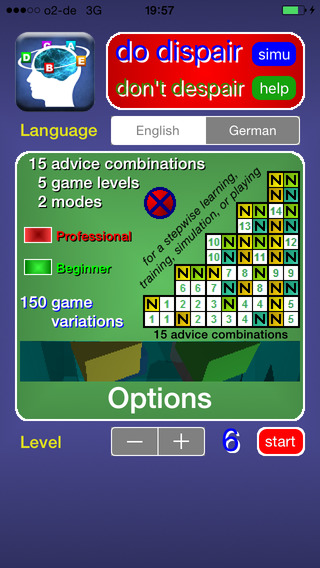
hopades clicks has announced the recent update for dispair, a free and unique puzzle game for iOS devices. This is a really challenging game, in which it depends on finding out a given order of letters within minimum attempts. Featuring several challenging levels, this free puzzle game sharpens thinking skills, improves logics and strengthens brain age all while having fun. The game features 150 game variations, arising from 5 game levels, 2 game modes and endless space to have fun.
Wildberg, Germany - hopades clicks, an emerging mobile app developer focused on creating educationally minded games, has announced the recent update for dispair, a free and unique puzzle game for the iPhone, iPad, and iPod touch devices running on iOS 6.0 or later. This game is a thrilling brainteaser, in which it depends on finding out a given order of letters (colours) within minimum attempts (within as few attempts as possible). Featuring 5 game levels, this brain puzzle sharpens thinking skills, improves logics and strengthens brain age all while having fun.
Once you open dispair you can start simulation for better understanding of the game rules and see how players can use hints about distance & neighbourhood of letters and colors while playing. The game offers two unique modes of play including Beginner where players have rather easy tasks and can make more attempts while Professional mode designed for experienced players who love real dispair challenges.
Anytime users can make suitability checks to see if their variant is correct. To keep things fun and fresh, dispair features detailed leaderboard where players can join a virtual community by posting their best results and see the highest rankings of other players. Players should take into consideration that game starts from the 4th level while other levels are available via in app purchase.
With simple and responsive gameplay dispair 3.0.2 is a clear improvement on an already enjoyable game and it is not just a great puzzle for your brain, it's a well-rounded and well polished brainteaser experience as a whole. Everyone loves a great brain buster, so make your dispair and start playing along with dispair game on iOS now!
Device Requirements:
* iPhone, iPad, and iPod touch
* Requires iOS 6.0 or later
* 14.9 MB
Pricing and Availability:
Until 17th of January, dispair 3.0.2 is Free and available worldwide exclusively through the App Store in the Games category.
hopades clicks: http://www.hopades.de/
dispair 3.0.2: http://www.hopades.de/dispair/
dispair Rankings: https://www.public-mediation.de/ew/scores.php?user=Akuma%20Shi&langu=e&level=4&schutz=8Fj13b29#vier
Download from iTunes: https://itunes.apple.com/app/dispair/id679929354
Screenshot: http://a5.mzstatic.com/us/r30/Purple5/v4/93/b9/79/93b9799a-7a6e-4d56-3260-9ad52a651f71/screen568x568.jpeg
App Icon: http://a4.mzstatic.com/us/r30/Purple4/v4/9e/86/1f/9e861fcc-74ab-4ec3-988b-078a8f4a50dd/icon175x175.jpeg
hopades clicks is an established mobile applications developer located in Wildberg, Germany currently focused on providing consumers with the highest quality puzzle-based games. The developer is committed to creating in-depth and mentally engaging mobile gaming experiences. (C) 2016 hopades clicks. All Rights Reserved. Apple, the Apple logo, iPhone, iPod and iPad are registered trademarks of Apple Inc. in the U.S. and/or other countries.
*******
Link To Article: http://prmac.com/release-id-78260.htm
*******
---------------------------------------------------------------------------------
Note that you can alter delivered distributions at any time.
Login to your account on prMac to alter your channel selection, or to opt-out at any time.
Challenge your brain with dispair on iOS - Published on 01/07/16
hopades clicks has announced the recent update for dispair, a free and unique puzzle game for iOS devices. This is a really challenging game, in which it depends on finding out a given order of letters within minimum attempts. Featuring several challenging levels, this free puzzle game sharpens thinking skills, improves logics and strengthens brain age all while having fun. The game features 150 game variations, arising from 5 game levels, 2 game modes and endless space to have fun.
Wildberg, Germany - hopades clicks, an emerging mobile app developer focused on creating educationally minded games, has announced the recent update for dispair, a free and unique puzzle game for the iPhone, iPad, and iPod touch devices running on iOS 6.0 or later. This game is a thrilling brainteaser, in which it depends on finding out a given order of letters (colours) within minimum attempts (within as few attempts as possible). Featuring 5 game levels, this brain puzzle sharpens thinking skills, improves logics and strengthens brain age all while having fun.
Once you open dispair you can start simulation for better understanding of the game rules and see how players can use hints about distance & neighbourhood of letters and colors while playing. The game offers two unique modes of play including Beginner where players have rather easy tasks and can make more attempts while Professional mode designed for experienced players who love real dispair challenges.
Anytime users can make suitability checks to see if their variant is correct. To keep things fun and fresh, dispair features detailed leaderboard where players can join a virtual community by posting their best results and see the highest rankings of other players. Players should take into consideration that game starts from the 4th level while other levels are available via in app purchase.
With simple and responsive gameplay dispair 3.0.2 is a clear improvement on an already enjoyable game and it is not just a great puzzle for your brain, it's a well-rounded and well polished brainteaser experience as a whole. Everyone loves a great brain buster, so make your dispair and start playing along with dispair game on iOS now!
Device Requirements:
* iPhone, iPad, and iPod touch
* Requires iOS 6.0 or later
* 14.9 MB
Pricing and Availability:
Until 17th of January, dispair 3.0.2 is Free and available worldwide exclusively through the App Store in the Games category.
hopades clicks: http://www.hopades.de/
dispair 3.0.2: http://www.hopades.de/dispair/
dispair Rankings: https://www.public-mediation.de/ew/scores.php?user=Akuma%20Shi&langu=e&level=4&schutz=8Fj13b29#vier
Download from iTunes: https://itunes.apple.com/app/dispair/id679929354
Screenshot: http://a5.mzstatic.com/us/r30/Purple5/v4/93/b9/79/93b9799a-7a6e-4d56-3260-9ad52a651f71/screen568x568.jpeg
App Icon: http://a4.mzstatic.com/us/r30/Purple4/v4/9e/86/1f/9e861fcc-74ab-4ec3-988b-078a8f4a50dd/icon175x175.jpeg

hopades clicks is an established mobile applications developer located in Wildberg, Germany currently focused on providing consumers with the highest quality puzzle-based games. The developer is committed to creating in-depth and mentally engaging mobile gaming experiences. (C) 2016 hopades clicks. All Rights Reserved. Apple, the Apple logo, iPhone, iPod and iPad are registered trademarks of Apple Inc. in the U.S. and/or other countries.
*******
Link To Article: http://prmac.com/release-id-78260.htm
*******
---------------------------------------------------------------------------------
Note that you can alter delivered distributions at any time.
Login to your account on prMac to alter your channel selection, or to opt-out at any time.
Heart Rate Plus 1.0 introduced for iOS - Free Heart Rate Monitor
A new article has been published at prMac.
Heart Rate Plus 1.0 introduced for iOS - Free Heart Rate Monitor - Published on 01/07/16
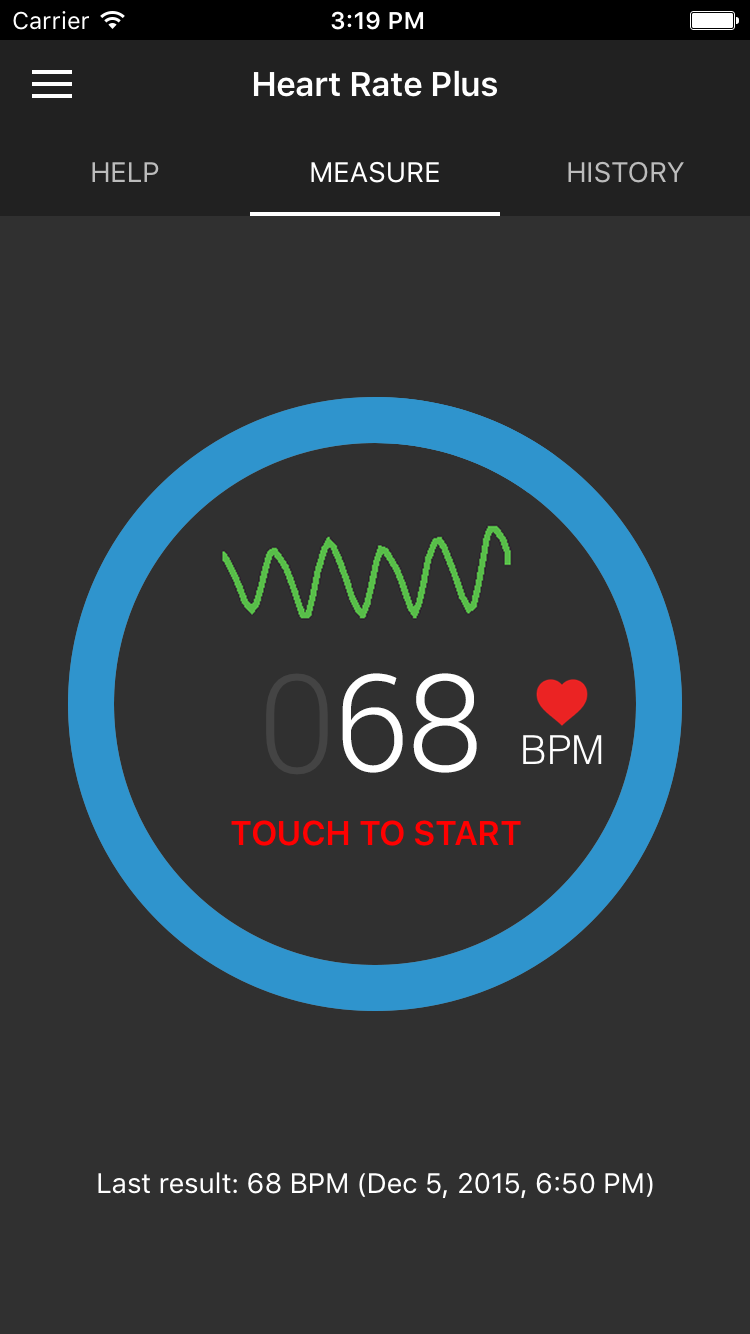
PVDAPPS today introduces Heart Rate Plus 1.0, their new heart rate monitor app developed for iPhone and iPod touch. Heart Rate Plus app will measure your heartbeat with great accuracy, using your iPhone's camera sensor and flashlight by processing the images of your pulse on your finger. Check your heart rate anytime, anywhere with Heart Rate Plus - at your home or your office - when you wake up, relax, before and after exercise, or before a big meeting.
Hanoi, Viet Nam - PVDAPPS today is proud to announce the release and immediate availability of Heart Rate Plus 1.0, their new heart rate monitor app developed for iPhone and iPod touch. Heart Rate Plus app will measure your heartbeat with great accuracy, using your iPhone's camera sensor and flashlight by processing the images of your pulse on your finger. Check your heart rate anytime, anywhere with Heart Rate Plus - at your home or your office - when you wake up, relax, before and after exercise, or before a big meeting. Instant, accurate, and excellent for monitoring your health and fitness.
Heart Rate Plus Features:
* Beautiful and attractive design
* Fast and accurate measurement
* Save result for access later
* Real time pulse graph
* Sync heart rate to Apple Health
* Reminder: Automatic remind you to measure your heartbeat everyday
* Export history to CSV file (pro feature)
Device Requirements:
* Designed for iPhone and iPod touch
* Requires iOS 7.1 or later
* 11.0 MB
Pricing and Availability
Heart Rate Plus 1.0 is available on the App Store for free with ads support and you can purchase Pro package which unlocks the Export history to CSV feature and turns off ads. Screenshots, icons and other related media are available for download.
Heart Rate Plus 1.0: http://heartrateplus.pvdapps.com/
Download from iTunes: https://itunes.apple.com/app/id1061544495
Screenshot 1: http://heartrateplus.pvdapps.com/screenshots/Main_Screen.png
Screenshot 2: http://heartrateplus.pvdapps.com/screenshots/History_Page.png
App Icon: http://a3.mzstatic.com/us/r30/Purple2/v4/fb/c7/19/fbc7193e-a948-2b5a-5d47-72ae509731f5/icon175x175.jpeg
Press Kit (zip): http://heartrateplus.pvdapps.com/HeartRatePlusPresskit.zip
Based in Hanoi, Viet Nam, PVDAPPS is a small team of passionate mobile developers and designers who make awesome mobile apps. The company builds high-end iPhone apps, iPad apps, Android apps, mobile web sites, and provide guidance and consulting around mobility. All Material and Software (C) Copyright 2016 PVDAPPS. All Rights Reserved. Apple, the Apple logo, iPhone, iPod and iPad are registered trademarks of Apple Inc. in the U.S. and/or other countries. Other trademarks and registered trademarks may be the property of their respective owners.
*******
Link To Article: http://prmac.com/release-id-78259.htm
*******
---------------------------------------------------------------------------------
Note that you can alter delivered distributions at any time.
Login to your account on prMac to alter your channel selection, or to opt-out at any time.
Heart Rate Plus 1.0 introduced for iOS - Free Heart Rate Monitor - Published on 01/07/16
PVDAPPS today introduces Heart Rate Plus 1.0, their new heart rate monitor app developed for iPhone and iPod touch. Heart Rate Plus app will measure your heartbeat with great accuracy, using your iPhone's camera sensor and flashlight by processing the images of your pulse on your finger. Check your heart rate anytime, anywhere with Heart Rate Plus - at your home or your office - when you wake up, relax, before and after exercise, or before a big meeting.
Hanoi, Viet Nam - PVDAPPS today is proud to announce the release and immediate availability of Heart Rate Plus 1.0, their new heart rate monitor app developed for iPhone and iPod touch. Heart Rate Plus app will measure your heartbeat with great accuracy, using your iPhone's camera sensor and flashlight by processing the images of your pulse on your finger. Check your heart rate anytime, anywhere with Heart Rate Plus - at your home or your office - when you wake up, relax, before and after exercise, or before a big meeting. Instant, accurate, and excellent for monitoring your health and fitness.
Heart Rate Plus Features:
* Beautiful and attractive design
* Fast and accurate measurement
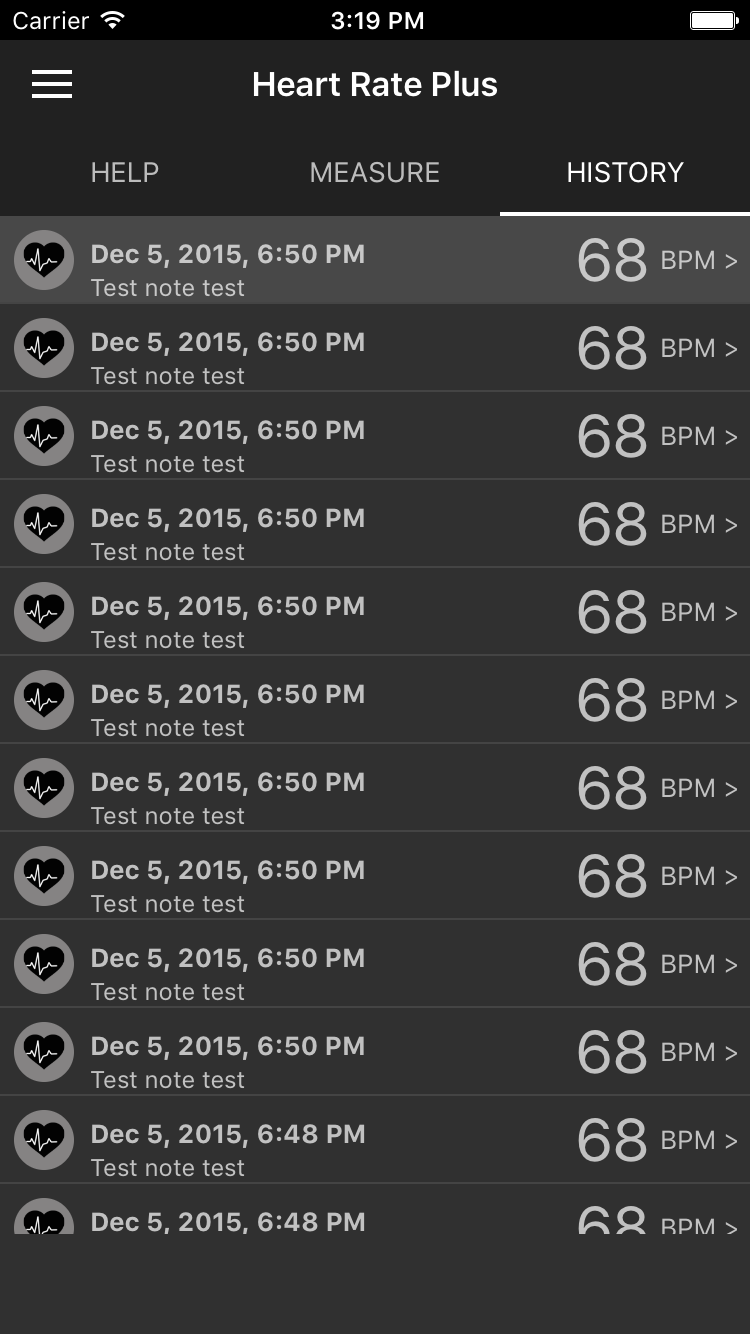
* Save result for access later
* Real time pulse graph
* Sync heart rate to Apple Health
* Reminder: Automatic remind you to measure your heartbeat everyday
* Export history to CSV file (pro feature)
Device Requirements:
* Designed for iPhone and iPod touch
* Requires iOS 7.1 or later
* 11.0 MB
Pricing and Availability
Heart Rate Plus 1.0 is available on the App Store for free with ads support and you can purchase Pro package which unlocks the Export history to CSV feature and turns off ads. Screenshots, icons and other related media are available for download.
Heart Rate Plus 1.0: http://heartrateplus.pvdapps.com/
Download from iTunes: https://itunes.apple.com/app/id1061544495
Screenshot 1: http://heartrateplus.pvdapps.com/screenshots/Main_Screen.png
Screenshot 2: http://heartrateplus.pvdapps.com/screenshots/History_Page.png
App Icon: http://a3.mzstatic.com/us/r30/Purple2/v4/fb/c7/19/fbc7193e-a948-2b5a-5d47-72ae509731f5/icon175x175.jpeg

Press Kit (zip): http://heartrateplus.pvdapps.com/HeartRatePlusPresskit.zip
Based in Hanoi, Viet Nam, PVDAPPS is a small team of passionate mobile developers and designers who make awesome mobile apps. The company builds high-end iPhone apps, iPad apps, Android apps, mobile web sites, and provide guidance and consulting around mobility. All Material and Software (C) Copyright 2016 PVDAPPS. All Rights Reserved. Apple, the Apple logo, iPhone, iPod and iPad are registered trademarks of Apple Inc. in the U.S. and/or other countries. Other trademarks and registered trademarks may be the property of their respective owners.
*******
Link To Article: http://prmac.com/release-id-78259.htm
*******
---------------------------------------------------------------------------------
Note that you can alter delivered distributions at any time.
Login to your account on prMac to alter your channel selection, or to opt-out at any time.
Subscribe to:
Posts (Atom)