A new article has been published at prMac.
DSync 2.0 for OS X - Are your backups synchronized? - Published on 01/11/16
DevStorm Apps today announces DSync 2.0, a major update to their file synchronization software developed exclusively for Mac OS X. Three steps is all it takes for DSync to synchronize your files. Select the folders, compare them, synchronize them. DSync integrates nicely with Mac OS X, allowing you to select cloud folders in addition to local and network folders. With the advanced algorithms in the latest version of DSync, synchronizing large folders with many files won't be a problem.
Cluj-Napoca, Romania - DevStorm Apps today is proud to announce the release of DSync 2.0, a major update to their file synchronization software developed exclusively for Mac OS X. Easy Synchronization for your Mac. DSync offers advanced yet easy-to-use functionality. Always have a backup with DSync, the best way to manage your local and remote file and folder synchronizations.
Three steps is all it takes for DSync to synchronize your files. Select the folders, compare them, synchronize them. Can it really be that easy? Sure it can. After spending years trying to use tools that are too complicated, create hidden files or just too limited, DevStorm Apps developed DSync - the easiest way to synchronize files on Mac.
With the advanced algorithms in the latest version of DSync, synchronizing large folders with many files won't be a problem. You can even fine-tune your synchronization by skipping, deleting of reversing the copy direction of the files you choose to. DSync integrates nicely with Mac OS X, allowing you to select cloud folders in addition to local and network folders. Use iCloud? Select the iCloud folder. Use DropBox? Select the DropBox folder. It's as easy as that.
Changelog for Version 2.0:
* Completely redesigned interface to achieve an easy-to-use 3 step process
* Added Search ability with real-time results
* Considerably improved scanning performance and memory usage
* Added ability to compare massive amount of files
* File names are no longer truncated at the end
* Added Include Empty Folders option
* Added Compare File Sizes
* Added Compare File Contents, based on file CRC checksum
* Added Swap folders button
* Improved readability of selected files in the list
* Added fine-grained selection of synchronization procedures
* Added Skip ability
* Added progressbar to see exact progress
* Added ability to override synchronization direction
* Added support for iCloud, DropBox and Google Drive
* Added Can Delete Files option to prevent accidental deletion of files
* Added QuickLook support
* Added Print ability
* Optimized for Retina displays
* On-screen tutorial
System Requirements:
* Requires OS X 10.7 or later
* 64-bit processor
* 3.8 MB
Pricing and Availability:
Don't take our word for it, try it for yourself today! DSync is currently available worldwide for $9.99 (USD) through the DevStorm Apps website. We've got a great 7 day, fully featured trial waiting for you.
DevStorm Apps: http://devstorm-apps.com
DSync 2.0: http://devstorm-apps.com/dsync/
Purchase DSync: https://pay.paddle.com/checkout/492131
YouTube Video: https://www.youtube.com/watch?v=-v-pJWtYq6A
Screenshot: http://devstorm-apps.com/dsync/images/uploads/010-swapresults.png
Press Kit (zip): http://devstorm-apps.com/dsync/presskit.zip
DevStorm Apps is a premium software developer based in Cluj-Napoca, Romania. Their primary objective is delivering high quality applications on the iPhone, iPad and Mac platforms. Copyright (C) 2016 DevStorm Apps. All Rights Reserved. Apple, the Apple logo, iPhone, iPod and iPad are registered trademarks of Apple Inc. in the U.S. and/or other countries.
*******
Link To Article: http://prmac.com/release-id-78286.htm
*******
---------------------------------------------------------------------------------
Note that you can alter delivered distributions at any time.
Login to your account on prMac to alter your channel selection, or to opt-out at any time.


xDev Magazine Year 13 In Printed Book Format - Pre-Order Sale
A new article has been published at prMac.
xDev Magazine Year 13 In Printed Book Format - Pre-Order Sale - Published on 01/11/16
xDev Magazine is reprinting the past year's issues into a convenient perfect-bound book which will be shipping in late January 2016. The 510-page book contains the full contents of Year 13 of the magazine, and features a full-color cover, black ink interior, and perfect-binding. Through January 22, the book may be pre-ordered for 25% off the normal price. Current subscribers can save even more with an additional subscriber-only discount.
Lafayette, Oregon - xDev Magazine is reprinting the past year's issues into a convenient perfect-bound book which will be shipping in late January 2016. Through January 22, the book may be pre-ordered for $44.99 - 25% off the normal price of $59.99. Current subscribers can save even more with an additional subscriber-only discount. The 510-page book contains the full contents of Year 13 of the magazine (issues 13.1-13.6, Jan. 2015-Dec. 2015), and features a full-color cover, black ink interior, and perfect-binding. Volume 13 includes articles on topics such as:
* Control Animation
* iOS Deployment
* Sandboxing Problems
* Class Extensions
* Windows 10
* Converting to 64-bit
* Medical Data Encryption
* Multiprocessing
* Caching
* Database Design Patterns
* Raspberry Pi
* iOS First Look
* Xojo Health Journal
* Creating Your First iOS App
* OS X "El Capitan" and Xojo
* Overflow errors
* Making Programming Decisions
* Database Design Tools
* XDC 2015
* Custom Operators
* Enterprise Data Modeling Tools
* Apple Watch
* Xojo Text Messaging
* Kaju Self-Updater
* Document-based apps
* Conditional Compilation Tips
* Build Scripts
* And much, much more
About Xojo:
Xojo, Inc. was founded with the idea that software development should be accessible to anyone. With traditional tools, creating software applications can be a very complicated process, but using Xojo anyone can learn to create high quality, native apps for the desktop, web, mobile and Raspberry Pi. With users all over the world, Xojo apps can be found in every conceivable category - from commercial software applications to use in governments, universities, businesses, and the Fortune 500. For more information, visit Xojo online.
Pricing and Availability:
Those interested should place orders today on the xDev website. The pre-order discount is only offered through Jan. 22, 2016. Previous annual collections of xDev (Volumes 1 through 12) are also available from the xDev website starting at just $30 (USD).
xDev Magazine: http://www.xdevmag.com
Volume 13 Book Pre-Order Sale: http://www.xdevmag.com/bookpreorder.shtml
Magazine Order Center: http://xdevmag.com/orders_books.shtml
xDev Magazine Store: http://xdevmag.com/orders.shtml
Image (Magazine): http://xdevmag.com/images/xdev13-3dbook-flat-small.jpg
Formerly Real Studio Developer, xDev Magazine has been publishing since 2002. xDev is an independent bimonthly publication focused on instructing users of the Xojo development environment. Each issue features over 70 pages of quality articles from top Xojo programmers and authors. xDev is renown around the world as the premiere source of Xojo instruction, tutorials, and programming advice. All Material and Software (C) Copyright 2016 xDev Magazine. All Rights Reserved. Other trademarks and registered trademarks may be the property of their respective owners.
*******
Link To Article: http://prmac.com/release-id-78285.htm
*******
---------------------------------------------------------------------------------
Note that you can alter delivered distributions at any time.
Login to your account on prMac to alter your channel selection, or to opt-out at any time.
xDev Magazine Year 13 In Printed Book Format - Pre-Order Sale - Published on 01/11/16
xDev Magazine is reprinting the past year's issues into a convenient perfect-bound book which will be shipping in late January 2016. The 510-page book contains the full contents of Year 13 of the magazine, and features a full-color cover, black ink interior, and perfect-binding. Through January 22, the book may be pre-ordered for 25% off the normal price. Current subscribers can save even more with an additional subscriber-only discount.
Lafayette, Oregon - xDev Magazine is reprinting the past year's issues into a convenient perfect-bound book which will be shipping in late January 2016. Through January 22, the book may be pre-ordered for $44.99 - 25% off the normal price of $59.99. Current subscribers can save even more with an additional subscriber-only discount. The 510-page book contains the full contents of Year 13 of the magazine (issues 13.1-13.6, Jan. 2015-Dec. 2015), and features a full-color cover, black ink interior, and perfect-binding. Volume 13 includes articles on topics such as:
* Control Animation
* iOS Deployment
* Sandboxing Problems
* Class Extensions
* Windows 10
* Converting to 64-bit
* Medical Data Encryption
* Multiprocessing
* Caching
* Database Design Patterns
* Raspberry Pi
* iOS First Look
* Xojo Health Journal
* Creating Your First iOS App
* OS X "El Capitan" and Xojo
* Overflow errors
* Making Programming Decisions
* Database Design Tools
* XDC 2015
* Custom Operators
* Enterprise Data Modeling Tools
* Apple Watch
* Xojo Text Messaging
* Kaju Self-Updater
* Document-based apps
* Conditional Compilation Tips
* Build Scripts
* And much, much more
About Xojo:
Xojo, Inc. was founded with the idea that software development should be accessible to anyone. With traditional tools, creating software applications can be a very complicated process, but using Xojo anyone can learn to create high quality, native apps for the desktop, web, mobile and Raspberry Pi. With users all over the world, Xojo apps can be found in every conceivable category - from commercial software applications to use in governments, universities, businesses, and the Fortune 500. For more information, visit Xojo online.
Pricing and Availability:
Those interested should place orders today on the xDev website. The pre-order discount is only offered through Jan. 22, 2016. Previous annual collections of xDev (Volumes 1 through 12) are also available from the xDev website starting at just $30 (USD).
xDev Magazine: http://www.xdevmag.com
Volume 13 Book Pre-Order Sale: http://www.xdevmag.com/bookpreorder.shtml
Magazine Order Center: http://xdevmag.com/orders_books.shtml
xDev Magazine Store: http://xdevmag.com/orders.shtml
Image (Magazine): http://xdevmag.com/images/xdev13-3dbook-flat-small.jpg

Formerly Real Studio Developer, xDev Magazine has been publishing since 2002. xDev is an independent bimonthly publication focused on instructing users of the Xojo development environment. Each issue features over 70 pages of quality articles from top Xojo programmers and authors. xDev is renown around the world as the premiere source of Xojo instruction, tutorials, and programming advice. All Material and Software (C) Copyright 2016 xDev Magazine. All Rights Reserved. Other trademarks and registered trademarks may be the property of their respective owners.
*******
Link To Article: http://prmac.com/release-id-78285.htm
*******
---------------------------------------------------------------------------------
Note that you can alter delivered distributions at any time.
Login to your account on prMac to alter your channel selection, or to opt-out at any time.
MileBug 3.2 brings 2016 IRS Mileage Rates and new Type to Search
A new article has been published at prMac.
MileBug 3.2 brings 2016 IRS Mileage Rates and new Type to Search - Published on 01/11/16
Izatt Apps today announces MileBug 3.2, an update to the popular GPS mile tracker available for iOS, Android and Windows Phone. MileBug is a beautiful GPS mile tracker app that makes it easy to track your tax-deductible mileage on your mobile device. MileBug was listed last year by Smart Hustle as one of "5 Apps Your Accountant is Begging You to Have in 2015." Version 3.2 for iOS adds 2016 IRS Mileage Rates, a new "Type to Search" feature for the destination list, and various bug fixes.
American Fork, Utah - Izatt Apps today is pleased to announce the 3.2 release of its flagship app, MileBug - Mileage Log, which adds the new 2016 IRS Mileage Rates, a new "Type to Search" feature for the origin/destination lists, and various bug fixes. At the beginning of each year since 2014, MileBug has reached the #1 spot in the Finance category in the U.S. Apple App Store, and in 2016 has already reached as high as the #2 spot. MileBug was listed last year by Smart Hustle Magazine as one of "5 Apps Your Accountant is Begging You to Have in 2015".
Each year the IRS puts out the new rates for which mileage driven on a personal vehicle for business may be claimed as a tax deduction. Due to lower gas prices, the 2016 rates have dropped from the $.575/mile rate of 2015 to the new current rate of $.54/mile. Miles driven for charity remain deductible at a rate of $.14/mile, and Medical/Moving mileage dropped from $.23/mile to $.19/mile. Any trips tracked with MileBug before the app was updated to the new version 3.2 will be retroactively recalculated to conform to the new 2016 IRS Mileage Rates.
The new "Type to Search" feature is now available when choosing an origin or destination from the possibly long list of previous destinations. Previously users had to scroll through potentially dozens if not hundreds of locations to find the one for the current trip. Now the user may simply begin typing in the origin or destination and the list will automatically scroll to the first matching entry.
MileBug is a beautiful mile tracker app that makes it easy to track your tax-deductible mileage on your iPhone, iPod touch, and iPad devices. MileBug first hit the Apple App Store in August 2008. At the time, MileBug was one of less than 2700 apps in the store. By January 2010 it had risen to be a Top 10 Finance app, where it has regularly appeared since, even reaching the #1 spot several dozen times since January 2014, and is heading to return again in 2016.
Device Requirements:
* iPhone, iPad, and iPod touch
* Requires iOS 7.1 or later
* 9.7 MB
Pricing and Availability:
MileBug - Mileage Log & Expense Tracker for Tax Deduction 3.2 is $2.99 (USD) and available worldwide through the Apple App Store in the Finance category, Google Play in Finance, and the Windows Marketplace in Business.
MileBug 3.2: http://milebug.com/
Purchase and Download (iOS): https://itunes.apple.com/app/milebug-mileage-log-expense/id288376848
Purchase and Download (Android): https://play.google.com/store/apps/details?id=com.izatt.milebug
Purchase and Download (Windows Phone): http://www.windowsphone.com/en-US/apps/6f849fcc-7456-4b99-87a0-0ca8bebad48b
Screenshot (MileBug Cloud): http://milebug.com/wp-content/uploads/2015/01/cloud-iphone5-ad.png
App Icon: http://milebug.com/wp-content/uploads/2015/01/milebug.1024x1024.png
Izatt International is a mobile application (iOS, Android) development company in American Fork, UT. Izatt develops applications internally and accepts outside development projects. Copyright 2008-2016 Izatt International. All Rights Reserved. Apple, the Apple logo, iPhone, iPod touch, iPad and iPad Mini are registered trademarks of Apple Computer in the U.S. and/or other countries.
*******
Link To Article: http://prmac.com/release-id-78284.htm
*******
---------------------------------------------------------------------------------
Note that you can alter delivered distributions at any time.
Login to your account on prMac to alter your channel selection, or to opt-out at any time.
MileBug 3.2 brings 2016 IRS Mileage Rates and new Type to Search - Published on 01/11/16
Izatt Apps today announces MileBug 3.2, an update to the popular GPS mile tracker available for iOS, Android and Windows Phone. MileBug is a beautiful GPS mile tracker app that makes it easy to track your tax-deductible mileage on your mobile device. MileBug was listed last year by Smart Hustle as one of "5 Apps Your Accountant is Begging You to Have in 2015." Version 3.2 for iOS adds 2016 IRS Mileage Rates, a new "Type to Search" feature for the destination list, and various bug fixes.
American Fork, Utah - Izatt Apps today is pleased to announce the 3.2 release of its flagship app, MileBug - Mileage Log, which adds the new 2016 IRS Mileage Rates, a new "Type to Search" feature for the origin/destination lists, and various bug fixes. At the beginning of each year since 2014, MileBug has reached the #1 spot in the Finance category in the U.S. Apple App Store, and in 2016 has already reached as high as the #2 spot. MileBug was listed last year by Smart Hustle Magazine as one of "5 Apps Your Accountant is Begging You to Have in 2015".
Each year the IRS puts out the new rates for which mileage driven on a personal vehicle for business may be claimed as a tax deduction. Due to lower gas prices, the 2016 rates have dropped from the $.575/mile rate of 2015 to the new current rate of $.54/mile. Miles driven for charity remain deductible at a rate of $.14/mile, and Medical/Moving mileage dropped from $.23/mile to $.19/mile. Any trips tracked with MileBug before the app was updated to the new version 3.2 will be retroactively recalculated to conform to the new 2016 IRS Mileage Rates.
The new "Type to Search" feature is now available when choosing an origin or destination from the possibly long list of previous destinations. Previously users had to scroll through potentially dozens if not hundreds of locations to find the one for the current trip. Now the user may simply begin typing in the origin or destination and the list will automatically scroll to the first matching entry.
MileBug is a beautiful mile tracker app that makes it easy to track your tax-deductible mileage on your iPhone, iPod touch, and iPad devices. MileBug first hit the Apple App Store in August 2008. At the time, MileBug was one of less than 2700 apps in the store. By January 2010 it had risen to be a Top 10 Finance app, where it has regularly appeared since, even reaching the #1 spot several dozen times since January 2014, and is heading to return again in 2016.
Device Requirements:
* iPhone, iPad, and iPod touch
* Requires iOS 7.1 or later
* 9.7 MB
Pricing and Availability:
MileBug - Mileage Log & Expense Tracker for Tax Deduction 3.2 is $2.99 (USD) and available worldwide through the Apple App Store in the Finance category, Google Play in Finance, and the Windows Marketplace in Business.
MileBug 3.2: http://milebug.com/
Purchase and Download (iOS): https://itunes.apple.com/app/milebug-mileage-log-expense/id288376848
Purchase and Download (Android): https://play.google.com/store/apps/details?id=com.izatt.milebug
Purchase and Download (Windows Phone): http://www.windowsphone.com/en-US/apps/6f849fcc-7456-4b99-87a0-0ca8bebad48b
Screenshot (MileBug Cloud): http://milebug.com/wp-content/uploads/2015/01/cloud-iphone5-ad.png

App Icon: http://milebug.com/wp-content/uploads/2015/01/milebug.1024x1024.png

Izatt International is a mobile application (iOS, Android) development company in American Fork, UT. Izatt develops applications internally and accepts outside development projects. Copyright 2008-2016 Izatt International. All Rights Reserved. Apple, the Apple logo, iPhone, iPod touch, iPad and iPad Mini are registered trademarks of Apple Computer in the U.S. and/or other countries.
*******
Link To Article: http://prmac.com/release-id-78284.htm
*******
---------------------------------------------------------------------------------
Note that you can alter delivered distributions at any time.
Login to your account on prMac to alter your channel selection, or to opt-out at any time.
New Karate App Aims High - iKarate-Do 1.0.2 for iOS
A new article has been published at prMac.
New Karate App Aims High - iKarate-Do 1.0.2 for iOS - Published on 01/10/16
There's a new karate app in town. UK based East Yorkshire Apps have released a new Karate app entitled iKarate-Do 1.0.2, aimed at helping new karate students quickly get to grips with common dojo commands, instruction and terminology. Whilst the introduction section relates specifically to Wado Ryu / Wadokai as this is the style of karate favored by the app authors, the app is useful for new students of all styles of karate from Shotokan to Shito-Ryu and Goju-ryu.
York, United Kingdom - There's a new karate app in town. UK based East Yorkshire Apps have released a new Karate app for iOS devices entitled iKarate-Do 1.0.2, aimed at helping new karate students quickly get to grips with common dojo commands, instruction and terminology. Utilizing advanced 3D graphical animations and audio instruction to reinforce learning, the iPhone, iPad and iPod iOS app includes three quizzes aimed at teaching Japanese numbers, words and commands.
The app has been released in two flavors, a free version supported by ads, and a child friendly paid (lowest possible price tier), version without ads. The app includes instruction on how to tie a karate belt (there is more than one way to do this correctly - this app shows a common method that is very useful for parents of young karateka).
Whilst the introduction section relates specifically to Wado Ryu / Wadokai as this is the style of karate favored by the app authors, the app is useful for new students of all styles of karate from Shotokan to Shito-Ryu and Goju-ryu. East Yorkshire Apps are hoping the app will be well enough received to spurn further expansion and development of the app to include not only grading syllabus but also detailed technical instruction and background knowledge.
Device Requirements:
* iPhone, iPad, and iPod touch
* Requires iOS 8.0 or later
* Universal Application
* 90.1 MB
Pricing and Availability:
iKarate-Do 1.0.2 is only $0.99, and is available worldwide exclusively through the App Store in the Education category.
East Yorkshire Apps Ltd.: http://www.eastyorkshireapps.co.uk
iKarate-Do 1.0.2: http://eastyorkshireapps.co.uk/ikarate-do/
Purchase and Download from iTunes: https://itunes.apple.com/app/ikarate-do/id1067793013
Screenshot: http://eastyorkshireapps.co.uk/wp-content/uploads/2016/01/ikaratedo_6_1.jpg
App Icon: http://eastyorkshireapps.co.uk/wp-content/uploads/2016/01/ikarateicon512.jpg
East Yorkshire Apps is a small company formed with a dual purpose: To support media agencies and other creative organizations who do not have in-house native iOS development resource. Build fun and educational apps for kids. Sometimes when the sun shines in the right direction we get to accomplish both at once. All Material and Software (C) Copyright 2016 iLifeTouch. All Rights Reserved. Apple, the Apple logo, iPhone, iPad and iPod are registered trademarks of Apple Inc. in the U.S. and/or other countries.
*******
Link To Article: http://prmac.com/release-id-78283.htm
*******
---------------------------------------------------------------------------------
Note that you can alter delivered distributions at any time.
Login to your account on prMac to alter your channel selection, or to opt-out at any time.
New Karate App Aims High - iKarate-Do 1.0.2 for iOS - Published on 01/10/16
There's a new karate app in town. UK based East Yorkshire Apps have released a new Karate app entitled iKarate-Do 1.0.2, aimed at helping new karate students quickly get to grips with common dojo commands, instruction and terminology. Whilst the introduction section relates specifically to Wado Ryu / Wadokai as this is the style of karate favored by the app authors, the app is useful for new students of all styles of karate from Shotokan to Shito-Ryu and Goju-ryu.
York, United Kingdom - There's a new karate app in town. UK based East Yorkshire Apps have released a new Karate app for iOS devices entitled iKarate-Do 1.0.2, aimed at helping new karate students quickly get to grips with common dojo commands, instruction and terminology. Utilizing advanced 3D graphical animations and audio instruction to reinforce learning, the iPhone, iPad and iPod iOS app includes three quizzes aimed at teaching Japanese numbers, words and commands.
The app has been released in two flavors, a free version supported by ads, and a child friendly paid (lowest possible price tier), version without ads. The app includes instruction on how to tie a karate belt (there is more than one way to do this correctly - this app shows a common method that is very useful for parents of young karateka).
Whilst the introduction section relates specifically to Wado Ryu / Wadokai as this is the style of karate favored by the app authors, the app is useful for new students of all styles of karate from Shotokan to Shito-Ryu and Goju-ryu. East Yorkshire Apps are hoping the app will be well enough received to spurn further expansion and development of the app to include not only grading syllabus but also detailed technical instruction and background knowledge.
Device Requirements:
* iPhone, iPad, and iPod touch
* Requires iOS 8.0 or later
* Universal Application
* 90.1 MB
Pricing and Availability:
iKarate-Do 1.0.2 is only $0.99, and is available worldwide exclusively through the App Store in the Education category.
East Yorkshire Apps Ltd.: http://www.eastyorkshireapps.co.uk
iKarate-Do 1.0.2: http://eastyorkshireapps.co.uk/ikarate-do/
Purchase and Download from iTunes: https://itunes.apple.com/app/ikarate-do/id1067793013
Screenshot: http://eastyorkshireapps.co.uk/wp-content/uploads/2016/01/ikaratedo_6_1.jpg

App Icon: http://eastyorkshireapps.co.uk/wp-content/uploads/2016/01/ikarateicon512.jpg

East Yorkshire Apps is a small company formed with a dual purpose: To support media agencies and other creative organizations who do not have in-house native iOS development resource. Build fun and educational apps for kids. Sometimes when the sun shines in the right direction we get to accomplish both at once. All Material and Software (C) Copyright 2016 iLifeTouch. All Rights Reserved. Apple, the Apple logo, iPhone, iPad and iPod are registered trademarks of Apple Inc. in the U.S. and/or other countries.
*******
Link To Article: http://prmac.com/release-id-78283.htm
*******
---------------------------------------------------------------------------------
Note that you can alter delivered distributions at any time.
Login to your account on prMac to alter your channel selection, or to opt-out at any time.
Guest Book - An Easy to Use Guest Contact Manager for iPad
A new article has been published at prMac.
Guest Book - An Easy to Use Guest Contact Manager for iPad - Published on 01/10/16
iLifeTouch announce Guest Book 1.0 for iPad. Guest Book is an easy to use guest contact manager for iPad. Effectively manage contacts of everyone attending the event. Now organizers can have a guest list along with all the details into one small app. Guests can register themselves into the app by giving their name, phone number, and address along with other details. The app lets users to take photos from the iPad and attach it with their contact details.
Kolkata, India - iLifeTouch is proud to announce the release of Guest Book 1.0 for iPad devices. Guest Book is an easy to use guest contact manager for iPad. By using the app, event managers can keep an extensive list of the guests who are attending an event. Guests can register themselves into the app by giving their name, phone number, and address, along with other details. The app allows users to take photos from the iPad and attach it with the contact details. This is how event organizers can have a guest list along with all the details into one small app.
Features:
* ADD NEW EVENT - Guest Book lets you add new events into the app. Guests can register themselves under that event. Use the app for another event by simply adding a new one.
* ATTACH SECURITY PAPERS - The app also lets you to scan papers using the iPad camera and attach them with the contact.
* SCAN QR CODE - Easily scan information stored into an QR code and save it with the contact.
* ADD ORGANIZATION LOGO - Add a logo of the organization and make the app look official.
* CHANGE APP COLOR - Choose your preferred color and give it a new look.
* PASSWORD PROTECT GUEST LIST - Secure guest list with password.
Guest Book is an ideal app for events to keep track on guest list. Download it today and make building guest an effortless job.
Device Requirements:
* iPad
* Requires iOS 8.0 or later
* 9.7 MB
Pricing and Availability:
Guest Book 1.0 is just $9.99 USD (or an equivalent amount in other currencies), and is available worldwide exclusively through the App Store in the Business category.
iLifeTouch: http://www.ilifetouch.com
Guest Book 1.0: http://www.ilifetouch.com/Guest-Book-Contact-Directory
Purchase and Download from iTunes: https://itunes.apple.com/app/guest-book-contact-directory/id1070084008
Screenshot: http://a2.mzstatic.com/us/r30/Purple69/v4/af/9b/a7/af9ba786-ecb4-fdaf-8a99-b9290e88eb7a/screen480x480.jpeg
App Icon: http://a2.mzstatic.com/us/r30/Purple49/v4/c0/28/e4/c028e400-00c1-b40d-19b5-6fd49110d3f9/icon175x175.png
iLifeTouch treats all their apps as if they belonged to the end users. Not only do they hope for feedback, they actively encourage users to tell them what they want and to inform them if they are missing something they would love to see built into their apps. They are eagerly awaiting your input and they are here to make your lives easier using their apps. All Material and Software (C) Copyright 2015 iLifeTouch. All Rights Reserved. Apple, the Apple logo, iPhone, iPad and iPod are registered trademarks of Apple Inc. in the U.S. and/or other countries.
*******
Link To Article: http://prmac.com/release-id-78282.htm
*******
---------------------------------------------------------------------------------
Note that you can alter delivered distributions at any time.
Login to your account on prMac to alter your channel selection, or to opt-out at any time.
Guest Book - An Easy to Use Guest Contact Manager for iPad - Published on 01/10/16
iLifeTouch announce Guest Book 1.0 for iPad. Guest Book is an easy to use guest contact manager for iPad. Effectively manage contacts of everyone attending the event. Now organizers can have a guest list along with all the details into one small app. Guests can register themselves into the app by giving their name, phone number, and address along with other details. The app lets users to take photos from the iPad and attach it with their contact details.
Kolkata, India - iLifeTouch is proud to announce the release of Guest Book 1.0 for iPad devices. Guest Book is an easy to use guest contact manager for iPad. By using the app, event managers can keep an extensive list of the guests who are attending an event. Guests can register themselves into the app by giving their name, phone number, and address, along with other details. The app allows users to take photos from the iPad and attach it with the contact details. This is how event organizers can have a guest list along with all the details into one small app.
Features:
* ADD NEW EVENT - Guest Book lets you add new events into the app. Guests can register themselves under that event. Use the app for another event by simply adding a new one.
* ATTACH SECURITY PAPERS - The app also lets you to scan papers using the iPad camera and attach them with the contact.
* SCAN QR CODE - Easily scan information stored into an QR code and save it with the contact.
* ADD ORGANIZATION LOGO - Add a logo of the organization and make the app look official.
* CHANGE APP COLOR - Choose your preferred color and give it a new look.
* PASSWORD PROTECT GUEST LIST - Secure guest list with password.
Guest Book is an ideal app for events to keep track on guest list. Download it today and make building guest an effortless job.
Device Requirements:
* iPad
* Requires iOS 8.0 or later
* 9.7 MB
Pricing and Availability:
Guest Book 1.0 is just $9.99 USD (or an equivalent amount in other currencies), and is available worldwide exclusively through the App Store in the Business category.
iLifeTouch: http://www.ilifetouch.com
Guest Book 1.0: http://www.ilifetouch.com/Guest-Book-Contact-Directory
Purchase and Download from iTunes: https://itunes.apple.com/app/guest-book-contact-directory/id1070084008
Screenshot: http://a2.mzstatic.com/us/r30/Purple69/v4/af/9b/a7/af9ba786-ecb4-fdaf-8a99-b9290e88eb7a/screen480x480.jpeg

App Icon: http://a2.mzstatic.com/us/r30/Purple49/v4/c0/28/e4/c028e400-00c1-b40d-19b5-6fd49110d3f9/icon175x175.png

iLifeTouch treats all their apps as if they belonged to the end users. Not only do they hope for feedback, they actively encourage users to tell them what they want and to inform them if they are missing something they would love to see built into their apps. They are eagerly awaiting your input and they are here to make your lives easier using their apps. All Material and Software (C) Copyright 2015 iLifeTouch. All Rights Reserved. Apple, the Apple logo, iPhone, iPad and iPod are registered trademarks of Apple Inc. in the U.S. and/or other countries.
*******
Link To Article: http://prmac.com/release-id-78282.htm
*******
---------------------------------------------------------------------------------
Note that you can alter delivered distributions at any time.
Login to your account on prMac to alter your channel selection, or to opt-out at any time.
Offline Japanese to English Language Dictionary 3.0 for iOS
A new article has been published at prMac.
Offline Japanese to English Language Dictionary 3.0 for iOS - Published on 01/10/16
LastThink announces the release of Offline Japanese to English Language Dictionary 3.0, the important update to their highly customizable dictionary application for iOS devices. Users can seek and find any word's translation and synonyms anytime and anywhere from their devices. The dictionary offers users a huge collection of words with their translations as well as definitions and synonyms, with well over 500,000 synonym variants. Version 3.0 offers improved search capability.
Yerevan, Armenia - LastThink is proud to announce the release of Offline Japanese to English Language Dictionary 3.0, the important update to their highly customizable dictionary application developed for iPhone, iPad, and iPod touch devices. Users can seek and find any word's translation and synonyms anytime and anywhere from their Apple devices.
Features:
* Tremendous range of synonyms and antonyms with well over five hundred thousand synonym variants
* Information about the discipline of structural linguistics by suggesting vital enough sentences
* Appropriate translations of colloquial and formal words as well as conjugation of verbs and declension of nouns
* Availability of various word definitions which will exactly influence on your understanding of a Foreign Language in a detailed way
* A distinction of a section named "Favorites" with the possibility of saving as many unknown words as you wish
* Thorough analysis of parts of speech (noun, verb, adjective, adverb) and their grammatical functions (subject, object, etc.)
* A possibility of the following application usage without an internet demand
* Existence of contemporary words such as "Woot", "OMG", "Crunk" and many others
In our new updated version we grant users a chance of typing the unknown word either in capitals or in small letters and the app will bring all the possible variants and definitions of the dictionary entries saved both in capital and small letters.
If you however experience any issues, please do not hesitate to contact us if you'd like to share your experience with Offline Dictionaries, or provide suggestions on how we could improve the product further. We will be more than happy to get in touch.
NOTE: We have selected data from the internet and if any assembly or constitution doesn't want us to show the content of the unit, please recommend us to remove it.
Device Requirements:
* iPhone, iPad, and iPod touch
* Optimized for iPhone 5, iPhone 6, and iPhone 6 Plus
* Requires iOS 6.0 or later
* Universal Application
* 455MB
Pricing and Availability:
Offline Japanese to English Language Dictionary 3.0 is free and available worldwide exclusively through the App Store in the Education category.
LastThink: http://lastthink.com/
Offline Japanese to English Language Dictionary 3.0: https://www.facebook.com/pages/Offline-Dictionary/882897578447079
Download from iTunes: https://itunes.apple.com/app/offline-japanese-to-english/id1052488438
Screenshot: http://a4.mzstatic.com/us/r30/Purple69/v4/00/5d/2d/005d2d3b-34b3-b357-c71a-331f5ccc475c/screen322x572.jpeg
App Icon: http://a3.mzstatic.com/us/r30/Purple69/v4/13/c5/83/13c58381-b6d3-5677-de80-948c47d61d98/icon175x175.png
LastThink is an IT company with a focus on mobile development. It has extended its list of services since 2012 to offer high-end business process management, system integration, as well as up-to-date communication solutions. LastThink's mission is to deliver maximum business value to its customers by designing, developing, implementing and maintaining efficient and high quality software solutions aligned with their most essential business needs. Their team will always do its best to meet client expectations. Copyright (C) 2016 LastThink LLC. All Rights Reserved. Apple, the Apple logo, iPhone, iPad and iPod are registered trademarks of Apple Inc. in the U.S. and/or other countries.
*******
Link To Article: http://prmac.com/release-id-78280.htm
*******
---------------------------------------------------------------------------------
Note that you can alter delivered distributions at any time.
Login to your account on prMac to alter your channel selection, or to opt-out at any time.
Offline Japanese to English Language Dictionary 3.0 for iOS - Published on 01/10/16
LastThink announces the release of Offline Japanese to English Language Dictionary 3.0, the important update to their highly customizable dictionary application for iOS devices. Users can seek and find any word's translation and synonyms anytime and anywhere from their devices. The dictionary offers users a huge collection of words with their translations as well as definitions and synonyms, with well over 500,000 synonym variants. Version 3.0 offers improved search capability.
Yerevan, Armenia - LastThink is proud to announce the release of Offline Japanese to English Language Dictionary 3.0, the important update to their highly customizable dictionary application developed for iPhone, iPad, and iPod touch devices. Users can seek and find any word's translation and synonyms anytime and anywhere from their Apple devices.
Features:
* Tremendous range of synonyms and antonyms with well over five hundred thousand synonym variants
* Information about the discipline of structural linguistics by suggesting vital enough sentences
* Appropriate translations of colloquial and formal words as well as conjugation of verbs and declension of nouns
* Availability of various word definitions which will exactly influence on your understanding of a Foreign Language in a detailed way
* A distinction of a section named "Favorites" with the possibility of saving as many unknown words as you wish
* Thorough analysis of parts of speech (noun, verb, adjective, adverb) and their grammatical functions (subject, object, etc.)
* A possibility of the following application usage without an internet demand
* Existence of contemporary words such as "Woot", "OMG", "Crunk" and many others
In our new updated version we grant users a chance of typing the unknown word either in capitals or in small letters and the app will bring all the possible variants and definitions of the dictionary entries saved both in capital and small letters.
If you however experience any issues, please do not hesitate to contact us if you'd like to share your experience with Offline Dictionaries, or provide suggestions on how we could improve the product further. We will be more than happy to get in touch.
NOTE: We have selected data from the internet and if any assembly or constitution doesn't want us to show the content of the unit, please recommend us to remove it.
Device Requirements:
* iPhone, iPad, and iPod touch
* Optimized for iPhone 5, iPhone 6, and iPhone 6 Plus
* Requires iOS 6.0 or later
* Universal Application
* 455MB
Pricing and Availability:
Offline Japanese to English Language Dictionary 3.0 is free and available worldwide exclusively through the App Store in the Education category.
LastThink: http://lastthink.com/
Offline Japanese to English Language Dictionary 3.0: https://www.facebook.com/pages/Offline-Dictionary/882897578447079
Download from iTunes: https://itunes.apple.com/app/offline-japanese-to-english/id1052488438
Screenshot: http://a4.mzstatic.com/us/r30/Purple69/v4/00/5d/2d/005d2d3b-34b3-b357-c71a-331f5ccc475c/screen322x572.jpeg

App Icon: http://a3.mzstatic.com/us/r30/Purple69/v4/13/c5/83/13c58381-b6d3-5677-de80-948c47d61d98/icon175x175.png

LastThink is an IT company with a focus on mobile development. It has extended its list of services since 2012 to offer high-end business process management, system integration, as well as up-to-date communication solutions. LastThink's mission is to deliver maximum business value to its customers by designing, developing, implementing and maintaining efficient and high quality software solutions aligned with their most essential business needs. Their team will always do its best to meet client expectations. Copyright (C) 2016 LastThink LLC. All Rights Reserved. Apple, the Apple logo, iPhone, iPad and iPod are registered trademarks of Apple Inc. in the U.S. and/or other countries.
*******
Link To Article: http://prmac.com/release-id-78280.htm
*******
---------------------------------------------------------------------------------
Note that you can alter delivered distributions at any time.
Login to your account on prMac to alter your channel selection, or to opt-out at any time.
iGetter v2.9.4 for OS X Released
A new article has been published at prMac.
iGetter v2.9.4 for OS X Released - Published on 01/09/16
Bulgaria (EU) based Presenta Ltd. has announced iGetter 2.9.4, ready for OS X 10.11 El Capitan. iGetter is a powerful, full featured download manager and accelerator. It can greatly improve the speed of your downloads using segmented downloading. It allows auto resume on broken downloads, queue filtering by various criteria, site explorer, history list, scheduling downloads for low traffic periods, auto redial on broken connection, auto hang-up and shut down on completion, and much more.
Dobrich, Bulgaria - Presenta Ltd. is pleased to announce the new release of iGetter version 2.9.4 for OS X. iGetter is a powerful, full featured download manager and accelerator. iGetter can greatly improve the speed of your downloads using segmented downloading. In addition it allows auto resume on broken downloads, queue filtering by various criteria, site explorer, history list, scheduling downloads for low traffic periods, auto redial on broken connection, auto hang-up and shut down on completion, and much more.
New in version 2.9.4:
* Optimized for Safari 9 on OS X 10.11 El Capitan.
* Optimized for Firefox v43 and Chrome v45 browsers.
* Added support for the Safari 9 cookie repository on OS X 10.11 El Capitan.
* Digitally signed iGetter Extension for Firefox at Mozilla add-ons store. This is a requirement since Firefox v43.
* Reworked iGetter Extension for initial compatibility with multiprocess versions of Firefox (v45 ).
* Digitally signed iGetter Extension for Chrome/Chromium at Google Play store. This allows automatic in-browser installation and update through the store. This is a requirement for the external extensions with the recent versions of Chrome.
* Reworked iGetter Extension for Chrome/Chromium using the build-in extension API to send all downloads to iGetter. This method replaces the functionality implemented previously by the iGetter Plugin (NPAPI), since NPAPI support was removed from Chrome as of version 45. The above operation can be temporarily disabled with the new context menu command "Disable integration" added by iGetter Extension for Chrome.
* Improved installation of iGetter Extension for Safari 9.0 , due to changed requirements for updating local extensions in Safari 9. Now iGetter will also need to launch Safari for extension updates, in addition to initial extension installation required since Safari 8.
* Improved both iGetter Plugin and iGetterScriptablePlugin for Safari, to read HttpOnly cookies in addition to the already available session and standard cookies.
* Implemented a workaround for the issue introduced in OS X 10.11 El Capitan, which in certain circumstances won't update properly the logical end of file, that could lead to improperly truncated files after a system restart. In iGetter this could manifest in an error that local file download has different size from the remote file.
* Reworded the browser integration options in both iGetter Preferences -> Integration and Installation dialogs, to better reflect the new browser integration functionality. The new option "Install iGetter Browser Extension (add contextual menus, watch for URL clicks)" replaces the previously worded "Add contextual menu support for Internet Browsers". Also "Install iGetter Browser Plugin (Safari and browsers with NPAPI support)" replaces "Integrate with Internet Browsers (watch for URL clicks)".
* Changed "Integrate with Internet Browsers" command from the Tools menu with "Install iGetter Browser Plugin" command, to better reflect its functionality in accordance with the changes in iGetter Preferences -> Integration tab panel.
* Added new function "Install iGetter Browser Extension" in the Tools menu, which installs/uninstalls iGetter Extensions for Safari, Firefox and Chrome/Chromium, and all applicable components.
* Updated User Agents of Safari, Firefox and Chrome for OS X, as well as Internet Explorer and Firefox for Windows with recent versions.
* Added new User Agent for MacAppStore.
* Added support for the "audio/vnd.audible.aax" MIME type.
* Implemented a workaround for an issue with OpenSSL, which in certain cases during a TLS EXT conversation, would drop the connection. The workaround will be used only on systems with OpenSSL 0.9.8j or later (MacOS X 10.6 to OS X 10.11 ).
* Fixed an issue with iGetter preferences, which in some very rare cases on OS X 10.10 won't save the latest preferences changes on disk.
* Fixed an issue that could lead in some rare cases to high CPU load in Retina mode on OS X 10.10 .
* Fixed an issue with AppNap usage which in some cases would prevent system sleep while iGetter is running on OS X 10.9 .
* Fixed an issue with the "Add to queue" ("Process Web Page") window, when the Total links number won't be calculated properly.
The International version of iGetter includes: English, French, German, Spanish, Italian, Turkish, Japanese, Russian, Hungarian, Simplified Chinese, Traditional Chinese, Polish and Portuguese (Brazil) localizations.
System Requirements:
* Requires Mac OS X 10.2.x - 10.11.x
* Intel- or PowerPC-based Mac
Pricing and Availability:
iGetter is shareware. iGetter can be evaluated for as long as it's needed to decide if it suits the user's needs. A licensed copy is available for $25.00 (USD). All registered users will get free support by email and free upgrades in the major 2.x versions.
Presenta Software: http://www.presenta.net/
iGetter 2.9.4: http://www.presenta.net/iGetter.html
Download iGetter: http://www.igetter.net/search/downloads/iGetter2.9.4.dmg
Purchase iGetter: http://store.esellerate.net/s.asp?s=STR282617360
Screenshot: http://www.presenta.net/images/iGetterLion.gif
App Icon: http://www.presenta.net/images/iGetter128x128.jpg
Presenta Ltd. was founded in March 1993 in Bulgaria (Europe). We are a computer company, which deals with software development. Since 1993 the company has been a basic software developer of networking, multimedia and accounting systems for Apple Macintosh computers. All Material and Software (C) Copyright 2016 Presenta Ltd. All Rights Reserved. Apple, the Apple logo, Macintosh and Mac OS X are registered trademarks of Apple Inc. in the U.S. and/or other countries. Other trademarks and registered trademarks may be the property of their respective owners.
*******
Link To Article: http://prmac.com/release-id-78275.htm
*******
---------------------------------------------------------------------------------
Note that you can alter delivered distributions at any time.
Login to your account on prMac to alter your channel selection, or to opt-out at any time.
iGetter v2.9.4 for OS X Released - Published on 01/09/16
Bulgaria (EU) based Presenta Ltd. has announced iGetter 2.9.4, ready for OS X 10.11 El Capitan. iGetter is a powerful, full featured download manager and accelerator. It can greatly improve the speed of your downloads using segmented downloading. It allows auto resume on broken downloads, queue filtering by various criteria, site explorer, history list, scheduling downloads for low traffic periods, auto redial on broken connection, auto hang-up and shut down on completion, and much more.
Dobrich, Bulgaria - Presenta Ltd. is pleased to announce the new release of iGetter version 2.9.4 for OS X. iGetter is a powerful, full featured download manager and accelerator. iGetter can greatly improve the speed of your downloads using segmented downloading. In addition it allows auto resume on broken downloads, queue filtering by various criteria, site explorer, history list, scheduling downloads for low traffic periods, auto redial on broken connection, auto hang-up and shut down on completion, and much more.
New in version 2.9.4:
* Optimized for Safari 9 on OS X 10.11 El Capitan.
* Optimized for Firefox v43 and Chrome v45 browsers.
* Added support for the Safari 9 cookie repository on OS X 10.11 El Capitan.
* Digitally signed iGetter Extension for Firefox at Mozilla add-ons store. This is a requirement since Firefox v43.
* Reworked iGetter Extension for initial compatibility with multiprocess versions of Firefox (v45 ).
* Digitally signed iGetter Extension for Chrome/Chromium at Google Play store. This allows automatic in-browser installation and update through the store. This is a requirement for the external extensions with the recent versions of Chrome.
* Reworked iGetter Extension for Chrome/Chromium using the build-in extension API to send all downloads to iGetter. This method replaces the functionality implemented previously by the iGetter Plugin (NPAPI), since NPAPI support was removed from Chrome as of version 45. The above operation can be temporarily disabled with the new context menu command "Disable integration" added by iGetter Extension for Chrome.
* Improved installation of iGetter Extension for Safari 9.0 , due to changed requirements for updating local extensions in Safari 9. Now iGetter will also need to launch Safari for extension updates, in addition to initial extension installation required since Safari 8.
* Improved both iGetter Plugin and iGetterScriptablePlugin for Safari, to read HttpOnly cookies in addition to the already available session and standard cookies.
* Implemented a workaround for the issue introduced in OS X 10.11 El Capitan, which in certain circumstances won't update properly the logical end of file, that could lead to improperly truncated files after a system restart. In iGetter this could manifest in an error that local file download has different size from the remote file.
* Reworded the browser integration options in both iGetter Preferences -> Integration and Installation dialogs, to better reflect the new browser integration functionality. The new option "Install iGetter Browser Extension (add contextual menus, watch for URL clicks)" replaces the previously worded "Add contextual menu support for Internet Browsers". Also "Install iGetter Browser Plugin (Safari and browsers with NPAPI support)" replaces "Integrate with Internet Browsers (watch for URL clicks)".
* Changed "Integrate with Internet Browsers" command from the Tools menu with "Install iGetter Browser Plugin" command, to better reflect its functionality in accordance with the changes in iGetter Preferences -> Integration tab panel.
* Added new function "Install iGetter Browser Extension" in the Tools menu, which installs/uninstalls iGetter Extensions for Safari, Firefox and Chrome/Chromium, and all applicable components.
* Updated User Agents of Safari, Firefox and Chrome for OS X, as well as Internet Explorer and Firefox for Windows with recent versions.
* Added new User Agent for MacAppStore.
* Added support for the "audio/vnd.audible.aax" MIME type.
* Implemented a workaround for an issue with OpenSSL, which in certain cases during a TLS EXT conversation, would drop the connection. The workaround will be used only on systems with OpenSSL 0.9.8j or later (MacOS X 10.6 to OS X 10.11 ).
* Fixed an issue with iGetter preferences, which in some very rare cases on OS X 10.10 won't save the latest preferences changes on disk.
* Fixed an issue that could lead in some rare cases to high CPU load in Retina mode on OS X 10.10 .
* Fixed an issue with AppNap usage which in some cases would prevent system sleep while iGetter is running on OS X 10.9 .
* Fixed an issue with the "Add to queue" ("Process Web Page") window, when the Total links number won't be calculated properly.
The International version of iGetter includes: English, French, German, Spanish, Italian, Turkish, Japanese, Russian, Hungarian, Simplified Chinese, Traditional Chinese, Polish and Portuguese (Brazil) localizations.
System Requirements:
* Requires Mac OS X 10.2.x - 10.11.x
* Intel- or PowerPC-based Mac
Pricing and Availability:
iGetter is shareware. iGetter can be evaluated for as long as it's needed to decide if it suits the user's needs. A licensed copy is available for $25.00 (USD). All registered users will get free support by email and free upgrades in the major 2.x versions.
Presenta Software: http://www.presenta.net/
iGetter 2.9.4: http://www.presenta.net/iGetter.html
Download iGetter: http://www.igetter.net/search/downloads/iGetter2.9.4.dmg
Purchase iGetter: http://store.esellerate.net/s.asp?s=STR282617360
Screenshot: http://www.presenta.net/images/iGetterLion.gif
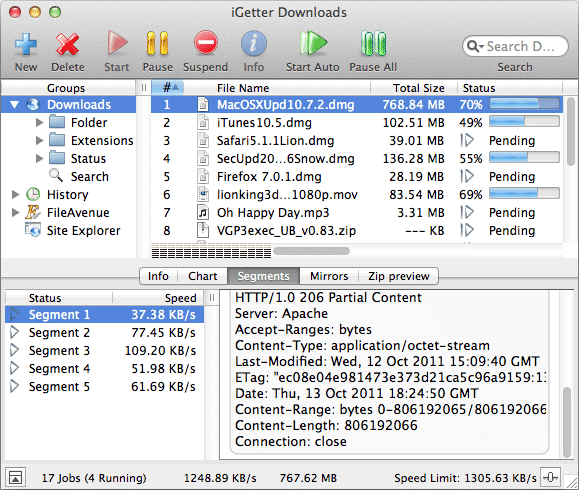
App Icon: http://www.presenta.net/images/iGetter128x128.jpg

Presenta Ltd. was founded in March 1993 in Bulgaria (Europe). We are a computer company, which deals with software development. Since 1993 the company has been a basic software developer of networking, multimedia and accounting systems for Apple Macintosh computers. All Material and Software (C) Copyright 2016 Presenta Ltd. All Rights Reserved. Apple, the Apple logo, Macintosh and Mac OS X are registered trademarks of Apple Inc. in the U.S. and/or other countries. Other trademarks and registered trademarks may be the property of their respective owners.
*******
Link To Article: http://prmac.com/release-id-78275.htm
*******
---------------------------------------------------------------------------------
Note that you can alter delivered distributions at any time.
Login to your account on prMac to alter your channel selection, or to opt-out at any time.
Subscribe to:
Posts (Atom)