A new article has been published at prMac.
Red Giant Films Presents Go Bag - Published on 01/12/16
Portland based Red Giant Films today releases "Go Bag," a brand new short film written and directed by award-winning filmmaker Seth Worley. Created by Red Giant Films, post production for "Go Bag" used every suite from Red Giant, including the Trapcode Suite 13 for muzzle flashes, sparks, smoke, debris, and the film's cinematic end title sequence; the Keying Suite for green screen and compositing; and Magic Bullet Suite 12.1 for color correction.
Portland, Oregon - Red Giant Films today released "Go Bag," a brand new short film written and directed by award-winning filmmaker Seth Worley. A high-paced action film packed with stunts, practical effects and CGI VFX, "Go Bag" tells the story of a spy who must fight for her life using only the contents of a stranger's carry-on bag. Created by Red Giant Films, post production for "Go Bag" used every suite from Red Giant, including the Trapcode Suite 13 for muzzle flashes, sparks, smoke, debris, and the film's cinematic end title sequence; the Keying Suite for green screen and compositing; and Magic Bullet Suite 12.1 for color correction.
"We always challenge ourselves when making our films, but this was easily the most ambitious project yet," said director Seth Worley. "We've never done hand-to-hand combat or real stunts before, and there's always a risk of first-time experiences failing horrifically. The one place I knew we would be solid was on the post production side, thanks to the tools from Red Giant. I've come to rely on tools like Trapcode Suite and Magic Bullet Suite in every story I tell."
Contrasting greatly from Red Giant Film's last short film "Old/New" (narrated by Patton Oswalt), "Go Bag" has virtually no dialogue, instead focusing on pure, gritty action. Born from the question of what famous TV action heroes might keep in their go bags (the bag of tools and assets one would need to pull out in an emergency) "Go Bag" tells the story of a spy with a bag full of solutions for any situation - except for the situation of losing that bag. Armed with an iPad, selfie stick, shaving cream, gym shorts and various sundries, our hero must fight off gun-wielding agents out to get her.
"This is our eighth Red Giant film, and something entirely different than we've ever done before," comments Aharon Rabinowitz, executive producer of Red Giant Films. "Seth always delivers amazing work, but from the first fight sequence, this one had me at the edge of my seat. The action is intense and surprisingly fun. I love that what we do on the software side at Red Giant is integrated so closely with the stories we tell. We're excited to take people behind the scenes to see how the film was made, so that they can do it, too."
Watch the making of "Go Bag" via the link below to learn more about how Red Giant Films pulled off the intense practical and visual effects for the film.
Red Giant Films puts its own products to the test with each short film it releases, and "Go Bag" was no exception. In fact, a number of tools and features that went into the newest version of Trapcode Particular (v 2.5), released as part of Trapcode Suite 13, were designed for the purpose of producing "Go Bag," including fully customizable muzzle flashes, sparks and debris presets and sprites. The plugin's brand new Effects Builder was critical in getting a lot of the VFX shots done quickly.
The end credit sequence for "Go Bag" was created by Territory Studio, whose work has been seen in Marvel's "The Avengers: Age of Ultron," "Guardians of the Galaxy" and "The Martian." The team used Trapcode Form to generate 3D objects and the brand new Trapcode Tao for the geometric interference patterns/glitching. 3D VFX for the short film were done by Coalter Digital, who worked with Red Giant Films on "Spy vs. Guy." Red Giant Films also used Magic Bullet Suite 12.1, which was crucial for color correction and finishing on the film's tight timeline, as the tools run in real-time. For flawless green screen and compositing, the film team used Red Giant Keying Suite.
Request a Product Review Kit or Press Interview:
Members of the media are invited to speak with Seth Worley or any member of the Red Giant Film team, or review any products or suites from Red Giant. For more information or to request an interview or product review kit, please contact Anya Nelson.
Red Giant: http://www.redgiant.com/
Red Giant Films: http://www.redgiant.com/films/
YouTube Video (Go Bag): https://www.youtube.com/watch?v=r1g1Z9Da1Vc
YouTube Video (The Making of Go Bag): https://www.youtube.com/watch?v=P7BaAIzSDCk
Vimeo Video (Spy vs. Guy): https://vimeo.com/64660267
Trapcode Suite 13: http://www.redgiant.com/products/trapcode-suite/
Red Giant is a software company made up of talented artists and technologists who collaborate to create unique tools for filmmakers, editors, VFX artists, and motion designers. Our company culture is focused on finding balance between work and life - we call it "the double bottom line" - this philosophy helps us ignore complexity in favor of building simple tools that yield giant results. Over the last decade, our products (like Magic Bullet and Trapcode) have become the standard in film and broadcast post-production. With over 200,000 users, it's nearly impossible to watch 20 minutes of TV without seeing our software in use. From our experiences as artists and filmmakers, we aspire to not only provide tools for artists, but inspiration as well. Watch our films, learn from over 200 free tutorials, or try our software on our website. All Material and Software (C) Copyright 2016 Red Giant. All Rights Reserved. Apple, the Apple logo, Macintosh and Mac OS X are registered trademarks of
Apple Inc. in the U.S. and/or other countries. Other trademarks and registered trademarks may be the property of their respective owners.
*******
Link To Article: http://prmac.com/release-id-78309.htm
*******
---------------------------------------------------------------------------------
Note that you can alter delivered distributions at any time.
Login to your account on prMac to alter your channel selection, or to opt-out at any time.

The Zones of Regulation : Exploring Emotions - Teaching Self Regulation
A new article has been published at prMac.
The Zones of Regulation : Exploring Emotions - Teaching Self Regulation - Published on 01/12/16
California based Selosoft, Inc. today introduces The Zones of Regulation : Exploring Emotions 1.0 for iOS, a new educational application designed to foster self-regulation skills in fun and exciting ways while simulating everyday situations students can relate to. The Zones of Regulation teaches four concrete colored "zones" to categorize all the feelings, sensory states and emotions we experience, helping students develop awareness of how they are feeling.
Lafayette, California - Selosoft, Inc. today is pleased to announce the release and immediate availability of The Zones of Regulation(R): Exploring Emotions 1.0 for iOS, a new educational application designed to foster self-regulation skills in fun and exciting ways while simulating everyday situations students can relate to.
Exploring Emotions is based off of the widely adopted framework, The Zones of Regulation, by Leah Kuypers. The framework was published as a curriculum (2011, Social Thinking Publishing) as well as an original app, both titled The Zones of Regulation. The Zones of Regulation teaches four concrete colored "zones" to categorize all the feelings, sensory states and emotions we experience, helping students develop awareness of how they are feeling and by providing a simple language and visual structure to communicate their feelings to others. In addition, students learn about tools and how they can be used to manage each of their zones. The app helps students gain skills in consciously regulating their behaviors to the social and environmental demands.
Exploring Emotions offers a new medium to address self-regulation needs and reinforce The Zones framework. There are several features in the app that create a comprehensive learning experience:
* Audio voiceover enriches the experience for students by providing social interaction between characters and instructional teachings throughout the app.
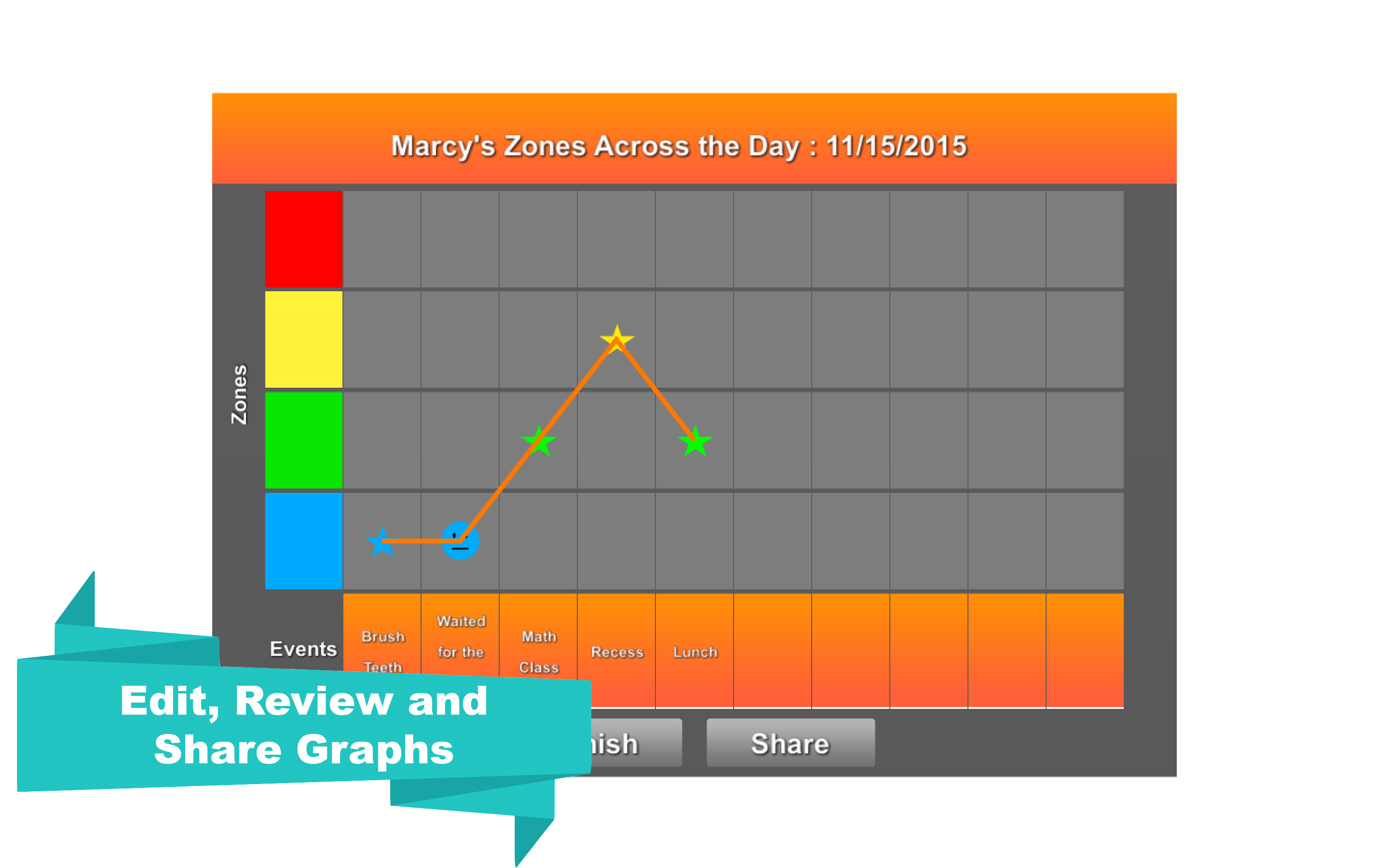
* Data tracking allows students to apply what they are learning in the app to their own life by self-monitoring and reflecting on their feelings (Zones) and how they were managed during events that occurred over the course of their day. These graphs can be saved, revisited and edited, and also emailed to an email address.
* Easy navigation throughout the app allows students to return to any point in the app to replay and consider different outcomes.
* Integration of an expansive toolbox that is fully customizable by students. Students learn about and categorize dozens of tools to help them manage their zones. They are also able to adjust the content of their toolbox.
* Incorporation of mini games provide real-time the opportunity for students to reflect on the outcome of games and how this triggers emotions.
* Multiple environments including a classroom, a cafeteria, and a park that offer different scenarios, events and activities to participate in. Students easily relate to the various situations presented throughout the app, helping them to make connections between learning in the app to real life.
* Reinforcing activities are infused throughout the app. For example, students can unlock a mini game and customize their avatar by coloring their hair and buying custom outfits.
* References to The Zones of Regulation curriculum are embedded throughout the app to assist adults who support a student in locating additional educational resources to strengthen learning.
Exploring Emotions is designed to be used with Pre-K, elementary students, secondary students, as well as is applicable to adults that struggle with emotional control. To enhance learning, it is recommended that an adult closely monitor the student's progression through the App, asking probing questions and facilitating discussions about how the App's content can be generalized to the student's real life. Exploring Emotions is a resource for parents to teach and encourage self-control and emotional management in the home through the Zones framework. It is an exciting resource for therapists and teachers looking to address social emotional learning (SEL) through a medium that is motivating for students to engage in.
The App provides a fun and engaging experience for students while learning and gaining valuable knowledge to assist in developing real-life skills in self-regulation and emotional control.
Device Requirements:
* iPhone, iPad, and iPod touch
* Requires iOS 6.0 or later
* 152 MB
Pricing and Availability:
The Zones of Regulation : Exploring Emotions 1.0 is $9.99 USD (or equivalent amount in other currencies) and available worldwide exclusively through the App Store in the Education category.
The Zones of Regulation : Exploring Emotions 1.0: http://www.selosoft.com/zonesEE.html
Purchase and Download: https://itunes.apple.com/app/zones-regulation-exploring/id1033751819
YouTube Video (Trailer): https://www.youtube.com/watch?v=LmIr2gRVhx8
Screenshot 1: http://www.selosoft.com/ZonesEE/Mac1.jpg
Screenshot 2: http://www.selosoft.com/ZonesEE/Mac5.jpg
App Icon: http://www.selosoft.com/Icons/ZonesEE_Icon_1024.png
Based in Lafayette, California, Selosoft, Inc. was founded by Sterling Selover in 2012. Selosoft, Inc. is a software company focusing on application development for mobile and desktop platforms. Copyright (C) 2016 Selosoft, Inc. All Rights Reserved. Apple, the Apple logo, iPhone, and iPod are registered trademarks of Apple Inc. in the U.S. and/or other countries. Other trademarks and registered trademarks may be the property of their respective owners.
*******
Link To Article: http://prmac.com/release-id-78308.htm
*******
---------------------------------------------------------------------------------
Note that you can alter delivered distributions at any time.
Login to your account on prMac to alter your channel selection, or to opt-out at any time.
The Zones of Regulation : Exploring Emotions - Teaching Self Regulation - Published on 01/12/16
California based Selosoft, Inc. today introduces The Zones of Regulation : Exploring Emotions 1.0 for iOS, a new educational application designed to foster self-regulation skills in fun and exciting ways while simulating everyday situations students can relate to. The Zones of Regulation teaches four concrete colored "zones" to categorize all the feelings, sensory states and emotions we experience, helping students develop awareness of how they are feeling.
Lafayette, California - Selosoft, Inc. today is pleased to announce the release and immediate availability of The Zones of Regulation(R): Exploring Emotions 1.0 for iOS, a new educational application designed to foster self-regulation skills in fun and exciting ways while simulating everyday situations students can relate to.
Exploring Emotions is based off of the widely adopted framework, The Zones of Regulation, by Leah Kuypers. The framework was published as a curriculum (2011, Social Thinking Publishing) as well as an original app, both titled The Zones of Regulation. The Zones of Regulation teaches four concrete colored "zones" to categorize all the feelings, sensory states and emotions we experience, helping students develop awareness of how they are feeling and by providing a simple language and visual structure to communicate their feelings to others. In addition, students learn about tools and how they can be used to manage each of their zones. The app helps students gain skills in consciously regulating their behaviors to the social and environmental demands.
Exploring Emotions offers a new medium to address self-regulation needs and reinforce The Zones framework. There are several features in the app that create a comprehensive learning experience:
* Audio voiceover enriches the experience for students by providing social interaction between characters and instructional teachings throughout the app.
* Data tracking allows students to apply what they are learning in the app to their own life by self-monitoring and reflecting on their feelings (Zones) and how they were managed during events that occurred over the course of their day. These graphs can be saved, revisited and edited, and also emailed to an email address.
* Easy navigation throughout the app allows students to return to any point in the app to replay and consider different outcomes.
* Integration of an expansive toolbox that is fully customizable by students. Students learn about and categorize dozens of tools to help them manage their zones. They are also able to adjust the content of their toolbox.
* Incorporation of mini games provide real-time the opportunity for students to reflect on the outcome of games and how this triggers emotions.
* Multiple environments including a classroom, a cafeteria, and a park that offer different scenarios, events and activities to participate in. Students easily relate to the various situations presented throughout the app, helping them to make connections between learning in the app to real life.
* Reinforcing activities are infused throughout the app. For example, students can unlock a mini game and customize their avatar by coloring their hair and buying custom outfits.
* References to The Zones of Regulation curriculum are embedded throughout the app to assist adults who support a student in locating additional educational resources to strengthen learning.
Exploring Emotions is designed to be used with Pre-K, elementary students, secondary students, as well as is applicable to adults that struggle with emotional control. To enhance learning, it is recommended that an adult closely monitor the student's progression through the App, asking probing questions and facilitating discussions about how the App's content can be generalized to the student's real life. Exploring Emotions is a resource for parents to teach and encourage self-control and emotional management in the home through the Zones framework. It is an exciting resource for therapists and teachers looking to address social emotional learning (SEL) through a medium that is motivating for students to engage in.
The App provides a fun and engaging experience for students while learning and gaining valuable knowledge to assist in developing real-life skills in self-regulation and emotional control.
Device Requirements:
* iPhone, iPad, and iPod touch
* Requires iOS 6.0 or later
* 152 MB
Pricing and Availability:
The Zones of Regulation : Exploring Emotions 1.0 is $9.99 USD (or equivalent amount in other currencies) and available worldwide exclusively through the App Store in the Education category.
The Zones of Regulation : Exploring Emotions 1.0: http://www.selosoft.com/zonesEE.html
Purchase and Download: https://itunes.apple.com/app/zones-regulation-exploring/id1033751819
YouTube Video (Trailer): https://www.youtube.com/watch?v=LmIr2gRVhx8
Screenshot 1: http://www.selosoft.com/ZonesEE/Mac1.jpg

Screenshot 2: http://www.selosoft.com/ZonesEE/Mac5.jpg
App Icon: http://www.selosoft.com/Icons/ZonesEE_Icon_1024.png

Based in Lafayette, California, Selosoft, Inc. was founded by Sterling Selover in 2012. Selosoft, Inc. is a software company focusing on application development for mobile and desktop platforms. Copyright (C) 2016 Selosoft, Inc. All Rights Reserved. Apple, the Apple logo, iPhone, and iPod are registered trademarks of Apple Inc. in the U.S. and/or other countries. Other trademarks and registered trademarks may be the property of their respective owners.
*******
Link To Article: http://prmac.com/release-id-78308.htm
*******
---------------------------------------------------------------------------------
Note that you can alter delivered distributions at any time.
Login to your account on prMac to alter your channel selection, or to opt-out at any time.
The Ambassador magazine extends its global digital reach with Magzter
A new article has been published at prMac.
The Ambassador magazine extends its global digital reach with Magzter - Published on 01/12/16
Zimbabwe's premier international relations and diplomacy magazine, The Ambassador, partners with Magzter, the world's largest digital magazine newsstand. To extend its digital footprint across the world, The Ambassador's mission is to promote bilateral and multilateral relations, investments, tourism, arts and culture in Zimbabwe. The Ambassador magazine also publishes opinions on developmental issues in Zimbabwe as well as other African countries.
New York, New York - Zimbabwe's premier international relations and diplomacy magazine, The Ambassador, partners with the world's largest digital magazine newsstand, Magzter, to extend its digital footprint across the world. The magazine's mission is to promote bilateral and multilateral relations, investments, tourism, arts and culture in Zimbabwe.
The Ambassador magazine also publishes opinions on developmental issues in Zimbabwe as well as other African countries. Magzter has been attracting a lot of publishers from African countries, thanks to its unique features such as zero upfront fee, mutually beneficial revenue sharing system and OREY Click Publishing� System for one-touch publishing. The addition of The Ambassador magazine has further strengthened Magzter's African catalogue.
The latest issue of The Ambassador magazine features many interesting articles such as Cuba-America relations have never looked brighter, digital disruption of the African narrative, 15 challenges you could face while doing business in Zambia, and the man to watch in 2016!
"We are possibly one of the few if not only Zimbabwean magazine publishers on Magzter. The Ambassador Magazine has been a strong advocate for print. Magzter has since shown us that there is life on the other side (Digital/Native). Magzter is possibly one of the biggest tools we'll use to place Zimbabwean publications on the World stage. The platform is seamless, user friendly full of digital opportunities and profitable. All our new Titles for 2016 will be launched on Magzter first. Thank you Scott Verchin for introducing me to Magzter and thanks to William for making the ride smooth. Magzter is the total package. Mobile First + Content First + Audience First = Magzter. Hence we say, 'Magzter First'!" - Marvin Madyara, Editor-in-Chief, The Ambassador - Zimbabwe
"Magzter has been expanding its presence all over the world and I feel Zimbabwe has plenty of promising magazines, which need to reach out to global readers. At Magzter, we are happy to provide digital wings to The Ambassador magazine and I am quite confident that the magazine will impress the readers with its insightful articles." - Girish Ramdas, CEO, Magzter Inc.
"The Ambassador magazine is best known for its honest and balanced opinions on current affairs and business developments in the African countries. The magazine also aptly reflects the current political scenario in Africa, which is being keenly followed by people around the world. I am very glad to welcome The Ambassador magazine on board Magzter.� - Vijay Radhakrishnan, President, Magzter Inc.
Device Requirements:
* iPhone, iPad, and iPod touch
* Optimized for iPhone 5, iPhone 6/6 Plus
* Requires iOS 7.0 or later
* 21.6 MB
Pricing and Availability:
Magzter - Digital Magazine Newsstand 5.1 is free and available worldwide through the App Store in the News category. A bi-monthly magazine, Ambassador is priced at $23.99 (USD) for an annual subscription on Magzter. The Ambassador magazine also comes as a treat to Magzter GOLD customers, who can enjoy reading it along with 3,500+ other exciting international titles. The app is also available on Google Play, and Windows 8, the web, Amazon App Store, Kindle Fire, and NOOK and is expanding to more platforms soon. Magzter's easy purchase and renewal systems ensure subscriptions are paid on time, eliminating the need for paper checks and postal mail issues. Users can buy their magazines on any of the above devices/platforms and seamlessly port their purchases to any other devices, a feature unique to Magzter.
Magzter - Digital Magazine Newsstand 5.1: http://www.magzter.com
Download from iTunes: https://itunes.apple.com/app/magzter-magazine-store/id412163953
Download from Google Play: https://play.google.com/store/apps/details?id=com.dci.magzter&hl=en
Screenshot: http://cdn.magzter.com/1434532413/1450595923/images/thumb/390_thumb_1.jpg
App Icon: http://a2.mzstatic.com/us/r30/Purple5/v4/81/fc/d3/81fcd369-00cd-a585-26d7-ee2f176c3c4b/mzl.orihehsu.175x175-75.jpg
Magzter is the world's largest and fastest growing global digital magazine newsstand with over 27 million digital consumers and more than 7,000 magazines from over 3,000 publishers. Headquartered in New York, Magzter has its local offices in London, Paris, Barcelona, Amsterdam, Helsinki, Mexico City, Chennai and Singapore and will soon be expanding to other countries. Founded by global entrepreneurs, Girish Ramdas and Vijay Radhakrishnan in June 2011, Magzter enables magazine publishers around the world to create and deliver digital editions of their titles to global consumers. Powered by its proprietary OREY Click Publishing System(R), Magzter also enables their customers to publish interactive/audio-visual content in the magazine as it supports HTML5. Magzter launched Magzter GOLD subscription service to give digital readers unlimited access to thousands of magazines for a low monthly price. All Material and Software (C) Copyright 2016 Magzter Inc. All Rights Reserved. Apple, the
Apple logo, iPhone, iPod and iPad are registered trademarks of Apple Inc. in the U.S. and/or other countries. Other trademarks and registered trademarks may be the property of their respective owners.
*******
Link To Article: http://prmac.com/release-id-78307.htm
*******
---------------------------------------------------------------------------------
Note that you can alter delivered distributions at any time.
Login to your account on prMac to alter your channel selection, or to opt-out at any time.
The Ambassador magazine extends its global digital reach with Magzter - Published on 01/12/16
Zimbabwe's premier international relations and diplomacy magazine, The Ambassador, partners with Magzter, the world's largest digital magazine newsstand. To extend its digital footprint across the world, The Ambassador's mission is to promote bilateral and multilateral relations, investments, tourism, arts and culture in Zimbabwe. The Ambassador magazine also publishes opinions on developmental issues in Zimbabwe as well as other African countries.
New York, New York - Zimbabwe's premier international relations and diplomacy magazine, The Ambassador, partners with the world's largest digital magazine newsstand, Magzter, to extend its digital footprint across the world. The magazine's mission is to promote bilateral and multilateral relations, investments, tourism, arts and culture in Zimbabwe.
The Ambassador magazine also publishes opinions on developmental issues in Zimbabwe as well as other African countries. Magzter has been attracting a lot of publishers from African countries, thanks to its unique features such as zero upfront fee, mutually beneficial revenue sharing system and OREY Click Publishing� System for one-touch publishing. The addition of The Ambassador magazine has further strengthened Magzter's African catalogue.
The latest issue of The Ambassador magazine features many interesting articles such as Cuba-America relations have never looked brighter, digital disruption of the African narrative, 15 challenges you could face while doing business in Zambia, and the man to watch in 2016!
"We are possibly one of the few if not only Zimbabwean magazine publishers on Magzter. The Ambassador Magazine has been a strong advocate for print. Magzter has since shown us that there is life on the other side (Digital/Native). Magzter is possibly one of the biggest tools we'll use to place Zimbabwean publications on the World stage. The platform is seamless, user friendly full of digital opportunities and profitable. All our new Titles for 2016 will be launched on Magzter first. Thank you Scott Verchin for introducing me to Magzter and thanks to William for making the ride smooth. Magzter is the total package. Mobile First + Content First + Audience First = Magzter. Hence we say, 'Magzter First'!" - Marvin Madyara, Editor-in-Chief, The Ambassador - Zimbabwe
"Magzter has been expanding its presence all over the world and I feel Zimbabwe has plenty of promising magazines, which need to reach out to global readers. At Magzter, we are happy to provide digital wings to The Ambassador magazine and I am quite confident that the magazine will impress the readers with its insightful articles." - Girish Ramdas, CEO, Magzter Inc.
"The Ambassador magazine is best known for its honest and balanced opinions on current affairs and business developments in the African countries. The magazine also aptly reflects the current political scenario in Africa, which is being keenly followed by people around the world. I am very glad to welcome The Ambassador magazine on board Magzter.� - Vijay Radhakrishnan, President, Magzter Inc.
Device Requirements:
* iPhone, iPad, and iPod touch
* Optimized for iPhone 5, iPhone 6/6 Plus
* Requires iOS 7.0 or later
* 21.6 MB
Pricing and Availability:
Magzter - Digital Magazine Newsstand 5.1 is free and available worldwide through the App Store in the News category. A bi-monthly magazine, Ambassador is priced at $23.99 (USD) for an annual subscription on Magzter. The Ambassador magazine also comes as a treat to Magzter GOLD customers, who can enjoy reading it along with 3,500+ other exciting international titles. The app is also available on Google Play, and Windows 8, the web, Amazon App Store, Kindle Fire, and NOOK and is expanding to more platforms soon. Magzter's easy purchase and renewal systems ensure subscriptions are paid on time, eliminating the need for paper checks and postal mail issues. Users can buy their magazines on any of the above devices/platforms and seamlessly port their purchases to any other devices, a feature unique to Magzter.
Magzter - Digital Magazine Newsstand 5.1: http://www.magzter.com
Download from iTunes: https://itunes.apple.com/app/magzter-magazine-store/id412163953
Download from Google Play: https://play.google.com/store/apps/details?id=com.dci.magzter&hl=en
Screenshot: http://cdn.magzter.com/1434532413/1450595923/images/thumb/390_thumb_1.jpg

App Icon: http://a2.mzstatic.com/us/r30/Purple5/v4/81/fc/d3/81fcd369-00cd-a585-26d7-ee2f176c3c4b/mzl.orihehsu.175x175-75.jpg

Magzter is the world's largest and fastest growing global digital magazine newsstand with over 27 million digital consumers and more than 7,000 magazines from over 3,000 publishers. Headquartered in New York, Magzter has its local offices in London, Paris, Barcelona, Amsterdam, Helsinki, Mexico City, Chennai and Singapore and will soon be expanding to other countries. Founded by global entrepreneurs, Girish Ramdas and Vijay Radhakrishnan in June 2011, Magzter enables magazine publishers around the world to create and deliver digital editions of their titles to global consumers. Powered by its proprietary OREY Click Publishing System(R), Magzter also enables their customers to publish interactive/audio-visual content in the magazine as it supports HTML5. Magzter launched Magzter GOLD subscription service to give digital readers unlimited access to thousands of magazines for a low monthly price. All Material and Software (C) Copyright 2016 Magzter Inc. All Rights Reserved. Apple, the
Apple logo, iPhone, iPod and iPad are registered trademarks of Apple Inc. in the U.S. and/or other countries. Other trademarks and registered trademarks may be the property of their respective owners.
*******
Link To Article: http://prmac.com/release-id-78307.htm
*******
---------------------------------------------------------------------------------
Note that you can alter delivered distributions at any time.
Login to your account on prMac to alter your channel selection, or to opt-out at any time.
Together for Mac and iOS iCloud Update
A new article has been published at prMac.
Together for Mac and iOS iCloud Update - Published on 01/12/16
UK based Reinvented Software today announces Together 3.5 for Mac and Together 1.4 for iPad and iPhone. Together was developed specifically for collecting, organizing and searching all kinds of files. Just about anything can be added to Together for safe keeping, tagged, previewed, collected together in different ways and found again instantly. In these versions, iCloud integration has been completely rewritten to make it more flexible, responsive and reliable.
Swansea, United Kingdom - Reinvented Software is proud to announce the release of Together 3.5 for Mac and Together 1.4 for iPad and iPhone today. In these versions, iCloud integration has been completely rewritten to make it more flexible, responsive and reliable.
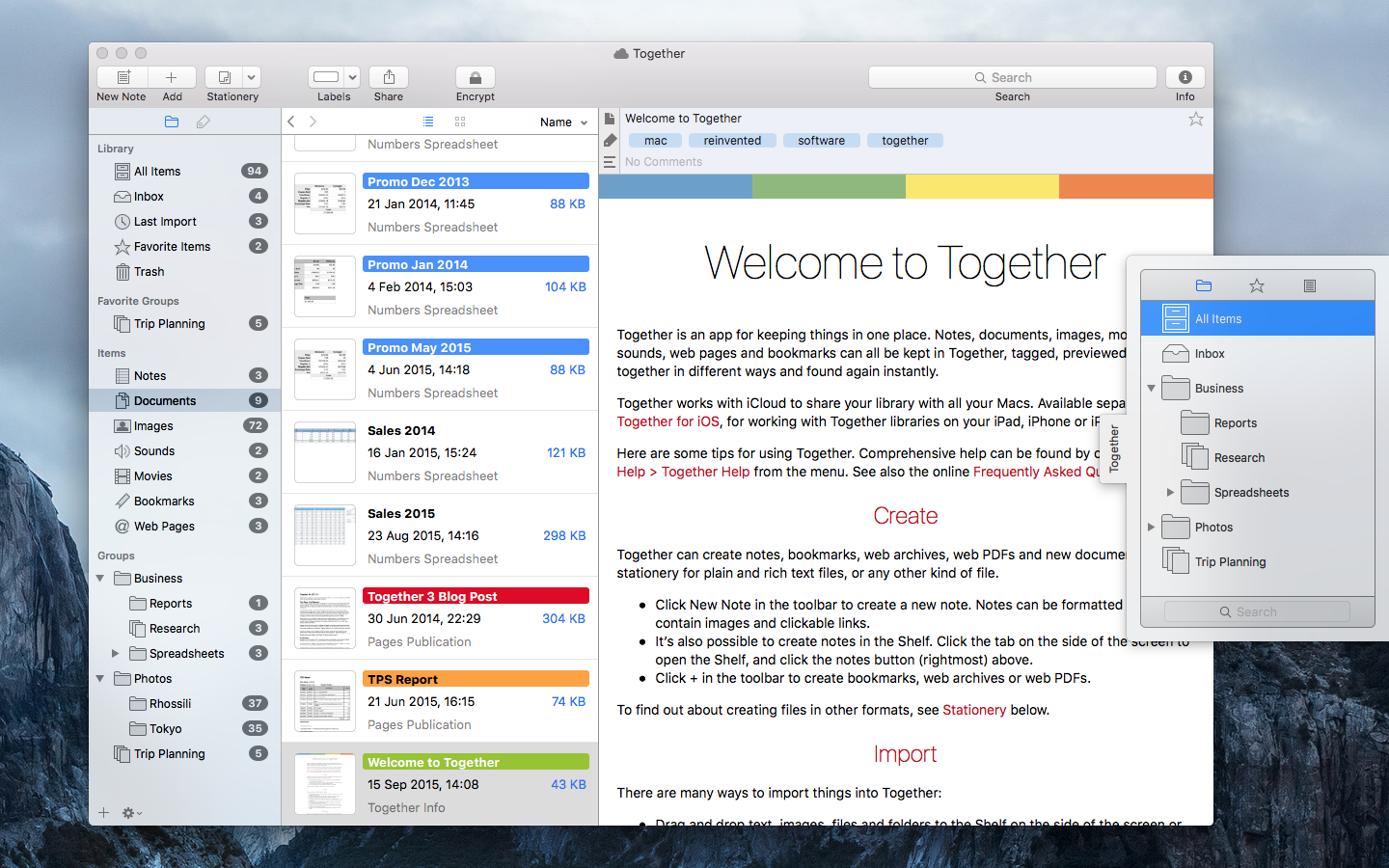
Together is for collecting, organizing and searching all kinds of files. Just about anything can be added to Together for safe keeping, tagged, previewed, collected together in different ways and found again instantly. With iCloud, Together libraries can be seamlessly shared with other Macs and iOS devices; changes made on one device will automatically appear on others.
Together 3.5 for Mac and Together 1.4 for iPad and iPhone include completely rewritten iCloud integration. iCloud libraries can now be stored anywhere, rather than on iCloud Drive, and have the same features as Together's local libraries, such as linked files and auto import. Also, for the first time, progress is shown for all iCloud activity.
Since the release of Together 3 for Mac in 2013, Together has used a combination of iCloud Core Data and iCloud Drive, where everything was handled by iCloud. With these new versions, Together communicates with iCloud directly using CloudKit, the same system Apple use in their own apps such as Photos and Notes on iOS 9 and El Capitan, giving the app far more control and flexibility, along with improved reliability and error handling.
In addition to the iCloud update, Together 3.5 for Mac includes improvements for auto import, search, label creation and the item list. Together 1.4 for iPad and iPhone includes a new document picker extension for accessing Together libraries in other apps, along with some other improvements.
Together 3.5 for Mac costs $49.99 (USD), is a free upgrade for all Together 3 users, requires OS X 10.11 El Capitan or later and is available with iCloud support from the Mac App Store, or without iCloud as a 15-day trial from the Reinvented Software web site. Together 1.4 for iPad and iPhone is a free upgrade for all existing users, otherwise $9.99 from the App Store, and requires iOS 9 or later.
Reinvented Software: http://reinventedsoftware.com/
Together: http://reinventedsoftware.com/together/
Purchase from the Mac App Store: http://itunes.apple.com/app/together-3/id641534696
Purchase from iTunes: https://itunes.apple.com/app/together-mobile/id896729921
Screenshot (Mac): http://reinventedsoftware.com/together/promo/Together_3.5.png
Screenshot (iOS): http://reinventedsoftware.com/together/promo/Together_iOS.png
Reinvented Software was founded in August 2004 by long-time Mac developer Steve Harris who, having wasted 10 years working for other people, decided to dedicate his life to making the best software in the world - software for the Mac. Copyright (C) 2004-2016 Reinvented Software. All Rights Reserved. Apple, the Apple logo, Mac OS X, iPhone, iPad, iPod, and Macintosh are registered trademarks of Apple Inc. in the U.S. and/or other countries.
*******
Link To Article: http://prmac.com/release-id-78306.htm
*******
---------------------------------------------------------------------------------
Note that you can alter delivered distributions at any time.
Login to your account on prMac to alter your channel selection, or to opt-out at any time.
Together for Mac and iOS iCloud Update - Published on 01/12/16
UK based Reinvented Software today announces Together 3.5 for Mac and Together 1.4 for iPad and iPhone. Together was developed specifically for collecting, organizing and searching all kinds of files. Just about anything can be added to Together for safe keeping, tagged, previewed, collected together in different ways and found again instantly. In these versions, iCloud integration has been completely rewritten to make it more flexible, responsive and reliable.
Swansea, United Kingdom - Reinvented Software is proud to announce the release of Together 3.5 for Mac and Together 1.4 for iPad and iPhone today. In these versions, iCloud integration has been completely rewritten to make it more flexible, responsive and reliable.
Together is for collecting, organizing and searching all kinds of files. Just about anything can be added to Together for safe keeping, tagged, previewed, collected together in different ways and found again instantly. With iCloud, Together libraries can be seamlessly shared with other Macs and iOS devices; changes made on one device will automatically appear on others.
Together 3.5 for Mac and Together 1.4 for iPad and iPhone include completely rewritten iCloud integration. iCloud libraries can now be stored anywhere, rather than on iCloud Drive, and have the same features as Together's local libraries, such as linked files and auto import. Also, for the first time, progress is shown for all iCloud activity.
Since the release of Together 3 for Mac in 2013, Together has used a combination of iCloud Core Data and iCloud Drive, where everything was handled by iCloud. With these new versions, Together communicates with iCloud directly using CloudKit, the same system Apple use in their own apps such as Photos and Notes on iOS 9 and El Capitan, giving the app far more control and flexibility, along with improved reliability and error handling.
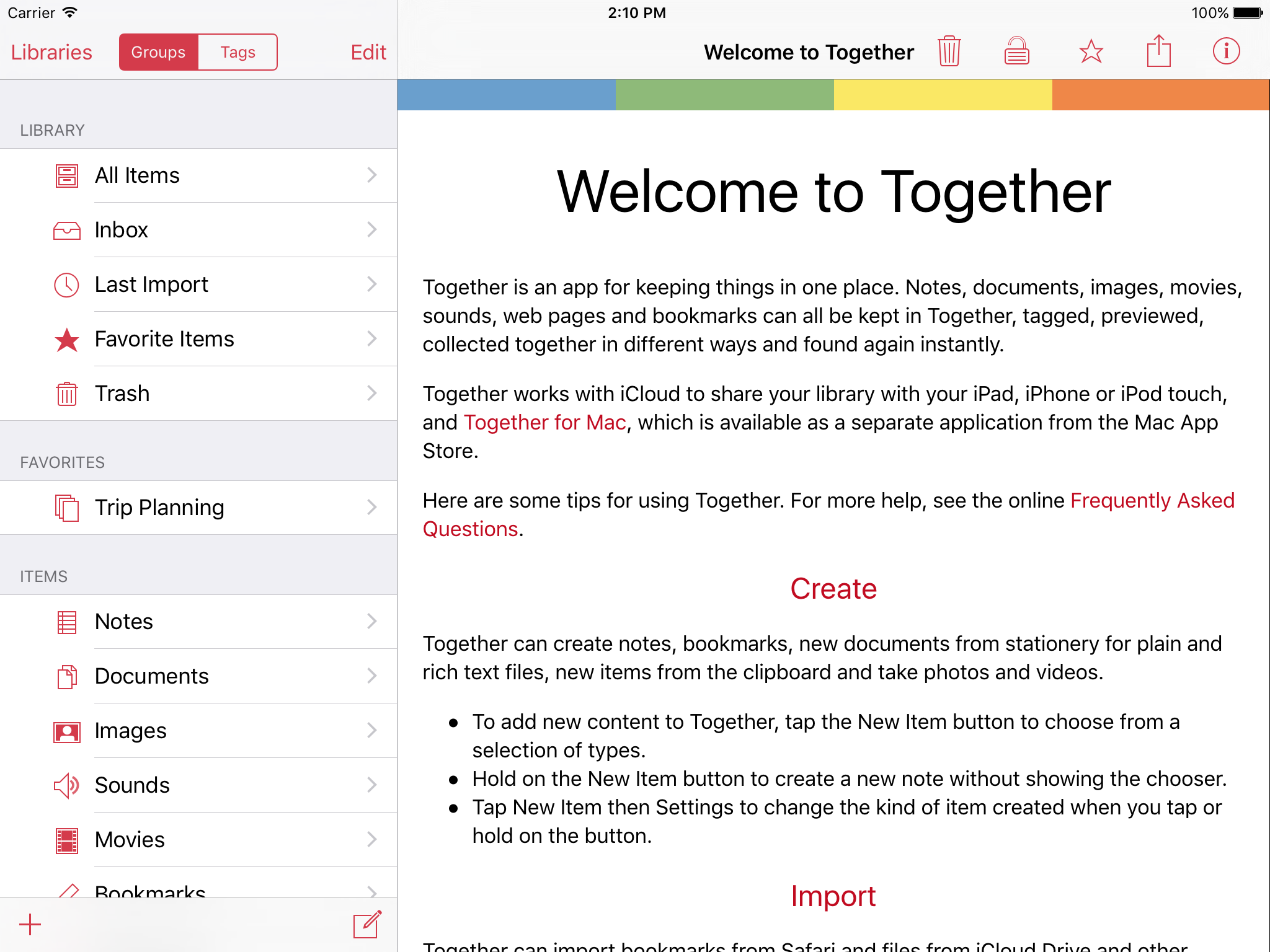
In addition to the iCloud update, Together 3.5 for Mac includes improvements for auto import, search, label creation and the item list. Together 1.4 for iPad and iPhone includes a new document picker extension for accessing Together libraries in other apps, along with some other improvements.
Together 3.5 for Mac costs $49.99 (USD), is a free upgrade for all Together 3 users, requires OS X 10.11 El Capitan or later and is available with iCloud support from the Mac App Store, or without iCloud as a 15-day trial from the Reinvented Software web site. Together 1.4 for iPad and iPhone is a free upgrade for all existing users, otherwise $9.99 from the App Store, and requires iOS 9 or later.
Reinvented Software: http://reinventedsoftware.com/
Together: http://reinventedsoftware.com/together/
Purchase from the Mac App Store: http://itunes.apple.com/app/together-3/id641534696
Purchase from iTunes: https://itunes.apple.com/app/together-mobile/id896729921
Screenshot (Mac): http://reinventedsoftware.com/together/promo/Together_3.5.png
Screenshot (iOS): http://reinventedsoftware.com/together/promo/Together_iOS.png
Reinvented Software was founded in August 2004 by long-time Mac developer Steve Harris who, having wasted 10 years working for other people, decided to dedicate his life to making the best software in the world - software for the Mac. Copyright (C) 2004-2016 Reinvented Software. All Rights Reserved. Apple, the Apple logo, Mac OS X, iPhone, iPad, iPod, and Macintosh are registered trademarks of Apple Inc. in the U.S. and/or other countries.
*******
Link To Article: http://prmac.com/release-id-78306.htm
*******
---------------------------------------------------------------------------------
Note that you can alter delivered distributions at any time.
Login to your account on prMac to alter your channel selection, or to opt-out at any time.
Offline Portuguese to English Language Dictionary Translator 3.0 for iOS
A new article has been published at prMac.
Offline Portuguese to English Language Dictionary Translator 3.0 for iOS - Published on 01/12/16
LastThink announces the release of Offline Portuguese to English Language Dictionary Translator 3.0, the important update to their highly customizable dictionary application for iOS devices. Users can seek and find any word's translation and synonyms anytime and anywhere from their devices. The dictionary offers users a huge collection of words with their translations as well as definitions and synonyms, with well over 500,000 synonym variants. Version 3.0 offers improved search capability.
Yerevan, Armenia - LastThink is proud to announce the release of Offline Portuguese to English Language Dictionary Translator 3.0, the important update to their highly customizable Dictionary application developed for iPhone, iPad, and iPod touch devices. Users can seek and find any word's translation and synonyms anytime and anywhere from their Apple devices.
Features:
* Tremendous range of synonyms and antonyms with well over five hundred thousand synonym variants
* Information about the discipline of structural linguistics by suggesting vital enough sentences
* Appropriate translations of colloquial and formal words as well as conjugation of verbs and declension of nouns
* Availability of various word definitions which will exactly influence on your understanding of a Foreign Language in a detailed way
* A distinction of a section named "Favorites" with the possibility of saving as many unknown words as you wish
* Thorough analysis of parts of speech (noun, verb, adjective, adverb) and their grammatical functions (subject, object, etc.)
* A possibility of the following application usage without an internet demand
* Existence of contemporary words such as "Woot", "OMG", "Crunk" and many others
In our new updated version we grant users a chance of typing the unknown word either in capitals or in small letters and the app will bring all the possible variants and definitions of the dictionary entries saved both in capital and small letters.
If you however experience any issues, please do not hesitate to contact us if you'd like to share your experience with Offline Dictionaries, or provide suggestions on how we could improve the product further. We will be more than happy to get in touch.
NOTE: We have selected data from the internet and if any assembly or constitution doesn't want us to show the content of the unit, please recommend us to remove it.
Device Requirements:
* iPhone, iPad, and iPod touch
* Optimized for iPhone 5, iPhone 6, and iPhone 6 Plus
* Requires iOS 6.0 or later
* Universal Application
* 437 MB
Pricing and Availability:
Offline Portuguese to English Language Dictionary Translator 3.0 is free, and is available worldwide exclusively through the App Store in the Education category.
LastThink: http://lastthink.com/
Offline Portuguese to English Language Dictionary Translator 3.0: https://www.facebook.com/pages/Offline-Dictionary/882897578447079
Download from iTunes: https://itunes.apple.com/app/offline-portuguese-to-english/id1046207173
Screenshot: http://a3.mzstatic.com/us/r30/Purple69/v4/f9/3c/10/f93c10b5-ff50-6eb9-fde4-344da5bbdd9a/screen322x572.jpeg
App Icon: http://a4.mzstatic.com/us/r30/Purple6/v4/d0/ed/03/d0ed0346-aea3-1c72-6181-fcc1f508bdc9/icon175x175.png
LastThink is an IT company with a focus on mobile development. It has extended its list of services since 2012 to offer high-end business process management, system integration, as well as up-to-date communication solutions. LastThink's mission is to deliver maximum business value to its customers by designing, developing, implementing and maintaining efficient and high quality software solutions aligned with their most essential business needs. Their team will always do its best to meet client expectations. Copyright (C) 2016 LastThink LLC. All Rights Reserved. Apple, the Apple logo, iPhone, iPad and iPod are registered trademarks of Apple Inc. in the U.S. and/or other countries.
*******
Link To Article: http://prmac.com/release-id-78305.htm
*******
---------------------------------------------------------------------------------
Note that you can alter delivered distributions at any time.
Login to your account on prMac to alter your channel selection, or to opt-out at any time.
Offline Portuguese to English Language Dictionary Translator 3.0 for iOS - Published on 01/12/16
LastThink announces the release of Offline Portuguese to English Language Dictionary Translator 3.0, the important update to their highly customizable dictionary application for iOS devices. Users can seek and find any word's translation and synonyms anytime and anywhere from their devices. The dictionary offers users a huge collection of words with their translations as well as definitions and synonyms, with well over 500,000 synonym variants. Version 3.0 offers improved search capability.
Yerevan, Armenia - LastThink is proud to announce the release of Offline Portuguese to English Language Dictionary Translator 3.0, the important update to their highly customizable Dictionary application developed for iPhone, iPad, and iPod touch devices. Users can seek and find any word's translation and synonyms anytime and anywhere from their Apple devices.
Features:
* Tremendous range of synonyms and antonyms with well over five hundred thousand synonym variants
* Information about the discipline of structural linguistics by suggesting vital enough sentences
* Appropriate translations of colloquial and formal words as well as conjugation of verbs and declension of nouns
* Availability of various word definitions which will exactly influence on your understanding of a Foreign Language in a detailed way
* A distinction of a section named "Favorites" with the possibility of saving as many unknown words as you wish
* Thorough analysis of parts of speech (noun, verb, adjective, adverb) and their grammatical functions (subject, object, etc.)
* A possibility of the following application usage without an internet demand
* Existence of contemporary words such as "Woot", "OMG", "Crunk" and many others
In our new updated version we grant users a chance of typing the unknown word either in capitals or in small letters and the app will bring all the possible variants and definitions of the dictionary entries saved both in capital and small letters.
If you however experience any issues, please do not hesitate to contact us if you'd like to share your experience with Offline Dictionaries, or provide suggestions on how we could improve the product further. We will be more than happy to get in touch.
NOTE: We have selected data from the internet and if any assembly or constitution doesn't want us to show the content of the unit, please recommend us to remove it.
Device Requirements:
* iPhone, iPad, and iPod touch
* Optimized for iPhone 5, iPhone 6, and iPhone 6 Plus
* Requires iOS 6.0 or later
* Universal Application
* 437 MB
Pricing and Availability:
Offline Portuguese to English Language Dictionary Translator 3.0 is free, and is available worldwide exclusively through the App Store in the Education category.
LastThink: http://lastthink.com/
Offline Portuguese to English Language Dictionary Translator 3.0: https://www.facebook.com/pages/Offline-Dictionary/882897578447079
Download from iTunes: https://itunes.apple.com/app/offline-portuguese-to-english/id1046207173
Screenshot: http://a3.mzstatic.com/us/r30/Purple69/v4/f9/3c/10/f93c10b5-ff50-6eb9-fde4-344da5bbdd9a/screen322x572.jpeg

App Icon: http://a4.mzstatic.com/us/r30/Purple6/v4/d0/ed/03/d0ed0346-aea3-1c72-6181-fcc1f508bdc9/icon175x175.png

LastThink is an IT company with a focus on mobile development. It has extended its list of services since 2012 to offer high-end business process management, system integration, as well as up-to-date communication solutions. LastThink's mission is to deliver maximum business value to its customers by designing, developing, implementing and maintaining efficient and high quality software solutions aligned with their most essential business needs. Their team will always do its best to meet client expectations. Copyright (C) 2016 LastThink LLC. All Rights Reserved. Apple, the Apple logo, iPhone, iPad and iPod are registered trademarks of Apple Inc. in the U.S. and/or other countries.
*******
Link To Article: http://prmac.com/release-id-78305.htm
*******
---------------------------------------------------------------------------------
Note that you can alter delivered distributions at any time.
Login to your account on prMac to alter your channel selection, or to opt-out at any time.
DupHunter Presents an Easy Way to Deal with Garbage Photos
A new article has been published at prMac.
DupHunter Presents an Easy Way to Deal with Garbage Photos - Published on 01/12/16
TeoreX announces DupHunter 2.0 for Mac OS X and Windows. DupHunter scans photos on a user's computer and gets rid of all duplicates, leaving only the best images in each group of similar pictures. Conveniently, the program automatically detects series of photos taken with continuous shooting or locates similar images based on their content. The tool implements a unique image analysis algorithm that not only detects similar images with high accuracy, but also does this extremely quickly.
Moscow, Russia - TeoreX is proud to announce DupHunter 2.0, their Mac OS X and Windows application designed to help users deal with duplicate images. Today, if a user has a digital camera, his hard drive crawls with photographs. And, apparently a large portion of them are duplicates. Some are a result of continuous shooting, others were made intentionally to catch a better angle or expression. A lot of images are not exactly duplicates of the original, but still need some refining - post-processed photos, sepia or grayscale photos and so on.
DupHunter is an app designed to quickly deal with all the photo duplicates. The tool implements a unique image analysis algorithm that not only detects similar images with high accuracy, but also does this extremely quickly. A user sets the program against folders on his or her computer, and it reveals all doubling images it finds. Then, the user simply selects best photos in each group of duplicates and discards others.
Interestingly, DupHunter finds duplicate images using two available algorithms. The first one is a classic content-based search that is useful to get rid of the same or just similar photographs on the disk. The smart analysis algorithm recognizes modified, distorted, cropped, resized and post-processed images as duplicate of their corresponding originals. The second search mode is timeline-based. It helps locating photos taken with short time gaps in between, for example, with a continuous shooting camera. In DupHunter, the user sees the entire series and can easily pick the best shot of all available photos.
Just like other software by TeoreX, the program features a tiny learning curve and intuitive, literally 3-buttons interface. Therefore, the app is a welcome addition to the photography toolbox of almost any user.
System Requirements:
* Mac OS X 10.7 or higher
* 1000 MHz processor
* 256 MB RAM
Pricing and Availability:
DupHunter is only $19.99 USD (or an equivalent amount in other currencies), and is available for download from the TeoreX website. A free trial is available for download. A Windows version is also available.
TeoreX: http://www.teorex.com/
DupHunter: http://www.duphunter.com/
Download: https://www.duphunter.com/download.html
Purchase: https://www.duphunter.com/order.html
TeoreX develops simple and easy to use yet functional graphics and multimedia tools since 2011. Among great tools developed by the company are Inpaint, iResizer, PhotoScissors, DupHunter, FolderIco and PhotoStitcher. All Material and Software (C) Copyright 2016 TeoreX. All Rights Reserved. Apple, the Apple logo, Macintosh and Mac OS X are registered trademarks of Apple Inc. in the U.S. and/or other countries. Other trademarks and registered trademarks may be the property of their respective owners.
*******
Link To Article: http://prmac.com/release-id-78304.htm
*******
---------------------------------------------------------------------------------
Note that you can alter delivered distributions at any time.
Login to your account on prMac to alter your channel selection, or to opt-out at any time.
DupHunter Presents an Easy Way to Deal with Garbage Photos - Published on 01/12/16
TeoreX announces DupHunter 2.0 for Mac OS X and Windows. DupHunter scans photos on a user's computer and gets rid of all duplicates, leaving only the best images in each group of similar pictures. Conveniently, the program automatically detects series of photos taken with continuous shooting or locates similar images based on their content. The tool implements a unique image analysis algorithm that not only detects similar images with high accuracy, but also does this extremely quickly.
Moscow, Russia - TeoreX is proud to announce DupHunter 2.0, their Mac OS X and Windows application designed to help users deal with duplicate images. Today, if a user has a digital camera, his hard drive crawls with photographs. And, apparently a large portion of them are duplicates. Some are a result of continuous shooting, others were made intentionally to catch a better angle or expression. A lot of images are not exactly duplicates of the original, but still need some refining - post-processed photos, sepia or grayscale photos and so on.
DupHunter is an app designed to quickly deal with all the photo duplicates. The tool implements a unique image analysis algorithm that not only detects similar images with high accuracy, but also does this extremely quickly. A user sets the program against folders on his or her computer, and it reveals all doubling images it finds. Then, the user simply selects best photos in each group of duplicates and discards others.
Interestingly, DupHunter finds duplicate images using two available algorithms. The first one is a classic content-based search that is useful to get rid of the same or just similar photographs on the disk. The smart analysis algorithm recognizes modified, distorted, cropped, resized and post-processed images as duplicate of their corresponding originals. The second search mode is timeline-based. It helps locating photos taken with short time gaps in between, for example, with a continuous shooting camera. In DupHunter, the user sees the entire series and can easily pick the best shot of all available photos.
Just like other software by TeoreX, the program features a tiny learning curve and intuitive, literally 3-buttons interface. Therefore, the app is a welcome addition to the photography toolbox of almost any user.
System Requirements:
* Mac OS X 10.7 or higher
* 1000 MHz processor
* 256 MB RAM
Pricing and Availability:
DupHunter is only $19.99 USD (or an equivalent amount in other currencies), and is available for download from the TeoreX website. A free trial is available for download. A Windows version is also available.
TeoreX: http://www.teorex.com/
DupHunter: http://www.duphunter.com/
Download: https://www.duphunter.com/download.html
Purchase: https://www.duphunter.com/order.html
TeoreX develops simple and easy to use yet functional graphics and multimedia tools since 2011. Among great tools developed by the company are Inpaint, iResizer, PhotoScissors, DupHunter, FolderIco and PhotoStitcher. All Material and Software (C) Copyright 2016 TeoreX. All Rights Reserved. Apple, the Apple logo, Macintosh and Mac OS X are registered trademarks of Apple Inc. in the U.S. and/or other countries. Other trademarks and registered trademarks may be the property of their respective owners.
*******
Link To Article: http://prmac.com/release-id-78304.htm
*******
---------------------------------------------------------------------------------
Note that you can alter delivered distributions at any time.
Login to your account on prMac to alter your channel selection, or to opt-out at any time.
MacNN Pointers eBook enjoys iBooks, Kindle chart success
A new article has been published at prMac.
MacNN Pointers eBook enjoys iBooks, Kindle chart success - Published on 01/12/16
MacNN Pointers: Get More from Your Apple Software, by William Gallagher and Charles Martin, an eBook of Mac, iPhone and iPad tutorials from two of MacNN's writing team. In celebration of 20 years of MacNN, this specially curated and updated collection of tutorials shows you how to solve common problems, discover brilliant new features and get more out of Mac OS X and iPhone/iPad iOS. This eBook has stormed up the charts of online book stores across both sides of the Atlantic.
Birmingham, United Kingdom - An ebook of Mac, iPhone and iPad tutorials from two of MacNN's writing team has stormed up the charts of online book stores across both sides of the Atlantic and on both iBooks and Kindle. Published by Dark Ride, MacNN Pointers: Get More from Your Apple Software is by William Gallagher and Charles Martin. The book is top of the Computing & Internet section of the iBooks Top Paid Books chart just days after being published, with similar success for the book on Amazon's Kindle store charts.
At the time of writing, the book's US Amazon store listing states it is in second place under the Kindle Store's Operating Systems/Mac OS chart, tenth under the overall version of the same category including both Kindle and physical books. It's also 11th in the Kindle Short Reads Computers & Technology section. In the United Kingdom, it has reached 66th place in the overall Computers & Internet/Mac OS chart, again including both Kindle and physical books.
"I'm beaming at the news it's selling so well, but I'm not terribly surprised," said author William Gallagher regarding the news, adding that "there are chapters by co-writer Charles Martin in here that I've regularly referred to myself. It's the straightforward, get-on-with-it practical advice that I like for myself and that I'm delighted so many other people seem to be enjoying too."
Charles Martin, editor of MacNN, calls the Pointers book "a point of pride for myself and William," after hearing from readers that the tutorials helped them "solve problems, explore new areas, and discover hidden abilities they didn't know their Mac or iOS device had within it."
Published by Dark Ride, MacNN Pointers: Get More from Your Apple Software is 99c in the US and 99p in the UK. It's priced to get it out to as many people as possible and MacNN managing editor Mike Wuerthele says he's delighted that Dark Ride is publishing this with because the company is encouraging readers to to use its advice and share the knowledge. It "isn't just for the casual OS X user," he says. "Educators can use it as well, with nothing fancy to do for permissions, other than telling students where it came from."
MacNN Pointers: Get More from Your Apple Software: https://itunes.apple.com/book/macnn-pointers-get-more-from/id1072754410
Purchase for Kindle (US): http://www.amazon.com/gp/product/B01ACLY7SW/ref=as_li_qf_sp_asin_il_tl?ie=UTF8&camp=1789&creative=9325&creativeASIN=B01ACLY7SW&linkCode=as2&tag=wwwwilliamgal-20&linkId=KB54G7666QZQTTPT
Purchase for Kindle (UK): http://www.amazon.co.uk/gp/product/B01ACLY7SW/ref=as_li_qf_sp_asin_il_tl?ie=UTF8&camp=1634&creative=6738&creativeASIN=B01ACLY7SW&linkCode=as2&tag=williamgallag-21
Screenshot: http://williamgallagher.com/wp-content/uploads/2016/01/MacNNBook-CORRECT.png
Dark Ride is the publishing business of British author, journalist and scriptwriter William Gallagher. It's the home of The Blank Screen guides for writers showing them how to make more time for writing, how to beat distractions and how to get more from their computers and their kettles. Every book is also intrinsically about the best tools any creatives can have. This combination of art, technology and productivity resulted in Getting Things Done on iPads and Macs. Copyright (C) 2016 Dark Ride. All Rights Reserved. Apple, the Apple logo, Mac OS X, iPhone, iPad, iPod and Macintosh are registered trademarks of Apple Inc. in the U.S. and/or other countries.
*******
Link To Article: http://prmac.com/release-id-78300.htm
*******
---------------------------------------------------------------------------------
Note that you can alter delivered distributions at any time.
Login to your account on prMac to alter your channel selection, or to opt-out at any time.
MacNN Pointers eBook enjoys iBooks, Kindle chart success - Published on 01/12/16
MacNN Pointers: Get More from Your Apple Software, by William Gallagher and Charles Martin, an eBook of Mac, iPhone and iPad tutorials from two of MacNN's writing team. In celebration of 20 years of MacNN, this specially curated and updated collection of tutorials shows you how to solve common problems, discover brilliant new features and get more out of Mac OS X and iPhone/iPad iOS. This eBook has stormed up the charts of online book stores across both sides of the Atlantic.
Birmingham, United Kingdom - An ebook of Mac, iPhone and iPad tutorials from two of MacNN's writing team has stormed up the charts of online book stores across both sides of the Atlantic and on both iBooks and Kindle. Published by Dark Ride, MacNN Pointers: Get More from Your Apple Software is by William Gallagher and Charles Martin. The book is top of the Computing & Internet section of the iBooks Top Paid Books chart just days after being published, with similar success for the book on Amazon's Kindle store charts.
At the time of writing, the book's US Amazon store listing states it is in second place under the Kindle Store's Operating Systems/Mac OS chart, tenth under the overall version of the same category including both Kindle and physical books. It's also 11th in the Kindle Short Reads Computers & Technology section. In the United Kingdom, it has reached 66th place in the overall Computers & Internet/Mac OS chart, again including both Kindle and physical books.
"I'm beaming at the news it's selling so well, but I'm not terribly surprised," said author William Gallagher regarding the news, adding that "there are chapters by co-writer Charles Martin in here that I've regularly referred to myself. It's the straightforward, get-on-with-it practical advice that I like for myself and that I'm delighted so many other people seem to be enjoying too."
Charles Martin, editor of MacNN, calls the Pointers book "a point of pride for myself and William," after hearing from readers that the tutorials helped them "solve problems, explore new areas, and discover hidden abilities they didn't know their Mac or iOS device had within it."
Published by Dark Ride, MacNN Pointers: Get More from Your Apple Software is 99c in the US and 99p in the UK. It's priced to get it out to as many people as possible and MacNN managing editor Mike Wuerthele says he's delighted that Dark Ride is publishing this with because the company is encouraging readers to to use its advice and share the knowledge. It "isn't just for the casual OS X user," he says. "Educators can use it as well, with nothing fancy to do for permissions, other than telling students where it came from."
MacNN Pointers: Get More from Your Apple Software: https://itunes.apple.com/book/macnn-pointers-get-more-from/id1072754410
Purchase for Kindle (US): http://www.amazon.com/gp/product/B01ACLY7SW/ref=as_li_qf_sp_asin_il_tl?ie=UTF8&camp=1789&creative=9325&creativeASIN=B01ACLY7SW&linkCode=as2&tag=wwwwilliamgal-20&linkId=KB54G7666QZQTTPT
Purchase for Kindle (UK): http://www.amazon.co.uk/gp/product/B01ACLY7SW/ref=as_li_qf_sp_asin_il_tl?ie=UTF8&camp=1634&creative=6738&creativeASIN=B01ACLY7SW&linkCode=as2&tag=williamgallag-21
Screenshot: http://williamgallagher.com/wp-content/uploads/2016/01/MacNNBook-CORRECT.png

Dark Ride is the publishing business of British author, journalist and scriptwriter William Gallagher. It's the home of The Blank Screen guides for writers showing them how to make more time for writing, how to beat distractions and how to get more from their computers and their kettles. Every book is also intrinsically about the best tools any creatives can have. This combination of art, technology and productivity resulted in Getting Things Done on iPads and Macs. Copyright (C) 2016 Dark Ride. All Rights Reserved. Apple, the Apple logo, Mac OS X, iPhone, iPad, iPod and Macintosh are registered trademarks of Apple Inc. in the U.S. and/or other countries.
*******
Link To Article: http://prmac.com/release-id-78300.htm
*******
---------------------------------------------------------------------------------
Note that you can alter delivered distributions at any time.
Login to your account on prMac to alter your channel selection, or to opt-out at any time.
Subscribe to:
Posts (Atom)