A new article has been published at prMac.
StoryBoard Artist Version 7 Now Available - Published on 01/25/16
California based PowerProduction Software today announces StoryBoard Artist Version 7, the essential digital and animatic storyboard creation tool for filmmakers. StoryBoard Artist Version gives you the simplicity and speed of working in 2D environments with all the flexibility you want when creating a 3D representation of your vision. Version 7 adds an unlimited number of character poses, advanced motion graphics, and integration with StoryBoard mobile apps for previs creation across devices.
Los Gatos, California - PowerProduction Software, the leading developer of visualization solutions for film and video production, announced today the availability of StoryBoard Artist Version 7, the essential digital and animatic storyboard creation tool for filmmakers. The new version 7 release amps up 3D capabilities, adding an unlimited number of character poses, advanced motion graphics, and integration with StoryBoard mobile apps for previs creation across devices.
"StoryBoard Artist Version 7 gives you the simplicity and speed of working in 2D environments with all the flexibility you want when creating a 3D representation of your vision. It's really the best of both worlds," says Paul Clatworthy, creative director at PowerProduction. "Artist 7 eliminates the time and learning curve that comes with creating an entire 3D world. With all the assets at your fingertips, users can quickly and easily create the shot they want. They can tweak characters in 3D just as if they were directing actors. Artist 7 is our best upgrade ever, building on our rich history of innovation in media production software."
StoryBoard Artist Version 7 Key Features
* Unlimited character posing with straightforward adjustment tools lets users get started quickly and tweak poses as needed
* New motion graphics capabilities let users define character movement within shots, providing an exact representation of the director's vision for that scene
* Supports standard 3D formats as well as Autodesk .FBX and Google SketchUp
* Integration with StoryBoard mobile apps allows users to storyboard on any of their devices
* Expanded timeline editing and sound sweetening
* Imports native screenplay formats such as Final Draft, Screenwriter and more
* Floating licensing, no hardware key
* Streamlined interface
Pricing and Availability
StoryBoard Artist Version 7 is immediately available through the PowerProduction Software worldwide reseller channel and direct from the PowerProduction Software website for 499.99 (USD). StoryBoard Artist owners can upgrade to the new version 7.0 for 199.00 (USD). Members of the media are invited to review StoryBoard Artist v7. For more information, please email Mariah Stein.
PowerProduction Software: http://www.powerproduction.com
StoryBoard Artist 7: http://www.powerproduction.com/storyboard-artist.html
Promo Video: http://www.powerproduction.com/Artist7/v/a7now5.mp4
PowerProduction Software has been a trendsetter in storyboard software for over a decade. The Hollywood production community has made them a staple in a very competitive niche. Their staff of well-rounded media professionals is dedicated to making sure that the software programming serves the needs of filmmakers. For more information, visit PowerProduction Software online. All Material and Software (C) Copyright 2016 PowerProduction Software. All Rights Reserved. Apple, the Apple logo, Mac OS X and Macintosh are registered trademarks of Apple Inc. in the U.S. and/or other countries. Other trademarks and registered trademarks may be the property of their respective owners.
*******
Link To Article: http://prmac.com/release-id-78473.htm
*******
---------------------------------------------------------------------------------
Note that you can alter delivered distributions at any time.
Login to your account on prMac to alter your channel selection, or to opt-out at any time.

BatchOutput for Microsoft Word Is Now Available for Sale on MacUpdate
A new article has been published at prMac.
BatchOutput for Microsoft Word Is Now Available for Sale on MacUpdate - Published on 01/25/16
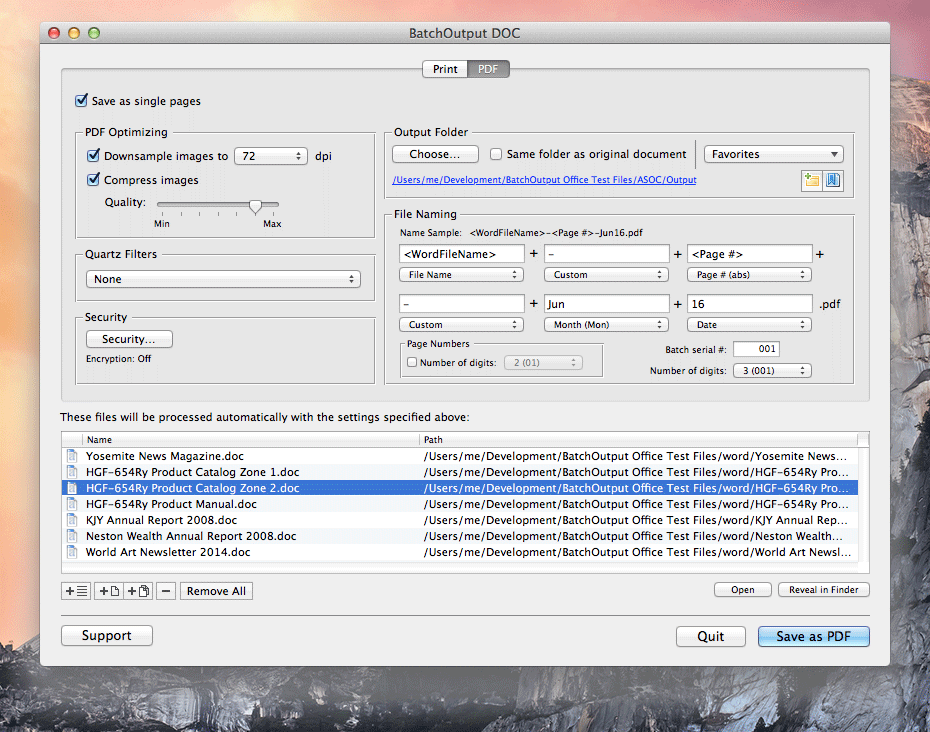
Zevrix Solutions announces that BatchOutput DOC, its output automation software for Microsoft Word, is now available for direct purchase on MacUpdate as part of its Enhanced Product Pages program. BatchOutput automates printing of multiple documents and allows to carry out professional PDF production directly from Word, simplifying and streamlining the conversion process. Users can batch export, split Word files into single page PDFs, reduce file size, protect PDF with password and more.
Toronto (ON) Canada - Zevrix Solutions is proud to announce that BatchOutput DOC, its output automation solution for Microsoft Word, is now available for direct purchase on MacUpdate full time as part of its Enhanced Product Pages program. The software provides advanced solutions for demanding enterprise and office publishing environments through automation of printing and professional PDF output.
MacUpdate began in 1996 as a forum for Mac enthusiasts to discuss and track Mac software updates and releases. Now, over a million users discover, discuss, try and purchase over 40,000 apps from over 6,000 developers. The new Enhanced Product Pages Program creates an easy way for MacUpdate members to purchase the software in just one click directly from its existing MacUpdate listing.
With BatchOutput DOC, users only need to select the files they wish to output and set up processing options - and the software will do the rest automatically. For example, BatchOutput can be left to output hundreds of Word files overnight, and the completed job can be picked up next morning.
In addition to batch printing, BatchOutput DOC allows to carry out professional PDF production directly from Word, bringing advanced PDF creation options right to the user's fingertips:
* Print and export multiple Word documents to PDF
* Split Word files into single page PDFs
* Variable output file names
* Reduce PDF file size and optimize documents for web, print and mobile devices
* Encrypt and password-protect PDF documents
* Change PDF color tone, brightness and other qualities
Pricing and Availability:
BatchOutput DOC can be purchased by MacUpdate members form its listing on MacUpdate. Trial version is also available for download. BatchOutput DOC requires Mac OS X 10.5-10.11 and Microsoft Office 2008, 2011 or 2016.
Zevrix Solutions: http://zevrix.com
BatchOutput DOC: http://www.macupdate.com/app/mac/25783/batchoutput-doc
Download BatchOutput DOC: http://zevrix.com/BatchOutputOffice.dmg
Screenshot: http://zevrix.com/screenshots/bo-office/bod2-pdf.png
Located in Toronto, Canada, Zevrix Solutions provides automation and productivity solutions for Adobe Creative Cloud and Creative Suite software, PDF workflows, graphic file diagnostics and Microsoft Office output on Mac OS. Zevrix is dedicated to help professionals increase their profits through automating everyday tasks, producing error-free documents, saving disk space and cutting production costs. For more information, visit their website. Copyright (C) 2016 Zevrix Solutions. All Rights Reserved. Other trademarks and registered trademarks may be the property of their respective owners.
*******
Link To Article: http://prmac.com/release-id-78472.htm
*******
---------------------------------------------------------------------------------
Note that you can alter delivered distributions at any time.
Login to your account on prMac to alter your channel selection, or to opt-out at any time.
BatchOutput for Microsoft Word Is Now Available for Sale on MacUpdate - Published on 01/25/16
Zevrix Solutions announces that BatchOutput DOC, its output automation software for Microsoft Word, is now available for direct purchase on MacUpdate as part of its Enhanced Product Pages program. BatchOutput automates printing of multiple documents and allows to carry out professional PDF production directly from Word, simplifying and streamlining the conversion process. Users can batch export, split Word files into single page PDFs, reduce file size, protect PDF with password and more.
Toronto (ON) Canada - Zevrix Solutions is proud to announce that BatchOutput DOC, its output automation solution for Microsoft Word, is now available for direct purchase on MacUpdate full time as part of its Enhanced Product Pages program. The software provides advanced solutions for demanding enterprise and office publishing environments through automation of printing and professional PDF output.
MacUpdate began in 1996 as a forum for Mac enthusiasts to discuss and track Mac software updates and releases. Now, over a million users discover, discuss, try and purchase over 40,000 apps from over 6,000 developers. The new Enhanced Product Pages Program creates an easy way for MacUpdate members to purchase the software in just one click directly from its existing MacUpdate listing.
With BatchOutput DOC, users only need to select the files they wish to output and set up processing options - and the software will do the rest automatically. For example, BatchOutput can be left to output hundreds of Word files overnight, and the completed job can be picked up next morning.
In addition to batch printing, BatchOutput DOC allows to carry out professional PDF production directly from Word, bringing advanced PDF creation options right to the user's fingertips:
* Print and export multiple Word documents to PDF
* Split Word files into single page PDFs
* Variable output file names
* Reduce PDF file size and optimize documents for web, print and mobile devices
* Encrypt and password-protect PDF documents
* Change PDF color tone, brightness and other qualities
Pricing and Availability:
BatchOutput DOC can be purchased by MacUpdate members form its listing on MacUpdate. Trial version is also available for download. BatchOutput DOC requires Mac OS X 10.5-10.11 and Microsoft Office 2008, 2011 or 2016.
Zevrix Solutions: http://zevrix.com
BatchOutput DOC: http://www.macupdate.com/app/mac/25783/batchoutput-doc
Download BatchOutput DOC: http://zevrix.com/BatchOutputOffice.dmg
Screenshot: http://zevrix.com/screenshots/bo-office/bod2-pdf.png
Located in Toronto, Canada, Zevrix Solutions provides automation and productivity solutions for Adobe Creative Cloud and Creative Suite software, PDF workflows, graphic file diagnostics and Microsoft Office output on Mac OS. Zevrix is dedicated to help professionals increase their profits through automating everyday tasks, producing error-free documents, saving disk space and cutting production costs. For more information, visit their website. Copyright (C) 2016 Zevrix Solutions. All Rights Reserved. Other trademarks and registered trademarks may be the property of their respective owners.
*******
Link To Article: http://prmac.com/release-id-78472.htm
*******
---------------------------------------------------------------------------------
Note that you can alter delivered distributions at any time.
Login to your account on prMac to alter your channel selection, or to opt-out at any time.
Wado Releases Rotary Card - A Memory Card Game for iOS and Android
A new article has been published at prMac.
Wado Releases Rotary Card - A Memory Card Game for iOS and Android - Published on 01/25/16
Japan-based developer, Wado announces the release of Rotary Card 1.0, their new memory card game with high-speed rotation for iOS and Android devices. Players need to find all the matching pairs of cards, however, the cards all rotate at high speed, making it more of a challenge. Over time, the rotation will continue to speed up, and the score points for a correct answer is continually decreasing. Players can only depend on their memory and speed!
Tokyo, Japan - Japan-based developer, Wado is proud to announce the release of Rotary Card 1.0, their memory card game with high-speed rotation for iOS and Android devices. Players need to find all the matching pairs of cards, which rotate at high speed. Over time, the rotation will continue to speed up, and score point for correct answer will be decreasing. The score point can become a negative amount, so the thrill of the game over draws near.
Players can only depend on their memory and speed! Let's challenge find all the matching pairs of cards, which rotates at high speed! For each over time, the rotation will continue to speed up, and score point for correct answer will be decreasing. The score point amount can becomes negative, so thrill of the game over draws near. Please enjoy this action-style card game.
Feature of interface:
* Quick response.
* Simple operation.
Feature of sound:
* The ON-OFF function of the sound
Languages:
* English
* Japanese
Device Requirements:
* iPhone, iPad, and iPod touch
* Requires iOS 7.0 or later
* 36.7 MB
Pricing and Availability:
Rotary Card 1.0 is free, and is available worldwide through the App Store in the Games category. An Android version is also available through Google Play.
Rotary Card 1.0: http://application.wadous.com/game/26.html
Download from iTunes: https://itunes.apple.com/app/id1070391629
Download from Google Play: https://play.google.com/store/apps/details?id=com.wadous.memory0002
Screenshot: http://a5.mzstatic.com/us/r30/Purple69/v4/40/77/91/40779147-f1c3-079e-80bc-ee45b5b98ef8/screen322x572.jpeg
App Icon: http://a5.mzstatic.com/us/r30/Purple69/v4/d2/34/c5/d234c5f2-045a-b135-00b2-f95b4ba8e4ac/icon175x175.jpeg
Located in Tokyo, Japan, Wado is an Japanese software construction company established in 2007. We are good at mobile-related solution and the customization of the open source. All Material and Software (C) Copyright 2016 Wado. All Rights Reserved. Apple, the Apple logo, iPhone, iPad and iPod are registered trademarks of Apple Inc. in the U.S. and/or other countries.
*******
Link To Article: http://prmac.com/release-id-78471.htm
*******
---------------------------------------------------------------------------------
Note that you can alter delivered distributions at any time.
Login to your account on prMac to alter your channel selection, or to opt-out at any time.
Wado Releases Rotary Card - A Memory Card Game for iOS and Android - Published on 01/25/16
Japan-based developer, Wado announces the release of Rotary Card 1.0, their new memory card game with high-speed rotation for iOS and Android devices. Players need to find all the matching pairs of cards, however, the cards all rotate at high speed, making it more of a challenge. Over time, the rotation will continue to speed up, and the score points for a correct answer is continually decreasing. Players can only depend on their memory and speed!
Tokyo, Japan - Japan-based developer, Wado is proud to announce the release of Rotary Card 1.0, their memory card game with high-speed rotation for iOS and Android devices. Players need to find all the matching pairs of cards, which rotate at high speed. Over time, the rotation will continue to speed up, and score point for correct answer will be decreasing. The score point can become a negative amount, so the thrill of the game over draws near.
Players can only depend on their memory and speed! Let's challenge find all the matching pairs of cards, which rotates at high speed! For each over time, the rotation will continue to speed up, and score point for correct answer will be decreasing. The score point amount can becomes negative, so thrill of the game over draws near. Please enjoy this action-style card game.
Feature of interface:
* Quick response.
* Simple operation.
Feature of sound:
* The ON-OFF function of the sound
Languages:
* English
* Japanese
Device Requirements:
* iPhone, iPad, and iPod touch
* Requires iOS 7.0 or later
* 36.7 MB
Pricing and Availability:
Rotary Card 1.0 is free, and is available worldwide through the App Store in the Games category. An Android version is also available through Google Play.
Rotary Card 1.0: http://application.wadous.com/game/26.html
Download from iTunes: https://itunes.apple.com/app/id1070391629
Download from Google Play: https://play.google.com/store/apps/details?id=com.wadous.memory0002
Screenshot: http://a5.mzstatic.com/us/r30/Purple69/v4/40/77/91/40779147-f1c3-079e-80bc-ee45b5b98ef8/screen322x572.jpeg

App Icon: http://a5.mzstatic.com/us/r30/Purple69/v4/d2/34/c5/d234c5f2-045a-b135-00b2-f95b4ba8e4ac/icon175x175.jpeg

Located in Tokyo, Japan, Wado is an Japanese software construction company established in 2007. We are good at mobile-related solution and the customization of the open source. All Material and Software (C) Copyright 2016 Wado. All Rights Reserved. Apple, the Apple logo, iPhone, iPad and iPod are registered trademarks of Apple Inc. in the U.S. and/or other countries.
*******
Link To Article: http://prmac.com/release-id-78471.htm
*******
---------------------------------------------------------------------------------
Note that you can alter delivered distributions at any time.
Login to your account on prMac to alter your channel selection, or to opt-out at any time.
Desqueeze Offers New Ways to Batch Resize Photos and Videos on iPhone
A new article has been published at prMac.
Desqueeze Offers New Ways to Batch Resize Photos and Videos on iPhone - Published on 01/25/16
Independent developer, Alexey Khutorschikov announces Desqueeze 1.0.3, his new iPhone app that lets amateurs and professionals reformat and resize a batch of photos and videos using presets or custom size up to 8192 px and 4k respectively. Settings includes compression format, size in pixels, orientation detection options, resizing method, photo dpi and video bitrate. All processed photos and videos are automatically saved to app-specific albums and are available for sharing.
Minsk, Belarus - Independent developer, Alexey Khutorschikov is proud to announce the release of Desqueeze 1.0.3, his new iPhone app that lets amateurs and professionals reformat and resize a batch of photos and videos using presets or custom size up to 8192 px and 4k respectively. Desqueeze allows to select and resize photos and videos from any album in the photo library. It provides all settings as optional, and does not require configuration before each processing. Settings includes compression format, size in pixels, orientation detection options, resizing method, photo dpi and video bitrate. All processed photos and videos are automatically saved to app-specific albums and are available for sharing on results screen even after app reloads.
Author and developer, Alex said, "I don't like apps with limited functionality, like square or discrete resizing apps. They solve tasks partially or temporarily and force to spend extra time and money on a new app in any non-standard situation. I wanted to make an app without limitations... and I made it"
Pixel size in Desqueeze app can be set using presets or manual input in the range from 1 x 1 px to 8192 x 8192 px for photos and from 16 x 16 px to 3840 x 2160 px for videos. When auto width or auto height used total size is calculated during processing depending on original size. App uses direct or reverse size for each item based on its shape and orientation detection options. Resizing methods allows to vary result within the same size to better meet customer requirements. For example, Stretch method can resolve anamorphic de-squeeze with any aspect ratio.
Desqueeze features:
* Compress to JPEG, PNG, TIFF image format and MP4, MOV, M4V video format
* Batch resize images up to 8192 x 8192 px and videos up to 3840 x 2160 px
* Detect Landscape, Square, Portrait orientation to resize properly
* Choose Stretch, Ratio Clip or Ratio Fill resizing method
* Autosave to app-specific albums in the photo library
* Share results by Email, Twitter, Facebook, YouTube, Vimeo, etc.
Device Requirements:
* iPhone, iPad, and iPod touch
* Requires iOS 8.0 or later
* 2.0 MB
Pricing and Availability:
Desqueeze 1.0.3 is free, and is available worldwide exclusively through the App Store in the Photo and Video category.
Desqueeze 1.0.3: http://www.desqueeze.com
Download from iTunes: https://itunes.apple.com/app/id1046809993
Youtube Video: https://www.youtube.com/watch?v=m0Byhl7XVlE
Press Kit (ZIP): http://www.desqueeze.com/desqueeze-press-kit.zip
Desqueeze was created in 2015 in Minsk, Belarus by Alexey Khutorschikov, Lead iOS/Web developer, who last few years specialises on photo editing solutions for iPhone/iPad/iPod, such as Crop-Size app. The basic idea was to create simple app, that can greatly facilitate life of owners of anamorphic optics. This idea has grown up and has become complete flexible solution. It is great for both amateurs and professionals, who needs fast and simple way to change size of photos and videos using iPhone/iPod. All Material and Software (C) Copyright 2016 Alexey Khutorschikov. All Rights Reserved. Apple, the Apple logo, iPhone, iPad and iPod are registered trademarks of Apple Inc. in the U.S. and/or other countries.
*******
Link To Article: http://prmac.com/release-id-78470.htm
*******
---------------------------------------------------------------------------------
Note that you can alter delivered distributions at any time.
Login to your account on prMac to alter your channel selection, or to opt-out at any time.
Desqueeze Offers New Ways to Batch Resize Photos and Videos on iPhone - Published on 01/25/16
Independent developer, Alexey Khutorschikov announces Desqueeze 1.0.3, his new iPhone app that lets amateurs and professionals reformat and resize a batch of photos and videos using presets or custom size up to 8192 px and 4k respectively. Settings includes compression format, size in pixels, orientation detection options, resizing method, photo dpi and video bitrate. All processed photos and videos are automatically saved to app-specific albums and are available for sharing.
Minsk, Belarus - Independent developer, Alexey Khutorschikov is proud to announce the release of Desqueeze 1.0.3, his new iPhone app that lets amateurs and professionals reformat and resize a batch of photos and videos using presets or custom size up to 8192 px and 4k respectively. Desqueeze allows to select and resize photos and videos from any album in the photo library. It provides all settings as optional, and does not require configuration before each processing. Settings includes compression format, size in pixels, orientation detection options, resizing method, photo dpi and video bitrate. All processed photos and videos are automatically saved to app-specific albums and are available for sharing on results screen even after app reloads.
Author and developer, Alex said, "I don't like apps with limited functionality, like square or discrete resizing apps. They solve tasks partially or temporarily and force to spend extra time and money on a new app in any non-standard situation. I wanted to make an app without limitations... and I made it"
Pixel size in Desqueeze app can be set using presets or manual input in the range from 1 x 1 px to 8192 x 8192 px for photos and from 16 x 16 px to 3840 x 2160 px for videos. When auto width or auto height used total size is calculated during processing depending on original size. App uses direct or reverse size for each item based on its shape and orientation detection options. Resizing methods allows to vary result within the same size to better meet customer requirements. For example, Stretch method can resolve anamorphic de-squeeze with any aspect ratio.
Desqueeze features:
* Compress to JPEG, PNG, TIFF image format and MP4, MOV, M4V video format
* Batch resize images up to 8192 x 8192 px and videos up to 3840 x 2160 px
* Detect Landscape, Square, Portrait orientation to resize properly
* Choose Stretch, Ratio Clip or Ratio Fill resizing method
* Autosave to app-specific albums in the photo library
* Share results by Email, Twitter, Facebook, YouTube, Vimeo, etc.
Device Requirements:
* iPhone, iPad, and iPod touch
* Requires iOS 8.0 or later
* 2.0 MB
Pricing and Availability:
Desqueeze 1.0.3 is free, and is available worldwide exclusively through the App Store in the Photo and Video category.
Desqueeze 1.0.3: http://www.desqueeze.com
Download from iTunes: https://itunes.apple.com/app/id1046809993
Youtube Video: https://www.youtube.com/watch?v=m0Byhl7XVlE
Press Kit (ZIP): http://www.desqueeze.com/desqueeze-press-kit.zip
Desqueeze was created in 2015 in Minsk, Belarus by Alexey Khutorschikov, Lead iOS/Web developer, who last few years specialises on photo editing solutions for iPhone/iPad/iPod, such as Crop-Size app. The basic idea was to create simple app, that can greatly facilitate life of owners of anamorphic optics. This idea has grown up and has become complete flexible solution. It is great for both amateurs and professionals, who needs fast and simple way to change size of photos and videos using iPhone/iPod. All Material and Software (C) Copyright 2016 Alexey Khutorschikov. All Rights Reserved. Apple, the Apple logo, iPhone, iPad and iPod are registered trademarks of Apple Inc. in the U.S. and/or other countries.
*******
Link To Article: http://prmac.com/release-id-78470.htm
*******
---------------------------------------------------------------------------------
Note that you can alter delivered distributions at any time.
Login to your account on prMac to alter your channel selection, or to opt-out at any time.
Tiny Agents - A New Exciting Arcade game for iPhone & iPad
A new article has been published at prMac.
Tiny Agents - A New Exciting Arcade game for iPhone & iPad - Published on 01/25/16
Witls Games announces Tiny Agents 1.0.2, their exciting arcade game for iPhone, iPad, Android, and Mac. It is a simple yet unique game where players bounce a white ball along with two small ones, and together they make the journey more exciting. The balls move through obstacles and break everything on their path. Try not to get close to any hurdles and break apart. The longer the player survives the more points they will get. Spend points to get special power ups.
Pensacola, Florida - Witls Games is proud to present Tiny Agents 1.0.2, their exciting arcade game for iPhone, iPad, Android, and Mac. Players need to bounce a white ball in the air by tapping on the screen to dodge various obstacles.
The game derives its uniqueness by featuring two little solid spherical objects, hanging around the white one that get their momentum when you bounce the white ball and circle around it to help players break the obstacles that come along the way and make the journey more exciting.
Game Highlights:
* Crazy game environment with tricky obstacles.
* Catchy sound effects and background score.
* Real life physics based game.
* So many different levels to play.
* Compete with friends using Game Center.
Try not to get close to any hurdles and break apart. The longer you survive the more points you will get. You can spend your points to get special power ups. Join in this exciting journey of Tiny Agents and compete with your friends and family.
Device Requirements:
* iPhone, iPad, and iPod touch
* Requires iOS 6.0 or later
* universal Application
* 12.1 MB
Pricing and Availability:
Tiny Agents 1.0.2 is $0.99 USD (or an equivalent amount in other currencies) and is available worldwide through the App Store in the Games category. There is also an Android version available on Google Play and Mac version available in the Mac App Store.
Witls Games: http://witls.com
Purchase and Download from iTunes: https://itunes.apple.com/app/tiny-agents-double-wammy/id1066240685
YouTube Trailer: https://www.youtube.com/watch?v=-cQIhKJKLOY
Screenshot 1: http://a5.mzstatic.com/us/r30/Purple7/v4/61/93/2b/61932b0d-d4df-0f89-7319-17ed696584d0/screen520x924.jpeg
Screenshot 2: http://a2.mzstatic.com/us/r30/Purple2/v4/7f/e8/93/7fe893cb-dbde-09f0-40f3-4092c53c8eac/screen520x924.jpeg
App icon: http://a1.mzstatic.com/us/r30/Purple49/v4/8c/27/20/8c2720ad-358f-818a-e63b-bf78ce2568e8/icon175x175.jpeg
Witls Games is a Mobile Game development studio that develops games for Android, Mac, iPhone, and iPad. They have published many popular games like Skatomaniac, Rotor and Tiny Agents on various App Stores. All Material and Software (C) Copyright 2016 Witls Games. All Rights Reserved. Apple, the Apple logo, iPhone, iPad and iPod are registered trademarks of Apple Inc. in the U.S. and/or other countries.
*******
Link To Article: http://prmac.com/release-id-78469.htm
*******
---------------------------------------------------------------------------------
Note that you can alter delivered distributions at any time.
Login to your account on prMac to alter your channel selection, or to opt-out at any time.
Tiny Agents - A New Exciting Arcade game for iPhone & iPad - Published on 01/25/16
Witls Games announces Tiny Agents 1.0.2, their exciting arcade game for iPhone, iPad, Android, and Mac. It is a simple yet unique game where players bounce a white ball along with two small ones, and together they make the journey more exciting. The balls move through obstacles and break everything on their path. Try not to get close to any hurdles and break apart. The longer the player survives the more points they will get. Spend points to get special power ups.
Pensacola, Florida - Witls Games is proud to present Tiny Agents 1.0.2, their exciting arcade game for iPhone, iPad, Android, and Mac. Players need to bounce a white ball in the air by tapping on the screen to dodge various obstacles.
The game derives its uniqueness by featuring two little solid spherical objects, hanging around the white one that get their momentum when you bounce the white ball and circle around it to help players break the obstacles that come along the way and make the journey more exciting.
Game Highlights:
* Crazy game environment with tricky obstacles.
* Catchy sound effects and background score.
* Real life physics based game.
* So many different levels to play.
* Compete with friends using Game Center.
Try not to get close to any hurdles and break apart. The longer you survive the more points you will get. You can spend your points to get special power ups. Join in this exciting journey of Tiny Agents and compete with your friends and family.
Device Requirements:
* iPhone, iPad, and iPod touch
* Requires iOS 6.0 or later
* universal Application
* 12.1 MB
Pricing and Availability:
Tiny Agents 1.0.2 is $0.99 USD (or an equivalent amount in other currencies) and is available worldwide through the App Store in the Games category. There is also an Android version available on Google Play and Mac version available in the Mac App Store.
Witls Games: http://witls.com
Purchase and Download from iTunes: https://itunes.apple.com/app/tiny-agents-double-wammy/id1066240685
YouTube Trailer: https://www.youtube.com/watch?v=-cQIhKJKLOY
Screenshot 1: http://a5.mzstatic.com/us/r30/Purple7/v4/61/93/2b/61932b0d-d4df-0f89-7319-17ed696584d0/screen520x924.jpeg

Screenshot 2: http://a2.mzstatic.com/us/r30/Purple2/v4/7f/e8/93/7fe893cb-dbde-09f0-40f3-4092c53c8eac/screen520x924.jpeg

App icon: http://a1.mzstatic.com/us/r30/Purple49/v4/8c/27/20/8c2720ad-358f-818a-e63b-bf78ce2568e8/icon175x175.jpeg

Witls Games is a Mobile Game development studio that develops games for Android, Mac, iPhone, and iPad. They have published many popular games like Skatomaniac, Rotor and Tiny Agents on various App Stores. All Material and Software (C) Copyright 2016 Witls Games. All Rights Reserved. Apple, the Apple logo, iPhone, iPad and iPod are registered trademarks of Apple Inc. in the U.S. and/or other countries.
*******
Link To Article: http://prmac.com/release-id-78469.htm
*******
---------------------------------------------------------------------------------
Note that you can alter delivered distributions at any time.
Login to your account on prMac to alter your channel selection, or to opt-out at any time.
New App Fonteer Finally Brings Font Options to iPhones and iPads
A new article has been published at prMac.
New App Fonteer Finally Brings Font Options to iPhones and iPads - Published on 01/25/16
Design Luscinia announces Fonteer 1.0.1, a revolutionary font installation app for iPhone, iPad, and iPod touch devices. Available for download on any device supporting iOS 8 or higher, Fonteer gives users the option to use any font in PowerPoint, Word, Excel, Pages, Keynote, Numbers and many other apps. Business people on the go can now craft PowerPoint presentations and complete documents without font limitations on their mobile device, previously resulting in awkward font substitutions.
Knegsel, Netherlands - Design Luscinia is proud to announce the release of Fonteer 1.0.1, a revolutionary font installation app for iPhone, iPad, and iPod touch devices. Available for download on any device supporting iOS 8 or higher, Fonteer gives users the option to use any font in PowerPoint, Word, Excel, Pages, Keynote, Numbers and many other apps.
"It was about time font selection be available for the devices we use the most everyday," said Jack Goossen. "Our app allows users to install any OpenType (.otf) or TrueType (.ttf) fonts on their iPhones and iPads. Tied to the Google fonts library, Fonteer is incredibly easy to use and free for up to three installs."
Fonteer is targeted to professionals who do the majority of business on their mobile devices. Business people on the go can now craft PowerPoint presentations and complete documents without font limitations on their mobile device, previously resulting in awkward font substitutions.
"Most people reading right now will be shocked to learn there were still font conversion problems between phones and computers today," said Goossen. "This simple, yet profound app is going to revolutionize business capabilities around the world. Of course, not just limited to professionals, check out Fonteer for more font options in creativity, design, and typography apps as well."
Device Requirements:
* iPhone, iPad, and iPod touch
* Requires iOS 8.0 or later
* Universal Application
* 4.7 MB
Pricing and Availability:
Fonteer 1.0.1 is free, and is available worldwide exclusively through the App Store in the Utilities category. The free version of Fonteer allows up to three installs. For $1.99, users can upgrade to the premium version allowing unlimited installs.
Design Luscinia: http://www.design-luscinia.nl
Fonteer 1.0.1: http://www.design-luscinia.nl/fonteer/
Download from iTunes: https://itunes.apple.com/app/fonteer-install-fonts/id1065830434
Purchase and Download: https://itunes.apple.com/app/fonteer-install-fonts-premium/id1068527475
Screenshot: http://a1.mzstatic.com/us/r30/Purple69/v4/51/e2/3e/51e23e63-b2cf-7aad-8523-115a59ad9c0a/screen322x572.jpeg
App Icon: http://a5.mzstatic.com/us/r30/Purple49/v4/2b/9f/64/2b9f6447-327a-4036-f34e-495d5d5ab9a2/icon175x175.jpeg
Design Luscinia is a Dutch mobile software development company founded in 2012 by Jack Goossen. The company provides quality apps for content creation on iPads and iPhones. Design Luscinia is best known for 'Phoetic - The Amazing Photo Word Cloud Generator'. Copyright (C) 2012-2016 Design Luscinia. All Rights Reserved. Apple, the Apple logo, iPhone, iPad and iPod are registered trademarks of Apple Inc. in the U.S. and/or other countries.
*******
Link To Article: http://prmac.com/release-id-78462.htm
*******
---------------------------------------------------------------------------------
Note that you can alter delivered distributions at any time.
Login to your account on prMac to alter your channel selection, or to opt-out at any time.
New App Fonteer Finally Brings Font Options to iPhones and iPads - Published on 01/25/16
Design Luscinia announces Fonteer 1.0.1, a revolutionary font installation app for iPhone, iPad, and iPod touch devices. Available for download on any device supporting iOS 8 or higher, Fonteer gives users the option to use any font in PowerPoint, Word, Excel, Pages, Keynote, Numbers and many other apps. Business people on the go can now craft PowerPoint presentations and complete documents without font limitations on their mobile device, previously resulting in awkward font substitutions.
Knegsel, Netherlands - Design Luscinia is proud to announce the release of Fonteer 1.0.1, a revolutionary font installation app for iPhone, iPad, and iPod touch devices. Available for download on any device supporting iOS 8 or higher, Fonteer gives users the option to use any font in PowerPoint, Word, Excel, Pages, Keynote, Numbers and many other apps.
"It was about time font selection be available for the devices we use the most everyday," said Jack Goossen. "Our app allows users to install any OpenType (.otf) or TrueType (.ttf) fonts on their iPhones and iPads. Tied to the Google fonts library, Fonteer is incredibly easy to use and free for up to three installs."
Fonteer is targeted to professionals who do the majority of business on their mobile devices. Business people on the go can now craft PowerPoint presentations and complete documents without font limitations on their mobile device, previously resulting in awkward font substitutions.
"Most people reading right now will be shocked to learn there were still font conversion problems between phones and computers today," said Goossen. "This simple, yet profound app is going to revolutionize business capabilities around the world. Of course, not just limited to professionals, check out Fonteer for more font options in creativity, design, and typography apps as well."
Device Requirements:
* iPhone, iPad, and iPod touch
* Requires iOS 8.0 or later
* Universal Application
* 4.7 MB
Pricing and Availability:
Fonteer 1.0.1 is free, and is available worldwide exclusively through the App Store in the Utilities category. The free version of Fonteer allows up to three installs. For $1.99, users can upgrade to the premium version allowing unlimited installs.
Design Luscinia: http://www.design-luscinia.nl
Fonteer 1.0.1: http://www.design-luscinia.nl/fonteer/
Download from iTunes: https://itunes.apple.com/app/fonteer-install-fonts/id1065830434
Purchase and Download: https://itunes.apple.com/app/fonteer-install-fonts-premium/id1068527475
Screenshot: http://a1.mzstatic.com/us/r30/Purple69/v4/51/e2/3e/51e23e63-b2cf-7aad-8523-115a59ad9c0a/screen322x572.jpeg

App Icon: http://a5.mzstatic.com/us/r30/Purple49/v4/2b/9f/64/2b9f6447-327a-4036-f34e-495d5d5ab9a2/icon175x175.jpeg

Design Luscinia is a Dutch mobile software development company founded in 2012 by Jack Goossen. The company provides quality apps for content creation on iPads and iPhones. Design Luscinia is best known for 'Phoetic - The Amazing Photo Word Cloud Generator'. Copyright (C) 2012-2016 Design Luscinia. All Rights Reserved. Apple, the Apple logo, iPhone, iPad and iPod are registered trademarks of Apple Inc. in the U.S. and/or other countries.
*******
Link To Article: http://prmac.com/release-id-78462.htm
*******
---------------------------------------------------------------------------------
Note that you can alter delivered distributions at any time.
Login to your account on prMac to alter your channel selection, or to opt-out at any time.
OfficeProtect 3.0 Secures an Excel Spreadsheet with Activation
A new article has been published at prMac.
OfficeProtect 3.0 Secures an Excel Spreadsheet with Activation - Published on 01/24/16
Excel Software has announced OfficeProtect 3.0, an important update to their application used to protect and license Microsoft Excel documents. Generate a Mac or Windows application from an Excel workbook that activates on a specific computer and works with 32 or 64-Bit Excel 2007 or later on Windows or Mac Office 2011 or 2016. The new release supports Mac Office 2011 or 2016 and adds an additional layer of protection.
Henderson, Nevada - Excel Software announced OfficeProtect 3.0 to protect and license Microsoft Excel documents. Using OfficeProtect with either QuickLicense or AppProtect, a user-editable Excel spreadsheet is converted into a protected application (EXE on Windows or APP on Mac). The new release supports Mac Office 2011 or 2016 and adds an additional layer of protection.
OfficeProtect supports 32 or 64-Bit Microsoft Excel 2007 or later on Windows and both Office 2011 and 2016 on Mac OS X computers. For additional protection, the Microsoft Encryption password can be applied transparently by the protected application during the launch process. OfficeProtect includes step-by-step tutorials and a Troubleshooting Guide to support developers that distribute and sell their workbooks. Protected workbooks support offline activation, online activation, a floating license server and USB dongle based activation using the MakeDongle product.
OfficeProtect supports two protection models, the VBA Bound License and Encrypted XLSM. A VBA Bound License uses password protected VBA code to bind an Office document to the QuickLicense runtime file. The Encrypted XLSM approach allows an Excel spreadsheet to be distributed as an application that is activated for a specific computer, but allows editing changes to be saved as encrypted documents.
The VBA Bound License supports Excel spreadsheets, Macros or Add-Ins for Excel, Word or PowerPoint. OfficeProtect includes ready-to-paste Visual Basic code and step-by-step instructions to bind a document to a license configured with QuickLicense.
Password removal tools used to pirate Excel spreadsheets are disabled when distributing a workbook as an application file. Most features of the Excel program are unaffected except for the ability to Save or Email an unprotected spreadsheet. Encrypted spreadsheets are openned by launching the application and saved when quitting.
Protected documents can be saved, duplicated and renamed. They can be shared and used on other computers with a valid license. The spreadsheet author can determine how many computers a document or family of documents can be used on. QuickLicense supports computer specific product activation, time or execution limited Trial licenses, software subscriptions, floating licenses, secure license portability and human language or brand customization.
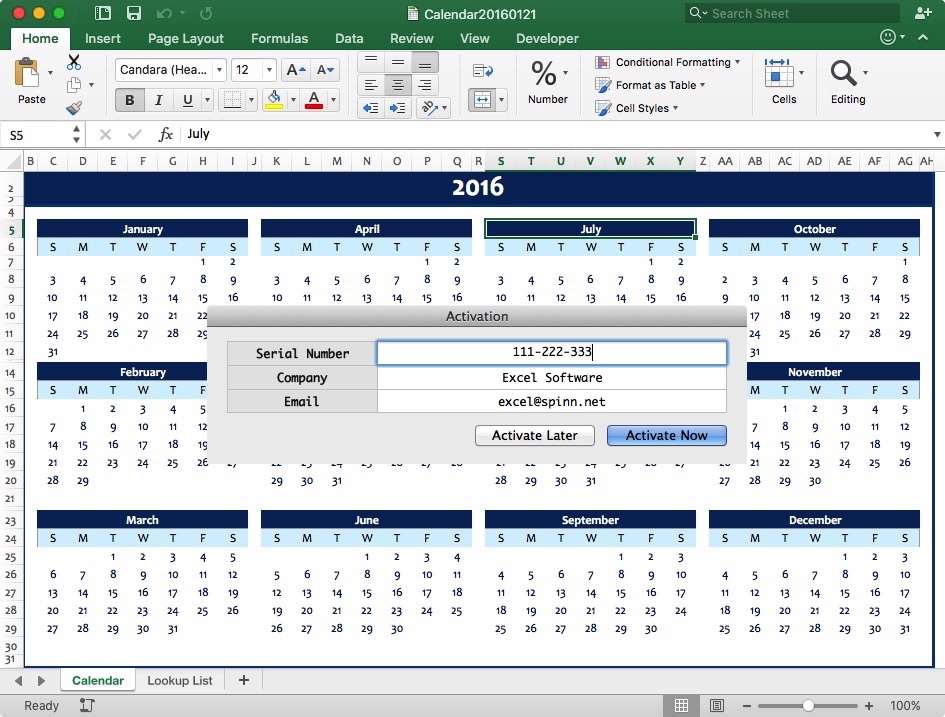
Protected workbooks can be activated with a Serial Number using an online activation server. The Safe Activation service supports activation of Internet connected or unconnected computers, online order processing and automates license management features to allow license release, restore, suspend and subscription management. Protected workbooks can also be activated with the self-hosted WebActivation or Desktop License Server products.
Pricing and Availability:
OfficeProtect is $395 for a Single User License that supports Microsoft Office on both Mac and Windows. It must be used with either AppProtect or QuickLicense. The product includes PDF User Guides, VBA interface code and royalty-free distribution rights for any number of protected documents or distributed licenses. Visit the company web site for demonstration videos and product information.
Excel Software: http://www.excelsoftware.com
OfficeProtect 3.0: http://www.excelsoftware.com/officeprotect
Purchase: http://www.excelsoftware.com/priceandordering
Screenshot: http://www.excelsoftware.com/image/workbook-activation.jpg
Application Icon: http://www.excelsoftware.com/image/officeprotect.gif
Established in 1985, Excel Software provides Windows and Mac OS X software products to thousands of users worldwide. Capabilities include system modeling & simulation, requirements management, software design, code generation, reengineering, bug tracking, help authoring, software license management, document protection and internet marketing automation. All Material and Software (C) Copyright 2016 Excel Software. All Rights Reserved. Apple, the Apple logo, Macintosh and Mac OS X are registered trademarks of Apple Inc. in the U.S. and/or other countries. Other trademarks and registered trademarks may be the property of their respective owners.
*******
Link To Article: http://prmac.com/release-id-78461.htm
*******
---------------------------------------------------------------------------------
Note that you can alter delivered distributions at any time.
Login to your account on prMac to alter your channel selection, or to opt-out at any time.
OfficeProtect 3.0 Secures an Excel Spreadsheet with Activation - Published on 01/24/16
Excel Software has announced OfficeProtect 3.0, an important update to their application used to protect and license Microsoft Excel documents. Generate a Mac or Windows application from an Excel workbook that activates on a specific computer and works with 32 or 64-Bit Excel 2007 or later on Windows or Mac Office 2011 or 2016. The new release supports Mac Office 2011 or 2016 and adds an additional layer of protection.
Henderson, Nevada - Excel Software announced OfficeProtect 3.0 to protect and license Microsoft Excel documents. Using OfficeProtect with either QuickLicense or AppProtect, a user-editable Excel spreadsheet is converted into a protected application (EXE on Windows or APP on Mac). The new release supports Mac Office 2011 or 2016 and adds an additional layer of protection.
OfficeProtect supports 32 or 64-Bit Microsoft Excel 2007 or later on Windows and both Office 2011 and 2016 on Mac OS X computers. For additional protection, the Microsoft Encryption password can be applied transparently by the protected application during the launch process. OfficeProtect includes step-by-step tutorials and a Troubleshooting Guide to support developers that distribute and sell their workbooks. Protected workbooks support offline activation, online activation, a floating license server and USB dongle based activation using the MakeDongle product.
OfficeProtect supports two protection models, the VBA Bound License and Encrypted XLSM. A VBA Bound License uses password protected VBA code to bind an Office document to the QuickLicense runtime file. The Encrypted XLSM approach allows an Excel spreadsheet to be distributed as an application that is activated for a specific computer, but allows editing changes to be saved as encrypted documents.
The VBA Bound License supports Excel spreadsheets, Macros or Add-Ins for Excel, Word or PowerPoint. OfficeProtect includes ready-to-paste Visual Basic code and step-by-step instructions to bind a document to a license configured with QuickLicense.
Password removal tools used to pirate Excel spreadsheets are disabled when distributing a workbook as an application file. Most features of the Excel program are unaffected except for the ability to Save or Email an unprotected spreadsheet. Encrypted spreadsheets are openned by launching the application and saved when quitting.
Protected documents can be saved, duplicated and renamed. They can be shared and used on other computers with a valid license. The spreadsheet author can determine how many computers a document or family of documents can be used on. QuickLicense supports computer specific product activation, time or execution limited Trial licenses, software subscriptions, floating licenses, secure license portability and human language or brand customization.
Protected workbooks can be activated with a Serial Number using an online activation server. The Safe Activation service supports activation of Internet connected or unconnected computers, online order processing and automates license management features to allow license release, restore, suspend and subscription management. Protected workbooks can also be activated with the self-hosted WebActivation or Desktop License Server products.
Pricing and Availability:
OfficeProtect is $395 for a Single User License that supports Microsoft Office on both Mac and Windows. It must be used with either AppProtect or QuickLicense. The product includes PDF User Guides, VBA interface code and royalty-free distribution rights for any number of protected documents or distributed licenses. Visit the company web site for demonstration videos and product information.
Excel Software: http://www.excelsoftware.com
OfficeProtect 3.0: http://www.excelsoftware.com/officeprotect
Purchase: http://www.excelsoftware.com/priceandordering
Screenshot: http://www.excelsoftware.com/image/workbook-activation.jpg
Application Icon: http://www.excelsoftware.com/image/officeprotect.gif

Established in 1985, Excel Software provides Windows and Mac OS X software products to thousands of users worldwide. Capabilities include system modeling & simulation, requirements management, software design, code generation, reengineering, bug tracking, help authoring, software license management, document protection and internet marketing automation. All Material and Software (C) Copyright 2016 Excel Software. All Rights Reserved. Apple, the Apple logo, Macintosh and Mac OS X are registered trademarks of Apple Inc. in the U.S. and/or other countries. Other trademarks and registered trademarks may be the property of their respective owners.
*******
Link To Article: http://prmac.com/release-id-78461.htm
*******
---------------------------------------------------------------------------------
Note that you can alter delivered distributions at any time.
Login to your account on prMac to alter your channel selection, or to opt-out at any time.
Subscribe to:
Posts (Atom)