A new article has been published at prMac.
Photohance One Tap Enhance The Easiest Photo Editor - released for iOS - Published on 02/03/16
Audience Apps Developers today introduces Photohance 1.0 for iPhone, iPad and iPod touch devices. Featuring a simple and clean interface, Photohance focuses on making the whole process of editing your photos easier. It is the ideal solution for anyone who prefers to enjoy the convenience of having a powerful, fast, and easy-to-use photo editor right on their iPhone or iPad. Anyone can enhance the appearance of any photo with just a single click.
Tamil nadu, India - Audience Apps Developers today is proud to announce the release of Photohance 1.0, the latest addition to a long list of great photo editing apps developed for iPhone, iPad and iPod touch devices. Most of us own smartphones with high end cameras. As a result, we prefer to edit or retouch the photos that we capture by those cameras right on our smartphones.However, to do that and get great results you need to an app that has a great UI so you can edit these photos right from our smartphone without any hassle.
That's where Photohance comes into play. Photohance is the ideal solution for anyone who prefers to enjoy the convenience of having a powerful, fast, and easy-to-use photo editor right on their iPhone or iPad.
Editing photos on a smartphone is second nature to most of us. Whether you're a compulsive Instagram selfie taker or someone one who simply enjoys the convenience of having a photo editor on their phone at all times, there are several apps available for making your photos shine. Photohance is the latest addition to a long list of great photo editing apps, but instead of giving users more customization options, the app focuses on making the whole process of editing your photos easier.
When I say it makes editing photos easy, I mean it makes it really easy. Like ABC 123 easy. There are no fancy tutorials or 3rd party integrations to sync your photos with this app. No, you won't find that here. What you will get, however, is a very barebones version of every photo editing app you've ever used - and that's a good thing. Sometimes you just want to get things done without fussing too much with contrast settings, filters and frames, and this app totally gets that.
Features:
This one app that you will use again and again. It's a lightweight app that lets you edit photos right on your trusty iDevice faster and with less hassle than ever before.
In fact, it will assist you to enhance the appearance of any photo with just a single click. In case if you are not satisfied with the results, you can apply effects as much as you want, until you are 100% happy with the outcome. Photohance comes along with a large number of filters to assist you with filtering images.
You don't need to be a professional photo editor in order to use Photohance and deliver a fabulous outlook to the photos. You don't even need to go through fancy tutorials that will ask you to how to get the best out of available features in Photohance
Layout and Design:
It comes along with a simple and clean interface. Therefore, it can be considered as one of the easiest photo editing applications that you can find in the App Store. The typical iPhone user looks forward to editing their photos without worrying too much about the settings.
We think most users just want a simple "one button" way to get the results they want. They don't want to deal with frames, filters, contrast settings and other advanced features. They just need to enhance the final appearance of the photo and make it a better looking one. Photohance is specifically designed for such people.
After the installation, you simply open the app and add photos directly from your camera roll. In order to do that, you will have to tap on the green colored "open album" button, which is located near the right hand corner of the screen.
Then you can add any desired image you want to edit from the camera roll. Once you have added it, you can tap on the "enhance" option and let Photohance do the magic for you.
In most of the cases, the "enhance" button in Photohance has the ability to make your photo a better looking one. The changes are done automatically and you don't need to worry about anything. The app is intelligent enough to find the perfect contrast and color balance accordingly and apply it in the photo.
And don't worry about making any change that you're not sure of. It has a button to undo all the changes that you make. It will assist you to get back to the original condition of the photo without any hassle.
Device Requirements:
* iPhone, iPad, and iPod touch
* Requires iOS 8.0 or later
* 2.4 MB
Pricing and Availability:
If you're looking for a quick way to enhance your photos, then Photohance is a good choice. The app is available in the app store for $1.99 (USD).
Audience Apps Developers: http://audienceappsdevelopers.com/
Photohance 1.0: https://itunes.apple.com/us/app/photohance/id1071729042
The iPhone App review: http://www.theiphoneappreview.com/2016/02/photohance-iphone-app/
App Dictions Review: http://appdictions.com/photohance-one-tap-enhance-the-easiest-photo-editor/
Screenshot: http://a1.mzstatic.com/us/r30/Purple49/v4/ed/ce/81/edce81ee-3853-4711-c65f-1aba4d4b5832/screen480x480.jpeg
App Icon: http://a3.mzstatic.com/us/r30/Purple49/v4/09/2f/70/092f7044-d114-c9e6-1c3a-e01bc439333d/icon175x175.jpeg
Located in Tamil Nadu, India, Audience Apps Developers is a sole proprietorship whose focus is on apps and games for iOS and Android platforms. All Material and Software (C) Copyright 2016 Audience Apps Developers. All Rights Reserved. Apple, the Apple logo, iPhone, iPod and iPad are registered trademarks of Apple Inc. in the U.S. and/or other countries. Other trademarks and registered trademarks may be the property of their respective owners.
*******
Link To Article: http://prmac.com/release-id-78580.htm
*******
---------------------------------------------------------------------------------
Note that you can alter delivered distributions at any time.
Login to your account on prMac to alter your channel selection, or to opt-out at any time.


GUI Speedometer - The Ultimate Digital Dashboard Display
A new article has been published at prMac.
GUI Speedometer - The Ultimate Digital Dashboard Display - Published on 02/03/16
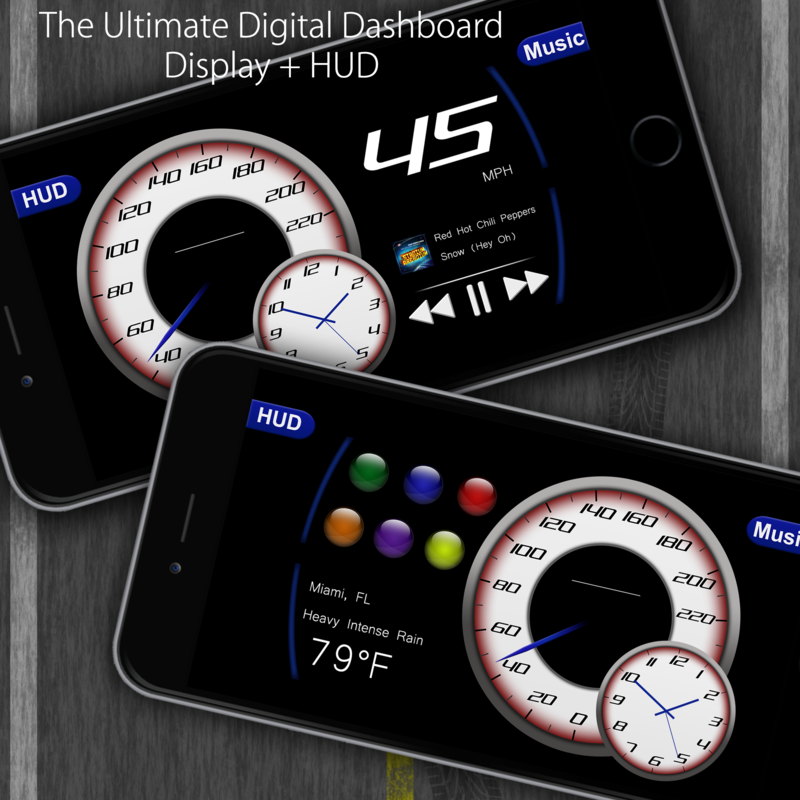
Miami based RMKapps has released GUI Speedometer 1.0, the ultimate digital dashboard display developed for iOS devices. GUI Speedometer is a precision based GPS digital dashboard that includes an analog and digital read out of your current speed in mph or km/h. Swiping right or left on the screen reveals more parameters such as six customizable colors to choose from, current weather updates, or just see whats playing on the built in iPod interface.
Miami, Florida - RMKapps is pleased to announce the official release of GUI Speedometer 1.0, the ultimate digital dashboard display developed for iOS devices. GUI Speedometer allows users to track their precise speed in both analog and digital read outs. It uses your phone's integrated GPS to calculate your speed and works on everything from boats, airplanes, buses, motorcycles, or cars as long as a GPS signal is available. Both mph and km/h formats are supported along with a GPS accuracy indicator to inform users of the GPS strength. Select the HUD (Heads up Display) button and users can safely keep their eyes on the road while their speed is displayed directly on the front windshield for nighttime driving.
This one-of-a-kind dashboard display, with its stunning user interface, will leave users feeling in control of a super car. From its unique slide feature that allows you to swipe right or left on the screen revealing more parameters such as: current weather updates, an integrated iPod interface, customizable color of the 220 mph/km/h speedometer; users will always have the information they need at their fingertips. Always drive safely and follow the rules of the road.
Features:
* Supports mph or km/h
* Accurate real time weather information based on your current location
* 6 Customizable colors
* Displays real current time
* Built-in iPod interface that allows you to select music from your library
* GPS precise current speed
* HUD (Heads Up Display) to safely display accurate speed and temperature directly in front of you
Device Requirements:
* iPhone, iPad, and iPod touch
* Requires iOS 8.3 or later
* 10.6 MB
Pricing and Availability:
GUI Speedometer 1.0 is Free (with in-app purchase to remove ads) and available worldwide exclusively through the App Store in the Navigation category.
GUI Speedometer 1.0: http://www.rmkapps.wix.com/rmkapps
Download from iTunes: https://itunes.apple.com/app/gui-speedometer/id1048832403
YouTube Video (Heads up Display Demo): https://www.youtube.com/watch?v=1RtvG1m7xrY
YouTube Video (App Demo): https://www.youtube.com/watch?v=80AQ-1G8Drg
Screenshot: http://i26.photobucket.com/albums/c143/viperrmk/roadMarketing_zps8gqzhuk4.png
App Icon: http://i26.photobucket.com/albums/c143/viperrmk/icon4round_zpssgtzk8xd.png
RMKapps is owned by Ryan Klimoski, an app developer based out of South Florida. Founded in 2014, RMKapps is committed to making quality apps that are entertaining and effective in daily use. All Material and Software (C) Copyright 2016 RMKapps. All Rights Reserved. Apple, the Apple logo, iPhone, iPod and iPad are registered trademarks of Apple Inc. in the U.S. and/or other countries. Other trademarks and registered trademarks may be the property of their respective owners.
*******
Link To Article: http://prmac.com/release-id-78577.htm
*******
---------------------------------------------------------------------------------
Note that you can alter delivered distributions at any time.
Login to your account on prMac to alter your channel selection, or to opt-out at any time.
GUI Speedometer - The Ultimate Digital Dashboard Display - Published on 02/03/16
Miami based RMKapps has released GUI Speedometer 1.0, the ultimate digital dashboard display developed for iOS devices. GUI Speedometer is a precision based GPS digital dashboard that includes an analog and digital read out of your current speed in mph or km/h. Swiping right or left on the screen reveals more parameters such as six customizable colors to choose from, current weather updates, or just see whats playing on the built in iPod interface.
Miami, Florida - RMKapps is pleased to announce the official release of GUI Speedometer 1.0, the ultimate digital dashboard display developed for iOS devices. GUI Speedometer allows users to track their precise speed in both analog and digital read outs. It uses your phone's integrated GPS to calculate your speed and works on everything from boats, airplanes, buses, motorcycles, or cars as long as a GPS signal is available. Both mph and km/h formats are supported along with a GPS accuracy indicator to inform users of the GPS strength. Select the HUD (Heads up Display) button and users can safely keep their eyes on the road while their speed is displayed directly on the front windshield for nighttime driving.
This one-of-a-kind dashboard display, with its stunning user interface, will leave users feeling in control of a super car. From its unique slide feature that allows you to swipe right or left on the screen revealing more parameters such as: current weather updates, an integrated iPod interface, customizable color of the 220 mph/km/h speedometer; users will always have the information they need at their fingertips. Always drive safely and follow the rules of the road.
Features:
* Supports mph or km/h
* Accurate real time weather information based on your current location
* 6 Customizable colors
* Displays real current time
* Built-in iPod interface that allows you to select music from your library
* GPS precise current speed
* HUD (Heads Up Display) to safely display accurate speed and temperature directly in front of you
Device Requirements:
* iPhone, iPad, and iPod touch
* Requires iOS 8.3 or later
* 10.6 MB
Pricing and Availability:
GUI Speedometer 1.0 is Free (with in-app purchase to remove ads) and available worldwide exclusively through the App Store in the Navigation category.
GUI Speedometer 1.0: http://www.rmkapps.wix.com/rmkapps
Download from iTunes: https://itunes.apple.com/app/gui-speedometer/id1048832403
YouTube Video (Heads up Display Demo): https://www.youtube.com/watch?v=1RtvG1m7xrY
YouTube Video (App Demo): https://www.youtube.com/watch?v=80AQ-1G8Drg
Screenshot: http://i26.photobucket.com/albums/c143/viperrmk/roadMarketing_zps8gqzhuk4.png
App Icon: http://i26.photobucket.com/albums/c143/viperrmk/icon4round_zpssgtzk8xd.png

RMKapps is owned by Ryan Klimoski, an app developer based out of South Florida. Founded in 2014, RMKapps is committed to making quality apps that are entertaining and effective in daily use. All Material and Software (C) Copyright 2016 RMKapps. All Rights Reserved. Apple, the Apple logo, iPhone, iPod and iPad are registered trademarks of Apple Inc. in the U.S. and/or other countries. Other trademarks and registered trademarks may be the property of their respective owners.
*******
Link To Article: http://prmac.com/release-id-78577.htm
*******
---------------------------------------------------------------------------------
Note that you can alter delivered distributions at any time.
Login to your account on prMac to alter your channel selection, or to opt-out at any time.
Offline Romanian to English Language Dictionary Translator 3.0 for iOS
A new article has been published at prMac.
Offline Romanian to English Language Dictionary Translator 3.0 for iOS - Published on 02/03/16
LastThink announces the release of Offline Romanian to English Language Dictionary Translator & Wordbook 3.0, the important update to their highly customizable dictionary application for iOS devices. Users can seek and find any word's translation and synonyms anytime and anywhere from their devices. The dictionary offers users a huge collection of words with their translations as well as definitions and synonyms. Version 3.0 offers improved search capability.
Yerevan, Armenia - LastThink is proud to announce the release of Offline Romanian to English Language Dictionary Translator & Wordbook 3.0, the important update to their highly customizable dictionary application developed for iPhone, iPad, and iPod touch devices. Users can seek and find any word's translation and synonyms anytime and anywhere from their Apple devices.
Features:
* Tremendous range of synonyms and antonyms with well over five hundred thousand synonym variants
* Information about the discipline of structural linguistics by suggesting vital enough sentences
* Appropriate translations of colloquial and formal words as well as conjugation of verbs and declension of nouns
* Availability of various word definitions which will exactly influence on your understanding of a Foreign Language in a detailed way
* A distinction of a section named "Favorites" with the possibility of saving as many unknown words as you wish
* Thorough analysis of parts of speech (noun, verb, adjective, adverb) and their grammatical functions (subject, object, etc.)
* A possibility of the following application usage without an internet demand
* Existence of contemporary words such as "Woot", "OMG", "Crunk" and many others
In our new updated version we grant users a chance of typing the unknown word either in capitals or in small letters and the app will bring all the possible variants and definitions of the dictionary entries saved both in capital and small letters.
If you however experience any issues, please do not hesitate to contact us if you'd like to share your experience with Offline Dictionaries, or provide suggestions on how we could improve the product further. We will be more than happy to get in touch.
NOTE: We have selected data from the internet and if any assembly or constitution doesn't want us to show the content of the unit, please recommend us to remove it.
Device Requirements:
* iPhone, iPad, and iPod touch
* Optimized for iPhone 5, iPhone 6, and iPhone 6 Plus
* Requires iOS 6.0 or later
* Universal Application
* 345 MB
Pricing and Availability:
Offline Romanian to English Language Dictionary Translator & Wordbook 3.0 is free and available worldwide exclusively through the App Store in the Education category.
LastThink: http://lastthink.com/
Offline Romanian to English Language Dictionary translator & wordbook 3.0: https://www.facebook.com/pages/Offline-Dictionary/882897578447079
Download from iTunes: https://itunes.apple.com/app/offline-romanian-to-english/id1048125769
Screenshot: http://a3.mzstatic.com/us/r30/Purple69/v4/06/26/76/06267690-3dce-3c2a-edc4-25985c66782c/screen322x572.jpeg
App Icon: http://a5.mzstatic.com/us/r30/Purple6/v4/e1/ad/84/e1ad8466-dedc-6717-d820-6005238a1166/icon175x175.png
LastThink is an IT company with a focus on mobile development. It has extended its list of services since 2012 to offer high-end business process management, system integration, as well as up-to-date communication solutions. LastThink's mission is to deliver maximum business value to its customers by designing, developing, implementing and maintaining efficient and high quality software solutions aligned with their most essential business needs. Their team will always do its best to meet client expectations. All Material and Software (C) Copyright 2016 LastThink LLC. All Rights Reserved. Apple, the Apple logo, iPhone, iPod and iPad are registered trademarks of Apple Inc. in the U.S. and/or other countries. Other trademarks and registered trademarks may be the property of their respective owners.
*******
Link To Article: http://prmac.com/release-id-78578.htm
*******
---------------------------------------------------------------------------------
Note that you can alter delivered distributions at any time.
Login to your account on prMac to alter your channel selection, or to opt-out at any time.
Offline Romanian to English Language Dictionary Translator 3.0 for iOS - Published on 02/03/16
LastThink announces the release of Offline Romanian to English Language Dictionary Translator & Wordbook 3.0, the important update to their highly customizable dictionary application for iOS devices. Users can seek and find any word's translation and synonyms anytime and anywhere from their devices. The dictionary offers users a huge collection of words with their translations as well as definitions and synonyms. Version 3.0 offers improved search capability.
Yerevan, Armenia - LastThink is proud to announce the release of Offline Romanian to English Language Dictionary Translator & Wordbook 3.0, the important update to their highly customizable dictionary application developed for iPhone, iPad, and iPod touch devices. Users can seek and find any word's translation and synonyms anytime and anywhere from their Apple devices.
Features:
* Tremendous range of synonyms and antonyms with well over five hundred thousand synonym variants
* Information about the discipline of structural linguistics by suggesting vital enough sentences
* Appropriate translations of colloquial and formal words as well as conjugation of verbs and declension of nouns
* Availability of various word definitions which will exactly influence on your understanding of a Foreign Language in a detailed way
* A distinction of a section named "Favorites" with the possibility of saving as many unknown words as you wish
* Thorough analysis of parts of speech (noun, verb, adjective, adverb) and their grammatical functions (subject, object, etc.)
* A possibility of the following application usage without an internet demand
* Existence of contemporary words such as "Woot", "OMG", "Crunk" and many others
In our new updated version we grant users a chance of typing the unknown word either in capitals or in small letters and the app will bring all the possible variants and definitions of the dictionary entries saved both in capital and small letters.
If you however experience any issues, please do not hesitate to contact us if you'd like to share your experience with Offline Dictionaries, or provide suggestions on how we could improve the product further. We will be more than happy to get in touch.
NOTE: We have selected data from the internet and if any assembly or constitution doesn't want us to show the content of the unit, please recommend us to remove it.
Device Requirements:
* iPhone, iPad, and iPod touch
* Optimized for iPhone 5, iPhone 6, and iPhone 6 Plus
* Requires iOS 6.0 or later
* Universal Application
* 345 MB
Pricing and Availability:
Offline Romanian to English Language Dictionary Translator & Wordbook 3.0 is free and available worldwide exclusively through the App Store in the Education category.
LastThink: http://lastthink.com/
Offline Romanian to English Language Dictionary translator & wordbook 3.0: https://www.facebook.com/pages/Offline-Dictionary/882897578447079
Download from iTunes: https://itunes.apple.com/app/offline-romanian-to-english/id1048125769
Screenshot: http://a3.mzstatic.com/us/r30/Purple69/v4/06/26/76/06267690-3dce-3c2a-edc4-25985c66782c/screen322x572.jpeg

App Icon: http://a5.mzstatic.com/us/r30/Purple6/v4/e1/ad/84/e1ad8466-dedc-6717-d820-6005238a1166/icon175x175.png

LastThink is an IT company with a focus on mobile development. It has extended its list of services since 2012 to offer high-end business process management, system integration, as well as up-to-date communication solutions. LastThink's mission is to deliver maximum business value to its customers by designing, developing, implementing and maintaining efficient and high quality software solutions aligned with their most essential business needs. Their team will always do its best to meet client expectations. All Material and Software (C) Copyright 2016 LastThink LLC. All Rights Reserved. Apple, the Apple logo, iPhone, iPod and iPad are registered trademarks of Apple Inc. in the U.S. and/or other countries. Other trademarks and registered trademarks may be the property of their respective owners.
*******
Link To Article: http://prmac.com/release-id-78578.htm
*******
---------------------------------------------------------------------------------
Note that you can alter delivered distributions at any time.
Login to your account on prMac to alter your channel selection, or to opt-out at any time.
CoverMe Private Cloud Storage Keeps Your Personal Data From Prying Eyes
A new article has been published at prMac.
CoverMe Private Cloud Storage Keeps Your Personal Data From Prying Eyes - Published on 02/03/16
San Jose based CoverMe, Inc. today announces their new CoverMe Private Cloud Storage service, which works together with their CoverMe App iOS 2.5 to provide high-security backup of your private, personal data. Many people think that CoverMe only protects their phone calls and messages. However, CoverMe is capable of much more than that. CoverMe is the world's most secure and private communications App, creating a safe place for whatever you need to keep from prying eyes.
San Jose, California - CoverMe, Inc. today is pleased to announce their new CoverMe Private Cloud Storage service, which works together with their CoverMe App iOS 2.5 to provide high-security backup of your private, confidential data.
What is CoverMe Private Cloud Storage?
People have often asked if they lose their phone can they recover their photos? If they change their mobile phone, can the contacts list and data be transferred to their new phone? The new CoverMe Private Cloud Storage provides the solution to these questions, creating a safe and impenetrable place to store your personal data.
CoverMe Private Cloud Storage takes care of all your privacy needs:
With CoverMe cloud storage, you can save all your confidential information in a special cloud space allocated just for you, accessible whenever you need: From message logs to password management, from private photos to top-secret documents.
Multiple levels of security:
Can CoverMe Private Cloud storage really protect your privacy? Can it be cracked by hackers resulting in huge information leaks? No need to worry. The biggest difference between CoverMe Private Cloud Storage and other ordinary cloud storage is that CoverMe has multiple independent password protections and the integrated use of a variety of the most advanced encryption algorithms.
All data stored on CoverMe Private Cloud Storage undergoes heavy encryption before being stored in a separate space for each user and can only be accessed by the user's unique key. Each key is generated randomly using various information from the user, and each user key is different. Even CoverMe's programmers who have written the code are not able to crack the user key.
CoverMe Private Cloud Storage is the ideal place to store data outside your phone. You can rest assured that your data will be protected and accessible only to you, whenever and wherever you need it.
Device Requirements:
* iPhone, iPad, and iPod touch
* Requires iOS 6.0 or later
* 76.9 MB
Pricing and Availability:
CoverMe 2.5 is Free (with in-app purchases) and available worldwide through the App Store in the Social Networking category. There is also an Android version available on Google Play.
CoverMe 2.5: http://www.coverme.ws/cn/index.html?s=pr
Download from iTunes: https://itunes.apple.com/app/coverme-private-texting-anonymous/id593652484
Promotional Banner: https://pbs.twimg.com/media/CaMKaC5UUAETOR7.png:large
Screenshot (Secure Phone Calls): http://a1.mzstatic.com/us/r30/Purple69/v4/40/b5/80/40b58024-0485-ddf2-3abf-a60598285049/screen322x572.jpeg
Screenshot (Private Messaging): http://a1.mzstatic.com/us/r30/Purple7/v4/24/1e/8d/241e8d25-89c9-5aa4-5b9f-71dc6dd2f247/screen322x572.jpeg
App Icon: http://a4.mzstatic.com/us/r30/Purple5/v4/ec/3d/8f/ec3d8fe0-c492-c289-eb01-ceb74ca367f0/icon175x175.jpeg
CoverMe was founded in 2012 in San Jose, California. CoverMe is dedicated to offering mobile security for all smartphone users. CoverMe developes mobile App along with the private cloud services to enhance security to phone calls and messaging placed by the smartphone user and to protect personal information. All Material and Software (C) Copyright 2016 CoverMe, Inc. All Rights Reserved. Apple, the Apple logo, iPhone, iPod and iPad are registered trademarks of Apple Inc. in the U.S. and/or other countries. Other trademarks and registered trademarks may be the property of their respective owners.
*******
Link To Article: http://prmac.com/release-id-78576.htm
*******
---------------------------------------------------------------------------------
Note that you can alter delivered distributions at any time.
Login to your account on prMac to alter your channel selection, or to opt-out at any time.
CoverMe Private Cloud Storage Keeps Your Personal Data From Prying Eyes - Published on 02/03/16
San Jose based CoverMe, Inc. today announces their new CoverMe Private Cloud Storage service, which works together with their CoverMe App iOS 2.5 to provide high-security backup of your private, personal data. Many people think that CoverMe only protects their phone calls and messages. However, CoverMe is capable of much more than that. CoverMe is the world's most secure and private communications App, creating a safe place for whatever you need to keep from prying eyes.
San Jose, California - CoverMe, Inc. today is pleased to announce their new CoverMe Private Cloud Storage service, which works together with their CoverMe App iOS 2.5 to provide high-security backup of your private, confidential data.
What is CoverMe Private Cloud Storage?
People have often asked if they lose their phone can they recover their photos? If they change their mobile phone, can the contacts list and data be transferred to their new phone? The new CoverMe Private Cloud Storage provides the solution to these questions, creating a safe and impenetrable place to store your personal data.
CoverMe Private Cloud Storage takes care of all your privacy needs:
With CoverMe cloud storage, you can save all your confidential information in a special cloud space allocated just for you, accessible whenever you need: From message logs to password management, from private photos to top-secret documents.
Multiple levels of security:
Can CoverMe Private Cloud storage really protect your privacy? Can it be cracked by hackers resulting in huge information leaks? No need to worry. The biggest difference between CoverMe Private Cloud Storage and other ordinary cloud storage is that CoverMe has multiple independent password protections and the integrated use of a variety of the most advanced encryption algorithms.
All data stored on CoverMe Private Cloud Storage undergoes heavy encryption before being stored in a separate space for each user and can only be accessed by the user's unique key. Each key is generated randomly using various information from the user, and each user key is different. Even CoverMe's programmers who have written the code are not able to crack the user key.
CoverMe Private Cloud Storage is the ideal place to store data outside your phone. You can rest assured that your data will be protected and accessible only to you, whenever and wherever you need it.
Device Requirements:
* iPhone, iPad, and iPod touch
* Requires iOS 6.0 or later
* 76.9 MB
Pricing and Availability:
CoverMe 2.5 is Free (with in-app purchases) and available worldwide through the App Store in the Social Networking category. There is also an Android version available on Google Play.
CoverMe 2.5: http://www.coverme.ws/cn/index.html?s=pr
Download from iTunes: https://itunes.apple.com/app/coverme-private-texting-anonymous/id593652484
Promotional Banner: https://pbs.twimg.com/media/CaMKaC5UUAETOR7.png:large

Screenshot (Secure Phone Calls): http://a1.mzstatic.com/us/r30/Purple69/v4/40/b5/80/40b58024-0485-ddf2-3abf-a60598285049/screen322x572.jpeg

Screenshot (Private Messaging): http://a1.mzstatic.com/us/r30/Purple7/v4/24/1e/8d/241e8d25-89c9-5aa4-5b9f-71dc6dd2f247/screen322x572.jpeg

App Icon: http://a4.mzstatic.com/us/r30/Purple5/v4/ec/3d/8f/ec3d8fe0-c492-c289-eb01-ceb74ca367f0/icon175x175.jpeg

CoverMe was founded in 2012 in San Jose, California. CoverMe is dedicated to offering mobile security for all smartphone users. CoverMe developes mobile App along with the private cloud services to enhance security to phone calls and messaging placed by the smartphone user and to protect personal information. All Material and Software (C) Copyright 2016 CoverMe, Inc. All Rights Reserved. Apple, the Apple logo, iPhone, iPod and iPad are registered trademarks of Apple Inc. in the U.S. and/or other countries. Other trademarks and registered trademarks may be the property of their respective owners.
*******
Link To Article: http://prmac.com/release-id-78576.htm
*******
---------------------------------------------------------------------------------
Note that you can alter delivered distributions at any time.
Login to your account on prMac to alter your channel selection, or to opt-out at any time.
LinkOptimizer for Adobe InDesign Is Now Available for Sale on MacUpdate
A new article has been published at prMac.
LinkOptimizer for Adobe InDesign Is Now Available for Sale on MacUpdate - Published on 02/03/16
Zevrix Solutions announces that LinkOptimizer, its workflow automation solution for Adobe InDesign, is now available for direct purchase on MacUpdate under its Enhanced Product Pages program. LinkOptimizer helps users reduce the size of InDesign links by eliminating excess image data, convert image colors, formats and more. As a result users can save gigabytes of disk space, accelerate output, reduce production time and costs, and effortlessly repurpose InDesign jobs for web and mobile devices.
Toronto (ON) Canada - Zevrix Solutions today announces that LinkOptimizer, its workflow automation solution for Adobe InDesign, is now available for direct purchase on MacUpdate full time through its Enhanced Product Pages program. LinkOptimizer automates complex image manipulation tasks helping users reduce the size of InDesign links, save processing time and production costs, and repurpose InDesign documents for web and mobile devices.
"This is the best extension I ever purchased for any design app," says Wayne Guy of Edge Graphics in Van Nuys, California. "It saves hours of time, tediously replacing linked images, resizing, batch processing. Worth every penny... It's a must have tool for a designer who works with image rich inDesign files such as catalogs or magazines."
MacUpdate began in 1996 as a forum for Mac enthusiasts to discuss and track Mac software updates and releases. Now, over a million users discover, discuss, try and purchase over 40,000 apps from over 6,000 developers. The new Enhanced Product Pages Program creates an easy way for MacUpdate members to purchase LinkOptimizer in just one click directly from its existing MacUpdate listing.
LinkOptimizer works automatically with Adobe Photoshop to eliminate the excess image data of InDesign links, perform essential image adjustments and convert image formats. The software offers the following main features:
* Resize links to match their InDesign dimensions at a target resolution
* Reduce link size by eliminating excess image data
* Convert colors and apply ICC profile
* Merge layers and delete hidden ones
* Convert image formats
* Optimize files for web and mobile devices
* Run a Photoshop Action on each image
Pricing and Availability:
LinkOptimizer can be purchased from MacUpdate for $259.95 USD (Light version: $179.95). Trial is also available for download. LinkOptimizer requires Mac OS X 10.6-10.11 and Adobe InDesign and Photoshop CS3-CC 2015.
Zevrix Solutions: http://zevrix.com
LinkOptimizer: http://www.macupdate.com/app/mac/21749/linkoptimizer
Download LinkOptimizer: http://zevrix.com/LinkOptimizer.dmg
Screenshot: http://zevrix.com/screenshots/lo4/res-win-ysmt.gif
Located in Toronto, Canada, Zevrix Solutions provides automation and productivity solutions for Adobe Creative Cloud and Creative Suite software, PDF workflows, graphic file diagnostics and Microsoft Office output on Mac OS. Zevrix is dedicated to help professionals increase their profits through automating everyday tasks, producing error-free documents, saving disk space and cutting production costs. For more information, visit their website. Copyright (C) 2016 Zevrix Solutions. All Rights Reserved. Other trademarks and registered trademarks may be the property of their respective owners.
*******
Link To Article: http://prmac.com/release-id-78575.htm
*******
---------------------------------------------------------------------------------
Note that you can alter delivered distributions at any time.
Login to your account on prMac to alter your channel selection, or to opt-out at any time.
LinkOptimizer for Adobe InDesign Is Now Available for Sale on MacUpdate - Published on 02/03/16
Zevrix Solutions announces that LinkOptimizer, its workflow automation solution for Adobe InDesign, is now available for direct purchase on MacUpdate under its Enhanced Product Pages program. LinkOptimizer helps users reduce the size of InDesign links by eliminating excess image data, convert image colors, formats and more. As a result users can save gigabytes of disk space, accelerate output, reduce production time and costs, and effortlessly repurpose InDesign jobs for web and mobile devices.
Toronto (ON) Canada - Zevrix Solutions today announces that LinkOptimizer, its workflow automation solution for Adobe InDesign, is now available for direct purchase on MacUpdate full time through its Enhanced Product Pages program. LinkOptimizer automates complex image manipulation tasks helping users reduce the size of InDesign links, save processing time and production costs, and repurpose InDesign documents for web and mobile devices.
"This is the best extension I ever purchased for any design app," says Wayne Guy of Edge Graphics in Van Nuys, California. "It saves hours of time, tediously replacing linked images, resizing, batch processing. Worth every penny... It's a must have tool for a designer who works with image rich inDesign files such as catalogs or magazines."
MacUpdate began in 1996 as a forum for Mac enthusiasts to discuss and track Mac software updates and releases. Now, over a million users discover, discuss, try and purchase over 40,000 apps from over 6,000 developers. The new Enhanced Product Pages Program creates an easy way for MacUpdate members to purchase LinkOptimizer in just one click directly from its existing MacUpdate listing.
LinkOptimizer works automatically with Adobe Photoshop to eliminate the excess image data of InDesign links, perform essential image adjustments and convert image formats. The software offers the following main features:
* Resize links to match their InDesign dimensions at a target resolution
* Reduce link size by eliminating excess image data
* Convert colors and apply ICC profile
* Merge layers and delete hidden ones
* Convert image formats
* Optimize files for web and mobile devices
* Run a Photoshop Action on each image
Pricing and Availability:
LinkOptimizer can be purchased from MacUpdate for $259.95 USD (Light version: $179.95). Trial is also available for download. LinkOptimizer requires Mac OS X 10.6-10.11 and Adobe InDesign and Photoshop CS3-CC 2015.
Zevrix Solutions: http://zevrix.com
LinkOptimizer: http://www.macupdate.com/app/mac/21749/linkoptimizer
Download LinkOptimizer: http://zevrix.com/LinkOptimizer.dmg
Screenshot: http://zevrix.com/screenshots/lo4/res-win-ysmt.gif

Located in Toronto, Canada, Zevrix Solutions provides automation and productivity solutions for Adobe Creative Cloud and Creative Suite software, PDF workflows, graphic file diagnostics and Microsoft Office output on Mac OS. Zevrix is dedicated to help professionals increase their profits through automating everyday tasks, producing error-free documents, saving disk space and cutting production costs. For more information, visit their website. Copyright (C) 2016 Zevrix Solutions. All Rights Reserved. Other trademarks and registered trademarks may be the property of their respective owners.
*******
Link To Article: http://prmac.com/release-id-78575.htm
*******
---------------------------------------------------------------------------------
Note that you can alter delivered distributions at any time.
Login to your account on prMac to alter your channel selection, or to opt-out at any time.
IGG Software Unveils New Product Name Banktivity to Replace iBank
A new article has been published at prMac.
IGG Software Unveils New Product Name Banktivity to Replace iBank - Published on 02/03/16
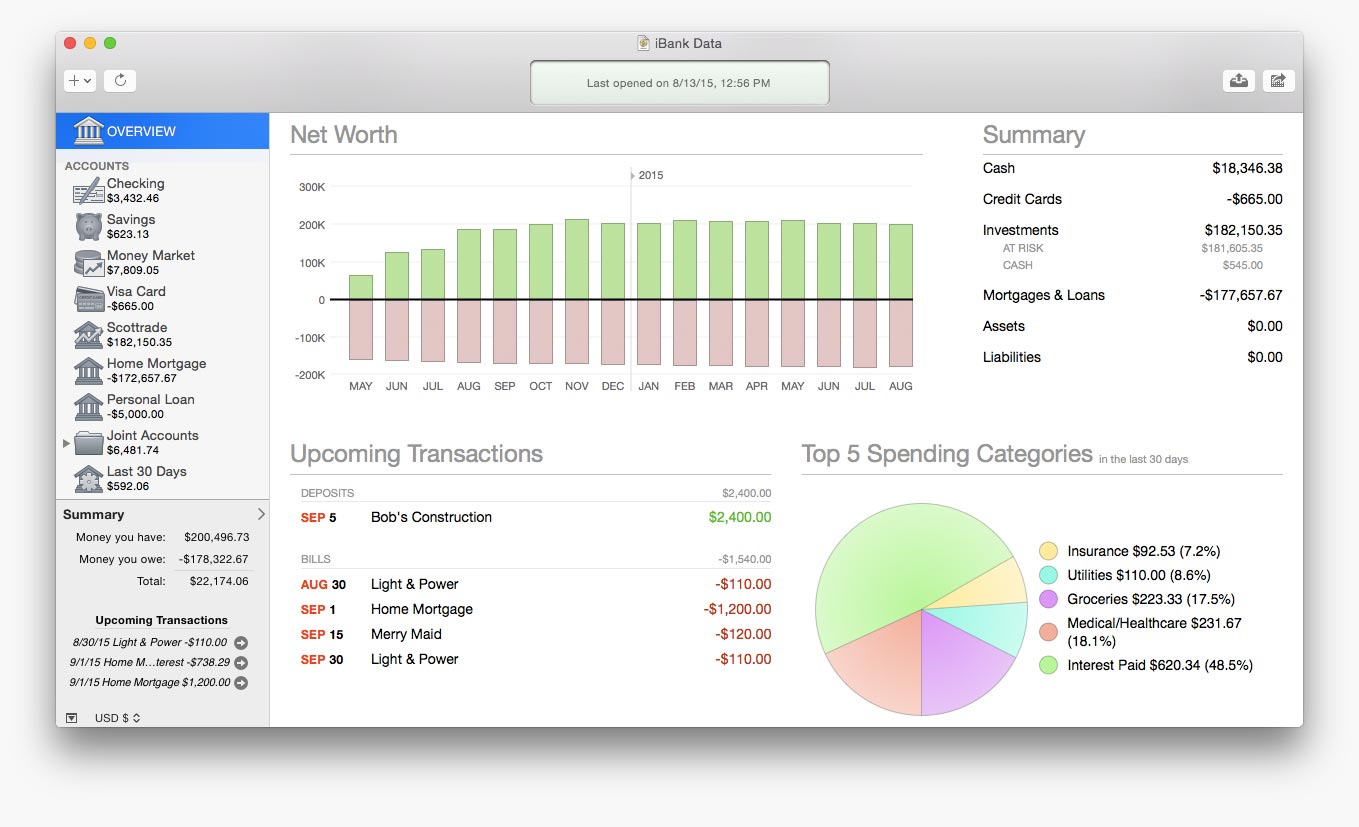
IGG Software today announced that its flagship family of iBank products have a new name, Banktivity. The name Banktivity is a result of combining bank + activity, which more closely aligns with IGG Software's products and goals. Banktivity aims to be the most complete personal finance software available for Mac and iOS devices. With the new name of Banktivity replacing iBank, the products will retain their current version numbers to help keep things simple for current users.
Putney, Vermont - IGG Software today announced that its flagship family of iBank products have a new name, Banktivity. The name Banktivity is a result of combining bank + activity, which more closely aligns with IGG Software's products and goals. "IGG Software's financial apps do more than let you look at your finances, they help you to actively manage your finances," says IGG Software's CEO, Ian Gillespie. The new version of Banktivity is free for all existing iBank 5 customers.
iBank was first released in November 2003, where it quickly became known among Mac users as an exceptional personal financial management app. In the 13 years following, IGG Software released an additional four iBank products for Mac, as well developing iBank applications for iOS. The first of these was iBank for iPhone, released in 2009, and iBank for the iPad, released in 2012. With the new name of Banktivity replacing iBank, the products will retain their current version numbers to help keep things simple for current users.
Banktivity Family of Products:
Banktivity 5 is available for new users for $59.99 (USD) after a 30-day free trial through the IGG Software online store. Banktivity 5 for Mac is also available on the Mac App Store. Banktivity requires Mac OS X 10.9 or higher and is fully compatible with 10.11 El Capitan. Banktivity for iPad version 3.0 is $19.99 at the App Store exclusively, and requires iOS 9 or later. Banktivity for iPhone 3.0, also only for iOS 9, is also available at the App Store exclusively for $9.99. Banktivity Investor is a free App for the iPhone and iPad, available in the Mac App Store.
IGG Software offers a free, fully encrypted, private cloud sync option to keep your data seamlessly in sync across all of your devices. For further information, review licenses, or to schedule interviews please contact either Ian Gillespie or CTO James Gillespie online.
IGG Software: https://www.iggsoftware.com
Banktivity: https://www.iggsoftware.com/banktivity/
Download Banktivity: https://www.iggsoft.com/banktivity/Banktivity5_Web.dmg
Purchase: https://secure.iggsoftware.com/store/
Screenshot: https://www.iggsoftware.com/images/ibank5/carousel/overview.jpg
App Icon: https://www.iggsoftware.com/images/ibank5/ibank5_128@2x.png
Based in Putney, Vermont, IGG Software, Inc. was founded in 2003 by developer Ian Gillespie to offer intuitive, elegant and powerful applications for individuals and small businesses exclusively for the Mac and for iOS devices. IGG develops the Banktivity (formerly iBank) family of apps exclusively for the Mac and for iOS devices. All Material and Software (C) Copyright 2016 IGG Software, Inc. All Rights Reserved. Apple, the Apple logo, Mac OS X, iPhone, iPod, iPad and Macintosh are registered trademarks of Apple Inc. in the U.S. and/or other countries. Other trademarks and registered trademarks may be the property of their respective owners.
*******
Link To Article: http://prmac.com/release-id-78571.htm
*******
---------------------------------------------------------------------------------
Note that you can alter delivered distributions at any time.
Login to your account on prMac to alter your channel selection, or to opt-out at any time.
IGG Software Unveils New Product Name Banktivity to Replace iBank - Published on 02/03/16
IGG Software today announced that its flagship family of iBank products have a new name, Banktivity. The name Banktivity is a result of combining bank + activity, which more closely aligns with IGG Software's products and goals. Banktivity aims to be the most complete personal finance software available for Mac and iOS devices. With the new name of Banktivity replacing iBank, the products will retain their current version numbers to help keep things simple for current users.
Putney, Vermont - IGG Software today announced that its flagship family of iBank products have a new name, Banktivity. The name Banktivity is a result of combining bank + activity, which more closely aligns with IGG Software's products and goals. "IGG Software's financial apps do more than let you look at your finances, they help you to actively manage your finances," says IGG Software's CEO, Ian Gillespie. The new version of Banktivity is free for all existing iBank 5 customers.
iBank was first released in November 2003, where it quickly became known among Mac users as an exceptional personal financial management app. In the 13 years following, IGG Software released an additional four iBank products for Mac, as well developing iBank applications for iOS. The first of these was iBank for iPhone, released in 2009, and iBank for the iPad, released in 2012. With the new name of Banktivity replacing iBank, the products will retain their current version numbers to help keep things simple for current users.
Banktivity Family of Products:
Banktivity 5 is available for new users for $59.99 (USD) after a 30-day free trial through the IGG Software online store. Banktivity 5 for Mac is also available on the Mac App Store. Banktivity requires Mac OS X 10.9 or higher and is fully compatible with 10.11 El Capitan. Banktivity for iPad version 3.0 is $19.99 at the App Store exclusively, and requires iOS 9 or later. Banktivity for iPhone 3.0, also only for iOS 9, is also available at the App Store exclusively for $9.99. Banktivity Investor is a free App for the iPhone and iPad, available in the Mac App Store.
IGG Software offers a free, fully encrypted, private cloud sync option to keep your data seamlessly in sync across all of your devices. For further information, review licenses, or to schedule interviews please contact either Ian Gillespie or CTO James Gillespie online.
IGG Software: https://www.iggsoftware.com
Banktivity: https://www.iggsoftware.com/banktivity/
Download Banktivity: https://www.iggsoft.com/banktivity/Banktivity5_Web.dmg
Purchase: https://secure.iggsoftware.com/store/
Screenshot: https://www.iggsoftware.com/images/ibank5/carousel/overview.jpg
App Icon: https://www.iggsoftware.com/images/ibank5/ibank5_128@2x.png

Based in Putney, Vermont, IGG Software, Inc. was founded in 2003 by developer Ian Gillespie to offer intuitive, elegant and powerful applications for individuals and small businesses exclusively for the Mac and for iOS devices. IGG develops the Banktivity (formerly iBank) family of apps exclusively for the Mac and for iOS devices. All Material and Software (C) Copyright 2016 IGG Software, Inc. All Rights Reserved. Apple, the Apple logo, Mac OS X, iPhone, iPod, iPad and Macintosh are registered trademarks of Apple Inc. in the U.S. and/or other countries. Other trademarks and registered trademarks may be the property of their respective owners.
*******
Link To Article: http://prmac.com/release-id-78571.htm
*******
---------------------------------------------------------------------------------
Note that you can alter delivered distributions at any time.
Login to your account on prMac to alter your channel selection, or to opt-out at any time.
Macminicolo offers a Pay what you want promotion
A new article has been published at prMac.
Macminicolo offers a Pay what you want promotion - Published on 02/03/16
Las Vegas based hosting company, Macminicolo today rolls out their "Pay What You Want" promotion. This value added promotion is great for first time and existing customers. Anyone can this opportunity to see how well a Mac mini can perform in a data center. Customers can use it to host their email, a website, or just a media machine. New and current customers can pay what they want for six months (a $390 value). It's a single payment for six months of hosting. The offer ends 7 February, 2016.
Las Vegas, Nevada - For the first time in their 11 year history, Macminicolo today is rolling out their "Pay What You Want" promotion. This value added promotion is great for first time and existing customers. Take this opportunity to see how well a Mac mini can perform in a data center. Customers might use it to host their email, a website, or just a media machine. Many people are going full time with an iPad Pro and use a Mac mini server to do some heavy lifting in the background. It's real simple:
1) Macminicolo is offering their Pro Package for six months. It's a $390 value, but customers can pay what they want. It's a single payment for six months of hosting, not a monthly payment. How simple is that?
2) Customers can choose to send in their machine, buy a used one, or purchase a new Mac mini. It's a great chance to see the benefits of hosting in a data center.
3) At the end of six months, customers will be able to continue hosting at a discounted $49/mo or Macminicolo will close out the account and get the machine sent back to them. Thanks for giving us a try!
"Everyone is eligible for this promotion," explained Brian Stucki, owner of Las Vegas based Macminicolo. "If you're a new customer, we're happy to have you. If you're a current customer, feel free to add an additional machine with this promotion."
Pricing and Availability:
New and current customers can pay what they want for six months (a $390 value). It's a single payment for six months of hosting, Macminicolo will offer this value added promotion for one week. The offer ends 7 February, 2016.
Macminicolo: https://macminicolo.net
Pay What You Want Promo: https://macminicolo.net/pwyw
Screenshot: https://macminicolo.net/index_files/macmini.png
Located in Las Vegas, Nevada, Macminicolo has been hosting Mac minis since their introduction in January 2005. They are the leaders in this niche market and are known for their personal service and advanced data center. They currently host hundreds of Mac minis for satisfied customers located in 56 different countries around the world. Find us on Twitter @macminicolo or on our company blog. All Material and Software (C) Copyright 2016 Macminicolo. All Rights Reserved. Apple, the Apple logo, Macintosh and Mac OS X are registered trademarks of Apple Inc. in the U.S. and/or other countries. Other trademarks and registered trademarks may be the property of their respective owners.
*******
Link To Article: http://prmac.com/release-id-78570.htm
*******
---------------------------------------------------------------------------------
Note that you can alter delivered distributions at any time.
Login to your account on prMac to alter your channel selection, or to opt-out at any time.
Macminicolo offers a Pay what you want promotion - Published on 02/03/16
Las Vegas based hosting company, Macminicolo today rolls out their "Pay What You Want" promotion. This value added promotion is great for first time and existing customers. Anyone can this opportunity to see how well a Mac mini can perform in a data center. Customers can use it to host their email, a website, or just a media machine. New and current customers can pay what they want for six months (a $390 value). It's a single payment for six months of hosting. The offer ends 7 February, 2016.
Las Vegas, Nevada - For the first time in their 11 year history, Macminicolo today is rolling out their "Pay What You Want" promotion. This value added promotion is great for first time and existing customers. Take this opportunity to see how well a Mac mini can perform in a data center. Customers might use it to host their email, a website, or just a media machine. Many people are going full time with an iPad Pro and use a Mac mini server to do some heavy lifting in the background. It's real simple:
1) Macminicolo is offering their Pro Package for six months. It's a $390 value, but customers can pay what they want. It's a single payment for six months of hosting, not a monthly payment. How simple is that?
2) Customers can choose to send in their machine, buy a used one, or purchase a new Mac mini. It's a great chance to see the benefits of hosting in a data center.
3) At the end of six months, customers will be able to continue hosting at a discounted $49/mo or Macminicolo will close out the account and get the machine sent back to them. Thanks for giving us a try!
"Everyone is eligible for this promotion," explained Brian Stucki, owner of Las Vegas based Macminicolo. "If you're a new customer, we're happy to have you. If you're a current customer, feel free to add an additional machine with this promotion."
Pricing and Availability:
New and current customers can pay what they want for six months (a $390 value). It's a single payment for six months of hosting, Macminicolo will offer this value added promotion for one week. The offer ends 7 February, 2016.
Macminicolo: https://macminicolo.net
Pay What You Want Promo: https://macminicolo.net/pwyw
Screenshot: https://macminicolo.net/index_files/macmini.png

Located in Las Vegas, Nevada, Macminicolo has been hosting Mac minis since their introduction in January 2005. They are the leaders in this niche market and are known for their personal service and advanced data center. They currently host hundreds of Mac minis for satisfied customers located in 56 different countries around the world. Find us on Twitter @macminicolo or on our company blog. All Material and Software (C) Copyright 2016 Macminicolo. All Rights Reserved. Apple, the Apple logo, Macintosh and Mac OS X are registered trademarks of Apple Inc. in the U.S. and/or other countries. Other trademarks and registered trademarks may be the property of their respective owners.
*******
Link To Article: http://prmac.com/release-id-78570.htm
*******
---------------------------------------------------------------------------------
Note that you can alter delivered distributions at any time.
Login to your account on prMac to alter your channel selection, or to opt-out at any time.
Subscribe to:
Posts (Atom)