A new article has been published at prMac.
PERALTA Unveils Abby iPhone Case That Doubles as Mini Purse - Published on 02/04/16
California based PERALTA | San Francisco has announced the new Abby iPhone Case, a beautiful micro-purse with a scratch-free pocket to keep the iPhone safe and easily accessible. The case accommodates an iPhone 6s Plus along with minimalist basic necessities. In a choice of two elegant, water-resistant LUNA fabrics or in naturally-pebbled black or mahogany leather, the beautiful Abby iPhone Case supports bold, smart, and creative women with a bag that's small enough to stay out of the way.
San Francisco, California - PERALTA | San Francisco, a local maker of sophisticated bags and cases for tech-savvy women, has announced the new Abby iPhone Case - a beautiful micro-purse with a scratch-free pocket to keep the iPhone safe and easily accessible. The Case accommodates an iPhone 6s Plus (or smaller phone) along with minimalist basic necessities - glasses, keys, wallet, mints and lipstick. In a choice of two elegant, water-resistant LUNA(R) fabrics or in naturally-pebbled black or mahogany leather, the beautiful Abby iPhone Case supports bold, smart, and creative women with a bag that's small enough to stay out of the way, yet big enough to keep key essentials quickly accessible.
"There are a lot of phone cases out there and even some that carry credit cards and cash, but in order for women juggling multiple roles to stay organized throughout their busy days, they need their critical essentials within easy reach," explains Amyel Oliveros, Creative Director. "The Abby Case is our answer to that; I designed it to hold an iPhone and other key necessities. It's a great-looking and trust-worthy sidekick to keep women prepared for whatever comes their way."
The PERALTA Abby iPhone Case combines gorgeous fabric from women-owned manufacturer, LUNA(R) Textiles or naturally-tanned, pebbled leather with a thoughtfully designed interior that includes: an UltraSuede(R)-lined phone pocket to keep screens clean and protected; a side pocket to keep a few small items organized; and a main compartment for slightly bulkier items like glasses or wallets. Premium-quality chrome hardware attaches a removable leather strap to two side hooks, so the Abby can be worn as a micro-purse or stowed strap-free in another bag, keeping essentials together. The case closes with YKK locking zippers, ensuring that women's necessities stay safely stowed inside, and gold lining lights up the interior making it easy to identify contents.
Women can choose from PERALTA's supple, naturally-tanned and naturally-pebbled, full grain leather in black or mahogany, or choose LUNA(R) textiles' regal, gold on blue "Plaza" or red on red "Gala" fabric. Luna's Nanotex(R) technology adds durability and water-resistance to these elegant fabrics. The Abby iPhone Case can be attached to the PERALTA Balani Backpack with PERALTA's quick access leather tether, further enhancing organization.
The Abby iPhone Case joins PERALTA's line of bags and cases to support women in their busy daily lives, including the Balani women's laptop backpack, the Scarlett iPad Pro Sleeve, the Etta Accessories pouch and the PERALTA leather key tether. All PERALTA products are designed and handcrafted in San Francisco. The Peralta line is designed to support the diverse array of successful women in all that they do.
Pricing and Availability:
The Abby Case
Price: $79 - textiles. $89 - leather.
Colors and Materials: Black or mahogany naturally-tanned, naturally-pebbled, full-grain leather or blue on gold "Plaza" or red on red "Gala" Luna(R) fabric with Nano-Tex water-resisting coating.
Dimensions: 8.5 to 7.75 x 6 by 1 inches Weight: 6.4 oz.
Available for pre-order at PERALTA online. Shipping begins by February 5, 2016.
PERALTA | San Francisco: http://www.peraltabags.com/
The Abby iPhone Case: http://www.peraltabags.com/products/abby-iphone-case
PERALTA designs bags to support bold, smart, and creative women in the many roles they play throughout the day. The bags are thoughtfully designed to keep women comfortable, confident and organized. PERALTA is a subsidiary of WaterField Designs, a San Francisco maker of bags and cases for tech-savvy consumers since 1998. For more information, see "Our Story" at the PERALTA website. PERALTA | San Francisco, WaterField Designs, Abby Phone Case, Balani Backpack, Etta Pouch are trademarks of WaterField Designs and PERALTA | San Francisco. Copyright (C) 2016 WaterField Designs. All Rights Reserved. Apple, the Apple logo, Macintosh, iPhone, iPad and iPod are registered trademarks of Apple Inc. in the U.S. and/or other countries. Other trademarks and registered trademarks may be the property of their respective owners.
*******
Link To Article: http://prmac.com/release-id-78545.htm
*******
---------------------------------------------------------------------------------
Note that you can alter delivered distributions at any time.
Login to your account on prMac to alter your channel selection, or to opt-out at any time.

DVDFab Meta Info Upload Competition Kicked Off
A new article has been published at prMac.
DVDFab Meta Info Upload Competition Kicked Off - Published on 02/04/16
Fengtao Software has rolled out a competition calling its users to upload and share the Meta information of their Blu-ray discs with the entire DVDFab community. And in return, the participants can get corresponding Forum titles, Amazon Gift Cards, or even cash. Meta Info is a brand new feature introduced in Blu-ray Copy and Blu-ray Ripper. The primary goal of this feature is to gather the Meta information of Blu-ray discs. The competition starts today, and ends on February 20, 2016.
Beijing, China - Fengtao Software, the industry leader specializing in DVD, Blu-ray and video backup solutions, has rolled out a competition calling its users to upload and share the Meta information of their Blu-ray discs with the entire DVDFab community, and in return, the participants can get corresponding Forum titles, Amazon Gift Cards, or even cash. The competition starts today, and ends on February 20, 2016. Move on for the detailed story.
What's Meta Info and Why the Competition:
Meta Info, or Metadata of a Blu-ray disc refers to all the basic information about that disc and the contents on it: title, synopsis, release date, runtime, audio/video formats, genre, director, actors and so on. All these information are very useful, but not deep enough for most DVDFab users and that is what the Meta Info feature is all about. Meta Info is a brand new feature introduced in two of the DVDFab Blu-ray related products, Blu-ray Copy and Blu-ray Ripper, to be more specific. The primary goal of this feature is to gather the above mentioned Meta information of Blu-ray discs, which can be achieved by DVDFab customers manually editing and uploading via the DVDFab client. As to the reason for running a competition on this, the one learnt from inside the DVDFab is that although there are already more than 5,000 uploads, the number is still a tiny drop in the ocean, considering there are perhaps more than 100,000 Blu-ray discs out there. So, a competition is thrown out to
drive people into the campaign.
Improve the Analysis Accuracy of Blu-ray Products:
The Meta information of the Blu-ray discs uploaded by customers is stored on DVDFab Server and everyone, paid or nonpaid user, can access. By doing this, next time when users open a Blu-ray disc, what DVDFab presents them will not be just a long list of different titles without any clues on what exactly those titles are, unless they preview them one by one, which by the way is time consuming and frustrating. On the contrary, with the help of the Meta Info, each title's name, what that title is all about, the running time etc, all these information is crystal clearly displayed in front of users' eyes. This could be incredibly helpful especially when they are dealing with a TV Show disc which may have more than 20 episodes on it. Therefore, the analysis accuracy gets improved and the user experience is brought to a higher level.
Smarten up Your Home Media Streaming Server:
Another benefit of the Meta Info feature could excite those home streaming server owners quite a lot. Normally, to manage a ton of movies, TV Shows and other videos in a multimedia streaming server could require a lot of time and energy, because users have to manually rename each file so that the media server can sort and filter all the files into correct groups. However, with the help of Meta Info, this trouble is no longer a headache. After ripping or converting, DVDFab will rename the output Blu-ray movie or TV Show episodes with correct titles, together with the correct season and episode numbers. In this manner, a home streaming server, say Plex, Serviio, or Vidon, can easily manage those media contents and list them clearly for effortless browsing and playback. All the users need to do is to select the movie, or name a specific episode from a TV Show, and then press the Play button to start enjoying the leisure times.
DVDFab: http://www.dvdfab.cn/
DVDFab Meta Info Upload Competition: http://www.dvdfab.cn/promotion.htm
Meta Information: http://www.dvdfab.cn/metainfo.htm
DVD Ripper for Mac: http://www.dvdfab.cn/dvd_ripper-for-mac.htm
Fengtao Software Inc., a professional multimedia software provider, has been dedicated to working on DVD cloner, DVD copy, Blu-ray copy, DVD ripper, DVD/Blu-ray conversion, video converter, DVD creator, Blu-ray creator, Blu-ray media player, etc. for more than 11 years with its well known DVDFab software. It has more than 50 million global users. All Material and Software (C) Copyright 2016 Fengtao Software Inc. All Rights Reserved. Apple, the Apple logo, Mac OS X, iPhone, iPad, iPod and Macintosh are registered trademarks of Apple Inc. in the U.S. and/or other countries. Other trademarks and registered trademarks may be the property of their respective owners.
*******
Link To Article: http://prmac.com/release-id-78544.htm
*******
---------------------------------------------------------------------------------
Note that you can alter delivered distributions at any time.
Login to your account on prMac to alter your channel selection, or to opt-out at any time.
DVDFab Meta Info Upload Competition Kicked Off - Published on 02/04/16
Fengtao Software has rolled out a competition calling its users to upload and share the Meta information of their Blu-ray discs with the entire DVDFab community. And in return, the participants can get corresponding Forum titles, Amazon Gift Cards, or even cash. Meta Info is a brand new feature introduced in Blu-ray Copy and Blu-ray Ripper. The primary goal of this feature is to gather the Meta information of Blu-ray discs. The competition starts today, and ends on February 20, 2016.
Beijing, China - Fengtao Software, the industry leader specializing in DVD, Blu-ray and video backup solutions, has rolled out a competition calling its users to upload and share the Meta information of their Blu-ray discs with the entire DVDFab community, and in return, the participants can get corresponding Forum titles, Amazon Gift Cards, or even cash. The competition starts today, and ends on February 20, 2016. Move on for the detailed story.
What's Meta Info and Why the Competition:
Meta Info, or Metadata of a Blu-ray disc refers to all the basic information about that disc and the contents on it: title, synopsis, release date, runtime, audio/video formats, genre, director, actors and so on. All these information are very useful, but not deep enough for most DVDFab users and that is what the Meta Info feature is all about. Meta Info is a brand new feature introduced in two of the DVDFab Blu-ray related products, Blu-ray Copy and Blu-ray Ripper, to be more specific. The primary goal of this feature is to gather the above mentioned Meta information of Blu-ray discs, which can be achieved by DVDFab customers manually editing and uploading via the DVDFab client. As to the reason for running a competition on this, the one learnt from inside the DVDFab is that although there are already more than 5,000 uploads, the number is still a tiny drop in the ocean, considering there are perhaps more than 100,000 Blu-ray discs out there. So, a competition is thrown out to
drive people into the campaign.
Improve the Analysis Accuracy of Blu-ray Products:
The Meta information of the Blu-ray discs uploaded by customers is stored on DVDFab Server and everyone, paid or nonpaid user, can access. By doing this, next time when users open a Blu-ray disc, what DVDFab presents them will not be just a long list of different titles without any clues on what exactly those titles are, unless they preview them one by one, which by the way is time consuming and frustrating. On the contrary, with the help of the Meta Info, each title's name, what that title is all about, the running time etc, all these information is crystal clearly displayed in front of users' eyes. This could be incredibly helpful especially when they are dealing with a TV Show disc which may have more than 20 episodes on it. Therefore, the analysis accuracy gets improved and the user experience is brought to a higher level.
Smarten up Your Home Media Streaming Server:
Another benefit of the Meta Info feature could excite those home streaming server owners quite a lot. Normally, to manage a ton of movies, TV Shows and other videos in a multimedia streaming server could require a lot of time and energy, because users have to manually rename each file so that the media server can sort and filter all the files into correct groups. However, with the help of Meta Info, this trouble is no longer a headache. After ripping or converting, DVDFab will rename the output Blu-ray movie or TV Show episodes with correct titles, together with the correct season and episode numbers. In this manner, a home streaming server, say Plex, Serviio, or Vidon, can easily manage those media contents and list them clearly for effortless browsing and playback. All the users need to do is to select the movie, or name a specific episode from a TV Show, and then press the Play button to start enjoying the leisure times.
DVDFab: http://www.dvdfab.cn/
DVDFab Meta Info Upload Competition: http://www.dvdfab.cn/promotion.htm
Meta Information: http://www.dvdfab.cn/metainfo.htm
DVD Ripper for Mac: http://www.dvdfab.cn/dvd_ripper-for-mac.htm
Fengtao Software Inc., a professional multimedia software provider, has been dedicated to working on DVD cloner, DVD copy, Blu-ray copy, DVD ripper, DVD/Blu-ray conversion, video converter, DVD creator, Blu-ray creator, Blu-ray media player, etc. for more than 11 years with its well known DVDFab software. It has more than 50 million global users. All Material and Software (C) Copyright 2016 Fengtao Software Inc. All Rights Reserved. Apple, the Apple logo, Mac OS X, iPhone, iPad, iPod and Macintosh are registered trademarks of Apple Inc. in the U.S. and/or other countries. Other trademarks and registered trademarks may be the property of their respective owners.
*******
Link To Article: http://prmac.com/release-id-78544.htm
*******
---------------------------------------------------------------------------------
Note that you can alter delivered distributions at any time.
Login to your account on prMac to alter your channel selection, or to opt-out at any time.
Jumping Alien Astronaut Hops into your Heart in Hoppy Naut Game
A new article has been published at prMac.
Jumping Alien Astronaut Hops into your Heart in Hoppy Naut Game - Published on 02/04/16
Shark Apps, LLC has announced Happy Naut 1.0, its entertaining new side-scrolling jumping game for iOS and Android devices. Players take on the role of a hopping alien astronaut in order to traverse diverse landscapes, avoid exotic obstacles, and collect coins. The terrain changes for every turn, offering hours of repeated gameplay. Players can focus their attention on beating old scores and winning coins to unlock additional playable Naut characters and up to six different game worlds.
Henderson, Nevada - Shark Apps, LLC has announced the release and immediate availability of Happy Naut 1.0, its entertaining new side-scrolling jumping game developed for iOS and Android devices. Players take on the role of a hopping alien astronaut - or Hoppy Naut - in order to traverse diverse landscapes, avoid exotic obstacles, and collect coins. In an exciting twist, the terrain changes for every turn, offering hours of repeated gameplay.
"With Hoppy Naut, you just never know what kind of world you're going to encounter," says Tony Godfrey, the game's creator. "It's absolutely addictive. As the landscape changes, even for a world you've mastered, you get to learn all over again where to jump over a chasm, avoid a barrier, or earn that stash of coins."
The endless variety of this casual side-scroller means that each landscape in Hoppy Naut is playable multiple times. Players can focus their attention on beating old scores and winning coins to unlock additional playable Naut characters and up to six different game worlds. Coins can be found by landing on creepy-crawlies or searching for them throughout the terrain, including large caches of riches stored in strange alien towns. Hoppy Naut also allows players to earn Achievements by reaching fun goals, as well as to compete on Leaderboards for the highest score.
Under development since June 2015, Hoppy Naut's game mechanics were created originally as a proof-of-concept in only a few weeks, and it only took 7 months of development to release the app in 10 major languages. Hoppy Naut is free to play, and any in-app purchase also removes ads. All advertising is on an opt-in basis - players can receive a gift of coins by watching a sponsored video, or skip the video entirely and continue playing.
Device Requirements:
* iPhone, iPad, and iPod touch
* Requires iOS 6.0 or later
* 34.3 MB
Pricing and Availability:
Happy Naut 1.0 is Free and available worldwide through the App Store in the Games category. There is also an Android version available on Google Play. It will be released soon on Amazon Kindle.
Shark Apps: http://www.sharkappsllc.com
Happy Naut 1.0: http://hoppynaut.com
Download from iTunes: https://itunes.apple.com/us/app/hoppy-naut/id1016663459
Download from Google Play: https://play.google.com/store/apps/details?id=com.sharkappsllc.HoppyNaut
YouTube Video: https://www.youtube.com/watch?v=FKQ3jVOyqUA
Screenshot: http://a1.mzstatic.com/us/r30/Purple69/v4/91/ea/15/91ea1583-e237-3dc5-af69-00a3c3ecc052/screen480x480.jpeg
Tony Godfrey created Shark Apps, LLC in 2013, after decades of working in large software companies. Based in Henderson, Nevada, Shark Apps, LLC began as an open-ended studio to research and develop software for a variety of mobile platforms. Hoppy Naut, Shark Apps' second project, follows Sea Animal City, released to wide acclaim in 2014. All Material and Software (C) Copyright 2016 Shark Apps, LLC. All Rights Reserved. Apple, the Apple logo, iPhone, iPod and iPad are registered trademarks of Apple Inc. in the U.S. and/or other countries. Other trademarks and registered trademarks may be the property of their respective owners.
*******
Link To Article: http://prmac.com/release-id-78543.htm
*******
---------------------------------------------------------------------------------
Note that you can alter delivered distributions at any time.
Login to your account on prMac to alter your channel selection, or to opt-out at any time.
Jumping Alien Astronaut Hops into your Heart in Hoppy Naut Game - Published on 02/04/16
Shark Apps, LLC has announced Happy Naut 1.0, its entertaining new side-scrolling jumping game for iOS and Android devices. Players take on the role of a hopping alien astronaut in order to traverse diverse landscapes, avoid exotic obstacles, and collect coins. The terrain changes for every turn, offering hours of repeated gameplay. Players can focus their attention on beating old scores and winning coins to unlock additional playable Naut characters and up to six different game worlds.
Henderson, Nevada - Shark Apps, LLC has announced the release and immediate availability of Happy Naut 1.0, its entertaining new side-scrolling jumping game developed for iOS and Android devices. Players take on the role of a hopping alien astronaut - or Hoppy Naut - in order to traverse diverse landscapes, avoid exotic obstacles, and collect coins. In an exciting twist, the terrain changes for every turn, offering hours of repeated gameplay.
"With Hoppy Naut, you just never know what kind of world you're going to encounter," says Tony Godfrey, the game's creator. "It's absolutely addictive. As the landscape changes, even for a world you've mastered, you get to learn all over again where to jump over a chasm, avoid a barrier, or earn that stash of coins."
The endless variety of this casual side-scroller means that each landscape in Hoppy Naut is playable multiple times. Players can focus their attention on beating old scores and winning coins to unlock additional playable Naut characters and up to six different game worlds. Coins can be found by landing on creepy-crawlies or searching for them throughout the terrain, including large caches of riches stored in strange alien towns. Hoppy Naut also allows players to earn Achievements by reaching fun goals, as well as to compete on Leaderboards for the highest score.
Under development since June 2015, Hoppy Naut's game mechanics were created originally as a proof-of-concept in only a few weeks, and it only took 7 months of development to release the app in 10 major languages. Hoppy Naut is free to play, and any in-app purchase also removes ads. All advertising is on an opt-in basis - players can receive a gift of coins by watching a sponsored video, or skip the video entirely and continue playing.
Device Requirements:
* iPhone, iPad, and iPod touch
* Requires iOS 6.0 or later
* 34.3 MB
Pricing and Availability:
Happy Naut 1.0 is Free and available worldwide through the App Store in the Games category. There is also an Android version available on Google Play. It will be released soon on Amazon Kindle.
Shark Apps: http://www.sharkappsllc.com
Happy Naut 1.0: http://hoppynaut.com
Download from iTunes: https://itunes.apple.com/us/app/hoppy-naut/id1016663459
Download from Google Play: https://play.google.com/store/apps/details?id=com.sharkappsllc.HoppyNaut
YouTube Video: https://www.youtube.com/watch?v=FKQ3jVOyqUA
Screenshot: http://a1.mzstatic.com/us/r30/Purple69/v4/91/ea/15/91ea1583-e237-3dc5-af69-00a3c3ecc052/screen480x480.jpeg

Tony Godfrey created Shark Apps, LLC in 2013, after decades of working in large software companies. Based in Henderson, Nevada, Shark Apps, LLC began as an open-ended studio to research and develop software for a variety of mobile platforms. Hoppy Naut, Shark Apps' second project, follows Sea Animal City, released to wide acclaim in 2014. All Material and Software (C) Copyright 2016 Shark Apps, LLC. All Rights Reserved. Apple, the Apple logo, iPhone, iPod and iPad are registered trademarks of Apple Inc. in the U.S. and/or other countries. Other trademarks and registered trademarks may be the property of their respective owners.
*******
Link To Article: http://prmac.com/release-id-78543.htm
*******
---------------------------------------------------------------------------------
Note that you can alter delivered distributions at any time.
Login to your account on prMac to alter your channel selection, or to opt-out at any time.
Digital Scrapbooking - Spread Love for Valentine's Day
A new article has been published at prMac.
Digital Scrapbooking - Spread Love for Valentine's Day - Published on 02/03/16
Tenkai and Baked Games today announce Digital Scrapbooking with Handmade Scraps 2.1, a new version of their popular app for iOS and Android devices. Digital Scrapbooking has been rewritten from scratch to deliver best experience ever. With this full-featured scrapbooking application anyone can create a unique Valentine's Day card using special backgrounds in red, blue, green, and many other colors. Easily and effortlessly decorate each card with hearts, stars, Santas, gifts and bows and more.
Czeladz, Poland - Tenkai and Baked Games today are proud to announce the release of Digital Scrapbooking with Handmade Scraps 2.1, a new version of their popular app developed for iOS and Android devices. Digital Scrapbooking has been rewritten from scratch to deliver best experience ever. With this full-featured scrapbooking application you will create a unique Valentine's Day card using special backgrounds in red, blue, green, and many other colors. You can decorate each card with hearts, stars, Santas, gifts and bows. You can also add some extra tiny elements such as buttons, pebbles or beads, to make the card look even more fabulous. At the end you will choose a frame and include your own greetings.
"The idea for Digital Scrapbooking was inspired by the love for creating hand-made things," explained Krzysiek Wolski, co-founder of Tenkai. "On our team we have Mirela, who loves creating all sorts of decorative things for the home, e.g. cushions, decorative elements for children's room, Valentine's Day decorations, and ornaments for every occasion. After work Mirela uses every spare moment to sew, glue, decorate or paint various wooden items used for household arrangements. She made her first birthday card from a special handmade paper. On the card, tiny pebbles and elements made of another paper were glued with a special adhesive - all of this created a great 3D effect. With this single card, and much encouragement from her loved ones, she began her creative adventure with scrapbooking. Her passion was embraced by our entire team, who turned the physical cards into digital scrapbooking, and all of this was rendered on a smartphone screen."
Features:
* Unique handmade scraps
* Beautiful collection of scraps created just for Valentine's Day
* Sharing on Facebook, Twitter, Instagram and other social media websites
* Send a card using email or sms
* Over 170 scraps to use
"Different elements used by Mirela for her cards have been used in the app, which gives it its uniqueness and originality," continued Wolski. "We hope that you will love those tiny stars, hearts, clouds and other decorative ornaments. Some of them were made on a special scrapbooking device - that's why the application boasts some unique elements and different colorful backgrounds as the basis for each card. We are very happy to put into your hands a piece of Mirela's heart, which contributed to the development of this app."
May the "Scrapbooking" always accompany you, not only when you want to send a card to a friend, mom or cousin for birthday or other celebrations, but also on any other days, when you want to send a card with a message that will make your loved ones smile. Imagine the smile, emotion or even positive astonishment when the person you appreciate receives a card made especially for them. Remember - every tiny thing given to another person will cause the same joy to return to us.
Device Requirements:
* iPhone, iPad, and iPod touch
* Requires iOS 6.0 or later
* 88.6 MB
Pricing and Availability:
Digital Scrapbooking with Handmade Scraps 2.1 is Free and available worldwide through the App Store in the Entertainment category. There is also an Android version available on Google Play.
Tenkai: http://www.tenkai.pl/
Baked Games: http://www.bakedgames.pl/
Digital Scrapbooking with Handmade Scraps 2.1: http://gift-from.me
Download from iTunes: https://itunes.apple.com/app/digital-scrapbooking-handmade/id597732429
Download from Google Play: https://play.google.com/store/apps/details?id=pl.tenkai.scrapbookinglite
Media Assets: https://www.dropbox.com/sh/b8vkrn8csukc16o/AAB85OzMMjpCXQTqwKfIZEz1a?dl=0
Tenkai is a software house located in Poland. Baked Games is an indie gamedev studio that was founded by the owners of Tenkai. They are working on the board game for tablets targeted for kids called BoardCraft Game. Before making games they were developing intranet web applications, webpages and software for banking. All Material and Software (C) Copyright 2016 Tenkai PL S C. All Rights Reserved. Apple, the Apple logo, iPhone, iPod and iPad are registered trademarks of Apple Inc. in the U.S. and/or other countries. Other trademarks and registered trademarks may be the property of their respective owners.
*******
Link To Article: http://prmac.com/release-id-78583.htm
*******
---------------------------------------------------------------------------------
Note that you can alter delivered distributions at any time.
Login to your account on prMac to alter your channel selection, or to opt-out at any time.
Digital Scrapbooking - Spread Love for Valentine's Day - Published on 02/03/16
Tenkai and Baked Games today announce Digital Scrapbooking with Handmade Scraps 2.1, a new version of their popular app for iOS and Android devices. Digital Scrapbooking has been rewritten from scratch to deliver best experience ever. With this full-featured scrapbooking application anyone can create a unique Valentine's Day card using special backgrounds in red, blue, green, and many other colors. Easily and effortlessly decorate each card with hearts, stars, Santas, gifts and bows and more.
Czeladz, Poland - Tenkai and Baked Games today are proud to announce the release of Digital Scrapbooking with Handmade Scraps 2.1, a new version of their popular app developed for iOS and Android devices. Digital Scrapbooking has been rewritten from scratch to deliver best experience ever. With this full-featured scrapbooking application you will create a unique Valentine's Day card using special backgrounds in red, blue, green, and many other colors. You can decorate each card with hearts, stars, Santas, gifts and bows. You can also add some extra tiny elements such as buttons, pebbles or beads, to make the card look even more fabulous. At the end you will choose a frame and include your own greetings.
"The idea for Digital Scrapbooking was inspired by the love for creating hand-made things," explained Krzysiek Wolski, co-founder of Tenkai. "On our team we have Mirela, who loves creating all sorts of decorative things for the home, e.g. cushions, decorative elements for children's room, Valentine's Day decorations, and ornaments for every occasion. After work Mirela uses every spare moment to sew, glue, decorate or paint various wooden items used for household arrangements. She made her first birthday card from a special handmade paper. On the card, tiny pebbles and elements made of another paper were glued with a special adhesive - all of this created a great 3D effect. With this single card, and much encouragement from her loved ones, she began her creative adventure with scrapbooking. Her passion was embraced by our entire team, who turned the physical cards into digital scrapbooking, and all of this was rendered on a smartphone screen."
Features:
* Unique handmade scraps
* Beautiful collection of scraps created just for Valentine's Day
* Sharing on Facebook, Twitter, Instagram and other social media websites
* Send a card using email or sms
* Over 170 scraps to use
"Different elements used by Mirela for her cards have been used in the app, which gives it its uniqueness and originality," continued Wolski. "We hope that you will love those tiny stars, hearts, clouds and other decorative ornaments. Some of them were made on a special scrapbooking device - that's why the application boasts some unique elements and different colorful backgrounds as the basis for each card. We are very happy to put into your hands a piece of Mirela's heart, which contributed to the development of this app."
May the "Scrapbooking" always accompany you, not only when you want to send a card to a friend, mom or cousin for birthday or other celebrations, but also on any other days, when you want to send a card with a message that will make your loved ones smile. Imagine the smile, emotion or even positive astonishment when the person you appreciate receives a card made especially for them. Remember - every tiny thing given to another person will cause the same joy to return to us.
Device Requirements:
* iPhone, iPad, and iPod touch
* Requires iOS 6.0 or later
* 88.6 MB
Pricing and Availability:
Digital Scrapbooking with Handmade Scraps 2.1 is Free and available worldwide through the App Store in the Entertainment category. There is also an Android version available on Google Play.
Tenkai: http://www.tenkai.pl/
Baked Games: http://www.bakedgames.pl/
Digital Scrapbooking with Handmade Scraps 2.1: http://gift-from.me
Download from iTunes: https://itunes.apple.com/app/digital-scrapbooking-handmade/id597732429
Download from Google Play: https://play.google.com/store/apps/details?id=pl.tenkai.scrapbookinglite
Media Assets: https://www.dropbox.com/sh/b8vkrn8csukc16o/AAB85OzMMjpCXQTqwKfIZEz1a?dl=0
Tenkai is a software house located in Poland. Baked Games is an indie gamedev studio that was founded by the owners of Tenkai. They are working on the board game for tablets targeted for kids called BoardCraft Game. Before making games they were developing intranet web applications, webpages and software for banking. All Material and Software (C) Copyright 2016 Tenkai PL S C. All Rights Reserved. Apple, the Apple logo, iPhone, iPod and iPad are registered trademarks of Apple Inc. in the U.S. and/or other countries. Other trademarks and registered trademarks may be the property of their respective owners.
*******
Link To Article: http://prmac.com/release-id-78583.htm
*******
---------------------------------------------------------------------------------
Note that you can alter delivered distributions at any time.
Login to your account on prMac to alter your channel selection, or to opt-out at any time.
InSili.co launches ObjCConverter for Swift - for the Mac App Store
A new article has been published at prMac.
InSili.co launches ObjCConverter for Swift - for the Mac App Store - Published on 02/03/16
InSili.co has launched ObjCConverter for Swift - for the Mac App Store. ObjCConverter for Swift (previously known as iSwift) offers automatic as-you-type conversion of your Objective-C sources to Apple's Swift language along with a full-featured Objective-C editor. Featuring an intuitive, easy-to-use interface, ObjCConverter is the best way to convert and translate your existing Objective-C files - Cocoa or iOS - to Swift on the fly.
Granada, Spain - InSili.co has launched ObjCConverter for Swift - for the Mac App Store. ObjCConverter for Swift (also known as iSwift) offers automatic as-you-type conversion of your Objective-C sources to Apple's Swift language along with a full-featured Objective-C editor. Featuring an intuitive, easy-to-use interface, ObjCConverter is the best way to convert and translate your existing Objective-C files - Cocoa or iOS - to Swift on the fly.
ObjCConverter, with its intuitive approach, can help minimize the time needed for converting old Objective-C projects to the new Swift language, or simply make learning Swift fun. "Every OSX or iOS developer has loads of code and libraries written in Objective-C and this is holding back lots of us from fully converting to Swift," said InSili.co's Chief Software Architect, Ioannis Zafeiropoulos, "and that's why I decided to make this whole process a lot easier. By creating what Apple has obviously missed from its latest Xcode releases: a tool which helps to automatically convert Objective-C to Swift."
Features:
* Easy-to-use, intuitive UI
* Batteries-included: You don't need to install anything - It just works
* Ultra fast: Automatic as-you-type live conversion from Objective-C to Swift
* Multiple file - Project-oriented - handling
* Drag'n'Drop: Drop your Objective-C source onto the App icon, import the file and have it instantly converted
* Advanced: Syntax Highlighting, Autocompletion, Live Syntax Checking & Error Reporting and Lots of Advanced editing options - powered by Peppermint
* Sophisticated: deep syntax recognition (including Objective-C 2.0)
* Preferences: Lots of options to tweak and fine tune the output
* Valid Swift 2.0 and 2.1 code output
System Requirements:
* OS X 10.7 (Lion) or later
* Intel 32/64-bit processor
* 18.7 MB available disk space
Pricing and Availability:
ObjCConverter for Swift / iSwift 2.4 is available for $14.99 USD (or equivalent amount in other currencies - VAT, where applicable, not included) and is available worldwide through the iSwift website and the Mac App Store.
iSwift 2.4: http://iswift.org
Try iSwift: http://iswift.org/try
Purchase and Download (MAS): https://itunes.apple.com/app/objcconverter-for-swift/id1032972703
Screenshot: http://iswift.org/iswift_screenshot.png
App Icon: http://iswift.org/iswift_icon.png
Located in Granada, Spain, InSili.co was founded in 2011 by Ioannis Zafeiropoulos, and is focused on building beautiful apps for OSX and iOS. All Material and Software (C) 2011-2016 InSili.co. All Rights Reserved. Apple, the Apple logo, Mac OS X, iPhone, iPad, iPod and Macintosh are registered trademarks of Apple Inc. in the U.S. and/or other countries.
*******
Link To Article: http://prmac.com/release-id-78582.htm
*******
---------------------------------------------------------------------------------
Note that you can alter delivered distributions at any time.
Login to your account on prMac to alter your channel selection, or to opt-out at any time.
InSili.co launches ObjCConverter for Swift - for the Mac App Store - Published on 02/03/16
InSili.co has launched ObjCConverter for Swift - for the Mac App Store. ObjCConverter for Swift (previously known as iSwift) offers automatic as-you-type conversion of your Objective-C sources to Apple's Swift language along with a full-featured Objective-C editor. Featuring an intuitive, easy-to-use interface, ObjCConverter is the best way to convert and translate your existing Objective-C files - Cocoa or iOS - to Swift on the fly.
Granada, Spain - InSili.co has launched ObjCConverter for Swift - for the Mac App Store. ObjCConverter for Swift (also known as iSwift) offers automatic as-you-type conversion of your Objective-C sources to Apple's Swift language along with a full-featured Objective-C editor. Featuring an intuitive, easy-to-use interface, ObjCConverter is the best way to convert and translate your existing Objective-C files - Cocoa or iOS - to Swift on the fly.
ObjCConverter, with its intuitive approach, can help minimize the time needed for converting old Objective-C projects to the new Swift language, or simply make learning Swift fun. "Every OSX or iOS developer has loads of code and libraries written in Objective-C and this is holding back lots of us from fully converting to Swift," said InSili.co's Chief Software Architect, Ioannis Zafeiropoulos, "and that's why I decided to make this whole process a lot easier. By creating what Apple has obviously missed from its latest Xcode releases: a tool which helps to automatically convert Objective-C to Swift."
Features:
* Easy-to-use, intuitive UI
* Batteries-included: You don't need to install anything - It just works
* Ultra fast: Automatic as-you-type live conversion from Objective-C to Swift
* Multiple file - Project-oriented - handling
* Drag'n'Drop: Drop your Objective-C source onto the App icon, import the file and have it instantly converted
* Advanced: Syntax Highlighting, Autocompletion, Live Syntax Checking & Error Reporting and Lots of Advanced editing options - powered by Peppermint
* Sophisticated: deep syntax recognition (including Objective-C 2.0)
* Preferences: Lots of options to tweak and fine tune the output
* Valid Swift 2.0 and 2.1 code output
System Requirements:
* OS X 10.7 (Lion) or later
* Intel 32/64-bit processor
* 18.7 MB available disk space
Pricing and Availability:
ObjCConverter for Swift / iSwift 2.4 is available for $14.99 USD (or equivalent amount in other currencies - VAT, where applicable, not included) and is available worldwide through the iSwift website and the Mac App Store.
iSwift 2.4: http://iswift.org
Try iSwift: http://iswift.org/try
Purchase and Download (MAS): https://itunes.apple.com/app/objcconverter-for-swift/id1032972703
Screenshot: http://iswift.org/iswift_screenshot.png

App Icon: http://iswift.org/iswift_icon.png

Located in Granada, Spain, InSili.co was founded in 2011 by Ioannis Zafeiropoulos, and is focused on building beautiful apps for OSX and iOS. All Material and Software (C) 2011-2016 InSili.co. All Rights Reserved. Apple, the Apple logo, Mac OS X, iPhone, iPad, iPod and Macintosh are registered trademarks of Apple Inc. in the U.S. and/or other countries.
*******
Link To Article: http://prmac.com/release-id-78582.htm
*******
---------------------------------------------------------------------------------
Note that you can alter delivered distributions at any time.
Login to your account on prMac to alter your channel selection, or to opt-out at any time.
FutureCalc: Ergonomic Calculator App For Single-Handed Use
A new article has been published at prMac.
FutureCalc: Ergonomic Calculator App For Single-Handed Use - Published on 02/03/16
Indie software developer, Hovik Melikyan today introduces FutureCalc 1.0, his new ergonomic calculator for iOS devices. Possibly the first of its kind, FutureCalc can be used with only one hand. FutureCalc's radial design makes its buttons accessible for the thumb without repositioning the phone or supporting it with the other hand. All results are displayed on-the-fly, so no need for an extra tap. Users merely double tap on any of the displayed numbers; the editable number allows copy & paste.
London, United Kingdom - Independent software developer and entrepreneur, Hovik Melikyan today is proud to announce the release and immediate availability of FutureCalc 1.0, his new ergonomic calculator app for iOS devices. Possibly the first of its kind, FutureCalc can be used with only one hand. FutureCalc's radial design makes its buttons accessible for the thumb without repositioning the phone or supporting it with the other hand. It features:
* No equal sign: the results are displayed "on the fly," so no need for an extra tap
* Can be flipped for use with either left or right hand: use the FLIP button
* There is only one Clear button: tap once to delete a digit, or double tap to reset the calculator
* Copy/paste supported: double tap on any of the displayed numbers; the editable number allows copy and paste, while others are only copyable
* Maximum length for arguments in this version is 16 digits
* Works on all iPhones starting from 4S: The 6/6S design is adjusted so that the physical size of the buttons is the same
* While using FutureCalc your other hand is free to do anything it wishes
Device Requirements:
* iPhone, iPad, and iPod touch
* Requires iOS 9.2 or later
* 2.0 MB
Pricing and Availability:
FutureCalc 1.0 is only $0.99 USD (or equivalent amount in other currencies) and available worldwide exclusively through the App Store in the Utilities category.
FutureCalc 1.0: http://www.FutureCalc.com
Purchase and Download: https://itunes.apple.com/app/futurecalc-futuristic-calculator/id1078127612
Screenshot: https://static.wixstatic.com/media/1314b8_bd9637e90e994c6fad51071774446527.png/v1/fill/w_332,h_620,al_c/1314b8_bd9637e90e994c6fad51071774446527.png
App Icon: https://static.wixstatic.com/media/1314b8_3d105587b4d145e286f064f78c2fe296.png/v1/fill/w_100,h_100,al_c,lg_1/1314b8_3d105587b4d145e286f064f78c2fe296.png
Hovik Melikyan is a Software Engineer, Physicist, Entrepreneur with more than 25 years of multi-disciplinary experience in software, electronics, graphics design and marketing. All Material and Software (C) Copyright 2016 Hovik Melikyan. All Rights Reserved. Apple, the Apple logo, iPhone, iPod and iPad are registered trademarks of Apple Inc. in the U.S. and/or other countries. Other trademarks and registered trademarks may be the property of their respective owners.
*******
Link To Article: http://prmac.com/release-id-78579.htm
*******
---------------------------------------------------------------------------------
Note that you can alter delivered distributions at any time.
Login to your account on prMac to alter your channel selection, or to opt-out at any time.
FutureCalc: Ergonomic Calculator App For Single-Handed Use - Published on 02/03/16
Indie software developer, Hovik Melikyan today introduces FutureCalc 1.0, his new ergonomic calculator for iOS devices. Possibly the first of its kind, FutureCalc can be used with only one hand. FutureCalc's radial design makes its buttons accessible for the thumb without repositioning the phone or supporting it with the other hand. All results are displayed on-the-fly, so no need for an extra tap. Users merely double tap on any of the displayed numbers; the editable number allows copy & paste.
London, United Kingdom - Independent software developer and entrepreneur, Hovik Melikyan today is proud to announce the release and immediate availability of FutureCalc 1.0, his new ergonomic calculator app for iOS devices. Possibly the first of its kind, FutureCalc can be used with only one hand. FutureCalc's radial design makes its buttons accessible for the thumb without repositioning the phone or supporting it with the other hand. It features:
* No equal sign: the results are displayed "on the fly," so no need for an extra tap
* Can be flipped for use with either left or right hand: use the FLIP button
* There is only one Clear button: tap once to delete a digit, or double tap to reset the calculator
* Copy/paste supported: double tap on any of the displayed numbers; the editable number allows copy and paste, while others are only copyable
* Maximum length for arguments in this version is 16 digits
* Works on all iPhones starting from 4S: The 6/6S design is adjusted so that the physical size of the buttons is the same
* While using FutureCalc your other hand is free to do anything it wishes
Device Requirements:
* iPhone, iPad, and iPod touch
* Requires iOS 9.2 or later
* 2.0 MB
Pricing and Availability:
FutureCalc 1.0 is only $0.99 USD (or equivalent amount in other currencies) and available worldwide exclusively through the App Store in the Utilities category.
FutureCalc 1.0: http://www.FutureCalc.com
Purchase and Download: https://itunes.apple.com/app/futurecalc-futuristic-calculator/id1078127612
Screenshot: https://static.wixstatic.com/media/1314b8_bd9637e90e994c6fad51071774446527.png/v1/fill/w_332,h_620,al_c/1314b8_bd9637e90e994c6fad51071774446527.png

App Icon: https://static.wixstatic.com/media/1314b8_3d105587b4d145e286f064f78c2fe296.png/v1/fill/w_100,h_100,al_c,lg_1/1314b8_3d105587b4d145e286f064f78c2fe296.png

Hovik Melikyan is a Software Engineer, Physicist, Entrepreneur with more than 25 years of multi-disciplinary experience in software, electronics, graphics design and marketing. All Material and Software (C) Copyright 2016 Hovik Melikyan. All Rights Reserved. Apple, the Apple logo, iPhone, iPod and iPad are registered trademarks of Apple Inc. in the U.S. and/or other countries. Other trademarks and registered trademarks may be the property of their respective owners.
*******
Link To Article: http://prmac.com/release-id-78579.htm
*******
---------------------------------------------------------------------------------
Note that you can alter delivered distributions at any time.
Login to your account on prMac to alter your channel selection, or to opt-out at any time.
Protect and Sell Documents for Use on Mac, Windows or Android
A new article has been published at prMac.
Protect and Sell Documents for Use on Mac, Windows or Android - Published on 02/03/16
DocProtect 5 applies device specific licensing to popular documents on Mac, Windows or Android devices. Protect training courses, research reports, confidential information, reference guides, price lists, customer contacts, repair manuals, demonstration videos, games and eBooks. DocProtect converts a document into a protected application. Version 5 adds the ability to generate a 32 or 64 bit Mac or Windows application, to support larger videos and bigger HTML based applications.
Henderson, Nevada - Excel Software announced DocProtect 5 to protect popular document types and ensure that only licensed users on a Mac, Windows or Android device can view the content. Protect computer training courses, research reports, confidential information, reference guides, price lists, customer contacts, repair manuals, demonstration videos, games and eBooks.
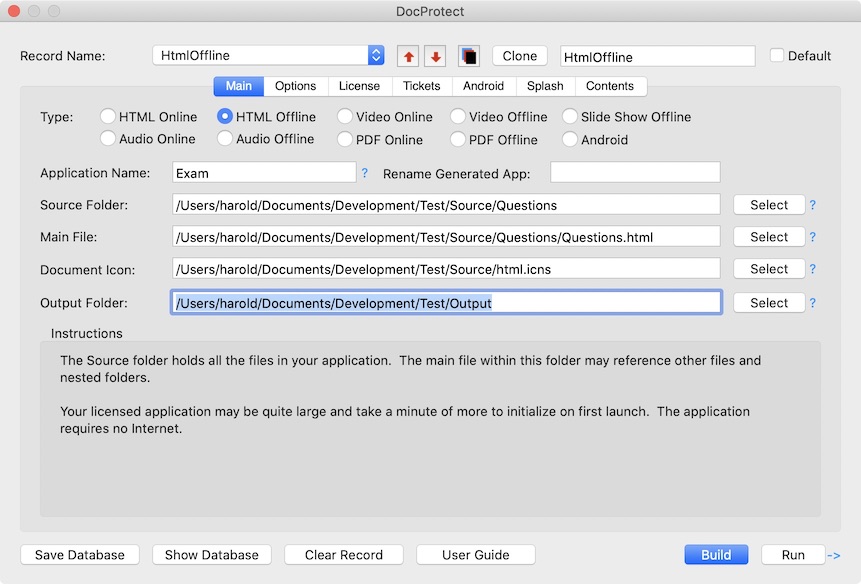
DocProtect 5 can generate an Android application from EPUB, PDF, Video or HTML files. It outputs a source folder of Java files that can be compiled into an Android application using Android Studio with no programming required. Other enhancements include support for larger documents, improved video playback controls, more flexible PDF support and features to organize, clone or batch build up to 200 protected documents with one command.
DocProtect converts a document into a protected application. Version 5 adds the ability to generate a 32 or 64 bit Mac or Windows application A 64-Bit app supports larger videos and bigger HTML based applications. PDF documents delivered as a protected Mac or Windows application use Adobe Reader or Acrobat Reader DC to present documents but restrict the ability to share or print unprotected documents. Alternatively, PDF files can be stored on the web and securely presented from a Mac, Linux or Android application without requiring Acrobat Reader. This option supports a custom index to a scrolling list of PDF files.
A collection of HTML files, scripts, CSS and images can be compiled into an application file with a custom icon. When running on the customer computer, the application browser window has back and forward buttons to allow link navigation to pages embedded within the application or external pages stored on the Internet. Source files and URLs are hidden from the user. Version 5 adds features to support larger projects and reduce launch time.
Video playback uses QuickTime technology, but restricts video sharing to licensed devices. Alternatively, protected WMV files use Media Player on Windows presented within a controller that allows quick or fine tune navigation to position the video. Audio books can also be output to an MP4 file, then protected with DocProtect.
In addition to delivering a document as a protected application, DocProtect works with the SafeWebApp player. The SafeWebApp player is a free download for Mac, Windows, Linux or Android and simplifies the delivery process of protected content. It supports many document types including EPUB formatted eBooks, PDFs, Videos, SWF or HTML content for online or offline use.
EPUB is an eBook standard designed for reflowable content. EPUB has received widespread adoption by publishers and software developers that make readers for various computers and devices. DocProtect generates a Mac, Windows, Linux or Android application that embeds its own EPUB reader so no additional software is required by the user. The SafeWebApp player also contains the EPUB reader.
DocProtect generated applications can require a computer unique password, USB dongle or a fully automated online activation process with Serial Numbers. To enable online activation, DocProtect can be used with a vendor account on the Safe Activation Service or with WebActivation or Desktop License Server running on a company website.
A document author can use MakeDongle to generate USB dongles from ordinary USB drives. The application can be stored on the computer drive or on the dongle itself, and only runs when the dongle is present.
DocProtect works independently or together with the QuickLicense protection and licensing system. Use QuickLicense to apply a time-limited Trial license, Product license, Try/Buy license or offer protected documents as a Subscription or Floating license. With a Group license, when one protected application in the group is activated, all are activated for that computer. A Group license can be applied to any document type.
Pricing and Availability:
DocProtect is $495 for a Single User License on either Windows or Mac OS X (10.7 or later) or $795 for both platforms. DocProtect running on either Mac or Windows can generate Android applications. DocProtect includes royalty-free runtime distribution rights for unlimited documents or licenses. Visit the company web site for demonstration videos and detailed information.
Excel Software: http://www.excelsoftware.com
DocProtect 5: http://www.excelsoftware.com/docprotect
Purchase: http://www.excelsoftware.com/priceandordering
Screenshot: http://www.excelsoftware.com/image/docprotect.jpg
Application Icon: http://www.excelsoftware.com/image/docprotecticon.gif
Established in 1985, Excel Software provides Windows and Mac OS X software products to thousands of users worldwide. Capabilities include system modeling & simulation, requirements management, software design, code generation, reengineering, bug tracking, help authoring, software license management, document protection and internet marketing automation. All Material and Software (C) Copyright 2016 Excel Software. All Rights Reserved. Apple, the Apple logo, Macintosh and Mac OS X are registered trademarks of Apple Inc. in the U.S. and/or other countries. Other trademarks and registered trademarks may be the property of their respective owners.
*******
Link To Article: http://prmac.com/release-id-78581.htm
*******
---------------------------------------------------------------------------------
Note that you can alter delivered distributions at any time.
Login to your account on prMac to alter your channel selection, or to opt-out at any time.
Protect and Sell Documents for Use on Mac, Windows or Android - Published on 02/03/16
DocProtect 5 applies device specific licensing to popular documents on Mac, Windows or Android devices. Protect training courses, research reports, confidential information, reference guides, price lists, customer contacts, repair manuals, demonstration videos, games and eBooks. DocProtect converts a document into a protected application. Version 5 adds the ability to generate a 32 or 64 bit Mac or Windows application, to support larger videos and bigger HTML based applications.
Henderson, Nevada - Excel Software announced DocProtect 5 to protect popular document types and ensure that only licensed users on a Mac, Windows or Android device can view the content. Protect computer training courses, research reports, confidential information, reference guides, price lists, customer contacts, repair manuals, demonstration videos, games and eBooks.
DocProtect 5 can generate an Android application from EPUB, PDF, Video or HTML files. It outputs a source folder of Java files that can be compiled into an Android application using Android Studio with no programming required. Other enhancements include support for larger documents, improved video playback controls, more flexible PDF support and features to organize, clone or batch build up to 200 protected documents with one command.
DocProtect converts a document into a protected application. Version 5 adds the ability to generate a 32 or 64 bit Mac or Windows application A 64-Bit app supports larger videos and bigger HTML based applications. PDF documents delivered as a protected Mac or Windows application use Adobe Reader or Acrobat Reader DC to present documents but restrict the ability to share or print unprotected documents. Alternatively, PDF files can be stored on the web and securely presented from a Mac, Linux or Android application without requiring Acrobat Reader. This option supports a custom index to a scrolling list of PDF files.
A collection of HTML files, scripts, CSS and images can be compiled into an application file with a custom icon. When running on the customer computer, the application browser window has back and forward buttons to allow link navigation to pages embedded within the application or external pages stored on the Internet. Source files and URLs are hidden from the user. Version 5 adds features to support larger projects and reduce launch time.
Video playback uses QuickTime technology, but restricts video sharing to licensed devices. Alternatively, protected WMV files use Media Player on Windows presented within a controller that allows quick or fine tune navigation to position the video. Audio books can also be output to an MP4 file, then protected with DocProtect.
In addition to delivering a document as a protected application, DocProtect works with the SafeWebApp player. The SafeWebApp player is a free download for Mac, Windows, Linux or Android and simplifies the delivery process of protected content. It supports many document types including EPUB formatted eBooks, PDFs, Videos, SWF or HTML content for online or offline use.
EPUB is an eBook standard designed for reflowable content. EPUB has received widespread adoption by publishers and software developers that make readers for various computers and devices. DocProtect generates a Mac, Windows, Linux or Android application that embeds its own EPUB reader so no additional software is required by the user. The SafeWebApp player also contains the EPUB reader.
DocProtect generated applications can require a computer unique password, USB dongle or a fully automated online activation process with Serial Numbers. To enable online activation, DocProtect can be used with a vendor account on the Safe Activation Service or with WebActivation or Desktop License Server running on a company website.
A document author can use MakeDongle to generate USB dongles from ordinary USB drives. The application can be stored on the computer drive or on the dongle itself, and only runs when the dongle is present.
DocProtect works independently or together with the QuickLicense protection and licensing system. Use QuickLicense to apply a time-limited Trial license, Product license, Try/Buy license or offer protected documents as a Subscription or Floating license. With a Group license, when one protected application in the group is activated, all are activated for that computer. A Group license can be applied to any document type.
Pricing and Availability:
DocProtect is $495 for a Single User License on either Windows or Mac OS X (10.7 or later) or $795 for both platforms. DocProtect running on either Mac or Windows can generate Android applications. DocProtect includes royalty-free runtime distribution rights for unlimited documents or licenses. Visit the company web site for demonstration videos and detailed information.
Excel Software: http://www.excelsoftware.com
DocProtect 5: http://www.excelsoftware.com/docprotect
Purchase: http://www.excelsoftware.com/priceandordering
Screenshot: http://www.excelsoftware.com/image/docprotect.jpg
Application Icon: http://www.excelsoftware.com/image/docprotecticon.gif

Established in 1985, Excel Software provides Windows and Mac OS X software products to thousands of users worldwide. Capabilities include system modeling & simulation, requirements management, software design, code generation, reengineering, bug tracking, help authoring, software license management, document protection and internet marketing automation. All Material and Software (C) Copyright 2016 Excel Software. All Rights Reserved. Apple, the Apple logo, Macintosh and Mac OS X are registered trademarks of Apple Inc. in the U.S. and/or other countries. Other trademarks and registered trademarks may be the property of their respective owners.
*******
Link To Article: http://prmac.com/release-id-78581.htm
*******
---------------------------------------------------------------------------------
Note that you can alter delivered distributions at any time.
Login to your account on prMac to alter your channel selection, or to opt-out at any time.
Subscribe to:
Posts (Atom)