A new article has been published at prMac.
Deliver Express 2.5.6 Improves Local File Transfer Speed - Published on 02/08/16
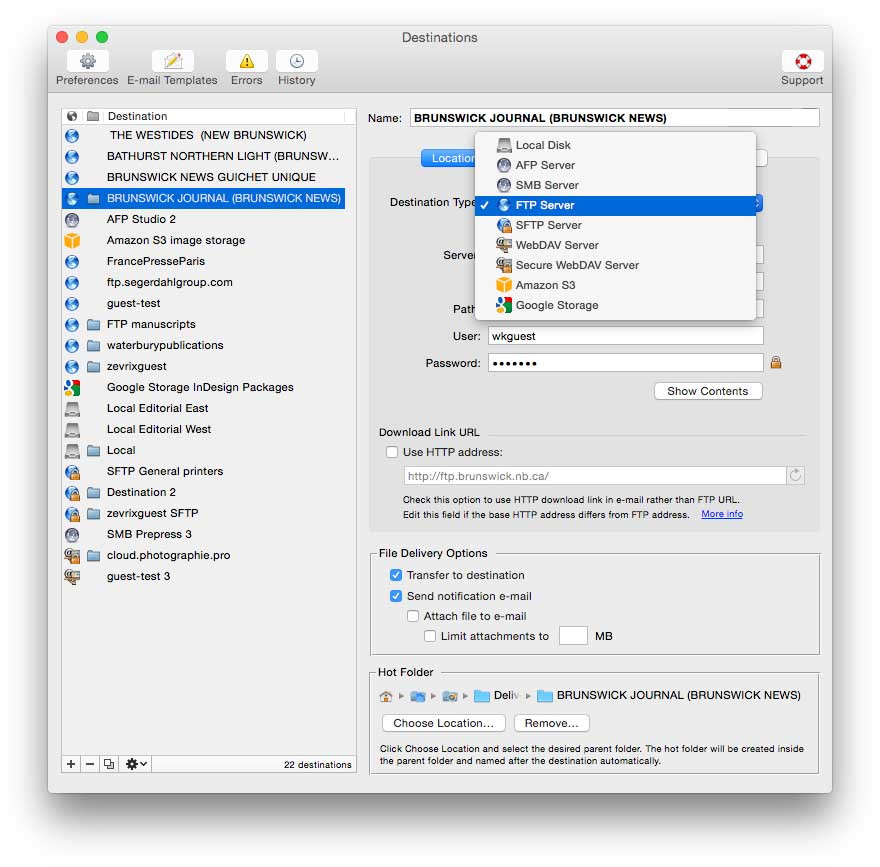
Zevrix Solutions announces Deliver Express 2.5, a maintenance update to its hot folder based solution to automatically send files across the Internet and locally with email notifications. Deliver Express can serve multiple users on a network and supports FTP, Amazon S3, WebDAV, Google Storage, AFP, SMB and other services. The software offers built-in email delivery notifications, file compression, detailed history and more. The new version dramatically speeds up file transfer on local networks.
Toronto (ON) Canada - Zevrix Solutions today is proud to announce the release of Deliver Express 2.5.6, a maintenance update to its automated solution to send and share files easily across the Internet and local networks with email notifications. Deliver Express processes files from watched hot folders and supports FTP, SFTP, Amazon S3, WebDAV, AFP and other remote and local services. The software can run absolutely unattended and offers variable email templates, delivery to multiple destinations, file compression, automatic PDF creation, and much more.
The new version dramatically improves file transfer speed on local networks. The actual speed boost depends on the file size, computer model, hard disk type and other factors. When sending a large file between destinations on a solid-state drive, users can experience a speed improvement up to 10 times compared to previous versions.
"What's great about Deliver Express for organizations is the unattended nature of using a hot folder," writes Jeffrey Mincey on Mac360.com. "It's perfect for all kinds of file delivery. Sensitive documents, encrypted files, financial information, graphic files, photographs, large files and so on."
Deliver Express is an ideal solution for ad agencies, designers, recording studios, photographers, legal offices and other users. Once copied to the hot folder, the files will be sent automatically with email confirmations issued upon delivery. Recipients can easily retrieve the files through the link in notification email.
Deliver Express offers the following key features:
* Upload files from watched hot folders
* Automatic email notifications
* Unlimited users on a network
* Submit files from both Mac and PC
* Automatic file compression and encryption
* Expire files after certain period
Pricing and Availability:
Deliver Express can be purchased from Zevrix website as well as from authorized resellers. The license prices are based on the maximum number of allowed destinations and range from $29.95 to $299.95 (USD). The update is free for licensed users. Trial is also available for download. Deliver Express requires Mac OS X 10.5-10.11.
Zevrix Solutions: http://zevrix.com
Deliver Express 2.5.6: http://zevrix.com/Deliver.php
Download Deliver Express: http://zevrix.com/DeliverExpress.dmg
Purchase: http://zevrix.com/store.php
Screenshot: http://zevrix.com/screenshots/deliver-2/dx-location-ysmt.jpg
Located in Toronto, Canada, Zevrix Solutions provides automation and productivity solutions for Adobe Creative Cloud and Creative Suite software, PDF workflows, graphic file diagnostics and Microsoft Office output on Mac OS. Zevrix is dedicated to help professionals increase their profits through automating everyday tasks, producing error-free documents, saving disk space and cutting production costs. For more information, visit their website. Copyright (C) 2016 Zevrix Solutions. All Rights Reserved. Other trademarks and registered trademarks may be the property of their respective owners.
*******
Link To Article: http://prmac.com/release-id-78639.htm
*******
---------------------------------------------------------------------------------
Note that you can alter delivered distributions at any time.
Login to your account on prMac to alter your channel selection, or to opt-out at any time.

Dropshare 4 for Mac - Major update to Popular Secure File Sharing Tool
A new article has been published at prMac.
Dropshare 4 for Mac - Major update to Popular Secure File Sharing Tool - Published on 02/08/16
Independent software developer, Timo Josten today announces Dropshare 4, a major update to his popular secure file sharing tool developed exclusively for Mac OS X. Dropshare is a menu bar application for Drag & Drop upload files, screenshots and even directories to your own server, Amazon S3 and Rackspace Cloud Files. Version 4 introduces a reworked UI, Landing pages may now be synchronised with Dropshare Sync, as well as support of Amazon S3 API-compliant services.
Dusseldorf, Germany - Independent software developer, Timo Josten today is proud to announce the release of Dropshare 4, a brand-new upgrade to his popular secure file sharing tool developed exclusively for Mac OS X. Dropshare is a menu bar application for Drag & Drop upload files, screenshots and even directories to your own server, Amazon S3 (or S3 API-compliant services) and Rackspace Cloud Files.
Dropshare for Mac 4 introduces a reworked UI to easily access current, pending and past uploads right from the menu bar. Landing pages, loved by many of our users, may now be synchronised with Dropshare Sync to all of your Macs. The biggest addition to this release is the support of Amazon S3 API-compliant services like DreamObjects or OpenStack; Dropshare now basically supports every third-party vendor of Amazon S3-like services to easily upload files and share them securely.
Many other improvements and changes have been packed into that upgrade which sets the base for future additions to the app. Dropshare for Mac 4 will automatically import settings from previous installations of the app to make the upgrade process smooth and seamless for existing users. The upgrade also offers the possibility to share connections between Macs by exporting them in an encrypted format to make sharing even easier than before.
System Requirements:
* OS X 10.9 or later
Pricing and Availability:
Dropshare for Mac 4 is a paid upgrade for existing customers and sells for $24.99 USD) from its official website. Existing customers who purchased Dropshare 3 in 2016 will receive the upgrade free of charge, and earlier customers may apply for a 50% off upgrade-pricing on their website.
Dropshare 4: https://getdropsha.re
Changelog: https://getdropsha.re/changelog/4.0.html
Download Free Trial: https://getdropsha.re/download
Upgrade Dropshare 3 to 4: https://getdropsha.re/upgrade-3-to-4/
Press Kit (zip): https://getdropsha.re/Dropshare-Press-Kit.zip
Dropshare is made by Timo Josten, an individual software developer from Germany. Copyright (C) 2016 Timo Josten. All Rights Reserved. Apple, the Apple logo and Mac OS X platforms are trademarks of Apple Inc. in the U.S. and/or other countries. Other trademarks and registered trademarks may be the property of their respective owners.
*******
Link To Article: http://prmac.com/release-id-78638.htm
*******
---------------------------------------------------------------------------------
Note that you can alter delivered distributions at any time.
Login to your account on prMac to alter your channel selection, or to opt-out at any time.
Dropshare 4 for Mac - Major update to Popular Secure File Sharing Tool - Published on 02/08/16
Independent software developer, Timo Josten today announces Dropshare 4, a major update to his popular secure file sharing tool developed exclusively for Mac OS X. Dropshare is a menu bar application for Drag & Drop upload files, screenshots and even directories to your own server, Amazon S3 and Rackspace Cloud Files. Version 4 introduces a reworked UI, Landing pages may now be synchronised with Dropshare Sync, as well as support of Amazon S3 API-compliant services.
Dusseldorf, Germany - Independent software developer, Timo Josten today is proud to announce the release of Dropshare 4, a brand-new upgrade to his popular secure file sharing tool developed exclusively for Mac OS X. Dropshare is a menu bar application for Drag & Drop upload files, screenshots and even directories to your own server, Amazon S3 (or S3 API-compliant services) and Rackspace Cloud Files.
Dropshare for Mac 4 introduces a reworked UI to easily access current, pending and past uploads right from the menu bar. Landing pages, loved by many of our users, may now be synchronised with Dropshare Sync to all of your Macs. The biggest addition to this release is the support of Amazon S3 API-compliant services like DreamObjects or OpenStack; Dropshare now basically supports every third-party vendor of Amazon S3-like services to easily upload files and share them securely.
Many other improvements and changes have been packed into that upgrade which sets the base for future additions to the app. Dropshare for Mac 4 will automatically import settings from previous installations of the app to make the upgrade process smooth and seamless for existing users. The upgrade also offers the possibility to share connections between Macs by exporting them in an encrypted format to make sharing even easier than before.
System Requirements:
* OS X 10.9 or later
Pricing and Availability:
Dropshare for Mac 4 is a paid upgrade for existing customers and sells for $24.99 USD) from its official website. Existing customers who purchased Dropshare 3 in 2016 will receive the upgrade free of charge, and earlier customers may apply for a 50% off upgrade-pricing on their website.
Dropshare 4: https://getdropsha.re
Changelog: https://getdropsha.re/changelog/4.0.html
Download Free Trial: https://getdropsha.re/download
Upgrade Dropshare 3 to 4: https://getdropsha.re/upgrade-3-to-4/
Press Kit (zip): https://getdropsha.re/Dropshare-Press-Kit.zip
Dropshare is made by Timo Josten, an individual software developer from Germany. Copyright (C) 2016 Timo Josten. All Rights Reserved. Apple, the Apple logo and Mac OS X platforms are trademarks of Apple Inc. in the U.S. and/or other countries. Other trademarks and registered trademarks may be the property of their respective owners.
*******
Link To Article: http://prmac.com/release-id-78638.htm
*******
---------------------------------------------------------------------------------
Note that you can alter delivered distributions at any time.
Login to your account on prMac to alter your channel selection, or to opt-out at any time.
Best Congratulation eCards - Design and Send Congratulation Greetings
A new article has been published at prMac.
Best Congratulation eCards - Design and Send Congratulation Greetings - Published on 02/08/16
iAppsTechnology today introduces Best Congratulation eCards 1.0, its amazing eCard app developed for iOS devices. A picture paints a thousand words. This app will simplify the creation and sending of congratulation cards to wish your friends and loved one's success or achievement. Personalize the eCards with pre-loaded beautiful templates and encouraging congratulation messages. eCards can then be saved as wallpapers, sharing via email and social media.
Kuala Lumpur, Malaysia - iAppsTechnology today is happy to announce the release of Best Congratulation eCards 1.0, its amazing congratulation eCard app developed for iPhone, iPad, and iPod touch devices. A picture paints a thousand words! This app will simplify the creation and sending of congratulation cards to wish your friends and loved one's success or achievement. Customize and personalize the eCards with pre-loaded beautiful templates and encouraging congratulation messages. eCards can then be saved as wallpapers, sharing via email and social media. Use this app for the following occasions:
* To congratulate your friends/family for their success in study
* To congratulate your friends/family for their success in getting promoted
* To congratulate your friends/family for their weddings/marriage
* To congratulate your friends/family for their success in their career/jobs
* To congratulate your friends/family for any achievements/success in life
This awesome app has the following amazing features :
* Pre-loaded with beautiful congratulation card templates
* Use own photo as card templates
* Separate cards for each device as well as landscape and portrait cards support, So no stretched cards at all
* Allow to use own photo/pictures as card template
* Pre-loaded invitation messages for customization - You may also write your own message
* Allow following message text customization options: Fonts, Color, Alignment, Size & Opacity
* Decorate with emoji/emoticons
* Integrated with Aviary for card template editing
* Play music while creating e-Cards
* Very attractive and interactive interface design
Integrated with Sharekit for card sharing:
* Facebook
* Twitter
* Tumblr
* Flickr
* Instagram
* Download to library
* Email
* Copy
* Print
* Sina Weibo
All-in-one eCard App to create and send congratulation cards for all success events. Get Unlimited Access to download all our quality Free Apps that come with this app.
App Store Customer Reviews (5 stars):
Customer Ratings - 14 ratings:
"Best out there - So convenient and simple to use, this app won't let you down anytime. Works perfectly in almost all aspects, you can import a picture from your gallery and use it as the greeting cards background. It's great! "- by Shane Watson.
"Search stops here - Not many e-cards out there which provide so many features and customization options. The Best Congratulation eCards is one of a kind App." - by june_austra
"Ease of use - This app makes sending cards just one touch away. Has amazing features, inbuilt landscape and portrait designed e-cards and cards can be customized very easily." - by Lotus_flowers
"User friendly - It has a very clean and neat user interface, very well built and is highly customizable. Rating it anything below 5 would be injustice to the devs!" - by Renata-420
"Customizable - I love how I can customize my own congratulation cards. It lets me add my own pictures and the text I want with no limitations as such. Couldn't have asked for a better congratulation e-card." - by Jennifer Anderson
Device Requirements:
* iPhone and iPad
* Optimized for iPhone 5, iPhone 6/6 Plus
* Requires iOS 6.0 or later
* Universal Application
* 66.2 MB
Pricing and Availability:
The Best Congratulation eCards 1.0 is $0.99 USD (or an equivalent amount in other currencies) and is available worldwide exclusively through the App Store in the Social Networking category. Grab a copy today for all your congratulation greeting needs. Celebrate your friends and loved success or achievement with a simple but sincere greetings.
iAppsTechnology: http://www.FreeApps2All.com
Best Congratulation eCards 1.0: http://BestCongratulationEcards.FreeApps2all.com
Purchase and Download: https://itunes.apple.com/app/best-congratulation-ecards/id1068187316
YouTube Video (Trailer): https://www.youtube.com/watch?v=frY1SVoSyJY
Promotional Banner: http://i.imgur.com/Bpr7G4T.jpg
App Icon: http://i.imgur.com/4N6STbo.jpg
iAppsTechnology is an app development company located in Kuala Lumpur, Malaysia. The company has released close to 300 free and paid apps available in App Store. We pride ourselves as the pioneer in developing eCard App for all kinds of events and occasions. We have also launched a lot of games, utilities, kids and an Islamic app. All Material and Software (C) Copyright 2016 iAppsTechnology. All Rights Reserved. Apple, the Apple logo, iPhone, iPod and iPad are registered trademarks of Apple Inc. in the U.S. and/or other countries. Other trademarks and registered trademarks may be the property of their respective owners.
*******
Link To Article: http://prmac.com/release-id-78637.htm
*******
---------------------------------------------------------------------------------
Note that you can alter delivered distributions at any time.
Login to your account on prMac to alter your channel selection, or to opt-out at any time.
Best Congratulation eCards - Design and Send Congratulation Greetings - Published on 02/08/16
iAppsTechnology today introduces Best Congratulation eCards 1.0, its amazing eCard app developed for iOS devices. A picture paints a thousand words. This app will simplify the creation and sending of congratulation cards to wish your friends and loved one's success or achievement. Personalize the eCards with pre-loaded beautiful templates and encouraging congratulation messages. eCards can then be saved as wallpapers, sharing via email and social media.
Kuala Lumpur, Malaysia - iAppsTechnology today is happy to announce the release of Best Congratulation eCards 1.0, its amazing congratulation eCard app developed for iPhone, iPad, and iPod touch devices. A picture paints a thousand words! This app will simplify the creation and sending of congratulation cards to wish your friends and loved one's success or achievement. Customize and personalize the eCards with pre-loaded beautiful templates and encouraging congratulation messages. eCards can then be saved as wallpapers, sharing via email and social media. Use this app for the following occasions:
* To congratulate your friends/family for their success in study
* To congratulate your friends/family for their success in getting promoted
* To congratulate your friends/family for their weddings/marriage
* To congratulate your friends/family for their success in their career/jobs
* To congratulate your friends/family for any achievements/success in life
This awesome app has the following amazing features :
* Pre-loaded with beautiful congratulation card templates
* Use own photo as card templates
* Separate cards for each device as well as landscape and portrait cards support, So no stretched cards at all
* Allow to use own photo/pictures as card template
* Pre-loaded invitation messages for customization - You may also write your own message
* Allow following message text customization options: Fonts, Color, Alignment, Size & Opacity
* Decorate with emoji/emoticons
* Integrated with Aviary for card template editing
* Play music while creating e-Cards
* Very attractive and interactive interface design
Integrated with Sharekit for card sharing:
* Tumblr
* Flickr
* Download to library
* Copy
* Sina Weibo
All-in-one eCard App to create and send congratulation cards for all success events. Get Unlimited Access to download all our quality Free Apps that come with this app.
App Store Customer Reviews (5 stars):
Customer Ratings - 14 ratings:
"Best out there - So convenient and simple to use, this app won't let you down anytime. Works perfectly in almost all aspects, you can import a picture from your gallery and use it as the greeting cards background. It's great! "- by Shane Watson.
"Search stops here - Not many e-cards out there which provide so many features and customization options. The Best Congratulation eCards is one of a kind App." - by june_austra
"Ease of use - This app makes sending cards just one touch away. Has amazing features, inbuilt landscape and portrait designed e-cards and cards can be customized very easily." - by Lotus_flowers
"User friendly - It has a very clean and neat user interface, very well built and is highly customizable. Rating it anything below 5 would be injustice to the devs!" - by Renata-420
"Customizable - I love how I can customize my own congratulation cards. It lets me add my own pictures and the text I want with no limitations as such. Couldn't have asked for a better congratulation e-card." - by Jennifer Anderson
Device Requirements:
* iPhone and iPad
* Optimized for iPhone 5, iPhone 6/6 Plus
* Requires iOS 6.0 or later
* Universal Application
* 66.2 MB
Pricing and Availability:
The Best Congratulation eCards 1.0 is $0.99 USD (or an equivalent amount in other currencies) and is available worldwide exclusively through the App Store in the Social Networking category. Grab a copy today for all your congratulation greeting needs. Celebrate your friends and loved success or achievement with a simple but sincere greetings.
iAppsTechnology: http://www.FreeApps2All.com
Best Congratulation eCards 1.0: http://BestCongratulationEcards.FreeApps2all.com
Purchase and Download: https://itunes.apple.com/app/best-congratulation-ecards/id1068187316
YouTube Video (Trailer): https://www.youtube.com/watch?v=frY1SVoSyJY
Promotional Banner: http://i.imgur.com/Bpr7G4T.jpg

App Icon: http://i.imgur.com/4N6STbo.jpg

iAppsTechnology is an app development company located in Kuala Lumpur, Malaysia. The company has released close to 300 free and paid apps available in App Store. We pride ourselves as the pioneer in developing eCard App for all kinds of events and occasions. We have also launched a lot of games, utilities, kids and an Islamic app. All Material and Software (C) Copyright 2016 iAppsTechnology. All Rights Reserved. Apple, the Apple logo, iPhone, iPod and iPad are registered trademarks of Apple Inc. in the U.S. and/or other countries. Other trademarks and registered trademarks may be the property of their respective owners.
*******
Link To Article: http://prmac.com/release-id-78637.htm
*******
---------------------------------------------------------------------------------
Note that you can alter delivered distributions at any time.
Login to your account on prMac to alter your channel selection, or to opt-out at any time.
A Fast and Convenient Way to Write Emoji-Rich Texts on iOS Devices
A new article has been published at prMac.
A Fast and Convenient Way to Write Emoji-Rich Texts on iOS Devices - Published on 02/08/16
Golmium Software Inc. announces Golmium Keyboard: QuickPicType PRO 1.0, a brand new way to type in emoji, pictograms, and other special symbols for iOS devices. When a user composes a text, the software predicts the word that is being typed. The suggestion bar above the keyboard instantly shows a set of buttons with matched Unicode pictograms, emojis, and special symbols. In currently available iOS keyboards the search for a needed symbol is usually a tedious and inconvenient task.
Boucherville, Canada - Golmium Software Inc. is proud to announce the release of Golmium Keyboard: QuickPicType PRO 1.0, a brand new way to type in emoji, pictograms, and other special symbols for iPhone, iPad, and iPod touch devices. Most people would like to enhance the text they type in Twitter, email, and FaceBook posts, etc. with various symbol elements ranging from the traditional emoticons to the ever-increasing multitude of miscellaneous Unicode symbols. In currently available iOS keyboards the search for a needed symbol is usually a tedious and inconvenient task; it is usually assumed that a user knows what they are looking for.
With the newly released keyboard app that task becomes a one-touch action. When a user composes a text, the software predicts the word that is being typed. The suggestion bar above the keyboard instantly shows a set of buttons with matched Unicode pictograms, emojis, and special symbols. Additionally, if space allows, the suggestions bar shows buttons with predicted words. The bar content is updated lightning-fast after each letter is typed in. By touching a button with the symbol or word the user adds it to the text.
Hundreds of standard Unicode symbols, pictograms and emoji are available for several thousand English words. The keyboard is highly configurable: the bar with suggestions can have one, two or three lines; a user can also choose from a wide selection of keyboard styles and colors. The QuickPicTypePRO keyboard respects user privacy absolutely because it does not need system full access, does not use an internet connection, and does not collect or store typed in data in any way, shape or form.
Device Requirements:
* iPhone, iPad, and iPod touch
* Requires iOS 9.1 or later
* Universal Application
* 4.3 MB
Pricing and Availability:
Golmium Keyboard: QuickPicType PRO 1.0 is just $0.99 USD (or an equivalent amount in other currencies) and is available worldwide exclusively through the App Store in the Utilities category. Promo codes for reviews are available upon request. A free "light" version is also available with less advanced features through the App Store.
Golmium Keyboard: QuickPicType PRO 1.0: http://www.golmium.com/#gig11
Purchase and Download from iTunes: https://itunes.apple.com/app/id1073946936
YouTube Video: https://www.youtube.com/watch?v=h2Af1HHxrgI
Screenshot: http://www.golmium.com/images/screenshot11.jpg
App Icon: http://www.golmium.com/images/icon11.png
Press Kit (ZIP): http://www.golmium.com/PressKit_QuickPicTypePRO_from_GolmiumSoftwareInc.zip
Golmium Software Inc. is located in Boucherville, Canada, and focuses on creating practical and unique applications for iOS. The company was launched in summer 2014, and currently has multiple products in development. All Material and Software Copyright (C) 2016 Golmium Software Inc. All Rights Reserved. Apple, the Apple logo, iPhone, iPad and iPod are registered trademarks of Apple Inc. in the U.S. and/or other countries.
*******
Link To Article: http://prmac.com/release-id-78636.htm
*******
---------------------------------------------------------------------------------
Note that you can alter delivered distributions at any time.
Login to your account on prMac to alter your channel selection, or to opt-out at any time.
A Fast and Convenient Way to Write Emoji-Rich Texts on iOS Devices - Published on 02/08/16
Golmium Software Inc. announces Golmium Keyboard: QuickPicType PRO 1.0, a brand new way to type in emoji, pictograms, and other special symbols for iOS devices. When a user composes a text, the software predicts the word that is being typed. The suggestion bar above the keyboard instantly shows a set of buttons with matched Unicode pictograms, emojis, and special symbols. In currently available iOS keyboards the search for a needed symbol is usually a tedious and inconvenient task.
Boucherville, Canada - Golmium Software Inc. is proud to announce the release of Golmium Keyboard: QuickPicType PRO 1.0, a brand new way to type in emoji, pictograms, and other special symbols for iPhone, iPad, and iPod touch devices. Most people would like to enhance the text they type in Twitter, email, and FaceBook posts, etc. with various symbol elements ranging from the traditional emoticons to the ever-increasing multitude of miscellaneous Unicode symbols. In currently available iOS keyboards the search for a needed symbol is usually a tedious and inconvenient task; it is usually assumed that a user knows what they are looking for.
With the newly released keyboard app that task becomes a one-touch action. When a user composes a text, the software predicts the word that is being typed. The suggestion bar above the keyboard instantly shows a set of buttons with matched Unicode pictograms, emojis, and special symbols. Additionally, if space allows, the suggestions bar shows buttons with predicted words. The bar content is updated lightning-fast after each letter is typed in. By touching a button with the symbol or word the user adds it to the text.
Hundreds of standard Unicode symbols, pictograms and emoji are available for several thousand English words. The keyboard is highly configurable: the bar with suggestions can have one, two or three lines; a user can also choose from a wide selection of keyboard styles and colors. The QuickPicTypePRO keyboard respects user privacy absolutely because it does not need system full access, does not use an internet connection, and does not collect or store typed in data in any way, shape or form.
Device Requirements:
* iPhone, iPad, and iPod touch
* Requires iOS 9.1 or later
* Universal Application
* 4.3 MB
Pricing and Availability:
Golmium Keyboard: QuickPicType PRO 1.0 is just $0.99 USD (or an equivalent amount in other currencies) and is available worldwide exclusively through the App Store in the Utilities category. Promo codes for reviews are available upon request. A free "light" version is also available with less advanced features through the App Store.
Golmium Keyboard: QuickPicType PRO 1.0: http://www.golmium.com/#gig11
Purchase and Download from iTunes: https://itunes.apple.com/app/id1073946936
YouTube Video: https://www.youtube.com/watch?v=h2Af1HHxrgI
Screenshot: http://www.golmium.com/images/screenshot11.jpg

App Icon: http://www.golmium.com/images/icon11.png

Press Kit (ZIP): http://www.golmium.com/PressKit_QuickPicTypePRO_from_GolmiumSoftwareInc.zip
Golmium Software Inc. is located in Boucherville, Canada, and focuses on creating practical and unique applications for iOS. The company was launched in summer 2014, and currently has multiple products in development. All Material and Software Copyright (C) 2016 Golmium Software Inc. All Rights Reserved. Apple, the Apple logo, iPhone, iPad and iPod are registered trademarks of Apple Inc. in the U.S. and/or other countries.
*******
Link To Article: http://prmac.com/release-id-78636.htm
*******
---------------------------------------------------------------------------------
Note that you can alter delivered distributions at any time.
Login to your account on prMac to alter your channel selection, or to opt-out at any time.
Timecode Releases Final Version of Reiner Knizia's Dice Monsters
A new article has been published at prMac.
Timecode Releases Final Version of Reiner Knizia's Dice Monsters - Published on 02/08/16
Timecode has just released Reiner Knizia's Dice Monsters 1.03 for iOS, an update to their unique dice game designed by prolific board game designer Dr. Reiner Knizia. Players must combine dice in the most optimal way to win battles against hilarious monsters in 5 different worlds. A player will fight combination monsters, total monsters, pixies and other kinds of opponents, as well as learn new monster's abilities while progressing through the game.
Kiev, Ukraine - Timecode, developer of games, mobile and server applications, has just released final version of "Reiner Knizia's Dice Monsters" on iOS devices, unique dice game designed by prolific board game designer Dr. Reiner Knizia. The gameplay is to combine dice in the optimal way, to win battles against hilarious monsters in 5 different worlds. A player will fight combination monsters, total monsters, pixies and other kinds of opponents, he/she will learn new monster's abilities while progressing through the game.
There are boosters revealed to the player gradually, to compensate new monsters' powers. At the final level of each world there's a boss fight, winning the fight will award the player with a new die with special abilities, such as a die with 7 pips, a steel die protecting from monsters' swords and others.
"Reiner Knizia's Dice Monsters" was released for a soft launch in Q4 2015. During last months the levels were balanced for best progression, new features were added according to players' feedback such as Eternal Life available as an IAP.
The game was designed by Dr. Reiner Knizia, having created over 600 published games, won the Deutscher Spiele Preis four times, a Spiel des Jahres award, and numerous other national and international awards. There are more than 40 of Dr. Reiner Knizia's games available in the App Stores.
"Reiner Knizia's Dice Monsters" expands Timecode's portfolio of high quality applications, including the "Totems: Game of Conquest" original board game, featured on App Store, "Snow Queen" an enchanting interactive children's book based on the award-winning Hans Christian Andersen fairytale, a beautiful visual word puzzle "Kaleidoscope," and the recently released "Twist & Pop," a unique match-3 puzzle game.
Device Requirements:
* iPhone, iPad, and iPod touch
* Requires iOS 6.0 or later
* 96.1 MB
Pricing and Availability:
Reiner Knizia's Dice Monsters 1.03 is Free and available worldwide exclusively through the App Store in the Games category.
Timecode: http://www.timecodegames.com/
Reiner Knizia's Dice Monsters 1.03: http://apps.appshout.com/reiner-knizias-dice-monsters/
Download from iTunes: https://itunes.apple.com/app/reiner-knizias-dice-monsters/id915046203
YouTube Video (Demo): https://www.youtube.com/watch?v=4dY2Rt-aCpw
Screenshot: http://a1.mzstatic.com/us/r30/Purple3/v4/dd/b1/55/ddb15598-db89-9d6e-08d5-fdb392827161/screen480x480.jpeg
App Icon: http://apps.appshout.com/reiner-knizias-dice-monsters/images/icon.png
Established in 2010, Timecode is a Kiev-based developer of games, mobile apps and server-side software. The core Timecode team has been together since 2005, with a strong focus in games, entertainment, dedication to art and a unique approach to design. Timecode has self-published 5 mobile games, 2 more original games are under development, coming in 2016. All Material and Software (C) Copyright 2016 Timecode DS LTD. All Rights Reserved. Apple, the Apple logo, iPhone, iPod and iPad are registered trademarks of Apple Inc. in the U.S. and/or other countries. Other trademarks and registered trademarks may be the property of their respective owners.
*******
Link To Article: http://prmac.com/release-id-78635.htm
*******
---------------------------------------------------------------------------------
Note that you can alter delivered distributions at any time.
Login to your account on prMac to alter your channel selection, or to opt-out at any time.
Timecode Releases Final Version of Reiner Knizia's Dice Monsters - Published on 02/08/16
Timecode has just released Reiner Knizia's Dice Monsters 1.03 for iOS, an update to their unique dice game designed by prolific board game designer Dr. Reiner Knizia. Players must combine dice in the most optimal way to win battles against hilarious monsters in 5 different worlds. A player will fight combination monsters, total monsters, pixies and other kinds of opponents, as well as learn new monster's abilities while progressing through the game.
Kiev, Ukraine - Timecode, developer of games, mobile and server applications, has just released final version of "Reiner Knizia's Dice Monsters" on iOS devices, unique dice game designed by prolific board game designer Dr. Reiner Knizia. The gameplay is to combine dice in the optimal way, to win battles against hilarious monsters in 5 different worlds. A player will fight combination monsters, total monsters, pixies and other kinds of opponents, he/she will learn new monster's abilities while progressing through the game.
There are boosters revealed to the player gradually, to compensate new monsters' powers. At the final level of each world there's a boss fight, winning the fight will award the player with a new die with special abilities, such as a die with 7 pips, a steel die protecting from monsters' swords and others.
"Reiner Knizia's Dice Monsters" was released for a soft launch in Q4 2015. During last months the levels were balanced for best progression, new features were added according to players' feedback such as Eternal Life available as an IAP.
The game was designed by Dr. Reiner Knizia, having created over 600 published games, won the Deutscher Spiele Preis four times, a Spiel des Jahres award, and numerous other national and international awards. There are more than 40 of Dr. Reiner Knizia's games available in the App Stores.
"Reiner Knizia's Dice Monsters" expands Timecode's portfolio of high quality applications, including the "Totems: Game of Conquest" original board game, featured on App Store, "Snow Queen" an enchanting interactive children's book based on the award-winning Hans Christian Andersen fairytale, a beautiful visual word puzzle "Kaleidoscope," and the recently released "Twist & Pop," a unique match-3 puzzle game.
Device Requirements:
* iPhone, iPad, and iPod touch
* Requires iOS 6.0 or later
* 96.1 MB
Pricing and Availability:
Reiner Knizia's Dice Monsters 1.03 is Free and available worldwide exclusively through the App Store in the Games category.
Timecode: http://www.timecodegames.com/
Reiner Knizia's Dice Monsters 1.03: http://apps.appshout.com/reiner-knizias-dice-monsters/
Download from iTunes: https://itunes.apple.com/app/reiner-knizias-dice-monsters/id915046203
YouTube Video (Demo): https://www.youtube.com/watch?v=4dY2Rt-aCpw
Screenshot: http://a1.mzstatic.com/us/r30/Purple3/v4/dd/b1/55/ddb15598-db89-9d6e-08d5-fdb392827161/screen480x480.jpeg

App Icon: http://apps.appshout.com/reiner-knizias-dice-monsters/images/icon.png

Established in 2010, Timecode is a Kiev-based developer of games, mobile apps and server-side software. The core Timecode team has been together since 2005, with a strong focus in games, entertainment, dedication to art and a unique approach to design. Timecode has self-published 5 mobile games, 2 more original games are under development, coming in 2016. All Material and Software (C) Copyright 2016 Timecode DS LTD. All Rights Reserved. Apple, the Apple logo, iPhone, iPod and iPad are registered trademarks of Apple Inc. in the U.S. and/or other countries. Other trademarks and registered trademarks may be the property of their respective owners.
*******
Link To Article: http://prmac.com/release-id-78635.htm
*******
---------------------------------------------------------------------------------
Note that you can alter delivered distributions at any time.
Login to your account on prMac to alter your channel selection, or to opt-out at any time.
DigitLoc Securely Stores Content in the Cloud
A new article has been published at prMac.
DigitLoc Securely Stores Content in the Cloud - Published on 02/08/16
DigitLock 1.5 by Fahmid Uddin lets anyone upload and store their private videos, photos or notes to the cloud, and secure them with an impossible-to-guess passcode. This app is ideal for syncing content between devices, and preventing content from falling into the wrong hands due to device loss, theft or hack. DigitLock's clean, clutter-less interface displays an at-a-glance an overview of each item's size, along with a thumbnail for each photo and video, or a date/time stamp for each note.
Boston, Massachusetts - iOS users who want to securely store content in the cloud - either so they can easily sync with their computer or other devices, or because they want peace of mind in case their device is lost, stolen or hacked - can now head to the App Store, and download the must-have new app DigitLock.
Created by developer Fahmid Uddin and available at no-cost, DigitLock lets users upload and store their private videos, photos or notes to the cloud, and secure them with an impossible-to-guess passcode. Users can also change their passcode whenever they wish by choosing from a virtual infinity of potential combinations.
Once users have uploaded their content to the cloud, DigitLock's clean, clutter-less interface displays an at-a-glance overview of each item's size, along with a thumbnail for each photo and video, or a date/time stamp for each note. Users can also quickly and simply delete any item.
"It can be a hassle - and also unsafe - to sync content across multiple devices, and to ensure that device loss, theft or hack will not result in private content falling into the wrong hands," commented Fahmid Uddin. "However, DigitLock solves these concerns in a way that's simple, easy and safe. And the app is available at no-cost, because we believe that everyone deserves more convenience, security and peace-of-mind!"
Device Requirements:
* iPhone, iPad, and iPod touch
* Requires iOS 8.0 or later
* 5.6 MB
Pricing and Availability:
DigitLock 1.5k, the must-have new app that securely stores content in the cloud for easy syncing and loss prevention, is Free and available worldwide exclusively through the App Store in the Photo & Video category.
DigitLock 1.5: http://apps.appshout.com/digitlock/
Download from iTunes : https://itunes.apple.com/app/digitlock-lock-photos-videos/id1055779405
Screenshot: http://a4.mzstatic.com/us/r30/Purple7/v4/17/86/7f/17867fe1-0095-0e15-0fa8-0e27b3dc2c1c/screen322x572.jpeg
App Icon : http://apps.appshout.com/digitlock/images/icon.png
Fahmid Uddin is a CTO and mobile app developer whose releases include Bolt Junior, Can You Even Glide, and the most recent app DigitLock. All Material and Software (C) Copyright 2016 Fahmid Uddin. All Rights Reserved. Apple, the Apple logo, iPhone, iPod and iPad are registered trademarks of Apple Inc. in the U.S. and/or other countries. Other trademarks and registered trademarks may be the property of their respective owners.
*******
Link To Article: http://prmac.com/release-id-78634.htm
*******
---------------------------------------------------------------------------------
Note that you can alter delivered distributions at any time.
Login to your account on prMac to alter your channel selection, or to opt-out at any time.
DigitLoc Securely Stores Content in the Cloud - Published on 02/08/16
DigitLock 1.5 by Fahmid Uddin lets anyone upload and store their private videos, photos or notes to the cloud, and secure them with an impossible-to-guess passcode. This app is ideal for syncing content between devices, and preventing content from falling into the wrong hands due to device loss, theft or hack. DigitLock's clean, clutter-less interface displays an at-a-glance an overview of each item's size, along with a thumbnail for each photo and video, or a date/time stamp for each note.
Boston, Massachusetts - iOS users who want to securely store content in the cloud - either so they can easily sync with their computer or other devices, or because they want peace of mind in case their device is lost, stolen or hacked - can now head to the App Store, and download the must-have new app DigitLock.
Created by developer Fahmid Uddin and available at no-cost, DigitLock lets users upload and store their private videos, photos or notes to the cloud, and secure them with an impossible-to-guess passcode. Users can also change their passcode whenever they wish by choosing from a virtual infinity of potential combinations.
Once users have uploaded their content to the cloud, DigitLock's clean, clutter-less interface displays an at-a-glance overview of each item's size, along with a thumbnail for each photo and video, or a date/time stamp for each note. Users can also quickly and simply delete any item.
"It can be a hassle - and also unsafe - to sync content across multiple devices, and to ensure that device loss, theft or hack will not result in private content falling into the wrong hands," commented Fahmid Uddin. "However, DigitLock solves these concerns in a way that's simple, easy and safe. And the app is available at no-cost, because we believe that everyone deserves more convenience, security and peace-of-mind!"
Device Requirements:
* iPhone, iPad, and iPod touch
* Requires iOS 8.0 or later
* 5.6 MB
Pricing and Availability:
DigitLock 1.5k, the must-have new app that securely stores content in the cloud for easy syncing and loss prevention, is Free and available worldwide exclusively through the App Store in the Photo & Video category.
DigitLock 1.5: http://apps.appshout.com/digitlock/
Download from iTunes : https://itunes.apple.com/app/digitlock-lock-photos-videos/id1055779405
Screenshot: http://a4.mzstatic.com/us/r30/Purple7/v4/17/86/7f/17867fe1-0095-0e15-0fa8-0e27b3dc2c1c/screen322x572.jpeg

App Icon : http://apps.appshout.com/digitlock/images/icon.png

Fahmid Uddin is a CTO and mobile app developer whose releases include Bolt Junior, Can You Even Glide, and the most recent app DigitLock. All Material and Software (C) Copyright 2016 Fahmid Uddin. All Rights Reserved. Apple, the Apple logo, iPhone, iPod and iPad are registered trademarks of Apple Inc. in the U.S. and/or other countries. Other trademarks and registered trademarks may be the property of their respective owners.
*******
Link To Article: http://prmac.com/release-id-78634.htm
*******
---------------------------------------------------------------------------------
Note that you can alter delivered distributions at any time.
Login to your account on prMac to alter your channel selection, or to opt-out at any time.
MacX DVD Ripper Pro Keeps Abreast of the Latest Encryption Algorithm
A new article has been published at prMac.
MacX DVD Ripper Pro Keeps Abreast of the Latest Encryption Algorithm - Published on 02/08/16
MacXDVD Software today announces MacX DVD Ripper Pro, an exciting update to its flagship DVD ripping software for Mac and Windows. With the advanced hyper-threading and multi-core processing, easily backup and rip your DVDs on Mac with the final video and audio file in all sorts of formats, including DVD to MP4, H.264, MOV, M4V, FLV, MPEG4, AVI, QT, MP3 and more. This new version improves its DVD decryption technology to support the latest released DVDs for legal personal use.
Chengdu, China - MacXDVD Software, a recognized DVD ripping solution provider, takes the ripping capabilities of its DVD ripping tool MacX DVD Ripper Pro even further to support the latest encryption algorithm, allowing users to watch the new released DVD movies from Hollywood/Disney, including Spectre, The Martian, Hotel Transylvania 2 more on iPhone 6S/6S Plus, iPhone 6/6 Plus, iPad Pro/mini 4/Air 2, Android phones & tablets freely.
Avid movie goers may free download the latest DVD movie ripper to have a shot with the newly-released DVD movies.
It is most likely that users will end up with failure when they try to rip the latest DVD movies for either safer storage or convenient playback, as evidenced by the fact that such forums as VideoHelp, MacRumors are flooded with questions on Disney Inside Out, Spectre etc: the ripping process goes for the first 10 minutes only and repeats the same 2 seconds over and over again; picture comes out in green horizontal lines; the ripping almost completes but "FileIO 0 F:/VIDEO_TS/VTS_21_0.IFO" shows up; the ripper simply stops responding...
"Considering the pain to rip new movies from Disney, Paramount, 20th Century Fox, Warner Bros, we decide to enhance our DVD ripper to free these discs from the new copy protections," said Jack, CEO of MacX DVD Software. "It's well known that to keep pace with the latest encryption algorithm is no easy feat, but we have delved into various new encryption technologies to solve the problem that users may have when they copy the latest DVD movies with other tools, which gives our product a massive leg up on the competition."
Now, the upgraded MacX DVD Ripper Pro stands out with enough value to make it truly useful and versatile by removing almost all the newest DVD copy protections, including Disney X-project DRM, the general CSS encrypted DVDs, Sony ARccOS protected DVDs and all region 1-6 commercial DVDs etc, and converting any commercial/homemade DVD movies to MP4, AVI, MKV, FLV, MOV, hot iPhone, iPad, Android, Windows phones & tablets etc with ease on both Mac (El Capitan) and Windows (10).
The upgrade also distinguishes the DVD ripper from the crowd with well-balanced output quality and ripping speed. With the advanced hyper-threading and multi-core processing, MacX DVD Ripper Pro comes with the fastest DVD ripping speed, up to 36X faster. And the High Quality Engine featured guarantees an original DVD quality.
Price and Availability:
MacX DVD Ripper Pro is normally priced at $59.95 (USD) for a single user license. And it's now marked down from $59.95 to $29.95, 50% off, at the special offer page. Everyone is welcome to free download the DVD ripper to enjoy the new DVD movies on the go. All purchased users are eligible for a free update to enjoy all the enhancements together with one-to-one technical support.
MacXDVD Software: http://www.macxdvd.com/
MacX DVD Ripper Pro: http://www.macxdvd.com/mac-dvd-ripper-pro/
Special Offer Page: http://www.macxdvd.com/special-offer/
Download MacX DVD Ripper Pro: http://www.macxdvd.com/download/macx-dvd-ripper-pro.dmg
MacXDVD Software is a division of Digiarty Software Company, owns a professional multimedia software development team, providing a range of products for Macintosh Computer users, including MacX Video Converter, MacX DVD Ripper, DVD Author, DVD backup tools, etc, series of apps for Apple video player, and iPhone, iPad 2D and 3D video games. Copyright (C) 2016 MacXDVD Software. All Rights Reserved. Apple, the Apple logo and Macintosh are registered trademarks of Apple Inc. in the U.S. and/or other countries.
*******
Link To Article: http://prmac.com/release-id-78624.htm
*******
---------------------------------------------------------------------------------
Note that you can alter delivered distributions at any time.
Login to your account on prMac to alter your channel selection, or to opt-out at any time.
MacX DVD Ripper Pro Keeps Abreast of the Latest Encryption Algorithm - Published on 02/08/16
MacXDVD Software today announces MacX DVD Ripper Pro, an exciting update to its flagship DVD ripping software for Mac and Windows. With the advanced hyper-threading and multi-core processing, easily backup and rip your DVDs on Mac with the final video and audio file in all sorts of formats, including DVD to MP4, H.264, MOV, M4V, FLV, MPEG4, AVI, QT, MP3 and more. This new version improves its DVD decryption technology to support the latest released DVDs for legal personal use.
Chengdu, China - MacXDVD Software, a recognized DVD ripping solution provider, takes the ripping capabilities of its DVD ripping tool MacX DVD Ripper Pro even further to support the latest encryption algorithm, allowing users to watch the new released DVD movies from Hollywood/Disney, including Spectre, The Martian, Hotel Transylvania 2 more on iPhone 6S/6S Plus, iPhone 6/6 Plus, iPad Pro/mini 4/Air 2, Android phones & tablets freely.
Avid movie goers may free download the latest DVD movie ripper to have a shot with the newly-released DVD movies.
It is most likely that users will end up with failure when they try to rip the latest DVD movies for either safer storage or convenient playback, as evidenced by the fact that such forums as VideoHelp, MacRumors are flooded with questions on Disney Inside Out, Spectre etc: the ripping process goes for the first 10 minutes only and repeats the same 2 seconds over and over again; picture comes out in green horizontal lines; the ripping almost completes but "FileIO 0 F:/VIDEO_TS/VTS_21_0.IFO" shows up; the ripper simply stops responding...
"Considering the pain to rip new movies from Disney, Paramount, 20th Century Fox, Warner Bros, we decide to enhance our DVD ripper to free these discs from the new copy protections," said Jack, CEO of MacX DVD Software. "It's well known that to keep pace with the latest encryption algorithm is no easy feat, but we have delved into various new encryption technologies to solve the problem that users may have when they copy the latest DVD movies with other tools, which gives our product a massive leg up on the competition."
Now, the upgraded MacX DVD Ripper Pro stands out with enough value to make it truly useful and versatile by removing almost all the newest DVD copy protections, including Disney X-project DRM, the general CSS encrypted DVDs, Sony ARccOS protected DVDs and all region 1-6 commercial DVDs etc, and converting any commercial/homemade DVD movies to MP4, AVI, MKV, FLV, MOV, hot iPhone, iPad, Android, Windows phones & tablets etc with ease on both Mac (El Capitan) and Windows (10).
The upgrade also distinguishes the DVD ripper from the crowd with well-balanced output quality and ripping speed. With the advanced hyper-threading and multi-core processing, MacX DVD Ripper Pro comes with the fastest DVD ripping speed, up to 36X faster. And the High Quality Engine featured guarantees an original DVD quality.
Price and Availability:
MacX DVD Ripper Pro is normally priced at $59.95 (USD) for a single user license. And it's now marked down from $59.95 to $29.95, 50% off, at the special offer page. Everyone is welcome to free download the DVD ripper to enjoy the new DVD movies on the go. All purchased users are eligible for a free update to enjoy all the enhancements together with one-to-one technical support.
MacXDVD Software: http://www.macxdvd.com/
MacX DVD Ripper Pro: http://www.macxdvd.com/mac-dvd-ripper-pro/
Special Offer Page: http://www.macxdvd.com/special-offer/
Download MacX DVD Ripper Pro: http://www.macxdvd.com/download/macx-dvd-ripper-pro.dmg
MacXDVD Software is a division of Digiarty Software Company, owns a professional multimedia software development team, providing a range of products for Macintosh Computer users, including MacX Video Converter, MacX DVD Ripper, DVD Author, DVD backup tools, etc, series of apps for Apple video player, and iPhone, iPad 2D and 3D video games. Copyright (C) 2016 MacXDVD Software. All Rights Reserved. Apple, the Apple logo and Macintosh are registered trademarks of Apple Inc. in the U.S. and/or other countries.
*******
Link To Article: http://prmac.com/release-id-78624.htm
*******
---------------------------------------------------------------------------------
Note that you can alter delivered distributions at any time.
Login to your account on prMac to alter your channel selection, or to opt-out at any time.
Subscribe to:
Posts (Atom)