A new article has been published at prMac.
Words of Gold released for iOS - Great Addition to Scrabble Games - Published on 02/11/16
Cupcake Sweet Entertainment today introduces Words of Gold 1.0.0, their free scrabble puzzle game developed for iPhone, iPad and iPod touch devices. In Words of Gold, you can play a mix of scrabble gameplay and puzzles like the ones in Candy Crush. If you ever had fun playing word games such as scrabble, crosswords and word search, you must try Words of Gold. The game has 280 levels, every single one of them offering different challenges and objectives.
Porto Alegre, Brazil - Cupcake Sweet Entertainment today is pleased to announce the release of Words of Gold 1.0.0, their new game title developed for iPhone, iPad and iPod touch devices. Do you love scrabble, but are tired of having to wait for your friends every single round? Cupcake has the answer. Words of Gold is a free scrabble puzzle game, where you can play a mix of scrabble gameplay and puzzles like the ones in Candy Crush. If you ever had fun playing word games such as scrabble, crosswords and word search, you must try Words of Gold.
The game has 280 levels, every single one of them with different challenges and objectives, like create 3 words, use special letters or use a letter bomb before it explodes. Words of Gold features lovely characters, the Tamarins, a traditional and endangered Brazilian animal.
Features:
* Connect adjacent letters to form words by dragging letters to the board
* Solve puzzles by playing letters, words, colored letters, letter bombs and more
* Play anytime and anywhere, online or offline on your phone or tablet
* Challenge your friends on leaderboards
Words of Gold and other Cupcake games are successful game on Facebook, with about half a million players. It's one of the greatest word games and the creator of scrabble puzzle genre.
Device Requirements:
* iPhone, iPad, and iPod touch
* Requires iOS 6.0 or later
* 77.1 MB
Pricing and Availability:
Words of Gold 1.0.0 is Free and available worldwide exclusively through the App Store in the Games category.
Words of Gold 1.0.0: http://www.cupcakese.com/words-of-gold
Download from iTunes: https://itunes.apple.com/app/words-of-gold/id1043484471
Download from Google Play: https://play.google.com/store/apps/details?id=air.com.cupcake.wordsofgold
YouTube Video (Trailer): https://www.youtube.com/watch?v=UQCM-6Itdqs
Media Assets: https://docs.google.com/document/d/1R9k7sm02CO9rvhsteejJktEY4O1JrXHGojDjfMnhN8E/edit#
We at Cupcake work with a different audience than the traditional gamers, mostly women over 35 years old, and are happy to introduce games to people who didn't grow playing games like we did. Our games are casual, but more intelligent than Candy Crush and other match 3 variants, as you really need to think before you play. All Material and Software (C) Copyright 2015 Cupcake Sweet Entertainment Desenvolvimento de Jogos LTDA. All Rights Reserved. Apple, the Apple logo, iPhone, iPod and iPad are registered trademarks of Apple Inc. in the U.S. and/or other countries. Other trademarks and registered trademarks may be the property of their respective owners.
*******
Link To Article: http://prmac.com/release-id-78668.htm
*******
---------------------------------------------------------------------------------
Note that you can alter delivered distributions at any time.
Login to your account on prMac to alter your channel selection, or to opt-out at any time.

NC - Twitter Widget Lets Users View Tweets via Notification Center
A new article has been published at prMac.
NC - Twitter Widget Lets Users View Tweets via Notification Center - Published on 02/11/16
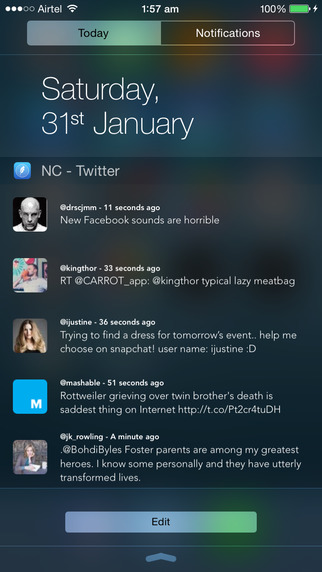
NC - Twitter Widget for Notification Center 1.1 by Apps Genie Limited lets users see their last 5 tweets or mentions via the Today tab of the Notification Center, or on the lock screen. And since NC automatically refreshes every time the Notification Center opens, users always know that they're getting the latest information from their Twitter account. This innovative app has been hailed as the best Notification Center widget for Twitter.
London, United Kingdom - iPhone users who are fed up with having to quit an app, unlock their device, or even consider jailbreaking their device simply to stay in touch with the Twitterverse, can now solve their problem by downloading NC - Twitter Widget for Notification Center (a.k.a. "NC") by Apps Genie Limited.
Hailed by iGeeksblog as "the best Notification Center widget for Twitter", NC lets users see their last 5 tweets via the Today tab of the Notification Center, or on the lock screen (users can change tweets to mentions via the app's settings). And since NC automatically refreshes every time the Notification Center opens, users always know that they're getting the latest information from their Twitter account.
Furthermore, from within any app users can tap a Tweet to mark it as a favorite, retweet it, or open it in their Twitter account. If they don't have the official Twitter app installed, users can have NC launch their Tweetbot or Twitteriffic account instead.
In featuring NC as a "can't-miss" app, Mashable noted: "NC is a clever app that takes advantage of iOS 8's notification center widgets in a unique way. This app adds a quick preview of the most recent tweets from your timeline to your notifications menu". And BGR.com concluded that "NC is a cool iPhone app which found a great new use for widgets that you've never seen before".
Other NC special features include:
* The option to clear the NC widget cache in a single tap
* A sleek, clutter-free interface with crisp, easy-to-read fonts
* Landscape support for all devices
"With NC, users don't have to close an app or unlock their device to check out the latest news, facts, quotes, mentions, and everything else on Twitter. It's all right there on their Today tab or the lock screen," commented Heidi Morsi of Apps Genie Limited.
Device Requirements:
* iPhone, iPad, and iPod touch
* Requires iOS 8.0 or later
* 35.8 MB
Pricing and Availability:
NC - Twitter Widget for Notification Center 1.1 (a.k.a. "NC") is $6.99 USD (or equivalent amount in other currencies) and available worldwide exclusively through the App Store in the Social Networking category.
NC - Twitter Widget for Notification Center 1.1: http://apps.appshout.com/nc-twitter-widget-for-notification-center/
Purchase and Download: https://itunes.apple.com/app/nc-twitter-widget-for-notification/id925691560
YouTube Video (Demo): https://www.youtube.com/watch?v=tNhjXQUOqcY
Screenshot: http://a2.mzstatic.com/us/r30/Purple5/v4/de/f7/85/def785f9-7342-7a79-2109-e83bb98ad574/screen322x572.jpeg
App Icon: http://apps.appshout.com/nc-twitter-widget-for-notification-center/images/icon.png
Based in London, United Kingdom, Apps Genie Limited are rapidly building a portfolio of high quality iOS apps for both the iPhone and iPad platforms. Focussing on games and utilities, their apps have been favourably received by App Store users worldwide. All Material and Software (C) Copyright 2016 Apps Genie Limited. All Rights Reserved. Apple, the Apple logo, iPhone, iPod and iPad are registered trademarks of Apple Inc. in the U.S. and/or other countries. Other trademarks and registered trademarks may be the property of their respective owners.
*******
Link To Article: http://prmac.com/release-id-78672.htm
*******
---------------------------------------------------------------------------------
Note that you can alter delivered distributions at any time.
Login to your account on prMac to alter your channel selection, or to opt-out at any time.
NC - Twitter Widget Lets Users View Tweets via Notification Center - Published on 02/11/16
NC - Twitter Widget for Notification Center 1.1 by Apps Genie Limited lets users see their last 5 tweets or mentions via the Today tab of the Notification Center, or on the lock screen. And since NC automatically refreshes every time the Notification Center opens, users always know that they're getting the latest information from their Twitter account. This innovative app has been hailed as the best Notification Center widget for Twitter.
London, United Kingdom - iPhone users who are fed up with having to quit an app, unlock their device, or even consider jailbreaking their device simply to stay in touch with the Twitterverse, can now solve their problem by downloading NC - Twitter Widget for Notification Center (a.k.a. "NC") by Apps Genie Limited.
Hailed by iGeeksblog as "the best Notification Center widget for Twitter", NC lets users see their last 5 tweets via the Today tab of the Notification Center, or on the lock screen (users can change tweets to mentions via the app's settings). And since NC automatically refreshes every time the Notification Center opens, users always know that they're getting the latest information from their Twitter account.
Furthermore, from within any app users can tap a Tweet to mark it as a favorite, retweet it, or open it in their Twitter account. If they don't have the official Twitter app installed, users can have NC launch their Tweetbot or Twitteriffic account instead.
In featuring NC as a "can't-miss" app, Mashable noted: "NC is a clever app that takes advantage of iOS 8's notification center widgets in a unique way. This app adds a quick preview of the most recent tweets from your timeline to your notifications menu". And BGR.com concluded that "NC is a cool iPhone app which found a great new use for widgets that you've never seen before".
Other NC special features include:
* The option to clear the NC widget cache in a single tap
* A sleek, clutter-free interface with crisp, easy-to-read fonts
* Landscape support for all devices
"With NC, users don't have to close an app or unlock their device to check out the latest news, facts, quotes, mentions, and everything else on Twitter. It's all right there on their Today tab or the lock screen," commented Heidi Morsi of Apps Genie Limited.
Device Requirements:
* iPhone, iPad, and iPod touch
* Requires iOS 8.0 or later
* 35.8 MB
Pricing and Availability:
NC - Twitter Widget for Notification Center 1.1 (a.k.a. "NC") is $6.99 USD (or equivalent amount in other currencies) and available worldwide exclusively through the App Store in the Social Networking category.
NC - Twitter Widget for Notification Center 1.1: http://apps.appshout.com/nc-twitter-widget-for-notification-center/
Purchase and Download: https://itunes.apple.com/app/nc-twitter-widget-for-notification/id925691560
YouTube Video (Demo): https://www.youtube.com/watch?v=tNhjXQUOqcY
Screenshot: http://a2.mzstatic.com/us/r30/Purple5/v4/de/f7/85/def785f9-7342-7a79-2109-e83bb98ad574/screen322x572.jpeg
App Icon: http://apps.appshout.com/nc-twitter-widget-for-notification-center/images/icon.png

Based in London, United Kingdom, Apps Genie Limited are rapidly building a portfolio of high quality iOS apps for both the iPhone and iPad platforms. Focussing on games and utilities, their apps have been favourably received by App Store users worldwide. All Material and Software (C) Copyright 2016 Apps Genie Limited. All Rights Reserved. Apple, the Apple logo, iPhone, iPod and iPad are registered trademarks of Apple Inc. in the U.S. and/or other countries. Other trademarks and registered trademarks may be the property of their respective owners.
*******
Link To Article: http://prmac.com/release-id-78672.htm
*******
---------------------------------------------------------------------------------
Note that you can alter delivered distributions at any time.
Login to your account on prMac to alter your channel selection, or to opt-out at any time.
Now Available: The new Silverstack 5
A new article has been published at prMac.
Now Available: The new Silverstack 5 - Published on 02/11/16
Pomfort today announces Silverstack 5, a major upgrade to its flagship product. Featuring the automated matching of media and color information in one clip library, Silverstack significantly facilitates and accelerates workflows in film productions of all sizes. Version 5 focuses on the evolving role color occupies in today's film production workflows and includes essential features that make it extremely easy to manage and create looks in combination with source media on set and beyond.
Munich, Germany - Pomfort, a global provider of professional software solutions for media and color management in motion pictures and broadcast production, today is proud to announce the release of Silverstack 5, a major upgrade to its flagship product. The new version 5 focuses on the evolving role color occupies in today's film production workflows and includes essential features that make it extremely easy to manage and create looks in combination with source media on set and beyond.
Silverstack is the clever software for media management that now also performs tasks to efficiently supply looks for QC, dailies creation, and for editorial. Featuring the automated matching of media and color information in one clip library, Silverstack significantly facilitates and accelerates workflows in film productions of all sizes. Features like the new grading controls, the import option for single looks or archives from LiveGrade or other tools, the extensive matching wizard, and the customizable reports now with color information, significantly help the production team in their daily activities.
Silverstack's powerful integration with common third-party tools like DaVinci Resolve or AVID Media Composer enable to transfer media and color information in a streamlined way so that customers do not waste time anymore going through confusing paper stacks. In addition, the opportunity to generate customizable clip reports with just a few clicks gives the entire production team a quick and detailed overview about all relevant production data and hereby tremendously supports them in their creative processes.
The newly built-in output for HD-SDI monitoring meets on-set staff's common requirements for checking source material. Silverstack XT enables teams to review clips in full 10-bit quality by using HD-SDI playout devices from Blackmagic Design (with AJA support coming soon). Furthermore, frame lines can be used to display clips with a variety of aspect ratios in the Silverstack Media Player, on HD-SDI monitors, and for the transcoded clips.
Silverstack has been one of the leading tools for media management in film productions over the last years, and has been used on thousands of feature films, television projects, and commercials such as Steve Jobs, Ant Man and many more.
"We have been Silverstack users for years, and it is impressive to experience how every upgrade facilitates the way how we are able to manage media and looks across teams or individually," says Matthieu Straub, onset workflow specialist at Be4Post in Paris. "I very much like the integration with LiveGrade that significantly increases the productivity working with colors at the film set."
New Features in Silverstack 5:
* Extensive look management and color grading functionalities
* A dynamic look library that seamlessly integrates with LiveGrade Pro
* Improved capabilities to transfer clip and color information to common dailies tools
* Advanced QC enhancements that now include professional HD-SDI monitoring
* Frame lines with options for different aspect ratios
"The feedback for Silverstack v5 related to look management features has been overwhelming already in the beta phase. Customers are thrilled with the option to handle clip and look information in one library", says Patrick Renner, product manager at Pomfort. "This really fastens production processes and enables frictionless transfers of all necessary data to subsequent production steps such as dailies creation. Unlike other tools Silverstack is a software that enables open media workflows so that customers now have even more options to work on their feature films, TV episodes, and commercials."
System Requirements:
* Intel Mac with Mac OS X 10.9 or higher
Pricing and Availability:
A yearly subscription for Silverstack can be purchased for $399 USD / 349 EUR, the yearly subscription for Silverstack XT comes at $599 USD / 529 EUR. Pomfort also offers the possibility to rent Silverstack and Silverstack XT for the duration of 14 days / one month / two months. Silverstack XT is now also available as a bundle offer with LiveGrade Pro. Silverstack 5 can be acquired at the Pomfort webstore and through authorized Pomfort resellers worldwide. A 14-day trial version is available as a free download.
Pomfort: http://pomfort.com
Silverstack 5: http://pomfort.com/silverstack/
Try Silverstack: http://pomfort.com/silverstack/try.html
Purchase: http://pomfort.com/store
Media Assets: http://pomfort.com/press
For more than 6 years, Pomfort has been one of the upcoming companies for information technology in the field of professional film production. Pomfort specializes in developing high-quality and cost-effective software products for file-based camera workflows. Customers in more than 80 countries work with Pomfort's innovative products. From film set to postproduction Pomfort enables film production teams to efficiently manage media and colors. Pomfort is internationally renowned for its well designed products Silverstack and LiveGrade. Copyright (C) 2015 Pomfort. All Rights Reserved. Apple, the Apple logo, Mac OS X, iPhone, iPad, iPod and Macintosh are registered trademarks of Apple Inc. in the U.S. and/or other countries.
*******
Link To Article: http://prmac.com/release-id-78671.htm
*******
---------------------------------------------------------------------------------
Note that you can alter delivered distributions at any time.
Login to your account on prMac to alter your channel selection, or to opt-out at any time.
Now Available: The new Silverstack 5 - Published on 02/11/16
Pomfort today announces Silverstack 5, a major upgrade to its flagship product. Featuring the automated matching of media and color information in one clip library, Silverstack significantly facilitates and accelerates workflows in film productions of all sizes. Version 5 focuses on the evolving role color occupies in today's film production workflows and includes essential features that make it extremely easy to manage and create looks in combination with source media on set and beyond.
Munich, Germany - Pomfort, a global provider of professional software solutions for media and color management in motion pictures and broadcast production, today is proud to announce the release of Silverstack 5, a major upgrade to its flagship product. The new version 5 focuses on the evolving role color occupies in today's film production workflows and includes essential features that make it extremely easy to manage and create looks in combination with source media on set and beyond.
Silverstack is the clever software for media management that now also performs tasks to efficiently supply looks for QC, dailies creation, and for editorial. Featuring the automated matching of media and color information in one clip library, Silverstack significantly facilitates and accelerates workflows in film productions of all sizes. Features like the new grading controls, the import option for single looks or archives from LiveGrade or other tools, the extensive matching wizard, and the customizable reports now with color information, significantly help the production team in their daily activities.
Silverstack's powerful integration with common third-party tools like DaVinci Resolve or AVID Media Composer enable to transfer media and color information in a streamlined way so that customers do not waste time anymore going through confusing paper stacks. In addition, the opportunity to generate customizable clip reports with just a few clicks gives the entire production team a quick and detailed overview about all relevant production data and hereby tremendously supports them in their creative processes.
The newly built-in output for HD-SDI monitoring meets on-set staff's common requirements for checking source material. Silverstack XT enables teams to review clips in full 10-bit quality by using HD-SDI playout devices from Blackmagic Design (with AJA support coming soon). Furthermore, frame lines can be used to display clips with a variety of aspect ratios in the Silverstack Media Player, on HD-SDI monitors, and for the transcoded clips.
Silverstack has been one of the leading tools for media management in film productions over the last years, and has been used on thousands of feature films, television projects, and commercials such as Steve Jobs, Ant Man and many more.
"We have been Silverstack users for years, and it is impressive to experience how every upgrade facilitates the way how we are able to manage media and looks across teams or individually," says Matthieu Straub, onset workflow specialist at Be4Post in Paris. "I very much like the integration with LiveGrade that significantly increases the productivity working with colors at the film set."
New Features in Silverstack 5:
* Extensive look management and color grading functionalities
* A dynamic look library that seamlessly integrates with LiveGrade Pro
* Improved capabilities to transfer clip and color information to common dailies tools
* Advanced QC enhancements that now include professional HD-SDI monitoring
* Frame lines with options for different aspect ratios
"The feedback for Silverstack v5 related to look management features has been overwhelming already in the beta phase. Customers are thrilled with the option to handle clip and look information in one library", says Patrick Renner, product manager at Pomfort. "This really fastens production processes and enables frictionless transfers of all necessary data to subsequent production steps such as dailies creation. Unlike other tools Silverstack is a software that enables open media workflows so that customers now have even more options to work on their feature films, TV episodes, and commercials."
System Requirements:
* Intel Mac with Mac OS X 10.9 or higher
Pricing and Availability:
A yearly subscription for Silverstack can be purchased for $399 USD / 349 EUR, the yearly subscription for Silverstack XT comes at $599 USD / 529 EUR. Pomfort also offers the possibility to rent Silverstack and Silverstack XT for the duration of 14 days / one month / two months. Silverstack XT is now also available as a bundle offer with LiveGrade Pro. Silverstack 5 can be acquired at the Pomfort webstore and through authorized Pomfort resellers worldwide. A 14-day trial version is available as a free download.
Pomfort: http://pomfort.com
Silverstack 5: http://pomfort.com/silverstack/
Try Silverstack: http://pomfort.com/silverstack/try.html
Purchase: http://pomfort.com/store
Media Assets: http://pomfort.com/press
For more than 6 years, Pomfort has been one of the upcoming companies for information technology in the field of professional film production. Pomfort specializes in developing high-quality and cost-effective software products for file-based camera workflows. Customers in more than 80 countries work with Pomfort's innovative products. From film set to postproduction Pomfort enables film production teams to efficiently manage media and colors. Pomfort is internationally renowned for its well designed products Silverstack and LiveGrade. Copyright (C) 2015 Pomfort. All Rights Reserved. Apple, the Apple logo, Mac OS X, iPhone, iPad, iPod and Macintosh are registered trademarks of Apple Inc. in the U.S. and/or other countries.
*******
Link To Article: http://prmac.com/release-id-78671.htm
*******
---------------------------------------------------------------------------------
Note that you can alter delivered distributions at any time.
Login to your account on prMac to alter your channel selection, or to opt-out at any time.
Mozart 2 Pro for Mac OS released - Popular Music Reading Game
A new article has been published at prMac.
Mozart 2 Pro for Mac OS released - Popular Music Reading Game - Published on 02/11/16
New York based RoGame Software announces the release of Mozart 2 Pro for Mac OS. Mozart helps musicians of all levels improve their music reading skills in an entertaining casual game. The new pro version features an overhauled game engine with 5 additional instruments, 235 assignable instrument sounds, new game characters, full support for El Capitan and looks better than ever. Over 25 new features make Mozart 2 Pro the must-have music reading game for students and professionals alike.
Rochester, New York - RoGame Software today is proud to announce the release of Mozart 2 Pro (v1.0.1), an important update to their popular music learning application for OS X. The biggest all-around change in this new version of the Mozart music reading game has to do with the game logic itself with the addition of half and quarter notes. These are introduced in realistic time-based subdivisions and appear exactly as they would in real sheet music. Ranges, another main focus of the game, are now announced in music notation at the beginning of each new round. They are reflected in the instrument's scale highlights as well. So using the piano instrument for example one now sees level 1 announced as ranging from middle C to g4 in music notation with exactly 5 gum drops on the keyboard indicating where those notes are located.
Clef selection in Mozart 2 Pro was completely reconfigured and is now instrument based. Most instruments have 2 - 3 possible clefs and some up to 5. The game also employs "octave-dropped" treble and bass clefs where indicated. Finally a new grand staff option has been implemented as well and is available in several of the game's instruments. Clef selection itself has been moved out of settings and is now handled by simply clicking the current clef in the notation view.
Also new in Mozart 2 Pro is a feature called "Do Over". Do Over in essence allows the player to repeat a game exactly. Since there are only 3 initial life points a single mistake can easily cost the game. So with the new Do Over feature the player can now tap the Do Over button, load the last game and give it another shot. Multiple do overs in a row are supported and will repeat a game not only with the exact pitches but with all game characters, jump hoops and all abandon. Do Over - new in Mozart 2 Pro.
Beside half and quarter notes another two game characters were added. The first of these is called "Double Time". The rotating Double Time cubes occur early on in the game and if identified incorrectly will double up the speed of the note movement for rest of the level mimicking the Jazz ensemble tradition of the same name. The second new game character occurs in the upper levels of the game and is simply called "Detonator". When a detonator is identified correctly it will clear the entire staff by detonating all remaining notes in quick succession. From an educational point of view quite ingenious because most player will wait until the last moment to clear as many notes as possible which means pre-positioning their fingers and reading those notes rather quickly.
Instruments are essential in the Mozart music reading game and Mozart 2 Pro adds the entire classical string instrument family. Violin, viola, cello and double bass - all feature instrument specific clef choices and ranges. As an added plus some some lesser common options that are already available for instruments like the guitar were implemented as well. As such all of these instruments support left-handed stringing and maybe more importantly string detuning. String detuning or scordatura can throw the most experienced reader for a loop, yet there are many works in the classical repertoire that require one or more strings to be tuned differently. With Mozart 2 Pro scordatura as well as reading in alternate clefs can now be practiced in a casual game for the entire classical string family. Yet another new instrument added is the 5-string Banjo. It also comes with string detuning and support for left-handed stringing.
Mozart 2 Pro not only adds instruments, it also changes what they can do. One example of that is called "Missed Note Highlighting". Any diatonic note that vanishes after hitting the clef area is now highlighted on the instrument for a second or two so one knows what it was the next time around. Another new instrument feature is the note info view. Between games any key or position played on an instrument now displays a small window with that note in music notation. A great way to look up any note one might have missed during the game.
There are many more new additions in this new version of the music reading game like the remaining notes indicator that lets one know how many notes are left in a level. Or the many added animations, the completely revamped mandolin instrument, the last score highlighting in the top ten list or the new instrument graphics in general. One final tidbit however has to do with sound. The new Mozart 2 Pro app comes with 235 assignable instrument sounds, no add-ons needed!
Instruments:
* Letters (C, D, E), Solfege (Do, Re, Mi)
* Banjo, Bass, Cello, Double Bass, Guitar, Mandolin, Piano, Viola, Violin
Quick Features:
* Much improved game play
* 235 assignable instrument sounds
* Half and quarter notes plus new game characters
* Do Over feature
* Missed note highlighting
* Note Info Views
* Grand staff and "octave-dropped" treble and bass clefs
* Improved range visualization
* MIDI support for class-compliant devices
* New documentation website
* Supports El Capitan
Mozart is a fantastic game that can help anybody improve their music reading skills and the new pro version adds a huge amount of new features and improvements. Designed for the beginner as well as the professional, Mozart 2 Pro is an excellent tool towards better reading in 12 minor and major keys, for practicing Solfege, unfamiliar keys, tunings and clefs or just to have fun while learning. Guitarists will find the Training Mode a valuable tool to study unfamiliar positions or maybe explore new open tunings. Pianists may want to improve on bass clef reading. And the upper levels of the game are challenging for the most advanced musician with double-flats, double-sharps and occasional key signature switch.
Language Support:
Mozart 2 Pro is localized into Chinese, Danish, Dutch, English, French, German, Italian, Japanese, Korean, Norwegian, Portuguese, Russian, Spanish and Swedish languages.
System Requirements:
* Mac OS 10.10 or later
* 64-bit processor
* 28.3 MB
Pricing and Availability:
Mozart 2 Pro (v1.0.1) costs $14.99 USD (or equivalent amount in other currencies) and is available worldwide exclusively through the Mac App Store in the education and music categories. Educational discounts are available.
RoGame Software: http://www.rogame.com
Mozart 2 Pro (v1.0.1): http://www.rogame.com/mozart.html
Direct Download Link: https://itunes.apple.com/app/mozart-2-pro/id1080682026
Screenshot: http://rogame.com/a/img/moza/macos/_fullSize/01-mozartMac.jpg
App Icon: http://www.rogame.com/a/img/moza/mozart2_1024.jpg
RoGame Software is located in Rochester, New York and provides quality software for iOS and Mac OS X systems. All Material and Software (C) Copyright 2016 RoGame Software / All Rights Reserved. Apple, the Apple logo, Mac OS X, iPhone, iPod, iPad and Macintosh are registered trademarks of Apple Inc. in the U.S. and/or other countries. Other trademarks and registered trademarks may be the property of their respective owners.
*******
Link To Article: http://prmac.com/release-id-78667.htm
*******
---------------------------------------------------------------------------------
Note that you can alter delivered distributions at any time.
Login to your account on prMac to alter your channel selection, or to opt-out at any time.
Mozart 2 Pro for Mac OS released - Popular Music Reading Game - Published on 02/11/16
New York based RoGame Software announces the release of Mozart 2 Pro for Mac OS. Mozart helps musicians of all levels improve their music reading skills in an entertaining casual game. The new pro version features an overhauled game engine with 5 additional instruments, 235 assignable instrument sounds, new game characters, full support for El Capitan and looks better than ever. Over 25 new features make Mozart 2 Pro the must-have music reading game for students and professionals alike.
Rochester, New York - RoGame Software today is proud to announce the release of Mozart 2 Pro (v1.0.1), an important update to their popular music learning application for OS X. The biggest all-around change in this new version of the Mozart music reading game has to do with the game logic itself with the addition of half and quarter notes. These are introduced in realistic time-based subdivisions and appear exactly as they would in real sheet music. Ranges, another main focus of the game, are now announced in music notation at the beginning of each new round. They are reflected in the instrument's scale highlights as well. So using the piano instrument for example one now sees level 1 announced as ranging from middle C to g4 in music notation with exactly 5 gum drops on the keyboard indicating where those notes are located.
Clef selection in Mozart 2 Pro was completely reconfigured and is now instrument based. Most instruments have 2 - 3 possible clefs and some up to 5. The game also employs "octave-dropped" treble and bass clefs where indicated. Finally a new grand staff option has been implemented as well and is available in several of the game's instruments. Clef selection itself has been moved out of settings and is now handled by simply clicking the current clef in the notation view.
Also new in Mozart 2 Pro is a feature called "Do Over". Do Over in essence allows the player to repeat a game exactly. Since there are only 3 initial life points a single mistake can easily cost the game. So with the new Do Over feature the player can now tap the Do Over button, load the last game and give it another shot. Multiple do overs in a row are supported and will repeat a game not only with the exact pitches but with all game characters, jump hoops and all abandon. Do Over - new in Mozart 2 Pro.
Beside half and quarter notes another two game characters were added. The first of these is called "Double Time". The rotating Double Time cubes occur early on in the game and if identified incorrectly will double up the speed of the note movement for rest of the level mimicking the Jazz ensemble tradition of the same name. The second new game character occurs in the upper levels of the game and is simply called "Detonator". When a detonator is identified correctly it will clear the entire staff by detonating all remaining notes in quick succession. From an educational point of view quite ingenious because most player will wait until the last moment to clear as many notes as possible which means pre-positioning their fingers and reading those notes rather quickly.
Instruments are essential in the Mozart music reading game and Mozart 2 Pro adds the entire classical string instrument family. Violin, viola, cello and double bass - all feature instrument specific clef choices and ranges. As an added plus some some lesser common options that are already available for instruments like the guitar were implemented as well. As such all of these instruments support left-handed stringing and maybe more importantly string detuning. String detuning or scordatura can throw the most experienced reader for a loop, yet there are many works in the classical repertoire that require one or more strings to be tuned differently. With Mozart 2 Pro scordatura as well as reading in alternate clefs can now be practiced in a casual game for the entire classical string family. Yet another new instrument added is the 5-string Banjo. It also comes with string detuning and support for left-handed stringing.
Mozart 2 Pro not only adds instruments, it also changes what they can do. One example of that is called "Missed Note Highlighting". Any diatonic note that vanishes after hitting the clef area is now highlighted on the instrument for a second or two so one knows what it was the next time around. Another new instrument feature is the note info view. Between games any key or position played on an instrument now displays a small window with that note in music notation. A great way to look up any note one might have missed during the game.
There are many more new additions in this new version of the music reading game like the remaining notes indicator that lets one know how many notes are left in a level. Or the many added animations, the completely revamped mandolin instrument, the last score highlighting in the top ten list or the new instrument graphics in general. One final tidbit however has to do with sound. The new Mozart 2 Pro app comes with 235 assignable instrument sounds, no add-ons needed!
Instruments:
* Letters (C, D, E), Solfege (Do, Re, Mi)
* Banjo, Bass, Cello, Double Bass, Guitar, Mandolin, Piano, Viola, Violin
Quick Features:
* Much improved game play
* 235 assignable instrument sounds
* Half and quarter notes plus new game characters
* Do Over feature
* Missed note highlighting
* Note Info Views
* Grand staff and "octave-dropped" treble and bass clefs
* Improved range visualization
* MIDI support for class-compliant devices
* New documentation website
* Supports El Capitan
Mozart is a fantastic game that can help anybody improve their music reading skills and the new pro version adds a huge amount of new features and improvements. Designed for the beginner as well as the professional, Mozart 2 Pro is an excellent tool towards better reading in 12 minor and major keys, for practicing Solfege, unfamiliar keys, tunings and clefs or just to have fun while learning. Guitarists will find the Training Mode a valuable tool to study unfamiliar positions or maybe explore new open tunings. Pianists may want to improve on bass clef reading. And the upper levels of the game are challenging for the most advanced musician with double-flats, double-sharps and occasional key signature switch.
Language Support:
Mozart 2 Pro is localized into Chinese, Danish, Dutch, English, French, German, Italian, Japanese, Korean, Norwegian, Portuguese, Russian, Spanish and Swedish languages.
System Requirements:
* Mac OS 10.10 or later
* 64-bit processor
* 28.3 MB
Pricing and Availability:
Mozart 2 Pro (v1.0.1) costs $14.99 USD (or equivalent amount in other currencies) and is available worldwide exclusively through the Mac App Store in the education and music categories. Educational discounts are available.
RoGame Software: http://www.rogame.com
Mozart 2 Pro (v1.0.1): http://www.rogame.com/mozart.html
Direct Download Link: https://itunes.apple.com/app/mozart-2-pro/id1080682026
Screenshot: http://rogame.com/a/img/moza/macos/_fullSize/01-mozartMac.jpg

App Icon: http://www.rogame.com/a/img/moza/mozart2_1024.jpg
RoGame Software is located in Rochester, New York and provides quality software for iOS and Mac OS X systems. All Material and Software (C) Copyright 2016 RoGame Software / All Rights Reserved. Apple, the Apple logo, Mac OS X, iPhone, iPod, iPad and Macintosh are registered trademarks of Apple Inc. in the U.S. and/or other countries. Other trademarks and registered trademarks may be the property of their respective owners.
*******
Link To Article: http://prmac.com/release-id-78667.htm
*******
---------------------------------------------------------------------------------
Note that you can alter delivered distributions at any time.
Login to your account on prMac to alter your channel selection, or to opt-out at any time.
Creator of greeting cards app with over 25M users has announced GIFcards
A new article has been published at prMac.
Creator of greeting cards app with over 25M users has announced GIFcards - Published on 02/11/16
Dmytro Semiriazhko, creator of biggest Russian greetings cards app with Pinxter inc., today announces the GIFcards app especially for St. Valentine's Day. GIFcards 1.0.1 enables anyone to use their iPhone as a drawing pad and converts the result into an animated GIF. It can be shared by iMessage or copy and paste into any application that supports GIF, such as Slack or Facebook messenger. All content is 100% user-generated and sorted by the amounts of likes the doogle's receive.
Alexandria, Virginia - Do you miss the cards we would exchange in elementary school on Valentine's day? Well now there is a digital version, by using GIFs you draw! Dmytro Semiriazhko - Creator of Biggest Russian greetings cards app with over 25M users has announced with Pinxter inc. the GIFcards app especially for St. Valentine's Day. The app enables users to draw and share animated doodles with others, which is a very creative way to let others know how they feel about them - especially with Valentines Day coming up soon.
Our developers gave us an excellent opportunity to create something really special by just running your finger on the iPhone screen. The app remembers your touches and transforms the image into a GIF. Share it by iMessage or copy and paste this in any application that supports GIF such as Slack or Facebook messenger.
The drawings are also made available to everyone within the application itself. This means the application is a hundred percent user-generated content and all the newest drawings by the users are all available in the Hot tab wherein all of these are sorted by the number of likes. You can find there is something for everyone or share your own personal message! This is a highly functional, innovative and most of all unique Valentine greeting card that can make someone happy and delighted this day of hearts.
Device Requirements:
* iPhone, iPad, and iPod touch
* Requires iOS 9.0 or later
* 8.6 MB
Pricing and Availability:
GIFcards 1.0.1 is Free and available worldwide exclusively through the App Store in the Photo & Video category.
Pinxter Digital: http://pinxter.me
GIFcards 1.0.1: https://itunes.apple.com/app/gifcards-draw-share-animated/id1080789671
GIF Examples (zip): https://www.dropbox.com/sh/4uv86plf5yypczn/AAAymENpHDZIFiJ3L56X0fIya?dl=1
Press Kit (zip): https://www.dropbox.com/sh/sm8vucn1mj46t0s/AAA2j50sy-RYFm3svSJn-ZV0a?dl=1
Video: https://www.dropbox.com/s/ulcwl2q61lao8uh/GIFcards.mp4?dl=1
Banner: https://www.dropbox.com/s/oj2lx8z7ulgvgsr/banner_01.jpg?dl=1
At Pinxter, we create innovative digital mobile experiences that drive a powerful personal connection to your brand. In today's fast paced market, consumers expect to manage brand relationships with effective mobile applications, to engage and to be inspired, not to look at information as a passive participant. With our extensive library of proprietary frameworks on our platform, Pinxter can navigate brands through the process much faster and with far greater efficiencies. As your brand's strategic digital partner, and the "Best Lifestyle App" developer in the Apple Store, our team will design, create, optimize, launch and continuously enhance your market leading mobile application; not just build you an app. All Material and Software (C) Copyright 2016 Pinxter Inc. All Rights Reserved. Apple, the Apple logo, iPhone, iPod and iPad are registered trademarks of Apple Inc. in the U.S. and/or other countries. Other trademarks and registered trademarks may be the property of their
respective owners.
*******
Link To Article: http://prmac.com/release-id-78666.htm
*******
---------------------------------------------------------------------------------
Note that you can alter delivered distributions at any time.
Login to your account on prMac to alter your channel selection, or to opt-out at any time.
Creator of greeting cards app with over 25M users has announced GIFcards - Published on 02/11/16
Dmytro Semiriazhko, creator of biggest Russian greetings cards app with Pinxter inc., today announces the GIFcards app especially for St. Valentine's Day. GIFcards 1.0.1 enables anyone to use their iPhone as a drawing pad and converts the result into an animated GIF. It can be shared by iMessage or copy and paste into any application that supports GIF, such as Slack or Facebook messenger. All content is 100% user-generated and sorted by the amounts of likes the doogle's receive.
Alexandria, Virginia - Do you miss the cards we would exchange in elementary school on Valentine's day? Well now there is a digital version, by using GIFs you draw! Dmytro Semiriazhko - Creator of Biggest Russian greetings cards app with over 25M users has announced with Pinxter inc. the GIFcards app especially for St. Valentine's Day. The app enables users to draw and share animated doodles with others, which is a very creative way to let others know how they feel about them - especially with Valentines Day coming up soon.
Our developers gave us an excellent opportunity to create something really special by just running your finger on the iPhone screen. The app remembers your touches and transforms the image into a GIF. Share it by iMessage or copy and paste this in any application that supports GIF such as Slack or Facebook messenger.
The drawings are also made available to everyone within the application itself. This means the application is a hundred percent user-generated content and all the newest drawings by the users are all available in the Hot tab wherein all of these are sorted by the number of likes. You can find there is something for everyone or share your own personal message! This is a highly functional, innovative and most of all unique Valentine greeting card that can make someone happy and delighted this day of hearts.
Device Requirements:
* iPhone, iPad, and iPod touch
* Requires iOS 9.0 or later
* 8.6 MB
Pricing and Availability:
GIFcards 1.0.1 is Free and available worldwide exclusively through the App Store in the Photo & Video category.
Pinxter Digital: http://pinxter.me
GIFcards 1.0.1: https://itunes.apple.com/app/gifcards-draw-share-animated/id1080789671
GIF Examples (zip): https://www.dropbox.com/sh/4uv86plf5yypczn/AAAymENpHDZIFiJ3L56X0fIya?dl=1
Press Kit (zip): https://www.dropbox.com/sh/sm8vucn1mj46t0s/AAA2j50sy-RYFm3svSJn-ZV0a?dl=1
Video: https://www.dropbox.com/s/ulcwl2q61lao8uh/GIFcards.mp4?dl=1
Banner: https://www.dropbox.com/s/oj2lx8z7ulgvgsr/banner_01.jpg?dl=1

At Pinxter, we create innovative digital mobile experiences that drive a powerful personal connection to your brand. In today's fast paced market, consumers expect to manage brand relationships with effective mobile applications, to engage and to be inspired, not to look at information as a passive participant. With our extensive library of proprietary frameworks on our platform, Pinxter can navigate brands through the process much faster and with far greater efficiencies. As your brand's strategic digital partner, and the "Best Lifestyle App" developer in the Apple Store, our team will design, create, optimize, launch and continuously enhance your market leading mobile application; not just build you an app. All Material and Software (C) Copyright 2016 Pinxter Inc. All Rights Reserved. Apple, the Apple logo, iPhone, iPod and iPad are registered trademarks of Apple Inc. in the U.S. and/or other countries. Other trademarks and registered trademarks may be the property of their
respective owners.
*******
Link To Article: http://prmac.com/release-id-78666.htm
*******
---------------------------------------------------------------------------------
Note that you can alter delivered distributions at any time.
Login to your account on prMac to alter your channel selection, or to opt-out at any time.
Meet Play Love official launch - the world's first online dating game
A new article has been published at prMac.
Meet Play Love official launch - the world's first online dating game - Published on 02/11/16
Digicub Ltd. today announces Meet Play Love 1.10, an update to their popular game title for iOS devices. This Valentine's Day, Meet Play Love brings a unique and fresh approach to finding love online. In an online virtual world where everyone is welcome, players create an avatar from millions of possible combinations, build the perfect likeness, or become someone else, then go online, and meet other players. Version 1.10 offers improved search, chat, mini-game tweaks, fixes minor bugs, and more.
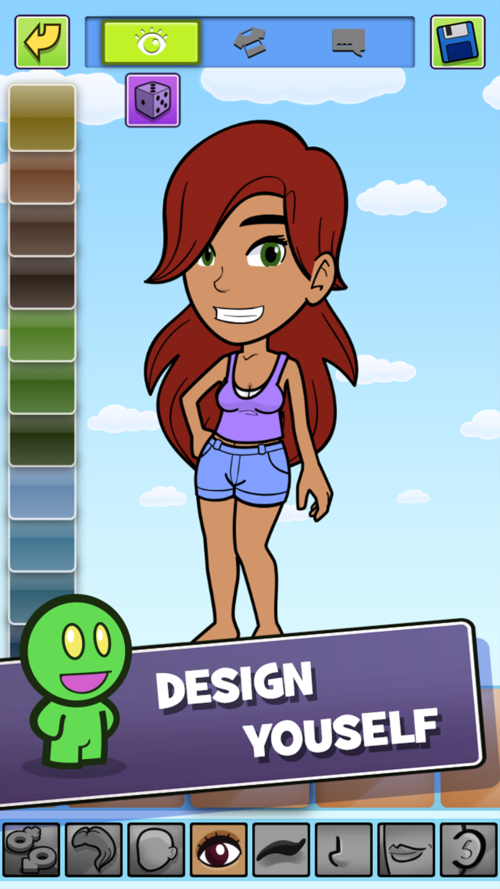
London, United Kingdom - Digicub Ltd. today is thrilled to announce the release of Meet Play Love 1.10, an update to their popular game title for iPhone, iPad and iPod touch devices. This Valentine's Day, Meet Play Love brings a unique and fresh approach to finding love online, without the selfies. Meet Play Love is an online virtual world where everyone is welcome. Create an avatar from millions of possible combinations - build the perfect likeness, or become someone else - then go online, and meet other players. It's an unique concept that has already attracted thousands of players in a public beta.
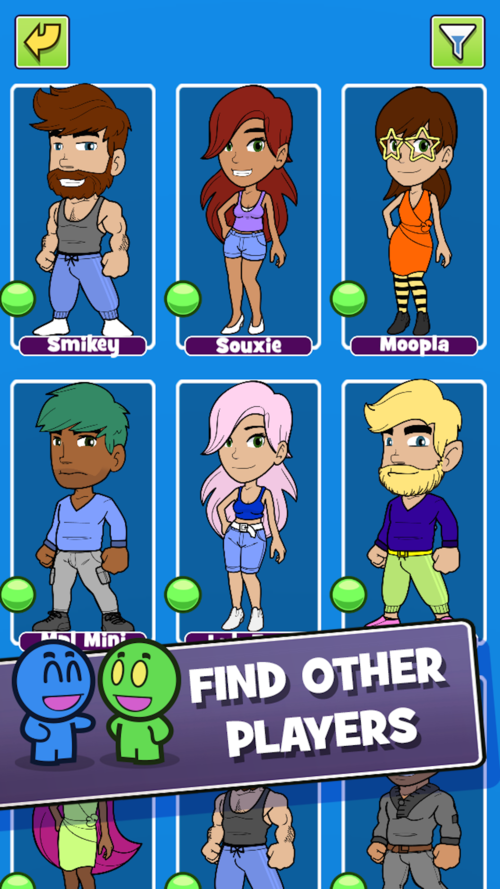
Users can search for other players nearby and from around the world, or discover matches via the in-game 'Cinder' app. Send love to other players by playing a series of simple and addictive mini-games, and receive love in return. Chat, exchange pictures and grow a relationship together. Meet Play Love welcomes all genders and sexualities, and doesn't force players to conform.
"There's a certain thrill to online relationships that doesn't always translate to the real world," explained Michael Othen, creator. "I wanted to make a game that embraces that feeling. People may meet up in real life, but Meet Play Love lets you connect and express yourself in a virtual space without judgement or pressure."
The Meet Play Love beta saw thousands of players coming together online, making friends and building online relationships. This release brings Meet Play Love back online for everyone to play. Version 1.10 offers major performance increases with improved search, improved chat, mini-game tweaks, fixes minor bugs, and more.
Device Requirements:
* iPhone, iPad, and iPod touch
* Requires iOS 8.0 or later
* 146 MB
Pricing and Availability:
Meet Play Love 1.10 is Free and available worldwide exclusively through the App Store in the Games category.
Digicub: http://www.digicub.com
Meet Play Love 1.10: http://www.digicub.com/games-1/#/page/
Download from iTunes: https://itunes.apple.com/app/meet-play-love-online-social/id973072951
Screenshot 1: http://static1.squarespace.com/static/560eafefe4b0cd75a6b30ce2/5613a143e4b03787be6f0787/5613a149e4b03787be6f0791/1444127051345/Image2iPhone6%2B.png?format=500w
Screenshot 2: http://static1.squarespace.com/static/560eafefe4b0cd75a6b30ce2/5613a143e4b03787be6f0787/5613a14fe4b0f47fe04c9085/1444127057151/Screen+Shot+2015-06-26+at+18.10.17.png?format=500w
App Icon: http://www.minigayboyfriend.com/Images/app1024.png
Established in 2011, Digicub creates games for the iOS platform and has achieved over 3 million downloads for its 'Mini' dating games series. All Material and Software (C) Copyright 2016 Digicub Ltd. All Rights Reserved. Apple, the Apple logo, iPhone, iPod and iPad are registered trademarks of Apple Inc. in the U.S. and/or other countries. Other trademarks and registered trademarks may be the property of their respective owners.
*******
Link To Article: http://prmac.com/release-id-78665.htm
*******
---------------------------------------------------------------------------------
Note that you can alter delivered distributions at any time.
Login to your account on prMac to alter your channel selection, or to opt-out at any time.
Meet Play Love official launch - the world's first online dating game - Published on 02/11/16
Digicub Ltd. today announces Meet Play Love 1.10, an update to their popular game title for iOS devices. This Valentine's Day, Meet Play Love brings a unique and fresh approach to finding love online. In an online virtual world where everyone is welcome, players create an avatar from millions of possible combinations, build the perfect likeness, or become someone else, then go online, and meet other players. Version 1.10 offers improved search, chat, mini-game tweaks, fixes minor bugs, and more.
London, United Kingdom - Digicub Ltd. today is thrilled to announce the release of Meet Play Love 1.10, an update to their popular game title for iPhone, iPad and iPod touch devices. This Valentine's Day, Meet Play Love brings a unique and fresh approach to finding love online, without the selfies. Meet Play Love is an online virtual world where everyone is welcome. Create an avatar from millions of possible combinations - build the perfect likeness, or become someone else - then go online, and meet other players. It's an unique concept that has already attracted thousands of players in a public beta.
Users can search for other players nearby and from around the world, or discover matches via the in-game 'Cinder' app. Send love to other players by playing a series of simple and addictive mini-games, and receive love in return. Chat, exchange pictures and grow a relationship together. Meet Play Love welcomes all genders and sexualities, and doesn't force players to conform.
"There's a certain thrill to online relationships that doesn't always translate to the real world," explained Michael Othen, creator. "I wanted to make a game that embraces that feeling. People may meet up in real life, but Meet Play Love lets you connect and express yourself in a virtual space without judgement or pressure."
The Meet Play Love beta saw thousands of players coming together online, making friends and building online relationships. This release brings Meet Play Love back online for everyone to play. Version 1.10 offers major performance increases with improved search, improved chat, mini-game tweaks, fixes minor bugs, and more.
Device Requirements:
* iPhone, iPad, and iPod touch
* Requires iOS 8.0 or later
* 146 MB
Pricing and Availability:
Meet Play Love 1.10 is Free and available worldwide exclusively through the App Store in the Games category.
Digicub: http://www.digicub.com
Meet Play Love 1.10: http://www.digicub.com/games-1/#/page/
Download from iTunes: https://itunes.apple.com/app/meet-play-love-online-social/id973072951
Screenshot 1: http://static1.squarespace.com/static/560eafefe4b0cd75a6b30ce2/5613a143e4b03787be6f0787/5613a149e4b03787be6f0791/1444127051345/Image2iPhone6%2B.png?format=500w
Screenshot 2: http://static1.squarespace.com/static/560eafefe4b0cd75a6b30ce2/5613a143e4b03787be6f0787/5613a14fe4b0f47fe04c9085/1444127057151/Screen+Shot+2015-06-26+at+18.10.17.png?format=500w
App Icon: http://www.minigayboyfriend.com/Images/app1024.png

Established in 2011, Digicub creates games for the iOS platform and has achieved over 3 million downloads for its 'Mini' dating games series. All Material and Software (C) Copyright 2016 Digicub Ltd. All Rights Reserved. Apple, the Apple logo, iPhone, iPod and iPad are registered trademarks of Apple Inc. in the U.S. and/or other countries. Other trademarks and registered trademarks may be the property of their respective owners.
*******
Link To Article: http://prmac.com/release-id-78665.htm
*******
---------------------------------------------------------------------------------
Note that you can alter delivered distributions at any time.
Login to your account on prMac to alter your channel selection, or to opt-out at any time.
Pick Your Subject and Learn by Playing Trivia
A new article has been published at prMac.
Pick Your Subject and Learn by Playing Trivia - Published on 02/11/16
Tulsa based iSolution Services today announces Trivia 4 Friends 2.12, an update to their popular mobile quiz game for iOS and Android devices. In Trivia 4 Friends, players can have fun while competing and learning at the same time. With over 25 different categories available, players can play multiple games with varying opponents and varying categories. In version 2.12, players can now select their own question categories when starting a new game session.
Tulsa, Oklahoma - iSolution Services today is pleased to announce the release of Trivia 4 Friends 2.12, an update to their popular mobile quiz game for iOS and Android devices. In Trivia 4 Friends, players can have fun while competing and learning at the same time. In version 2.12, players can now select their own question categories when starting a new game session.
"Instead of developing separate special interest apps, we decided to incorporate multiple categories of questions into one app," explained Larry Poor, co-founder of Tulsa-based iSolution Services LLC. "Instead of players opening separate apps, they can now open one app and play multiple games with varying opponents and varying categories. For example, a player could have one game going on with sports buddies using categories of Basketball, Football, etc. and another game going on with a spouse using categories of Food & Drink, Entertainment, etc."
* Play solo without signing in or play games with up to 4 players
* Leaderboard with weekly and monthly contests
* To avoid embarrassment, question only seen by player not opponent
* Opponent only sees whether player answered right or wrong and which category
* Can play against others without logging into Facebook
* Does not take a lot of time to play
* Play multiple game sessions at one time
* Choose your own game categories
* Earn points for each question answered correctly
* Award Levels based on points
* Chat with your opponents
* Ability to designate favorite players and categories
* Can block specific players
* Easily decline or resign from a game if you do not want to play
* Game Board shows standings
* Player Statistics shows overall progress
Each game session still consists of five categories but now the player starting a new game chooses the categories. Before they were chosen at random. Currently there are over 25 different categories available but others are continually being added. Some of the current categories are Entertainment, Food & Drink, Geography, History, Literature, Science, Sports, and Television. Besides the many individual categories, Category Packages are also available. For example, the "English Football Package" contains categories such as Championships, Managers, Players, and World Cup. As other packages are identified they will be added.
Device Requirements:
* iPhone, iPad, and iPod touch
* Requires iOS 7.1 or later
* 17.3 MB
Pricing and Availability:
Trivia 4 Friends 2.12 is Free and available worldwide through the App Store in the Games category. There is also an Android version available on Google Play.
Trivia 4 Friends 2.12: http://www.trivia4friends.com/
Download from iTunes: https://itunes.apple.com/app/trivia-4-friends/id586675964
Download from Google Play: https://play.google.com/store/apps/details?id=com.igames2go.t4f
YouTube Channel: http://www.youtube.com/trivia4friends
Media Assets: https://www.dropbox.com/sh/kmjf9hgooirjj2l/AAAO_ngsezmpKCL9W7jiAxsba?dl=0
Based in Tulsa, Oklahoma USA, iSolution Services was founded in 2009. The company develops mobile apps and provides various technology services. All Material and Software (C) Copyright 2016 iSolution Services LLC. All Rights Reserved. Apple, the Apple logo, iPhone, iPod and iPad are registered trademarks of Apple Inc. in the U.S. and/or other countries. Other trademarks and registered trademarks may be the property of their respective owners.
*******
Link To Article: http://prmac.com/release-id-78664.htm
*******
---------------------------------------------------------------------------------
Note that you can alter delivered distributions at any time.
Login to your account on prMac to alter your channel selection, or to opt-out at any time.
Pick Your Subject and Learn by Playing Trivia - Published on 02/11/16
Tulsa based iSolution Services today announces Trivia 4 Friends 2.12, an update to their popular mobile quiz game for iOS and Android devices. In Trivia 4 Friends, players can have fun while competing and learning at the same time. With over 25 different categories available, players can play multiple games with varying opponents and varying categories. In version 2.12, players can now select their own question categories when starting a new game session.
Tulsa, Oklahoma - iSolution Services today is pleased to announce the release of Trivia 4 Friends 2.12, an update to their popular mobile quiz game for iOS and Android devices. In Trivia 4 Friends, players can have fun while competing and learning at the same time. In version 2.12, players can now select their own question categories when starting a new game session.
"Instead of developing separate special interest apps, we decided to incorporate multiple categories of questions into one app," explained Larry Poor, co-founder of Tulsa-based iSolution Services LLC. "Instead of players opening separate apps, they can now open one app and play multiple games with varying opponents and varying categories. For example, a player could have one game going on with sports buddies using categories of Basketball, Football, etc. and another game going on with a spouse using categories of Food & Drink, Entertainment, etc."
* Play solo without signing in or play games with up to 4 players
* Leaderboard with weekly and monthly contests
* To avoid embarrassment, question only seen by player not opponent
* Opponent only sees whether player answered right or wrong and which category
* Can play against others without logging into Facebook
* Does not take a lot of time to play
* Play multiple game sessions at one time
* Choose your own game categories
* Earn points for each question answered correctly
* Award Levels based on points
* Chat with your opponents
* Ability to designate favorite players and categories
* Can block specific players
* Easily decline or resign from a game if you do not want to play
* Game Board shows standings
* Player Statistics shows overall progress
Each game session still consists of five categories but now the player starting a new game chooses the categories. Before they were chosen at random. Currently there are over 25 different categories available but others are continually being added. Some of the current categories are Entertainment, Food & Drink, Geography, History, Literature, Science, Sports, and Television. Besides the many individual categories, Category Packages are also available. For example, the "English Football Package" contains categories such as Championships, Managers, Players, and World Cup. As other packages are identified they will be added.
Device Requirements:
* iPhone, iPad, and iPod touch
* Requires iOS 7.1 or later
* 17.3 MB
Pricing and Availability:
Trivia 4 Friends 2.12 is Free and available worldwide through the App Store in the Games category. There is also an Android version available on Google Play.
Trivia 4 Friends 2.12: http://www.trivia4friends.com/
Download from iTunes: https://itunes.apple.com/app/trivia-4-friends/id586675964
Download from Google Play: https://play.google.com/store/apps/details?id=com.igames2go.t4f
YouTube Channel: http://www.youtube.com/trivia4friends
Media Assets: https://www.dropbox.com/sh/kmjf9hgooirjj2l/AAAO_ngsezmpKCL9W7jiAxsba?dl=0
Based in Tulsa, Oklahoma USA, iSolution Services was founded in 2009. The company develops mobile apps and provides various technology services. All Material and Software (C) Copyright 2016 iSolution Services LLC. All Rights Reserved. Apple, the Apple logo, iPhone, iPod and iPad are registered trademarks of Apple Inc. in the U.S. and/or other countries. Other trademarks and registered trademarks may be the property of their respective owners.
*******
Link To Article: http://prmac.com/release-id-78664.htm
*******
---------------------------------------------------------------------------------
Note that you can alter delivered distributions at any time.
Login to your account on prMac to alter your channel selection, or to opt-out at any time.
Subscribe to:
Posts (Atom)