A new article has been published at prMac.
Apps for Professional Word Wizards - Published on 02/15/16
infovole GmbH presents updates of its leading iOS productivity apps. fter 5 years and more than 5 million downloads, the Textkraft app series is an established and well-developed mobile tool for professional writers. New updates are making the apps more universal and comfortable again. The download is free of charge for existing users. Textkraft Professional offers comprehensive writing aids, multilingual offline dictionaries with synonyms, integrated online reference works and more.
Neuss, Germany - After 5 years and more than 5 million downloads, the Textkraft app series is an established and well-developed mobile tool for professional writers. New updates are making the apps more universal and comfortable again. The download is free of charge for existing users.
Textkraft Professional 4
Textkraft Professional for iPad is the universal tool for prolific writers. The app offers comprehensive writing aids, multilingual offline dictionaries with synonyms, integrated online reference works, precise cursor navigation, fast text selection guides and many additional keyboard functions, in addition to a sophisticated document management, access to all major cloud storages, important file formats and many communication features.
The update to version 4 includes Split View and Slide Over multitasking with other apps, a system wide Share Extension for research work and the integration of iOS 9 Spotlight Search. The app is now also optimized for the new iPad Pro, including the enhanced onscreen keyboard and the support of external keyboards.
Other highlights of the app are: 22 languages, switchable without changing the keyboard layout, correction keys, find and replace, text statistics, readability test, access protection, Siri dictation, VoiceOver support, multilingual text to speech, a special font to increase the readability for users with dyslexia, color themes with night mode and a WYSIWYG preview for printing and PDF export. For a limited time Textkraft Professional is available with 50% discount; new customers save $8.00.
Textkraft Pocket 3:
Textkraft Pocket is designed for use with the iPhone and the Apple Watch. The mobile writing app - which is often called "the Swiss Army knife for text" - has more than 100 specialized functions on board to handle text work quickly and easily on the go. The new version adds 3D-Touch Quick Actions for iPhone 6s and 6s Plus, simple access to WebDAV and HTML import. The support of Spotlight Search and the system-wide Share Extension of Textkraft Professional are also available in this release.
The integrated Apple Watch app offers direct access to text documents that are stored on Dropbox, Google Drive, iCloud documents, iCloud Drive, Microsoft OneDrive, Evernote, BOX, ownCloud, WebDAV or the local storage of the iPhone. All changes will be automatically synced with the original document in the cloud, without the need to operate on the phone.
ownCloud Access 2:
ownCloud Access provides control over secure ownCloud files on the go. It manages files and folders, displays documents and allows text editing. The new version is now an universal app for iPad and iPhone. ownCloud is an open source cloud server which addresses users who want to keep their data under own control. ownCloud services are secure and customizable for individuals, small businesses and large enterprises.
Fast access to recently edited and favorite documents, a well arranged document overview with thumbnail images, file management functions, offline storage, gesture-controlled zooming and scrolling, fast scrollbar for large documents, unlimited import and export features and a wide range of supported file formats are making this app one-of-a-kind.
Textkraft Professional: http://www.infovole.de/en/textkraft-pro/
Download Textkraft Professional: https://itunes.apple.com/app/textkraft-professional/id482550275
Textkraft Pocket: http://www.infovole.de/en/textkraft-pocket/
Download Textkraft Pocket: https://itunes.apple.com/app/textkraft-pocket/id909848112?ls=1&mt=8
ownCloud Access: http://www.infovole.de/en/new/owncloud-access-your-cloud-goes-out/
Download ownCloud Access: https://itunes.apple.com/app/owncloud-access-viewer-editor/id988343137?ls=1&mt=8
infovole GmbH, based in Germany, focuses on the development and marketing of mobile applications. Consulting, conception, design, development, App Store distribution, ASO and marketing; the service line portfolio of infovole covers the entire production and conversion chain of a mobile app. All Material and Software (C) Copyright 2016 infovole GmbH. All Rights Reserved. Apple, the Apple logo, iPhone, iPod and iPad are registered trademarks of Apple Inc. in the U.S. and/or other countries. Other trademarks and registered trademarks may be the property of their respective owners.
*******
Link To Article: http://prmac.com/release-id-78716.htm
*******
---------------------------------------------------------------------------------
Note that you can alter delivered distributions at any time.
Login to your account on prMac to alter your channel selection, or to opt-out at any time.

Steamburg by Telehorse wins award at White Nights Helsinki
A new article has been published at prMac.
Steamburg by Telehorse wins award at White Nights Helsinki - Published on 02/15/16
Steamburg, a new game by Telehorse, won the Indie Game Cup for Best Storytelling at White Nights Conference in Helsinki last Friday. The game was also nominated for Grand Prix at the event. The developer started working on the game in 2015 and showcased it at Tokyo Game Show and Casual Connect under the name Steamville. The name was changed under pressure from lawyers representing Zynga. Steamburg will compete for the Indie Prize at Casual Connect Europe in Amsterdam this week.
Warszawa, Poland - Steamburg, a new game by Telehorse, won the Indie Game Cup for Best Storytelling at White Nights Conference in Helsinki last Friday. The game was also nominated for the Grand Prix at the event. Steamburg is a puzzle adventure game by Telehorse. It is currently under development with the planned release date in the first half of 2016.
The game takes place in the same steampunk universe as Telehorse's award-winning Steampunker. Once again we meet Vincent, our Steampunker hero, who engages in combat in the town of Steamburg, fighting evil robots from outer space. Vincent's only weapon are small electro-bombs. Such a bomb cannot destroy the robot, though. It can shock him for a while, lure him or turn on a mechanism which opens a gate or a bridge and allows Vincent to move further. Vincent has to walk through Steamburg's streets, choosing his route very carefully, so that the robot chasing him is destroyed when it hits upon a high-voltage electrical device.
The difficulty level varies a lot. The task seems fairly easy in the first scene. Once you progress further, you need to try much harder to make various walking and flying robots hit straight upon a giant Tesla coil. As was the case with Steampunker, one of the game's strengths lies in its excellent steampunk-style artwork. An original score for the game will once again be composed by Silver Rocket.
Steamburg is being developed for mobile devices and Telehorse intends to launch both iOS and Android versions simultaneously. They are also working on the PC version, but the release date hasn't been scheduled yet. The game consists of 4 chapters, 8 scenes each.
The developer started working on the game in 2015 and showcased it at Tokyo Game Show and Casual Connect under the name Steamville. The name was changed under pressure from lawyers representing Zynga. Telehorse began developing a new steampunk-style game in early 2015. The game takes place in a town, so the studio decided to look for a nice-sounding place name. They immediately rejected Steam City, as it resembled Sim City too closely. Steamtown and Steamburg were the two strong contestants, but eventually Telehorse settled for Steamville. The US alone has dozens of towns whose names end in -ville.
Steamville's demo was showcased, among others, at the Casual Connect in San Francisco and Tokyo Game Show. On 27 October 2015 the law office representing Zynga sent Telehorse a letter demanding that the studio ceases to use the name Steamville until the end of the month, citing the infringement of Zynga's intellectual property rights.
Telehorse replied by explaining that their game in no way resembled Zynga products and that the name Steamville was not identical to any of Zynga's games. A bit of research yielded surprising results: games such as Blingville, Quackville Pyramidville or Dungeonville also got into legal trouble with the company. Unfortunately Zynga's legal team are famous for their effectiveness. In a subsequent e-mail they stated that Zynga has copyrighted the -ville suffix in Europe, thus winning their cases against Clubville and Toonsville. The scope of the trademark in Europe is vast and extends beyond video games.
Although Telehorse believe Zynga's action to be unfounded, they have decided to change the name of the game. As a small independent studio it does not have the resources required for a legal battle with a US giant and they would rather allocate their time and efforts to developing the game itself. Telehorse will be presenting Steamburg at the Indie Prize showcase at Casual Connect Europe in Amsterdam this week.
Steamburg: http://steamburggame.com/
YouTube Video (Trailer): https://www.youtube.com/watch?v=1ofhHKM1E0I
Screenshots: http://steamburggame.com/screens/
Telehorse is a Warsaw-based independent studio established in 2013 by Mariusz Szypura. Szypura has worked for advertising agencies as a graphic designer and creative director. He has been in charge of hundreds of campaigns and projects, winning a Fryderyk Music Award for the artwork on one of his album covers. What is more, Mariusz is an experienced musician with more than a dozen records under his belt. Telehorse allows him to pull all his skills together and independently develop computer games. In 2014 Telehorse released the first game called Steampunker for iOS and Android mobile devices. In 2015 Telehorse began work on a new game called Steamburg to be released in the first half of 2016, as well as continued the development of Steampunker. All Material and Software (C) Copyright 2015 Telehorse. All Rights Reserved. Apple, the Apple logo, iPhone, iPod and iPad are registered trademarks of Apple Inc. in the U.S. and/or other countries. Other trademarks and registered trademarks
may be the property of their respective owners.
*******
Link To Article: http://prmac.com/release-id-78715.htm
*******
---------------------------------------------------------------------------------
Note that you can alter delivered distributions at any time.
Login to your account on prMac to alter your channel selection, or to opt-out at any time.
Steamburg by Telehorse wins award at White Nights Helsinki - Published on 02/15/16
Steamburg, a new game by Telehorse, won the Indie Game Cup for Best Storytelling at White Nights Conference in Helsinki last Friday. The game was also nominated for Grand Prix at the event. The developer started working on the game in 2015 and showcased it at Tokyo Game Show and Casual Connect under the name Steamville. The name was changed under pressure from lawyers representing Zynga. Steamburg will compete for the Indie Prize at Casual Connect Europe in Amsterdam this week.
Warszawa, Poland - Steamburg, a new game by Telehorse, won the Indie Game Cup for Best Storytelling at White Nights Conference in Helsinki last Friday. The game was also nominated for the Grand Prix at the event. Steamburg is a puzzle adventure game by Telehorse. It is currently under development with the planned release date in the first half of 2016.
The game takes place in the same steampunk universe as Telehorse's award-winning Steampunker. Once again we meet Vincent, our Steampunker hero, who engages in combat in the town of Steamburg, fighting evil robots from outer space. Vincent's only weapon are small electro-bombs. Such a bomb cannot destroy the robot, though. It can shock him for a while, lure him or turn on a mechanism which opens a gate or a bridge and allows Vincent to move further. Vincent has to walk through Steamburg's streets, choosing his route very carefully, so that the robot chasing him is destroyed when it hits upon a high-voltage electrical device.
The difficulty level varies a lot. The task seems fairly easy in the first scene. Once you progress further, you need to try much harder to make various walking and flying robots hit straight upon a giant Tesla coil. As was the case with Steampunker, one of the game's strengths lies in its excellent steampunk-style artwork. An original score for the game will once again be composed by Silver Rocket.
Steamburg is being developed for mobile devices and Telehorse intends to launch both iOS and Android versions simultaneously. They are also working on the PC version, but the release date hasn't been scheduled yet. The game consists of 4 chapters, 8 scenes each.
The developer started working on the game in 2015 and showcased it at Tokyo Game Show and Casual Connect under the name Steamville. The name was changed under pressure from lawyers representing Zynga. Telehorse began developing a new steampunk-style game in early 2015. The game takes place in a town, so the studio decided to look for a nice-sounding place name. They immediately rejected Steam City, as it resembled Sim City too closely. Steamtown and Steamburg were the two strong contestants, but eventually Telehorse settled for Steamville. The US alone has dozens of towns whose names end in -ville.
Steamville's demo was showcased, among others, at the Casual Connect in San Francisco and Tokyo Game Show. On 27 October 2015 the law office representing Zynga sent Telehorse a letter demanding that the studio ceases to use the name Steamville until the end of the month, citing the infringement of Zynga's intellectual property rights.
Telehorse replied by explaining that their game in no way resembled Zynga products and that the name Steamville was not identical to any of Zynga's games. A bit of research yielded surprising results: games such as Blingville, Quackville Pyramidville or Dungeonville also got into legal trouble with the company. Unfortunately Zynga's legal team are famous for their effectiveness. In a subsequent e-mail they stated that Zynga has copyrighted the -ville suffix in Europe, thus winning their cases against Clubville and Toonsville. The scope of the trademark in Europe is vast and extends beyond video games.
Although Telehorse believe Zynga's action to be unfounded, they have decided to change the name of the game. As a small independent studio it does not have the resources required for a legal battle with a US giant and they would rather allocate their time and efforts to developing the game itself. Telehorse will be presenting Steamburg at the Indie Prize showcase at Casual Connect Europe in Amsterdam this week.
Steamburg: http://steamburggame.com/
YouTube Video (Trailer): https://www.youtube.com/watch?v=1ofhHKM1E0I
Screenshots: http://steamburggame.com/screens/
Telehorse is a Warsaw-based independent studio established in 2013 by Mariusz Szypura. Szypura has worked for advertising agencies as a graphic designer and creative director. He has been in charge of hundreds of campaigns and projects, winning a Fryderyk Music Award for the artwork on one of his album covers. What is more, Mariusz is an experienced musician with more than a dozen records under his belt. Telehorse allows him to pull all his skills together and independently develop computer games. In 2014 Telehorse released the first game called Steampunker for iOS and Android mobile devices. In 2015 Telehorse began work on a new game called Steamburg to be released in the first half of 2016, as well as continued the development of Steampunker. All Material and Software (C) Copyright 2015 Telehorse. All Rights Reserved. Apple, the Apple logo, iPhone, iPod and iPad are registered trademarks of Apple Inc. in the U.S. and/or other countries. Other trademarks and registered trademarks
may be the property of their respective owners.
*******
Link To Article: http://prmac.com/release-id-78715.htm
*******
---------------------------------------------------------------------------------
Note that you can alter delivered distributions at any time.
Login to your account on prMac to alter your channel selection, or to opt-out at any time.
Offline Khmer to English Language Dictionary 3.0 for iOS
A new article has been published at prMac.
Offline Khmer to English Language Dictionary 3.0 for iOS - Published on 02/15/16
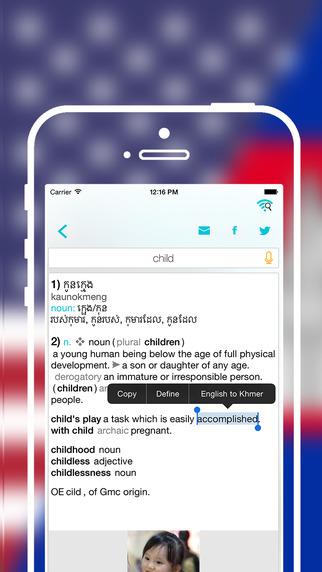
LastThink announces the release of Offline Khmer to English Language Dictionary 3.0, the important update to their highly customizable dictionary application for iOS devices. Users can seek and find any word's translation and synonyms anytime and anywhere from their devices. The dictionary offers users a huge collection of words with their translations as well as definitions and synonyms. Version 3.0 offers improved search capability.
Yerevan, Armenia - LastThink is proud to announce the release of Offline Khmer to English Language Dictionary 3.0, the important update to their highly customizable dictionary application developed for iPhone, iPad, and iPod touch devices. Users can seek and find any word's translation and synonyms anytime and anywhere from their Apple devices.
Features:
* Tremendous range of synonyms and antonyms with well over five hundred thousand synonym variants
* Information about the discipline of structural linguistics by suggesting vital enough sentences
* Appropriate translations of colloquial and formal words as well as conjugation of verbs and declension of nouns
* Availability of various word definitions which will exactly influence on your understanding of a Foreign Language in a detailed way
* A distinction of a section named "Favorites" with the possibility of saving as many unknown words as you wish
* Thorough analysis of parts of speech (noun, verb, adjective, adverb) and their grammatical functions (subject, object, etc.)
* A possibility of the following application usage without an internet demand
* Existence of contemporary words such as "Woot", "OMG", "Crunk" and many others
In our new updated version we grant users a chance of typing the unknown word either in capitals or in small letters and the app will bring all the possible variants and definitions of the dictionary entries saved both in capital and small letters.
If you however experience any issues, please do not hesitate to contact us if you'd like to share your experience with Offline Dictionaries, or provide suggestions on how we could improve the product further. We will be more than happy to get in touch.
NOTE: We have selected data from the internet and if any assembly or constitution doesn't want us to show the content of the unit, please recommend us to remove it.
Device Requirements:
* iPhone, iPad, and iPod touch
* Optimized for iPhone 5, iPhone 6, and iPhone 6 Plus
* Requires iOS 6.0 or later
* Universal Application
* 143 MB
Pricing and Availability:
Offline Khmer to English Language Dictionary 3.0 is free and available worldwide exclusively through the App Store in the Education category.
LastThink: http://lastthink.com/
Offline Khmer to English Language Dictionary 3.0: https://www.facebook.com/pages/Offline-Dictionary/882897578447079
Download from iTunes: https://itunes.apple.com/app/offline-khmer-to-english-language/id1001886582
Screenshot: http://a3.mzstatic.com/us/r30/Purple1/v4/55/5c/55/555c55dd-12a8-7945-ab20-59f4cd0f5798/screen322x572.jpeg
App Icon: http://a3.mzstatic.com/us/r30/Purple3/v4/87/b4/11/87b41118-a1f5-4442-2c26-f578ea24c808/icon175x175.jpeg
LastThink is an IT company with a focus on mobile development. It has extended its list of services since 2012 to offer high-end business process management, system integration, as well as up-to-date communication solutions. LastThink's mission is to deliver maximum business value to its customers by designing, developing, implementing and maintaining efficient and high quality software solutions aligned with their most essential business needs. Their team will always do its best to meet client expectations. All Material and Software (C) Copyright 2016 LastThink LLC. All Rights Reserved. Apple, the Apple logo, iPhone, iPod and iPad are registered trademarks of Apple Inc. in the U.S. and/or other countries. Other trademarks and registered trademarks may be the property of their respective owners.
*******
Link To Article: http://prmac.com/release-id-78714.htm
*******
---------------------------------------------------------------------------------
Note that you can alter delivered distributions at any time.
Login to your account on prMac to alter your channel selection, or to opt-out at any time.
Offline Khmer to English Language Dictionary 3.0 for iOS - Published on 02/15/16
LastThink announces the release of Offline Khmer to English Language Dictionary 3.0, the important update to their highly customizable dictionary application for iOS devices. Users can seek and find any word's translation and synonyms anytime and anywhere from their devices. The dictionary offers users a huge collection of words with their translations as well as definitions and synonyms. Version 3.0 offers improved search capability.
Yerevan, Armenia - LastThink is proud to announce the release of Offline Khmer to English Language Dictionary 3.0, the important update to their highly customizable dictionary application developed for iPhone, iPad, and iPod touch devices. Users can seek and find any word's translation and synonyms anytime and anywhere from their Apple devices.
Features:
* Tremendous range of synonyms and antonyms with well over five hundred thousand synonym variants
* Information about the discipline of structural linguistics by suggesting vital enough sentences
* Appropriate translations of colloquial and formal words as well as conjugation of verbs and declension of nouns
* Availability of various word definitions which will exactly influence on your understanding of a Foreign Language in a detailed way
* A distinction of a section named "Favorites" with the possibility of saving as many unknown words as you wish
* Thorough analysis of parts of speech (noun, verb, adjective, adverb) and their grammatical functions (subject, object, etc.)
* A possibility of the following application usage without an internet demand
* Existence of contemporary words such as "Woot", "OMG", "Crunk" and many others
In our new updated version we grant users a chance of typing the unknown word either in capitals or in small letters and the app will bring all the possible variants and definitions of the dictionary entries saved both in capital and small letters.
If you however experience any issues, please do not hesitate to contact us if you'd like to share your experience with Offline Dictionaries, or provide suggestions on how we could improve the product further. We will be more than happy to get in touch.
NOTE: We have selected data from the internet and if any assembly or constitution doesn't want us to show the content of the unit, please recommend us to remove it.
Device Requirements:
* iPhone, iPad, and iPod touch
* Optimized for iPhone 5, iPhone 6, and iPhone 6 Plus
* Requires iOS 6.0 or later
* Universal Application
* 143 MB
Pricing and Availability:
Offline Khmer to English Language Dictionary 3.0 is free and available worldwide exclusively through the App Store in the Education category.
LastThink: http://lastthink.com/
Offline Khmer to English Language Dictionary 3.0: https://www.facebook.com/pages/Offline-Dictionary/882897578447079
Download from iTunes: https://itunes.apple.com/app/offline-khmer-to-english-language/id1001886582
Screenshot: http://a3.mzstatic.com/us/r30/Purple1/v4/55/5c/55/555c55dd-12a8-7945-ab20-59f4cd0f5798/screen322x572.jpeg
App Icon: http://a3.mzstatic.com/us/r30/Purple3/v4/87/b4/11/87b41118-a1f5-4442-2c26-f578ea24c808/icon175x175.jpeg

LastThink is an IT company with a focus on mobile development. It has extended its list of services since 2012 to offer high-end business process management, system integration, as well as up-to-date communication solutions. LastThink's mission is to deliver maximum business value to its customers by designing, developing, implementing and maintaining efficient and high quality software solutions aligned with their most essential business needs. Their team will always do its best to meet client expectations. All Material and Software (C) Copyright 2016 LastThink LLC. All Rights Reserved. Apple, the Apple logo, iPhone, iPod and iPad are registered trademarks of Apple Inc. in the U.S. and/or other countries. Other trademarks and registered trademarks may be the property of their respective owners.
*******
Link To Article: http://prmac.com/release-id-78714.htm
*******
---------------------------------------------------------------------------------
Note that you can alter delivered distributions at any time.
Login to your account on prMac to alter your channel selection, or to opt-out at any time.
iBusiness Becomes Official Media Partner for InfoComm 2016
A new article has been published at prMac.
iBusiness Becomes Official Media Partner for InfoComm 2016 - Published on 02/15/16
iBusiness has become an official media partner for InfoComm 2016, which will take place in Las Vegas, Nevada, from June 4 - 10. i.Business will sponsor the Innovations Showcase, a dedicated area on the show floor for first-time exhibitors with creative new solutions and best-of-breed products. iBusiness magazine will be onsite during InfoComm and distributing its InfoComm 2016 Special Show Edition. iBusiness will be distributed throughout InfoComm 2016 with over a 500,000 readers worldwide.
Cape Coral, Florida - iBusiness has become an official media partner for InfoComm 2016, which will take place in Las Vegas, Nevada, from June 4 - 10. i.Business will sponsor the Innovations Showcase, a dedicated area on the show floor for first-time exhibitors with creative new solutions and best-of-breed products. iBusiness magazine will be onsite during InfoComm and distributing its InfoComm 2016 Special Show Edition.
"InfoComm showcases new innovative business solutions and our magazine is a perfect fit for InfoComm attendees," says Carmine De Santo, publisher of iBusiness Magazine.
iBusiness will be distributed throughout InfoComm 2016 with over a 500,000 readers worldwide. InfoComm is one of the largest events focused on the professional audiovisual industry. From acoustic technology to the latest in video wall displays, InfoComm brings together nearly 1,000 exhibitors and 40,000 attendees to see where the future of the AV industry is headed.
About InfoComm International
InfoComm International(R) is the international trade association representing the professional audiovisual and information communications industries. InfoComm has more than 5,000 members, including manufacturers, systems integrators, dealers and distributors, independent consultants, programmers, rental and staging companies, end users and multimedia professionals from more than 80 countries. InfoComm International is the leading resource for AV standards, market research and news. Its training, certification and education programs set a standard of excellence for AV professionals. InfoComm International is the founder of InfoComm, the largest annual conference and exhibition for AV buyers and sellers in North America. InfoComm also produces trade shows in Europe, the Middle East, China, India and Latin America. Additional information is available at infocomm.org.
iBusiness Magazine: http://www.ibusinessmag.com
InfoComm16 WebSite: http://www.infocommshow.org
Media Kit 2016: http://www.ibusinessmag.com/mediakit2016.pdf
Editorial Calendar 2016: http://d19cgyi5s8w5eh.cloudfront.net/eml/6hbRq_0zR1S8iZw2i5mKrg?e=results10@me.com&a=YIEd6elISfu61d7q5yiy4A&f=9e453f4a&t=1
Subscribe to iBusiness Magazine: http://ibusinessmag.com/i.Business_New/Subscribe.html
The team behind iBusiness Magazine have decades of experience in the Business to Business & Education communities. We strive to cover as many vertical markets as possible, which include but are not limited to, Retail, Hospitality, ERP, CAD, Real Estate, Legal, Scientific Computing, Medical/Healthcare, Government, Automotive, Manufacturers, Accounting/Finance, Print & Graphics and Security & Surveillance. Our articles take a solutions-based approach to productivity, workflow management and tips & tricks. The magazine articles come from the industry leaders with years of experience and proven track records. Copyright (C) 2016 i.Business Magazine.
*******
Link To Article: http://prmac.com/release-id-78712.htm
*******
---------------------------------------------------------------------------------
Note that you can alter delivered distributions at any time.
Login to your account on prMac to alter your channel selection, or to opt-out at any time.
iBusiness Becomes Official Media Partner for InfoComm 2016 - Published on 02/15/16
iBusiness has become an official media partner for InfoComm 2016, which will take place in Las Vegas, Nevada, from June 4 - 10. i.Business will sponsor the Innovations Showcase, a dedicated area on the show floor for first-time exhibitors with creative new solutions and best-of-breed products. iBusiness magazine will be onsite during InfoComm and distributing its InfoComm 2016 Special Show Edition. iBusiness will be distributed throughout InfoComm 2016 with over a 500,000 readers worldwide.
Cape Coral, Florida - iBusiness has become an official media partner for InfoComm 2016, which will take place in Las Vegas, Nevada, from June 4 - 10. i.Business will sponsor the Innovations Showcase, a dedicated area on the show floor for first-time exhibitors with creative new solutions and best-of-breed products. iBusiness magazine will be onsite during InfoComm and distributing its InfoComm 2016 Special Show Edition.
"InfoComm showcases new innovative business solutions and our magazine is a perfect fit for InfoComm attendees," says Carmine De Santo, publisher of iBusiness Magazine.
iBusiness will be distributed throughout InfoComm 2016 with over a 500,000 readers worldwide. InfoComm is one of the largest events focused on the professional audiovisual industry. From acoustic technology to the latest in video wall displays, InfoComm brings together nearly 1,000 exhibitors and 40,000 attendees to see where the future of the AV industry is headed.
About InfoComm International
InfoComm International(R) is the international trade association representing the professional audiovisual and information communications industries. InfoComm has more than 5,000 members, including manufacturers, systems integrators, dealers and distributors, independent consultants, programmers, rental and staging companies, end users and multimedia professionals from more than 80 countries. InfoComm International is the leading resource for AV standards, market research and news. Its training, certification and education programs set a standard of excellence for AV professionals. InfoComm International is the founder of InfoComm, the largest annual conference and exhibition for AV buyers and sellers in North America. InfoComm also produces trade shows in Europe, the Middle East, China, India and Latin America. Additional information is available at infocomm.org.
iBusiness Magazine: http://www.ibusinessmag.com
InfoComm16 WebSite: http://www.infocommshow.org
Media Kit 2016: http://www.ibusinessmag.com/mediakit2016.pdf
Editorial Calendar 2016: http://d19cgyi5s8w5eh.cloudfront.net/eml/6hbRq_0zR1S8iZw2i5mKrg?e=results10@me.com&a=YIEd6elISfu61d7q5yiy4A&f=9e453f4a&t=1
Subscribe to iBusiness Magazine: http://ibusinessmag.com/i.Business_New/Subscribe.html
The team behind iBusiness Magazine have decades of experience in the Business to Business & Education communities. We strive to cover as many vertical markets as possible, which include but are not limited to, Retail, Hospitality, ERP, CAD, Real Estate, Legal, Scientific Computing, Medical/Healthcare, Government, Automotive, Manufacturers, Accounting/Finance, Print & Graphics and Security & Surveillance. Our articles take a solutions-based approach to productivity, workflow management and tips & tricks. The magazine articles come from the industry leaders with years of experience and proven track records. Copyright (C) 2016 i.Business Magazine.
*******
Link To Article: http://prmac.com/release-id-78712.htm
*******
---------------------------------------------------------------------------------
Note that you can alter delivered distributions at any time.
Login to your account on prMac to alter your channel selection, or to opt-out at any time.
LifeFlix Introduces LifeFlix Pro Version 1.5
A new article has been published at prMac.
LifeFlix Introduces LifeFlix Pro Version 1.5 - Published on 02/15/16
LifeFlix today announces the release of LifeFlix Pro 1.5. LifeFlix is the simplest way to watch, protect, and share your video tape memories. This Mac app was created to import all your DV, HDV, and Digital Hi8 tapes. Users merely plug a video camera into their computer, and LifeFlix eagerly grabs all the videos and organizes them into a simple catalog. LifeFlix is designed to have no learning curve and just import your MiniDV or HDV tapes to your computer.
Salt Lake City, Utah - LifeFlix today is proud to announce the release of LifeFlix Pro Version 1.5. LifeFlix is the simplest way to watch, protect, and share your video tape memories. This Mac app was created to import all your DV, HDV, and Digital Hi8 tapes.
The release of the DV camera in 1995 was a revolution in video capture - there were over 150 million DV video cameras sold. The camera was small and affordable, the images were amazing, and everything was captured in digital format. It kicked off an Indie-filmmaking movement that still hums along today. That is the good news; the bad news is there are now more than 1.5 billion tapes sitting in shoe boxes and drawers around the world. LifeFlix was founded to help rescue these memories.
We created an app that you'll actually use because it's so easy. Just plug your camera into your computer, and LifeFlix eagerly grabs all the videos and organizes them into a simple catalog. You can immediately watch and share, or you can protect them on a external hard drive or cloud service.
"One weekend I had just spent a number of hours trying to import my DV tapes using iMovie and Final Cut Pro, and I just snapped," says founder Drew Little. "It was an okay process for one tape, but it was frustrating trying to import a bunch of tapes and share specific video moments. That is when I decided to start the company and create a better solution that was solely focused on import or capture. Because the video memories are all ten years old or more, seeing them for the first time was incredible."
Visit LifeFlix website to purchase your program today! And remember, you can try it for free first! After the quick download of your program, just go to your closet, grab your shoebox full of tapes, blow off the dust, and get ready to watch your memories come to life.
CAUTION: Memories may cause joyful tears. Have tissues on hand! Help us help you rescue those memories... trust us, it's awesome.
Pricing and Availability:
LifeFlix Version 1.5 is now available on their site for only $29.99 (USD), or you can try it for free.
LifeFlix: http://www.lifeflix.com
LifeFlix was founded by video industry veterans who have worked together for almost 20 years. We started in the 90's when the digital video age spawned, cultivated, and launched. We founded and worked at several major professional video companies including Red Giant, Canopus (Grass Valley), and Pinnacle Systems. The genesis of LifeFlix came from a shared frustration of trying to import our DV tapes using video editors. We all agreed the experience was okay for one tape, but not for 20. We just wanted to watch, protect, and share our memories. We invested our own money, hired engineers and designers, and got to work launching the first version of LifeFlix in early 2013. Now, thousands of customers later, we think we nailed the solution with the right mix of simplicity on the front end and professional-level media-handling on the back end. All Material and Software (C) Copyright 2016 LifeFlix. All Rights Reserved. Apple, the Apple logo, Mac OS X and Macintosh are registered trademarks
of Apple Inc. in the U.S. and/or other countries. Other trademarks and registered trademarks may be the property of their respective owners.
*******
Link To Article: http://prmac.com/release-id-78711.htm
*******
---------------------------------------------------------------------------------
Note that you can alter delivered distributions at any time.
Login to your account on prMac to alter your channel selection, or to opt-out at any time.
LifeFlix Introduces LifeFlix Pro Version 1.5 - Published on 02/15/16
LifeFlix today announces the release of LifeFlix Pro 1.5. LifeFlix is the simplest way to watch, protect, and share your video tape memories. This Mac app was created to import all your DV, HDV, and Digital Hi8 tapes. Users merely plug a video camera into their computer, and LifeFlix eagerly grabs all the videos and organizes them into a simple catalog. LifeFlix is designed to have no learning curve and just import your MiniDV or HDV tapes to your computer.
Salt Lake City, Utah - LifeFlix today is proud to announce the release of LifeFlix Pro Version 1.5. LifeFlix is the simplest way to watch, protect, and share your video tape memories. This Mac app was created to import all your DV, HDV, and Digital Hi8 tapes.
The release of the DV camera in 1995 was a revolution in video capture - there were over 150 million DV video cameras sold. The camera was small and affordable, the images were amazing, and everything was captured in digital format. It kicked off an Indie-filmmaking movement that still hums along today. That is the good news; the bad news is there are now more than 1.5 billion tapes sitting in shoe boxes and drawers around the world. LifeFlix was founded to help rescue these memories.
We created an app that you'll actually use because it's so easy. Just plug your camera into your computer, and LifeFlix eagerly grabs all the videos and organizes them into a simple catalog. You can immediately watch and share, or you can protect them on a external hard drive or cloud service.
"One weekend I had just spent a number of hours trying to import my DV tapes using iMovie and Final Cut Pro, and I just snapped," says founder Drew Little. "It was an okay process for one tape, but it was frustrating trying to import a bunch of tapes and share specific video moments. That is when I decided to start the company and create a better solution that was solely focused on import or capture. Because the video memories are all ten years old or more, seeing them for the first time was incredible."
Visit LifeFlix website to purchase your program today! And remember, you can try it for free first! After the quick download of your program, just go to your closet, grab your shoebox full of tapes, blow off the dust, and get ready to watch your memories come to life.
CAUTION: Memories may cause joyful tears. Have tissues on hand! Help us help you rescue those memories... trust us, it's awesome.
Pricing and Availability:
LifeFlix Version 1.5 is now available on their site for only $29.99 (USD), or you can try it for free.
LifeFlix: http://www.lifeflix.com
LifeFlix was founded by video industry veterans who have worked together for almost 20 years. We started in the 90's when the digital video age spawned, cultivated, and launched. We founded and worked at several major professional video companies including Red Giant, Canopus (Grass Valley), and Pinnacle Systems. The genesis of LifeFlix came from a shared frustration of trying to import our DV tapes using video editors. We all agreed the experience was okay for one tape, but not for 20. We just wanted to watch, protect, and share our memories. We invested our own money, hired engineers and designers, and got to work launching the first version of LifeFlix in early 2013. Now, thousands of customers later, we think we nailed the solution with the right mix of simplicity on the front end and professional-level media-handling on the back end. All Material and Software (C) Copyright 2016 LifeFlix. All Rights Reserved. Apple, the Apple logo, Mac OS X and Macintosh are registered trademarks
of Apple Inc. in the U.S. and/or other countries. Other trademarks and registered trademarks may be the property of their respective owners.
*******
Link To Article: http://prmac.com/release-id-78711.htm
*******
---------------------------------------------------------------------------------
Note that you can alter delivered distributions at any time.
Login to your account on prMac to alter your channel selection, or to opt-out at any time.
TruGlyph App Launches to Create Crowdsourced Global Visual Language
A new article has been published at prMac.
TruGlyph App Launches to Create Crowdsourced Global Visual Language - Published on 02/15/16
California based TruScribe today announces TruGlyph 2.0, its free iOS app that lets anyone create glyphs, images that animate as if drawn, and tag them with words and context. TruGlyph gives people worldwide the ability to communicate visually using these building blocks of visual language. Anyone can create a glyph that is meaningful to them or their life, then they or others can tag them with representative words, and the community decides the rest. Version 2.0 offers new games and badging.
Los Angeles, California - TruScribe, the world leader in whiteboard video, today announced the release of TruGlyph 2.0, its free iOS app that lets anyone create glyphs, images that animate as if drawn, and tag them with words and context. TruGlyph(TM), which is launching with 15,000 glyphs in its library, gives people worldwide the ability to communicate visually using these building blocks of visual language.
"TruGlyph is a direct result of our company's passion and purpose - to break down boundaries of language, culture, and understanding in human communication," said Andrew Herkert, TruScribe's Chief Revenue Officer. "It's a brave new step toward creating a visual language that can truly be embraced by global communities."
TruGlyph is both an app and a community. Anyone can create a glyph that is meaningful to them or their life, then they or others can tag them with representative words, and the community decides the rest.
"Communication can be greatly enhanced if there's a richer way of understanding each other through language barriers," added Herkert. "Visual language has to be a lot more than emojis. Humans need more context and meaning in their communications."
TruGlyph will not only be embraced by artists, designers, and illustrators, but by anyone who likes to sketch - as well as word lovers who like to tag or describe visuals. The app is free, easy to use, and registered users automatically become members who can vote on glyphs, play games, add tags, submit different versions of a given glyph, and even make money.
What Are Glyphs and How Does the App Work?
Glyphs are images that represent ideas, people, places, things, actions, feelings, and more. Users make them by logging in to the TruGlyph app and drawing, at which time they are either presented with a word or elect to make a glyph of their own choosing. The user then draws their glyph and submits it. Other members can vote on all glyphs submitted, play games, add tags, and/or submit different versions of any glyph.
* Draw Glyphs - Draw simple images that represent words and context and release them into the world
* Tag Glyphs - Users can add words to their own or other people's glyphs to give them even greater meaning
* Curate Glyphs - Play games that pit glyph vs. glyph and decide which glyphs and tags fit best
* Comment & Engage - Everyone can become a part of a growing global community to influence how the world will communicate visually
* Make Money - Financial rewards are in the works for contributors who add the most value
* Badges - Allow contributors to level up and earn rewards for contributing in one path or many
* Badging Profile - Each badge level varies in complexity. Whether users draw, tag, or curate, they have a path
More About Glyphs:
A glyph is a simple, drawn image made of thick, high-contrast lines that animates as if drawn and is associated with words and contexts. Glyphs are the building blocks of the global visual language being created with the TruGlyph app. Like any language elements, glyphs require some rules. These visual rules give glyphs uniformity when used together regardless of the source or use. These rules are built into the TruGlyph app so users can focus on meanings and associations.
A key element for engaging viewers is movement and, therefore, glyphs must animate. TruGlyph emulates drawing by starting the animation with a blank screen and revealing the first line from one end to the other end, continuing until all lines in the glyph are visible. A glyph is only a glyph when it has been associated with a word (more likely multiple words) or context. A context could be a phrase (a group of words) or a metaphorical use. When creating images that are associated with a word or phrase, there are three levels of images to consider:
1) First, and easiest, are literal images that represent the definition of the word.
2) Next are abstract images that often use symbolic references to address a word.
3) Lastly, an image may seek out a metaphor to get to the meaning behind how a word or phrase can be used.
Device Requirements:
* iPhone, iPad, and iPod touch
* Requires iOS 8.0 or later
* 6.6 MB
Pricing and Availability:
TruGlyph 2.0 is Free and available worldwide exclusively through the App Store in the Social Networking category.
TruScribe: http://www.truscribe.com/
TruGlyph 2.0: http://apps.appshout.com/truglyph/
Download from iTunes: https://itunes.apple.com/app/truglyph/id1050215340
Screenshot: http://a4.mzstatic.com/us/r30/Purple69/v4/bb/2a/93/bb2a9354-4e78-79ca-483d-dea5c11f5d93/screen322x572.jpeg
App Icon: http://apps.appshout.com/truglyph/images/icon.png
TruScribe is the world's fastest growing whiteboard video company. Founded in 2010, it is privately held, profitable, and was named the 253rd fastest growing company on the 2015 Inc. 5000 list. TruScribe has created thousands of videos in over 20 languages for more than 600 clients on six continents, including many marquee brands and Fortune 500 firms. Its proprietary methodology for creating whiteboard video, called Scribology(TM), is based in neuroscience and behavioral psychology research. Since its founding, TruScribe has iterated and innovated its tools to ensure its customers and their messages benefit from its unmatched whiteboard storytelling experience. The company's employees and representatives are based in Minneapolis MN, Madison WI, Los Angeles CA, and Cologne, Germany. In addition to its direct sales force in the U.S., TruScribe has channel partnerships in Asia, Europe, and the Middle East. All Material and Software (C) Copyright 2016 TruScribe LLC. All Rights
Reserved. Apple, the Apple logo, iPhone, iPod and iPad are registered trademarks of Apple Inc. in the U.S. and/or other countries.
*******
Link To Article: http://prmac.com/release-id-78710.htm
*******
---------------------------------------------------------------------------------
Note that you can alter delivered distributions at any time.
Login to your account on prMac to alter your channel selection, or to opt-out at any time.
TruGlyph App Launches to Create Crowdsourced Global Visual Language - Published on 02/15/16
California based TruScribe today announces TruGlyph 2.0, its free iOS app that lets anyone create glyphs, images that animate as if drawn, and tag them with words and context. TruGlyph gives people worldwide the ability to communicate visually using these building blocks of visual language. Anyone can create a glyph that is meaningful to them or their life, then they or others can tag them with representative words, and the community decides the rest. Version 2.0 offers new games and badging.
Los Angeles, California - TruScribe, the world leader in whiteboard video, today announced the release of TruGlyph 2.0, its free iOS app that lets anyone create glyphs, images that animate as if drawn, and tag them with words and context. TruGlyph(TM), which is launching with 15,000 glyphs in its library, gives people worldwide the ability to communicate visually using these building blocks of visual language.
"TruGlyph is a direct result of our company's passion and purpose - to break down boundaries of language, culture, and understanding in human communication," said Andrew Herkert, TruScribe's Chief Revenue Officer. "It's a brave new step toward creating a visual language that can truly be embraced by global communities."
TruGlyph is both an app and a community. Anyone can create a glyph that is meaningful to them or their life, then they or others can tag them with representative words, and the community decides the rest.
"Communication can be greatly enhanced if there's a richer way of understanding each other through language barriers," added Herkert. "Visual language has to be a lot more than emojis. Humans need more context and meaning in their communications."
TruGlyph will not only be embraced by artists, designers, and illustrators, but by anyone who likes to sketch - as well as word lovers who like to tag or describe visuals. The app is free, easy to use, and registered users automatically become members who can vote on glyphs, play games, add tags, submit different versions of a given glyph, and even make money.
What Are Glyphs and How Does the App Work?
Glyphs are images that represent ideas, people, places, things, actions, feelings, and more. Users make them by logging in to the TruGlyph app and drawing, at which time they are either presented with a word or elect to make a glyph of their own choosing. The user then draws their glyph and submits it. Other members can vote on all glyphs submitted, play games, add tags, and/or submit different versions of any glyph.
* Draw Glyphs - Draw simple images that represent words and context and release them into the world
* Tag Glyphs - Users can add words to their own or other people's glyphs to give them even greater meaning
* Curate Glyphs - Play games that pit glyph vs. glyph and decide which glyphs and tags fit best
* Comment & Engage - Everyone can become a part of a growing global community to influence how the world will communicate visually
* Make Money - Financial rewards are in the works for contributors who add the most value
* Badges - Allow contributors to level up and earn rewards for contributing in one path or many
* Badging Profile - Each badge level varies in complexity. Whether users draw, tag, or curate, they have a path
More About Glyphs:
A glyph is a simple, drawn image made of thick, high-contrast lines that animates as if drawn and is associated with words and contexts. Glyphs are the building blocks of the global visual language being created with the TruGlyph app. Like any language elements, glyphs require some rules. These visual rules give glyphs uniformity when used together regardless of the source or use. These rules are built into the TruGlyph app so users can focus on meanings and associations.
A key element for engaging viewers is movement and, therefore, glyphs must animate. TruGlyph emulates drawing by starting the animation with a blank screen and revealing the first line from one end to the other end, continuing until all lines in the glyph are visible. A glyph is only a glyph when it has been associated with a word (more likely multiple words) or context. A context could be a phrase (a group of words) or a metaphorical use. When creating images that are associated with a word or phrase, there are three levels of images to consider:
1) First, and easiest, are literal images that represent the definition of the word.
2) Next are abstract images that often use symbolic references to address a word.
3) Lastly, an image may seek out a metaphor to get to the meaning behind how a word or phrase can be used.
Device Requirements:
* iPhone, iPad, and iPod touch
* Requires iOS 8.0 or later
* 6.6 MB
Pricing and Availability:
TruGlyph 2.0 is Free and available worldwide exclusively through the App Store in the Social Networking category.
TruScribe: http://www.truscribe.com/
TruGlyph 2.0: http://apps.appshout.com/truglyph/
Download from iTunes: https://itunes.apple.com/app/truglyph/id1050215340
Screenshot: http://a4.mzstatic.com/us/r30/Purple69/v4/bb/2a/93/bb2a9354-4e78-79ca-483d-dea5c11f5d93/screen322x572.jpeg

App Icon: http://apps.appshout.com/truglyph/images/icon.png

TruScribe is the world's fastest growing whiteboard video company. Founded in 2010, it is privately held, profitable, and was named the 253rd fastest growing company on the 2015 Inc. 5000 list. TruScribe has created thousands of videos in over 20 languages for more than 600 clients on six continents, including many marquee brands and Fortune 500 firms. Its proprietary methodology for creating whiteboard video, called Scribology(TM), is based in neuroscience and behavioral psychology research. Since its founding, TruScribe has iterated and innovated its tools to ensure its customers and their messages benefit from its unmatched whiteboard storytelling experience. The company's employees and representatives are based in Minneapolis MN, Madison WI, Los Angeles CA, and Cologne, Germany. In addition to its direct sales force in the U.S., TruScribe has channel partnerships in Asia, Europe, and the Middle East. All Material and Software (C) Copyright 2016 TruScribe LLC. All Rights
Reserved. Apple, the Apple logo, iPhone, iPod and iPad are registered trademarks of Apple Inc. in the U.S. and/or other countries.
*******
Link To Article: http://prmac.com/release-id-78710.htm
*******
---------------------------------------------------------------------------------
Note that you can alter delivered distributions at any time.
Login to your account on prMac to alter your channel selection, or to opt-out at any time.
Reggie Ashworth announces VidConvert 1.6.4 - Video Conversion made Easy
A new article has been published at prMac.
Reggie Ashworth announces VidConvert 1.6.4 - Video Conversion made Easy - Published on 02/15/16
Independent software developer, Reggie Ashworth today announces VidConvert 1.6.4, an update to his popular video converter for Mac OS X. VidConvert is a video converter designed to make converting your videos simple and easy. VidConvert will convert just about any type of video into one of the many popular formats of today. Creating videos for your iPhone or iPad, for your Mac or TV, or formats such as DivX and MPEG are just a click away with VidConvert.
Anaheim, California - Independent software developer, Reggie Ashworth today is proud to announce the release of VidConvert 1.6.4, an update to his popular video converter for Mac OS X. VidConvert is a video converter designed to make converting your videos simple and easy. VidConvert will convert just about any type of video into one of the many popular formats of today. Creating videos for your iPhone or iPad, for your Mac or TV, or formats such as DivX and MPEG are just a click away with VidConvert.
You do not need to be an expert to use VidConvert. Simply add a file, select a format and a quality, and click convert. Optionally you can change your save folder from the main window. For advanced users you can select the Advanced panel if you choose to allow such options as custom Frame Rate, Bit Rate, etc. But for most users simply choosing Normal or High quality should be sufficient. After your conversion is finished simply add more files or quit VidConvert and the job is done.
Supported formats include iPhone, iPod, iPad, QuickTime, .mp4, MPEG-1 and 2, DivX, Xvid, and audio only formats such as .mp3 and .m4a. VidConvert can add iTunes compatible videos directly to your iTunes library for convenience and for syncing with your iPhone, iPod, or other iDevice. It's also possible to turn your favorite videos into audio only tracks for playback in your favorite audio device. And VidConvert is not limited to creating videos just for Apple devices, in fact any device that can play one of the supported formats can play a video converted by VidConvert. With VidConvert converting your videos couldn't be easier.
VidConvert Version 1.6.4 will run on Lion, Mountain Lion, Mavericks, Yosemite, and El Capitan, and here are a few of the new features included:
New in Version 1.6.1:
* Optimized for operation on OS 10.11 El Capitan (backwards compatible with Lion/Mountain Lion/Mavericks/Yosemite)
* Supported input - Most any type of video or audio format
* Supported output - iPhone, iPad, iPod, Retina, Apple TV, QuickTime, .mp4, .avi, DivX, Xvid, MPEG-1, MPEG-2, DVD (.vob), Windows Media, Flash, Matroska (.mkv), Theora (.ogg), WebM, .m4a, .mp3, .aiff, .wav, .wma, .ac3, ALAC
* Refreshed UI design
* Full 64-bit support for the fastest possible conversion
* Eight languages: English, Chinese, Dutch, French, German, Portuguese (Brazilian), Russian, and Spanish (with more to come)
* Support for latest FFmpeg releases
* Fully compatible with Retina displays
* All-around code cleanup and optimization including latest Dev tools
* Sparkle updater to always have the latest version (with new localizations)
* And More...
Feature Highlights:
* Expected features such as Preview, Joining or "stitching" files, ability to save settings, and more
* Normal and High quality presets to make video conversion automatic for most users
* Ability to author a DVD for burning
* Info panel to obtain Container, Video, and Audio details for each video
* All Apple Devices format to play on all iDevices or Apple TV
* Crop and Trim and more in the Advanced panel to customize your conversion if needed
* Drag and Drop simplicity even with folders of videos and List reordering once videos have been added
* Easily change Save To folder for each batch
* Progress indicator with time remaining for each file
Language Support:
* U.S. English, Chinese, Dutch, French, German, Portuguese (Brazilian), Russian, Spanish with more to come
Version 1.6.4 fixes a vulnerability in the Sparkle updater. For full Release Notes visit their website.
System Requirements:
* Mac OS X Version 10.7 Lion or later (El Capitan compatible)
* Intel only
* 21.7 MB Hard Drive space
Pricing and Availability:
VidConvert 1.6.4 is only $7.99 (USD) for a single user license. A demo which creates 3 minute samples is available. Older versions with pre-Lion support are available via the website. And Mac App Store version also available.
VidConvert 1.6.4: http://www.reggieashworth.com/vidconvert
Release Notes: http://www.reggieashworth.com/vidconvertnotes
Download VidConvert: http://www.reggieashworth.com/downloads/VidConvert.dmg
YouTube Channel: http://www.youtube.com/user/ReggieAshworth
Screenshot: http://www.reggieashworth.com/img/vidconvertprogressfull.png
Based in sunny Anaheim, California, Reggie Ashworth is an independent software developer whose passion for the Mac platform is only exceeded by his aim to craft simple, yet useful utilities. He is fanatical about total customer satisfaction. Copyright 2006-2016 Reggie Ashworth. All Rights Reserved. Apple, and the Apple logo, are registered trademarks of Apple Computer in the U.S. and/or other countries.
*******
Link To Article: http://prmac.com/release-id-78709.htm
*******
---------------------------------------------------------------------------------
Note that you can alter delivered distributions at any time.
Login to your account on prMac to alter your channel selection, or to opt-out at any time.
Reggie Ashworth announces VidConvert 1.6.4 - Video Conversion made Easy - Published on 02/15/16
Independent software developer, Reggie Ashworth today announces VidConvert 1.6.4, an update to his popular video converter for Mac OS X. VidConvert is a video converter designed to make converting your videos simple and easy. VidConvert will convert just about any type of video into one of the many popular formats of today. Creating videos for your iPhone or iPad, for your Mac or TV, or formats such as DivX and MPEG are just a click away with VidConvert.
Anaheim, California - Independent software developer, Reggie Ashworth today is proud to announce the release of VidConvert 1.6.4, an update to his popular video converter for Mac OS X. VidConvert is a video converter designed to make converting your videos simple and easy. VidConvert will convert just about any type of video into one of the many popular formats of today. Creating videos for your iPhone or iPad, for your Mac or TV, or formats such as DivX and MPEG are just a click away with VidConvert.
You do not need to be an expert to use VidConvert. Simply add a file, select a format and a quality, and click convert. Optionally you can change your save folder from the main window. For advanced users you can select the Advanced panel if you choose to allow such options as custom Frame Rate, Bit Rate, etc. But for most users simply choosing Normal or High quality should be sufficient. After your conversion is finished simply add more files or quit VidConvert and the job is done.
Supported formats include iPhone, iPod, iPad, QuickTime, .mp4, MPEG-1 and 2, DivX, Xvid, and audio only formats such as .mp3 and .m4a. VidConvert can add iTunes compatible videos directly to your iTunes library for convenience and for syncing with your iPhone, iPod, or other iDevice. It's also possible to turn your favorite videos into audio only tracks for playback in your favorite audio device. And VidConvert is not limited to creating videos just for Apple devices, in fact any device that can play one of the supported formats can play a video converted by VidConvert. With VidConvert converting your videos couldn't be easier.
VidConvert Version 1.6.4 will run on Lion, Mountain Lion, Mavericks, Yosemite, and El Capitan, and here are a few of the new features included:
New in Version 1.6.1:
* Optimized for operation on OS 10.11 El Capitan (backwards compatible with Lion/Mountain Lion/Mavericks/Yosemite)
* Supported input - Most any type of video or audio format
* Supported output - iPhone, iPad, iPod, Retina, Apple TV, QuickTime, .mp4, .avi, DivX, Xvid, MPEG-1, MPEG-2, DVD (.vob), Windows Media, Flash, Matroska (.mkv), Theora (.ogg), WebM, .m4a, .mp3, .aiff, .wav, .wma, .ac3, ALAC
* Refreshed UI design
* Full 64-bit support for the fastest possible conversion
* Eight languages: English, Chinese, Dutch, French, German, Portuguese (Brazilian), Russian, and Spanish (with more to come)
* Support for latest FFmpeg releases
* Fully compatible with Retina displays
* All-around code cleanup and optimization including latest Dev tools
* Sparkle updater to always have the latest version (with new localizations)
* And More...
Feature Highlights:
* Expected features such as Preview, Joining or "stitching" files, ability to save settings, and more
* Normal and High quality presets to make video conversion automatic for most users
* Ability to author a DVD for burning
* Info panel to obtain Container, Video, and Audio details for each video
* All Apple Devices format to play on all iDevices or Apple TV
* Crop and Trim and more in the Advanced panel to customize your conversion if needed
* Drag and Drop simplicity even with folders of videos and List reordering once videos have been added
* Easily change Save To folder for each batch
* Progress indicator with time remaining for each file
Language Support:
* U.S. English, Chinese, Dutch, French, German, Portuguese (Brazilian), Russian, Spanish with more to come
Version 1.6.4 fixes a vulnerability in the Sparkle updater. For full Release Notes visit their website.
System Requirements:
* Mac OS X Version 10.7 Lion or later (El Capitan compatible)
* Intel only
* 21.7 MB Hard Drive space
Pricing and Availability:
VidConvert 1.6.4 is only $7.99 (USD) for a single user license. A demo which creates 3 minute samples is available. Older versions with pre-Lion support are available via the website. And Mac App Store version also available.
VidConvert 1.6.4: http://www.reggieashworth.com/vidconvert
Release Notes: http://www.reggieashworth.com/vidconvertnotes
Download VidConvert: http://www.reggieashworth.com/downloads/VidConvert.dmg
YouTube Channel: http://www.youtube.com/user/ReggieAshworth
Screenshot: http://www.reggieashworth.com/img/vidconvertprogressfull.png

Based in sunny Anaheim, California, Reggie Ashworth is an independent software developer whose passion for the Mac platform is only exceeded by his aim to craft simple, yet useful utilities. He is fanatical about total customer satisfaction. Copyright 2006-2016 Reggie Ashworth. All Rights Reserved. Apple, and the Apple logo, are registered trademarks of Apple Computer in the U.S. and/or other countries.
*******
Link To Article: http://prmac.com/release-id-78709.htm
*******
---------------------------------------------------------------------------------
Note that you can alter delivered distributions at any time.
Login to your account on prMac to alter your channel selection, or to opt-out at any time.
Subscribe to:
Posts (Atom)