A new article has been published at prMac.
Output Factory for Adobe InDesign Is Now Available for Sale on MacUpdate - Published on 02/24/16
Zevrix Solutions announces that Output Factory, its output automation solution for Adobe InDesign, is now available for direct purchase on MacUpdate under its Enhanced Product Pages program. Output Factory lets users automatically print and export multiple InDesign files with an array of time-saving options. The software offers batch processing, export as single pages, variable file names, layer versioning, automatic preflighting and more.
Toronto (ON) Canada - Zevrix Solutions today is proud to announce that Output Factory, its output automation solution for Adobe InDesign, is now available for direct purchase on MacUpdate under its Enhanced Product Pages program. Output Factory lets printers, ad agencies and publishing houses worldwide automate and simplify their output workflow and easily repurpose InDesign files for the web and mobile devices.
"Output Factory is now a tool in our arsenal we couldn't do without," says Tony Rose, Vice President of Creative Services at Flynn Wright ad agency in Des Moines, Iowa. "Within the first day of use we realized its potential and have incorporated it into several of our workflows. Great product!"
MacUpdate began in 1996 as a forum for Mac enthusiasts to discuss and track Mac software updates and releases. Now, over a million users discover, discuss, try and purchase over 40,000 apps from over 6,000 developers. The new Enhanced Product Pages Program creates an easy way for MacUpdate members to purchase LinkOptimizer in just one click directly from its existing MacUpdate listing.
With Output Factory users only need to select InDesign files, adjust workflow settings, and the software will do the rest automatically. The program supports printing as well as exporting to PDF, PostScript, EPS, Flash, INX, IDML, EPUB, HTML and several image formats. It offers the following key features:
* Batch print and export InDesign files
* Export as single pages
* Layer versioning: output layer combinations as single files
* Output to several formats at once
* Variable output file names
* Automatic preflight and error handling
* Detailed output history
Pricing and Availability:
Output Factory can be purchased from MacUpdate for $169.95 USD (Light version $120, Server $700), as well as from authorized resellers and Adobe Exchange. Trial is also available for download. BatchOutput users can upgrade to Output Factory for $85. Output Factory requires Mac OS X 10.7-10.11 and Adobe InDesign CS3-CC 2015.
Zevrix Solutions: http://zevrix.com
Output Factory: http://www.macupdate.com/app/mac/40908/output-factory
Download Output Factory: http://zevrix.com/OutputFactory.dmg
Screenshot: http://zevrix.com/screenshots/of1/gen-pdf-ysmt.png
Located in Toronto, Canada, Zevrix Solutions provides automation and productivity solutions for Adobe Creative Cloud and Creative Suite software, PDF workflows, graphic file diagnostics and Microsoft Office output on Mac OS. Zevrix is dedicated to help professionals increase their profits through automating everyday tasks, producing error-free documents, saving disk space and cutting production costs. For more information, visit their website. Copyright (C) 2016 Zevrix Solutions. All Rights Reserved. Other trademarks and registered trademarks may be the property of their respective owners.
*******
Link To Article: http://prmac.com/release-id-78838.htm
*******
---------------------------------------------------------------------------------
Note that you can alter delivered distributions at any time.
Login to your account on prMac to alter your channel selection, or to opt-out at any time.


Eightythree Technology launches Stream - Cloud Music Player on App Store
A new article has been published at prMac.
Eightythree Technology launches Stream - Cloud Music Player on App Store - Published on 02/24/16
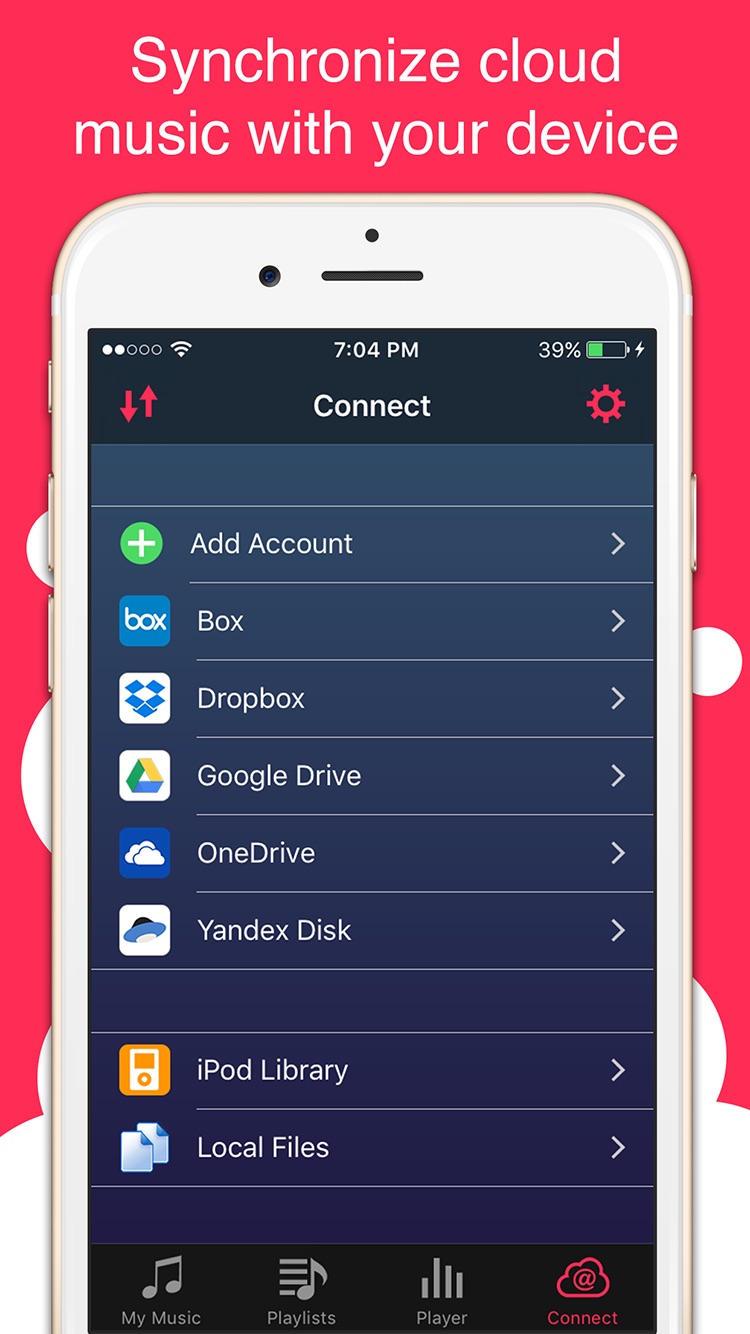
UK based Eightythree Technology today introduces Stream - Cloud Music Player 1.0, a tiny, but smart and powerful cloud music player for iOS devices. Stream lets you listen to music directly from your cloud storage like Box, Dropbox, GoogleDrive, OneDrive and Yandex.Disk. Stream will also help you to download your beloved music for offline playback, as well as transfer music files to iOS local storage from your computer using WiFi connection.
London, United Kingdom - Eightythree Technology today is proud to introduce Stream, a tiny, but smart and powerful cloud music player for iOS devices that let you listen music directly from your cloud storage like Box, Dropbox, GoogleDrive, OneDrive and Yandex.Disk. Also Stream will help you to download your beloved music for offline playback as well as transfer music files to iOS local storage from your computer using WiFi connection.
Stream is a new cloud music player for iPhone and iPad that provides a convenient way for you to stream music from any cloud storage accounts that you have and keep your device storage clear. It allows you to easily manage tracks across cloud drives, directly from one interface. In other words, instead of having to login to each account to listen you music, you just need to download Stream from the App Store and stream (or download) music from all your cloud drivers.
"Stream is an cloud music player for iPhone and iPad that allows users to link their various cloud services to a single app. Here you can transfer tracks between the different providers, listen to music and download it for offline playback." said Felix Yew, Founder of Eightythree Technology. "Many people have multiple cloud storage accounts - Box, Dropbox, OneDrive, Google Drive and Yandex.Disk - but managing them all separately can be a chore. Here's how you listen all your music from a single interface using Stream app."
Stream is quite easy to configure, and takes only a couple of minutes for setting things up. Anyone that's tired of managing multiple, separate cloud storage services to keep music library will benefit from Stream - Cloud Music Player. It's also good for users with multiple accounts on a single service. Stream was originally developed following the principles of clarity, simplicity and versatility. Thus, the minimalistic interface incorporates both essential and unique features, which let you:
* Listen to your music regardless of the cloud storage service: Box, Dropbox, OneDrive, Google Drive and Yandex.Disk
* Play numerous audio formats
* Take full advantage of AirPlay to listen from any of your wireless output devices
Music Player:
* Full featured media player
* Sleep timer
* Lock screen playback controls
* Background music playback
* Equalizer with BassBooster
* Over 20 realistic EQ presets
* Stylish audio Visualizer
* Fine scrubbing
* Album cover art
Download :
* Download your favorite songs on device for listening without internet connection
* Local WiFi transfer from your computer
Manage:
* Manage, copy, move, rename and transfer files between cloud storage
* Create playlists from music in cloud storage
Search:
* Music in your library by different parameters
Device Requirements:
* iPhone, iPad, and iPod touch
* Requires iOS 7.0 or later
* 19.3 MB
Pricing and Availability:
Stream - Cloud Music Player 1.0 is $1.99 (USD) special discount for new launching price and available worldwide exclusively through the App Store in Music category.
Eightythree Technology: http://www.eightythreetech.com
Stream - Cloud Music Player 1.0: http://www.eightythreetech.com/stream/
Purchase and Download: https://itunes.apple.com/app/stream-cloud-music-player/id1065802380
YouTube Video: https://www.youtube.com/watch?v=re4v3zgvu_k
Screenshot 1: https://is1-ssl.mzstatic.com/image/thumb/Purple49/v4/d9/a1/1a/d9a11ac6-ec11-7726-883c-6d0ee7796af4/pr_source.png/0x0ss.jpg
Screenshot 2: https://is1-ssl.mzstatic.com/image/thumb/Purple69/v4/bd/7e/65/bd7e6577-d0d4-1cce-ab0c-0ee8f3d56a92/pr_source.png/0x0ss.jpg
Eightythree Technology is a small, independent studio that creates innovative products for iOS platform. Officially founded in October 2009, the company's portfolio has grown from one app to multiple apps that enable people to do amazing things. All Material and Software (C) Copyright 2016 Eightythree Technology. All Rights Reserved. Apple, the Apple logo, iPhone, iPod and iPad are registered trademarks of Apple Inc. in the U.S. and/or other countries. Other trademarks and registered trademarks may be the property of their respective owners.
*******
Link To Article: http://prmac.com/release-id-78828.htm
*******
---------------------------------------------------------------------------------
Note that you can alter delivered distributions at any time.
Login to your account on prMac to alter your channel selection, or to opt-out at any time.
Eightythree Technology launches Stream - Cloud Music Player on App Store - Published on 02/24/16
UK based Eightythree Technology today introduces Stream - Cloud Music Player 1.0, a tiny, but smart and powerful cloud music player for iOS devices. Stream lets you listen to music directly from your cloud storage like Box, Dropbox, GoogleDrive, OneDrive and Yandex.Disk. Stream will also help you to download your beloved music for offline playback, as well as transfer music files to iOS local storage from your computer using WiFi connection.
London, United Kingdom - Eightythree Technology today is proud to introduce Stream, a tiny, but smart and powerful cloud music player for iOS devices that let you listen music directly from your cloud storage like Box, Dropbox, GoogleDrive, OneDrive and Yandex.Disk. Also Stream will help you to download your beloved music for offline playback as well as transfer music files to iOS local storage from your computer using WiFi connection.
Stream is a new cloud music player for iPhone and iPad that provides a convenient way for you to stream music from any cloud storage accounts that you have and keep your device storage clear. It allows you to easily manage tracks across cloud drives, directly from one interface. In other words, instead of having to login to each account to listen you music, you just need to download Stream from the App Store and stream (or download) music from all your cloud drivers.
"Stream is an cloud music player for iPhone and iPad that allows users to link their various cloud services to a single app. Here you can transfer tracks between the different providers, listen to music and download it for offline playback." said Felix Yew, Founder of Eightythree Technology. "Many people have multiple cloud storage accounts - Box, Dropbox, OneDrive, Google Drive and Yandex.Disk - but managing them all separately can be a chore. Here's how you listen all your music from a single interface using Stream app."
Stream is quite easy to configure, and takes only a couple of minutes for setting things up. Anyone that's tired of managing multiple, separate cloud storage services to keep music library will benefit from Stream - Cloud Music Player. It's also good for users with multiple accounts on a single service. Stream was originally developed following the principles of clarity, simplicity and versatility. Thus, the minimalistic interface incorporates both essential and unique features, which let you:
* Listen to your music regardless of the cloud storage service: Box, Dropbox, OneDrive, Google Drive and Yandex.Disk
* Play numerous audio formats
* Take full advantage of AirPlay to listen from any of your wireless output devices
Music Player:
* Full featured media player
* Sleep timer
* Lock screen playback controls
* Background music playback
* Equalizer with BassBooster
* Over 20 realistic EQ presets
* Stylish audio Visualizer
* Fine scrubbing
* Album cover art
Download :
* Download your favorite songs on device for listening without internet connection
* Local WiFi transfer from your computer
Manage:
* Manage, copy, move, rename and transfer files between cloud storage
* Create playlists from music in cloud storage
Search:
* Music in your library by different parameters
Device Requirements:
* iPhone, iPad, and iPod touch
* Requires iOS 7.0 or later
* 19.3 MB
Pricing and Availability:
Stream - Cloud Music Player 1.0 is $1.99 (USD) special discount for new launching price and available worldwide exclusively through the App Store in Music category.
Eightythree Technology: http://www.eightythreetech.com
Stream - Cloud Music Player 1.0: http://www.eightythreetech.com/stream/
Purchase and Download: https://itunes.apple.com/app/stream-cloud-music-player/id1065802380
YouTube Video: https://www.youtube.com/watch?v=re4v3zgvu_k
Screenshot 1: https://is1-ssl.mzstatic.com/image/thumb/Purple49/v4/d9/a1/1a/d9a11ac6-ec11-7726-883c-6d0ee7796af4/pr_source.png/0x0ss.jpg

Screenshot 2: https://is1-ssl.mzstatic.com/image/thumb/Purple69/v4/bd/7e/65/bd7e6577-d0d4-1cce-ab0c-0ee8f3d56a92/pr_source.png/0x0ss.jpg
Eightythree Technology is a small, independent studio that creates innovative products for iOS platform. Officially founded in October 2009, the company's portfolio has grown from one app to multiple apps that enable people to do amazing things. All Material and Software (C) Copyright 2016 Eightythree Technology. All Rights Reserved. Apple, the Apple logo, iPhone, iPod and iPad are registered trademarks of Apple Inc. in the U.S. and/or other countries. Other trademarks and registered trademarks may be the property of their respective owners.
*******
Link To Article: http://prmac.com/release-id-78828.htm
*******
---------------------------------------------------------------------------------
Note that you can alter delivered distributions at any time.
Login to your account on prMac to alter your channel selection, or to opt-out at any time.
Offline Urdu to English Language Dictionary 3.0 for iOS
A new article has been published at prMac.
Offline Urdu to English Language Dictionary 3.0 for iOS - Published on 02/24/16
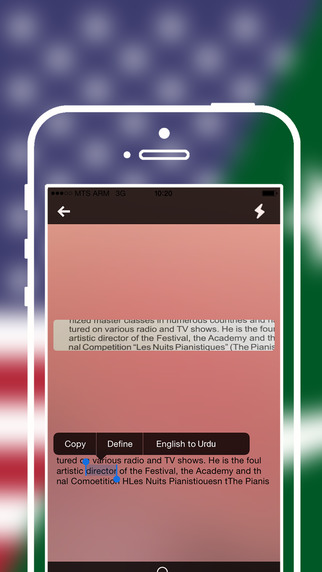
LastThink announces the release of Offline Urdu to English Language Dictionary 3.0, the important update to their highly customizable dictionary application for iOS devices. Users can seek and find any word's translation and synonyms anytime and anywhere from their devices. The dictionary offers users a huge collection of words with their translations as well as definitions and synonyms. Version 3.0 offers improved search capability.
Yerevan, Armenia - LastThink is proud to announce the release of Offline Urdu to English Language Dictionary 3.0, the important update to their highly customizable dictionary application developed for iPhone, iPad, and iPod touch devices. Users can seek and find any word's translation and synonyms anytime and anywhere from their Apple devices.
Features:
* Tremendous range of synonyms and antonyms with well over five hundred thousand synonym variants
* Information about the discipline of structural linguistics by suggesting vital enough sentences
* Appropriate translations of colloquial and formal words as well as conjugation of verbs and declension of nouns
* Availability of various word definitions which will exactly influence on your understanding of a Foreign Language in a detailed way
* A distinction of a section named "Favorites" with the possibility of saving as many unknown words as you wish
* Thorough analysis of parts of speech (noun, verb, adjective, adverb) and their grammatical functions (subject, object, etc.)
* A possibility of the following application usage without an internet demand
* Existence of contemporary words such as "Woot", "OMG", "Crunk" and many others
In our new updated version we grant users a chance of typing the unknown word either in capitals or in small letters and the app will bring all the possible variants and definitions of the dictionary entries saved both in capital and small letters.
If you however experience any issues, please do not hesitate to contact us if you'd like to share your experience with Offline Dictionaries, or provide suggestions on how we could improve the product further. We will be more than happy to get in touch.
NOTE: We have selected data from the internet and if any assembly or constitution doesn't want us to show the content of the unit, please recommend us to remove it.
Device Requirements:
* iPhone, iPad, and iPod touch
* Optimized for iPhone 5, iPhone 6, and iPhone 6 Plus
* Requires iOS 6.0 or later
* Universal Application
* 164 MB
Pricing and Availability:
Offline Urdu to English Language Dictionary 3.0 is free and available worldwide exclusively through the App Store in the Education category.
LastThink: http://lastthink.com/
Offline Urdu to English Language Dictionary 3.0: https://www.facebook.com/pages/Offline-Dictionary/882897578447079
Download from iTunes: https://itunes.apple.com/app/offline-urdu-to-english-language/id997667214
Screenshot: http://a4.mzstatic.com/us/r30/Purple1/v4/81/d5/9a/81d59aa3-e32d-a6ef-c81e-df92542ec57f/screen322x572.jpeg
App Icon: http://a4.mzstatic.com/us/r30/Purple69/v4/1f/ca/fb/1fcafb42-0eac-acbc-cd6d-bb5befaff52c/icon175x175.png
LastThink is an IT company with a focus on mobile development. It has extended its list of services since 2012 to offer high-end business process management, system integration, as well as up-to-date communication solutions. LastThink's mission is to deliver maximum business value to its customers by designing, developing, implementing and maintaining efficient and high quality software solutions aligned with their most essential business needs. Their team will always do its best to meet client expectations. All Material and Software (C) Copyright 2016 LastThink LLC. All Rights Reserved. Apple, the Apple logo, iPhone, iPod and iPad are registered trademarks of Apple Inc. in the U.S. and/or other countries. Other trademarks and registered trademarks may be the property of their respective owners.
*******
Link To Article: http://prmac.com/release-id-78837.htm
*******
---------------------------------------------------------------------------------
Note that you can alter delivered distributions at any time.
Login to your account on prMac to alter your channel selection, or to opt-out at any time.
Offline Urdu to English Language Dictionary 3.0 for iOS - Published on 02/24/16
LastThink announces the release of Offline Urdu to English Language Dictionary 3.0, the important update to their highly customizable dictionary application for iOS devices. Users can seek and find any word's translation and synonyms anytime and anywhere from their devices. The dictionary offers users a huge collection of words with their translations as well as definitions and synonyms. Version 3.0 offers improved search capability.
Yerevan, Armenia - LastThink is proud to announce the release of Offline Urdu to English Language Dictionary 3.0, the important update to their highly customizable dictionary application developed for iPhone, iPad, and iPod touch devices. Users can seek and find any word's translation and synonyms anytime and anywhere from their Apple devices.
Features:
* Tremendous range of synonyms and antonyms with well over five hundred thousand synonym variants
* Information about the discipline of structural linguistics by suggesting vital enough sentences
* Appropriate translations of colloquial and formal words as well as conjugation of verbs and declension of nouns
* Availability of various word definitions which will exactly influence on your understanding of a Foreign Language in a detailed way
* A distinction of a section named "Favorites" with the possibility of saving as many unknown words as you wish
* Thorough analysis of parts of speech (noun, verb, adjective, adverb) and their grammatical functions (subject, object, etc.)
* A possibility of the following application usage without an internet demand
* Existence of contemporary words such as "Woot", "OMG", "Crunk" and many others
In our new updated version we grant users a chance of typing the unknown word either in capitals or in small letters and the app will bring all the possible variants and definitions of the dictionary entries saved both in capital and small letters.
If you however experience any issues, please do not hesitate to contact us if you'd like to share your experience with Offline Dictionaries, or provide suggestions on how we could improve the product further. We will be more than happy to get in touch.
NOTE: We have selected data from the internet and if any assembly or constitution doesn't want us to show the content of the unit, please recommend us to remove it.
Device Requirements:
* iPhone, iPad, and iPod touch
* Optimized for iPhone 5, iPhone 6, and iPhone 6 Plus
* Requires iOS 6.0 or later
* Universal Application
* 164 MB
Pricing and Availability:
Offline Urdu to English Language Dictionary 3.0 is free and available worldwide exclusively through the App Store in the Education category.
LastThink: http://lastthink.com/
Offline Urdu to English Language Dictionary 3.0: https://www.facebook.com/pages/Offline-Dictionary/882897578447079
Download from iTunes: https://itunes.apple.com/app/offline-urdu-to-english-language/id997667214
Screenshot: http://a4.mzstatic.com/us/r30/Purple1/v4/81/d5/9a/81d59aa3-e32d-a6ef-c81e-df92542ec57f/screen322x572.jpeg
App Icon: http://a4.mzstatic.com/us/r30/Purple69/v4/1f/ca/fb/1fcafb42-0eac-acbc-cd6d-bb5befaff52c/icon175x175.png

LastThink is an IT company with a focus on mobile development. It has extended its list of services since 2012 to offer high-end business process management, system integration, as well as up-to-date communication solutions. LastThink's mission is to deliver maximum business value to its customers by designing, developing, implementing and maintaining efficient and high quality software solutions aligned with their most essential business needs. Their team will always do its best to meet client expectations. All Material and Software (C) Copyright 2016 LastThink LLC. All Rights Reserved. Apple, the Apple logo, iPhone, iPod and iPad are registered trademarks of Apple Inc. in the U.S. and/or other countries. Other trademarks and registered trademarks may be the property of their respective owners.
*******
Link To Article: http://prmac.com/release-id-78837.htm
*******
---------------------------------------------------------------------------------
Note that you can alter delivered distributions at any time.
Login to your account on prMac to alter your channel selection, or to opt-out at any time.
Eggs Surprise Fun for Kids - Free for iOS
A new article has been published at prMac.
Eggs Surprise Fun for Kids - Free for iOS - Published on 02/24/16
BoxGames announces Eggs Surprise With Friends 1.0 for iOS devices, their free surprise eggs simulator game, where players can experience purchasing eggs, unwrapping them, shaking them, getting toys from them, and collecting over 60 surprise toys. To get gamers started, the game provides 5 free surprise eggs and in-game cash of $5.00. The in-game cash can be used by players to purchase more eggs at the Candy Store. Cash may be earned during gameplay or obtained via in-app purchase.
Shah Alam, Malaysia - BoxGames today is pleased to announce Eggs Surprise With Friends 1.0 for iOS devices, their free surprise eggs simulator game. Players can experience purchasing eggs, unwrapping them, shaking them, getting toys from them and collecting toy sets. There are more than 60 fun surprise toys to collect. For starters, the game provides 5 free surprise eggs and a starting in-game cash of $5.00.
The developer is proud to announce Eggs Surprise With Friends today and commented, "Eggs Surprise With Friends was developed for my own daughter, Nadyne, who is three years old at the moment. She helped me a lot in beta testing the game. After a feature is successfully implemented, I'd give her the game to test on it - sure enough bugs were found and fixed. It was a lot of fun developing a game this way - to involve the people you love in the process".
"We decided to develop the game after we saw how attached our daughter was to the eggs surprise videos on YouTube. She'd watch that for hours! She even nagged us if she saw surprise eggs in the mall.", the developer added. The app design uses pleasing color tones and relaxing music through out - which is essential for toddlers' delicate eyes and ears. Interaction with app - such as shaking device to shake the egg - is also implemented to promote motor skills making it a great app for kids.
Feature Highlights:
* Buy eggs, shake, unwrap, and open eggs to reveal surprise toys
* Store toys in your stash
* Trade toys for cash
* Play fun games to earn more cash
* Premium Eggs to get Rare Toys
There are also 4 games built into the app for the players who want to earn more cash - Pat-A-Mole, Cross The Road, Angry Flap, and Magnet Wheel. These games can also be played by adults to help gain more cash to buy more eggs. Optionally, players can purchase more cash at the "Bank" with In-App Purchases.
Device Requirements:
* iPhone, iPad, or iPod touch
* Requires iOS 7.0 or later
* 72.4 MB
Pricing and Availability:
Eggs Surprise With Friends 1.0 is free and available worldwide exclusively through the App Store in the Games category. In games cash may be earned during gameplay or downloaded via an in-app purchase.
BoxGames: http://boxgames.emirbytes.com
Download from iTunes: https://itunes.apple.com/app/eggs-surprise-with-friends/id1082393901
Screenshot 1: http://a1.mzstatic.com/us/r30/Purple49/v4/ed/e5/dd/ede5dd34-684f-546e-7199-b3f52e665f0f/screen322x572.jpeg
Screenshot 2: http://a1.mzstatic.com/us/r30/Purple49/v4/3f/04/e8/3f04e808-b214-7c5e-23b4-b581d1e87c45/screen322x572.jpeg
Screenshot 3: http://a3.mzstatic.com/us/r30/Purple49/v4/4f/96/85/4f96859a-4d93-f8da-ff5d-ff396f910650/screen322x572.jpeg
Screenshot: http://a1.mzstatic.com/us/r30/Purple69/v4/fe/d6/ef/fed6ef02-8d3f-2b88-f825-c628a2b2ffd9/screen322x572.jpeg
Emir F Samsuddin has been involved in making utility software for more than 10 years, mostly in Windows desktop platform and Windows Mobile platform, using Delphi and Lazarus. And, recently the developer started to develop for Apple's iPhone platform in the year 2009. The developer also worked in developing games for the Windows platform for 2 years. Copyright (C) 2009-2016 Emir F Samsuddin. All Rights Reserved. Apple, the Apple logo, iPhone and iPod are registered trademarks of Apple Inc. in the U.S. and/or other countries.
*******
Link To Article: http://prmac.com/release-id-78836.htm
*******
---------------------------------------------------------------------------------
Note that you can alter delivered distributions at any time.
Login to your account on prMac to alter your channel selection, or to opt-out at any time.
Eggs Surprise Fun for Kids - Free for iOS - Published on 02/24/16
BoxGames announces Eggs Surprise With Friends 1.0 for iOS devices, their free surprise eggs simulator game, where players can experience purchasing eggs, unwrapping them, shaking them, getting toys from them, and collecting over 60 surprise toys. To get gamers started, the game provides 5 free surprise eggs and in-game cash of $5.00. The in-game cash can be used by players to purchase more eggs at the Candy Store. Cash may be earned during gameplay or obtained via in-app purchase.
Shah Alam, Malaysia - BoxGames today is pleased to announce Eggs Surprise With Friends 1.0 for iOS devices, their free surprise eggs simulator game. Players can experience purchasing eggs, unwrapping them, shaking them, getting toys from them and collecting toy sets. There are more than 60 fun surprise toys to collect. For starters, the game provides 5 free surprise eggs and a starting in-game cash of $5.00.
The developer is proud to announce Eggs Surprise With Friends today and commented, "Eggs Surprise With Friends was developed for my own daughter, Nadyne, who is three years old at the moment. She helped me a lot in beta testing the game. After a feature is successfully implemented, I'd give her the game to test on it - sure enough bugs were found and fixed. It was a lot of fun developing a game this way - to involve the people you love in the process".
"We decided to develop the game after we saw how attached our daughter was to the eggs surprise videos on YouTube. She'd watch that for hours! She even nagged us if she saw surprise eggs in the mall.", the developer added. The app design uses pleasing color tones and relaxing music through out - which is essential for toddlers' delicate eyes and ears. Interaction with app - such as shaking device to shake the egg - is also implemented to promote motor skills making it a great app for kids.
Feature Highlights:
* Buy eggs, shake, unwrap, and open eggs to reveal surprise toys
* Store toys in your stash
* Trade toys for cash
* Play fun games to earn more cash
* Premium Eggs to get Rare Toys
There are also 4 games built into the app for the players who want to earn more cash - Pat-A-Mole, Cross The Road, Angry Flap, and Magnet Wheel. These games can also be played by adults to help gain more cash to buy more eggs. Optionally, players can purchase more cash at the "Bank" with In-App Purchases.
Device Requirements:
* iPhone, iPad, or iPod touch
* Requires iOS 7.0 or later
* 72.4 MB
Pricing and Availability:
Eggs Surprise With Friends 1.0 is free and available worldwide exclusively through the App Store in the Games category. In games cash may be earned during gameplay or downloaded via an in-app purchase.
BoxGames: http://boxgames.emirbytes.com
Download from iTunes: https://itunes.apple.com/app/eggs-surprise-with-friends/id1082393901
Screenshot 1: http://a1.mzstatic.com/us/r30/Purple49/v4/ed/e5/dd/ede5dd34-684f-546e-7199-b3f52e665f0f/screen322x572.jpeg

Screenshot 2: http://a1.mzstatic.com/us/r30/Purple49/v4/3f/04/e8/3f04e808-b214-7c5e-23b4-b581d1e87c45/screen322x572.jpeg

Screenshot 3: http://a3.mzstatic.com/us/r30/Purple49/v4/4f/96/85/4f96859a-4d93-f8da-ff5d-ff396f910650/screen322x572.jpeg

Screenshot: http://a1.mzstatic.com/us/r30/Purple69/v4/fe/d6/ef/fed6ef02-8d3f-2b88-f825-c628a2b2ffd9/screen322x572.jpeg

Emir F Samsuddin has been involved in making utility software for more than 10 years, mostly in Windows desktop platform and Windows Mobile platform, using Delphi and Lazarus. And, recently the developer started to develop for Apple's iPhone platform in the year 2009. The developer also worked in developing games for the Windows platform for 2 years. Copyright (C) 2009-2016 Emir F Samsuddin. All Rights Reserved. Apple, the Apple logo, iPhone and iPod are registered trademarks of Apple Inc. in the U.S. and/or other countries.
*******
Link To Article: http://prmac.com/release-id-78836.htm
*******
---------------------------------------------------------------------------------
Note that you can alter delivered distributions at any time.
Login to your account on prMac to alter your channel selection, or to opt-out at any time.
Shade Combo introduced for iOS - New Game about Ducks and Combos
A new article has been published at prMac.
Shade Combo introduced for iOS - New Game about Ducks and Combos - Published on 02/24/16
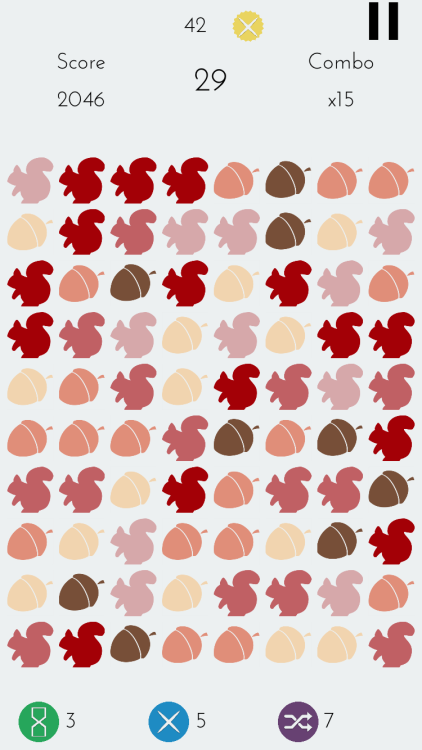
Independent game developer, Yusuf Turk today introduces Shade Combo 1.0, his fast paced puzzle game developed for iPhone, iPad and iPod touch devices. In Shade Combo, players combine lighter shade ducks to turn them into darker shades and combine darkest ducks to make them disappear. Combining them rapidly in a row starts the combo counter. The faster you play without a wrong move, higher your score gets. Shade Combo features both timed and endless modes, as well as Game Center integration.
Istanbul, Turkey - Independent game developer, Yusuf Turk today is proud to announce the release of Shade Combo 1.0, his fast paced puzzle game developed for iPhone, iPad and iPod touch devices. Players combine lighter shade ducks (or other objects) to turn them into darker shades and combine darkest ducks to make them disappear. Combining them rapidly in a row starts the combo counter. The score for each move is multiplied by your combo. Faster you play without a wrong move, higher your score gets. Every 10x combo earns the player a Combo Point which they can use to unlock more colors, shapes and power-ups. Power-ups give player opportunities to make even higher combos.
Features :
* 100+ items to unlock
* Timed Mode: Race against time
* Endless Mode: No time limit and unlimited shuffles
* Game Center integration
"The idea for Shade Combo came to me on a holiday in Japan," explained Yusuf Turk, indie developer. "While I was sitting near a small pond watching the ducks swim, the light came from such an angle that a passing duck's feathers seemed like three different shades of green, forming a peaceful harmony. In the blink of an eye the colorful duck blended in with the others. While searching for it I saw the little ducklings walking on the shore. It made me think of the circle of life. Ducks combining with each other, disappearing and then new ducks come into the picture. That was the feeling I wanted to capture in this game."
Language Support:
Shade Combo supports English, German, French, Spanish, Portuguese, Turkish, Chinese (Simplified), Chinese (Traditional), Japanese, Korean, Arabic and Russian languages.
Device Requirements:
* iPhone, iPad, and iPod touch
* Requires iOS 8.0 or later
* 25.7 MB
Pricing and Availability:
Shade Combo 1.0 is Free and available worldwide exclusively through the App Store in the Games category. I am look forward to hearing from you and have a good day!
Shade Combo 1.0: http://www.shadecombo.com
Download from iTunes: https://itunes.apple.com/app/shade-combo/id1072766326
YouTube Video (Gameplay): https://www.youtube.com/watch?v=E83_6wGAPVQ
Screenshot 1: http://62.media.tumblr.com/b9e77d11f3245e9d3c906a5159d5512f/tumblr_inline_o306dwbS3X1u1cuxt_500.png
Screenshot 2: http://62.media.tumblr.com/1591dbfbec17507691c04c9fcd8bfe99/tumblr_inline_o306fbI6w61u1cuxt_500.png
Media Assets: https://www.dropbox.com/sh/bqfi7hokmp9pdnp/AACdtaqak4HtXSNmxLOZnlzja?dl=0
Located in Istanbul, Turkey, Yusuf Turk is an independent game developer. Yusuf manages a small team of developers and artists to create enjoyable casual games. Developing games since 2014, Yusuf worked in the field of computer science. After getting accepted to UC Santa Cruz for a PhD program, he decided to drop out and make game development my full time job. All Material and Software (C) Copyright 2016 Yusuf Turk. All Rights Reserved. Apple, the Apple logo, iPhone, iPod and iPad are registered trademarks of Apple Inc. in the U.S. and/or other countries. Other trademarks and registered trademarks may be the property of their respective owners.
*******
Link To Article: http://prmac.com/release-id-78827.htm
*******
---------------------------------------------------------------------------------
Note that you can alter delivered distributions at any time.
Login to your account on prMac to alter your channel selection, or to opt-out at any time.
Shade Combo introduced for iOS - New Game about Ducks and Combos - Published on 02/24/16
Independent game developer, Yusuf Turk today introduces Shade Combo 1.0, his fast paced puzzle game developed for iPhone, iPad and iPod touch devices. In Shade Combo, players combine lighter shade ducks to turn them into darker shades and combine darkest ducks to make them disappear. Combining them rapidly in a row starts the combo counter. The faster you play without a wrong move, higher your score gets. Shade Combo features both timed and endless modes, as well as Game Center integration.
Istanbul, Turkey - Independent game developer, Yusuf Turk today is proud to announce the release of Shade Combo 1.0, his fast paced puzzle game developed for iPhone, iPad and iPod touch devices. Players combine lighter shade ducks (or other objects) to turn them into darker shades and combine darkest ducks to make them disappear. Combining them rapidly in a row starts the combo counter. The score for each move is multiplied by your combo. Faster you play without a wrong move, higher your score gets. Every 10x combo earns the player a Combo Point which they can use to unlock more colors, shapes and power-ups. Power-ups give player opportunities to make even higher combos.
Features :
* 100+ items to unlock
* Timed Mode: Race against time
* Endless Mode: No time limit and unlimited shuffles
* Game Center integration
"The idea for Shade Combo came to me on a holiday in Japan," explained Yusuf Turk, indie developer. "While I was sitting near a small pond watching the ducks swim, the light came from such an angle that a passing duck's feathers seemed like three different shades of green, forming a peaceful harmony. In the blink of an eye the colorful duck blended in with the others. While searching for it I saw the little ducklings walking on the shore. It made me think of the circle of life. Ducks combining with each other, disappearing and then new ducks come into the picture. That was the feeling I wanted to capture in this game."
Language Support:
Shade Combo supports English, German, French, Spanish, Portuguese, Turkish, Chinese (Simplified), Chinese (Traditional), Japanese, Korean, Arabic and Russian languages.
Device Requirements:
* iPhone, iPad, and iPod touch
* Requires iOS 8.0 or later
* 25.7 MB
Pricing and Availability:
Shade Combo 1.0 is Free and available worldwide exclusively through the App Store in the Games category. I am look forward to hearing from you and have a good day!
Shade Combo 1.0: http://www.shadecombo.com
Download from iTunes: https://itunes.apple.com/app/shade-combo/id1072766326
YouTube Video (Gameplay): https://www.youtube.com/watch?v=E83_6wGAPVQ
Screenshot 1: http://62.media.tumblr.com/b9e77d11f3245e9d3c906a5159d5512f/tumblr_inline_o306dwbS3X1u1cuxt_500.png

Screenshot 2: http://62.media.tumblr.com/1591dbfbec17507691c04c9fcd8bfe99/tumblr_inline_o306fbI6w61u1cuxt_500.png
Media Assets: https://www.dropbox.com/sh/bqfi7hokmp9pdnp/AACdtaqak4HtXSNmxLOZnlzja?dl=0
Located in Istanbul, Turkey, Yusuf Turk is an independent game developer. Yusuf manages a small team of developers and artists to create enjoyable casual games. Developing games since 2014, Yusuf worked in the field of computer science. After getting accepted to UC Santa Cruz for a PhD program, he decided to drop out and make game development my full time job. All Material and Software (C) Copyright 2016 Yusuf Turk. All Rights Reserved. Apple, the Apple logo, iPhone, iPod and iPad are registered trademarks of Apple Inc. in the U.S. and/or other countries. Other trademarks and registered trademarks may be the property of their respective owners.
*******
Link To Article: http://prmac.com/release-id-78827.htm
*******
---------------------------------------------------------------------------------
Note that you can alter delivered distributions at any time.
Login to your account on prMac to alter your channel selection, or to opt-out at any time.
BrowserHub helps users manage multiple web browsers on OS X
A new article has been published at prMac.
BrowserHub helps users manage multiple web browsers on OS X - Published on 02/24/16
Independent Mac developer, Guilherme Rambo today announces BrowserHub 1.0, his new web browser based utility developed for Mac OS X. BrowserHub sits between links and the web browsers installed on the system, so users can create rules which determine what browser should be used depending on the context. The user creates simple rules based on the URL and selects a browser to open links matching those rules. Rules can be created based on protocol, host, path, file extension or app.
Sao Sebastiao do Cai, Brazil - Guilherme Rambo, an independent Mac developer, today is please to announce the release of BrowserHub 1.0, his new web browser based utility developed for Mac OS X. BrowserHub sits between links and the web browsers installed on the system, so users can create rules which determine what browser should be used depending on the context.
With BrowserHub, the user creates simple rules based on the URL and select a browser to open links matching those rules. So the next time they click on a link in Mail for instance and the link matches that particular rule, It will open on the browser defined for that kind of link. Examples of rules that could be created with BrowserHub include: "open all YouTube links in Chrome," "open video links in VLC," or "open my bank's website on Internet Explorer in Parallels." The rules are created on an interface very similar to Mail's rules preferences.
BrowserHub's main features:
* Creation of rules to determine which sites should be opened with which browsers
* Rules can be created based on protocol, host, path, file extension or app
* Fast default browser switching with global keyboard shortcut
* Option-click any link anywhere to choose which browser should be used to open It
System Requirements:
* At least two web browsers installed on the system
* OS X 10.11 or later
* 64-bit processor
* 5.2 MB
Pricing and Availability:
BrowserHub 1.0 is offered at the special launch sale of $9.99 USD (or equivalent amount in other currencies) and available worldwide through the Mac App Store in the Utilities category. A limited number of Promotional Codes are available to members of the media. If you're interested in providing your readers with a special discount, please contact Guilherme Rambo.
BrowserHub 1.0: https://getbrowserhub.com
Purchase and Download (MAS): https://itunes.apple.com/app/browserhub/id1081203896
Download Trial: https://getbrowserhub.com/trial
Vimeo Video (Demo): https://vimeo.com/155176975
Application Icon: http://a2.mzstatic.com/us/r30/Purple69/v4/76/cc/32/76cc3286-ac8c-00b3-b944-41d6824e9aa7/icon128-2x.png
Press Kit (pdf): https://getbrowserhub.com/presskit
Guilherme Rambo is an independent software developer based in Rio Grande do Sul / Brazil, known for the creation of the open source WWDC app for OS X which is widely used by Mac and iOS developers. All Material and Software (C) 2016 Guilherme Rambo / All Rights Reserved. Apple, the Apple logo, OS X, El Capitan, are registered trademarks of Apple in the U.S. and/or other countries.
*******
Link To Article: http://prmac.com/release-id-78826.htm
*******
---------------------------------------------------------------------------------
Note that you can alter delivered distributions at any time.
Login to your account on prMac to alter your channel selection, or to opt-out at any time.
BrowserHub helps users manage multiple web browsers on OS X - Published on 02/24/16
Independent Mac developer, Guilherme Rambo today announces BrowserHub 1.0, his new web browser based utility developed for Mac OS X. BrowserHub sits between links and the web browsers installed on the system, so users can create rules which determine what browser should be used depending on the context. The user creates simple rules based on the URL and selects a browser to open links matching those rules. Rules can be created based on protocol, host, path, file extension or app.
Sao Sebastiao do Cai, Brazil - Guilherme Rambo, an independent Mac developer, today is please to announce the release of BrowserHub 1.0, his new web browser based utility developed for Mac OS X. BrowserHub sits between links and the web browsers installed on the system, so users can create rules which determine what browser should be used depending on the context.
With BrowserHub, the user creates simple rules based on the URL and select a browser to open links matching those rules. So the next time they click on a link in Mail for instance and the link matches that particular rule, It will open on the browser defined for that kind of link. Examples of rules that could be created with BrowserHub include: "open all YouTube links in Chrome," "open video links in VLC," or "open my bank's website on Internet Explorer in Parallels." The rules are created on an interface very similar to Mail's rules preferences.
BrowserHub's main features:
* Creation of rules to determine which sites should be opened with which browsers
* Rules can be created based on protocol, host, path, file extension or app
* Fast default browser switching with global keyboard shortcut
* Option-click any link anywhere to choose which browser should be used to open It
System Requirements:
* At least two web browsers installed on the system
* OS X 10.11 or later
* 64-bit processor
* 5.2 MB
Pricing and Availability:
BrowserHub 1.0 is offered at the special launch sale of $9.99 USD (or equivalent amount in other currencies) and available worldwide through the Mac App Store in the Utilities category. A limited number of Promotional Codes are available to members of the media. If you're interested in providing your readers with a special discount, please contact Guilherme Rambo.
BrowserHub 1.0: https://getbrowserhub.com
Purchase and Download (MAS): https://itunes.apple.com/app/browserhub/id1081203896
Download Trial: https://getbrowserhub.com/trial
Vimeo Video (Demo): https://vimeo.com/155176975
Application Icon: http://a2.mzstatic.com/us/r30/Purple69/v4/76/cc/32/76cc3286-ac8c-00b3-b944-41d6824e9aa7/icon128-2x.png

Press Kit (pdf): https://getbrowserhub.com/presskit
Guilherme Rambo is an independent software developer based in Rio Grande do Sul / Brazil, known for the creation of the open source WWDC app for OS X which is widely used by Mac and iOS developers. All Material and Software (C) 2016 Guilherme Rambo / All Rights Reserved. Apple, the Apple logo, OS X, El Capitan, are registered trademarks of Apple in the U.S. and/or other countries.
*******
Link To Article: http://prmac.com/release-id-78826.htm
*******
---------------------------------------------------------------------------------
Note that you can alter delivered distributions at any time.
Login to your account on prMac to alter your channel selection, or to opt-out at any time.
Arrhythmias App Update in Conjunction with Android Release of Same
A new article has been published at prMac.
Arrhythmias App Update in Conjunction with Android Release of Same - Published on 02/24/16
Abe Balsamo & Co. today announces Arrhythmias 3.13, a crucial update to their proprietary medical app for iOS and Android devices. The first ECG for your phone that has passed FDA validation, Arrhythmias helps to diagnose and treat very complicated medical problems, allowing medical practitioners to make quick, informed, peer-reviewed decisions. Version 3.12 has been updated with new color scheme, as well as, bug fixes/optimizations for the new Apple iOS software.
Taos, New Mexico - Building on the success of the "Arrhythmias" iPhone(R) App, the popular medical application "Arrhythmias" today launched a new version for Android(TM) - Google's open mobile platform - as well as, an updated Universal iDevice (iPod, iPhone, iPad) version.
The flagship app by Abe Balsamo & Co., "Arrhythmias" gets a crucial update. It has been updated with new color scheme, as well as, bug fixes/optimizations for the new Apple iOS software. This comes in the conjunction with the news that "Arrhythmias and Dysrhythmias" has been release for the Android platform, now available in the Google Play Store. The "Arrhythmias" app has been integrated into the world famous AliveCor software, the first ECG for your phone that has passed FDA validation.
A quick reference for medical students, residents and medical professionals, "Arrhythmias" (iDevice) and "Arrhythmias and Dysrhythmias" (Android) aids in the diagnosis of many common and uncommon heart problems. The Apple Store version has been downloaded over 100,000 times and has been named to Apple's "New and Noteworthy" list.
"We are eager to help medical practitioners make quick, informed, peer-reviewed decisions that are in line with the standards of care. We hope to provide affordable ($0.99) peace-of-mind to doctors, PAs, and NPs, as well as EMS professionals, when making decisions at the bedside or even in an ambulance. Our applications help to diagnose and treat very complicated medical problems, such as heart problems," states Abe Balsamo, president of Abe Balsamo & Co.
The apps are inexpensive and high quality, with an intuitive display and easy to use format. There are no "extra clicks," which allows for fast access, needed at the bedside during medical "codes" and life-threatening events. The application is updated regularly and strives to only provide relevant, informative, and even life-saving medical information. This is a very cost effective bedside reference now available for Android and Apple devices.
With the release, Android customers will enjoy the same tools as iPhone users, including:
* Arrhythmias and Dysrhythmias Descriptions
* Representative ECGs
* Peer Reviewed
* Bedside Reference (simple to use interface)
* Award Winning Research
* Treatments (updated regularly)
* No Ads (what?)
Device Requirements:
* iPhone, iPad, and iPod touch
* Requires iOS 7.0 or later
* Universal Application
* 89.6 MB
Pricing and Availability:
Arrhythmias 3.13 is only $0.99 USD (or equivalent amount in other currencies) and available worldwide through the App Store in the Medical category. There is also an Android version available on Google Play. Existing customers who purchased the app will receive a update at no cost. Both platforms are tightly integrated and updated regularly.
Apps By Abe: http://www.AppsByAbe.com
Arrhythmias 3.13: http://itunes.apple.com/app/arrhythmias/id429796356
Purchase and Download from Google Play: https://play.google.com/store/apps/details?id=com.arrhythmia
Screenshot: http://a2.mzstatic.com/us/r30/Purple69/v4/23/51/0f/23510f42-37d2-92c1-bdcb-3309cbe784e3/screen322x572.jpeg
App Icon: http://a5.mzstatic.com/us/r30/Purple69/v4/b1/96/76/b1967631-bb72-5313-4827-ccedddea4a35/icon175x175.png
Located in Taos, New Mexico, Abe Balsamo & Co. is a small, niche firm intent on providing point-of-care applications for medical providers. This small company has writers, editors, programmers, and doctors on the board of directors. Copyright (C) 2011-2016 Abe Balsamo & Co. All Rights Reserved. Apple, the Apple logo, iPhone, iPod and iPad are registered trademarks of Apple Inc. in the U.S. and/or other countries. Android, Google, Google Play are all registered trademarks of Google Inc in the U.S. and/or other countries.
*******
Link To Article: http://prmac.com/release-id-78825.htm
*******
---------------------------------------------------------------------------------
Note that you can alter delivered distributions at any time.
Login to your account on prMac to alter your channel selection, or to opt-out at any time.
Arrhythmias App Update in Conjunction with Android Release of Same - Published on 02/24/16
Abe Balsamo & Co. today announces Arrhythmias 3.13, a crucial update to their proprietary medical app for iOS and Android devices. The first ECG for your phone that has passed FDA validation, Arrhythmias helps to diagnose and treat very complicated medical problems, allowing medical practitioners to make quick, informed, peer-reviewed decisions. Version 3.12 has been updated with new color scheme, as well as, bug fixes/optimizations for the new Apple iOS software.
Taos, New Mexico - Building on the success of the "Arrhythmias" iPhone(R) App, the popular medical application "Arrhythmias" today launched a new version for Android(TM) - Google's open mobile platform - as well as, an updated Universal iDevice (iPod, iPhone, iPad) version.
The flagship app by Abe Balsamo & Co., "Arrhythmias" gets a crucial update. It has been updated with new color scheme, as well as, bug fixes/optimizations for the new Apple iOS software. This comes in the conjunction with the news that "Arrhythmias and Dysrhythmias" has been release for the Android platform, now available in the Google Play Store. The "Arrhythmias" app has been integrated into the world famous AliveCor software, the first ECG for your phone that has passed FDA validation.
A quick reference for medical students, residents and medical professionals, "Arrhythmias" (iDevice) and "Arrhythmias and Dysrhythmias" (Android) aids in the diagnosis of many common and uncommon heart problems. The Apple Store version has been downloaded over 100,000 times and has been named to Apple's "New and Noteworthy" list.
"We are eager to help medical practitioners make quick, informed, peer-reviewed decisions that are in line with the standards of care. We hope to provide affordable ($0.99) peace-of-mind to doctors, PAs, and NPs, as well as EMS professionals, when making decisions at the bedside or even in an ambulance. Our applications help to diagnose and treat very complicated medical problems, such as heart problems," states Abe Balsamo, president of Abe Balsamo & Co.
The apps are inexpensive and high quality, with an intuitive display and easy to use format. There are no "extra clicks," which allows for fast access, needed at the bedside during medical "codes" and life-threatening events. The application is updated regularly and strives to only provide relevant, informative, and even life-saving medical information. This is a very cost effective bedside reference now available for Android and Apple devices.
With the release, Android customers will enjoy the same tools as iPhone users, including:
* Arrhythmias and Dysrhythmias Descriptions
* Representative ECGs
* Peer Reviewed
* Bedside Reference (simple to use interface)
* Award Winning Research
* Treatments (updated regularly)
* No Ads (what?)
Device Requirements:
* iPhone, iPad, and iPod touch
* Requires iOS 7.0 or later
* Universal Application
* 89.6 MB
Pricing and Availability:
Arrhythmias 3.13 is only $0.99 USD (or equivalent amount in other currencies) and available worldwide through the App Store in the Medical category. There is also an Android version available on Google Play. Existing customers who purchased the app will receive a update at no cost. Both platforms are tightly integrated and updated regularly.
Apps By Abe: http://www.AppsByAbe.com
Arrhythmias 3.13: http://itunes.apple.com/app/arrhythmias/id429796356
Purchase and Download from Google Play: https://play.google.com/store/apps/details?id=com.arrhythmia
Screenshot: http://a2.mzstatic.com/us/r30/Purple69/v4/23/51/0f/23510f42-37d2-92c1-bdcb-3309cbe784e3/screen322x572.jpeg

App Icon: http://a5.mzstatic.com/us/r30/Purple69/v4/b1/96/76/b1967631-bb72-5313-4827-ccedddea4a35/icon175x175.png

Located in Taos, New Mexico, Abe Balsamo & Co. is a small, niche firm intent on providing point-of-care applications for medical providers. This small company has writers, editors, programmers, and doctors on the board of directors. Copyright (C) 2011-2016 Abe Balsamo & Co. All Rights Reserved. Apple, the Apple logo, iPhone, iPod and iPad are registered trademarks of Apple Inc. in the U.S. and/or other countries. Android, Google, Google Play are all registered trademarks of Google Inc in the U.S. and/or other countries.
*******
Link To Article: http://prmac.com/release-id-78825.htm
*******
---------------------------------------------------------------------------------
Note that you can alter delivered distributions at any time.
Login to your account on prMac to alter your channel selection, or to opt-out at any time.
Subscribe to:
Posts (Atom)