A new article has been published at prMac.
Pigs Can Fly, a Modern Take on a Classic Nintendo Hit Game - Published on 02/25/16
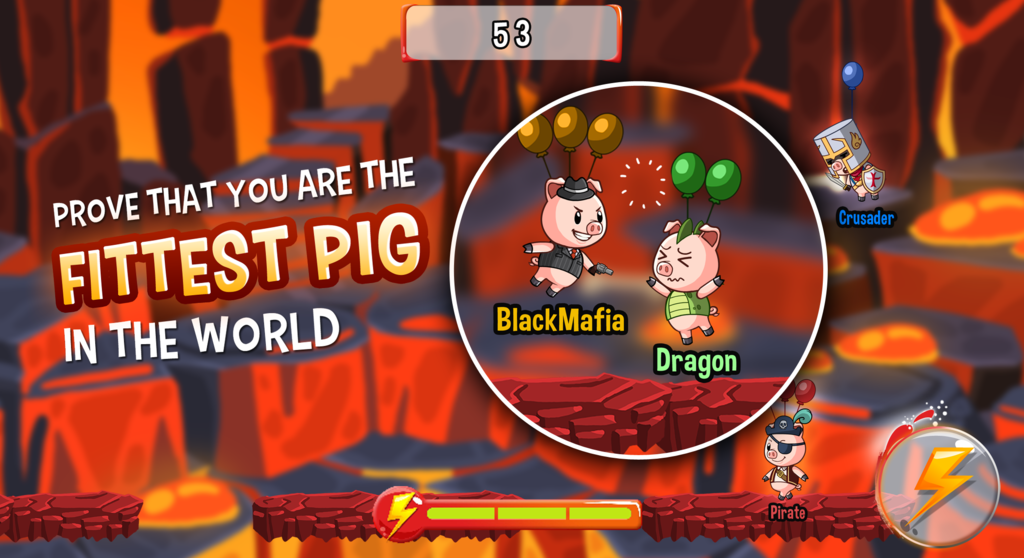
Invelopers announces Pigs Can Fly 1.0.3, their new real time action game for iOS and Android devices. The game is a tribute to the classic Nintendo hit game Balloon Fight, but with a modern twist. The core objective of the game is to pop your opponent's balloons and be the sole survivor. Players can invite buddies for a multiplayer match, or do a quick match with players around the world in a real time action pace battle of up to 4 players.
Singapore, Singapore - Invelopers is proud to announce the release of Pigs Can Fly 1.0.3, their entertaining game for iPhone, iPad, iPor touch, and Android devices. Pigs Can Fly brings out the nostalgia of a classic game for seasoned gamers while still being fun and easy for new and young players to enjoy the game.
Players tilt their devices using the gyro system to control the movement direction and tap anywhere on the screen to fly. The energy bar determines how long you can stay afloat until the need to fight for a safe spot on the platforms to charge your energy through rapid tapping on the charge button before taking flight again.
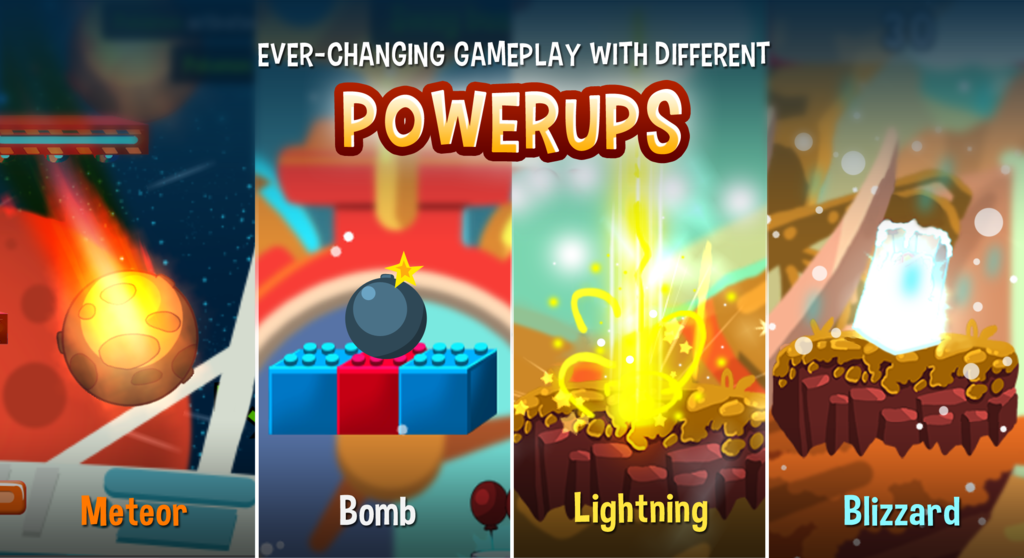
With 5 beautifully designed maps each having their own uniqueness (moving, disappearing or crumbling platforms), players can use the environment to their advantage. Players can also fight to open dropped crates (freeze, shield, bomb etc) at their own risk for chance to turn the game around in or against their favor.
The game design allows friends to gather for a fun time with its interactive style of game play and randomness of the crate drops or just a quick way to past time at home or while commuting. Players also can exchange their coins earned in battle for a wide variety of beautifully crafted avatars. Alternatively, they can purchase coins through our in app purchase. Collect them all!
With a global and friend leader board system players can fight it out among their friends or even challenge to be the global top scoring player for bragging rights.
Device Requirements:
* Phone, iPad, and iPod touch
* Requires iOS 6.0 or later
* Universal Application
* 96.8 MB
Pricing and Availability:
Pigs Can Fly 1.0.3 is free, and is available worldwide through the App Store in the Games category. An Android version is available through Google Play.
Pigs Can Fly 1.0.3: https://www.facebook.com/pigscanfly.invelopers
Download from iTunes: https://itunes.apple.com/app/pigs-can-fly/id999736838
Download from Google Play: https://play.google.com/store/apps/details?id=com.invelopers.pigscanfly
Screenshot - Pigs Can Fly Poster: http://i1070.photobucket.com/albums/u499/Invelopers/Mobile%20Uploads/5%20Splash%20page_zpslf5fcgbt.png
Screenshot - Fittest Pigs Survive: http://i1070.photobucket.com/albums/u499/Invelopers/Mobile%20Uploads/2%20in-game_v1_zpszw55gcn5.png
Screenshot - Power Ups: http://i1070.photobucket.com/albums/u499/Invelopers/Mobile%20Uploads/4%20Power%20ups_zpsxjpcfzuk.png
We are Invelopers. A Singaporean duo with a love and passion for gaming. Working with a team of developers, we aim to bring innovative ideas to life through the convenience of an app on your smartphone. All Material and Software (C) Copyright 2016 Invelopers. All Rights Reserved. Apple, the Apple logo, iPhone, iPod and iPad are registered trademarks of Apple Inc. in the U.S. and/or other countries. Other trademarks and registered trademarks may be the property of their respective owners.
*******
Link To Article: http://prmac.com/release-id-78845.htm
*******
---------------------------------------------------------------------------------
Note that you can alter delivered distributions at any time.
Login to your account on prMac to alter your channel selection, or to opt-out at any time.


SuperScreenshot App with Dropbox and Trello integration
A new article has been published at prMac.
SuperScreenshot App with Dropbox and Trello integration - Published on 02/25/16
Last October, SuperApp launched SuperScreenshot 1.1.2 with Trello & Dropbox integration for Mac. From adding text & arrows, to circles, lines, and hand drawings, you will be able to customize all of your screenshots. What makes SuperScreenshot stand out is not any feature that a similar app has, but an ability to share via Dropbox, Trello, and Email. Those features can serve for your working as well as entertaining demands. All steps from taking to editing & sharing are in the blink of an eye.
Lahti, Finland - The team at SuperApp is pleased to announce the best solution to take a screenshot on a Mac called SuperScreenshot. With SuperScreenshot, you can take a screenshot, edit, and share quickly.SuperScreenshot is now available on MAC App Store. The product makes it easier for Mac users to take screenshots, edit, and share them through Trello, Dropbox, and Email in less than a minute.
SuperScreenshot goes much further than basic cropping and editing screenshots. You can bind your own hotkeys to take a screenshot. It has capabilities for users to add texts, arrows, circles, rectangles, as well as freehand drawings on a screenshot to add extra emphases, once a user is satisfied with a screenshot, he or she can easily save on hard drive or use the sharing function. Besides those features, what makes SuperScreenshot stand out from another similar app is an ability to share via Dropbox, Trello, and Email. This app is perfect for both personal and business use.
"SuperScreenshot is the most convenient way of taking, editing, and sharing a screenshot", said SuperApp CEO Risto Lappi.
You can watch the video later and understand why SuperScreenshot is the best solution to take a Screenshot on Mac!
System Requirements:
* OS X 10.10.0 or later
* 64-bit processor
* 39.7 MB
Pricing and Availability:
SuperScreenshot 1.1.2 is currently $2.99 USD (or equivalent amount in other currencies) and available worldwide through the Mac App Store in the Utilities category. The lite version with Trello integration is also available for free!
SuperApp: http://superapp.fi
SuperScreenshot 1.1.2: http://www.superscreenshotapp.com/
Purchase and Download (MAS): https://itunes.apple.com/app/super-screenshot/id1020310825
YouTube Video: https://www.youtube.com/watch?v=q57hLjemlfQ
Screenshot: http://a3.mzstatic.com/us/r30/Purple3/v4/f7/2e/1b/f72e1bc3-f8e9-22b8-59a3-95a0391679e7/screen800x500.jpeg
Application Icon: http://a2.mzstatic.com/us/r30/Purple6/v4/98/93/91/98939160-00c9-b919-1dab-1389b31bc556/icon128-2x.png
SuperApp creates and develops applications for leading platforms. The team is proud of creating apps that make people's lives easier. SuperApp always try to make things better, more cost-effective, and cross-platform. At SuperApp, customer's satisfaction and happiness is always first priority. All Material and Software (C) Copyright 2016 SuperApp Oy. All Rights Reserved. Apple, the Apple logo, Mac OS X and Macintosh are registered trademarks of Apple Inc. in the U.S. and/or other countries. Other trademarks and registered trademarks may be the property of their respective owners.
*******
Link To Article: http://prmac.com/release-id-78844.htm
*******
---------------------------------------------------------------------------------
Note that you can alter delivered distributions at any time.
Login to your account on prMac to alter your channel selection, or to opt-out at any time.
SuperScreenshot App with Dropbox and Trello integration - Published on 02/25/16
Last October, SuperApp launched SuperScreenshot 1.1.2 with Trello & Dropbox integration for Mac. From adding text & arrows, to circles, lines, and hand drawings, you will be able to customize all of your screenshots. What makes SuperScreenshot stand out is not any feature that a similar app has, but an ability to share via Dropbox, Trello, and Email. Those features can serve for your working as well as entertaining demands. All steps from taking to editing & sharing are in the blink of an eye.
Lahti, Finland - The team at SuperApp is pleased to announce the best solution to take a screenshot on a Mac called SuperScreenshot. With SuperScreenshot, you can take a screenshot, edit, and share quickly.SuperScreenshot is now available on MAC App Store. The product makes it easier for Mac users to take screenshots, edit, and share them through Trello, Dropbox, and Email in less than a minute.
SuperScreenshot goes much further than basic cropping and editing screenshots. You can bind your own hotkeys to take a screenshot. It has capabilities for users to add texts, arrows, circles, rectangles, as well as freehand drawings on a screenshot to add extra emphases, once a user is satisfied with a screenshot, he or she can easily save on hard drive or use the sharing function. Besides those features, what makes SuperScreenshot stand out from another similar app is an ability to share via Dropbox, Trello, and Email. This app is perfect for both personal and business use.
"SuperScreenshot is the most convenient way of taking, editing, and sharing a screenshot", said SuperApp CEO Risto Lappi.
You can watch the video later and understand why SuperScreenshot is the best solution to take a Screenshot on Mac!
System Requirements:
* OS X 10.10.0 or later
* 64-bit processor
* 39.7 MB
Pricing and Availability:
SuperScreenshot 1.1.2 is currently $2.99 USD (or equivalent amount in other currencies) and available worldwide through the Mac App Store in the Utilities category. The lite version with Trello integration is also available for free!
SuperApp: http://superapp.fi
SuperScreenshot 1.1.2: http://www.superscreenshotapp.com/
Purchase and Download (MAS): https://itunes.apple.com/app/super-screenshot/id1020310825
YouTube Video: https://www.youtube.com/watch?v=q57hLjemlfQ
Screenshot: http://a3.mzstatic.com/us/r30/Purple3/v4/f7/2e/1b/f72e1bc3-f8e9-22b8-59a3-95a0391679e7/screen800x500.jpeg

Application Icon: http://a2.mzstatic.com/us/r30/Purple6/v4/98/93/91/98939160-00c9-b919-1dab-1389b31bc556/icon128-2x.png

SuperApp creates and develops applications for leading platforms. The team is proud of creating apps that make people's lives easier. SuperApp always try to make things better, more cost-effective, and cross-platform. At SuperApp, customer's satisfaction and happiness is always first priority. All Material and Software (C) Copyright 2016 SuperApp Oy. All Rights Reserved. Apple, the Apple logo, Mac OS X and Macintosh are registered trademarks of Apple Inc. in the U.S. and/or other countries. Other trademarks and registered trademarks may be the property of their respective owners.
*******
Link To Article: http://prmac.com/release-id-78844.htm
*******
---------------------------------------------------------------------------------
Note that you can alter delivered distributions at any time.
Login to your account on prMac to alter your channel selection, or to opt-out at any time.
InnerGroup Lets Users Share Secure, Encrypted Texts, Videos and More
A new article has been published at prMac.
InnerGroup Lets Users Share Secure, Encrypted Texts, Videos and More - Published on 02/25/16
Developed by indie developer Santo Porpiglia, InnerGroup 2.12 lets a group of invited users send each other end-to-end encrypted texts, videos, picture messages, and audio; without worrying about server breaches, spam, or their contact information or address book falling into the wrong hands. InnerGroup lets users start or join a tight-knit group that is comprised exclusively of members who have been invited. Version 2.12 fixes an issue with comments appearing for wrong post.
New York, New York - People who like the fun, speed and convenience of social media apps - but are concerned about having their personal details harvested by strangers, companies or even cyber criminals - can now get the communication features they want without compromising their privacy with the new app InnerGroup by developer Santo Porpiglia.
Available for iOS and Android devices at no cost and with no ads, InnerGroup lets users start or join a tight-knit group that is comprised exclusively of members (which the app calls "groupies") who have been invited. Anyone else who wants to join the exclusive social media party must request access from the group's creator, and there is no group size limit.
Inner Group offers users enhanced security and privacy:
* Groupies can send each other secure, end-to-end encrypted texts, videos, picture messages, and audio
* No data is stored, collected or sold by InnerGroup and user activity is not tracked - all usage is private to the users devices
Groupies don't have to worry about their contact information or address book being exposed, since they don't need to provide their email address or phone number to use the app. The only way this happens is if they intentionally choose to share their information either with a specific individual, or with the whole group.
Once a post is delivered to each groupie, it is automatically and permanently deleted from the InnerGroup server. As such, the only place the post lives is on each groupie's device (unless they wish to delete it). Furthermore, if and when a group owner chooses to delete a group, all posts are automatically deleted from each groupie's device.
Group owners can also "prune" their group by removing individual groupies, and even update their join code to prevent banished groupies from trying to sneak their way back in. They can also use the Group Lock feature that only allows groupies to comment on posts (group owners can temporarily disable this feature and allow groupies to post if desired).
While InnerGroup's security features are enterprise-grade, using it doesn't require an engineering degree. The app's intuitive design makes starting and joining groups very easy, and sending and receiving posts is as simple, fun and fast as Facebook and other popular social media apps - but without the security concerns or spam worries. There is no cost to send or receive posts, and there is no size limit (other than those imposed by individual users' devices).
"We don't collect or store any personal information to sell, we don't own the messages and media that users send via InnerGroup, and we don't have a back door," commented developer Santo Porpiglia. "What's more, conversations and posts can't be tracked, intercepted or monitored, and groupies' address books are never accessed by us or anyone else."
Device Requirements:
* iPhone, iPad, and iPod touch
* Requires iOS 8.3 or later
* 5.2 MB
Pricing and Availability:
InnerGroup 2.12, the unique new social media app that lets users share secure, end-to-end encrypted texts, videos, pics and audio, is Free (with in-app purchases) and available worldwide through the App Store in the Social Networking category. There is also an Android version available on Google Play.
InnerGroup 2.12: http://www.innerGroupApp.com
More Info: http://apps.appshout.com/innergroup/
Download from iTunes: https://itunes.apple.com/app/innergroup/id998498733
Download from Google Play: https://play.google.com/store/apps/details?id=com.sonnyporpiglia.innergroup
YouTube Video (Demo): https://www.youtube.com/watch?v=bL3ytoz8e8k
App Icon: http://apps.appshout.com/innergroup/images/icon.png
Based in New York, USA, Santo Porpiglia is talented developer with a degree in Computer Science from New York Institute of Technology. With a passion for apps that offer privacy and secure data storage for end-users, Santo is building a portfolio of well-received apps for both iOS and Android. All Material and Software (C) Copyright 2016 Santo Porpiglia. All Rights Reserved. Apple, the Apple logo, iPhone, iPod and iPad are registered trademarks of Apple Inc. in the U.S. and/or other countries. Other trademarks and registered trademarks may be the property of their respective owners.
*******
Link To Article: http://prmac.com/release-id-78843.htm
*******
---------------------------------------------------------------------------------
Note that you can alter delivered distributions at any time.
Login to your account on prMac to alter your channel selection, or to opt-out at any time.
InnerGroup Lets Users Share Secure, Encrypted Texts, Videos and More - Published on 02/25/16
Developed by indie developer Santo Porpiglia, InnerGroup 2.12 lets a group of invited users send each other end-to-end encrypted texts, videos, picture messages, and audio; without worrying about server breaches, spam, or their contact information or address book falling into the wrong hands. InnerGroup lets users start or join a tight-knit group that is comprised exclusively of members who have been invited. Version 2.12 fixes an issue with comments appearing for wrong post.
New York, New York - People who like the fun, speed and convenience of social media apps - but are concerned about having their personal details harvested by strangers, companies or even cyber criminals - can now get the communication features they want without compromising their privacy with the new app InnerGroup by developer Santo Porpiglia.
Available for iOS and Android devices at no cost and with no ads, InnerGroup lets users start or join a tight-knit group that is comprised exclusively of members (which the app calls "groupies") who have been invited. Anyone else who wants to join the exclusive social media party must request access from the group's creator, and there is no group size limit.
Inner Group offers users enhanced security and privacy:
* Groupies can send each other secure, end-to-end encrypted texts, videos, picture messages, and audio
* No data is stored, collected or sold by InnerGroup and user activity is not tracked - all usage is private to the users devices
Groupies don't have to worry about their contact information or address book being exposed, since they don't need to provide their email address or phone number to use the app. The only way this happens is if they intentionally choose to share their information either with a specific individual, or with the whole group.
Once a post is delivered to each groupie, it is automatically and permanently deleted from the InnerGroup server. As such, the only place the post lives is on each groupie's device (unless they wish to delete it). Furthermore, if and when a group owner chooses to delete a group, all posts are automatically deleted from each groupie's device.
Group owners can also "prune" their group by removing individual groupies, and even update their join code to prevent banished groupies from trying to sneak their way back in. They can also use the Group Lock feature that only allows groupies to comment on posts (group owners can temporarily disable this feature and allow groupies to post if desired).
While InnerGroup's security features are enterprise-grade, using it doesn't require an engineering degree. The app's intuitive design makes starting and joining groups very easy, and sending and receiving posts is as simple, fun and fast as Facebook and other popular social media apps - but without the security concerns or spam worries. There is no cost to send or receive posts, and there is no size limit (other than those imposed by individual users' devices).
"We don't collect or store any personal information to sell, we don't own the messages and media that users send via InnerGroup, and we don't have a back door," commented developer Santo Porpiglia. "What's more, conversations and posts can't be tracked, intercepted or monitored, and groupies' address books are never accessed by us or anyone else."
Device Requirements:
* iPhone, iPad, and iPod touch
* Requires iOS 8.3 or later
* 5.2 MB
Pricing and Availability:
InnerGroup 2.12, the unique new social media app that lets users share secure, end-to-end encrypted texts, videos, pics and audio, is Free (with in-app purchases) and available worldwide through the App Store in the Social Networking category. There is also an Android version available on Google Play.
InnerGroup 2.12: http://www.innerGroupApp.com
More Info: http://apps.appshout.com/innergroup/
Download from iTunes: https://itunes.apple.com/app/innergroup/id998498733
Download from Google Play: https://play.google.com/store/apps/details?id=com.sonnyporpiglia.innergroup
YouTube Video (Demo): https://www.youtube.com/watch?v=bL3ytoz8e8k
App Icon: http://apps.appshout.com/innergroup/images/icon.png

Based in New York, USA, Santo Porpiglia is talented developer with a degree in Computer Science from New York Institute of Technology. With a passion for apps that offer privacy and secure data storage for end-users, Santo is building a portfolio of well-received apps for both iOS and Android. All Material and Software (C) Copyright 2016 Santo Porpiglia. All Rights Reserved. Apple, the Apple logo, iPhone, iPod and iPad are registered trademarks of Apple Inc. in the U.S. and/or other countries. Other trademarks and registered trademarks may be the property of their respective owners.
*******
Link To Article: http://prmac.com/release-id-78843.htm
*******
---------------------------------------------------------------------------------
Note that you can alter delivered distributions at any time.
Login to your account on prMac to alter your channel selection, or to opt-out at any time.
Play.My.Way - The Parent Approved App now available for iOS and Android
A new article has been published at prMac.
Play.My.Way - The Parent Approved App now available for iOS and Android - Published on 02/25/16
Edtech Entrepreneur, Dr. Ahmad Hammoud today announces Play.My.Way 1.1, an update to his popular educational app developed for iPhone, iPad and iPod touch devices. Play.My.Way lets your kids use their phone only when they answer a challenging question every few minutes in Math, Science, or Language Arts. At parent-specified intervals, the app will interrupt any running application with an educational question, and will only return to the app once the question is answered.
Beirut, Lebanon - Edtech Entrepreneur, Dr. Ahmad Hammoud today is proud to announce the release of Play.My.Way 1.1, an update to his popular educational app developed for iPhone, iPad and iPod touch devices. Play.My.Way is the first mobile application which was developed to combat the problem of kids heavily using smart devices, in a way which is reasonable, logical. This app presents a Win-Win situation for both parents and kids.
Available in English, Play.My.Way lets your kids use their phone only when they answer a challenging question every few minutes in Math, Science, or Language Arts. At parent-specified intervals, Play.My.Way will interrupt any running application with an educational question, and will only return to the app once the question is answered. It runs atop any other app, which allows parent to integrate educational content in a way which guarantees academic value is delivered, while their kids are playing on any mobile device. You can also run the app in Quiz mode, where you can choose a specific chapter and a number of questions to run continuously for your child to be tested on.
What's New in Version 1.1
Several bugs are fixed and many enhancements are applied. This includes settings, security, and user interface.
Device Requirements:
* iPhone, iPad, and iPod touch
* Requires iOS 9.0 or later
* 39.0 MB
Pricing and Availability:
Play.My.Way 1.1 is Free (with in-app purchases) and available worldwide through the App Store in the Education category. There is also an Android version available on Google Play. The first chapter of each subject is for free. You can buy each subject for 1$ for full acess on all chapters. We are working on new subjects and languages for the near future.
Play.My.Way 1.1: http://www.playmyway.com
Download from iTunes: https://itunes.apple.com/app/play.my-way/id1053828940
Download from Google Play: https://play.google.com/store/apps/details?id=com.scopeexperts.playmyway2
Screenshot: http://a4.mzstatic.com/us/r30/Purple49/v4/97/51/04/975104ba-e11a-d38a-2e1c-0a7b9fe45078/screen480x480.jpeg
App Icon: http://a2.mzstatic.com/us/r30/Purple49/v4/3d/f6/a9/3df6a966-3f2e-e1e4-fe5d-881b83bfeb87/icon175x175.jpeg
Dr. Ahmad Hammoud is a Lebanese mobile app developer that has been developing apps for the iOS and Android platforms since 2008. Has a BS, Ms, and PHd in computer sciences. With excellent experience in latest technologies, Dr. Hammoud develops enterprise applications for many international institutions, such as the UN and works as a consultant for the World Bank. In 2008, he established Scope Experts for IT Services where he acts as chairman. All Material and Software (C) Copyright 2016 Dr. Ahmad Hammoud. All Rights Reserved. Apple, the Apple logo, iPhone, iPod and iPad are registered trademarks of Apple Inc. in the U.S. and/or other countries. Other trademarks and registered trademarks may be the property of their respective owners.
*******
Link To Article: http://prmac.com/release-id-78842.htm
*******
---------------------------------------------------------------------------------
Note that you can alter delivered distributions at any time.
Login to your account on prMac to alter your channel selection, or to opt-out at any time.
Play.My.Way - The Parent Approved App now available for iOS and Android - Published on 02/25/16
Edtech Entrepreneur, Dr. Ahmad Hammoud today announces Play.My.Way 1.1, an update to his popular educational app developed for iPhone, iPad and iPod touch devices. Play.My.Way lets your kids use their phone only when they answer a challenging question every few minutes in Math, Science, or Language Arts. At parent-specified intervals, the app will interrupt any running application with an educational question, and will only return to the app once the question is answered.
Beirut, Lebanon - Edtech Entrepreneur, Dr. Ahmad Hammoud today is proud to announce the release of Play.My.Way 1.1, an update to his popular educational app developed for iPhone, iPad and iPod touch devices. Play.My.Way is the first mobile application which was developed to combat the problem of kids heavily using smart devices, in a way which is reasonable, logical. This app presents a Win-Win situation for both parents and kids.
Available in English, Play.My.Way lets your kids use their phone only when they answer a challenging question every few minutes in Math, Science, or Language Arts. At parent-specified intervals, Play.My.Way will interrupt any running application with an educational question, and will only return to the app once the question is answered. It runs atop any other app, which allows parent to integrate educational content in a way which guarantees academic value is delivered, while their kids are playing on any mobile device. You can also run the app in Quiz mode, where you can choose a specific chapter and a number of questions to run continuously for your child to be tested on.
What's New in Version 1.1
Several bugs are fixed and many enhancements are applied. This includes settings, security, and user interface.
Device Requirements:
* iPhone, iPad, and iPod touch
* Requires iOS 9.0 or later
* 39.0 MB
Pricing and Availability:
Play.My.Way 1.1 is Free (with in-app purchases) and available worldwide through the App Store in the Education category. There is also an Android version available on Google Play. The first chapter of each subject is for free. You can buy each subject for 1$ for full acess on all chapters. We are working on new subjects and languages for the near future.
Play.My.Way 1.1: http://www.playmyway.com
Download from iTunes: https://itunes.apple.com/app/play.my-way/id1053828940
Download from Google Play: https://play.google.com/store/apps/details?id=com.scopeexperts.playmyway2
Screenshot: http://a4.mzstatic.com/us/r30/Purple49/v4/97/51/04/975104ba-e11a-d38a-2e1c-0a7b9fe45078/screen480x480.jpeg

App Icon: http://a2.mzstatic.com/us/r30/Purple49/v4/3d/f6/a9/3df6a966-3f2e-e1e4-fe5d-881b83bfeb87/icon175x175.jpeg

Dr. Ahmad Hammoud is a Lebanese mobile app developer that has been developing apps for the iOS and Android platforms since 2008. Has a BS, Ms, and PHd in computer sciences. With excellent experience in latest technologies, Dr. Hammoud develops enterprise applications for many international institutions, such as the UN and works as a consultant for the World Bank. In 2008, he established Scope Experts for IT Services where he acts as chairman. All Material and Software (C) Copyright 2016 Dr. Ahmad Hammoud. All Rights Reserved. Apple, the Apple logo, iPhone, iPod and iPad are registered trademarks of Apple Inc. in the U.S. and/or other countries. Other trademarks and registered trademarks may be the property of their respective owners.
*******
Link To Article: http://prmac.com/release-id-78842.htm
*******
---------------------------------------------------------------------------------
Note that you can alter delivered distributions at any time.
Login to your account on prMac to alter your channel selection, or to opt-out at any time.
Artgig's New Adaptive Math Game Jump! Lands in the App Store Today
A new article has been published at prMac.
Artgig's New Adaptive Math Game Jump! Lands in the App Store Today - Published on 02/25/16
Artgig Apps today introduces Jump! A Game of Numbers 1.0, their new educational game developed for iOS devices. The premise of Jump! is simple - save the little Snortles who have been blasted from their volcano home and scattered across the sea. You must get from shore to shore by sequentially jumping from one number to the next, while rescuing as many Snortles as you can along the way. The adaptive game engine makes Jump! fun for a wide range of ages.
Pleasantville, New York - Artgig Apps, creators of award-winning kids educational apps, is pleased to announce the launch of their new game, Jump! A Game of Numbers, today on the App Store. The premise of Jump! is simple - save the little Snortles who have been blasted from their volcano home and scattered across the sea. You must get from shore to shore by sequentially jumping from one number to the next, while rescuing as many Snortles as you can along the way. It sounds easy, but you'll encounter choices on your path where you need to combine numbers in order to progress.
The adaptive game engine is what makes Jump! fun for a wide range of ages. The engine adjusts the difficulty for each player as you play, so the challenge is just right. You begin counting by 1s and 2s, but before you know it, you may find yourself counting by 7s, 8s and 9s and things can add up quickly. You'll also need to watch out for Stompers and fuses or they'll send your Snortles flying!
Jo Booth of Teachers With Apps, expands on the academic virtues of the game "It is not merely drilling math facts, integration is ensured through play and lateral thinking. You see it's all about saving the Snortles, and the play brings automaticity in learning. It's nice too, that you can use this game as a warm up by playing a few levels or just going at it for the fun of it."
Jump! joins a successful suite of math apps that include the Mystery Math Town and Marble Math games. Artgig president, Matt Kicinski, notes "The secret sauce is the adaptive game engine. The more Snortles you save, and the more math you do, the more challenging the game will become. We play tested the game with kids, and adults, and it can get pretty intense - especially when a Stomper is chasing you. For kids who want a more leisurely math adventure, we've provided an option to turn off Stompers and fuses. The goal is to make it fun for everyone."
Device Requirements:
* iPhone, iPad, and iPod touch
* Requires iOS 6.0 or later
* 160 MB
Pricing and Availability:
Jump! A Game of Numbers 1.0 is $2.99 USD (or equivalent amount in other currencies) and available worldwide exclusively through the App Store in the Education category.
Jump! A Game of Numbers 1.0: http://artgigapps.com/apps/jump
App Store Link: https://itunes.apple.com/app/jump!-a-game-of-numbers/id1073602039
Teachers With Apps Review: http://www.teacherswithapps.com/jump-a-game-of-numbers/
Screenshot: http://a2.mzstatic.com/us/r30/Purple49/v4/8b/24/e2/8b24e2e3-8039-d7d2-a054-f0a6ce7d5fbe/screen480x480.jpeg
App Icon: http://i1175.photobucket.com/albums/r625/artgigapps/Jump/jump_icon_rounded_zpsdkxa7nwg.png
Artgig is an award-winning boutique interactive firm based in Westchester, NY. Artgig's key employees first met while working for a major U.S. educational publisher, creating, designing and developing kids games for schools. In 2002 Matt Kicinski formed Artgig, and they've been working together ever since. Copyright (C) 2016 Artgig, LLC. All Rights Reserved. Apple, the Apple logo, iPhone, iPod and iPad are registered trademarks of Apple Inc. in the U.S. and/or other countries.
*******
Link To Article: http://prmac.com/release-id-78841.htm
*******
---------------------------------------------------------------------------------
Note that you can alter delivered distributions at any time.
Login to your account on prMac to alter your channel selection, or to opt-out at any time.
Artgig's New Adaptive Math Game Jump! Lands in the App Store Today - Published on 02/25/16
Artgig Apps today introduces Jump! A Game of Numbers 1.0, their new educational game developed for iOS devices. The premise of Jump! is simple - save the little Snortles who have been blasted from their volcano home and scattered across the sea. You must get from shore to shore by sequentially jumping from one number to the next, while rescuing as many Snortles as you can along the way. The adaptive game engine makes Jump! fun for a wide range of ages.
Pleasantville, New York - Artgig Apps, creators of award-winning kids educational apps, is pleased to announce the launch of their new game, Jump! A Game of Numbers, today on the App Store. The premise of Jump! is simple - save the little Snortles who have been blasted from their volcano home and scattered across the sea. You must get from shore to shore by sequentially jumping from one number to the next, while rescuing as many Snortles as you can along the way. It sounds easy, but you'll encounter choices on your path where you need to combine numbers in order to progress.
The adaptive game engine is what makes Jump! fun for a wide range of ages. The engine adjusts the difficulty for each player as you play, so the challenge is just right. You begin counting by 1s and 2s, but before you know it, you may find yourself counting by 7s, 8s and 9s and things can add up quickly. You'll also need to watch out for Stompers and fuses or they'll send your Snortles flying!
Jo Booth of Teachers With Apps, expands on the academic virtues of the game "It is not merely drilling math facts, integration is ensured through play and lateral thinking. You see it's all about saving the Snortles, and the play brings automaticity in learning. It's nice too, that you can use this game as a warm up by playing a few levels or just going at it for the fun of it."
Jump! joins a successful suite of math apps that include the Mystery Math Town and Marble Math games. Artgig president, Matt Kicinski, notes "The secret sauce is the adaptive game engine. The more Snortles you save, and the more math you do, the more challenging the game will become. We play tested the game with kids, and adults, and it can get pretty intense - especially when a Stomper is chasing you. For kids who want a more leisurely math adventure, we've provided an option to turn off Stompers and fuses. The goal is to make it fun for everyone."
Device Requirements:
* iPhone, iPad, and iPod touch
* Requires iOS 6.0 or later
* 160 MB
Pricing and Availability:
Jump! A Game of Numbers 1.0 is $2.99 USD (or equivalent amount in other currencies) and available worldwide exclusively through the App Store in the Education category.
Jump! A Game of Numbers 1.0: http://artgigapps.com/apps/jump
App Store Link: https://itunes.apple.com/app/jump!-a-game-of-numbers/id1073602039
Teachers With Apps Review: http://www.teacherswithapps.com/jump-a-game-of-numbers/
Screenshot: http://a2.mzstatic.com/us/r30/Purple49/v4/8b/24/e2/8b24e2e3-8039-d7d2-a054-f0a6ce7d5fbe/screen480x480.jpeg

App Icon: http://i1175.photobucket.com/albums/r625/artgigapps/Jump/jump_icon_rounded_zpsdkxa7nwg.png

Artgig is an award-winning boutique interactive firm based in Westchester, NY. Artgig's key employees first met while working for a major U.S. educational publisher, creating, designing and developing kids games for schools. In 2002 Matt Kicinski formed Artgig, and they've been working together ever since. Copyright (C) 2016 Artgig, LLC. All Rights Reserved. Apple, the Apple logo, iPhone, iPod and iPad are registered trademarks of Apple Inc. in the U.S. and/or other countries.
*******
Link To Article: http://prmac.com/release-id-78841.htm
*******
---------------------------------------------------------------------------------
Note that you can alter delivered distributions at any time.
Login to your account on prMac to alter your channel selection, or to opt-out at any time.
Carl Can Divide 1.0 Coming Soon - Motivation for Practicing Times Tables
A new article has been published at prMac.
Carl Can Divide 1.0 Coming Soon - Motivation for Practicing Times Tables - Published on 02/25/16
On February 28, 2016, Ontario-based indie developer, codeDependent Software will release Carl Can Divide 1.0, their entertaining, and educational game for iOS devices. The app will motivate children 10 and up to practice times tables with fun swiping action, interactive prizes and gradual progression. Teachers and parents will appreciate the quick evaluation and reporting features of the app while kids will enjoy the gameplay, animation and sounds.
Ottawa, Canada - codeDependent Software is proud to announce the up-and-coming release and availability of Carl Can Divide Full Version 1.0, their new entertaining and educational game for iPhone, iPad, and iPod touch devices. Look for Carl Can Divide on February 28, 2016. Kids will be motivated to help Carl the fish along his journey on the ocean floor which provides them with an entertaining way to practice their times tables. This app will offer a fun challenge for children ages 10 and up, as they hone their division skills; as well as their knowledge of square roots, and prime numbers.
Carl Can Divide promises kids an exciting underwater challenge, where Carl can earn prizes by dividing numbers correctly. Carl is fascinated by his non-fish friend Amy and the amusing prizes that she shares with him for passing each level. Carl can use these prizes to decorate his room or to hold while he swims along the ocean.
To begin, players will select a divisor, for example: "5." Then the journey will begin, as Carl the little red fish progresses across the screen. Bubbles float up from the ocean floor that contain numbers. Players must swipe their finger on the bubbles containing numbers that are evenly divisible by the number they selected. Swipe the correct bubble and the player racks up points. Miss swiping too many of the correct answers, or swipe too many of the bubbles containing the wrong answers, and Carl will have to end his journey in order to hide from the "bad guys," who include sharks, jellyfish, mantas, and more.
The challenge increases with every successful journey. Players begin the game by attempting to select only the number bubbles divisible evenly by 10. Then they advance level by level, by looking for numbers divisible by 5, 2, 11, 4, 9, 3, 6, 8, 8, 7, and 12. If the player successfully navigates those waters, they'll take on square roots, and primes.
New users will make use of the short, yet informative tutorial, which tells them all about Carl and his friend Amy, as well as showing them how to play the game. The animated tutorial will offer a sample of the same entertaining graphics, animation, and sound effects that players will enjoy while playing the actual game.
Tracking a player's progress will be simple, with the concise, one-page report that can be generated and sent via email right from the app. Parents and teachers will be able to review the various levels played and the players progress, including how long the child has played, which answers they missed. The problem of nagging children to practice times tables and the tedious task of reviewing with flash cards is solved.
As well as local tracking of accomplishments, the game will award random virtual prizes at the successful completion of each level. In addition, the game will be Game Center compatible, allowing kids to view their accomplishments, and view where they rank compared to other players around the world, challenging them to improve their score.
Pricing and Availability:
Carl Can Divide Full Version - A fun division game for learning times tables and improving mental math skills (1.0), is $2.79 CDN ($1.99 USD), and will be available worldwide exclusively through the App Store in the Education category. Promo codes are available to members of the press. The game will be available in French, Spanish, Dutch, Czech, Italian, Simplified Chinese, and Portuguese. For more information about Carl Can Divide, or bulk educational purchases, please contact Evelyn Eldridge at codeDependent Software.
codeDependent Software: http://codeDependentsoftware.com
Carl Can Divide: http://codeDependentsoftware.com/carl-can-divide/
YouTube Video: https://www.youtube.com/watch?v=bDBl-7Ze8xw
Media Assets: http://codedependentsoftware.com/carl-can-divide-media-kit/
codeDependent Software is an Ottawa, Ontario-based app development and consulting company founded by developer Evelyn Eldridge. The firm specializes in small-to-medium sized mobile projects where they can focus on producing high quality, well designed iOS apps. The company offers functional, clean and simple designs, resulting in apps that are uncluttered, intuitive and easy to use. Copyright (C) 2016 codeDependent Software. All Rights Reserved. Apple, the Apple logo, iPhone, iPad and iPod are registered trademarks of Apple Inc. in the U.S. and/or other countries.
*******
Link To Article: http://prmac.com/release-id-78839.htm
*******
---------------------------------------------------------------------------------
Note that you can alter delivered distributions at any time.
Login to your account on prMac to alter your channel selection, or to opt-out at any time.
Carl Can Divide 1.0 Coming Soon - Motivation for Practicing Times Tables - Published on 02/25/16
On February 28, 2016, Ontario-based indie developer, codeDependent Software will release Carl Can Divide 1.0, their entertaining, and educational game for iOS devices. The app will motivate children 10 and up to practice times tables with fun swiping action, interactive prizes and gradual progression. Teachers and parents will appreciate the quick evaluation and reporting features of the app while kids will enjoy the gameplay, animation and sounds.
Ottawa, Canada - codeDependent Software is proud to announce the up-and-coming release and availability of Carl Can Divide Full Version 1.0, their new entertaining and educational game for iPhone, iPad, and iPod touch devices. Look for Carl Can Divide on February 28, 2016. Kids will be motivated to help Carl the fish along his journey on the ocean floor which provides them with an entertaining way to practice their times tables. This app will offer a fun challenge for children ages 10 and up, as they hone their division skills; as well as their knowledge of square roots, and prime numbers.
Carl Can Divide promises kids an exciting underwater challenge, where Carl can earn prizes by dividing numbers correctly. Carl is fascinated by his non-fish friend Amy and the amusing prizes that she shares with him for passing each level. Carl can use these prizes to decorate his room or to hold while he swims along the ocean.
To begin, players will select a divisor, for example: "5." Then the journey will begin, as Carl the little red fish progresses across the screen. Bubbles float up from the ocean floor that contain numbers. Players must swipe their finger on the bubbles containing numbers that are evenly divisible by the number they selected. Swipe the correct bubble and the player racks up points. Miss swiping too many of the correct answers, or swipe too many of the bubbles containing the wrong answers, and Carl will have to end his journey in order to hide from the "bad guys," who include sharks, jellyfish, mantas, and more.
The challenge increases with every successful journey. Players begin the game by attempting to select only the number bubbles divisible evenly by 10. Then they advance level by level, by looking for numbers divisible by 5, 2, 11, 4, 9, 3, 6, 8, 8, 7, and 12. If the player successfully navigates those waters, they'll take on square roots, and primes.
New users will make use of the short, yet informative tutorial, which tells them all about Carl and his friend Amy, as well as showing them how to play the game. The animated tutorial will offer a sample of the same entertaining graphics, animation, and sound effects that players will enjoy while playing the actual game.
Tracking a player's progress will be simple, with the concise, one-page report that can be generated and sent via email right from the app. Parents and teachers will be able to review the various levels played and the players progress, including how long the child has played, which answers they missed. The problem of nagging children to practice times tables and the tedious task of reviewing with flash cards is solved.
As well as local tracking of accomplishments, the game will award random virtual prizes at the successful completion of each level. In addition, the game will be Game Center compatible, allowing kids to view their accomplishments, and view where they rank compared to other players around the world, challenging them to improve their score.
Pricing and Availability:
Carl Can Divide Full Version - A fun division game for learning times tables and improving mental math skills (1.0), is $2.79 CDN ($1.99 USD), and will be available worldwide exclusively through the App Store in the Education category. Promo codes are available to members of the press. The game will be available in French, Spanish, Dutch, Czech, Italian, Simplified Chinese, and Portuguese. For more information about Carl Can Divide, or bulk educational purchases, please contact Evelyn Eldridge at codeDependent Software.
codeDependent Software: http://codeDependentsoftware.com
Carl Can Divide: http://codeDependentsoftware.com/carl-can-divide/
YouTube Video: https://www.youtube.com/watch?v=bDBl-7Ze8xw
Media Assets: http://codedependentsoftware.com/carl-can-divide-media-kit/
codeDependent Software is an Ottawa, Ontario-based app development and consulting company founded by developer Evelyn Eldridge. The firm specializes in small-to-medium sized mobile projects where they can focus on producing high quality, well designed iOS apps. The company offers functional, clean and simple designs, resulting in apps that are uncluttered, intuitive and easy to use. Copyright (C) 2016 codeDependent Software. All Rights Reserved. Apple, the Apple logo, iPhone, iPad and iPod are registered trademarks of Apple Inc. in the U.S. and/or other countries.
*******
Link To Article: http://prmac.com/release-id-78839.htm
*******
---------------------------------------------------------------------------------
Note that you can alter delivered distributions at any time.
Login to your account on prMac to alter your channel selection, or to opt-out at any time.
PadKeys 2.0 - iOS Custom Keyboard designed for iPad
A new article has been published at prMac.
PadKeys 2.0 - iOS Custom Keyboard designed for iPad - Published on 02/25/16
Natural Designs Software today announces PadKeys Keyboard 2.0, bringing major enhancements to their well-regarded iOS custom keyboard for iPad. PadKeys uses the extra real estate on tablet screens to provide number, punctuation, and cursor keys in accustomed places, and to display expanded autocorrect suggestions. The innovative layout is also ergonomic, with frequently-used keys sized larger for typing speed and accuracy. Version 2.0 brings themes, improved key labels, and smarter autocorrect.
Valley Cottage, New York - Natural Designs Software today is pleased to announce the release of PadKeys Keyboard 2.0, enhancing their well-regarded iOS custom keyboard for iPad users. PadKeys utilizes the extra real estate on tablet screens to provide number, punctuation and cursor keys in accustomed places, and to display expanded autocorrect suggestions. The innovative layout is also ergonomic, with frequently-used keys sized larger for typing speed and accuracy.
Why PadKeys was Created:
* Typing on an iPad in landscape mode can be surprisingly fast - until one needs to enter a number or common symbol like '%' or ';'. The iPad system keyboard was designed for the iPhone, leaving keys out because screen space was at a premium. But on the iPad there's plenty of room, so PadKeys can use a more traditional layout and speeding typing up accordingly.
* Moving the cursor in text has been the subject of many clever and innovative approaches, but when the text is small and fingers large, dedicated arrow keys are still easier to use. PadKeys puts these in the accustomed place on the bottom right.
* The iPhone-derived iPad system keyboard displays only three word suggestions in the middle of the screen, but these aren't always useful. PadKeys on the other hand uses the full width of the screen to display suggestions, enhancing the chance of a "hit". PadKeys also uses information about the key layout as well as the language being used to catch typos when finishing a word.
"PadKeys was stimulated by personal need," says Adrian Robert, founder and lead developer at Natural Designs, "But clearly I was not alone. Our users have expressed great satisfaction and gratitude for the product, and our ratings are among the highest on the App Store for any custom keyboard. PadKeys has been most popular with users in English-speaking countries and in Germany, but we have a good following in several other European countries as well."
What's New:
The most visible change in Version 2.0 is colorful themes, a feature which many other third-party keyboards have but was left out of PadKeys initially in order to focus on core functionality. There is also now an option to show small labels for the shifted versions of each key, something that many users requested. And finally the autocorrect / suggestions engine has been made more sophisticated, doing a better job at picking out the words the user tends to use.
Supported Languages:
English (US, CA, UK, AU, and NZ), Czech, Danish, Dutch, Finnish, French (France and Canada), German, Italian, Norwegian (Bokml), Polish, Portuguese (Brazil and Portugal), Romanian, Spanish, and Swedish.
Device Requirements:
* iPad 2 or later
* iOS 8.2 or later
* 12 MB free space
Pricing and Availability:
PadKeys Keyboard 2.0 is available for $1.99 US (or equivalent in other currencies) exclusively through the App Store in the Utilities category. Review codes are available upon request.
PadKeys Keyboard 2.0: http://padkeys.com
Purchase and Download: https://itunes.apple.com/app/padkeys-keyboard/id975022995
YouTube Video (Keyboard): https://www.youtube.com/watch?v=X8lbI00rEBI
Screenshot: http://a1.mzstatic.com/us/r30/Purple49/v4/05/ed/7a/05ed7a7a-9f94-9ac0-c7d5-7a313f00efef/screen480x480.jpeg
App Icon: http://a3.mzstatic.com/us/r30/Purple69/v4/d1/20/21/d120219f-7e61-b13f-d54e-6feb0a68b320/icon175x175.jpeg
Natural Designs Software, Inc. was founded in 2007 to bring innovative user interfaces to education, entertainment, and utility applications. Software should work the way the user sees, thinks and acts, not the other way around. The current products are a Chinese language learning program for desktop and iPad, and an iOS custom keyboard extension designed for tablets. Musical and visual art creativity software is in the works. All Material and Software (C) Copyright 2007-2016 Natural Designs Software, Inc. All Rights Reserved. Apple, the Apple logo, iPhone, iPod and iPad are registered trademarks of Apple Inc. in the U.S. and/or other countries. Other trademarks and registered trademarks may be the property of their respective owners.
*******
Link To Article: http://prmac.com/release-id-78840.htm
*******
---------------------------------------------------------------------------------
Note that you can alter delivered distributions at any time.
Login to your account on prMac to alter your channel selection, or to opt-out at any time.
PadKeys 2.0 - iOS Custom Keyboard designed for iPad - Published on 02/25/16
Natural Designs Software today announces PadKeys Keyboard 2.0, bringing major enhancements to their well-regarded iOS custom keyboard for iPad. PadKeys uses the extra real estate on tablet screens to provide number, punctuation, and cursor keys in accustomed places, and to display expanded autocorrect suggestions. The innovative layout is also ergonomic, with frequently-used keys sized larger for typing speed and accuracy. Version 2.0 brings themes, improved key labels, and smarter autocorrect.
Valley Cottage, New York - Natural Designs Software today is pleased to announce the release of PadKeys Keyboard 2.0, enhancing their well-regarded iOS custom keyboard for iPad users. PadKeys utilizes the extra real estate on tablet screens to provide number, punctuation and cursor keys in accustomed places, and to display expanded autocorrect suggestions. The innovative layout is also ergonomic, with frequently-used keys sized larger for typing speed and accuracy.
Why PadKeys was Created:
* Typing on an iPad in landscape mode can be surprisingly fast - until one needs to enter a number or common symbol like '%' or ';'. The iPad system keyboard was designed for the iPhone, leaving keys out because screen space was at a premium. But on the iPad there's plenty of room, so PadKeys can use a more traditional layout and speeding typing up accordingly.
* Moving the cursor in text has been the subject of many clever and innovative approaches, but when the text is small and fingers large, dedicated arrow keys are still easier to use. PadKeys puts these in the accustomed place on the bottom right.
* The iPhone-derived iPad system keyboard displays only three word suggestions in the middle of the screen, but these aren't always useful. PadKeys on the other hand uses the full width of the screen to display suggestions, enhancing the chance of a "hit". PadKeys also uses information about the key layout as well as the language being used to catch typos when finishing a word.
"PadKeys was stimulated by personal need," says Adrian Robert, founder and lead developer at Natural Designs, "But clearly I was not alone. Our users have expressed great satisfaction and gratitude for the product, and our ratings are among the highest on the App Store for any custom keyboard. PadKeys has been most popular with users in English-speaking countries and in Germany, but we have a good following in several other European countries as well."
What's New:
The most visible change in Version 2.0 is colorful themes, a feature which many other third-party keyboards have but was left out of PadKeys initially in order to focus on core functionality. There is also now an option to show small labels for the shifted versions of each key, something that many users requested. And finally the autocorrect / suggestions engine has been made more sophisticated, doing a better job at picking out the words the user tends to use.
Supported Languages:
English (US, CA, UK, AU, and NZ), Czech, Danish, Dutch, Finnish, French (France and Canada), German, Italian, Norwegian (Bokml), Polish, Portuguese (Brazil and Portugal), Romanian, Spanish, and Swedish.
Device Requirements:
* iPad 2 or later
* iOS 8.2 or later
* 12 MB free space
Pricing and Availability:
PadKeys Keyboard 2.0 is available for $1.99 US (or equivalent in other currencies) exclusively through the App Store in the Utilities category. Review codes are available upon request.
PadKeys Keyboard 2.0: http://padkeys.com
Purchase and Download: https://itunes.apple.com/app/padkeys-keyboard/id975022995
YouTube Video (Keyboard): https://www.youtube.com/watch?v=X8lbI00rEBI
Screenshot: http://a1.mzstatic.com/us/r30/Purple49/v4/05/ed/7a/05ed7a7a-9f94-9ac0-c7d5-7a313f00efef/screen480x480.jpeg

App Icon: http://a3.mzstatic.com/us/r30/Purple69/v4/d1/20/21/d120219f-7e61-b13f-d54e-6feb0a68b320/icon175x175.jpeg

Natural Designs Software, Inc. was founded in 2007 to bring innovative user interfaces to education, entertainment, and utility applications. Software should work the way the user sees, thinks and acts, not the other way around. The current products are a Chinese language learning program for desktop and iPad, and an iOS custom keyboard extension designed for tablets. Musical and visual art creativity software is in the works. All Material and Software (C) Copyright 2007-2016 Natural Designs Software, Inc. All Rights Reserved. Apple, the Apple logo, iPhone, iPod and iPad are registered trademarks of Apple Inc. in the U.S. and/or other countries. Other trademarks and registered trademarks may be the property of their respective owners.
*******
Link To Article: http://prmac.com/release-id-78840.htm
*******
---------------------------------------------------------------------------------
Note that you can alter delivered distributions at any time.
Login to your account on prMac to alter your channel selection, or to opt-out at any time.
Subscribe to:
Posts (Atom)