A new article has been published at prMac.
MaBaSoft Releases World Clock Deluxe 4.15.2 - Published on 02/29/16
MaBaSoft announces World Clock Deluxe 4.15.2, an update to their popular world time utility for Mac OS X. World Clock Deluxe comes with over 1,600 cities and 200 time zones, displays multiple clocks in a horizontal or vertical palette, in the menu bar, or in the Dock, calculates corresponding times in different cities, and allows users to easily identify the best time for meetings across multiple time zones. Version 4.15.2 improves security.
Milano, Italy - MaBaSoft is proud to announce World Clock Deluxe 4.15.2, an update to their popular world time utility for Mac OS X. World Clock Deluxe is a reliable and easy-to-use time tool for companies and organizations regularly communicating with people across the world, frequent travelers, and home users having family or friends in other countries or time zones.
World Clock Deluxe displays multiple digital or analog clocks in a highly configurable horizontal or vertical palette, in the menu bar, and in the Dock, and can show the time in over 1,600 cities and 200 time zones and world times, including Greenwich Mean Time, Coordinated Universal Time, and Internet Time. It comes with a variety of date and time formats and can display seconds, weekday, date, date change, time zone, offset from UTC, and offset from local time.
With World Clock Deluxe users can easily organize clocks so that they always have a good overview of the displayed times. Colors and labels can be assigned to clocks to quickly single out the local clock or different groups of clocks. Clocks can be sorted by name, time, longitude, longitude offset, or label. Seldom used clocks can be hidden and different clocks can be displayed in the palette, in the menu bar, and in the Dock.
World Clock Deluxe also helps users with phone calls to other countries and international meetings. The Time Converter quickly calculates corresponding dates and times in different cities or time zones, while the Meeting Planner allows users to easily identify the best time for online chats, conference calls, or video conferences across multiple time zones. Conversion results and meeting details can be easily shared via Mail or Messages, saved to a note, or added to a reminder.
With World Clock Deluxe, users can finally show the weather all over the world. World Clock Deluxe downloads National Oceanic and Atmospheric Administration (NOAA) weather reports and displays temperature, pressure, visibility, wind conditions, and precipitations.
Version 4.15.2 uses encrypted HTTPS connections for improved security when checking for updates and automatically downloading and installing updates of cities, time zones, and DST rules. In addition to that, it updates daylight-saving time information for the Cayman Islands, Iran, Morocco, and Western Sahara.
Language Support:
* English, German, French, Dutch, and Italian
System Requirements:
* Mac OS X 10.6, 10.7, 10.8, 10.9, 10.10, or 10.11 (El Capitan)
Pricing and Availability:
World Clock Deluxe 4.15.2 is a free update for registered version 4 users. It is $10.00 (USD) for users who purchased version 3, and costs $19.00 (USD) for new users. Family, Site, and World-wide licenses are also available.
MaBaSoft: https://www.mabasoft.net/
World Clock Deluxe 4.15.2: https://www.mabasoft.net/products/worldClockDeluxeX.html
Download World Clock Deluxe 4.15.2: https://www.mabasoft.net/downloads/files/World_Clock_Deluxe_4.15.2.dmg
Purchase : https://store.kagi.com/?2H_LIVE
Release Notes: https://www.mabasoft.net/releaseNotes/worldClockDeluxeX.html
Media Assets: https://www.mabasoft.net/pressImages/worldClockDeluxeX.html
MaBaSoft, based in Milano, Italy, is a small independent company founded by Marco Damaschi and Barbara Canino in 1997. MaBaSoft develops quality system utilities and applications for the Macintosh. All Material and Software Copyright 1997-2016 MaBaSoft. All Rights Reserved. Apple, the Apple logo and Mac are registered trademarks of Apple Inc. in the U.S. and/or other countries. Other trademarks and registered trademarks may be the property of their respective owners.
*******
Link To Article: http://prmac.com/release-id-78874.htm
*******
---------------------------------------------------------------------------------
Note that you can alter delivered distributions at any time.
Login to your account on prMac to alter your channel selection, or to opt-out at any time.

Carl Can Divide 1.0 Motivates Children Ages 10+ to Practice Times Tables
A new article has been published at prMac.
Carl Can Divide 1.0 Motivates Children Ages 10+ to Practice Times Tables - Published on 02/29/16
Ontario-based indie developer, codeDependent Software today introduces Carl Can Divide 1.0, their entertaining, and educational game for iOS devices. The app offers children 10 and up a brainteasing math challenge as they help Carl make it safely through the ocean by tapping the correct answers to prove their skills with division, square roots, and prime numbers. Teachers and parents will appreciate the reporting features of the app, while kids will enjoy the fun animation and sound effects.
Ottawa, Canada - codeDependent Software today is happy to announce the release and immediate availability of Carl Can Divide 1.0, their new entertaining and educational game for iPhone, iPad, and iPod touch devices. Kids will enjoy showing off their math skills, as they help Carl the fish along his journey on the ocean floor. This app offers a fun challenge for children ages 10 and up, as they hone their division skills; as well as their knowledge of square roots, and prime numbers.
Carl Can Divide leads kids through an exciting challenge under the waves, aiding Carl in his journeys along the way. Carl is a very smart fish, he's especially good at division. Carl's friend Amy loves it when Carl solves math problems for her. It delights her so much, that she gives Carl a prize for each level he correctly completes.
"My personal goal is to increase the proficiency for our kids to have instant mental recall of multiplication and division facts," says developer Evelyn Eldridge. "These are areas that I feel hinder future success in math. I see this over and over, where kids struggle with math in later years because they cannot recognize simple math facts. 'Carl Can Divide' helps a child's recall of math facts, rewarding them with entertaining gameplay, a place on the leaderboard, and virtual prize awards each time they help Carl safely make his journey."
To begin, players select a divisor, for example: "5." Then the journey begins, as Carl the happy fish progresses across the screen. Bubbles float up from the ocean floor that contain numbers. Players must swipe their finger on the bubbles containing numbers that are evenly divisible by the number they selected. Swipe the correct bubble, and Carl advances across the screen a bit and the player racks up points. Miss swiping too many of the correct answers, or swipe too many of the bubbles containing the wrong answers, and Carl will have to end his journey in order to hide from the "bad guys," who include sharks, jellyfish, mantas, and more.
The challenge increases with every successful journey. Players begin the game by attempting to select only the number bubbles divisible evenly by 10. Then they advance level by level, by looking for numbers divisible by 5, 2, 11, 4, 9, 3, 6, 8, 8, 7, and 12. If the player successfully navigates those waters, they'll take on square roots, and primes.
New users can make use of the short, yet informative tutorial, which tells them all about Carl and his friend Amy, as well as showing them how to play the game. The animated tutorial offers a sample of the same entertaining graphics, animation, and sound effects that players will enjoy while playing the actual game.
"As a university professor in mathematics, I sometimes see students that lack the confidence to tackle math problems for themselves," says Jeff Orchard, University of Waterloo Math Professor. "One of the simplest ways to build math confidence early on is to memorize the times tables. Anyone can do it if they try. And a game like this can actually make it fun."
Each level of play in "Carl" lasts only a few minutes, making it easy for kids to play, "just one more level," before dinner or bedtime. While the game is easy to understand, and kids can easily figure out what they have to do to succeed, it also presents a steadily increasing challenge, pushing the child to improve their math skills.
Carl Can Divide was developed and tested together with students and teachers to provide a fun solution to the tedious task of practicing times tables, square roots and prime numbers. "Playing Carl gives my class the needed number practice while the graphics and ease of use quickly engage the students. The easy swipe action and speed of the game works for all levels", says grade 5/6 teacher, Heather Earl.
Tracking a player's progress is a breeze, via the concise, one-page report that can be generated and sent via email to parents and teachers. The report displays the various levels of the game the child has participated in, their best score for the level, and their average score. In addition, the report also indicates how many times a level has been played, how long the child played, which answers they missed tapping, and which incorrect answers they tapped. All of the information offers an excellent report on a child's increasing ability with division and multiplication facts.
As well as local tracking of accomplishments, the game also awards random virtual prizes at the successful completion of each level. In addition, the game is Game Center compatible, allowing kids to view their accomplishments, and view where they rank compared to other players around the world, challenging them to improve their score.
Device Requirements:
* iPhone, iPad, or iPod touch
* Requires iOS 9.0 and higher
* Universal Application
* 31.7 MB
Pricing and Availability:
Carl Can Divide Full Version 1.0 is $1.99 USD (or an equivalent amount in other currencies), and is available worldwide exclusively through the App Store in the Education category. Promo codes are available to members of the press. The game is available in French, Spanish, Dutch, Czech, Italian, Simplified Chinese, Swedish, and Portuguese. For more information about Carl Can Divide, or bulk educational purchases, please contact Evelyn Eldridge at codeDependent Software.
codeDependent Software: http://codeDependentsoftware.com
Carl Can Divide 1.0: http://codeDependentsoftware.com/carl-can-divide/
Purchase and Download: https://itunes.apple.com/app/carl-can-divide-full-version/id1075424683
Media Assets: http://codedependentsoftware.com/carl-can-divide-media-kit/
codeDependent Software is an Ottawa, Ontario-based app development and consulting company founded by developer Evelyn Eldridge. The firm specializes in small-to-medium sized mobile projects where they can focus on producing high quality, well designed iOS apps. The company offers functional, clean and simple designs, resulting in apps that are uncluttered, intuitive, and easy to use. Copyright (C) 2016 codeDependent Software. All Rights Reserved. Apple, the Apple logo, iPhone, iPad and iPod are registered trademarks of Apple Inc. in the U.S. and/or other countries.
*******
Link To Article: http://prmac.com/release-id-78873.htm
*******
---------------------------------------------------------------------------------
Note that you can alter delivered distributions at any time.
Login to your account on prMac to alter your channel selection, or to opt-out at any time.
Carl Can Divide 1.0 Motivates Children Ages 10+ to Practice Times Tables - Published on 02/29/16
Ontario-based indie developer, codeDependent Software today introduces Carl Can Divide 1.0, their entertaining, and educational game for iOS devices. The app offers children 10 and up a brainteasing math challenge as they help Carl make it safely through the ocean by tapping the correct answers to prove their skills with division, square roots, and prime numbers. Teachers and parents will appreciate the reporting features of the app, while kids will enjoy the fun animation and sound effects.
Ottawa, Canada - codeDependent Software today is happy to announce the release and immediate availability of Carl Can Divide 1.0, their new entertaining and educational game for iPhone, iPad, and iPod touch devices. Kids will enjoy showing off their math skills, as they help Carl the fish along his journey on the ocean floor. This app offers a fun challenge for children ages 10 and up, as they hone their division skills; as well as their knowledge of square roots, and prime numbers.
Carl Can Divide leads kids through an exciting challenge under the waves, aiding Carl in his journeys along the way. Carl is a very smart fish, he's especially good at division. Carl's friend Amy loves it when Carl solves math problems for her. It delights her so much, that she gives Carl a prize for each level he correctly completes.
"My personal goal is to increase the proficiency for our kids to have instant mental recall of multiplication and division facts," says developer Evelyn Eldridge. "These are areas that I feel hinder future success in math. I see this over and over, where kids struggle with math in later years because they cannot recognize simple math facts. 'Carl Can Divide' helps a child's recall of math facts, rewarding them with entertaining gameplay, a place on the leaderboard, and virtual prize awards each time they help Carl safely make his journey."
To begin, players select a divisor, for example: "5." Then the journey begins, as Carl the happy fish progresses across the screen. Bubbles float up from the ocean floor that contain numbers. Players must swipe their finger on the bubbles containing numbers that are evenly divisible by the number they selected. Swipe the correct bubble, and Carl advances across the screen a bit and the player racks up points. Miss swiping too many of the correct answers, or swipe too many of the bubbles containing the wrong answers, and Carl will have to end his journey in order to hide from the "bad guys," who include sharks, jellyfish, mantas, and more.
The challenge increases with every successful journey. Players begin the game by attempting to select only the number bubbles divisible evenly by 10. Then they advance level by level, by looking for numbers divisible by 5, 2, 11, 4, 9, 3, 6, 8, 8, 7, and 12. If the player successfully navigates those waters, they'll take on square roots, and primes.
New users can make use of the short, yet informative tutorial, which tells them all about Carl and his friend Amy, as well as showing them how to play the game. The animated tutorial offers a sample of the same entertaining graphics, animation, and sound effects that players will enjoy while playing the actual game.
"As a university professor in mathematics, I sometimes see students that lack the confidence to tackle math problems for themselves," says Jeff Orchard, University of Waterloo Math Professor. "One of the simplest ways to build math confidence early on is to memorize the times tables. Anyone can do it if they try. And a game like this can actually make it fun."
Each level of play in "Carl" lasts only a few minutes, making it easy for kids to play, "just one more level," before dinner or bedtime. While the game is easy to understand, and kids can easily figure out what they have to do to succeed, it also presents a steadily increasing challenge, pushing the child to improve their math skills.
Carl Can Divide was developed and tested together with students and teachers to provide a fun solution to the tedious task of practicing times tables, square roots and prime numbers. "Playing Carl gives my class the needed number practice while the graphics and ease of use quickly engage the students. The easy swipe action and speed of the game works for all levels", says grade 5/6 teacher, Heather Earl.
Tracking a player's progress is a breeze, via the concise, one-page report that can be generated and sent via email to parents and teachers. The report displays the various levels of the game the child has participated in, their best score for the level, and their average score. In addition, the report also indicates how many times a level has been played, how long the child played, which answers they missed tapping, and which incorrect answers they tapped. All of the information offers an excellent report on a child's increasing ability with division and multiplication facts.
As well as local tracking of accomplishments, the game also awards random virtual prizes at the successful completion of each level. In addition, the game is Game Center compatible, allowing kids to view their accomplishments, and view where they rank compared to other players around the world, challenging them to improve their score.
Device Requirements:
* iPhone, iPad, or iPod touch
* Requires iOS 9.0 and higher
* Universal Application
* 31.7 MB
Pricing and Availability:
Carl Can Divide Full Version 1.0 is $1.99 USD (or an equivalent amount in other currencies), and is available worldwide exclusively through the App Store in the Education category. Promo codes are available to members of the press. The game is available in French, Spanish, Dutch, Czech, Italian, Simplified Chinese, Swedish, and Portuguese. For more information about Carl Can Divide, or bulk educational purchases, please contact Evelyn Eldridge at codeDependent Software.
codeDependent Software: http://codeDependentsoftware.com
Carl Can Divide 1.0: http://codeDependentsoftware.com/carl-can-divide/
Purchase and Download: https://itunes.apple.com/app/carl-can-divide-full-version/id1075424683
Media Assets: http://codedependentsoftware.com/carl-can-divide-media-kit/
codeDependent Software is an Ottawa, Ontario-based app development and consulting company founded by developer Evelyn Eldridge. The firm specializes in small-to-medium sized mobile projects where they can focus on producing high quality, well designed iOS apps. The company offers functional, clean and simple designs, resulting in apps that are uncluttered, intuitive, and easy to use. Copyright (C) 2016 codeDependent Software. All Rights Reserved. Apple, the Apple logo, iPhone, iPad and iPod are registered trademarks of Apple Inc. in the U.S. and/or other countries.
*******
Link To Article: http://prmac.com/release-id-78873.htm
*******
---------------------------------------------------------------------------------
Note that you can alter delivered distributions at any time.
Login to your account on prMac to alter your channel selection, or to opt-out at any time.
Fitmanual - Helps you to complete the Activity Ring every day
A new article has been published at prMac.
Fitmanual - Helps you to complete the Activity Ring every day - Published on 02/29/16
Jan Roskosch today announces Fitmanual 1.5, an Apple Watch and iPhone App that calculates your burned calories for a Workout at which you could not take your Apple Watch with you. These calories are then immediately added to the Activity Ring so that you can be sure to always reach your daily goal. With 25 activities to choose from, this App helps you to make more out of your Apple Watch. Fitmanual calculates the calories automatically. You don't have to know how many calories you've burned.
Essen, Germany - Jan Roskosch today is proud to announce the release of Fitmanual 1.5, an extraordinary Apple Watch and iPhone App that calculates your burned calories for a Workout at which you could not take your Apple Watch with you. These calories are then immediately added to the Activity Ring so that you can be sure to always reach your daily goal! With 25 activities to choose from this App helps you to make more out of your Apple Watch.
"I'm an 17 years old student from Germany, who loves his Apple Watch and doing sport with it. My Sister and I love to complete the Activity Ring every day. But if you're doing an activity that is not supported by the Apple Watch, its difficult to reach this goal," says Jan Roskosch, creator of Fitmanual.
Whether you went out to swim, played American Football or did some Kick Boxing, you surely didn't take the Apple Watch with you. Fitmanual is an extremely helpful App that calculates your burned calories during these activities by regarding your weight,the duration and of course the effort of your activity. It's easy-to-use and it even shows you how long you have to do another activity to burn the same amount of calories. Fitmanual includes a list of 25 activities, which gets longer with every update:
* Aerobic
* American Football
* Badminton
* Basketball
* Canoeing
* Handball
* Hockey
* Judo
* Karate
* Kick boxing
* Rowing
* Rugby
* Sailing
* Skiing
* Snowboarding
* Soccer
* Squash
* Swimming, slow
* Swimming, medium
* Swimming, fast
* Tennis
* Volleyball
* Windsurfing
* Wateraerobic
* Waterskiing
Unlike other Apps, Fitmanual calculates the calories automatically. You don't have to know how many calories you've burned. Therefore Fitmanual relies on highly accurate values for each and every workout. These values have been measured in scientific tests, which is why the amount of calories that is calculated is very precise. After a workout you don't want to spend much time touching on your device. With that in mind the App was created to be easy to use on both the iPhone and the Apple Watch with a simple user interface. It's convenient and sophisticated!
"With the help of this App my sister and I are now able to track every Handball and Swimming workout we're doing and we reach our daily goal every time. It's fun to see complete rings for every day!"
Device Requirements:
* iPhone and iPod touch with Apple Watch support
* Requires iOS 9.1 or later
* 5.9 MB
Pricing and Availability:
Fitmanual 1.5 is only $2.99 USD (or equivalent amount in other currencies) and available worldwide through the App Store in the Health and Fitness category. Review copies are available upon request.
Fitmanual 1.5: https://www.facebook.com/Fitmanual
Purchase and Download: https://itunes.apple.com/app/fitmanual/id1073477295
Product Video: http://roskosch.de/download/fitmanual/fitmanual-video.mp4
App Icon: http://roskosch.de/download/fitmanual/appicon.png
Press Kit (zip): http://roskosch.de/download/fitmanual/screenshots.zip
Based in Essen, Germany, Creating Your App was founded 2009 as a software development company specializing in iOS and Mac development. Creating Your App is a 2010 Winner of the EMMAs award for effective mobile marketing and a 2013 Winner of the PC-Magazine Best of the Year award. Copyright (C) 2016 Creating Your App. All Rights Reserved. Apple, the Apple logo, iPhone, iPod and iPad are registered trademarks of Apple Inc. in the U.S. and/or other countries.
*******
Link To Article: http://prmac.com/release-id-78872.htm
*******
---------------------------------------------------------------------------------
Note that you can alter delivered distributions at any time.
Login to your account on prMac to alter your channel selection, or to opt-out at any time.
Fitmanual - Helps you to complete the Activity Ring every day - Published on 02/29/16
Jan Roskosch today announces Fitmanual 1.5, an Apple Watch and iPhone App that calculates your burned calories for a Workout at which you could not take your Apple Watch with you. These calories are then immediately added to the Activity Ring so that you can be sure to always reach your daily goal. With 25 activities to choose from, this App helps you to make more out of your Apple Watch. Fitmanual calculates the calories automatically. You don't have to know how many calories you've burned.
Essen, Germany - Jan Roskosch today is proud to announce the release of Fitmanual 1.5, an extraordinary Apple Watch and iPhone App that calculates your burned calories for a Workout at which you could not take your Apple Watch with you. These calories are then immediately added to the Activity Ring so that you can be sure to always reach your daily goal! With 25 activities to choose from this App helps you to make more out of your Apple Watch.
"I'm an 17 years old student from Germany, who loves his Apple Watch and doing sport with it. My Sister and I love to complete the Activity Ring every day. But if you're doing an activity that is not supported by the Apple Watch, its difficult to reach this goal," says Jan Roskosch, creator of Fitmanual.
Whether you went out to swim, played American Football or did some Kick Boxing, you surely didn't take the Apple Watch with you. Fitmanual is an extremely helpful App that calculates your burned calories during these activities by regarding your weight,the duration and of course the effort of your activity. It's easy-to-use and it even shows you how long you have to do another activity to burn the same amount of calories. Fitmanual includes a list of 25 activities, which gets longer with every update:
* Aerobic
* American Football
* Badminton
* Basketball
* Canoeing
* Handball
* Hockey
* Judo
* Karate
* Kick boxing
* Rowing
* Rugby
* Sailing
* Skiing
* Snowboarding
* Soccer
* Squash
* Swimming, slow
* Swimming, medium
* Swimming, fast
* Tennis
* Volleyball
* Windsurfing
* Wateraerobic
* Waterskiing
Unlike other Apps, Fitmanual calculates the calories automatically. You don't have to know how many calories you've burned. Therefore Fitmanual relies on highly accurate values for each and every workout. These values have been measured in scientific tests, which is why the amount of calories that is calculated is very precise. After a workout you don't want to spend much time touching on your device. With that in mind the App was created to be easy to use on both the iPhone and the Apple Watch with a simple user interface. It's convenient and sophisticated!
"With the help of this App my sister and I are now able to track every Handball and Swimming workout we're doing and we reach our daily goal every time. It's fun to see complete rings for every day!"
Device Requirements:
* iPhone and iPod touch with Apple Watch support
* Requires iOS 9.1 or later
* 5.9 MB
Pricing and Availability:
Fitmanual 1.5 is only $2.99 USD (or equivalent amount in other currencies) and available worldwide through the App Store in the Health and Fitness category. Review copies are available upon request.
Fitmanual 1.5: https://www.facebook.com/Fitmanual
Purchase and Download: https://itunes.apple.com/app/fitmanual/id1073477295
Product Video: http://roskosch.de/download/fitmanual/fitmanual-video.mp4
App Icon: http://roskosch.de/download/fitmanual/appicon.png

Press Kit (zip): http://roskosch.de/download/fitmanual/screenshots.zip
Based in Essen, Germany, Creating Your App was founded 2009 as a software development company specializing in iOS and Mac development. Creating Your App is a 2010 Winner of the EMMAs award for effective mobile marketing and a 2013 Winner of the PC-Magazine Best of the Year award. Copyright (C) 2016 Creating Your App. All Rights Reserved. Apple, the Apple logo, iPhone, iPod and iPad are registered trademarks of Apple Inc. in the U.S. and/or other countries.
*******
Link To Article: http://prmac.com/release-id-78872.htm
*******
---------------------------------------------------------------------------------
Note that you can alter delivered distributions at any time.
Login to your account on prMac to alter your channel selection, or to opt-out at any time.
Lifelike Launches Alto: A Breakthrough Invoicing App for iPhone and iPad
A new article has been published at prMac.
Lifelike Launches Alto: A Breakthrough Invoicing App for iPhone and iPad - Published on 02/29/16
Lifelike today introduces Alto Invoicing 1.0, a new app that represents a breakthrough for mobile invoicing. Available for iPhone and iPad, Alto simplifies invoicing on the go for freelancers, consultants, small business and professionals. Alto features integrations with payment gateways and cloud based file stores for instant payment and the referencing of work documents. Users can choose from five invoice template options to suit their brand images. Alto can work for individuals or teams.
Dusseldorf, Germany - Lifelike, an independent studio that creates iOS and Mac apps, today announced the launch of Alto, a new app that represents a breakthrough for mobile invoicing. Available for iPhone and iPad, Alto simplifies invoicing on the go for freelancers, consultants, small business and professionals. Alto features integrations with payment gateways and cloud based file stores for instant payment and the referencing of work documents.
"Today's reality is that almost everyone who works for a living is constantly on the move," said Lee Black, CEO of Lifelike and creator of the Alto app. "Having to get yourself back to a PC in order to invoice is just not practical. For a lot of businesses, being on the go is what it's all about - today's entrepreneurs need to invoice or generate estimates wherever they are at any time."
Alto brings desktop-class invoicing and time tracking functionality to mobile devices. The app enables small businesses and freelancers to track billable hours, send estimates and invoices and get paid. Users can choose from five invoice template options to suit their brand images. The Alto Timer companion app makes it possible for users to track billable time on the fly and then bill for it instantly by email. Alto can work for individuals or teams.
The app features integration with Stripe, Square and Paypal to make Alto a payment processing app that can collect funds from clients. Integration with Dropbox, Github, and Photos enables the user to reference files, documents, images, code commits and other items needed to support an invoice. AddressBook integration simplifies setup and streamlines the invoicing process. A built-in set of animated visual charts give the user visibility into business statistics.
Device Requirements:
* iPhone, iPad, and iPod touch
* Requires iOS 8.0 or later
* 23.1 MB
Pricing and Availability:
With support for over 100 currencies, Alto Invoicing 1.0 is offered as a Free trial and available worldwide exclusively through the App Store in the Business category. The free trial allows users to create up to five invoices and estimates. Alto Premium is available for $19.99 USD per year. Premium allows customers to create unlimited invoices/estimates and the ability to add unlimited team members directly inside the app.
Alto Invoicing 1.0: https://www.alto.co/
More Info: http://apps.appshout.com/invoice-by-alto/
Download from iTunes: https://itunes.apple.com/app/alto-invoicing-cloud-estimates/id1077525643
YouTube Video (Demo): https://www.youtube.com/watch?v=znfBslgOQo0
Screenshot: http://a4.mzstatic.com/us/r30/Purple49/v4/8b/e5/32/8be53273-1753-a302-5119-e3b32084c848/screen480x480.jpeg
App Icon: http://apps.appshout.com/invoice-by-alto/images/icon.png
Lifelike was set up in 2014 by Scottish UX/UI Designer Lee Black - a talented UI/UX designer whose extensive portfolio includes high profile projects for BMW, Porsche, Vodafone, Samsung, Nokia, Disney, Warner Bros & Universal Studios. With its main office base in Dusseldorf, Germany, Lifelike specializes in UI/UX visual and interaction design that focuses on delivering great experiences that are easy-to-use, playful and more importantly, that connect with people. All Material and Software (C) Copyright 2016 Lifelike UX Ltd. All Rights Reserved. Apple, the Apple logo, iPhone, iPod and iPad are registered trademarks of Apple Inc. in the U.S. and/or other countries. Other trademarks and registered trademarks may be the property of their respective owners.
*******
Link To Article: http://prmac.com/release-id-78870.htm
*******
---------------------------------------------------------------------------------
Note that you can alter delivered distributions at any time.
Login to your account on prMac to alter your channel selection, or to opt-out at any time.
Lifelike Launches Alto: A Breakthrough Invoicing App for iPhone and iPad - Published on 02/29/16
Lifelike today introduces Alto Invoicing 1.0, a new app that represents a breakthrough for mobile invoicing. Available for iPhone and iPad, Alto simplifies invoicing on the go for freelancers, consultants, small business and professionals. Alto features integrations with payment gateways and cloud based file stores for instant payment and the referencing of work documents. Users can choose from five invoice template options to suit their brand images. Alto can work for individuals or teams.
Dusseldorf, Germany - Lifelike, an independent studio that creates iOS and Mac apps, today announced the launch of Alto, a new app that represents a breakthrough for mobile invoicing. Available for iPhone and iPad, Alto simplifies invoicing on the go for freelancers, consultants, small business and professionals. Alto features integrations with payment gateways and cloud based file stores for instant payment and the referencing of work documents.
"Today's reality is that almost everyone who works for a living is constantly on the move," said Lee Black, CEO of Lifelike and creator of the Alto app. "Having to get yourself back to a PC in order to invoice is just not practical. For a lot of businesses, being on the go is what it's all about - today's entrepreneurs need to invoice or generate estimates wherever they are at any time."
Alto brings desktop-class invoicing and time tracking functionality to mobile devices. The app enables small businesses and freelancers to track billable hours, send estimates and invoices and get paid. Users can choose from five invoice template options to suit their brand images. The Alto Timer companion app makes it possible for users to track billable time on the fly and then bill for it instantly by email. Alto can work for individuals or teams.
The app features integration with Stripe, Square and Paypal to make Alto a payment processing app that can collect funds from clients. Integration with Dropbox, Github, and Photos enables the user to reference files, documents, images, code commits and other items needed to support an invoice. AddressBook integration simplifies setup and streamlines the invoicing process. A built-in set of animated visual charts give the user visibility into business statistics.
Device Requirements:
* iPhone, iPad, and iPod touch
* Requires iOS 8.0 or later
* 23.1 MB
Pricing and Availability:
With support for over 100 currencies, Alto Invoicing 1.0 is offered as a Free trial and available worldwide exclusively through the App Store in the Business category. The free trial allows users to create up to five invoices and estimates. Alto Premium is available for $19.99 USD per year. Premium allows customers to create unlimited invoices/estimates and the ability to add unlimited team members directly inside the app.
Alto Invoicing 1.0: https://www.alto.co/
More Info: http://apps.appshout.com/invoice-by-alto/
Download from iTunes: https://itunes.apple.com/app/alto-invoicing-cloud-estimates/id1077525643
YouTube Video (Demo): https://www.youtube.com/watch?v=znfBslgOQo0
Screenshot: http://a4.mzstatic.com/us/r30/Purple49/v4/8b/e5/32/8be53273-1753-a302-5119-e3b32084c848/screen480x480.jpeg

App Icon: http://apps.appshout.com/invoice-by-alto/images/icon.png

Lifelike was set up in 2014 by Scottish UX/UI Designer Lee Black - a talented UI/UX designer whose extensive portfolio includes high profile projects for BMW, Porsche, Vodafone, Samsung, Nokia, Disney, Warner Bros & Universal Studios. With its main office base in Dusseldorf, Germany, Lifelike specializes in UI/UX visual and interaction design that focuses on delivering great experiences that are easy-to-use, playful and more importantly, that connect with people. All Material and Software (C) Copyright 2016 Lifelike UX Ltd. All Rights Reserved. Apple, the Apple logo, iPhone, iPod and iPad are registered trademarks of Apple Inc. in the U.S. and/or other countries. Other trademarks and registered trademarks may be the property of their respective owners.
*******
Link To Article: http://prmac.com/release-id-78870.htm
*******
---------------------------------------------------------------------------------
Note that you can alter delivered distributions at any time.
Login to your account on prMac to alter your channel selection, or to opt-out at any time.
Graphic Inspector Is Now Available for Sale on MacUpdate
A new article has been published at prMac.
Graphic Inspector Is Now Available for Sale on MacUpdate - Published on 02/29/16
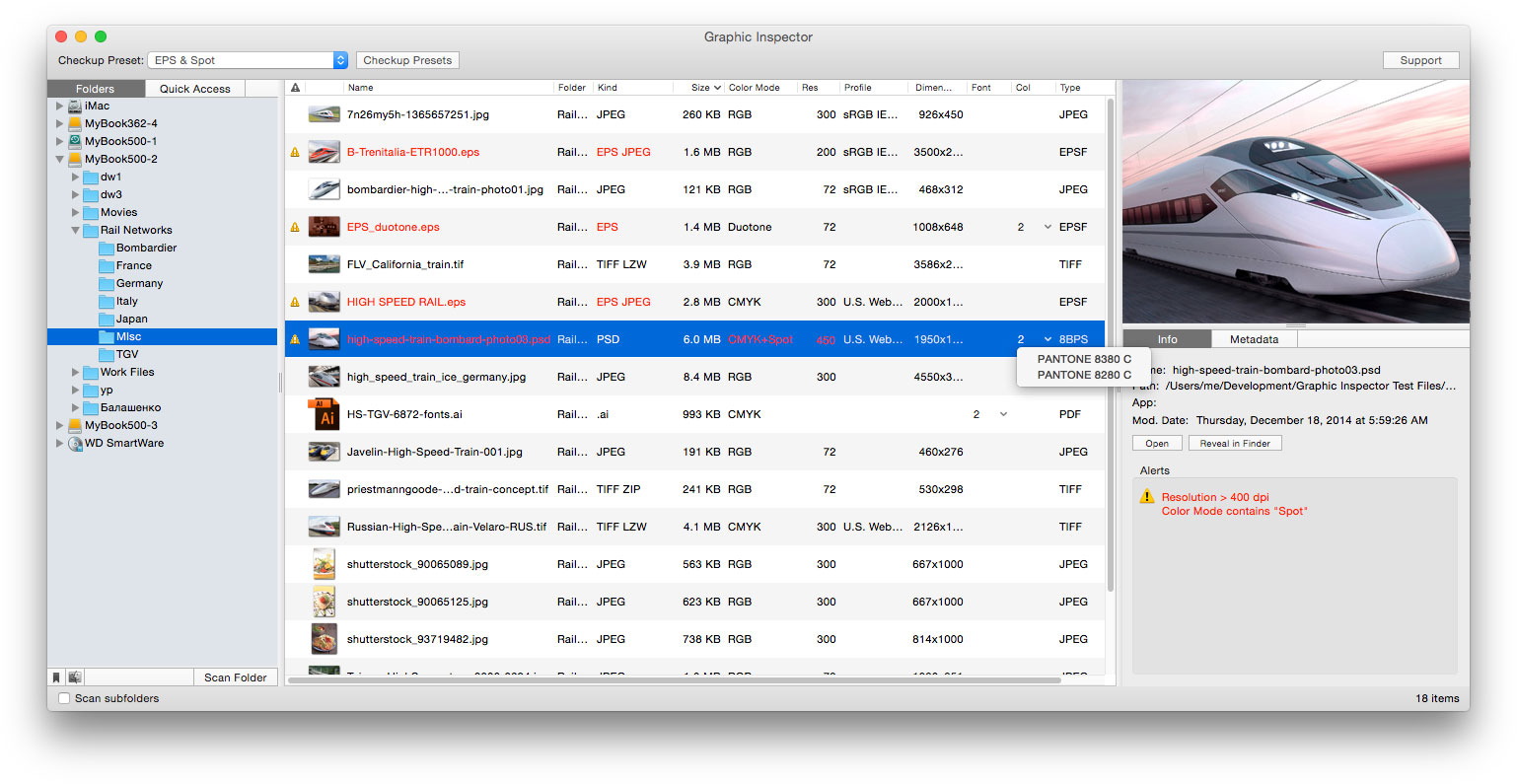
Toronto based Zevrix Solutions today announces that Graphic Inspector, its quality control solution for images and vector graphic files, is now available for direct purchase on MacUpdate under its Enhanced Product Pages program. Graphic Inspector provides graphic professionals of any trade - whether its print, web, photography or electronic publishing - with exhaustive info on images and vector graphics, saving the time and hassle of checking them manually.
Toronto (ON) Canada - Zevrix Solutions today is proud to announce that Graphic Inspector, its quality control solution for images and vector files, is now available for direct purchase on MacUpdate under its Enhanced Product Pages program. Graphic Inspector can check entire folders of files for specific attributes and errors according to user defined workflow requirements.
"I'm surprised no one else thought of it before: to display every bit of useful information about vector or raster graphic files and flag the ones that match rules you define," writes Jay Nelson in Layers magazine, "With its combination of price, utility, and thoughtful design, Graphic Inspector is a rare gem."
Graphic Inspector is designed to help photographers, graphic designers, publishers, printers or just anyone who needs to work with a large library of graphics and need to quickly search for a specific attribute or error. Instead of doing this file by file, which could be really tedious, users can employ Graphic Inspector to preflight batches of files with a simple drag and drop. For example, users can quickly detect files whose color mode is CMYK, format - JPEG, resolution is below 300 dpi, ICC profile contains "US Web Coated" and so on.
Graphic Inspector offers the following key features:
* Check batches of images and vector graphic files
* Common checks such as resolution, color mode, ICC profile and file size
* Professional prepress checks: spot colors, fonts in vector graphics, image compression
* Complete EXIF, IPTC and GPS metadata
* Powerful checkup presets for different workflows
* Save preflight data as text
Pricing and Availability:
Graphic Inspector can be purchased from MacUpdate for $19.95 (USD), as well as from authorized resellers. The update is free for users of version 2.x and $10 for licensed users of version 1. Graphic Inspector is free with purchase of PDF Checkpoint or InPreflight Pro for Adobe InDesign. Trial is also available for download. Graphic Inspector requires Mac OS X 10.7-10.11.
Zevrix Solutions: http://zevrix.com
Graphic Inspector: http://www.macupdate.com/app/mac/23707/graphic-inspector
Download Graphic Inspector: http://zevrix.com/GraphicInspector.dmg
Screenshot: http://zevrix.com/screenshots/gi2/gi2-main.jpg
Located in Toronto, Canada, Zevrix Solutions provides automation and productivity solutions for Adobe Creative Cloud and Creative Suite software, PDF workflows, graphic file diagnostics and Microsoft Office output on Mac OS. Zevrix is dedicated to help professionals increase their profits through automating everyday tasks, producing error-free documents, saving disk space and cutting production costs. For more information, visit their website. Copyright (C) 2016 Zevrix Solutions. All Rights Reserved. Other trademarks and registered trademarks may be the property of their respective owners.
*******
Link To Article: http://prmac.com/release-id-78871.htm
*******
---------------------------------------------------------------------------------
Note that you can alter delivered distributions at any time.
Login to your account on prMac to alter your channel selection, or to opt-out at any time.
Graphic Inspector Is Now Available for Sale on MacUpdate - Published on 02/29/16
Toronto based Zevrix Solutions today announces that Graphic Inspector, its quality control solution for images and vector graphic files, is now available for direct purchase on MacUpdate under its Enhanced Product Pages program. Graphic Inspector provides graphic professionals of any trade - whether its print, web, photography or electronic publishing - with exhaustive info on images and vector graphics, saving the time and hassle of checking them manually.
Toronto (ON) Canada - Zevrix Solutions today is proud to announce that Graphic Inspector, its quality control solution for images and vector files, is now available for direct purchase on MacUpdate under its Enhanced Product Pages program. Graphic Inspector can check entire folders of files for specific attributes and errors according to user defined workflow requirements.
"I'm surprised no one else thought of it before: to display every bit of useful information about vector or raster graphic files and flag the ones that match rules you define," writes Jay Nelson in Layers magazine, "With its combination of price, utility, and thoughtful design, Graphic Inspector is a rare gem."
Graphic Inspector is designed to help photographers, graphic designers, publishers, printers or just anyone who needs to work with a large library of graphics and need to quickly search for a specific attribute or error. Instead of doing this file by file, which could be really tedious, users can employ Graphic Inspector to preflight batches of files with a simple drag and drop. For example, users can quickly detect files whose color mode is CMYK, format - JPEG, resolution is below 300 dpi, ICC profile contains "US Web Coated" and so on.
Graphic Inspector offers the following key features:
* Check batches of images and vector graphic files
* Common checks such as resolution, color mode, ICC profile and file size
* Professional prepress checks: spot colors, fonts in vector graphics, image compression
* Complete EXIF, IPTC and GPS metadata
* Powerful checkup presets for different workflows
* Save preflight data as text
Pricing and Availability:
Graphic Inspector can be purchased from MacUpdate for $19.95 (USD), as well as from authorized resellers. The update is free for users of version 2.x and $10 for licensed users of version 1. Graphic Inspector is free with purchase of PDF Checkpoint or InPreflight Pro for Adobe InDesign. Trial is also available for download. Graphic Inspector requires Mac OS X 10.7-10.11.
Zevrix Solutions: http://zevrix.com
Graphic Inspector: http://www.macupdate.com/app/mac/23707/graphic-inspector
Download Graphic Inspector: http://zevrix.com/GraphicInspector.dmg
Screenshot: http://zevrix.com/screenshots/gi2/gi2-main.jpg
Located in Toronto, Canada, Zevrix Solutions provides automation and productivity solutions for Adobe Creative Cloud and Creative Suite software, PDF workflows, graphic file diagnostics and Microsoft Office output on Mac OS. Zevrix is dedicated to help professionals increase their profits through automating everyday tasks, producing error-free documents, saving disk space and cutting production costs. For more information, visit their website. Copyright (C) 2016 Zevrix Solutions. All Rights Reserved. Other trademarks and registered trademarks may be the property of their respective owners.
*******
Link To Article: http://prmac.com/release-id-78871.htm
*******
---------------------------------------------------------------------------------
Note that you can alter delivered distributions at any time.
Login to your account on prMac to alter your channel selection, or to opt-out at any time.
Aleratec Announces Mac Support for 1:22 Copy Cruiser Mini USB Duplicator
A new article has been published at prMac.
Aleratec Announces Mac Support for 1:22 Copy Cruiser Mini USB Duplicator - Published on 02/29/16
California based Aleratec Inc. today announces a new software update for the 1:22 Copy Cruiser Mini that now allows compatibility with Mac OS X computers and laptops in addition to Windows 10/8/7/Vista platforms. Designed for busy road warriors, educators, trainers, and IT professionals alike, the 1:22 Copy Cruiser Mini clones up to 22 thumb drives simultaneously and includes many of the advanced technologies of Aleratec's larger USB flash drive duplicators in a compact and portable package.
Chatsworth, California - Aleratec Inc., award-winning designer, developer and manufacturer of Portable Device Management (PDM) charge/sync products for mobile devices and professional-grade duplicators for hard disk drives, USB flash drives and DVD/CD discs, announced a new software update for the 1:22 Copy Cruiser Mini that now allows compatibility with Mac OS X computers and laptops in addition to Windows 10/8/7/Vista platforms. Responding to requests from customers who use MacBooks and iMacs to distribute information via USB thumb drives, the new software will be included with all 1:22 Copy Cruiser Mini duplicators and Upon verification, existing customers who already own an eligible Aleratec USB duplicator can also receive the new software update at no charge by contacting Aleratec customer support at (818) 678-0484.
"While the Windows platform still dominates in the workplace, we've seen a growing number of customers using Macs," notes Perry Solomon, Aleratec President and CEO. "Our 1:22 USB Copy Cruiser Mini is a powerful USB duplicator and we want to provide its robust options to Mac users as well."
The 1:22 Copy Cruiser Mini, a computer-connected USB duplicator, clones up to 22 thumb drives simultaneously and includes many of the advanced technologies of Aleratec's larger USB flash drive duplicators in a compact and portable package. Designed for busy road warriors, educators, trainers, IT professionals and others who regularly use flash drives, the 1:22 Copy Cruiser Mini makes perfect copies of flash drives quickly and includes proprietary Aleratec Software to simplify the copying process. Features include the ability to:
* Duplicate bootable flash drives from image files
* Duplicate directly from image files or flash drives
* Copy selected files and folders from PC or Mac hard drives
Price and Availability:
Aleratec's 1:22 USB Copy Cruiser Mini has an estimated Retail Price (ERP) of $629 and is available from Aleratec's dedicated resellers and distribution. For more information on Aleratec's Mac-compatible software for the 1:22 Copy Cruiser Mini, contact Perry Solomon. The full line of Aleratec solutions and accessories is also featured at Adorama, Amazon, B&H Photo Video, Barnes & Noble, Best Buy, CDW, Dell, HP, Insight, MacMall, Media Supply, Newegg, Office Depot, PC Connection, PCM, Quill, RadioShack, Rakuten, Sears, Staples, Tiger Direct, and Wal-Mart in addition to other leading US retailers. Government and education customers may purchase from Government and Education Specialists including B&H Photo Video Gov, Best Buy for Business Gov/Ed, CDW-G, EnPointe, Global, GovConnection, GOVPLACE, Insight Gov, PCM-G, SARCOM, Shi.com, Softchoice, SoftMart, Sparco, TIG, and Unicom Government. All products are available to resellers in the U.S. through D&H Distributing, Ingram Micro, and
Tech Data; in Canada through Ingram Micro Canada and Tech Data Canada; in Latin America and the Caribbean through Tech Data Miami; in the EMEA (Europe, Middle East, Africa) region through Ingram Micro UK.
Aleratec: http://www.aleratec.com
1:22 USB Copy Cruiser Mini Duplicator: http://www.aleratec.com/1-22-usb-copy-cruiser-mini-330119.html
Aleratec designs, develops and manufactures high-performance products acclaimed for their reliability and ease of use. Beginning in 2000, California-based Aleratec has met the needs of professionals in education, government and corporate markets with a diverse product line that includes professional-grade portable device management (PDM) charge/sync products for tablets and other mobile devices, duplicators for hard disk drives, USB flash drives and DVD/CD discs, as well as shredders, disc repair and related accessories. For more information, please visit Aleratec online or contact us toll free at 866-77-ALERATEC (866-772-5372). All Material and Software (C) Copyright 2016 Aleratec Inc. All Rights Reserved. Apple, the Apple logo, Mac OS X and Macintosh are registered trademarks of Apple Inc. in the U.S. and/or other countries. Other trademarks and registered trademarks may be the property of their respective owners.
*******
Link To Article: http://prmac.com/release-id-78869.htm
*******
---------------------------------------------------------------------------------
Note that you can alter delivered distributions at any time.
Login to your account on prMac to alter your channel selection, or to opt-out at any time.
Aleratec Announces Mac Support for 1:22 Copy Cruiser Mini USB Duplicator - Published on 02/29/16
California based Aleratec Inc. today announces a new software update for the 1:22 Copy Cruiser Mini that now allows compatibility with Mac OS X computers and laptops in addition to Windows 10/8/7/Vista platforms. Designed for busy road warriors, educators, trainers, and IT professionals alike, the 1:22 Copy Cruiser Mini clones up to 22 thumb drives simultaneously and includes many of the advanced technologies of Aleratec's larger USB flash drive duplicators in a compact and portable package.
Chatsworth, California - Aleratec Inc., award-winning designer, developer and manufacturer of Portable Device Management (PDM) charge/sync products for mobile devices and professional-grade duplicators for hard disk drives, USB flash drives and DVD/CD discs, announced a new software update for the 1:22 Copy Cruiser Mini that now allows compatibility with Mac OS X computers and laptops in addition to Windows 10/8/7/Vista platforms. Responding to requests from customers who use MacBooks and iMacs to distribute information via USB thumb drives, the new software will be included with all 1:22 Copy Cruiser Mini duplicators and Upon verification, existing customers who already own an eligible Aleratec USB duplicator can also receive the new software update at no charge by contacting Aleratec customer support at (818) 678-0484.
"While the Windows platform still dominates in the workplace, we've seen a growing number of customers using Macs," notes Perry Solomon, Aleratec President and CEO. "Our 1:22 USB Copy Cruiser Mini is a powerful USB duplicator and we want to provide its robust options to Mac users as well."
The 1:22 Copy Cruiser Mini, a computer-connected USB duplicator, clones up to 22 thumb drives simultaneously and includes many of the advanced technologies of Aleratec's larger USB flash drive duplicators in a compact and portable package. Designed for busy road warriors, educators, trainers, IT professionals and others who regularly use flash drives, the 1:22 Copy Cruiser Mini makes perfect copies of flash drives quickly and includes proprietary Aleratec Software to simplify the copying process. Features include the ability to:
* Duplicate bootable flash drives from image files
* Duplicate directly from image files or flash drives
* Copy selected files and folders from PC or Mac hard drives
Price and Availability:
Aleratec's 1:22 USB Copy Cruiser Mini has an estimated Retail Price (ERP) of $629 and is available from Aleratec's dedicated resellers and distribution. For more information on Aleratec's Mac-compatible software for the 1:22 Copy Cruiser Mini, contact Perry Solomon. The full line of Aleratec solutions and accessories is also featured at Adorama, Amazon, B&H Photo Video, Barnes & Noble, Best Buy, CDW, Dell, HP, Insight, MacMall, Media Supply, Newegg, Office Depot, PC Connection, PCM, Quill, RadioShack, Rakuten, Sears, Staples, Tiger Direct, and Wal-Mart in addition to other leading US retailers. Government and education customers may purchase from Government and Education Specialists including B&H Photo Video Gov, Best Buy for Business Gov/Ed, CDW-G, EnPointe, Global, GovConnection, GOVPLACE, Insight Gov, PCM-G, SARCOM, Shi.com, Softchoice, SoftMart, Sparco, TIG, and Unicom Government. All products are available to resellers in the U.S. through D&H Distributing, Ingram Micro, and
Tech Data; in Canada through Ingram Micro Canada and Tech Data Canada; in Latin America and the Caribbean through Tech Data Miami; in the EMEA (Europe, Middle East, Africa) region through Ingram Micro UK.
Aleratec: http://www.aleratec.com
1:22 USB Copy Cruiser Mini Duplicator: http://www.aleratec.com/1-22-usb-copy-cruiser-mini-330119.html
Aleratec designs, develops and manufactures high-performance products acclaimed for their reliability and ease of use. Beginning in 2000, California-based Aleratec has met the needs of professionals in education, government and corporate markets with a diverse product line that includes professional-grade portable device management (PDM) charge/sync products for tablets and other mobile devices, duplicators for hard disk drives, USB flash drives and DVD/CD discs, as well as shredders, disc repair and related accessories. For more information, please visit Aleratec online or contact us toll free at 866-77-ALERATEC (866-772-5372). All Material and Software (C) Copyright 2016 Aleratec Inc. All Rights Reserved. Apple, the Apple logo, Mac OS X and Macintosh are registered trademarks of Apple Inc. in the U.S. and/or other countries. Other trademarks and registered trademarks may be the property of their respective owners.
*******
Link To Article: http://prmac.com/release-id-78869.htm
*******
---------------------------------------------------------------------------------
Note that you can alter delivered distributions at any time.
Login to your account on prMac to alter your channel selection, or to opt-out at any time.
RationalPlan Project Management Software Translated To Russian Language
A new article has been published at prMac.
RationalPlan Project Management Software Translated To Russian Language - Published on 02/28/16
Starting with current version RationalPlan products are also available in Russian language. By adding Russian language support the Stand By Soft company hopes to better serve Russian users needs for project management software and at the same time to increase the user base for their products suite. This is a new market where RationalPlan is aiming to become a significant player.
Craiova, Romania - Starting with current version RationalPlan products are also available in Russian language. By adding Russian language support, the Stand By Soft company hopes to better serve Russian users needs for project management software and at the same time to increase the user base for their products suite. This is a new market where RationalPlan is aiming to become a significant player.
RationalPlan was created mainly for novice project managers by taking them step by step through the whole process of planning and managing a project. The application uses an embedded project guide that follows the recommended guidelines from PMBOK.
It is a project management application developed to assist project managers in creating plans, tracking progress, allocating resources, managing budgets and analyzing workload. Although initially designed as an affordable alternative to Microsoft Project but with the advantage of being able to operate on various platforms including Windows, Mac OS X and Linux it evolved to a powerful project portfolio management system. Further more, based on user requests, RationalPlan team put the accent on collaboration features and now the product can also be used as a teamwork solution to increase productivity and it is no longer just a desktop application. It can be used as a cloud service by multiple users with live concurrent access on a common pool of projects and resources.
RationalPlan suite includes:
* RationalPlan Single Project - an alternative to Microsoft Project and the perfect solution for novice or accidental project managers
* RationalPlan Multi Project - a project portfolio management solution for those users that have projects interconnected through dependencies and share common resources
* RationalPlan Project Viewer - a free viewer, the solution for anyone (from project stakeholders to team workers) to view project details
* RationalPlan Project Server - a centralized place to manage the company's projects while offering concurrent access to multiple users
RationalPlan: http://www.rationalplan.com
RationalPlan Products: http://www.rationalplan.com/project-management-products.php
Download: http://rationalplan.com/download.php
Purchase: http://rationalplan.com/purchase.php
Stand By Soft was founded in 1997 as a software company specialized in building desktop applications and components. RationalPlan is a project management solution that follows the general recommended guidelines from project management domain. MOOS Project viewer is a Microsoft Project viewer that allows users to open, view in a dynamic way and print any Microsoft Project file. All Material and Software (C) Copyright 2016 Stand By Soft. All Rights Reserved. Apple, the Apple logo, Macintosh and Mac OS X are registered trademarks of Apple Inc. in the U.S. and/or other countries. Other trademarks and registered trademarks may be the property of their respective owners.
*******
Link To Article: http://prmac.com/release-id-78866.htm
*******
---------------------------------------------------------------------------------
Note that you can alter delivered distributions at any time.
Login to your account on prMac to alter your channel selection, or to opt-out at any time.
RationalPlan Project Management Software Translated To Russian Language - Published on 02/28/16
Starting with current version RationalPlan products are also available in Russian language. By adding Russian language support the Stand By Soft company hopes to better serve Russian users needs for project management software and at the same time to increase the user base for their products suite. This is a new market where RationalPlan is aiming to become a significant player.
Craiova, Romania - Starting with current version RationalPlan products are also available in Russian language. By adding Russian language support, the Stand By Soft company hopes to better serve Russian users needs for project management software and at the same time to increase the user base for their products suite. This is a new market where RationalPlan is aiming to become a significant player.
RationalPlan was created mainly for novice project managers by taking them step by step through the whole process of planning and managing a project. The application uses an embedded project guide that follows the recommended guidelines from PMBOK.
It is a project management application developed to assist project managers in creating plans, tracking progress, allocating resources, managing budgets and analyzing workload. Although initially designed as an affordable alternative to Microsoft Project but with the advantage of being able to operate on various platforms including Windows, Mac OS X and Linux it evolved to a powerful project portfolio management system. Further more, based on user requests, RationalPlan team put the accent on collaboration features and now the product can also be used as a teamwork solution to increase productivity and it is no longer just a desktop application. It can be used as a cloud service by multiple users with live concurrent access on a common pool of projects and resources.
RationalPlan suite includes:
* RationalPlan Single Project - an alternative to Microsoft Project and the perfect solution for novice or accidental project managers
* RationalPlan Multi Project - a project portfolio management solution for those users that have projects interconnected through dependencies and share common resources
* RationalPlan Project Viewer - a free viewer, the solution for anyone (from project stakeholders to team workers) to view project details
* RationalPlan Project Server - a centralized place to manage the company's projects while offering concurrent access to multiple users
RationalPlan: http://www.rationalplan.com
RationalPlan Products: http://www.rationalplan.com/project-management-products.php
Download: http://rationalplan.com/download.php
Purchase: http://rationalplan.com/purchase.php
Stand By Soft was founded in 1997 as a software company specialized in building desktop applications and components. RationalPlan is a project management solution that follows the general recommended guidelines from project management domain. MOOS Project viewer is a Microsoft Project viewer that allows users to open, view in a dynamic way and print any Microsoft Project file. All Material and Software (C) Copyright 2016 Stand By Soft. All Rights Reserved. Apple, the Apple logo, Macintosh and Mac OS X are registered trademarks of Apple Inc. in the U.S. and/or other countries. Other trademarks and registered trademarks may be the property of their respective owners.
*******
Link To Article: http://prmac.com/release-id-78866.htm
*******
---------------------------------------------------------------------------------
Note that you can alter delivered distributions at any time.
Login to your account on prMac to alter your channel selection, or to opt-out at any time.
Subscribe to:
Posts (Atom)