A new article has been published at prMac.
BatchOutput for Microsoft Excel Improves Workbook PDF Export Reliability - Published on 03/01/16
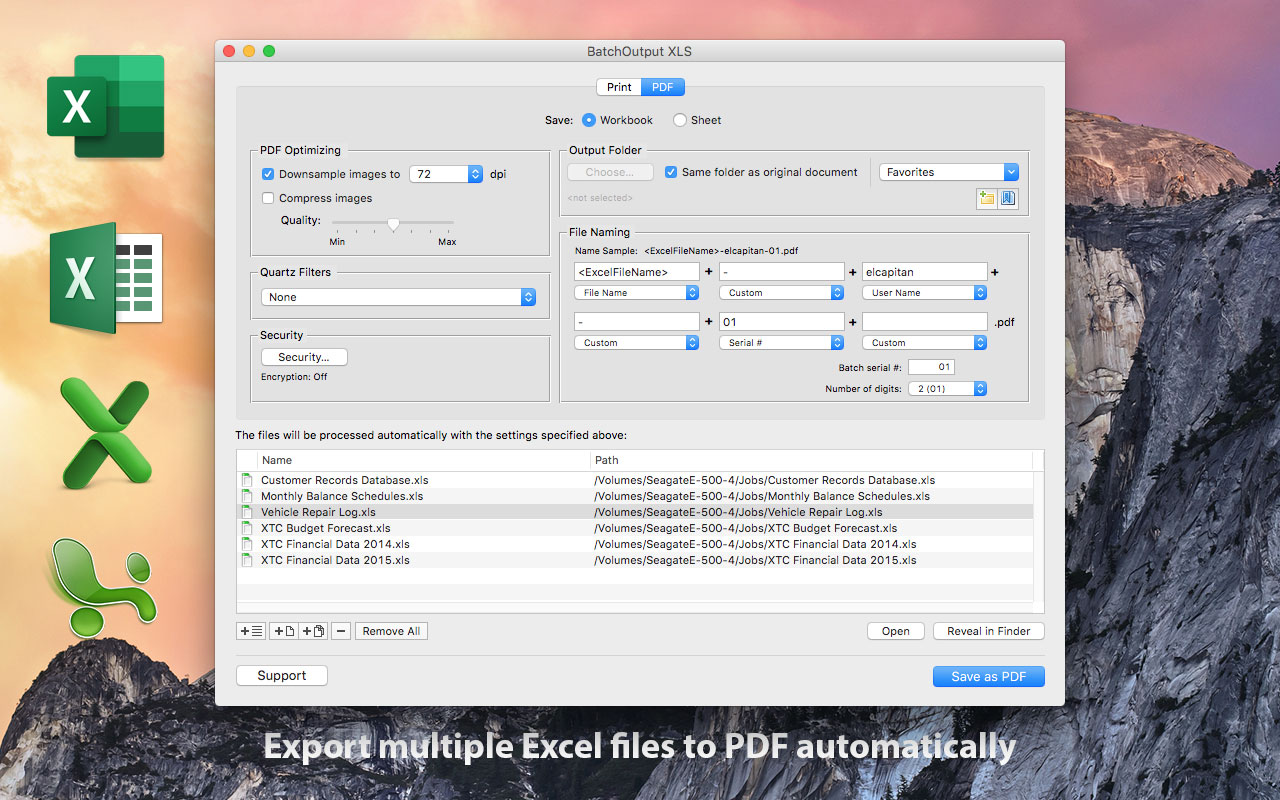
Zevrix Solutions announces BatchOutput XLS 2.3.6, a maintenance update to its output automation solution for Microsoft Excel on Mac OS. In addition to batch printing and PDF conversion, the software lets users carry out automated professional PDF production directly from Excel and effortlessly repurpose Excel spreadsheets for web and mobile devices. The new version ensures that the scaling and orientation settings are applied to all sheets when printing or exporting an entire workbook to PDF.
Toronto (ON) Canada - Zevrix Solutions today is proud to announce the release of BatchOutput XLS 2.3.6, a maintenance update to its output automation solution for Microsoft Excel on Mac OS. The software provides advanced solutions for demanding enterprise and office publishing environments through automation of printing and professional PDF output. With just a click of a button BatchOutput XLS can print and export hundreds of Excel files to PDF while the user is busy getting other important work done.
The new version ensures that the scaling and orientation settings are applied to all sheets when printing or exporting an entire Excel workbook to PDF. In previous versions such settings were applied to the current active sheet only.
In addition to batch printing, BatchOutput XLS allows to carry out powerful professional PDF production directly from Excel, helping users simplify and streamline the conversion process. BatchOutput XLS is the only app on the market that brings advanced PDF creation options right to Excel user's fingertips:
* Batch print and export Excel documents to PDF with a click of a button
* Variable PDF file names based on user name, date, batch number and other values
* Reduce PDF file size and optimize documents for web, print or mobile devices
* Encrypt and password-protect PDF from unauthorized copying, printing and viewing
* Apply Quartz filters to change PDF color tone, brightness and other qualities
BatchOutput XLS is a part of the Zevrix BatchOutput product family which also includes output automation solutions for Microsoft Word, PowerPoint, Adobe InDesign and PDF workflows.
Pricing and Availability:
BatchOutput XLS can be purchased for $39.95 (USD) from Zevrix website, as well as from authorized resellers, Mac App Store and MacUpdate. Trial is also available for download. BatchOutput XLS requires Mac OS X 10.6 - 10.11 and Microsoft Excel 2008, 2011 or 2016.
Zevrix Solutions: http://zevrix.com
BatchOutput XLS 2.3.6: http://zevrix.com/BatchOutputOffice.php
Download BatchOutput XLS: http://zevrix.com/BatchOutputOffice.dmg
Purchase: http://zevrix.com/store.php
Screenshot: http://zevrix.com/screenshots/bo-office/MAS/box2-pdf-mas.jpg
Located in Toronto, Canada, Zevrix Solutions provides automation and productivity solutions for Adobe Creative Cloud and Creative Suite software, PDF workflows, graphic file diagnostics and Microsoft Office output on Mac OS. Zevrix is dedicated to help professionals increase their profits through automating everyday tasks, producing error-free documents, saving disk space and cutting production costs. For more information, visit their website. Copyright (C) 2016 Zevrix Solutions. All Rights Reserved. Other trademarks and registered trademarks may be the property of their respective owners.
*******
Link To Article: http://prmac.com/release-id-78898.htm
*******
---------------------------------------------------------------------------------
Note that you can alter delivered distributions at any time.
Login to your account on prMac to alter your channel selection, or to opt-out at any time.

New app makes you donate to Donald Trump if you don't acheive your goals
A new article has been published at prMac.
New app makes you donate to Donald Trump if you don't acheive your goals - Published on 03/01/16
California based DatsuSoftware today introduces Flight: Habit and Goal Tracker 1.0.0, its new productivity app for iOS and Android devices. Flight not only allows you to track your habits and goals, but also boosts your incentive to succeed by allowing you to commit to real-world stakes to help hold yourself accountable. Flight also works across all your devices in real-time, without any need for syncing. Its sleek design is a joy to use, making habit tracking easier than ever before.
Los Angeles, California - A new app lets users track all of their personal habits and goals in one place, while using donating money to Donald Trump's campaign as incentive to succeed. The app is called Flight: Habit and Goal Tracker. It was designed by DatsuSoftware to allow users to manage all of their life's goals and habits, but also boost incentive to succeed by enabling users to commit to real-world stakes. Flight urges users to "Trump" their goals. If you don't succeed, you have to give money to the last person you'd want to give your money to: Donald Trump.
Flight is currently available on both Android and iPhone, and already has thousands of dollars at stake by users having just been launched this month. "I came up with the idea because I couldn't find an app in the app store that met my needs," said Jason Martin, Datsusoftware's CEO. "I started building Flight as just a tool I could use myself, but when friends started to become interested in using the app as well I knew I had something more people would want to use."
A Chapman University Research Study shows that you are 3x more likely to accomplish a goal if you put money on the line. By creating a commitment contract, and setting a deadline, you give yourself additional motivation to succeed. Flight lets users set those stakes. Flight's SMART Goal Management System allows users to organize their life goals, from their big bucket list all the way down to the small goals for the week. A SMART goal is defined as one that is Specific, Measurable, Achievable, Results-focused, and Time-bound.
Habits are also split between good habits to build (like exercise) and bad habits to break (like smoking). Flight works across all devices in real-time, without any need for syncing - and its sleek design is a joy to use. Users can also customize their stakes, pledging money to be donated to a charity, make a monetary bet with a friend (or foe), or even set custom stakes such as agreeing to post an embarrassing picture on Social Media. Whether it's building good habits or setting life goals, Flight has all the tools you need to take your life to new heights.
Device Requirements:
* iPhone, iPad, and iPod touch
* Requires iOS 6.0 or later
* 11.0 MB
Pricing and Availability:
Flight: Habit and Goal Tracker 1.0.0 is Free and available worldwide through the App Store in the Productivity category. There is also an Android version available on Google Play.
Flight: Habit and Goal Tracker 1.0.0: http://flight.do
Download from iTunes: https://itunes.apple.com/app/flight-habit-and-goal-tracker/id1073790725
Download from Google Play: https://play.google.com/store/apps/details?id=com.datsusoftware.flight
YouTube Video (Promo): https://www.youtube.com/watch?v=bqeK5dW73Cw
Media Assets: https://www.dropbox.com/sh/ra1vaszlfx8jkev/AACuj_rXbrOcxoeSMhAM7OEza?dl=0
DatsuSoftware was founded in Los Angeles, California in 2014. All Material and Software (C) Copyright 2016 DatsuSoftware, LLC. All Rights Reserved. Apple, the Apple logo, iPhone, iPod and iPad are registered trademarks of Apple Inc. in the U.S. and/or other countries. Other trademarks and registered trademarks may be the property of their respective owners.
*******
Link To Article: http://prmac.com/release-id-78897.htm
*******
---------------------------------------------------------------------------------
Note that you can alter delivered distributions at any time.
Login to your account on prMac to alter your channel selection, or to opt-out at any time.
New app makes you donate to Donald Trump if you don't acheive your goals - Published on 03/01/16
California based DatsuSoftware today introduces Flight: Habit and Goal Tracker 1.0.0, its new productivity app for iOS and Android devices. Flight not only allows you to track your habits and goals, but also boosts your incentive to succeed by allowing you to commit to real-world stakes to help hold yourself accountable. Flight also works across all your devices in real-time, without any need for syncing. Its sleek design is a joy to use, making habit tracking easier than ever before.
Los Angeles, California - A new app lets users track all of their personal habits and goals in one place, while using donating money to Donald Trump's campaign as incentive to succeed. The app is called Flight: Habit and Goal Tracker. It was designed by DatsuSoftware to allow users to manage all of their life's goals and habits, but also boost incentive to succeed by enabling users to commit to real-world stakes. Flight urges users to "Trump" their goals. If you don't succeed, you have to give money to the last person you'd want to give your money to: Donald Trump.
Flight is currently available on both Android and iPhone, and already has thousands of dollars at stake by users having just been launched this month. "I came up with the idea because I couldn't find an app in the app store that met my needs," said Jason Martin, Datsusoftware's CEO. "I started building Flight as just a tool I could use myself, but when friends started to become interested in using the app as well I knew I had something more people would want to use."
A Chapman University Research Study shows that you are 3x more likely to accomplish a goal if you put money on the line. By creating a commitment contract, and setting a deadline, you give yourself additional motivation to succeed. Flight lets users set those stakes. Flight's SMART Goal Management System allows users to organize their life goals, from their big bucket list all the way down to the small goals for the week. A SMART goal is defined as one that is Specific, Measurable, Achievable, Results-focused, and Time-bound.
Habits are also split between good habits to build (like exercise) and bad habits to break (like smoking). Flight works across all devices in real-time, without any need for syncing - and its sleek design is a joy to use. Users can also customize their stakes, pledging money to be donated to a charity, make a monetary bet with a friend (or foe), or even set custom stakes such as agreeing to post an embarrassing picture on Social Media. Whether it's building good habits or setting life goals, Flight has all the tools you need to take your life to new heights.
Device Requirements:
* iPhone, iPad, and iPod touch
* Requires iOS 6.0 or later
* 11.0 MB
Pricing and Availability:
Flight: Habit and Goal Tracker 1.0.0 is Free and available worldwide through the App Store in the Productivity category. There is also an Android version available on Google Play.
Flight: Habit and Goal Tracker 1.0.0: http://flight.do
Download from iTunes: https://itunes.apple.com/app/flight-habit-and-goal-tracker/id1073790725
Download from Google Play: https://play.google.com/store/apps/details?id=com.datsusoftware.flight
YouTube Video (Promo): https://www.youtube.com/watch?v=bqeK5dW73Cw
Media Assets: https://www.dropbox.com/sh/ra1vaszlfx8jkev/AACuj_rXbrOcxoeSMhAM7OEza?dl=0
DatsuSoftware was founded in Los Angeles, California in 2014. All Material and Software (C) Copyright 2016 DatsuSoftware, LLC. All Rights Reserved. Apple, the Apple logo, iPhone, iPod and iPad are registered trademarks of Apple Inc. in the U.S. and/or other countries. Other trademarks and registered trademarks may be the property of their respective owners.
*******
Link To Article: http://prmac.com/release-id-78897.htm
*******
---------------------------------------------------------------------------------
Note that you can alter delivered distributions at any time.
Login to your account on prMac to alter your channel selection, or to opt-out at any time.
SuperTab for Mac receives major upgrade to version 2.0 and 50%-off sale
A new article has been published at prMac.
SuperTab for Mac receives major upgrade to version 2.0 and 50%-off sale - Published on 03/01/16
California based SpriTec Software today announces SuperTab 2.0, a major update to its powerful utility application for OS X. With full support for Mac OS X El Capitan, SuperTab greatly enhances and extends the Mac's built-in Command-Tab Application Switcher. It builds upon the Mac's built-in App Switcher by providing users with instant access to much more than just their Active Apps. Version 2.0 gains several new features plus a special 50%-off celebratory sale price good through April 15, 2016.
San Diego, California - SpriTec Software today is proud to announce the release of SuperTab version 2.0, a major upgrade to its Macintosh utility application that greatly enhances and extends the Mac's built-in Command-Tab Application Switcher.
Highlighted new features:
* Drag and Drop Support
* Multiple Clipboards
* Clipboard History
* Spotlight Searches
* Enhanced Screen Shots
* Display Configurations
"The App that does what Apple should have Done!"
SuperTab builds upon the Mac's built-in Command-Tab App Switcher to provide users with instant access to much more than just their Active Apps. For example, SuperTab extends the Mac's App Switcher to let users quickly access their:
* Active Apps
* Recent Apps
* Recent Documents
* Dock Contents
* Dropbox Contents
* Clipboard History
* Tagged Items
* Finder Sidebar Items
* Folder Contents
* Application Windows
* Any Files, Folders or Apps
* Web Site Bookmarks
* Screen Shots
* Multiple Clipboards
* Saved Spotlight Searches
* Display Configurations
By giving Mac users such instant "Command-Tab" access to so much, SuperTab has quickly become one of the most powerful launchers in the Mac market. And now this new version 2.0 of SuperTab adds several key features, enhancements and capabilities to make SuperTab even more powerful, flexible and robust:
Drag and Drop:
SuperTab has fully integrated the power and simplicity of Drag and Drop. Finally users can interact with SuperTab in the natural way that the original Mac brought us.
* Add Files, Folders and Apps to SuperTab simply by dragging them from the Finder
* Drag Files, Folders, Text and Images from SuperTab directly into other Apps
* Drag and Drop items within SuperTab to configure SuperTab as fits users styles
* Drag Text and Image Clippings from the new Clipboard History into other Apps
* Drag Files, Text or Images into SuperTab to create Multiple Clipboards
* Drag URLs directly from Web Broswers into SuperTab to seamlessly create Web Site Bookmarks
Multiple Clipboards:
SuperTab now lets users create any number of custom, easily accessible clipboards.
* Clipboards hold Images and Rich Text
* Hover over a Clipboard to instantly preview its contents
* A single click on a Clipboard will Copy its contents or Paste them directly into the frontmost App
* Drag and Drop Clipboards into Apps to paste their contents
Clipboard History:
SuperTab also gives users instant access to their recent Clipboard History - all the Text and Images that they've recently copied to their Mac's Clipboard. Users can:
* Track just Text, just Images or both
* Specify the number of Clippings to Track: 10, 25 or 50
* Instantly preview the contents of each Clipping in their History
* Click a Clipping to instantly copy its contents to their Mac's Clipboard
* Drag and Drop Clipboard History Clippings into Apps to paste their contents
Spotlight Searches:
SuperTab now supports the ability to add Saved Spotlight Searches. Users can save any Spotlight Searches and then add them to SuperTab where the searches can then be easily re-performed directly within SuperTab - or have their search results displayed anew in the Finder.
Enhanced Screen Shots:
SuperTab's already powerful Screen Shot Items have been enhanced to streamline user's ability to effortlessly capture and work with still-image Screen Shots. Users can now:
* Have SuperTab automatically Hide Desktop Icons during screen shots
* Specify the App to open screen shots in
* Capture back-to-back screen shots by holding down the Command Key
* Preview, Copy, Share, Move & Delete saved screen shots immediatley within SuperTab
Display Configurations :
SuperTab now offers the simplest way yet to switch between frequently used Display Configurations (the sizes, resolution and relative placement of the Mac's Display Screens). When users have a Display Configuration of their Mac that they want to use again, they simply create a new Display Configuration Item and "Capture" the Mac's configuration in it - with just a single click. Then, when they want to later restore their Mac to that configuration, just a single click on that Display Configuration will instantly configure the Mac's Displays back to the saved configuration.
System Requirements:
SuperTab 2.0 runs on Mac OS X 10.8 later, including full compatibility with "El Capitan".
Pricing and Availability:
SuperTab 2.0 is free to download and install and is fully-functional for 30 days. After 30 days, it remains fully-functional but will occasionally ask users to register. Users can take advantage of a special 50%-off sale price of only $10, which is good now through April 15, 2016.
SuperTab 2.0: http://www.supertab.me
2.0 Overview: http://www.supertab.me/TwoPointOhRelease.html
Download SuperTab: http://www.supertab.me/Download.html
Purchase: http://www.supertab.me/Register.html
Screenshots: http://www.supertab.me/SuperTabScreenShots.html
Located in San Diego, California, SpriTec Software creates apps for the OSX platform. SpriTec Software is helmed by Ando Sonenblick, an Apple/Adobe/DivX/GoPro veteran with over 30 years of development experience. Copyright (C) 2016 SpriTec Software. All Rights Reserved. Apple, the Apple logo, Mac OS X, and Macintosh are registered trademarks of Apple Inc. in the U.S. and/or other countries. All other trademarks and trade names are the property of their respective owners.
*******
Link To Article: http://prmac.com/release-id-78883.htm
*******
---------------------------------------------------------------------------------
Note that you can alter delivered distributions at any time.
Login to your account on prMac to alter your channel selection, or to opt-out at any time.
SuperTab for Mac receives major upgrade to version 2.0 and 50%-off sale - Published on 03/01/16
California based SpriTec Software today announces SuperTab 2.0, a major update to its powerful utility application for OS X. With full support for Mac OS X El Capitan, SuperTab greatly enhances and extends the Mac's built-in Command-Tab Application Switcher. It builds upon the Mac's built-in App Switcher by providing users with instant access to much more than just their Active Apps. Version 2.0 gains several new features plus a special 50%-off celebratory sale price good through April 15, 2016.
San Diego, California - SpriTec Software today is proud to announce the release of SuperTab version 2.0, a major upgrade to its Macintosh utility application that greatly enhances and extends the Mac's built-in Command-Tab Application Switcher.
Highlighted new features:
* Drag and Drop Support
* Multiple Clipboards
* Clipboard History
* Spotlight Searches
* Enhanced Screen Shots
* Display Configurations
"The App that does what Apple should have Done!"
SuperTab builds upon the Mac's built-in Command-Tab App Switcher to provide users with instant access to much more than just their Active Apps. For example, SuperTab extends the Mac's App Switcher to let users quickly access their:
* Active Apps
* Recent Apps
* Recent Documents
* Dock Contents
* Dropbox Contents
* Clipboard History
* Tagged Items
* Finder Sidebar Items
* Folder Contents
* Application Windows
* Any Files, Folders or Apps
* Web Site Bookmarks
* Screen Shots
* Multiple Clipboards
* Saved Spotlight Searches
* Display Configurations
By giving Mac users such instant "Command-Tab" access to so much, SuperTab has quickly become one of the most powerful launchers in the Mac market. And now this new version 2.0 of SuperTab adds several key features, enhancements and capabilities to make SuperTab even more powerful, flexible and robust:
Drag and Drop:
SuperTab has fully integrated the power and simplicity of Drag and Drop. Finally users can interact with SuperTab in the natural way that the original Mac brought us.
* Add Files, Folders and Apps to SuperTab simply by dragging them from the Finder
* Drag Files, Folders, Text and Images from SuperTab directly into other Apps
* Drag and Drop items within SuperTab to configure SuperTab as fits users styles
* Drag Text and Image Clippings from the new Clipboard History into other Apps
* Drag Files, Text or Images into SuperTab to create Multiple Clipboards
* Drag URLs directly from Web Broswers into SuperTab to seamlessly create Web Site Bookmarks
Multiple Clipboards:
SuperTab now lets users create any number of custom, easily accessible clipboards.
* Clipboards hold Images and Rich Text
* Hover over a Clipboard to instantly preview its contents
* A single click on a Clipboard will Copy its contents or Paste them directly into the frontmost App
* Drag and Drop Clipboards into Apps to paste their contents
Clipboard History:
SuperTab also gives users instant access to their recent Clipboard History - all the Text and Images that they've recently copied to their Mac's Clipboard. Users can:
* Track just Text, just Images or both
* Specify the number of Clippings to Track: 10, 25 or 50
* Instantly preview the contents of each Clipping in their History
* Click a Clipping to instantly copy its contents to their Mac's Clipboard
* Drag and Drop Clipboard History Clippings into Apps to paste their contents
Spotlight Searches:
SuperTab now supports the ability to add Saved Spotlight Searches. Users can save any Spotlight Searches and then add them to SuperTab where the searches can then be easily re-performed directly within SuperTab - or have their search results displayed anew in the Finder.
Enhanced Screen Shots:
SuperTab's already powerful Screen Shot Items have been enhanced to streamline user's ability to effortlessly capture and work with still-image Screen Shots. Users can now:
* Have SuperTab automatically Hide Desktop Icons during screen shots
* Specify the App to open screen shots in
* Capture back-to-back screen shots by holding down the Command Key
* Preview, Copy, Share, Move & Delete saved screen shots immediatley within SuperTab
Display Configurations :
SuperTab now offers the simplest way yet to switch between frequently used Display Configurations (the sizes, resolution and relative placement of the Mac's Display Screens). When users have a Display Configuration of their Mac that they want to use again, they simply create a new Display Configuration Item and "Capture" the Mac's configuration in it - with just a single click. Then, when they want to later restore their Mac to that configuration, just a single click on that Display Configuration will instantly configure the Mac's Displays back to the saved configuration.
System Requirements:
SuperTab 2.0 runs on Mac OS X 10.8 later, including full compatibility with "El Capitan".
Pricing and Availability:
SuperTab 2.0 is free to download and install and is fully-functional for 30 days. After 30 days, it remains fully-functional but will occasionally ask users to register. Users can take advantage of a special 50%-off sale price of only $10, which is good now through April 15, 2016.
SuperTab 2.0: http://www.supertab.me
2.0 Overview: http://www.supertab.me/TwoPointOhRelease.html
Download SuperTab: http://www.supertab.me/Download.html
Purchase: http://www.supertab.me/Register.html
Screenshots: http://www.supertab.me/SuperTabScreenShots.html
Located in San Diego, California, SpriTec Software creates apps for the OSX platform. SpriTec Software is helmed by Ando Sonenblick, an Apple/Adobe/DivX/GoPro veteran with over 30 years of development experience. Copyright (C) 2016 SpriTec Software. All Rights Reserved. Apple, the Apple logo, Mac OS X, and Macintosh are registered trademarks of Apple Inc. in the U.S. and/or other countries. All other trademarks and trade names are the property of their respective owners.
*******
Link To Article: http://prmac.com/release-id-78883.htm
*******
---------------------------------------------------------------------------------
Note that you can alter delivered distributions at any time.
Login to your account on prMac to alter your channel selection, or to opt-out at any time.
iBusiness Magazine InfoComm 2016 Edition - Advertising Opportunities
A new article has been published at prMac.
iBusiness Magazine InfoComm 2016 Edition - Advertising Opportunities - Published on 03/01/16
iBusiness has become an official media partner for InfoComm 2016, which will take place in Las Vegas, Nevada, from June 4 - 10. i.Business will sponsor the Innovations Showcase, a dedicated area on the show floor for first-time exhibitors with creative new solutions and best-of-breed products. iBusiness magazine will be onsite during InfoComm and distributing its InfoComm 2016 Special Show Edition. iBusiness will be distributed throughout InfoComm 2016 with over a 500,000 readers worldwide.
Cape Coral, Florida - iBusiness has become an official media partner for InfoComm 2016, which will take place in Las Vegas, Nevada, from June 4 - 10. i.Business will sponsor the Innovations Showcase, a dedicated area on the show floor for first-time exhibitors with creative new solutions and best-of-breed products. iBusiness magazine will be onsite during InfoComm and distributing its InfoComm 2016 Special Show Edition.
"InfoComm showcases new innovative business solutions and our magazine is a perfect fit for InfoComm attendees," says Carmine De Santo, publisher of iBusiness Magazine.
iBusiness will be distributed throughout InfoComm 2016 with over a 500,000 readers worldwide. InfoComm is one of the largest events focused on the professional audiovisual industry. From acoustic technology to the latest in video wall displays, InfoComm brings together nearly 1,000 exhibitors and 40,000 attendees to see where the future of the AV industry is headed.
We have the following Advertisement Packages available for this InfoComm16 edition:
* Exclusive Your Product Image & Logo! on the Magazine Cover, Full Page Advertisement, Full Page Product Review, Company Banner Newsletter Sponsorship for only $15,000.00 - Only one Spot available for this bundle
* 2 Full Page Spread Advertisement, Full Page Product Review & Product Name on Cover of the Magazine for only $9,000.00 - 2 Spots available
* Premium Full Page Advertisement - First Right Hand Side Page #1, Full Product Review, Mention on Front Cover - for only $5,500.00 - Only one Spot available for this bundle
* Full Back Cover Advertisement, Full Page Advertisement - Premium Location, Full Page Product Review & Mention on Front Cover $6,000.00 - Only one Spot available for this bundle - SOLD OUT
* Inside Page1 (Right Hand Side) - Full Page Advertisement, Mention on Front Cover & Full Page Product Review $5,500.00 - Only 1 Spot available for this bundle
* Inside Front Cover Full Page Advertisement, Mention on Front Cover & Full Page Product Review $4,500.00 - Only 1 Spot available for this bundle
* Inside Back Cover Full Page Advertisement, Mention on Front Cover & Full Page Product Review $3,500.00 - Only 1 Spot available for this bundle
* Full Page Advertisement, Full Page Product Review & Product Name on Cover of the Magazine for only $3,500.00 - 3 Spots available
* 1/2 Page Advertisement & Full Page Product Review $2,150.00
* Full Page Advertisement Only $2,200.00
* 1/2 Page Advertisement $950.00
About InfoComm International
InfoComm International(R) is the international trade association representing the professional audiovisual and information communications industries. InfoComm has more than 5,000 members, including manufacturers, systems integrators, dealers and distributors, independent consultants, programmers, rental and staging companies, end users and multimedia professionals from more than 80 countries. InfoComm International is the leading resource for AV standards, market research and news. Its training, certification and education programs set a standard of excellence for AV professionals. InfoComm International is the founder of InfoComm, the largest annual conference and exhibition for AV buyers and sellers in North America. InfoComm also produces trade shows in Europe, the Middle East, China, India and Latin America. Additional information is available at the InfoComm website.
iBusiness Magazine: http://www.ibusinessmag.com
Presentation File Deck: http://www.ibusinessmag.com/iBusinessMagazine.pdf
Media Kit 2016: http://www.ibusinessmag.com/mediakit2016.pdf
Subscribe to iBusiness Magazine Today!: http://ibusinessmag.com/i.Business_New/Subscribe.html
About the Magazine: http://ibusinessmag.com/i.Business_New/About_Us.html
Infocomm: http://infocomm.org
The team behind iBusiness Magazine have decades of experience in the Business to Business & Education communities. We strive to cover as many vertical markets as possible, which include but are not limited to, Retail, Hospitality, ERP, CAD, Real Estate, Legal, Scientific Computing, Medical/Healthcare, Government, Automotive, Manufacturers, Accounting/Finance, Print & Graphics and Security & Surveillance. Our articles take a solutions-based approach to productivity, workflow management and tips & tricks. The magazine articles come from the industry leaders with years of experience and proven track records. Copyright (C) 2016 i.Business Magazine.
*******
Link To Article: http://prmac.com/release-id-78880.htm
*******
---------------------------------------------------------------------------------
Note that you can alter delivered distributions at any time.
Login to your account on prMac to alter your channel selection, or to opt-out at any time.
iBusiness Magazine InfoComm 2016 Edition - Advertising Opportunities - Published on 03/01/16
iBusiness has become an official media partner for InfoComm 2016, which will take place in Las Vegas, Nevada, from June 4 - 10. i.Business will sponsor the Innovations Showcase, a dedicated area on the show floor for first-time exhibitors with creative new solutions and best-of-breed products. iBusiness magazine will be onsite during InfoComm and distributing its InfoComm 2016 Special Show Edition. iBusiness will be distributed throughout InfoComm 2016 with over a 500,000 readers worldwide.
Cape Coral, Florida - iBusiness has become an official media partner for InfoComm 2016, which will take place in Las Vegas, Nevada, from June 4 - 10. i.Business will sponsor the Innovations Showcase, a dedicated area on the show floor for first-time exhibitors with creative new solutions and best-of-breed products. iBusiness magazine will be onsite during InfoComm and distributing its InfoComm 2016 Special Show Edition.
"InfoComm showcases new innovative business solutions and our magazine is a perfect fit for InfoComm attendees," says Carmine De Santo, publisher of iBusiness Magazine.
iBusiness will be distributed throughout InfoComm 2016 with over a 500,000 readers worldwide. InfoComm is one of the largest events focused on the professional audiovisual industry. From acoustic technology to the latest in video wall displays, InfoComm brings together nearly 1,000 exhibitors and 40,000 attendees to see where the future of the AV industry is headed.
We have the following Advertisement Packages available for this InfoComm16 edition:
* Exclusive Your Product Image & Logo! on the Magazine Cover, Full Page Advertisement, Full Page Product Review, Company Banner Newsletter Sponsorship for only $15,000.00 - Only one Spot available for this bundle
* 2 Full Page Spread Advertisement, Full Page Product Review & Product Name on Cover of the Magazine for only $9,000.00 - 2 Spots available
* Premium Full Page Advertisement - First Right Hand Side Page #1, Full Product Review, Mention on Front Cover - for only $5,500.00 - Only one Spot available for this bundle
* Full Back Cover Advertisement, Full Page Advertisement - Premium Location, Full Page Product Review & Mention on Front Cover $6,000.00 - Only one Spot available for this bundle - SOLD OUT
* Inside Page1 (Right Hand Side) - Full Page Advertisement, Mention on Front Cover & Full Page Product Review $5,500.00 - Only 1 Spot available for this bundle
* Inside Front Cover Full Page Advertisement, Mention on Front Cover & Full Page Product Review $4,500.00 - Only 1 Spot available for this bundle
* Inside Back Cover Full Page Advertisement, Mention on Front Cover & Full Page Product Review $3,500.00 - Only 1 Spot available for this bundle
* Full Page Advertisement, Full Page Product Review & Product Name on Cover of the Magazine for only $3,500.00 - 3 Spots available
* 1/2 Page Advertisement & Full Page Product Review $2,150.00
* Full Page Advertisement Only $2,200.00
* 1/2 Page Advertisement $950.00
About InfoComm International
InfoComm International(R) is the international trade association representing the professional audiovisual and information communications industries. InfoComm has more than 5,000 members, including manufacturers, systems integrators, dealers and distributors, independent consultants, programmers, rental and staging companies, end users and multimedia professionals from more than 80 countries. InfoComm International is the leading resource for AV standards, market research and news. Its training, certification and education programs set a standard of excellence for AV professionals. InfoComm International is the founder of InfoComm, the largest annual conference and exhibition for AV buyers and sellers in North America. InfoComm also produces trade shows in Europe, the Middle East, China, India and Latin America. Additional information is available at the InfoComm website.
iBusiness Magazine: http://www.ibusinessmag.com
Presentation File Deck: http://www.ibusinessmag.com/iBusinessMagazine.pdf
Media Kit 2016: http://www.ibusinessmag.com/mediakit2016.pdf
Subscribe to iBusiness Magazine Today!: http://ibusinessmag.com/i.Business_New/Subscribe.html
About the Magazine: http://ibusinessmag.com/i.Business_New/About_Us.html
Infocomm: http://infocomm.org
The team behind iBusiness Magazine have decades of experience in the Business to Business & Education communities. We strive to cover as many vertical markets as possible, which include but are not limited to, Retail, Hospitality, ERP, CAD, Real Estate, Legal, Scientific Computing, Medical/Healthcare, Government, Automotive, Manufacturers, Accounting/Finance, Print & Graphics and Security & Surveillance. Our articles take a solutions-based approach to productivity, workflow management and tips & tricks. The magazine articles come from the industry leaders with years of experience and proven track records. Copyright (C) 2016 i.Business Magazine.
*******
Link To Article: http://prmac.com/release-id-78880.htm
*******
---------------------------------------------------------------------------------
Note that you can alter delivered distributions at any time.
Login to your account on prMac to alter your channel selection, or to opt-out at any time.
Offline Kannada to English Language Dictionary 3.0 for iOS
A new article has been published at prMac.
Offline Kannada to English Language Dictionary 3.0 for iOS - Published on 03/01/16
LastThink announces the release of Offline Kannada to English Language Dictionary 3.0, the important update to their highly customizable dictionary application for iOS devices. Users can seek and find any word's translation and synonyms anytime and anywhere from their devices. The dictionary offers users a huge collection of words with their translations as well as definitions and synonyms. Version 3.0 offers improved search capability.
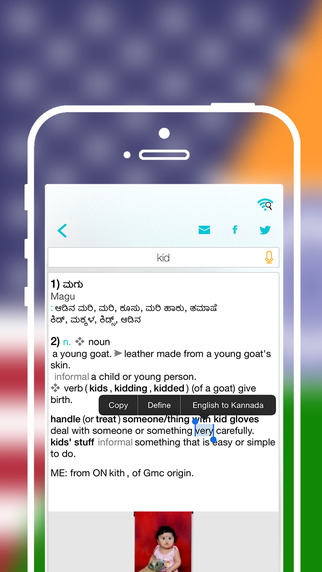
Yerevan, Armenia - LastThink is proud to announce the release of Offline Kannada to English Language Dictionary 3.0, the important update to their highly customizable dictionary application developed for iPhone, iPad, and iPod touch devices. Users can seek and find any word's translation and synonyms anytime and anywhere from their Apple devices.
Features:
* Tremendous range of synonyms and antonyms with well over five hundred thousand synonym variants
* Information about the discipline of structural linguistics by suggesting vital enough sentences
* Appropriate translations of colloquial and formal words as well as conjugation of verbs and declension of nouns
* Availability of various word definitions which will exactly influence on your understanding of a Foreign Language in a detailed way
* A distinction of a section named "Favorites" with the possibility of saving as many unknown words as you wish
* Thorough analysis of parts of speech (noun, verb, adjective, adverb) and their grammatical functions (subject, object, etc.)
* A possibility of the following application usage without an internet demand
* Existence of contemporary words such as "Woot", "OMG", "Crunk" and many others
In our new updated version we grant users a chance of typing the unknown word either in capitals or in small letters and the app will bring all the possible variants and definitions of the dictionary entries saved both in capital and small letters.
If you however experience any issues, please do not hesitate to contact us if you'd like to share your experience with Offline Dictionaries, or provide suggestions on how we could improve the product further. We will be more than happy to get in touch.
NOTE: We have selected data from the internet and if any assembly or constitution doesn't want us to show the content of the unit, please recommend us to remove it.
Device Requirements:
* iPhone, iPad, and iPod touch
* Optimized for iPhone 5, iPhone 6, and iPhone 6 Plus
* Requires iOS 6.0 or later
* Universal Application
* 192 MB
Pricing and Availability:
Offline Kannada to English Language Dictionary 3.0 is free and available worldwide exclusively through the App Store in the Education category.
LastThink: http://lastthink.com/
Offline Kannada to English Language Dictionary 3.0: https://www.facebook.com/pages/Offline-Dictionary/882897578447079
Download from iTunes: https://itunes.apple.com/app/offline-kannada-to-english/id1003675812
Screenshot: http://a1.mzstatic.com/us/r30/Purple5/v4/4a/6a/72/4a6a72b6-314a-2ba2-7d8e-5970145aff07/screen322x572.jpeg
App Icon: http://a5.mzstatic.com/us/r30/Purple2/v4/a6/23/b2/a623b294-24e3-2412-cb62-1525eefb642e/icon175x175.jpeg
LastThink is an IT company with a focus on mobile development. It has extended its list of services since 2012 to offer high-end business process management, system integration, as well as up-to-date communication solutions. LastThink's mission is to deliver maximum business value to its customers by designing, developing, implementing and maintaining efficient and high quality software solutions aligned with their most essential business needs. Their team will always do its best to meet client expectations. All Material and Software (C) Copyright 2016 LastThink LLC. All Rights Reserved. Apple, the Apple logo, iPhone, iPod and iPad are registered trademarks of Apple Inc. in the U.S. and/or other countries. Other trademarks and registered trademarks may be the property of their respective owners.
*******
Link To Article: http://prmac.com/release-id-78881.htm
*******
---------------------------------------------------------------------------------
Note that you can alter delivered distributions at any time.
Login to your account on prMac to alter your channel selection, or to opt-out at any time.
Offline Kannada to English Language Dictionary 3.0 for iOS - Published on 03/01/16
LastThink announces the release of Offline Kannada to English Language Dictionary 3.0, the important update to their highly customizable dictionary application for iOS devices. Users can seek and find any word's translation and synonyms anytime and anywhere from their devices. The dictionary offers users a huge collection of words with their translations as well as definitions and synonyms. Version 3.0 offers improved search capability.
Yerevan, Armenia - LastThink is proud to announce the release of Offline Kannada to English Language Dictionary 3.0, the important update to their highly customizable dictionary application developed for iPhone, iPad, and iPod touch devices. Users can seek and find any word's translation and synonyms anytime and anywhere from their Apple devices.
Features:
* Tremendous range of synonyms and antonyms with well over five hundred thousand synonym variants
* Information about the discipline of structural linguistics by suggesting vital enough sentences
* Appropriate translations of colloquial and formal words as well as conjugation of verbs and declension of nouns
* Availability of various word definitions which will exactly influence on your understanding of a Foreign Language in a detailed way
* A distinction of a section named "Favorites" with the possibility of saving as many unknown words as you wish
* Thorough analysis of parts of speech (noun, verb, adjective, adverb) and their grammatical functions (subject, object, etc.)
* A possibility of the following application usage without an internet demand
* Existence of contemporary words such as "Woot", "OMG", "Crunk" and many others
In our new updated version we grant users a chance of typing the unknown word either in capitals or in small letters and the app will bring all the possible variants and definitions of the dictionary entries saved both in capital and small letters.
If you however experience any issues, please do not hesitate to contact us if you'd like to share your experience with Offline Dictionaries, or provide suggestions on how we could improve the product further. We will be more than happy to get in touch.
NOTE: We have selected data from the internet and if any assembly or constitution doesn't want us to show the content of the unit, please recommend us to remove it.
Device Requirements:
* iPhone, iPad, and iPod touch
* Optimized for iPhone 5, iPhone 6, and iPhone 6 Plus
* Requires iOS 6.0 or later
* Universal Application
* 192 MB
Pricing and Availability:
Offline Kannada to English Language Dictionary 3.0 is free and available worldwide exclusively through the App Store in the Education category.
LastThink: http://lastthink.com/
Offline Kannada to English Language Dictionary 3.0: https://www.facebook.com/pages/Offline-Dictionary/882897578447079
Download from iTunes: https://itunes.apple.com/app/offline-kannada-to-english/id1003675812
Screenshot: http://a1.mzstatic.com/us/r30/Purple5/v4/4a/6a/72/4a6a72b6-314a-2ba2-7d8e-5970145aff07/screen322x572.jpeg
App Icon: http://a5.mzstatic.com/us/r30/Purple2/v4/a6/23/b2/a623b294-24e3-2412-cb62-1525eefb642e/icon175x175.jpeg

LastThink is an IT company with a focus on mobile development. It has extended its list of services since 2012 to offer high-end business process management, system integration, as well as up-to-date communication solutions. LastThink's mission is to deliver maximum business value to its customers by designing, developing, implementing and maintaining efficient and high quality software solutions aligned with their most essential business needs. Their team will always do its best to meet client expectations. All Material and Software (C) Copyright 2016 LastThink LLC. All Rights Reserved. Apple, the Apple logo, iPhone, iPod and iPad are registered trademarks of Apple Inc. in the U.S. and/or other countries. Other trademarks and registered trademarks may be the property of their respective owners.
*******
Link To Article: http://prmac.com/release-id-78881.htm
*******
---------------------------------------------------------------------------------
Note that you can alter delivered distributions at any time.
Login to your account on prMac to alter your channel selection, or to opt-out at any time.
Fast paced strategy game Stealin to be released on 5th of March on iOS
A new article has been published at prMac.
Fast paced strategy game Stealin to be released on 5th of March on iOS - Published on 03/01/16
Washington based Binary Banana today announces the up-and-coming release of Stealin, their new fast paced strategy game coming soon to iOS and Android devices. In Stealin, players follow the story of Sergeant Jaworski and Lieutenant Bradley, who are the last soldiers that can defeat general Stealin. Using the most advanced tank, they travel through the Stealinstan and recapture the land unlawful taken by Stealin's soldiers. Stealin will be released on 5th of March on iOS.
Bellevue, Washington - Binary Banana today is proud to announce the up-and-coming release of Stealin, their new fast paced strategy game coming soon to iOS and Android devices. Called by many a combination of Qix, JezzBall and tanks, it's a new engaging game from Binary Banana studio. In Stealin, players follow the story of Sergeant Jaworski and Lieutenant Bradley, who are the last soldiers that can defeat general Stealin. Using the most advanced tank, they travel through the Stealinstan and recapture the land unlawful taken by Stealin's soldiers.
On their way, they will pass meadows, deserts, snowstorms and swamps, they will fight with various enemy types, capture enemy barracks, struggle with fuel and time limits and general Stealin itself. During the journey, player will also discover many interesting historical facts about tanks, like "who invented first tank", "why tanks are called tanks" or "what was the biggest tank ever built".
The game finishes with the final battle against general Stealin, crazy soldier that rids on the bear and has ability to retake the land player already captured. Those players who manage to complete the game, are welcome to play one bonus level but they will have to finish all levels with maximum number of stars.
Gameplay:
The player controls a tank on the map by swiping and holding the finger on the screen. Map is divided by enemy and player land with a barbed fence. The goal is to move the tank into enemy territory and draw a line in an attempt to create a closed shape. When completed, the captured area becomes players and player is rewarded with points. To complete a level, the player must claim defined per level percentage of the playfield, usually between 80% and 90%.
Player will lose the game when enemy soldier touch the tank or uncompleted shape when drawing. The player cannot defend against the enemies and can only outmaneuver them in order to survive. Enemy soldiers can only move and bounce inside closed by barbed fence areas. Levels difficulty increases with the introduction of new enemy types, buildings, obstacles on the map and new game constraints like limited fuel and time.
Game story:
A cruel revolutionist named Stealin successfully led rebellion and in just few years, on the peaceful territory that was used to be called Homeland, formed a new country, Stealinstan. The only one standing region is Whiteslope, a small land in the Western part of Homeland, famous from the strongest and toughest men who don't accept the Stealin's authority. With the last savings they smuggled the most advanced tank, which now player, as Sergeant Jaworski, will use to recapture the land and bring back the peace to the world.
Features
* 35 levels with unique way to solve
* 1 bonus level, unlocked when player gets 3 stars in all levels
* Two difficulty levels, easy and normal. In easy player can earn maximum 2 stars, in normal 3
* Two levels constraints, game limited by number of attacks or by time
* Historical facts about tanks and military during the game
* Full Game Center and Google Play support for leaderboards
* Engaging game story with Lieutenant Bradley and Sergeant Jaworski
* Simple control with swipe and hold to move
* Available in 13 languages: English, Portuguese, Korean, Chinese, Turkish, Russian, Spanish, Japanese, Italian, French, Danish, Polish and German
Development:
Initial brainstorming and prototyping began in July 2014. In about six months, working prototype was completely redesigned due to issues with colliders. New 2D matrix approach was used instead. The last design change forced us also to build our own physic engine but at the same time let us have a full control over the game performance. Last 12 months were spent on getting the game art, social plugins and alpha/beta testing.
In December 2015 we did a soft launch of Stealin HD, version available only on iPads. We use gathered feedback to improve game controlling, levels difficulty and tutorial. Improved version will be released on Android and iOS as universal app on 5th of March. Game is created using Unity 3D and leverages plugins like Facebook SDK, Everyplay SDK, Google Play OBB Downloader and Google Play Games plugin for Unity.
Pricing and Availability:
Stealin will be priced at $2.99 (USD) and available worldwide on iTunes in the Games (Strategy, Arcade) category. There will also be an Android version available on Google Play. It will be released on 5th of March for iOS.
Binary Banana: http://binarybanana.com
Stealin: http://stealin.mobi
YouTube Video (Game Teaser): https://www.youtube.com/watch?v=uhfmGiW6Yns
YouTube Video (Level 15 Game Play): https://www.youtube.com/watch?v=hTIV1F3X2qw
Media Assets: http://stealin.mobi/press/
Located in Bellevue, WA, Binary Banana LLC was founded in 2013. Binary Banana is a game studio created to build what we love the most. Supported with many years of professional development, over a decade of hands-on experience and too many hours of admiring someone's else work, we finally got to the point where we are sure that we have the right team, right skills and sufficient knowledge to redefine game industry. All Material and Software (C) Copyright 2016 Binary Banana LLC. All Rights Reserved. Apple, the Apple logo, iPhone, iPod and iPad are registered trademarks of Apple Inc. in the U.S. and/or other countries. Other trademarks and registered trademarks may be the property of their respective owners.
*******
Link To Article: http://prmac.com/release-id-78884.htm
*******
---------------------------------------------------------------------------------
Note that you can alter delivered distributions at any time.
Login to your account on prMac to alter your channel selection, or to opt-out at any time.
Fast paced strategy game Stealin to be released on 5th of March on iOS - Published on 03/01/16
Washington based Binary Banana today announces the up-and-coming release of Stealin, their new fast paced strategy game coming soon to iOS and Android devices. In Stealin, players follow the story of Sergeant Jaworski and Lieutenant Bradley, who are the last soldiers that can defeat general Stealin. Using the most advanced tank, they travel through the Stealinstan and recapture the land unlawful taken by Stealin's soldiers. Stealin will be released on 5th of March on iOS.
Bellevue, Washington - Binary Banana today is proud to announce the up-and-coming release of Stealin, their new fast paced strategy game coming soon to iOS and Android devices. Called by many a combination of Qix, JezzBall and tanks, it's a new engaging game from Binary Banana studio. In Stealin, players follow the story of Sergeant Jaworski and Lieutenant Bradley, who are the last soldiers that can defeat general Stealin. Using the most advanced tank, they travel through the Stealinstan and recapture the land unlawful taken by Stealin's soldiers.
On their way, they will pass meadows, deserts, snowstorms and swamps, they will fight with various enemy types, capture enemy barracks, struggle with fuel and time limits and general Stealin itself. During the journey, player will also discover many interesting historical facts about tanks, like "who invented first tank", "why tanks are called tanks" or "what was the biggest tank ever built".
The game finishes with the final battle against general Stealin, crazy soldier that rids on the bear and has ability to retake the land player already captured. Those players who manage to complete the game, are welcome to play one bonus level but they will have to finish all levels with maximum number of stars.
Gameplay:
The player controls a tank on the map by swiping and holding the finger on the screen. Map is divided by enemy and player land with a barbed fence. The goal is to move the tank into enemy territory and draw a line in an attempt to create a closed shape. When completed, the captured area becomes players and player is rewarded with points. To complete a level, the player must claim defined per level percentage of the playfield, usually between 80% and 90%.
Player will lose the game when enemy soldier touch the tank or uncompleted shape when drawing. The player cannot defend against the enemies and can only outmaneuver them in order to survive. Enemy soldiers can only move and bounce inside closed by barbed fence areas. Levels difficulty increases with the introduction of new enemy types, buildings, obstacles on the map and new game constraints like limited fuel and time.
Game story:
A cruel revolutionist named Stealin successfully led rebellion and in just few years, on the peaceful territory that was used to be called Homeland, formed a new country, Stealinstan. The only one standing region is Whiteslope, a small land in the Western part of Homeland, famous from the strongest and toughest men who don't accept the Stealin's authority. With the last savings they smuggled the most advanced tank, which now player, as Sergeant Jaworski, will use to recapture the land and bring back the peace to the world.
Features
* 35 levels with unique way to solve
* 1 bonus level, unlocked when player gets 3 stars in all levels
* Two difficulty levels, easy and normal. In easy player can earn maximum 2 stars, in normal 3
* Two levels constraints, game limited by number of attacks or by time
* Historical facts about tanks and military during the game
* Full Game Center and Google Play support for leaderboards
* Engaging game story with Lieutenant Bradley and Sergeant Jaworski
* Simple control with swipe and hold to move
* Available in 13 languages: English, Portuguese, Korean, Chinese, Turkish, Russian, Spanish, Japanese, Italian, French, Danish, Polish and German
Development:
Initial brainstorming and prototyping began in July 2014. In about six months, working prototype was completely redesigned due to issues with colliders. New 2D matrix approach was used instead. The last design change forced us also to build our own physic engine but at the same time let us have a full control over the game performance. Last 12 months were spent on getting the game art, social plugins and alpha/beta testing.
In December 2015 we did a soft launch of Stealin HD, version available only on iPads. We use gathered feedback to improve game controlling, levels difficulty and tutorial. Improved version will be released on Android and iOS as universal app on 5th of March. Game is created using Unity 3D and leverages plugins like Facebook SDK, Everyplay SDK, Google Play OBB Downloader and Google Play Games plugin for Unity.
Pricing and Availability:
Stealin will be priced at $2.99 (USD) and available worldwide on iTunes in the Games (Strategy, Arcade) category. There will also be an Android version available on Google Play. It will be released on 5th of March for iOS.
Binary Banana: http://binarybanana.com
Stealin: http://stealin.mobi
YouTube Video (Game Teaser): https://www.youtube.com/watch?v=uhfmGiW6Yns
YouTube Video (Level 15 Game Play): https://www.youtube.com/watch?v=hTIV1F3X2qw
Media Assets: http://stealin.mobi/press/
Located in Bellevue, WA, Binary Banana LLC was founded in 2013. Binary Banana is a game studio created to build what we love the most. Supported with many years of professional development, over a decade of hands-on experience and too many hours of admiring someone's else work, we finally got to the point where we are sure that we have the right team, right skills and sufficient knowledge to redefine game industry. All Material and Software (C) Copyright 2016 Binary Banana LLC. All Rights Reserved. Apple, the Apple logo, iPhone, iPod and iPad are registered trademarks of Apple Inc. in the U.S. and/or other countries. Other trademarks and registered trademarks may be the property of their respective owners.
*******
Link To Article: http://prmac.com/release-id-78884.htm
*******
---------------------------------------------------------------------------------
Note that you can alter delivered distributions at any time.
Login to your account on prMac to alter your channel selection, or to opt-out at any time.
FmPro Migrator Converts Popular Databases to Cross-Platform/Mobile Apps
A new article has been published at prMac.
FmPro Migrator Converts Popular Databases to Cross-Platform/Mobile Apps - Published on 03/01/16
California based .com Solutions Inc. today releases FmPro Migrator Platinum Edition 7.81 with support for LiveCode 8 widgets as part of the LiveCode conversion feature. This feature supports the automated conversion of FileMaker, Microsoft Access and Visual FoxPro database applications into cross platform LiveCode apps. LiveCode is a cross platform development environment supporting 7 different deployment platforms: Windows, MacOS X, Linux, Server, iOS, Android and HTML5.
Fremont, California - .com Solutions Inc. today is pleased to announce the release of FmPro Migrator Platinum Edition 7.81 with support for LiveCode 8 widgets as part of the LiveCode conversion feature. This feature supports the automated conversion of FileMaker, Microsoft Access and Visual FoxPro database applications into cross platform LiveCode apps.
LiveCode is a cross platform development environment supporting 7 different deployment platforms: Windows, MacOS X, Linux, Server, IOS, Android and HTML5 (under development). All platforms share the Very High Level LiveCode Script Language. Each English word or phrase describes something that typically takes from a few lines to hundreds of lines of code in other languages. LiveCode Script is event driven and either object based (by attaching code to each object) or object oriented (if you use behaviors to share object code).
LiveCode 8 also includes LiveCode Builder. LiveCode Builder is a lower level systems language that allows the creation of LiveCode objects and direct access to any API, platform specific feature or library written in another language. It is possible to quickly wrap any API then expose the results to LiveCode Script.
FmPro Migrator 7.81 adds support for creating new LiveCode 8 widgets when performing a conversion project where the LiveCode version has been selected as version 8. Supported widgets include: Segmented (replacing the tab control), Push Button (replacing the legacy button object), and the Line Graph (in place of FileMaker Charts).
FmPro Migrator 7.81 not only supports the creation of LiveCode 8 apps, but has been built with LiveCode 8 - taking advantage of new widgets and commands in this release. The new LiveCode 8 segmented widget improves the display of the navigation bar across the top of each window. The segmented widget gives FmPro Migrator a more consistent look and color scheme across different platforms.
The addition of the new LiveCode 8 rawClipboardData command greatly improves the usability of clipboard functionality. This enhancement means that the FmPro Migrator application can now run from a locked volume, in case it was not fully extracted from the downloaded ZIP or DMG file.
Additional enhancements with this release include:
* Added a new LiveCode version menu to the LiveCode Conversion feature. Choosing the version (6,7,8) saves the new stack in the requested version and adds features appropriate to the version.
* Added a new preference item to LiveCode conversions to disable the card-level scripting in the generated stack file. This option enables developers to get a quick look at the objects created on each card from the original layout/form/report of the source project. No errors will be displayed when navigating between cards due to there not being a database available for instance. This change is likely to be helpful to Visual FoxPro developers who want to convert legacy apps into LiveCode.
* Added a new LiveChat button to the main window, making it easier to request technical assistance.
* PHP conversion projects include improved Unicode encoding within the saved PHP files, and escaping of layout/form names.
Note: Upgrading an .fp7 file to the .fmp12 file format makes it possible for FmPro Migrator to more accurately gather the list of Portal fields.
Pricing and Availability:
FmPro Migrator Platinum Edition is available immediately and is priced at ($600) per developer. You can build an unlimited number of applications having up to 250 forms/reports/layouts with FmPro Migrator during the term of the license key. There is a 30 Day Money Back Guarantee - Buy FmPro Migrator Platinum Edition software with confidence.
FmPro Migrator Platinum Edition 7.81: http://www.fmpromigrator.com/products/fmpro_migrator/index.html
LiveCode Conversion Feature: https://www.fmpromigrator.com/services/dbtolivecode_service.html
Download FmPro Migrator: http://www.fmpromigrator.com/downloads/demo_software/index.html#fmpro_migrator_demo
Purchase: https://sites.fastspring.com/fmpromigrator/instant/fmpromigrator_PLAT
YouTube Video (LiveCode): https://youtu.be/B1k7kG5MjKY?list=PLbJ-OUwbx-wVH2_I9k7l_kjvzse1JTfKA
Founded in 1999 by David Simpson in Sunny California, .com Solutions Inc. develops multi-platform graphical applications supporting FileMaker Pro, SQLite, Oracle, MySQL, Access, SQL Server, Sybase, DB2, OpenBase, PostgreSQL, FrontBase, Valentina, VB6, LiveCode and Visual FoxPro developers. FmPro Script Diff, compares and edits FileMaker Pro scripts. SQLite Diff compares SQLite database schema and data. Copyright (C) 1999-2016 .com Solutions Inc. All Rights Reserved. Apple, the Apple logo and Mac OS X platforms are trademarks of Apple Inc. in the U.S. and/or other countries.
*******
Link To Article: http://prmac.com/release-id-78882.htm
*******
---------------------------------------------------------------------------------
Note that you can alter delivered distributions at any time.
Login to your account on prMac to alter your channel selection, or to opt-out at any time.
FmPro Migrator Converts Popular Databases to Cross-Platform/Mobile Apps - Published on 03/01/16
California based .com Solutions Inc. today releases FmPro Migrator Platinum Edition 7.81 with support for LiveCode 8 widgets as part of the LiveCode conversion feature. This feature supports the automated conversion of FileMaker, Microsoft Access and Visual FoxPro database applications into cross platform LiveCode apps. LiveCode is a cross platform development environment supporting 7 different deployment platforms: Windows, MacOS X, Linux, Server, iOS, Android and HTML5.
Fremont, California - .com Solutions Inc. today is pleased to announce the release of FmPro Migrator Platinum Edition 7.81 with support for LiveCode 8 widgets as part of the LiveCode conversion feature. This feature supports the automated conversion of FileMaker, Microsoft Access and Visual FoxPro database applications into cross platform LiveCode apps.
LiveCode is a cross platform development environment supporting 7 different deployment platforms: Windows, MacOS X, Linux, Server, IOS, Android and HTML5 (under development). All platforms share the Very High Level LiveCode Script Language. Each English word or phrase describes something that typically takes from a few lines to hundreds of lines of code in other languages. LiveCode Script is event driven and either object based (by attaching code to each object) or object oriented (if you use behaviors to share object code).
LiveCode 8 also includes LiveCode Builder. LiveCode Builder is a lower level systems language that allows the creation of LiveCode objects and direct access to any API, platform specific feature or library written in another language. It is possible to quickly wrap any API then expose the results to LiveCode Script.
FmPro Migrator 7.81 adds support for creating new LiveCode 8 widgets when performing a conversion project where the LiveCode version has been selected as version 8. Supported widgets include: Segmented (replacing the tab control), Push Button (replacing the legacy button object), and the Line Graph (in place of FileMaker Charts).
FmPro Migrator 7.81 not only supports the creation of LiveCode 8 apps, but has been built with LiveCode 8 - taking advantage of new widgets and commands in this release. The new LiveCode 8 segmented widget improves the display of the navigation bar across the top of each window. The segmented widget gives FmPro Migrator a more consistent look and color scheme across different platforms.
The addition of the new LiveCode 8 rawClipboardData command greatly improves the usability of clipboard functionality. This enhancement means that the FmPro Migrator application can now run from a locked volume, in case it was not fully extracted from the downloaded ZIP or DMG file.
Additional enhancements with this release include:
* Added a new LiveCode version menu to the LiveCode Conversion feature. Choosing the version (6,7,8) saves the new stack in the requested version and adds features appropriate to the version.
* Added a new preference item to LiveCode conversions to disable the card-level scripting in the generated stack file. This option enables developers to get a quick look at the objects created on each card from the original layout/form/report of the source project. No errors will be displayed when navigating between cards due to there not being a database available for instance. This change is likely to be helpful to Visual FoxPro developers who want to convert legacy apps into LiveCode.
* Added a new LiveChat button to the main window, making it easier to request technical assistance.
* PHP conversion projects include improved Unicode encoding within the saved PHP files, and escaping of layout/form names.
Note: Upgrading an .fp7 file to the .fmp12 file format makes it possible for FmPro Migrator to more accurately gather the list of Portal fields.
Pricing and Availability:
FmPro Migrator Platinum Edition is available immediately and is priced at ($600) per developer. You can build an unlimited number of applications having up to 250 forms/reports/layouts with FmPro Migrator during the term of the license key. There is a 30 Day Money Back Guarantee - Buy FmPro Migrator Platinum Edition software with confidence.
FmPro Migrator Platinum Edition 7.81: http://www.fmpromigrator.com/products/fmpro_migrator/index.html
LiveCode Conversion Feature: https://www.fmpromigrator.com/services/dbtolivecode_service.html
Download FmPro Migrator: http://www.fmpromigrator.com/downloads/demo_software/index.html#fmpro_migrator_demo
Purchase: https://sites.fastspring.com/fmpromigrator/instant/fmpromigrator_PLAT
YouTube Video (LiveCode): https://youtu.be/B1k7kG5MjKY?list=PLbJ-OUwbx-wVH2_I9k7l_kjvzse1JTfKA
Founded in 1999 by David Simpson in Sunny California, .com Solutions Inc. develops multi-platform graphical applications supporting FileMaker Pro, SQLite, Oracle, MySQL, Access, SQL Server, Sybase, DB2, OpenBase, PostgreSQL, FrontBase, Valentina, VB6, LiveCode and Visual FoxPro developers. FmPro Script Diff, compares and edits FileMaker Pro scripts. SQLite Diff compares SQLite database schema and data. Copyright (C) 1999-2016 .com Solutions Inc. All Rights Reserved. Apple, the Apple logo and Mac OS X platforms are trademarks of Apple Inc. in the U.S. and/or other countries.
*******
Link To Article: http://prmac.com/release-id-78882.htm
*******
---------------------------------------------------------------------------------
Note that you can alter delivered distributions at any time.
Login to your account on prMac to alter your channel selection, or to opt-out at any time.
Subscribe to:
Posts (Atom)