A new article has been published at prMac.
Phone Drive - File Manager for iOS Adds Box, Yandex.Disk Cloud Service - Published on 03/10/16
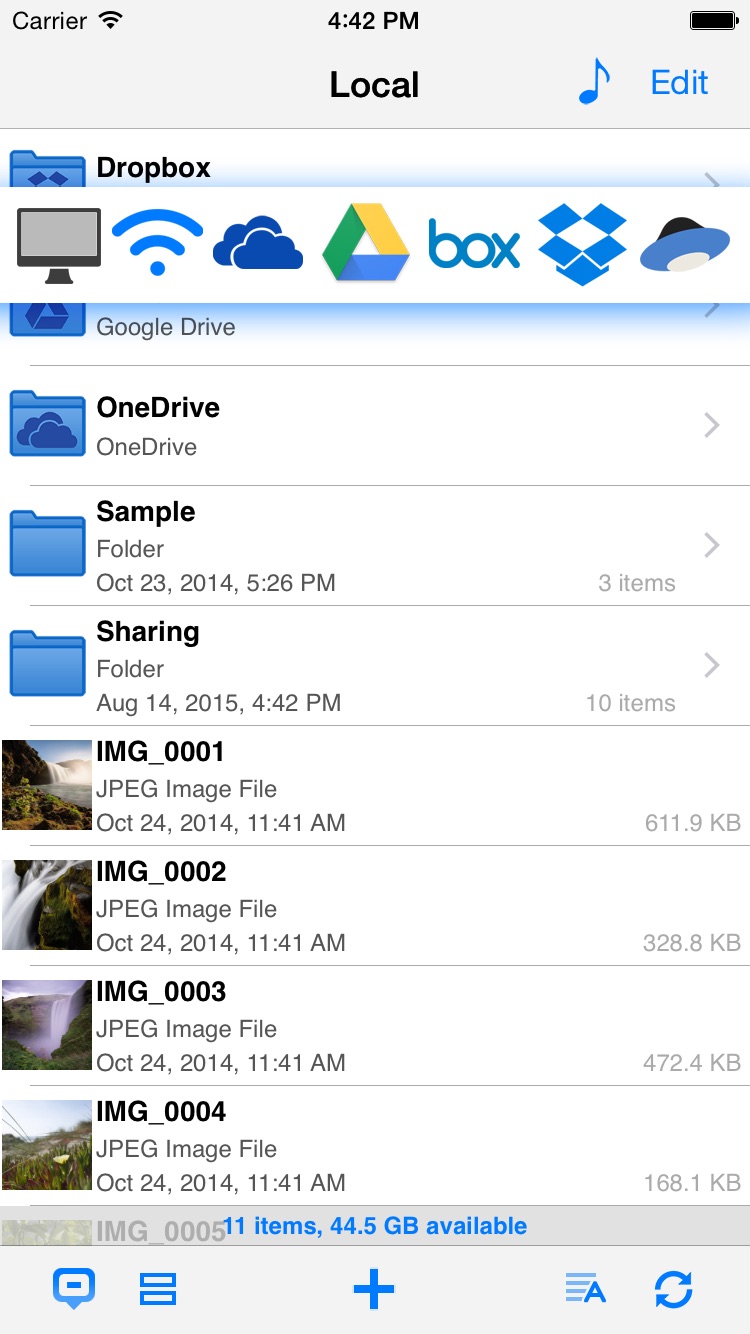
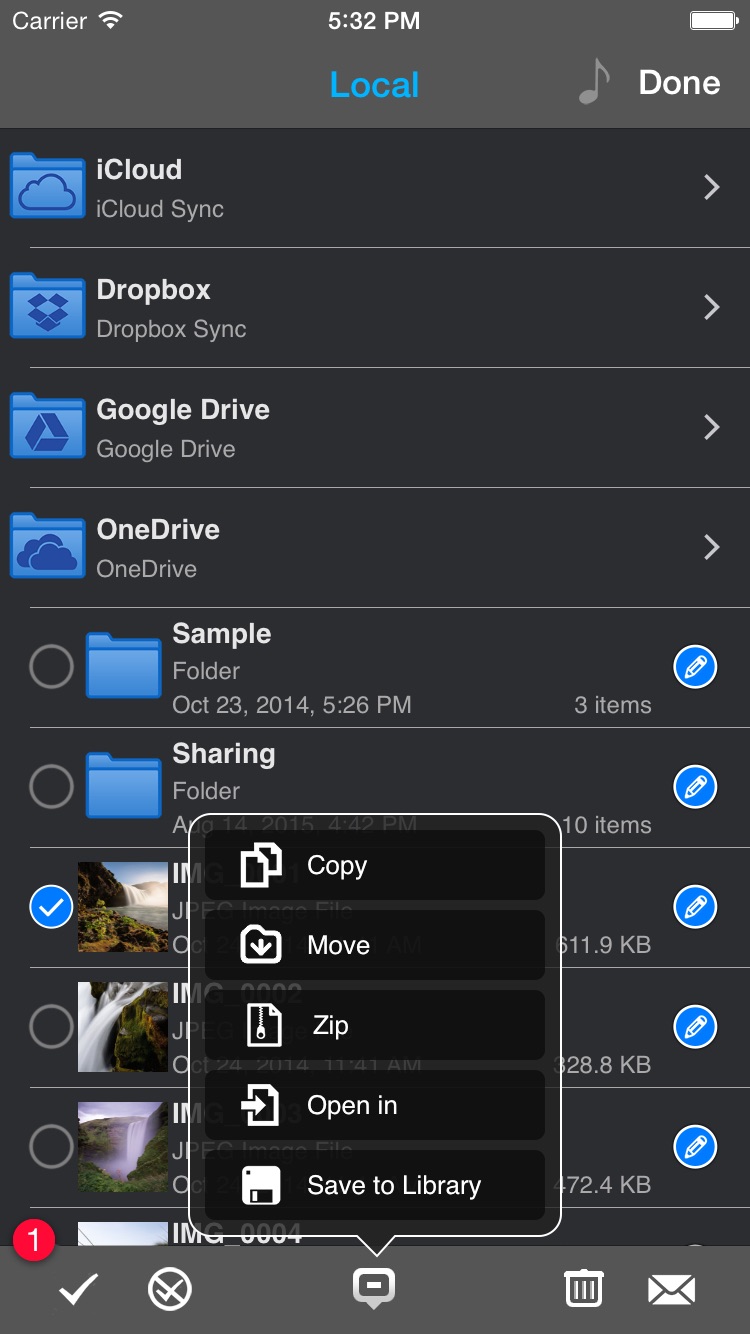
Eightythree Technology today announces Phone Drive - File Manager 6.3.1, a critical update to their innovative, multi-functional file management app for iOS. Phone Drive is a personal and secure wireless drive, allowing users to save, manage, edit and view files on any iPhone, iPad or iPod touch. Connecting via Wi-Fi to either Mac or PC desktops allows files to be easily transferred via Finder or Windows Explorer and more. Version 6.3.1 adds support for Box and Yandex.Disk cloud service.
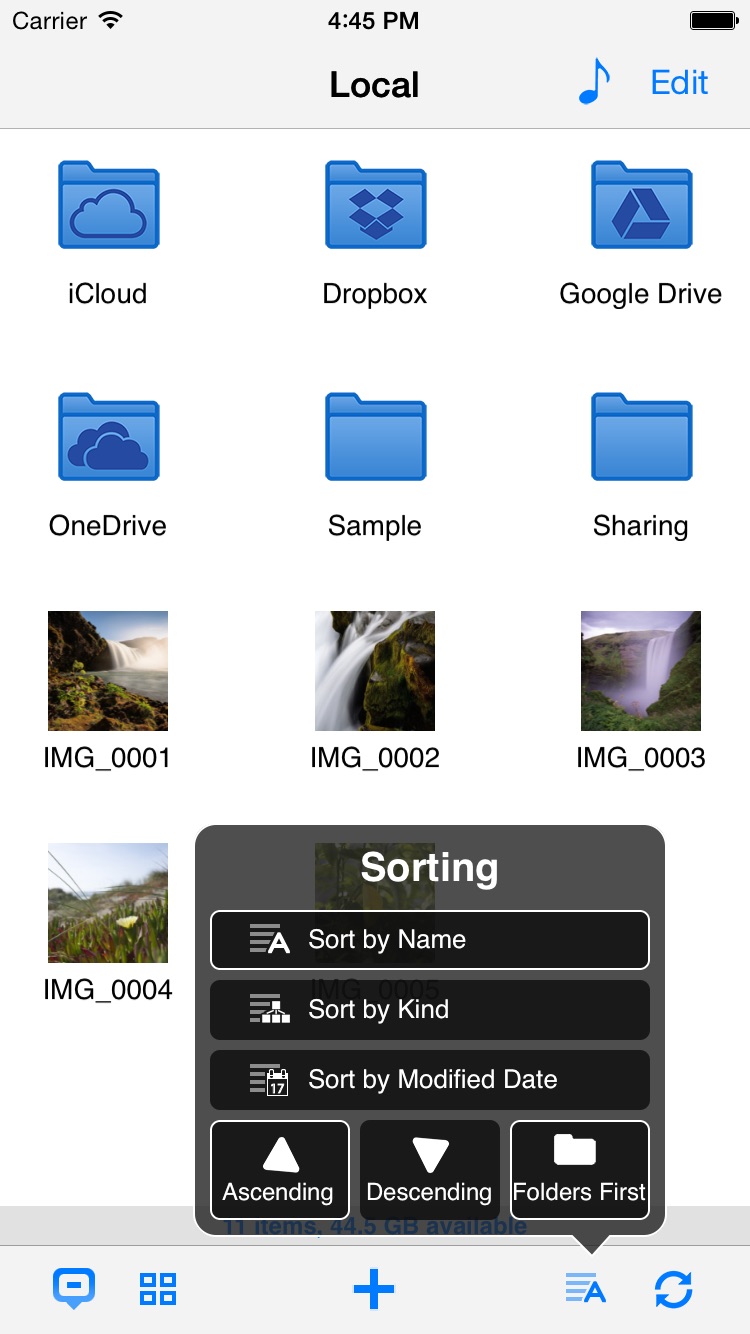
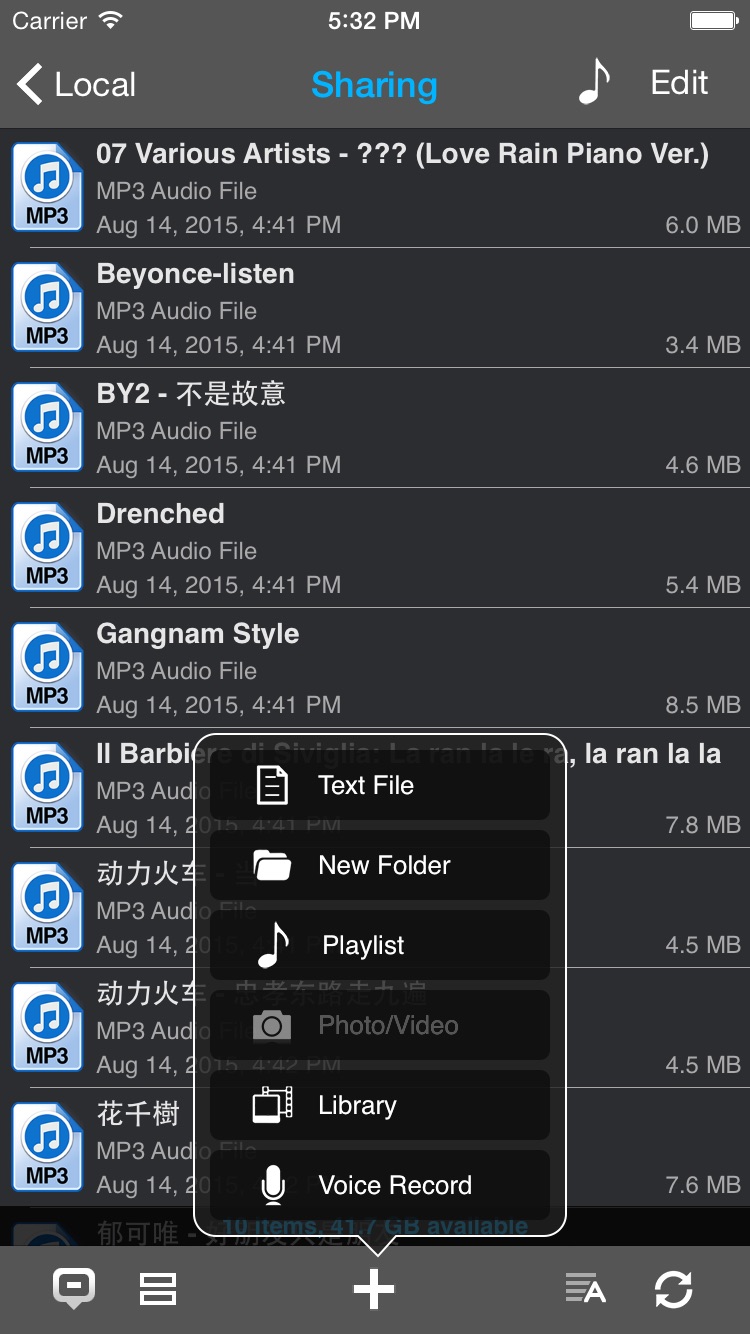
London, United Kingdom - Eightythree Technology today is proud to announce the release and immediate availability of Phone Drive - File Manager, a critical update to their innovative, multi-functional file management app developed for iPhone, iPad and iPod touch devices. Version 6.3.1 adds support for Box and Yandex.Disk cloud service. Phone Drive is a personal and secure wireless drive, allowing users to save, manage, edit and view files on iPhone, iPad and iPod touch devices. Connecting via Wi-Fi to either Mac or PC desktops allows files to be easily transferred via Finder or Windows Explorer and then viewed or edited directly on the device using a variety of included in-app utilities. With this new update users can link to their favourite cloud services directly with Dropbox, Google Drive, Microsoft OneDrive, iCloud Drive, Box and Yandex.Disk accounts for easy-to-use cloud management.
"Our simple and easy-to-use cloud management system is exclusive to Phone Drive. It's an innovative feature that sets us apart from all of the other personal utility apps on the market," said Felix Yew, Founder at Eightythree Technology. "We have seen such enormous success with this app in various countries and we are looking forward to the future as we continue to evolve our product to suit the ever-changing needs of our consumers."
Unlike the current storage facility offered by iOS, which only stores particular filetypes within individual apps, Phone Drive allows users to use their device as a virtual wireless hard drive and store almost every popular file format - from music and photographs to spreadsheets and presentations.
Built-in file viewers allow quick retrieval and editing without leaving the app, including; audio player, image viewer, voice recorder, text editor and document viewer supporting PDFs, MS Office, iWork, Text and HTML documents. In addition, a full file manager allows organisation on-the-go as well as supporting zip and archiving functionality.
Full list of supported formats:
* Audio (WAV, MP3, M4A, CAF, AIF, AIFF, AAC)
* Images (JPG, PNG, GIF, BMP, TIF, TIFF, ICO)
* Movies (MP4, MOV, MPV, M4V)
* iWorks (Pages, Numbers, and Keynote)
* Microsoft Office (Word, Excel and PowerPoint)
* RTF (Rich Text Format)
* RTFD (TextEdit with embedded images)
* PDF Documents
* Plain text
* Source code
* HTML web pages - Web archives
When away from the desk files can be transferred directly to-and-from other mobile devices using bluetooth, whilst an in-built personal Wi-Fi hotpot allows wireless connection to any computer, even on the road. Security can be enabled using a passcode lock, whilst file transfers between mobile device and computer are also password protected.
"Phone Drive offers iOS users a wireless drive that is incredibly easy-to-use for almost infinite purposes - storing photographs, music, documents even websites." commented Felix Yew of Eightythree Technology. "Normally any unused iPhone or iPad storage space cannot be accessed directly by consumers. With Phone Drive we have designed a fully open system where users can connect to their device as a wireless drive and access files on-the-go without leaving the app as well as linking most popular cloud service Dropbox, Google Drive, Microsoft OneDrive, iCloud, Box or Yandex.Disk."
Language Support:
Phone Drive supports English, Dutch, French, German, Greek, Italian, Japanese, Korean, Portuguese, Russian, Simplified Chinese, Spanish, Swedish, Traditional Chinese and Turkish Languages.
Device Requirements:
* iPhone, iPad, and iPod touch
* Optimized for iPhone 5, iPhone 6s/6s Plus
* Requires iOS 7.0 or later
* Universal Application
* 14.2 MB
Pricing and Availability:
Phone Drive 6.3.1 is $1.99 USD (or equivalent amount in other currencies) and available worldwide exclusively through the App Store in the Utilities category.
Phone Drive 6.3.1: http://www.eightythreetech.com/phonedrive/
Purchase and Download: https://itunes.apple.com/app/phone-drive/id431033044
Screenshot 1: https://is1-ssl.mzstatic.com/image/thumb/Purple69/v4/b6/f3/30/b6f3301e-ff0f-347c-e898-d3aff7bba4a8/pr_source.png/0x0ss.jpg
Screenshot 2: https://is1-ssl.mzstatic.com/image/thumb/Purple69/v4/0d/f4/a3/0df4a335-5f1c-ca04-2f77-a273abcb9ee6/mzl.ucsadrfs.png/0x0ss.jpg
Screenshot 3: https://is1-ssl.mzstatic.com/image/thumb/Purple49/v4/9f/95/e7/9f95e73c-7c6a-f3ce-4484-2c6c7e9eaa19/mzl.hphzwnyr.png/0x0ss.jpg
Screenshot 4: https://is1-ssl.mzstatic.com/image/thumb/Purple69/v4/f1/79/c8/f179c8a8-d383-dea5-90c3-f1fe2aaf831b/mzl.eozmthxv.png/0x0ss.jpg
Eightythree Technology is a small, independent studio that creates innovative products for iOS platform. Officially founded in October 2009, the company's portfolio has grown from one app to multiple apps that enable people to do amazing things. All Material and Software (C) Copyright 2016 Eightythree Technology. All Rights Reserved. Apple, the Apple logo, iPhone, iPod and iPad are registered trademarks of Apple Inc. in the U.S. and/or other countries. Other trademarks and registered trademarks may be the property of their respective owners.
*******
Link To Article: http://prmac.com/release-id-78971.htm
*******
---------------------------------------------------------------------------------
Note that you can alter delivered distributions at any time.
Login to your account on prMac to alter your channel selection, or to opt-out at any time.

Eat What app includes barcode feature for checking ingredients
A new article has been published at prMac.
Eat What app includes barcode feature for checking ingredients - Published on 03/10/16
We Have Kids today announce Eat What, available for iOS and Android devices. Eat What gives you all the details you need about what you're eating, whether you're grocery shopping, cooking, or dining out. When a user wants to know more about a product's ingredients, they need only scan the bar code for immediate access to the most important information about the item. The latest version now includes all the latest news and feature stories about nutrition, diet, and healthy eating.
Cracow, Poland - We Have Kids today is proud to announce the release of The Eat What app, available for Android and iPhone systems, gives you all the details you need about what you're eating, whether you're grocery shopping, cooking, or dining out. When a user wants to know more about a product's ingredients, they need only scan the bar code for immediate access to the most important information about the item. In addition to the extensive database of nutrition information, the latest version now includes all the latest news and feature stories about nutrition, diet, and healthy eating.
The Eat What app actually does what almost every app claims to: It's innovative, it breaks new ground in health and nutrition, and it solves a problem that makes your life so much easier as you're seeking to make careful choices about the foods that you eat.
Besides delivering all the latest news and informative articles about what's healthy and what's not, the app puts a database of plants, ingredients and chemical additives at your fingertips so that you know exactly what you're eating - and what to avoid, whether it's because of your preference for organic products, any health conditions and dietary restrictions, or simply because you want to learn about the compounds and substances found so often in processed food products.
If you didn't know what abelmosk was before, now you will. "The database has countless entries from all over the world, and we update it weekly," said producer at Kids. "That's just the beginning. We've added a comprehensive news feature to give users access to all the latest news articles on nutrition, diet, and healthy food. Our other in-app options include diets, prepared by nutrition professionals, designed for specific lifestyle or health situations, like when women are breastfeeding or children have allergies triggered by any additives."
The app also includes a handy OCR feature which can be used to scan the ingredients of a food packet label to ascertain the nutrition content and dietary requirements for that food item.
One of Eat What's best features is the barcode feature. Scan the ingredients label on a product while shopping, and if you've never heard of acetaldehyde the app will explain it for you. The app also makes it easy to share info with friends on Facebook, and it never gets old because the app database is updated weekly with new product and ingredient information, and new diet profiles. The producer welcomes interaction, including suggestions for new diet profiles and ingredient entries. The app itself is designed in English, and the iPhone version also offers a free "lite" app option.
Features:
* Ingredients database - lots of information from the whole wide world - and still growing
* Barcode with the best existing ingredients database in the world - a tool which allows you to scan the barcode and directly check what this product really contains - Any chosen product can be checked if it meets the requirements of your diet
* An E-numbered ingredients list, determining the harmfulness and harmlessness of the products and food ingredients
*Diet Store (nutrition profiles) - buy a diet that will protect you from diseases and will help you eat better according to your needs, with reference to diseases that require special care as it comes to the choice of food and the preventive actions that have to be taken to prevent further development of the disorder - Carry your own and your relatives' safety always by your side. Diets have been prepared by professional dietitians and food experts that have knowledge in the foods and additives
* It is also possible to create your own diet, based on your preferences. Scan the products, filtering them only to those appropriate for your diet
* Speech recognition - read out the ingredients list and check what you are really eating
* Facebook - share information about your food ingredients with your friends
Device Requirements:
* OS Requirements: iOS 5.1.1 or later & Android 2.3.3 and up
* Compatible with iPad, iPhone and iPod touch
* Size: iOS - Paid Version - 7.8 MB, Lite Version - 8.6 MB & Android - 12 MB
Pricing and Availability:
Eat What is currently available for Free with in-app purchase and Paid version at a cost of $1.99 (USD) with in-app purchase at iTunes App Store in Health & Fitness category. Eat What is also available in Android for Free with in-app purchases at Google Play Store in Health & Fitness category.
Eat What for iOS: https://itunes.apple.com/us/app/eat-what/id745639896
Eat What Lite for iOS: https://itunes.apple.com/us/app/eat-what-lite/id849147831
Eat What for Android: https://play.google.com/store/apps/details?id=info.eatwhat.eatwhatus
YouTube Video (App Demo): https://www.youtube.com/watch?v=vJ46FORS_Rk
Screenshot: http://a3.mzstatic.com/us/r30/Purple6/v4/23/42/c5/2342c5fc-ca76-a826-29ce-050e0fa9c1eb/screen568x568.jpeg
App Icon: http://a4.mzstatic.com/us/r30/Purple49/v4/04/23/7f/04237f63-11b6-ea29-ac1c-13c315ba1f9f/icon175x175.jpeg
We Have Kids is a company focused on one simple goal - raising consumer food awareness. Under the leadership of Kuba Szymonik, the company continues to develop its Eat What app for iPhone and Android systems. The app has a pocket food scanner, ingredients database and diet profile, all in one place. With today's fast-paced lifestyle, people don't have the time to search for and find the right food for their dietary needs. Our goal is to give them a quick yet reliable answer for basic questions like: What is it that I am eating and is it good for me depending on my diets or health in general. All Material and Software (C) Copyright 2016 We Have Kids. All Rights Reserved. Apple, the Apple logo, iPhone, iPod and iPad are registered trademarks of Apple Inc. in the U.S. and/or other countries. Other trademarks and registered trademarks may be the property of their respective owners.
*******
Link To Article: http://prmac.com/release-id-78970.htm
*******
---------------------------------------------------------------------------------
Note that you can alter delivered distributions at any time.
Login to your account on prMac to alter your channel selection, or to opt-out at any time.
Eat What app includes barcode feature for checking ingredients - Published on 03/10/16
We Have Kids today announce Eat What, available for iOS and Android devices. Eat What gives you all the details you need about what you're eating, whether you're grocery shopping, cooking, or dining out. When a user wants to know more about a product's ingredients, they need only scan the bar code for immediate access to the most important information about the item. The latest version now includes all the latest news and feature stories about nutrition, diet, and healthy eating.
Cracow, Poland - We Have Kids today is proud to announce the release of The Eat What app, available for Android and iPhone systems, gives you all the details you need about what you're eating, whether you're grocery shopping, cooking, or dining out. When a user wants to know more about a product's ingredients, they need only scan the bar code for immediate access to the most important information about the item. In addition to the extensive database of nutrition information, the latest version now includes all the latest news and feature stories about nutrition, diet, and healthy eating.
The Eat What app actually does what almost every app claims to: It's innovative, it breaks new ground in health and nutrition, and it solves a problem that makes your life so much easier as you're seeking to make careful choices about the foods that you eat.
Besides delivering all the latest news and informative articles about what's healthy and what's not, the app puts a database of plants, ingredients and chemical additives at your fingertips so that you know exactly what you're eating - and what to avoid, whether it's because of your preference for organic products, any health conditions and dietary restrictions, or simply because you want to learn about the compounds and substances found so often in processed food products.
If you didn't know what abelmosk was before, now you will. "The database has countless entries from all over the world, and we update it weekly," said producer at Kids. "That's just the beginning. We've added a comprehensive news feature to give users access to all the latest news articles on nutrition, diet, and healthy food. Our other in-app options include diets, prepared by nutrition professionals, designed for specific lifestyle or health situations, like when women are breastfeeding or children have allergies triggered by any additives."
The app also includes a handy OCR feature which can be used to scan the ingredients of a food packet label to ascertain the nutrition content and dietary requirements for that food item.
One of Eat What's best features is the barcode feature. Scan the ingredients label on a product while shopping, and if you've never heard of acetaldehyde the app will explain it for you. The app also makes it easy to share info with friends on Facebook, and it never gets old because the app database is updated weekly with new product and ingredient information, and new diet profiles. The producer welcomes interaction, including suggestions for new diet profiles and ingredient entries. The app itself is designed in English, and the iPhone version also offers a free "lite" app option.
Features:
* Ingredients database - lots of information from the whole wide world - and still growing
* Barcode with the best existing ingredients database in the world - a tool which allows you to scan the barcode and directly check what this product really contains - Any chosen product can be checked if it meets the requirements of your diet
* An E-numbered ingredients list, determining the harmfulness and harmlessness of the products and food ingredients
*Diet Store (nutrition profiles) - buy a diet that will protect you from diseases and will help you eat better according to your needs, with reference to diseases that require special care as it comes to the choice of food and the preventive actions that have to be taken to prevent further development of the disorder - Carry your own and your relatives' safety always by your side. Diets have been prepared by professional dietitians and food experts that have knowledge in the foods and additives
* It is also possible to create your own diet, based on your preferences. Scan the products, filtering them only to those appropriate for your diet
* Speech recognition - read out the ingredients list and check what you are really eating
* Facebook - share information about your food ingredients with your friends
Device Requirements:
* OS Requirements: iOS 5.1.1 or later & Android 2.3.3 and up
* Compatible with iPad, iPhone and iPod touch
* Size: iOS - Paid Version - 7.8 MB, Lite Version - 8.6 MB & Android - 12 MB
Pricing and Availability:
Eat What is currently available for Free with in-app purchase and Paid version at a cost of $1.99 (USD) with in-app purchase at iTunes App Store in Health & Fitness category. Eat What is also available in Android for Free with in-app purchases at Google Play Store in Health & Fitness category.
Eat What for iOS: https://itunes.apple.com/us/app/eat-what/id745639896
Eat What Lite for iOS: https://itunes.apple.com/us/app/eat-what-lite/id849147831
Eat What for Android: https://play.google.com/store/apps/details?id=info.eatwhat.eatwhatus
YouTube Video (App Demo): https://www.youtube.com/watch?v=vJ46FORS_Rk
Screenshot: http://a3.mzstatic.com/us/r30/Purple6/v4/23/42/c5/2342c5fc-ca76-a826-29ce-050e0fa9c1eb/screen568x568.jpeg

App Icon: http://a4.mzstatic.com/us/r30/Purple49/v4/04/23/7f/04237f63-11b6-ea29-ac1c-13c315ba1f9f/icon175x175.jpeg

We Have Kids is a company focused on one simple goal - raising consumer food awareness. Under the leadership of Kuba Szymonik, the company continues to develop its Eat What app for iPhone and Android systems. The app has a pocket food scanner, ingredients database and diet profile, all in one place. With today's fast-paced lifestyle, people don't have the time to search for and find the right food for their dietary needs. Our goal is to give them a quick yet reliable answer for basic questions like: What is it that I am eating and is it good for me depending on my diets or health in general. All Material and Software (C) Copyright 2016 We Have Kids. All Rights Reserved. Apple, the Apple logo, iPhone, iPod and iPad are registered trademarks of Apple Inc. in the U.S. and/or other countries. Other trademarks and registered trademarks may be the property of their respective owners.
*******
Link To Article: http://prmac.com/release-id-78970.htm
*******
---------------------------------------------------------------------------------
Note that you can alter delivered distributions at any time.
Login to your account on prMac to alter your channel selection, or to opt-out at any time.
New Game Release for iOS - FlippyCoin 3D
A new article has been published at prMac.
New Game Release for iOS - FlippyCoin 3D - Published on 03/10/16
Independent developer Jeremy Jones announces the release of the game FlippyCoin 3D 1.0 for iOS devices. The game is complex - flip a coin and see how many heads you can get in a row. Set on a blue backdrop, each flip of the coin is a perfect result of the velocity of your swipe gesture. The coin-flipping physics are satisfying and the game escalates with every flip of heads. Flip tails, and the game is over. Unlock achievements! There are 8 achievements to be unlocked.
Fairfield, Iowa - Independent developer, Jeremy Jones is excited to announce the recent release of FlippyCoin 3D 1.0. The game is a complex - flip a coin simulation. See how many heads you can get in a row. The coin-flipping physics are satisfying and the game escalates with every flip of heads.
Set on a blue backdrop, each flip of the coin is a perfect result of the velocity of your swipe gesture. As you flip the coin, a tails means an immediate game over, while a heads means one more step toward a high score and one more chance to flip the coin. Challenge your friends! With Game Center integration you can send your friends challenges to beat your high score. Unlock achievements! There are 8 achievements to be unlocked.
Device Requirements:
* iPhone, iPad, and iPod touch
* Requires iOS 9.2 or later
* 13.1 MB
Pricing and Availability:
FlippyCoin 3D 1.0 is free, and is available worldwide exclusively through the App Store in the Game category.
Stay or Switch: http://www.stayorswitch.com/about.html
Download from iTunes: https://itunes.apple.com/us/app/id1078114608
Screenshot: http://stayorswitch.com/flippycoin3dscreenshot.png
App Icon: http://stayorswitch.com/flippycoinappicon180.png
Jeremy Jones is an independent iOS developer based in Fairfield, Iowa. All Material and Software (C) Copyright 2016 Jeremy Jones. All Rights Reserved. Apple, the Apple logo, iPhone, iPod and iPad are registered trademarks of Apple Inc. in the U.S. and/or other countries. Other trademarks and registered trademarks may be the property of their respective owners.
*******
Link To Article: http://prmac.com/release-id-78979.htm
*******
---------------------------------------------------------------------------------
Note that you can alter delivered distributions at any time.
Login to your account on prMac to alter your channel selection, or to opt-out at any time.
New Game Release for iOS - FlippyCoin 3D - Published on 03/10/16
Independent developer Jeremy Jones announces the release of the game FlippyCoin 3D 1.0 for iOS devices. The game is complex - flip a coin and see how many heads you can get in a row. Set on a blue backdrop, each flip of the coin is a perfect result of the velocity of your swipe gesture. The coin-flipping physics are satisfying and the game escalates with every flip of heads. Flip tails, and the game is over. Unlock achievements! There are 8 achievements to be unlocked.
Fairfield, Iowa - Independent developer, Jeremy Jones is excited to announce the recent release of FlippyCoin 3D 1.0. The game is a complex - flip a coin simulation. See how many heads you can get in a row. The coin-flipping physics are satisfying and the game escalates with every flip of heads.
Set on a blue backdrop, each flip of the coin is a perfect result of the velocity of your swipe gesture. As you flip the coin, a tails means an immediate game over, while a heads means one more step toward a high score and one more chance to flip the coin. Challenge your friends! With Game Center integration you can send your friends challenges to beat your high score. Unlock achievements! There are 8 achievements to be unlocked.
Device Requirements:
* iPhone, iPad, and iPod touch
* Requires iOS 9.2 or later
* 13.1 MB
Pricing and Availability:
FlippyCoin 3D 1.0 is free, and is available worldwide exclusively through the App Store in the Game category.
Stay or Switch: http://www.stayorswitch.com/about.html
Download from iTunes: https://itunes.apple.com/us/app/id1078114608
Screenshot: http://stayorswitch.com/flippycoin3dscreenshot.png

App Icon: http://stayorswitch.com/flippycoinappicon180.png

Jeremy Jones is an independent iOS developer based in Fairfield, Iowa. All Material and Software (C) Copyright 2016 Jeremy Jones. All Rights Reserved. Apple, the Apple logo, iPhone, iPod and iPad are registered trademarks of Apple Inc. in the U.S. and/or other countries. Other trademarks and registered trademarks may be the property of their respective owners.
*******
Link To Article: http://prmac.com/release-id-78979.htm
*******
---------------------------------------------------------------------------------
Note that you can alter delivered distributions at any time.
Login to your account on prMac to alter your channel selection, or to opt-out at any time.
Hyperbolic Releases Tidy Up 4.1.9: The Duplicate Finder for Expert Users
A new article has been published at prMac.
Hyperbolic Releases Tidy Up 4.1.9: The Duplicate Finder for Expert Users - Published on 03/10/16
Hyperbolic Software today announces Tidy Up 4.1.9, the latest version of the award-winning duplicate finder and disk tidying utility. Tidy Up has become a must-have utility to reclaim disk space being taken up by duplicate files and packages. Tidy Up locates duplicate items using a wide range of criteria including owner application; time created or modified, name, label, extension and content. Version 4 introduces many new features to this already comprehensive tool.
Romano Canavese, Italy - Hyperbolic Software today is pleased to announce the release of Tidy Up 4.1.9, the latest version of the award-winning duplicate finder and disk tidying utility. Tidy Up 4 is an utility for Mac owners seeking to reclaim disk space being taken up by duplicate folders, files and packages.
Employing a fast search algorithm that quickly scans any mounted drive volume (hard drives, discs and portable drives) without writing an index, Tidy Up locates duplicate folders by content and duplicate files using a wide range of criteria including: owner application, time created or modified, name, label, extension and content.
Tidy Up also offers the capability to scan the databases of popular Apple applications such as Photos, iPhoto, Aperture, iTunes and Mail. Tidy Up makes use of "Smart Boxes" for a quick and easy organization of the found items, with the ability to trash, move or archive duplicates, as well as the option to replace the found items with an alias, to export a list of found items as HTML or text files.
Version 4 of Tidy Up introduces many new features to this already comprehensive tool.
Among the key improvements are:
* Full El Capitan compatibility
* Search engine completely rewritten using the latest OS X technologies
* New view by duplicate group
* New Quick "Auto-check" feature
* New Smart Search methods
* And many more
From version 4.1.9:
* Include bug fixes that sometimes did crash the application
* Other minor bug fixes and enhancements
System Requirements:
* Version 4 of Tidy Up requires OSX 10.8.0 or later
Pricing and Availability:
Tidy Up 4 can be purchased for $29.99 (USD). Users of Tidy Up version 3.x can upgrade for a special price. Products may be purchased online. More information on Tidy Up and download available at Hyperbolic Software online.
Hyperbolic Software: http://www.hyperbolicsoftware.com
Tidy Up 4.1.9: http://www.hyperbolicsoftware.com/TidyUp.html
Download Tidy Up: http://www.hyperbolicsoftware.com/programs/TidyUp4.zip
Purchase: https://www.hyperbolicsoftware.com/store/store.html
Screenshot: http://www.hyperbolicsoftware.com/images/tu-w1.png
Application Icon: http://www.hyperbolicsoftware.com/images/tu4-512.png
Since 1996 Hyperbolic Software has produced acclaimed programs such as Tidy Up, Quick Print, MacGizmo, Smart Trash, DupeZap and others.
Hyperbolic Software is specialized in duplicate-finding software; the company's first application was a duplicate finder and, since then, the new software is developed based on the twenty-year experience. Copyright (C) 2016 Hyperbolic Software. All Rights Reserved. Apple, the Apple logo, Mac OS X and Macintosh are registered trademarks of Apple Inc. in the U.S. and/or other countries.
*******
Link To Article: http://prmac.com/release-id-78978.htm
*******
---------------------------------------------------------------------------------
Note that you can alter delivered distributions at any time.
Login to your account on prMac to alter your channel selection, or to opt-out at any time.
Hyperbolic Releases Tidy Up 4.1.9: The Duplicate Finder for Expert Users - Published on 03/10/16
Hyperbolic Software today announces Tidy Up 4.1.9, the latest version of the award-winning duplicate finder and disk tidying utility. Tidy Up has become a must-have utility to reclaim disk space being taken up by duplicate files and packages. Tidy Up locates duplicate items using a wide range of criteria including owner application; time created or modified, name, label, extension and content. Version 4 introduces many new features to this already comprehensive tool.
Romano Canavese, Italy - Hyperbolic Software today is pleased to announce the release of Tidy Up 4.1.9, the latest version of the award-winning duplicate finder and disk tidying utility. Tidy Up 4 is an utility for Mac owners seeking to reclaim disk space being taken up by duplicate folders, files and packages.
Employing a fast search algorithm that quickly scans any mounted drive volume (hard drives, discs and portable drives) without writing an index, Tidy Up locates duplicate folders by content and duplicate files using a wide range of criteria including: owner application, time created or modified, name, label, extension and content.
Tidy Up also offers the capability to scan the databases of popular Apple applications such as Photos, iPhoto, Aperture, iTunes and Mail. Tidy Up makes use of "Smart Boxes" for a quick and easy organization of the found items, with the ability to trash, move or archive duplicates, as well as the option to replace the found items with an alias, to export a list of found items as HTML or text files.
Version 4 of Tidy Up introduces many new features to this already comprehensive tool.
Among the key improvements are:
* Full El Capitan compatibility
* Search engine completely rewritten using the latest OS X technologies
* New view by duplicate group
* New Quick "Auto-check" feature
* New Smart Search methods
* And many more
From version 4.1.9:
* Include bug fixes that sometimes did crash the application
* Other minor bug fixes and enhancements
System Requirements:
* Version 4 of Tidy Up requires OSX 10.8.0 or later
Pricing and Availability:
Tidy Up 4 can be purchased for $29.99 (USD). Users of Tidy Up version 3.x can upgrade for a special price. Products may be purchased online. More information on Tidy Up and download available at Hyperbolic Software online.
Hyperbolic Software: http://www.hyperbolicsoftware.com
Tidy Up 4.1.9: http://www.hyperbolicsoftware.com/TidyUp.html
Download Tidy Up: http://www.hyperbolicsoftware.com/programs/TidyUp4.zip
Purchase: https://www.hyperbolicsoftware.com/store/store.html
Screenshot: http://www.hyperbolicsoftware.com/images/tu-w1.png

Application Icon: http://www.hyperbolicsoftware.com/images/tu4-512.png
Since 1996 Hyperbolic Software has produced acclaimed programs such as Tidy Up, Quick Print, MacGizmo, Smart Trash, DupeZap and others.
Hyperbolic Software is specialized in duplicate-finding software; the company's first application was a duplicate finder and, since then, the new software is developed based on the twenty-year experience. Copyright (C) 2016 Hyperbolic Software. All Rights Reserved. Apple, the Apple logo, Mac OS X and Macintosh are registered trademarks of Apple Inc. in the U.S. and/or other countries.
*******
Link To Article: http://prmac.com/release-id-78978.htm
*******
---------------------------------------------------------------------------------
Note that you can alter delivered distributions at any time.
Login to your account on prMac to alter your channel selection, or to opt-out at any time.
Graphic Node Introduces First Templates Pack for Google Docs
A new article has been published at prMac.
Graphic Node Introduces First Templates Pack for Google Docs - Published on 03/10/16
Graphic Node introduces Bundle for Google Docs 1.0 for OS X, a new suite of templates for Google Docs, Sheets and Slides. Bundle for Google Docs provides 50 templates for Google Docs, 25 for Google Sheets, and 25 for Google Slides. The application offers ideal support for those who want to create beautiful content on cloud-based productivity tools. Google Docs, Sheets and Slides offer a possibility to access and edit documents from any location as long as it has internet connection.
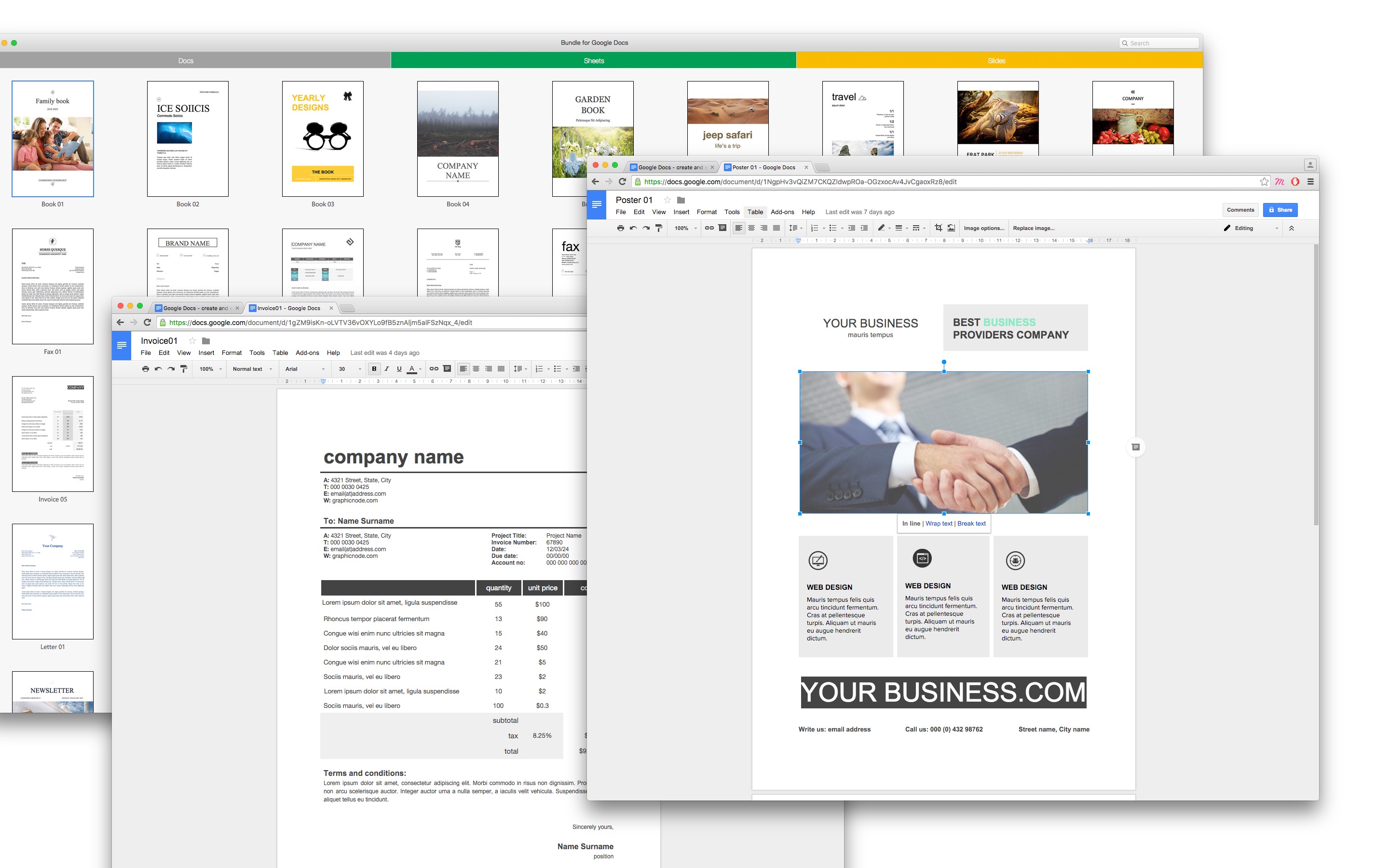
Sakiai, Lithuania - Graphic Node has recently introduced an application of templates for Google Docs, Sheets and Slides. The new Bundle for Google Docs offers ideal support for those who want to create beautiful content on cloud-based productivity tools. Bundle for Google Docs provides 50 templates for Google Docs, 25 for Google Sheets, and 25 for Google Slides.
"There are no other applications for Google productivity tools on the App store. Bundle for Google Docs is the first one, and we hope our clients will appreciate its content," says Jolita Unguvaitiene, Graphic Node's general manager. "It's great for those who use Google Docs or MS Office a lot. The templates can help make attractive posters, invoices, and presentations as well as create useful spreadsheets with charts in Sheets or Excel."
Google Docs, Sheets and Slides offer a possibility to access and edit documents from any location on the planet as long as it has internet connection, and Graphic Node's templates help users make them more eye-catching. Although the designs are marketed for the Google productivity tools, Sheets and Slides, they come in the standard Office formats and are therefore fully compatible with MS Office.
System Requirements:
* OS X 10.8 or later
* 64-bit processor
* 86.1 MB
Pricing and Availability:
Bundle for Google Docs 1.0 is $9.99 USD (or equivalent amount in other currencies) and available worldwide through the Mac App Store in the Productivity category.
Theme Inn: http://themeinn.com
Bundle for Google Docs 1.0: https://itunes.apple.com/app/bundle-for-google-docs/id1087003153
Screenshot: https://is1-ssl.mzstatic.com/image/thumb/Purple69/v4/3d/ab/64/3dab6464-4748-2ae9-c4fa-faaebce7e736/pr_source.jpg/0x0ss.jpg
Application Icon: http://www.themeinn.com/Birzelis/wp-content/uploads/2016/03/bundle-docs.png
Graphic Node is a graphic design company based in Lithuania and committed to creating exceptional templates and themes for the Mac OS X community. Theme Inn is a team of professional Mac designers who specialize in developing high-quality templates for Microsoft Office for Mac. The company defines its work through careful attention to rich visuals, ease of use and wide adaptability. Theme Inn's products are designed to save users time and help them achieve the best results. Copyright (C) 2016 Graphic Node. All Rights Reserved. Apple, the Apple logo, Mac OS X and Macintosh are registered trademarks of Apple Inc. in the U.S. and/or other countries.
*******
Link To Article: http://prmac.com/release-id-78976.htm
*******
---------------------------------------------------------------------------------
Note that you can alter delivered distributions at any time.
Login to your account on prMac to alter your channel selection, or to opt-out at any time.
Graphic Node Introduces First Templates Pack for Google Docs - Published on 03/10/16
Graphic Node introduces Bundle for Google Docs 1.0 for OS X, a new suite of templates for Google Docs, Sheets and Slides. Bundle for Google Docs provides 50 templates for Google Docs, 25 for Google Sheets, and 25 for Google Slides. The application offers ideal support for those who want to create beautiful content on cloud-based productivity tools. Google Docs, Sheets and Slides offer a possibility to access and edit documents from any location as long as it has internet connection.
Sakiai, Lithuania - Graphic Node has recently introduced an application of templates for Google Docs, Sheets and Slides. The new Bundle for Google Docs offers ideal support for those who want to create beautiful content on cloud-based productivity tools. Bundle for Google Docs provides 50 templates for Google Docs, 25 for Google Sheets, and 25 for Google Slides.
"There are no other applications for Google productivity tools on the App store. Bundle for Google Docs is the first one, and we hope our clients will appreciate its content," says Jolita Unguvaitiene, Graphic Node's general manager. "It's great for those who use Google Docs or MS Office a lot. The templates can help make attractive posters, invoices, and presentations as well as create useful spreadsheets with charts in Sheets or Excel."
Google Docs, Sheets and Slides offer a possibility to access and edit documents from any location on the planet as long as it has internet connection, and Graphic Node's templates help users make them more eye-catching. Although the designs are marketed for the Google productivity tools, Sheets and Slides, they come in the standard Office formats and are therefore fully compatible with MS Office.
System Requirements:
* OS X 10.8 or later
* 64-bit processor
* 86.1 MB
Pricing and Availability:
Bundle for Google Docs 1.0 is $9.99 USD (or equivalent amount in other currencies) and available worldwide through the Mac App Store in the Productivity category.
Theme Inn: http://themeinn.com
Bundle for Google Docs 1.0: https://itunes.apple.com/app/bundle-for-google-docs/id1087003153
Screenshot: https://is1-ssl.mzstatic.com/image/thumb/Purple69/v4/3d/ab/64/3dab6464-4748-2ae9-c4fa-faaebce7e736/pr_source.jpg/0x0ss.jpg
Application Icon: http://www.themeinn.com/Birzelis/wp-content/uploads/2016/03/bundle-docs.png

Graphic Node is a graphic design company based in Lithuania and committed to creating exceptional templates and themes for the Mac OS X community. Theme Inn is a team of professional Mac designers who specialize in developing high-quality templates for Microsoft Office for Mac. The company defines its work through careful attention to rich visuals, ease of use and wide adaptability. Theme Inn's products are designed to save users time and help them achieve the best results. Copyright (C) 2016 Graphic Node. All Rights Reserved. Apple, the Apple logo, Mac OS X and Macintosh are registered trademarks of Apple Inc. in the U.S. and/or other countries.
*******
Link To Article: http://prmac.com/release-id-78976.htm
*******
---------------------------------------------------------------------------------
Note that you can alter delivered distributions at any time.
Login to your account on prMac to alter your channel selection, or to opt-out at any time.
SmartHome Office Magazine - The Future of Home Automation
A new article has been published at prMac.
SmartHome Office Magazine - The Future of Home Automation - Published on 03/10/16
With the Success of iBusiness Magazine and over 500,000 readers worldwide, we bring you SmartHome Office Magazine. SmartHome Office Magazine is targeted specifically for the business home user and their automated home. SmartHome Office, is the only magazine that focuses exclusively on this enormous and growing segment. Our Premiere Issue will be distributed at CEDIA 2016 Trade Show in Dallas, TX on September 15-17, 2016.
Cape Coral, Florida - With the Success of iBusiness Magazine and over 500,000 readers worldwide, we bring you SmartHome Office Magazine. SmartHome Office Magazine is targeted specifically for the business home user and their automated home. SmartHome Office, is the only magazine that focuses exclusively on this enormous and growing segment. Our Premiere Issue will be distributed at CEDIA 2016 Trade Show in Dallas, TX on September 15-17, 2016
Traditional home automation devices were designed to control systems within a house, with limited range of connectivity; however, with recent developments across different areas of connectivity of appliances and devices, these systems enable users to monitor and control them even when they are on the move. This includes mobile connectivity functions and features provided by device manufacturers, compatible communication protocols, and technology based products offered by Internet Service Providers. Even though the concept of smart homes has been in existence for a while, the market has witnessed a profound growth; particularly in the last five years. Smart home service providers are beginning to gain traction in the marketplace, and we could see more smart home technology players joining in before an inevitable consolidation occurs, that's why we created SmartHome Office Magazine.
We have available the following advertising / review packages in our premiere issue:
* Cover Story - Full Magazine Front Cover Image, Full Page Advertisement & Review Inside the Magazine Only - $12,000.00
* Inside 1st Right Hand Page - Full Page Advertisement - $5,000.00
* Back Cover of the Magazine - $6,000.00
* Full Page Advertisement & Full Page Product Review with Product Mentioned on Magazine Cover Only $4,000.00 - Only 3 Spots
* Full Page Advertisement & Full Page Product Review - Only $2,900.00
* Half Page Advertisement & Full Page Product Review - -Only $2,200.00
* Full Page Advertisement - Only $1,950.00
* Half Page Advertisement - Only $950.00
The global smart homes market was valued at $20.38 billion in 2014 and is expected to reach $58.68 billion by 2020; the market is projected to grow at an estimated compound annual growth rate (CAGR) of 17% between 2015 and 2020. The smart home market revolves around green home solutions, which include smart energy management systems; and follow a minimal usage of energy and monitoring of appliances.
North America is expected to retain its position as the largest smart homes market. The revival of construction activities, especially with regards to new residential buildings and renovations, is expected to support the growth of the North American smart homes market. The U.S. will remain the major market for smart homes throughout the forecast period, due to its high adoption rate and continuous development.
The ways in which information is delivered to our audience continues to evolve. At SmartHome Office Magazine, we understand the importance of delivering content to readers in the format they want; as well as providing our advertisers with the opportunity to invest their marketing dollars where they will get the greatest impact and return on investment. With our print, online, and monthly e-newsletters, we have the media vehicles required to help deliver your message to the audience you want to reach.
* Print & Digital issue 4 times a year
* Informative Monthly newsletters
* Monthly e-mail blasts
* App Edition
Longstanding and respected industry experts from the technology and automation market, write the articles & reviews in SmartHome Office magazine. Our dedicated team of professionals consistently provides our readers with insightful articles that focus on the latest information on smart home solutions. We are always exploring new marketing campaigns to help get your message in front of the right demographic and generate sales.
SmartHome Office Magazine: http://www.thesmarthomeoffice.com
About the Magazine: http://www.thesmarthomeoffice.com/SmartHome_Office/About_Us.html
Media Kit: http://www.thesmarthomeoffice.com/mediakit2016.pdf
Presentation File: http://www.thesmarthomeoffice.com/SmartHomeOffice.pdf
The team behind SmartHome Office Magazine have decades of experience in the Business to Business communities. Our articles take a solutions-based approach to productivity, workflow management and tips & tricks. The magazine articles come from the industry leaders with years of experience and proven track records. Copyright (C) 2016 SmartHome Office Magazine. All Rights Reserved. Other trademarks and registered trademarks may be the property of their respective owners.
*******
Link To Article: http://prmac.com/release-id-78977.htm
*******
---------------------------------------------------------------------------------
Note that you can alter delivered distributions at any time.
Login to your account on prMac to alter your channel selection, or to opt-out at any time.
SmartHome Office Magazine - The Future of Home Automation - Published on 03/10/16
With the Success of iBusiness Magazine and over 500,000 readers worldwide, we bring you SmartHome Office Magazine. SmartHome Office Magazine is targeted specifically for the business home user and their automated home. SmartHome Office, is the only magazine that focuses exclusively on this enormous and growing segment. Our Premiere Issue will be distributed at CEDIA 2016 Trade Show in Dallas, TX on September 15-17, 2016.
Cape Coral, Florida - With the Success of iBusiness Magazine and over 500,000 readers worldwide, we bring you SmartHome Office Magazine. SmartHome Office Magazine is targeted specifically for the business home user and their automated home. SmartHome Office, is the only magazine that focuses exclusively on this enormous and growing segment. Our Premiere Issue will be distributed at CEDIA 2016 Trade Show in Dallas, TX on September 15-17, 2016
Traditional home automation devices were designed to control systems within a house, with limited range of connectivity; however, with recent developments across different areas of connectivity of appliances and devices, these systems enable users to monitor and control them even when they are on the move. This includes mobile connectivity functions and features provided by device manufacturers, compatible communication protocols, and technology based products offered by Internet Service Providers. Even though the concept of smart homes has been in existence for a while, the market has witnessed a profound growth; particularly in the last five years. Smart home service providers are beginning to gain traction in the marketplace, and we could see more smart home technology players joining in before an inevitable consolidation occurs, that's why we created SmartHome Office Magazine.
We have available the following advertising / review packages in our premiere issue:
* Cover Story - Full Magazine Front Cover Image, Full Page Advertisement & Review Inside the Magazine Only - $12,000.00
* Inside 1st Right Hand Page - Full Page Advertisement - $5,000.00
* Back Cover of the Magazine - $6,000.00
* Full Page Advertisement & Full Page Product Review with Product Mentioned on Magazine Cover Only $4,000.00 - Only 3 Spots
* Full Page Advertisement & Full Page Product Review - Only $2,900.00
* Half Page Advertisement & Full Page Product Review - -Only $2,200.00
* Full Page Advertisement - Only $1,950.00
* Half Page Advertisement - Only $950.00
The global smart homes market was valued at $20.38 billion in 2014 and is expected to reach $58.68 billion by 2020; the market is projected to grow at an estimated compound annual growth rate (CAGR) of 17% between 2015 and 2020. The smart home market revolves around green home solutions, which include smart energy management systems; and follow a minimal usage of energy and monitoring of appliances.
North America is expected to retain its position as the largest smart homes market. The revival of construction activities, especially with regards to new residential buildings and renovations, is expected to support the growth of the North American smart homes market. The U.S. will remain the major market for smart homes throughout the forecast period, due to its high adoption rate and continuous development.
The ways in which information is delivered to our audience continues to evolve. At SmartHome Office Magazine, we understand the importance of delivering content to readers in the format they want; as well as providing our advertisers with the opportunity to invest their marketing dollars where they will get the greatest impact and return on investment. With our print, online, and monthly e-newsletters, we have the media vehicles required to help deliver your message to the audience you want to reach.
* Print & Digital issue 4 times a year
* Informative Monthly newsletters
* Monthly e-mail blasts
* App Edition
Longstanding and respected industry experts from the technology and automation market, write the articles & reviews in SmartHome Office magazine. Our dedicated team of professionals consistently provides our readers with insightful articles that focus on the latest information on smart home solutions. We are always exploring new marketing campaigns to help get your message in front of the right demographic and generate sales.
SmartHome Office Magazine: http://www.thesmarthomeoffice.com
About the Magazine: http://www.thesmarthomeoffice.com/SmartHome_Office/About_Us.html
Media Kit: http://www.thesmarthomeoffice.com/mediakit2016.pdf
Presentation File: http://www.thesmarthomeoffice.com/SmartHomeOffice.pdf
The team behind SmartHome Office Magazine have decades of experience in the Business to Business communities. Our articles take a solutions-based approach to productivity, workflow management and tips & tricks. The magazine articles come from the industry leaders with years of experience and proven track records. Copyright (C) 2016 SmartHome Office Magazine. All Rights Reserved. Other trademarks and registered trademarks may be the property of their respective owners.
*******
Link To Article: http://prmac.com/release-id-78977.htm
*******
---------------------------------------------------------------------------------
Note that you can alter delivered distributions at any time.
Login to your account on prMac to alter your channel selection, or to opt-out at any time.
An App that Works as a Personal Trainer for Any Standing Desk User
A new article has been published at prMac.
An App that Works as a Personal Trainer for Any Standing Desk User - Published on 03/10/16
TableAir, UAB announces TableAir 1.5.3a2 for iPhone, iPad, and iPod touch devices. Available today, the TableAir app builds an individual training program based on user's previous experience with standing tables and helps to track training progress. Compatible with any standing desk on the market, TableAir app suggests sitting and standing intervals based on various case studies and recommendations from ergonomics experts. Version 1.5.3a2 brings a new firmware release.
Vilnius, Lithuania - TableAir, UAB is proud to announce the release of TableAir 1.5.3a2 for iPhone, iPad, and iPod touch devices. Available today, the TableAir app is designed to help the first time user of a standing table to make an easier and healthier transition to standing more while working. It also benefits advanced users by creating the optimal sit-to-stand schedule to follow. Compatible with any standing desk on the market, TableAir app suggests sitting and standing intervals based on various case studies and recommendations from ergonomics experts.
The user first defines his or her usual working hours and previous experience using a standing desk. At the start of each workday, the user chooses starting posture for the day and launches a personalized training program. A mobile (and) Apple Watch notification is sent each time the posture change is advised. A new sitting or standing session starts after an in-app confirmation about changed work position is received.
Optional infographic feature allows the user to see a visual record of how he or she is doing for the day and enables them to compare the actual training progress with a suggested daily program. Suggested standing time increases gradually, allowing the user to make an easier switch to a standing desk. An in-app tracker also calculates how many extra calories are burned while working standing up.
"One of the main misconceptions about switching to a standing desk is thinking that you need to stand all day. It's not a simple transition and it usually takes time to start feeling comfortable standing for long periods of time," said Lukas Lukosevicius, CEO at TableAir. "Many people buy standing desks, jump right into standing without a proper transition and thus start feeling various back, shoulder or feet pains. We help new users of standing desks to make a healthy transition and remind experienced standers when they are supposed to switch their working position."
TableAir app can also be used to adjust the height and LED color of the TableAir workstation and is now available to download for free worldwide, on the Apple App Store.
Device Requirements:
* iPhone, iPad, and iPod touch
* Requires iOS 8.1 or later
* 4.6 MB
Pricing and Availability:
TableAir 1.5.3a2 is free, and is available worldwide exclusively through the App Store in the Health and Fitness category.
TableAir: http://www.tableair.com
Download from iTunes: https://itunes.apple.com/app/tableair-smart-table/id972063502
TableAir App Media Assets: https://drive.google.com/folderview?id=0BzQAd88OTPXrTlJnSXcwR19iT3c&usp=sharing
The TableAir app is developed by TableAir, UAB. Founded in 2014, the company is mostly known for its smart workstation with a unique lifting process that enables healthy lifestyle, productivity and boost overall well-being in corporate or home office. All Material and Software (C) Copyright 2016 TableAir, UAB. All Rights Reserved. Apple, the Apple logo, iPhone, iPod and iPad are registered trademarks of Apple Inc. in the U.S. and/or other countries. Other trademarks and registered trademarks may be the property of their respective owners.
*******
Link To Article: http://prmac.com/release-id-78975.htm
*******
---------------------------------------------------------------------------------
Note that you can alter delivered distributions at any time.
Login to your account on prMac to alter your channel selection, or to opt-out at any time.
An App that Works as a Personal Trainer for Any Standing Desk User - Published on 03/10/16
TableAir, UAB announces TableAir 1.5.3a2 for iPhone, iPad, and iPod touch devices. Available today, the TableAir app builds an individual training program based on user's previous experience with standing tables and helps to track training progress. Compatible with any standing desk on the market, TableAir app suggests sitting and standing intervals based on various case studies and recommendations from ergonomics experts. Version 1.5.3a2 brings a new firmware release.
Vilnius, Lithuania - TableAir, UAB is proud to announce the release of TableAir 1.5.3a2 for iPhone, iPad, and iPod touch devices. Available today, the TableAir app is designed to help the first time user of a standing table to make an easier and healthier transition to standing more while working. It also benefits advanced users by creating the optimal sit-to-stand schedule to follow. Compatible with any standing desk on the market, TableAir app suggests sitting and standing intervals based on various case studies and recommendations from ergonomics experts.
The user first defines his or her usual working hours and previous experience using a standing desk. At the start of each workday, the user chooses starting posture for the day and launches a personalized training program. A mobile (and) Apple Watch notification is sent each time the posture change is advised. A new sitting or standing session starts after an in-app confirmation about changed work position is received.
Optional infographic feature allows the user to see a visual record of how he or she is doing for the day and enables them to compare the actual training progress with a suggested daily program. Suggested standing time increases gradually, allowing the user to make an easier switch to a standing desk. An in-app tracker also calculates how many extra calories are burned while working standing up.
"One of the main misconceptions about switching to a standing desk is thinking that you need to stand all day. It's not a simple transition and it usually takes time to start feeling comfortable standing for long periods of time," said Lukas Lukosevicius, CEO at TableAir. "Many people buy standing desks, jump right into standing without a proper transition and thus start feeling various back, shoulder or feet pains. We help new users of standing desks to make a healthy transition and remind experienced standers when they are supposed to switch their working position."
TableAir app can also be used to adjust the height and LED color of the TableAir workstation and is now available to download for free worldwide, on the Apple App Store.
Device Requirements:
* iPhone, iPad, and iPod touch
* Requires iOS 8.1 or later
* 4.6 MB
Pricing and Availability:
TableAir 1.5.3a2 is free, and is available worldwide exclusively through the App Store in the Health and Fitness category.
TableAir: http://www.tableair.com
Download from iTunes: https://itunes.apple.com/app/tableair-smart-table/id972063502
TableAir App Media Assets: https://drive.google.com/folderview?id=0BzQAd88OTPXrTlJnSXcwR19iT3c&usp=sharing
The TableAir app is developed by TableAir, UAB. Founded in 2014, the company is mostly known for its smart workstation with a unique lifting process that enables healthy lifestyle, productivity and boost overall well-being in corporate or home office. All Material and Software (C) Copyright 2016 TableAir, UAB. All Rights Reserved. Apple, the Apple logo, iPhone, iPod and iPad are registered trademarks of Apple Inc. in the U.S. and/or other countries. Other trademarks and registered trademarks may be the property of their respective owners.
*******
Link To Article: http://prmac.com/release-id-78975.htm
*******
---------------------------------------------------------------------------------
Note that you can alter delivered distributions at any time.
Login to your account on prMac to alter your channel selection, or to opt-out at any time.
Subscribe to:
Posts (Atom)