A new article has been published at prMac.
Deliver Express Improves File Transfer on Local Networks - Published on 03/18/16
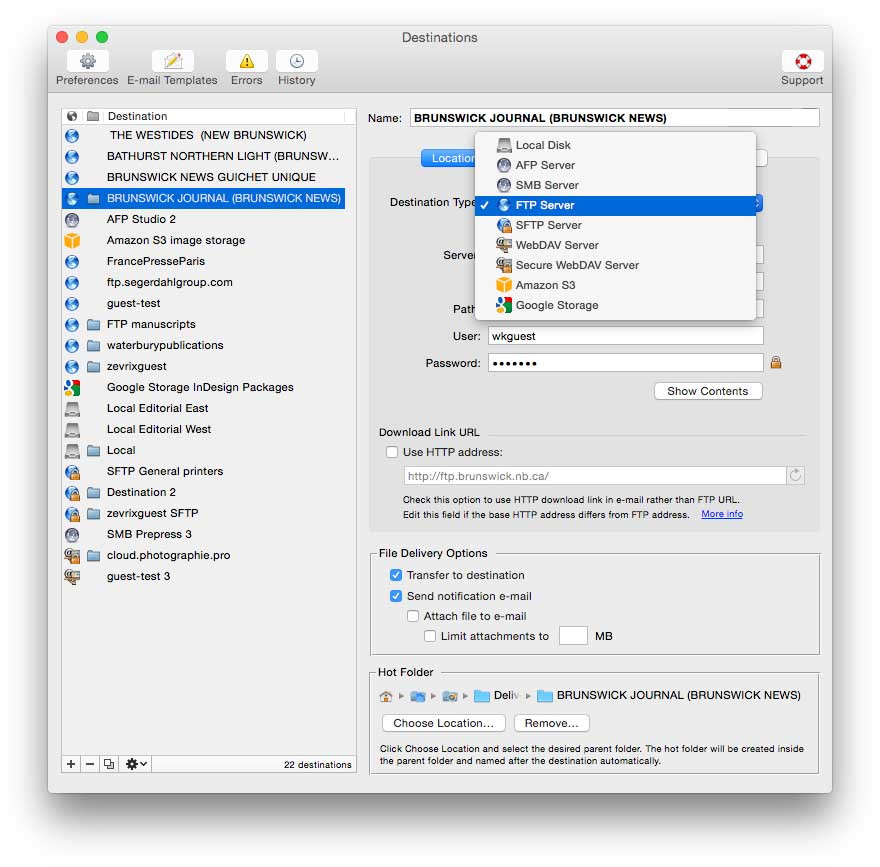
Zevrix Solutions announces Deliver Express 2.5.11, a feature update to its hot folder based solution to send files automatically across the Internet and locally with email notifications. Deliver Express can serve multiple users on a network and supports FTP, Amazon S3, WebDAV, Google Storage, AFP, SMB and other services. The new version lets users label completed local deliveries with a Finder tag, preserves file timestamps and custom icons, and introduces other improvements on local networks.
Toronto (ON) Canada - Zevrix Solutions today is proud to announce the release of Deliver Express 2.5.11, a feature update to its automated solution to send and share files easily across the Internet and local networks. Deliver Express processes files from watched hot folders and supports FTP, Amazon S3, WebDAV, AFP and other remote and local services. The software can run absolutely unattended and offers variable email notifications, delivery to multiple destinations, file compression, automatic PDF creation, and much more.
The new version introduces new features and improvements to file transfers on local networks. Deliver Express can now apply a Finder tag to local deliveries when copying is finished. It helps recipients identify completed transfers and solves the problem of attempting to use partially copied files and folders before processing is done. In addition, the new update improves accuracy of progress reporting, solves an issue of transfer interruption by unresolved aliases, and preserves file timestamps and custom icons.
Deliver Express is an ideal solution for ad agencies, photographers, recording studios, printers, educational institutions and other users. Once users copy files to the hot folders, they will be sent automatically with email confirmations issued upon delivery. Recipients can easily retrieve the files through the link in notification email.
Deliver Express offers the following key features:
* Upload files from watched hot folders
* Automatic email notifications based on variable templates
* Unlimited users on a network
* Submit files from both Mac and PC
* Automatic file compression and encryption
* Expire files after certain period
Pricing and Availability:
Deliver Express can be purchased from Zevrix website as well as from authorized resellers. The license prices are based on the maximum number of allowed destinations and range from $29.95 to $299.95 (USD). The update is free for licensed users. Trial is also available for download. Deliver Express requires OS X 10.5-10.11 (some features require OS X 10.7 and later).
Zevrix Solutions: http://zevrix.com
Deliver Express 2.5.11: http://zevrix.com/Deliver.php
Download Deliver Express: http://zevrix.com/DeliverExpress.dmg
Purchase: http://zevrix.com/store.php
Screenshot: http://zevrix.com/screenshots/deliver-2/dx-location-ysmt.jpg
Located in Toronto, Canada, Zevrix Solutions provides automation and productivity solutions for Adobe Creative Cloud and Creative Suite software, PDF workflows, graphic file diagnostics and Microsoft Office output on Mac OS. Zevrix is dedicated to help professionals increase their profits through automating everyday tasks, producing error-free documents, saving disk space and cutting production costs. For more information, visit their website. Copyright (C) 2016 Zevrix Solutions. All Rights Reserved. Other trademarks and registered trademarks may be the property of their respective owners.
*******
Link To Article: http://prmac.com/release-id-79025.htm
*******
---------------------------------------------------------------------------------
Note that you can alter delivered distributions at any time.
Login to your account on prMac to alter your channel selection, or to opt-out at any time.

MCE Ships PCIe-based Flash Storage Upgrades for MacBook Pro with Retina
A new article has been published at prMac.
MCE Ships PCIe-based Flash Storage Upgrades for MacBook Pro with Retina - Published on 03/17/16
MCE Technologies (MCE) today announced their complete range of PCIe-based Flash Storage Upgrade Solutions made for late-2013 through mid-2015 13-inch and 15-inch MacBook Pro with Retina Display. 1TB, 512GB, and 256GB capacities for late-2013 through mid-2014 MacBook Pro are at $899.00, $499.00, and $349, respectively. Faster PCIe v3.0-based 1TB, and 512GB capacities available for early and mid-2015 MacBook Pros at $999.00 and $549.00, respectively. All models available for immediate shipment.
San Dimas, California - MCE Technologies (MCE) announces they are now shipping their complete range of PCIe-based Flash Storage Upgrade Solutions made for the late-2013 through mid-2015 13-inch and 15-inch MacBook Pro with Retina Display. In addition to 1TB, 512GB, and 256GB capacity PCIe-based flash storage upgrade solutions for late-2013 through mid-2014 MacBook Pro with Retina Display models based on those machine's PCIe 2.0 architecture, also shipping are 1TB and 512GB capacity PCIe-based flash storage upgrade solutions for the more recent early and mid-2015 MacBook Pro with Retina Display models that take advantage of those machine's faster PCIe 3.0 architecture.
All MCE PCIe-based Flash Storage Solutions are user installable and each solution includes all necessary tools to perform the installation, an illustrated installation and upgrade guide, and drive cloning software. The MCE 1TB, 512GB, and 256GB PCIe-based Flash Storage Upgrade Solutions for the late-2013 through mid-2014 13-inch and 15-inch MacBook Pro with Retina Display are $899.00, $499.00, and $349.00 respectively and the MCE 1TB and 512GB PCIe-based Flash Storage Upgrade Solutions for the early and mid-2015 13-inch and 15-inch MacBook Pro with Retina Display are $999.00 and $549.00 respectively. All models are available for immediate shipment.
"We're thrilled to now offer the full range of capacities of PCIe-based Flash Storage Upgrade Solutions to fit the needs and budgets of users requiring more high speed internal storage capacity than what originally shipped with their MacBook Pros," said Arnold Ramirez, president of MCE. "We've heard from videographers, photographers, DJs, graphic designers, company executives... you name it, all with varying storage requirements and the recurrent theme is 'I don't have enough with what came with my MacBook Pro' and we're excited to be able to provide them with the storage they need."
The 1TB, 512GB, and 256GB MCE PCIe-based Flash Storage Upgrade Kits for 13-inch and 15-inch MacBook Pro (late 2013 through mid 2014) are based on the PCIe v2.0 (5.0GHz) architecture in those machines and can transfer date at speeds of up to 1GB/sec. The 1TB and 512GB MCE PCIe-based Flash Storage Upgrade Kits for 13-inch and 15-inch MacBook Pro (2015) take advantage of the faster PCIe v3.0 (8.0GHz) architecture present in those machines and can transfer data at speeds of up to 2GB/sec. All MCE PCIe-based Flash Storage drives feature native Trim support to ensure longevity and carry a one year warranty.
Pricing and Availability:
The MCE 1TB, 512GB, and 256GB PCIe-based Flash Storage Upgrade Solutions for the late-2013 through mid-2014 13-inch and 15-inch MacBook Pro with Retina Display are $899.00, $499.00, and $349.00, respectively and the MCE 1TB and 512GB PCIe-based Flash Storage Upgrade Solutions for the early-2015 and mid-2015 13-inch and 15-inch MacBook Pro with Retina Display are $999.00 and $549.00, respectively. All models are available for immediate shipment. The MCE PCIe-based Flash Storage Upgrade Solution is user-installable but a mail-in upgrade and data transfer service is also available. See web site for details.
MCE Technologies: http://www.mcetech.com
PCIe-based Flash Storage Upgrade for Mac: http://store.mcetech.com/mm/merchant.mvc
Purchase: http://store.mcetech.com/mm/merchant.mvc?Store_Code=MTOS&Screen=CTGY&Category_Code=SSD
Screenshot: http://store.mcetech.com/mm/graphics/00000001/rmbppcieflash_left_1000x399.jpg
MCE Technologies is a leader in the development of innovative storage peripherals and accessories for the Apple Macintosh platform and markets a wide range of Macintosh related products and solutions to distributors, dealers and end users. MCE is based in San Dimas, California and can be reached by telephone at (800) 5000-MAC (800-500-0622) in the U.S. or at (909) 599-3105 internationally. More information about products by MCE Technologies can be found on the the MCE Technologies website. Copyright (C) 2016 MCE Technologies. All Rights Reserved. Apple, the Apple logo, Mac OS X, and Macintosh are registered trademarks of Apple Inc. in the U.S. and/or other countries.
*******
Link To Article: http://prmac.com/release-id-79024.htm
*******
---------------------------------------------------------------------------------
Note that you can alter delivered distributions at any time.
Login to your account on prMac to alter your channel selection, or to opt-out at any time.
MCE Ships PCIe-based Flash Storage Upgrades for MacBook Pro with Retina - Published on 03/17/16
MCE Technologies (MCE) today announced their complete range of PCIe-based Flash Storage Upgrade Solutions made for late-2013 through mid-2015 13-inch and 15-inch MacBook Pro with Retina Display. 1TB, 512GB, and 256GB capacities for late-2013 through mid-2014 MacBook Pro are at $899.00, $499.00, and $349, respectively. Faster PCIe v3.0-based 1TB, and 512GB capacities available for early and mid-2015 MacBook Pros at $999.00 and $549.00, respectively. All models available for immediate shipment.
San Dimas, California - MCE Technologies (MCE) announces they are now shipping their complete range of PCIe-based Flash Storage Upgrade Solutions made for the late-2013 through mid-2015 13-inch and 15-inch MacBook Pro with Retina Display. In addition to 1TB, 512GB, and 256GB capacity PCIe-based flash storage upgrade solutions for late-2013 through mid-2014 MacBook Pro with Retina Display models based on those machine's PCIe 2.0 architecture, also shipping are 1TB and 512GB capacity PCIe-based flash storage upgrade solutions for the more recent early and mid-2015 MacBook Pro with Retina Display models that take advantage of those machine's faster PCIe 3.0 architecture.
All MCE PCIe-based Flash Storage Solutions are user installable and each solution includes all necessary tools to perform the installation, an illustrated installation and upgrade guide, and drive cloning software. The MCE 1TB, 512GB, and 256GB PCIe-based Flash Storage Upgrade Solutions for the late-2013 through mid-2014 13-inch and 15-inch MacBook Pro with Retina Display are $899.00, $499.00, and $349.00 respectively and the MCE 1TB and 512GB PCIe-based Flash Storage Upgrade Solutions for the early and mid-2015 13-inch and 15-inch MacBook Pro with Retina Display are $999.00 and $549.00 respectively. All models are available for immediate shipment.
"We're thrilled to now offer the full range of capacities of PCIe-based Flash Storage Upgrade Solutions to fit the needs and budgets of users requiring more high speed internal storage capacity than what originally shipped with their MacBook Pros," said Arnold Ramirez, president of MCE. "We've heard from videographers, photographers, DJs, graphic designers, company executives... you name it, all with varying storage requirements and the recurrent theme is 'I don't have enough with what came with my MacBook Pro' and we're excited to be able to provide them with the storage they need."
The 1TB, 512GB, and 256GB MCE PCIe-based Flash Storage Upgrade Kits for 13-inch and 15-inch MacBook Pro (late 2013 through mid 2014) are based on the PCIe v2.0 (5.0GHz) architecture in those machines and can transfer date at speeds of up to 1GB/sec. The 1TB and 512GB MCE PCIe-based Flash Storage Upgrade Kits for 13-inch and 15-inch MacBook Pro (2015) take advantage of the faster PCIe v3.0 (8.0GHz) architecture present in those machines and can transfer data at speeds of up to 2GB/sec. All MCE PCIe-based Flash Storage drives feature native Trim support to ensure longevity and carry a one year warranty.
Pricing and Availability:
The MCE 1TB, 512GB, and 256GB PCIe-based Flash Storage Upgrade Solutions for the late-2013 through mid-2014 13-inch and 15-inch MacBook Pro with Retina Display are $899.00, $499.00, and $349.00, respectively and the MCE 1TB and 512GB PCIe-based Flash Storage Upgrade Solutions for the early-2015 and mid-2015 13-inch and 15-inch MacBook Pro with Retina Display are $999.00 and $549.00, respectively. All models are available for immediate shipment. The MCE PCIe-based Flash Storage Upgrade Solution is user-installable but a mail-in upgrade and data transfer service is also available. See web site for details.
MCE Technologies: http://www.mcetech.com
PCIe-based Flash Storage Upgrade for Mac: http://store.mcetech.com/mm/merchant.mvc
Purchase: http://store.mcetech.com/mm/merchant.mvc?Store_Code=MTOS&Screen=CTGY&Category_Code=SSD
Screenshot: http://store.mcetech.com/mm/graphics/00000001/rmbppcieflash_left_1000x399.jpg

MCE Technologies is a leader in the development of innovative storage peripherals and accessories for the Apple Macintosh platform and markets a wide range of Macintosh related products and solutions to distributors, dealers and end users. MCE is based in San Dimas, California and can be reached by telephone at (800) 5000-MAC (800-500-0622) in the U.S. or at (909) 599-3105 internationally. More information about products by MCE Technologies can be found on the the MCE Technologies website. Copyright (C) 2016 MCE Technologies. All Rights Reserved. Apple, the Apple logo, Mac OS X, and Macintosh are registered trademarks of Apple Inc. in the U.S. and/or other countries.
*******
Link To Article: http://prmac.com/release-id-79024.htm
*******
---------------------------------------------------------------------------------
Note that you can alter delivered distributions at any time.
Login to your account on prMac to alter your channel selection, or to opt-out at any time.
Kilubu Magic Potions 2 released - Innovative Family Game for Apple TV
A new article has been published at prMac.
Kilubu Magic Potions 2 released - Innovative Family Game for Apple TV - Published on 03/17/16
Kiupe introduces Kilubu Magic Potions 2 for AppleTV. Kilubu Magic Potions 2 was specially designed by experts to create a great experience for the whole family on AppleTV. In a playful and quality environment, kids discover 8 missions, each one with a different character who needs help. Using the remote control, the child prepares magic potions and helps funny characters with all sorts of silly ingredients. The game enhances critical thinking and his funny environment will get lots of laugh.
Lyon, France - Kiupe today is proud to announces the release of Kilubu Magic Potions 2 (v1.0), a game which enhances critical thinking and deduction. Made for the whole family, Kilubu Magic Potions 2 is now available exclusively on AppleTV. In a playful and quality environment, kids discover 8 missions, each one with a different character who needs help. Using deduction will be necessary to solve all the mysteries happening in the strange village of Kilubu.
Using the remote control, the child prepares magic potions and helps funny characters with all sorts of silly ingredients. With the Magic Book of Spells and some clever investigating, players work with Sacha to make the right potions for people who need their help. Upside down tonic, giggle brew, floating juice... 8 missions and short stories are to be discovered.
Features Highlights :
* 8 missions and short stories to discover
* A sorcerer-style immersive game and an engaging story
* High quality graphics
* A game for the whole family
* Maximum use of the remote control to play
* A safe environment : no in-app purchases
Language Support :
* English and French
Device Requirements:
* Apple TV
Pricing and Availability :
Kilubu Magic Potions 2 (v1.0) is $3.99 USD (or equivalent amount in other currencies) and available worldwide exclusively through the App Store on Apple TV.
Kiupe: http://kiupe.com/
Kilubu Magic Potions 2 1.0: http://kiupe.com/games/kilubu-magic-potions/
YouTube Video (Trailer): https://www.youtube.com/watch?v=0_PVtGGUXio
Promotional Banner: http://kiupe.com/media/2016/03/TopShelf-ScrollingInsetBanner.png
Screenshot: http://kiupe.com/media/2016/03/Screenshot_04.png
App Icon: http://kiupe.com/media/2016/03/appIcon.png
Kiupe is a video game studio founded in France in 2012. The company designs and produces video games and web series for kids which help them understand the world. Their productions include themes like multiplication tables, math, protection of the environment, music learning and critical thinking. Copyright (C) 2016 Kiupe. All Rights Reserved. Apple, the Apple logo, iPhone, iPod, iPad and and Apple TV are registered trademarks of Apple Inc. in the U.S. and/or other countries.
*******
Link To Article: http://prmac.com/release-id-79023.htm
*******
---------------------------------------------------------------------------------
Note that you can alter delivered distributions at any time.
Login to your account on prMac to alter your channel selection, or to opt-out at any time.
Kilubu Magic Potions 2 released - Innovative Family Game for Apple TV - Published on 03/17/16
Kiupe introduces Kilubu Magic Potions 2 for AppleTV. Kilubu Magic Potions 2 was specially designed by experts to create a great experience for the whole family on AppleTV. In a playful and quality environment, kids discover 8 missions, each one with a different character who needs help. Using the remote control, the child prepares magic potions and helps funny characters with all sorts of silly ingredients. The game enhances critical thinking and his funny environment will get lots of laugh.
Lyon, France - Kiupe today is proud to announces the release of Kilubu Magic Potions 2 (v1.0), a game which enhances critical thinking and deduction. Made for the whole family, Kilubu Magic Potions 2 is now available exclusively on AppleTV. In a playful and quality environment, kids discover 8 missions, each one with a different character who needs help. Using deduction will be necessary to solve all the mysteries happening in the strange village of Kilubu.
Using the remote control, the child prepares magic potions and helps funny characters with all sorts of silly ingredients. With the Magic Book of Spells and some clever investigating, players work with Sacha to make the right potions for people who need their help. Upside down tonic, giggle brew, floating juice... 8 missions and short stories are to be discovered.
Features Highlights :
* 8 missions and short stories to discover
* A sorcerer-style immersive game and an engaging story
* High quality graphics
* A game for the whole family
* Maximum use of the remote control to play
* A safe environment : no in-app purchases
Language Support :
* English and French
Device Requirements:
* Apple TV
Pricing and Availability :
Kilubu Magic Potions 2 (v1.0) is $3.99 USD (or equivalent amount in other currencies) and available worldwide exclusively through the App Store on Apple TV.
Kiupe: http://kiupe.com/
Kilubu Magic Potions 2 1.0: http://kiupe.com/games/kilubu-magic-potions/
YouTube Video (Trailer): https://www.youtube.com/watch?v=0_PVtGGUXio
Promotional Banner: http://kiupe.com/media/2016/03/TopShelf-ScrollingInsetBanner.png

Screenshot: http://kiupe.com/media/2016/03/Screenshot_04.png

App Icon: http://kiupe.com/media/2016/03/appIcon.png

Kiupe is a video game studio founded in France in 2012. The company designs and produces video games and web series for kids which help them understand the world. Their productions include themes like multiplication tables, math, protection of the environment, music learning and critical thinking. Copyright (C) 2016 Kiupe. All Rights Reserved. Apple, the Apple logo, iPhone, iPod, iPad and and Apple TV are registered trademarks of Apple Inc. in the U.S. and/or other countries.
*******
Link To Article: http://prmac.com/release-id-79023.htm
*******
---------------------------------------------------------------------------------
Note that you can alter delivered distributions at any time.
Login to your account on prMac to alter your channel selection, or to opt-out at any time.
Turn-by-Turn Word Game - Lettermash is Challenging and Addictive
A new article has been published at prMac.
Turn-by-Turn Word Game - Lettermash is Challenging and Addictive - Published on 03/17/16
Austin based Graphite Fusion announces Lettermash 1.1.6, an update to their turn-based word battle game for iOS devices. Featuring an ideal blend of tactics, strategy and timing, Lettermash lets users engage in an epic battle of wits against family, friends and other players around the world. It starts by presenting all users with a 5x5 grid of letters. From there, players proceed in a turn-by-turn manner to connect adjacent letters, and spell as many words as possible during the time allotted.
Austin, Texas - Word game lovers who want to engage in an epic battle of wits against family, friends and other players around the world, can now head to the App Store and download Graphite Fusion's challenging, fun and massively addictive Lettermash. Lettermash starts by presenting all users with a 5x5 grid of letters (25 letters in total). From there, users proceed in a turn-by-turn manner to connect adjacent letters, and spell as many words as possible during the time allotted. The app is available at no cost.
However, in a unique and creative twist, each letter has a different value - which means that spelling some words is worth more than spelling other words. As such, users can't just race through their turn and spell the first word they see. They must think strategically and grasp whether it may be better to spell a different and more valuable word instead. Once a word is submitted and accepted, the associated letters disappear and are replaced by a new set.
In addition, during their turn users can use cool items to manipulate the grid - either to create some especially high scoring words, or make it even tougher for their opponents to spell words. Items include: modifier (change a letter), swap (switch the score value of one letter with the score of another), shuffle (rearrange letters), and replace (switch one letter for another).
Furthermore, users don't have to worry that their opponents will use various "cheating app". There are a multitude of word combinations with each Lettermash grid, and the individual letter scoring system makes cheating impossible - since as noted above, users don't just to find words, but they have to find the highest scoring words.
Other special Lettermash special features include:
* Leaderboard integration to challenge friends, and keep track of head-to-head battles
* A "Friending" feature that lets users easily keep track of how many times they've played and defeated their friends
* Facebook integration to find friends who are playing Lettermash
* Built-in chat to share compliments - and enjoy bragging
* A handy "Pass and Play" option that lets users go head-to-head against a friend using the same device without requiring a wifi or data connection
"We designed Lettermash to be easy to learn, fun to play, tough to master, and massively addictive," commented Jeremy Nortey of Graphite Fusion. "It's perfect for solo players, as well as for those who want to challenge their friends and family members. And unlike other boring and predictable games, Lettermash is the ideal blend of tactics, strategy and timing. It's also great for anyone who wants to boost their vocabulary!"
Device Requirements:
* iPhone, iPad, and iPod touch
* Requires iOS 8.1 or later
* 7.4 MB
Pricing and Availability:
Lettermash 1.1.6 is Free and available worldwide exclusively through the App Store in the Games category.
Graphite Fusion: http://www.graphitefusion.com
Lettermash 1.1.6: http://apps.appshout.com/lettermash/
Download from iTunes: https://itunes.apple.com/app/lettermash-turn-based-word/id1050508088
YouTube Video (Demo): https://www.youtube.com/watch?v=VDT7nJFiNQs
Screenshot: http://a3.mzstatic.com/us/r30/Purple69/v4/3f/ad/e5/3fade571-64b7-62c3-138b-f85186746d67/screen322x572.jpeg
App Icon: http://apps.appshout.com/lettermash/images/icon.png
Graphite Fusion is an iOS app development firm. The company's apps include Poker with Words!, Scramble Your Friends, SAT Vocab, and the recently released Lettermash. All apps are available in the App Store. All Material and Software (C) Copyright 2016 Graphite Fusion. All Rights Reserved. Apple, the Apple logo, iPhone, iPod and iPad are registered trademarks of Apple Inc. in the U.S. and/or other countries. Other trademarks and registered trademarks may be the property of their respective owners.
*******
Link To Article: http://prmac.com/release-id-79022.htm
*******
---------------------------------------------------------------------------------
Note that you can alter delivered distributions at any time.
Login to your account on prMac to alter your channel selection, or to opt-out at any time.
Turn-by-Turn Word Game - Lettermash is Challenging and Addictive - Published on 03/17/16
Austin based Graphite Fusion announces Lettermash 1.1.6, an update to their turn-based word battle game for iOS devices. Featuring an ideal blend of tactics, strategy and timing, Lettermash lets users engage in an epic battle of wits against family, friends and other players around the world. It starts by presenting all users with a 5x5 grid of letters. From there, players proceed in a turn-by-turn manner to connect adjacent letters, and spell as many words as possible during the time allotted.
Austin, Texas - Word game lovers who want to engage in an epic battle of wits against family, friends and other players around the world, can now head to the App Store and download Graphite Fusion's challenging, fun and massively addictive Lettermash. Lettermash starts by presenting all users with a 5x5 grid of letters (25 letters in total). From there, users proceed in a turn-by-turn manner to connect adjacent letters, and spell as many words as possible during the time allotted. The app is available at no cost.
However, in a unique and creative twist, each letter has a different value - which means that spelling some words is worth more than spelling other words. As such, users can't just race through their turn and spell the first word they see. They must think strategically and grasp whether it may be better to spell a different and more valuable word instead. Once a word is submitted and accepted, the associated letters disappear and are replaced by a new set.
In addition, during their turn users can use cool items to manipulate the grid - either to create some especially high scoring words, or make it even tougher for their opponents to spell words. Items include: modifier (change a letter), swap (switch the score value of one letter with the score of another), shuffle (rearrange letters), and replace (switch one letter for another).
Furthermore, users don't have to worry that their opponents will use various "cheating app". There are a multitude of word combinations with each Lettermash grid, and the individual letter scoring system makes cheating impossible - since as noted above, users don't just to find words, but they have to find the highest scoring words.
Other special Lettermash special features include:
* Leaderboard integration to challenge friends, and keep track of head-to-head battles
* A "Friending" feature that lets users easily keep track of how many times they've played and defeated their friends
* Facebook integration to find friends who are playing Lettermash
* Built-in chat to share compliments - and enjoy bragging
* A handy "Pass and Play" option that lets users go head-to-head against a friend using the same device without requiring a wifi or data connection
"We designed Lettermash to be easy to learn, fun to play, tough to master, and massively addictive," commented Jeremy Nortey of Graphite Fusion. "It's perfect for solo players, as well as for those who want to challenge their friends and family members. And unlike other boring and predictable games, Lettermash is the ideal blend of tactics, strategy and timing. It's also great for anyone who wants to boost their vocabulary!"
Device Requirements:
* iPhone, iPad, and iPod touch
* Requires iOS 8.1 or later
* 7.4 MB
Pricing and Availability:
Lettermash 1.1.6 is Free and available worldwide exclusively through the App Store in the Games category.
Graphite Fusion: http://www.graphitefusion.com
Lettermash 1.1.6: http://apps.appshout.com/lettermash/
Download from iTunes: https://itunes.apple.com/app/lettermash-turn-based-word/id1050508088
YouTube Video (Demo): https://www.youtube.com/watch?v=VDT7nJFiNQs
Screenshot: http://a3.mzstatic.com/us/r30/Purple69/v4/3f/ad/e5/3fade571-64b7-62c3-138b-f85186746d67/screen322x572.jpeg

App Icon: http://apps.appshout.com/lettermash/images/icon.png

Graphite Fusion is an iOS app development firm. The company's apps include Poker with Words!, Scramble Your Friends, SAT Vocab, and the recently released Lettermash. All apps are available in the App Store. All Material and Software (C) Copyright 2016 Graphite Fusion. All Rights Reserved. Apple, the Apple logo, iPhone, iPod and iPad are registered trademarks of Apple Inc. in the U.S. and/or other countries. Other trademarks and registered trademarks may be the property of their respective owners.
*******
Link To Article: http://prmac.com/release-id-79022.htm
*******
---------------------------------------------------------------------------------
Note that you can alter delivered distributions at any time.
Login to your account on prMac to alter your channel selection, or to opt-out at any time.
Email Tracking: Available Now on MailButler
A new article has been published at prMac.
Email Tracking: Available Now on MailButler - Published on 03/17/16
Shortly after MailButler release, Feingeist Software GmbH has announced that their Apple Mail assistant will now offer one more feature: Email Tracking. With this new option Apple Mail users will always know if the recipient has actually opened their email. MailButler already offers such features as Email Scheduling, Notes, and Upload to Cloud. The developers at Feingeist Software promise that more new features are planned and will be added to MailButler in future.
Berlin, Germany - Shortly after MailButler's release, Feingeist Software GmbH has announced that their Apple Mail assistant will now offer one more feature: Email Tracking. With this new option Apple Mail users will always know if the recipient has actually opened their email.
It provides the necessary information to plan the next step in communication with a person. In businesses, this feature turns into a strong analytical tool and becomes an absolute must-have for everybody doing sales, CRM or customer support. In private email conversations, tracking secures you from unnecessary repeats and reminders.
MailButler is a personal assistant for efficient and productive work with Apple Mail. With its various functions, it simplifies, optimizes and streamlines working with emails in one's daily life. MailButler already offers such features as:
* Email Scheduling: lets you schedule your emails to be sent at a specific date and time in the future
* Emails To Notes: allows you to easily convert your emails into notes
* Upload to Cloud: allows you to effortlessly send attachments independent of their size
With the new powerful email analytics tool of Email Tracking MailButler users get the opportunity to improve open rates and email responses. The developers at Feingeist Software promise that more new features are planned and will be added to MailButler in future.
Feingeist Software: https://www.feingeist.io/
MailButler: https://www.feingeist.io/mailbutler
Download MailButler: https://feingeist.io/files/MailButler.zip
Purchase: https://www.feingeist.io/mailbutler
Screenshot: https://www.feingeist.io/wp-content/uploads/2016/01/MailButler_Screenshot.png
Application Icon: https://www.feingeist.io/wp-content/uploads/2016/01/MailButler_Logo_256x256.png
Based in Berlin, Germany, Feingeist develops useful software for Mac OS X. The company was founded with the vision to make the life of Mac users easier, and help them complete their daily tasks in the most convenient and elegant way. The developers perceive security, privacy and productivity as the most important modern problems with their main products particularly target these problems. Their software includes an Apple Mail assistant MailButler, and a VPN client Shimo. They have one target: to simplify life and optimize one's daily productivity. All Material and Software (C) Copyright 2016 Feingeist Software GmbH. All Rights Reserved. Apple, the Apple logo, Macintosh and Mac OS X are registered trademarks of Apple Inc. in the U.S. and/or other countries.
*******
Link To Article: http://prmac.com/release-id-79019.htm
*******
---------------------------------------------------------------------------------
Note that you can alter delivered distributions at any time.
Login to your account on prMac to alter your channel selection, or to opt-out at any time.
Email Tracking: Available Now on MailButler - Published on 03/17/16
Shortly after MailButler release, Feingeist Software GmbH has announced that their Apple Mail assistant will now offer one more feature: Email Tracking. With this new option Apple Mail users will always know if the recipient has actually opened their email. MailButler already offers such features as Email Scheduling, Notes, and Upload to Cloud. The developers at Feingeist Software promise that more new features are planned and will be added to MailButler in future.
Berlin, Germany - Shortly after MailButler's release, Feingeist Software GmbH has announced that their Apple Mail assistant will now offer one more feature: Email Tracking. With this new option Apple Mail users will always know if the recipient has actually opened their email.
It provides the necessary information to plan the next step in communication with a person. In businesses, this feature turns into a strong analytical tool and becomes an absolute must-have for everybody doing sales, CRM or customer support. In private email conversations, tracking secures you from unnecessary repeats and reminders.
MailButler is a personal assistant for efficient and productive work with Apple Mail. With its various functions, it simplifies, optimizes and streamlines working with emails in one's daily life. MailButler already offers such features as:
* Email Scheduling: lets you schedule your emails to be sent at a specific date and time in the future
* Emails To Notes: allows you to easily convert your emails into notes
* Upload to Cloud: allows you to effortlessly send attachments independent of their size
With the new powerful email analytics tool of Email Tracking MailButler users get the opportunity to improve open rates and email responses. The developers at Feingeist Software promise that more new features are planned and will be added to MailButler in future.
Feingeist Software: https://www.feingeist.io/
MailButler: https://www.feingeist.io/mailbutler
Download MailButler: https://feingeist.io/files/MailButler.zip
Purchase: https://www.feingeist.io/mailbutler
Screenshot: https://www.feingeist.io/wp-content/uploads/2016/01/MailButler_Screenshot.png

Application Icon: https://www.feingeist.io/wp-content/uploads/2016/01/MailButler_Logo_256x256.png

Based in Berlin, Germany, Feingeist develops useful software for Mac OS X. The company was founded with the vision to make the life of Mac users easier, and help them complete their daily tasks in the most convenient and elegant way. The developers perceive security, privacy and productivity as the most important modern problems with their main products particularly target these problems. Their software includes an Apple Mail assistant MailButler, and a VPN client Shimo. They have one target: to simplify life and optimize one's daily productivity. All Material and Software (C) Copyright 2016 Feingeist Software GmbH. All Rights Reserved. Apple, the Apple logo, Macintosh and Mac OS X are registered trademarks of Apple Inc. in the U.S. and/or other countries.
*******
Link To Article: http://prmac.com/release-id-79019.htm
*******
---------------------------------------------------------------------------------
Note that you can alter delivered distributions at any time.
Login to your account on prMac to alter your channel selection, or to opt-out at any time.
FlexiHub - share USB ports on El Capitan (OS X 10.11)
A new article has been published at prMac.
FlexiHub - share USB ports on El Capitan (OS X 10.11) - Published on 03/17/16
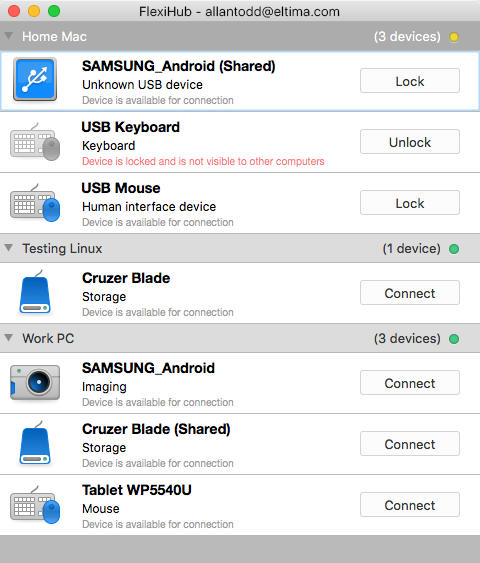
Frankfurt based Eltima Software today announces FlexiHub for Mac OS X, a new version of their revolutionary program for sharing of USB ports over the network. With FlexiHub, the shared ports with devices can be accessed from any spot on our planet. All FlexiHub connections are secured by SSL protocol and can go through FlexiHub's own redirection server for the safest experience. One can choose from three types of connections: LAN, UDP, and the native redirection server.
Frankfurt, Germany - Eltima Software, a long-time leader in USB port sharing solutions, today is proud to announce the release of FlexiHub for Mac OS X, a new version of their revolutionary program for sharing of USB ports over the network. Supporting El Capitan (OS X 10.11), FlexiHub for Mac OS X is easy to understand, easy-to-use and very efficient at what it does.
With FlexiHub the shared ports with devices can be accessed from any spot on our planet - they can be across the road, in the same room, or across the Atlantic. FlexiHub offers complete remote management of shared devices, connection and disconnection are performed without user's physical presence at the port. FlexiHub technology offers:
Unique USB ports sharing mechanism:
All FlexiHub connections are secured by SSL protocol and can go through FlexiHub's own redirection server for the safest experience. One can choose from three types of connections: LAN, UDP, and the native redirection server.
Top privacy level:
When starting to work with FlexiHub, its users have to register a private account, which helps to protect shared connections and ensuring they are only accessible to a specific group of people. FlexiHub uses 256-bit SSL encryption. Such connection cannot be intercepted and its data is safe.
Being an ultimate cross-platform solution, FlexiHub supports the most popular OS types - Mac, Windows, and Linux. Even if one user is working on a Mac and needs to debug colleague's software on Linux or Windows machine, or there is a need to connect to printers and scanners shared on your Linux-oriented office from your Mac - it is all a breeze with FlexiHub's possibilities.
Traffic compression:
One of the common issues of USB ports sharing is heavy traffic overloading the network. FlexiHub doesn't let it happen thanks to its unique technology of traffic compression. When certain devices send uncompressed data it can help unload network significantly. Depending on user's requirements, one can choose between better speed or better compression rate.
Versatile Subscription Plans:
FlexiHub offers four subscription plans - one free, three others are paid. Free subscription allows sharing one port and using software on two nodes (computers) with a limitation of 20 minutes per session. Paid subscription plans allow sharing numerous devices among multiple nodes (computers) with no limitations on connections duration. Paid subscribers can use FlexiHub's own redirection server and automatic reconnection in case of interrupted connection.
FlexiHub: http://www.flexihub.com/
Download FlexiHub: http://flexihub.com/download/flexihub.dmg
Subscriptions Plans: http://www.flexihub.com/prices/
Screenshot: http://flexihub.com/submit/flexihub_mac.png
Application Icon: http://blog.eltima.com/wp-content/uploads/icon_512x512.png
Eltima Software is a global software Development Company, specializing primarily in serial communication, mobile and flash software for Mac OS and Windows. Eltima Software delivers top-notch solutions having a friendly team of 40 professionals. Copyright (C) 2016 Eltima Software. All Rights Reserved. Apple, the Apple logo and Macintosh are registered trademarks of Apple Inc. in the U.S. and/or other countries.
*******
Link To Article: http://prmac.com/release-id-79020.htm
*******
---------------------------------------------------------------------------------
Note that you can alter delivered distributions at any time.
Login to your account on prMac to alter your channel selection, or to opt-out at any time.
FlexiHub - share USB ports on El Capitan (OS X 10.11) - Published on 03/17/16
Frankfurt based Eltima Software today announces FlexiHub for Mac OS X, a new version of their revolutionary program for sharing of USB ports over the network. With FlexiHub, the shared ports with devices can be accessed from any spot on our planet. All FlexiHub connections are secured by SSL protocol and can go through FlexiHub's own redirection server for the safest experience. One can choose from three types of connections: LAN, UDP, and the native redirection server.
Frankfurt, Germany - Eltima Software, a long-time leader in USB port sharing solutions, today is proud to announce the release of FlexiHub for Mac OS X, a new version of their revolutionary program for sharing of USB ports over the network. Supporting El Capitan (OS X 10.11), FlexiHub for Mac OS X is easy to understand, easy-to-use and very efficient at what it does.
With FlexiHub the shared ports with devices can be accessed from any spot on our planet - they can be across the road, in the same room, or across the Atlantic. FlexiHub offers complete remote management of shared devices, connection and disconnection are performed without user's physical presence at the port. FlexiHub technology offers:
Unique USB ports sharing mechanism:
All FlexiHub connections are secured by SSL protocol and can go through FlexiHub's own redirection server for the safest experience. One can choose from three types of connections: LAN, UDP, and the native redirection server.
Top privacy level:
When starting to work with FlexiHub, its users have to register a private account, which helps to protect shared connections and ensuring they are only accessible to a specific group of people. FlexiHub uses 256-bit SSL encryption. Such connection cannot be intercepted and its data is safe.
Being an ultimate cross-platform solution, FlexiHub supports the most popular OS types - Mac, Windows, and Linux. Even if one user is working on a Mac and needs to debug colleague's software on Linux or Windows machine, or there is a need to connect to printers and scanners shared on your Linux-oriented office from your Mac - it is all a breeze with FlexiHub's possibilities.
Traffic compression:
One of the common issues of USB ports sharing is heavy traffic overloading the network. FlexiHub doesn't let it happen thanks to its unique technology of traffic compression. When certain devices send uncompressed data it can help unload network significantly. Depending on user's requirements, one can choose between better speed or better compression rate.
Versatile Subscription Plans:
FlexiHub offers four subscription plans - one free, three others are paid. Free subscription allows sharing one port and using software on two nodes (computers) with a limitation of 20 minutes per session. Paid subscription plans allow sharing numerous devices among multiple nodes (computers) with no limitations on connections duration. Paid subscribers can use FlexiHub's own redirection server and automatic reconnection in case of interrupted connection.
FlexiHub: http://www.flexihub.com/
Download FlexiHub: http://flexihub.com/download/flexihub.dmg
Subscriptions Plans: http://www.flexihub.com/prices/
Screenshot: http://flexihub.com/submit/flexihub_mac.png
Application Icon: http://blog.eltima.com/wp-content/uploads/icon_512x512.png

Eltima Software is a global software Development Company, specializing primarily in serial communication, mobile and flash software for Mac OS and Windows. Eltima Software delivers top-notch solutions having a friendly team of 40 professionals. Copyright (C) 2016 Eltima Software. All Rights Reserved. Apple, the Apple logo and Macintosh are registered trademarks of Apple Inc. in the U.S. and/or other countries.
*******
Link To Article: http://prmac.com/release-id-79020.htm
*******
---------------------------------------------------------------------------------
Note that you can alter delivered distributions at any time.
Login to your account on prMac to alter your channel selection, or to opt-out at any time.
Shoot and Share Animated GIFs with Gifstory - GIF Camera and Editor
A new article has been published at prMac.
Shoot and Share Animated GIFs with Gifstory - GIF Camera and Editor - Published on 03/17/16
Ultralab Apps today introduces Gifstory 1.0, its new GIF Camera and Editor developed for iOS devices. Gifstory is a simple and powerful tool for those who wish to capture and share what's happening in their lives in the form of animated GIFs. There is a large variety of both bold and subtle filters, conveniently arranged into packs, that allow to add character and mood to any GIF. With Gifstory, captivating short clips are fun and easy to shoot, edit, store, and share.
Minsk, Belarus - Ultralab Apps today is excited to announce the release of Gifstory 1.0, its new GIF Camera and Editor developed for iOS devices. Gifstory is a simple and powerful tool for those who wish to capture and share what's happening in their lives every day in the form of animated GIFs. With Gifstory, captivating short clips are fun and easy to shoot, edit, store, and share.
Everybody loves GIFs. They are mesmerizing to watch, not as invasive as videos, and much better preserve the moment than regular pics. With every major social service now supporting GIFs, there's not a single reason not to embrace this amazing medium, abandoning photos for good.
Gifstory users can now capture everything that's happening around by shooting short animations up to 4 sec in length. There is a large variety of both bold and subtle filters, conveniently arranged into packs, that allow to add character and mood to any GIF. Many of the filters are taken from popular and acclaimed photo editors created by Ultralab Apps, such as Filterloop and Ultrapop.
When done with editing, from the sharing screen users can easily post their creations to social networks including Tumblr, Instagram and Facebook, or save them to camera roll both as a GIF or a video. All clips created by the user are stored and can be viewed in the app's Gallery. Visiting it and browsing through gifstories is what really brings memories to life!
Device Requirements:
* iPhone, iPod touch, and iPad
* Requires iOS 8.0 or later
* 18.8 MB
Pricing and Availability:
Gifstory 1.0 is Free and is available worldwide exclusively through the App Store in the Photo & Video category.
Ultralab Apps: http://ultralabapps.com
Gifstory 1.0: https://itunes.apple.com/app/gifstory-gif-camera-editor/id1059213655
Screenshot : http://apphunters.co/gifstory/screen.png
App Icon: http://apphunters.co/gifstory/icon.png
Founded in 2012, Ultralab is a community of talented developers, illustrators and marketers committed to the idea of creating apps and games that inspire, empower and entertain. All Material and Software (C) Copyright 2016 Ultralab. All Rights Reserved. Apple, the Apple logo, iPhone, iPod and iPad are registered trademarks of Apple Inc. in the U.S. and/or other countries. Other trademarks and registered trademarks may be the property of their respective owners.
*******
Link To Article: http://prmac.com/release-id-79021.htm
*******
---------------------------------------------------------------------------------
Note that you can alter delivered distributions at any time.
Login to your account on prMac to alter your channel selection, or to opt-out at any time.
Shoot and Share Animated GIFs with Gifstory - GIF Camera and Editor - Published on 03/17/16
Ultralab Apps today introduces Gifstory 1.0, its new GIF Camera and Editor developed for iOS devices. Gifstory is a simple and powerful tool for those who wish to capture and share what's happening in their lives in the form of animated GIFs. There is a large variety of both bold and subtle filters, conveniently arranged into packs, that allow to add character and mood to any GIF. With Gifstory, captivating short clips are fun and easy to shoot, edit, store, and share.
Minsk, Belarus - Ultralab Apps today is excited to announce the release of Gifstory 1.0, its new GIF Camera and Editor developed for iOS devices. Gifstory is a simple and powerful tool for those who wish to capture and share what's happening in their lives every day in the form of animated GIFs. With Gifstory, captivating short clips are fun and easy to shoot, edit, store, and share.
Everybody loves GIFs. They are mesmerizing to watch, not as invasive as videos, and much better preserve the moment than regular pics. With every major social service now supporting GIFs, there's not a single reason not to embrace this amazing medium, abandoning photos for good.
Gifstory users can now capture everything that's happening around by shooting short animations up to 4 sec in length. There is a large variety of both bold and subtle filters, conveniently arranged into packs, that allow to add character and mood to any GIF. Many of the filters are taken from popular and acclaimed photo editors created by Ultralab Apps, such as Filterloop and Ultrapop.
When done with editing, from the sharing screen users can easily post their creations to social networks including Tumblr, Instagram and Facebook, or save them to camera roll both as a GIF or a video. All clips created by the user are stored and can be viewed in the app's Gallery. Visiting it and browsing through gifstories is what really brings memories to life!
Device Requirements:
* iPhone, iPod touch, and iPad
* Requires iOS 8.0 or later
* 18.8 MB
Pricing and Availability:
Gifstory 1.0 is Free and is available worldwide exclusively through the App Store in the Photo & Video category.
Ultralab Apps: http://ultralabapps.com
Gifstory 1.0: https://itunes.apple.com/app/gifstory-gif-camera-editor/id1059213655
Screenshot : http://apphunters.co/gifstory/screen.png

App Icon: http://apphunters.co/gifstory/icon.png

Founded in 2012, Ultralab is a community of talented developers, illustrators and marketers committed to the idea of creating apps and games that inspire, empower and entertain. All Material and Software (C) Copyright 2016 Ultralab. All Rights Reserved. Apple, the Apple logo, iPhone, iPod and iPad are registered trademarks of Apple Inc. in the U.S. and/or other countries. Other trademarks and registered trademarks may be the property of their respective owners.
*******
Link To Article: http://prmac.com/release-id-79021.htm
*******
---------------------------------------------------------------------------------
Note that you can alter delivered distributions at any time.
Login to your account on prMac to alter your channel selection, or to opt-out at any time.
Subscribe to:
Posts (Atom)