A new article has been published at prMac.
Value of New NC Widget for Twitter Reflects Real iPhone App Innovation - Published on 03/31/16
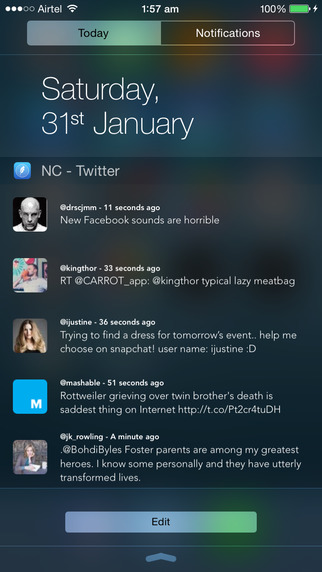
Now available from Apps Genie Limited, the NC - Twitter Widget for Notification Center lets anyone keep up with the latest activity on their Twitter account without having to launch the app entirely, or even without the hassle of unlocking their phone. Members will always have the freshest content from the last five sent tweets at their fingertips. Members can interact with those tweets right where they are, without stopping to interrupt a task, and retweet or favorite the updates they see.
London, United Kingdom - There is great news for active Twitter users who wish there was a better way to check their tweets from the iPhone! The NC - Twitter Widget for Notification Center, now available from Apps Genie Limited, lets you keep up with the latest activity on your Twitter account without having to launch the app entirely - or even without the hassle of unlocking your phone. This is a really smart addition, designed to work with iOS 8 in the notification center, and reflects the best innovation that's out there for Apple's new operating system.
Simply install the NC - Twitter Widget for Notification Center, and you'll always have the freshest content from the last five sent tweets at your fingertips. You can interact with those tweets from right where you are, without stopping to interrupt a game or a task, and retweet or favorite the updates you see. You can also open the tweet from the app default setting with the NC widget, or decide that it's worth it to go ahead within Twitter.
"The Apple operating system changes opened entirely new vistas for app developers looking to add value with extensions and options," explains Heidi Morsi, CEO/Founder of Apps Genie Limited. "But those options are only worth it if they deliver real value, and that's why we're so excited about NC. The widget reflects our commitment to making products that work in the real world, and solve real world problems with easy-to-use tools."
The app install is available at iTunes. To see positive reviews of the NC - Twitter Widget for Notification Center and related industry press coverage, see Mashable's recent "5 can't-miss apps" story or a media mention from the BGR site.
Features:
* From any app, view the latest Twitter news, quotes, mentions and updates
* Interact with most recent five tweets, without leaving your game or other apps
* Installs easily as a Twitter widget, working from your Notification Center operations
* Updated 1.1 version improves font size settings and landscape support
Device Requirements:
* iPhone, iPad, and iPod touch
* Requires iOS 8.0 or later
* Size: 35.8 MB
Pricing and Availability:
The NC - Twitter Widget for Notification Center 1.1 is currently available for $6.99 (USD) and available worldwide through the iTunes app store in the Social Networking category.
The NC - Twitter Widget for Notification Center 1.1: https://itunes.apple.com/app/nc-twitter-widget-for-notification/id925691560
Screenshot 1: http://a2.mzstatic.com/us/r30/Purple5/v4/de/f7/85/def785f9-7342-7a79-2109-e83bb98ad574/screen322x572.jpeg
Screenshot 2: http://a5.mzstatic.com/us/r30/Purple1/v4/7a/59/53/7a59538b-3714-6b18-ee9b-5ffc58d86cda/screen322x572.jpeg
App Icon: http://a1.mzstatic.com/us/r30/Purple7/v4/c5/f8/72/c5f8726f-db96-1fd8-ce68-1685aadc7dd2/icon175x175.jpeg
Based in London, UK, Apps Genie Limited are rapidly building a portfolio of high quality iOS apps for both iPhone & iPad. Focussing on games & utilities, their apps have been favourably received by App Store users worldwide.All Material and Software (C) Copyright 2016 Apps Genie Ltd. All Rights Reserved. Apple, the Apple logo, iPhone, iPod and iPad are registered trademarks of Apple Inc. in the U.S. and/or other countries. Other trademarks and registered trademarks may be the property of their respective owners.
*******
Link To Article: http://prmac.com/release-id-79107.htm
*******
---------------------------------------------------------------------------------
Note that you can alter delivered distributions at any time.
Login to your account on prMac to alter your channel selection, or to opt-out at any time.



New Jam Session app is the easy way to build a gapless playlist on iOS
A new article has been published at prMac.
New Jam Session app is the easy way to build a gapless playlist on iOS - Published on 03/31/16
Rome-based iOS developer, Fabrizio Bartolomucci today introduces Jam Session 1.0, a new iOS app for creating gapless playlists for Zumba, aerobics and dance classes. Jam Session allows anyone to select a number of tunes from their iTunes library and assign them to a playlist. Once the playlist is started, the tunes are played in a row without any interruption between them. The app uses a proprietary algorithm to find the right point of change with the next song and seamlessly merges the two.
Rome, Italy - Indie iOS developer, Fabrizio Bartolomucci today is pleased to announce the release and immediate availability of Jam Session 1.0, the new iOS app for creating gapless playlists for Zumba, aerobics and dance classes. The elimination of gaps between tracks may sound trivial, but for any situation dependent on music to aid concentration, Sound Jam may be revolutionary. No gaps in rhythm means no lapse in focus. Seamless song transitions allow for non-stop soundtrack creation, perfect for musically-supported classes
"Sound Jam isn't specifically designed for people like me, but my job requires me to focus for very long stretches of time, and I find a seamless soundtrack helps," said Sound Jam user and copywriter Ben Lloyd, "I already have an extensive music library on my iPhone, but the tiny gap between songs is just enough to break my concentration and flow. Sound Jam solves this problem, keeping me on track for the whole day."
"I swear my productivity has gone up since I discovered Sound Jam."
Bartolomucci is equally enthusiastic; "Although iOS is perfectly capable of putting together great playlists, there is always a gap between each song. But no matter what you do, there is always a short gap between tracks. Take a Zumba class for instance. An unbroken soundtrack and rhythm is vital to maintaining momentum keeping students on track. That delay between tracks is not only annoying, it can ruin the whole class."
Obviously trainers can create their own gapless soundtracks using existing tools, but the process is slow and time-consuming. Costing less than a cup of coffee, Sound Jam significantly reduces the time it takes to prepare a class or presentation.
Constructing a playlist in Jam Session is simple. Users can select songs, albums, or even existing playlists, direct from their iTunes library. Songs can be moved around in any order to suit the users needs, like providing the soundtrack for a class. Then all the user has to do is hit play - Jam Session takes care of the rest, removing unwanted gaps between tracks automatically. They can even add new tracks while the soundtrack plays.
"The process is so simple that if you can use iTunes, you can create a gapless playlist with Sound Jam," Bartolomucci promises, "No editing tools. No CD burning. No problem."
The app also includes a number of advanced settings and configurations for expert users, giving them the best audio output for use with external Bluetooth and AirPlay speaker systems.
Device Requirements:
* iPhone, iPad, and iPod touch
* Requires iOS 9.0 or later
* 17.1 MB
Pricing and Availability:
Jam Session 1.0 is $6.99 USD (or equivalent amount in other currencies) and available worldwide exclusively through the App Store in the Music category. Jam Session is the latest iOS app in Bartolomucci's growing portfolio, joining popular transit mapping tool In Arrivo and taxi booking system Taxi Professional among others. To learn more, please visit Jam Session's official website.
Jam Session 1.0: http://www.jamsession.in
Purchase and Download: https://itunes.apple.com/app/jam-session-handfree-seamless/id1082318053
Screenshot: http://a2.mzstatic.com/us/r30/Purple49/v4/2b/e6/f0/2be6f031-e681-24d1-2d12-bf182a13608d/screen480x480.jpeg
App Icon: http://a1.mzstatic.com/us/r30/Purple69/v4/e7/c8/53/e7c8533c-ff7f-35f5-95ac-7cac1969f213/icon175x175.jpeg
Based in Rome, Italy, Sound Jam is the brainchild of Dr Fabrizio Bartolomucci. Bartolomucci has been developing computer software since his youth, before graduating in 1988 with a degree in Computer Science from the University of Pisa. His apps, including in Arrivo, Taxi Professional, Limo Manager, Virtual Tags and iPuja, have received a number of positive reviews from iOS specialist blogs including AppGiveAway, SlapStart and KillerStartups thanks to the friendly nature of his user community. All Material and Software (C) Copyright 2016 Dr Fabrizio Bartolomucci. All Rights Reserved. Apple, the Apple logo, iPhone, iPod and iPad are registered trademarks of Apple Inc. in the U.S. and/or other countries. Other trademarks and registered trademarks may be the property of their respective owners.
*******
Link To Article: http://prmac.com/release-id-79106.htm
*******
---------------------------------------------------------------------------------
Note that you can alter delivered distributions at any time.
Login to your account on prMac to alter your channel selection, or to opt-out at any time.
New Jam Session app is the easy way to build a gapless playlist on iOS - Published on 03/31/16
Rome-based iOS developer, Fabrizio Bartolomucci today introduces Jam Session 1.0, a new iOS app for creating gapless playlists for Zumba, aerobics and dance classes. Jam Session allows anyone to select a number of tunes from their iTunes library and assign them to a playlist. Once the playlist is started, the tunes are played in a row without any interruption between them. The app uses a proprietary algorithm to find the right point of change with the next song and seamlessly merges the two.
Rome, Italy - Indie iOS developer, Fabrizio Bartolomucci today is pleased to announce the release and immediate availability of Jam Session 1.0, the new iOS app for creating gapless playlists for Zumba, aerobics and dance classes. The elimination of gaps between tracks may sound trivial, but for any situation dependent on music to aid concentration, Sound Jam may be revolutionary. No gaps in rhythm means no lapse in focus. Seamless song transitions allow for non-stop soundtrack creation, perfect for musically-supported classes
"Sound Jam isn't specifically designed for people like me, but my job requires me to focus for very long stretches of time, and I find a seamless soundtrack helps," said Sound Jam user and copywriter Ben Lloyd, "I already have an extensive music library on my iPhone, but the tiny gap between songs is just enough to break my concentration and flow. Sound Jam solves this problem, keeping me on track for the whole day."
"I swear my productivity has gone up since I discovered Sound Jam."
Bartolomucci is equally enthusiastic; "Although iOS is perfectly capable of putting together great playlists, there is always a gap between each song. But no matter what you do, there is always a short gap between tracks. Take a Zumba class for instance. An unbroken soundtrack and rhythm is vital to maintaining momentum keeping students on track. That delay between tracks is not only annoying, it can ruin the whole class."
Obviously trainers can create their own gapless soundtracks using existing tools, but the process is slow and time-consuming. Costing less than a cup of coffee, Sound Jam significantly reduces the time it takes to prepare a class or presentation.
Constructing a playlist in Jam Session is simple. Users can select songs, albums, or even existing playlists, direct from their iTunes library. Songs can be moved around in any order to suit the users needs, like providing the soundtrack for a class. Then all the user has to do is hit play - Jam Session takes care of the rest, removing unwanted gaps between tracks automatically. They can even add new tracks while the soundtrack plays.
"The process is so simple that if you can use iTunes, you can create a gapless playlist with Sound Jam," Bartolomucci promises, "No editing tools. No CD burning. No problem."
The app also includes a number of advanced settings and configurations for expert users, giving them the best audio output for use with external Bluetooth and AirPlay speaker systems.
Device Requirements:
* iPhone, iPad, and iPod touch
* Requires iOS 9.0 or later
* 17.1 MB
Pricing and Availability:
Jam Session 1.0 is $6.99 USD (or equivalent amount in other currencies) and available worldwide exclusively through the App Store in the Music category. Jam Session is the latest iOS app in Bartolomucci's growing portfolio, joining popular transit mapping tool In Arrivo and taxi booking system Taxi Professional among others. To learn more, please visit Jam Session's official website.
Jam Session 1.0: http://www.jamsession.in
Purchase and Download: https://itunes.apple.com/app/jam-session-handfree-seamless/id1082318053
Screenshot: http://a2.mzstatic.com/us/r30/Purple49/v4/2b/e6/f0/2be6f031-e681-24d1-2d12-bf182a13608d/screen480x480.jpeg

App Icon: http://a1.mzstatic.com/us/r30/Purple69/v4/e7/c8/53/e7c8533c-ff7f-35f5-95ac-7cac1969f213/icon175x175.jpeg

Based in Rome, Italy, Sound Jam is the brainchild of Dr Fabrizio Bartolomucci. Bartolomucci has been developing computer software since his youth, before graduating in 1988 with a degree in Computer Science from the University of Pisa. His apps, including in Arrivo, Taxi Professional, Limo Manager, Virtual Tags and iPuja, have received a number of positive reviews from iOS specialist blogs including AppGiveAway, SlapStart and KillerStartups thanks to the friendly nature of his user community. All Material and Software (C) Copyright 2016 Dr Fabrizio Bartolomucci. All Rights Reserved. Apple, the Apple logo, iPhone, iPod and iPad are registered trademarks of Apple Inc. in the U.S. and/or other countries. Other trademarks and registered trademarks may be the property of their respective owners.
*******
Link To Article: http://prmac.com/release-id-79106.htm
*******
---------------------------------------------------------------------------------
Note that you can alter delivered distributions at any time.
Login to your account on prMac to alter your channel selection, or to opt-out at any time.
Senegal Tv Live 1.5 for iOS
A new article has been published at prMac.
Senegal Tv Live 1.5 for iOS - Published on 03/31/16
LastThink announces the release of Senegal Tv Live 1.5, their highly customizable TV application for iOS devices. Anyone can directly access their favorite TV channel and watch diverse films, news, programs from their iPad, iPhone and iPod touch anywhere and anytime. Vibes are smart TV and movie playlists. Users can easily record their favorite films, news, talk shows, programs and more. Users can also share what they are watching via Facebook.
Yerevan, Armenia - LastThink is proud to announce the release of Senegal Tv Live 1.5, their highly customizable TV application developed for iPad and iPhone devices. Users can directly access their favorite TV channel and watch diverse films, news, programs from their iPad, iPhone and iPod touch anywhere and anytime.
Features:
* Navigating album photos by sliding your finger right or left on the screen
* Change the device you are streaming the picture to, by taping on the Play button in the upper right corner of your iPad's screen and selecting a desired device
* Screening and shooting any moment of your preferred TV program or film you like
* Altering the boring parts and moving straight to the best part at once - Filter by HD-only and favorite channels
* Rotating channels easily by a mere touch on your screen
* Organize your favorite TV shows, sport teams, movies, and actors and find where you can watch them - on TV and on demand
* Recording your favorite films, news, Talk Shows, programs and etc.
* Sharing what you're watching via Facebook, Twitter, YouTube, Dropbox, email and more - Vibes are smart TV and movie playlists
* The highest quality even with the lowest Internet and HD quality with the normal Internet - You can watch TV channels in HD level
* Editing and cropping videos into smaller parts. In addition to, you can take videos of your favorite program
* Capturing the funniest and most interesting moments of what you are watching with the trim tool
* Searching the content across streaming and broadcast services
* Discovering more than 100 channels of great entertainment beyond the Senegal Online TV app right on your device's touchscreen interface
If you however experience any issues, please do not hesitate to contact us if you'd like to share your experience with live TV channels, or provide suggestions on how we could improve the product further. We will be more than happy to get in touch.
NOTE: We have selected data from the internet and if any assembly or constitution doesn't want us to show the content of the unit, please recommend us to remove it. We follow TV regulations and adjustments and we select original TV content data without artificial editions.
Device Requirements:
* iPhone, iPad, and iPod touch
* Optimized for iPhone 5, iPhone 6, and iPhone 6 Plus
* Requires iOS 6.0 or later
* Universal Application
* 33.2 MB
Pricing and Availability:
Online Senegal Tv Live 1.5 is free and is available worldwide exclusively through the App Store in the Entertainment category.
LastThink: http://lastthink.com/
Senegal Tv Live 1.5: https://www.facebook.com/Online-Senegal-TV-Community-1504113329893196
Download from iTunes: https://itunes.apple.com/app/senegal-tv-live/id1074211877
Screenshot: http://a3.mzstatic.com/us/r30/Purple49/v4/6d/da/da/6ddada39-d608-9cbd-edc6-633daae279ce/screen322x572.jpeg
App Icon: http://a5.mzstatic.com/us/r30/Purple69/v4/9f/c8/8c/9fc88cf7-f4b5-6722-f63e-cca49c3d764e/icon175x175.png
LastThink is an IT company with a focus on mobile development. It has extended its list of services since 2012 to offer high-end business process management, system integration, as well as up-to-date communication solutions. LastThink's mission is to deliver maximum business value to its customers by designing, developing, implementing and maintaining efficient and high quality software solutions aligned with their most essential business needs. Their team will always do its best to meet client expectations. All Material and Software (C) Copyright 2016 LastThink LLC. All Rights Reserved. Apple, the Apple logo, iPhone, iPod and iPad are registered trademarks of Apple Inc. in the U.S. and/or other countries. Other trademarks and registered trademarks may be the property of their respective owners.
*******
Link To Article: http://prmac.com/release-id-79109.htm
*******
---------------------------------------------------------------------------------
Note that you can alter delivered distributions at any time.
Login to your account on prMac to alter your channel selection, or to opt-out at any time.
Senegal Tv Live 1.5 for iOS - Published on 03/31/16
LastThink announces the release of Senegal Tv Live 1.5, their highly customizable TV application for iOS devices. Anyone can directly access their favorite TV channel and watch diverse films, news, programs from their iPad, iPhone and iPod touch anywhere and anytime. Vibes are smart TV and movie playlists. Users can easily record their favorite films, news, talk shows, programs and more. Users can also share what they are watching via Facebook.
Yerevan, Armenia - LastThink is proud to announce the release of Senegal Tv Live 1.5, their highly customizable TV application developed for iPad and iPhone devices. Users can directly access their favorite TV channel and watch diverse films, news, programs from their iPad, iPhone and iPod touch anywhere and anytime.
Features:
* Navigating album photos by sliding your finger right or left on the screen
* Change the device you are streaming the picture to, by taping on the Play button in the upper right corner of your iPad's screen and selecting a desired device
* Screening and shooting any moment of your preferred TV program or film you like
* Altering the boring parts and moving straight to the best part at once - Filter by HD-only and favorite channels
* Rotating channels easily by a mere touch on your screen
* Organize your favorite TV shows, sport teams, movies, and actors and find where you can watch them - on TV and on demand
* Recording your favorite films, news, Talk Shows, programs and etc.
* Sharing what you're watching via Facebook, Twitter, YouTube, Dropbox, email and more - Vibes are smart TV and movie playlists
* The highest quality even with the lowest Internet and HD quality with the normal Internet - You can watch TV channels in HD level
* Editing and cropping videos into smaller parts. In addition to, you can take videos of your favorite program
* Capturing the funniest and most interesting moments of what you are watching with the trim tool
* Searching the content across streaming and broadcast services
* Discovering more than 100 channels of great entertainment beyond the Senegal Online TV app right on your device's touchscreen interface
If you however experience any issues, please do not hesitate to contact us if you'd like to share your experience with live TV channels, or provide suggestions on how we could improve the product further. We will be more than happy to get in touch.
NOTE: We have selected data from the internet and if any assembly or constitution doesn't want us to show the content of the unit, please recommend us to remove it. We follow TV regulations and adjustments and we select original TV content data without artificial editions.
Device Requirements:
* iPhone, iPad, and iPod touch
* Optimized for iPhone 5, iPhone 6, and iPhone 6 Plus
* Requires iOS 6.0 or later
* Universal Application
* 33.2 MB
Pricing and Availability:
Online Senegal Tv Live 1.5 is free and is available worldwide exclusively through the App Store in the Entertainment category.
LastThink: http://lastthink.com/
Senegal Tv Live 1.5: https://www.facebook.com/Online-Senegal-TV-Community-1504113329893196
Download from iTunes: https://itunes.apple.com/app/senegal-tv-live/id1074211877
Screenshot: http://a3.mzstatic.com/us/r30/Purple49/v4/6d/da/da/6ddada39-d608-9cbd-edc6-633daae279ce/screen322x572.jpeg

App Icon: http://a5.mzstatic.com/us/r30/Purple69/v4/9f/c8/8c/9fc88cf7-f4b5-6722-f63e-cca49c3d764e/icon175x175.png

LastThink is an IT company with a focus on mobile development. It has extended its list of services since 2012 to offer high-end business process management, system integration, as well as up-to-date communication solutions. LastThink's mission is to deliver maximum business value to its customers by designing, developing, implementing and maintaining efficient and high quality software solutions aligned with their most essential business needs. Their team will always do its best to meet client expectations. All Material and Software (C) Copyright 2016 LastThink LLC. All Rights Reserved. Apple, the Apple logo, iPhone, iPod and iPad are registered trademarks of Apple Inc. in the U.S. and/or other countries. Other trademarks and registered trademarks may be the property of their respective owners.
*******
Link To Article: http://prmac.com/release-id-79109.htm
*******
---------------------------------------------------------------------------------
Note that you can alter delivered distributions at any time.
Login to your account on prMac to alter your channel selection, or to opt-out at any time.
WeKast - Plug & Cast Solution Makes Presentations Easier
A new article has been published at prMac.
WeKast - Plug & Cast Solution Makes Presentations Easier - Published on 03/31/16
WeKast launches on Kickstarter seeking $50,000 to manufacture its presentation solution that eliminates setup, while increasing mobility and engagement. WeKast is a super-fast, incredibly-easy, wireless device to enable users to present from their mobile device, to any screen, anywhere they want. WeKast's solution enables presenters to seamlessly cast and control presentations from mobile devices without wires, wi-fi or any additional outside technology.
New York, NY - WeKast launches on Kickstarter seeking $50,000 to manufacture its presentation solution that eliminates setup, while increasing mobility and engagement. The WeKast device boasts a plug & cast wireless technology that allows users to move around the room freely while controlling their presentations from a mobile device.
WeKast announces a solution that enables presenters to seamlessly cast and control presentations from mobile devices without wires, wi-fi or any additional outside technology. Solutions on the market today, typically take between 5 to 20 minutes of pre-presentation setup. This awkward time-wasting process, involving wires, computers and wifi connections, often tethers presenters to a laptop or PC affecting a speaker's use of body language and their ability to engage with an audience.
Alternatively, with its built in power source and wi-fi, WeKast doesn't rely on any outside technology beyond a screen. The WeKast setup involves just three simple steps: 1. Plug the device into any screen. 2. Open the pre-downloaded app. 3. Select a presentation. The standalone solution can be brought into any meeting room and works instantly - without the need for wires, internet/wifi or even a computer/laptop.
The WeKast solution is designed to present slides exactly as they were original formatted on the computer with all animation, fonts, colors, graphics, video and audio represented seamlessly. The WeKast plug-in converts files into a mobile-optimized format which sends presentations directly to its Android and iOS mobile app. Users can then control the presentation from their device while keeping time using the app's timer and viewing their presenter notes within the app.
"After carrying our laptops around, untangling wires, and having to rely on spotty wifi networks with elusive passwords one too many times, we knew we needed to create a device that provided setup-free mobile presentations," says Noemie Alliel, CEO of WeKast. "It took a lot of R&D, but we are excited to finally share our project with the Kickstarter community. With their support and input we know we can produce the perfect presentation solution."
WeKast also offers "WeKast Engage", a robust social tool located in the app to help presenters socialize presentations through story sharing, encouraging feedback and allowing follow up with attendees. "WeKast Engage" capability can push slides to audience devices as each slide is presented. After which, attendees can mark them up for their own use. "WeKast Engage" also offers slide-by-slide 'like' voting, audience questions, Twitter engagement, as well as polling and other social features.
Early birds can back the Kickstarter campaign to get their WeKast for $89, which is 41% off of MSRP. Rewards are set to ship to backers by January 2017.
WeKast: http://www.wekast.com
WeKast Kickstarter Campaign: https://www.kickstarter.com/projects/allieln/wekast-plug-and-cast-presentation-solution
Press Release Site: http://www.relrelations.com/#!wekast/lsjk1
Download Images: https://drive.google.com/open?id=0B3nx-US6Diu5Mkk2WTdJYnNFazg
Founded in 2014, WeKast was born out of necessity, for our own use. We then realized that so many of our friends felt the same way. After carrying our laptops around, untangling wires, and having to rely on spotty wifi networks one too many times, we knew we needed to create a device that provided setup-free mobile presentations. It was time to put an end to the painful presentation process that wastes time and that has not been disrupted in years. Our company is passionate with creating an unmatched solution that's easy-to-use. Our mission is to provide a reliable presenting solution to help people optimize their presentations in every way. So far, all of our feedback has been over the top, everyone from professionals "on-the-go" to entrepreneurs are enjoying the many useful benefits of WeKast. Together with our team, we take our passion for innovation beyond our products and in every decision we make. All Material and Software (C) Copyright 2016 WeKast. All Rights Reserved. Apple,
the Apple logo, iPhone, iPod and iPad are registered trademarks of Apple Inc. in the U.S. and/or other countries. Other trademarks and registered trademarks may be the property of their respective owners.
*******
Link To Article: http://prmac.com/release-id-79108.htm
*******
---------------------------------------------------------------------------------
Note that you can alter delivered distributions at any time.
Login to your account on prMac to alter your channel selection, or to opt-out at any time.
WeKast - Plug & Cast Solution Makes Presentations Easier - Published on 03/31/16
WeKast launches on Kickstarter seeking $50,000 to manufacture its presentation solution that eliminates setup, while increasing mobility and engagement. WeKast is a super-fast, incredibly-easy, wireless device to enable users to present from their mobile device, to any screen, anywhere they want. WeKast's solution enables presenters to seamlessly cast and control presentations from mobile devices without wires, wi-fi or any additional outside technology.
New York, NY - WeKast launches on Kickstarter seeking $50,000 to manufacture its presentation solution that eliminates setup, while increasing mobility and engagement. The WeKast device boasts a plug & cast wireless technology that allows users to move around the room freely while controlling their presentations from a mobile device.
WeKast announces a solution that enables presenters to seamlessly cast and control presentations from mobile devices without wires, wi-fi or any additional outside technology. Solutions on the market today, typically take between 5 to 20 minutes of pre-presentation setup. This awkward time-wasting process, involving wires, computers and wifi connections, often tethers presenters to a laptop or PC affecting a speaker's use of body language and their ability to engage with an audience.
Alternatively, with its built in power source and wi-fi, WeKast doesn't rely on any outside technology beyond a screen. The WeKast setup involves just three simple steps: 1. Plug the device into any screen. 2. Open the pre-downloaded app. 3. Select a presentation. The standalone solution can be brought into any meeting room and works instantly - without the need for wires, internet/wifi or even a computer/laptop.
The WeKast solution is designed to present slides exactly as they were original formatted on the computer with all animation, fonts, colors, graphics, video and audio represented seamlessly. The WeKast plug-in converts files into a mobile-optimized format which sends presentations directly to its Android and iOS mobile app. Users can then control the presentation from their device while keeping time using the app's timer and viewing their presenter notes within the app.
"After carrying our laptops around, untangling wires, and having to rely on spotty wifi networks with elusive passwords one too many times, we knew we needed to create a device that provided setup-free mobile presentations," says Noemie Alliel, CEO of WeKast. "It took a lot of R&D, but we are excited to finally share our project with the Kickstarter community. With their support and input we know we can produce the perfect presentation solution."
WeKast also offers "WeKast Engage", a robust social tool located in the app to help presenters socialize presentations through story sharing, encouraging feedback and allowing follow up with attendees. "WeKast Engage" capability can push slides to audience devices as each slide is presented. After which, attendees can mark them up for their own use. "WeKast Engage" also offers slide-by-slide 'like' voting, audience questions, Twitter engagement, as well as polling and other social features.
Early birds can back the Kickstarter campaign to get their WeKast for $89, which is 41% off of MSRP. Rewards are set to ship to backers by January 2017.
WeKast: http://www.wekast.com
WeKast Kickstarter Campaign: https://www.kickstarter.com/projects/allieln/wekast-plug-and-cast-presentation-solution
Press Release Site: http://www.relrelations.com/#!wekast/lsjk1
Download Images: https://drive.google.com/open?id=0B3nx-US6Diu5Mkk2WTdJYnNFazg
Founded in 2014, WeKast was born out of necessity, for our own use. We then realized that so many of our friends felt the same way. After carrying our laptops around, untangling wires, and having to rely on spotty wifi networks one too many times, we knew we needed to create a device that provided setup-free mobile presentations. It was time to put an end to the painful presentation process that wastes time and that has not been disrupted in years. Our company is passionate with creating an unmatched solution that's easy-to-use. Our mission is to provide a reliable presenting solution to help people optimize their presentations in every way. So far, all of our feedback has been over the top, everyone from professionals "on-the-go" to entrepreneurs are enjoying the many useful benefits of WeKast. Together with our team, we take our passion for innovation beyond our products and in every decision we make. All Material and Software (C) Copyright 2016 WeKast. All Rights Reserved. Apple,
the Apple logo, iPhone, iPod and iPad are registered trademarks of Apple Inc. in the U.S. and/or other countries. Other trademarks and registered trademarks may be the property of their respective owners.
*******
Link To Article: http://prmac.com/release-id-79108.htm
*******
---------------------------------------------------------------------------------
Note that you can alter delivered distributions at any time.
Login to your account on prMac to alter your channel selection, or to opt-out at any time.
DEVONthink 2.8.10 released - Workflow enhancements and bug fixes
A new article has been published at prMac.
DEVONthink 2.8.10 released - Workflow enhancements and bug fixes - Published on 03/31/16
DEVONtechnologies, LLC todeay updates all editions of its intelligent information and document manager DEVONthink as well as the smart notebook DEVONnote. DEVONthink help its users classify and organize documents effortlessly with unique artificial intelligence. DEVONthink 2.8.10 adds contextual menu options to HTML 5 videos, supports Airmail 2, and accepts videos sent via the sharing extension. All editions fix minor bugs and glitches too. The updates are free and recommended for all users.
Coeur d'Alene, Idaho - DEVONtechnologies, LLC today updates all editions of its intelligent information and document manager DEVONthink as well as the smart notebook DEVONnote. Version 2.8.10 of DEVONthink and DEVONnote adds support for sending documents via Airmail 2. The sharing extension accepts videos, e.g. from the Photos application. DEVONthink 2.8.10 also offers new contextual menu commands for HTML 5 videos, e.g. of bookmarks or web archives. Using the contextual menu users conveniently copy links to the videos or download the video files to their Mac.
Other enhancements include the ability to rename the global inbox of the Pro and Pro Office editions. The Pro and Pro Office editions also better handle databases that are being or have been moved to the trash. When verifying their databases all editions detect more issues than before and are able to repair them. The improved Bookends support deals smarter with references duplicated in DEVONthink. On OS X Yosemite or later the Clip to DEVONthink Safari extension is no longer installed directly but downloaded from the Safari Extensions Gallery. The updates also fix issues and improve reliability and performance.
"We believe in regular maintenance updates to quickly provide our users with new functionality and bug fixes. The 2.8.10 release of DEVONthink and DEVONnote is no different: our users get workflow enhancements, better data safety, and fixes for a number of issues that we became aware of in the recent weeks, all for free," comments Eric Bohnisch-Volkmann, President of DEVONtechnologies.
Pricing and Availability:
All editions of DEVONthink as well as DEVONnote require an Intel-based Mac and OS X 10.8.5 or later (in the App Store: OS X 10.9 or later). They can be downloaded from DEVONtechnologies online and be test-driven for free before they need to be properly licensed. DEVONthink Personal and DEVONnote are also available in the App Store; DEVONthink can be purchased in bundles with DEVONagent for an attractive bundle price in DEVONtechnologies' online shop.
* DEVONthink Pro Office: US $149.95
* DEVONthink Pro: US $79.95
* DEVONthink Personal: US $49.95 (App Store: $49.99)
* DEVONnote: US $24.95 (App Store: $24.99)
More information:
Customers find more information about our apps on the DEVONtechnologies website. Eric Bohnisch-Volkmann also posts news, opinions, previews, and public betas in his blog Devonian Times.
DEVONtechnologies: http://www.devontechnologies.com
DEVONthink 2.8.10: http://www.devontechnologies.com/redirect.php?id=product-dt
Download DEVONthink: http://www.devontechnologies.com/redirect.php?id=download
Online Shop: http://www.devontechnologies.com/redirect.php?id=shop
Devonian Blog: http://www.devontechnologies.com/redirect.php?id=blog
DEVONtechnologies LLC creates end-user and server applications for the Mac and iOS platforms that enhance productivity, organization, and user experience with unique artificial intelligence technology. All applications are focused on both ease of use and satisfying the needs of even the most savvy users. The underlying DEVONtechnology is a flexible and versatile foundation that can be used for a large range of purposes from databases, data mining, and information retrieval to human-computer interfaces. DEVONtechnologies LLC was founded 2002 and incorporated 2004, and is today headquartered in Coeur d'Alene, Idaho, USA. All Material and Software (C) Copyright 2016 DEVONtechnologies LLC. All Rights Reserved. Apple, the Apple logo, Macintosh and Mac OS X are registered trademarks of Apple Inc. in the U.S. and/or other countries. Other trademarks and registered trademarks may be the property of their respective owners.
*******
Link To Article: http://prmac.com/release-id-79105.htm
*******
---------------------------------------------------------------------------------
Note that you can alter delivered distributions at any time.
Login to your account on prMac to alter your channel selection, or to opt-out at any time.
DEVONthink 2.8.10 released - Workflow enhancements and bug fixes - Published on 03/31/16
DEVONtechnologies, LLC todeay updates all editions of its intelligent information and document manager DEVONthink as well as the smart notebook DEVONnote. DEVONthink help its users classify and organize documents effortlessly with unique artificial intelligence. DEVONthink 2.8.10 adds contextual menu options to HTML 5 videos, supports Airmail 2, and accepts videos sent via the sharing extension. All editions fix minor bugs and glitches too. The updates are free and recommended for all users.
Coeur d'Alene, Idaho - DEVONtechnologies, LLC today updates all editions of its intelligent information and document manager DEVONthink as well as the smart notebook DEVONnote. Version 2.8.10 of DEVONthink and DEVONnote adds support for sending documents via Airmail 2. The sharing extension accepts videos, e.g. from the Photos application. DEVONthink 2.8.10 also offers new contextual menu commands for HTML 5 videos, e.g. of bookmarks or web archives. Using the contextual menu users conveniently copy links to the videos or download the video files to their Mac.
Other enhancements include the ability to rename the global inbox of the Pro and Pro Office editions. The Pro and Pro Office editions also better handle databases that are being or have been moved to the trash. When verifying their databases all editions detect more issues than before and are able to repair them. The improved Bookends support deals smarter with references duplicated in DEVONthink. On OS X Yosemite or later the Clip to DEVONthink Safari extension is no longer installed directly but downloaded from the Safari Extensions Gallery. The updates also fix issues and improve reliability and performance.
"We believe in regular maintenance updates to quickly provide our users with new functionality and bug fixes. The 2.8.10 release of DEVONthink and DEVONnote is no different: our users get workflow enhancements, better data safety, and fixes for a number of issues that we became aware of in the recent weeks, all for free," comments Eric Bohnisch-Volkmann, President of DEVONtechnologies.
Pricing and Availability:
All editions of DEVONthink as well as DEVONnote require an Intel-based Mac and OS X 10.8.5 or later (in the App Store: OS X 10.9 or later). They can be downloaded from DEVONtechnologies online and be test-driven for free before they need to be properly licensed. DEVONthink Personal and DEVONnote are also available in the App Store; DEVONthink can be purchased in bundles with DEVONagent for an attractive bundle price in DEVONtechnologies' online shop.
* DEVONthink Pro Office: US $149.95
* DEVONthink Pro: US $79.95
* DEVONthink Personal: US $49.95 (App Store: $49.99)
* DEVONnote: US $24.95 (App Store: $24.99)
More information:
Customers find more information about our apps on the DEVONtechnologies website. Eric Bohnisch-Volkmann also posts news, opinions, previews, and public betas in his blog Devonian Times.
DEVONtechnologies: http://www.devontechnologies.com
DEVONthink 2.8.10: http://www.devontechnologies.com/redirect.php?id=product-dt
Download DEVONthink: http://www.devontechnologies.com/redirect.php?id=download
Online Shop: http://www.devontechnologies.com/redirect.php?id=shop
Devonian Blog: http://www.devontechnologies.com/redirect.php?id=blog
DEVONtechnologies LLC creates end-user and server applications for the Mac and iOS platforms that enhance productivity, organization, and user experience with unique artificial intelligence technology. All applications are focused on both ease of use and satisfying the needs of even the most savvy users. The underlying DEVONtechnology is a flexible and versatile foundation that can be used for a large range of purposes from databases, data mining, and information retrieval to human-computer interfaces. DEVONtechnologies LLC was founded 2002 and incorporated 2004, and is today headquartered in Coeur d'Alene, Idaho, USA. All Material and Software (C) Copyright 2016 DEVONtechnologies LLC. All Rights Reserved. Apple, the Apple logo, Macintosh and Mac OS X are registered trademarks of Apple Inc. in the U.S. and/or other countries. Other trademarks and registered trademarks may be the property of their respective owners.
*******
Link To Article: http://prmac.com/release-id-79105.htm
*******
---------------------------------------------------------------------------------
Note that you can alter delivered distributions at any time.
Login to your account on prMac to alter your channel selection, or to opt-out at any time.
Cruise Commander is the Ultimate Cruise Companion App
A new article has been published at prMac.
Cruise Commander is the Ultimate Cruise Companion App - Published on 03/31/16
Indie developer Valentin Sandu introduces Cruise Commander 1.0 for iOS. Cruise Commander is the ultimate cruise companion that you will ever want. It will assist you in being fully prepared for the voyage of your choice by giving you insights into the ships you will be vacationing on, the companies that compete in offering you a multitude of choices & the destinations you will be emerging into. Easily research ports and places-of-interest, exploring over 200 vessels from nearly 30 cruise lines.
Bucharest, Romania - People heading out on a cruise vacation, regardless of whether it's their first trip on the open water, or their 100th nautical voyage, should make sure that they pack the new ultimate cruise companion app: Cruise Commander. Developed by Valentin Sandu and available at no cost from the App Store, Cruise Commander has been specifically designed to make any cruise experience easier, more enjoyable, and more memorable. From the convenience of their iPad or iPhone, users can:
* Plan their day by checking arrival and departure times for over 1000 ports in more than 200 countries. Users can also research port history, browse photos, browse places-of-interest, get weather forecasts, check out foreign exchange rates.
* Get insights on the vessel(s) that they'll be voyaging on, by researching and exploring over 200 cruise ships from nearly 30 cruise lines.
* Automatically build a log that tracks their journey across the water and from port-to-port. Users can add photos, notes and anything else they wish to create a memorable travel journal, and share it with friends and family.
A key feature of Cruise Commander is that once a voyage has been selected as a future trip, all the necessary itinerary maps are downloaded and then available offline at anytime. The app also features a crisp, clear layout and interface that looks exceptional.
"Simply put, Cruise Commander is the ultimate cruise companion app," commented Valentin Sandu. "It's perfect for people who are taking their very first voyage, or who are avid cruise fans and love the unmatched experience, joy and beauty of gliding across the open water."
Device Requirements:
* Compatible with iPad
* Requires iOS 8.3 or later
* 57.1 MB
Pricing and Availability:
Cruise Commander 1.0 is Free and available worldwide exclusively through the App Store in the Travel category.
Cruise Commander 1.0: http://www.cruise-commander.com/
More Info: http://apps.appshout.com/cruise-commander/
Download from iTunes: https://itunes.apple.com/app/cruise-commander/id966488270
Screenshot: http://a4.mzstatic.com/us/r30/Purple3/v4/ec/af/0d/ecaf0d53-f0e5-5dcb-854a-bca7665d2067/screen480x480.jpeg
App Icon: http://apps.appshout.com/cruise-commander/images/icon.png
Based in Bucharest, Romania, Valentin Sandu and his team have developed Cruise Commander with the goal to become a major reference source for technical information on cruise ships and cruise lines to be accessed by travel agents and cruise enthusiasts alike, as well as the go-to source for every cruise traveler worldwide. All Material and Software (C) Copyright 2016 Valentin Sandu. All Rights Reserved. Apple, the Apple logo, iPhone, iPod and iPad are registered trademarks of Apple Inc. in the U.S. and/or other countries. Other trademarks and registered trademarks may be the property of their respective owners.
*******
Link To Article: http://prmac.com/release-id-79104.htm
*******
---------------------------------------------------------------------------------
Note that you can alter delivered distributions at any time.
Login to your account on prMac to alter your channel selection, or to opt-out at any time.
Cruise Commander is the Ultimate Cruise Companion App - Published on 03/31/16
Indie developer Valentin Sandu introduces Cruise Commander 1.0 for iOS. Cruise Commander is the ultimate cruise companion that you will ever want. It will assist you in being fully prepared for the voyage of your choice by giving you insights into the ships you will be vacationing on, the companies that compete in offering you a multitude of choices & the destinations you will be emerging into. Easily research ports and places-of-interest, exploring over 200 vessels from nearly 30 cruise lines.
Bucharest, Romania - People heading out on a cruise vacation, regardless of whether it's their first trip on the open water, or their 100th nautical voyage, should make sure that they pack the new ultimate cruise companion app: Cruise Commander. Developed by Valentin Sandu and available at no cost from the App Store, Cruise Commander has been specifically designed to make any cruise experience easier, more enjoyable, and more memorable. From the convenience of their iPad or iPhone, users can:
* Plan their day by checking arrival and departure times for over 1000 ports in more than 200 countries. Users can also research port history, browse photos, browse places-of-interest, get weather forecasts, check out foreign exchange rates.
* Get insights on the vessel(s) that they'll be voyaging on, by researching and exploring over 200 cruise ships from nearly 30 cruise lines.
* Automatically build a log that tracks their journey across the water and from port-to-port. Users can add photos, notes and anything else they wish to create a memorable travel journal, and share it with friends and family.
A key feature of Cruise Commander is that once a voyage has been selected as a future trip, all the necessary itinerary maps are downloaded and then available offline at anytime. The app also features a crisp, clear layout and interface that looks exceptional.
"Simply put, Cruise Commander is the ultimate cruise companion app," commented Valentin Sandu. "It's perfect for people who are taking their very first voyage, or who are avid cruise fans and love the unmatched experience, joy and beauty of gliding across the open water."
Device Requirements:
* Compatible with iPad
* Requires iOS 8.3 or later
* 57.1 MB
Pricing and Availability:
Cruise Commander 1.0 is Free and available worldwide exclusively through the App Store in the Travel category.
Cruise Commander 1.0: http://www.cruise-commander.com/
More Info: http://apps.appshout.com/cruise-commander/
Download from iTunes: https://itunes.apple.com/app/cruise-commander/id966488270
Screenshot: http://a4.mzstatic.com/us/r30/Purple3/v4/ec/af/0d/ecaf0d53-f0e5-5dcb-854a-bca7665d2067/screen480x480.jpeg

App Icon: http://apps.appshout.com/cruise-commander/images/icon.png

Based in Bucharest, Romania, Valentin Sandu and his team have developed Cruise Commander with the goal to become a major reference source for technical information on cruise ships and cruise lines to be accessed by travel agents and cruise enthusiasts alike, as well as the go-to source for every cruise traveler worldwide. All Material and Software (C) Copyright 2016 Valentin Sandu. All Rights Reserved. Apple, the Apple logo, iPhone, iPod and iPad are registered trademarks of Apple Inc. in the U.S. and/or other countries. Other trademarks and registered trademarks may be the property of their respective owners.
*******
Link To Article: http://prmac.com/release-id-79104.htm
*******
---------------------------------------------------------------------------------
Note that you can alter delivered distributions at any time.
Login to your account on prMac to alter your channel selection, or to opt-out at any time.
Honduras Tv Live 1.5 for iOS
A new article has been published at prMac.
Honduras Tv Live 1.5 for iOS - Published on 03/30/16
LastThink announces the release of Honduras Tv Live 1.5, their highly customizable TV application for iOS devices. Anyone can directly access their favorite TV channel and watch diverse films, news, programs from their iPad, iPhone and iPod touch anywhere and anytime. Vibes are smart TV and movie playlists. Users can easily record their favorite films, news, talk shows, programs and more. Users can also share what they are watching via Facebook.
Yerevan, Armenia - LastThink is proud to announce the release of Honduras Tv Live 1.5, their highly customizable TV application developed for iPad and iPhone devices. Users can directly access their favorite TV channel and watch diverse films, news, programs from their iPad, iPhone and iPod touch anywhere and anytime.
Features:
* Navigating album photos by sliding your finger right or left on the screen
* Change the device you are streaming the picture to, by taping on the Play button in the upper right corner of your iPad's screen and selecting a desired device
* Screening and shooting any moment of your preferred TV program or film you like
* Altering the boring parts and moving straight to the best part at once - Filter by HD-only and favorite channels
* Rotating channels easily by a mere touch on your screen
* Organize your favorite TV shows, sport teams, movies, and actors and find where you can watch them - on TV and on demand
* Recording your favorite films, news, Talk Shows, programs and etc.
* Sharing what you're watching via Facebook, Twitter, YouTube, Dropbox, email and more - Vibes are smart TV and movie playlists
* The highest quality even with the lowest Internet and HD quality with the normal Internet - You can watch TV channels in HD level
* Editing and cropping videos into smaller parts. In addition to, you can take videos of your favorite program
* Capturing the funniest and most interesting moments of what you are watching with the trim tool
* Searching the content across streaming and broadcast services
* Discovering more than 100 channels of great entertainment beyond the Honduras Online TV app right on your device's touchscreen interface
If you however experience any issues, please do not hesitate to contact us if you'd like to share your experience with live TV channels, or provide suggestions on how we could improve the product further. We will be more than happy to get in touch.
NOTE: We have selected data from the internet and if any assembly or constitution doesn't want us to show the content of the unit, please recommend us to remove it. We follow TV regulations and adjustments and we select original TV content data without artificial editions.
Device Requirements:
* iPhone, iPad, and iPod touch
* Optimized for iPhone 5, iPhone 6, and iPhone 6 Plus
* Requires iOS 6.0 or later
* Universal Application
* 33.1 MB
Pricing and Availability:
Honduras Tv Live 1.5 is free and is available worldwide exclusively through the App Store in the Entertainment category.
LastThink: http://lastthink.com/
Honduras Tv Live 1.5: https://www.facebook.com/Honduras-Tv-Live-Community-141783692876116/
Download from iTunes: https://itunes.apple.com/app/honduras-tv-live/id1086953019
Screenshot: http://a2.mzstatic.com/us/r30/Purple69/v4/b7/a8/1a/b7a81a5c-46ed-46f0-8f93-8a877cf1ca8a/screen322x572.jpeg
App Icon: http://a2.mzstatic.com/us/r30/Purple69/v4/d1/56/ac/d156ac86-0fe8-0fa0-66f6-60cab6f0b0d7/icon175x175.jpeg
LastThink is an IT company with a focus on mobile development. It has extended its list of services since 2012 to offer high-end business process management, system integration, as well as up-to-date communication solutions. LastThink's mission is to deliver maximum business value to its customers by designing, developing, implementing and maintaining efficient and high quality software solutions aligned with their most essential business needs. Their team will always do its best to meet client expectations. All Material and Software (C) Copyright 2016 LastThink LLC. All Rights Reserved. Apple, the Apple logo, iPhone, iPod and iPad are registered trademarks of Apple Inc. in the U.S. and/or other countries. Other trademarks and registered trademarks may be the property of their respective owners.
*******
Link To Article: http://prmac.com/release-id-79103.htm
*******
---------------------------------------------------------------------------------
Note that you can alter delivered distributions at any time.
Login to your account on prMac to alter your channel selection, or to opt-out at any time.
Honduras Tv Live 1.5 for iOS - Published on 03/30/16
LastThink announces the release of Honduras Tv Live 1.5, their highly customizable TV application for iOS devices. Anyone can directly access their favorite TV channel and watch diverse films, news, programs from their iPad, iPhone and iPod touch anywhere and anytime. Vibes are smart TV and movie playlists. Users can easily record their favorite films, news, talk shows, programs and more. Users can also share what they are watching via Facebook.
Yerevan, Armenia - LastThink is proud to announce the release of Honduras Tv Live 1.5, their highly customizable TV application developed for iPad and iPhone devices. Users can directly access their favorite TV channel and watch diverse films, news, programs from their iPad, iPhone and iPod touch anywhere and anytime.
Features:
* Navigating album photos by sliding your finger right or left on the screen
* Change the device you are streaming the picture to, by taping on the Play button in the upper right corner of your iPad's screen and selecting a desired device
* Screening and shooting any moment of your preferred TV program or film you like
* Altering the boring parts and moving straight to the best part at once - Filter by HD-only and favorite channels
* Rotating channels easily by a mere touch on your screen
* Organize your favorite TV shows, sport teams, movies, and actors and find where you can watch them - on TV and on demand
* Recording your favorite films, news, Talk Shows, programs and etc.
* Sharing what you're watching via Facebook, Twitter, YouTube, Dropbox, email and more - Vibes are smart TV and movie playlists
* The highest quality even with the lowest Internet and HD quality with the normal Internet - You can watch TV channels in HD level
* Editing and cropping videos into smaller parts. In addition to, you can take videos of your favorite program
* Capturing the funniest and most interesting moments of what you are watching with the trim tool
* Searching the content across streaming and broadcast services
* Discovering more than 100 channels of great entertainment beyond the Honduras Online TV app right on your device's touchscreen interface
If you however experience any issues, please do not hesitate to contact us if you'd like to share your experience with live TV channels, or provide suggestions on how we could improve the product further. We will be more than happy to get in touch.
NOTE: We have selected data from the internet and if any assembly or constitution doesn't want us to show the content of the unit, please recommend us to remove it. We follow TV regulations and adjustments and we select original TV content data without artificial editions.
Device Requirements:
* iPhone, iPad, and iPod touch
* Optimized for iPhone 5, iPhone 6, and iPhone 6 Plus
* Requires iOS 6.0 or later
* Universal Application
* 33.1 MB
Pricing and Availability:
Honduras Tv Live 1.5 is free and is available worldwide exclusively through the App Store in the Entertainment category.
LastThink: http://lastthink.com/
Honduras Tv Live 1.5: https://www.facebook.com/Honduras-Tv-Live-Community-141783692876116/
Download from iTunes: https://itunes.apple.com/app/honduras-tv-live/id1086953019
Screenshot: http://a2.mzstatic.com/us/r30/Purple69/v4/b7/a8/1a/b7a81a5c-46ed-46f0-8f93-8a877cf1ca8a/screen322x572.jpeg

App Icon: http://a2.mzstatic.com/us/r30/Purple69/v4/d1/56/ac/d156ac86-0fe8-0fa0-66f6-60cab6f0b0d7/icon175x175.jpeg

LastThink is an IT company with a focus on mobile development. It has extended its list of services since 2012 to offer high-end business process management, system integration, as well as up-to-date communication solutions. LastThink's mission is to deliver maximum business value to its customers by designing, developing, implementing and maintaining efficient and high quality software solutions aligned with their most essential business needs. Their team will always do its best to meet client expectations. All Material and Software (C) Copyright 2016 LastThink LLC. All Rights Reserved. Apple, the Apple logo, iPhone, iPod and iPad are registered trademarks of Apple Inc. in the U.S. and/or other countries. Other trademarks and registered trademarks may be the property of their respective owners.
*******
Link To Article: http://prmac.com/release-id-79103.htm
*******
---------------------------------------------------------------------------------
Note that you can alter delivered distributions at any time.
Login to your account on prMac to alter your channel selection, or to opt-out at any time.
Subscribe to:
Posts (Atom)