A new article has been published at prMac.
AlertFilm - Your Movie Assistant is now available on the App Store - Published on 04/04/16
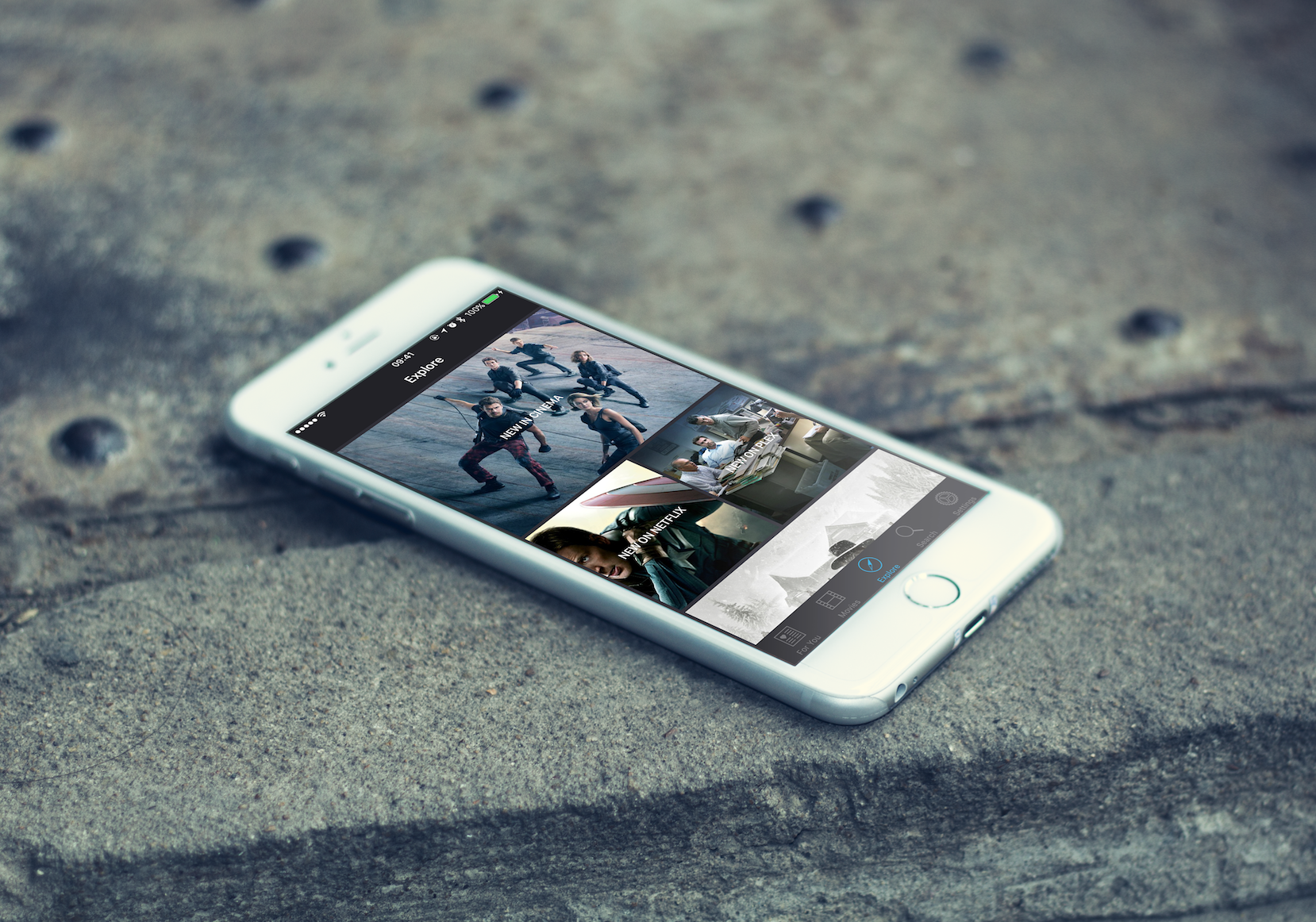
London based startup, AlertFilm Ltd. today announces AlertFilm 1.3.1, an update to their popular movie discovery app developed for iOS devices. AlertFilm makes discovering and enjoying streaming content simple by combining all the content from all the streaming platforms. With AlertFilm, the goal is to create an experience that is essential and enjoyable for the modern consumer, an everyday app that is as compelling and immersive as your favourite movie. Version 1.3.1 fixes a very minor bug.
London, United Kingdom - AlertFilm Ltd. today is proud to announce the release and immediate availability of AlertFilm 1.3.1, an update to their popular movie discovery app developed for iPhone, iPad and iPod touch devices. AlertFilm makes discovering and enjoying streaming content simple by combining all the content from all the streaming platforms.
Currently, AlertFilm is available for cinema releases, iTunes, Netflix and Plex. Amazon prime is coming soon. The market opportunity is huge. 7 out of 10 consumers watch streaming entertainment every week, and growth is unprecedented. With AlertFilm, the goal is to create an experience that is essential and enjoyable for the modern consumer, an everyday app that is as compelling and immersive as your favourite movie.
Features Available:
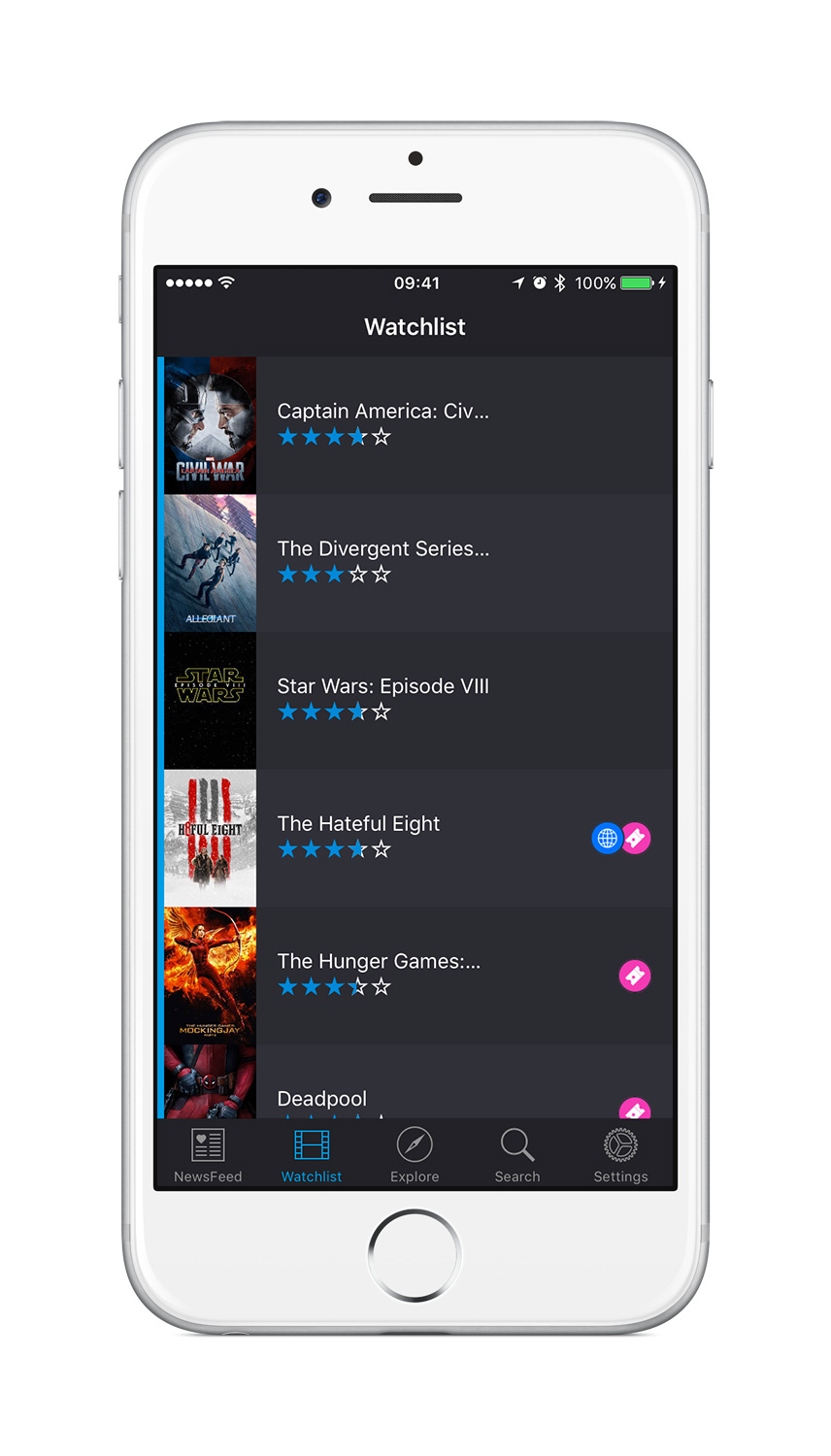
* Movie discovery (trailer, date, description)
* Watchlist
* Curated Playlists
* Notifications
* Check Availability
"Today, 7 out of 10 people watch streaming media every week, such as Netflix, Amazon Prime, BBC iPlayer, Sky, iTunes and more," explained Benjamin Garnier, product lead at London based AlertFilm Ltd. "There are dozens of streaming content providers, each with thousands of hours of content that is published and withdrawn without warning. Discovery is broken. Recommendation is broken. The simple task of finding a movie you want to watch, checking its availability and being able to watch it is a real problem. AlertFilm is a Free iOS app that aims to solve the massive problem of choice and discovery in the streaming entertainment market."
Currently in Ignite accelerator program based in London, AlertFilm will be opening a seed round soon. Version 1.3.1 fixes a very minor bug.
Device Requirements:
* iPhone, iPad, and iPod touch
* Requires iOS 9.1 or later
* 68.1 MB
Pricing and Availability:
AlertFilm 1.3.1 is Free and available worldwide exclusively through the App Store in the Entertainment category.
AlertFilm 1.3.1: http://get.alertfilm.com
Download from iTunes: https://itunes.apple.com/us/app/apple-store/id1082382753?pt=117719216&ct=prmac&mt=8
Promotional Image: https://s3-eu-west-1.amazonaws.com/filealertfilm/lifestyle1.png
Screenshot: https://s3-eu-west-1.amazonaws.com/filealertfilm/Screenshot2.jpg
App Icon: https://s3-eu-west-1.amazonaws.com/filealertfilm/iTunesArtwork-512%402x.png
Review Guide (PDF): https://s3-eu-west-1.amazonaws.com/filealertfilm/AlertFilm-ReviewGuide-v1.pdf
Located in London, United Kingdom, AlertFilm Ltd. is currently in Ignite startup accelerator program formed by 3 friends who graduated from international business, communication and engineering schools. These tech entrepreneurs are passionate about the entertainment industry and deeply involved in the startup community. All Material and Software (C) Copyright 2016 AlertFilm Ltd. All Rights Reserved. Apple, the Apple logo, iPhone, iPod and iPad are registered trademarks of Apple Inc. in the U.S. and/or other countries. Other trademarks and registered trademarks may be the property of their respective owners.
*******
Link To Article: http://prmac.com/release-id-79136.htm
*******
---------------------------------------------------------------------------------
Note that you can alter delivered distributions at any time.
Login to your account on prMac to alter your channel selection, or to opt-out at any time.


Notesero 1.0 for iPhone - A Beautifully Crafted Notes App For Daily Use
A new article has been published at prMac.
Notesero 1.0 for iPhone - A Beautifully Crafted Notes App For Daily Use - Published on 04/04/16
Velvet Rock Apps today introduces Notesero 1.0, their brand new note taking app for for iPhone. Featuring a beautifully polished interface, Notesero is perfect for day-to-day use. The app safely backs up the users data to iCloud and offers password protected folders to keep notes private and away from prying eyes. Notesero provides an intuitive design that focuses on user experience with the knowledge that all data is persistent and safely synced to iCloud.
Reading, United Kingdom - Velvet Rock Apps today introduces Notesero 1.0 for iPhone, their brand new notes app that safely backs up the users data to iCloud and offers password protected folders to keep notes private and away from prying eyes. With a beautifully polished interface and seamless iCloud syncing, Notesero is perfect for day to day use.
From the moment you open Notesero you'll appreciate the simple elegant design. The top part of the screen shows folders that have been created whilst the bottom third of the display provides a basic dashboard overview showing the total number of folders, the total number of notes and recent notes. Simply tapping on the total number of notes will immediately show all the notes that have been created irrespective of which folder they relate to. Tapping on recent notes give fast access to the last 10 notes created. Below these details are 2 buttons, the larger of the two allows the user to create a note and the smaller button offers further options which include creating a new folder, rearranging folders and accessing the settings area.
Once a folder has been created the user can simply swipe from right to left on the folder name to reveal three options; protect, rename or delete. Not only can users password protect individual folders but they can also give each folder a unique password and because Notesero supports Touch ID, opening protected folders is fast and secure. Folders can also be reorganised simply by dragging and dropping in any order the user desires, the ordering is subsequently synced to iCloud.
Creating a note is simple and quick, tapping the 'New Note' button immediately allows the user to start typing. A simple layout shows a title area towards the top of the screen and below this the main text input area. When selecting text, three small buttons appear just above the keyboard allowing the user to quickly add Bold, Italics or Underline to their selection.
There are numerous note taking apps available for iOS and trying to stand out from the crowd is becoming increasingly difficult. Notesero provides an intuitive, beautifully polished design that focuses on user experience with the knowledge that all data is persistent and safely synced to iCloud. Under-the-hood, Notesero has been designed for future updates in mind and proves just how much attention to detail has gone into creating the app.
Feature Highlights:
* Syncs all notes and folders to iCloud
* Password protect individual folders
* Search all notes instantly or alternatively search inside individual folders
* Use Touch ID to unlock password protected folders
* Organise notes and folders with drag and drop, no longer be constrained by date or alphabetical order
* Fast access to the last 10 notes with a single tap
* Get detail about individual notes such as number of words and characters and date last modified
* Email, print and share your notes as required
"Notesero has been built from the ground-up with the main focus being on the user experience" commented CEO and company founder , Chris Yates. "We wanted to craft a notes app that people would want to use daily and to ensure it was ready for future updates. Our intention is to develop both a Mac and iPad version of Notesero and due to our forward thinking development process, Notesero is already primed for future releases on separate devices. We're very excited about the road ahead."
Device Requirements:
* iPhone Compatible
* iOS 9.2 or later
* 9.2 MB
Pricing and Availability:
Notesero 1.0 for iPhone is free with an In-App Purchase and available worldwide through the iTunes App Store in the Productivity & Business categories.
Velvet Rock Apps: http://www.velvetrockapps.com/
Notesero 1.0: http://velvetrockapps.com/notesero.html
Download from iTunes: https://itunes.apple.com/app/notesero-capture-notes-password/id1089947929
Screenshot: http://a2.mzstatic.com/us/r30/Purple69/v4/f0/91/6b/f0916b59-310a-f88b-82f3-a0beabc6aa88/screen322x572.jpeg
App Icon: http://a1.mzstatic.com/us/r30/Purple49/v4/a9/00/79/a90079cc-0ea3-e428-809a-302d60f30023/icon350x350.png
Press Kit (zip): http://www.velvetrockapps.com/assets/notesero-1.0-press-kit.zip
Located in Reading, United Kingdom, the Velvet Rock Apps team is an independent software company founded by Chris Yates in 2010. With their strong blend of design and development skills, Velvet Rock's philosophy is to craft beautiful looking applications that focus on the user experience. Copyright (C) 2016 Chris Yates & Velvet Rock Apps. All Rights Reserved. Apple, the Apple logo, Mac, iPhone, iPod, and iPad are registered trademarks of Apple Inc. in the U.S. and/or other countries.
*******
Link To Article: http://prmac.com/release-id-79137.htm
*******
---------------------------------------------------------------------------------
Note that you can alter delivered distributions at any time.
Login to your account on prMac to alter your channel selection, or to opt-out at any time.
Notesero 1.0 for iPhone - A Beautifully Crafted Notes App For Daily Use - Published on 04/04/16
Velvet Rock Apps today introduces Notesero 1.0, their brand new note taking app for for iPhone. Featuring a beautifully polished interface, Notesero is perfect for day-to-day use. The app safely backs up the users data to iCloud and offers password protected folders to keep notes private and away from prying eyes. Notesero provides an intuitive design that focuses on user experience with the knowledge that all data is persistent and safely synced to iCloud.
Reading, United Kingdom - Velvet Rock Apps today introduces Notesero 1.0 for iPhone, their brand new notes app that safely backs up the users data to iCloud and offers password protected folders to keep notes private and away from prying eyes. With a beautifully polished interface and seamless iCloud syncing, Notesero is perfect for day to day use.
From the moment you open Notesero you'll appreciate the simple elegant design. The top part of the screen shows folders that have been created whilst the bottom third of the display provides a basic dashboard overview showing the total number of folders, the total number of notes and recent notes. Simply tapping on the total number of notes will immediately show all the notes that have been created irrespective of which folder they relate to. Tapping on recent notes give fast access to the last 10 notes created. Below these details are 2 buttons, the larger of the two allows the user to create a note and the smaller button offers further options which include creating a new folder, rearranging folders and accessing the settings area.
Once a folder has been created the user can simply swipe from right to left on the folder name to reveal three options; protect, rename or delete. Not only can users password protect individual folders but they can also give each folder a unique password and because Notesero supports Touch ID, opening protected folders is fast and secure. Folders can also be reorganised simply by dragging and dropping in any order the user desires, the ordering is subsequently synced to iCloud.
Creating a note is simple and quick, tapping the 'New Note' button immediately allows the user to start typing. A simple layout shows a title area towards the top of the screen and below this the main text input area. When selecting text, three small buttons appear just above the keyboard allowing the user to quickly add Bold, Italics or Underline to their selection.
There are numerous note taking apps available for iOS and trying to stand out from the crowd is becoming increasingly difficult. Notesero provides an intuitive, beautifully polished design that focuses on user experience with the knowledge that all data is persistent and safely synced to iCloud. Under-the-hood, Notesero has been designed for future updates in mind and proves just how much attention to detail has gone into creating the app.
Feature Highlights:
* Syncs all notes and folders to iCloud
* Password protect individual folders
* Search all notes instantly or alternatively search inside individual folders
* Use Touch ID to unlock password protected folders
* Organise notes and folders with drag and drop, no longer be constrained by date or alphabetical order
* Fast access to the last 10 notes with a single tap
* Get detail about individual notes such as number of words and characters and date last modified
* Email, print and share your notes as required
"Notesero has been built from the ground-up with the main focus being on the user experience" commented CEO and company founder , Chris Yates. "We wanted to craft a notes app that people would want to use daily and to ensure it was ready for future updates. Our intention is to develop both a Mac and iPad version of Notesero and due to our forward thinking development process, Notesero is already primed for future releases on separate devices. We're very excited about the road ahead."
Device Requirements:
* iPhone Compatible
* iOS 9.2 or later
* 9.2 MB
Pricing and Availability:
Notesero 1.0 for iPhone is free with an In-App Purchase and available worldwide through the iTunes App Store in the Productivity & Business categories.
Velvet Rock Apps: http://www.velvetrockapps.com/
Notesero 1.0: http://velvetrockapps.com/notesero.html
Download from iTunes: https://itunes.apple.com/app/notesero-capture-notes-password/id1089947929
Screenshot: http://a2.mzstatic.com/us/r30/Purple69/v4/f0/91/6b/f0916b59-310a-f88b-82f3-a0beabc6aa88/screen322x572.jpeg

App Icon: http://a1.mzstatic.com/us/r30/Purple49/v4/a9/00/79/a90079cc-0ea3-e428-809a-302d60f30023/icon350x350.png

Press Kit (zip): http://www.velvetrockapps.com/assets/notesero-1.0-press-kit.zip
Located in Reading, United Kingdom, the Velvet Rock Apps team is an independent software company founded by Chris Yates in 2010. With their strong blend of design and development skills, Velvet Rock's philosophy is to craft beautiful looking applications that focus on the user experience. Copyright (C) 2016 Chris Yates & Velvet Rock Apps. All Rights Reserved. Apple, the Apple logo, Mac, iPhone, iPod, and iPad are registered trademarks of Apple Inc. in the U.S. and/or other countries.
*******
Link To Article: http://prmac.com/release-id-79137.htm
*******
---------------------------------------------------------------------------------
Note that you can alter delivered distributions at any time.
Login to your account on prMac to alter your channel selection, or to opt-out at any time.
First Ever Role-Playing Poker Game - Lord Of Poker
A new article has been published at prMac.
First Ever Role-Playing Poker Game - Lord Of Poker - Published on 04/03/16
The Lord of Poker is a Role-playing Poker Game (RPPG). RPPG is a unique gaming genre that combines poker, an RPG, and a fantasy card game, and expands gaming experience through innovative gameplay. The game is a blend of the gameplay styles, with inspiration from Heroes of Might and Magic 3, Hearthstone and Dota 2. Developer LoP Game Corp. is currently seeking funds to complete the game's development over on Kickstarter. The game will be initially be delivered to PC and Mac OS X computers.
Minsk, Belarus - Developer LoP Game Corp. is currently seeks funds to complete the game's development over on Kickstarter. The team describes Lord of Poker as a blend of the gameplay styles with inspiration from Heroes of Might and Magic 3, Hearthstone and Dota 2. The game will be initially be delivered to PC and Mac OS X computers.
The game main features are:
* Players gain experience, level up, collect powerful items, and earn gold (internal money) through card combats. Heroes advance by making specified poker moves and their combos (raise, call, all-in, etc.).
* Using magic spells during card combat has a dramatic impact on gameplay, making it absolutely unpredictable.
* There are also four specific attributes each character class possesses to varying degrees: Endurance, Courage, Mind and Luck. Each of these influences strategy, playing style, and outcome of card combat.
* Each new location introduces new conditions to the game, making it impossible to use the same winning tactics all the time. Players will need to adapt their gaming strategy as they progress.
* Gameplay unfolds through a combination of gradual development of the game's plot and the immersive experience of a MMORPG (Massively Multiplayer On-line Role Playing Game) that takes place in an open world. Players will compete against other players and mobs while progressing through the central quest of the game.
* The never before seen Team Poker mode!
You will play one of class hero customary for fantasy setting which the Lord of Poker world is. You may choose Assassin, Druid, Monk, Paladin, and Wizard, all classes available in both male and female characters. A hero of your choice will then engage in card combats against other players and characters/bosses powered by the game's AI (mobs).
Hero's primary skills (determined by character class), powerful items that are worn or wielded, and knowledge of magic spells all influence the outcome of the game, just as your real-world poker tactics do. Each in-game playing location affects gaming style as well, by presenting a unique set of conditions that forces players to adapt in order to win. Your quest through the game's rich and detailed fantasy world to win the title of Lord of Poker promises to be not just an incredible adventure, but an entirely new poker/RPG experience.
Lord of Poker will be downloaded for free from the website. A monthly subscription at the price of $10 will be required to play the game (while the backers will get free subscription for one month or longer). The best players will be able to withdraw the real money from the game through the freeroll-type Main Tournament to be held monthly. Presumably, up to 10% of the total amount of subscriptions for the respective month will be distributed as the prize pool in the Main Tournament.
LoP Game Corp. is on Kickstarter right now and is looking to raise $100,000 until 3rd May 2016.
Lop Game Corp.: http://lopgame.com/en
Lord of Poker: https://www.kickstarter.com/projects/39490487/lord-of-poker
Lop Game Corp. is an indie game developing studio based in Belarus. The core of LoP Game Corp. is two friends from Belarus, who began work on Lord of Poker about a year ago. Alexander Petukh has a successful career in marketing and advertising, and Alexander Bernat is a professional poker player. All Material and Software (C) Copyright 2016 Lop Game Corp. All Rights Reserved. Apple, the Apple logo, Macintosh and Mac OS X are registered trademarks of Apple Inc. in the U.S. and/or other countries. Other trademarks and registered trademarks may be the property of their respective owners.
*******
Link To Article: http://prmac.com/release-id-79131.htm
*******
---------------------------------------------------------------------------------
Note that you can alter delivered distributions at any time.
Login to your account on prMac to alter your channel selection, or to opt-out at any time.
First Ever Role-Playing Poker Game - Lord Of Poker - Published on 04/03/16
The Lord of Poker is a Role-playing Poker Game (RPPG). RPPG is a unique gaming genre that combines poker, an RPG, and a fantasy card game, and expands gaming experience through innovative gameplay. The game is a blend of the gameplay styles, with inspiration from Heroes of Might and Magic 3, Hearthstone and Dota 2. Developer LoP Game Corp. is currently seeking funds to complete the game's development over on Kickstarter. The game will be initially be delivered to PC and Mac OS X computers.
Minsk, Belarus - Developer LoP Game Corp. is currently seeks funds to complete the game's development over on Kickstarter. The team describes Lord of Poker as a blend of the gameplay styles with inspiration from Heroes of Might and Magic 3, Hearthstone and Dota 2. The game will be initially be delivered to PC and Mac OS X computers.
The game main features are:
* Players gain experience, level up, collect powerful items, and earn gold (internal money) through card combats. Heroes advance by making specified poker moves and their combos (raise, call, all-in, etc.).
* Using magic spells during card combat has a dramatic impact on gameplay, making it absolutely unpredictable.
* There are also four specific attributes each character class possesses to varying degrees: Endurance, Courage, Mind and Luck. Each of these influences strategy, playing style, and outcome of card combat.
* Each new location introduces new conditions to the game, making it impossible to use the same winning tactics all the time. Players will need to adapt their gaming strategy as they progress.
* Gameplay unfolds through a combination of gradual development of the game's plot and the immersive experience of a MMORPG (Massively Multiplayer On-line Role Playing Game) that takes place in an open world. Players will compete against other players and mobs while progressing through the central quest of the game.
* The never before seen Team Poker mode!
You will play one of class hero customary for fantasy setting which the Lord of Poker world is. You may choose Assassin, Druid, Monk, Paladin, and Wizard, all classes available in both male and female characters. A hero of your choice will then engage in card combats against other players and characters/bosses powered by the game's AI (mobs).
Hero's primary skills (determined by character class), powerful items that are worn or wielded, and knowledge of magic spells all influence the outcome of the game, just as your real-world poker tactics do. Each in-game playing location affects gaming style as well, by presenting a unique set of conditions that forces players to adapt in order to win. Your quest through the game's rich and detailed fantasy world to win the title of Lord of Poker promises to be not just an incredible adventure, but an entirely new poker/RPG experience.
Lord of Poker will be downloaded for free from the website. A monthly subscription at the price of $10 will be required to play the game (while the backers will get free subscription for one month or longer). The best players will be able to withdraw the real money from the game through the freeroll-type Main Tournament to be held monthly. Presumably, up to 10% of the total amount of subscriptions for the respective month will be distributed as the prize pool in the Main Tournament.
LoP Game Corp. is on Kickstarter right now and is looking to raise $100,000 until 3rd May 2016.
Lop Game Corp.: http://lopgame.com/en
Lord of Poker: https://www.kickstarter.com/projects/39490487/lord-of-poker
Lop Game Corp. is an indie game developing studio based in Belarus. The core of LoP Game Corp. is two friends from Belarus, who began work on Lord of Poker about a year ago. Alexander Petukh has a successful career in marketing and advertising, and Alexander Bernat is a professional poker player. All Material and Software (C) Copyright 2016 Lop Game Corp. All Rights Reserved. Apple, the Apple logo, Macintosh and Mac OS X are registered trademarks of Apple Inc. in the U.S. and/or other countries. Other trademarks and registered trademarks may be the property of their respective owners.
*******
Link To Article: http://prmac.com/release-id-79131.htm
*******
---------------------------------------------------------------------------------
Note that you can alter delivered distributions at any time.
Login to your account on prMac to alter your channel selection, or to opt-out at any time.
Dominican Republic Tv Live 1.5 for iOS
A new article has been published at prMac.
Dominican Republic Tv Live 1.5 for iOS - Published on 04/03/16
LastThink announces the release of Dominican Republic Tv Live 1.5, their highly customizable TV application for iOS devices. Anyone can directly access their favorite TV channel and watch diverse films, news, programs from their iPad, iPhone and iPod touch anywhere and anytime. Vibes are smart TV and movie playlists. Users can easily record their favorite films, news, talk shows, programs and more. Users can also share what they are watching via Facebook.
Yerevan, Armenia - LastThink is proud to announce the release of Dominican Republic Tv Live 1.5, their highly customizable TV application developed for iPad and iPhone devices. Users can directly access their favorite TV channel and watch diverse films, news, programs from their iPad, iPhone and iPod touch anywhere and anytime.
Features:
* Navigating album photos by sliding your finger right or left on the screen
* Change the device you are streaming the picture to, by taping on the Play button in the upper right corner of your iPad's screen and selecting a desired device
* Screening and shooting any moment of your preferred TV program or film you like
* Altering the boring parts and moving straight to the best part at once - Filter by HD-only and favorite channels
* Rotating channels easily by a mere touch on your screen
* Organize your favorite TV shows, sport teams, movies, and actors and find where you can watch them - on TV and on demand
* Recording your favorite films, news, Talk Shows, programs and etc.
* Sharing what you're watching via Facebook, Twitter, YouTube, Dropbox, email and more - Vibes are smart TV and movie playlists
* The highest quality even with the lowest Internet and HD quality with the normal Internet - You can watch TV channels in HD level
* Editing and cropping videos into smaller parts. In addition to, you can take videos of your favorite program
* Capturing the funniest and most interesting moments of what you are watching with the trim tool
* Searching the content across streaming and broadcast services
* Discovering more than 100 channels of great entertainment beyond the Dominican Republic Online TV app right on your device's touchscreen interface
If you however experience any issues, please do not hesitate to contact us if you'd like to share your experience with live TV channels, or provide suggestions on how we could improve the product further. We will be more than happy to get in touch.
NOTE: We have selected data from the internet and if any assembly or constitution doesn't want us to show the content of the unit, please recommend us to remove it. We follow TV regulations and adjustments and we select original TV content data without artificial editions.
Device Requirements:
* iPhone, iPad, and iPod touch
* Optimized for iPhone 5, iPhone 6, and iPhone 6 Plus
* Requires iOS 6.0 or later
* Universal Application
* 33.2 MB
Pricing and Availability:
Dominican Republic Tv Live 1.5 is free and is available worldwide exclusively through the App Store in the Entertainment category.
LastThink: http://lastthink.com/
Dominican Republic Tv Live 1.5: https://www.facebook.com/Dominican-Republic-Tv-Live-Community-179332479089332/
Download from iTunes: https://itunes.apple.com/app/dominican-republic-tv-live/id1074205902
Screenshot: http://a4.mzstatic.com/us/r30/Purple69/v4/df/1c/3f/df1c3f2a-58c1-3242-d04d-7e18bbc1f2e2/screen322x572.jpeg
App Icon: http://a1.mzstatic.com/us/r30/Purple69/v4/c3/d6/99/c3d6990a-f017-5cdd-a17e-e021379b1d2c/icon175x175.png
LastThink is an IT company with a focus on mobile development. It has extended its list of services since 2012 to offer high-end business process management, system integration, as well as up-to-date communication solutions. LastThink's mission is to deliver maximum business value to its customers by designing, developing, implementing and maintaining efficient and high quality software solutions aligned with their most essential business needs. Their team will always do its best to meet client expectations. Copyright (C) 2016 LastThink LLC. All Rights Reserved. Apple, the Apple logo, iPhone, iPad and iPod are registered trademarks of Apple Inc. in the U.S. and/or other countries.
*******
Link To Article: http://prmac.com/release-id-79130.htm
*******
---------------------------------------------------------------------------------
Note that you can alter delivered distributions at any time.
Login to your account on prMac to alter your channel selection, or to opt-out at any time.
Dominican Republic Tv Live 1.5 for iOS - Published on 04/03/16
LastThink announces the release of Dominican Republic Tv Live 1.5, their highly customizable TV application for iOS devices. Anyone can directly access their favorite TV channel and watch diverse films, news, programs from their iPad, iPhone and iPod touch anywhere and anytime. Vibes are smart TV and movie playlists. Users can easily record their favorite films, news, talk shows, programs and more. Users can also share what they are watching via Facebook.
Yerevan, Armenia - LastThink is proud to announce the release of Dominican Republic Tv Live 1.5, their highly customizable TV application developed for iPad and iPhone devices. Users can directly access their favorite TV channel and watch diverse films, news, programs from their iPad, iPhone and iPod touch anywhere and anytime.
Features:
* Navigating album photos by sliding your finger right or left on the screen
* Change the device you are streaming the picture to, by taping on the Play button in the upper right corner of your iPad's screen and selecting a desired device
* Screening and shooting any moment of your preferred TV program or film you like
* Altering the boring parts and moving straight to the best part at once - Filter by HD-only and favorite channels
* Rotating channels easily by a mere touch on your screen
* Organize your favorite TV shows, sport teams, movies, and actors and find where you can watch them - on TV and on demand
* Recording your favorite films, news, Talk Shows, programs and etc.
* Sharing what you're watching via Facebook, Twitter, YouTube, Dropbox, email and more - Vibes are smart TV and movie playlists
* The highest quality even with the lowest Internet and HD quality with the normal Internet - You can watch TV channels in HD level
* Editing and cropping videos into smaller parts. In addition to, you can take videos of your favorite program
* Capturing the funniest and most interesting moments of what you are watching with the trim tool
* Searching the content across streaming and broadcast services
* Discovering more than 100 channels of great entertainment beyond the Dominican Republic Online TV app right on your device's touchscreen interface
If you however experience any issues, please do not hesitate to contact us if you'd like to share your experience with live TV channels, or provide suggestions on how we could improve the product further. We will be more than happy to get in touch.
NOTE: We have selected data from the internet and if any assembly or constitution doesn't want us to show the content of the unit, please recommend us to remove it. We follow TV regulations and adjustments and we select original TV content data without artificial editions.
Device Requirements:
* iPhone, iPad, and iPod touch
* Optimized for iPhone 5, iPhone 6, and iPhone 6 Plus
* Requires iOS 6.0 or later
* Universal Application
* 33.2 MB
Pricing and Availability:
Dominican Republic Tv Live 1.5 is free and is available worldwide exclusively through the App Store in the Entertainment category.
LastThink: http://lastthink.com/
Dominican Republic Tv Live 1.5: https://www.facebook.com/Dominican-Republic-Tv-Live-Community-179332479089332/
Download from iTunes: https://itunes.apple.com/app/dominican-republic-tv-live/id1074205902
Screenshot: http://a4.mzstatic.com/us/r30/Purple69/v4/df/1c/3f/df1c3f2a-58c1-3242-d04d-7e18bbc1f2e2/screen322x572.jpeg

App Icon: http://a1.mzstatic.com/us/r30/Purple69/v4/c3/d6/99/c3d6990a-f017-5cdd-a17e-e021379b1d2c/icon175x175.png

LastThink is an IT company with a focus on mobile development. It has extended its list of services since 2012 to offer high-end business process management, system integration, as well as up-to-date communication solutions. LastThink's mission is to deliver maximum business value to its customers by designing, developing, implementing and maintaining efficient and high quality software solutions aligned with their most essential business needs. Their team will always do its best to meet client expectations. Copyright (C) 2016 LastThink LLC. All Rights Reserved. Apple, the Apple logo, iPhone, iPad and iPod are registered trademarks of Apple Inc. in the U.S. and/or other countries.
*******
Link To Article: http://prmac.com/release-id-79130.htm
*******
---------------------------------------------------------------------------------
Note that you can alter delivered distributions at any time.
Login to your account on prMac to alter your channel selection, or to opt-out at any time.
New Features. New Updates. The New FotoMagico 5 is Here.
A new article has been published at prMac.
New Features. New Updates. The New FotoMagico 5 is Here. - Published on 04/03/16
Boinx Software announces a new version of its premier slideshow creation tool for Mac OS X, FotoMagico 5. This updated software program brings a combination of brand new editing tools and advancements to pre-existing features. This is the most powerful version of FotoMagico yet, featuring upgraded professional 4K slideshow capabilities, a new audio editing interface and advanced animation features for photos and videos.
Puchheim, Germany - Boinx Software has just announced a new version of its premier slideshow creation tool for Mac OS X, FotoMagico 5. This updated software program brings a combination of brand new editing tools and advancements to pre-existing features. Among many enhancements, FotoMagico 5 now features a slideshow interface with pre-built stories called "Snippets," Audio Envelopes and Fades to control audio levels, an Audio Marker Assistant to provide more precise sound editing capabilities, improved text editing and placeholders, and much more.
"FotoMagico is made by photographers for photographers," states Oliver Breidenbach, CEO, Boinx Software. "This is why it puts the needs of photographers front and center. It's easy to learn, as photographers want to spend their time taking photos - not learning a slide show app. The Snippets feature gets you magical results more quickly than ever. FotoMagico 5 slideshows look brilliant on 4K TVs as well as on YouTube. That's why thousands of photographers rely on FotoMagico to tell their stories."
FotoMagico 5 Updates Include:
* New "Snippets" feature allow users to insert their own photo and video content into these pre-built stories to create beautiful slideshows; FotoMagico pros can create their own Snippets to streamline the production of slideshows, perfect for those working with clients
* New Dark User Interface, designed for users of all skill levels, to make photos and videos stand out even more against a more modern backdrop
* Music Snippets come with free CC licensed music by Josh Woodward and Kevin MacLeod to set the mood; pre-loaded with perfectly timed audio markers means your story is synchronized with the matching music, while an attribution slide keeps users out of copyright troubles
* Animation Assistant designed to automatically make your slideshow move, while accounting for a variety of photo aspect ratios like portrait and panorama, movie and text properties
* New Audio Marker Assistant (Pro only) offers more precise control over timing than ever before, with perfectly synchronized music and slides creating the right dramatic effect
* New Audio Volume Envelopes and Fades (Pro only), the most requested feature, provides audio level controls that enable users to make the music softer when one intends to speak if presenting the slideshow, or to let the video audio take center stage
* Improved Text Editing and Text Placeholders (Pro only) for the most intuitive way to edit and format titles yet
Additional new features available only in FotoMagico 5 Pro include the timeline view; record narration; access to Lightroom and Aperture libraries; teleprompter support; chapter support; masks, borders and color correction; and additional sharing options, such as the Standalone Player, ProRes video, and custom video.
About FotoMagico:
FotoMagico, winner of two coveted Apple Design Awards, is the gold standard in slideshow apps, made exclusively for the Mac. FotoMagico, used by thousands of professional and amateur photographers around the world, allows users to create customized slideshows, mixing photos with movies and audio, for a storytelling effect like none other. FotoMagico brings photos to life and keeps any audience at the edge of their seats.
System Requirements:
* OS X 10.10 Yosemite or later
* 8 GB of RAM
* Dedicated graphics card is recommended
Pricing and Availability:
FotoMagico 5 is available now for $49.99 USD (or an equivalent amount in other currencies), FotoMagico 5 Pro is available for $99.99 USD. Existing customers can upgrade to FotoMagico 5 Pro for $49.99 USD from FotoMagico 4, and $74.99 USD from FotoMagico 3. Existing customers who previously purchased FotoMagico 4 in the Mac App Store will be able to upgrade to FotoMagico 5 Pro free of charge once they purchase the basic version of FotoMagico 5 for 49.99 USD. Members of the media are invited to review FotoMagico 5. For more information, please contact Anya Nelson. For press images, please visit Boinx online.
Boinx: http://boinx.com/
FotoMagico 5: https://boinx.com/fotomagico/
YouTube Demo: https://www.youtube.com/watch?v=ggvDpx-uSUI&feature=youtu.be
Press Images: https://boinx.com/press/media/
Located in Puchheim, near Munich, Germany, Boinx Software Ltd. develops award-winning animation, video production and photography software for the Mac(R) platform and iOS devices including the iPhone(R), iPad(R), iPod(R) and Apple TV(R). Honored with numerous Apple Design Awards and coveted spots on the Mac App Store's Best Apps of the Year list, the extensive family of Boinx apps includes iStopMotion for Mac, iStopMotion for iPad, FotoMagico, mimoLive (formerly BoinxTV), Mousepose, You Gotta See This!, PhotoPresenter for iOS, and PhotoWall+ for tvOS Boinx's newest social photo wall for sharing and saving crowd-sourced photos. Boinx Software has also been instrumental in the developmental processes of popular apps including Heads Up!, Ellen DeGeneres's charades party game, and the Leica T iPhone and iPad app, the elegant remote companion to the Leica T digital camera. Follow @boinxsoftware on Twitter and Facebook. For more information, please visit the Boinx Software website. All
Material and Software (C) Copyright 2016 Boinx Software Ltd. All Rights Reserved. Apple, the Apple logo, Macintosh and Mac OS X are registered trademarks of Apple Inc. in the U.S. and/or other countries. Other trademarks and registered trademarks may be the property of their respective owners.
*******
Link To Article: http://prmac.com/release-id-79129.htm
*******
---------------------------------------------------------------------------------
Note that you can alter delivered distributions at any time.
Login to your account on prMac to alter your channel selection, or to opt-out at any time.
New Features. New Updates. The New FotoMagico 5 is Here. - Published on 04/03/16
Boinx Software announces a new version of its premier slideshow creation tool for Mac OS X, FotoMagico 5. This updated software program brings a combination of brand new editing tools and advancements to pre-existing features. This is the most powerful version of FotoMagico yet, featuring upgraded professional 4K slideshow capabilities, a new audio editing interface and advanced animation features for photos and videos.
Puchheim, Germany - Boinx Software has just announced a new version of its premier slideshow creation tool for Mac OS X, FotoMagico 5. This updated software program brings a combination of brand new editing tools and advancements to pre-existing features. Among many enhancements, FotoMagico 5 now features a slideshow interface with pre-built stories called "Snippets," Audio Envelopes and Fades to control audio levels, an Audio Marker Assistant to provide more precise sound editing capabilities, improved text editing and placeholders, and much more.
"FotoMagico is made by photographers for photographers," states Oliver Breidenbach, CEO, Boinx Software. "This is why it puts the needs of photographers front and center. It's easy to learn, as photographers want to spend their time taking photos - not learning a slide show app. The Snippets feature gets you magical results more quickly than ever. FotoMagico 5 slideshows look brilliant on 4K TVs as well as on YouTube. That's why thousands of photographers rely on FotoMagico to tell their stories."
FotoMagico 5 Updates Include:
* New "Snippets" feature allow users to insert their own photo and video content into these pre-built stories to create beautiful slideshows; FotoMagico pros can create their own Snippets to streamline the production of slideshows, perfect for those working with clients
* New Dark User Interface, designed for users of all skill levels, to make photos and videos stand out even more against a more modern backdrop
* Music Snippets come with free CC licensed music by Josh Woodward and Kevin MacLeod to set the mood; pre-loaded with perfectly timed audio markers means your story is synchronized with the matching music, while an attribution slide keeps users out of copyright troubles
* Animation Assistant designed to automatically make your slideshow move, while accounting for a variety of photo aspect ratios like portrait and panorama, movie and text properties
* New Audio Marker Assistant (Pro only) offers more precise control over timing than ever before, with perfectly synchronized music and slides creating the right dramatic effect
* New Audio Volume Envelopes and Fades (Pro only), the most requested feature, provides audio level controls that enable users to make the music softer when one intends to speak if presenting the slideshow, or to let the video audio take center stage
* Improved Text Editing and Text Placeholders (Pro only) for the most intuitive way to edit and format titles yet
Additional new features available only in FotoMagico 5 Pro include the timeline view; record narration; access to Lightroom and Aperture libraries; teleprompter support; chapter support; masks, borders and color correction; and additional sharing options, such as the Standalone Player, ProRes video, and custom video.
About FotoMagico:
FotoMagico, winner of two coveted Apple Design Awards, is the gold standard in slideshow apps, made exclusively for the Mac. FotoMagico, used by thousands of professional and amateur photographers around the world, allows users to create customized slideshows, mixing photos with movies and audio, for a storytelling effect like none other. FotoMagico brings photos to life and keeps any audience at the edge of their seats.
System Requirements:
* OS X 10.10 Yosemite or later
* 8 GB of RAM
* Dedicated graphics card is recommended
Pricing and Availability:
FotoMagico 5 is available now for $49.99 USD (or an equivalent amount in other currencies), FotoMagico 5 Pro is available for $99.99 USD. Existing customers can upgrade to FotoMagico 5 Pro for $49.99 USD from FotoMagico 4, and $74.99 USD from FotoMagico 3. Existing customers who previously purchased FotoMagico 4 in the Mac App Store will be able to upgrade to FotoMagico 5 Pro free of charge once they purchase the basic version of FotoMagico 5 for 49.99 USD. Members of the media are invited to review FotoMagico 5. For more information, please contact Anya Nelson. For press images, please visit Boinx online.
Boinx: http://boinx.com/
FotoMagico 5: https://boinx.com/fotomagico/
YouTube Demo: https://www.youtube.com/watch?v=ggvDpx-uSUI&feature=youtu.be
Press Images: https://boinx.com/press/media/
Located in Puchheim, near Munich, Germany, Boinx Software Ltd. develops award-winning animation, video production and photography software for the Mac(R) platform and iOS devices including the iPhone(R), iPad(R), iPod(R) and Apple TV(R). Honored with numerous Apple Design Awards and coveted spots on the Mac App Store's Best Apps of the Year list, the extensive family of Boinx apps includes iStopMotion for Mac, iStopMotion for iPad, FotoMagico, mimoLive (formerly BoinxTV), Mousepose, You Gotta See This!, PhotoPresenter for iOS, and PhotoWall+ for tvOS Boinx's newest social photo wall for sharing and saving crowd-sourced photos. Boinx Software has also been instrumental in the developmental processes of popular apps including Heads Up!, Ellen DeGeneres's charades party game, and the Leica T iPhone and iPad app, the elegant remote companion to the Leica T digital camera. Follow @boinxsoftware on Twitter and Facebook. For more information, please visit the Boinx Software website. All
Material and Software (C) Copyright 2016 Boinx Software Ltd. All Rights Reserved. Apple, the Apple logo, Macintosh and Mac OS X are registered trademarks of Apple Inc. in the U.S. and/or other countries. Other trademarks and registered trademarks may be the property of their respective owners.
*******
Link To Article: http://prmac.com/release-id-79129.htm
*******
---------------------------------------------------------------------------------
Note that you can alter delivered distributions at any time.
Login to your account on prMac to alter your channel selection, or to opt-out at any time.
Gym Bag 1.0 - The Gym Utility App for iOS Devices
A new article has been published at prMac.
Gym Bag 1.0 - The Gym Utility App for iOS Devices - Published on 04/02/16
Purple Goldfish announces Gym Bag 1.0, their all-in-one workout and nutrition utility app for iOS touch devices. The app optimizes and streamlines workout and nutrition routines by counting sets, timing rests, calculating which plates to use, and calculating macronutrient and creatine intake recommendations. Gym bag is an all-in-one workout and nutrition utility app. Rest precisely, track sets effortlessly. Eat accurately, lift immensely. Smash that PB.
London, United Kingdom - Purple Goldfish is proud to announce the release of Gym Bag 1.0, their all-in-one workout and nutrition utility app for iPhone, iPad, and iPod touch devices. The app optimizes and streamlines workout and nutrition routines by counting sets, timing rests, calculating which plates to use, and calculating macronutrient and creatine intake recommendations.
Rest Precisely, Track Sets Effortlessly
* Time your rest precisely, maximizing the effectiveness of your routine.
* Track the amount of sets you have remaining, reduce mental fatigue.
* Leave the app and be notified that your rest has finished via a push notification.
Calculate Plates Instantly
* Enter a total weight to lift and the calculator will tell you what plates to use.
* Customizable, can support subtracting bar weight, as well as metric or imperial weights.
* If the weight cannot be made from the plates available, the app will calculate the nearest weight to your target weight.
Eat Accurately, Lift Immensely
* Calculate your macro nutrient requirements, broken down into the three: protein, fat and carbohydrate.
* Configurable, uses your bodyweight, daily caloric target, phase (bulk/cut) and gender to accurately calculate your macro nutrient requirements.
Smash That PB
* Calculate the pace you need to maintain to hit your PB.
* Configurable between metric and imperial.
Features:
LIFTING
* PLATE CALCULATOR - Instantly calculates plates for any given weight, metric or imperial.
* SET REST TIMER - Tracks sets and rest time between sets. Configurable to your routine.
* ONE REP MAX CALCULATOR - Calculates your one rep max.
* PERCENT OF ONE REP MAX CALCULATOR - Calculates the percentage of your one rep max to lift.
NUTRITION
* MACRONUTRIENTS CALCULATOR - Calculates daily protein, carbohydrate and fat target recommendations based on your fitness goals.
* CREATINE INTAKE CALCULATOR - Calculates daily creatine recommendations based on phase; loading or maintenance.
CARDIO
* DISTANCE CALCULATOR - Calculates the distance you will achieve by maintaining a specified pace.
* PACE CALCULATOR - Calculates the pace required to travel a certain distance in a specified time.
Device Requirements:
* iPhone, iPad, and iPod touch
* Requires iOS 9.0 or later
* Universal Application
* 9.7 MB
Pricing and Availability:
Gym Bag 1.0 is free, and is available worldwide exclusively through the App Store in the Health and Fitness category.
Purple Goldfish: http://www.purplegoldfish.onl
Gym Bag 1.0: http://www.purplegoldfish.onl/gymbag.html
Download from iTunes: https://itunes.apple.com/app/gym-bag-the-gym-utility-app/id1088185425
Screenshot: http://www.purplegoldfish.onl/img/gym-bag/5.png
App Icon: http://www.purplegoldfish.onl/img/gym-bag/Logo%20V2-01.png
Purple Goldfish build apps and offer technical services as a service. Copyright (C) 2016 Purple Goldfish. All Rights Reserved. Apple, the Apple logo, iPhone, iPad and iPod are registered trademarks of Apple Inc. in the U.S. and/or other countries.
*******
Link To Article: http://prmac.com/release-id-79128.htm
*******
---------------------------------------------------------------------------------
Note that you can alter delivered distributions at any time.
Login to your account on prMac to alter your channel selection, or to opt-out at any time.
Gym Bag 1.0 - The Gym Utility App for iOS Devices - Published on 04/02/16
Purple Goldfish announces Gym Bag 1.0, their all-in-one workout and nutrition utility app for iOS touch devices. The app optimizes and streamlines workout and nutrition routines by counting sets, timing rests, calculating which plates to use, and calculating macronutrient and creatine intake recommendations. Gym bag is an all-in-one workout and nutrition utility app. Rest precisely, track sets effortlessly. Eat accurately, lift immensely. Smash that PB.
London, United Kingdom - Purple Goldfish is proud to announce the release of Gym Bag 1.0, their all-in-one workout and nutrition utility app for iPhone, iPad, and iPod touch devices. The app optimizes and streamlines workout and nutrition routines by counting sets, timing rests, calculating which plates to use, and calculating macronutrient and creatine intake recommendations.
Rest Precisely, Track Sets Effortlessly
* Time your rest precisely, maximizing the effectiveness of your routine.
* Track the amount of sets you have remaining, reduce mental fatigue.
* Leave the app and be notified that your rest has finished via a push notification.
Calculate Plates Instantly
* Enter a total weight to lift and the calculator will tell you what plates to use.
* Customizable, can support subtracting bar weight, as well as metric or imperial weights.
* If the weight cannot be made from the plates available, the app will calculate the nearest weight to your target weight.
Eat Accurately, Lift Immensely
* Calculate your macro nutrient requirements, broken down into the three: protein, fat and carbohydrate.
* Configurable, uses your bodyweight, daily caloric target, phase (bulk/cut) and gender to accurately calculate your macro nutrient requirements.
Smash That PB
* Calculate the pace you need to maintain to hit your PB.
* Configurable between metric and imperial.
Features:
LIFTING
* PLATE CALCULATOR - Instantly calculates plates for any given weight, metric or imperial.
* SET REST TIMER - Tracks sets and rest time between sets. Configurable to your routine.
* ONE REP MAX CALCULATOR - Calculates your one rep max.
* PERCENT OF ONE REP MAX CALCULATOR - Calculates the percentage of your one rep max to lift.
NUTRITION
* MACRONUTRIENTS CALCULATOR - Calculates daily protein, carbohydrate and fat target recommendations based on your fitness goals.
* CREATINE INTAKE CALCULATOR - Calculates daily creatine recommendations based on phase; loading or maintenance.
CARDIO
* DISTANCE CALCULATOR - Calculates the distance you will achieve by maintaining a specified pace.
* PACE CALCULATOR - Calculates the pace required to travel a certain distance in a specified time.
Device Requirements:
* iPhone, iPad, and iPod touch
* Requires iOS 9.0 or later
* Universal Application
* 9.7 MB
Pricing and Availability:
Gym Bag 1.0 is free, and is available worldwide exclusively through the App Store in the Health and Fitness category.
Purple Goldfish: http://www.purplegoldfish.onl
Gym Bag 1.0: http://www.purplegoldfish.onl/gymbag.html
Download from iTunes: https://itunes.apple.com/app/gym-bag-the-gym-utility-app/id1088185425
Screenshot: http://www.purplegoldfish.onl/img/gym-bag/5.png

App Icon: http://www.purplegoldfish.onl/img/gym-bag/Logo%20V2-01.png

Purple Goldfish build apps and offer technical services as a service. Copyright (C) 2016 Purple Goldfish. All Rights Reserved. Apple, the Apple logo, iPhone, iPad and iPod are registered trademarks of Apple Inc. in the U.S. and/or other countries.
*******
Link To Article: http://prmac.com/release-id-79128.htm
*******
---------------------------------------------------------------------------------
Note that you can alter delivered distributions at any time.
Login to your account on prMac to alter your channel selection, or to opt-out at any time.
To Text Converter 1.3 from Tension Software
A new article has been published at prMac.
To Text Converter 1.3 from Tension Software - Published on 04/02/16
Tension Software announces the release of To Text Converter 1.3, the important update to their file converter for Mac OS X. To Text Converter can convert files from various formats (PDF, HTML, RTF, RTFD) to standard plain TEXT. It works with a simple drag and drop of files to its window. Version 1.3 brings an improved layout, improved text extraction, and optimization for OS X 10.11 El Capitan.
Milano, Italy - Tension Software is proud to announce the release of To Text Converter 1.3, the important update to their file converter for Mac OS X. To Text Converter can convert files from various formats (PDF, HTML, RTF, RTFD) to standard plain TEXT
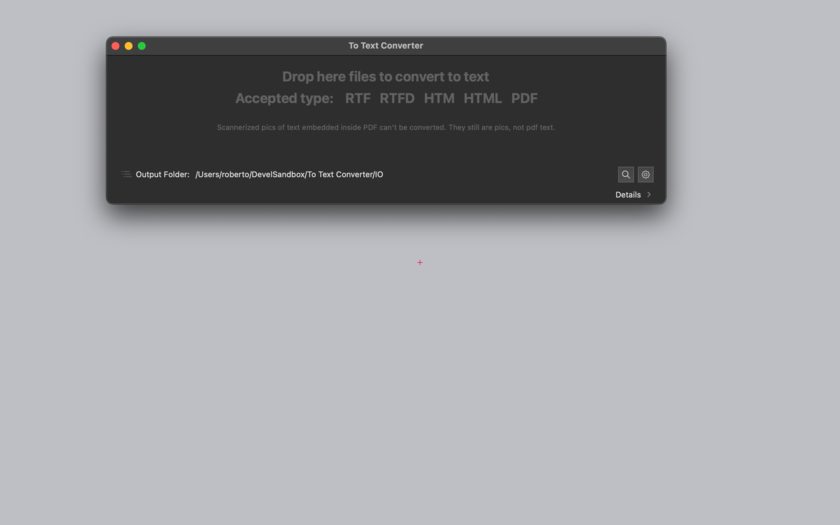
It works with a simple drag and drop of files to its window.
It can accept and instantly convert to plain text:
* PDF documents from any platform (.pdf files)
* Web pages (.html and .htm files)
* Rich text Format documents ( .rtf files)
* Rich Text Format with embedded graphics documents ( .rtfd files)
To Text Converter works creating new text files near the original files or inside a selected folder as specified in the preferences (original file are untouched). The newly created files will contain, in text format, the perfectly readable textual content of the original files. The original files will be always left untouched to never damage your previous work.
Useful to extract text, cleaning it from format text and various language code, in case of web pages, PDF, RTF and RTFD files. Obtained text, can be used for any purpose because it is always 'clean' with no code inside and ready to use in any other application. It can be used as pre-processor for applications such as Data Extractor to extract data from PDF and insert them in database.
It can process many files at once, dropping them on the 'To Text Converter' main window in a single step, in that case it will save more files each with the relative text inside. It always shows in the window path to the converted and created files. It is able to show in the finder pressing a button, both the last processed file and the converted one for an easy reference to the used files inside the application. It is fast and written using the latest generation algorithms and can convert and save thousands of files in few seconds.
Features:
* Easy to use
* Works using Drag and Drop
* Can save results in a custom folder or near the originals
* Never touch or modify the original files
* Works on PDF, RTF, RTFD, HTM, HTML
* Keeps a log of all the processed files
* Convert also more then one file per time
* Full PDF manual embedded (accessible from the Help menu)
New in this release:
* Improved layout
* Now all the window area can handle drag and drop of files
* Log area inside the main window
* Improved text extraction
* Improved handling of error situations
* Optimized for OS X 10.11 El Capitan
System Requirements:
* Fully compatible with OS X 10.10
* Optimized for OS x 10.11
Pricing and Availability:
To Text Converter 1.3 is $9.99 and is available for purchase at the Tension Software website and the Mac App Store. A trial version is available for download.
Tension Software: http://www.tensionsoftware.com
To Text Converter 1.3: http://www.tensionsoftware.com/osx/totextconverter/
Direct Download: http://sec.tensionsoftware.com/osx/totextconverter/totextconverter.dmg
Purchase: http://www.tensionsoftware.com/buy/
Screenshot: http://www.tensionsoftware.com/static/tensionsoftware/images/app/totextconverter/screenshots/mac/1.png
Application Icon: http://www.tensionsoftware.com/static/tensionsoftware/images/app/totextconverter/icons/128.png
Tension Software develops software for Mac OS X and iOS using the latest Apple technology, Cocoa and Objective-C. All Material and Software (C) Copyright 2016 Tension Software. All Rights Reserved. Apple, the Apple logo, Macintosh and Mac OS X are registered trademarks of Apple Inc. in the U.S. and/or other countries. Other trademarks and registered trademarks may be the property of their respective owners.
*******
Link To Article: http://prmac.com/release-id-79127.htm
*******
---------------------------------------------------------------------------------
Note that you can alter delivered distributions at any time.
Login to your account on prMac to alter your channel selection, or to opt-out at any time.
To Text Converter 1.3 from Tension Software - Published on 04/02/16
Tension Software announces the release of To Text Converter 1.3, the important update to their file converter for Mac OS X. To Text Converter can convert files from various formats (PDF, HTML, RTF, RTFD) to standard plain TEXT. It works with a simple drag and drop of files to its window. Version 1.3 brings an improved layout, improved text extraction, and optimization for OS X 10.11 El Capitan.
Milano, Italy - Tension Software is proud to announce the release of To Text Converter 1.3, the important update to their file converter for Mac OS X. To Text Converter can convert files from various formats (PDF, HTML, RTF, RTFD) to standard plain TEXT
It works with a simple drag and drop of files to its window.
It can accept and instantly convert to plain text:
* PDF documents from any platform (.pdf files)
* Web pages (.html and .htm files)
* Rich text Format documents ( .rtf files)
* Rich Text Format with embedded graphics documents ( .rtfd files)
To Text Converter works creating new text files near the original files or inside a selected folder as specified in the preferences (original file are untouched). The newly created files will contain, in text format, the perfectly readable textual content of the original files. The original files will be always left untouched to never damage your previous work.
Useful to extract text, cleaning it from format text and various language code, in case of web pages, PDF, RTF and RTFD files. Obtained text, can be used for any purpose because it is always 'clean' with no code inside and ready to use in any other application. It can be used as pre-processor for applications such as Data Extractor to extract data from PDF and insert them in database.
It can process many files at once, dropping them on the 'To Text Converter' main window in a single step, in that case it will save more files each with the relative text inside. It always shows in the window path to the converted and created files. It is able to show in the finder pressing a button, both the last processed file and the converted one for an easy reference to the used files inside the application. It is fast and written using the latest generation algorithms and can convert and save thousands of files in few seconds.
Features:
* Easy to use
* Works using Drag and Drop
* Can save results in a custom folder or near the originals
* Never touch or modify the original files
* Works on PDF, RTF, RTFD, HTM, HTML
* Keeps a log of all the processed files
* Convert also more then one file per time
* Full PDF manual embedded (accessible from the Help menu)
New in this release:
* Improved layout
* Now all the window area can handle drag and drop of files
* Log area inside the main window
* Improved text extraction
* Improved handling of error situations
* Optimized for OS X 10.11 El Capitan
System Requirements:
* Fully compatible with OS X 10.10
* Optimized for OS x 10.11
Pricing and Availability:
To Text Converter 1.3 is $9.99 and is available for purchase at the Tension Software website and the Mac App Store. A trial version is available for download.
Tension Software: http://www.tensionsoftware.com
To Text Converter 1.3: http://www.tensionsoftware.com/osx/totextconverter/
Direct Download: http://sec.tensionsoftware.com/osx/totextconverter/totextconverter.dmg
Purchase: http://www.tensionsoftware.com/buy/
Screenshot: http://www.tensionsoftware.com/static/tensionsoftware/images/app/totextconverter/screenshots/mac/1.png
Application Icon: http://www.tensionsoftware.com/static/tensionsoftware/images/app/totextconverter/icons/128.png

Tension Software develops software for Mac OS X and iOS using the latest Apple technology, Cocoa and Objective-C. All Material and Software (C) Copyright 2016 Tension Software. All Rights Reserved. Apple, the Apple logo, Macintosh and Mac OS X are registered trademarks of Apple Inc. in the U.S. and/or other countries. Other trademarks and registered trademarks may be the property of their respective owners.
*******
Link To Article: http://prmac.com/release-id-79127.htm
*******
---------------------------------------------------------------------------------
Note that you can alter delivered distributions at any time.
Login to your account on prMac to alter your channel selection, or to opt-out at any time.
Subscribe to:
Posts (Atom)