A new article has been published at prMac.
Reggie Ashworth releases AppDelete 4.2.5 - Uninstall Anything - Published on 04/04/16
Independent software developer, Reggie Ashworth today announces AppDelete 4.2.5, an update to his popular application deletion utility for Mac OS X. With a simple Drag & Drop, AppDelete will uninstall anything along with all of the associated items. Mac users will no longer have to hunt through their system to find and delete these items manually. AppDelete is a must-have utility for beta testers and casual users alike, and the perfect companion to any Mac fanatic's toolbox.
Anaheim, California - Independent software developer, Reggie Ashworth today is proud to announce the release of AppDelete 4.2.5, an update to his very popular application deletion utility for Mac OS X. With a simple Drag & Drop, AppDelete will uninstall anything along with all of the associated items. Mac users will no longer have to hunt through their system to find and delete these items manually.
You can drag any item that can be uninstalled onto AppDelete: Applications, Widgets, Preference Panes, Plugins, Screensavers, etc. You can also activate AppDelete in many ways: dragging items onto main window, onto dock icon, selecting in menu, right-clicking using AppDelete workflow, dragging from Launchpad, and throwing items in the trash. When the preview screen appears you can uncheck any items you would like to exclude.
You also have several choices: delete the items, log only the items, or archive (copy) the items to a .zip file for safekeeping or reinstall at a later date. The items you delete will be moved to the trash and arranged in a folder so that you can see exactly what was deleted and you know exactly where it came from. The items will not be removed from your computer until you empty them from your trash. You can also undo the last delete if you choose.
Version 4 has been 100% redesigned and updated and just one look will show you that this is an entirely new AppDelete. AppDelete Version 4.2.5 will run on Lion, Mountain Lion, Mavericks, Yosemite, and El Capitan, and here are a few of the new features included:
New in Version 4.2:
* Optimized for El Capitan (still backwards compatible with Lion/Mountain Lion/Mavericks/Yosemite)
* New refreshed UI and graphics for El Capitan
* New app icon for all OS versions
* Improved and more efficient search algorithm
* Now possible to copy/paste from log
* Fixed issue where menu bar icon wouldn't appear in dark mode (El Capitan)
* Miscellaneous bug-fixes and optimizations throughout
* And new website...
Feature Highlights:
* Search filters to find items for deletion fast (including old PPC apps)
* Finds associated items that are invisible or hidden
* Trash monitoring so that simply throwing an app in the trash triggers AppDelete
* Archive/Install from Archive feature for safekeeping and transferring items to another Mac
* Password requested only once if needed instead of multiple requests
* Keeps a Log of all activities and has the ability to Undo a deletion
* Moves items into an organized deleted package in your trash
* Force Empty Trash for stubborn to remove items
There are various options to make your AppDelete experience complete: Quick search filters to help choose items for deletion, Force Empty Trash, an Orphans feature to search and delete orphaned files, Install from Archive even for another Mac, various options in Preferences, and more. AppDelete is a must-have utility for software tinkerers, beta testers, casual users, and the perfect companion to any Mac fanatic's toolbox.
AppDelete Version 4.2.5 has an improved search algorithm, an improved registration panel, and other fixes and improvements. For full Release Notes see Changelog.
Support Languages:
AppDelete supports language in U.S. English, Chinese, Czech, Danish, Dutch, Finnish, French, German, Italian, Japanese, Korean, Portuguese (Brazilian), Russian, Spanish and Swedish.
System Requirements:
* Mac OS X Version 10.7 Lion or later (El Capitan compatible)
* Intel only
* 13.3 MB Hard Drive space
Pricing and Availability:
AppDelete 4.2.5 is only $7.99 (USD) for a single user license. Upgrades from Version 2/AppDelete Lite are only $3.99 (USD). A full-featured demo is available. Note: Version 3 licenses without a serial number are also eligible for the upgrade.
AppDelete 4.2.5: http://www.reggieashworth.com/appdelete
Changelog: http://www.reggieashworth.com/appdeletenotes
Download AppDelete: http://www.reggieashworth.com/downloads/AppDelete.dmg
YouTube Channel (Tutorials): http://www.youtube.com/user/ReggieAshworth
Screenshot One (Tiff): http://www.reggieashworth.com/img/picOneCropped2.tiff
Screenshot Two (Tiff): http://www.reggieashworth.com/img/picTwoCropped2.tiff
Based in sunny Anaheim, California, Reggie Ashworth is an independent software developer whose passion for the Mac platform is only exceeded by his aim to craft simple, yet useful utilities. He is fanatical about total customer satisfaction. Copyright 2006-2016 Reggie Ashworth. All Rights Reserved. Apple, the Apple logo, and Macintosh are registered trademarks of Apple Computer in the U.S. and/or other countries.
*******
Link To Article: http://prmac.com/release-id-79138.htm
*******
---------------------------------------------------------------------------------
Note that you can alter delivered distributions at any time.
Login to your account on prMac to alter your channel selection, or to opt-out at any time.

Password Repository 3.3 for Mac
A new article has been published at prMac.
Password Repository 3.3 for Mac - Published on 04/04/16
Tension Software announces Password Repository 3.3, the important update to their OS X native app to manage all your passwords and all the related data in a safe way on your Mac. Password Repository for OS X, is compatible with the similar version for iOS on iTunes and any document created with Password Repository 3 on a Mac, can be transferred via iTunes and used on the iPhone, iPod touch and iPad without any changes.
Milano, Italy - Tension Software is proud to announce the release of Password Repository 3.3, the important updates to their OS X native app to manage all your passwords and all the related data in a safe way on your Mac. Password Repository for OS X, is compatible with the similar version for iOS on iTunes and any document created with Password Repository 3 on a Mac, can be transferred via iTunes and used on the iPhone, iPod touch and iPad without any changes
Password Repository is a document based app and allows you to manage an unlimited numbers of documents, any containing how many password records (records related data) you like. Any document you create is protected by a 'Master Password' with AES-256 encryption algorithm, using the latest native Cocoa libraries by Apple.
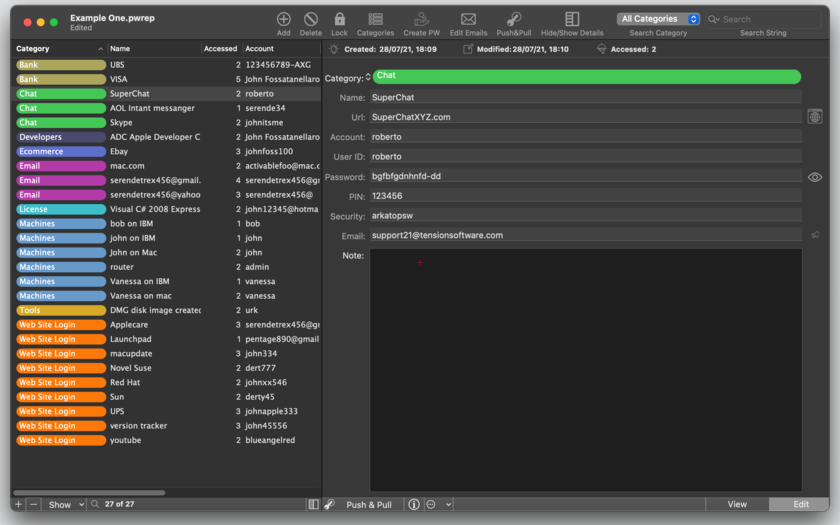
A Password Repository document has a simple layout and is based on a 'Master and Detail' interface, with a list of records on the left and a detail of the selected record on the right. Simplicity and easy of use is one of the key feature of Password Repository but it can satisfy also the power user.
For any record you can insert at any moment:
* Category (you can create a list of Categories and any record has one associated)
* Name (to identify it)
* Url (the web site where you use this password if needed)
* Account (if you are identified by an account)
* User ID (how you login or are recognized here)
* Password (the password used)
* Email (the email you used to at this place to register yourself)
* Note (a free text area with additional notes you want to have)
Categories inside the document are defined by a colored label that you can customize. Changing the aspect of a category changes the label for all the associated records, inside the document. Customized colored categories are a distinctive elements of Password Repository and users love it! With categories, browsing your passwords, you have a subdivision of your data 'by color' very easy to manage from the first day of use.
Automatic visualization for any record of creation data, modification data and how many time the record was accessed (useful to sort records by use and see your most 'accessed' passwords in a single shot) All the records can be sorted, arranged, filtered and displayed as you like. To sort records just click in the header of the table. To filter just type in the search field, data is filtered as-you-type. The windows remember how you positioned and arranged it and you will find it as you positioned it the last time.
Any data can be copied with a single click. The URL can be opened with a click too. Passwords can be visualized or showed by a series of dot.
Documents can be auto locked after a specified time of inactivity in background (it will require the Master Password protecting the document, to access the data inside). For data security the user has to switch from view mode to edit mode to change data inside the document.
Full support of undo adding and removing records and categories. Full customization of the master table, the user can visualize only the columns he likes.
You can set Password repository in the preferences to always open at startup the document you prefer, containing all your main passwords. In that way you can use it as a utility app, still having for when you need it, the full power of a true document based app.
Data exchange with other apps. Password Repository has import and export functions that let you customize anything and make it in this field one of the best of the category. You can import and export using comma separated value and tab separated values
Password Repository has Push&Pull! With Push&Pull is a simple and effective way to use userId/password on the web without plug inn or additional software that can introduce complexity and security/compatibility problems.
With Push&Pull when you want to go to a website listed in one of your record where you have to use your userID/password:
* Simply click the Push&Pull button, and automatically your default browser opens to the requested site. At that point you don't need to come back to Password Repository!
* You already have your userId in your clipboard, so you paste it in the 'user' field, then, still staying inside your browser, you have a new small icon placed in the menu bar (in the right part) placed by Password Repository which is in background
* Still from your browser, click that icon (and the password is copied in your clipboard) and paste the icon in the 'password' field inside your browser.
If you try it you will see it's great and it really works as you expect!
Features:
* Push&Pull for userId/Password (do it all with a single click)
* Data protection of all your data inside the document using AES-256 powerful encryption algorithm
* If you upgrade form an older version full compatibility with your previous documents
* Fast to open documents thanks to the native implementation we use for the encryption mechanism
* Safe and stable. Password Repository 3 uses all the latest Apple technology to manage your data.
* Password Repository 3 is document based. You can manage and move how many documents you like.
* Password generator inside to create new password in the format you need.
* Resume, Auto Save, Versions, all supported.
* Import and Export of data in a very customizable way.
* Can import also from non native encoding format.
* Can import from TSV, CSV and even CSV-S (using semicolon) format
* Includes a full User Guide in PDF
New in this release:
* Improvements and bug fix in layout
* Category Column can be hided
* Improved password dialog
* Bug fix opening of previously hidden/show toolbar
* Bug fix of cursor not placed inside search editor at startup
* Bug fix effecting changing setting category name
* Optimized for OS X 10.11 El Capitan
System Requirements:
* OS X Version 10.10 or higher
* Optimized for OS X 10.11
Pricing and Availability:
Password Repository 3.3 is $20 USD (or an equivalent amount in other currencies) and is available both from the Tension Software website and from the Mac App Store.
Tension Software: http://www.tensionsoftware.com
Password Repository 3.3: http://www.tensionsoftware.com/osx/passwordrepository/
Direct Download: http://sec.tensionsoftware.com/osx/passwordrepository/passwordrepository.dmg
Purchase: http://www.tensionsoftware.com/buy/
Screenshot: http://www.tensionsoftware.com/static/tensionsoftware/images/app/passwordrepository/screenshots/mac/1.png
Application Icon: http://www.tensionsoftware.com/static/tensionsoftware/images/app/passwordrepository/icons/128.png
Tension Software develops software for Mac OS X and iOS using the latest Apple technology, Cocoa and Objective-C. All Material and Software (C) Copyright 2016 Tension Software. All Rights Reserved. Apple, the Apple logo, Macintosh and Mac OS X are registered trademarks of Apple Inc. in the U.S. and/or other countries. Other trademarks and registered trademarks may be the property of their respective owners.
*******
Link To Article: http://prmac.com/release-id-79133.htm
*******
---------------------------------------------------------------------------------
Note that you can alter delivered distributions at any time.
Login to your account on prMac to alter your channel selection, or to opt-out at any time.
Password Repository 3.3 for Mac - Published on 04/04/16
Tension Software announces Password Repository 3.3, the important update to their OS X native app to manage all your passwords and all the related data in a safe way on your Mac. Password Repository for OS X, is compatible with the similar version for iOS on iTunes and any document created with Password Repository 3 on a Mac, can be transferred via iTunes and used on the iPhone, iPod touch and iPad without any changes.
Milano, Italy - Tension Software is proud to announce the release of Password Repository 3.3, the important updates to their OS X native app to manage all your passwords and all the related data in a safe way on your Mac. Password Repository for OS X, is compatible with the similar version for iOS on iTunes and any document created with Password Repository 3 on a Mac, can be transferred via iTunes and used on the iPhone, iPod touch and iPad without any changes
Password Repository is a document based app and allows you to manage an unlimited numbers of documents, any containing how many password records (records related data) you like. Any document you create is protected by a 'Master Password' with AES-256 encryption algorithm, using the latest native Cocoa libraries by Apple.
A Password Repository document has a simple layout and is based on a 'Master and Detail' interface, with a list of records on the left and a detail of the selected record on the right. Simplicity and easy of use is one of the key feature of Password Repository but it can satisfy also the power user.
For any record you can insert at any moment:
* Category (you can create a list of Categories and any record has one associated)
* Name (to identify it)
* Url (the web site where you use this password if needed)
* Account (if you are identified by an account)
* User ID (how you login or are recognized here)
* Password (the password used)
* Email (the email you used to at this place to register yourself)
* Note (a free text area with additional notes you want to have)
Categories inside the document are defined by a colored label that you can customize. Changing the aspect of a category changes the label for all the associated records, inside the document. Customized colored categories are a distinctive elements of Password Repository and users love it! With categories, browsing your passwords, you have a subdivision of your data 'by color' very easy to manage from the first day of use.
Automatic visualization for any record of creation data, modification data and how many time the record was accessed (useful to sort records by use and see your most 'accessed' passwords in a single shot) All the records can be sorted, arranged, filtered and displayed as you like. To sort records just click in the header of the table. To filter just type in the search field, data is filtered as-you-type. The windows remember how you positioned and arranged it and you will find it as you positioned it the last time.
Any data can be copied with a single click. The URL can be opened with a click too. Passwords can be visualized or showed by a series of dot.
Documents can be auto locked after a specified time of inactivity in background (it will require the Master Password protecting the document, to access the data inside). For data security the user has to switch from view mode to edit mode to change data inside the document.
Full support of undo adding and removing records and categories. Full customization of the master table, the user can visualize only the columns he likes.
You can set Password repository in the preferences to always open at startup the document you prefer, containing all your main passwords. In that way you can use it as a utility app, still having for when you need it, the full power of a true document based app.
Data exchange with other apps. Password Repository has import and export functions that let you customize anything and make it in this field one of the best of the category. You can import and export using comma separated value and tab separated values
Password Repository has Push&Pull! With Push&Pull is a simple and effective way to use userId/password on the web without plug inn or additional software that can introduce complexity and security/compatibility problems.
With Push&Pull when you want to go to a website listed in one of your record where you have to use your userID/password:
* Simply click the Push&Pull button, and automatically your default browser opens to the requested site. At that point you don't need to come back to Password Repository!
* You already have your userId in your clipboard, so you paste it in the 'user' field, then, still staying inside your browser, you have a new small icon placed in the menu bar (in the right part) placed by Password Repository which is in background
* Still from your browser, click that icon (and the password is copied in your clipboard) and paste the icon in the 'password' field inside your browser.
If you try it you will see it's great and it really works as you expect!
Features:
* Push&Pull for userId/Password (do it all with a single click)
* Data protection of all your data inside the document using AES-256 powerful encryption algorithm
* If you upgrade form an older version full compatibility with your previous documents
* Fast to open documents thanks to the native implementation we use for the encryption mechanism
* Safe and stable. Password Repository 3 uses all the latest Apple technology to manage your data.
* Password Repository 3 is document based. You can manage and move how many documents you like.
* Password generator inside to create new password in the format you need.
* Resume, Auto Save, Versions, all supported.
* Import and Export of data in a very customizable way.
* Can import also from non native encoding format.
* Can import from TSV, CSV and even CSV-S (using semicolon) format
* Includes a full User Guide in PDF
New in this release:
* Improvements and bug fix in layout
* Category Column can be hided
* Improved password dialog
* Bug fix opening of previously hidden/show toolbar
* Bug fix of cursor not placed inside search editor at startup
* Bug fix effecting changing setting category name
* Optimized for OS X 10.11 El Capitan
System Requirements:
* OS X Version 10.10 or higher
* Optimized for OS X 10.11
Pricing and Availability:
Password Repository 3.3 is $20 USD (or an equivalent amount in other currencies) and is available both from the Tension Software website and from the Mac App Store.
Tension Software: http://www.tensionsoftware.com
Password Repository 3.3: http://www.tensionsoftware.com/osx/passwordrepository/
Direct Download: http://sec.tensionsoftware.com/osx/passwordrepository/passwordrepository.dmg
Purchase: http://www.tensionsoftware.com/buy/
Screenshot: http://www.tensionsoftware.com/static/tensionsoftware/images/app/passwordrepository/screenshots/mac/1.png
Application Icon: http://www.tensionsoftware.com/static/tensionsoftware/images/app/passwordrepository/icons/128.png

Tension Software develops software for Mac OS X and iOS using the latest Apple technology, Cocoa and Objective-C. All Material and Software (C) Copyright 2016 Tension Software. All Rights Reserved. Apple, the Apple logo, Macintosh and Mac OS X are registered trademarks of Apple Inc. in the U.S. and/or other countries. Other trademarks and registered trademarks may be the property of their respective owners.
*******
Link To Article: http://prmac.com/release-id-79133.htm
*******
---------------------------------------------------------------------------------
Note that you can alter delivered distributions at any time.
Login to your account on prMac to alter your channel selection, or to opt-out at any time.
Peter Rabbit Now An Endless Text Runner on iOS
A new article has been published at prMac.
Peter Rabbit Now An Endless Text Runner on iOS - Published on 04/04/16
Purple Wax Games announces Peter Rabbit - Endless Text Runner of the Beatrix Potter Classic Tale 1.0 for iOS devices, the game allows children to explore the charming world of Peter Rabbit as an endless runner where the words of the tale form the platforms. Simply tap the screen to make Peter jump and don't let him fall. Venture into Mr. McGregor's Garden, munch on vegetables, but watch out for Mr. McGregor!
Pembroke, United Kingdom - To commemorate Beatrix Potter's 150th birthday this year, Purple Wax Games has re-imagined her classic tale for the app generation. Peter Rabbit - Endless Text Runner of the Beatrix Potter Classic Tale 1.0 for iPhone, iPad and iPod touch devices, allows children to explore the charming world of Peter Rabbit as an endless runner where the words of the tale form the platforms. Simply tap the screen to make Peter jump and don't let him fall. Venture into Mr. McGregor's Garden, munch on vegetables, but watch out for Mr. McGregor!
Adults can read the tale to younger children, letting them tap the screen to keep the story going. Older children and adults can read and play the game by themselves.
Features:
* Includes Word Highlighting to aid reading.
* Unlimited continues in Play mode ensure it's not too difficult for children (or adults!).
* QuickPlay mode starts from the beginning of the story every time - great for showing to friends and family without losing your place in the story.
* A child-safe app with no in-app purchases & no adverts, found in the App Store's Kids section for Ages 5 and under.
Disclaimer: The Tale of Peter Rabbit by Beatrix Potter was first published in 1902 and is now out of copyright. This app is in no way connected to F. Warne & Co., the original publisher of the book.
Device Requirements:
* iPad, iPhone & iPod touch
* Requires iOS 6.0 or later
* Universal Application
* 7.1 MB
Pricing and Availability:
'Peter Rabbit - Endless Text Runner of the Beatrix Potter Classic Tale' is only $0.99 USD (or an equivalent amount in other currencies) and is available in the United Kingdom, Ireland, Australia, New Zealand, United States and Canada exclusively through the App Store in the Games category. Promo Codes available on request.
Peter Rabbit - Endless Text Runner of the Beatrix Potter Classic Tale 1.0: http://purplewaxgames.com/peterrabbit.html
Purchase and Download from iTunes: https://itunes.apple.com/app/peter-rabbit-endless-text/id1095430531
YouTube Video: https://www.youtube.com/watch?v=1TkUYvt04ZU
App Icon: http://purplewaxgames.com/PeterRabbit_Icon.png
Press Kit (ZIP): http://purplewaxgames.com/PeterRabbitPress.zip
Located in Pembroke, United Kingdom, Purple Wax Games was founded in 2010 by Kevin Ayre to create fun iPhone, iPod touch and iPad apps. Kevin previously worked for Fuse Games Ltd, creating new titles for Nintendo such as Metroid Prime Pinball for Nintendo DS and Mario Pinball Land / Super Mario Ball for Nintendo GameBoy Advance. Copyright (C) 2016 Purple Wax Games. All Rights Reserved. Apple, the Apple logo, iPhone, iPad and iPod are registered trademarks of Apple Inc. in the U.S. and/or other countries. Other trademarks and registered trademarks may be the property of their respective owners.
*******
Link To Article: http://prmac.com/release-id-79135.htm
*******
---------------------------------------------------------------------------------
Note that you can alter delivered distributions at any time.
Login to your account on prMac to alter your channel selection, or to opt-out at any time.
Peter Rabbit Now An Endless Text Runner on iOS - Published on 04/04/16
Purple Wax Games announces Peter Rabbit - Endless Text Runner of the Beatrix Potter Classic Tale 1.0 for iOS devices, the game allows children to explore the charming world of Peter Rabbit as an endless runner where the words of the tale form the platforms. Simply tap the screen to make Peter jump and don't let him fall. Venture into Mr. McGregor's Garden, munch on vegetables, but watch out for Mr. McGregor!
Pembroke, United Kingdom - To commemorate Beatrix Potter's 150th birthday this year, Purple Wax Games has re-imagined her classic tale for the app generation. Peter Rabbit - Endless Text Runner of the Beatrix Potter Classic Tale 1.0 for iPhone, iPad and iPod touch devices, allows children to explore the charming world of Peter Rabbit as an endless runner where the words of the tale form the platforms. Simply tap the screen to make Peter jump and don't let him fall. Venture into Mr. McGregor's Garden, munch on vegetables, but watch out for Mr. McGregor!
Adults can read the tale to younger children, letting them tap the screen to keep the story going. Older children and adults can read and play the game by themselves.
Features:
* Includes Word Highlighting to aid reading.
* Unlimited continues in Play mode ensure it's not too difficult for children (or adults!).
* QuickPlay mode starts from the beginning of the story every time - great for showing to friends and family without losing your place in the story.
* A child-safe app with no in-app purchases & no adverts, found in the App Store's Kids section for Ages 5 and under.
Disclaimer: The Tale of Peter Rabbit by Beatrix Potter was first published in 1902 and is now out of copyright. This app is in no way connected to F. Warne & Co., the original publisher of the book.
Device Requirements:
* iPad, iPhone & iPod touch
* Requires iOS 6.0 or later
* Universal Application
* 7.1 MB
Pricing and Availability:
'Peter Rabbit - Endless Text Runner of the Beatrix Potter Classic Tale' is only $0.99 USD (or an equivalent amount in other currencies) and is available in the United Kingdom, Ireland, Australia, New Zealand, United States and Canada exclusively through the App Store in the Games category. Promo Codes available on request.
Peter Rabbit - Endless Text Runner of the Beatrix Potter Classic Tale 1.0: http://purplewaxgames.com/peterrabbit.html
Purchase and Download from iTunes: https://itunes.apple.com/app/peter-rabbit-endless-text/id1095430531
YouTube Video: https://www.youtube.com/watch?v=1TkUYvt04ZU
App Icon: http://purplewaxgames.com/PeterRabbit_Icon.png

Press Kit (ZIP): http://purplewaxgames.com/PeterRabbitPress.zip
Located in Pembroke, United Kingdom, Purple Wax Games was founded in 2010 by Kevin Ayre to create fun iPhone, iPod touch and iPad apps. Kevin previously worked for Fuse Games Ltd, creating new titles for Nintendo such as Metroid Prime Pinball for Nintendo DS and Mario Pinball Land / Super Mario Ball for Nintendo GameBoy Advance. Copyright (C) 2016 Purple Wax Games. All Rights Reserved. Apple, the Apple logo, iPhone, iPad and iPod are registered trademarks of Apple Inc. in the U.S. and/or other countries. Other trademarks and registered trademarks may be the property of their respective owners.
*******
Link To Article: http://prmac.com/release-id-79135.htm
*******
---------------------------------------------------------------------------------
Note that you can alter delivered distributions at any time.
Login to your account on prMac to alter your channel selection, or to opt-out at any time.
MaBaSoft Releases Currency Assistant 3.2.4
A new article has been published at prMac.
MaBaSoft Releases Currency Assistant 3.2.4 - Published on 04/04/16
MaBaSoft announces Currency Assistant 3.2.4, an update to their currency converter for Mac OS X. Currency Assistant is a very flexible currency conversion calculator that provides 174 currencies, including all major circulating currencies plus the 19 Eurozone legacy currencies, allows the creation of multiple converters, and automatically updates exchange rates over the Internet. Version 3.2.4 improves security.
Milano, Italy - MaBaSoft is proud to announce the release of Currency Assistant 3.2.4, an important update to their currency converter for Mac OS X. Currency Assistant allows users to easily calculate conversions between 174 world currencies (all major circulating currencies plus the 19 Eurozone legacy currencies) and updates exchange rates automatically over the Internet. Version 3.2.4 improves security by using a secure HTTP connection when checking for updates.
Currency Assistant is a very flexible currency converter; users can define multiple conversion windows which can contain up to 24 currencies. Converters are very easy to set up or edit and have an Action pop-up menu to quickly accomplish recurrent tasks, a Rate pop-up menu to view and copy exchange rates, and a tape in a drawer to log results.
With Currency Assistant users can quickly calculate conversions to multiple currencies and automatically convert the result of expressions. In addition to that, multiple amounts can be copied from a spreadsheet or another document and pasted to the desired input display: Currency Assistant will automatically convert the pasted amounts and log results in the tape. Finally, Currency Assistant can import text files, Word documents, and text clippings containing series of amounts and automatically convert the enclosed values.
Working with results is also very easy. Amounts can be copied from a display or from the tape, conversions can be exported by dragging them from the tape to a document in another application, and the tape can be saved to a RTF or plain text file and printed. Moreover, configurable Copy Special commands allow users to copy results including ISO code, currency name, or symbol and quickly copy frequently used text snippets containing conversion results, ISO codes, currency names, and symbols.
Managing currencies is simple and straightforward with Currency Assistant. The Currencies window allows users to quickly search, sort, edit, batch edit, and restore currencies, set a base currency, and automatically update exchange rates. Currency Assistant uses the rates published by the European Central Bank, the Bank of Canada, the International Monetary Fund, and the Bank of Italy to automatically update exchange rates.
Language Support:
* US English, German, French, Dutch, and Italian
System Requirements:
* Mac OS X 10.6, 10.7, 10.8, 10.9, 10.10, or 10.11 (El Capitan)
Pricing and Availability:
Currency Assistant 3.2.4 is now 50% off and available for just $8.95 (USD) for new users or $4.95 (USD) for Euro Assistant Pro registered users. Version 3.2.4 is a free update for registered version 3 users. Site and world-wide licenses are also available.
MaBaSoft: https://www.mabasoft.net/
Currency Assistant 3.2.4: https://www.mabasoft.net/products/currencyAssistant.html
Purchase Currency Assistant: https://store.kagi.com/?2H_LIVE
Direct Download: https://www.mabasoft.net/downloads/files/Currency_Assistant_3.2.4.dmg
Release Notes: https://www.mabasoft.net/releaseNotes/currencyAssistant.html
Media Assets: https://www.mabasoft.net/pressImages/currencyAssistant.html
MaBaSoft, based in Milano, Italy, is a small independent company founded by Marco Damaschi and Barbara Canino in 1997. MaBaSoft develops quality system utilities and applications for the Macintosh. Copyright 1997-2016 MaBaSoft. All Rights Reserved. Apple, the Apple logo, Macintosh and Mac OS X are registered trademarks of Apple Inc. in the U.S. and/or other countries. Other trademarks and registered trademarks may be the property of their respective owners.
*******
Link To Article: http://prmac.com/release-id-79134.htm
*******
---------------------------------------------------------------------------------
Note that you can alter delivered distributions at any time.
Login to your account on prMac to alter your channel selection, or to opt-out at any time.
MaBaSoft Releases Currency Assistant 3.2.4 - Published on 04/04/16
MaBaSoft announces Currency Assistant 3.2.4, an update to their currency converter for Mac OS X. Currency Assistant is a very flexible currency conversion calculator that provides 174 currencies, including all major circulating currencies plus the 19 Eurozone legacy currencies, allows the creation of multiple converters, and automatically updates exchange rates over the Internet. Version 3.2.4 improves security.
Milano, Italy - MaBaSoft is proud to announce the release of Currency Assistant 3.2.4, an important update to their currency converter for Mac OS X. Currency Assistant allows users to easily calculate conversions between 174 world currencies (all major circulating currencies plus the 19 Eurozone legacy currencies) and updates exchange rates automatically over the Internet. Version 3.2.4 improves security by using a secure HTTP connection when checking for updates.
Currency Assistant is a very flexible currency converter; users can define multiple conversion windows which can contain up to 24 currencies. Converters are very easy to set up or edit and have an Action pop-up menu to quickly accomplish recurrent tasks, a Rate pop-up menu to view and copy exchange rates, and a tape in a drawer to log results.
With Currency Assistant users can quickly calculate conversions to multiple currencies and automatically convert the result of expressions. In addition to that, multiple amounts can be copied from a spreadsheet or another document and pasted to the desired input display: Currency Assistant will automatically convert the pasted amounts and log results in the tape. Finally, Currency Assistant can import text files, Word documents, and text clippings containing series of amounts and automatically convert the enclosed values.
Working with results is also very easy. Amounts can be copied from a display or from the tape, conversions can be exported by dragging them from the tape to a document in another application, and the tape can be saved to a RTF or plain text file and printed. Moreover, configurable Copy Special commands allow users to copy results including ISO code, currency name, or symbol and quickly copy frequently used text snippets containing conversion results, ISO codes, currency names, and symbols.
Managing currencies is simple and straightforward with Currency Assistant. The Currencies window allows users to quickly search, sort, edit, batch edit, and restore currencies, set a base currency, and automatically update exchange rates. Currency Assistant uses the rates published by the European Central Bank, the Bank of Canada, the International Monetary Fund, and the Bank of Italy to automatically update exchange rates.
Language Support:
* US English, German, French, Dutch, and Italian
System Requirements:
* Mac OS X 10.6, 10.7, 10.8, 10.9, 10.10, or 10.11 (El Capitan)
Pricing and Availability:
Currency Assistant 3.2.4 is now 50% off and available for just $8.95 (USD) for new users or $4.95 (USD) for Euro Assistant Pro registered users. Version 3.2.4 is a free update for registered version 3 users. Site and world-wide licenses are also available.
MaBaSoft: https://www.mabasoft.net/
Currency Assistant 3.2.4: https://www.mabasoft.net/products/currencyAssistant.html
Purchase Currency Assistant: https://store.kagi.com/?2H_LIVE
Direct Download: https://www.mabasoft.net/downloads/files/Currency_Assistant_3.2.4.dmg
Release Notes: https://www.mabasoft.net/releaseNotes/currencyAssistant.html
Media Assets: https://www.mabasoft.net/pressImages/currencyAssistant.html
MaBaSoft, based in Milano, Italy, is a small independent company founded by Marco Damaschi and Barbara Canino in 1997. MaBaSoft develops quality system utilities and applications for the Macintosh. Copyright 1997-2016 MaBaSoft. All Rights Reserved. Apple, the Apple logo, Macintosh and Mac OS X are registered trademarks of Apple Inc. in the U.S. and/or other countries. Other trademarks and registered trademarks may be the property of their respective owners.
*******
Link To Article: http://prmac.com/release-id-79134.htm
*******
---------------------------------------------------------------------------------
Note that you can alter delivered distributions at any time.
Login to your account on prMac to alter your channel selection, or to opt-out at any time.
Lebanon Tv Live 1.5 for iOS
A new article has been published at prMac.
Lebanon Tv Live 1.5 for iOS - Published on 04/04/16
LastThink announces the release of Lebanon Tv Live 1.5, their highly customizable TV application for iOS devices. Anyone can directly access their favorite TV channel and watch diverse films, news, programs from their iPad, iPhone and iPod touch anywhere and anytime. Vibes are smart TV and movie playlists. Users can easily record their favorite films, news, talk shows, programs and more. Users can also share what they are watching via Facebook.
Yerevan, Armenia - LastThink is proud to announce the release of Lebanon Tv Live 1.5, their highly customizable TV application developed for iPad and iPhone devices. Users can directly access their favorite TV channel and watch diverse films, news, programs from their iPad, iPhone and iPod touch anywhere and anytime.
Features:
* Navigating album photos by sliding your finger right or left on the screen
* Change the device you are streaming the picture to, by taping on the Play button in the upper right corner of your iPad's screen and selecting a desired device
* Screening and shooting any moment of your preferred TV program or film you like
* Altering the boring parts and moving straight to the best part at once - Filter by HD-only and favorite channels
* Rotating channels easily by a mere touch on your screen
* Organize your favorite TV shows, sport teams, movies, and actors and find where you can watch them - on TV and on demand
* Recording your favorite films, news, Talk Shows, programs and etc.
* Sharing what you're watching via Facebook, Twitter, YouTube, Dropbox, email and more - Vibes are smart TV and movie playlists
* The highest quality even with the lowest Internet and HD quality with the normal Internet - You can watch TV channels in HD level
* Editing and cropping videos into smaller parts. In addition to, you can take videos of your favorite program
* Capturing the funniest and most interesting moments of what you are watching with the trim tool
* Searching the content across streaming and broadcast services
* Discovering more than 100 channels of great entertainment beyond the Lebanon Online TV app right on your device's touchscreen interface
If you however experience any issues, please do not hesitate to contact us if you'd like to share your experience with live TV channels, or provide suggestions on how we could improve the product further. We will be more than happy to get in touch.
NOTE: We have selected data from the internet and if any assembly or constitution doesn't want us to show the content of the unit, please recommend us to remove it. We follow TV regulations and adjustments and we select original TV content data without artificial editions.
Device Requirements:
* iPhone, iPad, and iPod touch
* Optimized for iPhone 5, iPhone 6, and iPhone 6 Plus
* Requires iOS 6.0 or later
* Universal Application
* 33.2 MB
Pricing and Availability:
Lebanon Tv Live 1.5 is free and is available worldwide exclusively through the App Store in the Entertainment category.
LastThink: http://lastthink.com/
Lebanon Tv Live 1.5: https://www.facebook.com/Online-Lebanon-TV-Community-1761648334063127/
Download from iTunes: https://itunes.apple.com/app/lebanon-tv-live/id1074208384
Screenshot: http://a5.mzstatic.com/us/r30/Purple69/v4/63/22/88/632288e7-a804-1c19-b70a-c83f055bc34e/screen322x572.jpeg
App Icon: http://a2.mzstatic.com/us/r30/Purple69/v4/ae/46/9e/ae469e12-ac83-7154-f7c0-4e005b4bed48/icon175x175.jpeg
LastThink is an IT company with a focus on mobile development. It has extended its list of services since 2012 to offer high-end business process management, system integration, as well as up-to-date communication solutions. LastThink's mission is to deliver maximum business value to its customers by designing, developing, implementing and maintaining efficient and high quality software solutions aligned with their most essential business needs. Their team will always do its best to meet client expectations. Copyright (C) 2016 LastThink LLC. All Rights Reserved. Apple, the Apple logo, iPhone, iPad and iPod are registered trademarks of Apple Inc. in the U.S. and/or other countries.
*******
Link To Article: http://prmac.com/release-id-79132.htm
*******
---------------------------------------------------------------------------------
Note that you can alter delivered distributions at any time.
Login to your account on prMac to alter your channel selection, or to opt-out at any time.
Lebanon Tv Live 1.5 for iOS - Published on 04/04/16
LastThink announces the release of Lebanon Tv Live 1.5, their highly customizable TV application for iOS devices. Anyone can directly access their favorite TV channel and watch diverse films, news, programs from their iPad, iPhone and iPod touch anywhere and anytime. Vibes are smart TV and movie playlists. Users can easily record their favorite films, news, talk shows, programs and more. Users can also share what they are watching via Facebook.
Yerevan, Armenia - LastThink is proud to announce the release of Lebanon Tv Live 1.5, their highly customizable TV application developed for iPad and iPhone devices. Users can directly access their favorite TV channel and watch diverse films, news, programs from their iPad, iPhone and iPod touch anywhere and anytime.
Features:
* Navigating album photos by sliding your finger right or left on the screen
* Change the device you are streaming the picture to, by taping on the Play button in the upper right corner of your iPad's screen and selecting a desired device
* Screening and shooting any moment of your preferred TV program or film you like
* Altering the boring parts and moving straight to the best part at once - Filter by HD-only and favorite channels
* Rotating channels easily by a mere touch on your screen
* Organize your favorite TV shows, sport teams, movies, and actors and find where you can watch them - on TV and on demand
* Recording your favorite films, news, Talk Shows, programs and etc.
* Sharing what you're watching via Facebook, Twitter, YouTube, Dropbox, email and more - Vibes are smart TV and movie playlists
* The highest quality even with the lowest Internet and HD quality with the normal Internet - You can watch TV channels in HD level
* Editing and cropping videos into smaller parts. In addition to, you can take videos of your favorite program
* Capturing the funniest and most interesting moments of what you are watching with the trim tool
* Searching the content across streaming and broadcast services
* Discovering more than 100 channels of great entertainment beyond the Lebanon Online TV app right on your device's touchscreen interface
If you however experience any issues, please do not hesitate to contact us if you'd like to share your experience with live TV channels, or provide suggestions on how we could improve the product further. We will be more than happy to get in touch.
NOTE: We have selected data from the internet and if any assembly or constitution doesn't want us to show the content of the unit, please recommend us to remove it. We follow TV regulations and adjustments and we select original TV content data without artificial editions.
Device Requirements:
* iPhone, iPad, and iPod touch
* Optimized for iPhone 5, iPhone 6, and iPhone 6 Plus
* Requires iOS 6.0 or later
* Universal Application
* 33.2 MB
Pricing and Availability:
Lebanon Tv Live 1.5 is free and is available worldwide exclusively through the App Store in the Entertainment category.
LastThink: http://lastthink.com/
Lebanon Tv Live 1.5: https://www.facebook.com/Online-Lebanon-TV-Community-1761648334063127/
Download from iTunes: https://itunes.apple.com/app/lebanon-tv-live/id1074208384
Screenshot: http://a5.mzstatic.com/us/r30/Purple69/v4/63/22/88/632288e7-a804-1c19-b70a-c83f055bc34e/screen322x572.jpeg

App Icon: http://a2.mzstatic.com/us/r30/Purple69/v4/ae/46/9e/ae469e12-ac83-7154-f7c0-4e005b4bed48/icon175x175.jpeg

LastThink is an IT company with a focus on mobile development. It has extended its list of services since 2012 to offer high-end business process management, system integration, as well as up-to-date communication solutions. LastThink's mission is to deliver maximum business value to its customers by designing, developing, implementing and maintaining efficient and high quality software solutions aligned with their most essential business needs. Their team will always do its best to meet client expectations. Copyright (C) 2016 LastThink LLC. All Rights Reserved. Apple, the Apple logo, iPhone, iPad and iPod are registered trademarks of Apple Inc. in the U.S. and/or other countries.
*******
Link To Article: http://prmac.com/release-id-79132.htm
*******
---------------------------------------------------------------------------------
Note that you can alter delivered distributions at any time.
Login to your account on prMac to alter your channel selection, or to opt-out at any time.
AlertFilm - Your Movie Assistant is now available on the App Store
A new article has been published at prMac.
AlertFilm - Your Movie Assistant is now available on the App Store - Published on 04/04/16
London based startup, AlertFilm Ltd. today announces AlertFilm 1.3.1, an update to their popular movie discovery app developed for iOS devices. AlertFilm makes discovering and enjoying streaming content simple by combining all the content from all the streaming platforms. With AlertFilm, the goal is to create an experience that is essential and enjoyable for the modern consumer, an everyday app that is as compelling and immersive as your favourite movie. Version 1.3.1 fixes a very minor bug.
London, United Kingdom - AlertFilm Ltd. today is proud to announce the release and immediate availability of AlertFilm 1.3.1, an update to their popular movie discovery app developed for iPhone, iPad and iPod touch devices. AlertFilm makes discovering and enjoying streaming content simple by combining all the content from all the streaming platforms.
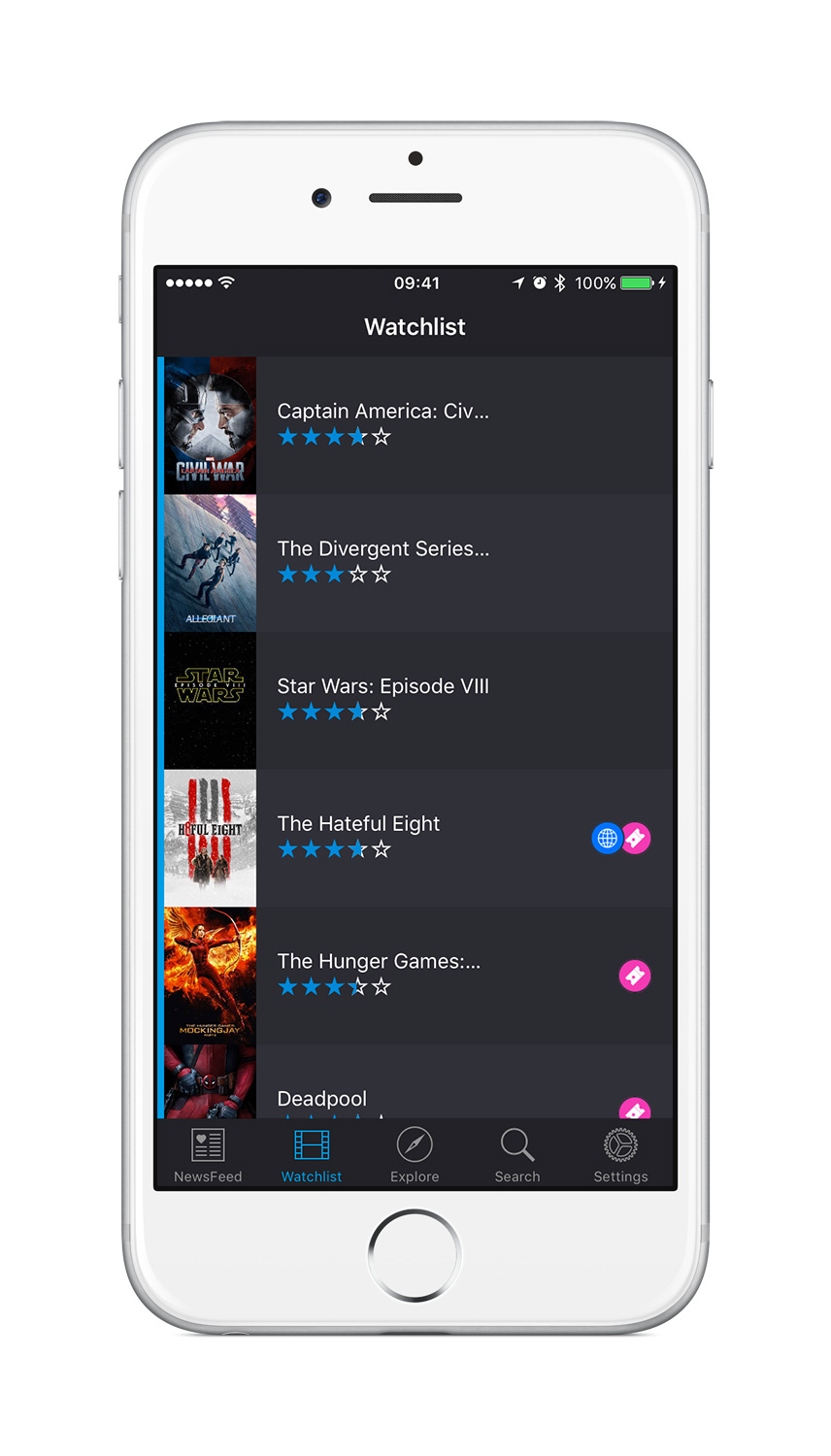
Currently, AlertFilm is available for cinema releases, iTunes, Netflix and Plex. Amazon prime is coming soon. The market opportunity is huge. 7 out of 10 consumers watch streaming entertainment every week, and growth is unprecedented. With AlertFilm, the goal is to create an experience that is essential and enjoyable for the modern consumer, an everyday app that is as compelling and immersive as your favourite movie.
Features Available:
* Movie discovery (trailer, date, description)
* Watchlist
* Curated Playlists
* Notifications
* Check Availability
"Today, 7 out of 10 people watch streaming media every week, such as Netflix, Amazon Prime, BBC iPlayer, Sky, iTunes and more," explained Benjamin Garnier, product lead at London based AlertFilm Ltd. "There are dozens of streaming content providers, each with thousands of hours of content that is published and withdrawn without warning. Discovery is broken. Recommendation is broken. The simple task of finding a movie you want to watch, checking its availability and being able to watch it is a real problem. AlertFilm is a Free iOS app that aims to solve the massive problem of choice and discovery in the streaming entertainment market."
Currently in Ignite accelerator program based in London, AlertFilm will be opening a seed round soon. Version 1.3.1 fixes a very minor bug.
Device Requirements:
* iPhone, iPad, and iPod touch
* Requires iOS 9.1 or later
* 68.1 MB
Pricing and Availability:
AlertFilm 1.3.1 is Free and available worldwide exclusively through the App Store in the Entertainment category.
AlertFilm 1.3.1: http://get.alertfilm.com
Download from iTunes: https://itunes.apple.com/us/app/apple-store/id1082382753?pt=117719216&ct=prmac&mt=8
Promotional Image: https://s3-eu-west-1.amazonaws.com/filealertfilm/lifestyle1.png
Screenshot: https://s3-eu-west-1.amazonaws.com/filealertfilm/Screenshot2.jpg
App Icon: https://s3-eu-west-1.amazonaws.com/filealertfilm/iTunesArtwork-512%402x.png
Review Guide (PDF): https://s3-eu-west-1.amazonaws.com/filealertfilm/AlertFilm-ReviewGuide-v1.pdf
Located in London, United Kingdom, AlertFilm Ltd. is currently in Ignite startup accelerator program formed by 3 friends who graduated from international business, communication and engineering schools. These tech entrepreneurs are passionate about the entertainment industry and deeply involved in the startup community. All Material and Software (C) Copyright 2016 AlertFilm Ltd. All Rights Reserved. Apple, the Apple logo, iPhone, iPod and iPad are registered trademarks of Apple Inc. in the U.S. and/or other countries. Other trademarks and registered trademarks may be the property of their respective owners.
*******
Link To Article: http://prmac.com/release-id-79136.htm
*******
---------------------------------------------------------------------------------
Note that you can alter delivered distributions at any time.
Login to your account on prMac to alter your channel selection, or to opt-out at any time.
AlertFilm - Your Movie Assistant is now available on the App Store - Published on 04/04/16
London based startup, AlertFilm Ltd. today announces AlertFilm 1.3.1, an update to their popular movie discovery app developed for iOS devices. AlertFilm makes discovering and enjoying streaming content simple by combining all the content from all the streaming platforms. With AlertFilm, the goal is to create an experience that is essential and enjoyable for the modern consumer, an everyday app that is as compelling and immersive as your favourite movie. Version 1.3.1 fixes a very minor bug.
London, United Kingdom - AlertFilm Ltd. today is proud to announce the release and immediate availability of AlertFilm 1.3.1, an update to their popular movie discovery app developed for iPhone, iPad and iPod touch devices. AlertFilm makes discovering and enjoying streaming content simple by combining all the content from all the streaming platforms.
Currently, AlertFilm is available for cinema releases, iTunes, Netflix and Plex. Amazon prime is coming soon. The market opportunity is huge. 7 out of 10 consumers watch streaming entertainment every week, and growth is unprecedented. With AlertFilm, the goal is to create an experience that is essential and enjoyable for the modern consumer, an everyday app that is as compelling and immersive as your favourite movie.
Features Available:
* Movie discovery (trailer, date, description)
* Watchlist
* Curated Playlists
* Notifications
* Check Availability
"Today, 7 out of 10 people watch streaming media every week, such as Netflix, Amazon Prime, BBC iPlayer, Sky, iTunes and more," explained Benjamin Garnier, product lead at London based AlertFilm Ltd. "There are dozens of streaming content providers, each with thousands of hours of content that is published and withdrawn without warning. Discovery is broken. Recommendation is broken. The simple task of finding a movie you want to watch, checking its availability and being able to watch it is a real problem. AlertFilm is a Free iOS app that aims to solve the massive problem of choice and discovery in the streaming entertainment market."
Currently in Ignite accelerator program based in London, AlertFilm will be opening a seed round soon. Version 1.3.1 fixes a very minor bug.
Device Requirements:
* iPhone, iPad, and iPod touch
* Requires iOS 9.1 or later
* 68.1 MB
Pricing and Availability:
AlertFilm 1.3.1 is Free and available worldwide exclusively through the App Store in the Entertainment category.
AlertFilm 1.3.1: http://get.alertfilm.com
Download from iTunes: https://itunes.apple.com/us/app/apple-store/id1082382753?pt=117719216&ct=prmac&mt=8
Promotional Image: https://s3-eu-west-1.amazonaws.com/filealertfilm/lifestyle1.png

Screenshot: https://s3-eu-west-1.amazonaws.com/filealertfilm/Screenshot2.jpg
App Icon: https://s3-eu-west-1.amazonaws.com/filealertfilm/iTunesArtwork-512%402x.png

Review Guide (PDF): https://s3-eu-west-1.amazonaws.com/filealertfilm/AlertFilm-ReviewGuide-v1.pdf
Located in London, United Kingdom, AlertFilm Ltd. is currently in Ignite startup accelerator program formed by 3 friends who graduated from international business, communication and engineering schools. These tech entrepreneurs are passionate about the entertainment industry and deeply involved in the startup community. All Material and Software (C) Copyright 2016 AlertFilm Ltd. All Rights Reserved. Apple, the Apple logo, iPhone, iPod and iPad are registered trademarks of Apple Inc. in the U.S. and/or other countries. Other trademarks and registered trademarks may be the property of their respective owners.
*******
Link To Article: http://prmac.com/release-id-79136.htm
*******
---------------------------------------------------------------------------------
Note that you can alter delivered distributions at any time.
Login to your account on prMac to alter your channel selection, or to opt-out at any time.
Notesero 1.0 for iPhone - A Beautifully Crafted Notes App For Daily Use
A new article has been published at prMac.
Notesero 1.0 for iPhone - A Beautifully Crafted Notes App For Daily Use - Published on 04/04/16
Velvet Rock Apps today introduces Notesero 1.0, their brand new note taking app for for iPhone. Featuring a beautifully polished interface, Notesero is perfect for day-to-day use. The app safely backs up the users data to iCloud and offers password protected folders to keep notes private and away from prying eyes. Notesero provides an intuitive design that focuses on user experience with the knowledge that all data is persistent and safely synced to iCloud.
Reading, United Kingdom - Velvet Rock Apps today introduces Notesero 1.0 for iPhone, their brand new notes app that safely backs up the users data to iCloud and offers password protected folders to keep notes private and away from prying eyes. With a beautifully polished interface and seamless iCloud syncing, Notesero is perfect for day to day use.
From the moment you open Notesero you'll appreciate the simple elegant design. The top part of the screen shows folders that have been created whilst the bottom third of the display provides a basic dashboard overview showing the total number of folders, the total number of notes and recent notes. Simply tapping on the total number of notes will immediately show all the notes that have been created irrespective of which folder they relate to. Tapping on recent notes give fast access to the last 10 notes created. Below these details are 2 buttons, the larger of the two allows the user to create a note and the smaller button offers further options which include creating a new folder, rearranging folders and accessing the settings area.
Once a folder has been created the user can simply swipe from right to left on the folder name to reveal three options; protect, rename or delete. Not only can users password protect individual folders but they can also give each folder a unique password and because Notesero supports Touch ID, opening protected folders is fast and secure. Folders can also be reorganised simply by dragging and dropping in any order the user desires, the ordering is subsequently synced to iCloud.
Creating a note is simple and quick, tapping the 'New Note' button immediately allows the user to start typing. A simple layout shows a title area towards the top of the screen and below this the main text input area. When selecting text, three small buttons appear just above the keyboard allowing the user to quickly add Bold, Italics or Underline to their selection.
There are numerous note taking apps available for iOS and trying to stand out from the crowd is becoming increasingly difficult. Notesero provides an intuitive, beautifully polished design that focuses on user experience with the knowledge that all data is persistent and safely synced to iCloud. Under-the-hood, Notesero has been designed for future updates in mind and proves just how much attention to detail has gone into creating the app.
Feature Highlights:
* Syncs all notes and folders to iCloud
* Password protect individual folders
* Search all notes instantly or alternatively search inside individual folders
* Use Touch ID to unlock password protected folders
* Organise notes and folders with drag and drop, no longer be constrained by date or alphabetical order
* Fast access to the last 10 notes with a single tap
* Get detail about individual notes such as number of words and characters and date last modified
* Email, print and share your notes as required
"Notesero has been built from the ground-up with the main focus being on the user experience" commented CEO and company founder , Chris Yates. "We wanted to craft a notes app that people would want to use daily and to ensure it was ready for future updates. Our intention is to develop both a Mac and iPad version of Notesero and due to our forward thinking development process, Notesero is already primed for future releases on separate devices. We're very excited about the road ahead."
Device Requirements:
* iPhone Compatible
* iOS 9.2 or later
* 9.2 MB
Pricing and Availability:
Notesero 1.0 for iPhone is free with an In-App Purchase and available worldwide through the iTunes App Store in the Productivity & Business categories.
Velvet Rock Apps: http://www.velvetrockapps.com/
Notesero 1.0: http://velvetrockapps.com/notesero.html
Download from iTunes: https://itunes.apple.com/app/notesero-capture-notes-password/id1089947929
Screenshot: http://a2.mzstatic.com/us/r30/Purple69/v4/f0/91/6b/f0916b59-310a-f88b-82f3-a0beabc6aa88/screen322x572.jpeg
App Icon: http://a1.mzstatic.com/us/r30/Purple49/v4/a9/00/79/a90079cc-0ea3-e428-809a-302d60f30023/icon350x350.png
Press Kit (zip): http://www.velvetrockapps.com/assets/notesero-1.0-press-kit.zip
Located in Reading, United Kingdom, the Velvet Rock Apps team is an independent software company founded by Chris Yates in 2010. With their strong blend of design and development skills, Velvet Rock's philosophy is to craft beautiful looking applications that focus on the user experience. Copyright (C) 2016 Chris Yates & Velvet Rock Apps. All Rights Reserved. Apple, the Apple logo, Mac, iPhone, iPod, and iPad are registered trademarks of Apple Inc. in the U.S. and/or other countries.
*******
Link To Article: http://prmac.com/release-id-79137.htm
*******
---------------------------------------------------------------------------------
Note that you can alter delivered distributions at any time.
Login to your account on prMac to alter your channel selection, or to opt-out at any time.
Notesero 1.0 for iPhone - A Beautifully Crafted Notes App For Daily Use - Published on 04/04/16
Velvet Rock Apps today introduces Notesero 1.0, their brand new note taking app for for iPhone. Featuring a beautifully polished interface, Notesero is perfect for day-to-day use. The app safely backs up the users data to iCloud and offers password protected folders to keep notes private and away from prying eyes. Notesero provides an intuitive design that focuses on user experience with the knowledge that all data is persistent and safely synced to iCloud.
Reading, United Kingdom - Velvet Rock Apps today introduces Notesero 1.0 for iPhone, their brand new notes app that safely backs up the users data to iCloud and offers password protected folders to keep notes private and away from prying eyes. With a beautifully polished interface and seamless iCloud syncing, Notesero is perfect for day to day use.
From the moment you open Notesero you'll appreciate the simple elegant design. The top part of the screen shows folders that have been created whilst the bottom third of the display provides a basic dashboard overview showing the total number of folders, the total number of notes and recent notes. Simply tapping on the total number of notes will immediately show all the notes that have been created irrespective of which folder they relate to. Tapping on recent notes give fast access to the last 10 notes created. Below these details are 2 buttons, the larger of the two allows the user to create a note and the smaller button offers further options which include creating a new folder, rearranging folders and accessing the settings area.
Once a folder has been created the user can simply swipe from right to left on the folder name to reveal three options; protect, rename or delete. Not only can users password protect individual folders but they can also give each folder a unique password and because Notesero supports Touch ID, opening protected folders is fast and secure. Folders can also be reorganised simply by dragging and dropping in any order the user desires, the ordering is subsequently synced to iCloud.
Creating a note is simple and quick, tapping the 'New Note' button immediately allows the user to start typing. A simple layout shows a title area towards the top of the screen and below this the main text input area. When selecting text, three small buttons appear just above the keyboard allowing the user to quickly add Bold, Italics or Underline to their selection.
There are numerous note taking apps available for iOS and trying to stand out from the crowd is becoming increasingly difficult. Notesero provides an intuitive, beautifully polished design that focuses on user experience with the knowledge that all data is persistent and safely synced to iCloud. Under-the-hood, Notesero has been designed for future updates in mind and proves just how much attention to detail has gone into creating the app.
Feature Highlights:
* Syncs all notes and folders to iCloud
* Password protect individual folders
* Search all notes instantly or alternatively search inside individual folders
* Use Touch ID to unlock password protected folders
* Organise notes and folders with drag and drop, no longer be constrained by date or alphabetical order
* Fast access to the last 10 notes with a single tap
* Get detail about individual notes such as number of words and characters and date last modified
* Email, print and share your notes as required
"Notesero has been built from the ground-up with the main focus being on the user experience" commented CEO and company founder , Chris Yates. "We wanted to craft a notes app that people would want to use daily and to ensure it was ready for future updates. Our intention is to develop both a Mac and iPad version of Notesero and due to our forward thinking development process, Notesero is already primed for future releases on separate devices. We're very excited about the road ahead."
Device Requirements:
* iPhone Compatible
* iOS 9.2 or later
* 9.2 MB
Pricing and Availability:
Notesero 1.0 for iPhone is free with an In-App Purchase and available worldwide through the iTunes App Store in the Productivity & Business categories.
Velvet Rock Apps: http://www.velvetrockapps.com/
Notesero 1.0: http://velvetrockapps.com/notesero.html
Download from iTunes: https://itunes.apple.com/app/notesero-capture-notes-password/id1089947929
Screenshot: http://a2.mzstatic.com/us/r30/Purple69/v4/f0/91/6b/f0916b59-310a-f88b-82f3-a0beabc6aa88/screen322x572.jpeg

App Icon: http://a1.mzstatic.com/us/r30/Purple49/v4/a9/00/79/a90079cc-0ea3-e428-809a-302d60f30023/icon350x350.png

Press Kit (zip): http://www.velvetrockapps.com/assets/notesero-1.0-press-kit.zip
Located in Reading, United Kingdom, the Velvet Rock Apps team is an independent software company founded by Chris Yates in 2010. With their strong blend of design and development skills, Velvet Rock's philosophy is to craft beautiful looking applications that focus on the user experience. Copyright (C) 2016 Chris Yates & Velvet Rock Apps. All Rights Reserved. Apple, the Apple logo, Mac, iPhone, iPod, and iPad are registered trademarks of Apple Inc. in the U.S. and/or other countries.
*******
Link To Article: http://prmac.com/release-id-79137.htm
*******
---------------------------------------------------------------------------------
Note that you can alter delivered distributions at any time.
Login to your account on prMac to alter your channel selection, or to opt-out at any time.
Subscribe to:
Posts (Atom)