A new article has been published at prMac.
Search Out 2.2 for iOS Searches Everything in Contacts and Calendars - Published on 04/07/16
Independent developer, Fabrizio Bernasconi announces Search Out 2.2, an important update to his app for iOS devices, which quickly searches within Contacts and Calendar events. This app overcomes the limitations of searching via iOS 9 Spotlight. Just type a single letter, number or symbol, and in a short time you will have the list of the results available. Version 2.2 adds search on calendar future events, improved search performance, and a new "Birthdays" section (via In-App purchase).
Venice, Italy - Independent app developer, Fabrizio Bernasconi is proud to announce the release of Search Out 2.2, an important update to his app for iPhone, iPad, iPod touch devices that quickly searches within Contacts and Calendar Events. It overcomes the limitations of research using Spotlight (included with iOS 9).
Just type a single letter, number or symbol, and in a short time you will have the list of the results available. Each result will consist of the kind (contact), the field that contains the search string, and the full value of the field with the highlighted searched term.
Search Out is made by Italian iOS Senior developer Fabrizio Bernasconi. It is very fast and useful to find unknown phone number, email addresses or an address's location. Version 2.2 adds search on calendar future events, improved search performance, and a new "Birthdays" section (via In-App purchase). In the future there will be some new features to extend functionality and improve the power of this very useful app. Keep in touch!
Device Requirements:
* iPhone, iPad, and iPod touch
* Requires iOS 9.0 or later
* Universal Application
* 14.6 MB
Pricing and Availability:
Search Out 2.2 is free, and is available worldwide exclusively through the App Store in the Productivity category. The free version offers limited search. The full version is available as a convenient in-app purchase for only $0.99 USD (or an equivalent amount in other currencies).
Fabrizio Bernasconi: http://www.bernasconiweb.it
Search Out 2.2: http://www.bernasconiweb.it/iphone-apps/search-out-iphone-ipad-application.php
Download from iTunes: https://itunes.apple.com/app/search-out/id407530246
Screenshot: http://www.bernasconiweb.it/iphone-apps/img/searchout-screenshots/search-out-iphone1(large).jpg
App Icon: http://www.bernasconiweb.it/iphone-apps/img/searchout.png
Independent Italian app developer, Fabrizio Bernasconi specializes in quality iOS applications. All Material and Software (C) Copyright 2016 Fabrizio Bernasconi. All Rights Reserved. Apple, the Apple logo, iPhone, iPod and iPad are registered trademarks of Apple Inc. in the U.S. and/or other countries. Other trademarks and registered trademarks may be the property of their respective owners.
*******
Link To Article: http://prmac.com/release-id-79176.htm
*******
---------------------------------------------------------------------------------
Note that you can alter delivered distributions at any time.
Login to your account on prMac to alter your channel selection, or to opt-out at any time.

.jpg)

Maintain Releases Cocktail 9.2.4 (El Capitan Edition)
A new article has been published at prMac.
Maintain Releases Cocktail 9.2.4 (El Capitan Edition) - Published on 04/07/16
Maintain today announces Cocktail 9.2.4 (El Capitan Edition), the latest maintenance update for users running OS X El Capitan 10.11. This version contains improvements on the "Clear applications caches" procedure and fixes compatibility issues with 1Password. It also adds compatibility with the latest versions of supported web browsers and resolves a number of other issues discovered in the previous release. Cocktail updates are now distributed over HTTPS (HTTP over SSL) for extra security.
Ekero, Sweden - Maintain today is pleased to announce the release of Cocktail 9.2.4 (El Capitan Edition), the latest maintenance update for users running OS X El Capitan 10.11. The update is highly recommended for all users of Cocktail (El Capitan Edition).
What's New:
* Improvements on the "Clear applications caches" procedure
* Fixed compatibility issues with 1Password
* Updates are now distributed over HTTPS (HTTP over SSL) for extra security
* Added compatibility with the latest versions of supported web browsers
* Addresses an issue in which Cocktail may fail to clear DNS cache
* Addresses an issue in which improper permissions were set on the Firewall log during the rotation of this log
* Resolves a number of other minor issues discovered in the previous release
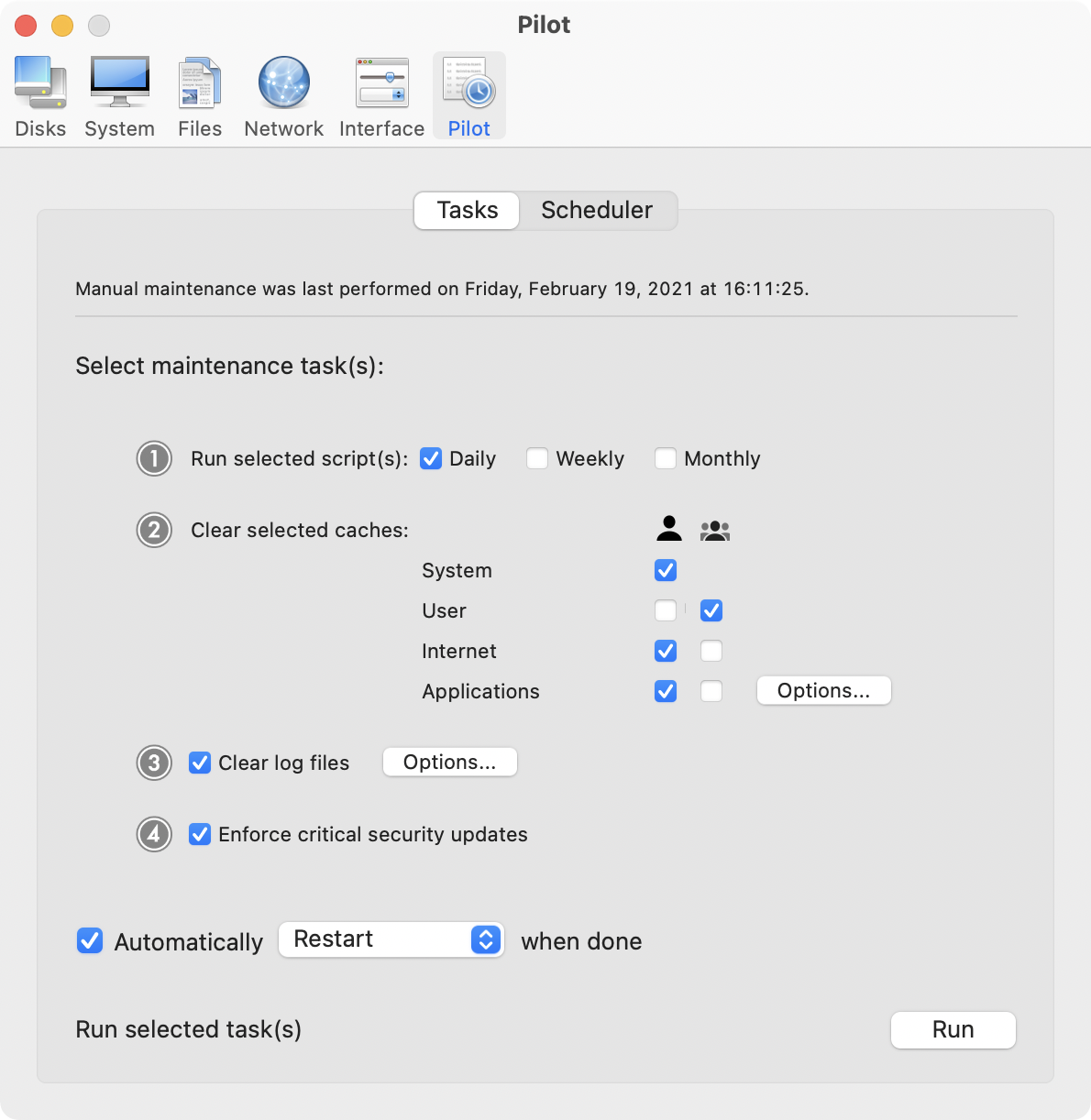
Cocktail is a general purpose utility for OS X that lets you clean, repair and optimize your Mac. The application serves up a perfect mix of maintenance tools and tweaks, all accessible through a clean and easy to use interface. Cocktail's features are arranged into five categories that helps you manage various aspects of your computer. It also comes with an automatic Pilot mode that allows you to simply press a button and relax, knowing that Cocktail will take care of the rest.
Disk:
* Automatically check S.M.A.R.T. status of disks
* Enable or disable journaling
* Repair disk permissions
* Reset home directory permissions and ACLs
* Set disk sleep (spindown) time
* Modify standby delay
* Change other disk sleep settings
* Force eject CD/DVD
System:
* Run periodic maintenance scripts
* Purge inactive memory and optimize virtual memory usage
* Manage Spotlight indexing
* Erase Spotlight indexes
* Modify Time Machine settings
* Rebuild Launch Services and Help databases
* Rebuild Mail's Envelope Index
* Update locate and whatis databases
* Force empty the Trash
* Change startup mode or set startup delay
* Disable startup sound
* Disable Notification Center and App Nap
Files:
* Clear system caches
* Clear user caches
* Clear font caches
* Clear virtual memory swap files
* Clear temporary files
* Clear Internet caches
* Clear cookies, download lists, form values and history files
* Clear Adobe Flash Player caches and cookies
* Clear applications caches
* Search for corrupted preference files
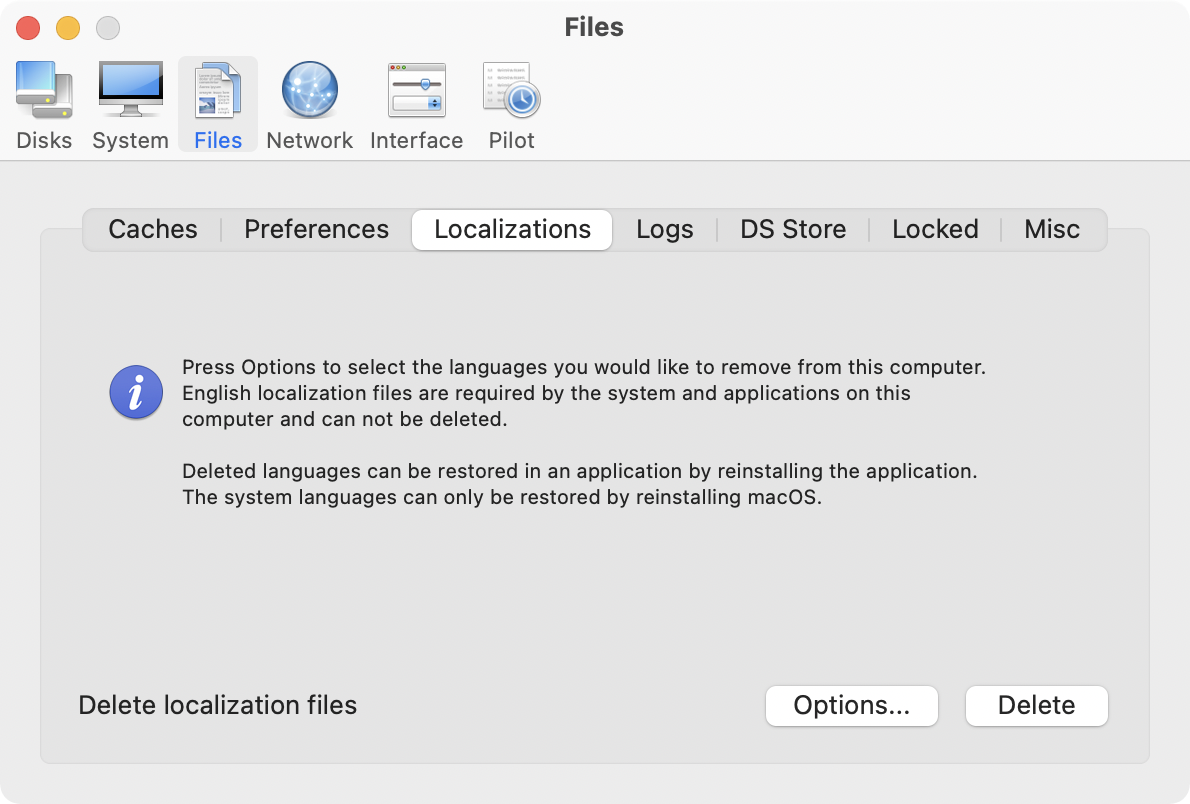
* Delete unnecessary localization (language resources) files
* Clear and manage (view, print and save) log files
* Delete invisible DS Store files
* Delete locked or inaccessible items
Network:
* Change speed, duplex and MTU of network cards
* Easily optimize network settings for common connection types
* Modify IP configuration parameters
* Configure File Sharing settings
Interface:
* Customize look and features of Finder, Dock, login window and other system services
* Modify hidden settings of Safari, QuickTime X and iTunes
Pilot:
* Clean, repair and optimize your system with one click of the button
* Schedule clearing of caches and log files as well as permissions repair and run of periodic maintenance scripts
System Requirements:
Cocktail 9.2.4 (El Capitan Edition) requires OS X El Capitan 10.11 to run. Cocktail (Yosemite Edition) for OS X 10.10, Cocktail (Mavericks Edition) for OS X 10.9, Cocktail (Mountain Lion Edition) for OS X 10.8 and Cocktail (Lion Edition) for OS X 10.7 are available for download from Maintain website.
Pricing and Availability:
Cocktail is $19.00 (USD) for a single user license and available for purchase from the Maintain website. When unregistered, Cocktail runs in demo mode and will expire after the tenth launch.
Cocktail 9.2.4 (El Capitan Edition): http://www.maintain.se/cocktail
Download Cocktail 9.2.4 (El Capitan Edition): http://usa.maintain.se/Cocktail9ECE.dmg
Vimeo Video: https://vimeo.com/109816714
Screenshot 1: http://www.maintain.se/downloads/screenshots/screenshot1.png
Screenshot 2: http://www.maintain.se/downloads/screenshots/screenshot2.png
Application Icon: http://www.maintain.se/downloads/screenshots/icon.png
Maintain develops tailored applications for Mac users. We work towards creating technical solutions which maintain your computer and make it as efficient and easy to use as possible. In addition, we offer comprehensive consultancy and support services which cover everything from operation of existing systems to purchase and implementation of new technical solutions. Among our clients are: Major League Baseball, Puma, The New York Times, Sony Pictures, Ericsson, Fortum, The City Of Calgary, Peak Performance, Loreal, Harvard University, Los Angeles Times, Swedish Film Institute, Weber, ESPN, Business Week, Swedish National Police Board, Norwegian Broadcasting Corporation, Getty Images, University of Texas, South Park Studios, CompUSA, bwin, Lockheed Martin, Defense Intelligence Agency, University of Michigan and hundred of thousands of Mac users around the world. Copyright (C) 2016 Maintain. All Rights Reserved. Apple, the Apple logo and Mac are registered trademarks of Apple Inc. in
the U.S. and/or other countries.
*******
Link To Article: http://prmac.com/release-id-79177.htm
*******
---------------------------------------------------------------------------------
Note that you can alter delivered distributions at any time.
Login to your account on prMac to alter your channel selection, or to opt-out at any time.
Maintain Releases Cocktail 9.2.4 (El Capitan Edition) - Published on 04/07/16
Maintain today announces Cocktail 9.2.4 (El Capitan Edition), the latest maintenance update for users running OS X El Capitan 10.11. This version contains improvements on the "Clear applications caches" procedure and fixes compatibility issues with 1Password. It also adds compatibility with the latest versions of supported web browsers and resolves a number of other issues discovered in the previous release. Cocktail updates are now distributed over HTTPS (HTTP over SSL) for extra security.
Ekero, Sweden - Maintain today is pleased to announce the release of Cocktail 9.2.4 (El Capitan Edition), the latest maintenance update for users running OS X El Capitan 10.11. The update is highly recommended for all users of Cocktail (El Capitan Edition).
What's New:
* Improvements on the "Clear applications caches" procedure
* Fixed compatibility issues with 1Password
* Updates are now distributed over HTTPS (HTTP over SSL) for extra security
* Added compatibility with the latest versions of supported web browsers
* Addresses an issue in which Cocktail may fail to clear DNS cache
* Addresses an issue in which improper permissions were set on the Firewall log during the rotation of this log
* Resolves a number of other minor issues discovered in the previous release
Cocktail is a general purpose utility for OS X that lets you clean, repair and optimize your Mac. The application serves up a perfect mix of maintenance tools and tweaks, all accessible through a clean and easy to use interface. Cocktail's features are arranged into five categories that helps you manage various aspects of your computer. It also comes with an automatic Pilot mode that allows you to simply press a button and relax, knowing that Cocktail will take care of the rest.
Disk:
* Automatically check S.M.A.R.T. status of disks
* Enable or disable journaling
* Repair disk permissions
* Reset home directory permissions and ACLs
* Set disk sleep (spindown) time
* Modify standby delay
* Change other disk sleep settings
* Force eject CD/DVD
System:
* Run periodic maintenance scripts
* Purge inactive memory and optimize virtual memory usage
* Manage Spotlight indexing
* Erase Spotlight indexes
* Modify Time Machine settings
* Rebuild Launch Services and Help databases
* Rebuild Mail's Envelope Index
* Update locate and whatis databases
* Force empty the Trash
* Change startup mode or set startup delay
* Disable startup sound
* Disable Notification Center and App Nap
Files:
* Clear system caches
* Clear user caches
* Clear font caches
* Clear virtual memory swap files
* Clear temporary files
* Clear Internet caches
* Clear cookies, download lists, form values and history files
* Clear Adobe Flash Player caches and cookies
* Clear applications caches
* Search for corrupted preference files
* Delete unnecessary localization (language resources) files
* Clear and manage (view, print and save) log files
* Delete invisible DS Store files
* Delete locked or inaccessible items
Network:
* Change speed, duplex and MTU of network cards
* Easily optimize network settings for common connection types
* Modify IP configuration parameters
* Configure File Sharing settings
Interface:
* Customize look and features of Finder, Dock, login window and other system services
* Modify hidden settings of Safari, QuickTime X and iTunes
Pilot:
* Clean, repair and optimize your system with one click of the button
* Schedule clearing of caches and log files as well as permissions repair and run of periodic maintenance scripts
System Requirements:
Cocktail 9.2.4 (El Capitan Edition) requires OS X El Capitan 10.11 to run. Cocktail (Yosemite Edition) for OS X 10.10, Cocktail (Mavericks Edition) for OS X 10.9, Cocktail (Mountain Lion Edition) for OS X 10.8 and Cocktail (Lion Edition) for OS X 10.7 are available for download from Maintain website.
Pricing and Availability:
Cocktail is $19.00 (USD) for a single user license and available for purchase from the Maintain website. When unregistered, Cocktail runs in demo mode and will expire after the tenth launch.
Cocktail 9.2.4 (El Capitan Edition): http://www.maintain.se/cocktail
Download Cocktail 9.2.4 (El Capitan Edition): http://usa.maintain.se/Cocktail9ECE.dmg
Vimeo Video: https://vimeo.com/109816714
Screenshot 1: http://www.maintain.se/downloads/screenshots/screenshot1.png
Screenshot 2: http://www.maintain.se/downloads/screenshots/screenshot2.png
Application Icon: http://www.maintain.se/downloads/screenshots/icon.png

Maintain develops tailored applications for Mac users. We work towards creating technical solutions which maintain your computer and make it as efficient and easy to use as possible. In addition, we offer comprehensive consultancy and support services which cover everything from operation of existing systems to purchase and implementation of new technical solutions. Among our clients are: Major League Baseball, Puma, The New York Times, Sony Pictures, Ericsson, Fortum, The City Of Calgary, Peak Performance, Loreal, Harvard University, Los Angeles Times, Swedish Film Institute, Weber, ESPN, Business Week, Swedish National Police Board, Norwegian Broadcasting Corporation, Getty Images, University of Texas, South Park Studios, CompUSA, bwin, Lockheed Martin, Defense Intelligence Agency, University of Michigan and hundred of thousands of Mac users around the world. Copyright (C) 2016 Maintain. All Rights Reserved. Apple, the Apple logo and Mac are registered trademarks of Apple Inc. in
the U.S. and/or other countries.
*******
Link To Article: http://prmac.com/release-id-79177.htm
*******
---------------------------------------------------------------------------------
Note that you can alter delivered distributions at any time.
Login to your account on prMac to alter your channel selection, or to opt-out at any time.
New App Veggie Bottoms Kitchen is a Recipe for Family-Friendly Fun
A new article has been published at prMac.
New App Veggie Bottoms Kitchen is a Recipe for Family-Friendly Fun - Published on 04/07/16
Seattle based Red Card Studios today introduces Veggie Bottoms Kitchen 1.0 for iOS, a new app that encourages parents and kids to cook real recipes together, while promoting healthy eating, and making learning to cook fun! With over 40 simple, yet delicious, recipes packed with fun food facts, cooking tips, techniques, and easy step-by-step recipes, Veggie Bottoms Kitchen helps create a real connection between your kids and the food they eat.
Seattle, Washington - Veggie Bottoms Kitchen, a new app from Red Card Studios, is the perfect cooking companion for kids who want to get more confident in the kitchen, and for parents who want to encourage the family to stay healthy. Eating fruits and vegetables has never been so fun!
What is Veggie Bottoms Kitchen?
Veggie Bottoms Kitchen uses playful animated characters like John Lemon ("a bit of a sour chap"), Sophia Broccoli ("green and beautiful from head to stem"), and Charles Chard III ("a lean, green, vitamin-packed machine") to introduce over forty kid-friendly, vegetarian recipes from all over the culinary map: kiwi pizza, banana bon bons, African peanut soup, marketplace coconut curry, and much more. Browse recipes by tapping on your favorite fruit or veggie character or filter the recipes by dietary restrictions for the allergy-conscious. The recipes of Veggie Bottoms Kitchen were created by a certified nutritionist to help remind people that cooking doesn't have to be hard, and eating healthy doesn't have to be boring.
Want to create your own recipes? Veggie Bottoms Kitchen also includes the "Test Kitchen," - an area dedicated to letting kids mix up their own smoothie concoctions in a virtual blender for Chef Monty to try. Keep playing and you might just unlock some of his secret smoothie recipes!
Cook, create and play in the kitchen with Veggie Bottoms Kitchen. The app was developed by Red Card Studios as a follow-up to their award-winning interactive book Veggie Bottoms, which first introduced this world of fun, colorful, vitamin-packed characters.
Patrick Skidmore, co-creator of Veggie Bottoms and Veggie Bottoms Kitchen explains, "After we made the original Veggie Bottoms, we saw firsthand how good it was at getting kids interested in fruits and vegetables - giggling at the kitchen table. So the idea of building a hands-on cooking app for kids was kind of a no-brainer. So many educational apps focus on math or science or memorization. But cooking really brings out the creative side in people. This organic kind of learning is more robust, and has far reaching effects in cognitive thinking. It also encourages families to come together in the kitchen for a shared experience."
Device Requirements:
* Compatible with iPad
* Requires iOS 6.0 or later
* 39.0 MB
Pricing and Availability:
Veggie Bottoms Kitchen 1.0 is $1.99 USD (or equivalent amount in other currencies) and available worldwide exclusively through the App Store in the Food & Drink category. For more information, please visit Veggie Bottoms Kitchen's official website or connect with us on Facebook, Twitter, and LinkedIn (@RedCardStudios).
Veggie Bottoms Kitchen 1.0: http://veggiebottomskitchen.com
Purchase and Download: https://itunes.apple.com/app/veggie-bottoms-kitchen/id1081562872
Screenshot Gallery: http://veggiebottomskitchen.com/gallery/
App Icon: http://veggiebottomskitchen.com/downloads/VBK-Icon-1024x1024.png
Media Assets: http://veggiebottomskitchen.com/press-kit/
Founded in early 2002, Red Card Studios has pursued a single mission: to produce creative and innovative digital design solutions for any platform or medium. From their headquarters in Seattle, Red Card Studios has produced professional creative work for Microsoft, Disney, Motorola, The Getty Center, Stanford, ABC, and more. The Red Card Apps team extends the creative vision of Red Card Studios to the production of high-quality, educational (and most of all fun!) interactive apps for kids of all ages. Their award winning, highly rated flagship app for kids, Veggie Bottoms, was released in 2013. All Material and Software (C) Copyright 2016 Red Card Studios, LLC. All Rights Reserved. Apple, the Apple logo, iPhone, iPod and iPad are registered trademarks of Apple Inc. in the U.S. and/or other countries. Other trademarks and registered trademarks may be the property of their respective owners.
*******
Link To Article: http://prmac.com/release-id-79172.htm
*******
---------------------------------------------------------------------------------
Note that you can alter delivered distributions at any time.
Login to your account on prMac to alter your channel selection, or to opt-out at any time.
New App Veggie Bottoms Kitchen is a Recipe for Family-Friendly Fun - Published on 04/07/16
Seattle based Red Card Studios today introduces Veggie Bottoms Kitchen 1.0 for iOS, a new app that encourages parents and kids to cook real recipes together, while promoting healthy eating, and making learning to cook fun! With over 40 simple, yet delicious, recipes packed with fun food facts, cooking tips, techniques, and easy step-by-step recipes, Veggie Bottoms Kitchen helps create a real connection between your kids and the food they eat.
Seattle, Washington - Veggie Bottoms Kitchen, a new app from Red Card Studios, is the perfect cooking companion for kids who want to get more confident in the kitchen, and for parents who want to encourage the family to stay healthy. Eating fruits and vegetables has never been so fun!
What is Veggie Bottoms Kitchen?
Veggie Bottoms Kitchen uses playful animated characters like John Lemon ("a bit of a sour chap"), Sophia Broccoli ("green and beautiful from head to stem"), and Charles Chard III ("a lean, green, vitamin-packed machine") to introduce over forty kid-friendly, vegetarian recipes from all over the culinary map: kiwi pizza, banana bon bons, African peanut soup, marketplace coconut curry, and much more. Browse recipes by tapping on your favorite fruit or veggie character or filter the recipes by dietary restrictions for the allergy-conscious. The recipes of Veggie Bottoms Kitchen were created by a certified nutritionist to help remind people that cooking doesn't have to be hard, and eating healthy doesn't have to be boring.
Want to create your own recipes? Veggie Bottoms Kitchen also includes the "Test Kitchen," - an area dedicated to letting kids mix up their own smoothie concoctions in a virtual blender for Chef Monty to try. Keep playing and you might just unlock some of his secret smoothie recipes!
Cook, create and play in the kitchen with Veggie Bottoms Kitchen. The app was developed by Red Card Studios as a follow-up to their award-winning interactive book Veggie Bottoms, which first introduced this world of fun, colorful, vitamin-packed characters.
Patrick Skidmore, co-creator of Veggie Bottoms and Veggie Bottoms Kitchen explains, "After we made the original Veggie Bottoms, we saw firsthand how good it was at getting kids interested in fruits and vegetables - giggling at the kitchen table. So the idea of building a hands-on cooking app for kids was kind of a no-brainer. So many educational apps focus on math or science or memorization. But cooking really brings out the creative side in people. This organic kind of learning is more robust, and has far reaching effects in cognitive thinking. It also encourages families to come together in the kitchen for a shared experience."
Device Requirements:
* Compatible with iPad
* Requires iOS 6.0 or later
* 39.0 MB
Pricing and Availability:
Veggie Bottoms Kitchen 1.0 is $1.99 USD (or equivalent amount in other currencies) and available worldwide exclusively through the App Store in the Food & Drink category. For more information, please visit Veggie Bottoms Kitchen's official website or connect with us on Facebook, Twitter, and LinkedIn (@RedCardStudios).
Veggie Bottoms Kitchen 1.0: http://veggiebottomskitchen.com
Purchase and Download: https://itunes.apple.com/app/veggie-bottoms-kitchen/id1081562872
Screenshot Gallery: http://veggiebottomskitchen.com/gallery/
App Icon: http://veggiebottomskitchen.com/downloads/VBK-Icon-1024x1024.png

Media Assets: http://veggiebottomskitchen.com/press-kit/
Founded in early 2002, Red Card Studios has pursued a single mission: to produce creative and innovative digital design solutions for any platform or medium. From their headquarters in Seattle, Red Card Studios has produced professional creative work for Microsoft, Disney, Motorola, The Getty Center, Stanford, ABC, and more. The Red Card Apps team extends the creative vision of Red Card Studios to the production of high-quality, educational (and most of all fun!) interactive apps for kids of all ages. Their award winning, highly rated flagship app for kids, Veggie Bottoms, was released in 2013. All Material and Software (C) Copyright 2016 Red Card Studios, LLC. All Rights Reserved. Apple, the Apple logo, iPhone, iPod and iPad are registered trademarks of Apple Inc. in the U.S. and/or other countries. Other trademarks and registered trademarks may be the property of their respective owners.
*******
Link To Article: http://prmac.com/release-id-79172.htm
*******
---------------------------------------------------------------------------------
Note that you can alter delivered distributions at any time.
Login to your account on prMac to alter your channel selection, or to opt-out at any time.
iFlicks 2.4 beta for Mac OS X: Video Metadata Editor and Conversion
A new article has been published at prMac.
iFlicks 2.4 beta for Mac OS X: Video Metadata Editor and Conversion - Published on 04/07/16
Indie developer, Jendrik Bertram today announces the public beta of iFlicks 2.4, a major update of the popular iFlicks for Mac OS X. iFlicks has integrated video muxing and encoding capabilities for users to choose the best option to quickly import their video files into iTunes and automatically complete them with metadata and artwork. iFlicks 2.4 features automatic chapter and subtitle download, extended in-place editing, chapter images, improved metadata, extended rules and much more.
Paderborn, Germany - Indie developer, Jendrik Bertram today is pleased to announce the release of iFlicks 2.4 beta, a major update of iFlicks 2 for Mac OS X. iFlicks has integrated video muxing and encoding capabilities, so that users can choose the best option to quickly import their video files into iTunes. They can add metadata to Movies and TV Shows to make their iTunes library look awesome and even update existing videos by dragging them from iTunes to the iFlicks window.
With iFlicks, users can process their video files faster than ever before, so that they can watch them on their iOS device right away. iFlicks uses the most advanced encoders to convert the video stream while keeping quality high and file sizes low. Many current video files can be transferred into m4v containers without lengthy re-encoding or quality loss.
What's New in Version 2.4:
* Automatic lookup of subtitles
* Automatic lookup of chapter titles
* Improved support for in-place editing of files
* Extended metadata support
* Creation of chapter images
* Faster processing
* More powerful rules
Feature Highlights:
* Automatic lookup for Movies and TV Shows
* Clever parsing of file names
* Finds squared artwork for TV Shows
* Metadata completely customizable using rules
* All common mp4 metadata tags supported
* Full support for iTunes specific metadata
* Extend your metadata with chapters
* Extremely fast processing of many video types
* High quality video encoding
* Support for surround audio tracks
* Audio support for multiple tracks in different languages
* Support for subtitles to be embedded in your video files
* Dedicated presets to optimize videos for any Apple device
* Apple Script support for most functions
* Custom watch folders with automated processing
* Powerful rule system to customize your workflow
* Integrated tightly with iTunes
The new support for automatic subtitle and chapter title download mark another step that puts iFlicks ahead of its competition. All of these new features are completely configurable using the incredibly powerful rule system iFlicks provides.
iFlicks can be fully automated using rules, watch folders, and scripts. Users can automatically open videos copied to watch folders and run custom rules to modify metadata and settings. The app handles all common video formats like H.264 and DivX and supports all common video containers like mp4, mkv, and avi.
Using the powerful rules, users can not only move metadata around to their preference, but also automatically choose preset, destination, and further processing options depending on file path, type, or other conditions. Simple rules easily make repeatable steps work automatically and there is powerful rules support for video tagging.
"iFlicks is all about Movie and TV Show Metadata. It helps you make your iTunes Library look awesome by adding metadata; all using a beautifully designed user-interface. It really brings your iTunes library to life," said Jendrik Bertram. "Managing your video collection on your Mac has never been this easy. If you love Movies just as much as we do, you want them to look beautiful in your iTunes library."
Language Support:
iFlicks supports English, Arabic, Bokml, Norwegian, Catalan, Croatian, Czech, Danish, Dutch, Finnish, French, German, Greek, Hebrew, Hungarian, Indonesian, Italian, Japanese, Korean, Malay, Polish, Portuguese, Romanian, Russian, Simplified Chinese, Slovak, Spanish, Swedish, Thai, Traditional Chinese, Turkish, Ukrainian and Vietnamese languages.
Device Requirements:
* An 64bit Intel based Mac
* Mac OS X 10.10 or later
* iTunes 12
Pricing and Availability:
iFlicks 2.4 beta is free during the public beta.
iFlicks: http://www.iflicksapp.com
Test iFlicks Beta: http://beta.iflicksapp.com
Purchase and Download iFlicks 2 (MAS): https://itunes.apple.com/app/iflicks-2/id731062389
Screenshot: http://www.iflicksapp.com/images/screenshot_metadata.png
Application Icon: http://www.iflicksapp.com/images/iFlicks.png
Located in Paderborn, Germany, independent software developer Jendrik Bertram has a passion to craft elegant, easy-to-use applications for the Mac platform. As an indie developer, Jendrik Bertram would like to thank all of his wonderful beta testers. Copyright (C) 2016 Jendrik Bertram. All Rights Reserved. Apple, the Apple logo, iPhone, iPod, iPad, QuickTime and iTunes are registered trademarks of Apple Inc. in the U.S. and/or other countries. Other registered trademarks may be the property of their respective owners.
*******
Link To Article: http://prmac.com/release-id-79173.htm
*******
---------------------------------------------------------------------------------
Note that you can alter delivered distributions at any time.
Login to your account on prMac to alter your channel selection, or to opt-out at any time.
iFlicks 2.4 beta for Mac OS X: Video Metadata Editor and Conversion - Published on 04/07/16
Indie developer, Jendrik Bertram today announces the public beta of iFlicks 2.4, a major update of the popular iFlicks for Mac OS X. iFlicks has integrated video muxing and encoding capabilities for users to choose the best option to quickly import their video files into iTunes and automatically complete them with metadata and artwork. iFlicks 2.4 features automatic chapter and subtitle download, extended in-place editing, chapter images, improved metadata, extended rules and much more.
Paderborn, Germany - Indie developer, Jendrik Bertram today is pleased to announce the release of iFlicks 2.4 beta, a major update of iFlicks 2 for Mac OS X. iFlicks has integrated video muxing and encoding capabilities, so that users can choose the best option to quickly import their video files into iTunes. They can add metadata to Movies and TV Shows to make their iTunes library look awesome and even update existing videos by dragging them from iTunes to the iFlicks window.
With iFlicks, users can process their video files faster than ever before, so that they can watch them on their iOS device right away. iFlicks uses the most advanced encoders to convert the video stream while keeping quality high and file sizes low. Many current video files can be transferred into m4v containers without lengthy re-encoding or quality loss.
What's New in Version 2.4:
* Automatic lookup of subtitles
* Automatic lookup of chapter titles
* Improved support for in-place editing of files
* Extended metadata support
* Creation of chapter images
* Faster processing
* More powerful rules
Feature Highlights:
* Automatic lookup for Movies and TV Shows
* Clever parsing of file names
* Finds squared artwork for TV Shows
* Metadata completely customizable using rules
* All common mp4 metadata tags supported
* Full support for iTunes specific metadata
* Extend your metadata with chapters
* Extremely fast processing of many video types
* High quality video encoding
* Support for surround audio tracks
* Audio support for multiple tracks in different languages
* Support for subtitles to be embedded in your video files
* Dedicated presets to optimize videos for any Apple device
* Apple Script support for most functions
* Custom watch folders with automated processing
* Powerful rule system to customize your workflow
* Integrated tightly with iTunes
The new support for automatic subtitle and chapter title download mark another step that puts iFlicks ahead of its competition. All of these new features are completely configurable using the incredibly powerful rule system iFlicks provides.
iFlicks can be fully automated using rules, watch folders, and scripts. Users can automatically open videos copied to watch folders and run custom rules to modify metadata and settings. The app handles all common video formats like H.264 and DivX and supports all common video containers like mp4, mkv, and avi.
Using the powerful rules, users can not only move metadata around to their preference, but also automatically choose preset, destination, and further processing options depending on file path, type, or other conditions. Simple rules easily make repeatable steps work automatically and there is powerful rules support for video tagging.
"iFlicks is all about Movie and TV Show Metadata. It helps you make your iTunes Library look awesome by adding metadata; all using a beautifully designed user-interface. It really brings your iTunes library to life," said Jendrik Bertram. "Managing your video collection on your Mac has never been this easy. If you love Movies just as much as we do, you want them to look beautiful in your iTunes library."
Language Support:
iFlicks supports English, Arabic, Bokml, Norwegian, Catalan, Croatian, Czech, Danish, Dutch, Finnish, French, German, Greek, Hebrew, Hungarian, Indonesian, Italian, Japanese, Korean, Malay, Polish, Portuguese, Romanian, Russian, Simplified Chinese, Slovak, Spanish, Swedish, Thai, Traditional Chinese, Turkish, Ukrainian and Vietnamese languages.
Device Requirements:
* An 64bit Intel based Mac
* Mac OS X 10.10 or later
* iTunes 12
Pricing and Availability:
iFlicks 2.4 beta is free during the public beta.
iFlicks: http://www.iflicksapp.com
Test iFlicks Beta: http://beta.iflicksapp.com
Purchase and Download iFlicks 2 (MAS): https://itunes.apple.com/app/iflicks-2/id731062389
Screenshot: http://www.iflicksapp.com/images/screenshot_metadata.png

Application Icon: http://www.iflicksapp.com/images/iFlicks.png

Located in Paderborn, Germany, independent software developer Jendrik Bertram has a passion to craft elegant, easy-to-use applications for the Mac platform. As an indie developer, Jendrik Bertram would like to thank all of his wonderful beta testers. Copyright (C) 2016 Jendrik Bertram. All Rights Reserved. Apple, the Apple logo, iPhone, iPod, iPad, QuickTime and iTunes are registered trademarks of Apple Inc. in the U.S. and/or other countries. Other registered trademarks may be the property of their respective owners.
*******
Link To Article: http://prmac.com/release-id-79173.htm
*******
---------------------------------------------------------------------------------
Note that you can alter delivered distributions at any time.
Login to your account on prMac to alter your channel selection, or to opt-out at any time.
High Fives - A sleek new collectible puzzle game available now on iOS
A new article has been published at prMac.
High Fives - A sleek new collectible puzzle game available now on iOS - Published on 04/07/16
Indie game developer, Jeffrey Yim today introduces High Fives 1.0 for iOS, a new puzzle game about combining colors and numbers. Players must slide colors and numbered tiles into other tiles to create high numbers. However, certain rules turn this simple task into a mind bending challenge. Combine two 5 tiles to earn coins which are used to unlock new tiles and change the way the board looks and sounds. Featuring almost one hundred tiles, players will always have a reason to come back to play.
Vancouver, Canada - Indie game developer, Jeffrey Yim, one of the developers of the Apple featured game Mechanic Panic, today is thrilled to announce the release and immediate availability of High Fives 1.0 for iOS, a new puzzle game about combining colors and numbers. High Fives' simple, accessible, gameplay can be summarized as combining numbers to increase their value, until two fives match, creating High Fives.
Gameplay involves sliding numbered tiles around a board, however a few rules turn this simple task into a mind bending challenge. Numbers can only combine together, for instance, 1 and 1 form 2, which can then only combine with another 2. Also, colors only combine with each other, so two green tiles, or two red tiles match together to form a 1. Keep combining numbers until two 5 tiles match, creating a High Five, clearing the tiles, giving points, and coins.
Each slide adds a new number to the board so players must continuously remove tiles by combining them to prevent the board from filling up. Use coins earned in-game to unlock new tiles to customize the way the board looks and sounds. Featuring almost one hundred tiles, players will always have a reason to come back to play the game, earn coins and unlock new tiles.
Features:
* Easy to learn, hard to master gameplay
* Unlock tons of tiles and play with new decks
* Compete with your friends with global leaderboards
* Share your best scores with the tap of a button
* Chill soundtrack
Device Requirements:
* iPhone, iPod touch and iPad
* Requires iOS 8.0 or later
* 17.7 MB
Pricing and Availability:
High Fives 1.0 is Free and available worldwide exclusively through the App Store in the Games category.
High Fives 1.0: http://tarenar.wix.com/highfives
Download from iTunes: https://itunes.apple.com/app/high-fives-puzzle-slider-game/id1082240901
YouTube Video (Trailer): https://www.youtube.com/watch?v=ckE7c5rF_Z8
Screenshot: http://a4.mzstatic.com/us/r30/Purple49/v4/f2/d6/16/f2d61694-a87a-92dd-0a3e-2dc3abc0edd3/screen322x572.jpeg
App Icon: http://a2.mzstatic.com/us/r30/Purple49/v4/af/d3/fe/afd3fec0-a7f2-d402-aa45-c32071903c27/icon175x175.jpeg
Located in Vancouver BC, Jeffrey Yim is an independent game developers that has worked in the games industry over 9 years. Copyright (C) 2016 Jeffrey Yim. All Rights Reserved. Apple, the Apple logo, iPhone, iPod and iPad are registered trademarks of Apple Inc. in the U.S. and/or other countries.
*******
Link To Article: http://prmac.com/release-id-79174.htm
*******
---------------------------------------------------------------------------------
Note that you can alter delivered distributions at any time.
Login to your account on prMac to alter your channel selection, or to opt-out at any time.
High Fives - A sleek new collectible puzzle game available now on iOS - Published on 04/07/16
Indie game developer, Jeffrey Yim today introduces High Fives 1.0 for iOS, a new puzzle game about combining colors and numbers. Players must slide colors and numbered tiles into other tiles to create high numbers. However, certain rules turn this simple task into a mind bending challenge. Combine two 5 tiles to earn coins which are used to unlock new tiles and change the way the board looks and sounds. Featuring almost one hundred tiles, players will always have a reason to come back to play.
Vancouver, Canada - Indie game developer, Jeffrey Yim, one of the developers of the Apple featured game Mechanic Panic, today is thrilled to announce the release and immediate availability of High Fives 1.0 for iOS, a new puzzle game about combining colors and numbers. High Fives' simple, accessible, gameplay can be summarized as combining numbers to increase their value, until two fives match, creating High Fives.
Gameplay involves sliding numbered tiles around a board, however a few rules turn this simple task into a mind bending challenge. Numbers can only combine together, for instance, 1 and 1 form 2, which can then only combine with another 2. Also, colors only combine with each other, so two green tiles, or two red tiles match together to form a 1. Keep combining numbers until two 5 tiles match, creating a High Five, clearing the tiles, giving points, and coins.
Each slide adds a new number to the board so players must continuously remove tiles by combining them to prevent the board from filling up. Use coins earned in-game to unlock new tiles to customize the way the board looks and sounds. Featuring almost one hundred tiles, players will always have a reason to come back to play the game, earn coins and unlock new tiles.
Features:
* Easy to learn, hard to master gameplay
* Unlock tons of tiles and play with new decks
* Compete with your friends with global leaderboards
* Share your best scores with the tap of a button
* Chill soundtrack
Device Requirements:
* iPhone, iPod touch and iPad
* Requires iOS 8.0 or later
* 17.7 MB
Pricing and Availability:
High Fives 1.0 is Free and available worldwide exclusively through the App Store in the Games category.
High Fives 1.0: http://tarenar.wix.com/highfives
Download from iTunes: https://itunes.apple.com/app/high-fives-puzzle-slider-game/id1082240901
YouTube Video (Trailer): https://www.youtube.com/watch?v=ckE7c5rF_Z8
Screenshot: http://a4.mzstatic.com/us/r30/Purple49/v4/f2/d6/16/f2d61694-a87a-92dd-0a3e-2dc3abc0edd3/screen322x572.jpeg

App Icon: http://a2.mzstatic.com/us/r30/Purple49/v4/af/d3/fe/afd3fec0-a7f2-d402-aa45-c32071903c27/icon175x175.jpeg

Located in Vancouver BC, Jeffrey Yim is an independent game developers that has worked in the games industry over 9 years. Copyright (C) 2016 Jeffrey Yim. All Rights Reserved. Apple, the Apple logo, iPhone, iPod and iPad are registered trademarks of Apple Inc. in the U.S. and/or other countries.
*******
Link To Article: http://prmac.com/release-id-79174.htm
*******
---------------------------------------------------------------------------------
Note that you can alter delivered distributions at any time.
Login to your account on prMac to alter your channel selection, or to opt-out at any time.
myHealthbox Opens its Search APIs to Third-Party Developers
A new article has been published at prMac.
myHealthbox Opens its Search APIs to Third-Party Developers - Published on 04/07/16
myHealthbox announces that it will now allow developers to access the same search APIs behind its healthcare platform. The myHealtbox Search API covers 35 languages and can be used to access details of over 2 million medicines and healthcare products available in over 50 countries, to view over 1.5 million Patient Information Leaflets and Summary of Product Characteristics documents and to search through healthcare alerts and news from over 200 official sources.
Milano, Italy - myHealthbox will now allow developers to access the same search APIs behind its healthcare platform. The myHealtbox Search API covers 35 languages and can be used to access details of over 2 million medicines and healthcare products available in over 50 countries, to view over 1.5 million Patient Information Leaflets, (for the general public), and Summary of Product Characteristics (for healthcare professionals) documents, and to search through healthcare alerts and news from over 200 official sources.
The Web API is currently free to use with fair usage limitations, you will need to obtain an access key, although myHealthbox is planning to introduce a paid service at a later date.
myHealthbox(TM) is a leading provider of health information services to consumers and healthcare professionals. myHealthbox(TM) provides a platform to access official Patient Information Leaflets (PIL) and Summary of Product Characteristics (SPC) documents on healthcare products including: human, animal and plants medications; drugs; herbal, homoeopathic and natural remedies; prescription and over-the-counter medicines; beauty products and cosmetics; supplements and medical devices.
myHealthbox is the largest independent source of digital healthcare information, providing freely available, trustworthy data for both consumers and professionals. myHealthbox gives companies a unique platform for simple and interactive sharing of healthcare information regardless of device or geography.
With the rise of internet users to over 3 billion, and 175 million Google searches per day for health-related information, the demand for digital, accessible and trustworthy information on health products is greater than ever. We provide a simple solution to cover the demand for simple and high quality information from consumer and health professionals, and for those companies wanting to engage with them.
Our search engine provides digital information leaflets for a big selection of health-related products ranging from traditional pharma medicines to over-the-counter and alternative therapies, to medical devices, topical creams and nutritional supplements, to veterinary and plants products. With already over 2 million leaflets available in 35 languages myHealthbox is rapidly expanding its coverage and users base.
myHealthbox: http://developers.myhealthbox.eu/
myHealthbox, an Italy based company, provides a solution to replace the paper-based technology and provision this information in digital format through an electronic version of the information leaflet. With our products and services we want to improve the connection between users of healthcare-related products and the companies supplying those products thus improving the quantity and quality of information that is available on these products. All Material and Software (C) Copyright 2016 myHealthbox. All Rights Reserved. Apple, the Apple logo, iPhone, iPod and iPad are registered trademarks of Apple Inc. in the U.S. and/or other countries. Other trademarks and registered trademarks may be the property of their respective owners.
*******
Link To Article: http://prmac.com/release-id-79175.htm
*******
---------------------------------------------------------------------------------
Note that you can alter delivered distributions at any time.
Login to your account on prMac to alter your channel selection, or to opt-out at any time.
myHealthbox Opens its Search APIs to Third-Party Developers - Published on 04/07/16
myHealthbox announces that it will now allow developers to access the same search APIs behind its healthcare platform. The myHealtbox Search API covers 35 languages and can be used to access details of over 2 million medicines and healthcare products available in over 50 countries, to view over 1.5 million Patient Information Leaflets and Summary of Product Characteristics documents and to search through healthcare alerts and news from over 200 official sources.
Milano, Italy - myHealthbox will now allow developers to access the same search APIs behind its healthcare platform. The myHealtbox Search API covers 35 languages and can be used to access details of over 2 million medicines and healthcare products available in over 50 countries, to view over 1.5 million Patient Information Leaflets, (for the general public), and Summary of Product Characteristics (for healthcare professionals) documents, and to search through healthcare alerts and news from over 200 official sources.
The Web API is currently free to use with fair usage limitations, you will need to obtain an access key, although myHealthbox is planning to introduce a paid service at a later date.
myHealthbox(TM) is a leading provider of health information services to consumers and healthcare professionals. myHealthbox(TM) provides a platform to access official Patient Information Leaflets (PIL) and Summary of Product Characteristics (SPC) documents on healthcare products including: human, animal and plants medications; drugs; herbal, homoeopathic and natural remedies; prescription and over-the-counter medicines; beauty products and cosmetics; supplements and medical devices.
myHealthbox is the largest independent source of digital healthcare information, providing freely available, trustworthy data for both consumers and professionals. myHealthbox gives companies a unique platform for simple and interactive sharing of healthcare information regardless of device or geography.
With the rise of internet users to over 3 billion, and 175 million Google searches per day for health-related information, the demand for digital, accessible and trustworthy information on health products is greater than ever. We provide a simple solution to cover the demand for simple and high quality information from consumer and health professionals, and for those companies wanting to engage with them.
Our search engine provides digital information leaflets for a big selection of health-related products ranging from traditional pharma medicines to over-the-counter and alternative therapies, to medical devices, topical creams and nutritional supplements, to veterinary and plants products. With already over 2 million leaflets available in 35 languages myHealthbox is rapidly expanding its coverage and users base.
myHealthbox: http://developers.myhealthbox.eu/
myHealthbox, an Italy based company, provides a solution to replace the paper-based technology and provision this information in digital format through an electronic version of the information leaflet. With our products and services we want to improve the connection between users of healthcare-related products and the companies supplying those products thus improving the quantity and quality of information that is available on these products. All Material and Software (C) Copyright 2016 myHealthbox. All Rights Reserved. Apple, the Apple logo, iPhone, iPod and iPad are registered trademarks of Apple Inc. in the U.S. and/or other countries. Other trademarks and registered trademarks may be the property of their respective owners.
*******
Link To Article: http://prmac.com/release-id-79175.htm
*******
---------------------------------------------------------------------------------
Note that you can alter delivered distributions at any time.
Login to your account on prMac to alter your channel selection, or to opt-out at any time.
Tropical Software releases TopXNotes Pro 1.5 for iOS
A new article has been published at prMac.
Tropical Software releases TopXNotes Pro 1.5 for iOS - Published on 04/07/16
From the One Spark Crowd Funding Festival in Jacksonville, Florida, Tropical Software today announces TopXNotes Pro 1.5, the third leg of their freemium tripod of apps for iPhone, iPad and iPod touch devices. TopXNotes Pro features note creation and editing in landscape and portrait modes, emailing a note, backup/restore to the device, and so much more. TopXNotes Pro features note sharing and encryption, in addition to all the features of TopXNotes, along with WiFi NoteSync to TopXNotes for Mac.
Atlantic Beach, Florida - Tropical Software today is thrilled to announce the release of TopXNotes Pro 1.5, the third leg of their freemium tripod of apps for iPhone, iPad and iPod touch devices. The announcement was made from the One Spark Crowd Funding Festival in Jacksonville, Florida. TopXNotes Pro contains 4-way sorting to the NoteOrganizer (note list.) The TopXNotes family will keep your notes synchronized between TopXNotes for Mac and TopXNotes Touch for iPhone, iPad and iPod touch.
TopXNotes Pro for iOS includes the major improvements to their WiFi based NoteSync process for improved efficiency, stability and performance including improved handling of large files, files with many notes and improved handling of other conditions. In addition to all the past features of TopXNotes, TopXNotes Pro features note sharing and encryption. Finally, TopXNotes Pro now checks for compatible NoteSync services between Mac and iOS device and will not attempt sync between incompatible versions. If you suspect a problem be sure you have the latest versions on iOS and Mac.
TopXNotes Pro features note creation and editing in landscape and portrait modes, emailing a note, backup/restore to the device, clickable hot links, and note synchronization (NoteSync) with TopXNotes for Mac. You also have full access to all fonts and font sizes Apple offers in iOS. Now you can also have your notes "on the go", create new notes, edit notes, delete some and keep them in sync with your Mac's notes.
Previous changes to NoteOrganizer (note list) allows it to be sorted by note title or date, ascending or descending for either. Other changes include changing the user interface default fonts to a more popular font. The NoteOrganizer list titles, list dates, search, email, and the default note font are now the preferred iOS family font (Helvetica.) Also in a previous TopXNotes touch release we made even more changes to accommodate retina display and new screen sizes in iPhone 6 and iPad 4.
TopXNotes Pro features note creation and editing in landscape and portrait modes, emailing a note, backup/restore to the device, clickable hot links, and note synchronization (NoteSync) with TopXNotes for Mac. You also have full access to all fonts and font sizes Apple offers in iOS. Now you can also have your notes "on the go", create new notes, edit notes, delete some and keep them in sync with your Mac's notes.
Previous changes to NoteOrganizer (note list) allows it to be sorted by note title or date, ascending or descending for either. Other changes include changing the user interface default fonts to a more popular font. The NoteOrganizer list titles, list dates, search, email, and the default note font are now the preferred iOS family font (Helvetica.) Also in a previous TopXNotes touch release we made even more changes to accommodate retina display and new screen sizes in iPhone 6 and iPad 4
This release of TopXNotes Pro for iOS, with retina graphics, compliments the release of TopXNotes 1.8, the latest update to its award-winning personal note manager for Macintosh. When combined with TopXNotes for Mac customers can synchronize notes between one Mac and multiple devices running TopXNotes touch including iPhone, iPod touch and/or iPad.
TopXNotes Pro for iOS also works perfectly with Apple's latest iOS and TopXNotes Pro for iOS even supports the latest iOS spell checking. With NoteZoom you can adjust the font size on the go as you hurry to the next destination. Included in NoteZoom is the ability to choose from all of the fonts supported in the iOS.
Device Requirements:
* iPhone, iPad, or iPod touch
* Requires iOS 4.3 or later
* 2.3 MB
Pricing and Availability:
TopXNotes Pro 1.5 is only $4.99 USD (or equivalent amount in other currencies) and available worldwide exclusively through the App Store in the Productivity category. This release is the latest advance in a series of companion products we plan to release for Apple touch devices. Be sure to also try our note organizing solution for Mac notes, TopXNotes for Mac, today.
TopXNotes Pro for iOS 1.5: http://www.tropic4.com/topxnotestouch.html
Purchase and Download: https://itunes.apple.com/app/topxnotes-pro/id863252668
Reviews and Awards: http://www.tropic4.com/reviews.html
One Spark Crowd Funding Festival : http://onespark.com/
Screenshot: http://a4.mzstatic.com/us/r30/Purple6/v4/56/92/53/569253db-6f1d-9a3f-28c7-e9c5cf916d45/screen696x696.jpeg
App Icon: http://a4.mzstatic.com/us/r30/Purple5/v4/e2/be/45/e2be45f3-9acd-adfd-2136-0c161cbb9610/icon175x175.jpeg
Tropical Software makes the award-winning TopXNotes, a modern personal note manager with state of the art proprietary encryption technology for the ultimate in securing personal information. Located in Atlantic Beach, Florida, Tropical Software is owned and operated by former Apple employee James Lee, and is dedicated to improving the lives of its customers by offering easy to use productivity software for Macs and Apple touch devices including iPhone, iPod touch and iPad. Copyright (C) 2016 Tropical Software, Inc. All Rights Reserved. Apple, the Apple logo, iPhone, iPod, iPad and Macintosh are registered trademarks of Apple Inc. in the U.S. and/or other countries.
*******
Link To Article: http://prmac.com/release-id-79171.htm
*******
---------------------------------------------------------------------------------
Note that you can alter delivered distributions at any time.
Login to your account on prMac to alter your channel selection, or to opt-out at any time.
Tropical Software releases TopXNotes Pro 1.5 for iOS - Published on 04/07/16
From the One Spark Crowd Funding Festival in Jacksonville, Florida, Tropical Software today announces TopXNotes Pro 1.5, the third leg of their freemium tripod of apps for iPhone, iPad and iPod touch devices. TopXNotes Pro features note creation and editing in landscape and portrait modes, emailing a note, backup/restore to the device, and so much more. TopXNotes Pro features note sharing and encryption, in addition to all the features of TopXNotes, along with WiFi NoteSync to TopXNotes for Mac.
Atlantic Beach, Florida - Tropical Software today is thrilled to announce the release of TopXNotes Pro 1.5, the third leg of their freemium tripod of apps for iPhone, iPad and iPod touch devices. The announcement was made from the One Spark Crowd Funding Festival in Jacksonville, Florida. TopXNotes Pro contains 4-way sorting to the NoteOrganizer (note list.) The TopXNotes family will keep your notes synchronized between TopXNotes for Mac and TopXNotes Touch for iPhone, iPad and iPod touch.
TopXNotes Pro for iOS includes the major improvements to their WiFi based NoteSync process for improved efficiency, stability and performance including improved handling of large files, files with many notes and improved handling of other conditions. In addition to all the past features of TopXNotes, TopXNotes Pro features note sharing and encryption. Finally, TopXNotes Pro now checks for compatible NoteSync services between Mac and iOS device and will not attempt sync between incompatible versions. If you suspect a problem be sure you have the latest versions on iOS and Mac.
TopXNotes Pro features note creation and editing in landscape and portrait modes, emailing a note, backup/restore to the device, clickable hot links, and note synchronization (NoteSync) with TopXNotes for Mac. You also have full access to all fonts and font sizes Apple offers in iOS. Now you can also have your notes "on the go", create new notes, edit notes, delete some and keep them in sync with your Mac's notes.
Previous changes to NoteOrganizer (note list) allows it to be sorted by note title or date, ascending or descending for either. Other changes include changing the user interface default fonts to a more popular font. The NoteOrganizer list titles, list dates, search, email, and the default note font are now the preferred iOS family font (Helvetica.) Also in a previous TopXNotes touch release we made even more changes to accommodate retina display and new screen sizes in iPhone 6 and iPad 4.
TopXNotes Pro features note creation and editing in landscape and portrait modes, emailing a note, backup/restore to the device, clickable hot links, and note synchronization (NoteSync) with TopXNotes for Mac. You also have full access to all fonts and font sizes Apple offers in iOS. Now you can also have your notes "on the go", create new notes, edit notes, delete some and keep them in sync with your Mac's notes.
Previous changes to NoteOrganizer (note list) allows it to be sorted by note title or date, ascending or descending for either. Other changes include changing the user interface default fonts to a more popular font. The NoteOrganizer list titles, list dates, search, email, and the default note font are now the preferred iOS family font (Helvetica.) Also in a previous TopXNotes touch release we made even more changes to accommodate retina display and new screen sizes in iPhone 6 and iPad 4
This release of TopXNotes Pro for iOS, with retina graphics, compliments the release of TopXNotes 1.8, the latest update to its award-winning personal note manager for Macintosh. When combined with TopXNotes for Mac customers can synchronize notes between one Mac and multiple devices running TopXNotes touch including iPhone, iPod touch and/or iPad.
TopXNotes Pro for iOS also works perfectly with Apple's latest iOS and TopXNotes Pro for iOS even supports the latest iOS spell checking. With NoteZoom you can adjust the font size on the go as you hurry to the next destination. Included in NoteZoom is the ability to choose from all of the fonts supported in the iOS.
Device Requirements:
* iPhone, iPad, or iPod touch
* Requires iOS 4.3 or later
* 2.3 MB
Pricing and Availability:
TopXNotes Pro 1.5 is only $4.99 USD (or equivalent amount in other currencies) and available worldwide exclusively through the App Store in the Productivity category. This release is the latest advance in a series of companion products we plan to release for Apple touch devices. Be sure to also try our note organizing solution for Mac notes, TopXNotes for Mac, today.
TopXNotes Pro for iOS 1.5: http://www.tropic4.com/topxnotestouch.html
Purchase and Download: https://itunes.apple.com/app/topxnotes-pro/id863252668
Reviews and Awards: http://www.tropic4.com/reviews.html
One Spark Crowd Funding Festival : http://onespark.com/
Screenshot: http://a4.mzstatic.com/us/r30/Purple6/v4/56/92/53/569253db-6f1d-9a3f-28c7-e9c5cf916d45/screen696x696.jpeg

App Icon: http://a4.mzstatic.com/us/r30/Purple5/v4/e2/be/45/e2be45f3-9acd-adfd-2136-0c161cbb9610/icon175x175.jpeg

Tropical Software makes the award-winning TopXNotes, a modern personal note manager with state of the art proprietary encryption technology for the ultimate in securing personal information. Located in Atlantic Beach, Florida, Tropical Software is owned and operated by former Apple employee James Lee, and is dedicated to improving the lives of its customers by offering easy to use productivity software for Macs and Apple touch devices including iPhone, iPod touch and iPad. Copyright (C) 2016 Tropical Software, Inc. All Rights Reserved. Apple, the Apple logo, iPhone, iPod, iPad and Macintosh are registered trademarks of Apple Inc. in the U.S. and/or other countries.
*******
Link To Article: http://prmac.com/release-id-79171.htm
*******
---------------------------------------------------------------------------------
Note that you can alter delivered distributions at any time.
Login to your account on prMac to alter your channel selection, or to opt-out at any time.
Subscribe to:
Posts (Atom)