A new article has been published at prMac.
Bez is a Powerful New Illustration App for iPad Pro - Published on 04/12/16
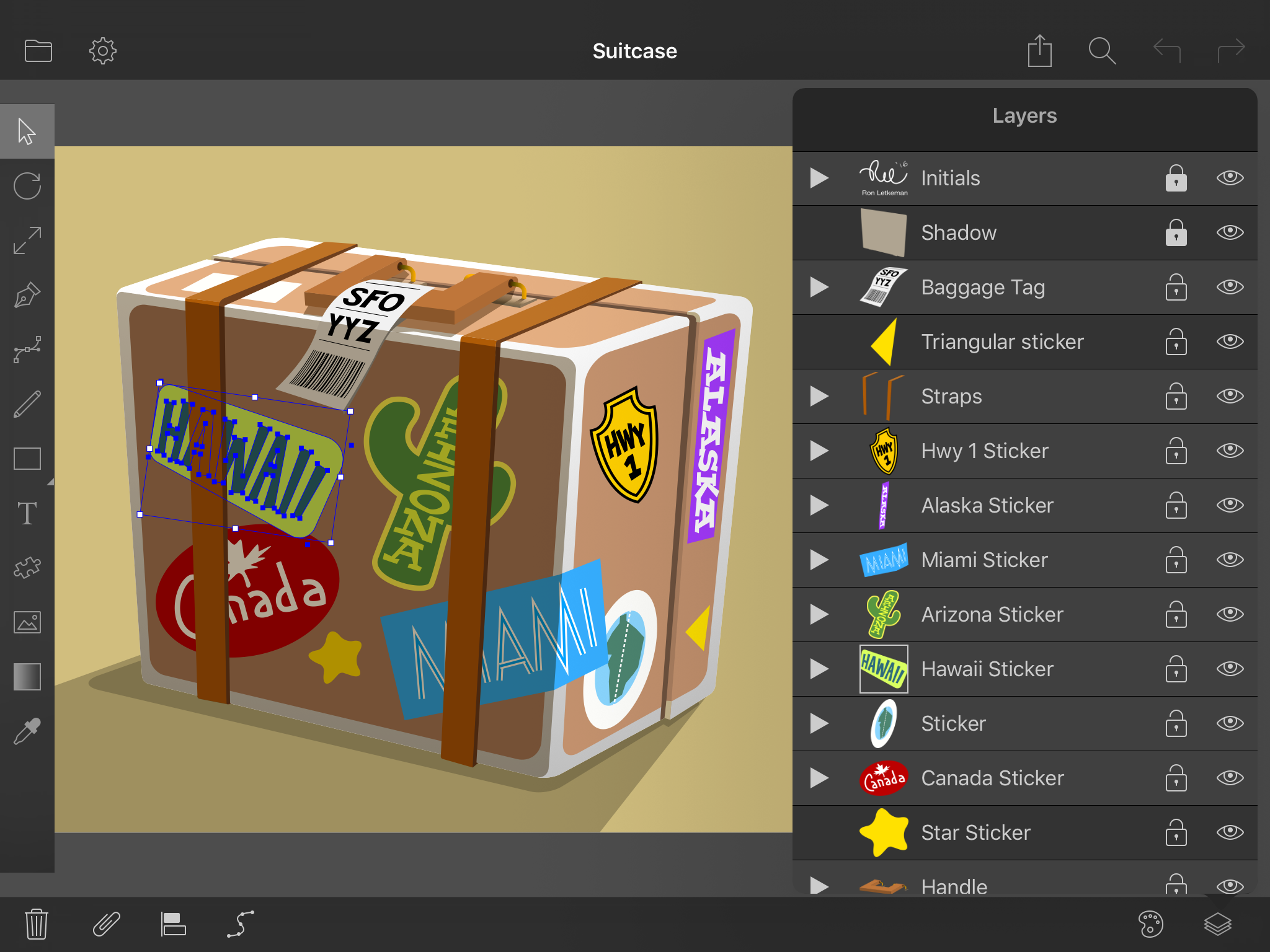
Juicy Bits today introduces Bez 1.0, a powerful vector graphics editor that makes it easy to create art on an iPad Pro. Bez is a flexible and professional tool for designing high-quality illustrations. It offers unlimited layers and groups for flexible document organization with support for multiple graphic styles per object. With full support for Slide Over, Split View, Smart Keyboard, and Apple Pencil, Bez was created from the ground-up to support touch interaction and a tablet device.
Sammamish, Washington - Today, Juicy Bits, maker of three App Store Best of the Year award winners and two Editors' Choice apps, released Bez 1.0 for iPad Pro. Bez (a nod to Pierre Bezier's eponymous curve), is a powerful vector graphics editor that makes it easy to create beautiful and precise art on an iPad Pro. With full support for Slide Over, Split View, Smart Keyboard, and Apple Pencil, Bez is a flexible and professional tool for designing high-quality illustrations.
"I'm a long-time fan of Adobe Illustrator," says Mike Swanson, Founder of Juicy Bits, "and I've wanted an app for my iPad that lets me create detailed artwork using just my fingers and the Apple Pencil. Bez is my take on a vector editor that's been created from the ground-up to support touch interaction and a tablet device. I'm amazed by the artwork that early testers have been able to create, and in-fact, four of their creations are included in the app."
The free version of Bez enables users do almost everything. A single in-app purchase unlocks additional features like high-quality output to PNG and SVG and the ability to import and export documents to services like iCloud and Dropbox.
Included features:
* Tools for creating new shapes and easily editing corners, curves, and line segments
* Support for multiple graphic styles (strokes, fills, and shadows) per object
* Rotate, scale, and translate objects interactively or by entering numeric values
* Unlimited layers and groups for flexible document organization
* Full undo and redo support for risk-free editing
* Snap to objects, a grid, or individual pixels, and use smart guides for accurate spacing
* Symbol library for storing common shapes
* Shape alignment and distribution tools
* Boolean shape operations like combine, subtract, intersect, and exclude
* Pan and zoom up to 4,096% for precise edits
Pricing and Availability:
Bez 1.0 is currently available for free on the App Store. A single "Unlock Everything" in-app purchase for $7.99 USD enables all premium features. Bez runs on iPad and iPad Pro with iOS 9.0 (or later).
Bez 1.0: http://www.juicybitssoftware.com/bez/
Download from iTunes: http://itunes.apple.com/app/id1041554256
Vimeo Video (Preview): https://vimeo.com/160990565/fc386bbfed
Screenshot: http://www.juicybitssoftware.com//images/media/bez/1.0/Bez%20Screenshot.png
App Icon: http://www.juicybitssoftware.com//images/media/bez/1.0/Bez%20Icon.png
Press Kit (zip): https://www.juicybitssoftware.com/files/bez/Bez%20Press%20Kit.zip
Founded in 2009, Juicy Bits is a small company that produces unique, freshly squeezed software for mobile devices. Their Layout app was named by Apple as one of the best photo apps of 2012, and Halftone, with over 2.5 million user downloads, was named by Apple as one of the best photo apps as part of App Store Rewind 2011. Halftone 2, an Apple Editors' Choice, was also selected for the App Store Best of 2013. Copyright (C) 2009-2016 Juicy Bits. All Rights Reserved. Apple, the Apple logo, iPhone, iPod and iPad are registered trademarks of Apple Inc. in the U.S. and/or other countries.
*******
Link To Article: http://prmac.com/release-id-79214.htm
*******
---------------------------------------------------------------------------------
Note that you can alter delivered distributions at any time.
Login to your account on prMac to alter your channel selection, or to opt-out at any time.


LastThink releases Online Haitian TV for iOS
A new article has been published at prMac.
LastThink releases Online Haitian TV for iOS - Published on 04/12/16
LastThink announces Online Haitian TV 1.5, their highly customizable TV application for iOS devices. Anyone can directly access their favorite TV channel and watch diverse films, news, programs from their iPad, iPhone and iPod touch anywhere and anytime. Vibes are smart TV and movie playlists. Users can easily record their favorite films, news, talk shows, programs and more. Users can also share what they are watching via Facebook, Twitter, YouTube, Dropbox, email and more.
Yerevan, Armenia - LastThink is proud to announce the release of Online Haitian TV 1.5, their highly customizable TV application developed for iPad and iPhone devices. Users can directly access their favorite TV channel and watch diverse films, news, programs from their iPad, iPhone and iPod touch anywhere and anytime.
Features:
* Navigating album photos by sliding your finger right or left on the screen
* Change the device you are streaming the picture to, by taping on the Play button in the upper right corner of your iPad's screen and selecting a desired device
* Screening and shooting any moment of your preferred TV program or film you like
* Altering the boring parts and moving straight to the best part at once - Filter by HD-only and favorite channels
* Rotating channels easily by a mere touch on your screen
* Organize your favorite TV shows, sport teams, movies, and actors and find where you can watch them - on TV and on demand
* Recording your favorite films, news, Talk Shows, programs and etc.
* Sharing what you're watching via Facebook, Twitter, YouTube, Dropbox, email and more - Vibes are smart TV and movie playlists
* The highest quality even with the lowest Internet and HD quality with the normal Internet - You can watch TV channels in HD level
* Editing and cropping videos into smaller parts. In addition to, you can take videos of your favorite program
* Capturing the funniest and most interesting moments of what you are watching with the trim tool
* Searching the content across streaming and broadcast services
* Discovering more than 100 channels of great entertainment beyond the Haitian Online TV app right on your device's touchscreen interface
We have selected data from the internet and if any assembly or constitution doesn't want us to show the content of the unit, please recommend us to remove it. We follow TV regulations and adjustments and we select original TV content data without artificial editions. If you however experience any issues, please do not hesitate to contact us if you'd like to share your experience with live TV channels, or provide suggestions on how we could improve the product further. We will be more than happy to get in touch.
Device Requirements:
* iPhone, iPad, and iPod touch
* Optimized for iPhone 5, iPhone 6, and iPhone 6 Plus
* Requires iOS 6.0 or later
* Universal Application
* 33.1 MB
Pricing and Availability:
Online Haitian TV 1.5 is free and is available worldwide exclusively through the App Store in the Entertainment category.
LastThink: http://lastthink.com/
Online Haitian TV 1.5: https://itunes.apple.com/app/online-haitian-tv-live/id1074207006
Screenshot: http://a5.mzstatic.com/us/r30/Purple49/v4/de/fe/ae/defeaef1-ae16-32ab-cb2c-2edcedb9e23b/screen640x640.jpeg
App Icon: http://a5.mzstatic.com/us/r30/Purple69/v4/75/bc/9e/75bc9ee9-1c29-9fd6-e5d9-ccfb1a87002e/icon175x175.jpeg
LastThink is an IT company with a focus on mobile development. It has extended its list of services since 2012 to offer high-end business process management, system integration, as well as up-to-date communication solutions. LastThink's mission is to deliver maximum business value to its customers by designing, developing, implementing and maintaining efficient and high quality software solutions aligned with their most essential business needs. Their team will always do its best to meet client expectations. Copyright (C) 2016 LastThink LLC. All Rights Reserved. Apple, the Apple logo, iPhone, iPad and iPod are registered trademarks of Apple Inc. in the U.S. and/or other countries.
*******
Link To Article: http://prmac.com/release-id-79211.htm
*******
---------------------------------------------------------------------------------
Note that you can alter delivered distributions at any time.
Login to your account on prMac to alter your channel selection, or to opt-out at any time.
LastThink releases Online Haitian TV for iOS - Published on 04/12/16
LastThink announces Online Haitian TV 1.5, their highly customizable TV application for iOS devices. Anyone can directly access their favorite TV channel and watch diverse films, news, programs from their iPad, iPhone and iPod touch anywhere and anytime. Vibes are smart TV and movie playlists. Users can easily record their favorite films, news, talk shows, programs and more. Users can also share what they are watching via Facebook, Twitter, YouTube, Dropbox, email and more.
Yerevan, Armenia - LastThink is proud to announce the release of Online Haitian TV 1.5, their highly customizable TV application developed for iPad and iPhone devices. Users can directly access their favorite TV channel and watch diverse films, news, programs from their iPad, iPhone and iPod touch anywhere and anytime.
Features:
* Navigating album photos by sliding your finger right or left on the screen
* Change the device you are streaming the picture to, by taping on the Play button in the upper right corner of your iPad's screen and selecting a desired device
* Screening and shooting any moment of your preferred TV program or film you like
* Altering the boring parts and moving straight to the best part at once - Filter by HD-only and favorite channels
* Rotating channels easily by a mere touch on your screen
* Organize your favorite TV shows, sport teams, movies, and actors and find where you can watch them - on TV and on demand
* Recording your favorite films, news, Talk Shows, programs and etc.
* Sharing what you're watching via Facebook, Twitter, YouTube, Dropbox, email and more - Vibes are smart TV and movie playlists
* The highest quality even with the lowest Internet and HD quality with the normal Internet - You can watch TV channels in HD level
* Editing and cropping videos into smaller parts. In addition to, you can take videos of your favorite program
* Capturing the funniest and most interesting moments of what you are watching with the trim tool
* Searching the content across streaming and broadcast services
* Discovering more than 100 channels of great entertainment beyond the Haitian Online TV app right on your device's touchscreen interface
We have selected data from the internet and if any assembly or constitution doesn't want us to show the content of the unit, please recommend us to remove it. We follow TV regulations and adjustments and we select original TV content data without artificial editions. If you however experience any issues, please do not hesitate to contact us if you'd like to share your experience with live TV channels, or provide suggestions on how we could improve the product further. We will be more than happy to get in touch.
Device Requirements:
* iPhone, iPad, and iPod touch
* Optimized for iPhone 5, iPhone 6, and iPhone 6 Plus
* Requires iOS 6.0 or later
* Universal Application
* 33.1 MB
Pricing and Availability:
Online Haitian TV 1.5 is free and is available worldwide exclusively through the App Store in the Entertainment category.
LastThink: http://lastthink.com/
Online Haitian TV 1.5: https://itunes.apple.com/app/online-haitian-tv-live/id1074207006
Screenshot: http://a5.mzstatic.com/us/r30/Purple49/v4/de/fe/ae/defeaef1-ae16-32ab-cb2c-2edcedb9e23b/screen640x640.jpeg

App Icon: http://a5.mzstatic.com/us/r30/Purple69/v4/75/bc/9e/75bc9ee9-1c29-9fd6-e5d9-ccfb1a87002e/icon175x175.jpeg

LastThink is an IT company with a focus on mobile development. It has extended its list of services since 2012 to offer high-end business process management, system integration, as well as up-to-date communication solutions. LastThink's mission is to deliver maximum business value to its customers by designing, developing, implementing and maintaining efficient and high quality software solutions aligned with their most essential business needs. Their team will always do its best to meet client expectations. Copyright (C) 2016 LastThink LLC. All Rights Reserved. Apple, the Apple logo, iPhone, iPad and iPod are registered trademarks of Apple Inc. in the U.S. and/or other countries.
*******
Link To Article: http://prmac.com/release-id-79211.htm
*******
---------------------------------------------------------------------------------
Note that you can alter delivered distributions at any time.
Login to your account on prMac to alter your channel selection, or to opt-out at any time.
Offline Kiosk 1.0 for iPad Turns any Website into an Offline Kiosk
A new article has been published at prMac.
Offline Kiosk 1.0 for iPad Turns any Website into an Offline Kiosk - Published on 04/12/16
Seattle-based developer Codium Labs announces Offline Kiosk 1.0, their incredibly useful app for iPad devices. Offline Kiosk allows anyone to convert an existing website into a completely self-contained package, offering all of the features and content of the online version, with no Internet connection needed. The resulting "kiosk" site resides completely on an iPad; including all pages, graphics, audio, video, and other content, making it perfect for any road warrior's customer service toolkit.
Seattle, Washington - Codium Labs today is proud to announce the release and immediate availability of Offline Kiosk 1.0, their new utility app developed for Apple's iPad and iPad Pro devices. Offline Kiosk allows anyone to convert an existing website into a full-featured offline "kiosk" version of the site that is viewable on an iPad anywhere and at any time - with no Internet connection needed. Offline Kiosk automatically downloads all content from the original website to the iPad's storage space. This includes all pages, graphics, audio, video, and other information, and conveniently repackaging it into a self-contained presentation stored completely on the mobile device.
Creating a kiosk takes just three easy steps:
1.) Select the website to use.
2.) Tap the "Download" button.
3.) When the download is complete, simply tap the "Start" button to launch the kiosk.
Offline Kiosk is the perfect tool for use at trade shows, museum exhibits and tours, self-service locations and more. With no need for an Internet connection, the app offers sales and public relations people a complete solution for presenting marketing materials, engaging potential customers, capturing leads and sign-ups, or conducting surveys. Offline Kiosk is also handy for sharing always-available technical documentation with members of support teams.
Syncing with secure websites (that require a login and password), as well as the enabling of website surveys and forms, can be added via a handy in-app purchase. This allows collecting customer sign-ups, conducting surveys, and running educational programs without an Internet connection. The app caches all of the submitted forms in device memory, then automatically sends the data to the website when a connection is restored.
"Offline Kiosk is the perfect app for any business who has the need to supply up-to-date and complete information to their sales and support personnel," says Codium Labs founder Andrei Chtcherbatchenko. "The app's remote updating capabilities allow a business to update an entire fleet of devices automatically, whenever an internet connection is available, or by simply sending a push notification when new content is available!"
Offline Kiosk is built on the proven Offline Pages Pro app engine, which is available on both the Mac and iOS platforms. Offline Pages Pro has been a popular tool for any business arsenal since 2010, offering the most advanced and accurate offline browser available on any platform today. Offline Kiosk offers a number of features that sets it apart from the original app:
* Support for automatic website logins. Users are automatically redirected to a login page when necessary
* Support for forms submission. Perfect for conducting surveys, customer sign-ups, and more
* A simple user interface that allows users to create an offline kiosk from a website in just a few minutes
* Easy mass deployment to a fleet of devices
* Automatic and remote updates
Offline Kiosk aims to be the most advanced offline browsing solution available on any platform. Its proprietary technology allows cloning of almost any HTML5 website with just a few taps. The app supports a number of web frameworks right out of the box, including: Ajax, jQuery, Angular, TypeKit, Krpano, Wix, Squarespace, as well as generic HTML5 video, lightboxes, slideshows, and 3D panoramas. If users need support for a new framework, it can be added using developer API or website-specific settings.
Features include:
* Create offline kiosks from existing websites in minutes, no coding required
* Support for WordPress, including custom themes and most plugins
* Support for most popular web products and frameworks
* Support for new products can be added using a developer API
* Automatically saves HTML5 video and audio from supported hosting providers
* Capacity to download up to 50,000 pages per kiosk
* True fullscreen mode, offering a securely locked down view, with no controls exposed
* Support for Guided Access prevents users from switching to other apps
* Support for most common file types, including PDF and Office documents
* Website can be automatically updated in the background
* Content can be updated via scheduled updates, or remotely via push notification
* Sharing or emailing kiosk settings makes for easy mass deployment
* The ability to import and export downloaded kiosks
* The ability to import websites that are stored locally on Mac or PC
* Sync with secure websites that require login and password (with an in-app purchase)
* Accept sign-up forms or surveys both online and offline (with an in-app purchase)
For unsupervised operation, Offline Kiosk offers a number of options to control how a kiosk can be used by viewers. This includes preventing a user from exiting kiosk mode, whether to allow online browsing, email, printing, or updating, and more. The app can even prevent the iPad from going to sleep, to make sure the kiosk is always available for use.
Those who aren't sure if their website will function properly with Offline Kiosk are invited to visit Codium Labs online where a free compatibility tool is available to test the website. Users need only enter the URLs of up to three websites they wish to check for compatibility, and Codium Labs will email back screenshots of the webpages as they run offline on a device of the user's choice, including the iPad, iPad Pro, and iPhone.
Device Requirements:
* Compatible with iPad 2 or later
* Requires iOS 8.0 or later
* 3.8 MB
Pricing and Availability:
Offline Kiosk 1.0 is $29.99 (USD) and is available worldwide exclusively through the App Store in the Business category. Promotional codes are available to members of the press upon request.
Codium Labs: http://codiumlabs.com
Offline Kiosk 1.0: http://codiumlabs.com/ios/offline-kiosk/
Purchase and Download: https://itunes.apple.com/app/offline-kiosk/id1085540867
Media Assets: http://codiumlabs.com/ios/offline-kiosk/press/
Redmond, WA-based Codium Labs LLC, founded in 2009 with a mission of bringing desktop quality productivity software to iOS. It is privately funded and specializes in mobile and distributed business applications. Codium Labs operates from Redmond, Washington. In November 2009, Codium Labs shipped Babelshot for iPhone which featured first of its kind mobile OCR system using smartphone camera for input and on-device text recognition. Our flagship products are Offline Pages Pro, the most accurate offline browser available today, and Offline Pages Business App Platform, the toolkit for building offline apps from existing HTML5 websites. All Material and Software (C) Copyright 2016 Codium Labs LLC. All Rights Reserved. Apple, the Apple logo, iPhone, iPod and iPad are registered trademarks of Apple Inc. in the U.S. and/or other countries. Other trademarks and registered trademarks may be the property of their respective owners.
*******
Link To Article: http://prmac.com/release-id-79210.htm
*******
---------------------------------------------------------------------------------
Note that you can alter delivered distributions at any time.
Login to your account on prMac to alter your channel selection, or to opt-out at any time.
Offline Kiosk 1.0 for iPad Turns any Website into an Offline Kiosk - Published on 04/12/16
Seattle-based developer Codium Labs announces Offline Kiosk 1.0, their incredibly useful app for iPad devices. Offline Kiosk allows anyone to convert an existing website into a completely self-contained package, offering all of the features and content of the online version, with no Internet connection needed. The resulting "kiosk" site resides completely on an iPad; including all pages, graphics, audio, video, and other content, making it perfect for any road warrior's customer service toolkit.
Seattle, Washington - Codium Labs today is proud to announce the release and immediate availability of Offline Kiosk 1.0, their new utility app developed for Apple's iPad and iPad Pro devices. Offline Kiosk allows anyone to convert an existing website into a full-featured offline "kiosk" version of the site that is viewable on an iPad anywhere and at any time - with no Internet connection needed. Offline Kiosk automatically downloads all content from the original website to the iPad's storage space. This includes all pages, graphics, audio, video, and other information, and conveniently repackaging it into a self-contained presentation stored completely on the mobile device.
Creating a kiosk takes just three easy steps:
1.) Select the website to use.
2.) Tap the "Download" button.
3.) When the download is complete, simply tap the "Start" button to launch the kiosk.
Offline Kiosk is the perfect tool for use at trade shows, museum exhibits and tours, self-service locations and more. With no need for an Internet connection, the app offers sales and public relations people a complete solution for presenting marketing materials, engaging potential customers, capturing leads and sign-ups, or conducting surveys. Offline Kiosk is also handy for sharing always-available technical documentation with members of support teams.
Syncing with secure websites (that require a login and password), as well as the enabling of website surveys and forms, can be added via a handy in-app purchase. This allows collecting customer sign-ups, conducting surveys, and running educational programs without an Internet connection. The app caches all of the submitted forms in device memory, then automatically sends the data to the website when a connection is restored.
"Offline Kiosk is the perfect app for any business who has the need to supply up-to-date and complete information to their sales and support personnel," says Codium Labs founder Andrei Chtcherbatchenko. "The app's remote updating capabilities allow a business to update an entire fleet of devices automatically, whenever an internet connection is available, or by simply sending a push notification when new content is available!"
Offline Kiosk is built on the proven Offline Pages Pro app engine, which is available on both the Mac and iOS platforms. Offline Pages Pro has been a popular tool for any business arsenal since 2010, offering the most advanced and accurate offline browser available on any platform today. Offline Kiosk offers a number of features that sets it apart from the original app:
* Support for automatic website logins. Users are automatically redirected to a login page when necessary
* Support for forms submission. Perfect for conducting surveys, customer sign-ups, and more
* A simple user interface that allows users to create an offline kiosk from a website in just a few minutes
* Easy mass deployment to a fleet of devices
* Automatic and remote updates
Offline Kiosk aims to be the most advanced offline browsing solution available on any platform. Its proprietary technology allows cloning of almost any HTML5 website with just a few taps. The app supports a number of web frameworks right out of the box, including: Ajax, jQuery, Angular, TypeKit, Krpano, Wix, Squarespace, as well as generic HTML5 video, lightboxes, slideshows, and 3D panoramas. If users need support for a new framework, it can be added using developer API or website-specific settings.
Features include:
* Create offline kiosks from existing websites in minutes, no coding required
* Support for WordPress, including custom themes and most plugins
* Support for most popular web products and frameworks
* Support for new products can be added using a developer API
* Automatically saves HTML5 video and audio from supported hosting providers
* Capacity to download up to 50,000 pages per kiosk
* True fullscreen mode, offering a securely locked down view, with no controls exposed
* Support for Guided Access prevents users from switching to other apps
* Support for most common file types, including PDF and Office documents
* Website can be automatically updated in the background
* Content can be updated via scheduled updates, or remotely via push notification
* Sharing or emailing kiosk settings makes for easy mass deployment
* The ability to import and export downloaded kiosks
* The ability to import websites that are stored locally on Mac or PC
* Sync with secure websites that require login and password (with an in-app purchase)
* Accept sign-up forms or surveys both online and offline (with an in-app purchase)
For unsupervised operation, Offline Kiosk offers a number of options to control how a kiosk can be used by viewers. This includes preventing a user from exiting kiosk mode, whether to allow online browsing, email, printing, or updating, and more. The app can even prevent the iPad from going to sleep, to make sure the kiosk is always available for use.
Those who aren't sure if their website will function properly with Offline Kiosk are invited to visit Codium Labs online where a free compatibility tool is available to test the website. Users need only enter the URLs of up to three websites they wish to check for compatibility, and Codium Labs will email back screenshots of the webpages as they run offline on a device of the user's choice, including the iPad, iPad Pro, and iPhone.
Device Requirements:
* Compatible with iPad 2 or later
* Requires iOS 8.0 or later
* 3.8 MB
Pricing and Availability:
Offline Kiosk 1.0 is $29.99 (USD) and is available worldwide exclusively through the App Store in the Business category. Promotional codes are available to members of the press upon request.
Codium Labs: http://codiumlabs.com
Offline Kiosk 1.0: http://codiumlabs.com/ios/offline-kiosk/
Purchase and Download: https://itunes.apple.com/app/offline-kiosk/id1085540867
Media Assets: http://codiumlabs.com/ios/offline-kiosk/press/
Redmond, WA-based Codium Labs LLC, founded in 2009 with a mission of bringing desktop quality productivity software to iOS. It is privately funded and specializes in mobile and distributed business applications. Codium Labs operates from Redmond, Washington. In November 2009, Codium Labs shipped Babelshot for iPhone which featured first of its kind mobile OCR system using smartphone camera for input and on-device text recognition. Our flagship products are Offline Pages Pro, the most accurate offline browser available today, and Offline Pages Business App Platform, the toolkit for building offline apps from existing HTML5 websites. All Material and Software (C) Copyright 2016 Codium Labs LLC. All Rights Reserved. Apple, the Apple logo, iPhone, iPod and iPad are registered trademarks of Apple Inc. in the U.S. and/or other countries. Other trademarks and registered trademarks may be the property of their respective owners.
*******
Link To Article: http://prmac.com/release-id-79210.htm
*******
---------------------------------------------------------------------------------
Note that you can alter delivered distributions at any time.
Login to your account on prMac to alter your channel selection, or to opt-out at any time.
USB Network Gate 4.0 released with full support for OS X 10.11
A new article has been published at prMac.
USB Network Gate 4.0 released with full support for OS X 10.11 - Published on 04/12/16
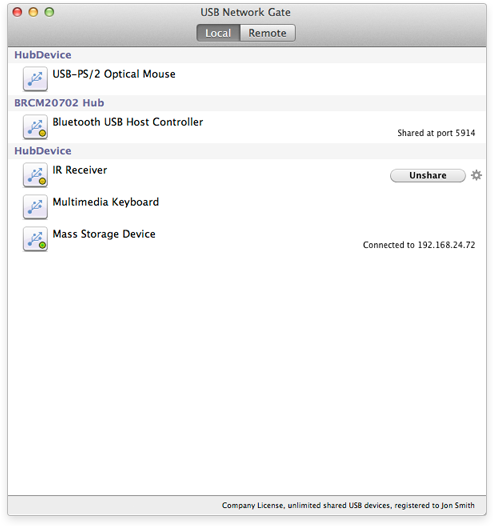
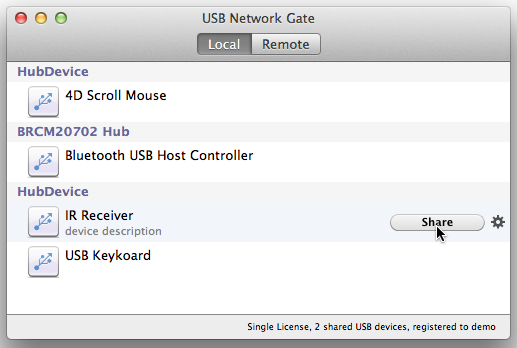
Frankfurt based developer, Eltima Software today announces USB Network Gate 4.0 for Mac OS X. USB Network Gate allows working with remote USB devices from your local computer over Internet/LAN/WAN as if those devices were plugged directly into your machine. Those devices can be next door or in a different country and it will make no difference at all. Version 4.0 supports OS X El Capitan and includes several stability and interface improvements.
Frankfurt, Germany - Eltima Software has just released USB Network Gate 4.0 for Mac OS X. This new major update offers full-blown OS X El Capitan support, which makes it compatible with OS X 10.9 - 10.11. USB Network Gate primary functionality is making it possible to work with remote USB devices from a local computer over Internet/LAN/WAN as if those devices were plugged in a local machine directly. Those devices can be next door or in a different country and it will make no difference at all.
Here're new features offered by USB Network Gate 4.0:
* A completely new driver with OS X 10.11 support
* Third-party libraries were updated to their latest versions for enhanced stability
* Improved sharing of keyboard and devices that take a long time to start
* Fixed problems with updating the firmware on an iPad shared on Windows
* Improved interface
USB Network Gate for Mac lets its users perform the following:
* Connect remote devices to local Mac over Ethernet, Internet, LAN, WAN
* Share USB device among multiple computers
* Use USB devices on virtual machines & blade servers
* Access USB device over RDP (Remote Desktop Protocol)
* Share your device with anyone at any location
USB Network Gate is available for multiple OS types - Mac, Windows, and Linux - which makes sharing and accessing the shared devices pretty versatile.
Pricing and Availability:
USB Network Gate runs on Mac OS 10.9 and later and costs $89.95 (USD) for sharing 1 USB device. Please note that USB Network Gate by Eltima Software is licensed according to the number of shared USB devices. Every server computer (where the device will be shared) requires a separate license. Client module of USB Network Gate is free and unlimited in quantities used.
USB Network Gate for Mac 4.0: http://www.eltima.com/products/usb-over-network-mac/
Download USB Network Gate: http://www.eltima.com/download/usb_network_gate.dmg
Purchase: http://www.eltima.com/purchase/usb-over-ethernet/?os=mac
Screenshot 1: http://www.eltima.com/imgnew/products/usb/splash/mac.png
Screenshot 2: http://wiki.eltima.com/wp-content/uploads/2012/04/Share-Local-USB-Devices1.png
Press Kit (zip): http://eltima.com/files/ung-pics.zip
Eltima Software is a global software Development Company, specializing primarily in serial communication, mobile and flash software for Mac OS and Windows. Eltima Software delivers top-notch solutions having a friendly team of 40 professionals. Copyright (C) 2016 Eltima Software. All Rights Reserved. Apple, the Apple logo and Macintosh are registered trademarks of Apple Inc. in the U.S. and/or other countries.
*******
Link To Article: http://prmac.com/release-id-79213.htm
*******
---------------------------------------------------------------------------------
Note that you can alter delivered distributions at any time.
Login to your account on prMac to alter your channel selection, or to opt-out at any time.
USB Network Gate 4.0 released with full support for OS X 10.11 - Published on 04/12/16
Frankfurt based developer, Eltima Software today announces USB Network Gate 4.0 for Mac OS X. USB Network Gate allows working with remote USB devices from your local computer over Internet/LAN/WAN as if those devices were plugged directly into your machine. Those devices can be next door or in a different country and it will make no difference at all. Version 4.0 supports OS X El Capitan and includes several stability and interface improvements.
Frankfurt, Germany - Eltima Software has just released USB Network Gate 4.0 for Mac OS X. This new major update offers full-blown OS X El Capitan support, which makes it compatible with OS X 10.9 - 10.11. USB Network Gate primary functionality is making it possible to work with remote USB devices from a local computer over Internet/LAN/WAN as if those devices were plugged in a local machine directly. Those devices can be next door or in a different country and it will make no difference at all.
Here're new features offered by USB Network Gate 4.0:
* A completely new driver with OS X 10.11 support
* Third-party libraries were updated to their latest versions for enhanced stability
* Improved sharing of keyboard and devices that take a long time to start
* Fixed problems with updating the firmware on an iPad shared on Windows
* Improved interface
USB Network Gate for Mac lets its users perform the following:
* Connect remote devices to local Mac over Ethernet, Internet, LAN, WAN
* Share USB device among multiple computers
* Use USB devices on virtual machines & blade servers
* Access USB device over RDP (Remote Desktop Protocol)
* Share your device with anyone at any location
USB Network Gate is available for multiple OS types - Mac, Windows, and Linux - which makes sharing and accessing the shared devices pretty versatile.
Pricing and Availability:
USB Network Gate runs on Mac OS 10.9 and later and costs $89.95 (USD) for sharing 1 USB device. Please note that USB Network Gate by Eltima Software is licensed according to the number of shared USB devices. Every server computer (where the device will be shared) requires a separate license. Client module of USB Network Gate is free and unlimited in quantities used.
USB Network Gate for Mac 4.0: http://www.eltima.com/products/usb-over-network-mac/
Download USB Network Gate: http://www.eltima.com/download/usb_network_gate.dmg
Purchase: http://www.eltima.com/purchase/usb-over-ethernet/?os=mac
Screenshot 1: http://www.eltima.com/imgnew/products/usb/splash/mac.png
Screenshot 2: http://wiki.eltima.com/wp-content/uploads/2012/04/Share-Local-USB-Devices1.png
Press Kit (zip): http://eltima.com/files/ung-pics.zip
Eltima Software is a global software Development Company, specializing primarily in serial communication, mobile and flash software for Mac OS and Windows. Eltima Software delivers top-notch solutions having a friendly team of 40 professionals. Copyright (C) 2016 Eltima Software. All Rights Reserved. Apple, the Apple logo and Macintosh are registered trademarks of Apple Inc. in the U.S. and/or other countries.
*******
Link To Article: http://prmac.com/release-id-79213.htm
*******
---------------------------------------------------------------------------------
Note that you can alter delivered distributions at any time.
Login to your account on prMac to alter your channel selection, or to opt-out at any time.
Org.ly for iPhone - Re-imagining Org Charts for Sales Professionals
A new article has been published at prMac.
Org.ly for iPhone - Re-imagining Org Charts for Sales Professionals - Published on 04/12/16
UK based SLiCK Concepts Ltd introduces Org.ly 1.1, a brand new contact management and org chart app developed for iOS. Aimed squarely at sales professionals, Org.ly re-imagines the creation of org charts. You don't have to create the org chart, Org.ly does it for you automatically. You simply organise your contacts into the company hierarchy and the org chart is created. Even better, you can swipe up and down on a contact to instantly see who a contact reports to, and who reports to them.
Oxford, United Kingdom - SLiCK Concepts Ltd is proud to announce the release of Org.ly 1.1, a brand new contact management and org chart app developed for iPhone(R). Org.ly automatically creates the Org Chart for you, so you no longer have to spend hours doing it yourself.
Made for Sales Professionals by a Sales Professional:
Frustrated by the current solutions for creating Org Charts required for insertion in Account Plans, etc. Steve Brigden, founder of SLiCK Concepts, inventor of Org.ly and a sales professional with more than thirty years experience, set out to make an app that simplified this process.
Why Org.ly is better:
Simplicity. Org.ly re-imagines creating Org Charts by using the contact details we carry around with us in our phones and leveraging the touch and gesture controls provided by Apple devices to make managing your contacts and creating Org Charts a real pleasure. Other Org Chart apps simply try to re-create the Powerpoint experience on a mobile device, creating a poor mobile experience to rival the poor desktop experience.
Key Features:
* You don't create the Org Chart, Org.ly does it for you - automatically
* You swipe to connect contacts to their manager from within Org.ly - that's it
* You have immediate visibility of who reports to whom - all via a swipe on the iPhone(R) screen
* Update the information on the fly - your Org Charts are always up to date
* Easy export of the Org Chart for inclusion in Account Plans, etc.
"Traditional methods for creating Org Charts are really painful - drawing boxes, connecting them together with lines, typing in names, aligning, re-arranging, aligning again. It is rubbish," explained Steve Brigden, founder of Oxford based SLiCK Concepts Ltd. "Technology has moved on - it's about time that Org Charts caught up."
Device Requirements:
* iPhone, iPad, and iPod touch
* Requires iOS 8.0 or later
* 14.4 MB
Pricing and Availability:
Org.ly 1.1 is $3.99 USD (or equivalent amount in other currencies) and available worldwide exclusively through the App Store in the Productivity category. Promotional Codes are available to journalists. Contact Steve Brigden to request one.
Org.ly 1.1: http://www.orglyapp.com
Purchase and Download: https://itunes.apple.com/app/org.ly-contact-management/id1047120452
Media Assets: https://drive.google.com/folderview?id=0B2bMWTIBYX3eaGZ6RDgwMHRvdkk&usp=sharing
Based in Oxford, United Kingdom, SLiCK Concepts Ltd was formed in May 2015 by Steve Brigden specifically to bring Org.ly market. All Material and Software (C) Copyright 2015-2016 SLiCK Concepts Ltd. All Rights Reserved. Apple, the Apple logo, iPhone, iPod and iPad are registered trademarks of Apple Inc. in the U.S. and/or other countries. Other trademarks and registered trademarks may be the property of their respective owners.
*******
Link To Article: http://prmac.com/release-id-79209.htm
*******
---------------------------------------------------------------------------------
Note that you can alter delivered distributions at any time.
Login to your account on prMac to alter your channel selection, or to opt-out at any time.
Org.ly for iPhone - Re-imagining Org Charts for Sales Professionals - Published on 04/12/16
UK based SLiCK Concepts Ltd introduces Org.ly 1.1, a brand new contact management and org chart app developed for iOS. Aimed squarely at sales professionals, Org.ly re-imagines the creation of org charts. You don't have to create the org chart, Org.ly does it for you automatically. You simply organise your contacts into the company hierarchy and the org chart is created. Even better, you can swipe up and down on a contact to instantly see who a contact reports to, and who reports to them.
Oxford, United Kingdom - SLiCK Concepts Ltd is proud to announce the release of Org.ly 1.1, a brand new contact management and org chart app developed for iPhone(R). Org.ly automatically creates the Org Chart for you, so you no longer have to spend hours doing it yourself.
Made for Sales Professionals by a Sales Professional:
Frustrated by the current solutions for creating Org Charts required for insertion in Account Plans, etc. Steve Brigden, founder of SLiCK Concepts, inventor of Org.ly and a sales professional with more than thirty years experience, set out to make an app that simplified this process.
Why Org.ly is better:
Simplicity. Org.ly re-imagines creating Org Charts by using the contact details we carry around with us in our phones and leveraging the touch and gesture controls provided by Apple devices to make managing your contacts and creating Org Charts a real pleasure. Other Org Chart apps simply try to re-create the Powerpoint experience on a mobile device, creating a poor mobile experience to rival the poor desktop experience.
Key Features:
* You don't create the Org Chart, Org.ly does it for you - automatically
* You swipe to connect contacts to their manager from within Org.ly - that's it
* You have immediate visibility of who reports to whom - all via a swipe on the iPhone(R) screen
* Update the information on the fly - your Org Charts are always up to date
* Easy export of the Org Chart for inclusion in Account Plans, etc.
"Traditional methods for creating Org Charts are really painful - drawing boxes, connecting them together with lines, typing in names, aligning, re-arranging, aligning again. It is rubbish," explained Steve Brigden, founder of Oxford based SLiCK Concepts Ltd. "Technology has moved on - it's about time that Org Charts caught up."
Device Requirements:
* iPhone, iPad, and iPod touch
* Requires iOS 8.0 or later
* 14.4 MB
Pricing and Availability:
Org.ly 1.1 is $3.99 USD (or equivalent amount in other currencies) and available worldwide exclusively through the App Store in the Productivity category. Promotional Codes are available to journalists. Contact Steve Brigden to request one.
Org.ly 1.1: http://www.orglyapp.com
Purchase and Download: https://itunes.apple.com/app/org.ly-contact-management/id1047120452
Media Assets: https://drive.google.com/folderview?id=0B2bMWTIBYX3eaGZ6RDgwMHRvdkk&usp=sharing
Based in Oxford, United Kingdom, SLiCK Concepts Ltd was formed in May 2015 by Steve Brigden specifically to bring Org.ly market. All Material and Software (C) Copyright 2015-2016 SLiCK Concepts Ltd. All Rights Reserved. Apple, the Apple logo, iPhone, iPod and iPad are registered trademarks of Apple Inc. in the U.S. and/or other countries. Other trademarks and registered trademarks may be the property of their respective owners.
*******
Link To Article: http://prmac.com/release-id-79209.htm
*******
---------------------------------------------------------------------------------
Note that you can alter delivered distributions at any time.
Login to your account on prMac to alter your channel selection, or to opt-out at any time.
Cheap clothing plus more with Fabswapp 2.0 - Swapping made easier
A new article has been published at prMac.
Cheap clothing plus more with Fabswapp 2.0 - Swapping made easier - Published on 04/12/16
Vancouver based MobiBlossom Solutions Inc. today announces FabSwapp 2.0, an important update to their item swapping app for iOS devices. Find a new home for your once-loved items with a local community of like-minded people where personal relationships are built. Navigation and communication is what this release is all about. Version 2.0 offers the ability to chat with users inside the app, as well as added the ability to share items inside the app with your friends, either by facebook or email.
Vancouver, Canada - MobiBlossom Solutions Inc. today is proud to announce the release of FabSwapp 2.0, an important update to their item swapping app for iPhone, iPad, and iPod touch devices. Trade your pre-loved stuff with other people nearby. Fabswapp is an eco and financial friendly way to keep your closet constantly changing by being part of the local item swapping community.
Navigation and communication is what this release is all about. With a refined interface design, users will easily navigate through the app and find what they want faster. Whats new in version 2 is the ability to chat with users inside the app. This will increase user participation and make fabswapp feel more like a community. Finally, we also added the ability to share items inside the app with your friends, either by facebook or email.
FabSwapp has been growing organically from the launch. We have successfully penetrated into the lives of thousands. Open free trade with a community, using bartering instead of money has users excited and active on the app. One way to describe fabswapp is to compare it to craigslist with the ability to know where the item is and know that it will not cost you anything to obtain it.
Find thousands of free items on Fabswapp. Everything ranging from party dresses to video games. Fabswapp has something for everyone. Users can post any item that they no longer need on fabswapp in hopes of finding it a new home. By paying it forward, the app will save approx. 75 pounds of landfill waste per user a year. Fabswapp is also capable of saving families thousands of dollars a year on kids clothing and toys. There is no better reason to try a free app and get free stuff.
Device Requirements:
* iPhone, iPad, and iPod touch
* Requires iOS 7.1 or later
* 87.1 MB
Pricing and Availability:
FabSwapp 2.0 is Free (with in-app purchases) and available worldwide exclusively through the App Store in the Lifestyle category.
MobiBlossom Solutions: https://www.mobiblossom.com/
FabSwapp 2.0: http://www.fabswapp.com/
Download from iTunes: https://itunes.apple.com/app/fabswapp-get-free.-give-free./id1021124737
YouTube Video: https://www.youtube.com/watch?v=OX4xOq1KjFg
Screenshot: http://a1.mzstatic.com/us/r30/Purple49/v4/ef/4a/3f/ef4a3fce-a3ca-d961-57e8-e3b722fdcd2d/screen322x572.jpeg
App Icon: http://a2.mzstatic.com/us/r30/Purple69/v4/f9/1b/ba/f91bbac5-d107-b242-bd1d-44e5e5e62654/icon175x175.png
MobiBlossom Solutions is a Vancouver based software development company, that specializes in building high quality native mobile applications for iOS and Android, as well as responsive HTML 5 mobile web apps. Their clients hail from various industries such as Community Awareness, Education, Special Hobby, and Business Services just to name a few. The company was founded in 2011 by Mina Sabbaghian, Neda Sabbaghian and Jeremy Smillie, who all have over a decade of experience in IT each. The founders gained experience through some of the biggest companies today. Vancouver being the newest startup hub has given MobiBlossom Solutions some strong roots. With projects starting and finishing it is exciting to see what new idea's get thrown our way. The company will take on all types of projects, from government all the way to start-ups. Their goal is to get everyone's idea out there on an app as any idea can become the next big thing. All Material and Software (C) Copyright 2016 MobiBlossom
Solutions Inc. All Rights Reserved. Apple, the Apple logo, iPhone, iPod and iPad are registered trademarks of Apple Inc. in the U.S. and/or other countries. Other trademarks and registered trademarks may be the property of their respective owners.
*******
Link To Article: http://prmac.com/release-id-79212.htm
*******
---------------------------------------------------------------------------------
Note that you can alter delivered distributions at any time.
Login to your account on prMac to alter your channel selection, or to opt-out at any time.
Cheap clothing plus more with Fabswapp 2.0 - Swapping made easier - Published on 04/12/16
Vancouver based MobiBlossom Solutions Inc. today announces FabSwapp 2.0, an important update to their item swapping app for iOS devices. Find a new home for your once-loved items with a local community of like-minded people where personal relationships are built. Navigation and communication is what this release is all about. Version 2.0 offers the ability to chat with users inside the app, as well as added the ability to share items inside the app with your friends, either by facebook or email.
Vancouver, Canada - MobiBlossom Solutions Inc. today is proud to announce the release of FabSwapp 2.0, an important update to their item swapping app for iPhone, iPad, and iPod touch devices. Trade your pre-loved stuff with other people nearby. Fabswapp is an eco and financial friendly way to keep your closet constantly changing by being part of the local item swapping community.
Navigation and communication is what this release is all about. With a refined interface design, users will easily navigate through the app and find what they want faster. Whats new in version 2 is the ability to chat with users inside the app. This will increase user participation and make fabswapp feel more like a community. Finally, we also added the ability to share items inside the app with your friends, either by facebook or email.
FabSwapp has been growing organically from the launch. We have successfully penetrated into the lives of thousands. Open free trade with a community, using bartering instead of money has users excited and active on the app. One way to describe fabswapp is to compare it to craigslist with the ability to know where the item is and know that it will not cost you anything to obtain it.
Find thousands of free items on Fabswapp. Everything ranging from party dresses to video games. Fabswapp has something for everyone. Users can post any item that they no longer need on fabswapp in hopes of finding it a new home. By paying it forward, the app will save approx. 75 pounds of landfill waste per user a year. Fabswapp is also capable of saving families thousands of dollars a year on kids clothing and toys. There is no better reason to try a free app and get free stuff.
Device Requirements:
* iPhone, iPad, and iPod touch
* Requires iOS 7.1 or later
* 87.1 MB
Pricing and Availability:
FabSwapp 2.0 is Free (with in-app purchases) and available worldwide exclusively through the App Store in the Lifestyle category.
MobiBlossom Solutions: https://www.mobiblossom.com/
FabSwapp 2.0: http://www.fabswapp.com/
Download from iTunes: https://itunes.apple.com/app/fabswapp-get-free.-give-free./id1021124737
YouTube Video: https://www.youtube.com/watch?v=OX4xOq1KjFg
Screenshot: http://a1.mzstatic.com/us/r30/Purple49/v4/ef/4a/3f/ef4a3fce-a3ca-d961-57e8-e3b722fdcd2d/screen322x572.jpeg

App Icon: http://a2.mzstatic.com/us/r30/Purple69/v4/f9/1b/ba/f91bbac5-d107-b242-bd1d-44e5e5e62654/icon175x175.png

MobiBlossom Solutions is a Vancouver based software development company, that specializes in building high quality native mobile applications for iOS and Android, as well as responsive HTML 5 mobile web apps. Their clients hail from various industries such as Community Awareness, Education, Special Hobby, and Business Services just to name a few. The company was founded in 2011 by Mina Sabbaghian, Neda Sabbaghian and Jeremy Smillie, who all have over a decade of experience in IT each. The founders gained experience through some of the biggest companies today. Vancouver being the newest startup hub has given MobiBlossom Solutions some strong roots. With projects starting and finishing it is exciting to see what new idea's get thrown our way. The company will take on all types of projects, from government all the way to start-ups. Their goal is to get everyone's idea out there on an app as any idea can become the next big thing. All Material and Software (C) Copyright 2016 MobiBlossom
Solutions Inc. All Rights Reserved. Apple, the Apple logo, iPhone, iPod and iPad are registered trademarks of Apple Inc. in the U.S. and/or other countries. Other trademarks and registered trademarks may be the property of their respective owners.
*******
Link To Article: http://prmac.com/release-id-79212.htm
*******
---------------------------------------------------------------------------------
Note that you can alter delivered distributions at any time.
Login to your account on prMac to alter your channel selection, or to opt-out at any time.
Protect and License Spreadsheets, Plugins, Games and Desktop Apps
A new article has been published at prMac.
Protect and License Spreadsheets, Plugins, Games and Desktop Apps - Published on 04/11/16
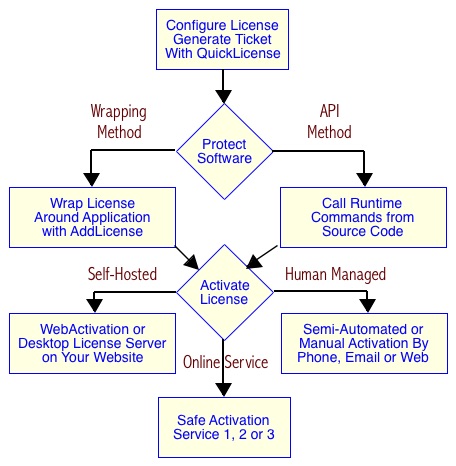
QuickLicense 8 adds major enhancements for software protection and licensing with new spreadsheet protection feature, Microsoft Access support, application usage statistics and end-user interface enhancements. QuickLicense supports an API or wrapping approach to protect virtually any software on Mac, Windows or Linux. A license can be applied to any kind of digital product (application, plugin, library, game or spreadsheet) using the AddLicense wrapping tool or programming API.
Henderson, Nevada - Excel Software today shipped QuickLicense 8.0, the industry leading tool for protection and licensing of Mac, Windows and Linux software. The new release adds major enhancements for spreadsheet protection, application usage statistics, end-user interface enhancements and improved developer tools.
QuickLicense is used to define the type of license (Trial, Product, Try/Buy, Subscription or Floating), the licensing features (feature flags, pre-activation message, license release, restore, reset and suspend) and the activation process (manual, online, dongle or floating license server). A license can be applied to any kind of digital product (application, plugin, library, game or spreadsheet) using the AddLicense wrapping tool or programming API.
AddLicense allows a developer to add any configured license to a compiled Mac or Windows application with a few button clicks. No programming is required to assign the license, add a splash screen or embed resource files and folders directly into the protected application file. Applications created with Unity, MAX MSP, Adobe Air or any environment that normally exposes resource files can be delivered as a single application file.
AddLicense can protect an Excel spreadsheet by generating an EXE file for Windows or APP file for Mac. The protected application handles the licensing process, presents a user interface to create, name and open documents into Microsoft Excel, but prevents use on unlicensed computers. New AddLicense features include sort, find and organizational folders in the user interface. AddLicense was enhanced to protect Mac Excel 2016 and Microsoft Access (ACCDE files).
AddLicense can now generate 32-bit or 64-bit applications on Mac or Windows and check the user computer for minimum OS or RAM requirements. A splash screen can be presented on application launch for a specified time period. Applications that require several seconds to launch can begin running behind the splash screen. AddLicense can modify version and copyright text in the Get Info dialog for Mac applications.
Protected applications support many activation methods including a manual process with a computer unique activation code, activation through a web browser, instant online activation or USB dongle. Excel Software offers three online activation solutions including the Safe Activation Service. Desktop License Server or WebActivation are self-hosted activation servers that run on a developer website.
QuickLicense 8.0 adds HTML formatting to a pre-activation message that presents application information or a license agreement that must be confirmed to continue. A licensed application can record status logs on Safe Activation to track how often an application runs or what licensing features are used.
QuickLicense supports companion products including runtime plugins for Xojo or FileMaker applications. The QLRT Xcode product consists a runtime library file that can be dropped into any Swift or Objective-C application. The Xcode program can send any API command with one function call. QuickLicense runtime files are available for the Linux or Android OS.
QuickLicense can be used with DocProtect to apply all license types and features to protected PDF, EPUB, SWF, Video or HTML files. Applications protected with the QuickLicense API or AddLicense wrapping tool can require a USB dongle. Developers can generate their own dongles from empty USB drives using MakeDongle.
QuickLicense 8 is $595 for the Standard edition or $995 for the Pro edition on either Mac or Windows. The package includes a PDF and printed User Guide, tutorials, online videos, programming code examples, the AddLicense wrapping tool and SendMessage testing tool. QuickLicense includes royalty-free runtime distribution rights for any number of protected products or licenses.
Excel Software: http://www.excelsoftware.com
QuickLicense 8.0: http://www.excelsoftware.com/quicklicense
Purchase Link: http://www.excelsoftware.com/priceandordering
Screenshot: http://www.excelsoftware.com/image/protect-software.jpg
Established in 1985, Excel Software provides Windows and Mac OS X software products to thousands of users worldwide. Capabilities include system modeling & simulation, requirements management, software design, code generation, re-engineering, bug tracking, help authoring, software license management, document protection and internet marketing automation. All Material and Software (C) Copyright 2016 Excel Software. All Rights Reserved. Apple, the Apple logo, Macintosh and Mac OS X are registered trademarks of Apple Inc. in the U.S. and/or other countries. Other trademarks and registered trademarks may be the property of their respective owners.
*******
Link To Article: http://prmac.com/release-id-79208.htm
*******
---------------------------------------------------------------------------------
Note that you can alter delivered distributions at any time.
Login to your account on prMac to alter your channel selection, or to opt-out at any time.
Protect and License Spreadsheets, Plugins, Games and Desktop Apps - Published on 04/11/16
QuickLicense 8 adds major enhancements for software protection and licensing with new spreadsheet protection feature, Microsoft Access support, application usage statistics and end-user interface enhancements. QuickLicense supports an API or wrapping approach to protect virtually any software on Mac, Windows or Linux. A license can be applied to any kind of digital product (application, plugin, library, game or spreadsheet) using the AddLicense wrapping tool or programming API.
Henderson, Nevada - Excel Software today shipped QuickLicense 8.0, the industry leading tool for protection and licensing of Mac, Windows and Linux software. The new release adds major enhancements for spreadsheet protection, application usage statistics, end-user interface enhancements and improved developer tools.
QuickLicense is used to define the type of license (Trial, Product, Try/Buy, Subscription or Floating), the licensing features (feature flags, pre-activation message, license release, restore, reset and suspend) and the activation process (manual, online, dongle or floating license server). A license can be applied to any kind of digital product (application, plugin, library, game or spreadsheet) using the AddLicense wrapping tool or programming API.
AddLicense allows a developer to add any configured license to a compiled Mac or Windows application with a few button clicks. No programming is required to assign the license, add a splash screen or embed resource files and folders directly into the protected application file. Applications created with Unity, MAX MSP, Adobe Air or any environment that normally exposes resource files can be delivered as a single application file.
AddLicense can protect an Excel spreadsheet by generating an EXE file for Windows or APP file for Mac. The protected application handles the licensing process, presents a user interface to create, name and open documents into Microsoft Excel, but prevents use on unlicensed computers. New AddLicense features include sort, find and organizational folders in the user interface. AddLicense was enhanced to protect Mac Excel 2016 and Microsoft Access (ACCDE files).
AddLicense can now generate 32-bit or 64-bit applications on Mac or Windows and check the user computer for minimum OS or RAM requirements. A splash screen can be presented on application launch for a specified time period. Applications that require several seconds to launch can begin running behind the splash screen. AddLicense can modify version and copyright text in the Get Info dialog for Mac applications.
Protected applications support many activation methods including a manual process with a computer unique activation code, activation through a web browser, instant online activation or USB dongle. Excel Software offers three online activation solutions including the Safe Activation Service. Desktop License Server or WebActivation are self-hosted activation servers that run on a developer website.
QuickLicense 8.0 adds HTML formatting to a pre-activation message that presents application information or a license agreement that must be confirmed to continue. A licensed application can record status logs on Safe Activation to track how often an application runs or what licensing features are used.
QuickLicense supports companion products including runtime plugins for Xojo or FileMaker applications. The QLRT Xcode product consists a runtime library file that can be dropped into any Swift or Objective-C application. The Xcode program can send any API command with one function call. QuickLicense runtime files are available for the Linux or Android OS.
QuickLicense can be used with DocProtect to apply all license types and features to protected PDF, EPUB, SWF, Video or HTML files. Applications protected with the QuickLicense API or AddLicense wrapping tool can require a USB dongle. Developers can generate their own dongles from empty USB drives using MakeDongle.
QuickLicense 8 is $595 for the Standard edition or $995 for the Pro edition on either Mac or Windows. The package includes a PDF and printed User Guide, tutorials, online videos, programming code examples, the AddLicense wrapping tool and SendMessage testing tool. QuickLicense includes royalty-free runtime distribution rights for any number of protected products or licenses.
Excel Software: http://www.excelsoftware.com
QuickLicense 8.0: http://www.excelsoftware.com/quicklicense
Purchase Link: http://www.excelsoftware.com/priceandordering
Screenshot: http://www.excelsoftware.com/image/protect-software.jpg
Established in 1985, Excel Software provides Windows and Mac OS X software products to thousands of users worldwide. Capabilities include system modeling & simulation, requirements management, software design, code generation, re-engineering, bug tracking, help authoring, software license management, document protection and internet marketing automation. All Material and Software (C) Copyright 2016 Excel Software. All Rights Reserved. Apple, the Apple logo, Macintosh and Mac OS X are registered trademarks of Apple Inc. in the U.S. and/or other countries. Other trademarks and registered trademarks may be the property of their respective owners.
*******
Link To Article: http://prmac.com/release-id-79208.htm
*******
---------------------------------------------------------------------------------
Note that you can alter delivered distributions at any time.
Login to your account on prMac to alter your channel selection, or to opt-out at any time.
Subscribe to:
Posts (Atom)