A new article has been published at prMac.
LastThink releases Bangladesh TV Live 1.5 for iOS - Published on 04/19/16
LastThink announces the release of Bangladesh TV Live 1.5, their highly customizable TV application for iOS devices. Anyone can directly access their favorite TV channel and watch diverse films, news, programs from their iPad, iPhone and iPod touch anywhere and anytime. Vibes are smart TV and movie playlists. Users can easily record their favorite films, news, talk shows, programs and more. Users can also share what they are watching via Facebook.
Yerevan, Armenia - LastThink is proud to announce the release of Bangladesh TV Live 1.5, their highly customizable TV application developed for iPad and iPhone devices. Users can directly access their favorite TV channel and watch diverse films, news, programs from their iPad, iPhone and iPod touch anywhere and anytime.
Features:
* Navigating album photos by sliding your finger right or left on the screen
* Change the device you are streaming the picture to, by taping on the Play button in the upper right corner of your iPad's screen and selecting a desired device
* Screening and shooting any moment of your preferred TV program or film you like
* Altering the boring parts and moving straight to the best part at once - Filter by HD-only and favorite channels
* Rotating channels easily by a mere touch on your screen
* Organize your favorite TV shows, sport teams, movies, and actors and find where you can watch them - on TV and on demand
* Recording your favorite films, news, Talk Shows, programs and etc.
* Sharing what you're watching via Facebook, Twitter, YouTube, Dropbox, email and more - Vibes are smart TV and movie playlists
* The highest quality even with the lowest Internet and HD quality with the normal Internet - You can watch TV channels in HD level
* Editing and cropping videos into smaller parts. In addition to, you can take videos of your favorite program
* Capturing the funniest and most interesting moments of what you are watching with the trim tool
* Searching the content across streaming and broadcast services
* Discovering more than 100 channels of great entertainment beyond the Bangladesh Online TV app right on your device's touchscreen interface
We have selected data from the internet and if any assembly or constitution doesn't want us to show the content of the unit, please recommend us to remove it. We follow TV regulations and adjustments and we select original TV content data without artificial editions. If you however experience any issues, please do not hesitate to contact us if you'd like to share your experience with live TV channels, or provide suggestions on how we could improve the product further. We will be more than happy to get in touch.
Device Requirements:
* iPhone, iPad, and iPod touch
* Optimized for iPhone 5, iPhone 6, and iPhone 6 Plus
* Requires iOS 6.0 or later
* Universal Application
* 33.2 MB
Pricing and Availability:
Bangladesh TV Live 1.5 is free and is available worldwide exclusively through the App Store in the Entertainment category.
LastThink: http://lastthink.com/
Bangladesh TV Live 1.5: https://itunes.apple.com/app/bangladesh-tv-live/id1086952078
Screenshot: http://a3.mzstatic.com/us/r30/Purple49/v4/94/93/9d/94939d8d-a81f-c7ab-572e-8b786941bec2/screen322x572.jpeg
App Icon: http://a2.mzstatic.com/us/r30/Purple69/v4/b0/31/ed/b031ed4f-5e02-0d0a-39bd-2e6707ff5535/icon175x175.jpeg
LastThink is an IT company with a focus on mobile development. It has extended its list of services since 2012 to offer high-end business process management, system integration, as well as up-to-date communication solutions. LastThink's mission is to deliver maximum business value to its customers by designing, developing, implementing and maintaining efficient and high quality software solutions aligned with their most essential business needs. Their team will always do its best to meet client expectations. All Material and Software (C) Copyright 2016 LastThink. All Rights Reserved. Apple, the Apple logo, iPhone, iPod and iPad are registered trademarks of Apple Inc. in the U.S. and/or other countries. Other trademarks and registered trademarks may be the property of their respective owners.
*******
Link To Article: http://prmac.com/release-id-79260.htm
*******
---------------------------------------------------------------------------------
Note that you can alter delivered distributions at any time.
Login to your account on prMac to alter your channel selection, or to opt-out at any time.


Packing Pro Celebrates Its 7th Anniversary on the App Store
A new article has been published at prMac.
Packing Pro Celebrates Its 7th Anniversary on the App Store - Published on 04/19/16
QuinnScape's Packing Pro celebrates its 7th anniversary on Apple's App Store today. Packing Pro is a mobile packing list app that features unlimited, 100% customizable packing lists, an extensive, yet flexible, catalog, handy sample lists, iCloud auto-sync and various list sharing options. Packing Pro has also been recognized by CNN, WSJ, BBC, The New York Times, Expedia and Budget Travel, and has earned glowing reviews on major tech and app blogs.
Taipei, Taiwan - Packing Pro, the popular travel app for the iPhone, iPad & iPod touch by QuinnScape, today celebrates its 7th anniversary on the App Store. Originally based on the Packing (+TO DO!) app, which was released six months earlier, these apps were two of the first few thousand apps on the App Store, compared to the over one million that are currently there today. During this time, both apps have kept pace with and added support for all of Apple's new iOS updates and devices, starting with iOS 2 and iPhone 3G, and progressing all the way up to the current iOS 9, iPhone 6s/6s Plus, iPad Pro, iPad Air 2, iPad mini 4 & iPod touch 6G. Packing Pro has also maintained its position in the top 10 or 20 for all travel apps for much of this time.
During these seven years, Packing Pro has been highlighted on Apple's App Store several times. Currently, it can be found in the "Travel Survival Kit" and "Travel Expenses" promotions. It has also ranked at #1 for iPads and #2 for iPhones in the U.S. App Store's Travel section. Besides Apple, Packing Pro has also been recognized by CNN, WSJ, BBC, The New York Times, Expedia and Budget Travel, and has earned glowing reviews on major tech and app blogs (Gizmodo, Mashable, Macworld, CNET, TUAW and iPhone Life, among others).
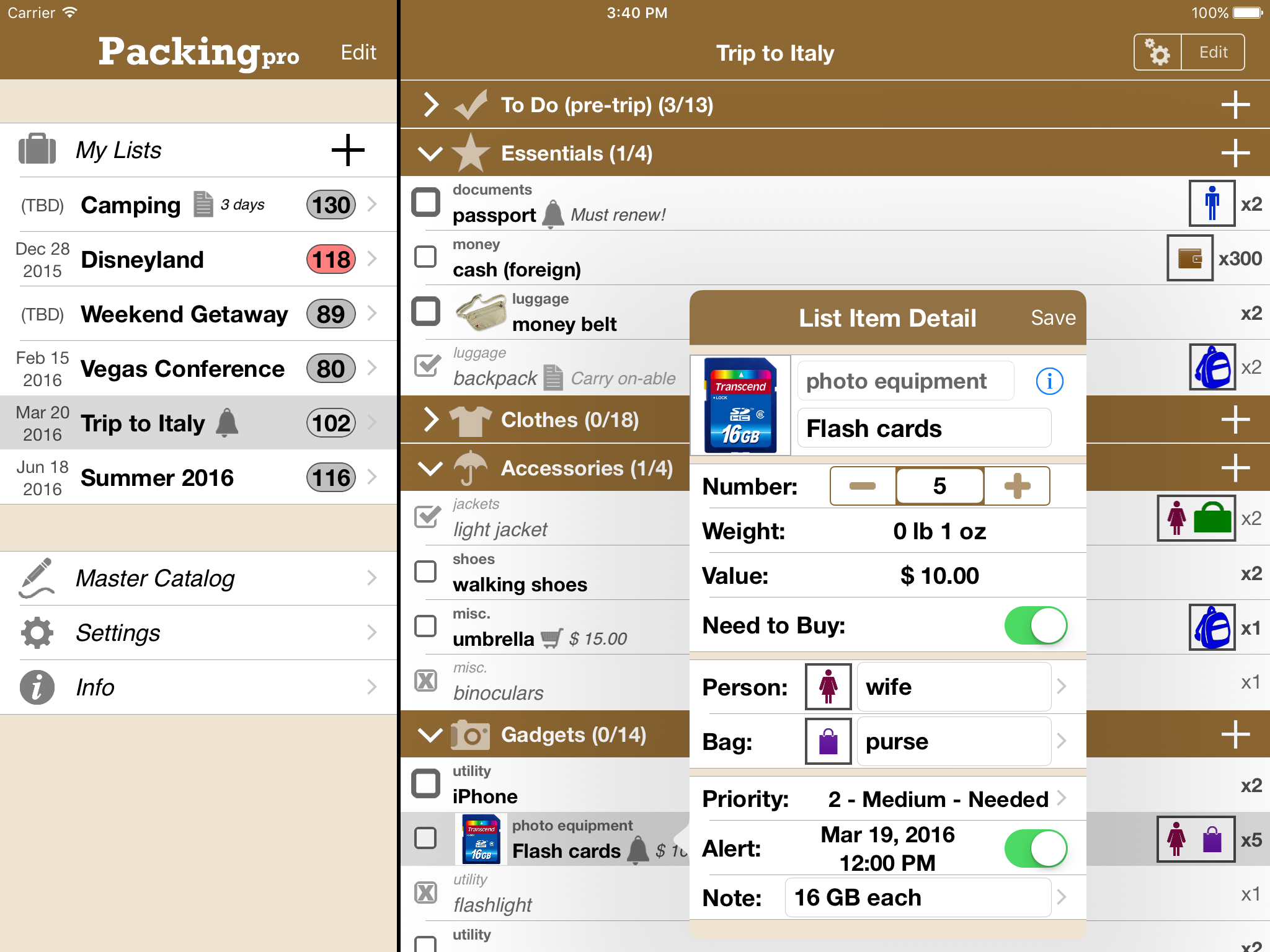
Packing Pro is a mobile packing app that features unlimited, 100% customizable packing lists, an extensive, yet flexible, catalog, handy sample lists, iCloud auto-sync and various list sharing options. A host of special functions include:
* Multi-item selection from catalog for speedy list building
* Multi-item editing for easy list & catalog management
* Collapsable categories with floating headers & running item tallies
* List sorting & filtering by packing status, priority, need to buy, bag and/or person
* Item, weight and value totals & subtotals
* Item images to eliminate any confusion - never again pack the wrong item
* Item & list alerts for user-set reminders
* Email export for file sharing
* Wireless printing
* Fully customized device support for all sizes of iPhone, iPod touch & iPad
* Full multi-lingual support for English, Spanish, French, German, Italian, Portuguese, Russian, Polish, Japanese & Chinese
Besides the core features listed above (which are also present in the basic Packing (+TO DO!) app), Packing Pro also gives its users the following Pro-level features:
* iCloud auto-syncing support
* Expert packing list wizard that can "automagically" create a list
* Email, iTunes, AirDrop, Dropbox & Box file sharing, backup & out-of-app editing support
* Customized design (themes, layout, fonts, colors, textures)
* Double-sized Master Catalog with over 800 items and to-do tasks
* Twice as many sample lists
* Smart Search
Seven years on Apple's App Store have given QuinnScape valuable experience, and Packing Pro, its star product, has stood the test of time and truly become an essential app for your iPhone, iPad or iPod touch. Check it out today!
Pricing and Availability:
Packing Pro is a universal app that is available for purchase worldwide on the iPhone & iPad App Store for $2.99 (USD), or the equivalent in local currency. The basic Packing (+TO DO!) sells for $0.99.
QuinnScape: http://www.quinnscape.com/
Packing Pro 11.2: http://www.quinnscape.com/PackingPro.asp
Purchase and Download: https://geo.itunes.apple.com/us/app/packing-pro/id312266675?mt=8&at=1l3v8Yv&pt=55410&ct=prmac
Video Demos: http://www.quinnscape.com/PackingPro-videodemo.asp
Screenshot: http://www.quinnscape.com/media/images/PackingPro-iPad-v11.1.png
App Icon: http://www.quinnscape.com/media/images/PackingPro-Icon-250x250.png
Since its founding in October 2008, QuinnScape has been managed by Quinn Genzel. Quinn is best known for his popular, top-ranking travel packing apps: Packing (+TO DO!) and Packing Pro. Packing Pro has been recognized by Apple, CNN, WSJ, BBC, National Geographic, Budget Travel, Fodor's, CNET, Macworld and a host of others as one of their top apps for traveling. Other app created by Quinn include a grocery shopping list app (Shopping Pro), nature appreciation apps (iLove Nature and iLove Birds), 3D VR action games (R.I.P and Ghost Buddy) and high-quality puzzles (the aQ's Pro Slider Puzzle series). Copyright (C) 2008-2016 QuinnScape. All Rights Reserved. Apple, the Apple logo, iPhone, iPod and iPad are registered trademarks of Apple Inc. in the U.S. and/or other countries.
*******
Link To Article: http://prmac.com/release-id-79256.htm
*******
---------------------------------------------------------------------------------
Note that you can alter delivered distributions at any time.
Login to your account on prMac to alter your channel selection, or to opt-out at any time.
Packing Pro Celebrates Its 7th Anniversary on the App Store - Published on 04/19/16
QuinnScape's Packing Pro celebrates its 7th anniversary on Apple's App Store today. Packing Pro is a mobile packing list app that features unlimited, 100% customizable packing lists, an extensive, yet flexible, catalog, handy sample lists, iCloud auto-sync and various list sharing options. Packing Pro has also been recognized by CNN, WSJ, BBC, The New York Times, Expedia and Budget Travel, and has earned glowing reviews on major tech and app blogs.
Taipei, Taiwan - Packing Pro, the popular travel app for the iPhone, iPad & iPod touch by QuinnScape, today celebrates its 7th anniversary on the App Store. Originally based on the Packing (+TO DO!) app, which was released six months earlier, these apps were two of the first few thousand apps on the App Store, compared to the over one million that are currently there today. During this time, both apps have kept pace with and added support for all of Apple's new iOS updates and devices, starting with iOS 2 and iPhone 3G, and progressing all the way up to the current iOS 9, iPhone 6s/6s Plus, iPad Pro, iPad Air 2, iPad mini 4 & iPod touch 6G. Packing Pro has also maintained its position in the top 10 or 20 for all travel apps for much of this time.
During these seven years, Packing Pro has been highlighted on Apple's App Store several times. Currently, it can be found in the "Travel Survival Kit" and "Travel Expenses" promotions. It has also ranked at #1 for iPads and #2 for iPhones in the U.S. App Store's Travel section. Besides Apple, Packing Pro has also been recognized by CNN, WSJ, BBC, The New York Times, Expedia and Budget Travel, and has earned glowing reviews on major tech and app blogs (Gizmodo, Mashable, Macworld, CNET, TUAW and iPhone Life, among others).
Packing Pro is a mobile packing app that features unlimited, 100% customizable packing lists, an extensive, yet flexible, catalog, handy sample lists, iCloud auto-sync and various list sharing options. A host of special functions include:
* Multi-item selection from catalog for speedy list building
* Multi-item editing for easy list & catalog management
* Collapsable categories with floating headers & running item tallies
* List sorting & filtering by packing status, priority, need to buy, bag and/or person
* Item, weight and value totals & subtotals
* Item images to eliminate any confusion - never again pack the wrong item
* Item & list alerts for user-set reminders
* Email export for file sharing
* Wireless printing
* Fully customized device support for all sizes of iPhone, iPod touch & iPad
* Full multi-lingual support for English, Spanish, French, German, Italian, Portuguese, Russian, Polish, Japanese & Chinese
Besides the core features listed above (which are also present in the basic Packing (+TO DO!) app), Packing Pro also gives its users the following Pro-level features:
* iCloud auto-syncing support
* Expert packing list wizard that can "automagically" create a list
* Email, iTunes, AirDrop, Dropbox & Box file sharing, backup & out-of-app editing support
* Customized design (themes, layout, fonts, colors, textures)
* Double-sized Master Catalog with over 800 items and to-do tasks
* Twice as many sample lists
* Smart Search
Seven years on Apple's App Store have given QuinnScape valuable experience, and Packing Pro, its star product, has stood the test of time and truly become an essential app for your iPhone, iPad or iPod touch. Check it out today!
Pricing and Availability:
Packing Pro is a universal app that is available for purchase worldwide on the iPhone & iPad App Store for $2.99 (USD), or the equivalent in local currency. The basic Packing (+TO DO!) sells for $0.99.
QuinnScape: http://www.quinnscape.com/
Packing Pro 11.2: http://www.quinnscape.com/PackingPro.asp
Purchase and Download: https://geo.itunes.apple.com/us/app/packing-pro/id312266675?mt=8&at=1l3v8Yv&pt=55410&ct=prmac
Video Demos: http://www.quinnscape.com/PackingPro-videodemo.asp
Screenshot: http://www.quinnscape.com/media/images/PackingPro-iPad-v11.1.png
App Icon: http://www.quinnscape.com/media/images/PackingPro-Icon-250x250.png

Since its founding in October 2008, QuinnScape has been managed by Quinn Genzel. Quinn is best known for his popular, top-ranking travel packing apps: Packing (+TO DO!) and Packing Pro. Packing Pro has been recognized by Apple, CNN, WSJ, BBC, National Geographic, Budget Travel, Fodor's, CNET, Macworld and a host of others as one of their top apps for traveling. Other app created by Quinn include a grocery shopping list app (Shopping Pro), nature appreciation apps (iLove Nature and iLove Birds), 3D VR action games (R.I.P and Ghost Buddy) and high-quality puzzles (the aQ's Pro Slider Puzzle series). Copyright (C) 2008-2016 QuinnScape. All Rights Reserved. Apple, the Apple logo, iPhone, iPod and iPad are registered trademarks of Apple Inc. in the U.S. and/or other countries.
*******
Link To Article: http://prmac.com/release-id-79256.htm
*******
---------------------------------------------------------------------------------
Note that you can alter delivered distributions at any time.
Login to your account on prMac to alter your channel selection, or to opt-out at any time.
Flotrak 1.1 for iPhone - Create and Share Music Loops with the World
A new article has been published at prMac.
Flotrak 1.1 for iPhone - Create and Share Music Loops with the World - Published on 04/19/16
UK based development team, Flotrak Ltd today introduces Flotrak 1.1, an important update to their music loop creation and sharing app for iOS devices. The app allows anyone to create & share music loops, called flo's, with friends, family, and users from around the world. Users can create and share flo's that capture an emotion or recall a pleasant memory. Listen to other users' flo's, and watch them go viral by hitting the HOT 100. Version 1.1 allows users to share flo's directly from Spotify
Crawley, United Kingdom - Flotrak Ltd is today proud to announce the release and immediate availability of Flotrak 1.1, the important update to their popular music loop creation and sharing app for iPhone, iPad, and iPod touch devices. This app is the first of its kind, which allows anyone to create music loops, known as "flo's" which are 30, 60, and 90 second music loops which include beautifully created artwork, created directly within the iOS app.
Flotrak aims to be the perfect platform for everyone to create and share unique music loops. While it's a great way for fans to share their favorite tunes, it's also a great method of exposure for artists, producers and DJ's. Flotrak is a UI built for music to go viral. Simply select a song from your music library, and then select a 30, 60, or 90 second piece of the music. Flotrak will then automatically create a flo, using the album artwork accompanying the music. Everyone has a favorite part of a song that touches them, be it the chorus, or a particular verse. With Flotrak, anyone can create a music loop that takes the listener straight to a memory or emotion that is close to their heart. Anyone has the chance for their flo to go viral with the HOT 100, the first people's chart!
"Flotrak was built on the idea of sharing music with the world. Yes, there are many different ways to share music, but not how Flotrak has done it. Content is extremely important as a mobile user, but the way we experience it is just as important," says Flotrak founder Tasvinder Aulakh. "We have built Flotrak in a way no other music or audio app has ever been. We have implemented a social UI, which is up-to-date with the latest trends that we have been seeing in the app world. With these two ingredients combined, Flotrak is truly the fastest, most intuitive, and beautifully presented method yet to create, share and discover new and old music or other audio via flo's."
Users can open the Flotrak app and simply browse the available loops, enjoying other user's taste in music, or their own creations. Flotrak's unique interface allows users to simply scroll through their home feed from flo to flo. As the next flo scrolls up, it automatically begins playing the associated loop. The user can then tap the flo's artwork to pause the music, and then tap it again to once more begin playing. A quick double-tap "likes" the flo, letting the user know you appreciate their creation.
Flotrak Features:
* Select and create high-quality 30, 60, or 90 second flo's from your music library, from directly within the app
* The chance to go viral with the first ever "people's chart," the HOT 100.
* Descriptive hashtags allow users to describe their flo's making it easy to find
* Full Spotify integration
* Use cover videos for user profiles to catch other users' eye
* Get access to the full content of the flo using FindIn
* Easily see how many flo's a particular piece of content gets
* Posts can use cool YouTube and SoundCloud artwork
* Instantly share flo's on Facebook, Twitter, Pinterest, What's App and other social networks
* Connect with Flotrak users all over the world
* Keep up to date with other users' flo's and news
* Upload from your computer as well as from the app, via the Flotrak website's upload page
Flotrak user profiles act as a playlist of a user's favorite flo's, showing off their favorite music, and allowing other users to enjoy other's unique taste in music. Users also have the option to upload a widescreen cover video, which really brings a profile to life.
"Another very important factor about Flotrak, is that it's a great way to create your very own personal timeline in music which you can go back to and relive memories and explore sounds that you have stored," notes Tasvinder. "This timeline can be accessed anywhere, whenever. Try to paint the picture of scrolling back years in time to music you used to listen to. Its the best and easiest way to do this."
Flotrak allows exploring music via the use of the ubiquitous hashtag. Users add a caption to their flo, which includes hashtags that make the flo meaningful to them. Other users can simply search for various hashtags, depending on the emotion, feeling, or mood they're feeling at the time. This system offers an intuitive and easy to use method for searching for just the right kind of music.
Anyone can view the "Hot Right Now" list to see what is currently trending on the service. If a flo attracts enough eyes and ears, it might become popular enough to rank on the first ever "people's chart" the HOT 100. Both the "Hot Right Now" and the "HOT 100" lists are easily viewed with just a single tap of an icon.
Once a user finds a flo they really enjoy, maybe they'd like to hear the song in its entirety. That never poses a problem, as Flotrak users can quickly use the app's "FindIn" capability to search and listen to the full content on Apple Music, SoundCloud, and YouTube. (More services are coming soon!) Flotrak fans can also share flo's on popular social media platforms, such as Facebook, Twitter, Pinterest, and more, even if the recipient isn't a Flotrak member.
With the release of version 1.1, listeners can now search and share flo's directly from Spotify in the Flotrak app. If a user sees the Spotify logo on any artwork, they can directly listen to the full song on Spotify with one click of a button. With Spotify's vast music library, finding songs to share has never been easier. Using Spotify with Flotrak allows users to create a flo to share on the Flotrak network.
Music fans love Flotrak:
"Finally, a chance to make a recognizable impact in the charts. This has to be one of my favorite features of Flotrak. A global chart system that is non-biased and is based on what us 'the people' like, not what we 'should' like! I am not sure as to how it works, but it resets every week, giving new opportunity to new music to make it around the world! It's an artist's dream platform." - @d.sarkari
"I'm definitely a 30 second flo guy, it makes the content more gripping, but then again for those build ups, 60 second and 90 second flo's are ideal. The fact that I can create and chop flo's to my liking is what makes my flo's so personal. Its simply my best part, and its straight to the point, no need to scrub, no unnecessary loading, just bang! Drop after drop! I love EDM music, after 15mins of going through #HouseDrops, I'm buzzing!!! I can also see artwork changing the game too; have been seeing some really creative stuff that compliments the flo." - @jr_aulakh
"FindIn, it makes perfect sense. Ok, not everything I'm going to love, but when I do find something that I want to dig further into, I use FindIn. The three dots under the artwork save me every time. So I have found a flo that I like, I simply click more "three dots" and am presented with the options to buy it or stream the full version from iTunes, SoundCloud and YouTube. I can't wait to see more options such as Pandora and Spotify! On the same page, share it with one click. Love it! I always share things I like, and for some reason, when I share a flo to Facebook or Twitter, it is presented beautifully on my feed!" - @coco_
Flotrak offers an easy, and fun way to share music with the world. It's social UI, the use of hashtags for search, and the ability to quickly view and listen to flo's with zero buffering and no scrubbing, makes the app the perfect companion for any music lover who owns an iPhone, iPad, or iPod touch. Flotrak is the first place to look to discover the latest trends in music.
Device Requirements:
* iPhone, iPad, and iPod touch
* Requires iOS 7.0 or later
* 20.4 MB
Pricing and Availability:
Flotrak 1.1 is free, and is available worldwide exclusively through the App Store in the Music category. Members of the press please contact Tasvinder Aulakh for more information.
Flotrak 1.1: http://www.flotrak.com
Download from iTunes: https://itunes.apple.com/app/flotrak/id1004886856
Screenshot 1: http://a2.mzstatic.com/us/r30/Purple49/v4/8b/dc/9b/8bdc9b01-8b8b-035e-be2a-eaa0fd391d19/screen322x572.jpeg
Screenshot 2: http://a5.mzstatic.com/us/r30/Purple49/v4/46/62/75/466275f2-3e2c-f43e-b8ce-57e15e7f386f/screen322x572.jpeg
App Icon: http://a1.mzstatic.com/us/r30/Purple1/v4/58/95/70/58957079-39e6-49ce-562a-7c7946e41187/icon175x175.jpeg
Press Kit (ZIP): http://www.flotrak.com/download
Founded in the United Kingdom in 2015, and based in a small town called Crawley, Flotrak Ltd is comprised of three hard working employees, working from a makeshift office. The development team works hard to change the way listeners hear, discover, search and see music. All Material and Software (C) Copyright 2016 Flotrak Ltd. All Rights Reserved. Apple, the Apple logo, iPhone, iPad and iPod are registered trademarks of Apple Inc. in the U.S. and/or other countries.
*******
Link To Article: http://prmac.com/release-id-79257.htm
*******
---------------------------------------------------------------------------------
Note that you can alter delivered distributions at any time.
Login to your account on prMac to alter your channel selection, or to opt-out at any time.
Flotrak 1.1 for iPhone - Create and Share Music Loops with the World - Published on 04/19/16
UK based development team, Flotrak Ltd today introduces Flotrak 1.1, an important update to their music loop creation and sharing app for iOS devices. The app allows anyone to create & share music loops, called flo's, with friends, family, and users from around the world. Users can create and share flo's that capture an emotion or recall a pleasant memory. Listen to other users' flo's, and watch them go viral by hitting the HOT 100. Version 1.1 allows users to share flo's directly from Spotify
Crawley, United Kingdom - Flotrak Ltd is today proud to announce the release and immediate availability of Flotrak 1.1, the important update to their popular music loop creation and sharing app for iPhone, iPad, and iPod touch devices. This app is the first of its kind, which allows anyone to create music loops, known as "flo's" which are 30, 60, and 90 second music loops which include beautifully created artwork, created directly within the iOS app.
Flotrak aims to be the perfect platform for everyone to create and share unique music loops. While it's a great way for fans to share their favorite tunes, it's also a great method of exposure for artists, producers and DJ's. Flotrak is a UI built for music to go viral. Simply select a song from your music library, and then select a 30, 60, or 90 second piece of the music. Flotrak will then automatically create a flo, using the album artwork accompanying the music. Everyone has a favorite part of a song that touches them, be it the chorus, or a particular verse. With Flotrak, anyone can create a music loop that takes the listener straight to a memory or emotion that is close to their heart. Anyone has the chance for their flo to go viral with the HOT 100, the first people's chart!
"Flotrak was built on the idea of sharing music with the world. Yes, there are many different ways to share music, but not how Flotrak has done it. Content is extremely important as a mobile user, but the way we experience it is just as important," says Flotrak founder Tasvinder Aulakh. "We have built Flotrak in a way no other music or audio app has ever been. We have implemented a social UI, which is up-to-date with the latest trends that we have been seeing in the app world. With these two ingredients combined, Flotrak is truly the fastest, most intuitive, and beautifully presented method yet to create, share and discover new and old music or other audio via flo's."
Users can open the Flotrak app and simply browse the available loops, enjoying other user's taste in music, or their own creations. Flotrak's unique interface allows users to simply scroll through their home feed from flo to flo. As the next flo scrolls up, it automatically begins playing the associated loop. The user can then tap the flo's artwork to pause the music, and then tap it again to once more begin playing. A quick double-tap "likes" the flo, letting the user know you appreciate their creation.
Flotrak Features:
* Select and create high-quality 30, 60, or 90 second flo's from your music library, from directly within the app
* The chance to go viral with the first ever "people's chart," the HOT 100.
* Descriptive hashtags allow users to describe their flo's making it easy to find
* Full Spotify integration
* Use cover videos for user profiles to catch other users' eye
* Get access to the full content of the flo using FindIn
* Easily see how many flo's a particular piece of content gets
* Posts can use cool YouTube and SoundCloud artwork
* Instantly share flo's on Facebook, Twitter, Pinterest, What's App and other social networks
* Connect with Flotrak users all over the world
* Keep up to date with other users' flo's and news
* Upload from your computer as well as from the app, via the Flotrak website's upload page
Flotrak user profiles act as a playlist of a user's favorite flo's, showing off their favorite music, and allowing other users to enjoy other's unique taste in music. Users also have the option to upload a widescreen cover video, which really brings a profile to life.
"Another very important factor about Flotrak, is that it's a great way to create your very own personal timeline in music which you can go back to and relive memories and explore sounds that you have stored," notes Tasvinder. "This timeline can be accessed anywhere, whenever. Try to paint the picture of scrolling back years in time to music you used to listen to. Its the best and easiest way to do this."
Flotrak allows exploring music via the use of the ubiquitous hashtag. Users add a caption to their flo, which includes hashtags that make the flo meaningful to them. Other users can simply search for various hashtags, depending on the emotion, feeling, or mood they're feeling at the time. This system offers an intuitive and easy to use method for searching for just the right kind of music.
Anyone can view the "Hot Right Now" list to see what is currently trending on the service. If a flo attracts enough eyes and ears, it might become popular enough to rank on the first ever "people's chart" the HOT 100. Both the "Hot Right Now" and the "HOT 100" lists are easily viewed with just a single tap of an icon.
Once a user finds a flo they really enjoy, maybe they'd like to hear the song in its entirety. That never poses a problem, as Flotrak users can quickly use the app's "FindIn" capability to search and listen to the full content on Apple Music, SoundCloud, and YouTube. (More services are coming soon!) Flotrak fans can also share flo's on popular social media platforms, such as Facebook, Twitter, Pinterest, and more, even if the recipient isn't a Flotrak member.
With the release of version 1.1, listeners can now search and share flo's directly from Spotify in the Flotrak app. If a user sees the Spotify logo on any artwork, they can directly listen to the full song on Spotify with one click of a button. With Spotify's vast music library, finding songs to share has never been easier. Using Spotify with Flotrak allows users to create a flo to share on the Flotrak network.
Music fans love Flotrak:
"Finally, a chance to make a recognizable impact in the charts. This has to be one of my favorite features of Flotrak. A global chart system that is non-biased and is based on what us 'the people' like, not what we 'should' like! I am not sure as to how it works, but it resets every week, giving new opportunity to new music to make it around the world! It's an artist's dream platform." - @d.sarkari
"I'm definitely a 30 second flo guy, it makes the content more gripping, but then again for those build ups, 60 second and 90 second flo's are ideal. The fact that I can create and chop flo's to my liking is what makes my flo's so personal. Its simply my best part, and its straight to the point, no need to scrub, no unnecessary loading, just bang! Drop after drop! I love EDM music, after 15mins of going through #HouseDrops, I'm buzzing!!! I can also see artwork changing the game too; have been seeing some really creative stuff that compliments the flo." - @jr_aulakh
"FindIn, it makes perfect sense. Ok, not everything I'm going to love, but when I do find something that I want to dig further into, I use FindIn. The three dots under the artwork save me every time. So I have found a flo that I like, I simply click more "three dots" and am presented with the options to buy it or stream the full version from iTunes, SoundCloud and YouTube. I can't wait to see more options such as Pandora and Spotify! On the same page, share it with one click. Love it! I always share things I like, and for some reason, when I share a flo to Facebook or Twitter, it is presented beautifully on my feed!" - @coco_
Flotrak offers an easy, and fun way to share music with the world. It's social UI, the use of hashtags for search, and the ability to quickly view and listen to flo's with zero buffering and no scrubbing, makes the app the perfect companion for any music lover who owns an iPhone, iPad, or iPod touch. Flotrak is the first place to look to discover the latest trends in music.
Device Requirements:
* iPhone, iPad, and iPod touch
* Requires iOS 7.0 or later
* 20.4 MB
Pricing and Availability:
Flotrak 1.1 is free, and is available worldwide exclusively through the App Store in the Music category. Members of the press please contact Tasvinder Aulakh for more information.
Flotrak 1.1: http://www.flotrak.com
Download from iTunes: https://itunes.apple.com/app/flotrak/id1004886856
Screenshot 1: http://a2.mzstatic.com/us/r30/Purple49/v4/8b/dc/9b/8bdc9b01-8b8b-035e-be2a-eaa0fd391d19/screen322x572.jpeg

Screenshot 2: http://a5.mzstatic.com/us/r30/Purple49/v4/46/62/75/466275f2-3e2c-f43e-b8ce-57e15e7f386f/screen322x572.jpeg

App Icon: http://a1.mzstatic.com/us/r30/Purple1/v4/58/95/70/58957079-39e6-49ce-562a-7c7946e41187/icon175x175.jpeg
Press Kit (ZIP): http://www.flotrak.com/download
Founded in the United Kingdom in 2015, and based in a small town called Crawley, Flotrak Ltd is comprised of three hard working employees, working from a makeshift office. The development team works hard to change the way listeners hear, discover, search and see music. All Material and Software (C) Copyright 2016 Flotrak Ltd. All Rights Reserved. Apple, the Apple logo, iPhone, iPad and iPod are registered trademarks of Apple Inc. in the U.S. and/or other countries.
*******
Link To Article: http://prmac.com/release-id-79257.htm
*******
---------------------------------------------------------------------------------
Note that you can alter delivered distributions at any time.
Login to your account on prMac to alter your channel selection, or to opt-out at any time.
Creator of A+ Signature app announces Mix on Pix 1.0 for iPhone/iPad
A new article has been published at prMac.
Creator of A+ Signature app announces Mix on Pix 1.0 for iPhone/iPad - Published on 04/19/16
Montreal Based Pixtolab today introduces Mix on Pix 1.0, their brand new app for iOS devices. Now it's easier than ever to create an outstanding social post with pictures and texts. Perfect for both professional photographer to casual user alike, Mix on Pix is a most versatile app to add anything on pictures, including texts, annotations, watermarks, photos, logos and more. Mix on Pix offers finely designed Stock Texts and Stock Art, as well as users have access to 477 available fonts and more.
Montreal, Canada - Pixtolab today is proud to announce the release and immediate availability of Mix on Pix 1.0 for iPhone/iPad as the most versatile app to add anything on pictures: texts, annotations, watermarks, photos, logos and more. Mix on Pix follows in the steps of the popular A+ Signature app, with major improvements in features and customization.
Mix on Pix targets everyone who takes and edits photos, from the professional photographer to the casual user doing social posts. With Mix on Pix, it is now easier than ever to create an outstanding social post with pictures and texts. Pixtolab calls a Picture/Text post a Pixto.
"Mix on Pix has been created to be at the intersections of Photography, Typography, Creativity, Productivity and Mobility." said Francois Robert, President of Pixtolab. "With the ubiquity of bigger iPhones and iPads, a new generation of users want power on top of ease of use. These were the guidelines for the design of Mix on Pix, which contains a lot more functionalities and customization possibilities than your average Photo App. Providing all this power while keeping simple things simple was the greatest challenge."
Key features:
* Multiple sessions - Work sessions are saved and reopened just like Pages or Word documents
* Texts, dates, arrows, shapes, writings and drawings on photos
* Access to a categorized lists of fonts - 477 available fonts - Users can also install their own fonts
* Texts stands out in an instant with Quick FX
* Pictures on Picture with an optional pack
* Finely designed Stock Texts and Stock Art
* Every item can be customized or grouped to give unsurpassed control
* Saving and sharing at full resolution
Sometimes, more is more. In general, users want ease-of-use. But as the computing pioneer Alan Kay once said: "Simple things should be simple. Complex things should be possible."
Designed for iOS 9:
* 3D Touch to quickly create a new session or open the last session
* Slide Over and Split View on iPad and iPad Pro
* Search in Spotlight using the Session name
* Devices can be used for a longer time in Low Power Mode thanks to adaptive display effects
Pricing and Availability:
For a limited time, Mix on Pix 1.0 is offered at the introductory price of $1.99 USD (or an equivalent amount in other currencies). It is available worldwide through the App Store in the Photo and Video category. Mix on Pix is designed for iPhone and iPad. It requires iOS 9.0 or newer.
Pixtolab: http://www.pixtolab.com
Mix on Pix 1.0: http://www.pixtolab.com/MixOnPix.html
Download from iTunes: http://itunes.apple.com/app/id633281586
Media Assets: http://www.pixtolab.com/MixOnPixMedia.html
Located in Montreal, Canada, Pixtolab was founded in 1987 and has specialized in mobile development since 2009. An independent studio, Pixtolab is driven by life partners Francois Robert and Linda Tsibucas. The developer and artist team continue their goal of creating top quality apps to help users be productive, create artworks and have fun. All Material and Software (C) Copyright 2016 Pixtolab Technologies Inc. All Rights Reserved. Apple, the Apple logo, iPhone, iPod and iPad are registered trademarks of Apple Inc. in the U.S. and/or other countries. Other trademarks and registered trademarks may be the property of their respective owners.
*******
Link To Article: http://prmac.com/release-id-79255.htm
*******
---------------------------------------------------------------------------------
Note that you can alter delivered distributions at any time.
Login to your account on prMac to alter your channel selection, or to opt-out at any time.
Creator of A+ Signature app announces Mix on Pix 1.0 for iPhone/iPad - Published on 04/19/16
Montreal Based Pixtolab today introduces Mix on Pix 1.0, their brand new app for iOS devices. Now it's easier than ever to create an outstanding social post with pictures and texts. Perfect for both professional photographer to casual user alike, Mix on Pix is a most versatile app to add anything on pictures, including texts, annotations, watermarks, photos, logos and more. Mix on Pix offers finely designed Stock Texts and Stock Art, as well as users have access to 477 available fonts and more.
Montreal, Canada - Pixtolab today is proud to announce the release and immediate availability of Mix on Pix 1.0 for iPhone/iPad as the most versatile app to add anything on pictures: texts, annotations, watermarks, photos, logos and more. Mix on Pix follows in the steps of the popular A+ Signature app, with major improvements in features and customization.
Mix on Pix targets everyone who takes and edits photos, from the professional photographer to the casual user doing social posts. With Mix on Pix, it is now easier than ever to create an outstanding social post with pictures and texts. Pixtolab calls a Picture/Text post a Pixto.
"Mix on Pix has been created to be at the intersections of Photography, Typography, Creativity, Productivity and Mobility." said Francois Robert, President of Pixtolab. "With the ubiquity of bigger iPhones and iPads, a new generation of users want power on top of ease of use. These were the guidelines for the design of Mix on Pix, which contains a lot more functionalities and customization possibilities than your average Photo App. Providing all this power while keeping simple things simple was the greatest challenge."
Key features:
* Multiple sessions - Work sessions are saved and reopened just like Pages or Word documents
* Texts, dates, arrows, shapes, writings and drawings on photos
* Access to a categorized lists of fonts - 477 available fonts - Users can also install their own fonts
* Texts stands out in an instant with Quick FX
* Pictures on Picture with an optional pack
* Finely designed Stock Texts and Stock Art
* Every item can be customized or grouped to give unsurpassed control
* Saving and sharing at full resolution
Sometimes, more is more. In general, users want ease-of-use. But as the computing pioneer Alan Kay once said: "Simple things should be simple. Complex things should be possible."
Designed for iOS 9:
* 3D Touch to quickly create a new session or open the last session
* Slide Over and Split View on iPad and iPad Pro
* Search in Spotlight using the Session name
* Devices can be used for a longer time in Low Power Mode thanks to adaptive display effects
Pricing and Availability:
For a limited time, Mix on Pix 1.0 is offered at the introductory price of $1.99 USD (or an equivalent amount in other currencies). It is available worldwide through the App Store in the Photo and Video category. Mix on Pix is designed for iPhone and iPad. It requires iOS 9.0 or newer.
Pixtolab: http://www.pixtolab.com
Mix on Pix 1.0: http://www.pixtolab.com/MixOnPix.html
Download from iTunes: http://itunes.apple.com/app/id633281586
Media Assets: http://www.pixtolab.com/MixOnPixMedia.html
Located in Montreal, Canada, Pixtolab was founded in 1987 and has specialized in mobile development since 2009. An independent studio, Pixtolab is driven by life partners Francois Robert and Linda Tsibucas. The developer and artist team continue their goal of creating top quality apps to help users be productive, create artworks and have fun. All Material and Software (C) Copyright 2016 Pixtolab Technologies Inc. All Rights Reserved. Apple, the Apple logo, iPhone, iPod and iPad are registered trademarks of Apple Inc. in the U.S. and/or other countries. Other trademarks and registered trademarks may be the property of their respective owners.
*******
Link To Article: http://prmac.com/release-id-79255.htm
*******
---------------------------------------------------------------------------------
Note that you can alter delivered distributions at any time.
Login to your account on prMac to alter your channel selection, or to opt-out at any time.
Typinator 6.9 makes switching from TextExpander a breeze
A new article has been published at prMac.
Typinator 6.9 makes switching from TextExpander a breeze - Published on 04/19/16
Ergonis Software today announces Typinator 6.9, a new version of their popular text expander. Typinator is a powerful, yet elegantly simple solution that boosts your productivity by automating the process of inserting frequently used text and auto-correcting typing errors. Version 6.9 offers improved import of TextExpander snippets, an extended DOuble CAps exceptions set, support for the Sogou input methods for Chinese, and more. It is is fully compatible with OS X El Capitan.
Perg, Austria - Ergonis Software today announced the release of Typinator 6.9, a new version of their popular text expander. The new version offers improved import of TextExpander snippets, an extended DOuble CAps exceptions set, support for the Sogou input method for Chinese, and more.
"In the past, we could already welcome many users who switched from TextExpander to Typinator. The import of TextExpander snippets has therefore been a feature of Typinator since version 2," said Christoph Reichenberger, CEO of Ergonis Software. "But since Smile recently switched to a subscription-based pricing model for TextExpander, more and more TextExpander users are now migrating to Typinator. We took this opportunity to take a closer look at the import feature and found a couple of things that we could improve." So the new version 6.9 of Typinator now also supports import from TextExpander's "textexpandersettings" file format and correctly converts certain types of fill-ins as well as nested snippet invocations.
And due to popular demand, we have decided to welcome former TextExpander customers to the subscription-free world of Typinator with a special crossgrade discount. If you order a Typinator license from the Ergonis Online Store during April 2016 and enter the coupon code "TE1604P", you get Typinator at 25% off. But we have more great news for you: All Typinator purchases made from now on include the major upgrade to Typinator 7 (scheduled for later this year) for free.
Typinator 6.9 furthermore comes with an extended predefined DOuble CAps exceptions set, offers improved handling of delays when sending event sequences to applications and improves compatibility with several third-party applications like RootsMagic, Wine, LibreOffice, and Slack. Chinese users will be glad to hear that Typinator 6.9 supports the Sogou input method.
Typinator is a powerful, yet elegantly simple solution that boosts your productivity by automating the process of inserting frequently used text and auto-correcting typing errors. Across all applications, it detects specific sequences of typed characters and automatically replaces them with text snippets, graphics, URLs, dates and special characters.
System Requirements:
Typinator 6.9 requires Mac OS X 10.6 or newer and is fully compatible with OS X El Capitan (10.11).
Availability and Ordering:
Typinator can be purchased securely on the Ergonis Software website. The upgrade to Typinator 6.9 is free for anyone who owns a valid license for Typinator 6. Upgrade paths are available for owners of older licenses. All Typinator purchases made in or after April 2016 also include the major upgrade to Typinator 7 (scheduled for later this year) for free. For information about purchases, including enterprise licenses, volume discounts, and upgrade pricing offers, see the company's web site.
Ergonis Software: http://www.ergonis.com/
Typinator 6.9: http://www.ergonis.com/products/typinator
Download Typinator: http://www.ergonis.com/downloads/typinator-install.dmg
Switching from TextExpander: http://www.ergonis.com/products/tips/switching-from-textexpander-to-typinator.php
Purchase Typinator: https://store.ergonis.com/products/typinator
Screenshot: http://www.ergonis.com/images/products/typi/external/typinator-screen.png
Headquartered in Perg, Austria, Ergonis Software Gmbh is a privately held software development company founded in 2002. With a focus on innovation, Ergonis develops ergonomic and intuitive software that boosts the productivity of Mac and PC users alike. Copyright 2002-2016 Ergonis Software Gmbh. All Rights Reserved. Ergonis products are either registered trademarks or trademarks of Ergonis Software GmbH. Other company and product names may be trademarks of their respective owners.
*******
Link To Article: http://prmac.com/release-id-79258.htm
*******
---------------------------------------------------------------------------------
Note that you can alter delivered distributions at any time.
Login to your account on prMac to alter your channel selection, or to opt-out at any time.
Typinator 6.9 makes switching from TextExpander a breeze - Published on 04/19/16
Ergonis Software today announces Typinator 6.9, a new version of their popular text expander. Typinator is a powerful, yet elegantly simple solution that boosts your productivity by automating the process of inserting frequently used text and auto-correcting typing errors. Version 6.9 offers improved import of TextExpander snippets, an extended DOuble CAps exceptions set, support for the Sogou input methods for Chinese, and more. It is is fully compatible with OS X El Capitan.
Perg, Austria - Ergonis Software today announced the release of Typinator 6.9, a new version of their popular text expander. The new version offers improved import of TextExpander snippets, an extended DOuble CAps exceptions set, support for the Sogou input method for Chinese, and more.
"In the past, we could already welcome many users who switched from TextExpander to Typinator. The import of TextExpander snippets has therefore been a feature of Typinator since version 2," said Christoph Reichenberger, CEO of Ergonis Software. "But since Smile recently switched to a subscription-based pricing model for TextExpander, more and more TextExpander users are now migrating to Typinator. We took this opportunity to take a closer look at the import feature and found a couple of things that we could improve." So the new version 6.9 of Typinator now also supports import from TextExpander's "textexpandersettings" file format and correctly converts certain types of fill-ins as well as nested snippet invocations.
And due to popular demand, we have decided to welcome former TextExpander customers to the subscription-free world of Typinator with a special crossgrade discount. If you order a Typinator license from the Ergonis Online Store during April 2016 and enter the coupon code "TE1604P", you get Typinator at 25% off. But we have more great news for you: All Typinator purchases made from now on include the major upgrade to Typinator 7 (scheduled for later this year) for free.
Typinator 6.9 furthermore comes with an extended predefined DOuble CAps exceptions set, offers improved handling of delays when sending event sequences to applications and improves compatibility with several third-party applications like RootsMagic, Wine, LibreOffice, and Slack. Chinese users will be glad to hear that Typinator 6.9 supports the Sogou input method.
Typinator is a powerful, yet elegantly simple solution that boosts your productivity by automating the process of inserting frequently used text and auto-correcting typing errors. Across all applications, it detects specific sequences of typed characters and automatically replaces them with text snippets, graphics, URLs, dates and special characters.
System Requirements:
Typinator 6.9 requires Mac OS X 10.6 or newer and is fully compatible with OS X El Capitan (10.11).
Availability and Ordering:
Typinator can be purchased securely on the Ergonis Software website. The upgrade to Typinator 6.9 is free for anyone who owns a valid license for Typinator 6. Upgrade paths are available for owners of older licenses. All Typinator purchases made in or after April 2016 also include the major upgrade to Typinator 7 (scheduled for later this year) for free. For information about purchases, including enterprise licenses, volume discounts, and upgrade pricing offers, see the company's web site.
Ergonis Software: http://www.ergonis.com/
Typinator 6.9: http://www.ergonis.com/products/typinator
Download Typinator: http://www.ergonis.com/downloads/typinator-install.dmg
Switching from TextExpander: http://www.ergonis.com/products/tips/switching-from-textexpander-to-typinator.php
Purchase Typinator: https://store.ergonis.com/products/typinator
Screenshot: http://www.ergonis.com/images/products/typi/external/typinator-screen.png

Headquartered in Perg, Austria, Ergonis Software Gmbh is a privately held software development company founded in 2002. With a focus on innovation, Ergonis develops ergonomic and intuitive software that boosts the productivity of Mac and PC users alike. Copyright 2002-2016 Ergonis Software Gmbh. All Rights Reserved. Ergonis products are either registered trademarks or trademarks of Ergonis Software GmbH. Other company and product names may be trademarks of their respective owners.
*******
Link To Article: http://prmac.com/release-id-79258.htm
*******
---------------------------------------------------------------------------------
Note that you can alter delivered distributions at any time.
Login to your account on prMac to alter your channel selection, or to opt-out at any time.
Up to 50% off - DVDFab April Mega Sale 2016 Goes Live
A new article has been published at prMac.
Up to 50% off - DVDFab April Mega Sale 2016 Goes Live - Published on 04/19/16
Fengtao Software today kicks off its April Mega Sale promotion, offering their Passkey software at 50% off, or get the lifetime version as a free gift by ordering its No.1 seller, DVDFab All-In-One Lifetime Gift. This covers the lifetime version of all its Copy, Ripper, Converter and Creator modules. It includes everything a movie lover may need to back up their physical DVD and Blu-ray discs, convert them into on-demand formats for enjoying on the go, or create DVDs and Blu-rays.
Beijing, China - Fengtao Software, the industry leader in the field of DVD, Blu-ray and video backup solutions, today kicks off another round of promotions under the theme of an April Mega Sale, giving customers a very rare chance to buy its Passkey software with an astounding 50% discount, or get the lifetime version as a free gift by ordering its No.1 seller DVDFab All-In-One Lifetime Gift. The Mega Sale starts today and ends on May 9th.
* Lifetime Passkey included in the DVDFab All-In-One Lifetime Gift:
As the company's No.1 bestseller of all time, DVDFab All-In-One Lifetime Gift covers the lifetime version of all its Copy, Ripper, Converter and Creator modules, which could be everything a movie lover may need to back up their physical DVD and Blu-ray discs, convert them into on-demand formats for enjoying on the move, or create homemade DVDs and Blu-rays from all occasions. During this April Mega Sale, anyone who purchases this all-inclusive multimedia solution package can enjoy 25% off, and in the meantime, get the lifetime version of Passkey for DVD & Blu-ray totally for free. This is really a seldom seen opportunity to buy an all-in-one package like this with 25% off which is normally priced at $299, and at the same time, receive another great product for free whose lifetime subscription values $154.5 alone. Guess one will never see this chance come twice, so don't miss out this one, which won't be gone till May 9th.
* 50% off on Passkey for DVD and Blu-ray:
To those who already own the DVDFab All-In-One Lifetime version but not the Passkey software, don't feel being neglected, because you are not. In a way to show the heartfelt gratitude towards your long-term support, Fengtao Software is offering you an astounding 50% discount during the April Mega Sale to buy the Passkey software alone, for DVD, for Blu-ray or for both, and no matter what the subscription model you choose, 1/2/3/4-year or lifetime license. Remember when the whole shareware world is on a trend of abandoning the lifetime subscription model, like the SlySoft's new skin RedFox is about to do, Passkey, along with all the other DVDFab products from Fengtao Software, still offers lifetime subscriptions. Don't feel hesitate!
* 30% off on Some Other Hot Selling Products:
During the April Mega Sale period, there is also a 30% discount available on two bestselling bundles and two single products. Those two bundles are DVD Copy DVD Ripper and Blu-ray Copy Blu-ray Ripper, and the selected two single products include DVD Copy and Blu-ray Copy, regardless of the operating system difference. Again, the offer shall end on May 9th. Make sure you catch the chance.
For the terms and conditions of DVDFab April Mega Sale 2016, don't hesitate to visit DVDFab online.
DVDFab Software: http://dvdfab.cn/
DVD Copy for Mac: http://www.dvdfab.cn/dvd-copy-for-mac.htm
Bluray Ripper: http://www.dvdfab.cn/blu-ray-ripper-for-mac.htm
DVD Ripper for Mac: http://www.dvdfab.cn/dvd_ripper-for-mac.htm
Passkey Promotion: http://www.dvdfab.cn/promotion.htm
Fengtao Software Inc., a professional multimedia software provider, has been dedicated to working on DVD cloner, DVD copy, Blu-ray copy, DVD ripper, DVD/Blu-ray conversion, video converter, DVD creator, Blu-ray creator, Blu-ray media player, etc. for more than 11 years with its well known DVDFab software. It has more than 50 million global users. All Material and Software (C) Copyright 2016 Fengtao Software Inc. All Rights Reserved. Apple, the Apple logo, Mac OS X, iPhone, iPad, iPod and Macintosh are registered trademarks of Apple Inc. in the U.S. and/or other countries. Other trademarks and registered trademarks may be the property of their respective owners.
*******
Link To Article: http://prmac.com/release-id-79259.htm
*******
---------------------------------------------------------------------------------
Note that you can alter delivered distributions at any time.
Login to your account on prMac to alter your channel selection, or to opt-out at any time.
Up to 50% off - DVDFab April Mega Sale 2016 Goes Live - Published on 04/19/16
Fengtao Software today kicks off its April Mega Sale promotion, offering their Passkey software at 50% off, or get the lifetime version as a free gift by ordering its No.1 seller, DVDFab All-In-One Lifetime Gift. This covers the lifetime version of all its Copy, Ripper, Converter and Creator modules. It includes everything a movie lover may need to back up their physical DVD and Blu-ray discs, convert them into on-demand formats for enjoying on the go, or create DVDs and Blu-rays.
Beijing, China - Fengtao Software, the industry leader in the field of DVD, Blu-ray and video backup solutions, today kicks off another round of promotions under the theme of an April Mega Sale, giving customers a very rare chance to buy its Passkey software with an astounding 50% discount, or get the lifetime version as a free gift by ordering its No.1 seller DVDFab All-In-One Lifetime Gift. The Mega Sale starts today and ends on May 9th.
* Lifetime Passkey included in the DVDFab All-In-One Lifetime Gift:
As the company's No.1 bestseller of all time, DVDFab All-In-One Lifetime Gift covers the lifetime version of all its Copy, Ripper, Converter and Creator modules, which could be everything a movie lover may need to back up their physical DVD and Blu-ray discs, convert them into on-demand formats for enjoying on the move, or create homemade DVDs and Blu-rays from all occasions. During this April Mega Sale, anyone who purchases this all-inclusive multimedia solution package can enjoy 25% off, and in the meantime, get the lifetime version of Passkey for DVD & Blu-ray totally for free. This is really a seldom seen opportunity to buy an all-in-one package like this with 25% off which is normally priced at $299, and at the same time, receive another great product for free whose lifetime subscription values $154.5 alone. Guess one will never see this chance come twice, so don't miss out this one, which won't be gone till May 9th.
* 50% off on Passkey for DVD and Blu-ray:
To those who already own the DVDFab All-In-One Lifetime version but not the Passkey software, don't feel being neglected, because you are not. In a way to show the heartfelt gratitude towards your long-term support, Fengtao Software is offering you an astounding 50% discount during the April Mega Sale to buy the Passkey software alone, for DVD, for Blu-ray or for both, and no matter what the subscription model you choose, 1/2/3/4-year or lifetime license. Remember when the whole shareware world is on a trend of abandoning the lifetime subscription model, like the SlySoft's new skin RedFox is about to do, Passkey, along with all the other DVDFab products from Fengtao Software, still offers lifetime subscriptions. Don't feel hesitate!
* 30% off on Some Other Hot Selling Products:
During the April Mega Sale period, there is also a 30% discount available on two bestselling bundles and two single products. Those two bundles are DVD Copy DVD Ripper and Blu-ray Copy Blu-ray Ripper, and the selected two single products include DVD Copy and Blu-ray Copy, regardless of the operating system difference. Again, the offer shall end on May 9th. Make sure you catch the chance.
For the terms and conditions of DVDFab April Mega Sale 2016, don't hesitate to visit DVDFab online.
DVDFab Software: http://dvdfab.cn/
DVD Copy for Mac: http://www.dvdfab.cn/dvd-copy-for-mac.htm
Bluray Ripper: http://www.dvdfab.cn/blu-ray-ripper-for-mac.htm
DVD Ripper for Mac: http://www.dvdfab.cn/dvd_ripper-for-mac.htm
Passkey Promotion: http://www.dvdfab.cn/promotion.htm
Fengtao Software Inc., a professional multimedia software provider, has been dedicated to working on DVD cloner, DVD copy, Blu-ray copy, DVD ripper, DVD/Blu-ray conversion, video converter, DVD creator, Blu-ray creator, Blu-ray media player, etc. for more than 11 years with its well known DVDFab software. It has more than 50 million global users. All Material and Software (C) Copyright 2016 Fengtao Software Inc. All Rights Reserved. Apple, the Apple logo, Mac OS X, iPhone, iPad, iPod and Macintosh are registered trademarks of Apple Inc. in the U.S. and/or other countries. Other trademarks and registered trademarks may be the property of their respective owners.
*******
Link To Article: http://prmac.com/release-id-79259.htm
*******
---------------------------------------------------------------------------------
Note that you can alter delivered distributions at any time.
Login to your account on prMac to alter your channel selection, or to opt-out at any time.
Insights 5.0: Learning from Observations
A new article has been published at prMac.
Insights 5.0: Learning from Observations - Published on 04/19/16
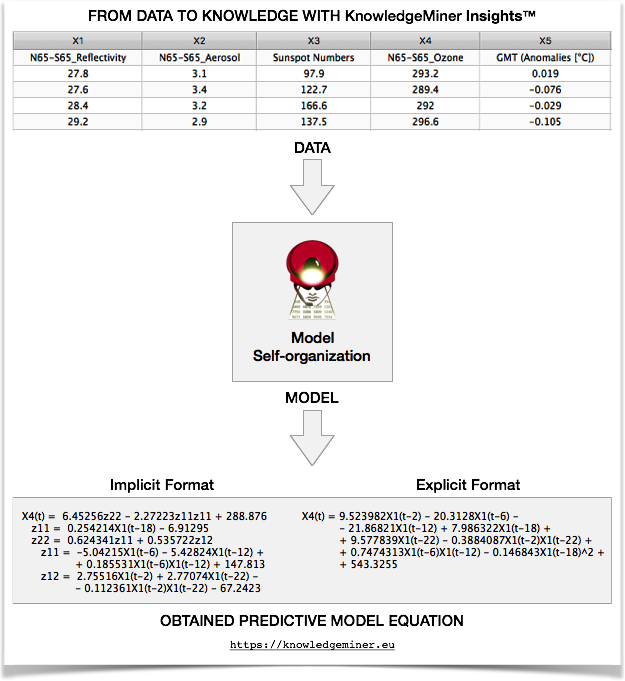
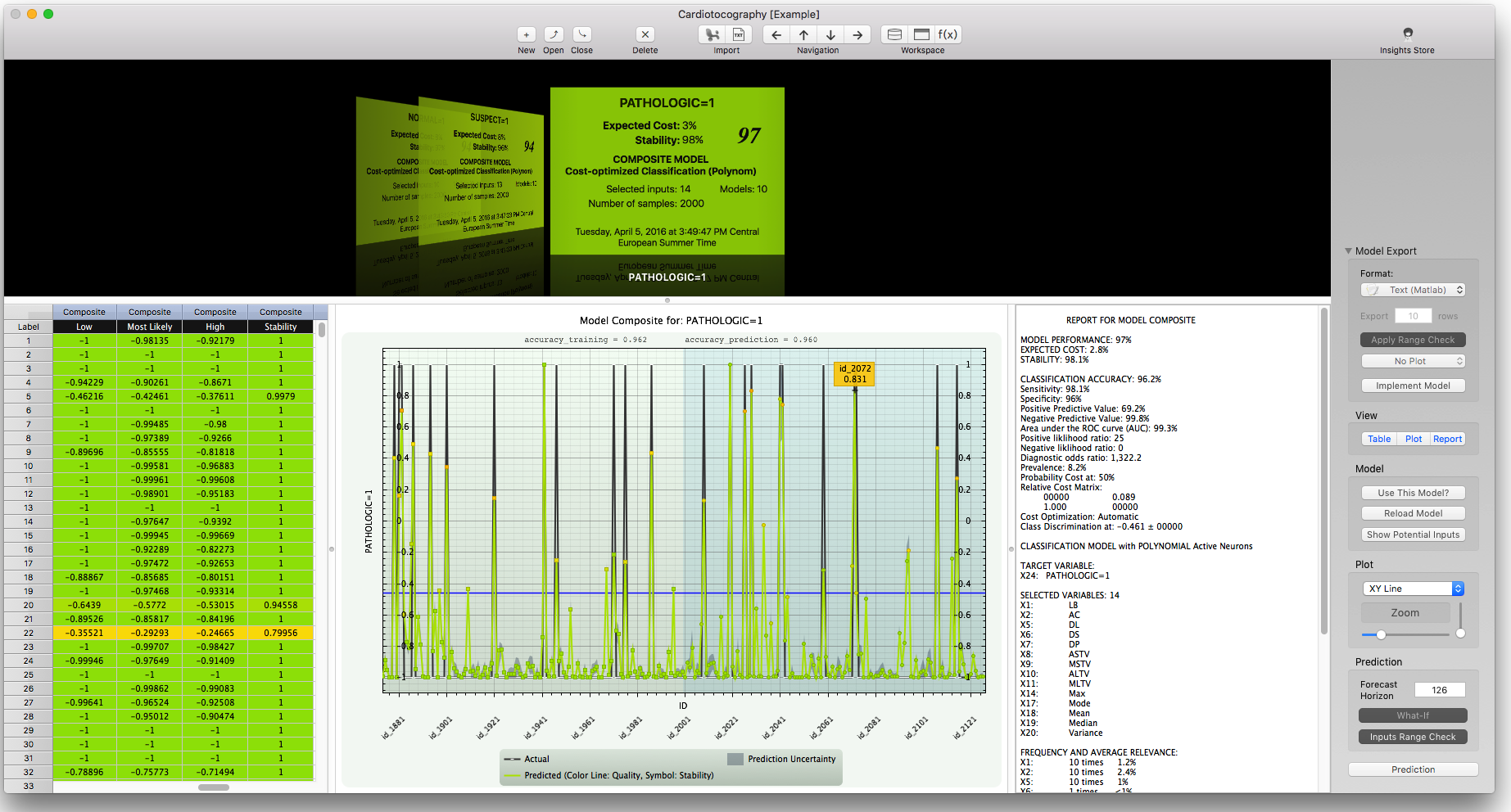
KnowledgeMiner Software is pleased to announce the release of Insights 5.0 for OS X, a major update to its critically acclaimed application recognized as an alternative and supplemental tool to established confirmatory science based modeling approaches. Following the principle of Occam's razor, the app now develops complexity minimized predictive models from observation data, autonomously, and extracts new knowledge in form of explicit model equations that describe the data, mathematically.
Berlin, Germany - KnowledgeMiner Software today is pleased to announce the release of Insights 5.0 for OS X, a major update to its critically acclaimed application that implements original self-organizing modeling for classification, diagnosis, and forecasting problems of complex nature for decision support. Following the principle of Occam's razor, the app now develops complexity minimized predictive models from observation data, autonomously, and it generates new knowledge in form of explicit model equations that describe the data, mathematically, for further analysis, interpretation, and theory formulation purposes. Insights extracts all information needed for model development from the observation data, exclusively, why it is increasingly recognized as a superior alternative and supplemental tool to established assumption based confirmatory science approaches for complex modeling.
Today, we are facing an ever-widening spectrum of complex problems, which require analysis and research. However, in many cases it is impossible to create reliable analytical models using classical confirmatory science based methods since there is incomplete knowledge of the processes involved, which requires making often unjustified assumptions to fill the missing knowledge. Environmental, medical, and socio-economic problems are but three examples. Here, self-organizing modeling methods help to overcome this knowledge gap and to reveal relevant relationships inherent in complex systems in an adaptive, fast, reliable, and objective way.
Insights for OS X is a professional, yet convenient tool for building predictive models from data of complex systems by model self-organization, autonomously. Taking observational data that describe a system or process, the software constructs a working mathematical model of that system by AI-powered knowledge extraction technologies. It implements a unique set of powerful modeling tools such as self-detection of relevant input factors, cost-optimized and prevalence-sensitive classification, or similar patterns recognition, which is applied to health and life sciences related problems, energy forecasting, sales prediction, financial and resource planning, engineering problems, climate change modeling, and other by many corporations, universities, research institutes, students, and individuals worldwide.
Feature Highlights:
* Original, high-dimensional, self-organizing, inductive knowledge mining from observation data
* Automatically develops analytical models and model ensembles from data along with explicit mathematical equations that describe the data as an interpretation of how the model works
* Integrates all complex tasks, such as relevant variables selection from up to 2000 inputs, knowledge extraction, model development and validation, into one process and hides it from user
* Live Prediction Validation technology
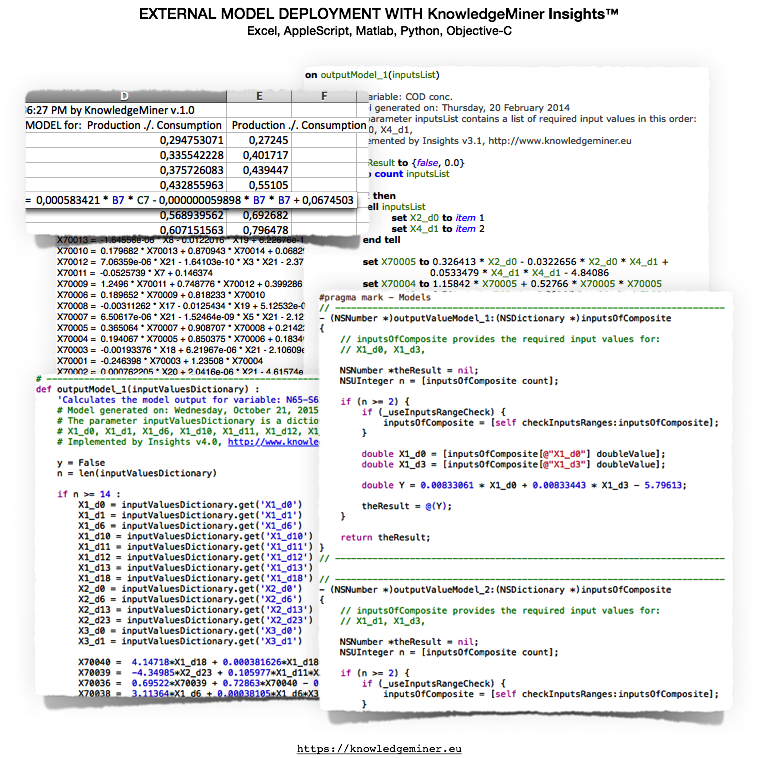
* Model deployment and export to Microsoft Excel, ready-to-use Python, Objective-C, AppleScript source code, or TEXT to be used in Matlab
* Powered by 64-bit, parallel, cross-platform, self-organizing modeling engine for multi-core CPUs
Insights 5.0 comes with various updated example models, such as cost-optimized models for fetal state monitoring, QSAR models for toxicity screening of chemical substances, or climate models for ozone concentration and global mean temperature. More than 20 examples are included for illustrative purposes, taken from the fields of Climate Change, Energy, Life Sciences, Chemistry, Engineering, and Business.
Language Support:
* English, Spanish, and German
System Requirements:
* OS X 10.9 or later
* Any Mac with 64-bit CPU, 8 GB RAM recommended
* Minimum screen resolution of 1400 x 800 pixel
Pricing and Availability:
Insights for OS X is available as Free, Student, Advanced, or Pro edition exclusively from the KnowledgeMiner Software website. Until April 30, 2016, promotional prices with up to 75% discount are provided. Academic versions can be purchased by contacting KnowledgeMiner Software directly. Review copies are available on request.
KnowledgeMiner Software: http://www.knowledgeminer.eu
Insights 5.0 for OS X: http://www.knowledgeminer.eu/about.html
Download Insights: http://www.knowledgeminer.eu/download.html
Screenshot (Model Self-Organization): http://www.knowledgeminer.eu/img/som_pr.png
Screenshot (Model Deployment): http://www.knowledgeminer.eu/img/model_export_formats_pr.png
Screenshot: http://www.knowledgeminer.eu/img/screenshot_pr.png
Located in Berlin, Germany, KnowledgeMiner Software is a privately held company founded in 1993. The company is active in research, development, consulting, and application of outstanding self-organizing modeling and analysis technologies. It developed the distinguished Insights and Ockham tools for the Mac by implementing a number of original technologies for high-dimensional inductive modeling and global sensitivity analysis. KMS has been doing consulting in model development and prediction of toxicological and eco-toxicological hazards and risks of chemical compounds from experimental data for regulatory purposes within REACH and participated in three international research projects funded by the European Commission related to QSAR. Other fields of activity have been climate change related modeling and prediction problems, probabilistic energy forecasting, sales and demand predictions, medical diagnosis, and wastewater reuse problems. Copyright (C) 2016 KnowledgeMiner Software.
All Rights Reserved. Apple, the Apple logo, Mac OS X, and Macintosh are registered trademarks of Apple Inc. in the U.S. and/or other countries. Other trademarks and registered trademarks may be the property of their respective owners.
*******
Link To Article: http://prmac.com/release-id-79254.htm
*******
---------------------------------------------------------------------------------
Note that you can alter delivered distributions at any time.
Login to your account on prMac to alter your channel selection, or to opt-out at any time.
Insights 5.0: Learning from Observations - Published on 04/19/16
KnowledgeMiner Software is pleased to announce the release of Insights 5.0 for OS X, a major update to its critically acclaimed application recognized as an alternative and supplemental tool to established confirmatory science based modeling approaches. Following the principle of Occam's razor, the app now develops complexity minimized predictive models from observation data, autonomously, and extracts new knowledge in form of explicit model equations that describe the data, mathematically.
Berlin, Germany - KnowledgeMiner Software today is pleased to announce the release of Insights 5.0 for OS X, a major update to its critically acclaimed application that implements original self-organizing modeling for classification, diagnosis, and forecasting problems of complex nature for decision support. Following the principle of Occam's razor, the app now develops complexity minimized predictive models from observation data, autonomously, and it generates new knowledge in form of explicit model equations that describe the data, mathematically, for further analysis, interpretation, and theory formulation purposes. Insights extracts all information needed for model development from the observation data, exclusively, why it is increasingly recognized as a superior alternative and supplemental tool to established assumption based confirmatory science approaches for complex modeling.
Today, we are facing an ever-widening spectrum of complex problems, which require analysis and research. However, in many cases it is impossible to create reliable analytical models using classical confirmatory science based methods since there is incomplete knowledge of the processes involved, which requires making often unjustified assumptions to fill the missing knowledge. Environmental, medical, and socio-economic problems are but three examples. Here, self-organizing modeling methods help to overcome this knowledge gap and to reveal relevant relationships inherent in complex systems in an adaptive, fast, reliable, and objective way.
Insights for OS X is a professional, yet convenient tool for building predictive models from data of complex systems by model self-organization, autonomously. Taking observational data that describe a system or process, the software constructs a working mathematical model of that system by AI-powered knowledge extraction technologies. It implements a unique set of powerful modeling tools such as self-detection of relevant input factors, cost-optimized and prevalence-sensitive classification, or similar patterns recognition, which is applied to health and life sciences related problems, energy forecasting, sales prediction, financial and resource planning, engineering problems, climate change modeling, and other by many corporations, universities, research institutes, students, and individuals worldwide.
Feature Highlights:
* Original, high-dimensional, self-organizing, inductive knowledge mining from observation data
* Automatically develops analytical models and model ensembles from data along with explicit mathematical equations that describe the data as an interpretation of how the model works
* Integrates all complex tasks, such as relevant variables selection from up to 2000 inputs, knowledge extraction, model development and validation, into one process and hides it from user
* Live Prediction Validation technology
* Model deployment and export to Microsoft Excel, ready-to-use Python, Objective-C, AppleScript source code, or TEXT to be used in Matlab
* Powered by 64-bit, parallel, cross-platform, self-organizing modeling engine for multi-core CPUs
Insights 5.0 comes with various updated example models, such as cost-optimized models for fetal state monitoring, QSAR models for toxicity screening of chemical substances, or climate models for ozone concentration and global mean temperature. More than 20 examples are included for illustrative purposes, taken from the fields of Climate Change, Energy, Life Sciences, Chemistry, Engineering, and Business.
Language Support:
* English, Spanish, and German
System Requirements:
* OS X 10.9 or later
* Any Mac with 64-bit CPU, 8 GB RAM recommended
* Minimum screen resolution of 1400 x 800 pixel
Pricing and Availability:
Insights for OS X is available as Free, Student, Advanced, or Pro edition exclusively from the KnowledgeMiner Software website. Until April 30, 2016, promotional prices with up to 75% discount are provided. Academic versions can be purchased by contacting KnowledgeMiner Software directly. Review copies are available on request.
KnowledgeMiner Software: http://www.knowledgeminer.eu
Insights 5.0 for OS X: http://www.knowledgeminer.eu/about.html
Download Insights: http://www.knowledgeminer.eu/download.html
Screenshot (Model Self-Organization): http://www.knowledgeminer.eu/img/som_pr.png
Screenshot (Model Deployment): http://www.knowledgeminer.eu/img/model_export_formats_pr.png
Screenshot: http://www.knowledgeminer.eu/img/screenshot_pr.png
Located in Berlin, Germany, KnowledgeMiner Software is a privately held company founded in 1993. The company is active in research, development, consulting, and application of outstanding self-organizing modeling and analysis technologies. It developed the distinguished Insights and Ockham tools for the Mac by implementing a number of original technologies for high-dimensional inductive modeling and global sensitivity analysis. KMS has been doing consulting in model development and prediction of toxicological and eco-toxicological hazards and risks of chemical compounds from experimental data for regulatory purposes within REACH and participated in three international research projects funded by the European Commission related to QSAR. Other fields of activity have been climate change related modeling and prediction problems, probabilistic energy forecasting, sales and demand predictions, medical diagnosis, and wastewater reuse problems. Copyright (C) 2016 KnowledgeMiner Software.
All Rights Reserved. Apple, the Apple logo, Mac OS X, and Macintosh are registered trademarks of Apple Inc. in the U.S. and/or other countries. Other trademarks and registered trademarks may be the property of their respective owners.
*******
Link To Article: http://prmac.com/release-id-79254.htm
*******
---------------------------------------------------------------------------------
Note that you can alter delivered distributions at any time.
Login to your account on prMac to alter your channel selection, or to opt-out at any time.
Subscribe to:
Posts (Atom)