A new article has been published at prMac.
FanLyfe launch new video sharing app for sports fans on iOS - Published on 04/22/16
Miami based FanLyfe LLC today announces FanLyfe 1.1, an update to its video based sharing app developed for iPhone, iPad and iPod touch. FanLyfe allows sports fans to post and upload videos directly inside their favorite team's feed on game day, and the opposing team's feed as well. The app also lets users have control of the community-based content published on their team's feed and allows interaction with other fans through video. Version 1.1 fixes minor bugs and adds stabilization to the app.
Miami, Florida - FanLyfe LLC today is proud to announce the official release of FanLyfe 1.1, an update to its video based sharing app developed for iPhone, iPad and iPod touch. FanLyfe allows sports fans to post and upload videos directly inside their favorite team's feed on game day, and the opposing team's feed as well. FanLyfe lets users have control of the community-based content published on their team's feed and allows interaction with other fans through video.
The app works by asking users which team is their favorite, across a wide range of sports, including baseball, football, soccer and basketball. Both professional and university leagues are covered, and users can choose multiple teams, depending on their level of interest. FanLyfe will then provide the user with direct access to the fan feed of their team of choice, informing them who they are playing that day, and how other supporters are preparing for the big game. Version 1.1 fixes minor bugs and adds stabilization to the app.
Features include:
* Smack cam - Game of the day every user can upload a video to this game and talk smack
* Explore - The ability to search for friends by username, or search team names for trending fan videos
* Home - Shows list of all videos uploaded by sports fans
"This app will revolutionize the way sports fans are able to interact with each other outside the arena" says founder, Willie Nelson. "A big problem with sports fans watching alone from a TV or phone is that they don't get the same experience of being part of the real time action, and joining in with their cheers and jeers. Now with this app, they get to be a more visible and audible part of the experience, and connect with other fans."
Device Requirements:
* iPhone, iPad, and iPod touch
* Requires iOS 7.1 or later
* 10.3 MB
Pricing and Availability:
FanLyfe 1.1 is a free app and is available worldwide through the App Store in the Sports Category.
FanLyfe 1.1: http://www.fanlyfe.com/
Download from iTunes: https://itunes.apple.com/app/fanlyfe-sports-fans-unite/id1039745474
Screenshot: http://a4.mzstatic.com/us/r30/Purple69/v4/41/05/e1/4105e1ba-2736-1b56-be85-d97fa0a614f6/screen322x572.jpeg
App Icon: http://a4.mzstatic.com/us/r30/Purple49/v4/26/4c/af/264caf6d-2239-110f-ab63-b0314ed1787d/icon175x175.jpeg
Located in Miami, Florida, FanLyfe LLC was founded in 2015. The company specializes in development for the mobile platform. All Material and Software (C) Copyright 2016 FanLyfe LLC. All Rights Reserved. Apple, the Apple logo, iPhone, iPod and iPad are registered trademarks of Apple Inc. in the U.S. and/or other countries. Other trademarks and registered trademarks may be the property of their respective owners.
*******
Link To Article: http://prmac.com/release-id-79291.htm
*******
---------------------------------------------------------------------------------
Note that you can alter delivered distributions at any time.
Login to your account on prMac to alter your channel selection, or to opt-out at any time.


Alphabet First Writer Tracing improves children's alphabet writing
A new article has been published at prMac.
Alphabet First Writer Tracing improves children's alphabet writing - Published on 04/21/16
Macaw Moon announces Alphabet First Writer Tracing 4.5.2, an update to their free educational game title for iOS devices. Learning to write in cursive stimulates the brain like nothing else. Alphabet First Writer Tracing helps teach children how to write cursive and uppercase letters, in a fun and effective way. The app is based on the proven montessori learning method, where children develop spelling, writing and reading skills through fascinating games. Version 4.5.2 includes minor bug fixes.
Venice, Italy - Italy - The new "Alphabet First Writer Tracing" app teaches children how to write cursive and uppercase letters, in a fun and effective way. The benefits of this new educational game app go beyond writing, because learning to write in cursive stimulates the brain like nothing else.
Conceived and designed by parents for their children to help them learn the letters of alphabet, with assistance from teachers of pre-k and primary schools, with the aim to to create a simple application which is also fun for both children and parents. The apps methods are based on the proven montessori learning method, children develop spelling, writing and reading skills through fascinating games.
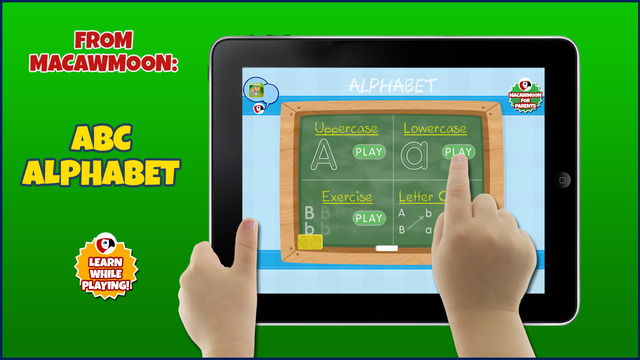
Alphabet First Writer Tracing is an easy and fast way for children of all abilities to learn english alphabet, it's super fun and so easy to use that children of all ages will think letter tracing is a game, prolonging their practice time. The app is beautifully designed, and each letter is presented in full-screen with dotted lines shown to guide players through writing the letter. After each letter is finished they are combined on a blackboard with the full alphabet. Players can also choose between uppercase and lowercase letters - Completing each letter unlocks the confetti celebration with exploding letters and music. Ket features of the app include:
Uppercase and lowercase:
Players must follow the trail of the letters, it is simple and intuitive.
Exercise:
Exercise mode allows children to learn to write by hand by replicating a series of letters.
Matching uppercase and lowercase letters:
The top shows letters in uppercase. The bottom shows letters in lowercase. Players must draw a line between the two letters matching uppercase and lowercase to get to the next level.
Benefits for children:
* Fun gameplay
* Trace letters with chalk to improve writing skills
* Gorgeous graphics and cute sounds
* kids love hearing everything in mommy's or daddy's voice
* The app is extremely easy-to-use for kids of all ages and abilities
Device Requirements:
* iPhone, iPad, and iPod touch
* Requires iOS 6.0 or later
* 24.5 MB
Pricing and Availability:
Alphabet First Writer Tracing 4.5.2 is Free (with in-app purchases) and available worldwide exclusively through the App Store in the Games category. The free app is complete with all the letters of 4 games.
Macaw Moon: http://www.macawmoon.com/
Alphabet First Writer Tracing 4.5.2: http://apps.appshout.com/alphabet-first-writer/
Download from iTunes: https://itunes.apple.com/app/my-first-little-writer-handwriting/id594843724
Screenshot: http://a1.mzstatic.com/us/r30/Purple1/v4/15/86/5d/15865dcb-9cfc-f605-01ad-f42bda43111f/screen640x640.jpeg
App Icon : http://a1.mzstatic.com/us/r30/Purple49/v4/85/51/c7/8551c758-3849-17d0-cd82-e58e92717187/icon175x175.jpeg
Based in Italy with an objective to make learning and growing fun, Macaw Moon is a game studio that develops games and educational apps for children - allowing them to start to understand the world through playing. Our educational games are simple, safe and intuitive, encouraging the curiosity of children from their early years. Parents and younger players can enjoy our apps together: the games are available in free version and for the parents there's the option to remove the ads visualization. All Material and Software (C) Copyright 2016 Macaw Moon. All Rights Reserved. Apple, the Apple logo, iPhone, iPod and iPad are registered trademarks of Apple Inc. in the U.S. and/or other countries. Other trademarks and registered trademarks may be the property of their respective owners.
*******
Link To Article: http://prmac.com/release-id-79290.htm
*******
---------------------------------------------------------------------------------
Note that you can alter delivered distributions at any time.
Login to your account on prMac to alter your channel selection, or to opt-out at any time.
Alphabet First Writer Tracing improves children's alphabet writing - Published on 04/21/16
Macaw Moon announces Alphabet First Writer Tracing 4.5.2, an update to their free educational game title for iOS devices. Learning to write in cursive stimulates the brain like nothing else. Alphabet First Writer Tracing helps teach children how to write cursive and uppercase letters, in a fun and effective way. The app is based on the proven montessori learning method, where children develop spelling, writing and reading skills through fascinating games. Version 4.5.2 includes minor bug fixes.
Venice, Italy - Italy - The new "Alphabet First Writer Tracing" app teaches children how to write cursive and uppercase letters, in a fun and effective way. The benefits of this new educational game app go beyond writing, because learning to write in cursive stimulates the brain like nothing else.
Conceived and designed by parents for their children to help them learn the letters of alphabet, with assistance from teachers of pre-k and primary schools, with the aim to to create a simple application which is also fun for both children and parents. The apps methods are based on the proven montessori learning method, children develop spelling, writing and reading skills through fascinating games.
Alphabet First Writer Tracing is an easy and fast way for children of all abilities to learn english alphabet, it's super fun and so easy to use that children of all ages will think letter tracing is a game, prolonging their practice time. The app is beautifully designed, and each letter is presented in full-screen with dotted lines shown to guide players through writing the letter. After each letter is finished they are combined on a blackboard with the full alphabet. Players can also choose between uppercase and lowercase letters - Completing each letter unlocks the confetti celebration with exploding letters and music. Ket features of the app include:
Uppercase and lowercase:
Players must follow the trail of the letters, it is simple and intuitive.
Exercise:
Exercise mode allows children to learn to write by hand by replicating a series of letters.
Matching uppercase and lowercase letters:
The top shows letters in uppercase. The bottom shows letters in lowercase. Players must draw a line between the two letters matching uppercase and lowercase to get to the next level.
Benefits for children:
* Fun gameplay
* Trace letters with chalk to improve writing skills
* Gorgeous graphics and cute sounds
* kids love hearing everything in mommy's or daddy's voice
* The app is extremely easy-to-use for kids of all ages and abilities
Device Requirements:
* iPhone, iPad, and iPod touch
* Requires iOS 6.0 or later
* 24.5 MB
Pricing and Availability:
Alphabet First Writer Tracing 4.5.2 is Free (with in-app purchases) and available worldwide exclusively through the App Store in the Games category. The free app is complete with all the letters of 4 games.
Macaw Moon: http://www.macawmoon.com/
Alphabet First Writer Tracing 4.5.2: http://apps.appshout.com/alphabet-first-writer/
Download from iTunes: https://itunes.apple.com/app/my-first-little-writer-handwriting/id594843724
Screenshot: http://a1.mzstatic.com/us/r30/Purple1/v4/15/86/5d/15865dcb-9cfc-f605-01ad-f42bda43111f/screen640x640.jpeg
App Icon : http://a1.mzstatic.com/us/r30/Purple49/v4/85/51/c7/8551c758-3849-17d0-cd82-e58e92717187/icon175x175.jpeg

Based in Italy with an objective to make learning and growing fun, Macaw Moon is a game studio that develops games and educational apps for children - allowing them to start to understand the world through playing. Our educational games are simple, safe and intuitive, encouraging the curiosity of children from their early years. Parents and younger players can enjoy our apps together: the games are available in free version and for the parents there's the option to remove the ads visualization. All Material and Software (C) Copyright 2016 Macaw Moon. All Rights Reserved. Apple, the Apple logo, iPhone, iPod and iPad are registered trademarks of Apple Inc. in the U.S. and/or other countries. Other trademarks and registered trademarks may be the property of their respective owners.
*******
Link To Article: http://prmac.com/release-id-79290.htm
*******
---------------------------------------------------------------------------------
Note that you can alter delivered distributions at any time.
Login to your account on prMac to alter your channel selection, or to opt-out at any time.
Innovative Menubar App File Cabinet Pro Gets Turbocharged In Update
A new article has been published at prMac.
Innovative Menubar App File Cabinet Pro Gets Turbocharged In Update - Published on 04/22/16
Writes for All Inc. announces the release of File Cabinet Pro version 2.0. File Cabinet Pro, the file manager for the OS X menubar allows you to quickly navigate to important files from a popover window that appears from the menubar. File Cabinet Pro version 2.0 significantly improves the user experience by introducing a Global Hotkey feature, allowing you to automatically show and hide the app without using the mouse. The new update also includes significant performance improvements.
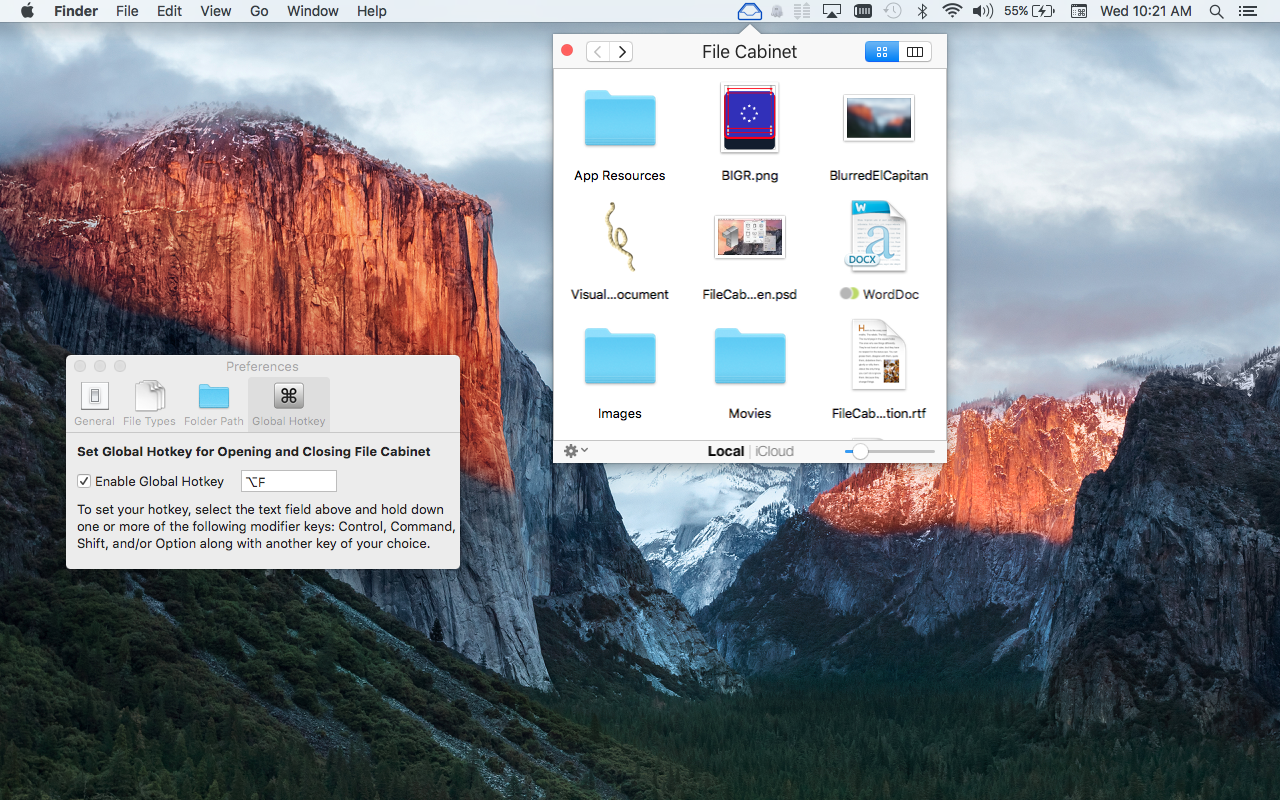
Coral Springs, Florida - Writes for All Inc. is proud to announce the release of File Cabinet Pro version 2.0. File Cabinet Pro is a powerful file manager for the OS X menubar. File Cabinet Pro allows users to open, move, rename, tag, trash, copy and paste files, all from a popover window that appears from the menubar. File Cabinet Pro is the most convenient place for users to store files they access often, as it completely eliminates desktop clutter. File Cabinet Pro version 2.0 is a significant update. The new version of the application offers the following improvements:
* Global Hotkey support for automatically showing and hiding the popover window. This feature is disabled by default, however, it can be turned on in settings
* The icon in the menubar now changes to dark blue when File Cabinet Pro is the focused app. It will change to black when File Cabinet Pro is not the focused app
* You can now "Go Back" by using the Command [ keyboard shortcut
* You can now "Go Forward" by using the Command ] keyboard shortcut
* Major performance improvements, especially when viewing a directory with lots of files in it
* Users on OS X El Capitan will enjoy additional performance improvements when viewing directories in Icon View because the application now leverages new API introduced in OS X El Capitan
File Cabinet Pro is truly an innovative application for Mac OS X. File Cabinet Pro still offers all the following powerful features:
* Create subdirectories in File Cabinet Pro
* Click into subdirectories and open documents
* Store files locally and in iCloud
* Drag and drop files to and from iCloud
* Tag files - Select files in File Cabinet Pro, right click, and then simply add or remove file tags from the control in the context menu
* Show in Finder
* Rename files
* Copy and paste files
* Trash files
* View items as icons or in columns
* Launch the application at login - You can have File Cabinet Pro automatically launch when you login to your Mac (optional feature, disabled by default)
* Built in lightweight text editor - Create and edit .txt, .rtf, and .rtfd files
* Built in lightweight image viewer/editor. Rotate images, crop images, and apply filters to images
* Built in media player - Watch video and play audio files
* PDF viewer
* Editable files support document versions
File Cabinet Pro 2.0: http://apptyrant.com/file-cabinet-pro-help/
Release Notes for Version 2.0: http://apptyrant.com/2016/04/20/file-cabinet-pro-version-2-0-released-global-hotkey-feature-added/
Tutorial: How to Set a Global Hotkey for Opening/Closing the Window: http://apptyrant.com/2016/04/20/quick-tutorial-how-to-set-a-global-hotkey-in-for-openingclosing-file-cabinet-pro/
Purchase: http://sites.fastspring.com/apptyrant/product/filecabinetpro
Screenshot: http://apptyrant.com/wordpress/wp-content/uploads/2016/04/FileCabinetProScreenshotGlobalHotkeyTabSelectedInSettings.png
Application Icon: http://apptyrant.com/wordpress/wp-content/uploads/2015/08/FileCabinetMacAppIcon.png
Writes for All Inc. owns and operates AppTyrant, a website dedicated to iOS and Mac application development. Links to iOS and Mac applications distributed by Writes for All Inc. can be found on the website. All Material and Software (C) Copyright 2016 Writes for All Inc. All Rights Reserved. Apple, the Apple logo, Mac OS X, iPhone, iPod, iPad and Macintosh are registered trademarks of Apple Inc. in the U.S. and/or other countries. Other trademarks and registered trademarks may be the property of their respective owners.
*******
Link To Article: http://prmac.com/release-id-79289.htm
*******
---------------------------------------------------------------------------------
Note that you can alter delivered distributions at any time.
Login to your account on prMac to alter your channel selection, or to opt-out at any time.
Innovative Menubar App File Cabinet Pro Gets Turbocharged In Update - Published on 04/22/16
Writes for All Inc. announces the release of File Cabinet Pro version 2.0. File Cabinet Pro, the file manager for the OS X menubar allows you to quickly navigate to important files from a popover window that appears from the menubar. File Cabinet Pro version 2.0 significantly improves the user experience by introducing a Global Hotkey feature, allowing you to automatically show and hide the app without using the mouse. The new update also includes significant performance improvements.
Coral Springs, Florida - Writes for All Inc. is proud to announce the release of File Cabinet Pro version 2.0. File Cabinet Pro is a powerful file manager for the OS X menubar. File Cabinet Pro allows users to open, move, rename, tag, trash, copy and paste files, all from a popover window that appears from the menubar. File Cabinet Pro is the most convenient place for users to store files they access often, as it completely eliminates desktop clutter. File Cabinet Pro version 2.0 is a significant update. The new version of the application offers the following improvements:
* Global Hotkey support for automatically showing and hiding the popover window. This feature is disabled by default, however, it can be turned on in settings
* The icon in the menubar now changes to dark blue when File Cabinet Pro is the focused app. It will change to black when File Cabinet Pro is not the focused app
* You can now "Go Back" by using the Command [ keyboard shortcut
* You can now "Go Forward" by using the Command ] keyboard shortcut
* Major performance improvements, especially when viewing a directory with lots of files in it
* Users on OS X El Capitan will enjoy additional performance improvements when viewing directories in Icon View because the application now leverages new API introduced in OS X El Capitan
File Cabinet Pro is truly an innovative application for Mac OS X. File Cabinet Pro still offers all the following powerful features:
* Create subdirectories in File Cabinet Pro
* Click into subdirectories and open documents
* Store files locally and in iCloud
* Drag and drop files to and from iCloud
* Tag files - Select files in File Cabinet Pro, right click, and then simply add or remove file tags from the control in the context menu
* Show in Finder
* Rename files
* Copy and paste files
* Trash files
* View items as icons or in columns
* Launch the application at login - You can have File Cabinet Pro automatically launch when you login to your Mac (optional feature, disabled by default)
* Built in lightweight text editor - Create and edit .txt, .rtf, and .rtfd files
* Built in lightweight image viewer/editor. Rotate images, crop images, and apply filters to images
* Built in media player - Watch video and play audio files
* PDF viewer
* Editable files support document versions
File Cabinet Pro 2.0: http://apptyrant.com/file-cabinet-pro-help/
Release Notes for Version 2.0: http://apptyrant.com/2016/04/20/file-cabinet-pro-version-2-0-released-global-hotkey-feature-added/
Tutorial: How to Set a Global Hotkey for Opening/Closing the Window: http://apptyrant.com/2016/04/20/quick-tutorial-how-to-set-a-global-hotkey-in-for-openingclosing-file-cabinet-pro/
Purchase: http://sites.fastspring.com/apptyrant/product/filecabinetpro
Screenshot: http://apptyrant.com/wordpress/wp-content/uploads/2016/04/FileCabinetProScreenshotGlobalHotkeyTabSelectedInSettings.png
Application Icon: http://apptyrant.com/wordpress/wp-content/uploads/2015/08/FileCabinetMacAppIcon.png

Writes for All Inc. owns and operates AppTyrant, a website dedicated to iOS and Mac application development. Links to iOS and Mac applications distributed by Writes for All Inc. can be found on the website. All Material and Software (C) Copyright 2016 Writes for All Inc. All Rights Reserved. Apple, the Apple logo, Mac OS X, iPhone, iPod, iPad and Macintosh are registered trademarks of Apple Inc. in the U.S. and/or other countries. Other trademarks and registered trademarks may be the property of their respective owners.
*******
Link To Article: http://prmac.com/release-id-79289.htm
*******
---------------------------------------------------------------------------------
Note that you can alter delivered distributions at any time.
Login to your account on prMac to alter your channel selection, or to opt-out at any time.
Alima Studios New Game Alima's Baby Liam, A Baby Simulation Experience
A new article has been published at prMac.
Alima Studios New Game Alima's Baby Liam, A Baby Simulation Experience - Published on 04/21/16
Alima Studios announces Alima's Baby Liam (Virtual Baby) 2.1, an important update to their virtual baby app for iOS devices. Player takes care of a virtual baby with responsive body and gestures that change according to his happiness, health, and hungry with colorful 3D cartoon graphics. The tasks must be completed in a specific order to keep things stress-free. Golden stars will be received rewarding good care.
Guadalajara, Spain - Alima Studios is proud to announce the release of Alima's Baby Liam (Virtual Baby) 2.1, an important update to their virtual baby app for iPhone, iPad, and iPod touch devices. Baby has to be attended as if he was your own real baby. His responsive body changes as you feed him and gestures will change as well according to his happiness, health, and hungry, in an environment designed with colorful 3D cartoon graphics.
Golden stars will be received rewarding good care, which can be used to achieve all kinds of things like food, clothing, or toys to make the game more interesting and personalizable. Liam always appears at the center of the screen and the different options for interacting with him are placed on left side of the screen, while on the right side the potential items are placed.
The game is an entertaining 'virtual pet' that allows the good things about having a baby without dealing with any of the bad things. The tasks must be completed in a specific order keep stress-free. The game comes after the company received a substantial amount of feedback from their users asking for improvements and more baby virtual pet games from the company.
Alima's Baby Liam is a great implementation of the virtual pet/babies game genre which was developed for a different style of gameplay that provides elaborate and more creative than previous versions. The baby game for Android features 3D graphics with realistic cartoon physics.
The game app boasts unique features including:
* Responsive body changes: The shape of the baby will change according to his feeding, getting fat, or skinny
* Behaviour related to baby state: His moves and gestures will change according his happiness, health, and hungry
* Colorful 3D cartoon graphics that's matched with an engaging soundtrack
* Easy controls: Gamers simply mark the the items they need to use and move them
* Modern simulation: Users need take care of the baby in a balanced way and they will observe changes in real time according to them
* Unlockable rooms and items: Users will pass levels and will be rewarded with new rooms and items adding more activities to do with their baby adding creative combinations
* Optimization: The app is compatible with tablets device in addition to smartphones
"We feel gamers will love our new version of a modernized "Alima's Baby" with new challenges and 3D beautiful graphics," comments the game's designer, Manuel Benito. "Our studio completely renewed the previous versions features by creating a visually charming game with cute graphics for kids to improve their empathy skills. "They're having fun and learning without even realizing it."
Device Requirements:
* iPhone, iPad, and iPod touch
* Requires iOS 9.0 or later
* Universal Application
* 65.7 MB
Pricing and Availability:
Alima's Baby Liam (Virtual Baby) 2.1 is free, and is available worldwide exclusively through the App Store in the Games category.
Alima's Baby Liam (Virtual Baby) 2.1: http://www.alimastudios.com/liam
Download from iTunes: https://itunes.apple.com/app/alimas-baby-liam-virtual-baby/id1090756318
Screenshot: http://a1.mzstatic.com/us/r30/Purple69/v4/7d/20/73/7d207337-a455-1307-e821-e794ef115779/screen640x640.jpeg
App Icon: http://a3.mzstatic.com/us/r30/Purple49/v4/c5/96/ae/c596ae8b-6362-1952-90f3-9d5c4b5c5d3d/icon175x175.png
Based out of Madrid, Alima Studios was launched as an independent game developer studio in 2013. The company is owned and operated by a crew of two brothers, Alberto and Manuel Benito. The pair are noted as a 'fun-loving bunch of games lovers' who have dedicated their lives to video games ever since they saw their first pixels. Their goal is to make original and fun games that anyone can enjoy. In 2014, they launched the game 'Alima's Baby', which reached more than 1 million installs on Google Play, with additional games available on the Google Play market that include Mega Pang Galaxy and Alima's Baby Pang. Copyright (C) 2016 Alima Studios. All Rights Reserved. Apple, the Apple logo, iPhone, iPod and iPad are registered trademarks of Apple Inc. in the U.S. and/or other countries. Other trademarks and registered trademarks may be the property of their respective owners.
*******
Link To Article: http://prmac.com/release-id-79288.htm
*******
---------------------------------------------------------------------------------
Note that you can alter delivered distributions at any time.
Login to your account on prMac to alter your channel selection, or to opt-out at any time.
Alima Studios New Game Alima's Baby Liam, A Baby Simulation Experience - Published on 04/21/16
Alima Studios announces Alima's Baby Liam (Virtual Baby) 2.1, an important update to their virtual baby app for iOS devices. Player takes care of a virtual baby with responsive body and gestures that change according to his happiness, health, and hungry with colorful 3D cartoon graphics. The tasks must be completed in a specific order to keep things stress-free. Golden stars will be received rewarding good care.
Guadalajara, Spain - Alima Studios is proud to announce the release of Alima's Baby Liam (Virtual Baby) 2.1, an important update to their virtual baby app for iPhone, iPad, and iPod touch devices. Baby has to be attended as if he was your own real baby. His responsive body changes as you feed him and gestures will change as well according to his happiness, health, and hungry, in an environment designed with colorful 3D cartoon graphics.
Golden stars will be received rewarding good care, which can be used to achieve all kinds of things like food, clothing, or toys to make the game more interesting and personalizable. Liam always appears at the center of the screen and the different options for interacting with him are placed on left side of the screen, while on the right side the potential items are placed.
The game is an entertaining 'virtual pet' that allows the good things about having a baby without dealing with any of the bad things. The tasks must be completed in a specific order keep stress-free. The game comes after the company received a substantial amount of feedback from their users asking for improvements and more baby virtual pet games from the company.
Alima's Baby Liam is a great implementation of the virtual pet/babies game genre which was developed for a different style of gameplay that provides elaborate and more creative than previous versions. The baby game for Android features 3D graphics with realistic cartoon physics.
The game app boasts unique features including:
* Responsive body changes: The shape of the baby will change according to his feeding, getting fat, or skinny
* Behaviour related to baby state: His moves and gestures will change according his happiness, health, and hungry
* Colorful 3D cartoon graphics that's matched with an engaging soundtrack
* Easy controls: Gamers simply mark the the items they need to use and move them
* Modern simulation: Users need take care of the baby in a balanced way and they will observe changes in real time according to them
* Unlockable rooms and items: Users will pass levels and will be rewarded with new rooms and items adding more activities to do with their baby adding creative combinations
* Optimization: The app is compatible with tablets device in addition to smartphones
"We feel gamers will love our new version of a modernized "Alima's Baby" with new challenges and 3D beautiful graphics," comments the game's designer, Manuel Benito. "Our studio completely renewed the previous versions features by creating a visually charming game with cute graphics for kids to improve their empathy skills. "They're having fun and learning without even realizing it."
Device Requirements:
* iPhone, iPad, and iPod touch
* Requires iOS 9.0 or later
* Universal Application
* 65.7 MB
Pricing and Availability:
Alima's Baby Liam (Virtual Baby) 2.1 is free, and is available worldwide exclusively through the App Store in the Games category.
Alima's Baby Liam (Virtual Baby) 2.1: http://www.alimastudios.com/liam
Download from iTunes: https://itunes.apple.com/app/alimas-baby-liam-virtual-baby/id1090756318
Screenshot: http://a1.mzstatic.com/us/r30/Purple69/v4/7d/20/73/7d207337-a455-1307-e821-e794ef115779/screen640x640.jpeg

App Icon: http://a3.mzstatic.com/us/r30/Purple49/v4/c5/96/ae/c596ae8b-6362-1952-90f3-9d5c4b5c5d3d/icon175x175.png

Based out of Madrid, Alima Studios was launched as an independent game developer studio in 2013. The company is owned and operated by a crew of two brothers, Alberto and Manuel Benito. The pair are noted as a 'fun-loving bunch of games lovers' who have dedicated their lives to video games ever since they saw their first pixels. Their goal is to make original and fun games that anyone can enjoy. In 2014, they launched the game 'Alima's Baby', which reached more than 1 million installs on Google Play, with additional games available on the Google Play market that include Mega Pang Galaxy and Alima's Baby Pang. Copyright (C) 2016 Alima Studios. All Rights Reserved. Apple, the Apple logo, iPhone, iPod and iPad are registered trademarks of Apple Inc. in the U.S. and/or other countries. Other trademarks and registered trademarks may be the property of their respective owners.
*******
Link To Article: http://prmac.com/release-id-79288.htm
*******
---------------------------------------------------------------------------------
Note that you can alter delivered distributions at any time.
Login to your account on prMac to alter your channel selection, or to opt-out at any time.
Checklist Pro - A Smart To-Do Application for Mac with a Design Marvel
A new article has been published at prMac.
Checklist Pro - A Smart To-Do Application for Mac with a Design Marvel - Published on 04/21/16
Idea2Inspire announces Checklist Pro 1.0, their to-do app for Mac OS X. It is a smart todo app where users will be able to add task for today or in the days to come. There is also option for for users to add tasks in advance for days to come. The app also provides handy basic weather stats with animated icons on top of every page for a day. users can download Checklist Pro and plan their daily schedule with 100% certainty of attending every event.
Pensacola, Florida - Idea2Inspire is happy to announce the release of their new Mac OS X application, Checklist Pro 1.0. The app is currently available in the Mac App Store, under the category of Utilities. It is a smart and easy to use to-do manager where users can add tasks for today and mark them as done after completion. This is how users can track how many tasks are completed or how many tasks are still left to do.
There is also option for adding tasks in advance for days to come. It also provides basic weather stats with animated icons on top of every page for a day. The design of the app is the most striking element of this app which makes it super user intuitive where users can add tasks very easily.
App highlights:
* Add or update notes.
* Intuitive app interface.
* Change the color of date and background.
* Get weather updates with nice animation.
* Add reminder with simple steps.
* Browse with categories.
* Move pending tasks to next day.
So, download Checklist Pro and plan your daily schedule with 100% surety of attending every event.
System Requirement:
* OS X 10.8 or later
* 64-bit processor
* 2.0 MB
Pricing and Availability:
Checklist Pro is $2.99 USD (or an equivalent amount in other currencies), and is available exclusively through the Mac App Store in the Utilities category. For more information please contact Idea2Inspire.
Idea2Inspire: http://idea2inspire.com
Checklist Pro 1.0: https://itunes.apple.com/app/checklist-pro/id1100125167
Blog | Idea2Inspire: http://idea2inspire.blogspot.in/
Screenshot 1: http://a2.mzstatic.com/us/r30/Purple49/v4/54/99/cd/5499cd9b-d5ea-c395-20d3-d155a57fe740/screen800x500.jpeg
Screenshot 2: http://a5.mzstatic.com/us/r30/Purple49/v4/4a/ec/ce/4aeccedb-f1d0-dfb1-588b-e7832f715a6c/screen800x500.jpeg
App icon: http://a4.mzstatic.com/us/r30/Purple49/v4/e0/94/60/e094603f-3851-2cbb-14ba-6b112254ab0b/icon256.png
Idea2Inspire is an app development studio, based in FL, USA. We are specialized in creating quality iOS and Mac apps for the users to make life easier. Idea2Inspire is a bunch of passionate developer that thrives for excellence. We always try to shape our inventory of ideas through our apps. We develop apps that simplify as well as inspire your life. Our dedicated team is really committed in making quality apps. We ensure we achieve our goals in the highly competitive app space. We have several apps in the app store with good ratings and got featured in a number of top charts. All Material and Software (C) Copyright 2016 Idea2Inspire. All Rights Reserved. Apple, the Apple logo, Macintosh and Mac OS X are registered trademarks of Apple Inc. in the U.S. and/or other countries. Other trademarks and registered trademarks may be the property of their respective owners.
*******
Link To Article: http://prmac.com/release-id-79287.htm
*******
---------------------------------------------------------------------------------
Note that you can alter delivered distributions at any time.
Login to your account on prMac to alter your channel selection, or to opt-out at any time.
Checklist Pro - A Smart To-Do Application for Mac with a Design Marvel - Published on 04/21/16
Idea2Inspire announces Checklist Pro 1.0, their to-do app for Mac OS X. It is a smart todo app where users will be able to add task for today or in the days to come. There is also option for for users to add tasks in advance for days to come. The app also provides handy basic weather stats with animated icons on top of every page for a day. users can download Checklist Pro and plan their daily schedule with 100% certainty of attending every event.
Pensacola, Florida - Idea2Inspire is happy to announce the release of their new Mac OS X application, Checklist Pro 1.0. The app is currently available in the Mac App Store, under the category of Utilities. It is a smart and easy to use to-do manager where users can add tasks for today and mark them as done after completion. This is how users can track how many tasks are completed or how many tasks are still left to do.
There is also option for adding tasks in advance for days to come. It also provides basic weather stats with animated icons on top of every page for a day. The design of the app is the most striking element of this app which makes it super user intuitive where users can add tasks very easily.
App highlights:
* Add or update notes.
* Intuitive app interface.
* Change the color of date and background.
* Get weather updates with nice animation.
* Add reminder with simple steps.
* Browse with categories.
* Move pending tasks to next day.
So, download Checklist Pro and plan your daily schedule with 100% surety of attending every event.
System Requirement:
* OS X 10.8 or later
* 64-bit processor
* 2.0 MB
Pricing and Availability:
Checklist Pro is $2.99 USD (or an equivalent amount in other currencies), and is available exclusively through the Mac App Store in the Utilities category. For more information please contact Idea2Inspire.
Idea2Inspire: http://idea2inspire.com
Checklist Pro 1.0: https://itunes.apple.com/app/checklist-pro/id1100125167
Blog | Idea2Inspire: http://idea2inspire.blogspot.in/
Screenshot 1: http://a2.mzstatic.com/us/r30/Purple49/v4/54/99/cd/5499cd9b-d5ea-c395-20d3-d155a57fe740/screen800x500.jpeg

Screenshot 2: http://a5.mzstatic.com/us/r30/Purple49/v4/4a/ec/ce/4aeccedb-f1d0-dfb1-588b-e7832f715a6c/screen800x500.jpeg

App icon: http://a4.mzstatic.com/us/r30/Purple49/v4/e0/94/60/e094603f-3851-2cbb-14ba-6b112254ab0b/icon256.png

Idea2Inspire is an app development studio, based in FL, USA. We are specialized in creating quality iOS and Mac apps for the users to make life easier. Idea2Inspire is a bunch of passionate developer that thrives for excellence. We always try to shape our inventory of ideas through our apps. We develop apps that simplify as well as inspire your life. Our dedicated team is really committed in making quality apps. We ensure we achieve our goals in the highly competitive app space. We have several apps in the app store with good ratings and got featured in a number of top charts. All Material and Software (C) Copyright 2016 Idea2Inspire. All Rights Reserved. Apple, the Apple logo, Macintosh and Mac OS X are registered trademarks of Apple Inc. in the U.S. and/or other countries. Other trademarks and registered trademarks may be the property of their respective owners.
*******
Link To Article: http://prmac.com/release-id-79287.htm
*******
---------------------------------------------------------------------------------
Note that you can alter delivered distributions at any time.
Login to your account on prMac to alter your channel selection, or to opt-out at any time.
Tell my Dad I'm Good in Math for iOS Devices
A new article has been published at prMac.
Tell my Dad I'm Good in Math for iOS Devices - Published on 04/21/16
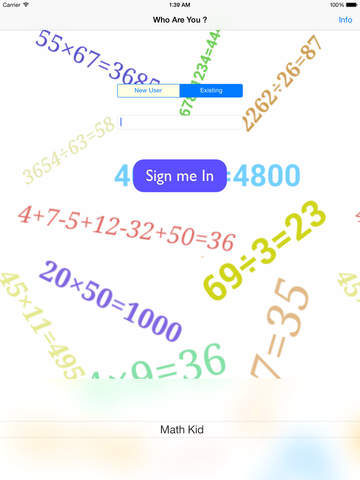
Bluewave Solutions announces its new release for Math Education App, Tell My dad i'm good in math 1.10 for iOS devices for kids from 6 - 14 years. It targets the parents who would like to follow up their kids mathematical skills even if they are not available. This educational app provides training with random exercises in different simple math operations (Addition, Subtraction, Multiplication, Division) in different types of formats to give kids maximum focus.
Dubai, United Arab Emirates - Bluewave Solutions is proud to announce the release of Tell my Dad i'm good in Math 1.10, their educational app for iPhone, iPad, and iPod touch devices. At Bluewave Solutions, we are reaching out for the parents who want to engage their Kids in math, who want to sharpen their math skills and to followup with their progress during this experience. The app is a simple old fashioned math operation skills tests math app. It provides training with random exercises about different simple math operations (Addition, Subtraction, Multiplication, Division) in different types of formats, through a simple but not complicated interface to give the kids maximum focus.
The Education should come from Gamification process where the whole is a blend of a Game, Challenge and Achievements Recognition from parents, peers and teachers. This is what Bluewave Solutions are trying to do in this app, to gamify the Math education process which will enable Students to increase their interests in the Math Subject and the overall education message would be delivered in a new way!
The difference that BWS provide in this app is in the detail report that it provides to parents about:
* Mailing system to the parents when the kid finishes each operation to inform the parent about his progress
* Kid's scores in various math operations
* Time taken to finish 10 random tests within a specific category
* Hall of Fame for highest achievers
At Bluewave Solutions, There is a belief that reporting is the most important in education as it allows course correction for the student flow of education. "Tell my dad i'm good in Math" is designed to give the parent the power to follow up with his kid's math skills if he is in the office or traveling.
Within the new Release, Bluewave Solutions have another feature which is the peer to peer Challenge in order to motivate the Children and Students to be the best among their peers. Bluewave Solutions have used the Apple Game Center as challenge platform in order to view the "Hall of Fame" for each of the Math Operations.
Age Group Target:
* The best age group are kids from 6-14 years.
Device Requirements:
* iPhone, iPad, and iPod touch
* Requires iOS 9.2 or later
* Universal Application
* 6.1 MB
Pricing and Availability:
Tell my Dad i'm good in Math 1.10 is free, and is available worldwide exclusively through the App Store in the Education category. It is a serious App to master math skills, and it is for free as it is from parents to parents. All suggestions from all parents are open & welcomed to improve the performance & to come up with new Ideas.
Tell my Dad i'm good in Math 1.10: http://bluewavesolutions.net/Home1/tell-my-dad-im-good-in-math/
Download from iTunes: https://itunes.apple.com/app/apple-store/id912242465?pt=399301&ct=Press%20Release&mt=8
Screenshot 1: http://a2.mzstatic.com/us/r30/Purple4/v4/38/8e/6d/388e6d6c-d08f-ac7d-aa21-bba30e294b18/screen568x568.jpeg
Screenshot 2: http://a5.mzstatic.com/us/r30/Purple5/v4/09/99/0f/09990f47-6abd-9fd7-8d0b-1741c0bbeb8d/screen480x480.jpeg
App Icon: http://a5.mzstatic.com/us/r30/Purple1/v4/c1/2c/cb/c12ccbd6-9d4f-96b9-ed5b-e5541d569df8/mzl.tslpscki.175x175-75.jpg
Based in Dubai, U.A.E, at Bluewave Solutions we have a target to deliver the best quality application to cover all tastes, all domains. We cover the application development cycle from end to end, from the concept phase to the marketing phase. Copyright (C) 2016 Bluewave Solutions. All Rights Reserved. Apple, the Apple logo, iPhone, iPod and iPad are registered trademarks of Apple Inc. in the U.S. and/or other countries. Other trademarks and registered trademarks may be the property of their respective owners.
*******
Link To Article: http://prmac.com/release-id-79286.htm
*******
---------------------------------------------------------------------------------
Note that you can alter delivered distributions at any time.
Login to your account on prMac to alter your channel selection, or to opt-out at any time.
Tell my Dad I'm Good in Math for iOS Devices - Published on 04/21/16
Bluewave Solutions announces its new release for Math Education App, Tell My dad i'm good in math 1.10 for iOS devices for kids from 6 - 14 years. It targets the parents who would like to follow up their kids mathematical skills even if they are not available. This educational app provides training with random exercises in different simple math operations (Addition, Subtraction, Multiplication, Division) in different types of formats to give kids maximum focus.
Dubai, United Arab Emirates - Bluewave Solutions is proud to announce the release of Tell my Dad i'm good in Math 1.10, their educational app for iPhone, iPad, and iPod touch devices. At Bluewave Solutions, we are reaching out for the parents who want to engage their Kids in math, who want to sharpen their math skills and to followup with their progress during this experience. The app is a simple old fashioned math operation skills tests math app. It provides training with random exercises about different simple math operations (Addition, Subtraction, Multiplication, Division) in different types of formats, through a simple but not complicated interface to give the kids maximum focus.
The Education should come from Gamification process where the whole is a blend of a Game, Challenge and Achievements Recognition from parents, peers and teachers. This is what Bluewave Solutions are trying to do in this app, to gamify the Math education process which will enable Students to increase their interests in the Math Subject and the overall education message would be delivered in a new way!
The difference that BWS provide in this app is in the detail report that it provides to parents about:
* Mailing system to the parents when the kid finishes each operation to inform the parent about his progress
* Kid's scores in various math operations
* Time taken to finish 10 random tests within a specific category
* Hall of Fame for highest achievers
At Bluewave Solutions, There is a belief that reporting is the most important in education as it allows course correction for the student flow of education. "Tell my dad i'm good in Math" is designed to give the parent the power to follow up with his kid's math skills if he is in the office or traveling.
Within the new Release, Bluewave Solutions have another feature which is the peer to peer Challenge in order to motivate the Children and Students to be the best among their peers. Bluewave Solutions have used the Apple Game Center as challenge platform in order to view the "Hall of Fame" for each of the Math Operations.
Age Group Target:
* The best age group are kids from 6-14 years.
Device Requirements:
* iPhone, iPad, and iPod touch
* Requires iOS 9.2 or later
* Universal Application
* 6.1 MB
Pricing and Availability:
Tell my Dad i'm good in Math 1.10 is free, and is available worldwide exclusively through the App Store in the Education category. It is a serious App to master math skills, and it is for free as it is from parents to parents. All suggestions from all parents are open & welcomed to improve the performance & to come up with new Ideas.
Tell my Dad i'm good in Math 1.10: http://bluewavesolutions.net/Home1/tell-my-dad-im-good-in-math/
Download from iTunes: https://itunes.apple.com/app/apple-store/id912242465?pt=399301&ct=Press%20Release&mt=8
Screenshot 1: http://a2.mzstatic.com/us/r30/Purple4/v4/38/8e/6d/388e6d6c-d08f-ac7d-aa21-bba30e294b18/screen568x568.jpeg

Screenshot 2: http://a5.mzstatic.com/us/r30/Purple5/v4/09/99/0f/09990f47-6abd-9fd7-8d0b-1741c0bbeb8d/screen480x480.jpeg
App Icon: http://a5.mzstatic.com/us/r30/Purple1/v4/c1/2c/cb/c12ccbd6-9d4f-96b9-ed5b-e5541d569df8/mzl.tslpscki.175x175-75.jpg

Based in Dubai, U.A.E, at Bluewave Solutions we have a target to deliver the best quality application to cover all tastes, all domains. We cover the application development cycle from end to end, from the concept phase to the marketing phase. Copyright (C) 2016 Bluewave Solutions. All Rights Reserved. Apple, the Apple logo, iPhone, iPod and iPad are registered trademarks of Apple Inc. in the U.S. and/or other countries. Other trademarks and registered trademarks may be the property of their respective owners.
*******
Link To Article: http://prmac.com/release-id-79286.htm
*******
---------------------------------------------------------------------------------
Note that you can alter delivered distributions at any time.
Login to your account on prMac to alter your channel selection, or to opt-out at any time.
Jumsoft Presents the Infographics Set for Apple's Pages
A new article has been published at prMac.
Jumsoft Presents the Infographics Set for Apple's Pages - Published on 04/21/16
Developer of high-quality applications and designs, Jumsoft today introduces Infographics for Pages 2.7, its brand new design application for Apple's Pages layout solution for OS X. Adapted from one of Jumsoft's best-selling quality visualization tools, Infographics for Page offers over 2,000 diagrams, maps, and other visualization elements. Although the set is designed for Apple's Pages, the images can also be pasted in Keynote, Numbers, or iBooks Author.
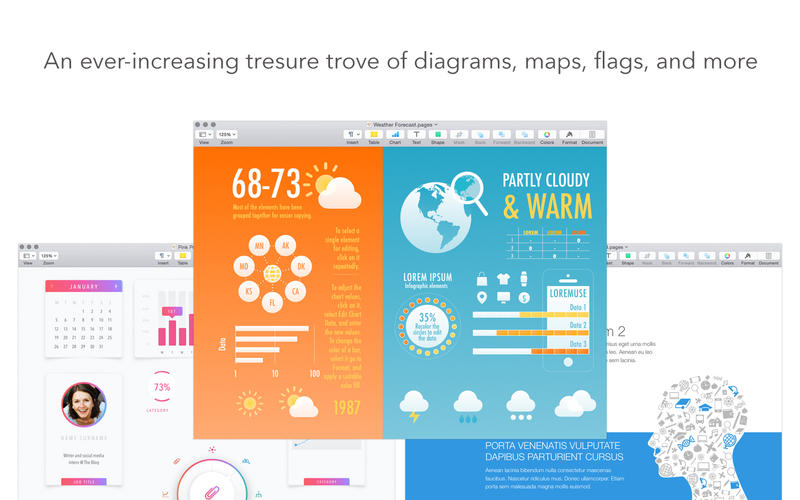
Vilnius, Lithuania - Jumsoft, a developer of high-quality applications and designs for OS X, is further extending its product selection with the new Infographics for Pages app. It's been adapted from one of Jumsoft's best-sellers, Infographics, which was originally designed for Keynote. The new version offers over 2,000 diagrams, maps, and other visualization elements.
The items included in the Infographics set range from smart and modern diagrams to national symbols and maps. Whether users are preparing a report focused on a particular country, explaining the intricacies of an industry, or presenting annual financial results, Infographics has a go-to supply of quality visualization tools. Although the set is designed for Apple's Pages, the images can also be pasted in Keynote, Numbers, or iBooks Author.
Algirdas Unguvaitis, the general manager of Jumsoft, said, "There is huge demand for quality data visualization elements in media, marketing, web design, and many other industries. The Keynote version of Infographics has been one of our most popular products since the day it launched, and now we're happy to introduce the Pages version."
All images included in the Infographics set have transparent backgrounds that allow them to be placed on various colored and patterned backgrounds. Most elements are drawn in shapes, which enable resizing and changing colors as well as adding and removing various image components.
Device Requirements:
* OS X 10.10 or later
* 64-bit processor
* 641 MB
Pricing and Availability:
Infographics for Pages 2.7 is offered at the introductory price of $14.99 USD (or equivalent amount in other currencies) and available worldwide exclusively through the App Store in the Graphics & Design category. The set is also included in Jumsoft's Toolbox for Pages and Toolbox for iWork apps. More information and design samples are available on the Mac App Store.
Jumsoft: http://www.jumsoft.com/
Infographics for Pages 2.7: https://itunes.apple.com/app/infographics-for-pages/id1099408858
Screenshot: http://a1.mzstatic.com/us/r30/Purple1/v4/c3/f2/9b/c3f29b40-7230-7fb5-e4a0-6300dfca05ec/screen800x500.jpeg
Application Icon: http://a3.mzstatic.com/us/r30/Purple1/v4/ee/34/ff/ee34ff7c-c4e2-270f-4f48-de972e2e6df2/icon128-2x.png
Based in scenic Vilnius, Lithuania, Jumsoft is a privately funded company founded in 2002. Committed to providing the highest quality software, Jumsoft is a dedicated group of Apple Macintosh experts whose goal is creating and marketing exciting, easy-to-use and powerful applications for the Mac Platform. Jumsoft most recently focused its attention on maximizing the potential of Apple's iWork, quickly becoming the leading provider of Keynote themes and objects. Copyright 2002-2016 Jumsoft. All Rights Reserved. Apple, the Apple logo, Mac OS X and Macintosh are registered trademarks of Apple Computer in the U.S. and/or other countries.
*******
Link To Article: http://prmac.com/release-id-79285.htm
*******
---------------------------------------------------------------------------------
Note that you can alter delivered distributions at any time.
Login to your account on prMac to alter your channel selection, or to opt-out at any time.
Jumsoft Presents the Infographics Set for Apple's Pages - Published on 04/21/16
Developer of high-quality applications and designs, Jumsoft today introduces Infographics for Pages 2.7, its brand new design application for Apple's Pages layout solution for OS X. Adapted from one of Jumsoft's best-selling quality visualization tools, Infographics for Page offers over 2,000 diagrams, maps, and other visualization elements. Although the set is designed for Apple's Pages, the images can also be pasted in Keynote, Numbers, or iBooks Author.
Vilnius, Lithuania - Jumsoft, a developer of high-quality applications and designs for OS X, is further extending its product selection with the new Infographics for Pages app. It's been adapted from one of Jumsoft's best-sellers, Infographics, which was originally designed for Keynote. The new version offers over 2,000 diagrams, maps, and other visualization elements.
The items included in the Infographics set range from smart and modern diagrams to national symbols and maps. Whether users are preparing a report focused on a particular country, explaining the intricacies of an industry, or presenting annual financial results, Infographics has a go-to supply of quality visualization tools. Although the set is designed for Apple's Pages, the images can also be pasted in Keynote, Numbers, or iBooks Author.
Algirdas Unguvaitis, the general manager of Jumsoft, said, "There is huge demand for quality data visualization elements in media, marketing, web design, and many other industries. The Keynote version of Infographics has been one of our most popular products since the day it launched, and now we're happy to introduce the Pages version."
All images included in the Infographics set have transparent backgrounds that allow them to be placed on various colored and patterned backgrounds. Most elements are drawn in shapes, which enable resizing and changing colors as well as adding and removing various image components.
Device Requirements:
* OS X 10.10 or later
* 64-bit processor
* 641 MB
Pricing and Availability:
Infographics for Pages 2.7 is offered at the introductory price of $14.99 USD (or equivalent amount in other currencies) and available worldwide exclusively through the App Store in the Graphics & Design category. The set is also included in Jumsoft's Toolbox for Pages and Toolbox for iWork apps. More information and design samples are available on the Mac App Store.
Jumsoft: http://www.jumsoft.com/
Infographics for Pages 2.7: https://itunes.apple.com/app/infographics-for-pages/id1099408858
Screenshot: http://a1.mzstatic.com/us/r30/Purple1/v4/c3/f2/9b/c3f29b40-7230-7fb5-e4a0-6300dfca05ec/screen800x500.jpeg
Application Icon: http://a3.mzstatic.com/us/r30/Purple1/v4/ee/34/ff/ee34ff7c-c4e2-270f-4f48-de972e2e6df2/icon128-2x.png
Based in scenic Vilnius, Lithuania, Jumsoft is a privately funded company founded in 2002. Committed to providing the highest quality software, Jumsoft is a dedicated group of Apple Macintosh experts whose goal is creating and marketing exciting, easy-to-use and powerful applications for the Mac Platform. Jumsoft most recently focused its attention on maximizing the potential of Apple's iWork, quickly becoming the leading provider of Keynote themes and objects. Copyright 2002-2016 Jumsoft. All Rights Reserved. Apple, the Apple logo, Mac OS X and Macintosh are registered trademarks of Apple Computer in the U.S. and/or other countries.
*******
Link To Article: http://prmac.com/release-id-79285.htm
*******
---------------------------------------------------------------------------------
Note that you can alter delivered distributions at any time.
Login to your account on prMac to alter your channel selection, or to opt-out at any time.
Subscribe to:
Posts (Atom)