A new article has been published at prMac.
The Wittify Keyboard is now available on the Apple App Store - Published on 04/26/16
Boston-based team of Harvard Business School students introduce Wittify 1.0, a new app utility for iOS devices. The Wittify keyboard and application equips smartphone users with a supply of meaningful quotes and phrases, readily accessible in a keyboard. Wittify helps users return to the roots of communication, words, when they are the best way to convey meaning. The app features carefully selected quotes and phrases categorized by topic and use-case.
Boston, Massachusetts - A team of Harvard Business School students are proud to announce the Wittify Keyboard available on the Apple App Store. The Wittify keyboard and application equips smartphone users with a supply of meaningful quotes and phrases, readily accessible in a keyboard. At a time when smartphone users are trending towards using fewer words and more short-hand sayings, emoji, and other symbols in electronic communication, Wittify helps users return to the roots of communication - words - when they are the best way to convey meaning.
Wittify does not simply provide a list, but rather carefully selected quotes and phrases categorized by topic and use-case. The high-quality material helps users select just the right words for every situation. Remember that time when your friend needed encouragement and you couldn't find the right words? How about that time you got stuck trying to say how much you care? Or the time you hoped to say something funny? Wittify is here to help.
The Wittify Keyboard contains a wide range of categories from inspiration, romance, and encouragement to jokes, puns, and comebacks. Additional premium content will be made available in the future for a fee. Wittify plans to release an Android version in early summer 2016.
Device Requirements:
* iPhone, iPad, and iPod touch
* Requires iOS 8.0 or later
* 12.0 MB
Pricing and Availability:
Wittify 1.0 is Free and available worldwide exclusively through the App Store in the Utilities category. If you would like further information about Wittify or would like to schedule an interview, please contact the Wittify team via email.
Wittify 1.0: http://www.wittify.me
Download from iTunes: https://itunes.apple.com/app/wittify/id1102610979
Screenshot: http://a5.mzstatic.com/us/r30/Purple49/v4/ca/39/2a/ca392a38-852a-2d8b-6b5e-05ce388ff565/screen322x572.jpeg
App Icon: http://a5.mzstatic.com/us/r30/Purple49/v4/fc/a1/25/fca1256c-ec78-4b40-b352-42be044d935e/icon175x175.jpeg
Wittify was created by five Harvard Business School students with a vision to restore the power of words to electronic communication. Each of the five founders comes from a different industry, but brings a unique perspective to contribute to the quality of this application. All Material and Software (C) Copyright 2016 Wittify. All Rights Reserved. Apple, the Apple logo, iPhone, iPod and iPad are registered trademarks of Apple Inc. in the U.S. and/or other countries. Other trademarks and registered trademarks may be the property of their respective owners.
*******
Link To Article: http://prmac.com/release-id-79315.htm
*******
---------------------------------------------------------------------------------
Note that you can alter delivered distributions at any time.
Login to your account on prMac to alter your channel selection, or to opt-out at any time.


PDFpen 8 Adds Digital Signatures, File and Audio Attachments, Portfolios
A new article has been published at prMac.
PDFpen 8 Adds Digital Signatures, File and Audio Attachments, Portfolios - Published on 04/26/16
California based Smile releases PDFpen 8, the latest version of its all-purpose PDF editing tool for OS X. PDFpen 8 features support for digital signatures, file attachments and in version 8, portfolio creation. Users can play and record audio annotations as well as export PDFs to Microsoft Word and Excel formats much faster and with no need for Internet access. The new measurement tool can be used to measure distances using the scale included in architectural documents.
San Francisco, California - Smile is proud to announce the release of PDFpen 8, the latest version of its all-purpose PDF editing tool for Mac. This major new version features support for digital signatures, file attachments, and, in PDFpenPro, portfolio creation.
PDFpen and PDFpenPro 8 now enable the application of digital signatures, as well as validation of digitally signed documents. This secure and trusted signing option adds to PDFpen 7's current signing options, which include interactive signature fields, pasting scanned signatures, and a scribble tool.
File attachments and annotations can be previewed and extracted from documents in PDFpen, while PDFpenPro can also create and delete them.
Users can play and record audio annotations as well as export PDFs to Microsoft(R) Word (.docx) format much faster and with no need for Internet access. PDFpenPro can also export to Microsoft(R) Excel (.xlsx) format without the need for Internet access.
The new measurement tool can be used to measure distances using the scale included in architectural documents.
PDFpenPro 8 allows the creation and editing of portfolios, a convenient way to package files together. It includes more form creation options, including, choosing widget styles for radio buttons and checkboxes, and setting the tab order of fields using drag and drop in the sidebar.
"We're excited to bring cryptographically secure digital signature support to PDFpen 8. Many find these signatures preferable for personal use, and they are required in many fields for business and government use," said Philip Goward, Smile Founder. "We're thrilled to extend the utility of PDFpen 8 through fast, offline Word export, and file and audio attachments. We've also brought more power to our Pro users in portfolios, a great way to package multiple documents."
The PDF-to-PowerPoint and PDF-to-PDF/A export functions use the Nuance OmniPage Cloud Service for document conversion. PDFs are securely uploaded to the service and returned as PowerPoint documents in .pptx format, and PDF Archive documents in PDF/A format. PDF Archive format is an Internationally-accepted format for archival storage and long term use of PDFs.
PDFpenPro and PDFpen 8 work with PDFpen for iPad & iPhone version 2, allowing seamless editing across devices when used with Dropbox storage or iCloud Drive. iCloud storage is available when PDFpen is purchased via the Mac App Store.
PDFpen retails for US $74.95, PDFpenPro for $124.95. Family Pack licenses, which cover up to five computers in one household, are $94.95 for PDFpen and $149.95 for PDFpenPro. Office Pack licenses start at $224.95 for PDFpen (5 users) and $349.95 for PDFpenPro (5 users).
Upgrades from earlier single user versions of either application are US $30, and free to users who purchased on or after January 1, 2016. Upgrades from previous versions of PDFpen to PDFpenPro 8 are $50. Upgrade pricing for Family Packs and Office Packs is found on our web store: http://smle.us/store
PDFpen 8 and PDFpenPro 8 require OS X 10.10 (Yosemite) or later. For OS X 10.9 (Mavericks), see our website for compatible previous PDFpen versions. Demo versions are available on Smile's website. Full versions of PDFpen and PDFpenPro are also available for purchase on Apple's Mac App Store.
What's New in PDFpen 8:
* Validate digital signatures for authenticity and trust of digitally signed documents
* Digitally sign documents using AATL or self-signed certificates
* Create a digital certificate for self-signing
* Preview and extract file attachments and annotations
* Record and playback audio annotations
* Measure distances with the measurement tool, including scale within architectural documents
* Export PDF to Microsoft(R) Word (.docx) offline
Features Specific to PDFpenPro:
* Add and delete file attachments and annotations (new)
* Create Portfolio documents, combining related files together (new)
* Export in Microsoft(R) Excel (.xlsx) offline (new)
* Choose widget styles for radio buttons and checkboxes (new)
* Rearrange tab order of form fields via sidebar drag and drop (new)
* Create cross-platform fillable PDF forms including interactive signature fields and email or web submission buttons
* Create and edit Table of Contents
* Convert websites into PDFs
* Correct typos in OCR text layer
* Add and edit document permissions
* Automatic form creation makes existing PDF forms fillable
* Gather submitted form data via backend integration
* Export to Microsoft(R) PowerPoint (.pptx) and PDF Archive (PDF/A) formats (requires Internet connection)
Features:
* Add text, images and signatures to PDF
* Correct text in original PDF with editable text blocks
* Fill out interactive PDF forms and sign them
* Redact or erase text, including OCR text
* Search and redact text; search and replace text
* Export in Microsoft(R) Word format (.docx) while offline
* Scan directly from Image Capture or TWAIN scanners
* Perform OCR (Optical Character Recognition) on scanned documents
* Viewable OCR layer for proofing OCR text from scanned pages
* Adjust resolution, color depth and contrast, skew, and size of an image or scanned document
* Sign PDF forms via interactive signature fields
* Digitally sign documents using AATL certificates, create and sign with self-signed certificates, validate digital signatures
* Insert and remove pages; re-order pages in a PDF by drag & drop; combine PDFs
* Move, resize, copy and delete images in original PDF
* Save PDFs directly to Evernote
* Preview and extract file attachments and annotations
* Record and playback audio annotations
* Copy and paste rich text; retain fonts and formatting when copying from PDFs, including columns
* Context-sensitive popup-menus enable quick edits
* Add (and print) notes and comments
* Mark up documents with highlighting, underscoring and strikethrough
* Save frequently-used images, signatures, objects and text in the Library
* Apply business-related and sign here stamps via the Library
* Print notes and comments with or without the original text
* Print a list of all annotations along with the document
* Full screen mode, as well as zoom to document width and zoom to actual document size
* Password protect a document with up to 256-bit AES encryption
* Compatible with iCloud Drive
* Sync Library items with PDFpen for iPad and iPhone via iCloud
* Automate PDF manipulations with AppleScript
* Available in English, Japanese, German, French, Italian, and Spanish
System Requirements:
* OS X 10.10 (Yosemite) and later
* iCloud storage and sync requires the Mac App Store version (use of iCloud Drive does not)
PDFpen Pricing:
US $74.95
Family Pack: $94.95 (home use; up to 5 computers in one household)
Office Pack: starts at $224.95 for 5 users
Single user upgrade from earlier versions of PDFpen: $30
Upgrade pricing for Family Packs and Office Packs: http://smle.us/pdfpenup
(Free upgrades for purchases made on or after January 1, 2016; no free upgrades available in the Mac App Store)
PDFpenPro Pricing:
US $124.95
Family Pack: $149.95 (home use; up to 5 computers in one household)
Office Pack: starts at $349.95 for 5 users
Single user upgrade from earlier versions of PDFpenPro: $30
Upgrade pricing for Family Packs and Office Packs: http://smle.us/pdfpenproup
(Free upgrades for purchases made on or after January 1, 2016; no free upgrades available in the Mac App Store)
Single user upgrade from previous version of PDFpen to PDFpenPro 8: $50
Site licenses: PDFpen $1249.95, PDFpenPro $1624.95
Site license terms: Single contact for support; single physical address or company with fewer than 1,000 employees.
Smile: https://smilesoftware.com
PDFpen 8: https://smilesoftware.com/pdfpen
Download PDFpen: https://smilesoftware.com/pdfpen/download
Purchase: http://sites.fastspring.com/smile/product/pp8
Media Assets: https://smilesoftware.com/PDFpen/presskit
Headquartered in San Francisco, California, Smile makes productivity software, including PDFpen, the all-purpose Mac PDF editor; PDFpen for iPad & iPhone, the mobile PDF editor; PDFpen Scan , which brings the power of OCR to your iPad and iPhone; TextExpander, the typing shortcut tool for Mac, iPhone & iPad, and Windows; and DiscLabel, the CD label design program for Mac. Copyright (C) 2016 SmileOnMyMac, LLC dba Smile. All Rights Reserved. PDFpen, PDFpenPro, TextExpander, and the Smile logo are registered trademarks of SmileOnMyMac, LLC dba Smile. DiscLabel is a trademark of Smile. Apple, the Apple logo, Mac, iPad, iPhone, and iPod touch are trademarks of Apple Inc., registered in the U.S. and other countries. App Store is a service mark of Apple Inc.
*******
Link To Article: http://prmac.com/release-id-79314.htm
*******
---------------------------------------------------------------------------------
Note that you can alter delivered distributions at any time.
Login to your account on prMac to alter your channel selection, or to opt-out at any time.
PDFpen 8 Adds Digital Signatures, File and Audio Attachments, Portfolios - Published on 04/26/16
California based Smile releases PDFpen 8, the latest version of its all-purpose PDF editing tool for OS X. PDFpen 8 features support for digital signatures, file attachments and in version 8, portfolio creation. Users can play and record audio annotations as well as export PDFs to Microsoft Word and Excel formats much faster and with no need for Internet access. The new measurement tool can be used to measure distances using the scale included in architectural documents.
San Francisco, California - Smile is proud to announce the release of PDFpen 8, the latest version of its all-purpose PDF editing tool for Mac. This major new version features support for digital signatures, file attachments, and, in PDFpenPro, portfolio creation.
PDFpen and PDFpenPro 8 now enable the application of digital signatures, as well as validation of digitally signed documents. This secure and trusted signing option adds to PDFpen 7's current signing options, which include interactive signature fields, pasting scanned signatures, and a scribble tool.
File attachments and annotations can be previewed and extracted from documents in PDFpen, while PDFpenPro can also create and delete them.
Users can play and record audio annotations as well as export PDFs to Microsoft(R) Word (.docx) format much faster and with no need for Internet access. PDFpenPro can also export to Microsoft(R) Excel (.xlsx) format without the need for Internet access.
The new measurement tool can be used to measure distances using the scale included in architectural documents.
PDFpenPro 8 allows the creation and editing of portfolios, a convenient way to package files together. It includes more form creation options, including, choosing widget styles for radio buttons and checkboxes, and setting the tab order of fields using drag and drop in the sidebar.
"We're excited to bring cryptographically secure digital signature support to PDFpen 8. Many find these signatures preferable for personal use, and they are required in many fields for business and government use," said Philip Goward, Smile Founder. "We're thrilled to extend the utility of PDFpen 8 through fast, offline Word export, and file and audio attachments. We've also brought more power to our Pro users in portfolios, a great way to package multiple documents."
The PDF-to-PowerPoint and PDF-to-PDF/A export functions use the Nuance OmniPage Cloud Service for document conversion. PDFs are securely uploaded to the service and returned as PowerPoint documents in .pptx format, and PDF Archive documents in PDF/A format. PDF Archive format is an Internationally-accepted format for archival storage and long term use of PDFs.
PDFpenPro and PDFpen 8 work with PDFpen for iPad & iPhone version 2, allowing seamless editing across devices when used with Dropbox storage or iCloud Drive. iCloud storage is available when PDFpen is purchased via the Mac App Store.
PDFpen retails for US $74.95, PDFpenPro for $124.95. Family Pack licenses, which cover up to five computers in one household, are $94.95 for PDFpen and $149.95 for PDFpenPro. Office Pack licenses start at $224.95 for PDFpen (5 users) and $349.95 for PDFpenPro (5 users).
Upgrades from earlier single user versions of either application are US $30, and free to users who purchased on or after January 1, 2016. Upgrades from previous versions of PDFpen to PDFpenPro 8 are $50. Upgrade pricing for Family Packs and Office Packs is found on our web store: http://smle.us/store
PDFpen 8 and PDFpenPro 8 require OS X 10.10 (Yosemite) or later. For OS X 10.9 (Mavericks), see our website for compatible previous PDFpen versions. Demo versions are available on Smile's website. Full versions of PDFpen and PDFpenPro are also available for purchase on Apple's Mac App Store.
What's New in PDFpen 8:
* Validate digital signatures for authenticity and trust of digitally signed documents
* Digitally sign documents using AATL or self-signed certificates
* Create a digital certificate for self-signing
* Preview and extract file attachments and annotations
* Record and playback audio annotations
* Measure distances with the measurement tool, including scale within architectural documents
* Export PDF to Microsoft(R) Word (.docx) offline
Features Specific to PDFpenPro:
* Add and delete file attachments and annotations (new)
* Create Portfolio documents, combining related files together (new)
* Export in Microsoft(R) Excel (.xlsx) offline (new)
* Choose widget styles for radio buttons and checkboxes (new)
* Rearrange tab order of form fields via sidebar drag and drop (new)
* Create cross-platform fillable PDF forms including interactive signature fields and email or web submission buttons
* Create and edit Table of Contents
* Convert websites into PDFs
* Correct typos in OCR text layer
* Add and edit document permissions
* Automatic form creation makes existing PDF forms fillable
* Gather submitted form data via backend integration
* Export to Microsoft(R) PowerPoint (.pptx) and PDF Archive (PDF/A) formats (requires Internet connection)
Features:
* Add text, images and signatures to PDF
* Correct text in original PDF with editable text blocks
* Fill out interactive PDF forms and sign them
* Redact or erase text, including OCR text
* Search and redact text; search and replace text
* Export in Microsoft(R) Word format (.docx) while offline
* Scan directly from Image Capture or TWAIN scanners
* Perform OCR (Optical Character Recognition) on scanned documents
* Viewable OCR layer for proofing OCR text from scanned pages
* Adjust resolution, color depth and contrast, skew, and size of an image or scanned document
* Sign PDF forms via interactive signature fields
* Digitally sign documents using AATL certificates, create and sign with self-signed certificates, validate digital signatures
* Insert and remove pages; re-order pages in a PDF by drag & drop; combine PDFs
* Move, resize, copy and delete images in original PDF
* Save PDFs directly to Evernote
* Preview and extract file attachments and annotations
* Record and playback audio annotations
* Copy and paste rich text; retain fonts and formatting when copying from PDFs, including columns
* Context-sensitive popup-menus enable quick edits
* Add (and print) notes and comments
* Mark up documents with highlighting, underscoring and strikethrough
* Save frequently-used images, signatures, objects and text in the Library
* Apply business-related and sign here stamps via the Library
* Print notes and comments with or without the original text
* Print a list of all annotations along with the document
* Full screen mode, as well as zoom to document width and zoom to actual document size
* Password protect a document with up to 256-bit AES encryption
* Compatible with iCloud Drive
* Sync Library items with PDFpen for iPad and iPhone via iCloud
* Automate PDF manipulations with AppleScript
* Available in English, Japanese, German, French, Italian, and Spanish
System Requirements:
* OS X 10.10 (Yosemite) and later
* iCloud storage and sync requires the Mac App Store version (use of iCloud Drive does not)
PDFpen Pricing:
US $74.95
Family Pack: $94.95 (home use; up to 5 computers in one household)
Office Pack: starts at $224.95 for 5 users
Single user upgrade from earlier versions of PDFpen: $30
Upgrade pricing for Family Packs and Office Packs: http://smle.us/pdfpenup
(Free upgrades for purchases made on or after January 1, 2016; no free upgrades available in the Mac App Store)
PDFpenPro Pricing:
US $124.95
Family Pack: $149.95 (home use; up to 5 computers in one household)
Office Pack: starts at $349.95 for 5 users
Single user upgrade from earlier versions of PDFpenPro: $30
Upgrade pricing for Family Packs and Office Packs: http://smle.us/pdfpenproup
(Free upgrades for purchases made on or after January 1, 2016; no free upgrades available in the Mac App Store)
Single user upgrade from previous version of PDFpen to PDFpenPro 8: $50
Site licenses: PDFpen $1249.95, PDFpenPro $1624.95
Site license terms: Single contact for support; single physical address or company with fewer than 1,000 employees.
Smile: https://smilesoftware.com
PDFpen 8: https://smilesoftware.com/pdfpen
Download PDFpen: https://smilesoftware.com/pdfpen/download
Purchase: http://sites.fastspring.com/smile/product/pp8
Media Assets: https://smilesoftware.com/PDFpen/presskit
Headquartered in San Francisco, California, Smile makes productivity software, including PDFpen, the all-purpose Mac PDF editor; PDFpen for iPad & iPhone, the mobile PDF editor; PDFpen Scan , which brings the power of OCR to your iPad and iPhone; TextExpander, the typing shortcut tool for Mac, iPhone & iPad, and Windows; and DiscLabel, the CD label design program for Mac. Copyright (C) 2016 SmileOnMyMac, LLC dba Smile. All Rights Reserved. PDFpen, PDFpenPro, TextExpander, and the Smile logo are registered trademarks of SmileOnMyMac, LLC dba Smile. DiscLabel is a trademark of Smile. Apple, the Apple logo, Mac, iPad, iPhone, and iPod touch are trademarks of Apple Inc., registered in the U.S. and other countries. App Store is a service mark of Apple Inc.
*******
Link To Article: http://prmac.com/release-id-79314.htm
*******
---------------------------------------------------------------------------------
Note that you can alter delivered distributions at any time.
Login to your account on prMac to alter your channel selection, or to opt-out at any time.
Top Productivity App Drafts is the Topic of New Screencast Series
A new article has been published at prMac.
Top Productivity App Drafts is the Topic of New Screencast Series - Published on 04/26/16
Agile Tortoise today announces a new series of screencasts to help users get more out of their app Drafts. Drafts is a quick capture note taking focused on making it easy to quickly jot down notes and ideas, and send them almost anywhere with powerful, customizable actions. Hosted by David Sparks (aka MacSparky of the Mac Power Users podcast), this screencasts series aims to help Drafts users unlock the power of the app to be more productive on their iPhone, iPads - and even Apple Watch.
North Richland Hills, Texas - Agile Tortoise today is excited to announce a new series of screencasts to help users get more out of their app, Drafts. Drafts is a quick capture note taking app for iPhone and iPad, focused on making it easy to quickly jot down notes and ideas and send them almost anywhere with powerful, customizable actions.
The "Getting To Know Drafts" Screencast series launches today with two installments: An Overview of the Drafts app, and one covering integration with Dropbox. Additional screencasts will be rolled out, one per week, over the next couple of months. Topics include managing and configuring Drafts, as well as integration with services like Evernote, Reminders, Email, iMessage and more.
Hosted by David Sparks (aka MacSparky of the Mac Power Users podcast), this screencast series aims to help Drafts users unlock the power of the app to be more productive on their iPhone, iPads - and even Apple Watch.
To celebrate the launch of the screencast series, Drafts will be on sale for $6.99 USD - 30% off - through May 2, 2016.
Screencasts will be distributed via the Agile Tortoise YouTube channel, Vimeo and on the Agile Tortoise website. Agile Tortoise is dedicated to helping customers get the most out of Drafts and these screencasts build on documentation and online support available to create a launching point for new and existing users to learn about the depth and time-saving power Drafts can offer.
Drafts: http://agiletortoise.com/drafts
Purchase and Download: https://itunes.apple.com/app/id905337691
YouTube Channel: https://www.youtube.com/channel/UCpnNWS06-rLQj4lZ5M2DP8Q
Vimeo Channel: https://vimeo.com/agiletortoise
Founded in 2006, Agile Tortoise, Inc. is an independent software company that develops mobile and web software both for end-users and clients. Agile Tortoise, Inc. is based in Dallas-Fort Worth, TX. For more information, visit Agile Tortoise online. Copyright (C) 2006-2016 Agile Tortoise, Inc. All Rights Reserved. Apple, the Apple logo, iPhone, iPod and iPad are registered trademarks of Apple Inc. in the U.S. and/or other countries.
*******
Link To Article: http://prmac.com/release-id-79313.htm
*******
---------------------------------------------------------------------------------
Note that you can alter delivered distributions at any time.
Login to your account on prMac to alter your channel selection, or to opt-out at any time.
Top Productivity App Drafts is the Topic of New Screencast Series - Published on 04/26/16
Agile Tortoise today announces a new series of screencasts to help users get more out of their app Drafts. Drafts is a quick capture note taking focused on making it easy to quickly jot down notes and ideas, and send them almost anywhere with powerful, customizable actions. Hosted by David Sparks (aka MacSparky of the Mac Power Users podcast), this screencasts series aims to help Drafts users unlock the power of the app to be more productive on their iPhone, iPads - and even Apple Watch.
North Richland Hills, Texas - Agile Tortoise today is excited to announce a new series of screencasts to help users get more out of their app, Drafts. Drafts is a quick capture note taking app for iPhone and iPad, focused on making it easy to quickly jot down notes and ideas and send them almost anywhere with powerful, customizable actions.
The "Getting To Know Drafts" Screencast series launches today with two installments: An Overview of the Drafts app, and one covering integration with Dropbox. Additional screencasts will be rolled out, one per week, over the next couple of months. Topics include managing and configuring Drafts, as well as integration with services like Evernote, Reminders, Email, iMessage and more.
Hosted by David Sparks (aka MacSparky of the Mac Power Users podcast), this screencast series aims to help Drafts users unlock the power of the app to be more productive on their iPhone, iPads - and even Apple Watch.
To celebrate the launch of the screencast series, Drafts will be on sale for $6.99 USD - 30% off - through May 2, 2016.
Screencasts will be distributed via the Agile Tortoise YouTube channel, Vimeo and on the Agile Tortoise website. Agile Tortoise is dedicated to helping customers get the most out of Drafts and these screencasts build on documentation and online support available to create a launching point for new and existing users to learn about the depth and time-saving power Drafts can offer.
Drafts: http://agiletortoise.com/drafts
Purchase and Download: https://itunes.apple.com/app/id905337691
YouTube Channel: https://www.youtube.com/channel/UCpnNWS06-rLQj4lZ5M2DP8Q
Vimeo Channel: https://vimeo.com/agiletortoise
Founded in 2006, Agile Tortoise, Inc. is an independent software company that develops mobile and web software both for end-users and clients. Agile Tortoise, Inc. is based in Dallas-Fort Worth, TX. For more information, visit Agile Tortoise online. Copyright (C) 2006-2016 Agile Tortoise, Inc. All Rights Reserved. Apple, the Apple logo, iPhone, iPod and iPad are registered trademarks of Apple Inc. in the U.S. and/or other countries.
*******
Link To Article: http://prmac.com/release-id-79313.htm
*******
---------------------------------------------------------------------------------
Note that you can alter delivered distributions at any time.
Login to your account on prMac to alter your channel selection, or to opt-out at any time.
Product Builder 2.1.1 Helps Developers Create Packages for Mac App Store
A new article has been published at prMac.
Product Builder 2.1.1 Helps Developers Create Packages for Mac App Store - Published on 04/25/16
Tension Software announces Product Builder 2.1.1 for Mac OS X, which helps developers create packages for app submission to the Mac App Store without using Xcode. Product Builder is an indispensable tool for any App Store developer that do not use Xcode to build applications and use alternate build environments such as Xamarin or others. Version 2.1.1 brings bug fixes, and is optimized for OS X 10.11 El Capitan.
Milano, Italy - Tension Software is proud to announce the release of Product Builder 2.1.1 for Mac OS X, which helps developers create packages for app submission to the Mac App Store without using Xcode. Product Builder allows to create packages ready to be transmitted using the Application Loader (by Apple and included with the Developer tools) to the Mac App Store.
Product Builder is an indispensable tool for any App Store developer that do not use Xcode to build applications and use alternate build environments such as Xamarin or others. Product Builder allows users to correctly submit applications with spaces inside the application name.
The app can optionally check for MASReceipt inside the app to avoid creating from an already authenticated app, (a common error). It can optionally add the app release number to the package, (to avoid submit old packages in the submission phase). It makes the repetitive creation of packages a pleasure and avoid errors creating and submitting to the App Store!
After inserting the correct setup one time only, to create a package you just need to:
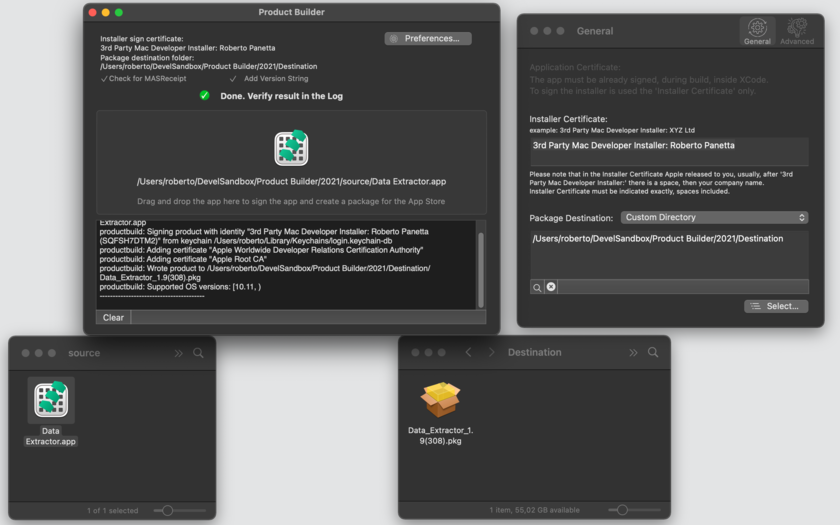
1. Launch Product Builder and drag the application to submit from the finder to the Product Builder window.
2. Select source and destination (a sandbox requirement)
3. Done!
Features:
* Creates via Drag and Drop a package with the application signed with your signature.
* Handles correctly applications with spaces in the name, example: 'Product Builder'
* Put the created Package near the original app or in a preference selectable via preferences
* Auto-creates a package without spaces in the name ready to be correctly submitted to the App Store
* Optionally includes release string in the package name to avoid confusion on your Hard Disk between successive releases and during submission to the store
* Correctly handles submission of sandboxed app with signed entitlements inside
* Check if you are building using an already MAS authenticated app to avoid this kind of mistake
* Full diagnostic of the package creation in a log area
* PDF User Guide
* Uses only the installer certificate to sign the installer
* Improved main window layout
Minimum Requirements:
* OS X 10.10 or later
* 64-bit processor
* 1.3 MB
Pricing and Availability:
Product Builder 2.1.1 is $4.99, and is available worldwide exclusively through the Mac App Store in the Developer Tools category.
Tension Software: http://www.tensionsoftware.com
Product Builder 2.1.1: http://www.tensionsoftware.com/osx/productbuilder/
Purchase and Download from Mac App Store: https://itunes.apple.com/app/product-builder/id421614213
Screenshot: http://www.tensionsoftware.com/static/tensionsoftware/images/app/productbuilder/screenshots/mac/1.png
Application Icon: http://www.tensionsoftware.com/static/tensionsoftware/images/app/productbuilder/icons/128.png
Tension Software develops software for Mac OS X and iOS using the latest Apple technology, Cocoa and Objective-C. All Material and Software (C) Copyright 2016 Tension Software. All Rights Reserved. Apple, the Apple logo, Macintosh and Mac OS X are registered trademarks of Apple Inc. in the U.S. and/or other countries. Other trademarks and registered trademarks may be the property of their respective owners.
*******
Link To Article: http://prmac.com/release-id-79312.htm
*******
---------------------------------------------------------------------------------
Note that you can alter delivered distributions at any time.
Login to your account on prMac to alter your channel selection, or to opt-out at any time.
Product Builder 2.1.1 Helps Developers Create Packages for Mac App Store - Published on 04/25/16
Tension Software announces Product Builder 2.1.1 for Mac OS X, which helps developers create packages for app submission to the Mac App Store without using Xcode. Product Builder is an indispensable tool for any App Store developer that do not use Xcode to build applications and use alternate build environments such as Xamarin or others. Version 2.1.1 brings bug fixes, and is optimized for OS X 10.11 El Capitan.
Milano, Italy - Tension Software is proud to announce the release of Product Builder 2.1.1 for Mac OS X, which helps developers create packages for app submission to the Mac App Store without using Xcode. Product Builder allows to create packages ready to be transmitted using the Application Loader (by Apple and included with the Developer tools) to the Mac App Store.
Product Builder is an indispensable tool for any App Store developer that do not use Xcode to build applications and use alternate build environments such as Xamarin or others. Product Builder allows users to correctly submit applications with spaces inside the application name.
The app can optionally check for MASReceipt inside the app to avoid creating from an already authenticated app, (a common error). It can optionally add the app release number to the package, (to avoid submit old packages in the submission phase). It makes the repetitive creation of packages a pleasure and avoid errors creating and submitting to the App Store!
After inserting the correct setup one time only, to create a package you just need to:
1. Launch Product Builder and drag the application to submit from the finder to the Product Builder window.
2. Select source and destination (a sandbox requirement)
3. Done!
Features:
* Creates via Drag and Drop a package with the application signed with your signature.
* Handles correctly applications with spaces in the name, example: 'Product Builder'
* Put the created Package near the original app or in a preference selectable via preferences
* Auto-creates a package without spaces in the name ready to be correctly submitted to the App Store
* Optionally includes release string in the package name to avoid confusion on your Hard Disk between successive releases and during submission to the store
* Correctly handles submission of sandboxed app with signed entitlements inside
* Check if you are building using an already MAS authenticated app to avoid this kind of mistake
* Full diagnostic of the package creation in a log area
* PDF User Guide
* Uses only the installer certificate to sign the installer
* Improved main window layout
Minimum Requirements:
* OS X 10.10 or later
* 64-bit processor
* 1.3 MB
Pricing and Availability:
Product Builder 2.1.1 is $4.99, and is available worldwide exclusively through the Mac App Store in the Developer Tools category.
Tension Software: http://www.tensionsoftware.com
Product Builder 2.1.1: http://www.tensionsoftware.com/osx/productbuilder/
Purchase and Download from Mac App Store: https://itunes.apple.com/app/product-builder/id421614213
Screenshot: http://www.tensionsoftware.com/static/tensionsoftware/images/app/productbuilder/screenshots/mac/1.png
Application Icon: http://www.tensionsoftware.com/static/tensionsoftware/images/app/productbuilder/icons/128.png
Tension Software develops software for Mac OS X and iOS using the latest Apple technology, Cocoa and Objective-C. All Material and Software (C) Copyright 2016 Tension Software. All Rights Reserved. Apple, the Apple logo, Macintosh and Mac OS X are registered trademarks of Apple Inc. in the U.S. and/or other countries. Other trademarks and registered trademarks may be the property of their respective owners.
*******
Link To Article: http://prmac.com/release-id-79312.htm
*******
---------------------------------------------------------------------------------
Note that you can alter delivered distributions at any time.
Login to your account on prMac to alter your channel selection, or to opt-out at any time.
A Smartphone App Features New Approach to Mobile Health
A new article has been published at prMac.
A Smartphone App Features New Approach to Mobile Health - Published on 04/25/16
HealthShield, developed by Sylex Technologies LLC, is a new smartphone application that detects health threats by evaluating data provided by user. Developed by a company that is a national eHealth provider in several countries, it increases patient engagement and improves healthcare outcomes. The HealthShield app will be available for iOS devices through the iOS App Store and for Android devices through Google Play in June, 2016.
Glendale, California - HealthShield app is developed by Sylex Technologies LLC, a national eHealth system software provider in several countries. The app, coming soon for iOS and Android devices, is designed for a general audience, to improve healthcare outcomes through early detection and patient engagement and education.
Intelligent algorithms based on Sylex Technologies' own technological achievements, analyze provided objective data together with subjective for a health risk assessment. Elaborated medical models can catch a possible health threat at the earliest, when a problem is not yet clearly visible - a user can not pay enough attention to details that do not seem important for him, but in reality are signs of a developing disease. The app recommends the lab tests necessary for more precise health risk evaluation based on individual data and preliminary results. Early stage health risk detection reduces the cost and complexity of treatment.
The application does not require registration or personal information to function. It is easy to start, and very flexible with an intuitive and user-friendly interface. HealthShield app can keep continuous track of individual symptoms, complaints and lab results. New data can be added, changed or deleted at any time. The app includes alerts about potential disease risks. Additional lab tests are recommended for more precise risk assessment, as well as convenient classification of symptoms and photo inputs for lab tests.
"With this app, we are empowering everybody by giving them the possibility to self-educate and get their possible health risks under control," said Avet Manukyan, founder of Sylex Technologies. "The app is not a toy, but a very powerful tool that can save lives."
The HealthShield app will be available for iOS devices through the Apple App Store and Android devices through Google Play in June, 2016.
Sylex Technologies: http://www.sylextech.com
HealthShield Mobile Application: http://www.healthshieldapp.com
Sylex Technologies LLC is a technology company that specializes in products and solutions for healthcare and insurance business automatization. For more than ten years, the company has worked closely with insurance companies and healthcare providers to supply them with the most flexible, sophisticated and user-friendly software. Sylex Technologies software includes billing, resource planning, business intelligence, EMR management and other solutions. The company is known for its state of the art technological platform and excellent reputation. All Material and Software (C) Copyright 2016 Sylex Technologies LLC. All Rights Reserved. Apple, the Apple logo, iPhone, iPod and iPad are registered trademarks of Apple Inc. in the U.S. and/or other countries. Other trademarks and registered trademarks may be the property of their respective owners.
*******
Link To Article: http://prmac.com/release-id-79311.htm
*******
---------------------------------------------------------------------------------
Note that you can alter delivered distributions at any time.
Login to your account on prMac to alter your channel selection, or to opt-out at any time.
A Smartphone App Features New Approach to Mobile Health - Published on 04/25/16
HealthShield, developed by Sylex Technologies LLC, is a new smartphone application that detects health threats by evaluating data provided by user. Developed by a company that is a national eHealth provider in several countries, it increases patient engagement and improves healthcare outcomes. The HealthShield app will be available for iOS devices through the iOS App Store and for Android devices through Google Play in June, 2016.
Glendale, California - HealthShield app is developed by Sylex Technologies LLC, a national eHealth system software provider in several countries. The app, coming soon for iOS and Android devices, is designed for a general audience, to improve healthcare outcomes through early detection and patient engagement and education.
Intelligent algorithms based on Sylex Technologies' own technological achievements, analyze provided objective data together with subjective for a health risk assessment. Elaborated medical models can catch a possible health threat at the earliest, when a problem is not yet clearly visible - a user can not pay enough attention to details that do not seem important for him, but in reality are signs of a developing disease. The app recommends the lab tests necessary for more precise health risk evaluation based on individual data and preliminary results. Early stage health risk detection reduces the cost and complexity of treatment.
The application does not require registration or personal information to function. It is easy to start, and very flexible with an intuitive and user-friendly interface. HealthShield app can keep continuous track of individual symptoms, complaints and lab results. New data can be added, changed or deleted at any time. The app includes alerts about potential disease risks. Additional lab tests are recommended for more precise risk assessment, as well as convenient classification of symptoms and photo inputs for lab tests.
"With this app, we are empowering everybody by giving them the possibility to self-educate and get their possible health risks under control," said Avet Manukyan, founder of Sylex Technologies. "The app is not a toy, but a very powerful tool that can save lives."
The HealthShield app will be available for iOS devices through the Apple App Store and Android devices through Google Play in June, 2016.
Sylex Technologies: http://www.sylextech.com
HealthShield Mobile Application: http://www.healthshieldapp.com
Sylex Technologies LLC is a technology company that specializes in products and solutions for healthcare and insurance business automatization. For more than ten years, the company has worked closely with insurance companies and healthcare providers to supply them with the most flexible, sophisticated and user-friendly software. Sylex Technologies software includes billing, resource planning, business intelligence, EMR management and other solutions. The company is known for its state of the art technological platform and excellent reputation. All Material and Software (C) Copyright 2016 Sylex Technologies LLC. All Rights Reserved. Apple, the Apple logo, iPhone, iPod and iPad are registered trademarks of Apple Inc. in the U.S. and/or other countries. Other trademarks and registered trademarks may be the property of their respective owners.
*******
Link To Article: http://prmac.com/release-id-79311.htm
*******
---------------------------------------------------------------------------------
Note that you can alter delivered distributions at any time.
Login to your account on prMac to alter your channel selection, or to opt-out at any time.
Amharic Keyboard 2.2 for iOS Offers Customizable Afghan Text Entry
A new article has been published at prMac.
Amharic Keyboard 2.2 for iOS Offers Customizable Afghan Text Entry - Published on 04/25/16
LastThink today announces Amharic Keyboard for iPad and iPhone 2.2, an important update to their highly customizable keyboard application. Amharic Keyboard offers users a third-party keyboard for use with iOS apps that allows anyone to modify it to their individual tastes. Users can modify the order of the keyboard for more convenient usage. The update includes the ability to save specific words for later use, emoticons, paragraph formatting, word prediction, and more.
Yerevan, Armenia - LastThink is proud to announce the release of Amharic Keyboard for iPad and iPhone 2.2, an important update to their highly customizable keyboard application. The Amharic Keyboard's customization features allow anyone to create the keyboard layout that is perfect for their needs. Features include the ability to change the size, shape, and order of characters; the ability to save specific words for later use; emoticons, word prediction, and more.
Users can change the order of the keyboard's letter layout, and even create handy shortcuts to allow entering words or even entire sentences with just a few keystrokes. The keyboard's Swipe feature allows users to swipe their finger around the keyboard to select letters and form words. The app intelligently predicts what the user intends to enter, greatly enhancing typing speed.
What's New in Version 2.2:
* Change the size, and place, as well as the shape of characters and keyboard separately
* Save any words that are used frequently in the active vocabulary for later use
* Express emotions with emoji characters (emoticons) which will correspond to entered words
* Paragraph formatting: Adjust alignment, line spacing, margins, bullets and numbering
* Optional smart auto correction: Intelligent spell checking for even the sloppiest typing
* Style: Customize the look of the keyboard. Change the color of the keys and background
* Word prediction: The keyboard guesses and displays the appropriate word as the user types
* Share text via Facebook, Twitter, email, Dropbox, and more
"When we set out to create the Amharic Keyboard, we knew we wanted to create a customizable keyboard that would offer users the ability to modify it to their individual tastes," says LastThink founder Grigori Jlavyan. Our keyboard allows Amharic speaking users to easily enter their text messages, emails, and other types of texts via a comprehensive interface, making their day-to-day communications more convenient than ever."
The Amharic Keyboard also offers handy paragraph formatting options, allowing users to adjust the alignment of their text, while also offering the ability to set line spacing, adjust margins, even add bulleted or numbered lists. Optional smart correction makes even the sloppiest speller's text entry become correct. The keyboard also offers a downloadable Amharic font for use with iOS devices, making text entry, editing, and display even more convenient.
Amharic Keyboard emphasizes the user's security above all, and while many third-party iOS keyboard apps require "Full Access" - with the ability to send back keystrokes and other information back to their developer - the Amharic Keyboard does not, protecting the text entry and sensitive user information, keeping their personal information safe from prying eyes.
Device Requirements:
* iPhone, iPad, and iPod touch
* Optimized for iPhone 5, iPhone 6/6 Plus
* Universal Application
* Requires iOS 6.0 or later
* 8.9 MB
Pricing and Availability:
Amharic Keyboard 2.2 is free, and is available worldwide exclusively through the App Store in the Utilities category. A convenient $2.99 in-app purchase is available to remove ads. Review codes are available upon request.
LastThink: http://lastthink.com/
Amharic Keyboard for iPhone and iPad 2.2: https://www.facebook.com/pages/Amharic-Keyboard-for-IPhone-and-IPad/705369959482876
Download from iTunes: https://itunes.apple.com/app/amharic-keyboard-for-iphone/id785184757
Screenshot: http://a1.mzstatic.com/us/r30/Purple4/v4/97/c0/c7/97c0c727-5708-d7b3-b635-ec5e66a5af05/screen568x568.jpeg
App Icon: http://a1.mzstatic.com/us/r30/Purple/v4/e4/1c/c3/e41cc399-3a2b-4863-da9e-89e365d44572/icon175x175.jpeg
LastThink is an IT company with a focus on mobile development. It has extended its list of services since 2012 to offer high-end business process management, system integration, as well as up-to-date communication solutions. LastThink's mission is to deliver maximum business value to its customers by designing, developing, implementing and maintaining efficient and high quality software solutions aligned with their most essential business needs. Their team will always do its best to meet client expectations. Copyright (C) 2016 LastThink LLC. All Rights Reserved. Apple, the Apple logo, iPhone, iPad and iPod are registered trademarks of Apple Inc. in the U.S. and/or other countries.
*******
Link To Article: http://prmac.com/release-id-79310.htm
*******
---------------------------------------------------------------------------------
Note that you can alter delivered distributions at any time.
Login to your account on prMac to alter your channel selection, or to opt-out at any time.
Amharic Keyboard 2.2 for iOS Offers Customizable Afghan Text Entry - Published on 04/25/16
LastThink today announces Amharic Keyboard for iPad and iPhone 2.2, an important update to their highly customizable keyboard application. Amharic Keyboard offers users a third-party keyboard for use with iOS apps that allows anyone to modify it to their individual tastes. Users can modify the order of the keyboard for more convenient usage. The update includes the ability to save specific words for later use, emoticons, paragraph formatting, word prediction, and more.
Yerevan, Armenia - LastThink is proud to announce the release of Amharic Keyboard for iPad and iPhone 2.2, an important update to their highly customizable keyboard application. The Amharic Keyboard's customization features allow anyone to create the keyboard layout that is perfect for their needs. Features include the ability to change the size, shape, and order of characters; the ability to save specific words for later use; emoticons, word prediction, and more.
Users can change the order of the keyboard's letter layout, and even create handy shortcuts to allow entering words or even entire sentences with just a few keystrokes. The keyboard's Swipe feature allows users to swipe their finger around the keyboard to select letters and form words. The app intelligently predicts what the user intends to enter, greatly enhancing typing speed.
What's New in Version 2.2:
* Change the size, and place, as well as the shape of characters and keyboard separately
* Save any words that are used frequently in the active vocabulary for later use
* Express emotions with emoji characters (emoticons) which will correspond to entered words
* Paragraph formatting: Adjust alignment, line spacing, margins, bullets and numbering
* Optional smart auto correction: Intelligent spell checking for even the sloppiest typing
* Style: Customize the look of the keyboard. Change the color of the keys and background
* Word prediction: The keyboard guesses and displays the appropriate word as the user types
* Share text via Facebook, Twitter, email, Dropbox, and more
"When we set out to create the Amharic Keyboard, we knew we wanted to create a customizable keyboard that would offer users the ability to modify it to their individual tastes," says LastThink founder Grigori Jlavyan. Our keyboard allows Amharic speaking users to easily enter their text messages, emails, and other types of texts via a comprehensive interface, making their day-to-day communications more convenient than ever."
The Amharic Keyboard also offers handy paragraph formatting options, allowing users to adjust the alignment of their text, while also offering the ability to set line spacing, adjust margins, even add bulleted or numbered lists. Optional smart correction makes even the sloppiest speller's text entry become correct. The keyboard also offers a downloadable Amharic font for use with iOS devices, making text entry, editing, and display even more convenient.
Amharic Keyboard emphasizes the user's security above all, and while many third-party iOS keyboard apps require "Full Access" - with the ability to send back keystrokes and other information back to their developer - the Amharic Keyboard does not, protecting the text entry and sensitive user information, keeping their personal information safe from prying eyes.
Device Requirements:
* iPhone, iPad, and iPod touch
* Optimized for iPhone 5, iPhone 6/6 Plus
* Universal Application
* Requires iOS 6.0 or later
* 8.9 MB
Pricing and Availability:
Amharic Keyboard 2.2 is free, and is available worldwide exclusively through the App Store in the Utilities category. A convenient $2.99 in-app purchase is available to remove ads. Review codes are available upon request.
LastThink: http://lastthink.com/
Amharic Keyboard for iPhone and iPad 2.2: https://www.facebook.com/pages/Amharic-Keyboard-for-IPhone-and-IPad/705369959482876
Download from iTunes: https://itunes.apple.com/app/amharic-keyboard-for-iphone/id785184757
Screenshot: http://a1.mzstatic.com/us/r30/Purple4/v4/97/c0/c7/97c0c727-5708-d7b3-b635-ec5e66a5af05/screen568x568.jpeg

App Icon: http://a1.mzstatic.com/us/r30/Purple/v4/e4/1c/c3/e41cc399-3a2b-4863-da9e-89e365d44572/icon175x175.jpeg

LastThink is an IT company with a focus on mobile development. It has extended its list of services since 2012 to offer high-end business process management, system integration, as well as up-to-date communication solutions. LastThink's mission is to deliver maximum business value to its customers by designing, developing, implementing and maintaining efficient and high quality software solutions aligned with their most essential business needs. Their team will always do its best to meet client expectations. Copyright (C) 2016 LastThink LLC. All Rights Reserved. Apple, the Apple logo, iPhone, iPad and iPod are registered trademarks of Apple Inc. in the U.S. and/or other countries.
*******
Link To Article: http://prmac.com/release-id-79310.htm
*******
---------------------------------------------------------------------------------
Note that you can alter delivered distributions at any time.
Login to your account on prMac to alter your channel selection, or to opt-out at any time.
The Numerical Puzzle Cipher Fall Has Been Released
A new article has been published at prMac.
The Numerical Puzzle Cipher Fall Has Been Released - Published on 04/25/16
Indie developer Konstantin Novik announces Cipher Fall 1.1, an important update to his casual game for iOS devices. Numerical puzzles are very popular today. Test and improve your math skills and share your success with friends. Tap symbols on the screen to make basic arithmetic calculations to achieve the target value. Less taps you make, higher score you get. Be fast and concentrated! Version 1.1 brings minor gameplay improvements, and a fix for a high scores issue.
Moscow, Russian Federation - Independent developer Konstantin Novik is proud to announce the release of Cipher Fall 1.1, an important update to his amazing casual game for iPhone, iPad, and iPod touch devices. Numerical puzzles are very popular today. Such a game has a wide audience. It allows not only to entertain, but also to train basic math skills in a funny manner. Thus the game should be interesting both for children and adults.
Konstantin is glad to introduce the Cipher Fall. This is a puzzle game with some features of an arcade. Players should achieve the target value by tapping the numbers and math operators on the screen. Less taps they make, higher score they get. Also the speed is important too.
The gameplay was inspired by one of the famous movies: The Matrix. It combines a set of features. Falling symbols and scoring mechanism require players to make a fast decisions like in arcades. A variety of different characters on the screen them you to be intent. This is a bit similar to the hidden object games. Finally the goal of the game is to get the target value making basic math operations. This is a typical feature of numerical puzzles. In spite of the simplicity of the core idea, the mix of different genres makes the game process quite fascinating and funny.
The overall gameplay is very comfortable. It doesn't impose any tough time restrictions, so players may take enough time to make a decisions. The score is the only suffering value if a player is not fast enough. Everyone may share achievements with their friends in social networks. The game doesn't include any in-app purchases.
Actually, the Cipher Fall is a very fascinating game for all that allows to spend time with fun and benefit for the brain. Version 1.1 brings minor gameplay improvements, and a fix for a high scores issue.
Device Requirements:
* iPhone, iPad, and iPod touch
* Requires iOS 9.0 or later
* 4.7 MB
Pricing and Availability:
Cipher Fall 1.1 is only $0.99, and is available worldwide exclusively through the App Store in the Games category.
Cipher Fall 1.1: http://amasoft.biz/main/cipher-fall/
Purchase and Download from iTunes: https://itunes.apple.com/app/cipher-fall/id1101989092
Screenshot: http://a1.mzstatic.com/us/r30/Purple49/v4/75/aa/49/75aa4925-6d0b-f003-3b84-e0c5cda68762/screen322x572.jpeg
App Icon: http://a1.mzstatic.com/us/r30/Purple1/v4/56/9b/ce/569bceb0-9bea-025f-92b4-c55baf0ffb41/icon175x175.jpeg
Located in Moscow, Russian Federation, indie developer Konstantin Novik creates different type of applications to assist and entertain. Copyright (C) 2016 Konstantin Novik. All Rights Reserved. Apple, the Apple logo, iPhone, iPod and iPad are registered trademarks of Apple Inc. in the U.S. and/or other countries.
*******
Link To Article: http://prmac.com/release-id-79309.htm
*******
---------------------------------------------------------------------------------
Note that you can alter delivered distributions at any time.
Login to your account on prMac to alter your channel selection, or to opt-out at any time.
The Numerical Puzzle Cipher Fall Has Been Released - Published on 04/25/16
Indie developer Konstantin Novik announces Cipher Fall 1.1, an important update to his casual game for iOS devices. Numerical puzzles are very popular today. Test and improve your math skills and share your success with friends. Tap symbols on the screen to make basic arithmetic calculations to achieve the target value. Less taps you make, higher score you get. Be fast and concentrated! Version 1.1 brings minor gameplay improvements, and a fix for a high scores issue.
Moscow, Russian Federation - Independent developer Konstantin Novik is proud to announce the release of Cipher Fall 1.1, an important update to his amazing casual game for iPhone, iPad, and iPod touch devices. Numerical puzzles are very popular today. Such a game has a wide audience. It allows not only to entertain, but also to train basic math skills in a funny manner. Thus the game should be interesting both for children and adults.
Konstantin is glad to introduce the Cipher Fall. This is a puzzle game with some features of an arcade. Players should achieve the target value by tapping the numbers and math operators on the screen. Less taps they make, higher score they get. Also the speed is important too.
The gameplay was inspired by one of the famous movies: The Matrix. It combines a set of features. Falling symbols and scoring mechanism require players to make a fast decisions like in arcades. A variety of different characters on the screen them you to be intent. This is a bit similar to the hidden object games. Finally the goal of the game is to get the target value making basic math operations. This is a typical feature of numerical puzzles. In spite of the simplicity of the core idea, the mix of different genres makes the game process quite fascinating and funny.
The overall gameplay is very comfortable. It doesn't impose any tough time restrictions, so players may take enough time to make a decisions. The score is the only suffering value if a player is not fast enough. Everyone may share achievements with their friends in social networks. The game doesn't include any in-app purchases.
Actually, the Cipher Fall is a very fascinating game for all that allows to spend time with fun and benefit for the brain. Version 1.1 brings minor gameplay improvements, and a fix for a high scores issue.
Device Requirements:
* iPhone, iPad, and iPod touch
* Requires iOS 9.0 or later
* 4.7 MB
Pricing and Availability:
Cipher Fall 1.1 is only $0.99, and is available worldwide exclusively through the App Store in the Games category.
Cipher Fall 1.1: http://amasoft.biz/main/cipher-fall/
Purchase and Download from iTunes: https://itunes.apple.com/app/cipher-fall/id1101989092
Screenshot: http://a1.mzstatic.com/us/r30/Purple49/v4/75/aa/49/75aa4925-6d0b-f003-3b84-e0c5cda68762/screen322x572.jpeg

App Icon: http://a1.mzstatic.com/us/r30/Purple1/v4/56/9b/ce/569bceb0-9bea-025f-92b4-c55baf0ffb41/icon175x175.jpeg

Located in Moscow, Russian Federation, indie developer Konstantin Novik creates different type of applications to assist and entertain. Copyright (C) 2016 Konstantin Novik. All Rights Reserved. Apple, the Apple logo, iPhone, iPod and iPad are registered trademarks of Apple Inc. in the U.S. and/or other countries.
*******
Link To Article: http://prmac.com/release-id-79309.htm
*******
---------------------------------------------------------------------------------
Note that you can alter delivered distributions at any time.
Login to your account on prMac to alter your channel selection, or to opt-out at any time.
Subscribe to:
Posts (Atom)