A new article has been published at prMac.
Deliver Express 2.5.12 Improves Compatibility Across OS X Versions - Published on 04/28/16
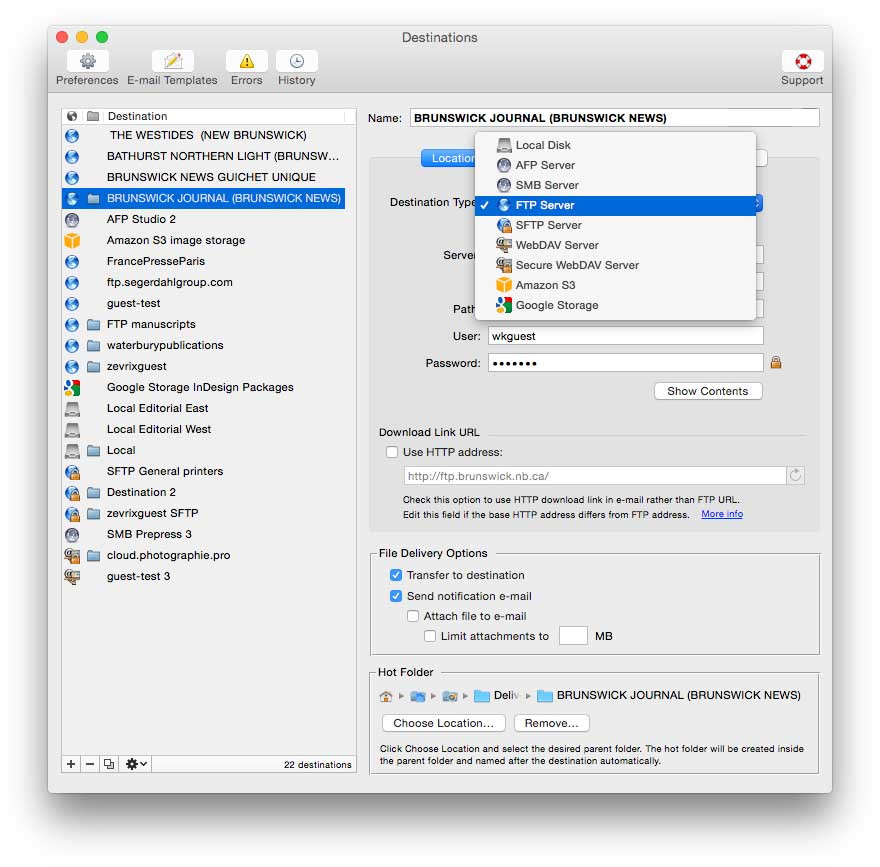
Zevrix Solutions announces Deliver Express 2.5.12, a maintenance update to its file transfer solution that automatically sends files across the Internet and locally from watched hot folders. The app also issues automatic email notifications upon file delivery. Deliver Express can serve unlimited users on a network and supports FTP, SFTP, WebDAV and more. The new version solves a compatibility issue with some older versions of OS X and introduces improvements in memory management and stability.
Toronto (ON) Canada - Zevrix Solutions today is proud to announce the release of Deliver Express 2.5.12, a maintenance update to its automated solution to send and share files easily across the Internet and local networks. Deliver Express processes files from watched hot folders and supports FTP, Amazon S3, WebDAV, AFP and other remote and local services. The software can run absolutely unattended and offers variable email notifications, delivery to multiple destinations, file compression, automatic PDF creation, and much more.
"What's great about Deliver Express for organizations is the unattended nature of using a hot folder," writes Jeffrey Mincey on Mac360. "It's perfect for all kinds of file delivery. Sensitive documents, encrypted files, financial information, graphic files, photographs, large files and so on."
The new version addresses a compatibility issue which could result in crashes when transferring files to local destinations on Mac OS X 10.7-10.8. To avoid the problem, the option to apply Finder tags to completed deliveries is now disabled on OS X versions prior to 10.9. The update also improves reliability of file expiration engine, ensures that Internet passwords do not appear in system logs, and improves memory management.
Deliver Express offers the following key features:
* Upload files automatically from watched hot folders
* Built-in email delivery notifications
* Download link in notification email
* Unlimited users on a network
* Submit files from both Mac and PC
* Automatic file compression and encryption
* Create PDF on the fly and attach to email
* Expire files after certain period
Pricing and Availability:
Deliver Express can be purchased from Zevrix website as well as from authorized resellers. The license prices are based on the maximum number of allowed destinations and range from $29.95 to $299.95 (USD). The update is free for licensed users. Trial is also available for download. Deliver Express requires OS X 10.5-10.11 (some features require OS X 10.7 and later).
Zevrix Solutions: http://zevrix.com
Deliver Express 2.5.12: http://zevrix.com/Deliver.php
Download Deliver Express: http://zevrix.com/DeliverExpress.dmg
Purchase: http://zevrix.com/store.php
Screenshot: http://zevrix.com/screenshots/deliver-2/dx-location-ysmt.jpg
Located in Toronto, Canada, Zevrix Solutions provides automation and productivity solutions for Adobe Creative Cloud and Creative Suite software, PDF workflows, graphic file diagnostics and Microsoft Office output on Mac OS. Zevrix is dedicated to help professionals increase their profits through automating everyday tasks, producing error-free documents, saving disk space and cutting production costs. For more information, visit their website. Copyright (C) 2016 Zevrix Solutions. All Rights Reserved. Other trademarks and registered trademarks may be the property of their respective owners.
*******
Link To Article: http://prmac.com/release-id-79340.htm
*******
---------------------------------------------------------------------------------
Note that you can alter delivered distributions at any time.
Login to your account on prMac to alter your channel selection, or to opt-out at any time.

Create Booklet 1.3 released for OS X - Booklet Factory is here
A new article has been published at prMac.
Create Booklet 1.3 released for OS X - Booklet Factory is here - Published on 04/28/16
TheKeptPromise today announces Create Booklet 1.3.3 for Mac OS X, an update to its app and PDF service. Create Booklet allows anyone to create a booklet from almost any file from within almost any software. The app can place pages side by side re-sorted for booklet printing, no matter what printer is used. In version 1.3.3, Booklet Factory has been updated with automated batch processing and now supports El Capitan. It's perfect for anyone who quickly needs to create multiple booklets at once.
Ratingen, Germany - TheKeptPromise today is pleased to announce the release of Create Booklet 1.3.3 for Mac OS X, an update to its app and PDF service. The app allows the user to create a booklet from almost any file from within almost any software. Create Booklet is the standard solution for creating booklets since 2005, with over 120,000 users.
Version 1.3.3 marks the end of the old Create Booklet automator action as with 1.3.3 all features are included. This means our long term customers can finally update to El Capitan.
The Booklet Factory goes far beyond it's predecessor, it allows the instant printing and exporting of multiple booklets with individual or shared settings. We also extended the app to allow saving default settings for document or factory processing as well as creating booklet paper formats on the fly based on the input format.
New Features:
* Booklet Factory: automated batch processing with all bells and whistles
* Save all settings as default
* Automatic paper size
Road to Create Booklet 1.3.3
Create Booklet started with a simple PDF Service that was enhanced by customer's requests, but quickly reached the limit of a Service and so the Create Booklet app 1.0 was born.
When version 1.1 came to the App Store, it was the first app to allow printing duplex booklets on any printer, using the manual duplex method. After every release, TheKeptPromise listened very carefully to their user's requests. As a result, Create Booklet 1.2 added Pro features like Page Numbering, Creep Compensation as well as an improved layout and an extended help section. 1.3 releases the Automator Action off duty and integrates a professional batch workflow right into Create Booklet: Booklet Factory.
Features:
* Booklet Factory: Convenient batch processing built-in
* Straight Order
* Support for auto-rotation of landscape pages
* Set last page for numbering
* Manual Duplex: Print duplex, even with a non-duplex printer
* Create a booklet from any app: Open Create Booklet directly from the print panel
* Direct PDF editing: Add Empty pages, add images, add complete PDFs, reorder pages, remove unneeded pages
* Page Numbering
* Creep Compensation
* Auto help when you need it
* Save a booklet to a new PDF
* Rasterize broken PDFs
* Select output print format and orientation
* Layout your PDF to the final output size using zoom and position setting
* Reverse booklet page order (allows right to left documents usage!)
* Split thick booklets into multiple thin ones
* Easily staple booklets: Create Booklet adds staple marks on the first and last page
See what our customers have to say about Create Booklet:
"Wow. I wish I'd known about it years ago [...]. I've just used Create Booklet to make the first ever books for the Bumthang people in their own language. Thank YOU." - Mark
"THANK YOU for Create Booklet! I have used it several times now to print out playbills for my children's various school plays, and it has been an absolute lifesaver." - William W. Lin
"I was desperately looking for a quick and easy way of making a Christmas Carol booklet. I came across this site, and it was almost like a Christmas miracle ;-) Thanks so much for making and sharing Create Booklet. It works perfectly and really helped me out." - Dan
Supported Languages:
* English, German, French and Italian
System Requirements:
* OS X 10.7 or later
* 64-bit processor
* 23.0 MB
Pricing and Availability:
Create Booklet 1.3.3 is $9.99 USD (or equivalent amount in other currencies) and available worldwide through the Mac App Store in the Utilities category.
TheKeptPromise: http://thekeptpromise.com/TheKeptPromise/
Create Booklet 1.3.3: http://thekeptpromise.com/CreateBooklet/
Purchase and Download (MAS): https://itunes.apple.com/app/create-booklet/id943029046
Screenshot 1: http://a1.mzstatic.com/us/r30/Purple6/v4/82/97/cf/8297cfc8-7602-d8e4-fc8f-9dcbe87e91e2/screen800x500.jpeg
Screenshot 2: http://a4.mzstatic.com/us/r30/Purple69/v4/8b/76/88/8b76888e-36cc-442f-40bf-56bf704a7085/screen800x500.jpeg
Application Icon: http://a4.mzstatic.com/us/r30/Purple30/v4/3b/5f/42/3b5f42f9-1d9b-9372-2a9e-10d4ca0b966d/icon128-2x.png
TheKeptPromise, home of apps like MyTeeth (which was featured by Apple in their "parenthood" TV ad), is an app development company based in Ratingen/Germany and creates software that lives up to its promise. The company develops solutions in areas they feel the customer needs are not met. TheKeptPromise is a start-up of award winning professionals who have published scientific papers, have had photos selected by National Geographic, 1px and more. All Material and Software (C) Copyright 2016 TheKeptPromise. All Rights Reserved. Apple, the Apple logo, Macintosh and Mac OS X are registered trademarks of Apple Inc. in the U.S. and/or other countries. Other trademarks and registered trademarks may be the property of their respective owners.
*******
Link To Article: http://prmac.com/release-id-79337.htm
*******
---------------------------------------------------------------------------------
Note that you can alter delivered distributions at any time.
Login to your account on prMac to alter your channel selection, or to opt-out at any time.
Create Booklet 1.3 released for OS X - Booklet Factory is here - Published on 04/28/16
TheKeptPromise today announces Create Booklet 1.3.3 for Mac OS X, an update to its app and PDF service. Create Booklet allows anyone to create a booklet from almost any file from within almost any software. The app can place pages side by side re-sorted for booklet printing, no matter what printer is used. In version 1.3.3, Booklet Factory has been updated with automated batch processing and now supports El Capitan. It's perfect for anyone who quickly needs to create multiple booklets at once.
Ratingen, Germany - TheKeptPromise today is pleased to announce the release of Create Booklet 1.3.3 for Mac OS X, an update to its app and PDF service. The app allows the user to create a booklet from almost any file from within almost any software. Create Booklet is the standard solution for creating booklets since 2005, with over 120,000 users.
Version 1.3.3 marks the end of the old Create Booklet automator action as with 1.3.3 all features are included. This means our long term customers can finally update to El Capitan.
The Booklet Factory goes far beyond it's predecessor, it allows the instant printing and exporting of multiple booklets with individual or shared settings. We also extended the app to allow saving default settings for document or factory processing as well as creating booklet paper formats on the fly based on the input format.
New Features:
* Booklet Factory: automated batch processing with all bells and whistles
* Save all settings as default
* Automatic paper size
Road to Create Booklet 1.3.3
Create Booklet started with a simple PDF Service that was enhanced by customer's requests, but quickly reached the limit of a Service and so the Create Booklet app 1.0 was born.
When version 1.1 came to the App Store, it was the first app to allow printing duplex booklets on any printer, using the manual duplex method. After every release, TheKeptPromise listened very carefully to their user's requests. As a result, Create Booklet 1.2 added Pro features like Page Numbering, Creep Compensation as well as an improved layout and an extended help section. 1.3 releases the Automator Action off duty and integrates a professional batch workflow right into Create Booklet: Booklet Factory.
Features:
* Booklet Factory: Convenient batch processing built-in
* Straight Order
* Support for auto-rotation of landscape pages
* Set last page for numbering
* Manual Duplex: Print duplex, even with a non-duplex printer
* Create a booklet from any app: Open Create Booklet directly from the print panel
* Direct PDF editing: Add Empty pages, add images, add complete PDFs, reorder pages, remove unneeded pages
* Page Numbering
* Creep Compensation
* Auto help when you need it
* Save a booklet to a new PDF
* Rasterize broken PDFs
* Select output print format and orientation
* Layout your PDF to the final output size using zoom and position setting
* Reverse booklet page order (allows right to left documents usage!)
* Split thick booklets into multiple thin ones
* Easily staple booklets: Create Booklet adds staple marks on the first and last page
See what our customers have to say about Create Booklet:
"Wow. I wish I'd known about it years ago [...]. I've just used Create Booklet to make the first ever books for the Bumthang people in their own language. Thank YOU." - Mark
"THANK YOU for Create Booklet! I have used it several times now to print out playbills for my children's various school plays, and it has been an absolute lifesaver." - William W. Lin
"I was desperately looking for a quick and easy way of making a Christmas Carol booklet. I came across this site, and it was almost like a Christmas miracle ;-) Thanks so much for making and sharing Create Booklet. It works perfectly and really helped me out." - Dan
Supported Languages:
* English, German, French and Italian
System Requirements:
* OS X 10.7 or later
* 64-bit processor
* 23.0 MB
Pricing and Availability:
Create Booklet 1.3.3 is $9.99 USD (or equivalent amount in other currencies) and available worldwide through the Mac App Store in the Utilities category.
TheKeptPromise: http://thekeptpromise.com/TheKeptPromise/
Create Booklet 1.3.3: http://thekeptpromise.com/CreateBooklet/
Purchase and Download (MAS): https://itunes.apple.com/app/create-booklet/id943029046
Screenshot 1: http://a1.mzstatic.com/us/r30/Purple6/v4/82/97/cf/8297cfc8-7602-d8e4-fc8f-9dcbe87e91e2/screen800x500.jpeg

Screenshot 2: http://a4.mzstatic.com/us/r30/Purple69/v4/8b/76/88/8b76888e-36cc-442f-40bf-56bf704a7085/screen800x500.jpeg

Application Icon: http://a4.mzstatic.com/us/r30/Purple30/v4/3b/5f/42/3b5f42f9-1d9b-9372-2a9e-10d4ca0b966d/icon128-2x.png

TheKeptPromise, home of apps like MyTeeth (which was featured by Apple in their "parenthood" TV ad), is an app development company based in Ratingen/Germany and creates software that lives up to its promise. The company develops solutions in areas they feel the customer needs are not met. TheKeptPromise is a start-up of award winning professionals who have published scientific papers, have had photos selected by National Geographic, 1px and more. All Material and Software (C) Copyright 2016 TheKeptPromise. All Rights Reserved. Apple, the Apple logo, Macintosh and Mac OS X are registered trademarks of Apple Inc. in the U.S. and/or other countries. Other trademarks and registered trademarks may be the property of their respective owners.
*******
Link To Article: http://prmac.com/release-id-79337.htm
*******
---------------------------------------------------------------------------------
Note that you can alter delivered distributions at any time.
Login to your account on prMac to alter your channel selection, or to opt-out at any time.
Coming Soon ... Avadon 3: The Warborn, Fantasy Adventure for Macintosh
A new article has been published at prMac.
Coming Soon ... Avadon 3: The Warborn, Fantasy Adventure for Macintosh - Published on 04/28/16
Spiderweb Software, Inc. announced today the upcoming release of Avadon 3: The Warborn, the final chapter in the Avadon Trilogy. Avadon 3 will be an all-new, indie, retro fantasy role-playing game, full of exciting battles, lands to conquer, and the intricate stories Spiderweb Software is known for. Choose from five different character classes, each with dozens of spells and abilities. Explore cunning dungeons, hunt for hundreds of magical artifacts, and pass judgment on your enemies.
Seattle, Washington - Spiderweb Software, Inc. announced today the upcoming release of Avadon 3: The Warborn, the final chapter in the Avadon Trilogy. Avadon 3 will be an all-new, indie, retro fantasy role-playing game, full of exciting battles, lands to conquer, and the intricate stories Spiderweb Software is known for.
You are a Hand of Avadon, the Black Fortress. You are a warrior and spy, judge and executioner, with nearly unlimited power to fight the enemies of your homeland. Your word is Law.
But your lands have been invaded. Your borders have been overrun by barbarians, monsters, and powerful armies. Cities are burning, and your people are desperate for help. You have discovered a path to ending the war, but your plan will need every scrap of power and resourcefulness to succeed.
The ending to the saga is not set in stone, though. Yes, you can defeat the enemy and save your people. You might also betray your people and bring victory to the invaders. You can even, with cunning and violence, gain great power and wealth for yourself. In the conclusion to the Avadon Saga, the choice will be up to you!
Avadon 3: The Warborn is an epic fantasy role-playing adventure in an enormous and unique world. You can choose from five different character classes, each with dozens of spells and abilities. Explore cunning dungeons, hunt for hundreds of magical artifacts, and pass judgment on your enemies. Avadon 3 features many different endings. Will you save your people or betray them? We leave that decision up to you. Avadon 3 will be released for Windows, Macintosh, and the iPad in Fall, 2016.
Spiderweb Software: http://www.spiderwebsoftware.com/
Avadon 3: The Warborn: http://www.spiderwebsoftware.com/avadon3
Avadon 3: The Warborn on Steam: http://store.steampowered.com/app/460780/
YouTube Video (Trailer): https://www.youtube.com/watch?v=dI6fwtZL_bM
Screenshots: http://www.spiderwebsoftware.com/avadon3/shots.html
Spiderweb Software, Inc., an Indie game company based in Seattle, WA, is fanatically dedicated to creating fun, exciting fantasy role-playing games for Windows, Macintosh, and the iPad. Past titles include the award-winning Exile, Geneforge, Avernum and Avadon series. Copyright (C) 2016 Spiderweb Software, Inc. All Rights Reserved. Apple, the Apple logo and Macintosh are registered trademarks of Apple Inc. in the U.S. and/or other countries.
*******
Link To Article: http://prmac.com/release-id-79336.htm
*******
---------------------------------------------------------------------------------
Note that you can alter delivered distributions at any time.
Login to your account on prMac to alter your channel selection, or to opt-out at any time.
Coming Soon ... Avadon 3: The Warborn, Fantasy Adventure for Macintosh - Published on 04/28/16
Spiderweb Software, Inc. announced today the upcoming release of Avadon 3: The Warborn, the final chapter in the Avadon Trilogy. Avadon 3 will be an all-new, indie, retro fantasy role-playing game, full of exciting battles, lands to conquer, and the intricate stories Spiderweb Software is known for. Choose from five different character classes, each with dozens of spells and abilities. Explore cunning dungeons, hunt for hundreds of magical artifacts, and pass judgment on your enemies.
Seattle, Washington - Spiderweb Software, Inc. announced today the upcoming release of Avadon 3: The Warborn, the final chapter in the Avadon Trilogy. Avadon 3 will be an all-new, indie, retro fantasy role-playing game, full of exciting battles, lands to conquer, and the intricate stories Spiderweb Software is known for.
You are a Hand of Avadon, the Black Fortress. You are a warrior and spy, judge and executioner, with nearly unlimited power to fight the enemies of your homeland. Your word is Law.
But your lands have been invaded. Your borders have been overrun by barbarians, monsters, and powerful armies. Cities are burning, and your people are desperate for help. You have discovered a path to ending the war, but your plan will need every scrap of power and resourcefulness to succeed.
The ending to the saga is not set in stone, though. Yes, you can defeat the enemy and save your people. You might also betray your people and bring victory to the invaders. You can even, with cunning and violence, gain great power and wealth for yourself. In the conclusion to the Avadon Saga, the choice will be up to you!
Avadon 3: The Warborn is an epic fantasy role-playing adventure in an enormous and unique world. You can choose from five different character classes, each with dozens of spells and abilities. Explore cunning dungeons, hunt for hundreds of magical artifacts, and pass judgment on your enemies. Avadon 3 features many different endings. Will you save your people or betray them? We leave that decision up to you. Avadon 3 will be released for Windows, Macintosh, and the iPad in Fall, 2016.
Spiderweb Software: http://www.spiderwebsoftware.com/
Avadon 3: The Warborn: http://www.spiderwebsoftware.com/avadon3
Avadon 3: The Warborn on Steam: http://store.steampowered.com/app/460780/
YouTube Video (Trailer): https://www.youtube.com/watch?v=dI6fwtZL_bM
Screenshots: http://www.spiderwebsoftware.com/avadon3/shots.html
Spiderweb Software, Inc., an Indie game company based in Seattle, WA, is fanatically dedicated to creating fun, exciting fantasy role-playing games for Windows, Macintosh, and the iPad. Past titles include the award-winning Exile, Geneforge, Avernum and Avadon series. Copyright (C) 2016 Spiderweb Software, Inc. All Rights Reserved. Apple, the Apple logo and Macintosh are registered trademarks of Apple Inc. in the U.S. and/or other countries.
*******
Link To Article: http://prmac.com/release-id-79336.htm
*******
---------------------------------------------------------------------------------
Note that you can alter delivered distributions at any time.
Login to your account on prMac to alter your channel selection, or to opt-out at any time.
Body Parts - Basic (Middle and Asia) from Kidz Learn Applications
A new article has been published at prMac.
Body Parts - Basic (Middle and Asia) from Kidz Learn Applications - Published on 04/27/16
Kidz Learn Applications announces Body Parts - Basic (Middle and Asia) 1.0, their educational app for iOS, Blackberry, Android, and Amazon Fire devices that allows a child to learn parts of a body in 5 different languages. Body Parts helps young children learn about the different body parts, along with how to pronounce the word that accompanies the respective part. Body Parts utilizes not only imagery, but HD sound as well, to help children connect the body parts to the words.
Edison, New Jersey - Kidz Learn Applications is pleased to introduce Body Parts - Basic (Middle and Asia) 1.0, their educational smartphone application available for iOS, Black Berry, Android, and Amazon Fire devices. It is an educational app that describes the basic parts of a human body in 5 languages.
Upon opening this app, users can select an image: eyes, nose, ears, lips, hands, fingers and feet; or can select the full catalog of parts from the bottom center tile. In addition, users can also select the Questions section of Body Parts, which goes into a little game for the child to play. Once inside, the voice of a young child will ask, "Which of these pictures shows the nose?" for example and there are three pictures to choose from; choose the correct answer and a large smiley face pops up and allows the player to go to the next question. This section of the game makes learning the body parts both visually and audibly stimulating, keeping the learning fun.
This app fosters kids to learn other languages by providing them with the settings tab (iOS) or Settings menu option (Android). This allows the user to learn the parts of the human body in the language he/she wants to learn. This application enables a child to learn in languages: English, Tamil, Hindi and Chinese and Arabic.
The full catalog section mentioned above this section of the app is extremely comprehensive and gives the users a breakdown of all the upper body, middle body and lower body parts, starting at the top of each respective section and giving the user a quick video breakdown of all of the body parts in that given section.
This app also takes Privacy and Security of Kids and does not display ads or take location information. This app also does not have in-app purchases, ads or links to social media and external websites.
"I am a mom with 2 kids. My kid loves to play in smart phones and Tablet. She/he enjoys playing games. This made me think, why not make educational applications for kids to learn and have fun," says Gomathy Shankaran. "My kid loves to learn and have fun with my applications. Hence the apps are intended for all kids who want to grow by learning smart. My applications have Parental Gate for in-App purchases, links to external websites and Social Media. Kid's will have fun Learning," Gomathy adds.
Device Requirements:
* iPhone, iPad, and iPod touch
* Requires iOS 6.0 or later
* 75.7 MB
Pricing and Availability:
Body Parts - Basic (Middle and Asia)1.0 is just $1.99 USD (or equivalent amount in other currencies), and is available worldwide through the App Store in the Education category. The app is also available on for Android devices through Google Play and Amazon Fire devices through the Amazon Appstore.
Body Parts - Basic (Middle and Asia) 1.0: https://itunes.apple.com/app/body-parts-basic-middle-asia/id1088010167
Purchase and Download from Google Play: https://play.google.com/store/apps/details?id=com.bodyparts2lang.application
Purchase and Download from Amazon: http://www.amazon.com/Independent-Body-Parts-Middle-and-Asia/dp/B01CUQB19K
Youtube Video: https://www.youtube.com/channel/UCbMQ72Dj9DY9kxtvUSFj7cA
Kidz Learn App Links: http://kidzlearn.co/iosandroid-links.html
Kidz Learn Applications are designed for kid's to have fun and enhance their learning abilities.The many paid, and unpaid applications do not require WIFI or net connection to play. Kidz Learn considers Security and Privacy of kid's important. The applications are developed taking security and privacy in to consideration. All Material and Software (C) Copyright 2016 Kidz Learn Applications. All Rights Reserved. Apple, the Apple logo, iPhone, iPod and iPad are registered trademarks of Apple Inc. in the U.S. and/or other countries. Other trademarks and registered trademarks may be the property of their respective owners.
*******
Link To Article: http://prmac.com/release-id-79335.htm
*******
---------------------------------------------------------------------------------
Note that you can alter delivered distributions at any time.
Login to your account on prMac to alter your channel selection, or to opt-out at any time.
Body Parts - Basic (Middle and Asia) from Kidz Learn Applications - Published on 04/27/16
Kidz Learn Applications announces Body Parts - Basic (Middle and Asia) 1.0, their educational app for iOS, Blackberry, Android, and Amazon Fire devices that allows a child to learn parts of a body in 5 different languages. Body Parts helps young children learn about the different body parts, along with how to pronounce the word that accompanies the respective part. Body Parts utilizes not only imagery, but HD sound as well, to help children connect the body parts to the words.
Edison, New Jersey - Kidz Learn Applications is pleased to introduce Body Parts - Basic (Middle and Asia) 1.0, their educational smartphone application available for iOS, Black Berry, Android, and Amazon Fire devices. It is an educational app that describes the basic parts of a human body in 5 languages.
Upon opening this app, users can select an image: eyes, nose, ears, lips, hands, fingers and feet; or can select the full catalog of parts from the bottom center tile. In addition, users can also select the Questions section of Body Parts, which goes into a little game for the child to play. Once inside, the voice of a young child will ask, "Which of these pictures shows the nose?" for example and there are three pictures to choose from; choose the correct answer and a large smiley face pops up and allows the player to go to the next question. This section of the game makes learning the body parts both visually and audibly stimulating, keeping the learning fun.
This app fosters kids to learn other languages by providing them with the settings tab (iOS) or Settings menu option (Android). This allows the user to learn the parts of the human body in the language he/she wants to learn. This application enables a child to learn in languages: English, Tamil, Hindi and Chinese and Arabic.
The full catalog section mentioned above this section of the app is extremely comprehensive and gives the users a breakdown of all the upper body, middle body and lower body parts, starting at the top of each respective section and giving the user a quick video breakdown of all of the body parts in that given section.
This app also takes Privacy and Security of Kids and does not display ads or take location information. This app also does not have in-app purchases, ads or links to social media and external websites.
"I am a mom with 2 kids. My kid loves to play in smart phones and Tablet. She/he enjoys playing games. This made me think, why not make educational applications for kids to learn and have fun," says Gomathy Shankaran. "My kid loves to learn and have fun with my applications. Hence the apps are intended for all kids who want to grow by learning smart. My applications have Parental Gate for in-App purchases, links to external websites and Social Media. Kid's will have fun Learning," Gomathy adds.
Device Requirements:
* iPhone, iPad, and iPod touch
* Requires iOS 6.0 or later
* 75.7 MB
Pricing and Availability:
Body Parts - Basic (Middle and Asia)1.0 is just $1.99 USD (or equivalent amount in other currencies), and is available worldwide through the App Store in the Education category. The app is also available on for Android devices through Google Play and Amazon Fire devices through the Amazon Appstore.
Body Parts - Basic (Middle and Asia) 1.0: https://itunes.apple.com/app/body-parts-basic-middle-asia/id1088010167
Purchase and Download from Google Play: https://play.google.com/store/apps/details?id=com.bodyparts2lang.application
Purchase and Download from Amazon: http://www.amazon.com/Independent-Body-Parts-Middle-and-Asia/dp/B01CUQB19K
Youtube Video: https://www.youtube.com/channel/UCbMQ72Dj9DY9kxtvUSFj7cA
Kidz Learn App Links: http://kidzlearn.co/iosandroid-links.html
Kidz Learn Applications are designed for kid's to have fun and enhance their learning abilities.The many paid, and unpaid applications do not require WIFI or net connection to play. Kidz Learn considers Security and Privacy of kid's important. The applications are developed taking security and privacy in to consideration. All Material and Software (C) Copyright 2016 Kidz Learn Applications. All Rights Reserved. Apple, the Apple logo, iPhone, iPod and iPad are registered trademarks of Apple Inc. in the U.S. and/or other countries. Other trademarks and registered trademarks may be the property of their respective owners.
*******
Link To Article: http://prmac.com/release-id-79335.htm
*******
---------------------------------------------------------------------------------
Note that you can alter delivered distributions at any time.
Login to your account on prMac to alter your channel selection, or to opt-out at any time.
Afghanistan Keyboard 1.0
A new article has been published at prMac.
Afghanistan Keyboard 1.0 - Published on 04/27/16
LastThink today announces Afghanistan Keyboard for iPad and iPhone 1.0, their highly customizable keyboard application. Afghanistan Keyboard offers users a third-party keyboard for use with iOS apps that allows anyone to modify it to their individual taste. Users can modify the order of the keyboard for more convenient usage. The update includes the ability to save specific words for later use, emoticons, paragraph formatting, word prediction, and more.
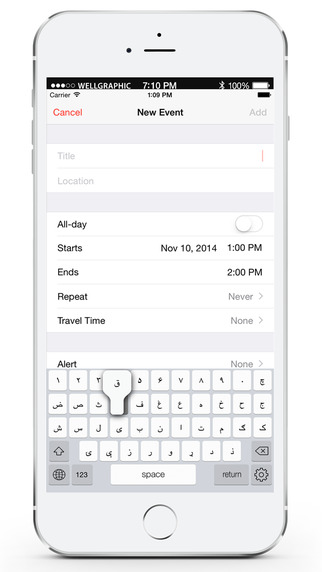
Yerevan, Armenia - LastThink is proud to announce the release of Afghanistan Keyboard for iPad and iPhone 1.0, their highly customizable keyboard application. The Afghanistan Keyboard's customization features allow anyone to create the keyboard layout that is perfect for their needs. Features include the ability to change the size, shape, and order of characters; the ability to save specific words for later use; emoticons, word prediction, and more.
Users can change the order of the keyboard's letter layout, and even create handy shortcuts to allow entering words or even entire sentences with just a few keystrokes. The keyboard's Swipe feature allows users to swipe their finger around the keyboard to select letters and form words. The app intelligently predicts what the user intends to enter, greatly enhancing typing speed.
What's New in Version 1.0:
* Change the size, and place, as well as the shape of characters and keyboard separately
* Save any words that are used frequently in the active vocabulary for later use
* Express emotions with emoji characters (emoticons) which will correspond to entered words
* Paragraph formatting: Adjust alignment, line spacing, margins, bullets and numbering
* Optional smart auto correction: Intelligent spell checking for even the sloppiest typing
* Style: Customize the look of the keyboard. Change the color of the keys and background
* Word prediction: The keyboard guesses and displays the appropriate word as the user types
* Share text via Facebook, Twitter, email, Dropbox, and more
"When we set out to create the Afghanistan Keyboard, we knew we wanted to create a customizable keyboard that would offer users the ability to modify it to their individual tastes," says LastThink founder Grigori Jlavyan. " Our keyboard allows Afghanistan speaking users to easily enter their text messages, emails, and other types of texts via a comprehensive interface, making their day-to-day communications more convenient than ever."
The Afghanistan Keyboard also offers handy paragraph formatting options, allowing users to adjust the alignment of their text, while also offering the ability to set line spacing, adjust margins, even add bulleted or numbered lists. Optional smart correction makes even the sloppiest speller's text entry become correct. The keyboard also offers a downloadable Afghanistan font for use with iOS devices, making text entry, editing, and display even more convenient.
Afghanistan Keyboard emphasizes the user's security above all, and while many third-party iOS keyboard apps require "Full Access" - with the ability to send back keystrokes and other information back to their developer - the Afghanistan Keyboard does not, protecting the text entry and sensitive user information, keeping their personal information safe from prying eyes.
Device Requirements:
* iPhone, iPad, and iPod touch
* Optimized for iPhone 5, iPhone 6/6 Plus
* Universal Application
* Requires iOS 8.0 or later
* 7.5 MB
Pricing and Availability:
Afghanistan Keyboard 1.0 is only $1.99 USD (or equivalent amount in other currencies) and available worldwide exclusively through the App Store in the Utilities category. Review codes are available upon request.
LastThink: http://lastthink.com/
Afghanistan Keyboard ( Pashto Keypad ) for iPad and iPhone 1.0: https://www.facebook.com/pages/IosRegion/688324511213130
Direct Download Link: https://itunes.apple.com/app/afghanistan-keyboard-pashto/id939204674
Screenshot: http://a5.mzstatic.com/us/r30/Purple1/v4/83/ff/41/83ff41d4-a160-4c1e-fa20-e96ba3eff14d/screen322x572.jpeg
App Icon: http://a4.mzstatic.com/us/r30/Purple3/v4/64/7c/76/647c76f7-8c96-0f28-1813-2fe21663542d/icon175x175.png
LastThink is an IT company with a focus on mobile development. It has extended its list of services since 2012 to offer high-end business process management, system integration, as well as up-to-date communication solutions. LastThink's mission is to deliver maximum business value to its customers by designing, developing, implementing and maintaining efficient and high quality software solutions aligned with their most essential business needs. Their team will always do its best to meet client expectations. All Material and Software (C) Copyright 2016 LastThink. All Rights Reserved. Apple, the Apple logo, iPhone, iPod and iPad are registered trademarks of Apple Inc. in the U.S. and/or other countries. Other trademarks and registered trademarks may be the property of their respective owners.
*******
Link To Article: http://prmac.com/release-id-79334.htm
*******
---------------------------------------------------------------------------------
Note that you can alter delivered distributions at any time.
Login to your account on prMac to alter your channel selection, or to opt-out at any time.
Afghanistan Keyboard 1.0 - Published on 04/27/16
LastThink today announces Afghanistan Keyboard for iPad and iPhone 1.0, their highly customizable keyboard application. Afghanistan Keyboard offers users a third-party keyboard for use with iOS apps that allows anyone to modify it to their individual taste. Users can modify the order of the keyboard for more convenient usage. The update includes the ability to save specific words for later use, emoticons, paragraph formatting, word prediction, and more.
Yerevan, Armenia - LastThink is proud to announce the release of Afghanistan Keyboard for iPad and iPhone 1.0, their highly customizable keyboard application. The Afghanistan Keyboard's customization features allow anyone to create the keyboard layout that is perfect for their needs. Features include the ability to change the size, shape, and order of characters; the ability to save specific words for later use; emoticons, word prediction, and more.
Users can change the order of the keyboard's letter layout, and even create handy shortcuts to allow entering words or even entire sentences with just a few keystrokes. The keyboard's Swipe feature allows users to swipe their finger around the keyboard to select letters and form words. The app intelligently predicts what the user intends to enter, greatly enhancing typing speed.
What's New in Version 1.0:
* Change the size, and place, as well as the shape of characters and keyboard separately
* Save any words that are used frequently in the active vocabulary for later use
* Express emotions with emoji characters (emoticons) which will correspond to entered words
* Paragraph formatting: Adjust alignment, line spacing, margins, bullets and numbering
* Optional smart auto correction: Intelligent spell checking for even the sloppiest typing
* Style: Customize the look of the keyboard. Change the color of the keys and background
* Word prediction: The keyboard guesses and displays the appropriate word as the user types
* Share text via Facebook, Twitter, email, Dropbox, and more
"When we set out to create the Afghanistan Keyboard, we knew we wanted to create a customizable keyboard that would offer users the ability to modify it to their individual tastes," says LastThink founder Grigori Jlavyan. " Our keyboard allows Afghanistan speaking users to easily enter their text messages, emails, and other types of texts via a comprehensive interface, making their day-to-day communications more convenient than ever."
The Afghanistan Keyboard also offers handy paragraph formatting options, allowing users to adjust the alignment of their text, while also offering the ability to set line spacing, adjust margins, even add bulleted or numbered lists. Optional smart correction makes even the sloppiest speller's text entry become correct. The keyboard also offers a downloadable Afghanistan font for use with iOS devices, making text entry, editing, and display even more convenient.
Afghanistan Keyboard emphasizes the user's security above all, and while many third-party iOS keyboard apps require "Full Access" - with the ability to send back keystrokes and other information back to their developer - the Afghanistan Keyboard does not, protecting the text entry and sensitive user information, keeping their personal information safe from prying eyes.
Device Requirements:
* iPhone, iPad, and iPod touch
* Optimized for iPhone 5, iPhone 6/6 Plus
* Universal Application
* Requires iOS 8.0 or later
* 7.5 MB
Pricing and Availability:
Afghanistan Keyboard 1.0 is only $1.99 USD (or equivalent amount in other currencies) and available worldwide exclusively through the App Store in the Utilities category. Review codes are available upon request.
LastThink: http://lastthink.com/
Afghanistan Keyboard ( Pashto Keypad ) for iPad and iPhone 1.0: https://www.facebook.com/pages/IosRegion/688324511213130
Direct Download Link: https://itunes.apple.com/app/afghanistan-keyboard-pashto/id939204674
Screenshot: http://a5.mzstatic.com/us/r30/Purple1/v4/83/ff/41/83ff41d4-a160-4c1e-fa20-e96ba3eff14d/screen322x572.jpeg
App Icon: http://a4.mzstatic.com/us/r30/Purple3/v4/64/7c/76/647c76f7-8c96-0f28-1813-2fe21663542d/icon175x175.png

LastThink is an IT company with a focus on mobile development. It has extended its list of services since 2012 to offer high-end business process management, system integration, as well as up-to-date communication solutions. LastThink's mission is to deliver maximum business value to its customers by designing, developing, implementing and maintaining efficient and high quality software solutions aligned with their most essential business needs. Their team will always do its best to meet client expectations. All Material and Software (C) Copyright 2016 LastThink. All Rights Reserved. Apple, the Apple logo, iPhone, iPod and iPad are registered trademarks of Apple Inc. in the U.S. and/or other countries. Other trademarks and registered trademarks may be the property of their respective owners.
*******
Link To Article: http://prmac.com/release-id-79334.htm
*******
---------------------------------------------------------------------------------
Note that you can alter delivered distributions at any time.
Login to your account on prMac to alter your channel selection, or to opt-out at any time.
Precise Screenshot is a New Generation Tool to Take Screenshots on Mac
A new article has been published at prMac.
Precise Screenshot is a New Generation Tool to Take Screenshots on Mac - Published on 04/27/16
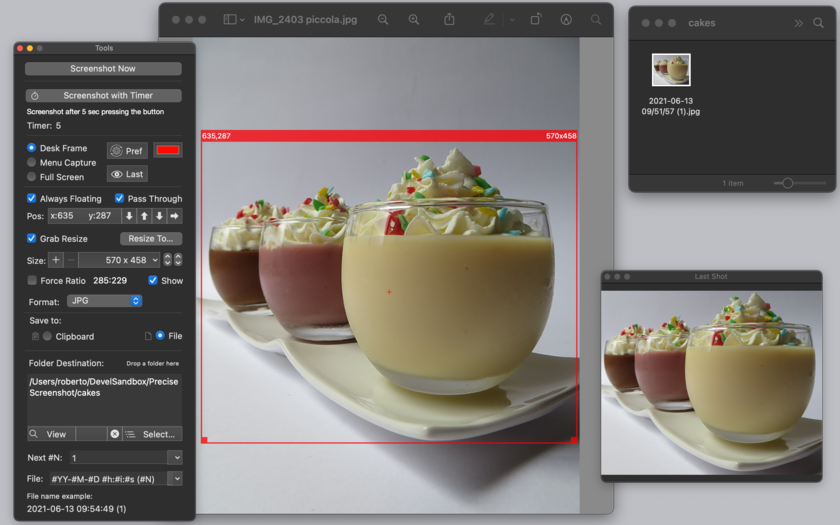
Tension Software announces Precise Screenshot 1.4.2, an important update to their new generation tool to take screenshots of Mac OS X screens. Precise Screenshot can select a resizable portion of the screen with the usual drag method or it can use pre-fixed size area from a customizable popup menu, or also use the full screen area. Precise Screenshot can take shot immediately or using a timer selectable from 0 to 10 seconds. Version 1.4.2 brings a number of bug fixes to the app.
Milano, Italy - Tension Software is proud to a announce the release of Precise Screenshot 1.4.2, an important update to their new generation tool to take screenshots from a Mac OS X screen. Precise Screenshot can select a resizable portion of the screen with the usual drag method or it can use pre-fixed size area from a customizable popup menu (with the sizes the user needs) or also use the full screen area.
Specify a new specific screen size to take screenshot with high precision is just a matter of selecting it from the custom popup, (or resizing and dragging it in the traditional way). The screenshot frame area shows it's size and position in the upper side border. The screenshot can be moved and resized with precision 1 pixel by 1 pixel. Precise Screenshot can take shot immediately or using a timer selectable from 0 to 10 seconds, (showing a count down).
It works even when in background using a status menu on the right part of the menu bar to take screenshot when other apps are in foreground and in active status. It offers also a useful tool palette with all the setting controls.It can save to the clipboard (with the picture immediately available for use) or to disk in selectable custom places. It can save to disk in JPG, PNG, TIFF format. It can save with/without alpha channel (for transparency).
'Include Menu' mode to always include in the shot the upper part of the screen with menu bar area included
Desk Frame mode to capture any portion of the screen (menu bar excluded). It can use a custom file name using meta-tags, with serial number (automatically increased) and or using date elements (Year, Month, Day, Hour, Minute, Second). The user can modify any setting at any time, also in the middle of the work as required by different situations.
Precise Screenshot can offer a preview of the latest screenshot in a floating palette. Optimized for OS X 10.11, it is fully sandboxed offering the maximum protection level combined with the maximum flexibility. It's small, fast and full featured, it has all you need for a precise and perfect work. Embedded PDF User Guide included.
What's new for this release:
* Bug fix: solved error of 1 pixel in size of screenshot when in 'Include Menu' mode
* Bug fix: movement arrow buttons are now correctly disabled when in 'Full Screen' and 'Include Menu' mode
* Other minor bug fixes
System Requirements:
* OS X 10.10 or later
* 64-bit processor
* 14.0 MB
Pricing and Availability:
Precise Screenshot 1.4.2 is $5.99 USD (or an equivalent amount in other currencies), and is available worldwide exclusively through the Mac App Store in the Utilities category.
Tension Software: http://www.tensionsoftware.com
Precise Screenshot 1.4.2: http://www.tensionsoftware.com/osx/precisescreenshot/
Purchase and Download from Mac App Store: http://itunes.apple.com/app/precise-screenshot/id531794281
Screenshot: http://www.tensionsoftware.com/static/tensionsoftware/images/app/precisescreenshot/screenshots/mac/1.png
Application Icon: http://www.tensionsoftware.com/static/tensionsoftware/images/app/precisescreenshot/icons/128.png
Tension Software develops software for Mac OS X and iOS using the latest Apple technology, Cocoa and Objective-C. All Material and Software (C) Copyright 2016 Tension Software. All Rights Reserved. Apple, the Apple logo, Macintosh and Mac OS X are registered trademarks of Apple Inc. in the U.S. and/or other countries. Other trademarks and registered trademarks may be the property of their respective owners.
*******
Link To Article: http://prmac.com/release-id-79333.htm
*******
---------------------------------------------------------------------------------
Note that you can alter delivered distributions at any time.
Login to your account on prMac to alter your channel selection, or to opt-out at any time.
Precise Screenshot is a New Generation Tool to Take Screenshots on Mac - Published on 04/27/16
Tension Software announces Precise Screenshot 1.4.2, an important update to their new generation tool to take screenshots of Mac OS X screens. Precise Screenshot can select a resizable portion of the screen with the usual drag method or it can use pre-fixed size area from a customizable popup menu, or also use the full screen area. Precise Screenshot can take shot immediately or using a timer selectable from 0 to 10 seconds. Version 1.4.2 brings a number of bug fixes to the app.
Milano, Italy - Tension Software is proud to a announce the release of Precise Screenshot 1.4.2, an important update to their new generation tool to take screenshots from a Mac OS X screen. Precise Screenshot can select a resizable portion of the screen with the usual drag method or it can use pre-fixed size area from a customizable popup menu (with the sizes the user needs) or also use the full screen area.
Specify a new specific screen size to take screenshot with high precision is just a matter of selecting it from the custom popup, (or resizing and dragging it in the traditional way). The screenshot frame area shows it's size and position in the upper side border. The screenshot can be moved and resized with precision 1 pixel by 1 pixel. Precise Screenshot can take shot immediately or using a timer selectable from 0 to 10 seconds, (showing a count down).
It works even when in background using a status menu on the right part of the menu bar to take screenshot when other apps are in foreground and in active status. It offers also a useful tool palette with all the setting controls.It can save to the clipboard (with the picture immediately available for use) or to disk in selectable custom places. It can save to disk in JPG, PNG, TIFF format. It can save with/without alpha channel (for transparency).
'Include Menu' mode to always include in the shot the upper part of the screen with menu bar area included
Desk Frame mode to capture any portion of the screen (menu bar excluded). It can use a custom file name using meta-tags, with serial number (automatically increased) and or using date elements (Year, Month, Day, Hour, Minute, Second). The user can modify any setting at any time, also in the middle of the work as required by different situations.
Precise Screenshot can offer a preview of the latest screenshot in a floating palette. Optimized for OS X 10.11, it is fully sandboxed offering the maximum protection level combined with the maximum flexibility. It's small, fast and full featured, it has all you need for a precise and perfect work. Embedded PDF User Guide included.
What's new for this release:
* Bug fix: solved error of 1 pixel in size of screenshot when in 'Include Menu' mode
* Bug fix: movement arrow buttons are now correctly disabled when in 'Full Screen' and 'Include Menu' mode
* Other minor bug fixes
System Requirements:
* OS X 10.10 or later
* 64-bit processor
* 14.0 MB
Pricing and Availability:
Precise Screenshot 1.4.2 is $5.99 USD (or an equivalent amount in other currencies), and is available worldwide exclusively through the Mac App Store in the Utilities category.
Tension Software: http://www.tensionsoftware.com
Precise Screenshot 1.4.2: http://www.tensionsoftware.com/osx/precisescreenshot/
Purchase and Download from Mac App Store: http://itunes.apple.com/app/precise-screenshot/id531794281
Screenshot: http://www.tensionsoftware.com/static/tensionsoftware/images/app/precisescreenshot/screenshots/mac/1.png
Application Icon: http://www.tensionsoftware.com/static/tensionsoftware/images/app/precisescreenshot/icons/128.png

Tension Software develops software for Mac OS X and iOS using the latest Apple technology, Cocoa and Objective-C. All Material and Software (C) Copyright 2016 Tension Software. All Rights Reserved. Apple, the Apple logo, Macintosh and Mac OS X are registered trademarks of Apple Inc. in the U.S. and/or other countries. Other trademarks and registered trademarks may be the property of their respective owners.
*******
Link To Article: http://prmac.com/release-id-79333.htm
*******
---------------------------------------------------------------------------------
Note that you can alter delivered distributions at any time.
Login to your account on prMac to alter your channel selection, or to opt-out at any time.
TaoMix 2 - An Infinite World of Sounds Available on iOS
A new article has been published at prMac.
TaoMix 2 - An Infinite World of Sounds Available on iOS - Published on 04/27/16
Montreal based inookta studio inc. today introduces TaoMix 2, their new fitness app for iOS devices. TaoMix makes it easy for anyone to create their own immersive, uniquely personal relaxing soundscapes. Users can collect and mix more than 100 carefully handpicked sounds to create dynamic soundscapes that evolve over time. They can also record and mix their own sounds to create truly unique and memorable soundscapes that can be shared with the world via Facebook, Twitter or by email.
Montreal, Canada - Available today for iPhone and iPad, TaoMix 2 makes it easy for anyone to create their own immersive, uniquely personal relaxing soundscapes that will transport them around the world, from the highest mountains to the ocean's depths.
In this sequel to the first TaoMix app, users can collect and mix more than 100 carefully handpicked sounds to create dynamic soundscapes that evolve over time, for a greater immersion. They can also record and mix their own sounds to create truly unique and memorable soundscapes that can be shared with the world via Facebook, Twitter or by email. The timer can be used to fall asleep or to set a time limit to a relaxation, meditation or yoga sessions and an Apple Watch Extension allows to play soundscapes and switch between them, without having to launch the iOS app.
"TaoMix 2 pushes the immersive experience one step further by adding randomness and customization to the soundscapes, while keeping a sleek and simple design, said Sebastien Mourey, co-founder of inookta studio. "Greater immersion leads to a better relaxation."
Key features:
* Easily create dynamic soundscapes that evolve over time
* Collect and mix more than 100 carefully handpicked sounds
* Option to generate random soundscapes
* Record sounds from your own life and surroundings to create truly unique and memorable soundscapes
* Share your creations with the world
Pricing and Availability
TaoMix 2 (v2.0.0) is available for free on the App Store in English and French, and is compatible with iPhone 4s and later, and iPad 2 and later. While the app offers enough free content to create a wide variety of soundscapes, some sound packs need to be purchased.
TaoMix 2.0: http://inookta.com/taomix/
Download from iTunes: https://itunes.apple.com/app/id1032493819
YouTube Video (App Preview): https://www.youtube.com/watch?v=FGXLAebgJlM
Screenshot: http://taomix2-cf.inookta.com/public/pr/TaoMix2_iPhone6_1.png
App Icon: http://taomix2-cf.inookta.com/public/pr/TaoMix2_icon.png
Press Kit (zip): http://inookta.com/taomix/taomix2-presskit.zip
inookta is an indie studio based in Montreal, Canada, whose mission is to create intuitive digital tools for sound exploration. All Material and Software (C) Copyright 2016 inookta studio inc. All Rights Reserved. Apple, the Apple logo, iPhone, iPod and iPad are registered trademarks of Apple Inc. in the U.S. and/or other countries. Other trademarks and registered trademarks may be the property of their respective owners.
*******
Link To Article: http://prmac.com/release-id-79331.htm
*******
---------------------------------------------------------------------------------
Note that you can alter delivered distributions at any time.
Login to your account on prMac to alter your channel selection, or to opt-out at any time.
TaoMix 2 - An Infinite World of Sounds Available on iOS - Published on 04/27/16
Montreal based inookta studio inc. today introduces TaoMix 2, their new fitness app for iOS devices. TaoMix makes it easy for anyone to create their own immersive, uniquely personal relaxing soundscapes. Users can collect and mix more than 100 carefully handpicked sounds to create dynamic soundscapes that evolve over time. They can also record and mix their own sounds to create truly unique and memorable soundscapes that can be shared with the world via Facebook, Twitter or by email.
Montreal, Canada - Available today for iPhone and iPad, TaoMix 2 makes it easy for anyone to create their own immersive, uniquely personal relaxing soundscapes that will transport them around the world, from the highest mountains to the ocean's depths.
In this sequel to the first TaoMix app, users can collect and mix more than 100 carefully handpicked sounds to create dynamic soundscapes that evolve over time, for a greater immersion. They can also record and mix their own sounds to create truly unique and memorable soundscapes that can be shared with the world via Facebook, Twitter or by email. The timer can be used to fall asleep or to set a time limit to a relaxation, meditation or yoga sessions and an Apple Watch Extension allows to play soundscapes and switch between them, without having to launch the iOS app.
"TaoMix 2 pushes the immersive experience one step further by adding randomness and customization to the soundscapes, while keeping a sleek and simple design, said Sebastien Mourey, co-founder of inookta studio. "Greater immersion leads to a better relaxation."
Key features:
* Easily create dynamic soundscapes that evolve over time
* Collect and mix more than 100 carefully handpicked sounds
* Option to generate random soundscapes
* Record sounds from your own life and surroundings to create truly unique and memorable soundscapes
* Share your creations with the world
Pricing and Availability
TaoMix 2 (v2.0.0) is available for free on the App Store in English and French, and is compatible with iPhone 4s and later, and iPad 2 and later. While the app offers enough free content to create a wide variety of soundscapes, some sound packs need to be purchased.
TaoMix 2.0: http://inookta.com/taomix/
Download from iTunes: https://itunes.apple.com/app/id1032493819
YouTube Video (App Preview): https://www.youtube.com/watch?v=FGXLAebgJlM
Screenshot: http://taomix2-cf.inookta.com/public/pr/TaoMix2_iPhone6_1.png

App Icon: http://taomix2-cf.inookta.com/public/pr/TaoMix2_icon.png

Press Kit (zip): http://inookta.com/taomix/taomix2-presskit.zip
inookta is an indie studio based in Montreal, Canada, whose mission is to create intuitive digital tools for sound exploration. All Material and Software (C) Copyright 2016 inookta studio inc. All Rights Reserved. Apple, the Apple logo, iPhone, iPod and iPad are registered trademarks of Apple Inc. in the U.S. and/or other countries. Other trademarks and registered trademarks may be the property of their respective owners.
*******
Link To Article: http://prmac.com/release-id-79331.htm
*******
---------------------------------------------------------------------------------
Note that you can alter delivered distributions at any time.
Login to your account on prMac to alter your channel selection, or to opt-out at any time.
Subscribe to:
Posts (Atom)