A new article has been published at prMac.
FotoJet Adds All-New DESIGN Mode for Making Professional Creations - Published on 04/29/16
Today, PearlMountain announces FotoJet 3.0, a free browser-based, user-friendly collage maker. The new version adds an all-new DESIGN mode, which will bring users an unprecedented experience for designing professional social media graphics, posters and other photo creations. FotoJet provides 300 social media graphics including Facebook Cover, Facebook Post, Instagram Post, and more. Users can also apply 80 shapes & lines, and search 580,000 images and 93,000 pieces of clipart from the Internet.
Chengdu, China - FotoJet is a customer-friendly collage maker that can help users customize unique and splendid collages at ease. What makes people much more excited is that it newly adds DESIGN mode where users can make professional graphic designs from 200 revamped and 70 newly designed templates. They can also apply 80 shapes & lines, and search 580,000 images and 93,000 pieces of clipart from the Internet. All these features ensure users a more convenient way to design fabulous and amazing creations.
In DESIGN mode, FotoJet provides 300 social media graphics including Facebook Cover, Facebook Post, Instagram Post, Twitter Header and YouTube Channel Art. What's different from collages is that all these templates are embedded with beautiful pictures. Users can get their own designs in seconds with some slight adjustments and then save, print them out or share to popular social platforms.
What's more, FotoJet enables users to add 80 shapes & lines to beautify their creations by simply dragging or with just one click. They can arrange them at will by moving, resizing and rotating. It's also flexible to customize them freely with favorite color fill, and proper opacity as needed to ensure the shape or line is an extraordinary one.
Additionally, FotoJet makes it convenient for users to search online images and clipart to add into their creations in DESIGN mode. They can search 580,000 images from Pixabay and 93,000 clipart from OpenClipart. The clipart they added can be freely adjusted with color overlay. Besides, FotoJet provides many new background resources for users to beautify their creations. With so many great new features and under a more intuitive GUI, users are able to unleash their creativity to the most!
Pricing and Availability:
FotoJet is free, works flawlessly in any web browser, and is fully compatible with Mac, Windows and Linux. Try it out at the FotoJet website.
FotoJet: https://www.fotojet.com/
PearlMountain Technology Co., Ltd is a dedicated graphics and software development company founded in 2006. Over the past 8 years, it has released products with great popularity among worldwide users like Picture Collage Maker, Publisher Plus and Watermark Plus. Its products have already been well received all through North America, Europe and Asia software markets for their ease of use, reliability and superior performance. All Material and Software (C) Copyright 2016 PearlMountain Technology Co., Ltd. All Rights Reserved. Apple, the Apple logo, Macintosh and Mac OS X are registered trademarks of Apple Inc. in the U.S. and/or other countries. Other trademarks and registered trademarks may be the property of their respective owners.
*******
Link To Article: http://prmac.com/release-id-79349.htm
*******
---------------------------------------------------------------------------------
Note that you can alter delivered distributions at any time.
Login to your account on prMac to alter your channel selection, or to opt-out at any time.

Armenian Keyboard 2.5 for iPad and iPhone Now Available in App Store
A new article has been published at prMac.
Armenian Keyboard 2.5 for iPad and iPhone Now Available in App Store - Published on 04/29/16
iOSRegion announces the release of Armenian Keyboard for iPad and iPhone 2.5 for iOS devices, an important update for their highly customizable keyboard app. If users are looking for an innovative and highly customizable keyboard application, which they can modify to suit their individual taste, then they have found it for good fortune. It allows users to modify the order of the letters for more convenient typing. Version 2.5 brings general bug fixes, and stability & design improvements.
Yerevan, Armenia - iOSRegion is proud to announce the release of Armenian Keyboard for iPad and iPhone 2.5, the important update to their customizable keyboard app for iPhone, iPad, and iPod touch devices. The Armenian Keyboard is highly customizable, and offers our users a contemporary way of typing. If users are looking for an innovative and highly customizable keyboard application, which they can modify to suit your individual taste, then they have found it for good fortune.
Features:
* "Change Character" section, which allows users to change the order of keyboard letters and make it more convenient to use
* "Helper View" section, which has "Correction" and "Database" features. The first one is aimed to correct the misspellings, the second one is to add the mostly used words in its glossary and it will offer the user those words in due course while typing. Both of them will improve typing speed.
* "Shortcut Collection" section, where users can save some sentences or saying in forms of abbreviations. All users need is to write down the abbreviation while typing and it will open it and send the whole sentence.
* "Static Keyboard" section, which is responsible for saving the letter order in the bar chart, regardless of changing its sizes
* "Default" and "New" Keyboard variants, here the first one is convenient for iPhone, iPad, iPod touch keyboard users, whereas the "New" style is a flat style with different font.
* "Swipe" feature to swipe around the screen, select different letters and to form words. All users need is to swipe over whatever they want to say. The app is going will predict what the user meant. It allows anyone to wipe around the screen with their finger, hence type really fast.
Our newfangled Armenian Keyboard app is specifically customized for iPhones and iPads. If users still have a second thought about downloading this app, then they should know one more thing about our company and the kind of work we conduct. The quality of this Armenian Keyboard is always processed and the number of features is extended by our sophisticated professionals who always strive to create innovative apps for our modern users.
Version 2.5 brings general bug fixes, stability improvements, and design improvements.
Device Requirements:
* iPhone, iPad, and iPod touch
* Universal App
* Optimized for iPhone 5, iPhone 6, and iPhone 6 Plus
* Requires iOS 6.1 or later
* 12.7 MB
Pricing and Availability:
Armenian Keyboard for iPad and iPhone 3.0 is free and is available worldwide exclusively through the App Stoere in the Utilities category.
LastThink: http://lastthink.com/
Armenian Keyboard 2.5: https://www.facebook.com/ArmKeyboard
Download from iTunes: https://itunes.apple.com/app/arm-keyboard/id673974495
Screenshot: http://a3.mzstatic.com/us/r30/Purple4/v4/7d/fc/ec/7dfcecaa-c10c-cddb-5eb9-2ea692a4b9f0/screen568x568.jpeg
App Icon: http://a4.mzstatic.com/us/r30/Purple2/v4/1b/11/34/1b113485-1474-03ef-a3d5-1d55639f1f2c/icon175x175.jpeg
iOSRegion offers a complete spectrum of services - from envisioning and business consulting to mobile-based business solutions, intellectual property-based mobile technology solutions, mobile technology services (mobile application development and maintenance, mobile testing services), and industry-focused mobility solutions. Copyright (C) 2016 iOSRegion All Rights Reserved. Apple, the Apple logo, iPhone, iPad and iPod are registered trademarks of Apple Inc. in the U.S. and/or other countries.
*******
Link To Article: http://prmac.com/release-id-79348.htm
*******
---------------------------------------------------------------------------------
Note that you can alter delivered distributions at any time.
Login to your account on prMac to alter your channel selection, or to opt-out at any time.
Armenian Keyboard 2.5 for iPad and iPhone Now Available in App Store - Published on 04/29/16
iOSRegion announces the release of Armenian Keyboard for iPad and iPhone 2.5 for iOS devices, an important update for their highly customizable keyboard app. If users are looking for an innovative and highly customizable keyboard application, which they can modify to suit their individual taste, then they have found it for good fortune. It allows users to modify the order of the letters for more convenient typing. Version 2.5 brings general bug fixes, and stability & design improvements.
Yerevan, Armenia - iOSRegion is proud to announce the release of Armenian Keyboard for iPad and iPhone 2.5, the important update to their customizable keyboard app for iPhone, iPad, and iPod touch devices. The Armenian Keyboard is highly customizable, and offers our users a contemporary way of typing. If users are looking for an innovative and highly customizable keyboard application, which they can modify to suit your individual taste, then they have found it for good fortune.
Features:
* "Change Character" section, which allows users to change the order of keyboard letters and make it more convenient to use
* "Helper View" section, which has "Correction" and "Database" features. The first one is aimed to correct the misspellings, the second one is to add the mostly used words in its glossary and it will offer the user those words in due course while typing. Both of them will improve typing speed.
* "Shortcut Collection" section, where users can save some sentences or saying in forms of abbreviations. All users need is to write down the abbreviation while typing and it will open it and send the whole sentence.
* "Static Keyboard" section, which is responsible for saving the letter order in the bar chart, regardless of changing its sizes
* "Default" and "New" Keyboard variants, here the first one is convenient for iPhone, iPad, iPod touch keyboard users, whereas the "New" style is a flat style with different font.
* "Swipe" feature to swipe around the screen, select different letters and to form words. All users need is to swipe over whatever they want to say. The app is going will predict what the user meant. It allows anyone to wipe around the screen with their finger, hence type really fast.
Our newfangled Armenian Keyboard app is specifically customized for iPhones and iPads. If users still have a second thought about downloading this app, then they should know one more thing about our company and the kind of work we conduct. The quality of this Armenian Keyboard is always processed and the number of features is extended by our sophisticated professionals who always strive to create innovative apps for our modern users.
Version 2.5 brings general bug fixes, stability improvements, and design improvements.
Device Requirements:
* iPhone, iPad, and iPod touch
* Universal App
* Optimized for iPhone 5, iPhone 6, and iPhone 6 Plus
* Requires iOS 6.1 or later
* 12.7 MB
Pricing and Availability:
Armenian Keyboard for iPad and iPhone 3.0 is free and is available worldwide exclusively through the App Stoere in the Utilities category.
LastThink: http://lastthink.com/
Armenian Keyboard 2.5: https://www.facebook.com/ArmKeyboard
Download from iTunes: https://itunes.apple.com/app/arm-keyboard/id673974495
Screenshot: http://a3.mzstatic.com/us/r30/Purple4/v4/7d/fc/ec/7dfcecaa-c10c-cddb-5eb9-2ea692a4b9f0/screen568x568.jpeg

App Icon: http://a4.mzstatic.com/us/r30/Purple2/v4/1b/11/34/1b113485-1474-03ef-a3d5-1d55639f1f2c/icon175x175.jpeg

iOSRegion offers a complete spectrum of services - from envisioning and business consulting to mobile-based business solutions, intellectual property-based mobile technology solutions, mobile technology services (mobile application development and maintenance, mobile testing services), and industry-focused mobility solutions. Copyright (C) 2016 iOSRegion All Rights Reserved. Apple, the Apple logo, iPhone, iPad and iPod are registered trademarks of Apple Inc. in the U.S. and/or other countries.
*******
Link To Article: http://prmac.com/release-id-79348.htm
*******
---------------------------------------------------------------------------------
Note that you can alter delivered distributions at any time.
Login to your account on prMac to alter your channel selection, or to opt-out at any time.
PageNet introduces PocketFishing for iOS - Virtual Fishing Simulator
A new article has been published at prMac.
PageNet introduces PocketFishing for iOS - Virtual Fishing Simulator - Published on 04/29/16
Moscow based PageNet today introduces PocketFishing 1.7.3, their new fishing simulator for iPhone, iPad and iPod touch devices. Welcome to virtual fishing! Virtual fishing takes place at several Russian rivers and lakes, ranging from small calm river Voronka in the Tambov region to a fantastically beautiful tarn in Altai. Players will use wide range of fishing tackle and bait available in the game, from hooks and bread-crumb to different fishing rods and special lures.
Moscow, Russian Federation - PageNet today is pleased to announce the release of PocketFishing 1.7.3, their new fishing simulator for iPhone, iPad and iPod touch devices. Welcome to virtual fishing! You can cast the line and catch a huge fish, even at home with PocketFishing, anywhere and anytime. Fishing fans will love the game for its fascination and realism. Virtual fishing takes place at several Russian rivers and lakes, ranging from small calm river Voronka in the Tambov region to a fantastically beautiful tarn in Altai. In these water bodies you will find a lot of fish species and surely won't be bored waiting for a fish to bite.
For catching fish, you can use wide range of fishing tackle and bait available in the game, from hooks and bread-crumb to different fishing rods and special lures. Train and build your fishing skills to prepare for hooking a really huge fish. The game features global Global Highscores and Achievements where you can publish your score and boast about your catch to your friends. Catch your first fish and enjoy the feel of real fishing!
Key features:
* Beautiful rich graphics, amazing landscapes of rivers and lakes in different seasons
* Nice music and realistic sounds of nature
* Great variety of fish species and wide range of fishing tackle and bait
* Intuitive control
* Realistic physics
* Global Highscores and Achievements
Featuring amazing landscapes of rivers and lakes, PocketFishing offers beautiful rich graphics. Fishermen will appreciate realistic fish bite, beauty of the smooth water surface, the elegance of bending rods, and other attributes. The game offers pleasant a soundtrack with realistic sounds of nature make playing process enjoyable and captivating. Due to simple intuitive control the game is easy-to-play, even for novice gamers.
Device Requirements:
* iPhone, iPad, and iPod touch
* Requires iOS 6.0 or later
* 53.6 MB
Pricing and Availability:
PocketFishing 1.7.3 is Free and available worldwide exclusively through the App Store in the Games category.
PageNet: http://pagenetsoft.com
PocketFishing 1.7.3: https://itunes.apple.com/app/id1075762390
YouTube Video (Trailer): https://www.youtube.com/watch?v=MRrZgonF1rE
Splash Screen: http://pagenetsoft.com/presskit/LaunchImage.jpg
App Icon: http://pagenetsoft.com/presskit/Icon_new_512.png
Press Kit (zip): http://pagenetsoft.com/presskit/pocketfishing-ios.zip
Headquartered in Moscow, Russia, PageNet has been working in the field of information technologies since 1996. The company is heavily involved in the Russian mobile games market, developing for mobile platforms. Copyright (C) 1996-2016 PageNet Company. All Rights Reserved. Apple, the Apple logo, iPhone, iPod and iPad are registered trademarks of Apple Inc. in the U.S. and/or other countries.
*******
Link To Article: http://prmac.com/release-id-79345.htm
*******
---------------------------------------------------------------------------------
Note that you can alter delivered distributions at any time.
Login to your account on prMac to alter your channel selection, or to opt-out at any time.
PageNet introduces PocketFishing for iOS - Virtual Fishing Simulator - Published on 04/29/16
Moscow based PageNet today introduces PocketFishing 1.7.3, their new fishing simulator for iPhone, iPad and iPod touch devices. Welcome to virtual fishing! Virtual fishing takes place at several Russian rivers and lakes, ranging from small calm river Voronka in the Tambov region to a fantastically beautiful tarn in Altai. Players will use wide range of fishing tackle and bait available in the game, from hooks and bread-crumb to different fishing rods and special lures.
Moscow, Russian Federation - PageNet today is pleased to announce the release of PocketFishing 1.7.3, their new fishing simulator for iPhone, iPad and iPod touch devices. Welcome to virtual fishing! You can cast the line and catch a huge fish, even at home with PocketFishing, anywhere and anytime. Fishing fans will love the game for its fascination and realism. Virtual fishing takes place at several Russian rivers and lakes, ranging from small calm river Voronka in the Tambov region to a fantastically beautiful tarn in Altai. In these water bodies you will find a lot of fish species and surely won't be bored waiting for a fish to bite.
For catching fish, you can use wide range of fishing tackle and bait available in the game, from hooks and bread-crumb to different fishing rods and special lures. Train and build your fishing skills to prepare for hooking a really huge fish. The game features global Global Highscores and Achievements where you can publish your score and boast about your catch to your friends. Catch your first fish and enjoy the feel of real fishing!
Key features:
* Beautiful rich graphics, amazing landscapes of rivers and lakes in different seasons
* Nice music and realistic sounds of nature
* Great variety of fish species and wide range of fishing tackle and bait
* Intuitive control
* Realistic physics
* Global Highscores and Achievements
Featuring amazing landscapes of rivers and lakes, PocketFishing offers beautiful rich graphics. Fishermen will appreciate realistic fish bite, beauty of the smooth water surface, the elegance of bending rods, and other attributes. The game offers pleasant a soundtrack with realistic sounds of nature make playing process enjoyable and captivating. Due to simple intuitive control the game is easy-to-play, even for novice gamers.
Device Requirements:
* iPhone, iPad, and iPod touch
* Requires iOS 6.0 or later
* 53.6 MB
Pricing and Availability:
PocketFishing 1.7.3 is Free and available worldwide exclusively through the App Store in the Games category.
PageNet: http://pagenetsoft.com
PocketFishing 1.7.3: https://itunes.apple.com/app/id1075762390
YouTube Video (Trailer): https://www.youtube.com/watch?v=MRrZgonF1rE
Splash Screen: http://pagenetsoft.com/presskit/LaunchImage.jpg

App Icon: http://pagenetsoft.com/presskit/Icon_new_512.png

Press Kit (zip): http://pagenetsoft.com/presskit/pocketfishing-ios.zip
Headquartered in Moscow, Russia, PageNet has been working in the field of information technologies since 1996. The company is heavily involved in the Russian mobile games market, developing for mobile platforms. Copyright (C) 1996-2016 PageNet Company. All Rights Reserved. Apple, the Apple logo, iPhone, iPod and iPad are registered trademarks of Apple Inc. in the U.S. and/or other countries.
*******
Link To Article: http://prmac.com/release-id-79345.htm
*******
---------------------------------------------------------------------------------
Note that you can alter delivered distributions at any time.
Login to your account on prMac to alter your channel selection, or to opt-out at any time.
New App Harnesses Power of Mobile for Interpreters and Translators
A new article has been published at prMac.
New App Harnesses Power of Mobile for Interpreters and Translators - Published on 04/29/16
Code Switch Media announces INTRAKIT 1.6.0 for iOS and Android devices. Aimed at professional interpreters and translators, INTRAKIT is the world's first truly mobile terminology management app. Complete with more than 20,000 terms compiled into categorized and curated glossaries, the app provides relevant terminology from a variety of fields such as legal, medical, business, and finance. Version 1.6.0 fixes very minor bugs and removes the subscription based model.
Bowling Green, Kentucky - Code Switch Media is pleased to announce the official release of INTRAKIT 1.6.0 for iOS and Android devices. Aimed at professional interpreters and translators, INTRAKIT(TM) is the world's first truly mobile terminology management app. Complete with more than 20,000 terms compiled into categorized and curated glossaries, the app provides relevant terminology from a variety of fields such as legal, medical, business, and finance.
At $299 USD, the app resides in the upper tier of the App Store price range, but offers a superior value to other terminology or reference tools available online. It is the first product that offers the user complete access to the database both on and offline.
"This is not an app for everyone," said Melannie Lopez, CEO of Code Switch Media. "It is a sophisticated tool designed to improve individual performance, and reduce research time, thereby increasing revenues for a very specific audience of professional interpreters and translators. They know who they are and they know what this app is worth."
INTRAKIT(TM) offers its users the ability to easily create their own terminology library and to share that collection with other users. The app demonstrates Code Switch Media's commitment to develop customizable products that allow users to meet their exact needs with an emphasis on strengthening their customer's brands and growing their businesses.
Developed by an experienced professional interpreter, INTRAKIT(TM) combines industry knowledge with cutting edge user experience and design to help users harness the power of mobile. Regular updates address the challenge of ever changing language requirements. INTRAKIT(TM) provides access to its database on any Android or iOS device, as well as on any desktop through the web app.
Currently available in English-to-Spanish, with additional languages in the works. A language neutral version will also be released to accommodate users who may work in exotic language pairs, or several different languages.
The power of the platform is the user's ability to contribute content to the database, a feature planned for release in Fall of 2016. Any user may contribute content, and if the content is selected to be added into the INTRAKIT(TM) database, the user will be paid for their contributions.
"We want to build this tool with the help of all of the brilliant language professionals around the world. We want them to feel invested in this product, to know that it also contains a part of their knowledge and experience." said Lopez.
Device Requirements:
* iPhone, and iPad
* Requires iOS 6.0 or later
* Android phone or tablet
* Android 4.0 and up
* 52.1 MB
Pricing and Availability:
Download a free 7 day trial of INTRAKIT 1.6.0 (with in-app purchase) exclusively through the App Store or Google Play Store in the Reference category. Upgrade to INTRAKIT PRO through the in-app purchase of $299 (USD) for lifetime access to the app.
INTRAKIT 1.6.0: http://codeswitchmedia.com
Download from iTunes: https://itunes.apple.com/app/intrakit/id1039520205
Download from Google Play: https://play.google.com/store/apps/details?id=com.codeswitchmedia.intrakitES
Screenshot: http://a5.mzstatic.com/us/r30/Purple6/v4/68/dc/40/68dc40a7-b654-1340-e707-5c0f2fae4517/screen322x572.jpeg
App Icon: http://a3.mzstatic.com/us/r30/Purple69/v4/37/e6/ad/37e6adf0-7d90-a973-e8db-7d3f1b577bd9/icon175x175.jpeg
Co-Founded by Melannie Lopez, CEO, and Alex Cruz, CTO, in April, 2015, Code Switch Media creates innovative digital products and content for professional interpreters and translators. As the voice of the world, interpreters and translators face rising complexities around the need for meaningful communication in an ever globalized society. Code Switch Media provides modern tools to enhance their performance and effectiveness, thereby improving people's lives around the globe. Code Switch Media - Innovative Technology Connecting Humanity. All Material and Software (C) Copyright 2016 Code Switch Media, LLC. All Rights Reserved. Apple, the Apple logo, iPhone, iPod and iPad are registered trademarks of Apple Inc. in the U.S. and/or other countries. Other trademarks and registered trademarks may be the property of their respective owners.
*******
Link To Article: http://prmac.com/release-id-79347.htm
*******
---------------------------------------------------------------------------------
Note that you can alter delivered distributions at any time.
Login to your account on prMac to alter your channel selection, or to opt-out at any time.
New App Harnesses Power of Mobile for Interpreters and Translators - Published on 04/29/16
Code Switch Media announces INTRAKIT 1.6.0 for iOS and Android devices. Aimed at professional interpreters and translators, INTRAKIT is the world's first truly mobile terminology management app. Complete with more than 20,000 terms compiled into categorized and curated glossaries, the app provides relevant terminology from a variety of fields such as legal, medical, business, and finance. Version 1.6.0 fixes very minor bugs and removes the subscription based model.
Bowling Green, Kentucky - Code Switch Media is pleased to announce the official release of INTRAKIT 1.6.0 for iOS and Android devices. Aimed at professional interpreters and translators, INTRAKIT(TM) is the world's first truly mobile terminology management app. Complete with more than 20,000 terms compiled into categorized and curated glossaries, the app provides relevant terminology from a variety of fields such as legal, medical, business, and finance.
At $299 USD, the app resides in the upper tier of the App Store price range, but offers a superior value to other terminology or reference tools available online. It is the first product that offers the user complete access to the database both on and offline.
"This is not an app for everyone," said Melannie Lopez, CEO of Code Switch Media. "It is a sophisticated tool designed to improve individual performance, and reduce research time, thereby increasing revenues for a very specific audience of professional interpreters and translators. They know who they are and they know what this app is worth."
INTRAKIT(TM) offers its users the ability to easily create their own terminology library and to share that collection with other users. The app demonstrates Code Switch Media's commitment to develop customizable products that allow users to meet their exact needs with an emphasis on strengthening their customer's brands and growing their businesses.
Developed by an experienced professional interpreter, INTRAKIT(TM) combines industry knowledge with cutting edge user experience and design to help users harness the power of mobile. Regular updates address the challenge of ever changing language requirements. INTRAKIT(TM) provides access to its database on any Android or iOS device, as well as on any desktop through the web app.
Currently available in English-to-Spanish, with additional languages in the works. A language neutral version will also be released to accommodate users who may work in exotic language pairs, or several different languages.
The power of the platform is the user's ability to contribute content to the database, a feature planned for release in Fall of 2016. Any user may contribute content, and if the content is selected to be added into the INTRAKIT(TM) database, the user will be paid for their contributions.
"We want to build this tool with the help of all of the brilliant language professionals around the world. We want them to feel invested in this product, to know that it also contains a part of their knowledge and experience." said Lopez.
Device Requirements:
* iPhone, and iPad
* Requires iOS 6.0 or later
* Android phone or tablet
* Android 4.0 and up
* 52.1 MB
Pricing and Availability:
Download a free 7 day trial of INTRAKIT 1.6.0 (with in-app purchase) exclusively through the App Store or Google Play Store in the Reference category. Upgrade to INTRAKIT PRO through the in-app purchase of $299 (USD) for lifetime access to the app.
INTRAKIT 1.6.0: http://codeswitchmedia.com
Download from iTunes: https://itunes.apple.com/app/intrakit/id1039520205
Download from Google Play: https://play.google.com/store/apps/details?id=com.codeswitchmedia.intrakitES
Screenshot: http://a5.mzstatic.com/us/r30/Purple6/v4/68/dc/40/68dc40a7-b654-1340-e707-5c0f2fae4517/screen322x572.jpeg

App Icon: http://a3.mzstatic.com/us/r30/Purple69/v4/37/e6/ad/37e6adf0-7d90-a973-e8db-7d3f1b577bd9/icon175x175.jpeg

Co-Founded by Melannie Lopez, CEO, and Alex Cruz, CTO, in April, 2015, Code Switch Media creates innovative digital products and content for professional interpreters and translators. As the voice of the world, interpreters and translators face rising complexities around the need for meaningful communication in an ever globalized society. Code Switch Media provides modern tools to enhance their performance and effectiveness, thereby improving people's lives around the globe. Code Switch Media - Innovative Technology Connecting Humanity. All Material and Software (C) Copyright 2016 Code Switch Media, LLC. All Rights Reserved. Apple, the Apple logo, iPhone, iPod and iPad are registered trademarks of Apple Inc. in the U.S. and/or other countries. Other trademarks and registered trademarks may be the property of their respective owners.
*******
Link To Article: http://prmac.com/release-id-79347.htm
*******
---------------------------------------------------------------------------------
Note that you can alter delivered distributions at any time.
Login to your account on prMac to alter your channel selection, or to opt-out at any time.
MacFamilyTree 8 is Best new app at the Mac App Store
A new article has been published at prMac.
MacFamilyTree 8 is Best new app at the Mac App Store - Published on 04/29/16
MacFamilyTree celebrates its 18th birthday! Synium Software just recently launched MacFamilyTree 8, a major update to the popular genealogy software for OS X. MacFamilyTree offer various ways to explore your personal family history, discover your origins, and how your family has evolved over the course of time. Customer reviews have been outstanding and MacFamilyTree 8 received 5* ratings all over the world. MacFamilyTree 8 has been picked by Apple as "Best new App" at the Mac App Store.
Mainz, Germany - MacFamilyTree celebrates its 18th birthday! A few days ago, Synium Software announced MacFamilyTree 8.0, an important update to the popular genealogy software for OS X. Explore your personal family history and discover your origins, your ancestors and how your family has evolved over the course of time. No matter how you want to illustrate your family relationships, MacFamilyTree is the right genealogy application for you, offering different types of reports, charts or the innovative Virtual Tree 3D view.
MacFamilyTree 8 assists you entering your data and researching your family tree, offers dozens of printable and configurable charts and reports and publishes your family tree as a book or web site with just a few clicks. Two decades of expertise went into the development of MacFamilyTree 8 and no other app is better suited for your genealogy research.
The nicest birthday present comes from Apple: MacFamilyTree 8 is featured as "Best new app" at the Mac App Store. That's a major award and Synium Software would like to say thanks to Apple - and of course thanks to all customers who made this possible.
Quick Overview: New in version 8:
Both MacFamilyTree 8 for Mac and MobileFamilyTree 8 for iPhone and iPad (available separately at the iOS App Store) have been completely overhauled. MacFamilyTree 8 comes with a redesigned interface, the best Interactive Tree of all time, the new "Smart Filters", and a host of further innovative new features. We've also made a huge number of tweaks under the hood of the app and you'll love discovering many helpful improvements everywhere you look. A complete list of all new features can be found on MacFamilyTree's product page.
Supported Languages:
MacFamilyTree 8 and MobileFamilyTree 8 are available in 14 languages, including English, German, French, Dutch, Italian, Polish, Portuguese, Russian, Chinese, Swedish, Spanish, Finnish, Danish, and Hungarian. We will soon launch a free update containing Norwegian and Czech, so MacFamilyTree 8 and MobileFamilyTree 8 will be available in two more languages.
System Requirements:
* MacFamilyTree 8 requires a Mac with OS X 10.10 Yosemite or higher
* MobileFamilyTree 8 requires an iPhone, iPad or iPod touch running iOS 8 or later
Pricing and Availability:
MacFamilyTree 8 sells for an introductory pricing of just $29.99 USD (50% discount) while the iOS app "MobileFamilyTree 8" is available for $9.99. To synchronize the database between different devices you'll need a free iCloud user account. The app is exclusively available via the Mac App Store. Research via FamilySearch requires a free FamilySearch account. No subscription fees apply.
MacFamilyTree 8.0: http://www.syniumsoftware.com/macfamilytree
Purchase and Download (MAS): https://itunes.apple.com/app/macfamilytree-8/id1037755919
Download Demo: http://www.syniumsoftware.com/startdownload?product_identifier=MFT8
YouTube Video (Demo): https://www.youtube.com/watch?v=toVfTMKno-g
Media Gallery: http://www.syniumsoftware.com/macfamilytree/gallery
Application Icon: http://www.syniumsoftware.com/wp-content/plugins/synium-products-icons/images/MFT8/512.png
Synium Software GmbH has been developing software exclusively for the Mac since 2005 and for the iPhone since 2008. The products range from productivity applications to multimedia software and iPhone and iPad applications. All Material and Software (C) 2005-2016 Synium Software GmbH / All Rights Reserved. Apple, the Apple logo, OS X and Macintosh are registered trademarks of Apple Computer in the U.S. and/or other countries.
*******
Link To Article: http://prmac.com/release-id-79346.htm
*******
---------------------------------------------------------------------------------
Note that you can alter delivered distributions at any time.
Login to your account on prMac to alter your channel selection, or to opt-out at any time.
MacFamilyTree 8 is Best new app at the Mac App Store - Published on 04/29/16
MacFamilyTree celebrates its 18th birthday! Synium Software just recently launched MacFamilyTree 8, a major update to the popular genealogy software for OS X. MacFamilyTree offer various ways to explore your personal family history, discover your origins, and how your family has evolved over the course of time. Customer reviews have been outstanding and MacFamilyTree 8 received 5* ratings all over the world. MacFamilyTree 8 has been picked by Apple as "Best new App" at the Mac App Store.
Mainz, Germany - MacFamilyTree celebrates its 18th birthday! A few days ago, Synium Software announced MacFamilyTree 8.0, an important update to the popular genealogy software for OS X. Explore your personal family history and discover your origins, your ancestors and how your family has evolved over the course of time. No matter how you want to illustrate your family relationships, MacFamilyTree is the right genealogy application for you, offering different types of reports, charts or the innovative Virtual Tree 3D view.
MacFamilyTree 8 assists you entering your data and researching your family tree, offers dozens of printable and configurable charts and reports and publishes your family tree as a book or web site with just a few clicks. Two decades of expertise went into the development of MacFamilyTree 8 and no other app is better suited for your genealogy research.
The nicest birthday present comes from Apple: MacFamilyTree 8 is featured as "Best new app" at the Mac App Store. That's a major award and Synium Software would like to say thanks to Apple - and of course thanks to all customers who made this possible.
Quick Overview: New in version 8:
Both MacFamilyTree 8 for Mac and MobileFamilyTree 8 for iPhone and iPad (available separately at the iOS App Store) have been completely overhauled. MacFamilyTree 8 comes with a redesigned interface, the best Interactive Tree of all time, the new "Smart Filters", and a host of further innovative new features. We've also made a huge number of tweaks under the hood of the app and you'll love discovering many helpful improvements everywhere you look. A complete list of all new features can be found on MacFamilyTree's product page.
Supported Languages:
MacFamilyTree 8 and MobileFamilyTree 8 are available in 14 languages, including English, German, French, Dutch, Italian, Polish, Portuguese, Russian, Chinese, Swedish, Spanish, Finnish, Danish, and Hungarian. We will soon launch a free update containing Norwegian and Czech, so MacFamilyTree 8 and MobileFamilyTree 8 will be available in two more languages.
System Requirements:
* MacFamilyTree 8 requires a Mac with OS X 10.10 Yosemite or higher
* MobileFamilyTree 8 requires an iPhone, iPad or iPod touch running iOS 8 or later
Pricing and Availability:
MacFamilyTree 8 sells for an introductory pricing of just $29.99 USD (50% discount) while the iOS app "MobileFamilyTree 8" is available for $9.99. To synchronize the database between different devices you'll need a free iCloud user account. The app is exclusively available via the Mac App Store. Research via FamilySearch requires a free FamilySearch account. No subscription fees apply.
MacFamilyTree 8.0: http://www.syniumsoftware.com/macfamilytree
Purchase and Download (MAS): https://itunes.apple.com/app/macfamilytree-8/id1037755919
Download Demo: http://www.syniumsoftware.com/startdownload?product_identifier=MFT8
YouTube Video (Demo): https://www.youtube.com/watch?v=toVfTMKno-g
Media Gallery: http://www.syniumsoftware.com/macfamilytree/gallery
Application Icon: http://www.syniumsoftware.com/wp-content/plugins/synium-products-icons/images/MFT8/512.png

Synium Software GmbH has been developing software exclusively for the Mac since 2005 and for the iPhone since 2008. The products range from productivity applications to multimedia software and iPhone and iPad applications. All Material and Software (C) 2005-2016 Synium Software GmbH / All Rights Reserved. Apple, the Apple logo, OS X and Macintosh are registered trademarks of Apple Computer in the U.S. and/or other countries.
*******
Link To Article: http://prmac.com/release-id-79346.htm
*******
---------------------------------------------------------------------------------
Note that you can alter delivered distributions at any time.
Login to your account on prMac to alter your channel selection, or to opt-out at any time.
Avalon Lords Dawn Rises - Hits Early Access
A new article has been published at prMac.
Avalon Lords Dawn Rises - Hits Early Access - Published on 04/29/16
Independent developer, Animus Interactive today announces Avalon Lords Dawn Rises, their new real time strategy game on Steam's Early Access platform. Avalon Lords Dawn Rises features massive single and multiplayer battles set against a fantasy storyline inspired by Arthurian mythos. Players build kingdoms, assemble armies, defend their territory and wage war against their enemies. The game supports up to six players in all out Team Deathmatch or Free-For-All battles.
New York, New York - Independent developer, Animus Interactive launches their new Real Time Strategy game, Avalon Lords Dawn Rises on Steam's Early Access platform today. Avalon Lords Dawn Rises is a medieval real time strategy game set in the land of Spero, which will feature multiplayer combat and an upcoming single-player campaign. Players start as a commander within the city of Avon, one of Spero�s five city states. Avon is under attack from the treacherous Speran Alliance, and players aid King Lutherian in defending their homeland and fighting to conquer the warring Factions. The ultimate goal is to unite all five Factions under the banner of the Order of Dawn.
Avalon Lords Dawn Rises supports up to six players in all out Team Deathmatch or Free-For-All battles. Players build cities and armies in Conflict Mode for an expansive military campaign of conquest. In Battle Mode, competitors can jump straight into the action as they skirmish with friends, taking their armies into the fight for world domination. In Empire Mode, players can join one of the five Factions and battle for domination of a persistent multiplayer map.
Key Features:
* Massive-scale combat: Avalon Lords Dawn Rises features both single- and multiplayer battles set on expansive 3D maps
* Kingdom building: Players gather resources, place buildings, and raise powerful armies to defend their castles and defeat their enemies
* Online multiplayer support: Take to the battlefield with up to six players in Team Deathmatch or Free-For-All matches
Three challenging modes of play:
* Empire Mode: Join friends and allies to battle other player-led Factions in this rich, multiplayer campaign
* Battle Mode: Use the Army Builder to form armies then pit them against other players in furious online battles
* Conflict Mode: Wage war on other players by building cities, collecting resources and raising armies to conquer the map
To request a Steam Key, please contact Dan Long.
Avalon Lords Dawn Rises: http://www.avalonlords.com
Steam Store : http://store.steampowered.com/app/329280
Media Assets: https://spaces.hightail.com/space/kzdcf
Animus Interactive is an independent games company based in New York, New York, with staff working remotely from all over the world to create a game that will revolutionize the RTS genre. Our team includes AAA developers, talented artists and writers, and a dedicated community team. All Material and Software (C) Copyright 2016 Animus Interactive Inc. All Rights Reserved. Apple, the Apple logo, Mac OS X and Macintosh are registered trademarks of Apple Inc. in the U.S. and/or other countries. Other trademarks and registered trademarks may be the property of their respective owners.
*******
Link To Article: http://prmac.com/release-id-79342.htm
*******
---------------------------------------------------------------------------------
Note that you can alter delivered distributions at any time.
Login to your account on prMac to alter your channel selection, or to opt-out at any time.
Avalon Lords Dawn Rises - Hits Early Access - Published on 04/29/16
Independent developer, Animus Interactive today announces Avalon Lords Dawn Rises, their new real time strategy game on Steam's Early Access platform. Avalon Lords Dawn Rises features massive single and multiplayer battles set against a fantasy storyline inspired by Arthurian mythos. Players build kingdoms, assemble armies, defend their territory and wage war against their enemies. The game supports up to six players in all out Team Deathmatch or Free-For-All battles.
New York, New York - Independent developer, Animus Interactive launches their new Real Time Strategy game, Avalon Lords Dawn Rises on Steam's Early Access platform today. Avalon Lords Dawn Rises is a medieval real time strategy game set in the land of Spero, which will feature multiplayer combat and an upcoming single-player campaign. Players start as a commander within the city of Avon, one of Spero�s five city states. Avon is under attack from the treacherous Speran Alliance, and players aid King Lutherian in defending their homeland and fighting to conquer the warring Factions. The ultimate goal is to unite all five Factions under the banner of the Order of Dawn.
Avalon Lords Dawn Rises supports up to six players in all out Team Deathmatch or Free-For-All battles. Players build cities and armies in Conflict Mode for an expansive military campaign of conquest. In Battle Mode, competitors can jump straight into the action as they skirmish with friends, taking their armies into the fight for world domination. In Empire Mode, players can join one of the five Factions and battle for domination of a persistent multiplayer map.
Key Features:
* Massive-scale combat: Avalon Lords Dawn Rises features both single- and multiplayer battles set on expansive 3D maps
* Kingdom building: Players gather resources, place buildings, and raise powerful armies to defend their castles and defeat their enemies
* Online multiplayer support: Take to the battlefield with up to six players in Team Deathmatch or Free-For-All matches
Three challenging modes of play:
* Empire Mode: Join friends and allies to battle other player-led Factions in this rich, multiplayer campaign
* Battle Mode: Use the Army Builder to form armies then pit them against other players in furious online battles
* Conflict Mode: Wage war on other players by building cities, collecting resources and raising armies to conquer the map
To request a Steam Key, please contact Dan Long.
Avalon Lords Dawn Rises: http://www.avalonlords.com
Steam Store : http://store.steampowered.com/app/329280
Media Assets: https://spaces.hightail.com/space/kzdcf
Animus Interactive is an independent games company based in New York, New York, with staff working remotely from all over the world to create a game that will revolutionize the RTS genre. Our team includes AAA developers, talented artists and writers, and a dedicated community team. All Material and Software (C) Copyright 2016 Animus Interactive Inc. All Rights Reserved. Apple, the Apple logo, Mac OS X and Macintosh are registered trademarks of Apple Inc. in the U.S. and/or other countries. Other trademarks and registered trademarks may be the property of their respective owners.
*******
Link To Article: http://prmac.com/release-id-79342.htm
*******
---------------------------------------------------------------------------------
Note that you can alter delivered distributions at any time.
Login to your account on prMac to alter your channel selection, or to opt-out at any time.
Tension Software Announces Geo WPS 1.1.1 for Mac OS X
A new article has been published at prMac.
Tension Software Announces Geo WPS 1.1.1 for Mac OS X - Published on 04/28/16
Tension Software announces Geo WPS 1.1.1 for Mac OSX, the important update to their geo-location application for Mac OS X. Geo WPS allows users to track their geographic position using OS X's wi-fi geo-tracking and other available hardware inside and connected to the Mac to detect the Mac's coordinates in the best precise way via Apple core location. Version 1.1.1 Brings bug fixes, and optimization for OS X 10.11 El Capitan.
Milano, Italy - Tension Software is proud to announce the release of Geo WPS 1.1.1 for Mac OS X. Geo WPS allows users to track their geographic position using OS X wi-fi geo-tracking and other available hardware inside and connected to a Mac to detect a user's coordinate in the best precise way via Apple core location. Geo WPS shows the position over a zoomable OpenLayers map. The map is updated live from the internet (almost all the world is mapped to a very high level) with possibility to zoom up to 18 levels.
It can work with any Mac with airport turned on (to detect correct location) and an available internet connection (using any kind of connection, not necessarily via the airport, which is required to be ON just to detect the presence of wi-fi stations around, just the presence, it does NOT connect to them).
In some way Geo WPS reassemble GPS features without a GPS (it can works only in area with mapped wi-fi signals, typically urban areas ) even when the sky is not visible (in GPS system visibility of sky is mandatory)
It works perfectly in closed environments if it detects mapped wi-fi stations around.
The map can be shown with the zoom level you prefer and maintaining this zoom level during position upgrade. The map can scroll maintaining your position at the window center when you are moving (providing you are net connected, to calculate your position and show the current location map).
The map is interactive and user can drag scroll and drag zoom.
* Uses the standard Apple core location library
* Continuously updates your position showing it on a map
* Doesn't requires an established wi-fi connection, just airport turned ON to detects wi-fi around
* It can work using your wireless modem (USB key or Bluetooth modem) to query for your position via internet
* Zoomable map of the world with your position
* Show any place in an interactive movable graphical map
* Works also in closed environments
* Based on a open map format
* PDF Manual embedded in the app included
System Requirements:
* OS X 10.10 or later
* 64-bit processor
* 3.4 MB
Pricing and availability:
Geo WPS 1.1.1 is $4.99 USD (or an equivalent amount in other currencies) and is available worldwide exclusively through the Mac App Store in the Travel category.
Tension Software: http://www.tensionsoftware.com
Geo WPS 1.1.1: http://www.tensionsoftware.com/osx/geowps/
Purchase and Download from Mac App Store: http://itunes.apple.com/app/geo-wps/id416758904
Screenshot: http://www.tensionsoftware.com/static/tensionsoftware/images/app/geowps/screenshots/mac/1.png
Application Icon: http://www.tensionsoftware.com/static/tensionsoftware/images/app/geowps/icons/128.png
Tension Software develops software for Mac OS X and iOS using the latest Apple technology, Cocoa and Objective-C. All Material and Software (C) Copyright 2016 Tension Software. All Rights Reserved. Apple, the Apple logo, Macintosh and Mac OS X are registered trademarks of Apple Inc. in the U.S. and/or other countries. Other trademarks and registered trademarks may be the property of their respective owners.
*******
Link To Article: http://prmac.com/release-id-79344.htm
*******
---------------------------------------------------------------------------------
Note that you can alter delivered distributions at any time.
Login to your account on prMac to alter your channel selection, or to opt-out at any time.
Tension Software Announces Geo WPS 1.1.1 for Mac OS X - Published on 04/28/16
Tension Software announces Geo WPS 1.1.1 for Mac OSX, the important update to their geo-location application for Mac OS X. Geo WPS allows users to track their geographic position using OS X's wi-fi geo-tracking and other available hardware inside and connected to the Mac to detect the Mac's coordinates in the best precise way via Apple core location. Version 1.1.1 Brings bug fixes, and optimization for OS X 10.11 El Capitan.
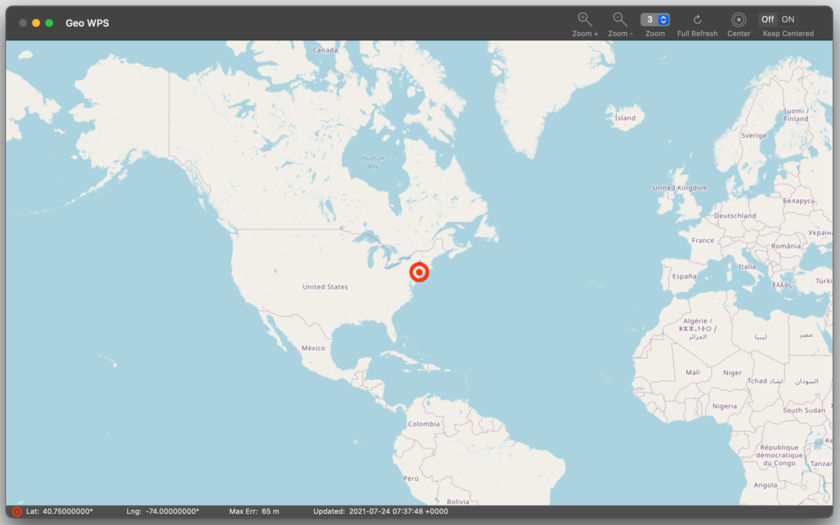
Milano, Italy - Tension Software is proud to announce the release of Geo WPS 1.1.1 for Mac OS X. Geo WPS allows users to track their geographic position using OS X wi-fi geo-tracking and other available hardware inside and connected to a Mac to detect a user's coordinate in the best precise way via Apple core location. Geo WPS shows the position over a zoomable OpenLayers map. The map is updated live from the internet (almost all the world is mapped to a very high level) with possibility to zoom up to 18 levels.
It can work with any Mac with airport turned on (to detect correct location) and an available internet connection (using any kind of connection, not necessarily via the airport, which is required to be ON just to detect the presence of wi-fi stations around, just the presence, it does NOT connect to them).
In some way Geo WPS reassemble GPS features without a GPS (it can works only in area with mapped wi-fi signals, typically urban areas ) even when the sky is not visible (in GPS system visibility of sky is mandatory)
It works perfectly in closed environments if it detects mapped wi-fi stations around.
The map can be shown with the zoom level you prefer and maintaining this zoom level during position upgrade. The map can scroll maintaining your position at the window center when you are moving (providing you are net connected, to calculate your position and show the current location map).
The map is interactive and user can drag scroll and drag zoom.
* Uses the standard Apple core location library
* Continuously updates your position showing it on a map
* Doesn't requires an established wi-fi connection, just airport turned ON to detects wi-fi around
* It can work using your wireless modem (USB key or Bluetooth modem) to query for your position via internet
* Zoomable map of the world with your position
* Show any place in an interactive movable graphical map
* Works also in closed environments
* Based on a open map format
* PDF Manual embedded in the app included
System Requirements:
* OS X 10.10 or later
* 64-bit processor
* 3.4 MB
Pricing and availability:
Geo WPS 1.1.1 is $4.99 USD (or an equivalent amount in other currencies) and is available worldwide exclusively through the Mac App Store in the Travel category.
Tension Software: http://www.tensionsoftware.com
Geo WPS 1.1.1: http://www.tensionsoftware.com/osx/geowps/
Purchase and Download from Mac App Store: http://itunes.apple.com/app/geo-wps/id416758904
Screenshot: http://www.tensionsoftware.com/static/tensionsoftware/images/app/geowps/screenshots/mac/1.png
Application Icon: http://www.tensionsoftware.com/static/tensionsoftware/images/app/geowps/icons/128.png

Tension Software develops software for Mac OS X and iOS using the latest Apple technology, Cocoa and Objective-C. All Material and Software (C) Copyright 2016 Tension Software. All Rights Reserved. Apple, the Apple logo, Macintosh and Mac OS X are registered trademarks of Apple Inc. in the U.S. and/or other countries. Other trademarks and registered trademarks may be the property of their respective owners.
*******
Link To Article: http://prmac.com/release-id-79344.htm
*******
---------------------------------------------------------------------------------
Note that you can alter delivered distributions at any time.
Login to your account on prMac to alter your channel selection, or to opt-out at any time.
Subscribe to:
Posts (Atom)