A new article has been published at prMac.
Khmer Keyboard 2.0 for iOS Offers Customizable Khmer Entry - Published on 05/02/16
LastThink announces Khmer Keyboard 2.0, an important update to their highly customizable keyboard application for iOS devices. Khmer Keyboard offers users a third-party keyboard for use with iOS apps that allows anyone to modify it to their individual taste. Users can modify the order of the keyboard for more convenient usage. The update includes the ability to save specific words for later use, emoticons, paragraph formatting, word prediction, and more.
Yerevan, Armenia - LastThink is proud to announce the release of Khmer Keyboard 2.0, an important update to their highly customizable keyboard application for iPhone, iPad, and iPod touch devices. The Khmer Keyboard's customization features allow anyone to create the keyboard layout that is perfect for their needs. Features include the ability to change the size, shape, and order of characters; the ability to save specific words for later use; emoticons, word prediction, and more.
Users can change the order of the keyboard's letter layout, and even create handy shortcuts to allow entering words or even entire sentences with just a few keystrokes. The keyboard's Swipe feature allows users to swipe their finger around the keyboard to select letters and form words. The app intelligently predicts what the user intends to enter, greatly enhancing typing speed.
What's New in Version 2.0:
* Change the size, and place, as well as the shape of characters and keyboard separately
* Save any words that are used frequently in the active vocabulary for later use
* Express emotions with emoji characters (emoticons) which will correspond to entered words
* Paragraph formatting: Adjust alignment, line spacing, margins, bullets and numbering
* Optional smart auto correction: Intelligent spell checking for even the sloppiest typing
* Style: Customize the look of the keyboard. Change the color of the keys and background
* Word prediction: The keyboard guesses and displays the appropriate word as the user types
* Share text via Facebook, Twitter, email, Dropbox, and more
"When we set out to create the Khmer Keyboard, we knew we wanted to create a customizable keyboard that would offer users the ability to modify it to their individual tastes," says LastThink founder Grigori Jlavyan. Our keyboard allows Khmer speaking users to easily enter their text messages, emails, and other types of texts via a comprehensive interface, making their day-to-day communications more convenient than ever."
The Khmer Keyboard also offers handy paragraph formatting options, allowing users to adjust the alignment of their text, while also offering the ability to set line spacing, adjust margins, even add bulleted or numbered lists. Optional smart correction makes even the sloppiest speller's text entry become correct. The keyboard also offers a downloadable Khmer font for use with iOS devices, making text entry, editing, and display even more convenient.
Khmer Keyboard emphasizes the user's security above all, and while many third-party iOS keyboard apps require "Full Access" - with the ability to send back keystrokes and other information back to their developer - the Khmer Keyboard does not, protecting the text entry and sensitive user information, keeping their personal information safe from prying eyes.
Device Requirements:
* iPhone, iPad, and iPod touch
* Optimized for iPhone 5, iPhone 6/6 Plus
* Universal Application
* Requires iOS 6.0 or later
* 8.7 MB
Pricing and Availability:
Khmer Keyboard 2.0 is free of charge and available worldwide exclusively through the App Store in the Utilities category. Review codes are available upon request.
LastThink: http://lastthink.com/
Khmer Keypad 2.0: https://www.facebook.com/pages/IosRegion/688324511213130
Download from iTunes: https://itunes.apple.com/app/khmer-keypad/id793706269
Screenshot: http://a2.mzstatic.com/us/r30/Purple4/v4/aa/ad/46/aaad461f-209f-02dc-3344-d0987b1641f0/screen568x568.jpeg
App Icon: http://a4.mzstatic.com/us/r30/Purple4/v4/e8/7c/bb/e87cbbb5-2c20-430b-a409-723eac80006a/icon175x175.jpeg
LastThink is an IT company with a focus on mobile development. It has extended its list of services since 2012 to offer high-end business process management, system integration, as well as up-to-date communication solutions. LastThink's mission is to deliver maximum business value to its customers by designing, developing, implementing and maintaining efficient and high quality software solutions aligned with their most essential business needs. Their team will always do its best to meet client expectations. Copyright (C) 2016 LastThink LLC. All Rights Reserved. Apple, the Apple logo, iPhone, iPad and iPod are registered trademarks of Apple Inc. in the U.S. and/or other countries.
*******
Link To Article: http://prmac.com/release-id-79362.htm
*******
---------------------------------------------------------------------------------
Note that you can alter delivered distributions at any time.
Login to your account on prMac to alter your channel selection, or to opt-out at any time.


Take Out 50 Levels Of Trash In Arcade Runner MOP: Operation Cleanup
A new article has been published at prMac.
Take Out 50 Levels Of Trash In Arcade Runner MOP: Operation Cleanup - Published on 05/02/16
Ensenasoft introduces MOP: Operation Cleanup 1.0.0, its action-packed arcade runner for Mac OS X. Engineered using simple parts, MOP is a curious and unique model of robot with one single objective: clean up a polluted environment. To save the world players must sweep the area for trash and run, jump, swim and slide their way through each world, destroying enemies and obstacles blocking their path. Explore five challenging worlds with 50 difficult missions full of pixel-perfect platforming fun.
Mexico City, Mexico - Ensenasoft, an award-winning game developer and publisher, is proud to announce the worldwide release of MOP: Operation Cleanup 1.0.0, its new action-packed arcade runner for Mac OS X. MOP: Operation Cleanup is aimed at pixel-perfect purists seeking the ultimate radiation thrill of a highly addictive game. You are MOP, a curious and unique model of robot. You have been engineered using simple parts with one single objective: To clean up a polluted environment.
Explore five challenging worlds with 50 difficult missions full of pixel-perfect platforming fun. Ordinary trash items have mutated into ugly creatures due to contact with radioactive and malignant substances. The foul odor is polluting and contaminating what remains. To save the world you must sweep the area for trash and run, jump, swim and slide your way through each world, destroying enemies and obstacles blocking your path. Levels contain surprises, traps and hidden areas to discover. Be sure to watch out for the grumpy bears, electric toasters, zombie turtles and even mutated socks trying to get you!
System Requirements:
* OS X 10.6.6 or later
* 136 MB
Pricing and Availability:
MOP: Operation Cleanup 1.0.0 is $4.99 USD (or equivalent amount in other currencies) and available worldwide through the Mac App Store in the Games category. Journalists interested in further information, additional assets or a redeemable key for review are welcome to contact EnsenaSoft by sending an email to Hans Olsen. Follow us on social media for news and updates, and to experience our vast catalogue of titles for all major gaming platforms.
EnsenaSoft: http://www.ensenasoft.com
MOP: Operation Cleanup 1.0.0: http://www.mopthegame.com
Purchase and Download (Mac App Store): https://itunes.apple.com/app/mop-operation-cleanup/id1064622094
YouTube Video (Game Trailer): http://www.youtube.com/watch?v=igIQ7fQqfR0
Screenshot: http://a1.mzstatic.com/us/r30/Purple49/v4/bd/af/33/bdaf330f-89cc-951a-9997-11678486440f/screen800x500.jpeg
Application Icon: http://a5.mzstatic.com/us/r30/Purple69/v4/f4/6d/5f/f46d5fae-4629-5005-ad27-8b4effafc6a9/icon256.png
EnsenaSoft is an award-winning game developer and publisher founded in Mexico in 2009, and consists of a talented group of designers, artists, programmers and musicians all committed to creating high-quality digital games content across all major gaming platforms and technologies. With a portfolio spanning hundreds of released titles, it is our continued promise to produce entertaining digital games to audiences of all ages and gaming preferences. All Material and Software (C) Copyright 2016 EnsenaSoft, S.A. de C.V. All Rights Reserved. Apple, the Apple logo, Mac OS X and Macintosh are registered trademarks of Apple Inc. in the U.S. and/or other countries. Other trademarks and registered trademarks may be the property of their respective owners.
*******
Link To Article: http://prmac.com/release-id-79363.htm
*******
---------------------------------------------------------------------------------
Note that you can alter delivered distributions at any time.
Login to your account on prMac to alter your channel selection, or to opt-out at any time.
Take Out 50 Levels Of Trash In Arcade Runner MOP: Operation Cleanup - Published on 05/02/16
Ensenasoft introduces MOP: Operation Cleanup 1.0.0, its action-packed arcade runner for Mac OS X. Engineered using simple parts, MOP is a curious and unique model of robot with one single objective: clean up a polluted environment. To save the world players must sweep the area for trash and run, jump, swim and slide their way through each world, destroying enemies and obstacles blocking their path. Explore five challenging worlds with 50 difficult missions full of pixel-perfect platforming fun.
Mexico City, Mexico - Ensenasoft, an award-winning game developer and publisher, is proud to announce the worldwide release of MOP: Operation Cleanup 1.0.0, its new action-packed arcade runner for Mac OS X. MOP: Operation Cleanup is aimed at pixel-perfect purists seeking the ultimate radiation thrill of a highly addictive game. You are MOP, a curious and unique model of robot. You have been engineered using simple parts with one single objective: To clean up a polluted environment.
Explore five challenging worlds with 50 difficult missions full of pixel-perfect platforming fun. Ordinary trash items have mutated into ugly creatures due to contact with radioactive and malignant substances. The foul odor is polluting and contaminating what remains. To save the world you must sweep the area for trash and run, jump, swim and slide your way through each world, destroying enemies and obstacles blocking your path. Levels contain surprises, traps and hidden areas to discover. Be sure to watch out for the grumpy bears, electric toasters, zombie turtles and even mutated socks trying to get you!
System Requirements:
* OS X 10.6.6 or later
* 136 MB
Pricing and Availability:
MOP: Operation Cleanup 1.0.0 is $4.99 USD (or equivalent amount in other currencies) and available worldwide through the Mac App Store in the Games category. Journalists interested in further information, additional assets or a redeemable key for review are welcome to contact EnsenaSoft by sending an email to Hans Olsen. Follow us on social media for news and updates, and to experience our vast catalogue of titles for all major gaming platforms.
EnsenaSoft: http://www.ensenasoft.com
MOP: Operation Cleanup 1.0.0: http://www.mopthegame.com
Purchase and Download (Mac App Store): https://itunes.apple.com/app/mop-operation-cleanup/id1064622094
YouTube Video (Game Trailer): http://www.youtube.com/watch?v=igIQ7fQqfR0
Screenshot: http://a1.mzstatic.com/us/r30/Purple49/v4/bd/af/33/bdaf330f-89cc-951a-9997-11678486440f/screen800x500.jpeg

Application Icon: http://a5.mzstatic.com/us/r30/Purple69/v4/f4/6d/5f/f46d5fae-4629-5005-ad27-8b4effafc6a9/icon256.png

EnsenaSoft is an award-winning game developer and publisher founded in Mexico in 2009, and consists of a talented group of designers, artists, programmers and musicians all committed to creating high-quality digital games content across all major gaming platforms and technologies. With a portfolio spanning hundreds of released titles, it is our continued promise to produce entertaining digital games to audiences of all ages and gaming preferences. All Material and Software (C) Copyright 2016 EnsenaSoft, S.A. de C.V. All Rights Reserved. Apple, the Apple logo, Mac OS X and Macintosh are registered trademarks of Apple Inc. in the U.S. and/or other countries. Other trademarks and registered trademarks may be the property of their respective owners.
*******
Link To Article: http://prmac.com/release-id-79363.htm
*******
---------------------------------------------------------------------------------
Note that you can alter delivered distributions at any time.
Login to your account on prMac to alter your channel selection, or to opt-out at any time.
Stay-U released for iOS - Cognitive Assessment to Help You Stay You
A new article has been published at prMac.
Stay-U released for iOS - Cognitive Assessment to Help You Stay You - Published on 05/02/16
New Jersey-based indie developer, PeqApps today introduces Stay-U 1.0, its new educational app for iPhone, iPad and iPod touch devices. Stay-U provides 100 years of cognitive assessment based on players' scores in 25 fun and challenging brain games. Games are played in Game Center with 2 players, and scores are based on reaction time and skill level. Measuring long-term changes to cognitive function can help trigger the behaviors that maintain it, and help you stay you.
Pompton Plains, New Jersey - PeqApps is pleased to announce the release of Stay-U for the iPhone, iPad and iPod touch. Stay-U provides 100 years of cognitive assessment that is based on players' scores in 25 fun and challenging brain games. Games are played in Game Center with 2 players, and scores are based on reaction time and skill level. The winning score of each game is awarded 100 points, and the losing score is curved relative to the winning score.
Cognitive function starts to decline as early as age 27, and for millions of people this decline eventually leads to dementia. But cognitive decline can be slowed by brain healthy behaviors such as eating a balanced diet, engaging in regular physical activity, managing stress, getting enough sleep, maintaining strong social connections and participating in cognitively stimulating activities. Cambridge University research estimates that 1/3 of dementia cases could be prevented solely through changes to behavior. By tracking long-term changes to cognitive function, Stay-U can help trigger the behaviors that maintain it, and help you stay you.
Stay-U Games:
* 2048 - Earn the 2048 tile before the grid fills up
* Boomer - Avoid exploding tiles while swiping paths
* Brink - Slide puzzle tiles into the correct positions
* Card Sharp - A card game where it's 21 or bust
* Code Breaker - Tap colored pegs to solve the code
* Concentration - Match hidden letters, numbers & shapes
* Connect: Connect dots with matching colors
* Edge Match - Match puzzle tile colors & patterns
* Fifteen - Slide tiles into the correct order
* Flash - Simon Says using flashes & sounds
* Fruit Crunch - Match 3 fruits to crunch them
* Heap - Try to move all the playing cards onto the heap
* Hopscotch - Slide letter tiles between rows to spell words
* Mines: Uncover tiles without detonating mines
* Paired Up - Tap the matching pair of colored animal tiles
* Peg - Peg Solitaire with colorful marbles
* Scramble - Slide letter tiles to unscramble words
* Sudoku - Fill each 3x3 box with the numbers 1-9
* Tetravex - Slide tiles until all adjacent edges match
* Total Recall - Memorize & recall words
* Treys - Find 3 cards that are all the same or all different
* Word Crunch - Find words by swiping in a straight line
* Word Hunt - Form words by tracing adjacent letters
* Yacht - Roll 5 dice to make 12 different combinations
Device Requirements:
* iPhone, iPad, and iPod touch
* Requires iOS 7.0 or later
* 11.9 MB
Pricing and Availability:
Stay-U 1.0 is Free and available worldwide exclusively through the App Store in the Education category.
Stay-U 1.0: http://stay-u.com
Download from iTunes: https://itunes.apple.com/app/stay-u/id1049900611
Screenshot 1: http://peqapps.com/stay-u/press/SUImage1.png
Screenshot 2: http://peqapps.com/stay-u/press/SUImage2.png
App Icon: http://peqapps.com/stay-u/press/SUAppIcon.png
Located in Pompton Plains, New Jersey, Indie developer PeqApps creates brain game apps for the iOS platform. Our goal is to transform brain games into tools that nudge users towards the behaviors that maintain cognitive function and prevent dementia. Copyright (C) 2015-2016 PeqApps. All Rights Reserved. Apple, the Apple logo, iPhone, iPod and iPad are registered trademarks of Apple Inc. in the U.S. and/or other countries. Other trademarks and registered trademarks may be the property of their respective owners.
*******
Link To Article: http://prmac.com/release-id-79365.htm
*******
---------------------------------------------------------------------------------
Note that you can alter delivered distributions at any time.
Login to your account on prMac to alter your channel selection, or to opt-out at any time.
Stay-U released for iOS - Cognitive Assessment to Help You Stay You - Published on 05/02/16
New Jersey-based indie developer, PeqApps today introduces Stay-U 1.0, its new educational app for iPhone, iPad and iPod touch devices. Stay-U provides 100 years of cognitive assessment based on players' scores in 25 fun and challenging brain games. Games are played in Game Center with 2 players, and scores are based on reaction time and skill level. Measuring long-term changes to cognitive function can help trigger the behaviors that maintain it, and help you stay you.
Pompton Plains, New Jersey - PeqApps is pleased to announce the release of Stay-U for the iPhone, iPad and iPod touch. Stay-U provides 100 years of cognitive assessment that is based on players' scores in 25 fun and challenging brain games. Games are played in Game Center with 2 players, and scores are based on reaction time and skill level. The winning score of each game is awarded 100 points, and the losing score is curved relative to the winning score.
Cognitive function starts to decline as early as age 27, and for millions of people this decline eventually leads to dementia. But cognitive decline can be slowed by brain healthy behaviors such as eating a balanced diet, engaging in regular physical activity, managing stress, getting enough sleep, maintaining strong social connections and participating in cognitively stimulating activities. Cambridge University research estimates that 1/3 of dementia cases could be prevented solely through changes to behavior. By tracking long-term changes to cognitive function, Stay-U can help trigger the behaviors that maintain it, and help you stay you.
Stay-U Games:
* 2048 - Earn the 2048 tile before the grid fills up
* Boomer - Avoid exploding tiles while swiping paths
* Brink - Slide puzzle tiles into the correct positions
* Card Sharp - A card game where it's 21 or bust
* Code Breaker - Tap colored pegs to solve the code
* Concentration - Match hidden letters, numbers & shapes
* Connect: Connect dots with matching colors
* Edge Match - Match puzzle tile colors & patterns
* Fifteen - Slide tiles into the correct order
* Flash - Simon Says using flashes & sounds
* Fruit Crunch - Match 3 fruits to crunch them
* Heap - Try to move all the playing cards onto the heap
* Hopscotch - Slide letter tiles between rows to spell words
* Mines: Uncover tiles without detonating mines
* Paired Up - Tap the matching pair of colored animal tiles
* Peg - Peg Solitaire with colorful marbles
* Scramble - Slide letter tiles to unscramble words
* Sudoku - Fill each 3x3 box with the numbers 1-9
* Tetravex - Slide tiles until all adjacent edges match
* Total Recall - Memorize & recall words
* Treys - Find 3 cards that are all the same or all different
* Word Crunch - Find words by swiping in a straight line
* Word Hunt - Form words by tracing adjacent letters
* Yacht - Roll 5 dice to make 12 different combinations
Device Requirements:
* iPhone, iPad, and iPod touch
* Requires iOS 7.0 or later
* 11.9 MB
Pricing and Availability:
Stay-U 1.0 is Free and available worldwide exclusively through the App Store in the Education category.
Stay-U 1.0: http://stay-u.com
Download from iTunes: https://itunes.apple.com/app/stay-u/id1049900611
Screenshot 1: http://peqapps.com/stay-u/press/SUImage1.png

Screenshot 2: http://peqapps.com/stay-u/press/SUImage2.png

App Icon: http://peqapps.com/stay-u/press/SUAppIcon.png

Located in Pompton Plains, New Jersey, Indie developer PeqApps creates brain game apps for the iOS platform. Our goal is to transform brain games into tools that nudge users towards the behaviors that maintain cognitive function and prevent dementia. Copyright (C) 2015-2016 PeqApps. All Rights Reserved. Apple, the Apple logo, iPhone, iPod and iPad are registered trademarks of Apple Inc. in the U.S. and/or other countries. Other trademarks and registered trademarks may be the property of their respective owners.
*******
Link To Article: http://prmac.com/release-id-79365.htm
*******
---------------------------------------------------------------------------------
Note that you can alter delivered distributions at any time.
Login to your account on prMac to alter your channel selection, or to opt-out at any time.
Get notifications when your friend's phone battery is about to die
A new article has been published at prMac.
Get notifications when your friend's phone battery is about to die - Published on 05/02/16
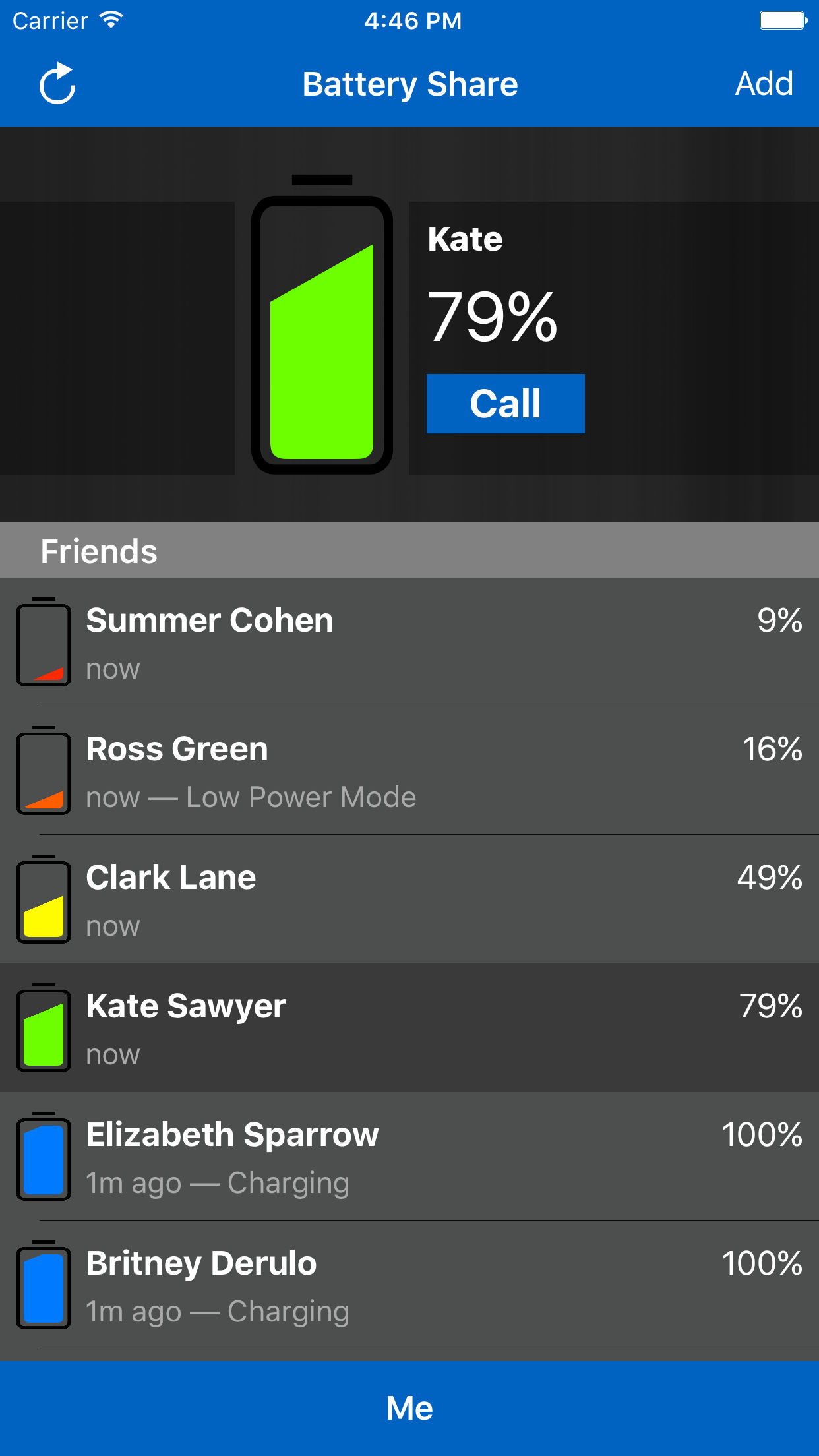
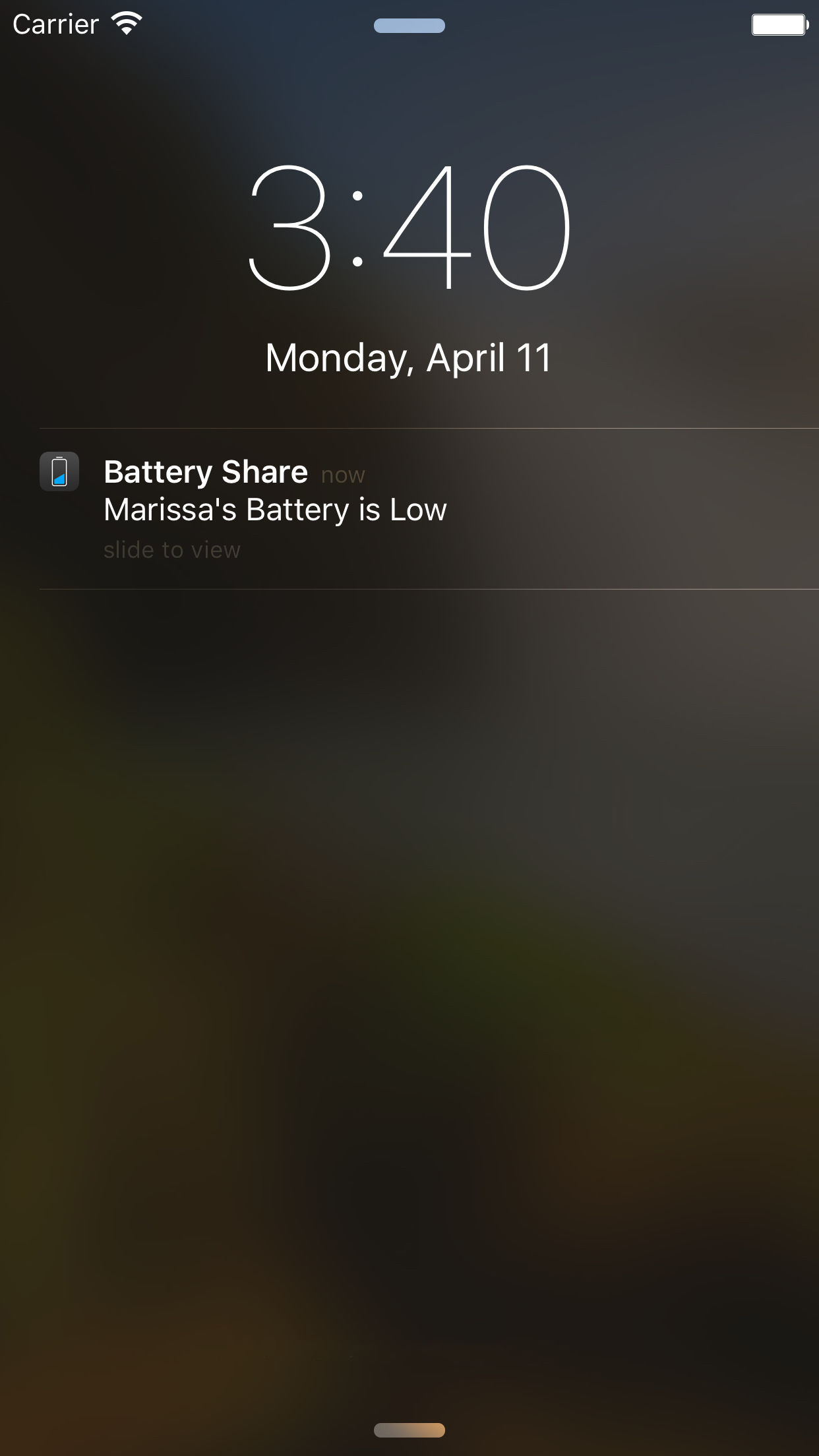
Stonelight Pictures introduces Battery Share 1.0.1, a new utility for iOS 9 supported devices. Battery Share is for all those times when you tried to get ahold of someone but their phone was dead and you should have called or messaged a little bit sooner. The app sends you notifications when your friends are running low on power. Opening the app gives you a quick list of your friends with their battery status. Version 1.0.1 offers performance optimizations.
Calgary, Canada - Stonelight Pictures today is proud to announce the release of Battery Share 1.0.1, a new utility for iOS 9 supported devices. People are spending more time on their phones, resulting in batteries draining faster and dying sooner. Battery Share sends a notification telling you when your friends have low batteries, allowing you to contact them before they become unavailable. Opening the app gives you a quick list of your friends with their battery status. You can see if the phone is charging or in low-power mode. Low battery notifications are customizable, choose which friends you receive notifications from, and silence notifications from others.
Setup is easy. Install the app and invite friends to share their battery status by sending them a message. When a friend accepts your invitation using the Battery Share app on their device, you can start following their battery status immediately.
Features Include:
* Quickly see the battery status of your friends and family
* Low Battery Notifications from followers on your list
* Simple privacy controls
* VoIP calling
* Customizable notifications
Device Requirements:
* iPhone or iPad
* Requires iOS 9.1 or later
* 22.8 MB
Pricing and Availability:
Battery Share 1.0.1 is only $0.99 USD (or equivalent amount in other currencies) and available worldwide exclusively through the App Store in the Utilities category.
Stonelight Pictures: http://stonelightpictures.com
Battery Share 1.0.1: https://itunes.apple.com/app/battery-share/id1091016284
Screenshot 1: http://stonelightpictures.com/BatteryShare2.jpg
Screenshot 2: http://stonelightpictures.com/BatteryShare1.jpg
Screenshot 3: http://stonelightpictures.com/BatteryShare3.jpg
Screenshot 4: http://stonelightpictures.com/BatteryShare4.jpg
Located in Alberta, Canada, Stonelight Pictures is a software development company bringing new and exciting apps to iOS and Mac for the last 7 years. All Material and Software (C) Copyright 2016 Stonelight Pictures. All Rights Reserved. Apple, the Apple logo, Mac OS X, iPhone, iPod, iPad and Macintosh are registered trademarks of Apple Inc. in the U.S. and/or other countries. Other trademarks and registered trademarks may be the property of their respective owners.
*******
Link To Article: http://prmac.com/release-id-79364.htm
*******
---------------------------------------------------------------------------------
Note that you can alter delivered distributions at any time.
Login to your account on prMac to alter your channel selection, or to opt-out at any time.
Get notifications when your friend's phone battery is about to die - Published on 05/02/16
Stonelight Pictures introduces Battery Share 1.0.1, a new utility for iOS 9 supported devices. Battery Share is for all those times when you tried to get ahold of someone but their phone was dead and you should have called or messaged a little bit sooner. The app sends you notifications when your friends are running low on power. Opening the app gives you a quick list of your friends with their battery status. Version 1.0.1 offers performance optimizations.
Calgary, Canada - Stonelight Pictures today is proud to announce the release of Battery Share 1.0.1, a new utility for iOS 9 supported devices. People are spending more time on their phones, resulting in batteries draining faster and dying sooner. Battery Share sends a notification telling you when your friends have low batteries, allowing you to contact them before they become unavailable. Opening the app gives you a quick list of your friends with their battery status. You can see if the phone is charging or in low-power mode. Low battery notifications are customizable, choose which friends you receive notifications from, and silence notifications from others.
Setup is easy. Install the app and invite friends to share their battery status by sending them a message. When a friend accepts your invitation using the Battery Share app on their device, you can start following their battery status immediately.
Features Include:
* Quickly see the battery status of your friends and family
* Low Battery Notifications from followers on your list
* Simple privacy controls
* VoIP calling
* Customizable notifications
Device Requirements:
* iPhone or iPad
* Requires iOS 9.1 or later
* 22.8 MB
Pricing and Availability:
Battery Share 1.0.1 is only $0.99 USD (or equivalent amount in other currencies) and available worldwide exclusively through the App Store in the Utilities category.
Stonelight Pictures: http://stonelightpictures.com
Battery Share 1.0.1: https://itunes.apple.com/app/battery-share/id1091016284
Screenshot 1: http://stonelightpictures.com/BatteryShare2.jpg
Screenshot 2: http://stonelightpictures.com/BatteryShare1.jpg

Screenshot 3: http://stonelightpictures.com/BatteryShare3.jpg
Screenshot 4: http://stonelightpictures.com/BatteryShare4.jpg

Located in Alberta, Canada, Stonelight Pictures is a software development company bringing new and exciting apps to iOS and Mac for the last 7 years. All Material and Software (C) Copyright 2016 Stonelight Pictures. All Rights Reserved. Apple, the Apple logo, Mac OS X, iPhone, iPod, iPad and Macintosh are registered trademarks of Apple Inc. in the U.S. and/or other countries. Other trademarks and registered trademarks may be the property of their respective owners.
*******
Link To Article: http://prmac.com/release-id-79364.htm
*******
---------------------------------------------------------------------------------
Note that you can alter delivered distributions at any time.
Login to your account on prMac to alter your channel selection, or to opt-out at any time.
Macgo Blu-ray Player Mother's Day Promotion 2016
A new article has been published at prMac.
Macgo Blu-ray Player Mother's Day Promotion 2016 - Published on 05/01/16
Macgo Blu-ray player is on promotion for Mother's Day. It provides the warmest gift for mothers. The promotion includes both Macgo Mac and Windows Blu-ray players. During Mother's Day promotion, each license for Macgo Windows Blu-ray Player only cost $29.95 instead of the original $59.95. The price of Mac Blu-ray Player is also cut from $59.95 to $39.95. With more products you purchase, the less price for each Blu-ray player you can get.
Hong Kong, China - Have you decided on which gift to buy for your beloved mother on Mother's Day yet? If not, Macgo can help you find the best choice by giving a huge discount on Blu-ray players. This time the promotion cut over 50% off just to encourage you to thank your mother for all her unconditional love with a special gift. Around Mother's Day your mothers can get the most satisfying gift with the least price you need to pay.
Macgo Mac Blu-ray Player is the first Blu-ray player for Mac OS X that has official certification in the world. Both of Mac and Windows Blu-ray players can play multiple kinds of videos. On Mother's Day, the whole family can sit together enjoying a nice movie with the Blu-ray player which can provide the most real scene. During Mother's Day promotion, each license for Macgo Windows Blu-ray Player only cost $29.95 instead of the original $59.95. The price of Mac Blu-ray Player is also cut from $59.95 to $39.95. And that is not the biggest discount. With more products you purchase, the less price for each Blu-ray player you can get.
If you are a green hand to Macgo Blu-ray player, you can learn more about its excellent features before purchase.
Features of Macgo Blu-ray Player:
* It can play all kinds of Blu-ray discs and their ISO files on all Mac products.
* Macgo's unique hardware acceleration technique-BluFast MX can reduce the workload of hardware during Blu-ray playback.
* Mac Blu-ray Player supports DTS 5.1, Dolby TrueHD Audio DTS-HD Master Audio and Pass Through without any quality loss to take you experiencing HD audio-visual feast.
* It can play any videos or audios like MP4, MOV and RMVB, etc. on Windows without converting formats.
Have you already attracted by these excellent features and the low prices? It's time to download the program and have a try.
System Requirements:
* Mac OS X 10.6- 10.11/ Windows 10 / 8.1 / 8 / 7 / Vista / XP (SP2 or later)
* Intel Core2 Duo 2.4GHz processor or higher recommended
* 512 MB RAM or higher recommended
* An internal or external Blu-ray drive
* USB 2.0 or FireWire 400
Macgo Blu-ray Player: http://www.macblurayplayer.com
Macgo Mother's Day Promotion: http://www.macblurayplayer.com/store.htm
Download: http://www.macblurayplayer.com/download.htm
Purchase: http://www.macblurayplayer.com/store.htm
Macgo International Limited has over ten years of experience in DVD Blu-ray video and has developed many DVD Blu-ray video tools with advanced technology. In the past ten years, Macgo has established itself as the innovative leader in video DVD Blu-ray technology by pioneering more performance enhancing technology. All Material and Software (C) Copyright 2016 Macgo International Limited. All Rights Reserved. Apple, the Apple logo, Macintosh and Mac OS X are registered trademarks of Apple Inc. in the U.S. and/or other countries. Other trademarks and registered trademarks may be the property of their respective owners.
*******
Link To Article: http://prmac.com/release-id-79361.htm
*******
---------------------------------------------------------------------------------
Note that you can alter delivered distributions at any time.
Login to your account on prMac to alter your channel selection, or to opt-out at any time.
Macgo Blu-ray Player Mother's Day Promotion 2016 - Published on 05/01/16
Macgo Blu-ray player is on promotion for Mother's Day. It provides the warmest gift for mothers. The promotion includes both Macgo Mac and Windows Blu-ray players. During Mother's Day promotion, each license for Macgo Windows Blu-ray Player only cost $29.95 instead of the original $59.95. The price of Mac Blu-ray Player is also cut from $59.95 to $39.95. With more products you purchase, the less price for each Blu-ray player you can get.
Hong Kong, China - Have you decided on which gift to buy for your beloved mother on Mother's Day yet? If not, Macgo can help you find the best choice by giving a huge discount on Blu-ray players. This time the promotion cut over 50% off just to encourage you to thank your mother for all her unconditional love with a special gift. Around Mother's Day your mothers can get the most satisfying gift with the least price you need to pay.
Macgo Mac Blu-ray Player is the first Blu-ray player for Mac OS X that has official certification in the world. Both of Mac and Windows Blu-ray players can play multiple kinds of videos. On Mother's Day, the whole family can sit together enjoying a nice movie with the Blu-ray player which can provide the most real scene. During Mother's Day promotion, each license for Macgo Windows Blu-ray Player only cost $29.95 instead of the original $59.95. The price of Mac Blu-ray Player is also cut from $59.95 to $39.95. And that is not the biggest discount. With more products you purchase, the less price for each Blu-ray player you can get.
If you are a green hand to Macgo Blu-ray player, you can learn more about its excellent features before purchase.
Features of Macgo Blu-ray Player:
* It can play all kinds of Blu-ray discs and their ISO files on all Mac products.
* Macgo's unique hardware acceleration technique-BluFast MX can reduce the workload of hardware during Blu-ray playback.
* Mac Blu-ray Player supports DTS 5.1, Dolby TrueHD Audio DTS-HD Master Audio and Pass Through without any quality loss to take you experiencing HD audio-visual feast.
* It can play any videos or audios like MP4, MOV and RMVB, etc. on Windows without converting formats.
Have you already attracted by these excellent features and the low prices? It's time to download the program and have a try.
System Requirements:
* Mac OS X 10.6- 10.11/ Windows 10 / 8.1 / 8 / 7 / Vista / XP (SP2 or later)
* Intel Core2 Duo 2.4GHz processor or higher recommended
* 512 MB RAM or higher recommended
* An internal or external Blu-ray drive
* USB 2.0 or FireWire 400
Macgo Blu-ray Player: http://www.macblurayplayer.com
Macgo Mother's Day Promotion: http://www.macblurayplayer.com/store.htm
Download: http://www.macblurayplayer.com/download.htm
Purchase: http://www.macblurayplayer.com/store.htm
Macgo International Limited has over ten years of experience in DVD Blu-ray video and has developed many DVD Blu-ray video tools with advanced technology. In the past ten years, Macgo has established itself as the innovative leader in video DVD Blu-ray technology by pioneering more performance enhancing technology. All Material and Software (C) Copyright 2016 Macgo International Limited. All Rights Reserved. Apple, the Apple logo, Macintosh and Mac OS X are registered trademarks of Apple Inc. in the U.S. and/or other countries. Other trademarks and registered trademarks may be the property of their respective owners.
*******
Link To Article: http://prmac.com/release-id-79361.htm
*******
---------------------------------------------------------------------------------
Note that you can alter delivered distributions at any time.
Login to your account on prMac to alter your channel selection, or to opt-out at any time.
Devanagari Keyboard 2.5 for iOS
A new article has been published at prMac.
Devanagari Keyboard 2.5 for iOS - Published on 05/01/16
LastThink today announces Devanagari Keyboard 2.5, an important update to their highly customizable keyboard application for iOS devices. Devanagari Keyboard offers users a third-party keyboard for use with iOS apps that allows anyone to modify it to their individual taste. Users can modify the order of the keyboard for more convenient usage. The update includes the ability to save specific words for later use, emoticons, paragraph formatting, word prediction, and more.
Yerevan, Armenia - LastThink is proud to announce the release of Devanagari Keyboard 2.5, an important update to their highly customizable keyboard application for iPhone, iPad, and iPod touch devices. The Devanagari Keyboard's customization features allow anyone to create the keyboard layout that is perfect for their needs. Features include the ability to change the size, shape, and order of characters; the ability to save specific words for later use; emoticons, word prediction, and more.
Users can change the order of the keyboard's letter layout, and even create handy shortcuts to allow entering words or even entire sentences with just a few keystrokes. The keyboard's Swipe feature allows users to swipe their finger around the keyboard to select letters and form words. The app intelligently predicts what the user intends to enter, greatly enhancing typing speed.
What's New in Version 2.5:
* Change the size, and place, as well as the shape of characters and keyboard separately
* Save any words that are used frequently in the active vocabulary for later use
* Express emotions with emoji characters (emoticons) which will correspond to entered words
* Paragraph formatting: Adjust alignment, line spacing, margins, bullets and numbering
* Optional smart auto correction: Intelligent spell checking for even the sloppiest typing
* Style: Customize the look of the keyboard. Change the color of the keys and background
* Word prediction: The keyboard guesses and displays the appropriate word as the user types
* Share text via Facebook, Twitter, email, Dropbox, and more
"When we set out to create the Devanagari Keyboard, we knew we wanted to create a customizable keyboard that would offer users the ability to modify it to their individual tastes," says LastThink founder Grigori Jlavyan. Our keyboard allows Devanagari speaking users to easily enter their text messages, emails, and other types of texts via a comprehensive interface, making their day-to-day communications more convenient than ever."
The Devanagari Keyboard also offers handy paragraph formatting options, allowing users to adjust the alignment of their text, while also offering the ability to set line spacing, adjust margins, even add bulleted or numbered lists. Optional smart correction makes even the sloppiest speller's text entry become correct. The keyboard also offers a downloadable Devanagari font for use with iOS devices, making text entry, editing, and display even more convenient.
Devanagari Keyboard emphasizes the user's security above all, and while many third-party iOS keyboard apps require "Full Access" - with the ability to send back keystrokes and other information back to their developer - the Devanagari Keyboard does not, protecting the text entry and sensitive user information, keeping their personal information safe from prying eyes.
Device Requirements:
* iPhone, iPad, and iPod touch
* Optimized for iPhone 5, iPhone 6/6 Plus
* Universal Application
* Requires iOS 6.1 or later
* 12.8 MB
Pricing and Availability:
Devanagari Keyboard 2.5 is free and available worldwide exclusively through the App Store in the Utilities category. Review codes are available upon request.
LastThink: http://lastthink.com/
Devanagari keyboard 2.5: https://www.facebook.com/pages/IosRegion/688324511213130
Download from iTunes: https://itunes.apple.com/app/devanagari-keyboard/id788537059
Screenshot: http://a1.mzstatic.com/us/r30/Purple/v4/6b/b8/ac/6bb8ac3c-ac57-6e29-88ec-76321d64fcfd/screen568x568.jpeg
App Icon: http://a5.mzstatic.com/us/r30/Purple2/v4/25/27/d7/2527d741-15df-3f14-4505-e257193a62db/icon175x175.jpeg
LastThink is an IT company with a focus on mobile development. It has extended its list of services since 2012 to offer high-end business process management, system integration, as well as up-to-date communication solutions. LastThink's mission is to deliver maximum business value to its customers by designing, developing, implementing and maintaining efficient and high quality software solutions aligned with their most essential business needs. Their team will always do its best to meet client expectations. Copyright (C) 2016 LastThink LLC. All Rights Reserved. Apple, the Apple logo, iPhone, iPad and iPod are registered trademarks of Apple Inc. in the U.S. and/or other countries.
*******
Link To Article: http://prmac.com/release-id-79360.htm
*******
---------------------------------------------------------------------------------
Note that you can alter delivered distributions at any time.
Login to your account on prMac to alter your channel selection, or to opt-out at any time.
Devanagari Keyboard 2.5 for iOS - Published on 05/01/16
LastThink today announces Devanagari Keyboard 2.5, an important update to their highly customizable keyboard application for iOS devices. Devanagari Keyboard offers users a third-party keyboard for use with iOS apps that allows anyone to modify it to their individual taste. Users can modify the order of the keyboard for more convenient usage. The update includes the ability to save specific words for later use, emoticons, paragraph formatting, word prediction, and more.
Yerevan, Armenia - LastThink is proud to announce the release of Devanagari Keyboard 2.5, an important update to their highly customizable keyboard application for iPhone, iPad, and iPod touch devices. The Devanagari Keyboard's customization features allow anyone to create the keyboard layout that is perfect for their needs. Features include the ability to change the size, shape, and order of characters; the ability to save specific words for later use; emoticons, word prediction, and more.
Users can change the order of the keyboard's letter layout, and even create handy shortcuts to allow entering words or even entire sentences with just a few keystrokes. The keyboard's Swipe feature allows users to swipe their finger around the keyboard to select letters and form words. The app intelligently predicts what the user intends to enter, greatly enhancing typing speed.
What's New in Version 2.5:
* Change the size, and place, as well as the shape of characters and keyboard separately
* Save any words that are used frequently in the active vocabulary for later use
* Express emotions with emoji characters (emoticons) which will correspond to entered words
* Paragraph formatting: Adjust alignment, line spacing, margins, bullets and numbering
* Optional smart auto correction: Intelligent spell checking for even the sloppiest typing
* Style: Customize the look of the keyboard. Change the color of the keys and background
* Word prediction: The keyboard guesses and displays the appropriate word as the user types
* Share text via Facebook, Twitter, email, Dropbox, and more
"When we set out to create the Devanagari Keyboard, we knew we wanted to create a customizable keyboard that would offer users the ability to modify it to their individual tastes," says LastThink founder Grigori Jlavyan. Our keyboard allows Devanagari speaking users to easily enter their text messages, emails, and other types of texts via a comprehensive interface, making their day-to-day communications more convenient than ever."
The Devanagari Keyboard also offers handy paragraph formatting options, allowing users to adjust the alignment of their text, while also offering the ability to set line spacing, adjust margins, even add bulleted or numbered lists. Optional smart correction makes even the sloppiest speller's text entry become correct. The keyboard also offers a downloadable Devanagari font for use with iOS devices, making text entry, editing, and display even more convenient.
Devanagari Keyboard emphasizes the user's security above all, and while many third-party iOS keyboard apps require "Full Access" - with the ability to send back keystrokes and other information back to their developer - the Devanagari Keyboard does not, protecting the text entry and sensitive user information, keeping their personal information safe from prying eyes.
Device Requirements:
* iPhone, iPad, and iPod touch
* Optimized for iPhone 5, iPhone 6/6 Plus
* Universal Application
* Requires iOS 6.1 or later
* 12.8 MB
Pricing and Availability:
Devanagari Keyboard 2.5 is free and available worldwide exclusively through the App Store in the Utilities category. Review codes are available upon request.
LastThink: http://lastthink.com/
Devanagari keyboard 2.5: https://www.facebook.com/pages/IosRegion/688324511213130
Download from iTunes: https://itunes.apple.com/app/devanagari-keyboard/id788537059
Screenshot: http://a1.mzstatic.com/us/r30/Purple/v4/6b/b8/ac/6bb8ac3c-ac57-6e29-88ec-76321d64fcfd/screen568x568.jpeg

App Icon: http://a5.mzstatic.com/us/r30/Purple2/v4/25/27/d7/2527d741-15df-3f14-4505-e257193a62db/icon175x175.jpeg

LastThink is an IT company with a focus on mobile development. It has extended its list of services since 2012 to offer high-end business process management, system integration, as well as up-to-date communication solutions. LastThink's mission is to deliver maximum business value to its customers by designing, developing, implementing and maintaining efficient and high quality software solutions aligned with their most essential business needs. Their team will always do its best to meet client expectations. Copyright (C) 2016 LastThink LLC. All Rights Reserved. Apple, the Apple logo, iPhone, iPad and iPod are registered trademarks of Apple Inc. in the U.S. and/or other countries.
*******
Link To Article: http://prmac.com/release-id-79360.htm
*******
---------------------------------------------------------------------------------
Note that you can alter delivered distributions at any time.
Login to your account on prMac to alter your channel selection, or to opt-out at any time.
New Free iPhone App to Improve Spanish Conversation Skills
A new article has been published at prMac.
New Free iPhone App to Improve Spanish Conversation Skills - Published on 04/30/16
Horizon Properties announces �Hablemos! 1.2, their free conversational Spanish app. Most people trying to learn a new language find that they have acquired some expertise in vocabulary, pronunciation and basic conversation skills. When they find themselves in a situation where they need to put that together into an actual real-world conversation, they tend to get a "brain freeze". That's where �Hablemos! becomes a valuable tool. Rapidly search over 1,100 Spanish sentences.
Scottsdale, Arizona - Horizon Properties is proud to announce the release of �Hablemos! 1.2, their free conversational Spanish app. �Hablemos! means "let's talk" in Spanish. The purpose of the app is to pick up where other language training ends. Most people trying to learn a new language find that they have acquired some expertise in vocabulary, pronunciation and basic conversation skills. When they find themselves in a situation where they need to put that together into an actual real-world conversation, they tend to get a "brain freeze". That's where �Hablemos! becomes a valuable tool.
The app comes pre-loaded with over 1,100 Spanish sentences and their English translations. These can be instantaneously searched, immensely improving your conversational confidence. Users can add their own translations to handle situations that they commonly encounter.
There is also a flashcard mode that allows you to review either selected records or the entire database in a quiz format. Flashcard mode is a great way to review the entire database in a quiz format, or they can limit their flashcards to whatever subset of the database that they desire. Give the free app a try today! We're confident that it will help you to make more rapid progress toward Spanish fluency.
Device Requirements:
* iPhone, iPad, and iPod touch
* Requires iOS 9.3 or later
* 12.3 MB
Pricing and Availability:
�Hablemos! 1.2 is free, and is available worldwide exclusively through the App Store in the Education category.
�Hablemos! 1.2: http://www.doszapatos.net
Download form iTunes: https://geo.itunes.apple.com/app/hablemos!/id1104078104
Screenshot: http://a5.mzstatic.com/us/r30/Purple49/v4/85/d3/9f/85d39f24-a7c0-58d3-3674-6dd9c3b8f2f2/screen322x572.jpeg
App Icon: http://a3.mzstatic.com/us/r30/Purple1/v4/b5/22/25/b5222548-486f-4c02-f8cd-81146739ebb4/icon175x175.jpeg
Horizon Properties LLC is located in Scottsdale, AZ, and created apps for iOS devices. It's first app, �Hablemos! offers users a way to improve their conversational Spanish confidence. All Material and Software (C) Copyright 2016 Horizon Properties LLC. All Rights Reserved. Apple, the Apple logo, iPhone, iPod and iPad are registered trademarks of Apple Inc. in the U.S. and/or other countries. Other trademarks and registered trademarks may be the property of their respective owners.
*******
Link To Article: http://prmac.com/release-id-79359.htm
*******
---------------------------------------------------------------------------------
Note that you can alter delivered distributions at any time.
Login to your account on prMac to alter your channel selection, or to opt-out at any time.
New Free iPhone App to Improve Spanish Conversation Skills - Published on 04/30/16
Horizon Properties announces �Hablemos! 1.2, their free conversational Spanish app. Most people trying to learn a new language find that they have acquired some expertise in vocabulary, pronunciation and basic conversation skills. When they find themselves in a situation where they need to put that together into an actual real-world conversation, they tend to get a "brain freeze". That's where �Hablemos! becomes a valuable tool. Rapidly search over 1,100 Spanish sentences.
Scottsdale, Arizona - Horizon Properties is proud to announce the release of �Hablemos! 1.2, their free conversational Spanish app. �Hablemos! means "let's talk" in Spanish. The purpose of the app is to pick up where other language training ends. Most people trying to learn a new language find that they have acquired some expertise in vocabulary, pronunciation and basic conversation skills. When they find themselves in a situation where they need to put that together into an actual real-world conversation, they tend to get a "brain freeze". That's where �Hablemos! becomes a valuable tool.
The app comes pre-loaded with over 1,100 Spanish sentences and their English translations. These can be instantaneously searched, immensely improving your conversational confidence. Users can add their own translations to handle situations that they commonly encounter.
There is also a flashcard mode that allows you to review either selected records or the entire database in a quiz format. Flashcard mode is a great way to review the entire database in a quiz format, or they can limit their flashcards to whatever subset of the database that they desire. Give the free app a try today! We're confident that it will help you to make more rapid progress toward Spanish fluency.
Device Requirements:
* iPhone, iPad, and iPod touch
* Requires iOS 9.3 or later
* 12.3 MB
Pricing and Availability:
�Hablemos! 1.2 is free, and is available worldwide exclusively through the App Store in the Education category.
�Hablemos! 1.2: http://www.doszapatos.net
Download form iTunes: https://geo.itunes.apple.com/app/hablemos!/id1104078104
Screenshot: http://a5.mzstatic.com/us/r30/Purple49/v4/85/d3/9f/85d39f24-a7c0-58d3-3674-6dd9c3b8f2f2/screen322x572.jpeg

App Icon: http://a3.mzstatic.com/us/r30/Purple1/v4/b5/22/25/b5222548-486f-4c02-f8cd-81146739ebb4/icon175x175.jpeg

Horizon Properties LLC is located in Scottsdale, AZ, and created apps for iOS devices. It's first app, �Hablemos! offers users a way to improve their conversational Spanish confidence. All Material and Software (C) Copyright 2016 Horizon Properties LLC. All Rights Reserved. Apple, the Apple logo, iPhone, iPod and iPad are registered trademarks of Apple Inc. in the U.S. and/or other countries. Other trademarks and registered trademarks may be the property of their respective owners.
*******
Link To Article: http://prmac.com/release-id-79359.htm
*******
---------------------------------------------------------------------------------
Note that you can alter delivered distributions at any time.
Login to your account on prMac to alter your channel selection, or to opt-out at any time.
Subscribe to:
Posts (Atom)