A new article has been published at prMac.
Guru Arcade releases Pop Rocket Rescue - Interplanetary Stacking Puzzler - Published on 05/05/16
Toronto based Guru Arcade today introduces Pop Rocket Rescue 1.0, their new game title developed for iOS and Android devices. Pop Rocket Rescue is a strategic stacking puzzler where players are tasked with rescuing Fizzies, a species of soda pop-producing aliens scattered across 13 uniquely challenging worlds. Players must build a tower using different shapes, while contending with gravity as they try to build in a way that keeps their friends safe.
Toronto, Canada - Friends stick together when the odds are stacked against them. Few mobile games take that as literally as Pop Rocket Rescue, available today on the App Store and Google Play. The latest mobile release from Guru Arcade, Pop Rocket Rescue is a strategic stacking puzzler where players are tasked with rescuing Fizzies, a species of soda pop-producing aliens scattered across 13 uniquely challenging worlds.
Guru Arcade is the interactive division of Guru Studio, the internationally renowned entertainment company behind such fun family TV hits as Justin Time and PAW Patrol. "Guru Arcade grew from our ability to make great characters, stories, and animation, which are also the foundation of great games," said Mary Bredin, EVP Content and Strategy for Guru Studio.
Building from Guru Arcade's success with kid-friendly entertainment, Pop Rocket Rescue is pursuing a slightly older crowd. "While kids will be able to enjoy the colorful planets and puzzles presented in earlier levels, the challenge ramps up fairly quickly in Pop Rocket Rescue," adds Game Designer Alex Larsen. "We like to think that this is a well-crafted puzzler for players who love a challenge."
Pop Rocket Rescue features include:
* Balance-based gameplay: Build a tower using different shapes, but don't let it fall! You'll need to contend with gravity as you try to build in a way that keeps your friends safe.
* 8 special Fizzies with their own powers: From the sticky blocks of 'Gloop' to the explosive personality of 'Cherry Boom!,' there's a Fizzie for every situation.
* Head-scratching puzzles: Every stranded Fizzie needs your help, but there are only so many pieces to use and directions to go before you tumble and topple. Can you outsmart each stage?
* 80 Levels spread across 13 worlds: Defend your tower from incoming meteors in the Smashteroid Belt, blow up debris to make room for your towers in Junkyard Boom, and use Gloop's sticky syrup to get through a Sticky Situation!
In addition to today's release of Pop Rocket Rescue, Guru Arcade has commissioned a study to learn more about the habits of mobile gamers and has published the findings. Highlights include how many games the average mobile gamer has installed, which room of the house they most frequently play in (surprise - it's not the bathroom!), and what percentage of players have seen their mobile fun get them in trouble. You can view an infographic summarizing the study's results linked below.
Device Requirements:
* iPhone, iPad, and iPod touch
* Requires iOS 7.0 or later
* 184 MB
Pricing and Availability:
Pop Rocket Rescue 1.0 is Free and available worldwide through the App Store in the Games category. There is also an Android version available on Google Play. For more information, download the Pop Rocket Rescue press kit or visit the Pop Rocket Rescue website.
Guru Arcade: http://guruarcade.com/
Pop Rocket Rescue 1.0: http://poprocketrescue.com/
Download from iTunes: https://itunes.apple.com/app/pop-rocket-rescue/id1053967162
Download from Google Play: https://play.google.com/store/apps/details?id=com.guruarcade.PopRocketRescue
Infographics: https://www.dropbox.com/sh/kjm22ceatl6c59l/AACj4I7llM9gqWvJCqlHbRqja/Infographic?dl=0
Media Assets: https://www.dropbox.com/sh/kjm22ceatl6c59l/AABbx43-lPduSLSEqZCPnKJCa?dl=0
Guru Arcade is an indie plus game developer housed at Guru Studio in Toronto. As a small but mighty dev team, Arcade is lucky to draw from the rich pool of artistic talent at the award-winning animation studio they call home. Guru Arcade was established in 2014 to create interactive companions to two of Guru's successful TV shows, Justin Time and Dinopaws, which earned top spots on the App Store charts for kids' games. Both games combined rich, high-quality animation with clear, engaging game play for preschoolers. All Material and Software (C) Copyright 2016 Guru Arcade. All Rights Reserved. Apple, the Apple logo, iPhone, iPod and iPad are registered trademarks of Apple Inc. in the U.S. and/or other countries. Other trademarks and registered trademarks may be the property of their respective owners.
*******
Link To Article: http://prmac.com/release-id-79397.htm
*******
---------------------------------------------------------------------------------
Note that you can alter delivered distributions at any time.
Login to your account on prMac to alter your channel selection, or to opt-out at any time.

Announcing Launcher v2.0 for iOS - Now with Multiple Widgets
A new article has been published at prMac.
Announcing Launcher v2.0 for iOS - Now with Multiple Widgets - Published on 05/05/16
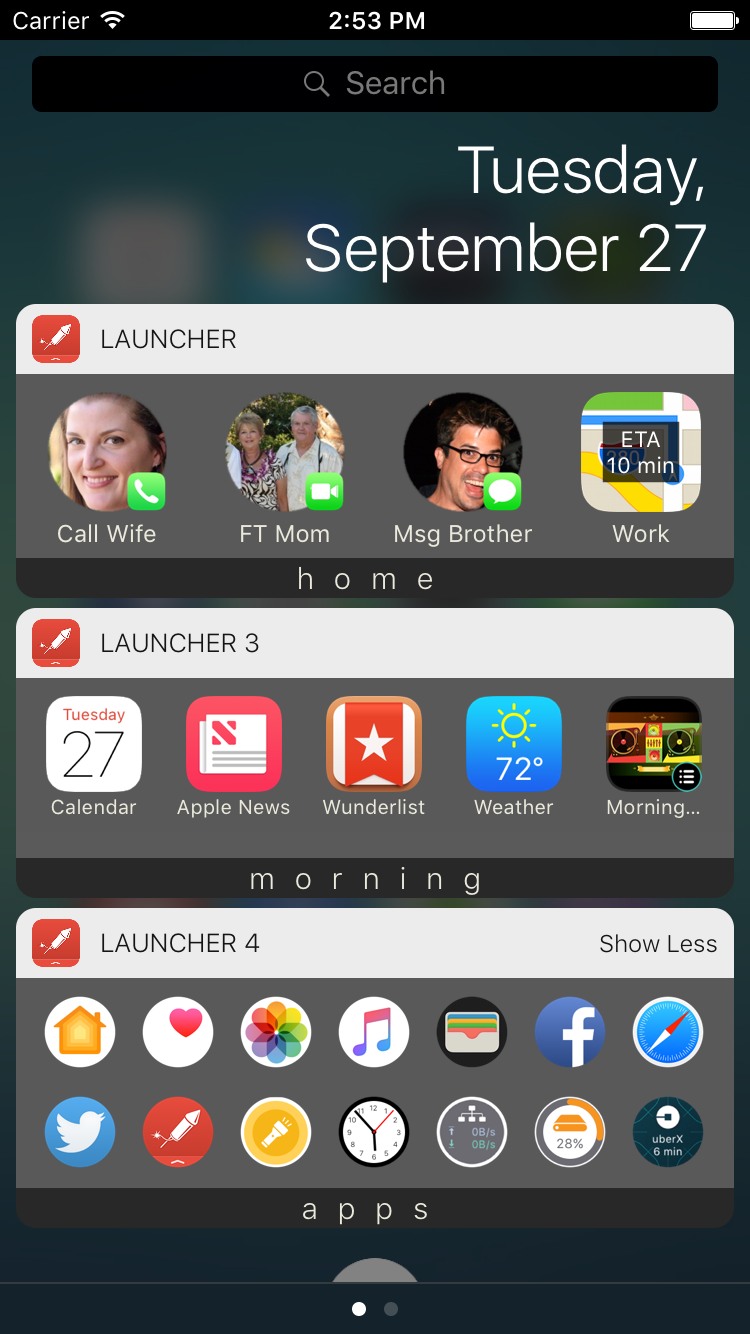
Cromulent Labs today introduces Launcher 2.0, a must-have app for all of your iOS devices. Available at any time by just swiping down from the top of your screen, Launcher allows you lightning fast access to apps straight from the Notification Center on your iPhone or iPad. Version 2.0 brings functionality never before seen in the App Store: the ability to show or hide its widgets based on time, day and/or location so that you always have relevant launchers at your fingertips.
San Francisco, California - Cromulent Labs today is proud to announce the release of the next major version of its must-have app for iOS. Installed on over 2 million devices worldwide, Launcher is already the most powerful widget-based app on the App Store and it now continues to raise the bar of iOS functionality. Installing Launcher v2.0 allows you to add multiple app-launching Today Widgets to the Notification Center on your iPhone or iPad.
Multiple widgets greatly increases the number of launchers you can have in your Notification Center and helps the organization of your launchers. Each widget can be configured to show or hide based on time, day, and/or location, which is functionality never before seen in the App Store. Set up widgets for home, work, the gym, morning, weekdays, or whatever you can come up with so that you always have relevant launchers at your fingertips.
Version 2.0 also brings the ability to backup and restore launchers to and from iCloud to make your life easier when you install Launcher on multiple devices or upgrade your device. And lastly, this version allows for more icon customization including circular icons and the ability to create your own custom icons to help personalize your launchers.
With just one touch in the Notification Center you can:
* Call, message, email, and FaceTime the people you contact the most
* Get directions home or search for nearby restaurants, coffee shops, or whatever you're looking for at your current location
* See current weather conditions and forecasts, Uber time estimates, driving or transit time estimates, world clocks, and network, disk, and battery status with dynamically updating magic launchers! (Pro Version only)
* Quickly access your favorite web sites
* Start playing music immediately
* Perform actions within a number of apps. Run a Workflow, load a specific page on Facebook, fire off a canned email, tweet, and more
* Launch your most frequently used apps - thousands of apps built-in
Features:
* Backup and restore launchers to and from iCloud (Requires in-app purchase)
* Innovative auto-setup of launchers which will set up contact launchers for the people most important to you and your most frequently used apps
* Incredibly easy setup and editing of launchers. Just a few taps and you're done
* Many different icon choices so that you can configure each launcher just how you like it or create your own
* Ability to create custom launchers for apps and actions that aren't yet supported
* Pro Version users get the ability to change the icon sizes and hide labels to make widget more compact
* Choose up to four launchers to set as 3D-touch home screen quick actions for iPhone 6S and 6S Plus
Device Requirements:
* iPad, iPhone, or iPod touch
* Requires iOS 8.0 or later
* 28.7 MB
Pricing and Availability:
Launcher 2.0 is free and available worldwide exclusively through the App Store in the Productivity category. Users can choose to unlock Multiple Widgets and/or the Pro Version with one-time in-app purchases. Unlocking Multiple Widgets gives the user up to 5 more widgets and the ability to show or hide widgets based on time, day, and/or location. The Pro Version gives users up to 35 launchers per widget (maximum number is device dependent), the ability to change the size of the launcher icons and hide labels to make the widgets more compact and access to the dynamic updating magic launchers.
Cromulent Labs: http://www.cromulentlabs.com/
Launcher 2.0: http://www.cromulentlabs.com/launcher.html
Download from iTunes: https://itunes.apple.com/app/launcher/id905099592
YouTube Video: https://www.youtube.com/watch?v=NnVv72JYr2Y
Screenshot: http://www.cromulentlabs.com/images/ss/iPhone6-WidgetScreen1.png
App Icon: http://www.cromulentlabs.com/images/LauncherIcon.png
Cromulent Labs, Inc. is an independent software development company based in San Francisco. For more information about the company and its products, visit Cromulent Labs online. Copyright (C) 2016 Cromulent Labs, Inc. All Rights Reserved. Apple, the Apple logo, iPhone, iPod and iPad are registered trademarks of Apple Inc. in the U.S. and/or other countries.
*******
Link To Article: http://prmac.com/release-id-79396.htm
*******
---------------------------------------------------------------------------------
Note that you can alter delivered distributions at any time.
Login to your account on prMac to alter your channel selection, or to opt-out at any time.
Announcing Launcher v2.0 for iOS - Now with Multiple Widgets - Published on 05/05/16
Cromulent Labs today introduces Launcher 2.0, a must-have app for all of your iOS devices. Available at any time by just swiping down from the top of your screen, Launcher allows you lightning fast access to apps straight from the Notification Center on your iPhone or iPad. Version 2.0 brings functionality never before seen in the App Store: the ability to show or hide its widgets based on time, day and/or location so that you always have relevant launchers at your fingertips.
San Francisco, California - Cromulent Labs today is proud to announce the release of the next major version of its must-have app for iOS. Installed on over 2 million devices worldwide, Launcher is already the most powerful widget-based app on the App Store and it now continues to raise the bar of iOS functionality. Installing Launcher v2.0 allows you to add multiple app-launching Today Widgets to the Notification Center on your iPhone or iPad.
Multiple widgets greatly increases the number of launchers you can have in your Notification Center and helps the organization of your launchers. Each widget can be configured to show or hide based on time, day, and/or location, which is functionality never before seen in the App Store. Set up widgets for home, work, the gym, morning, weekdays, or whatever you can come up with so that you always have relevant launchers at your fingertips.
Version 2.0 also brings the ability to backup and restore launchers to and from iCloud to make your life easier when you install Launcher on multiple devices or upgrade your device. And lastly, this version allows for more icon customization including circular icons and the ability to create your own custom icons to help personalize your launchers.
With just one touch in the Notification Center you can:
* Call, message, email, and FaceTime the people you contact the most
* Get directions home or search for nearby restaurants, coffee shops, or whatever you're looking for at your current location
* See current weather conditions and forecasts, Uber time estimates, driving or transit time estimates, world clocks, and network, disk, and battery status with dynamically updating magic launchers! (Pro Version only)
* Quickly access your favorite web sites
* Start playing music immediately
* Perform actions within a number of apps. Run a Workflow, load a specific page on Facebook, fire off a canned email, tweet, and more
* Launch your most frequently used apps - thousands of apps built-in
Features:
* Backup and restore launchers to and from iCloud (Requires in-app purchase)
* Innovative auto-setup of launchers which will set up contact launchers for the people most important to you and your most frequently used apps
* Incredibly easy setup and editing of launchers. Just a few taps and you're done
* Many different icon choices so that you can configure each launcher just how you like it or create your own
* Ability to create custom launchers for apps and actions that aren't yet supported
* Pro Version users get the ability to change the icon sizes and hide labels to make widget more compact
* Choose up to four launchers to set as 3D-touch home screen quick actions for iPhone 6S and 6S Plus
Device Requirements:
* iPad, iPhone, or iPod touch
* Requires iOS 8.0 or later
* 28.7 MB
Pricing and Availability:
Launcher 2.0 is free and available worldwide exclusively through the App Store in the Productivity category. Users can choose to unlock Multiple Widgets and/or the Pro Version with one-time in-app purchases. Unlocking Multiple Widgets gives the user up to 5 more widgets and the ability to show or hide widgets based on time, day, and/or location. The Pro Version gives users up to 35 launchers per widget (maximum number is device dependent), the ability to change the size of the launcher icons and hide labels to make the widgets more compact and access to the dynamic updating magic launchers.
Cromulent Labs: http://www.cromulentlabs.com/
Launcher 2.0: http://www.cromulentlabs.com/launcher.html
Download from iTunes: https://itunes.apple.com/app/launcher/id905099592
YouTube Video: https://www.youtube.com/watch?v=NnVv72JYr2Y
Screenshot: http://www.cromulentlabs.com/images/ss/iPhone6-WidgetScreen1.png
App Icon: http://www.cromulentlabs.com/images/LauncherIcon.png

Cromulent Labs, Inc. is an independent software development company based in San Francisco. For more information about the company and its products, visit Cromulent Labs online. Copyright (C) 2016 Cromulent Labs, Inc. All Rights Reserved. Apple, the Apple logo, iPhone, iPod and iPad are registered trademarks of Apple Inc. in the U.S. and/or other countries.
*******
Link To Article: http://prmac.com/release-id-79396.htm
*******
---------------------------------------------------------------------------------
Note that you can alter delivered distributions at any time.
Login to your account on prMac to alter your channel selection, or to opt-out at any time.
MovieShop brings professional-grade video editing to your mobile device
A new article has been published at prMac.
MovieShop brings professional-grade video editing to your mobile device - Published on 05/05/16
Number One Application Co., Ltd. today announces MovieShop 1.5, an update to their popular video editing tool for iOS devices. With MovieShop, anyone can trim and combine video footage, add sound from existing media in the device's music library and upload finished content to social media outlets. Other tools include overlays, titles, effect filters, and slideshow capabilities. Version 1.5 offers a host of new features that make this a standout app for any video enthusiast.
Ho Chi Minh, Vietnam - Today, Number One Application Co., Ltd. is proud to announce the release of MovieShop 1.5, an update to their popular video editing tool that has brought mobile movie montage to a completely new level. MovieShop is a full-scale professional editing center at an extremely accessible price.
"There's no video editor on the app marketplace that gives as many easy-to-use, professional options as MovieShop - especially not at such an inexpensive rate," said Tony Long, Technical Manager. "We want to bring the ability to generate high-end content to all users so that a low budget doesn't have to mean a 'low-budget' product."
The basic functions of MovieShop include the ability to trim and combine video footage, add sound from existing media in the device's music library (as well as the built-in sound effect library), and upload finished content to social media outlets such as Vine, Snapchat, Facebook, Instagram, Vimeo, or YouTube, or send it in an email.
Other tools include overlays, titles, effect filters, and slideshow capabilities. Additional professional effects, which are currently free (but will incur charges down the road), include animated text, layer-based blendable overlay editing, chained filters for thousands of effect combinations, and multiple chroma keys (for a "green screen" effect).
Device Requirements:
* iPhone, iPad, and iPod touch
* Requires iOS 8.0 or later
* 96.8 MB
Pricing and Availability:
MovieShop 1.5 is $1.99 USD (or equivalent amount in other currencies) and available worldwide exclusively through the App Store in the Photo & Video category.
MovieShop 1.5: http://www.bestoneapp.com/movieshop.html
Purchase and Download: https://itunes.apple.com/app/id912125363
Screenshot 1: http://a2.mzstatic.com/us/r30/Purple2/v4/19/56/0a/19560aab-35bb-cde2-8d1f-239fedcc69d4/screen322x572.jpeg
Screenshot 2: http://a3.mzstatic.com/us/r30/Purple2/v4/8f/9f/e0/8f9fe0a4-997d-d4b3-e5e2-42ce9e4f3392/screen322x572.jpeg
Screenshot 3: http://a5.mzstatic.com/us/r30/Purple2/v4/68/6c/17/686c17e5-7956-ee8b-a01f-0098b7013d72/screen322x572.jpeg
App Icon: http://a4.mzstatic.com/us/r30/Purple30/v4/a4/5d/ed/a45ded68-a827-fbf0-f5a9-f8f13dcb3736/icon175x175.png
Founded in 2015, Number One Application Co., Ltd. is a Vietnam based company with dedicated engineers with over ten years of experience in the photo/video editing industry. Our engineers want to create a unique photo/video editor application for pc/mobile devices, targeting billions of non-pro users to create high-end product. We have a plan to deploy our apps onto multiple platforms (iOS/Android/Windows) with professional but easy-to-use features. We anticipate that we will become a leading company in the photo/video editing industry. All Material and Software (C) Copyright 2016 Number One Application Co., Ltd. All Rights Reserved. Apple, the Apple logo, iPhone, iPod and iPad are registered trademarks of Apple Inc. in the U.S. and/or other countries. Other trademarks and registered trademarks may be the property of their respective owners.
*******
Link To Article: http://prmac.com/release-id-79390.htm
*******
---------------------------------------------------------------------------------
Note that you can alter delivered distributions at any time.
Login to your account on prMac to alter your channel selection, or to opt-out at any time.
MovieShop brings professional-grade video editing to your mobile device - Published on 05/05/16
Number One Application Co., Ltd. today announces MovieShop 1.5, an update to their popular video editing tool for iOS devices. With MovieShop, anyone can trim and combine video footage, add sound from existing media in the device's music library and upload finished content to social media outlets. Other tools include overlays, titles, effect filters, and slideshow capabilities. Version 1.5 offers a host of new features that make this a standout app for any video enthusiast.
Ho Chi Minh, Vietnam - Today, Number One Application Co., Ltd. is proud to announce the release of MovieShop 1.5, an update to their popular video editing tool that has brought mobile movie montage to a completely new level. MovieShop is a full-scale professional editing center at an extremely accessible price.
"There's no video editor on the app marketplace that gives as many easy-to-use, professional options as MovieShop - especially not at such an inexpensive rate," said Tony Long, Technical Manager. "We want to bring the ability to generate high-end content to all users so that a low budget doesn't have to mean a 'low-budget' product."
The basic functions of MovieShop include the ability to trim and combine video footage, add sound from existing media in the device's music library (as well as the built-in sound effect library), and upload finished content to social media outlets such as Vine, Snapchat, Facebook, Instagram, Vimeo, or YouTube, or send it in an email.
Other tools include overlays, titles, effect filters, and slideshow capabilities. Additional professional effects, which are currently free (but will incur charges down the road), include animated text, layer-based blendable overlay editing, chained filters for thousands of effect combinations, and multiple chroma keys (for a "green screen" effect).
Device Requirements:
* iPhone, iPad, and iPod touch
* Requires iOS 8.0 or later
* 96.8 MB
Pricing and Availability:
MovieShop 1.5 is $1.99 USD (or equivalent amount in other currencies) and available worldwide exclusively through the App Store in the Photo & Video category.
MovieShop 1.5: http://www.bestoneapp.com/movieshop.html
Purchase and Download: https://itunes.apple.com/app/id912125363
Screenshot 1: http://a2.mzstatic.com/us/r30/Purple2/v4/19/56/0a/19560aab-35bb-cde2-8d1f-239fedcc69d4/screen322x572.jpeg

Screenshot 2: http://a3.mzstatic.com/us/r30/Purple2/v4/8f/9f/e0/8f9fe0a4-997d-d4b3-e5e2-42ce9e4f3392/screen322x572.jpeg

Screenshot 3: http://a5.mzstatic.com/us/r30/Purple2/v4/68/6c/17/686c17e5-7956-ee8b-a01f-0098b7013d72/screen322x572.jpeg

App Icon: http://a4.mzstatic.com/us/r30/Purple30/v4/a4/5d/ed/a45ded68-a827-fbf0-f5a9-f8f13dcb3736/icon175x175.png

Founded in 2015, Number One Application Co., Ltd. is a Vietnam based company with dedicated engineers with over ten years of experience in the photo/video editing industry. Our engineers want to create a unique photo/video editor application for pc/mobile devices, targeting billions of non-pro users to create high-end product. We have a plan to deploy our apps onto multiple platforms (iOS/Android/Windows) with professional but easy-to-use features. We anticipate that we will become a leading company in the photo/video editing industry. All Material and Software (C) Copyright 2016 Number One Application Co., Ltd. All Rights Reserved. Apple, the Apple logo, iPhone, iPod and iPad are registered trademarks of Apple Inc. in the U.S. and/or other countries. Other trademarks and registered trademarks may be the property of their respective owners.
*******
Link To Article: http://prmac.com/release-id-79390.htm
*******
---------------------------------------------------------------------------------
Note that you can alter delivered distributions at any time.
Login to your account on prMac to alter your channel selection, or to opt-out at any time.
Lumy 2, A Simple App That Helps You Take Beautiful Photographs
A new article has been published at prMac.
Lumy 2, A Simple App That Helps You Take Beautiful Photographs - Published on 05/05/16
Appatakkars today announces Lumy 2, a major update to their popular universal photography app for iOS, Apple Watch, and Apple TV devices. Lumy was specifically developed to help you take beautiful photographs by letting you keep track of the Magical hour. With Lumy, you can anticipate the best lighting condition and get ready ahead of time to take advantage of it. Lumy shows you the weather information like cloudiness and temperature for the next 5 days, so you can plan things out.
Chennai, India - Appatakkars today is proud to announce the release of Lumy 2, a major update to their popular universal photography app developed for iPhone, iPad, iPod touch, Apple Watch, and Apple TV devices. Lumy is a simple app that helps you take beautiful photographs by letting you keep track of the Magical hour (also known as Golden Hour). With lumy, you can anticipate the best lighting condition and get ready ahead of time to take advantage of it. Lumy shows you the weather information like cloudiness and temperature for the next 5 days, so you can plan things out. It is the ultimate tool for anyone who wants to take stunning photographs. Lumy has been featured by Apple in AppStore at "Photographer's Toolkit Category".
What's New:
* 3D Touch supports with Peek & Pop and Quick Actions
* Spotlight Search - Use Spotlight to search photographic times
* Slide Over and Split View Support- Multitasking on iPad Air 2 and iPad Pro
* Watch Complication - Get photographic times right in your watch face
* Watch TimeTravel - Use time travel to see future photographic times right on your watch face
* Support for watchOS 2 with a completely rewritten native watch app
* Lumy is now available on your Apple TV
* Universal Purchase - Use Lumy on iPhone, iPad, iPod touch, and the new Apple TV with a single purchase on the App Store
* Support for Handoff
* Support for iPad Pro
Other Features:
* Weather information (C/F)
* Current location & All major cities around the world
* Sunrise / Sunset / Magic Hours
* Notifications
* No Internet Connection needed for magic hour calculation
* Universal (iPhone / iPad / iPod touch / Apple Watch / Apple TV)
* Familiar, gesture driven design
Device Requirements:
* iPhone, iPad, iPod touch
* Includes Apple Watch and Apple TV versions
* Requires iOS 9.0 or later
* Universal App
* 5.5 MB
Pricing and Availability:
Lumy 2.0 is $3.99 USD (or equivalent amount in other currencies) and available worldwide exclusively through the App Store in the Photo & Video category from May 5 2016.
Appatakkars: http://appatakkars.com
Lumy 2.0: http://appatakkars.com/lumy/
Purchase and Download: https://itunes.apple.com/app/id908905093
Artwork (What's New): https://www.behance.net/gallery/36809105/Lumy-2-Whats-New
Artwork (Screenshots): https://www.behance.net/gallery/26360617/Lumy-for-iOS
Press Kit (Zip): http://cl.ly/032G3t0C3q0g
Appatakkars is a mobile application development company which specializes in developing applications for mobile devices. We are passionate about designing and developing mobile Apps. All Material and Software (C) Copyright 2014 Appatakkars. All Rights Reserved. Apple, the Apple logo, iPhone, iPod and iPad are registered trademarks of Apple Inc. in the U.S. and/or other countries. Other trademarks and registered trademarks may be the property of their respective owners.
*******
Link To Article: http://prmac.com/release-id-79395.htm
*******
---------------------------------------------------------------------------------
Note that you can alter delivered distributions at any time.
Login to your account on prMac to alter your channel selection, or to opt-out at any time.
Lumy 2, A Simple App That Helps You Take Beautiful Photographs - Published on 05/05/16
Appatakkars today announces Lumy 2, a major update to their popular universal photography app for iOS, Apple Watch, and Apple TV devices. Lumy was specifically developed to help you take beautiful photographs by letting you keep track of the Magical hour. With Lumy, you can anticipate the best lighting condition and get ready ahead of time to take advantage of it. Lumy shows you the weather information like cloudiness and temperature for the next 5 days, so you can plan things out.
Chennai, India - Appatakkars today is proud to announce the release of Lumy 2, a major update to their popular universal photography app developed for iPhone, iPad, iPod touch, Apple Watch, and Apple TV devices. Lumy is a simple app that helps you take beautiful photographs by letting you keep track of the Magical hour (also known as Golden Hour). With lumy, you can anticipate the best lighting condition and get ready ahead of time to take advantage of it. Lumy shows you the weather information like cloudiness and temperature for the next 5 days, so you can plan things out. It is the ultimate tool for anyone who wants to take stunning photographs. Lumy has been featured by Apple in AppStore at "Photographer's Toolkit Category".
What's New:
* 3D Touch supports with Peek & Pop and Quick Actions
* Spotlight Search - Use Spotlight to search photographic times
* Slide Over and Split View Support- Multitasking on iPad Air 2 and iPad Pro
* Watch Complication - Get photographic times right in your watch face
* Watch TimeTravel - Use time travel to see future photographic times right on your watch face
* Support for watchOS 2 with a completely rewritten native watch app
* Lumy is now available on your Apple TV
* Universal Purchase - Use Lumy on iPhone, iPad, iPod touch, and the new Apple TV with a single purchase on the App Store
* Support for Handoff
* Support for iPad Pro
Other Features:
* Weather information (C/F)
* Current location & All major cities around the world
* Sunrise / Sunset / Magic Hours
* Notifications
* No Internet Connection needed for magic hour calculation
* Universal (iPhone / iPad / iPod touch / Apple Watch / Apple TV)
* Familiar, gesture driven design
Device Requirements:
* iPhone, iPad, iPod touch
* Includes Apple Watch and Apple TV versions
* Requires iOS 9.0 or later
* Universal App
* 5.5 MB
Pricing and Availability:
Lumy 2.0 is $3.99 USD (or equivalent amount in other currencies) and available worldwide exclusively through the App Store in the Photo & Video category from May 5 2016.
Appatakkars: http://appatakkars.com
Lumy 2.0: http://appatakkars.com/lumy/
Purchase and Download: https://itunes.apple.com/app/id908905093
Artwork (What's New): https://www.behance.net/gallery/36809105/Lumy-2-Whats-New
Artwork (Screenshots): https://www.behance.net/gallery/26360617/Lumy-for-iOS
Press Kit (Zip): http://cl.ly/032G3t0C3q0g
Appatakkars is a mobile application development company which specializes in developing applications for mobile devices. We are passionate about designing and developing mobile Apps. All Material and Software (C) Copyright 2014 Appatakkars. All Rights Reserved. Apple, the Apple logo, iPhone, iPod and iPad are registered trademarks of Apple Inc. in the U.S. and/or other countries. Other trademarks and registered trademarks may be the property of their respective owners.
*******
Link To Article: http://prmac.com/release-id-79395.htm
*******
---------------------------------------------------------------------------------
Note that you can alter delivered distributions at any time.
Login to your account on prMac to alter your channel selection, or to opt-out at any time.
Just released - New Elmedia Video Player with AirPlay support
A new article has been published at prMac.
Just released - New Elmedia Video Player with AirPlay support - Published on 05/05/16
Eltima Software today releases Elmedia Video Player 6.5, an update to their popular universal media player for OS X. Elmedia Video Player is a multifunctional media player with its own volume control that supports all common and not very common audio and video formats. Playback speed is adjustable and users can easily create and manage their own playlists and so much more. Along with multiple new features, version 6.5 offers AirPlay support for streaming audio and video among various devices.
Frankfurt, Germany - Eltima Software today is pleased to announce the release of Elmedia Video Player 6.5, an update to their popular universal media player for OS X. Elmedia Video Player is a multifunctional media player with its own volume control that supports all common and not very common audio & video formats, like AVI, FLV, SWF, WMV, MOV, MP4, MP3, DAT, FLAC, M4V, MPG, MKV, etc. Full-screen mode transitions are smooth and easy, player can be floating on top of all applications so that nothing is obscuring the view, also image can be fitted to your screen. Managing possibilities don't stop there: create and manage your own playlists; playback speed is adjustable; one can flip the image vertically, mirror, rotate - clockwise/ counterclockwise, and revert to original; use the A-B loop for continuous play of any segment of video/audio file.
Elmedia Video Player supports multiple audio tracks and offers customizing the preferred audio and subtitles languages for files with multiple subtitles and audio streams. You can also load subtitles automatically or open the subtitles manually (.srt, .ass, .smil, etc.). In case subtitles or audio are not in sync with the video you can work with audio and subtitles delay. Additionally Elmedia can open a DVD or a video that was copied from DVD without prior conversion.
System Requirements:
* OS X 10.7 or later
* 29.3 MB
Pricing and Availability:
Elmedia Video Player 6.5 is Free and available worldwide through the Mac App Store in the Entertainment category. Elmedia Video Player has the PRO version available for $9.99 via in-app purchase.
Elmedia Video Player 6.5: http://mac.eltima.com/mediaplayer.html
Download from the Mac App Store: https://itunes.apple.com/app/elmedia-video-player/id1044549675
Screenshot: http://mac.eltima.com/submit/elmedia_video_player.jpg
Application Icon: http://a5.mzstatic.com/us/r30/Purple69/v4/db/63/59/db6359bc-7559-3555-6eb9-de95625075eb/icon256.png
Eltima Software is a global software Development Company, specializing primarily in serial communication, mobile and flash software for Mac OS and Windows. Eltima Software delivers top-notch solutions having a friendly team of 40 professionals. Copyright (C) 2016 Eltima Software. All Rights Reserved. Apple, the Apple logo and Macintosh are registered trademarks of Apple Inc. in the U.S. and/or other countries.
*******
Link To Article: http://prmac.com/release-id-79394.htm
*******
---------------------------------------------------------------------------------
Note that you can alter delivered distributions at any time.
Login to your account on prMac to alter your channel selection, or to opt-out at any time.
Just released - New Elmedia Video Player with AirPlay support - Published on 05/05/16
Eltima Software today releases Elmedia Video Player 6.5, an update to their popular universal media player for OS X. Elmedia Video Player is a multifunctional media player with its own volume control that supports all common and not very common audio and video formats. Playback speed is adjustable and users can easily create and manage their own playlists and so much more. Along with multiple new features, version 6.5 offers AirPlay support for streaming audio and video among various devices.
Frankfurt, Germany - Eltima Software today is pleased to announce the release of Elmedia Video Player 6.5, an update to their popular universal media player for OS X. Elmedia Video Player is a multifunctional media player with its own volume control that supports all common and not very common audio & video formats, like AVI, FLV, SWF, WMV, MOV, MP4, MP3, DAT, FLAC, M4V, MPG, MKV, etc. Full-screen mode transitions are smooth and easy, player can be floating on top of all applications so that nothing is obscuring the view, also image can be fitted to your screen. Managing possibilities don't stop there: create and manage your own playlists; playback speed is adjustable; one can flip the image vertically, mirror, rotate - clockwise/ counterclockwise, and revert to original; use the A-B loop for continuous play of any segment of video/audio file.
Elmedia Video Player supports multiple audio tracks and offers customizing the preferred audio and subtitles languages for files with multiple subtitles and audio streams. You can also load subtitles automatically or open the subtitles manually (.srt, .ass, .smil, etc.). In case subtitles or audio are not in sync with the video you can work with audio and subtitles delay. Additionally Elmedia can open a DVD or a video that was copied from DVD without prior conversion.
System Requirements:
* OS X 10.7 or later
* 29.3 MB
Pricing and Availability:
Elmedia Video Player 6.5 is Free and available worldwide through the Mac App Store in the Entertainment category. Elmedia Video Player has the PRO version available for $9.99 via in-app purchase.
Elmedia Video Player 6.5: http://mac.eltima.com/mediaplayer.html
Download from the Mac App Store: https://itunes.apple.com/app/elmedia-video-player/id1044549675
Screenshot: http://mac.eltima.com/submit/elmedia_video_player.jpg

Application Icon: http://a5.mzstatic.com/us/r30/Purple69/v4/db/63/59/db6359bc-7559-3555-6eb9-de95625075eb/icon256.png

Eltima Software is a global software Development Company, specializing primarily in serial communication, mobile and flash software for Mac OS and Windows. Eltima Software delivers top-notch solutions having a friendly team of 40 professionals. Copyright (C) 2016 Eltima Software. All Rights Reserved. Apple, the Apple logo and Macintosh are registered trademarks of Apple Inc. in the U.S. and/or other countries.
*******
Link To Article: http://prmac.com/release-id-79394.htm
*******
---------------------------------------------------------------------------------
Note that you can alter delivered distributions at any time.
Login to your account on prMac to alter your channel selection, or to opt-out at any time.
Eminenturetech Sails Into Web Design, Development, and SEO World
A new article has been published at prMac.
Eminenturetech Sails Into Web Design, Development, and SEO World - Published on 05/05/16
Eminenturetech, is the offspring of global outsourcing organization Eminenture Pvt. Ltd. The new firm is introducing itself to the tech world for facilitating web design, development and SEO. The firm's dynamic structure discloses the picture of all verticals. They include internet marketing, search engine marketing, web design, and development. Its website alerts the global community to its extremely sophisticated domains of technology.
New Delhi, India - Technology is roaring today. Eminenture Pvt. Ltd., the global outsourcing unit, has comprehended this new wave of technology. Now, it has entered the electrifying world of high-end technology under the name "Eminenturetech." Its website alerts the global community to its extremely sophisticated domains of technology. Its dynamic structure discloses the picture of all verticals. They include internet marketing, search engine marketing, web design, and development.
Apart from this layout of its work area, G-Utilities and P2P Express verticals are also inclusive. Since every update of search engines puts a new puzzle before the web promoters, these two verticals of Eminenturetech will prove an unprecedented help for the website runners. Google comes with algorithm updates now and then. For sure, its every upgrade can make the way tougher to achieve good ranking in SERPs. But its SEO and SEM as well as support section can beat the clock for the website owners who want to stay ahead of curve.
Web design and development of a company define how active it is. This is why Eminenturetech focuses on showcasing its expertise and stronghold over these two. Emphasizing on unique crafting of exclusive logos, banners and mobile apps, it attempts to learn variety. Exposure to diverse commercial entities will ensure it to map new paths in its success story.
Its marketing head stated, "We are paving to the global technology market. Hope, this launch from the house of Eminenture Pvt. Ltd. will add a chapter of success in its history." And also, "We worked extremely hard to remove the glitches that most of the web services seekers face off every day. We can let them help in combating the technical barriers effortlessly."
Eminenture: http://www.eminenture.com/
Eminenture�s Strategy of Internet Marketing (YouTube Video): https://www.youtube.com/watch?v=ydWrpzp4tNQ
Eminenturetech is a subset of Eminenture Pvt. Ltd.. It mainly deals in technology services, including web design, development, search engine optimization (SEO), search engine marketing (SEM) and social media marketing (SMM). Exhibiting superlative designs, logos and banners of the websites is its area of expertise. All Material and Software (C) Copyright 2016 Eminenturetech. All Rights Reserved. Apple, the Apple logo, Macintosh and Mac OS X are registered trademarks of Apple Inc. in the U.S. and/or other countries. Other trademarks and registered trademarks may be the property of their respective owners.
*******
Link To Article: http://prmac.com/release-id-79393.htm
*******
---------------------------------------------------------------------------------
Note that you can alter delivered distributions at any time.
Login to your account on prMac to alter your channel selection, or to opt-out at any time.
Eminenturetech Sails Into Web Design, Development, and SEO World - Published on 05/05/16
Eminenturetech, is the offspring of global outsourcing organization Eminenture Pvt. Ltd. The new firm is introducing itself to the tech world for facilitating web design, development and SEO. The firm's dynamic structure discloses the picture of all verticals. They include internet marketing, search engine marketing, web design, and development. Its website alerts the global community to its extremely sophisticated domains of technology.
New Delhi, India - Technology is roaring today. Eminenture Pvt. Ltd., the global outsourcing unit, has comprehended this new wave of technology. Now, it has entered the electrifying world of high-end technology under the name "Eminenturetech." Its website alerts the global community to its extremely sophisticated domains of technology. Its dynamic structure discloses the picture of all verticals. They include internet marketing, search engine marketing, web design, and development.
Apart from this layout of its work area, G-Utilities and P2P Express verticals are also inclusive. Since every update of search engines puts a new puzzle before the web promoters, these two verticals of Eminenturetech will prove an unprecedented help for the website runners. Google comes with algorithm updates now and then. For sure, its every upgrade can make the way tougher to achieve good ranking in SERPs. But its SEO and SEM as well as support section can beat the clock for the website owners who want to stay ahead of curve.
Web design and development of a company define how active it is. This is why Eminenturetech focuses on showcasing its expertise and stronghold over these two. Emphasizing on unique crafting of exclusive logos, banners and mobile apps, it attempts to learn variety. Exposure to diverse commercial entities will ensure it to map new paths in its success story.
Its marketing head stated, "We are paving to the global technology market. Hope, this launch from the house of Eminenture Pvt. Ltd. will add a chapter of success in its history." And also, "We worked extremely hard to remove the glitches that most of the web services seekers face off every day. We can let them help in combating the technical barriers effortlessly."
Eminenture: http://www.eminenture.com/
Eminenture�s Strategy of Internet Marketing (YouTube Video): https://www.youtube.com/watch?v=ydWrpzp4tNQ
Eminenturetech is a subset of Eminenture Pvt. Ltd.. It mainly deals in technology services, including web design, development, search engine optimization (SEO), search engine marketing (SEM) and social media marketing (SMM). Exhibiting superlative designs, logos and banners of the websites is its area of expertise. All Material and Software (C) Copyright 2016 Eminenturetech. All Rights Reserved. Apple, the Apple logo, Macintosh and Mac OS X are registered trademarks of Apple Inc. in the U.S. and/or other countries. Other trademarks and registered trademarks may be the property of their respective owners.
*******
Link To Article: http://prmac.com/release-id-79393.htm
*******
---------------------------------------------------------------------------------
Note that you can alter delivered distributions at any time.
Login to your account on prMac to alter your channel selection, or to opt-out at any time.
DEVART Launches Snaptric - Group Photo Editor for iPhone
A new article has been published at prMac.
DEVART Launches Snaptric - Group Photo Editor for iPhone - Published on 05/05/16
DEVART announces Snaptric 1.0, their extremely fast and fluid app for fixing group photos on iOS devices. Snaptric enables anyone to effortlessly replace faces in their group photos. Most times when photographers take photos of a group, one person blinks, another looks away, or has the wrong expression. Snaptric can replace the faces that don't look right with better ones within seconds. Users can preview their results while sliding, showing how the replacements fit seamlessly.
Amsterdam, Netherlands - DEVART is proud to announce the launch of Snaptric 1.0, their new photo editing app for iPhone, iPad, and iPod touch devices. Snaptric allows photographers to select a set of group shots taken in succession and then replace the faces that don't look right with better ones from the set. The process takes just a few seconds. All users need to do is tap on the face they want to replace and use a slider to choose another. The impressive feature is that users can preview their results while sliding, showing how the replacements fit seamlessly.
Most times when photographers take photos of a group, one person blinks, another looks away, or has the wrong expression. So usually they take a couple of photos and then choose the best one. Snaptric however, can replace the faces that don't look good with better ones within seconds.
This is how Snaptric Works:
1. The user selects one photo from a set of photos with the same background and people, taken in succession. Snaptric automatically detects which photo's belong to the same set and loads them all.
2. Tapping on a face highlights it and brings up a slider with thumbnails representing the photoset.
3. This enables the users to choose a face with a better expression; While sliding they can preview the result immediately.
4. The result can be saved or shared in full resolution.
Snaptric works as standalone app but also as extension of the built-in Camera and Photo app, so users can also take pictures with the Camera app and directly edit their photos there. Selecting is extremely fast and simple, because after selecting one photo, the app will select the other relevant photos, (or load when using the Photos app). The app also has an auto-mix button that automatically combines the best faces on the different photos into one group photo.
The Technology Behind Snaptric:
Snaptric's advanced face detection in combination with the automatic layer management makes replacing the faces very easy. The cutting edge Metal acceleration makes it blazing fast, enabling users to view replacements in real time. The smart Image stabilisation calculates the best way to align the photo set. Invisible seams are made by the Snaptric(TM) algorithm, a specially developed seam-stitching technique, that snaps together the selections in the right place. Snaptric is localized in English, Dutch, French, German and Japanese.
Features:
* Shows previews of the replaced faces real time while using the slider
* Uses existing photos or takes new photos
* Access directly from the Camera or Photo app
* Super picker, quickly selects relevant photos
* Saves in full resolution (12 MP)
* Shares on Instagram, Flickr, Twitter, Facebook etc
* Supports Portrait and Landscape mode
* Fast, due to cutting edge Metal acceleration
Device Requirements:
* iPhone, iPad, and iPod touch
* Requires iOS 9.0 or later
* 7.7 MB
Pricing and Availability:
Snaptric 1.0 is just $2.99 USD (or an equivalent amount in other currencies), and is available worldwide exclusively through the App Store in the Photo and Video category.
DEVART: http://www.devart.nl
Snaptric 1.0: http://www.snaptric.com
Purchase and Download from iTunes: https://itunes.apple.com/app/id1105814367
Video Demo: http://www.snaptric.com/demo.html
Press Kit (ZIP): http://www.snaptric.com/snaptric_presskit.zip
DEVART is well known for its fluid and user-centred UIs. DEVART creates apps and devices that are elegant and extremely user friendly. Previously they have successfully developed best selling apps including CalAlarm, Wines and several Holidays apps. All Material and Software (C) Copyright 2016 DEVART. All Rights Reserved. Apple, the Apple logo, iPhone, iPod and iPad are registered trademarks of Apple Inc. in the U.S. and/or other countries. Other trademarks and registered trademarks may be the property of their respective owners.
*******
Link To Article: http://prmac.com/release-id-79392.htm
*******
---------------------------------------------------------------------------------
Note that you can alter delivered distributions at any time.
Login to your account on prMac to alter your channel selection, or to opt-out at any time.
DEVART Launches Snaptric - Group Photo Editor for iPhone - Published on 05/05/16
DEVART announces Snaptric 1.0, their extremely fast and fluid app for fixing group photos on iOS devices. Snaptric enables anyone to effortlessly replace faces in their group photos. Most times when photographers take photos of a group, one person blinks, another looks away, or has the wrong expression. Snaptric can replace the faces that don't look right with better ones within seconds. Users can preview their results while sliding, showing how the replacements fit seamlessly.
Amsterdam, Netherlands - DEVART is proud to announce the launch of Snaptric 1.0, their new photo editing app for iPhone, iPad, and iPod touch devices. Snaptric allows photographers to select a set of group shots taken in succession and then replace the faces that don't look right with better ones from the set. The process takes just a few seconds. All users need to do is tap on the face they want to replace and use a slider to choose another. The impressive feature is that users can preview their results while sliding, showing how the replacements fit seamlessly.
Most times when photographers take photos of a group, one person blinks, another looks away, or has the wrong expression. So usually they take a couple of photos and then choose the best one. Snaptric however, can replace the faces that don't look good with better ones within seconds.
This is how Snaptric Works:
1. The user selects one photo from a set of photos with the same background and people, taken in succession. Snaptric automatically detects which photo's belong to the same set and loads them all.
2. Tapping on a face highlights it and brings up a slider with thumbnails representing the photoset.
3. This enables the users to choose a face with a better expression; While sliding they can preview the result immediately.
4. The result can be saved or shared in full resolution.
Snaptric works as standalone app but also as extension of the built-in Camera and Photo app, so users can also take pictures with the Camera app and directly edit their photos there. Selecting is extremely fast and simple, because after selecting one photo, the app will select the other relevant photos, (or load when using the Photos app). The app also has an auto-mix button that automatically combines the best faces on the different photos into one group photo.
The Technology Behind Snaptric:
Snaptric's advanced face detection in combination with the automatic layer management makes replacing the faces very easy. The cutting edge Metal acceleration makes it blazing fast, enabling users to view replacements in real time. The smart Image stabilisation calculates the best way to align the photo set. Invisible seams are made by the Snaptric(TM) algorithm, a specially developed seam-stitching technique, that snaps together the selections in the right place. Snaptric is localized in English, Dutch, French, German and Japanese.
Features:
* Shows previews of the replaced faces real time while using the slider
* Uses existing photos or takes new photos
* Access directly from the Camera or Photo app
* Super picker, quickly selects relevant photos
* Saves in full resolution (12 MP)
* Shares on Instagram, Flickr, Twitter, Facebook etc
* Supports Portrait and Landscape mode
* Fast, due to cutting edge Metal acceleration
Device Requirements:
* iPhone, iPad, and iPod touch
* Requires iOS 9.0 or later
* 7.7 MB
Pricing and Availability:
Snaptric 1.0 is just $2.99 USD (or an equivalent amount in other currencies), and is available worldwide exclusively through the App Store in the Photo and Video category.
DEVART: http://www.devart.nl
Snaptric 1.0: http://www.snaptric.com
Purchase and Download from iTunes: https://itunes.apple.com/app/id1105814367
Video Demo: http://www.snaptric.com/demo.html
Press Kit (ZIP): http://www.snaptric.com/snaptric_presskit.zip
DEVART is well known for its fluid and user-centred UIs. DEVART creates apps and devices that are elegant and extremely user friendly. Previously they have successfully developed best selling apps including CalAlarm, Wines and several Holidays apps. All Material and Software (C) Copyright 2016 DEVART. All Rights Reserved. Apple, the Apple logo, iPhone, iPod and iPad are registered trademarks of Apple Inc. in the U.S. and/or other countries. Other trademarks and registered trademarks may be the property of their respective owners.
*******
Link To Article: http://prmac.com/release-id-79392.htm
*******
---------------------------------------------------------------------------------
Note that you can alter delivered distributions at any time.
Login to your account on prMac to alter your channel selection, or to opt-out at any time.
Subscribe to:
Posts (Atom)