A new article has been published at prMac.
Blingz Style app turns your Apple Watch into dynamic jewelry - Published on 05/10/16
Blingz Technology today announces Blingz Style 1.1, an app that brings live personal expressions to the Apple Watch. Blingz Style changes the face of the Apple Watch from plain black to a canvas for dynamic expression. Anyone can choose a Style for their Apple Watch that fits their current mood from a large library. Styles are looping videos that can play continuously on the Apple Watch. Users can also share Styles with their friends. Version 1.1 introduces 12 new styles with minor bug fixes.
San Jose, California - Blingz Technology today is proud to announce the release of Blingz Style 1.1, an app that brings live personal expressions to the Apple Watch. Blingz Style changes the face of the Apple Watch from plain black to a canvas for dynamic expression. This is a new way of thinking about the display on the Apple Watch. Instead of using the it for consuming information, the display is used to visually communicate with the people around us.
App users can quickly choose a Style for their Apple Watch that fits their current mood from a large library. Styles are looping videos that can play continuously on the Apple Watch. The growing library of curated Styles range from spinning diamonds and moving watch gears to dancing ballerinas and playful puppies. Users can also share Styles with their friends. Version 1.1 introduces 12 new styles with minor bug fixes.
Key Features:
* Express yourself with dynamic styles on your Apple Watch display
* Share your styles with your favorite friends and build a following
* Customize your Apple Watch to match your fashion
* Large library of unique live styles to choose from. New styles updated regularly
* Change your style easily as your mood changes with a simple swipe and tap
Device Requirements:
* iPhone, iPad, and iPod touch (supports Apple Watch)
* Requires iOS 9.0 or later
* 41.1 MB
Pricing and Availability:
Blingz Style 1.1 is Free and available worldwide exclusively through the App Store in the Lifestyle category. The app with introductory library of Styles is free.
Blingz Technology: http://www.blingztech.com
Blingz Style 1.1: http://www.blingztech.com/about.html
Download from iTunes: https://itunes.apple.com/app/blingz-style-live-image-expressions/id1102102627
Screenshot 1: http://a3.mzstatic.com/us/r30/Purple4/v4/8b/1a/a5/8b1aa515-983e-e746-8828-cda8e2c05ebd/screen322x572.jpeg
Screenshot 2: http://a5.mzstatic.com/us/r30/Purple49/v4/34/12/95/3412950a-1eea-35c1-da63-f8680887c553/screen390x390.jpeg
App Icon: http://a1.mzstatic.com/us/r30/Purple60/v4/cb/8c/e3/cb8ce31e-361a-789b-4ba6-0ab324306896/icon175x175.png
Blingz Technology is bringing you exciting style tech that enhances personal expression in the real world. All Material and Software (C) Copyright 2016 Blingz Inc. All Rights Reserved. Apple, the Apple logo, iPhone, iPod and iPad are registered trademarks of Apple Inc. in the U.S. and/or other countries. Other trademarks and registered trademarks may be the property of their respective owners.
*******
Link To Article: http://prmac.com/release-id-79430.htm
*******
---------------------------------------------------------------------------------
Note that you can alter delivered distributions at any time.
Login to your account on prMac to alter your channel selection, or to opt-out at any time.


Introducing Artboard 2: The Graphic Design App for Creative People
A new article has been published at prMac.
Introducing Artboard 2: The Graphic Design App for Creative People - Published on 05/10/16
Mapdiva today announces Artboard 2.0 for Mac OS X, a full-featured drawing software to create crisp vector graphics and layered illustrations. Positioned as an alternative to more complicated and expensive vector drawing software, Artboard 2 puts quality graphic design tools squarely within reach of new and experienced creatives. Overflowing with new features and a tidy user interface, its speed and responsiveness are complemented by smart techniques for interacting with drawing objects.
Indianapolis, Indiana - Today, Mapdiva is pleased to announce the release of Artboard 2, full-featured drawing software to create crisp vector graphics and layered illustrations. Artboard 2 is positioned as an alternative to more complicated and expensive vector drawing software. Overflowing with new features and a tidy user interface, its speed and responsiveness are complemented by smart techniques for interacting with drawing objects. With its affordable price point and plethora of in-app and online resources, Artboard 2 puts quality graphic design tools squarely within reach of new and experienced creatives.
"Since 2011, our motto for Artboard has been "Simple. Powerful. Fun," co-founder Graham Cox explains. "It keeps us focused and forces us to carefully consider each and every feature; to balance functionality with usability." That simplicity and power are evident in Artboard's new tabbed interface, more powerful styles editor, and "smart" drawing tools.
Free in-app resources make Artboard 2 all the more appealing. Artboard's built-in library of over 1900 styles and clip art include a wide assortment of maps, shapes, color swatches and more. And these aren't just standard clip art images - they are crisp vector graphics that you can completely change the size, color and design of to make your own. Flexible templates help small businesses, students, hobbyist and 2D game designers get started on their projects quickly, such as making business cards, posters, pixel perfect icons, and right-sized social media graphics.
Notable Features of Artboard 2:
* At Your Fingertips Control - Single direct Select tool for editing objects, combined with a new tabbed interface, puts what you need at your fingertips. You can add and remove points, simplify paths, rotate and resize shapes, edit objects through direct and numeric input, move center points, combine objects with Boolean operators, crop and clip photos, reset object's bounding box, and... much, much more.
* Super Smart Drawing Tools - "Live" adjust all vector shapes, paths, and curves directly. New Geometry Tab means no more digging through menus to find edit commands.
* More Powerful Styles Editor - Go way beyond simple stroke and fill styles of basic illustration software. Artboard's Styles Tab is used to create and edit expert "stacked" styles (including arrowed strokes, rough strokes, pattern brushes, gradients, image tile, patterned and hatched fills, and more).
* Time-Saving Workflows - Export your drawing, selected objects, individual layers, and/or "slices" of your drawing, at multiple resolutions and scales, supporting multiple Color Spaces. Print shrink-to-fit to a single page, and "poster-tiled" printing over multiple sheets of paper.
* Editable Clip Art & Styles - Includes over 1900 royalty-free fully editable clip art and graphic styles to customize, plus a Library to store your own.
Pricing and Availability:
To celebrate its launch, Artboard 2 is on sale through May 2016 for 40% off / $29.99 USD (normally $49.99 USD) from Mapdiva. A free trial is available from their website. Mac App Store version coming soon. Artboard software is exclusively for Mac OS X.
Mapdiva: https://www.mapdiva.com
Artboard 2: https://www.mapdiva.com/artboard
Release Notes: https://www.mapdiva.com/artboard/artb-user-guide/artboard-software-release-notes/
Download Trial: https://www.mapdiva.com/artboard
Purchase: https://www.mapdiva.com/store/
Screenshot/App Icon: https://www.mapdiva.com/mapdiva/artboard-press-kit/
Mapdiva is dedicated to making intuitive software so users can focus their creative energy on content and design. Founded in 2008 by Graham Cox and Jill Saligoe-Simmel, Mapdiva, LLC develops powerfully easy vector illustration software. Mapdiva, LLC has offices in Indianapolis, IN USA and Armidale, NSW Australia. Copyright (C) 2008-2016 Mapdiva, LLC. All Rights Reserved. Apple, the Apple logo and Macintosh are registered trademarks of Apple Inc. in the U.S. and/or other countries.
*******
Link To Article: http://prmac.com/release-id-79427.htm
*******
---------------------------------------------------------------------------------
Note that you can alter delivered distributions at any time.
Login to your account on prMac to alter your channel selection, or to opt-out at any time.
Introducing Artboard 2: The Graphic Design App for Creative People - Published on 05/10/16
Mapdiva today announces Artboard 2.0 for Mac OS X, a full-featured drawing software to create crisp vector graphics and layered illustrations. Positioned as an alternative to more complicated and expensive vector drawing software, Artboard 2 puts quality graphic design tools squarely within reach of new and experienced creatives. Overflowing with new features and a tidy user interface, its speed and responsiveness are complemented by smart techniques for interacting with drawing objects.
Indianapolis, Indiana - Today, Mapdiva is pleased to announce the release of Artboard 2, full-featured drawing software to create crisp vector graphics and layered illustrations. Artboard 2 is positioned as an alternative to more complicated and expensive vector drawing software. Overflowing with new features and a tidy user interface, its speed and responsiveness are complemented by smart techniques for interacting with drawing objects. With its affordable price point and plethora of in-app and online resources, Artboard 2 puts quality graphic design tools squarely within reach of new and experienced creatives.
"Since 2011, our motto for Artboard has been "Simple. Powerful. Fun," co-founder Graham Cox explains. "It keeps us focused and forces us to carefully consider each and every feature; to balance functionality with usability." That simplicity and power are evident in Artboard's new tabbed interface, more powerful styles editor, and "smart" drawing tools.
Free in-app resources make Artboard 2 all the more appealing. Artboard's built-in library of over 1900 styles and clip art include a wide assortment of maps, shapes, color swatches and more. And these aren't just standard clip art images - they are crisp vector graphics that you can completely change the size, color and design of to make your own. Flexible templates help small businesses, students, hobbyist and 2D game designers get started on their projects quickly, such as making business cards, posters, pixel perfect icons, and right-sized social media graphics.
Notable Features of Artboard 2:
* At Your Fingertips Control - Single direct Select tool for editing objects, combined with a new tabbed interface, puts what you need at your fingertips. You can add and remove points, simplify paths, rotate and resize shapes, edit objects through direct and numeric input, move center points, combine objects with Boolean operators, crop and clip photos, reset object's bounding box, and... much, much more.
* Super Smart Drawing Tools - "Live" adjust all vector shapes, paths, and curves directly. New Geometry Tab means no more digging through menus to find edit commands.
* More Powerful Styles Editor - Go way beyond simple stroke and fill styles of basic illustration software. Artboard's Styles Tab is used to create and edit expert "stacked" styles (including arrowed strokes, rough strokes, pattern brushes, gradients, image tile, patterned and hatched fills, and more).
* Time-Saving Workflows - Export your drawing, selected objects, individual layers, and/or "slices" of your drawing, at multiple resolutions and scales, supporting multiple Color Spaces. Print shrink-to-fit to a single page, and "poster-tiled" printing over multiple sheets of paper.
* Editable Clip Art & Styles - Includes over 1900 royalty-free fully editable clip art and graphic styles to customize, plus a Library to store your own.
Pricing and Availability:
To celebrate its launch, Artboard 2 is on sale through May 2016 for 40% off / $29.99 USD (normally $49.99 USD) from Mapdiva. A free trial is available from their website. Mac App Store version coming soon. Artboard software is exclusively for Mac OS X.
Mapdiva: https://www.mapdiva.com
Artboard 2: https://www.mapdiva.com/artboard
Release Notes: https://www.mapdiva.com/artboard/artb-user-guide/artboard-software-release-notes/
Download Trial: https://www.mapdiva.com/artboard
Purchase: https://www.mapdiva.com/store/
Screenshot/App Icon: https://www.mapdiva.com/mapdiva/artboard-press-kit/
Mapdiva is dedicated to making intuitive software so users can focus their creative energy on content and design. Founded in 2008 by Graham Cox and Jill Saligoe-Simmel, Mapdiva, LLC develops powerfully easy vector illustration software. Mapdiva, LLC has offices in Indianapolis, IN USA and Armidale, NSW Australia. Copyright (C) 2008-2016 Mapdiva, LLC. All Rights Reserved. Apple, the Apple logo and Macintosh are registered trademarks of Apple Inc. in the U.S. and/or other countries.
*******
Link To Article: http://prmac.com/release-id-79427.htm
*******
---------------------------------------------------------------------------------
Note that you can alter delivered distributions at any time.
Login to your account on prMac to alter your channel selection, or to opt-out at any time.
Get notified when your friends or loved ones are running low on power
A new article has been published at prMac.
Get notified when your friends or loved ones are running low on power - Published on 05/10/16
Calgary based developer, Stonelight Pictures today announces Battery Share 1.0.3, a new utility for iOS 9 devices. Battery Share gives you a final opportunity to contact your friends or loved ones before their phone dies. By getting notifications when your friend's battery is low, you can make last contact before their phone runs out of power. The app features simple privacy controls, with VoIP calling. Version 1.0.3 introduces 3D Touch support with nice performance optimizations.
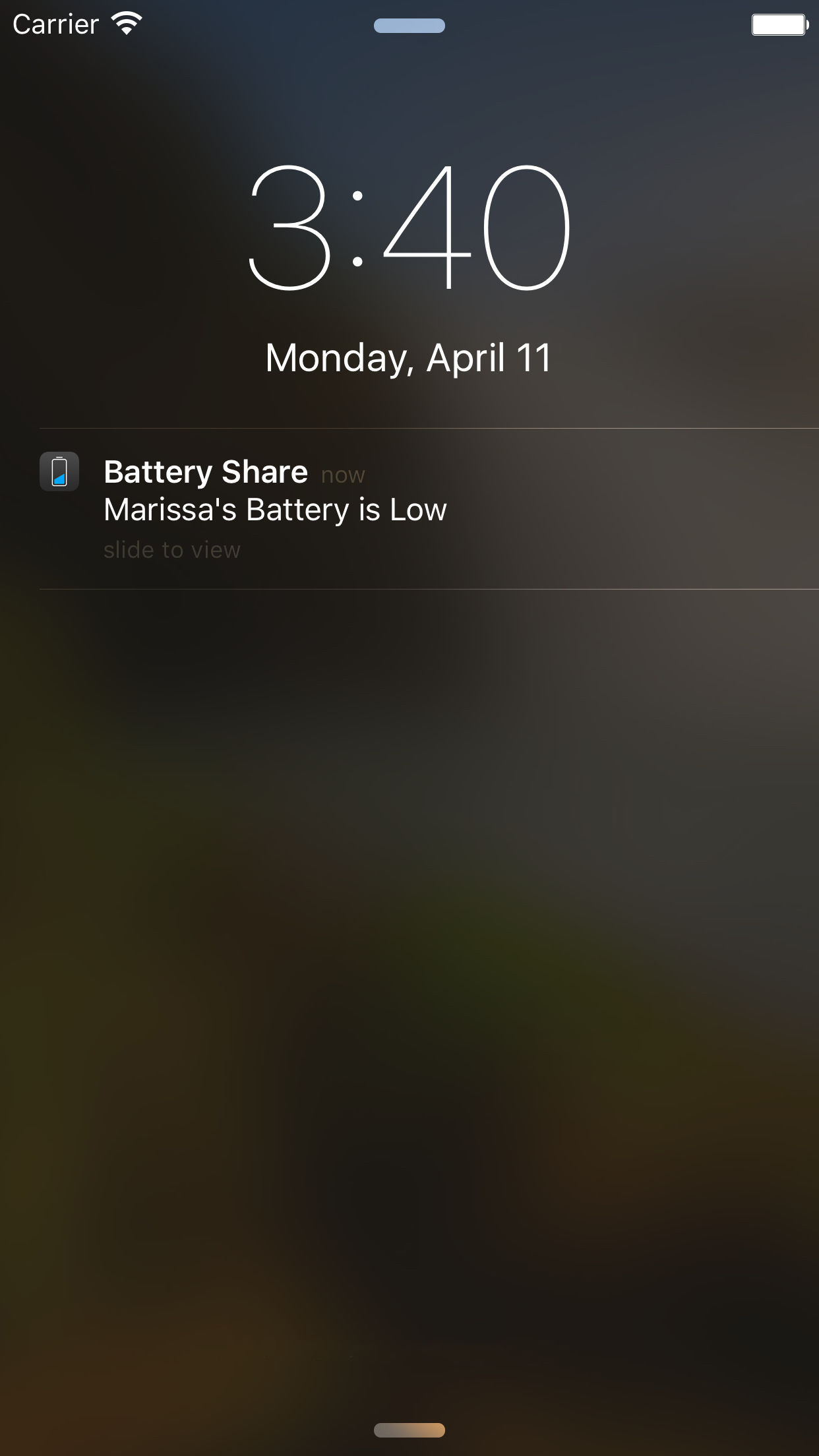
Calgary, Canada - Stonelight Pictures today is proud to announce the release and immediate availability of Battery Share 1.0.3, a new utility for iOS 9 devices. Battery Share gives you a last opportunity to contact your friends or loved ones before their phone dies. By getting notifications when your friend's battery is low, you can make last contact before their phone runs out of power.
Unfortunately, batteries have a knack for dying when we're running late. And no doubt many of us have been on the receiving end of several missed calls and texts simply because our phone couldn't turn on.
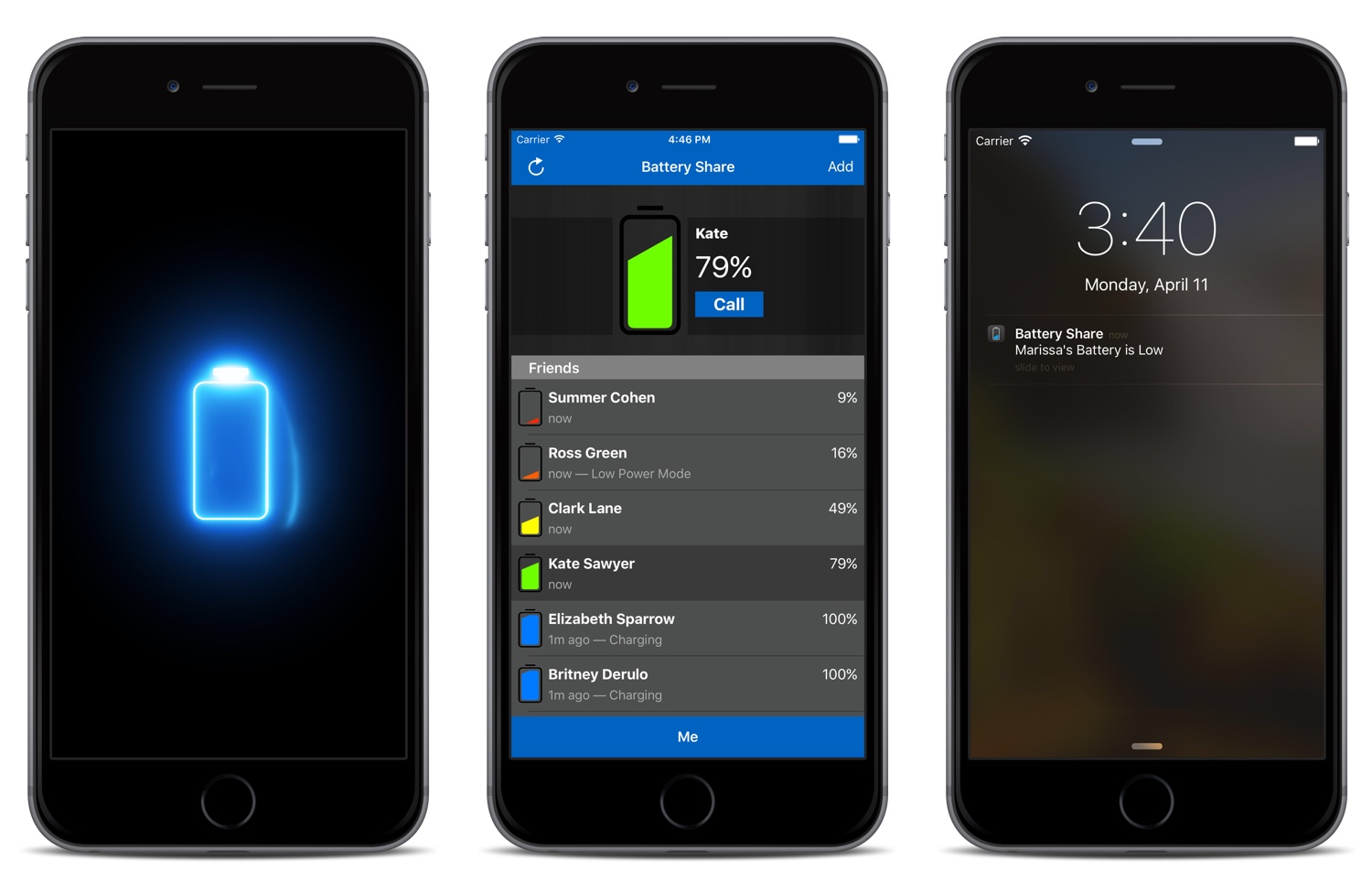
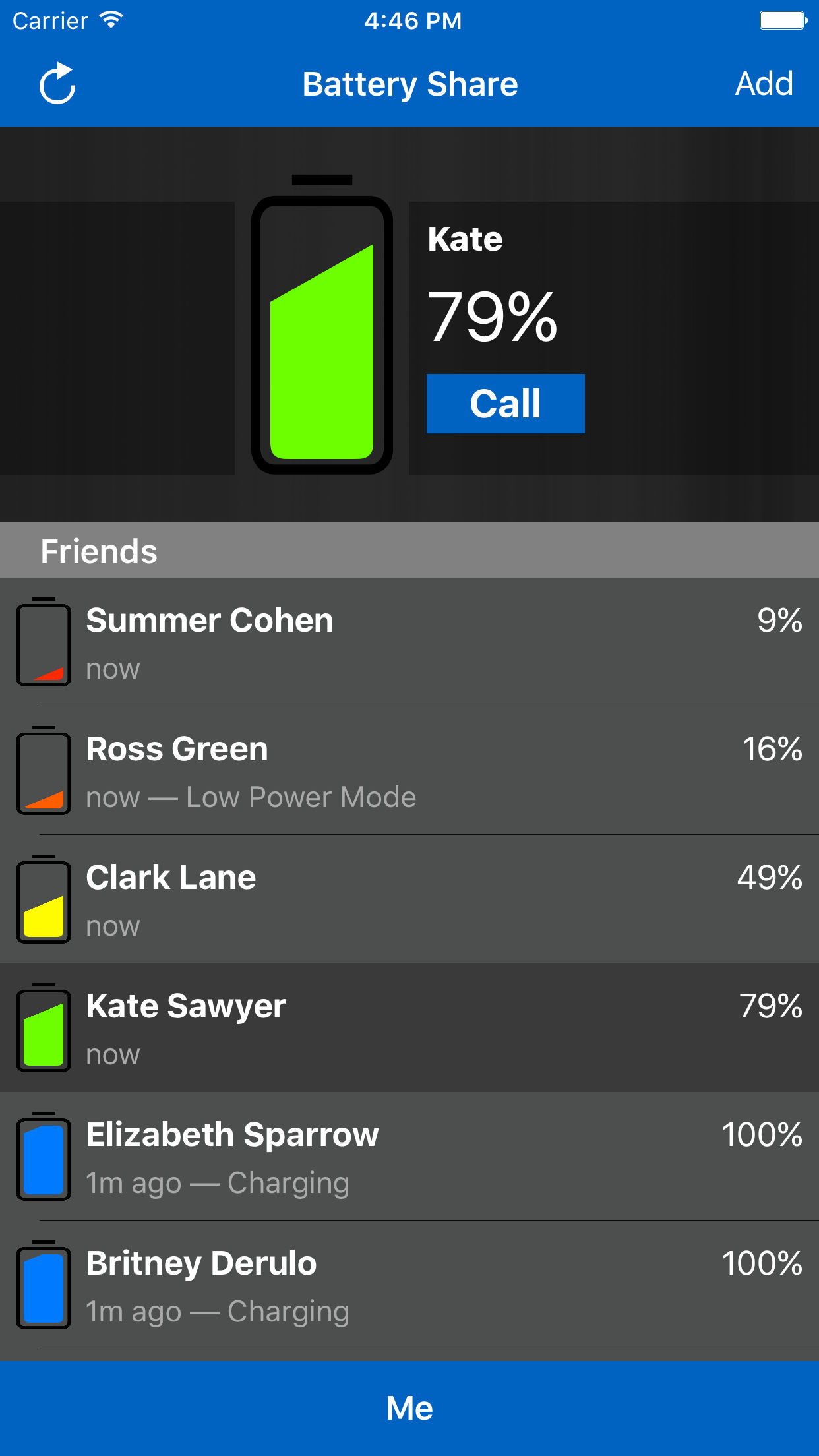
Battery Share warns selected friends and loved ones when you have a low battery. It also notifies you when their phone is about to die. This gives you the opportunity to contact them before they become unavailable. The app also allows you to see the battery power level of your friend's device, plus, the app will display if their device is charging, or is in low-power mode. Notifications are customizable, so you can select exactly who you'll receive notifications from. The app also includes internet calling (VoIP) capabilities, so you can stay in touch with friends via the app.
Just install the app and invite friends to share their battery status by sending them a message. When a friend accepts your invitation using the Battery Share app on their device, you can start following their battery status immediately.
Features:
* Quickly see the battery status of your friends and family
* Low Battery Notifications from your followers
* Simple privacy controls
* VoIP calling
* Gravity-animated battery icons
* Quickly add contacts with 3D Touch
Device Requirements:
* iPhone, iPad, and iPod touch
* Requires iOS 9.1 or later
* 22.8 MB
Pricing and Availability:
Battery Share 1.0.3 is only $0.99 USD (or equivalent amount in other currencies) and available worldwide exclusively through the App Store in the Utilities category.
Battery Share 1.0.3: http://stonelightpictures.com
Purchase and Download: https://itunes.apple.com/app/battery-share-track-your-friends/id1091016284
Screenshot 1: http://stonelightpictures.com/BatteryShare.jpg
Screenshot 2: http://stonelightpictures.com/BatteryShare1.jpg
Screenshot 3: http://stonelightpictures.com/BatteryShare2.jpg
Screenshot 4: http://stonelightpictures.com/BatteryShare3.jpg
Located in Alberta, Canada, Stonelight Pictures is a software development company bringing new and exciting apps to iOS and Mac for the last 7 years. All Material and Software (C) Copyright 2016 Stonelight Pictures. All Rights Reserved. Apple, the Apple logo, Mac OS X, iPhone, iPod, iPad and Macintosh are registered trademarks of Apple Inc. in the U.S. and/or other countries. Other trademarks and registered trademarks may be the property of their respective owners.
*******
Link To Article: http://prmac.com/release-id-79429.htm
*******
---------------------------------------------------------------------------------
Note that you can alter delivered distributions at any time.
Login to your account on prMac to alter your channel selection, or to opt-out at any time.
Get notified when your friends or loved ones are running low on power - Published on 05/10/16
Calgary based developer, Stonelight Pictures today announces Battery Share 1.0.3, a new utility for iOS 9 devices. Battery Share gives you a final opportunity to contact your friends or loved ones before their phone dies. By getting notifications when your friend's battery is low, you can make last contact before their phone runs out of power. The app features simple privacy controls, with VoIP calling. Version 1.0.3 introduces 3D Touch support with nice performance optimizations.
Calgary, Canada - Stonelight Pictures today is proud to announce the release and immediate availability of Battery Share 1.0.3, a new utility for iOS 9 devices. Battery Share gives you a last opportunity to contact your friends or loved ones before their phone dies. By getting notifications when your friend's battery is low, you can make last contact before their phone runs out of power.
Unfortunately, batteries have a knack for dying when we're running late. And no doubt many of us have been on the receiving end of several missed calls and texts simply because our phone couldn't turn on.
Battery Share warns selected friends and loved ones when you have a low battery. It also notifies you when their phone is about to die. This gives you the opportunity to contact them before they become unavailable. The app also allows you to see the battery power level of your friend's device, plus, the app will display if their device is charging, or is in low-power mode. Notifications are customizable, so you can select exactly who you'll receive notifications from. The app also includes internet calling (VoIP) capabilities, so you can stay in touch with friends via the app.
Just install the app and invite friends to share their battery status by sending them a message. When a friend accepts your invitation using the Battery Share app on their device, you can start following their battery status immediately.
Features:
* Quickly see the battery status of your friends and family
* Low Battery Notifications from your followers
* Simple privacy controls
* VoIP calling
* Gravity-animated battery icons
* Quickly add contacts with 3D Touch
Device Requirements:
* iPhone, iPad, and iPod touch
* Requires iOS 9.1 or later
* 22.8 MB
Pricing and Availability:
Battery Share 1.0.3 is only $0.99 USD (or equivalent amount in other currencies) and available worldwide exclusively through the App Store in the Utilities category.
Battery Share 1.0.3: http://stonelightpictures.com
Purchase and Download: https://itunes.apple.com/app/battery-share-track-your-friends/id1091016284
Screenshot 1: http://stonelightpictures.com/BatteryShare.jpg
Screenshot 2: http://stonelightpictures.com/BatteryShare1.jpg

Screenshot 3: http://stonelightpictures.com/BatteryShare2.jpg
Screenshot 4: http://stonelightpictures.com/BatteryShare3.jpg
Located in Alberta, Canada, Stonelight Pictures is a software development company bringing new and exciting apps to iOS and Mac for the last 7 years. All Material and Software (C) Copyright 2016 Stonelight Pictures. All Rights Reserved. Apple, the Apple logo, Mac OS X, iPhone, iPod, iPad and Macintosh are registered trademarks of Apple Inc. in the U.S. and/or other countries. Other trademarks and registered trademarks may be the property of their respective owners.
*******
Link To Article: http://prmac.com/release-id-79429.htm
*******
---------------------------------------------------------------------------------
Note that you can alter delivered distributions at any time.
Login to your account on prMac to alter your channel selection, or to opt-out at any time.
Beevr - The app to keep your neighbors connected with almost everything
A new article has been published at prMac.
Beevr - The app to keep your neighbors connected with almost everything - Published on 05/10/16
Houston based Beevrhood, Inc. announces Beevr 2.1, an update to their interactive social networking app developed for iOS devices. Beevr was developed specifically to support the needs and concerns of neighborhood communities, with the aim to help keep their members informed and connected on inner social interests. With this App the objective seeks to achieve integration and active participation from residents in a privately, safely way and according to the interests of each person.
Houston, Texas - Beevrhood, Inc. is pleased to announce the release of Beevr 2.1, an update to their interactive social networking app developed for iOS devices. Developed by an American startup and conformed by a Mexican team of entrepreneurs, Beevr aims to broaden and strengthen the information neighborhood networks in inherent themes to the community, security, sports, parties, services, projects, emergencies and even possible new businesses. Beevr is, above all, an application of inclusive social character.
Small guarantees for a calmer and happier life:
Meet your neighbors, decide what you want to know, be actively involved or stay informed about what happens in your community, are some of the premises of Beevr, a private communication service to connect the community in a personalized and secure way. Beevr offer to users different levels of privacy with which each person can decide the type of participation that have within their community. This 4 security levels of participation are: public, discreet, private and anonymous, and only for people who make up the neighborhood.
Individually, the users can design the local network to his own liking and according to their interests, in case of emergency, announcements and security or weird situations, the app count with an alert system. Undoubtedly Beevr is a tool with a high degree of utility and collaborative level where people feel supported and protected by his neighbors in some way. This, is a contribution of mobile technology created to improve the quality of life through this application.
"The idea started after I had lived and experienced the startup ecosystem in San Francisco and from the personal experience of living in a country where insecurity and the generalized lack of trust to one another is a constant subject and problem," explained Guillermo Plasenciam Founder of Houston based Beevrhood, Inc. "We wanted to do something that can truly contribute in a positive way to society. That's what led to Beevr. Beevr was created from scratch for one main purpose, bringing back trust and improving the quality of life for our families and we believe we can do it by bringing back the sense of community on our neighborhood communities. At the same time with Beevr we have crafted an app that will make every day's life activities within those communities easier, safer, and more enjoyable than ever before; by providing a unique collaborative experience that will break the barriers of communication and interaction but most of all, that provides an experience that invite and
enhance innovation from neighbors so they can find new solutions and opportunities and at the end enhance their life."
Neighborhood groups and civic associations already have this application that has allowed them to organize themselves effectively according to their interests. Interact and meet those who live around us is a way to live better. Beevr now available in the US. Version 2.1 now supports English, with new invitation and promo design, as well as minor error fixes.
Device Requirements:
* iPhone, iPad, and iPod touch
* Requires iOS 8.4 or later
* 74.7 MB
Pricing and Availability:
Beevr 2.1 is Free and currently available in Mexico and USA exclusively through the App Store in the Social Networking category. We continue to improve. We would love to hear from you. Please contact Guillermo Plasencia for any questions. Thank you for your support!
Beevr 2.1: http://www.beevrhood.com
Download from iTunes: https://itunes.apple.com/app/beevr/id1057296275
Media Assets: https://angel.co/projects/271716-beevr?src=startup_profile
Beevrhood is an internet software company based in Houston, Texas, conformed by a Mexican team of entrepreneurs. All Material and Software (C) Copyright 2016 Beevrhood, Inc. All Rights Reserved. Apple, the Apple logo, iPhone, iPod and iPad are registered trademarks of Apple Inc. in the U.S. and/or other countries. Other trademarks and registered trademarks may be the property of their respective owners.
*******
Link To Article: http://prmac.com/release-id-79428.htm
*******
---------------------------------------------------------------------------------
Note that you can alter delivered distributions at any time.
Login to your account on prMac to alter your channel selection, or to opt-out at any time.
Beevr - The app to keep your neighbors connected with almost everything - Published on 05/10/16
Houston based Beevrhood, Inc. announces Beevr 2.1, an update to their interactive social networking app developed for iOS devices. Beevr was developed specifically to support the needs and concerns of neighborhood communities, with the aim to help keep their members informed and connected on inner social interests. With this App the objective seeks to achieve integration and active participation from residents in a privately, safely way and according to the interests of each person.
Houston, Texas - Beevrhood, Inc. is pleased to announce the release of Beevr 2.1, an update to their interactive social networking app developed for iOS devices. Developed by an American startup and conformed by a Mexican team of entrepreneurs, Beevr aims to broaden and strengthen the information neighborhood networks in inherent themes to the community, security, sports, parties, services, projects, emergencies and even possible new businesses. Beevr is, above all, an application of inclusive social character.
Small guarantees for a calmer and happier life:
Meet your neighbors, decide what you want to know, be actively involved or stay informed about what happens in your community, are some of the premises of Beevr, a private communication service to connect the community in a personalized and secure way. Beevr offer to users different levels of privacy with which each person can decide the type of participation that have within their community. This 4 security levels of participation are: public, discreet, private and anonymous, and only for people who make up the neighborhood.
Individually, the users can design the local network to his own liking and according to their interests, in case of emergency, announcements and security or weird situations, the app count with an alert system. Undoubtedly Beevr is a tool with a high degree of utility and collaborative level where people feel supported and protected by his neighbors in some way. This, is a contribution of mobile technology created to improve the quality of life through this application.
"The idea started after I had lived and experienced the startup ecosystem in San Francisco and from the personal experience of living in a country where insecurity and the generalized lack of trust to one another is a constant subject and problem," explained Guillermo Plasenciam Founder of Houston based Beevrhood, Inc. "We wanted to do something that can truly contribute in a positive way to society. That's what led to Beevr. Beevr was created from scratch for one main purpose, bringing back trust and improving the quality of life for our families and we believe we can do it by bringing back the sense of community on our neighborhood communities. At the same time with Beevr we have crafted an app that will make every day's life activities within those communities easier, safer, and more enjoyable than ever before; by providing a unique collaborative experience that will break the barriers of communication and interaction but most of all, that provides an experience that invite and
enhance innovation from neighbors so they can find new solutions and opportunities and at the end enhance their life."
Neighborhood groups and civic associations already have this application that has allowed them to organize themselves effectively according to their interests. Interact and meet those who live around us is a way to live better. Beevr now available in the US. Version 2.1 now supports English, with new invitation and promo design, as well as minor error fixes.
Device Requirements:
* iPhone, iPad, and iPod touch
* Requires iOS 8.4 or later
* 74.7 MB
Pricing and Availability:
Beevr 2.1 is Free and currently available in Mexico and USA exclusively through the App Store in the Social Networking category. We continue to improve. We would love to hear from you. Please contact Guillermo Plasencia for any questions. Thank you for your support!
Beevr 2.1: http://www.beevrhood.com
Download from iTunes: https://itunes.apple.com/app/beevr/id1057296275
Media Assets: https://angel.co/projects/271716-beevr?src=startup_profile
Beevrhood is an internet software company based in Houston, Texas, conformed by a Mexican team of entrepreneurs. All Material and Software (C) Copyright 2016 Beevrhood, Inc. All Rights Reserved. Apple, the Apple logo, iPhone, iPod and iPad are registered trademarks of Apple Inc. in the U.S. and/or other countries. Other trademarks and registered trademarks may be the property of their respective owners.
*******
Link To Article: http://prmac.com/release-id-79428.htm
*******
---------------------------------------------------------------------------------
Note that you can alter delivered distributions at any time.
Login to your account on prMac to alter your channel selection, or to opt-out at any time.
uDesktop NEXT for Mac - Choose from Many Free, Hi-Res Wallpapers
A new article has been published at prMac.
uDesktop NEXT for Mac - Choose from Many Free, Hi-Res Wallpapers - Published on 05/09/16
Aperio Lux announces uDesktop NEXT 3.0 for OS X, the next generation of desktop wallpaper application that lets users choose from many hi-res images. There are 36 categories of images for any taste. Wallpapers are available in different resolutions for everything from iPhone and iPad to the brand-new iMac with Retina 5K display, including wallpapers for latest iPhone 6S and iPad Pro. Version 3.0 brings animation support, improved search, and more.
Kiev, Ukraine - Aperio Lux today is pleased to announce the release and immediate availability of uDesktop NEXT 3.0 for Mac OS X, the next generation of their powerful desktop wallpaper application that lets users choose from many Hi-Res images. Users may download as many wallpapers as they wish. Image categories include: 3D, Abstract, Animals, Architectures, Aviation, Birds, Black & White, Cars, Cartoon, Cats, Colors, Dogs, Fantasy, Fire, Flowers, Food, Games, Glass, Holidays, Insects, Interiors, Love, Misc, Monuments, Motorbikes, Mountains, Music, Nature, Ships, Space, Sports, Technical, Textures, Underwater World, Water, Weapons. In addition, it includes some special categories with beautiful pictures of different countries as well as sketches and landscapes.
Wallpapers are available in different resolutions, for everything from iPhone and iPad to the brand-new iMac with Retina 5K display, including wallpapers for latest iPhone 6, iPhone 6S and iPad Pro. In addition, uDesktop NEXT includes wallpapers for 4K, 5K and 8K displays as well as incredible panoramic Hi-Res desktop pictures.
Feature Highlights:
* UNLIMITED downloads of high definition pictures
* Categorized Wallpapers. The wallpapers are presented in 36 different categories each containing dramatic, artistic images for any taste. All categories are constantly being updated
* Wallpapers for everything from iPhone and iPad to the brand-new iMac with Retina 5K display including latest iPhone 6S and iPad Pro
* Resolution Lock allows you to search wallpapers only for your resolution
* Surfboard - incredible panoramic Hi-Res desktop pictures
* Featured Section with Editors' Choice and TOP 100
* Special categories in Featured Section
* Incredible 4K, 5K and 8K wallpapers
* Sort the wallpapers by New, Recent, Popular or choose Random
* Search wallpapers by tags
* My Folder - add your own images in the catalog for displaying on the desktop
Additional features
* Adding more than a thousand new images weekly
* Share wallpapers with friends via Twitter, Facebook, Message, Email, AirDrop, Flickr
* Settings for set image as desktop picture
* Multi display support
* Absolutely new user friendly interface
* OS X 10.11 compatible
uDesktop NEXT change user's judgement of how user can search wallpapers. There is nothing Mac users view more often on their computers than the desktop. The desktop greets users each time they log in, and they instantly recognize it as their own. There are countless apps and websites offering images to personalize the desktop, but none so powerful, user friendly and economical as uDesktop NEXT.
First, unlike other similar applications in uDesktop NEXT there is no hidden or additional costs. A choice of thousands incredible, beautiful, high-resolution images is provided free. Users may download as many as they wish.
Second, the quality and variety of the wallpapers are unsurpassed. There are 36 categories of images, each containing dramatic, artistic photographs for any taste.
Third, wallpapers available in different resolutions for everything from iPhone and iPad to the brand-new iMac with Retina 5K display, including wallpapers for latest iPhone 6, iPhone 6S and iPad Pro.
Fourth, lets user add their own images in the catalog for displaying on the desktop. This would allow uDesktop NEXT to become a unified center for managing user's wallpapers. Mix personal photos with the best of professional photography.
What's New in Version 3.0:
* Animation support has been added
* Search has been has been completely updated
* New wallpapers categories and resolutions have been added
System Requirements:
* OS X Lion 10.10 or later
* Intel 64-bit processor
* 4.4 MB
Pricing/Availability:
uDesktop NEXT is only $0.99 USD (or an equivalent amount in other currencies) from May 7, 2016 until May 12, 2016; and $3.99 starting from May 13, 2016. Available worldwide exclusively on the Mac App Store (except Russia) in the Lifestyle category. Promo codes are available on the request.
Aperio Lux: http://aperio-lux.com
uDesktop NEXT 3.0: http://beta.aperio-lux.com/uDesktop-NEXT/
Purchase and Download from Mac App Store: https://itunes.apple.com/app/udesktop-next-vast-wallpaper/id671040216
Press Kit (ZIP): http://beta.aperio-lux.com/MediaKitArchives/uDesktop_NEXT_Media_Kit.zip
Aperio Lux is an independent team of enthusiasts and innovators from Ukraine. The Aperio Lux team develops ergonomic and user-friendly software for OS X and iOS. All Material and Software Copyright (C) 2011-2016 Alexey Nikitin and Alexandr Bondar. All Rights Reserved. Apple, the Apple logo, iPhone, iPod and iPad are registered trademarks of Apple Inc. in the U.S. and/or other countries. Other trademarks and registered trademarks may be the property of their respective owners.
*******
Link To Article: http://prmac.com/release-id-79426.htm
*******
---------------------------------------------------------------------------------
Note that you can alter delivered distributions at any time.
Login to your account on prMac to alter your channel selection, or to opt-out at any time.
uDesktop NEXT for Mac - Choose from Many Free, Hi-Res Wallpapers - Published on 05/09/16
Aperio Lux announces uDesktop NEXT 3.0 for OS X, the next generation of desktop wallpaper application that lets users choose from many hi-res images. There are 36 categories of images for any taste. Wallpapers are available in different resolutions for everything from iPhone and iPad to the brand-new iMac with Retina 5K display, including wallpapers for latest iPhone 6S and iPad Pro. Version 3.0 brings animation support, improved search, and more.
Kiev, Ukraine - Aperio Lux today is pleased to announce the release and immediate availability of uDesktop NEXT 3.0 for Mac OS X, the next generation of their powerful desktop wallpaper application that lets users choose from many Hi-Res images. Users may download as many wallpapers as they wish. Image categories include: 3D, Abstract, Animals, Architectures, Aviation, Birds, Black & White, Cars, Cartoon, Cats, Colors, Dogs, Fantasy, Fire, Flowers, Food, Games, Glass, Holidays, Insects, Interiors, Love, Misc, Monuments, Motorbikes, Mountains, Music, Nature, Ships, Space, Sports, Technical, Textures, Underwater World, Water, Weapons. In addition, it includes some special categories with beautiful pictures of different countries as well as sketches and landscapes.
Wallpapers are available in different resolutions, for everything from iPhone and iPad to the brand-new iMac with Retina 5K display, including wallpapers for latest iPhone 6, iPhone 6S and iPad Pro. In addition, uDesktop NEXT includes wallpapers for 4K, 5K and 8K displays as well as incredible panoramic Hi-Res desktop pictures.
Feature Highlights:
* UNLIMITED downloads of high definition pictures
* Categorized Wallpapers. The wallpapers are presented in 36 different categories each containing dramatic, artistic images for any taste. All categories are constantly being updated
* Wallpapers for everything from iPhone and iPad to the brand-new iMac with Retina 5K display including latest iPhone 6S and iPad Pro
* Resolution Lock allows you to search wallpapers only for your resolution
* Surfboard - incredible panoramic Hi-Res desktop pictures
* Featured Section with Editors' Choice and TOP 100
* Special categories in Featured Section
* Incredible 4K, 5K and 8K wallpapers
* Sort the wallpapers by New, Recent, Popular or choose Random
* Search wallpapers by tags
* My Folder - add your own images in the catalog for displaying on the desktop
Additional features
* Adding more than a thousand new images weekly
* Share wallpapers with friends via Twitter, Facebook, Message, Email, AirDrop, Flickr
* Settings for set image as desktop picture
* Multi display support
* Absolutely new user friendly interface
* OS X 10.11 compatible
uDesktop NEXT change user's judgement of how user can search wallpapers. There is nothing Mac users view more often on their computers than the desktop. The desktop greets users each time they log in, and they instantly recognize it as their own. There are countless apps and websites offering images to personalize the desktop, but none so powerful, user friendly and economical as uDesktop NEXT.
First, unlike other similar applications in uDesktop NEXT there is no hidden or additional costs. A choice of thousands incredible, beautiful, high-resolution images is provided free. Users may download as many as they wish.
Second, the quality and variety of the wallpapers are unsurpassed. There are 36 categories of images, each containing dramatic, artistic photographs for any taste.
Third, wallpapers available in different resolutions for everything from iPhone and iPad to the brand-new iMac with Retina 5K display, including wallpapers for latest iPhone 6, iPhone 6S and iPad Pro.
Fourth, lets user add their own images in the catalog for displaying on the desktop. This would allow uDesktop NEXT to become a unified center for managing user's wallpapers. Mix personal photos with the best of professional photography.
What's New in Version 3.0:
* Animation support has been added
* Search has been has been completely updated
* New wallpapers categories and resolutions have been added
System Requirements:
* OS X Lion 10.10 or later
* Intel 64-bit processor
* 4.4 MB
Pricing/Availability:
uDesktop NEXT is only $0.99 USD (or an equivalent amount in other currencies) from May 7, 2016 until May 12, 2016; and $3.99 starting from May 13, 2016. Available worldwide exclusively on the Mac App Store (except Russia) in the Lifestyle category. Promo codes are available on the request.
Aperio Lux: http://aperio-lux.com
uDesktop NEXT 3.0: http://beta.aperio-lux.com/uDesktop-NEXT/
Purchase and Download from Mac App Store: https://itunes.apple.com/app/udesktop-next-vast-wallpaper/id671040216
Press Kit (ZIP): http://beta.aperio-lux.com/MediaKitArchives/uDesktop_NEXT_Media_Kit.zip
Aperio Lux is an independent team of enthusiasts and innovators from Ukraine. The Aperio Lux team develops ergonomic and user-friendly software for OS X and iOS. All Material and Software Copyright (C) 2011-2016 Alexey Nikitin and Alexandr Bondar. All Rights Reserved. Apple, the Apple logo, iPhone, iPod and iPad are registered trademarks of Apple Inc. in the U.S. and/or other countries. Other trademarks and registered trademarks may be the property of their respective owners.
*******
Link To Article: http://prmac.com/release-id-79426.htm
*******
---------------------------------------------------------------------------------
Note that you can alter delivered distributions at any time.
Login to your account on prMac to alter your channel selection, or to opt-out at any time.
Gurmukhi Keyboard Punjabi Language for iPhone and iPad 1.0
A new article has been published at prMac.
Gurmukhi Keyboard Punjabi Language for iPhone and iPad 1.0 - Published on 05/09/16
LastThink today announces Gurmukhi Keyboard Punjabi Language for iPhone and iPad 1.0, their highly customizable keyboard application. Gurmukhi Keyboard offers users a third-party keyboard for use with iOS apps that allows anyone to modify it to their individual taste. Users can modify the order of the keyboard for more convenient usage. The app includes the ability to save specific words for later use, emoticons, paragraph formatting, word prediction, and more.
Yerevan, Armenia - LastThink is proud to announce the release of Gurmukhi Keyboard Punjabi Language for iPhone and iPad 1.0, their highly customizable keyboard application. The Gurmukhi Keyboard's customization features allow anyone to create the keyboard layout that is perfect for their needs. Features include the ability to change the size, shape, and order of characters; the ability to save specific words for later use; emoticons, word prediction, and more.
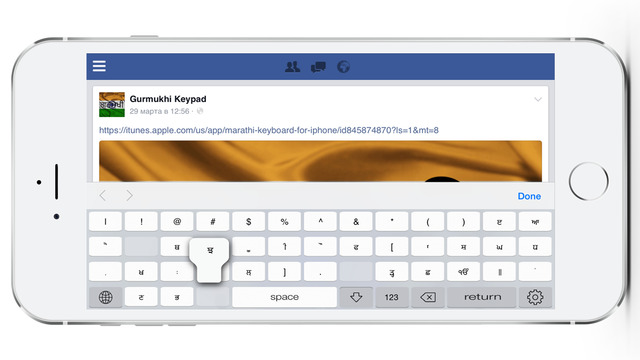
Users can change the order of the keyboard's letter layout, and even create handy shortcuts to allow entering words or even entire sentences with just a few keystrokes. The keyboard's Swipe feature allows users to swipe their finger around the keyboard to select letters and form words. The app intelligently predicts what the user intends to enter, greatly enhancing typing speed.
Features:
* Change the size, and place, as well as the shape of characters and keyboard separately
* Save any words that are used frequently in the active vocabulary for later use
* Express emotions with emoji characters (emoticons) which will correspond to entered words
* Paragraph formatting: Adjust alignment, line spacing, margins, bullets and numbering
* Optional smart auto correction: Intelligent spell checking for even the sloppiest typing
* Style: Customize the look of the keyboard. Change the color of the keys and background
* Word prediction: The keyboard guesses and displays the appropriate word as the user types
* Share text via Facebook, Twitter, email, Dropbox, and more
"When we set out to create the Gurmukhi Keyboard, we knew we wanted to create a customizable keyboard that would offer users the ability to modify it to their individual tastes," says LastThink founder Grigori Jlavyan. Our keyboard allows Gurmukhi speaking users to easily enter their text messages, emails, and other types of texts via a comprehensive interface, making their day-to-day communications more convenient than ever."
The Gurmukhi Keyboard also offers handy paragraph formatting options, allowing users to adjust the alignment of their text, while also offering the ability to set line spacing, adjust margins, even add bulleted or numbered lists. Optional smart correction makes even the sloppiest speller's text entry become correct. The keyboard also offers a downloadable Gurmukhi font for use with iOS devices, making text entry, editing, and display even more convenient.
Gurmukhi Keyboard emphasizes the user's security above all, and while many third-party iOS keyboard apps require "Full Access" - with the ability to send back keystrokes and other information back to their developer - the Gurmukhi Keyboard does not, protecting the text entry and sensitive user information, keeping their personal information safe from prying eyes.
Device Requirements:
* iPhone, iPad, and iPod touch
* Optimized for iPhone 5, iPhone 6/6 Plus
* Universal Application
* Requires iOS 8.0 or later
* 9.2 MB
Pricing and Availability:
Gurmukhi Keyboard Punjabi Language for iPhone and iPad 1.0 is $2.99 USD (or an equivalent amount in other currencies), and is available worldwide exclusively through the App Store in the Utilities category. Review codes are available upon request.
LastThink: http://lastthink.com/
Gurmukhi Keyboard Punjabi Language for iPhone and iPad 1.0: https://www.facebook.com/pages/Gurmukhi-Keypad/719386534755105
Purchase and Download from iTunes: https://itunes.apple.com/app/gurmukhi-keyboard-punjabi/id941086288
Screenshot: http://a3.mzstatic.com/us/r30/Purple5/v4/78/da/a4/78daa49e-4e27-b202-b3fa-b75afe9d24bc/screen640x640.jpeg
App Icon: http://a3.mzstatic.com/us/r30/Purple3/v4/13/d3/a3/13d3a3d9-3add-4330-9f50-103717733132/icon175x175.jpeg
LastThink is an IT company with a focus on mobile development. It has extended its list of services since 2012 to offer high-end business process management, system integration, as well as up-to-date communication solutions. LastThink's mission is to deliver maximum business value to its customers by designing, developing, implementing and maintaining efficient and high quality software solutions aligned with their most essential business needs. Their team will always do its best to meet client expectations. All Material and Software (C) Copyright 2016 LastThink. All Rights Reserved. Apple, the Apple logo, iPhone, iPod and iPad are registered trademarks of Apple Inc. in the U.S. and/or other countries. Other trademarks and registered trademarks may be the property of their respective owners.
*******
Link To Article: http://prmac.com/release-id-79425.htm
*******
---------------------------------------------------------------------------------
Note that you can alter delivered distributions at any time.
Login to your account on prMac to alter your channel selection, or to opt-out at any time.
Gurmukhi Keyboard Punjabi Language for iPhone and iPad 1.0 - Published on 05/09/16
LastThink today announces Gurmukhi Keyboard Punjabi Language for iPhone and iPad 1.0, their highly customizable keyboard application. Gurmukhi Keyboard offers users a third-party keyboard for use with iOS apps that allows anyone to modify it to their individual taste. Users can modify the order of the keyboard for more convenient usage. The app includes the ability to save specific words for later use, emoticons, paragraph formatting, word prediction, and more.
Yerevan, Armenia - LastThink is proud to announce the release of Gurmukhi Keyboard Punjabi Language for iPhone and iPad 1.0, their highly customizable keyboard application. The Gurmukhi Keyboard's customization features allow anyone to create the keyboard layout that is perfect for their needs. Features include the ability to change the size, shape, and order of characters; the ability to save specific words for later use; emoticons, word prediction, and more.
Users can change the order of the keyboard's letter layout, and even create handy shortcuts to allow entering words or even entire sentences with just a few keystrokes. The keyboard's Swipe feature allows users to swipe their finger around the keyboard to select letters and form words. The app intelligently predicts what the user intends to enter, greatly enhancing typing speed.
Features:
* Change the size, and place, as well as the shape of characters and keyboard separately
* Save any words that are used frequently in the active vocabulary for later use
* Express emotions with emoji characters (emoticons) which will correspond to entered words
* Paragraph formatting: Adjust alignment, line spacing, margins, bullets and numbering
* Optional smart auto correction: Intelligent spell checking for even the sloppiest typing
* Style: Customize the look of the keyboard. Change the color of the keys and background
* Word prediction: The keyboard guesses and displays the appropriate word as the user types
* Share text via Facebook, Twitter, email, Dropbox, and more
"When we set out to create the Gurmukhi Keyboard, we knew we wanted to create a customizable keyboard that would offer users the ability to modify it to their individual tastes," says LastThink founder Grigori Jlavyan. Our keyboard allows Gurmukhi speaking users to easily enter their text messages, emails, and other types of texts via a comprehensive interface, making their day-to-day communications more convenient than ever."
The Gurmukhi Keyboard also offers handy paragraph formatting options, allowing users to adjust the alignment of their text, while also offering the ability to set line spacing, adjust margins, even add bulleted or numbered lists. Optional smart correction makes even the sloppiest speller's text entry become correct. The keyboard also offers a downloadable Gurmukhi font for use with iOS devices, making text entry, editing, and display even more convenient.
Gurmukhi Keyboard emphasizes the user's security above all, and while many third-party iOS keyboard apps require "Full Access" - with the ability to send back keystrokes and other information back to their developer - the Gurmukhi Keyboard does not, protecting the text entry and sensitive user information, keeping their personal information safe from prying eyes.
Device Requirements:
* iPhone, iPad, and iPod touch
* Optimized for iPhone 5, iPhone 6/6 Plus
* Universal Application
* Requires iOS 8.0 or later
* 9.2 MB
Pricing and Availability:
Gurmukhi Keyboard Punjabi Language for iPhone and iPad 1.0 is $2.99 USD (or an equivalent amount in other currencies), and is available worldwide exclusively through the App Store in the Utilities category. Review codes are available upon request.
LastThink: http://lastthink.com/
Gurmukhi Keyboard Punjabi Language for iPhone and iPad 1.0: https://www.facebook.com/pages/Gurmukhi-Keypad/719386534755105
Purchase and Download from iTunes: https://itunes.apple.com/app/gurmukhi-keyboard-punjabi/id941086288
Screenshot: http://a3.mzstatic.com/us/r30/Purple5/v4/78/da/a4/78daa49e-4e27-b202-b3fa-b75afe9d24bc/screen640x640.jpeg
App Icon: http://a3.mzstatic.com/us/r30/Purple3/v4/13/d3/a3/13d3a3d9-3add-4330-9f50-103717733132/icon175x175.jpeg

LastThink is an IT company with a focus on mobile development. It has extended its list of services since 2012 to offer high-end business process management, system integration, as well as up-to-date communication solutions. LastThink's mission is to deliver maximum business value to its customers by designing, developing, implementing and maintaining efficient and high quality software solutions aligned with their most essential business needs. Their team will always do its best to meet client expectations. All Material and Software (C) Copyright 2016 LastThink. All Rights Reserved. Apple, the Apple logo, iPhone, iPod and iPad are registered trademarks of Apple Inc. in the U.S. and/or other countries. Other trademarks and registered trademarks may be the property of their respective owners.
*******
Link To Article: http://prmac.com/release-id-79425.htm
*******
---------------------------------------------------------------------------------
Note that you can alter delivered distributions at any time.
Login to your account on prMac to alter your channel selection, or to opt-out at any time.
AntiDuplicates - A Must Have App for Mac OS X Computers
A new article has been published at prMac.
AntiDuplicates - A Must Have App for Mac OS X Computers - Published on 05/09/16
iLifeTouch announces AntiDuplicates 1.0, their new utility app for Mac OS X. AntiDuplicates is an essential tool for Mac users to free up their hard drives from unwanted junk files. Users simply need select a particular folder for scanning, and the app will find multiple copies of the same files, which stay hidden in different locations. Search results will be laid out in an intuitive interface from where users will be able to choose and selectively delete multiple copies of the same file.
Kolkata, India - iLifeTouch is pleased to announce the release of AntiDuplicates 1.0, their new utility app for Mac OS X. AntiDuplicates is an essential tool for Mac user to free up their hard drives from unwanted junk files. This app will help anyone find multiple copies of the same files which stay hidden in different locations. AntiDuplicates gives users an easy interface from where they can add folders and the app will start scanning for duplicate files. The search results will be laid out in an intuitive interface from where users will be able to choose and selectively delete multiple copies of the same file.
Top Features:
* Quick and easy app operation for finding duplicate files
* Easy to use app with simple functionalities
* Three different levels - Simple, Strong, and Extreme, for performing a better scan
* Add folders and keep the search results inside the app for future reference
* Delete duplicate properties instantly
* See locations of scanned files right from the app
* Search through the duplicate files for decisive deletion
* See Preview of files before deleting
After scanning a particular folder, users can select the files they want to delete very easily. This is where anyone can free your hard drive from unnecessary files, and save some extra space. It provides a clean and easy to navigate app interface. It works very fast with excellent results. Download AntiDuplicates and regain some extra space on any Mac's hard drive.
System Requirements:
* OS X 10.10 or later
* 64-bit processor
* 1.5 MB
Pricing and Availability:
AntiDuplicates 1.0 is just $2.99 USD (or an equivalent amount in other currencies) and is available worldwide exclusively through the Mac App Store in the Utilities category.
iLifeTouch: http://www.ilifetouch.com
AntiDuplicates 1.0: http://www.ilifetouch.com/Antiduplicates
Purchase and Download from Mac App Store: https://itunes.apple.com/app/antiduplicates/id1109341029
Screenshot: http://a1.mzstatic.com/us/r30/Purple20/v4/1d/ad/a5/1dada5ea-21cb-db43-0d7c-3e2e6bfd74b8/screen800x500.jpeg
Application Icon: http://a4.mzstatic.com/us/r30/Purple20/v4/b6/76/be/b676be7b-05e5-f670-4e66-f6c7261435c4/icon128-2x.png
iLifeTouch treats all their apps as if they belonged to the end users. Not only do they hope for feedback, they actively encourage users to tell them what they want and to inform them if they are missing something they would love to see built into their apps. They are eagerly awaiting your input and they are here to make your lives easier using their apps. All Material and Software (C) Copyright 2016 iLifeTouch. All Rights Reserved. Apple, the Apple logo, Macintosh and Mac OS X are registered trademarks of Apple Inc. in the U.S. and/or other countries. Other trademarks and registered trademarks may be the property of their respective owners.
*******
Link To Article: http://prmac.com/release-id-79424.htm
*******
---------------------------------------------------------------------------------
Note that you can alter delivered distributions at any time.
Login to your account on prMac to alter your channel selection, or to opt-out at any time.
AntiDuplicates - A Must Have App for Mac OS X Computers - Published on 05/09/16
iLifeTouch announces AntiDuplicates 1.0, their new utility app for Mac OS X. AntiDuplicates is an essential tool for Mac users to free up their hard drives from unwanted junk files. Users simply need select a particular folder for scanning, and the app will find multiple copies of the same files, which stay hidden in different locations. Search results will be laid out in an intuitive interface from where users will be able to choose and selectively delete multiple copies of the same file.
Kolkata, India - iLifeTouch is pleased to announce the release of AntiDuplicates 1.0, their new utility app for Mac OS X. AntiDuplicates is an essential tool for Mac user to free up their hard drives from unwanted junk files. This app will help anyone find multiple copies of the same files which stay hidden in different locations. AntiDuplicates gives users an easy interface from where they can add folders and the app will start scanning for duplicate files. The search results will be laid out in an intuitive interface from where users will be able to choose and selectively delete multiple copies of the same file.
Top Features:
* Quick and easy app operation for finding duplicate files
* Easy to use app with simple functionalities
* Three different levels - Simple, Strong, and Extreme, for performing a better scan
* Add folders and keep the search results inside the app for future reference
* Delete duplicate properties instantly
* See locations of scanned files right from the app
* Search through the duplicate files for decisive deletion
* See Preview of files before deleting
After scanning a particular folder, users can select the files they want to delete very easily. This is where anyone can free your hard drive from unnecessary files, and save some extra space. It provides a clean and easy to navigate app interface. It works very fast with excellent results. Download AntiDuplicates and regain some extra space on any Mac's hard drive.
System Requirements:
* OS X 10.10 or later
* 64-bit processor
* 1.5 MB
Pricing and Availability:
AntiDuplicates 1.0 is just $2.99 USD (or an equivalent amount in other currencies) and is available worldwide exclusively through the Mac App Store in the Utilities category.
iLifeTouch: http://www.ilifetouch.com
AntiDuplicates 1.0: http://www.ilifetouch.com/Antiduplicates
Purchase and Download from Mac App Store: https://itunes.apple.com/app/antiduplicates/id1109341029
Screenshot: http://a1.mzstatic.com/us/r30/Purple20/v4/1d/ad/a5/1dada5ea-21cb-db43-0d7c-3e2e6bfd74b8/screen800x500.jpeg

Application Icon: http://a4.mzstatic.com/us/r30/Purple20/v4/b6/76/be/b676be7b-05e5-f670-4e66-f6c7261435c4/icon128-2x.png

iLifeTouch treats all their apps as if they belonged to the end users. Not only do they hope for feedback, they actively encourage users to tell them what they want and to inform them if they are missing something they would love to see built into their apps. They are eagerly awaiting your input and they are here to make your lives easier using their apps. All Material and Software (C) Copyright 2016 iLifeTouch. All Rights Reserved. Apple, the Apple logo, Macintosh and Mac OS X are registered trademarks of Apple Inc. in the U.S. and/or other countries. Other trademarks and registered trademarks may be the property of their respective owners.
*******
Link To Article: http://prmac.com/release-id-79424.htm
*******
---------------------------------------------------------------------------------
Note that you can alter delivered distributions at any time.
Login to your account on prMac to alter your channel selection, or to opt-out at any time.
Subscribe to:
Posts (Atom)