A new article has been published at prMac.
Devanagari Keyboard for iPad and iPhone 1.0 - Published on 05/15/16
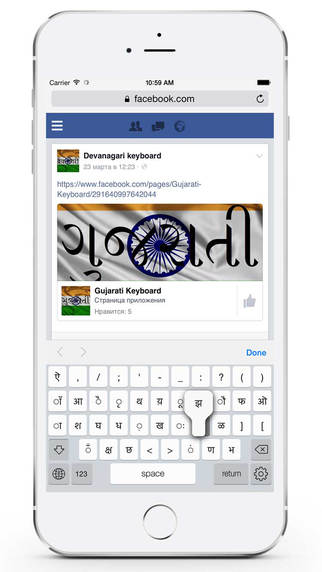
LastThink announces Devanagari Keyboard for iPad and iPhone 1.0, their highly customizable keyboard application for iOS devices. Devanagari Keyboard offers users a third-party keyboard for use with iOS apps that allows anyone to modify it to their individual taste. Users can modify the order of the keyboard for more convenient usage. The app includes the ability to save specific words for later use, emoticons, paragraph formatting, word prediction, and more.
Yerevan, Armenia - LastThink is proud to announce the release of Devanagari keyboard for iPhone and iPad 1.0, their highly customizable keyboard application for iPhone, iPad, and iPod touch. The Devanagari Keyboard's customization features allow anyone to create the keyboard layout that is perfect for their needs. Features include the ability to change the size, shape, and order of characters; the ability to save specific words for later use; emoticons, word prediction, and more.
Users can change the order of the keyboard's letter layout, and even create handy shortcuts to allow entering words or even entire sentences with just a few keystrokes. The keyboard's Swipe feature allows users to swipe their finger around the keyboard to select letters and form words. The app intelligently predicts what the user intends to enter, greatly enhancing typing speed.
Features:
* Change the size, and place, as well as the shape of characters and keyboard separately
* Save any words that are used frequently in the active vocabulary for later use
* Express emotions with emoji characters (emoticons) which will correspond to entered words
* Paragraph formatting: Adjust alignment, line spacing, margins, bullets and numbering
* Optional smart auto correction: Intelligent spell checking for even the sloppiest typing
* Style: Customize the look of the keyboard. Change the color of the keys and background
* Word prediction: The keyboard guesses and displays the appropriate word as the user types
* Share text via Facebook, Twitter, email, Dropbox, and more
"When we set out to create the Devanagari Keyboard, we knew we wanted to create a customizable keyboard that would offer users the ability to modify it to their individual tastes," says LastThink founder Grigori Jlavyan. Our keyboard allows Devanagari speaking users to easily enter their text messages, emails, and other types of texts via a comprehensive interface, making their day-to-day communications more convenient than ever."
The Devanagari Keyboard also offers handy paragraph formatting options, allowing users to adjust the alignment of their text, while also offering the ability to set line spacing, adjust margins, even add bulleted or numbered lists. Optional smart correction makes even the sloppiest speller's text entry become correct. The keyboard also offers a downloadable Devanagari font for use with iOS devices, making text entry, editing, and display even more convenient.
Devanagari Keyboard emphasizes the user's security above all, and while many third-party iOS keyboard apps require "Full Access" - with the ability to send back keystrokes and other information back to their developer - the Devanagari Keyboard does not, protecting the text entry and sensitive user information, keeping their personal information safe from prying eyes.
Device Requirements:
* iPhone, iPad, and iPod touch
* Optimized for iPhone 5, iPhone 6/6 Plus
* Universal Application
* Requires iOS 8.0 or later
* 6.5 MB
Pricing and Availability:
Devanagari keyboard for iPhone and iPad 1.0 is $0.99 and available worldwide exclusively through the App Store in the Utilities category. Review codes are available upon request.
LastThink: http://lastthink.com/
Devanagari keyboard for iPhone and iPad 1.0: https://www.facebook.com/pages/IosRegion/688324511213130
Purchase and Download from iTunes: https://itunes.apple.com/app/devanagari-keyboard-for-iphone/id935658624
Screenshot: http://a1.mzstatic.com/us/r30/Purple1/v4/f6/c7/e5/f6c7e552-2578-0a56-f488-df0b50307368/screen322x572.jpeg
App Icon: http://a3.mzstatic.com/us/r30/Purple1/v4/18/46/85/184685ce-e26e-617e-adce-1b6075bebdce/icon175x175.png
LastThink is an IT company with a focus on mobile development. It has extended its list of services since 2012 to offer high-end business process management, system integration, as well as up-to-date communication solutions. LastThink's mission is to deliver maximum business value to its customers by designing, developing, implementing and maintaining efficient and high quality software solutions aligned with their most essential business needs. Their team will always do its best to meet client expectations. All Material and Software (C) Copyright 2016 LastThink. All Rights Reserved. Apple, the Apple logo, iPhone, iPod and iPad are registered trademarks of Apple Inc. in the U.S. and/or other countries. Other trademarks and registered trademarks may be the property of their respective owners.
*******
Link To Article: http://prmac.com/release-id-79471.htm
*******
---------------------------------------------------------------------------------
Note that you can alter delivered distributions at any time.
Login to your account on prMac to alter your channel selection, or to opt-out at any time.


Systena Selects Plasma's C2M, for Launching IoT Solutions in Japan
A new article has been published at prMac.
Systena Selects Plasma's C2M, for Launching IoT Solutions in Japan - Published on 05/15/16
Systena Corp, a Tokyo-based Information Technology and Services Corporation announces a strategic partnership with Plasma, a US-based IoT and Digital Enterprise Solutions provider. Systena and Plasma bring new market offerings that allow organizations to rapidly adopt IoT and optimize operations. Real-time insights, data analytics and automation of business processes will be delivered via cloud, in a code-free environment.
Dallas, Texas - Systena Corp, a Tokyo-based Information Technology and Services Corporation has announced a strategic partnership with Plasma, a US-based IoT and Digital Enterprise Solutions provider. This move further strengthens Systena's market position as a leading provider of Internet of Things (IoT)/M2M solutions and services in Japan. Systena plans to accelerate IoT adoption in Japan leveraging the combined capabilities. New end-to-end IoT/M2M solutions will be created by harnessing Systena's IoT/M2M routers and C2M(TM), Plasma's IoT and Digital Enterprise platform.
The advanced capabilities of C2M have been implemented at large US corporations such as AT&T and Cricket Wireless. Using this technology, organizations adopting IoT can collect data from devices, sensors, and IT systems in real-time, and perform big-data analytics. In addition, organizations will be able to optimize operations using the built-in workflow engine.
Whereas most IoT platforms do not offer comprehensive capabilities, C2M's vast set of built-in functionality such as Connectivity, Device Management, Big Data, Analytics supporting Machine Learning, Visualization, Event Management/Streaming Analytics and Business Workflows make it comprehensive and very powerful. C2M supports a secure operation by using industry-standard security practices. It offers Device and Service management capabilities out-of-box with Lightweight M2M and OMA DM.
The platform also includes a sophisticated Edge connector that supports Analytics, Visualization, Event Management and more. C2M facilitates interoperability via a code-free, drag & drop mashing environment. This enables extracting full value from existing IT assets. Organizations can expand product and service offerings based on their evolving needs, without having to buy new platforms.
C2M is designed to be implemented across a wide variety of use cases, applications and verticals such as smart cities, agriculture and farming, healthcare, industrial IoT, fleet and logistics, wearables, connected cars, smart homes, and many more.
"I have seen many IoT platforms before, but C2M is the best All-in-One IoT platform I have seen thus far." said Katsuhiro Fuchinoue, President & CEO of Systena America Inc. "I am excited for Systena to be introduce such a successful American IoT platform to the Japanese market. I am proud for Systena to become a catalyst of Japanese IoT market."
"IoT holds the promise of transforming the world around us," said Yasser Khan, Founder and CTO of Plasma. "Our partnership with Systena offers the opportunity for Plasma to play a critical role in the rapidly evolving IoT landscape in Japan."
About Plasma and C2M(TM)
Plasma, headquartered in Dallas, Texas, is a leader in IoT and Enterprise Digital Transformation. C2M(TM), Plasma's code-free, end-to-end IoT and Digital Enterprise platform allows easy, secure and rapid prototyping and deployment of IoT/M2M solutions.
About Systena
Systena, located in Tokyo, Japan, engrains solution sales business abilities for selling IT-related products to corporate customers as well as provides total solution services support for IT service, cloud and consumer service businesses.
Website: http://www.plasmacomp.com/
Connect2me: https://www.connect2.me/
Plasma is one of the world's leading provider of IoT solutions, and Plasma's products have been deployed by some of the largest corporations. C2M(TM) is Plasma's virtually code-free IoT platform that allows rapid prototyping and deployment of IoT solutions. C2M(TM)'s vast set of built-in functionality such as connectivity, big data storage, analytics, machine learning, visualization, event management and business workflows make it a very comprehensive, cost effective, and rapid development platform.
*******
Link To Article: http://prmac.com/release-id-79470.htm
*******
---------------------------------------------------------------------------------
Note that you can alter delivered distributions at any time.
Login to your account on prMac to alter your channel selection, or to opt-out at any time.
Systena Selects Plasma's C2M, for Launching IoT Solutions in Japan - Published on 05/15/16
Systena Corp, a Tokyo-based Information Technology and Services Corporation announces a strategic partnership with Plasma, a US-based IoT and Digital Enterprise Solutions provider. Systena and Plasma bring new market offerings that allow organizations to rapidly adopt IoT and optimize operations. Real-time insights, data analytics and automation of business processes will be delivered via cloud, in a code-free environment.
Dallas, Texas - Systena Corp, a Tokyo-based Information Technology and Services Corporation has announced a strategic partnership with Plasma, a US-based IoT and Digital Enterprise Solutions provider. This move further strengthens Systena's market position as a leading provider of Internet of Things (IoT)/M2M solutions and services in Japan. Systena plans to accelerate IoT adoption in Japan leveraging the combined capabilities. New end-to-end IoT/M2M solutions will be created by harnessing Systena's IoT/M2M routers and C2M(TM), Plasma's IoT and Digital Enterprise platform.
The advanced capabilities of C2M have been implemented at large US corporations such as AT&T and Cricket Wireless. Using this technology, organizations adopting IoT can collect data from devices, sensors, and IT systems in real-time, and perform big-data analytics. In addition, organizations will be able to optimize operations using the built-in workflow engine.
Whereas most IoT platforms do not offer comprehensive capabilities, C2M's vast set of built-in functionality such as Connectivity, Device Management, Big Data, Analytics supporting Machine Learning, Visualization, Event Management/Streaming Analytics and Business Workflows make it comprehensive and very powerful. C2M supports a secure operation by using industry-standard security practices. It offers Device and Service management capabilities out-of-box with Lightweight M2M and OMA DM.
The platform also includes a sophisticated Edge connector that supports Analytics, Visualization, Event Management and more. C2M facilitates interoperability via a code-free, drag & drop mashing environment. This enables extracting full value from existing IT assets. Organizations can expand product and service offerings based on their evolving needs, without having to buy new platforms.
C2M is designed to be implemented across a wide variety of use cases, applications and verticals such as smart cities, agriculture and farming, healthcare, industrial IoT, fleet and logistics, wearables, connected cars, smart homes, and many more.
"I have seen many IoT platforms before, but C2M is the best All-in-One IoT platform I have seen thus far." said Katsuhiro Fuchinoue, President & CEO of Systena America Inc. "I am excited for Systena to be introduce such a successful American IoT platform to the Japanese market. I am proud for Systena to become a catalyst of Japanese IoT market."
"IoT holds the promise of transforming the world around us," said Yasser Khan, Founder and CTO of Plasma. "Our partnership with Systena offers the opportunity for Plasma to play a critical role in the rapidly evolving IoT landscape in Japan."
About Plasma and C2M(TM)
Plasma, headquartered in Dallas, Texas, is a leader in IoT and Enterprise Digital Transformation. C2M(TM), Plasma's code-free, end-to-end IoT and Digital Enterprise platform allows easy, secure and rapid prototyping and deployment of IoT/M2M solutions.
About Systena
Systena, located in Tokyo, Japan, engrains solution sales business abilities for selling IT-related products to corporate customers as well as provides total solution services support for IT service, cloud and consumer service businesses.
Website: http://www.plasmacomp.com/
Connect2me: https://www.connect2.me/
Plasma is one of the world's leading provider of IoT solutions, and Plasma's products have been deployed by some of the largest corporations. C2M(TM) is Plasma's virtually code-free IoT platform that allows rapid prototyping and deployment of IoT solutions. C2M(TM)'s vast set of built-in functionality such as connectivity, big data storage, analytics, machine learning, visualization, event management and business workflows make it a very comprehensive, cost effective, and rapid development platform.
*******
Link To Article: http://prmac.com/release-id-79470.htm
*******
---------------------------------------------------------------------------------
Note that you can alter delivered distributions at any time.
Login to your account on prMac to alter your channel selection, or to opt-out at any time.
Desktop Ghost Pro for Mac: Hide Your Entire Desktop with a Global Hotkey
A new article has been published at prMac.
Desktop Ghost Pro for Mac: Hide Your Entire Desktop with a Global Hotkey - Published on 05/14/16
Writes for All Inc. announces the release of Desktop Ghost Pro 1.0, its powerful utility application for Mac OS X. Desktop Ghost Pro allows users to easily hide and show all the files on their desktop with a single button click, from the menubar, or by setting up Global Hotkeys. Desktop Ghost Pro gives users the choice to run the application as a menu bar-only app or as a regular app with an icon in the dock.
Coral Springs, Florida - Writes for All today is pleased to introduce Desktop Ghost Pro 1.0 for Mac OS X. Desktop Ghost Pro is a useful utility application that allows users to hide and show all the files on their desktop with a single button click, from the menubar, or by using Global Hotkeys. Desktop Ghost Pro is the perfect solution for OS X users who take screencasts and/or screenshots but do not want to move all the files on their desktop to another location on their computer.
Desktop Ghost Pro gives users the choice to run the application as a menu bar-only app or as a regular app with an icon in the dock. With Desktop Ghost Pro, users can also hide and show all the files on their desktop when the app is not even in focus, by setting up Global Hotkeys.
Features:
* Instantly hide and show all files on the desktop.
* Optionally run Desktop Ghost Pro as a menubar application for easy access.
* Hide/Show files on the desktop from the standard window or the menubar.
* Use Global Hotkeys to show and hide files on the desktop without using the mouse.
* Users can easily set Desktop Ghost Pro to launch when they first log in to their Mac (optional feature, disabled by default).
System Requirements:
* OS X 10.10 or later
* 64-bit processor
* 0.7 MB
Pricing and Availability:
Desktop Ghost Pro 1.0 is just $1.99 USD (or an equivalent amount in other currencies), and is available worldwide exclusively through the Mac App Store in the Utilities category.
App Tyrant: https://apptyrant.com
Desktop Ghost Pro 1.0: https://apptyrant.com/desktop-ghost-pro/
Purchase and Download from Mac App Store: https://itunes.apple.com/app/desktop-ghost-pro/id1110825277
YouTube Demo Video: https://www.youtube.com/watch?v=BZtNaLmcy7M
Screenshot: https://i1.wp.com/apptyrant.com/wordpress/wp-content/uploads/2016/05/DesktopGhostProWindowscreenshot.jpg
Writes for All Inc. owns and operates AppTyrant, a website dedicated to iOS and Mac application development. Links to iOS and Mac applications distributed by Writes for All Inc. can be found on the website. All Material and Software (C) Copyright 2016 Writes for All Inc. All Rights Reserved. Apple, the Apple logo, Macintosh and Mac OS X are registered trademarks of Apple Inc. in the U.S. and/or other countries. Other trademarks and registered trademarks may be the property of their respective owners.
*******
Link To Article: http://prmac.com/release-id-79469.htm
*******
---------------------------------------------------------------------------------
Note that you can alter delivered distributions at any time.
Login to your account on prMac to alter your channel selection, or to opt-out at any time.
Desktop Ghost Pro for Mac: Hide Your Entire Desktop with a Global Hotkey - Published on 05/14/16
Writes for All Inc. announces the release of Desktop Ghost Pro 1.0, its powerful utility application for Mac OS X. Desktop Ghost Pro allows users to easily hide and show all the files on their desktop with a single button click, from the menubar, or by setting up Global Hotkeys. Desktop Ghost Pro gives users the choice to run the application as a menu bar-only app or as a regular app with an icon in the dock.
Coral Springs, Florida - Writes for All today is pleased to introduce Desktop Ghost Pro 1.0 for Mac OS X. Desktop Ghost Pro is a useful utility application that allows users to hide and show all the files on their desktop with a single button click, from the menubar, or by using Global Hotkeys. Desktop Ghost Pro is the perfect solution for OS X users who take screencasts and/or screenshots but do not want to move all the files on their desktop to another location on their computer.
Desktop Ghost Pro gives users the choice to run the application as a menu bar-only app or as a regular app with an icon in the dock. With Desktop Ghost Pro, users can also hide and show all the files on their desktop when the app is not even in focus, by setting up Global Hotkeys.
Features:
* Instantly hide and show all files on the desktop.
* Optionally run Desktop Ghost Pro as a menubar application for easy access.
* Hide/Show files on the desktop from the standard window or the menubar.
* Use Global Hotkeys to show and hide files on the desktop without using the mouse.
* Users can easily set Desktop Ghost Pro to launch when they first log in to their Mac (optional feature, disabled by default).
System Requirements:
* OS X 10.10 or later
* 64-bit processor
* 0.7 MB
Pricing and Availability:
Desktop Ghost Pro 1.0 is just $1.99 USD (or an equivalent amount in other currencies), and is available worldwide exclusively through the Mac App Store in the Utilities category.
App Tyrant: https://apptyrant.com
Desktop Ghost Pro 1.0: https://apptyrant.com/desktop-ghost-pro/
Purchase and Download from Mac App Store: https://itunes.apple.com/app/desktop-ghost-pro/id1110825277
YouTube Demo Video: https://www.youtube.com/watch?v=BZtNaLmcy7M
Screenshot: https://i1.wp.com/apptyrant.com/wordpress/wp-content/uploads/2016/05/DesktopGhostProWindowscreenshot.jpg

Writes for All Inc. owns and operates AppTyrant, a website dedicated to iOS and Mac application development. Links to iOS and Mac applications distributed by Writes for All Inc. can be found on the website. All Material and Software (C) Copyright 2016 Writes for All Inc. All Rights Reserved. Apple, the Apple logo, Macintosh and Mac OS X are registered trademarks of Apple Inc. in the U.S. and/or other countries. Other trademarks and registered trademarks may be the property of their respective owners.
*******
Link To Article: http://prmac.com/release-id-79469.htm
*******
---------------------------------------------------------------------------------
Note that you can alter delivered distributions at any time.
Login to your account on prMac to alter your channel selection, or to opt-out at any time.
ONLYOFFICE Desktop Editors for Mac OS X Computers Released
A new article has been published at prMac.
ONLYOFFICE Desktop Editors for Mac OS X Computers Released - Published on 05/14/16
Ascensio System SIA announces the release of ONLYOFFICE Desktop Editors for Apple Mac OS X computers, an office suite that combines text, spreadsheet and presentation editors allowing to create, view and edit documents offline. The office suite is based on the same technology as ONLYOFFICE online editors. But, in comparison with web-based version, desktop editors are no longer limited by browser resources.
Riga, Latvia - Ascensio System SIA, the developer of IT solutions for business, is proud to announce the release of ONLYOFFICE Desktop Editors for Apple Mac OS X computers, an office suite that combines text, spreadsheet and presentation editors allowing to create, view and edit documents offline.
The office suite is based on the same technology as ONLYOFFICE online editors. But, in comparison with web-based version, desktop editors are no longer limited by browser resources. They feature all types of formatting options and allow to edit complex documents regardless of their size. Supporting all the popular documents formats, ONLYOFFICE Desktop Editors are highly compatible with MS Office.
Moreover, the editors allow to easily switch to online mode and collaborate on documents with colleagues or teammates using real-time co-editing, reviewing, commenting or chatting features.
"The majority of users would prefer desktop editors to online apps. We take into account their views and needs", - said Oleg Korshul, lead programmer, Ascencio System SIA. - "What's more, we always wanted to build desktop app ourselves as their allow us to get away from browser limits and make our editors work faster. We hope that ONLYOFFICE users will enjoy working with them".
The desktop applications are available by subscription for business, but they are absolutely free for personal use. Moreover, the users of the server-based ONLYOFFICE Enterprise Edition and the cloud-based SaaS solution can also get licenses for desktop editors free of charge. The number of free licenses depends on the pricing plan.
The current version is available for Mac OS 10.10 or higher. The application is available for download on the ONLYOFFICE official website.
ONLYOFFICE: https://www.onlyoffice.com/
ONLYOFFICE Desktop Editors: https://www.onlyoffice.com/apps.aspx
Direct Download Link: http://download.onlyoffice.com/install/desktop/editors/mac/distrib/onlyoffice/ONLYOFFICE.dmg
Head-quartered in Riga, Latvia, Ascensio System SIA is a fast growing IT-company, famous for its flagship product - multifunctional web-suite ONLYOFFICE, integrated with document and project management toolset, Gantt chart, CRM and mail server. All Material and Software Copyright (C) 2016 Ascensio System SIA. All Rights Reserved. Apple, the Apple logo, iPhone, iPod and iPad are registered trademarks of Apple Inc. in the U.S. and/or other countries. Other trademarks and registered trademarks may be the property of their respective owners.
*******
Link To Article: http://prmac.com/release-id-79467.htm
*******
---------------------------------------------------------------------------------
Note that you can alter delivered distributions at any time.
Login to your account on prMac to alter your channel selection, or to opt-out at any time.
ONLYOFFICE Desktop Editors for Mac OS X Computers Released - Published on 05/14/16
Ascensio System SIA announces the release of ONLYOFFICE Desktop Editors for Apple Mac OS X computers, an office suite that combines text, spreadsheet and presentation editors allowing to create, view and edit documents offline. The office suite is based on the same technology as ONLYOFFICE online editors. But, in comparison with web-based version, desktop editors are no longer limited by browser resources.
Riga, Latvia - Ascensio System SIA, the developer of IT solutions for business, is proud to announce the release of ONLYOFFICE Desktop Editors for Apple Mac OS X computers, an office suite that combines text, spreadsheet and presentation editors allowing to create, view and edit documents offline.
The office suite is based on the same technology as ONLYOFFICE online editors. But, in comparison with web-based version, desktop editors are no longer limited by browser resources. They feature all types of formatting options and allow to edit complex documents regardless of their size. Supporting all the popular documents formats, ONLYOFFICE Desktop Editors are highly compatible with MS Office.
Moreover, the editors allow to easily switch to online mode and collaborate on documents with colleagues or teammates using real-time co-editing, reviewing, commenting or chatting features.
"The majority of users would prefer desktop editors to online apps. We take into account their views and needs", - said Oleg Korshul, lead programmer, Ascencio System SIA. - "What's more, we always wanted to build desktop app ourselves as their allow us to get away from browser limits and make our editors work faster. We hope that ONLYOFFICE users will enjoy working with them".
The desktop applications are available by subscription for business, but they are absolutely free for personal use. Moreover, the users of the server-based ONLYOFFICE Enterprise Edition and the cloud-based SaaS solution can also get licenses for desktop editors free of charge. The number of free licenses depends on the pricing plan.
The current version is available for Mac OS 10.10 or higher. The application is available for download on the ONLYOFFICE official website.
ONLYOFFICE: https://www.onlyoffice.com/
ONLYOFFICE Desktop Editors: https://www.onlyoffice.com/apps.aspx
Direct Download Link: http://download.onlyoffice.com/install/desktop/editors/mac/distrib/onlyoffice/ONLYOFFICE.dmg
Head-quartered in Riga, Latvia, Ascensio System SIA is a fast growing IT-company, famous for its flagship product - multifunctional web-suite ONLYOFFICE, integrated with document and project management toolset, Gantt chart, CRM and mail server. All Material and Software Copyright (C) 2016 Ascensio System SIA. All Rights Reserved. Apple, the Apple logo, iPhone, iPod and iPad are registered trademarks of Apple Inc. in the U.S. and/or other countries. Other trademarks and registered trademarks may be the property of their respective owners.
*******
Link To Article: http://prmac.com/release-id-79467.htm
*******
---------------------------------------------------------------------------------
Note that you can alter delivered distributions at any time.
Login to your account on prMac to alter your channel selection, or to opt-out at any time.
Kazakh Keyboard for iPad and iPhone 1.0
A new article has been published at prMac.
Kazakh Keyboard for iPad and iPhone 1.0 - Published on 05/14/16
LastThink today announces Kazakh Keyboard for iPad and iPhone 1.0, their highly customizable keyboard application for iOS devices. Kazakh Keyboard offers users a third-party keyboard for use with iOS apps that allows anyone to modify it to their individual taste. Users can modify the order of the keyboard for more convenient usage. The app offers the ability to save specific words for later use, emoticons, paragraph formatting, word prediction, and more.
Yerevan, Armenia - LastThink is proud to announce the release of Kazakh Keyboard for iPad and iPhone 1.0, an important update to their highly customizable keyboard application for iPhone, iPad, and iPod touch devices. The Kazakh Keyboard's customization features allow anyone to create the keyboard layout that is perfect for their needs. Features include the ability to change the size, shape, and order of characters; the ability to save specific words for later use; emoticons, word prediction, and more.
Users can change the order of the keyboard's letter layout, and even create handy shortcuts to allow entering words or even entire sentences with just a few keystrokes. The keyboard's Swipe feature allows users to swipe their finger around the keyboard to select letters and form words. The app intelligently predicts what the user intends to enter, greatly enhancing typing speed.
Features:
* Change the size, and place, as well as the shape of characters and keyboard separately
* Save any words that are used frequently in the active vocabulary for later use
* Express emotions with emoji characters (emoticons) which will correspond to entered words
* Paragraph formatting: Adjust alignment, line spacing, margins, bullets and numbering
* Optional smart auto correction: Intelligent spell checking for even the sloppiest typing
* Style: Customize the look of the keyboard. Change the color of the keys and background
* Word prediction: The keyboard guesses and displays the appropriate word as the user types
* Share text via Facebook, Twitter, email, Dropbox, and more
"When we set out to create the Kazakh Keyboard, we knew we wanted to create a customizable keyboard that would offer users the ability to modify it to their individual tastes," says LastThink founder Grigori Jlavyan. Our keyboard allows Kazakh speaking users to easily enter their text messages, emails, and other types of texts via a comprehensive interface, making their day-to-day communications more convenient than ever."
The Kazakh Keyboard also offers handy paragraph formatting options, allowing users to adjust the alignment of their text, while also offering the ability to set line spacing, adjust margins, even add bulleted or numbered lists. Optional smart correction makes even the sloppiest speller's text entry become correct. The keyboard also offers a downloadable Kazakh font for use with iOS devices, making text entry, editing, and display even more convenient.
Kazakh Keyboard emphasizes the user's security above all, and while many third-party iOS keyboard apps require "Full Access" - with the ability to send back keystrokes and other information back to their developer - the Kazakh Keyboard does not, protecting the text entry and sensitive user information, keeping their personal information safe from prying eyes.
Device Requirements:
* iPhone, iPad, and iPod touch
* Optimized for iPhone 5, iPhone 6/6 Plus
* Universal Application
* Requires iOS 6.1 or later
* 7.6 MB
Pricing and Availability:
Kazakh Keyboard for iPad and iPhone 1.0 is $1.99 and available worldwide exclusively through the App Store in the Utilities category. Review codes are available upon request.
LastThink: http://lastthink.com/
Kazakh Keyboard for iPad and iPhone 1.0: https://www.facebook.com/pages/Kazak-Keyboard/199175850252584?fref=ts
Purchase and Download from iTunes: https://itunes.apple.com/app/kazakh-keyboard-for-ipad-iphone/id931821955
Screenshot: http://a4.mzstatic.com/us/r30/Purple3/v4/a7/a8/39/a7a83906-7bfb-aa99-a788-928024fd463e/screen640x640.jpeg
App Icon: http://a4.mzstatic.com/us/r30/Purple5/v4/ef/57/36/ef573613-4edc-ec69-3bcb-28602bf75565/icon175x175.jpeg
LastThink is an IT company with a focus on mobile development. It has extended its list of services since 2012 to offer high-end business process management, system integration, as well as up-to-date communication solutions. LastThink's mission is to deliver maximum business value to its customers by designing, developing, implementing and maintaining efficient and high quality software solutions aligned with their most essential business needs. Their team will always do its best to meet client expectations. All Material and Software (C) Copyright 2016 LastThink. All Rights Reserved. Apple, the Apple logo, iPhone, iPod and iPad are registered trademarks of Apple Inc. in the U.S. and/or other countries. Other trademarks and registered trademarks may be the property of their respective owners.
*******
Link To Article: http://prmac.com/release-id-79468.htm
*******
---------------------------------------------------------------------------------
Note that you can alter delivered distributions at any time.
Login to your account on prMac to alter your channel selection, or to opt-out at any time.
Kazakh Keyboard for iPad and iPhone 1.0 - Published on 05/14/16
LastThink today announces Kazakh Keyboard for iPad and iPhone 1.0, their highly customizable keyboard application for iOS devices. Kazakh Keyboard offers users a third-party keyboard for use with iOS apps that allows anyone to modify it to their individual taste. Users can modify the order of the keyboard for more convenient usage. The app offers the ability to save specific words for later use, emoticons, paragraph formatting, word prediction, and more.
Yerevan, Armenia - LastThink is proud to announce the release of Kazakh Keyboard for iPad and iPhone 1.0, an important update to their highly customizable keyboard application for iPhone, iPad, and iPod touch devices. The Kazakh Keyboard's customization features allow anyone to create the keyboard layout that is perfect for their needs. Features include the ability to change the size, shape, and order of characters; the ability to save specific words for later use; emoticons, word prediction, and more.
Users can change the order of the keyboard's letter layout, and even create handy shortcuts to allow entering words or even entire sentences with just a few keystrokes. The keyboard's Swipe feature allows users to swipe their finger around the keyboard to select letters and form words. The app intelligently predicts what the user intends to enter, greatly enhancing typing speed.
Features:
* Change the size, and place, as well as the shape of characters and keyboard separately
* Save any words that are used frequently in the active vocabulary for later use
* Express emotions with emoji characters (emoticons) which will correspond to entered words
* Paragraph formatting: Adjust alignment, line spacing, margins, bullets and numbering
* Optional smart auto correction: Intelligent spell checking for even the sloppiest typing
* Style: Customize the look of the keyboard. Change the color of the keys and background
* Word prediction: The keyboard guesses and displays the appropriate word as the user types
* Share text via Facebook, Twitter, email, Dropbox, and more
"When we set out to create the Kazakh Keyboard, we knew we wanted to create a customizable keyboard that would offer users the ability to modify it to their individual tastes," says LastThink founder Grigori Jlavyan. Our keyboard allows Kazakh speaking users to easily enter their text messages, emails, and other types of texts via a comprehensive interface, making their day-to-day communications more convenient than ever."
The Kazakh Keyboard also offers handy paragraph formatting options, allowing users to adjust the alignment of their text, while also offering the ability to set line spacing, adjust margins, even add bulleted or numbered lists. Optional smart correction makes even the sloppiest speller's text entry become correct. The keyboard also offers a downloadable Kazakh font for use with iOS devices, making text entry, editing, and display even more convenient.
Kazakh Keyboard emphasizes the user's security above all, and while many third-party iOS keyboard apps require "Full Access" - with the ability to send back keystrokes and other information back to their developer - the Kazakh Keyboard does not, protecting the text entry and sensitive user information, keeping their personal information safe from prying eyes.
Device Requirements:
* iPhone, iPad, and iPod touch
* Optimized for iPhone 5, iPhone 6/6 Plus
* Universal Application
* Requires iOS 6.1 or later
* 7.6 MB
Pricing and Availability:
Kazakh Keyboard for iPad and iPhone 1.0 is $1.99 and available worldwide exclusively through the App Store in the Utilities category. Review codes are available upon request.
LastThink: http://lastthink.com/
Kazakh Keyboard for iPad and iPhone 1.0: https://www.facebook.com/pages/Kazak-Keyboard/199175850252584?fref=ts
Purchase and Download from iTunes: https://itunes.apple.com/app/kazakh-keyboard-for-ipad-iphone/id931821955
Screenshot: http://a4.mzstatic.com/us/r30/Purple3/v4/a7/a8/39/a7a83906-7bfb-aa99-a788-928024fd463e/screen640x640.jpeg

App Icon: http://a4.mzstatic.com/us/r30/Purple5/v4/ef/57/36/ef573613-4edc-ec69-3bcb-28602bf75565/icon175x175.jpeg

LastThink is an IT company with a focus on mobile development. It has extended its list of services since 2012 to offer high-end business process management, system integration, as well as up-to-date communication solutions. LastThink's mission is to deliver maximum business value to its customers by designing, developing, implementing and maintaining efficient and high quality software solutions aligned with their most essential business needs. Their team will always do its best to meet client expectations. All Material and Software (C) Copyright 2016 LastThink. All Rights Reserved. Apple, the Apple logo, iPhone, iPod and iPad are registered trademarks of Apple Inc. in the U.S. and/or other countries. Other trademarks and registered trademarks may be the property of their respective owners.
*******
Link To Article: http://prmac.com/release-id-79468.htm
*******
---------------------------------------------------------------------------------
Note that you can alter delivered distributions at any time.
Login to your account on prMac to alter your channel selection, or to opt-out at any time.
Kazakh Keyboard 2.5 for iOS Offers Customizable Kazakh Text Entry
A new article has been published at prMac.
Kazakh Keyboard 2.5 for iOS Offers Customizable Kazakh Text Entry - Published on 05/13/16
LastThink today announces Kazakh Keyboard for iPad and iPhone 2.5, an important update to their highly customizable keyboard application for iOS devices. Kazakh Keyboard offers users a third-party keyboard for use with iOS apps that allows anyone to modify it to their individual taste. Users can modify the order of the keyboard for more convenient usage. The update includes the ability to save specific words for later use, emoticons, paragraph formatting, word prediction, and more.
Yerevan, Armenia - LastThink is proud to announce the release of Kazakh Keyboard for iPad and iPhone 2.5, an important update to their highly customizable keyboard application for iOS devices. The Kazakh Keyboard's customization features allow anyone to create the keyboard layout that is perfect for their needs. Features include the ability to change the size, shape, and order of characters; the ability to save specific words for later use; emoticons, word prediction, and more.
Users can change the order of the keyboard's letter layout, and even create handy shortcuts to allow entering words or even entire sentences with just a few keystrokes. The keyboard's Swipe feature allows users to swipe their finger around the keyboard to select letters and form words. The app intelligently predicts what the user intends to enter, greatly enhancing typing speed.
What's New in Version 2.5:
* Change the size, and place, as well as the shape of characters and keyboard separately
* Save any words that are used frequently in the active vocabulary for later use
* Express emotions with emoji characters (emoticons) which will correspond to entered words
* Paragraph formatting: Adjust alignment, line spacing, margins, bullets and numbering
* Optional smart auto correction: Intelligent spell checking for even the sloppiest typing
* Style: Customize the look of the keyboard. Change the color of the keys and background
* Word prediction: The keyboard guesses and displays the appropriate word as the user types
* Share text via Facebook, Twitter, email, Dropbox, and more
"When we set out to create the Kazakh Keyboard, we knew we wanted to create a customizable keyboard that would offer users the ability to modify it to their individual tastes," says LastThink founder Grigori Jlavyan. Our keyboard allows Kazakh speaking users to easily enter their text messages, emails, and other types of texts via a comprehensive interface, making their day-to-day communications more convenient than ever."
The Kazakh Keyboard also offers handy paragraph formatting options, allowing users to adjust the alignment of their text, while also offering the ability to set line spacing, adjust margins, even add bulleted or numbered lists. Optional smart correction makes even the sloppiest speller's text entry become correct. The keyboard also offers a downloadable Kazakh font for use with iOS devices, making text entry, editing, and display even more convenient.
Belarusian Keyboard emphasizes the user's security above all, and while many third-party iOS keyboard apps require "Full Access" - with the ability to send back keystrokes and other information back to their developer - the Kazakh Keyboard does not, protecting the text entry and sensitive user information, keeping their personal information safe from prying eyes.
Device Requirements:
* iPhone, iPad, and iPod touch
* Optimized for iPhone 5, iPhone 6/6 Plus
* Universal Application
* Requires iOS 6.1 or later
* 13.4 MB
Pricing and Availability:
Kazakh Keyboard for iPad and iPhone 2.5 is free, and is available worldwide exclusively through the App Store in the Utilities category. A convenient in-app purchase is available to remove ads. Review codes are available upon request.
LastThink: http://lastthink.com/
Kazakh Keyboard for iPhone and iPad 2.5: https://www.facebook.com/pages/Kazak-Keyboard/199175850252584
Download from iTunes: https://itunes.apple.com/app/kazakh-keyboard-for-iphone/id675057648
Screenshot: http://a4.mzstatic.com/us/r30/Purple4/v4/60/d5/c5/60d5c56d-74a9-cad5-e71f-af1139d6e1ea/screen568x568.jpeg
App Icon: http://a5.mzstatic.com/us/r30/Purple/v4/e4/ca/d0/e4cad019-4a0b-90d5-59eb-eff99c2e288d/icon175x175.png
LastThink is an IT company with a focus on mobile development. It has extended its list of services since 2012 to offer high-end business process management, system integration, as well as up-to-date communication solutions. LastThink's mission is to deliver maximum business value to its customers by designing, developing, implementing and maintaining efficient and high quality software solutions aligned with their most essential business needs. Their team will always do its best to meet client expectations. All Material and Software (C) Copyright 2016 LastThink. All Rights Reserved. Apple, the Apple logo, iPhone, iPod and iPad are registered trademarks of Apple Inc. in the U.S. and/or other countries. Other trademarks and registered trademarks may be the property of their respective owners.
*******
Link To Article: http://prmac.com/release-id-79465.htm
*******
---------------------------------------------------------------------------------
Note that you can alter delivered distributions at any time.
Login to your account on prMac to alter your channel selection, or to opt-out at any time.
Kazakh Keyboard 2.5 for iOS Offers Customizable Kazakh Text Entry - Published on 05/13/16
LastThink today announces Kazakh Keyboard for iPad and iPhone 2.5, an important update to their highly customizable keyboard application for iOS devices. Kazakh Keyboard offers users a third-party keyboard for use with iOS apps that allows anyone to modify it to their individual taste. Users can modify the order of the keyboard for more convenient usage. The update includes the ability to save specific words for later use, emoticons, paragraph formatting, word prediction, and more.
Yerevan, Armenia - LastThink is proud to announce the release of Kazakh Keyboard for iPad and iPhone 2.5, an important update to their highly customizable keyboard application for iOS devices. The Kazakh Keyboard's customization features allow anyone to create the keyboard layout that is perfect for their needs. Features include the ability to change the size, shape, and order of characters; the ability to save specific words for later use; emoticons, word prediction, and more.
Users can change the order of the keyboard's letter layout, and even create handy shortcuts to allow entering words or even entire sentences with just a few keystrokes. The keyboard's Swipe feature allows users to swipe their finger around the keyboard to select letters and form words. The app intelligently predicts what the user intends to enter, greatly enhancing typing speed.
What's New in Version 2.5:
* Change the size, and place, as well as the shape of characters and keyboard separately
* Save any words that are used frequently in the active vocabulary for later use
* Express emotions with emoji characters (emoticons) which will correspond to entered words
* Paragraph formatting: Adjust alignment, line spacing, margins, bullets and numbering
* Optional smart auto correction: Intelligent spell checking for even the sloppiest typing
* Style: Customize the look of the keyboard. Change the color of the keys and background
* Word prediction: The keyboard guesses and displays the appropriate word as the user types
* Share text via Facebook, Twitter, email, Dropbox, and more
"When we set out to create the Kazakh Keyboard, we knew we wanted to create a customizable keyboard that would offer users the ability to modify it to their individual tastes," says LastThink founder Grigori Jlavyan. Our keyboard allows Kazakh speaking users to easily enter their text messages, emails, and other types of texts via a comprehensive interface, making their day-to-day communications more convenient than ever."
The Kazakh Keyboard also offers handy paragraph formatting options, allowing users to adjust the alignment of their text, while also offering the ability to set line spacing, adjust margins, even add bulleted or numbered lists. Optional smart correction makes even the sloppiest speller's text entry become correct. The keyboard also offers a downloadable Kazakh font for use with iOS devices, making text entry, editing, and display even more convenient.
Belarusian Keyboard emphasizes the user's security above all, and while many third-party iOS keyboard apps require "Full Access" - with the ability to send back keystrokes and other information back to their developer - the Kazakh Keyboard does not, protecting the text entry and sensitive user information, keeping their personal information safe from prying eyes.
Device Requirements:
* iPhone, iPad, and iPod touch
* Optimized for iPhone 5, iPhone 6/6 Plus
* Universal Application
* Requires iOS 6.1 or later
* 13.4 MB
Pricing and Availability:
Kazakh Keyboard for iPad and iPhone 2.5 is free, and is available worldwide exclusively through the App Store in the Utilities category. A convenient in-app purchase is available to remove ads. Review codes are available upon request.
LastThink: http://lastthink.com/
Kazakh Keyboard for iPhone and iPad 2.5: https://www.facebook.com/pages/Kazak-Keyboard/199175850252584
Download from iTunes: https://itunes.apple.com/app/kazakh-keyboard-for-iphone/id675057648
Screenshot: http://a4.mzstatic.com/us/r30/Purple4/v4/60/d5/c5/60d5c56d-74a9-cad5-e71f-af1139d6e1ea/screen568x568.jpeg

App Icon: http://a5.mzstatic.com/us/r30/Purple/v4/e4/ca/d0/e4cad019-4a0b-90d5-59eb-eff99c2e288d/icon175x175.png

LastThink is an IT company with a focus on mobile development. It has extended its list of services since 2012 to offer high-end business process management, system integration, as well as up-to-date communication solutions. LastThink's mission is to deliver maximum business value to its customers by designing, developing, implementing and maintaining efficient and high quality software solutions aligned with their most essential business needs. Their team will always do its best to meet client expectations. All Material and Software (C) Copyright 2016 LastThink. All Rights Reserved. Apple, the Apple logo, iPhone, iPod and iPad are registered trademarks of Apple Inc. in the U.S. and/or other countries. Other trademarks and registered trademarks may be the property of their respective owners.
*******
Link To Article: http://prmac.com/release-id-79465.htm
*******
---------------------------------------------------------------------------------
Note that you can alter delivered distributions at any time.
Login to your account on prMac to alter your channel selection, or to opt-out at any time.
Play the Latest Restaurant Management Game, Food Court Fever 2
A new article has been published at prMac.
Play the Latest Restaurant Management Game, Food Court Fever 2 - Published on 05/13/16
Flowmotion Entertainment Inc. announces Food Court Fever 2 : Super Chef 1.0, an exciting restaurant simulation game for iOS, and Android devices. The game brings a new dimension in cooking simulation games with its vivid graphics, effects and game play. It allows players to carefully study the recipe and cook delicious meals in this fun time management game. The game currently features 70 different levels across 7 locations.
Vancouver, BC, Canada - Flowmotion Entertainment Inc. is happy to announce the availability of its latest game, Food Court Fever 2 : Super Chef 1.0, an exciting restaurant simulation game for iPhone, iPad, iPod touch, and Android devices. The game allows players to carefully study the recipe and cook delicious meals in this fun time management game. The game currently features 70 different levels across 7 locations. The game provides several in-game boosters to serve your customers faster. These can be earned or bought using in-app purchases.
If you had a chance to play the original game and gained confidence in your cooking skills, the sequel allows you to cook and run your restaurant in an all-new-environment, with HD graphics, sound and game play. Food Court Fever 2: Super Chef is feature rich with improvements to provide players with an unparalleled gaming experience.
Key Features:
* Play 70 different levels with increasing star challenge
* Feed the world with 7 different restaurants to master the challenge and unlock
* Tons of different exotic food ingredients to shop and unlock
* Earn coins & gems to decorate your own restaurant
* Plus play mini game challenges
"The newest game from Flowmotion is a cutting edge restaurant simulation game," said Dario Pavan, CEO of Flowmotion Entertainment. "At each level we have introduced new characters and dishes to keep the players engaged and make the game more fun to play. And the players get rewarded for their progress."
Device Requirements:
* iPhone, iPad, and iPod touch
* Requires iOS 6.0 or later
* Universal Application
* 160 MB
Pricing and Availability:
Food Court Fever 2 : Super Chef 1.0 is free, and is available worldwide through the App Store in the Games category. An Android version is available through Google Play. The game offers in-app purchases.
Flowmotion Entertainment: http://www.flowmotionentertainment.com
Food Court Fever 2: https://www.facebook.com/flowmotionentertainment
Download from iTunes: https://itunes.apple.com/app/food-court-fever-2-world-cooking/id1106213205
Download from Google Play: https://play.google.com/store/apps/details?id=com.fme.food.court.fever.ll&referrer=utm_source%3Dgoogle%26utm_medium%3Dcpc%26utm_campaign%3Dpress%2520release%26anid%3Dadmob
Screenshot: http://a2.mzstatic.com/us/r30/Purple18/v4/68/cd/97/68cd9796-a7c2-359e-7c72-51b17019e84e/screen640x640.jpeg
App Icon: http://a4.mzstatic.com/us/r30/Purple18/v4/30/09/0a/30090a8e-9c33-3cc4-4a00-ea5929e8790b/icon175x175.jpeg
Flowmotion Entertainment Inc. is committed to building fun games that can be enjoyed by the whole family and by boys and girls, men and women, of all age groups - kids, adults, and older generations. The company was founded in 2014, and is a fast growing mobile game studio which has published over 500 games enjoyed by over 5 million people around the world! All Material and Software (C) Copyright 2016 Flowmotion Entertainment Inc. All Rights Reserved. Apple, the Apple logo, iPhone, iPod and iPad are registered trademarks of Apple Inc. in the U.S. and/or other countries. Other trademarks and registered trademarks may be the property of their respective owners.
*******
Link To Article: http://prmac.com/release-id-79464.htm
*******
---------------------------------------------------------------------------------
Note that you can alter delivered distributions at any time.
Login to your account on prMac to alter your channel selection, or to opt-out at any time.
Play the Latest Restaurant Management Game, Food Court Fever 2 - Published on 05/13/16
Flowmotion Entertainment Inc. announces Food Court Fever 2 : Super Chef 1.0, an exciting restaurant simulation game for iOS, and Android devices. The game brings a new dimension in cooking simulation games with its vivid graphics, effects and game play. It allows players to carefully study the recipe and cook delicious meals in this fun time management game. The game currently features 70 different levels across 7 locations.
Vancouver, BC, Canada - Flowmotion Entertainment Inc. is happy to announce the availability of its latest game, Food Court Fever 2 : Super Chef 1.0, an exciting restaurant simulation game for iPhone, iPad, iPod touch, and Android devices. The game allows players to carefully study the recipe and cook delicious meals in this fun time management game. The game currently features 70 different levels across 7 locations. The game provides several in-game boosters to serve your customers faster. These can be earned or bought using in-app purchases.
If you had a chance to play the original game and gained confidence in your cooking skills, the sequel allows you to cook and run your restaurant in an all-new-environment, with HD graphics, sound and game play. Food Court Fever 2: Super Chef is feature rich with improvements to provide players with an unparalleled gaming experience.
Key Features:
* Play 70 different levels with increasing star challenge
* Feed the world with 7 different restaurants to master the challenge and unlock
* Tons of different exotic food ingredients to shop and unlock
* Earn coins & gems to decorate your own restaurant
* Plus play mini game challenges
"The newest game from Flowmotion is a cutting edge restaurant simulation game," said Dario Pavan, CEO of Flowmotion Entertainment. "At each level we have introduced new characters and dishes to keep the players engaged and make the game more fun to play. And the players get rewarded for their progress."
Device Requirements:
* iPhone, iPad, and iPod touch
* Requires iOS 6.0 or later
* Universal Application
* 160 MB
Pricing and Availability:
Food Court Fever 2 : Super Chef 1.0 is free, and is available worldwide through the App Store in the Games category. An Android version is available through Google Play. The game offers in-app purchases.
Flowmotion Entertainment: http://www.flowmotionentertainment.com
Food Court Fever 2: https://www.facebook.com/flowmotionentertainment
Download from iTunes: https://itunes.apple.com/app/food-court-fever-2-world-cooking/id1106213205
Download from Google Play: https://play.google.com/store/apps/details?id=com.fme.food.court.fever.ll&referrer=utm_source%3Dgoogle%26utm_medium%3Dcpc%26utm_campaign%3Dpress%2520release%26anid%3Dadmob
Screenshot: http://a2.mzstatic.com/us/r30/Purple18/v4/68/cd/97/68cd9796-a7c2-359e-7c72-51b17019e84e/screen640x640.jpeg

App Icon: http://a4.mzstatic.com/us/r30/Purple18/v4/30/09/0a/30090a8e-9c33-3cc4-4a00-ea5929e8790b/icon175x175.jpeg

Flowmotion Entertainment Inc. is committed to building fun games that can be enjoyed by the whole family and by boys and girls, men and women, of all age groups - kids, adults, and older generations. The company was founded in 2014, and is a fast growing mobile game studio which has published over 500 games enjoyed by over 5 million people around the world! All Material and Software (C) Copyright 2016 Flowmotion Entertainment Inc. All Rights Reserved. Apple, the Apple logo, iPhone, iPod and iPad are registered trademarks of Apple Inc. in the U.S. and/or other countries. Other trademarks and registered trademarks may be the property of their respective owners.
*******
Link To Article: http://prmac.com/release-id-79464.htm
*******
---------------------------------------------------------------------------------
Note that you can alter delivered distributions at any time.
Login to your account on prMac to alter your channel selection, or to opt-out at any time.
Subscribe to:
Posts (Atom)