A new article has been published at prMac.
Malayalam Keypad 2.1 for iOS Offers Customizable Malayalam Entry - Published on 05/20/16
LastThink today announces Malayalam Keypad 2.1, an important update to their highly customizable keyboard application for iOS devices. Malayalam Keypad offers users a third-party keyboard for use with iOS apps that allows anyone to modify it to their individual taste. Users can modify the order of the keyboard for more convenient usage. The update includes the ability to save specific words for later use, emoticons, paragraph formatting, word prediction, and more.
Yerevan, Armenia - LastThink is proud to announce the release of Malayalam Keypad 2.1, an important update to their highly customizable keyboard application for iPhone, iPad, and iPod touch devices. The Malayalam Keypad's customization features allow anyone to create the keyboard layout that is perfect for their needs. Features include the ability to change the size, shape, and order of characters; the ability to save specific words for later use; emoticons, word prediction, and more.
Users can change the order of the keyboard's letter layout, and even create handy shortcuts to allow entering words or even entire sentences with just a few keystrokes. The keyboard's Swipe feature allows users to swipe their finger around the keyboard to select letters and form words. The app intelligently predicts what the user intends to enter, greatly enhancing typing speed.
What's New in Version 2.1:
* Change the size, and place, as well as the shape of characters and keyboard separately
* Save any words that are used frequently in the active vocabulary for later use
* Express emotions with emoji characters (emoticons) which will correspond to entered words
* Paragraph formatting: Adjust alignment, line spacing, margins, bullets and numbering
* Optional smart auto correction: Intelligent spell checking for even the sloppiest typing
* Style: Customize the look of the keyboard. Change the color of the keys and background
* Word prediction: The keyboard guesses and displays the appropriate word as the user types
* Share text via Facebook, Twitter, email, Dropbox, and more
"When we set out to create the Malayalam Keypad, we knew we wanted to create a customizable keyboard that would offer users the ability to modify it to their individual tastes," says LastThink founder Grigori Jlavyan. Our keyboard allows Malayalam speaking users to easily enter their text messages, emails, and other types of texts via a comprehensive interface, making their day-to-day communications more convenient than ever."
The Malayalam Keypad also offers handy paragraph formatting options, allowing users to adjust the alignment of their text, while also offering the ability to set line spacing, adjust margins, even add bulleted or numbered lists. Optional smart correction makes even the sloppiest speller's text entry become correct. The keyboard also offers a downloadable Malayalam font for use with iOS devices, making text entry, editing, and display even more convenient.
Malayalam Keypad emphasizes the user's security above all, and while many third-party iOS keyboard apps require "Full Access" - with the ability to send back keystrokes and other information back to their developer - the Malayalam Keyboard does not, protecting the text entry and sensitive user information, keeping their personal information safe from prying eyes.
Device Requirements:
* iPhone, iPad, and iPod touch
* Optimized for iPhone 5, iPhone 6/6 Plus
* Universal Application
* Requires iOS 6.0 or later
* 7.9 MB
Pricing and Availability:
Malayalam Keypad 2.1 is free of charge and available worldwide exclusively through the App Store in the Utilities category. Review codes are available upon request.
LastThink: http://lastthink.com/
Malayalam Keypad 2.1: https://www.facebook.com/pages/Malayalam-Keyboard/186052881578804
Download from iTunes: https://itunes.apple.com/app/malayalam-keypad/id705178424
Screenshot: http://a5.mzstatic.com/us/r30/Purple4/v4/82/63/93/826393e2-d00f-2143-5b36-2e1470e50dfb/screen568x568.jpeg
App Icon: http://a4.mzstatic.com/us/r30/Purple/v4/5d/98/78/5d987852-e259-d1de-5dac-6a72da99b798/icon175x175.png
LastThink is an IT company with a focus on mobile development. It has extended its list of services since 2012 to offer high-end business process management, system integration, as well as up-to-date communication solutions. LastThink's mission is to deliver maximum business value to its customers by designing, developing, implementing and maintaining efficient and high quality software solutions aligned with their most essential business needs. Their team will always do its best to meet client expectations. All Material and Software (C) Copyright 2016 LastThink. All Rights Reserved. Apple, the Apple logo, iPhone, iPod and iPad are registered trademarks of Apple Inc. in the U.S. and/or other countries. Other trademarks and registered trademarks may be the property of their respective owners.
*******
Link To Article: http://prmac.com/release-id-79522.htm
*******
---------------------------------------------------------------------------------
Note that you can alter delivered distributions at any time.
Login to your account on prMac to alter your channel selection, or to opt-out at any time.


WITLS Games releases Rescue Birds - Slingshot and Power Balls for iOS
A new article has been published at prMac.
WITLS Games releases Rescue Birds - Slingshot and Power Balls for iOS - Published on 05/20/16
Popular iOS game development studio, WITLS Games today introduces Rescue Birds - Slingshot and Power Balls 1.0, their new 3D action game for iOS devices. In Rescue Birds, your goal is to rescue captured birds by breaking cages with a slingshot and different power balls. The gameplay is very interesting as it presents different backdrops and themes as you level up. As you go up the ladder and complete levels one by one, there will always be something new waiting for you in each level.
Kolkata, India - The popular iOS game development studio WITLS, today is excited to announce the release of Rescue Birds - Slingshot and Power Balls 1.0, their new game title for iPhone and iPad in the iTunes App Store. Rescue Birds is a 3D action game for everyone, where your goal is to rescue captured birds by breaking cages with a slingshot and different power balls. The gameplay is very interesting as it presents different backdrops and themes as you level up.
Rescue Birds - Slingshot and Power Balls will leave you enthralled in each of the levels. As you go up the ladder and complete levels one by one, there will always be something new waiting for you in each level.
Game Highlights:
* Simple game controls - Just aim and throw power balls at the cages
* Easy gameplay in an intriguing game environment
* 100 levels to complete (More levels are coming)
* Collect power marbles in your inventory
* Try to achieve the highest score and share with friends
* Different game environment in different levels
* High quality graphics and smooth animations
* Enthralling sound effects and background score
Rescue Birds - Slingshot and Power Balls is also coming for Apple TV and Mac ver soon.
Device Requirements:
* iPhone, iPad and iPod touch
* Requires iOS 6.0 or above
* File size 78.1 MB
Pricing and Availability:
Rescue Birds - Slingshot and Power Balls 1.0 is free and available worldwide through the Apple App Store in the Games category. There is an in-app purchase available in the game for those who want to unlock all the 100 levels. Visit Witls Games online for more info about the game, and other releases.
Rescue Birds - Slingshot and Power Balls 1.0: http://witls.com/info-details.php?id=14
Download from iTunes: https://itunes.apple.com/app/rescue-birds-slingshot-power/id1100591729
YouTube Video (Trailer): https://www.youtube.com/watch?v=KQSFdIGEO7U
Screenshot: http://a1.mzstatic.com/us/r30/Purple20/v4/36/76/1d/36761d59-7656-03d8-6745-22084475d1ae/screen322x572.jpeg
App Icon: http://a5.mzstatic.com/us/r30/Purple1/v4/9a/4b/aa/9a4baa8d-92fe-7192-5955-12df8b5b5139/icon175x175.png
Witls Games is a Mobile Game development studio that develops games for Android, Mac, iPhone, and iPad. They have published many popular games like Skatomaniac, Rotor and Tiny Agents on various App Stores. All Material and Software (C) Copyright 2016 Witls Games. All Rights Reserved. Apple, the Apple logo, iPhone, iPad and iPod are registered trademarks of Apple Inc. in the U.S. and/or other countries.
*******
Link To Article: http://prmac.com/release-id-79521.htm
*******
---------------------------------------------------------------------------------
Note that you can alter delivered distributions at any time.
Login to your account on prMac to alter your channel selection, or to opt-out at any time.
WITLS Games releases Rescue Birds - Slingshot and Power Balls for iOS - Published on 05/20/16
Popular iOS game development studio, WITLS Games today introduces Rescue Birds - Slingshot and Power Balls 1.0, their new 3D action game for iOS devices. In Rescue Birds, your goal is to rescue captured birds by breaking cages with a slingshot and different power balls. The gameplay is very interesting as it presents different backdrops and themes as you level up. As you go up the ladder and complete levels one by one, there will always be something new waiting for you in each level.
Kolkata, India - The popular iOS game development studio WITLS, today is excited to announce the release of Rescue Birds - Slingshot and Power Balls 1.0, their new game title for iPhone and iPad in the iTunes App Store. Rescue Birds is a 3D action game for everyone, where your goal is to rescue captured birds by breaking cages with a slingshot and different power balls. The gameplay is very interesting as it presents different backdrops and themes as you level up.
Rescue Birds - Slingshot and Power Balls will leave you enthralled in each of the levels. As you go up the ladder and complete levels one by one, there will always be something new waiting for you in each level.
Game Highlights:
* Simple game controls - Just aim and throw power balls at the cages
* Easy gameplay in an intriguing game environment
* 100 levels to complete (More levels are coming)
* Collect power marbles in your inventory
* Try to achieve the highest score and share with friends
* Different game environment in different levels
* High quality graphics and smooth animations
* Enthralling sound effects and background score
Rescue Birds - Slingshot and Power Balls is also coming for Apple TV and Mac ver soon.
Device Requirements:
* iPhone, iPad and iPod touch
* Requires iOS 6.0 or above
* File size 78.1 MB
Pricing and Availability:
Rescue Birds - Slingshot and Power Balls 1.0 is free and available worldwide through the Apple App Store in the Games category. There is an in-app purchase available in the game for those who want to unlock all the 100 levels. Visit Witls Games online for more info about the game, and other releases.
Rescue Birds - Slingshot and Power Balls 1.0: http://witls.com/info-details.php?id=14
Download from iTunes: https://itunes.apple.com/app/rescue-birds-slingshot-power/id1100591729
YouTube Video (Trailer): https://www.youtube.com/watch?v=KQSFdIGEO7U
Screenshot: http://a1.mzstatic.com/us/r30/Purple20/v4/36/76/1d/36761d59-7656-03d8-6745-22084475d1ae/screen322x572.jpeg

App Icon: http://a5.mzstatic.com/us/r30/Purple1/v4/9a/4b/aa/9a4baa8d-92fe-7192-5955-12df8b5b5139/icon175x175.png

Witls Games is a Mobile Game development studio that develops games for Android, Mac, iPhone, and iPad. They have published many popular games like Skatomaniac, Rotor and Tiny Agents on various App Stores. All Material and Software (C) Copyright 2016 Witls Games. All Rights Reserved. Apple, the Apple logo, iPhone, iPad and iPod are registered trademarks of Apple Inc. in the U.S. and/or other countries.
*******
Link To Article: http://prmac.com/release-id-79521.htm
*******
---------------------------------------------------------------------------------
Note that you can alter delivered distributions at any time.
Login to your account on prMac to alter your channel selection, or to opt-out at any time.
Flipdeck App Uses Deck of Cards Approach for Simple Info Sharing
A new article has been published at prMac.
Flipdeck App Uses Deck of Cards Approach for Simple Info Sharing - Published on 05/20/16
Silicon Valley based Presentek Software today introduces Flipdeck 1.0, their new productivity app for the iPhone. Flipdeck makes it easy and fast to organize and repeatedly send frequently shared information from a mobile phone. By creating cards of information categorized into decks, Flipdeck users can quickly flip to what they wish to send and then text or email the contents of the card. Cards can contain an image, text, and links to web pages, documents, videos, and more.
Los Gatos, California - Presentek Software today is very pleased to announce the release of Flipdeck 1.0, their new productivity and lifestyle mobile app for the iPhone. Flipdeck makes it easy and fast to organize and repeatedly send frequently shared information from a mobile phone. The app can be downloaded for free through June 20th, 2016.
By creating cards of information categorized into decks, Flipdeck users can quickly flip to what they wish to send and then text or email the contents of the card. Cards can contain an image, text, and links to web pages, documents, videos, and more. After setting up a card once, it only takes seconds to find and send information.
"We developed Flipdeck around the belief that almost everyone has a 'short list' of information that they get asked for again and again," said Lee Mayfield, President of Flipdeck. "If you've ever found yourself looking through your outbox trying to find information you can re-use, then Flipdeck is for you. This app is about sharing just the information that's important to you - whether it's your business card and portfolio, info about an upcoming event, a rental property, or a recipe. Send it the moment someone asks - no more waiting until you get home or back to the office."
Key Features:
* Organize information using a familiar "cards" and "decks" approach
* Attach images to cards from the phone's camera or photo library, the web, or included Flipdeck icons
* Insert text notes and multiple links to web pages, documents, or videos on each card
* Send the contents of any card via email or text message
* Personalize communications with customized subject lines, greetings, and signatures
* Move cards between decks and favorite most-used cards for quick sending
Flipdeck seeks to make the user experience as easy as possible with a simple design and intuitive user interface. Using a single orienting image and limited text, cards are designed for visual association with their contents for rapid location within a deck. Flipdeck has also established a Twitter handle, @FlipdeckSupport, and created a series of FAQ videos to assist users.
Flipdeck is dedicated to giving users a simple, fast way to send frequently shared information using their mobile phones - so they don't have to go searching for the same links, docs, and videos every time. Using a familiar cards and decks approach to organizing information, the Flipdeck iOS app can be used by anyone to send links to the information that's important to them.
Device Requirements:
* Compatible with iPhone
* Requires iOS 9.0 or later
* 8.4 MB
Pricing and Availability:
Flipdeck 1.0 is Free through June 20th, 2016 (normally priced at $2.99) and available worldwide exclusively through the App Store in the Productivity category.
Flipdeck 1.0: http://www.flipdeck.com/
Download from iTunes: https://itunes.apple.com/app/flipdeck/id1101939878
YouTube Video (Informational): https://www.youtube.com/watch?v=3xfrkJh3ydI
Media Assets: http://www.flipdeck.com/press.html
Based out of Silicon Valley (Los Gatos, CA), Presentek Software also offers solutions for companies and sales teams. All Material and Software (C) Copyright 2016 Presentek, Inc. All Rights Reserved. Apple, the Apple logo, iPhone, iPod and iPad are registered trademarks of Apple Inc. in the U.S. and/or other countries. App Store is a service mark of Apple Inc. Other trademarks and registered trademarks may be the property of their respective owners.
*******
Link To Article: http://prmac.com/release-id-79520.htm
*******
---------------------------------------------------------------------------------
Note that you can alter delivered distributions at any time.
Login to your account on prMac to alter your channel selection, or to opt-out at any time.
Flipdeck App Uses Deck of Cards Approach for Simple Info Sharing - Published on 05/20/16
Silicon Valley based Presentek Software today introduces Flipdeck 1.0, their new productivity app for the iPhone. Flipdeck makes it easy and fast to organize and repeatedly send frequently shared information from a mobile phone. By creating cards of information categorized into decks, Flipdeck users can quickly flip to what they wish to send and then text or email the contents of the card. Cards can contain an image, text, and links to web pages, documents, videos, and more.
Los Gatos, California - Presentek Software today is very pleased to announce the release of Flipdeck 1.0, their new productivity and lifestyle mobile app for the iPhone. Flipdeck makes it easy and fast to organize and repeatedly send frequently shared information from a mobile phone. The app can be downloaded for free through June 20th, 2016.
By creating cards of information categorized into decks, Flipdeck users can quickly flip to what they wish to send and then text or email the contents of the card. Cards can contain an image, text, and links to web pages, documents, videos, and more. After setting up a card once, it only takes seconds to find and send information.
"We developed Flipdeck around the belief that almost everyone has a 'short list' of information that they get asked for again and again," said Lee Mayfield, President of Flipdeck. "If you've ever found yourself looking through your outbox trying to find information you can re-use, then Flipdeck is for you. This app is about sharing just the information that's important to you - whether it's your business card and portfolio, info about an upcoming event, a rental property, or a recipe. Send it the moment someone asks - no more waiting until you get home or back to the office."
Key Features:
* Organize information using a familiar "cards" and "decks" approach
* Attach images to cards from the phone's camera or photo library, the web, or included Flipdeck icons
* Insert text notes and multiple links to web pages, documents, or videos on each card
* Send the contents of any card via email or text message
* Personalize communications with customized subject lines, greetings, and signatures
* Move cards between decks and favorite most-used cards for quick sending
Flipdeck seeks to make the user experience as easy as possible with a simple design and intuitive user interface. Using a single orienting image and limited text, cards are designed for visual association with their contents for rapid location within a deck. Flipdeck has also established a Twitter handle, @FlipdeckSupport, and created a series of FAQ videos to assist users.
Flipdeck is dedicated to giving users a simple, fast way to send frequently shared information using their mobile phones - so they don't have to go searching for the same links, docs, and videos every time. Using a familiar cards and decks approach to organizing information, the Flipdeck iOS app can be used by anyone to send links to the information that's important to them.
Device Requirements:
* Compatible with iPhone
* Requires iOS 9.0 or later
* 8.4 MB
Pricing and Availability:
Flipdeck 1.0 is Free through June 20th, 2016 (normally priced at $2.99) and available worldwide exclusively through the App Store in the Productivity category.
Flipdeck 1.0: http://www.flipdeck.com/
Download from iTunes: https://itunes.apple.com/app/flipdeck/id1101939878
YouTube Video (Informational): https://www.youtube.com/watch?v=3xfrkJh3ydI
Media Assets: http://www.flipdeck.com/press.html
Based out of Silicon Valley (Los Gatos, CA), Presentek Software also offers solutions for companies and sales teams. All Material and Software (C) Copyright 2016 Presentek, Inc. All Rights Reserved. Apple, the Apple logo, iPhone, iPod and iPad are registered trademarks of Apple Inc. in the U.S. and/or other countries. App Store is a service mark of Apple Inc. Other trademarks and registered trademarks may be the property of their respective owners.
*******
Link To Article: http://prmac.com/release-id-79520.htm
*******
---------------------------------------------------------------------------------
Note that you can alter delivered distributions at any time.
Login to your account on prMac to alter your channel selection, or to opt-out at any time.
Major Update Streamlines Shopping Pro - Adds Sort and Search to Catalog
A new article has been published at prMac.
Major Update Streamlines Shopping Pro - Adds Sort and Search to Catalog - Published on 05/20/16
QuinnScape today announces Shopping Pro 4.0, a major update to its popular shopping app for iOS. Shopping Pro features an extensive, customizable catalog, several handy sample lists that can be used as templates, and unlimited, 100% customizable shopping lists. Version 4.0 supports all devices running on iOS 8 and 9. New search and sort functions in the Master Catalog, as well as a more convenient search tool on list pages, greatly improve the user experience as well.
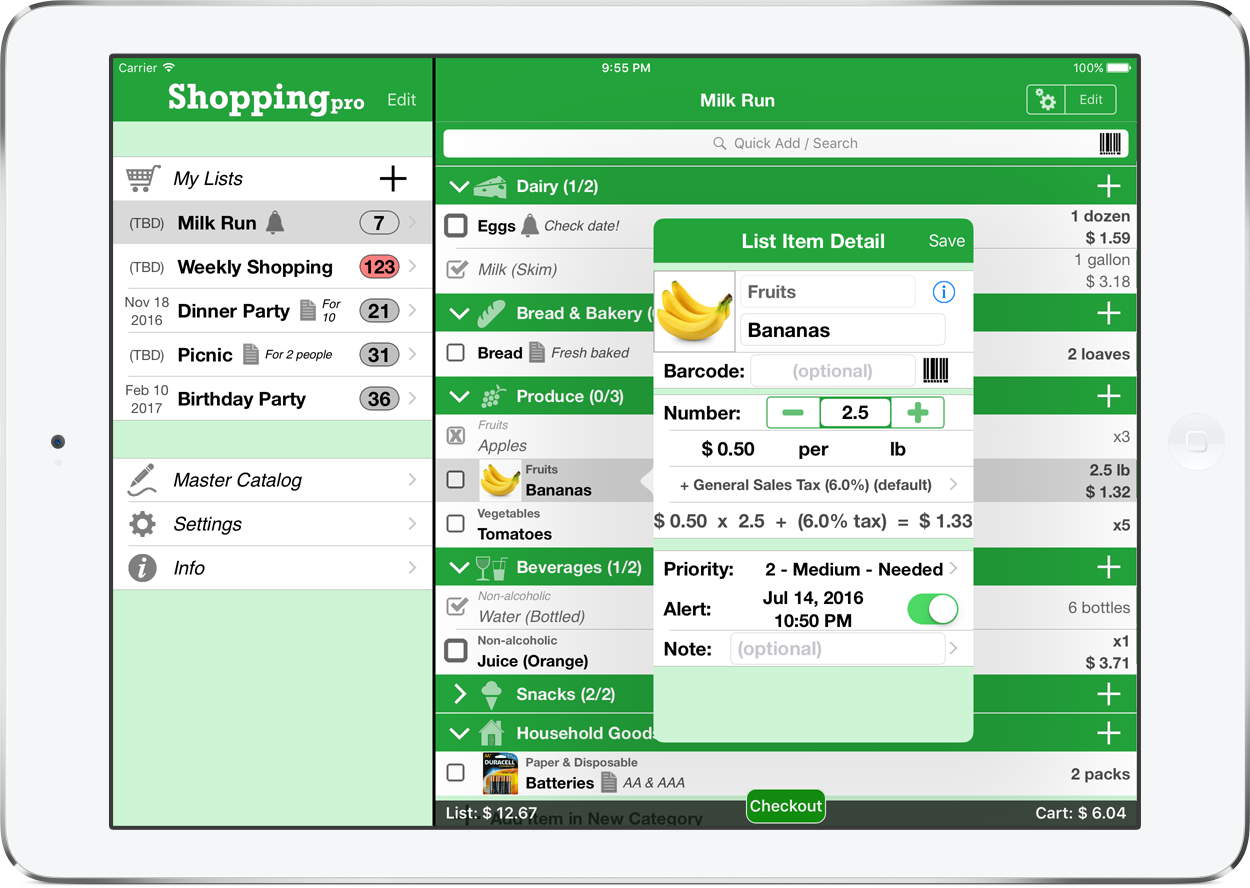
Taipei, Taiwan - QuinnScape today is proud to announce the release of a new, major update for its popular shopping app, Shopping Pro (Grocery List). Update 4.0 drops support for iOS 6 & 7 and now fully embraces iOS 8 & 9. Over 20,000 lines of code were revised or completely re-written, leading to much smoother operation on current devices. Besides this under-the-hood revamp, big improvements in design & user experience were also made, and a few new features were added as well, such as search & sort in the Master Catalog. Search was also brought out of hiding on list pages, for extra convenience.
Shopping Pro is a digital shopping list that features an extensive, customizable catalog, several handy sample lists that can be used as templates, and unlimited, 100% customizable shopping lists. A host of special functions include:
* Multi-item selection from catalog for speedy list building
* Multi-item editing for easy list & catalog management
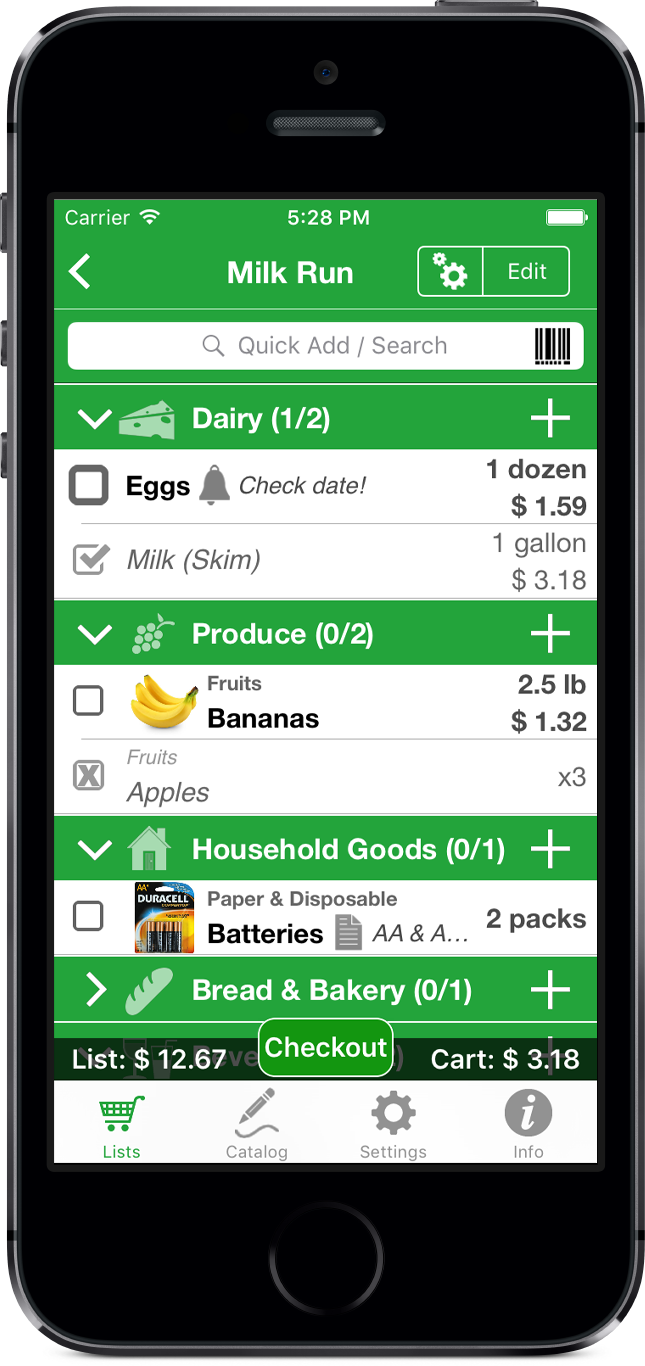
* Collapsable categories with floating headers & running item tallies
* Numerous list sorting and display options
* Bottom bar for on-list & in-cart cost totals
* Ability to set and calculate an app-wide default tax, or per-item taxes as well
* Item images to eliminate any confusion - never again buy the wrong product
* Item & list alerts for user-set reminders
* Email export for file sharing
* Wireless printing
* Fully customized device support for all sizes of iPhone, iPod touch & iPad
Besides the core features listed above, Shopping Pro also gives its users great Pro-level features:
* iCloud auto-syncing support
* Email, iTunes, AirDrop, Dropbox and Box file sharing, backup and out-of-app editing support
* Customized design (themes, layout, fonts, colors, textures)
* Huge built-in Master Catalog with over 1500 items
* Eight convenient sample lists
* Smart Search (lists and catalog)
With update 4.0, Shopping Pro now smoothly supports all devices running on iOS 8 & 9, and new search & sort functions in the Master Catalog, as well as a more convenient search tool on list pages, greatly improve the user experience. Check it out today!
Pricing and Availability:
Shopping Pro 4.0 is a universal app (like two apps in one!) that is available for purchase worldwide on the iPhone & iPad App Store for only $2.99 (USD), or the equivalent in local currency. App Store promo codes are also available upon request for press and bloggers around the world.
QuinnScape: http://www.quinnscape.com/
Shopping Pro 4.0: http://www.quinnscape.com/ShoppingPro.asp
Purchase and Download: https://geo.itunes.apple.com/us/app/shopping-pro-grocery-list/id586893082?mt=8&at=1l3v8Yv&pt=55410&ct=prmac
Screenshot 1: http://www.quinnscape.com/media/images/ShoppingPro-v4.0-on-iPad.png
Screenshot 2: http://www.quinnscape.com/media/images/ShoppingPro-v4.0-on-iPhone-list.png
App Icon: http://www.quinnscape.com/media/images/ShoppingPro-icon-250x250.png
Since its founding in October 2008, QuinnScape has been managed by Quinn Genzel. Quinn is best known for his popular, top-ranking travel packing apps: Packing ( TO DO!) and Packing Pro. Packing Pro has been recognized by Apple, CNN, WSJ, BBC, National Geographic, Budget Travel, Fodor's, CNET, Macworld and a host of others as one of their top apps for traveling. Other app created by Quinn include a grocery shopping list app (Shopping Pro), nature appreciation apps (iLove Nature and iLove Birds), 3D VR action games (R.I.P and Ghost Buddy) and high-quality puzzles (the aQ's Pro Slider Puzzle series). Copyright (C) 2008-2016 QuinnScape. All Rights Reserved. Apple, the Apple logo, iPhone, iPod and iPad are registered trademarks of Apple Inc. in the U.S. and/or other countries.
*******
Link To Article: http://prmac.com/release-id-79519.htm
*******
---------------------------------------------------------------------------------
Note that you can alter delivered distributions at any time.
Login to your account on prMac to alter your channel selection, or to opt-out at any time.
Major Update Streamlines Shopping Pro - Adds Sort and Search to Catalog - Published on 05/20/16
QuinnScape today announces Shopping Pro 4.0, a major update to its popular shopping app for iOS. Shopping Pro features an extensive, customizable catalog, several handy sample lists that can be used as templates, and unlimited, 100% customizable shopping lists. Version 4.0 supports all devices running on iOS 8 and 9. New search and sort functions in the Master Catalog, as well as a more convenient search tool on list pages, greatly improve the user experience as well.
Taipei, Taiwan - QuinnScape today is proud to announce the release of a new, major update for its popular shopping app, Shopping Pro (Grocery List). Update 4.0 drops support for iOS 6 & 7 and now fully embraces iOS 8 & 9. Over 20,000 lines of code were revised or completely re-written, leading to much smoother operation on current devices. Besides this under-the-hood revamp, big improvements in design & user experience were also made, and a few new features were added as well, such as search & sort in the Master Catalog. Search was also brought out of hiding on list pages, for extra convenience.
Shopping Pro is a digital shopping list that features an extensive, customizable catalog, several handy sample lists that can be used as templates, and unlimited, 100% customizable shopping lists. A host of special functions include:
* Multi-item selection from catalog for speedy list building
* Multi-item editing for easy list & catalog management
* Collapsable categories with floating headers & running item tallies
* Numerous list sorting and display options
* Bottom bar for on-list & in-cart cost totals
* Ability to set and calculate an app-wide default tax, or per-item taxes as well
* Item images to eliminate any confusion - never again buy the wrong product
* Item & list alerts for user-set reminders
* Email export for file sharing
* Wireless printing
* Fully customized device support for all sizes of iPhone, iPod touch & iPad
Besides the core features listed above, Shopping Pro also gives its users great Pro-level features:
* iCloud auto-syncing support
* Email, iTunes, AirDrop, Dropbox and Box file sharing, backup and out-of-app editing support
* Customized design (themes, layout, fonts, colors, textures)
* Huge built-in Master Catalog with over 1500 items
* Eight convenient sample lists
* Smart Search (lists and catalog)
With update 4.0, Shopping Pro now smoothly supports all devices running on iOS 8 & 9, and new search & sort functions in the Master Catalog, as well as a more convenient search tool on list pages, greatly improve the user experience. Check it out today!
Pricing and Availability:
Shopping Pro 4.0 is a universal app (like two apps in one!) that is available for purchase worldwide on the iPhone & iPad App Store for only $2.99 (USD), or the equivalent in local currency. App Store promo codes are also available upon request for press and bloggers around the world.
QuinnScape: http://www.quinnscape.com/
Shopping Pro 4.0: http://www.quinnscape.com/ShoppingPro.asp
Purchase and Download: https://geo.itunes.apple.com/us/app/shopping-pro-grocery-list/id586893082?mt=8&at=1l3v8Yv&pt=55410&ct=prmac
Screenshot 1: http://www.quinnscape.com/media/images/ShoppingPro-v4.0-on-iPad.png
Screenshot 2: http://www.quinnscape.com/media/images/ShoppingPro-v4.0-on-iPhone-list.png
App Icon: http://www.quinnscape.com/media/images/ShoppingPro-icon-250x250.png

Since its founding in October 2008, QuinnScape has been managed by Quinn Genzel. Quinn is best known for his popular, top-ranking travel packing apps: Packing ( TO DO!) and Packing Pro. Packing Pro has been recognized by Apple, CNN, WSJ, BBC, National Geographic, Budget Travel, Fodor's, CNET, Macworld and a host of others as one of their top apps for traveling. Other app created by Quinn include a grocery shopping list app (Shopping Pro), nature appreciation apps (iLove Nature and iLove Birds), 3D VR action games (R.I.P and Ghost Buddy) and high-quality puzzles (the aQ's Pro Slider Puzzle series). Copyright (C) 2008-2016 QuinnScape. All Rights Reserved. Apple, the Apple logo, iPhone, iPod and iPad are registered trademarks of Apple Inc. in the U.S. and/or other countries.
*******
Link To Article: http://prmac.com/release-id-79519.htm
*******
---------------------------------------------------------------------------------
Note that you can alter delivered distributions at any time.
Login to your account on prMac to alter your channel selection, or to opt-out at any time.
Ultimate FreeCell Solitaire Released for OS X
A new article has been published at prMac.
Ultimate FreeCell Solitaire Released for OS X - Published on 05/19/16
UBJ3D announces Ultimate FreeCell Solitaire Free 1.2.0, their new FreeCell solitaire game for Mac OS X. The game features an Online Challenge where players compete with others around the world. In Quick Game the final score is calculated as points won and game duration in seconds. It offers great great graphics, animations and sounds, maximum card size for best playing experience, adjustable background. Ultimate FreeCell Solitaire is a must for every solitaire card game fan.
Zagreb, Croatia - UBJ3D is pleased to announce the release of Ultimate FreeCell Solitaire Free 1.2.0, their new FreeCell solitaire game for Mac OS X. FreeCell solitaire (sometimes called Patience) is one of the enormously popular solitaire games included with Windows. Unlike many solitaire games, all the cards in FreeCell can be seen at the opening deal, so most FreeCell deals can be solved but it requires skill and patience.
What differs Ultimate FreeCell Solitaire from dozens of other solitaire games?:
The game offers great great graphics, animations and sounds, maximum card size for best playing experience, adjustable background (choose from your gallery or take a photo!) and an unique "Online challenge" - compete against other players worldwide.
Online Challenge:
This is an unique competition in playing FreeCell solitaire. You compete with players around the world and after each game your skill level is adjusted according to the result of the match. For skill measurement ELO rating is used, same method which is used to rate the skill level of chess players.
Quick Game:
In this mode you have indefinite time but you better play as fast as you can because the final score is calculated as: points won - game duration in seconds.
Ultimate FreeCell Solitaire is a must for every solitaire card game fan.
Device Requirements:
* Requires OS X 10.8 or later
* 64-bit processor
* 16.1 MB
Availability:
Ultimate FreeCell Solitaire Free 1.2.0 is $1.99 USD (or an equivalent amount in other currencies) and is available worldwide through the Mac App Store in the Games category. There are also Android, iOS and BlackBerry versions available.
Ultimate FreeCell Solitaire Free 1.2.0: http://www.ubj3d.com/ufcs
Download from the Mac App Store: https://itunes.apple.com/app/ultimate-freecell-solitaire/id1112276494
Screenshot: http://a2.mzstatic.com/us/r30/Purple1/v4/c8/e1/5b/c8e15b8f-ddd2-812a-4999-994b5cb4d5b7/screen520x924.jpeg
App Icon: http://a1.mzstatic.com/us/r30/Purple5/v4/47/2f/be/472fbe7c-0937-49d2-8436-57be316fdc85/icon175x175.png
Located in Zagreb, Croatia, UBJ3D was founded in 2011 by Damir Kranjcec, developing high-quality games for Android, iOS, BlackBerry, Windows Phone and Mac. All Material and Software (C) 2016 UBJ3D/ All Rights Reserved. Apple, the Apple logo, iPod, the iPod logo, are registered trademarks of Apple Computer in the U.S. and/or other countries.
*******
Link To Article: http://prmac.com/release-id-79518.htm
*******
---------------------------------------------------------------------------------
Note that you can alter delivered distributions at any time.
Login to your account on prMac to alter your channel selection, or to opt-out at any time.
Ultimate FreeCell Solitaire Released for OS X - Published on 05/19/16
UBJ3D announces Ultimate FreeCell Solitaire Free 1.2.0, their new FreeCell solitaire game for Mac OS X. The game features an Online Challenge where players compete with others around the world. In Quick Game the final score is calculated as points won and game duration in seconds. It offers great great graphics, animations and sounds, maximum card size for best playing experience, adjustable background. Ultimate FreeCell Solitaire is a must for every solitaire card game fan.
Zagreb, Croatia - UBJ3D is pleased to announce the release of Ultimate FreeCell Solitaire Free 1.2.0, their new FreeCell solitaire game for Mac OS X. FreeCell solitaire (sometimes called Patience) is one of the enormously popular solitaire games included with Windows. Unlike many solitaire games, all the cards in FreeCell can be seen at the opening deal, so most FreeCell deals can be solved but it requires skill and patience.
What differs Ultimate FreeCell Solitaire from dozens of other solitaire games?:
The game offers great great graphics, animations and sounds, maximum card size for best playing experience, adjustable background (choose from your gallery or take a photo!) and an unique "Online challenge" - compete against other players worldwide.
Online Challenge:
This is an unique competition in playing FreeCell solitaire. You compete with players around the world and after each game your skill level is adjusted according to the result of the match. For skill measurement ELO rating is used, same method which is used to rate the skill level of chess players.
Quick Game:
In this mode you have indefinite time but you better play as fast as you can because the final score is calculated as: points won - game duration in seconds.
Ultimate FreeCell Solitaire is a must for every solitaire card game fan.
Device Requirements:
* Requires OS X 10.8 or later
* 64-bit processor
* 16.1 MB
Availability:
Ultimate FreeCell Solitaire Free 1.2.0 is $1.99 USD (or an equivalent amount in other currencies) and is available worldwide through the Mac App Store in the Games category. There are also Android, iOS and BlackBerry versions available.
Ultimate FreeCell Solitaire Free 1.2.0: http://www.ubj3d.com/ufcs
Download from the Mac App Store: https://itunes.apple.com/app/ultimate-freecell-solitaire/id1112276494
Screenshot: http://a2.mzstatic.com/us/r30/Purple1/v4/c8/e1/5b/c8e15b8f-ddd2-812a-4999-994b5cb4d5b7/screen520x924.jpeg

App Icon: http://a1.mzstatic.com/us/r30/Purple5/v4/47/2f/be/472fbe7c-0937-49d2-8436-57be316fdc85/icon175x175.png

Located in Zagreb, Croatia, UBJ3D was founded in 2011 by Damir Kranjcec, developing high-quality games for Android, iOS, BlackBerry, Windows Phone and Mac. All Material and Software (C) 2016 UBJ3D/ All Rights Reserved. Apple, the Apple logo, iPod, the iPod logo, are registered trademarks of Apple Computer in the U.S. and/or other countries.
*******
Link To Article: http://prmac.com/release-id-79518.htm
*******
---------------------------------------------------------------------------------
Note that you can alter delivered distributions at any time.
Login to your account on prMac to alter your channel selection, or to opt-out at any time.
Announcing WooStories Wedding App for iOS
A new article has been published at prMac.
Announcing WooStories Wedding App for iOS - Published on 05/19/16
WooStories - all your wedding guest's photos in one album - announces WooStories Mobile 1.0 for iOS devices, their app that allows wedding guests to easily contribute photos, movies and voice recordings to an organizer's own Dropbox location. Wedding guests simply tap the link to join a wedding (a Woo Story) and point and shoot. Original photos remain on guest's iPhone or iPad, but all the photos from the wedding are uploaded to one wedding album.
Austin, Texas - WooStories - all your wedding guest's photos in one album - is proud to announce the release of WooStories Mobile 1.0 for iPhone, iPad, and iPod touch devices, their app that allows wedding guests to easily contribute photos, movies and voice recordings to an organizer's own Dropbox location. Wedding guests simply tap the link to join a wedding (a Woo Story) and point and shoot. WooStories uses the wedding organizer's Dropbox to store the photos.
Tom Davidson, President of WooStories explains, "Our app lets the wedding couple enjoy all the photos and videos that the guests have taken. Instead of relying solely on the photos of the professional photographer, you get to experience all the great shots that happened on your big day."
Why WooStories?
* You don't have to wait for your guests to forward to you the photos/videos. They are uploaded to your WooStory as they are taken.
* Original photos remain on your guest's iPhone or iPad, but all the photos from your wedding are uploaded to one wedding album.
* WooStories is available for the iPhone and iPad through the Apple App store.
For more information, visit the WooStories website. For more information, or to schedule an interview, contact Tom Davidson, founder of WooStories.
Device Requirements:
* iPhone, iPad, and iPod touch
* Requires iOS 8.1 or later
* Universal Application
* 15.3 MB
Pricing and Availability:
WooStories Mobile 1.0 is just $0.99, and is available worldwide exclusively through the App Store in the Lifestyle category.
WooStories 1.0: http://www.woostories.com
Purchase and Download from iTunes: https://itunes.apple.com/app/woostories-mobile-all-your/id1086510699
Screenshot: http://a1.mzstatic.com/us/r30/Purple30/v4/8d/ef/86/8def86a6-b241-8396-eec6-ebdba839732c/screen322x572.jpeg
App Icon: http://a5.mzstatic.com/us/r30/Purple20/v4/58/5c/5e/585c5edb-ebc5-e3f8-a389-e1cb59596417/icon175x175.png
WooStories is a small company out of Austin, Texas and we've been building advanced user interfaces, iOS apps, back-end services for decades. Our focus is building well thought-out, useful apps. All Material and Software (C) Copyright 2016 LastThink. All Rights Reserved. Apple, the Apple logo, iPhone, iPod and iPad are registered trademarks of Apple Inc. in the U.S. and/or other countries. Other trademarks and registered trademarks may be the property of their respective owners.
*******
Link To Article: http://prmac.com/release-id-79517.htm
*******
---------------------------------------------------------------------------------
Note that you can alter delivered distributions at any time.
Login to your account on prMac to alter your channel selection, or to opt-out at any time.
Announcing WooStories Wedding App for iOS - Published on 05/19/16
WooStories - all your wedding guest's photos in one album - announces WooStories Mobile 1.0 for iOS devices, their app that allows wedding guests to easily contribute photos, movies and voice recordings to an organizer's own Dropbox location. Wedding guests simply tap the link to join a wedding (a Woo Story) and point and shoot. Original photos remain on guest's iPhone or iPad, but all the photos from the wedding are uploaded to one wedding album.
Austin, Texas - WooStories - all your wedding guest's photos in one album - is proud to announce the release of WooStories Mobile 1.0 for iPhone, iPad, and iPod touch devices, their app that allows wedding guests to easily contribute photos, movies and voice recordings to an organizer's own Dropbox location. Wedding guests simply tap the link to join a wedding (a Woo Story) and point and shoot. WooStories uses the wedding organizer's Dropbox to store the photos.
Tom Davidson, President of WooStories explains, "Our app lets the wedding couple enjoy all the photos and videos that the guests have taken. Instead of relying solely on the photos of the professional photographer, you get to experience all the great shots that happened on your big day."
Why WooStories?
* You don't have to wait for your guests to forward to you the photos/videos. They are uploaded to your WooStory as they are taken.
* Original photos remain on your guest's iPhone or iPad, but all the photos from your wedding are uploaded to one wedding album.
* WooStories is available for the iPhone and iPad through the Apple App store.
For more information, visit the WooStories website. For more information, or to schedule an interview, contact Tom Davidson, founder of WooStories.
Device Requirements:
* iPhone, iPad, and iPod touch
* Requires iOS 8.1 or later
* Universal Application
* 15.3 MB
Pricing and Availability:
WooStories Mobile 1.0 is just $0.99, and is available worldwide exclusively through the App Store in the Lifestyle category.
WooStories 1.0: http://www.woostories.com
Purchase and Download from iTunes: https://itunes.apple.com/app/woostories-mobile-all-your/id1086510699
Screenshot: http://a1.mzstatic.com/us/r30/Purple30/v4/8d/ef/86/8def86a6-b241-8396-eec6-ebdba839732c/screen322x572.jpeg

App Icon: http://a5.mzstatic.com/us/r30/Purple20/v4/58/5c/5e/585c5edb-ebc5-e3f8-a389-e1cb59596417/icon175x175.png

WooStories is a small company out of Austin, Texas and we've been building advanced user interfaces, iOS apps, back-end services for decades. Our focus is building well thought-out, useful apps. All Material and Software (C) Copyright 2016 LastThink. All Rights Reserved. Apple, the Apple logo, iPhone, iPod and iPad are registered trademarks of Apple Inc. in the U.S. and/or other countries. Other trademarks and registered trademarks may be the property of their respective owners.
*******
Link To Article: http://prmac.com/release-id-79517.htm
*******
---------------------------------------------------------------------------------
Note that you can alter delivered distributions at any time.
Login to your account on prMac to alter your channel selection, or to opt-out at any time.
ToNewDigital Releases SamuraiSword Fun Educational Game for Kids
A new article has been published at prMac.
ToNewDigital Releases SamuraiSword Fun Educational Game for Kids - Published on 05/19/16
ToNewDigital announces SamuraiSword 1.0, their educational game for iOS devices, an initiative under e-Learn Assess and Improve program, based on CCSS (Common Core State Standards(R)) and big data analytics. With the launch of a new series of educational games for the iPad/iPhone, the games are intended to improve computational fluency for early childhood learners. Computational skills are one of the most essential skills for the overall success of a child.
Justin, Texas - ToNewDigital announces its launch of SamuraiSword 1.0, their game for iPhone, iPad, and iPod touch devices, an initiative under e-Learn Assess and Improve program, based on CCSS (Common Core State Standards(R)) and big data analytics. With the launch of a new series of educational games for the iPad/iPhone, the games are intended to improve computational fluency for early childhood learners. Computational skills are one of the most essential skills for the overall success of a child.
Designed for grades K-2, SamuraiSword helps student think quantitatively and develop attention. Game environment concepts are used to develop the interest for study. Game is one of its kind to review kids' knowledge and efficiency. In SamuraiSword game, parents and teachers will receive a quick report card/assessment at the end to review the game session.
"SamuraiSword is ToNewDigital's commitment towards supporting teachers and students in a truly blended and gamified learning environment" said Manish Panjwani, CEO of ToNewDigital.
Available for free through the Apple App Store, students use their mathematical skills to help Samurai - an onscreen characters cut variety of fruits and earn the rewards. Students will apply their addition, subtraction and multiplication knowledge to win rewards. The formative assessments are formed using CCSS (Common Core State Standards(R)). In the coming weeks, teachers will be able to adjust the game level depending upon the kids current knowledge level. Rewards for kids (incentives) will further elevate kids engagement and surely result in better learning outcomes.
Device Requirements:
* iPhone, iPad, and iPod touch
* Requires iOS 8.0 or later
* Universal Application
* 6.5 MB
Pricing and Availability:
SamuraiSword 1.0 is free, and is available worldwide exclusively through the App Store in the Games category.
ToNewDigital: http://tonewdigital.com
SamuraiSword 1.0: https://itunes.apple.com/app/samuraisword-fun-educational/id1109977830
Screenshot 1: http://a5.mzstatic.com/us/r30/Purple18/v4/a0/87/7b/a0877b06-a036-9a0b-2d14-aaf0ea91d9fe/screen640x640.jpeg
Screenshot 2: http://a3.mzstatic.com/us/r30/Purple60/v4/a0/d8/fa/a0d8fa76-08e9-fe54-be73-dd6da7694cf1/screen640x640.jpeg
App Icon: http://a1.mzstatic.com/us/r30/Purple18/v4/be/7a/af/be7aafca-5f31-491c-b6ab-e58b12ee9fcd/icon175x175.png
Founded by industry experts to build innovative solutions based on instructional research and advancement of technology. Apart from student and teacher centric product development, ToNewDigital works with Publishers and Ed-tech companies to build their future digital solutions including multiplatform/multiarchitecture application development and content development. Solutions include learning tools, simulations, games, creative and interactive course content. ToNewDigital focuses on discovering and implementing new ways to serve education marketplace in the most effective manner. All Material and Software (C) Copyright 2016 ToNewDigital. All Rights Reserved. Apple, the Apple logo, iPhone, iPod and iPad are registered trademarks of Apple Inc. in the U.S. and/or other countries. Other trademarks and registered trademarks may be the property of their respective owners.
*******
Link To Article: http://prmac.com/release-id-79516.htm
*******
---------------------------------------------------------------------------------
Note that you can alter delivered distributions at any time.
Login to your account on prMac to alter your channel selection, or to opt-out at any time.
ToNewDigital Releases SamuraiSword Fun Educational Game for Kids - Published on 05/19/16
ToNewDigital announces SamuraiSword 1.0, their educational game for iOS devices, an initiative under e-Learn Assess and Improve program, based on CCSS (Common Core State Standards(R)) and big data analytics. With the launch of a new series of educational games for the iPad/iPhone, the games are intended to improve computational fluency for early childhood learners. Computational skills are one of the most essential skills for the overall success of a child.
Justin, Texas - ToNewDigital announces its launch of SamuraiSword 1.0, their game for iPhone, iPad, and iPod touch devices, an initiative under e-Learn Assess and Improve program, based on CCSS (Common Core State Standards(R)) and big data analytics. With the launch of a new series of educational games for the iPad/iPhone, the games are intended to improve computational fluency for early childhood learners. Computational skills are one of the most essential skills for the overall success of a child.
Designed for grades K-2, SamuraiSword helps student think quantitatively and develop attention. Game environment concepts are used to develop the interest for study. Game is one of its kind to review kids' knowledge and efficiency. In SamuraiSword game, parents and teachers will receive a quick report card/assessment at the end to review the game session.
"SamuraiSword is ToNewDigital's commitment towards supporting teachers and students in a truly blended and gamified learning environment" said Manish Panjwani, CEO of ToNewDigital.
Available for free through the Apple App Store, students use their mathematical skills to help Samurai - an onscreen characters cut variety of fruits and earn the rewards. Students will apply their addition, subtraction and multiplication knowledge to win rewards. The formative assessments are formed using CCSS (Common Core State Standards(R)). In the coming weeks, teachers will be able to adjust the game level depending upon the kids current knowledge level. Rewards for kids (incentives) will further elevate kids engagement and surely result in better learning outcomes.
Device Requirements:
* iPhone, iPad, and iPod touch
* Requires iOS 8.0 or later
* Universal Application
* 6.5 MB
Pricing and Availability:
SamuraiSword 1.0 is free, and is available worldwide exclusively through the App Store in the Games category.
ToNewDigital: http://tonewdigital.com
SamuraiSword 1.0: https://itunes.apple.com/app/samuraisword-fun-educational/id1109977830
Screenshot 1: http://a5.mzstatic.com/us/r30/Purple18/v4/a0/87/7b/a0877b06-a036-9a0b-2d14-aaf0ea91d9fe/screen640x640.jpeg

Screenshot 2: http://a3.mzstatic.com/us/r30/Purple60/v4/a0/d8/fa/a0d8fa76-08e9-fe54-be73-dd6da7694cf1/screen640x640.jpeg

App Icon: http://a1.mzstatic.com/us/r30/Purple18/v4/be/7a/af/be7aafca-5f31-491c-b6ab-e58b12ee9fcd/icon175x175.png

Founded by industry experts to build innovative solutions based on instructional research and advancement of technology. Apart from student and teacher centric product development, ToNewDigital works with Publishers and Ed-tech companies to build their future digital solutions including multiplatform/multiarchitecture application development and content development. Solutions include learning tools, simulations, games, creative and interactive course content. ToNewDigital focuses on discovering and implementing new ways to serve education marketplace in the most effective manner. All Material and Software (C) Copyright 2016 ToNewDigital. All Rights Reserved. Apple, the Apple logo, iPhone, iPod and iPad are registered trademarks of Apple Inc. in the U.S. and/or other countries. Other trademarks and registered trademarks may be the property of their respective owners.
*******
Link To Article: http://prmac.com/release-id-79516.htm
*******
---------------------------------------------------------------------------------
Note that you can alter delivered distributions at any time.
Login to your account on prMac to alter your channel selection, or to opt-out at any time.
Subscribe to:
Posts (Atom)