A new article has been published at prMac.
Put Your Product in Front of 150,000 Attendees at the CES Show - Published on 05/22/16
We are pleased to announce that our Issue #36 Edition of i.Business Magazine Featuring SmartHome Solutions. This edition will be distributed at the CES Trade Show in Las Vegas this coming January 2017. Looking to launch your App, software or device to the business community ? We have the budget friendly solution for you. Looking to grow your business? Do you want to gain market share in the Business/Enterprise market?
Cape Coral, Florida - We are pleased to announce that our Issue #30 Edition of i.Business Magazine Featuring SmartHome Solutions. This edition will be distributed at the CES Trade Show in Las Vegas this January 2017.
This Special Edition will be distributed at the CES Trade Show in Las Vegas at:
* Magazine Bins throughout all buildings of the show - All Buildings
* Our Booths Location in South Hall
* Models - Handing them out to Attendees
* Over 150,000 registers Attendees will see your product on the Magazine Cover!
Looking to launch your App, software or device to the business community? We have the budget friendly solution for you. Looking to grow your business? Do you want to gain market share in the Business/Enterprise market? If you're looking for a marketing partner that understands the Business, Enterprise & Professional market, there is no better choice than the i.Business Family!
Special Advertising & Review Pricing Packages for this CES Edition:
* Front Cover Magazine - Full Exclusive Front Cover of the Magazine, Full Page Advertisement & Full Page Review - $12,500.00 - Regularly Sells for $18,500.00
* 2 Full Page Spread Advertisement, Full Page Product Review & Product Name on Cover of the Magazine for only $7,000.00 - 1 Spots available
* Premium - Full Page Advertisement - First Right Hand Side Page #1, Full Product Review, Mention on Front Cover - for only $6,000.00 - Only one Spot available for this bundle
* Inside Front Cover Full Page Advertisement, Mention on Front Cover & Full Page Product Review $6,000.00 - Only 1 Spot available for this bundle
* Inside Back Cover Full Page Advertisement, Mention on Front Cover & Full Page Product Review $4,000.00 - Only 1 Spot available for this bundle
* Full Page Advertisement, Full Page Product Review & Product Name on Cover of the Magazine for only $5,000.00 - 2 Spots available
* 1/2 Page Advertisement & Full Page Product Review $2,500.00
* Full Page Advertisement Only $2,000.00
* 1/2 Page Advertisement $1,000.00
With the Magazine Cover Story Exclusive you get the following - Full Exclusive Front Cover of the Magazine, Full Page Advertisement & Full Page Review, Client Success Story or Case Study. You get the whole front cover of the magazine with your product image and logo on it.This is a great opportunity to get HUGE exposure of your App, Product or Service to over 500,000 Business Professionals. If you are interested in the magazine cover opportunity for your company, please email me and we can send you the details.
i.Business Magazine is the distinct choice for business end-users that are currently using Apple technology or are interested in switching. Unlike any other magazine, we focus on providing information about business and enterprise solutions running on Apple technologies. i.Business Magazine highlights what Apple can do for business and enterprise.
Publisher of i.Business Magazine Carmine DeSanto says "We have set ourselves apart by focusing on business/enterprise solutions for all Apple technologies." "We are the only Apple based business and enterprise magazine on the market." Medical/Healthcare, Legal, Retail, Real Estate, Finance, Automotive, Manufacturing, Security and small business success stories to name a few are some of the articles you will find in our issues.
i.Business Magazine: http://www.ibusinessmag.com
Slide Show Presentation: http://www.ibusinessmag.com/iBusinessMagazine.pdf
Media Kit: http://www.ibusinessmag.com/mediakit2016.pdf
CES Magazine Package: http://www.ibusinessmag.com/smb/CES/Top_25.html
The team behind iBusiness Magazine have decades of experience in the Business to Business & Education communities. We strive to cover as many vertical markets as possible, which include but are not limited to, Retail, Hospitality, ERP, CAD, Real Estate, Legal, Scientific Computing, Medical/Healthcare, Government, Automotive, Manufacturers, Accounting/Finance, Print & Graphics and Security & Surveillance. Our articles take a solutions-based approach to productivity, workflow management and tips & tricks. The magazine articles come from the industry leaders with years of experience and proven track records. Copyright (C) 2016 i.Business Magazine.
*******
Link To Article: http://prmac.com/release-id-79532.htm
*******
---------------------------------------------------------------------------------
Note that you can alter delivered distributions at any time.
Login to your account on prMac to alter your channel selection, or to opt-out at any time.

Marathi Keyboard 1.0 for iOS Offers Customizable Marathi Entry
A new article has been published at prMac.
Marathi Keyboard 1.0 for iOS Offers Customizable Marathi Entry - Published on 05/22/16
LastThink today announces Marathi Keyboard for iPad and iPhone 1.0, their highly customizable keyboard application for iOS devices. Marathi Keyboard offers users a third-party keyboard for use with iOS apps that allows anyone to modify it to their individual taste. Users can modify the order of the keyboard for more convenient usage. The app offers the ability to save specific words for later use, emoticons, paragraph formatting, word prediction, and more.
Yerevan, Armenia - LastThink is proud to announce the release of Marathi Keyboard for iPad and iPhone 1.0, their highly customizable keyboard application for iPhone, iPad, and iPod touch devices. The Marathi Keyboard's customization features allow anyone to create the keyboard layout that is perfect for their needs. Features include the ability to change the size, shape, and order of characters; the ability to save specific words for later use; emoticons, word prediction, and more.
Users can change the order of the keyboard's letter layout, and even create handy shortcuts to allow entering words or even entire sentences with just a few keystrokes. The keyboard's Swipe feature allows users to swipe their finger around the keyboard to select letters and form words. The app intelligently predicts what the user intends to enter, greatly enhancing typing speed.
Features:
* Change the size, and place, as well as the shape of characters and keyboard separately
* Save any words that are used frequently in the active vocabulary for later use
* Express emotions with emoji characters (emoticons) which will correspond to entered words
* Paragraph formatting: Adjust alignment, line spacing, margins, bullets and numbering
* Optional smart auto correction: Intelligent spell checking for even the sloppiest typing
* Style: Customize the look of the keyboard. Change the color of the keys and background
* Word prediction: The keyboard guesses and displays the appropriate word as the user types
* Share text via Facebook, Twitter, email, Dropbox, and more
"When we set out to create the Marathi Keyboard, we knew we wanted to create a customizable keyboard that would offer users the ability to modify it to their individual tastes," says LastThink founder Grigori Jlavyan. Our keyboard allows Marathi speaking users to easily enter their text messages, emails, and other types of texts via a comprehensive interface, making their day-to-day communications more convenient than ever."
The Marathi Keyboard also offers handy paragraph formatting options, allowing users to adjust the alignment of their text, while also offering the ability to set line spacing, adjust margins, even add bulleted or numbered lists. Optional smart correction makes even the sloppiest speller's text entry become correct. The keyboard also offers a downloadable Marathi font for use with iOS devices, making text entry, editing, and display even more convenient.
Marathi Keyboard emphasizes the user's security above all, and while many third-party iOS keyboard apps require "Full Access" - with the ability to send back keystrokes and other information back to their developer - the Marathi Keyboard does not, protecting the text entry and sensitive user information, keeping their personal information safe from prying eyes.
Device Requirements:
* iPhone, iPad, and iPod touch
* Optimized for iPhone 5, iPhone 6/6 Plus
* Universal Application
* Requires iOS 8.0 or later
* 8.7 MB
Pricing and Availability:
Marathi Keyboard for iPad and iPhone 1.0 is $1.99 and available worldwide exclusively through the App Store in the Utilities category. Review codes are available upon request.
LastThink: http://lastthink.com/
Marathi Keyboard for iPad and iPhone 1.0: https://www.facebook.com/pages/IosRegion/688324511213130
Purchase and Download from iTunes: https://itunes.apple.com/app/marathi-keyboard-for-ipad/id944609615
Screenshot: http://a3.mzstatic.com/us/r30/Purple3/v4/40/59/ea/4059ea7c-32e1-7ed2-b6db-9bd22ef340ed/screen322x572.jpeg
App Icon: http://a5.mzstatic.com/us/r30/Purple3/v4/a1/1c/75/a11c752d-0064-e891-89c1-52750b9760b5/icon175x175.png
LastThink is an IT company with a focus on mobile development. It has extended its list of services since 2012 to offer high-end business process management, system integration, as well as up-to-date communication solutions. LastThink's mission is to deliver maximum business value to its customers by designing, developing, implementing and maintaining efficient and high quality software solutions aligned with their most essential business needs. Their team will always do its best to meet client expectations. Copyright (C) 2016 LastThink LLC. All Rights Reserved. Apple, the Apple logo, iPhone, iPad and iPod are registered trademarks of Apple Inc. in the U.S. and/or other countries.
*******
Link To Article: http://prmac.com/release-id-79533.htm
*******
---------------------------------------------------------------------------------
Note that you can alter delivered distributions at any time.
Login to your account on prMac to alter your channel selection, or to opt-out at any time.
Marathi Keyboard 1.0 for iOS Offers Customizable Marathi Entry - Published on 05/22/16
LastThink today announces Marathi Keyboard for iPad and iPhone 1.0, their highly customizable keyboard application for iOS devices. Marathi Keyboard offers users a third-party keyboard for use with iOS apps that allows anyone to modify it to their individual taste. Users can modify the order of the keyboard for more convenient usage. The app offers the ability to save specific words for later use, emoticons, paragraph formatting, word prediction, and more.
Yerevan, Armenia - LastThink is proud to announce the release of Marathi Keyboard for iPad and iPhone 1.0, their highly customizable keyboard application for iPhone, iPad, and iPod touch devices. The Marathi Keyboard's customization features allow anyone to create the keyboard layout that is perfect for their needs. Features include the ability to change the size, shape, and order of characters; the ability to save specific words for later use; emoticons, word prediction, and more.
Users can change the order of the keyboard's letter layout, and even create handy shortcuts to allow entering words or even entire sentences with just a few keystrokes. The keyboard's Swipe feature allows users to swipe their finger around the keyboard to select letters and form words. The app intelligently predicts what the user intends to enter, greatly enhancing typing speed.
Features:
* Change the size, and place, as well as the shape of characters and keyboard separately
* Save any words that are used frequently in the active vocabulary for later use
* Express emotions with emoji characters (emoticons) which will correspond to entered words
* Paragraph formatting: Adjust alignment, line spacing, margins, bullets and numbering
* Optional smart auto correction: Intelligent spell checking for even the sloppiest typing
* Style: Customize the look of the keyboard. Change the color of the keys and background
* Word prediction: The keyboard guesses and displays the appropriate word as the user types
* Share text via Facebook, Twitter, email, Dropbox, and more
"When we set out to create the Marathi Keyboard, we knew we wanted to create a customizable keyboard that would offer users the ability to modify it to their individual tastes," says LastThink founder Grigori Jlavyan. Our keyboard allows Marathi speaking users to easily enter their text messages, emails, and other types of texts via a comprehensive interface, making their day-to-day communications more convenient than ever."
The Marathi Keyboard also offers handy paragraph formatting options, allowing users to adjust the alignment of their text, while also offering the ability to set line spacing, adjust margins, even add bulleted or numbered lists. Optional smart correction makes even the sloppiest speller's text entry become correct. The keyboard also offers a downloadable Marathi font for use with iOS devices, making text entry, editing, and display even more convenient.
Marathi Keyboard emphasizes the user's security above all, and while many third-party iOS keyboard apps require "Full Access" - with the ability to send back keystrokes and other information back to their developer - the Marathi Keyboard does not, protecting the text entry and sensitive user information, keeping their personal information safe from prying eyes.
Device Requirements:
* iPhone, iPad, and iPod touch
* Optimized for iPhone 5, iPhone 6/6 Plus
* Universal Application
* Requires iOS 8.0 or later
* 8.7 MB
Pricing and Availability:
Marathi Keyboard for iPad and iPhone 1.0 is $1.99 and available worldwide exclusively through the App Store in the Utilities category. Review codes are available upon request.
LastThink: http://lastthink.com/
Marathi Keyboard for iPad and iPhone 1.0: https://www.facebook.com/pages/IosRegion/688324511213130
Purchase and Download from iTunes: https://itunes.apple.com/app/marathi-keyboard-for-ipad/id944609615
Screenshot: http://a3.mzstatic.com/us/r30/Purple3/v4/40/59/ea/4059ea7c-32e1-7ed2-b6db-9bd22ef340ed/screen322x572.jpeg

App Icon: http://a5.mzstatic.com/us/r30/Purple3/v4/a1/1c/75/a11c752d-0064-e891-89c1-52750b9760b5/icon175x175.png

LastThink is an IT company with a focus on mobile development. It has extended its list of services since 2012 to offer high-end business process management, system integration, as well as up-to-date communication solutions. LastThink's mission is to deliver maximum business value to its customers by designing, developing, implementing and maintaining efficient and high quality software solutions aligned with their most essential business needs. Their team will always do its best to meet client expectations. Copyright (C) 2016 LastThink LLC. All Rights Reserved. Apple, the Apple logo, iPhone, iPad and iPod are registered trademarks of Apple Inc. in the U.S. and/or other countries.
*******
Link To Article: http://prmac.com/release-id-79533.htm
*******
---------------------------------------------------------------------------------
Note that you can alter delivered distributions at any time.
Login to your account on prMac to alter your channel selection, or to opt-out at any time.
Insert the Texts You Use More Often with Just a Mouse Click!
A new article has been published at prMac.
Insert the Texts You Use More Often with Just a Mouse Click! - Published on 05/22/16
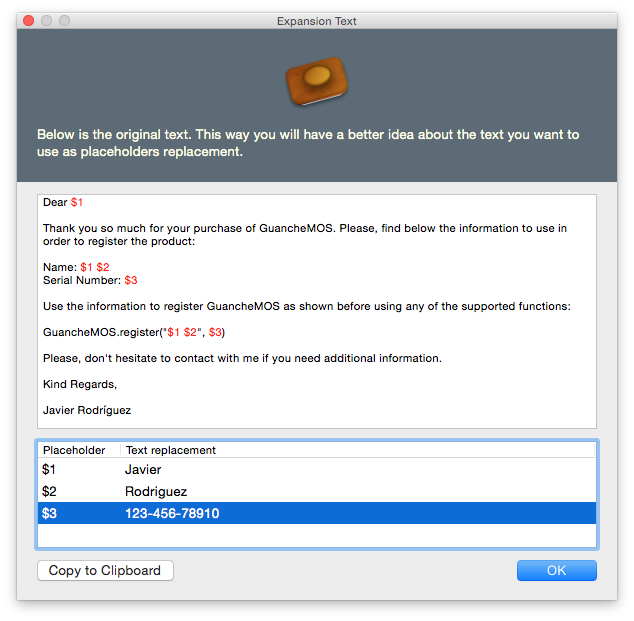
AprendeXojo announces Stamp: Don't Repeat Yourself! for Mac OS X. Don't waste time writing again and again the same texts with only minor changes! Improve your productivity with limitless text templates that you can select from the Finder menu, and where you can include up to nine placeholders, so you can type the text that really changes once you want to apply the selected template on the frontmost document.
Madrid, Spain - AprendeXojo is proud to announce the release of Stamp: Don't Repeat Yourself! for Mac OS X. Don't waste time writing again and again the same texts with only minor changes! Improve your productivity with limitless text templates that you can select from the Finder menu, and where you can include up to nine placeholders, so you can type the text that really changes once you want to apply the selected template on the frontmost document.
In addition, you can repeat and combine the placeholders on the templates, so you have all the flexibility you need to properly compose complex text combinations! You can use Stamp, from OS X 10.7 and on, to save time:
* Writing canned messages with placeholders you will replace on the fly.
* On customer support, writing email replies (or other mediums as Facebook, Twitter...)
* Writing text snippets: headings, footprints, signatures...
* Using code snippets in your projects
* Writing reports, memorandums, emails
And a lot of other text-related tasks in your day to day!
Clean user interface, simple and fast to use, and best of all: Stamp will not hurt you pocket. It's just 4.95 Euro and you can install and use it on every Mac you own!
Access the Templates from the Finder Menu
The Stamp finder menu dynamically shows the ten templates you use more often! Nevertheless, other Finder menu option gives access to the window with all of the available entries for selection: easy and fast!
Add text in a breeze!
Create new templates with the selected text from any application using the Finder Menu item, dragging a text file or text selection to the Stamp window. This way it is really fast and easy adding new entries with text you are going to use again in the future!
Pricing and Availability:
Stamp: Don't Repeat Yourself! is 4,95 Euro and is available for purchase from the AprendeXojo website. a trial download and free trial license is available from the AprendeXojo website.
AprendeXojo: http://www.aprendexojo.com
Stamp: Don�t Repeat Yourself!: http://www.aprendexojo.com/software/stamp-dont-repeat-yourself/
Direct Download Link: http://www.aprendexojo.com/stamp.php
Purchase: http://www.aprendexojo.com/product/stamp/
Screenshot: http://www.aprendexojo.com/wp-content/uploads/2016/05/StampExpansion.png
Application Icon: http://www.aprendexojo.com/wp-content/uploads/2016/05/ExpanderIcon-300x300.png
AprendeXojo provides native software for OS X, iOS, Windows and the Web developed with Xojo, Objective-C, C and other languages and technologies. All Material and Software (C) Copyright 2016 AprendeXojo. All Rights Reserved. Apple, the Apple logo, iPhone, iPod and iPad are registered trademarks of Apple Inc. in the U.S. and/or other countries. Other trademarks and registered trademarks may be the property of their respective owners.
*******
Link To Article: http://prmac.com/release-id-79531.htm
*******
---------------------------------------------------------------------------------
Note that you can alter delivered distributions at any time.
Login to your account on prMac to alter your channel selection, or to opt-out at any time.
Insert the Texts You Use More Often with Just a Mouse Click! - Published on 05/22/16
AprendeXojo announces Stamp: Don't Repeat Yourself! for Mac OS X. Don't waste time writing again and again the same texts with only minor changes! Improve your productivity with limitless text templates that you can select from the Finder menu, and where you can include up to nine placeholders, so you can type the text that really changes once you want to apply the selected template on the frontmost document.
Madrid, Spain - AprendeXojo is proud to announce the release of Stamp: Don't Repeat Yourself! for Mac OS X. Don't waste time writing again and again the same texts with only minor changes! Improve your productivity with limitless text templates that you can select from the Finder menu, and where you can include up to nine placeholders, so you can type the text that really changes once you want to apply the selected template on the frontmost document.
In addition, you can repeat and combine the placeholders on the templates, so you have all the flexibility you need to properly compose complex text combinations! You can use Stamp, from OS X 10.7 and on, to save time:
* Writing canned messages with placeholders you will replace on the fly.
* On customer support, writing email replies (or other mediums as Facebook, Twitter...)
* Writing text snippets: headings, footprints, signatures...
* Using code snippets in your projects
* Writing reports, memorandums, emails
And a lot of other text-related tasks in your day to day!
Clean user interface, simple and fast to use, and best of all: Stamp will not hurt you pocket. It's just 4.95 Euro and you can install and use it on every Mac you own!
Access the Templates from the Finder Menu
The Stamp finder menu dynamically shows the ten templates you use more often! Nevertheless, other Finder menu option gives access to the window with all of the available entries for selection: easy and fast!
Add text in a breeze!
Create new templates with the selected text from any application using the Finder Menu item, dragging a text file or text selection to the Stamp window. This way it is really fast and easy adding new entries with text you are going to use again in the future!
Pricing and Availability:
Stamp: Don't Repeat Yourself! is 4,95 Euro and is available for purchase from the AprendeXojo website. a trial download and free trial license is available from the AprendeXojo website.
AprendeXojo: http://www.aprendexojo.com
Stamp: Don�t Repeat Yourself!: http://www.aprendexojo.com/software/stamp-dont-repeat-yourself/
Direct Download Link: http://www.aprendexojo.com/stamp.php
Purchase: http://www.aprendexojo.com/product/stamp/
Screenshot: http://www.aprendexojo.com/wp-content/uploads/2016/05/StampExpansion.png
Application Icon: http://www.aprendexojo.com/wp-content/uploads/2016/05/ExpanderIcon-300x300.png

AprendeXojo provides native software for OS X, iOS, Windows and the Web developed with Xojo, Objective-C, C and other languages and technologies. All Material and Software (C) Copyright 2016 AprendeXojo. All Rights Reserved. Apple, the Apple logo, iPhone, iPod and iPad are registered trademarks of Apple Inc. in the U.S. and/or other countries. Other trademarks and registered trademarks may be the property of their respective owners.
*******
Link To Article: http://prmac.com/release-id-79531.htm
*******
---------------------------------------------------------------------------------
Note that you can alter delivered distributions at any time.
Login to your account on prMac to alter your channel selection, or to opt-out at any time.
First Trump Clicker Available Now in Apple App Store And Google Play
A new article has been published at prMac.
First Trump Clicker Available Now in Apple App Store And Google Play - Published on 05/21/16
Flowmotion Entertainment announces Trump Tycoon - Donald's Capitalist Clicker Adventure 1.0, their entertaining game for iOS and Android devices. The game is really simple to play and keeps boredom away. The repetitive clicking or tapping action is the basis for winning currency and progressing in the game. Super addictive incremental tapping game allows players to unlock achievements and grow their Mega Billion-Dollar Business.
West Vancouver, Canada - Flowmotion Entertainment is pleased to announce the release of Trump Tycoon - Donald's Capitalist Clicker Adventure 1.0, their entertaining game for iPad, iPhone, iPod touch, and Android devices. The game is really simple to play and keeps boredom away. The repetitive clicking or tapping action is the basis for winning currency and progressing in the game. Gamers can go about doing their chores while still playing the game. Love Trump or loathe him, you'll love this game!
Key Features:
* Super addictive incremental tapping game
* Unlock achievements and grow your Mega Billion-Dollar Business
* Invest and expand into new businesses
* Buy gold and spend it to warp into the future
* Compete with other idle clickers on the leaderboard
"You will not find a more emotionally rewarding, supper addictive idle game than this.," said Dario Pavan, Co-Pilot of Flowmotion Entertainment. "Don't take my word, just download the game and give it a try."
Flowmotion Entertainment Inc. is committed to building fun games that can be enjoyed by the whole family and by boys and girls, men and women, of all age groups - kids, adults, and older generations. The company was founded in 2014, and is a fast growing mobile game studio which has published over 500 games enjoyed by over 5 million people around the world!
Flowmotion is Co-Piloted by Dario Pavan and Ryan Yada, who guide the company's international all-star team on a fun-filled journey of constant and never-ending improvement. Flowmotion Entertainment understands the philosophy of giving back to the community and donates 1% of all game revenues to helping feed hungry kids and supporting the awesome efforts of Backpack Buddies. To learn more about Flowmotion Entertainment visit the Flowmotion website.
Device Requirements:
* iPhone, iPad, and iPod touch
* Requires iOS 6.0 or later
* Universal Application
* 92.7 MB
Pricing and Availability:
Trump Tycoon - Donald's Capitalist Clicker Adventure 1.0 is free, and is available worldwide through the App Store in the Games category. An Android version is available through Google Play. The app offers in-app purchases.
Flowmotion Entertainment: http://flowmotionentertainment.com/
Trump Tycoon 1.0: https://www.facebook.com/trumptycoon/?fref=ts
Download from iTunes: https://itunes.apple.com/app/trump-tycoon-donalds-capitalist/id1108800302
Download from Google Play: https://play.google.com/store/apps/details?id=com.fme.Trump.Tycoon&hl=en
Screenshot: http://a4.mzstatic.com/us/r30/Purple30/v4/3b/d9/20/3bd92042-99d1-a3dc-3b76-25f06cfa367b/screen322x572.jpeg
App Icon: http://a2.mzstatic.com/us/r30/Purple20/v4/ba/2d/ce/ba2dce5a-37f4-9b21-5d19-8b992e16a678/icon175x175.png
Flowmotion Entertainment Inc. is committed to building fun games that can be enjoyed by the whole family and by boys and girls, men and women, of all age groups - kids, adults, and older generations. The company was founded in 2014, and is a fast growing mobile game studio which has published over 500 games enjoyed by over 5 million people around the world! All Material and Software (C) Copyright 2016 Flowmotion Entertainment Inc. All Rights Reserved. Apple, the Apple logo, iPhone, iPod and iPad are registered trademarks of Apple Inc. in the U.S. and/or other countries. Other trademarks and registered trademarks may be the property of their respective owners.
*******
Link To Article: http://prmac.com/release-id-79528.htm
*******
---------------------------------------------------------------------------------
Note that you can alter delivered distributions at any time.
Login to your account on prMac to alter your channel selection, or to opt-out at any time.
First Trump Clicker Available Now in Apple App Store And Google Play - Published on 05/21/16
Flowmotion Entertainment announces Trump Tycoon - Donald's Capitalist Clicker Adventure 1.0, their entertaining game for iOS and Android devices. The game is really simple to play and keeps boredom away. The repetitive clicking or tapping action is the basis for winning currency and progressing in the game. Super addictive incremental tapping game allows players to unlock achievements and grow their Mega Billion-Dollar Business.
West Vancouver, Canada - Flowmotion Entertainment is pleased to announce the release of Trump Tycoon - Donald's Capitalist Clicker Adventure 1.0, their entertaining game for iPad, iPhone, iPod touch, and Android devices. The game is really simple to play and keeps boredom away. The repetitive clicking or tapping action is the basis for winning currency and progressing in the game. Gamers can go about doing their chores while still playing the game. Love Trump or loathe him, you'll love this game!
Key Features:
* Super addictive incremental tapping game
* Unlock achievements and grow your Mega Billion-Dollar Business
* Invest and expand into new businesses
* Buy gold and spend it to warp into the future
* Compete with other idle clickers on the leaderboard
"You will not find a more emotionally rewarding, supper addictive idle game than this.," said Dario Pavan, Co-Pilot of Flowmotion Entertainment. "Don't take my word, just download the game and give it a try."
Flowmotion Entertainment Inc. is committed to building fun games that can be enjoyed by the whole family and by boys and girls, men and women, of all age groups - kids, adults, and older generations. The company was founded in 2014, and is a fast growing mobile game studio which has published over 500 games enjoyed by over 5 million people around the world!
Flowmotion is Co-Piloted by Dario Pavan and Ryan Yada, who guide the company's international all-star team on a fun-filled journey of constant and never-ending improvement. Flowmotion Entertainment understands the philosophy of giving back to the community and donates 1% of all game revenues to helping feed hungry kids and supporting the awesome efforts of Backpack Buddies. To learn more about Flowmotion Entertainment visit the Flowmotion website.
Device Requirements:
* iPhone, iPad, and iPod touch
* Requires iOS 6.0 or later
* Universal Application
* 92.7 MB
Pricing and Availability:
Trump Tycoon - Donald's Capitalist Clicker Adventure 1.0 is free, and is available worldwide through the App Store in the Games category. An Android version is available through Google Play. The app offers in-app purchases.
Flowmotion Entertainment: http://flowmotionentertainment.com/
Trump Tycoon 1.0: https://www.facebook.com/trumptycoon/?fref=ts
Download from iTunes: https://itunes.apple.com/app/trump-tycoon-donalds-capitalist/id1108800302
Download from Google Play: https://play.google.com/store/apps/details?id=com.fme.Trump.Tycoon&hl=en
Screenshot: http://a4.mzstatic.com/us/r30/Purple30/v4/3b/d9/20/3bd92042-99d1-a3dc-3b76-25f06cfa367b/screen322x572.jpeg

App Icon: http://a2.mzstatic.com/us/r30/Purple20/v4/ba/2d/ce/ba2dce5a-37f4-9b21-5d19-8b992e16a678/icon175x175.png

Flowmotion Entertainment Inc. is committed to building fun games that can be enjoyed by the whole family and by boys and girls, men and women, of all age groups - kids, adults, and older generations. The company was founded in 2014, and is a fast growing mobile game studio which has published over 500 games enjoyed by over 5 million people around the world! All Material and Software (C) Copyright 2016 Flowmotion Entertainment Inc. All Rights Reserved. Apple, the Apple logo, iPhone, iPod and iPad are registered trademarks of Apple Inc. in the U.S. and/or other countries. Other trademarks and registered trademarks may be the property of their respective owners.
*******
Link To Article: http://prmac.com/release-id-79528.htm
*******
---------------------------------------------------------------------------------
Note that you can alter delivered distributions at any time.
Login to your account on prMac to alter your channel selection, or to opt-out at any time.
iBusiness Magazine - Business Innovation Solutions
A new article has been published at prMac.
iBusiness Magazine - Business Innovation Solutions - Published on 05/21/16
The New Look & Content; iBusiness magazine is targeted at the cross platform business community; including, SMB, Enterprise, Fortune 1000 and IT professionals. Now in its sixth year of publication, it is the only magazine in the market that focuses exclusively on cross platform business applications and solutions to help maximize workplace productivity. We focus on providing information about business and enterprise solutions running on Apple, Google & Microsoft technologies.
Cape Coral, Florida - The New Look & Content; iBusiness Magazine is targeted at the cross platform business community; including, SMB, Enterprise, Fortune 1000 and IT professionals. iBusiness, now in its sixth year of publication, is the only magazine in the market that focuses exclusively on cross platform business applications and solutions to help maximize workplace productivity.
iBusiness Magazine is the distinct choice for business end-users that are currently using Apple, Google & Microsoft technology or are interested in switching. Unlike any other magazines, we focus on providing information about business and enterprise solutions running on Apple, Google & Microsoft technologies.
Publisher of iBusiness Magazine, Carmine DeSanto says "We have set ourselves apart by focusing on business/enterprise solutions for all technologies. We are the only cross platform technology business and enterprise magazine on the market. Medical/Healthcare, Legal, Retail, Real Estate, Finance, Automotive, Manufacturing, Security and Small Business success stories to name a few, are some of the articles you will find in our issues."
The ways in which information is delivered to our audience continues to evolve. At iBusiness, we understand the importance of delivering content to readers in the format they want; as well as providing our advertisers with the opportunity to invest their marketing dollars where they will get the greatest impact and return on investment. With our print, online, and monthly e-newsletters, we have the media vehicles required to help deliver your message to the audience you want to reach.
* Print & Digital issue six times a year
* Informative Monthly newsletters
* Bi-weekly e-mail blasts
* iBusiness web site
* Measurable results
* Newsstand edition
Longstanding and respected industry experts from all vertical markets write the articles in iBusiness magazine. Our dedicated team of professionals consistently provide our readers with insightful articles that focus on the latest information in the world of mobile business applications. We are always exploring new marketing campaigns to help get your message in front of the decision makers and generate sales. Don't hesitate to contact us with your questions and feedback.
Website: http://www.ibusinessmag.com
Slide Show Presentation: http://www.ibusinessmag.com/iBusinessMagazine.pdf
Media Kit: http://www.ibusinessmag.com/mediakit2016.pdf
Editorial Calendar: http://d19cgyi5s8w5eh.cloudfront.net/eml/6hbRq_0zR1S8iZw2i5mKrg?e=results10@me.com&a=YIEd6elISfu61d7q5yiy4A&f=9e453f4a&t=1
The team behind iBusiness Magazine have decades of experience in the Business to Business & Education communities. We strive to cover as many vertical markets as possible, which include but are not limited to, Retail, Hospitality, ERP, CAD, Real Estate, Legal, Scientific Computing, Medical/Healthcare, Government, Automotive, Manufacturers, Accounting/Finance, Print & Graphics and Security & Surveillance. Our articles take a solutions-based approach to productivity, workflow management and tips & tricks. The magazine articles come from the industry leaders with years of experience and proven track records. Copyright (C) 2016 i.Business Magazine.
*******
Link To Article: http://prmac.com/release-id-79529.htm
*******
---------------------------------------------------------------------------------
Note that you can alter delivered distributions at any time.
Login to your account on prMac to alter your channel selection, or to opt-out at any time.
iBusiness Magazine - Business Innovation Solutions - Published on 05/21/16
The New Look & Content; iBusiness magazine is targeted at the cross platform business community; including, SMB, Enterprise, Fortune 1000 and IT professionals. Now in its sixth year of publication, it is the only magazine in the market that focuses exclusively on cross platform business applications and solutions to help maximize workplace productivity. We focus on providing information about business and enterprise solutions running on Apple, Google & Microsoft technologies.
Cape Coral, Florida - The New Look & Content; iBusiness Magazine is targeted at the cross platform business community; including, SMB, Enterprise, Fortune 1000 and IT professionals. iBusiness, now in its sixth year of publication, is the only magazine in the market that focuses exclusively on cross platform business applications and solutions to help maximize workplace productivity.
iBusiness Magazine is the distinct choice for business end-users that are currently using Apple, Google & Microsoft technology or are interested in switching. Unlike any other magazines, we focus on providing information about business and enterprise solutions running on Apple, Google & Microsoft technologies.
Publisher of iBusiness Magazine, Carmine DeSanto says "We have set ourselves apart by focusing on business/enterprise solutions for all technologies. We are the only cross platform technology business and enterprise magazine on the market. Medical/Healthcare, Legal, Retail, Real Estate, Finance, Automotive, Manufacturing, Security and Small Business success stories to name a few, are some of the articles you will find in our issues."
The ways in which information is delivered to our audience continues to evolve. At iBusiness, we understand the importance of delivering content to readers in the format they want; as well as providing our advertisers with the opportunity to invest their marketing dollars where they will get the greatest impact and return on investment. With our print, online, and monthly e-newsletters, we have the media vehicles required to help deliver your message to the audience you want to reach.
* Print & Digital issue six times a year
* Informative Monthly newsletters
* Bi-weekly e-mail blasts
* iBusiness web site
* Measurable results
* Newsstand edition
Longstanding and respected industry experts from all vertical markets write the articles in iBusiness magazine. Our dedicated team of professionals consistently provide our readers with insightful articles that focus on the latest information in the world of mobile business applications. We are always exploring new marketing campaigns to help get your message in front of the decision makers and generate sales. Don't hesitate to contact us with your questions and feedback.
Website: http://www.ibusinessmag.com
Slide Show Presentation: http://www.ibusinessmag.com/iBusinessMagazine.pdf
Media Kit: http://www.ibusinessmag.com/mediakit2016.pdf
Editorial Calendar: http://d19cgyi5s8w5eh.cloudfront.net/eml/6hbRq_0zR1S8iZw2i5mKrg?e=results10@me.com&a=YIEd6elISfu61d7q5yiy4A&f=9e453f4a&t=1
The team behind iBusiness Magazine have decades of experience in the Business to Business & Education communities. We strive to cover as many vertical markets as possible, which include but are not limited to, Retail, Hospitality, ERP, CAD, Real Estate, Legal, Scientific Computing, Medical/Healthcare, Government, Automotive, Manufacturers, Accounting/Finance, Print & Graphics and Security & Surveillance. Our articles take a solutions-based approach to productivity, workflow management and tips & tricks. The magazine articles come from the industry leaders with years of experience and proven track records. Copyright (C) 2016 i.Business Magazine.
*******
Link To Article: http://prmac.com/release-id-79529.htm
*******
---------------------------------------------------------------------------------
Note that you can alter delivered distributions at any time.
Login to your account on prMac to alter your channel selection, or to opt-out at any time.
Malayalam Keyboard for iPhone and iPad 1.0
A new article has been published at prMac.
Malayalam Keyboard for iPhone and iPad 1.0 - Published on 05/21/16
LastThink announces Malayalam Keyboard for iPad and iPhone 1.0, their highly customizable keyboard application. Malayalam Keyboard offers users a third-party keyboard for use with iOS apps that allows anyone to modify it to their individual taste. Users can modify the order of the keyboard for more convenient usage. The app offers the ability to save specific words for later use, emoticons, paragraph formatting, word prediction, and more.
Yerevan, Armenia - LastThink is proud to announce the release of Malayalam Keyboard for iPhone and iPad 1.0, their highly customizable keyboard application. The Malayalam Keyboard's customization features allow anyone to create the keyboard layout that is perfect for their needs. Features include the ability to change the size, shape, and order of characters; the ability to save specific words for later use; emoticons, word prediction, and more.
Users can change the order of the keyboard's letter layout, and even create handy shortcuts to allow entering words or even entire sentences with just a few keystrokes. The keyboard's Swipe feature allows users to swipe their finger around the keyboard to select letters and form words. The app intelligently predicts what the user intends to enter, greatly enhancing typing speed.
Features:
* Change the size, and place, as well as the shape of characters and keyboard separately
* Save any words that are used frequently in the active vocabulary for later use
* Express emotions with emoji characters (emoticons) which will correspond to entered words
* Paragraph formatting: Adjust alignment, line spacing, margins, bullets and numbering
* Optional smart auto correction: Intelligent spell checking for even the sloppiest typing
* Style: Customize the look of the keyboard. Change the color of the keys and background
* Word prediction: The keyboard guesses and displays the appropriate word as the user types
* Share text via Facebook, Twitter, email, Dropbox, and more
"When we set out to create the Malayalam Keyboard, we knew we wanted to create a customizable keyboard that would offer users the ability to modify it to their individual tastes," says LastThink founder Grigori Jlavyan. Our keyboard allows Belarusian speaking users to easily enter their text messages, emails, and other types of texts via a comprehensive interface, making their day-to-day communications more convenient than ever."
The Malayalam Keyboard also offers handy paragraph formatting options, allowing users to adjust the alignment of their text, while also offering the ability to set line spacing, adjust margins, even add bulleted or numbered lists. Optional smart correction makes even the sloppiest speller's text entry become correct. The keyboard also offers a downloadable Malayalam font for use with iOS devices, making text entry, editing, and display even more convenient.
Malayalam Keyboard emphasizes the user's security above all, and while many third-party iOS keyboard apps require "Full Access" - with the ability to send back keystrokes and other information back to their developer - the Malayalam Keyboard does not, protecting the text entry and sensitive user information, keeping their personal information safe from prying eyes.
Device Requirements:
* iPhone, iPad, and iPod touch
* Optimized for iPhone 5, iPhone 6/6 Plus
* Universal Application
* Requires iOS 8.0 or later
* 10.2 MB
Pricing and Availability:
Malayalam Keyboard 1.0 is $2.99 and available worldwide exclusively through the App Store in the Utilities category. Review codes are available upon request.
LastThink: http://lastthink.com/
Malayalam Keyboard for iPhone and iPad 1.0: https://www.facebook.com/pages/Malayalam-Keyboard/186052881578804
Purchase and Download from iTunes: https://itunes.apple.com/app/malayalam-keyboard-for-iphone/id940044302
Screenshot: http://a2.mzstatic.com/us/r30/Purple3/v4/77/30/93/773093f7-1f63-ad24-2c32-4f0ea935f6d7/screen640x640.jpeg
App Icon: http://a2.mzstatic.com/us/r30/Purple3/v4/6c/c7/93/6cc79301-a89d-bd5c-8864-eb0d28f2752d/icon175x175.png
LastThink is an IT company with a focus on mobile development. It has extended its list of services since 2012 to offer high-end business process management, system integration, as well as up-to-date communication solutions. LastThink's mission is to deliver maximum business value to its customers by designing, developing, implementing and maintaining efficient and high quality software solutions aligned with their most essential business needs. Their team will always do its best to meet client expectations. All Material and Software (C) Copyright 2016 LastThink. All Rights Reserved. Apple, the Apple logo, iPhone, iPod and iPad are registered trademarks of Apple Inc. in the U.S. and/or other countries. Other trademarks and registered trademarks may be the property of their respective owners.
*******
Link To Article: http://prmac.com/release-id-79526.htm
*******
---------------------------------------------------------------------------------
Note that you can alter delivered distributions at any time.
Login to your account on prMac to alter your channel selection, or to opt-out at any time.
Malayalam Keyboard for iPhone and iPad 1.0 - Published on 05/21/16
LastThink announces Malayalam Keyboard for iPad and iPhone 1.0, their highly customizable keyboard application. Malayalam Keyboard offers users a third-party keyboard for use with iOS apps that allows anyone to modify it to their individual taste. Users can modify the order of the keyboard for more convenient usage. The app offers the ability to save specific words for later use, emoticons, paragraph formatting, word prediction, and more.
Yerevan, Armenia - LastThink is proud to announce the release of Malayalam Keyboard for iPhone and iPad 1.0, their highly customizable keyboard application. The Malayalam Keyboard's customization features allow anyone to create the keyboard layout that is perfect for their needs. Features include the ability to change the size, shape, and order of characters; the ability to save specific words for later use; emoticons, word prediction, and more.
Users can change the order of the keyboard's letter layout, and even create handy shortcuts to allow entering words or even entire sentences with just a few keystrokes. The keyboard's Swipe feature allows users to swipe their finger around the keyboard to select letters and form words. The app intelligently predicts what the user intends to enter, greatly enhancing typing speed.
Features:
* Change the size, and place, as well as the shape of characters and keyboard separately
* Save any words that are used frequently in the active vocabulary for later use
* Express emotions with emoji characters (emoticons) which will correspond to entered words
* Paragraph formatting: Adjust alignment, line spacing, margins, bullets and numbering
* Optional smart auto correction: Intelligent spell checking for even the sloppiest typing
* Style: Customize the look of the keyboard. Change the color of the keys and background
* Word prediction: The keyboard guesses and displays the appropriate word as the user types
* Share text via Facebook, Twitter, email, Dropbox, and more
"When we set out to create the Malayalam Keyboard, we knew we wanted to create a customizable keyboard that would offer users the ability to modify it to their individual tastes," says LastThink founder Grigori Jlavyan. Our keyboard allows Belarusian speaking users to easily enter their text messages, emails, and other types of texts via a comprehensive interface, making their day-to-day communications more convenient than ever."
The Malayalam Keyboard also offers handy paragraph formatting options, allowing users to adjust the alignment of their text, while also offering the ability to set line spacing, adjust margins, even add bulleted or numbered lists. Optional smart correction makes even the sloppiest speller's text entry become correct. The keyboard also offers a downloadable Malayalam font for use with iOS devices, making text entry, editing, and display even more convenient.
Malayalam Keyboard emphasizes the user's security above all, and while many third-party iOS keyboard apps require "Full Access" - with the ability to send back keystrokes and other information back to their developer - the Malayalam Keyboard does not, protecting the text entry and sensitive user information, keeping their personal information safe from prying eyes.
Device Requirements:
* iPhone, iPad, and iPod touch
* Optimized for iPhone 5, iPhone 6/6 Plus
* Universal Application
* Requires iOS 8.0 or later
* 10.2 MB
Pricing and Availability:
Malayalam Keyboard 1.0 is $2.99 and available worldwide exclusively through the App Store in the Utilities category. Review codes are available upon request.
LastThink: http://lastthink.com/
Malayalam Keyboard for iPhone and iPad 1.0: https://www.facebook.com/pages/Malayalam-Keyboard/186052881578804
Purchase and Download from iTunes: https://itunes.apple.com/app/malayalam-keyboard-for-iphone/id940044302
Screenshot: http://a2.mzstatic.com/us/r30/Purple3/v4/77/30/93/773093f7-1f63-ad24-2c32-4f0ea935f6d7/screen640x640.jpeg

App Icon: http://a2.mzstatic.com/us/r30/Purple3/v4/6c/c7/93/6cc79301-a89d-bd5c-8864-eb0d28f2752d/icon175x175.png

LastThink is an IT company with a focus on mobile development. It has extended its list of services since 2012 to offer high-end business process management, system integration, as well as up-to-date communication solutions. LastThink's mission is to deliver maximum business value to its customers by designing, developing, implementing and maintaining efficient and high quality software solutions aligned with their most essential business needs. Their team will always do its best to meet client expectations. All Material and Software (C) Copyright 2016 LastThink. All Rights Reserved. Apple, the Apple logo, iPhone, iPod and iPad are registered trademarks of Apple Inc. in the U.S. and/or other countries. Other trademarks and registered trademarks may be the property of their respective owners.
*******
Link To Article: http://prmac.com/release-id-79526.htm
*******
---------------------------------------------------------------------------------
Note that you can alter delivered distributions at any time.
Login to your account on prMac to alter your channel selection, or to opt-out at any time.
Almond Musical Terms Reference now Available for Apple Watch
A new article has been published at prMac.
Almond Musical Terms Reference now Available for Apple Watch - Published on 05/20/16
New York-based RoGame Software announces Almond 1.6.5. The update to their comprehensive, illustrated music terminology reference for iOS and now also Apple Watch devices. Version 1.6.5 has been updated with a refreshed interface, improved support for iPhone 6 as well as iPhone 6 Plus and fixes several minor issues. Also updated were Google and Wikipedia linking and cross referencing functionality. Almond is now included in the popular Music Beginner Bundle also available in the App Store.
Rochester, New York - RoGame Software is proud to announce the release of Almond 1.6.5, an important update to their comprehensive, illustrated music terminology reference for iPhone, iPad, iPod touch, and Apple Watch Devices. The app lists over 1500 listings with 200 illustrations and is designed to deliver short and concise definitions. In addition to most common phrases also standard French, Italian and German terms are included.
Music terminology is often confusing to beginners as well as advanced students and even teachers due to the melange of languages used. While one score may have remarks in German the next piece could be annotated in Italian or French. Almond is not limited to only classical music. Many terms from contemporary music styles like Jazz, Rock, Hip Hop as well modern music production are also included. Best of all - Almond is now also available for Apple Watch, so one can have an entire musical terms reference right on the wrist!
On iOS in a unique three-step access, most often the main description plus inline illustration are available directly from the main screen. Tapping an entry displays the details view that often contains additional information regarding a specific term. To widen a definition Almond also features convenient links to Google and Wikipedia which can be accessed through the buttons in the toolbar. These buttons are "pre-loaded" with the current search term and will launch Safari with the results for the search term in either Google Defines or Wikipedia. This three-step access allows quick access to data even if not connected to the internet or when data transfer needs to be kept to a minimum, and only takes one additional tap to access the full resources of the internet to do a deep search for a specific musical term.
Like all Watch apps, Almond for Apple Watch is an extension of the iOS app that hosts it, but unlike most Apple Watch implementations Almond is a near full realization of its iOS app. Almond for Apple Watch includes the full set of musical terms, cross-referencing and all images. It loads in 3 screens to allow for faster searching: an alphabetic index, search terms as per letter and finally the definition screen. Almond for Apple Watch is the first musical terms reference for Apple Watch and of course it is free with the iOS app.
Quick Features:
* Much improved game play
* Over 1500 terms
* Over 200 Illustrations
* Major German, Italian and French terms included
* Cross referencing
* Search
* One-tap Google and Wikipedia Search
* 3 available font sizes
* Fully featured Apple Watch app
* Updated for iOS 9
Anybody involved in music, student or professional, has at some time or another used dictionaries, tables and other ways to look up musical terminology. Even the experienced performer will occasionally have had a score with just one or two completely unknown annotations. With Almond this is now a problem of the past. Almond is available on the iPhone app store by itself and also at a great discount as part of the popular Music Beginner Bundle.
Device Requirements:
* iPhone, iPad, iPod touch, and Apple Watch
* Requires iOS 9.0 or later
* Universal Application
* 6.4 MB
Pricing and Availability:
Almond 1.6.5 is $1.99 USD (or an equivalent amount in other currencies), and is available worldwide exclusively through the App Store in the music category. Educational discounts are available.
RoGame Software: http://www.rogame.com
Almond 1.6.5: http://www.rogame.com/almond.html
Purchase and Download from iTunes: https://itunes.apple.com/app/almond/id296156544
Screenshot: http://rogame.com/a/img/almo/watch/watch-03@2x.jpg
App Icon: http://www.rogame.com/a/img/almo/iphone/Icon_1024.jpg
RoGame Software is located in Rochester, New York and provides quality software for iOS and Mac OS X systems. All Material and Software (C) Copyright 2016 RoGame Software. All Rights Reserved. Apple, the Apple logo, iPhone, iPod and iPad are registered trademarks of Apple Inc. in the U.S. and/or other countries. Other trademarks and registered trademarks may be the property of their respective owners.
*******
Link To Article: http://prmac.com/release-id-79525.htm
*******
---------------------------------------------------------------------------------
Note that you can alter delivered distributions at any time.
Login to your account on prMac to alter your channel selection, or to opt-out at any time.
Almond Musical Terms Reference now Available for Apple Watch - Published on 05/20/16
New York-based RoGame Software announces Almond 1.6.5. The update to their comprehensive, illustrated music terminology reference for iOS and now also Apple Watch devices. Version 1.6.5 has been updated with a refreshed interface, improved support for iPhone 6 as well as iPhone 6 Plus and fixes several minor issues. Also updated were Google and Wikipedia linking and cross referencing functionality. Almond is now included in the popular Music Beginner Bundle also available in the App Store.
Rochester, New York - RoGame Software is proud to announce the release of Almond 1.6.5, an important update to their comprehensive, illustrated music terminology reference for iPhone, iPad, iPod touch, and Apple Watch Devices. The app lists over 1500 listings with 200 illustrations and is designed to deliver short and concise definitions. In addition to most common phrases also standard French, Italian and German terms are included.
Music terminology is often confusing to beginners as well as advanced students and even teachers due to the melange of languages used. While one score may have remarks in German the next piece could be annotated in Italian or French. Almond is not limited to only classical music. Many terms from contemporary music styles like Jazz, Rock, Hip Hop as well modern music production are also included. Best of all - Almond is now also available for Apple Watch, so one can have an entire musical terms reference right on the wrist!
On iOS in a unique three-step access, most often the main description plus inline illustration are available directly from the main screen. Tapping an entry displays the details view that often contains additional information regarding a specific term. To widen a definition Almond also features convenient links to Google and Wikipedia which can be accessed through the buttons in the toolbar. These buttons are "pre-loaded" with the current search term and will launch Safari with the results for the search term in either Google Defines or Wikipedia. This three-step access allows quick access to data even if not connected to the internet or when data transfer needs to be kept to a minimum, and only takes one additional tap to access the full resources of the internet to do a deep search for a specific musical term.
Like all Watch apps, Almond for Apple Watch is an extension of the iOS app that hosts it, but unlike most Apple Watch implementations Almond is a near full realization of its iOS app. Almond for Apple Watch includes the full set of musical terms, cross-referencing and all images. It loads in 3 screens to allow for faster searching: an alphabetic index, search terms as per letter and finally the definition screen. Almond for Apple Watch is the first musical terms reference for Apple Watch and of course it is free with the iOS app.
Quick Features:
* Much improved game play
* Over 1500 terms
* Over 200 Illustrations
* Major German, Italian and French terms included
* Cross referencing
* Search
* One-tap Google and Wikipedia Search
* 3 available font sizes
* Fully featured Apple Watch app
* Updated for iOS 9
Anybody involved in music, student or professional, has at some time or another used dictionaries, tables and other ways to look up musical terminology. Even the experienced performer will occasionally have had a score with just one or two completely unknown annotations. With Almond this is now a problem of the past. Almond is available on the iPhone app store by itself and also at a great discount as part of the popular Music Beginner Bundle.
Device Requirements:
* iPhone, iPad, iPod touch, and Apple Watch
* Requires iOS 9.0 or later
* Universal Application
* 6.4 MB
Pricing and Availability:
Almond 1.6.5 is $1.99 USD (or an equivalent amount in other currencies), and is available worldwide exclusively through the App Store in the music category. Educational discounts are available.
RoGame Software: http://www.rogame.com
Almond 1.6.5: http://www.rogame.com/almond.html
Purchase and Download from iTunes: https://itunes.apple.com/app/almond/id296156544
Screenshot: http://rogame.com/a/img/almo/watch/watch-03@2x.jpg

App Icon: http://www.rogame.com/a/img/almo/iphone/Icon_1024.jpg
RoGame Software is located in Rochester, New York and provides quality software for iOS and Mac OS X systems. All Material and Software (C) Copyright 2016 RoGame Software. All Rights Reserved. Apple, the Apple logo, iPhone, iPod and iPad are registered trademarks of Apple Inc. in the U.S. and/or other countries. Other trademarks and registered trademarks may be the property of their respective owners.
*******
Link To Article: http://prmac.com/release-id-79525.htm
*******
---------------------------------------------------------------------------------
Note that you can alter delivered distributions at any time.
Login to your account on prMac to alter your channel selection, or to opt-out at any time.
Subscribe to:
Posts (Atom)