A new article has been published at prMac.
Output Factory for InDesign Adds New Variable File Name Options - Published on 05/24/16
Zevrix Solutions announces Output Factory 1.5.54, a feature update to its output automation solution for Adobe InDesign. Output Factory automates printing, exporting and preflighting from InDesign. The software offers batch processing, export as single pages, layer versioning and much more. The new version adds an option to ignore hidden layers when using the script label feature which lets users insert contents of selected text frames in InDesign document into variable output file names.
Toronto (ON), Canada - Zevrix Solutions today is pleased to announce the release of Output Factory 1.5.54, a feature update to its solution to automate printing, exporting, preflighting and file delivery from Adobe InDesign. Output Factory lets printers, ad agencies and publishing houses worldwide automate and simplify their output workflow and easily repurpose InDesign files for the web and mobile devices.
"When every second counts Output Factory is a life saver!" says Glen Saville of eponymous design studio in Hornchurch, UK. "It's a sublime beast that saves a lot of time. I just drag my files into the job list, set them up as I want and then sit back and watch the computer do its stuff."
The new version improves the script label feature which gives users an easy way to insert text from specific frames in InDesign document directly into variable output file names. The new update adds an option to ignore script labels on hidden layers thus allowing users to assign identical labels across multiple layers in InDesign. This feature is especially useful for automated output of multi-lingual documents as well as the projects that contain separate versions for different distribution zones.
With Output Factory users only need to select InDesign files, adjust workflow settings, and the software will do the rest automatically. Built-in preflighting ensures that no output errors will be left unnoticed. The program supports all popular output formats and offers the following key features:
* Batch output of InDesign files
* Supports print, PDF, PostScript, EPS, TIFF, HTML and other formats
* Export as single pages
*Layer versioning
* Output to several formats at once
* Variable output file names
* Automatic preflight
Pricing and Availability:
Output Factory 1.5.54 can be purchased from Zevrix website for $169.95 USD (Light version $120, Server $700), as well as from authorized resellers and Adobe Exchange. Trial is also available for download. BatchOutput users can upgrade to Output Factory for $85. Output Factory requires Mac OS X 10.6-10.11 and Adobe InDesign CS3-CC 2015.
Zevrix Solutions: http://zevrix.com
Output Factory 1.5.54: http://zevrix.com/OutputFactory.php
Download Output Factory: http://zevrix.com/OutputFactory.dmg
Purchase: http://zevrix.com/store.php
Screenshot: http://zevrix.com/screenshots/of1/gen-pdf-ysmt.png
Located in Toronto, Canada, Zevrix Solutions provides automation and productivity solutions for Adobe Creative Cloud and Creative Suite software, PDF workflows, graphic file diagnostics and Microsoft Office output on Mac OS. Zevrix is dedicated to help professionals increase their profits through automating everyday tasks, producing error-free documents, saving disk space and cutting production costs. For more information, visit their website. Copyright (C) 2016 Zevrix Solutions. All Rights Reserved. Other trademarks and registered trademarks may be the property of their respective owners.
*******
Link To Article: http://prmac.com/release-id-79543.htm
*******
---------------------------------------------------------------------------------
Note that you can alter delivered distributions at any time.
Login to your account on prMac to alter your channel selection, or to opt-out at any time.


Virtual TimeClock 16 Helps Employers Simplify Labor Compliance
A new article has been published at prMac.
Virtual TimeClock 16 Helps Employers Simplify Labor Compliance - Published on 05/24/16
California based Redcort Software Inc. today announces Virtual TimeClock 16, an important update to the company's popular timecard management application for Macintosh and Windows PC computers. Virtual TimeClock impartially records the exact time as it occurs, removing any guessing or estimating of arrivals, departures, breaks and lunches. Version 16 helps companies eliminate unwanted overtime and reduce labor costs by ensuring that worker start, stop, and meal break times are properly observed.
Clovis, California - Employers have a powerful new ally in the face of growing labor regulations with today's release of Virtual TimeClock 16 from Redcort Software Inc. This major update to their popular time clock software helps companies eliminate unwanted overtime and reduce labor costs by ensuring that worker start, stop, and meal break times are properly observed. Virtual TimeClock 16 is even easier to use, automatically catches common timecard errors, and saves time by simplifying management of the time clock.
Bob Ward & Sons, a long time sporting goods retailer in Montana, uses Virtual TimeClock to manage employee time and attendance at their stores. The reporting and compliance requirements of the Affordable Care Act (ACA) prompted Mark Anderson, Bob Ward's Manager of Operations, to contact Redcort Software for help. Keith DeLong, founder and CEO of Redcort Software, explains, "Several new rules in Virtual TimeClock 16 were a direct result of Mark's compelling request for new controls that would dramatically simplify their ACA compliance and reporting." Mark was thrilled to see his requested features in Virtual TimeClock 16, adding "Virtual TimeClock has always been very user friendly. These new controls and features simply enhance what has always been a very functional and dynamic program."
The updated interface in Virtual TimeClock 16 enables workers to punch in and out up to 50% faster. The time clock automatically alerts users when they've missed a clock out, enabling managers to quickly and easily approve timecards for payroll. Over a dozen additional program improvements enhance the overall experience for all users.
Pricing and Availability:
Virtual TimeClock is available for Macintosh and Windows PC computers. One time license pricing starts at $99 USD for the Basic Edition and $195 USD for Virtual TimeClock Pro. Annual software maintenance and support enrollment and discounted upgrade pricing is available upon request or online at the Redcort Software store.
Redcort Software: https://www.redcort.com/
Virtual TimeClock 16: https://www.redcort.com/timeclock/
Free Virtual Time Clock Software Trial: https://www.redcort.com/timeclock/free-time-clock-software-trial.html
Download Virtual TimeClock: https://www.redcort.com/download/
Purchase: https://www.redcort.com/store/
Redcort Software Inc. is a California corporation that develops, sells, and supports employee time and attendance solutions. The knowledgable, U.S. based team at Redcort Software pursues a collaborative relationship with their customers through direct engagement and regular feedback. Over a half million users in more than 65 countries rely on Redcort's Virtual TimeClock software every day. (C) 2016 Redcort Software, Inc. All rights reserved. Virtual TimeClock and Virtual TimeClock Pro are registered trademarks of Redcort Software, Inc. All other names mentioned are trademarks or registered trademarks of their respective holders in the United States and other countries.
*******
Link To Article: http://prmac.com/release-id-79542.htm
*******
---------------------------------------------------------------------------------
Note that you can alter delivered distributions at any time.
Login to your account on prMac to alter your channel selection, or to opt-out at any time.
Virtual TimeClock 16 Helps Employers Simplify Labor Compliance - Published on 05/24/16
California based Redcort Software Inc. today announces Virtual TimeClock 16, an important update to the company's popular timecard management application for Macintosh and Windows PC computers. Virtual TimeClock impartially records the exact time as it occurs, removing any guessing or estimating of arrivals, departures, breaks and lunches. Version 16 helps companies eliminate unwanted overtime and reduce labor costs by ensuring that worker start, stop, and meal break times are properly observed.
Clovis, California - Employers have a powerful new ally in the face of growing labor regulations with today's release of Virtual TimeClock 16 from Redcort Software Inc. This major update to their popular time clock software helps companies eliminate unwanted overtime and reduce labor costs by ensuring that worker start, stop, and meal break times are properly observed. Virtual TimeClock 16 is even easier to use, automatically catches common timecard errors, and saves time by simplifying management of the time clock.
Bob Ward & Sons, a long time sporting goods retailer in Montana, uses Virtual TimeClock to manage employee time and attendance at their stores. The reporting and compliance requirements of the Affordable Care Act (ACA) prompted Mark Anderson, Bob Ward's Manager of Operations, to contact Redcort Software for help. Keith DeLong, founder and CEO of Redcort Software, explains, "Several new rules in Virtual TimeClock 16 were a direct result of Mark's compelling request for new controls that would dramatically simplify their ACA compliance and reporting." Mark was thrilled to see his requested features in Virtual TimeClock 16, adding "Virtual TimeClock has always been very user friendly. These new controls and features simply enhance what has always been a very functional and dynamic program."
The updated interface in Virtual TimeClock 16 enables workers to punch in and out up to 50% faster. The time clock automatically alerts users when they've missed a clock out, enabling managers to quickly and easily approve timecards for payroll. Over a dozen additional program improvements enhance the overall experience for all users.
Pricing and Availability:
Virtual TimeClock is available for Macintosh and Windows PC computers. One time license pricing starts at $99 USD for the Basic Edition and $195 USD for Virtual TimeClock Pro. Annual software maintenance and support enrollment and discounted upgrade pricing is available upon request or online at the Redcort Software store.
Redcort Software: https://www.redcort.com/
Virtual TimeClock 16: https://www.redcort.com/timeclock/
Free Virtual Time Clock Software Trial: https://www.redcort.com/timeclock/free-time-clock-software-trial.html
Download Virtual TimeClock: https://www.redcort.com/download/
Purchase: https://www.redcort.com/store/
Redcort Software Inc. is a California corporation that develops, sells, and supports employee time and attendance solutions. The knowledgable, U.S. based team at Redcort Software pursues a collaborative relationship with their customers through direct engagement and regular feedback. Over a half million users in more than 65 countries rely on Redcort's Virtual TimeClock software every day. (C) 2016 Redcort Software, Inc. All rights reserved. Virtual TimeClock and Virtual TimeClock Pro are registered trademarks of Redcort Software, Inc. All other names mentioned are trademarks or registered trademarks of their respective holders in the United States and other countries.
*******
Link To Article: http://prmac.com/release-id-79542.htm
*******
---------------------------------------------------------------------------------
Note that you can alter delivered distributions at any time.
Login to your account on prMac to alter your channel selection, or to opt-out at any time.
Pre-summer Update Modernizes Packing Pro, Adds Search & Sort to Catalog
A new article has been published at prMac.
Pre-summer Update Modernizes Packing Pro, Adds Search & Sort to Catalog - Published on 05/24/16
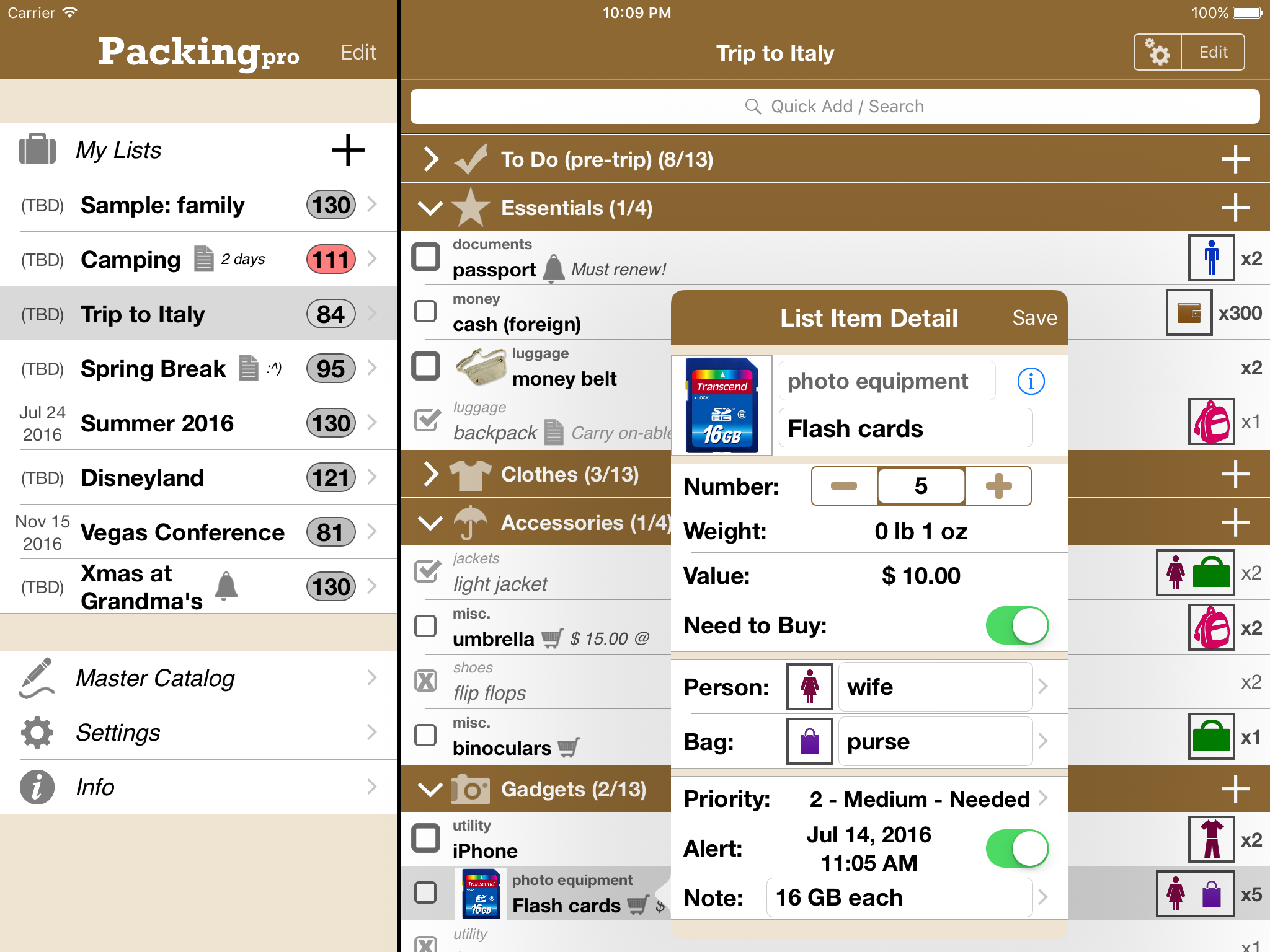
QuinnScape today announces Packing Pro 12.0, a major upgrade that fully modernizes this 7-year old iOS travel app. Packing Pro features unlimited, 100% customizable packing lists, an extensive, yet flexible, catalog and handy sample lists that can be used as templates. Greatly improving the user experience, version 12.0 now supports all devices running on iOS 8 and 9, new search and sort functions in the Master Catalog, as well as a more convenient search tool on list pages.
Taipei, Taiwan - QuinnScape today is pleased to announce the release of Packing Pro 12.0, a major upgrade that fully modernizes this 7-year old iOS travel app. Packing Pro now fully supports and embraces iOS 8 & 9. Over 20,000 lines of code were revised or completely re-written, leading to much smoother operation on current devices. Besides this under-the-hood revamp, big improvements in design and user experience were also made, and a few new features were added as well, such as search & sort in the Master Catalog. Search was also brought out of hiding on list pages, for extra convenience.
During the seven years Packing Pro has been on Apple's App Store, it has been highlighted several times. Currently, it can be found in the "Travel Survival Kit" and "Travel Expenses" promotions. It has also ranked at #1 for iPads and #2 for iPhones in the U.S. App Store's Travel section. Besides Apple, Packing Pro has also been recognized by CNN, WSJ, BBC, The New York Times, Expedia and Budget Travel, and has earned glowing reviews on major tech and app blogs (Gizmodo, Mashable, Macworld, CNET and iPhone Life, among others).
Packing Pro is a mobile travel packing list app that features unlimited, 100% customizable packing lists, an extensive, yet flexible, catalog, handy sample lists, iCloud auto-sync and various list sharing options. A host of special functions include:
* Multi-item selection from catalog for speedy list building
* Multi-item editing for easy list and catalog management
* Collapsable categories with floating headers and running item tallies
* List sorting & filtering by packing status, priority, need to buy, bag and/or person
* Item, weight and value totals & subtotals
* Item images to eliminate any confusion - never again pack the wrong item
* Item and list alerts for user-set reminders
* Email export for file sharing
* Wireless printing
* Fully customized device support for all sizes of iPhone, iPod touch and iPad
* Full multi-lingual support for English, Spanish, French, German, Italian, Portuguese, Russian, Polish, Japanese and Chinese
Besides the core features listed above (which are also present in the basic Packing (+TO DO!) app), Packing Pro also gives its users the following Pro-level features:
* iCloud auto-syncing support
* Expert packing list wizard that can "automagically" create a list
* Email, iTunes, AirDrop, Dropbox and Box file sharing, backup & out-of-app editing support
* Customized design (themes, layout, fonts, colors, textures)
* Double-sized Master Catalog with over 800 items and to-do tasks
* Twice as many sample lists
* Smart Search (lists & catalog)
Packing Pro version 12.0 is a major upgrade that fully modernizes this 7-year old app. It now smoothly supports all devices running on iOS 8 & 9, and new search & sort functions in the Master Catalog, as well as a more convenient search tool on list pages, greatly improve the user experience. Check it out today!
Pricing and Availability:
Packing Pro is a universal app that is available for purchase worldwide on the iPhone & iPad App Store for $2.99 (USD), or the equivalent in local currency. The basic Packing (+TO DO!) sells for $0.99.
QuinnScape: http://www.quinnscape.com/
Packing Pro 12.0: http://www.quinnscape.com/PackingPro.asp
Purchase and Download: https://geo.itunes.apple.com/us/app/packing-pro/id312266675?mt=8&at=1l3v8Yv&pt=55410&ct=prmac
Video Demos: http://www.quinnscape.com/PackingPro-videodemo.asp
Screenshot: http://www.quinnscape.com/media/images/PackingPro-iPad-v12.0.png
App Icon: http://www.quinnscape.com/media/images/PackingPro-Icon-250x250.png
Since its founding in October 2008, QuinnScape has been managed by Quinn Genzel. Quinn is best known for his popular, top-ranking travel packing apps: Packing (+TO DO!) and Packing Pro. Packing Pro has been recognized by Apple, CNN, WSJ, BBC, National Geographic, Budget Travel, Fodor's, CNET, Macworld and a host of others as one of their top apps for traveling. Other app created by Quinn include a grocery shopping list app (Shopping Pro), nature appreciation apps (iLove Nature and iLove Birds), 3D VR action games (R.I.P and Ghost Buddy) and high-quality puzzles (the aQ's Pro Slider Puzzle series). Copyright (C) 2008-2016 QuinnScape. All Rights Reserved. Apple, the Apple logo, iPhone, iPod and iPad are registered trademarks of Apple Inc. in the U.S. and/or other countries.
*******
Link To Article: http://prmac.com/release-id-79530.htm
*******
---------------------------------------------------------------------------------
Note that you can alter delivered distributions at any time.
Login to your account on prMac to alter your channel selection, or to opt-out at any time.
Pre-summer Update Modernizes Packing Pro, Adds Search & Sort to Catalog - Published on 05/24/16
QuinnScape today announces Packing Pro 12.0, a major upgrade that fully modernizes this 7-year old iOS travel app. Packing Pro features unlimited, 100% customizable packing lists, an extensive, yet flexible, catalog and handy sample lists that can be used as templates. Greatly improving the user experience, version 12.0 now supports all devices running on iOS 8 and 9, new search and sort functions in the Master Catalog, as well as a more convenient search tool on list pages.
Taipei, Taiwan - QuinnScape today is pleased to announce the release of Packing Pro 12.0, a major upgrade that fully modernizes this 7-year old iOS travel app. Packing Pro now fully supports and embraces iOS 8 & 9. Over 20,000 lines of code were revised or completely re-written, leading to much smoother operation on current devices. Besides this under-the-hood revamp, big improvements in design and user experience were also made, and a few new features were added as well, such as search & sort in the Master Catalog. Search was also brought out of hiding on list pages, for extra convenience.
During the seven years Packing Pro has been on Apple's App Store, it has been highlighted several times. Currently, it can be found in the "Travel Survival Kit" and "Travel Expenses" promotions. It has also ranked at #1 for iPads and #2 for iPhones in the U.S. App Store's Travel section. Besides Apple, Packing Pro has also been recognized by CNN, WSJ, BBC, The New York Times, Expedia and Budget Travel, and has earned glowing reviews on major tech and app blogs (Gizmodo, Mashable, Macworld, CNET and iPhone Life, among others).
Packing Pro is a mobile travel packing list app that features unlimited, 100% customizable packing lists, an extensive, yet flexible, catalog, handy sample lists, iCloud auto-sync and various list sharing options. A host of special functions include:
* Multi-item selection from catalog for speedy list building
* Multi-item editing for easy list and catalog management
* Collapsable categories with floating headers and running item tallies
* List sorting & filtering by packing status, priority, need to buy, bag and/or person
* Item, weight and value totals & subtotals
* Item images to eliminate any confusion - never again pack the wrong item
* Item and list alerts for user-set reminders
* Email export for file sharing
* Wireless printing
* Fully customized device support for all sizes of iPhone, iPod touch and iPad
* Full multi-lingual support for English, Spanish, French, German, Italian, Portuguese, Russian, Polish, Japanese and Chinese
Besides the core features listed above (which are also present in the basic Packing (+TO DO!) app), Packing Pro also gives its users the following Pro-level features:
* iCloud auto-syncing support
* Expert packing list wizard that can "automagically" create a list
* Email, iTunes, AirDrop, Dropbox and Box file sharing, backup & out-of-app editing support
* Customized design (themes, layout, fonts, colors, textures)
* Double-sized Master Catalog with over 800 items and to-do tasks
* Twice as many sample lists
* Smart Search (lists & catalog)
Packing Pro version 12.0 is a major upgrade that fully modernizes this 7-year old app. It now smoothly supports all devices running on iOS 8 & 9, and new search & sort functions in the Master Catalog, as well as a more convenient search tool on list pages, greatly improve the user experience. Check it out today!
Pricing and Availability:
Packing Pro is a universal app that is available for purchase worldwide on the iPhone & iPad App Store for $2.99 (USD), or the equivalent in local currency. The basic Packing (+TO DO!) sells for $0.99.
QuinnScape: http://www.quinnscape.com/
Packing Pro 12.0: http://www.quinnscape.com/PackingPro.asp
Purchase and Download: https://geo.itunes.apple.com/us/app/packing-pro/id312266675?mt=8&at=1l3v8Yv&pt=55410&ct=prmac
Video Demos: http://www.quinnscape.com/PackingPro-videodemo.asp
Screenshot: http://www.quinnscape.com/media/images/PackingPro-iPad-v12.0.png
App Icon: http://www.quinnscape.com/media/images/PackingPro-Icon-250x250.png

Since its founding in October 2008, QuinnScape has been managed by Quinn Genzel. Quinn is best known for his popular, top-ranking travel packing apps: Packing (+TO DO!) and Packing Pro. Packing Pro has been recognized by Apple, CNN, WSJ, BBC, National Geographic, Budget Travel, Fodor's, CNET, Macworld and a host of others as one of their top apps for traveling. Other app created by Quinn include a grocery shopping list app (Shopping Pro), nature appreciation apps (iLove Nature and iLove Birds), 3D VR action games (R.I.P and Ghost Buddy) and high-quality puzzles (the aQ's Pro Slider Puzzle series). Copyright (C) 2008-2016 QuinnScape. All Rights Reserved. Apple, the Apple logo, iPhone, iPod and iPad are registered trademarks of Apple Inc. in the U.S. and/or other countries.
*******
Link To Article: http://prmac.com/release-id-79530.htm
*******
---------------------------------------------------------------------------------
Note that you can alter delivered distributions at any time.
Login to your account on prMac to alter your channel selection, or to opt-out at any time.
Bedrock Code LLC releases BC Blackjack for iOS
A new article has been published at prMac.
Bedrock Code LLC releases BC Blackjack for iOS - Published on 05/24/16
Los Angeles based Bedrock Code LLC today introduces BC Blackjack 1.0, their new mobile app for playing and practicing realistic casino blackjack on iOS devices. With the aim to be the most casino-like blackjack app in the App Store, BC Blackjack features 3D rendered full sized cards, chips and table as well as realistic card dealing, chip stacking and paying of bets. BC Blackjack also includes a built-in trainer and strategy cards which can help players practice and learn basic strategy.
Los Angeles, California - Bedrock Code LLC today is thrilled to announce the release and immediate availability of BC Blackjack 1.0, their new mobile app for playing and practicing realistic casino blackjack on iOS devices. 3D rendered full sized cards, chips and table as well as its realistic card dealing, chip stacking and paying of bets help make BC Blackjack one of the most casino-like blackjack apps in the App Store. BC Blackjack also includes a built in trainer and basic strategy cards which can help players practice and learn basic strategy.
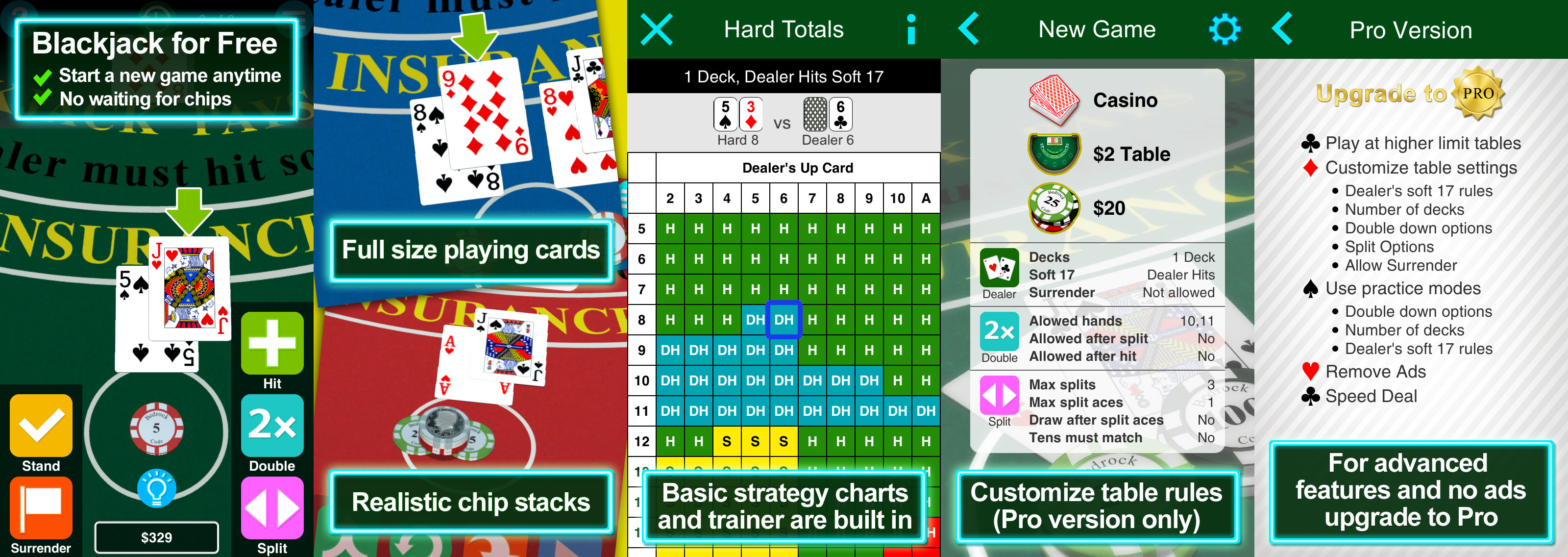
BC Blackjack features realistic full sized cards, chips and blackjack table, so no more squinting at tiny cards like in other Blackjack apps. The realism does not stop there: BC Blackjack stacks chips, deals cards, pays and collects bets just like in the casino. Pro users can customize the table rules to match their favorite casino.
BC Blackjack also has basic strategy charts and a trainer built in. When a player is not sure how to play a hand, they can pull up the basic strategy chart to better visualize what to do. Their actions versus basic strategy are tracked, so they can compare their play to basic strategy.
Feature List:
* Full sized cards, chips and table
* Realistic casino game play
* Built in basic strategy trainer
* Basic strategy charts with history
* No waiting or paying for more chips
* Advanced plays like insurance, surrender, even money
Pro Features List:
* Access higher limit tables
* Customize table settings
* Practice modes: hard totals, soft totals, pairs
* Remove ads
* Start with higher bankrolls
* Speed Deal
Pro Table Settings:
* Dealer's soft 17 rules
* Number of decks (1, 2, 4, 6, 8)
* Double down options
* Split Options
* Surrender Options
"The graphics capabilities of today's mobile devices are impressive, so why not take advantage of them." explains Bedrock Code's Mark Yamashita. "We wanted to build something better than the standard 2D top down, fixed view blackjack app. Users are starting to expect a more immersive experience, and we think we have done that with BC Blackjack. As a consumer, it makes me question the randomness of the cards if I have to pay or wait for additional chips in a blackjack app. If I like an app, I'd much rather pay for it once and then be able to use when I want to. That is why we made BC Blackjack free, with the option to unlock advanced features and remove ads with a Pro version via a one time in-app purchase."
Device Requirements:
* iPhone / iPod touch, iPad
* Requires iOS 8.0 or later
* 76.2 MB
Pricing and Availability:
BC Blackjack 1.0 is free to download and play. Start a new game at any time. Upgrade to the Pro version via in-app purchase for $3.99 (USD). The Pro version allows higher limit tables, the ability to change table settings, removes ads, allows practice modes and more. BC Blackjack is available exclusively through Apple's iTunes App Store in the Games > Casino category.
BC Blackjack 1.0: http://www.bedrockcode.com
Download from iTunes: https://itunes.apple.com/app/bc-blackjack/id1032503757
Splash Screen: http://www.bedrockcode.net/ss_combo.jpg
Screenshot: http://a2.mzstatic.com/us/r30/Purple20/v4/ac/0f/17/ac0f1721-6b19-7dd4-aee8-9f08f4af540d/screen480x480.jpeg
App Icon: http://www.bedrockcode.net/Icon-180.png
Based in Los Angeles, California, Bedrock Code LLC is a privately funded company founded in 2015 by Mark Yamashita. Bedrock Code's developers have worked on several very successful apps in the App Store, including Aw Craps! and the TeachMe series of apps. Bedrock Code strives to build fun mobile apps that are rock solid and intuitive. All Material and Software (C) Copyright 2016 Bedrock Code LLC. All Rights Reserved. Apple, the Apple logo, iPod, the iPod logo, are registered trademarks of Apple Computer in the U.S. and/or other countries.
*******
Link To Article: http://prmac.com/release-id-79535.htm
*******
---------------------------------------------------------------------------------
Note that you can alter delivered distributions at any time.
Login to your account on prMac to alter your channel selection, or to opt-out at any time.
Bedrock Code LLC releases BC Blackjack for iOS - Published on 05/24/16
Los Angeles based Bedrock Code LLC today introduces BC Blackjack 1.0, their new mobile app for playing and practicing realistic casino blackjack on iOS devices. With the aim to be the most casino-like blackjack app in the App Store, BC Blackjack features 3D rendered full sized cards, chips and table as well as realistic card dealing, chip stacking and paying of bets. BC Blackjack also includes a built-in trainer and strategy cards which can help players practice and learn basic strategy.
Los Angeles, California - Bedrock Code LLC today is thrilled to announce the release and immediate availability of BC Blackjack 1.0, their new mobile app for playing and practicing realistic casino blackjack on iOS devices. 3D rendered full sized cards, chips and table as well as its realistic card dealing, chip stacking and paying of bets help make BC Blackjack one of the most casino-like blackjack apps in the App Store. BC Blackjack also includes a built in trainer and basic strategy cards which can help players practice and learn basic strategy.
BC Blackjack features realistic full sized cards, chips and blackjack table, so no more squinting at tiny cards like in other Blackjack apps. The realism does not stop there: BC Blackjack stacks chips, deals cards, pays and collects bets just like in the casino. Pro users can customize the table rules to match their favorite casino.
BC Blackjack also has basic strategy charts and a trainer built in. When a player is not sure how to play a hand, they can pull up the basic strategy chart to better visualize what to do. Their actions versus basic strategy are tracked, so they can compare their play to basic strategy.
Feature List:
* Full sized cards, chips and table
* Realistic casino game play
* Built in basic strategy trainer
* Basic strategy charts with history
* No waiting or paying for more chips
* Advanced plays like insurance, surrender, even money
Pro Features List:
* Access higher limit tables
* Customize table settings
* Practice modes: hard totals, soft totals, pairs
* Remove ads
* Start with higher bankrolls
* Speed Deal
Pro Table Settings:
* Dealer's soft 17 rules
* Number of decks (1, 2, 4, 6, 8)
* Double down options
* Split Options
* Surrender Options
"The graphics capabilities of today's mobile devices are impressive, so why not take advantage of them." explains Bedrock Code's Mark Yamashita. "We wanted to build something better than the standard 2D top down, fixed view blackjack app. Users are starting to expect a more immersive experience, and we think we have done that with BC Blackjack. As a consumer, it makes me question the randomness of the cards if I have to pay or wait for additional chips in a blackjack app. If I like an app, I'd much rather pay for it once and then be able to use when I want to. That is why we made BC Blackjack free, with the option to unlock advanced features and remove ads with a Pro version via a one time in-app purchase."
Device Requirements:
* iPhone / iPod touch, iPad
* Requires iOS 8.0 or later
* 76.2 MB
Pricing and Availability:
BC Blackjack 1.0 is free to download and play. Start a new game at any time. Upgrade to the Pro version via in-app purchase for $3.99 (USD). The Pro version allows higher limit tables, the ability to change table settings, removes ads, allows practice modes and more. BC Blackjack is available exclusively through Apple's iTunes App Store in the Games > Casino category.
BC Blackjack 1.0: http://www.bedrockcode.com
Download from iTunes: https://itunes.apple.com/app/bc-blackjack/id1032503757
Splash Screen: http://www.bedrockcode.net/ss_combo.jpg
Screenshot: http://a2.mzstatic.com/us/r30/Purple20/v4/ac/0f/17/ac0f1721-6b19-7dd4-aee8-9f08f4af540d/screen480x480.jpeg

App Icon: http://www.bedrockcode.net/Icon-180.png

Based in Los Angeles, California, Bedrock Code LLC is a privately funded company founded in 2015 by Mark Yamashita. Bedrock Code's developers have worked on several very successful apps in the App Store, including Aw Craps! and the TeachMe series of apps. Bedrock Code strives to build fun mobile apps that are rock solid and intuitive. All Material and Software (C) Copyright 2016 Bedrock Code LLC. All Rights Reserved. Apple, the Apple logo, iPod, the iPod logo, are registered trademarks of Apple Computer in the U.S. and/or other countries.
*******
Link To Article: http://prmac.com/release-id-79535.htm
*******
---------------------------------------------------------------------------------
Note that you can alter delivered distributions at any time.
Login to your account on prMac to alter your channel selection, or to opt-out at any time.
Marathi Keyboard for iPhone and iPad 2.5
A new article has been published at prMac.
Marathi Keyboard for iPhone and iPad 2.5 - Published on 05/23/16
LastThink today announces Marathi Keyboard for iPhone and iPad 2.5, an important update to their highly customizable keyboard application. Marathi Keyboard offers users a third-party keyboard for use with iOS apps that allows anyone to modify it to their individual taste. Users can modify the order of the keyboard for more convenient usage. The update includes the ability to save specific words for later use, emoticons, paragraph formatting, word prediction, and more.
Yerevan, Armenia - LastThink is proud to announce the release of Marathi Keyboard for iPhone and iPad 2.5, an important update to their highly customizable keyboard application. The Marathi Keyboard's customization features allow anyone to create the keyboard layout that is perfect for their needs. Features include the ability to change the size, shape, and order of characters; the ability to save specific words for later use; emoticons, word prediction, and more.
Users can change the order of the keyboard's letter layout, and even create handy shortcuts to allow entering words or even entire sentences with just a few keystrokes. The keyboard's Swipe feature allows users to swipe their finger around the keyboard to select letters and form words. The app intelligently predicts what the user intends to enter, greatly enhancing typing speed.
What's New in Version 2.5:
* Change the size, and place, as well as the shape of characters and keyboard separately
* Save any words that are used frequently in the active vocabulary for later use
* Express emotions with emoji characters (emoticons) which will correspond to entered words
* Paragraph formatting: Adjust alignment, line spacing, margins, bullets and numbering
* Optional smart auto correction: Intelligent spell checking for even the sloppiest typing
* Style: Customize the look of the keyboard. Change the color of the keys and background
* Word prediction: The keyboard guesses and displays the appropriate word as the user types
* Share text via Facebook, Twitter, email, Dropbox, and more
"When we set out to create the Marathi Keyboard, we knew we wanted to create a customizable keyboard that would offer users the ability to modify it to their individual tastes," says LastThink founder Grigori Jlavyan. Our keyboard allows Marathi speaking users to easily enter their text messages, emails, and other types of texts via a comprehensive interface, making their day-to-day communications more convenient than ever."
The Marathi Keyboard also offers handy paragraph formatting options, allowing users to adjust the alignment of their text, while also offering the ability to set line spacing, adjust margins, even add bulleted or numbered lists. Optional smart correction makes even the sloppiest speller's text entry become correct. The keyboard also offers a downloadable Marathi font for use with iOS devices, making text entry, editing, and display even more convenient.
Marathi Keyboard emphasizes the user's security above all, and while many third-party iOS keyboard apps require "Full Access" - with the ability to send back keystrokes and other information back to their developer - the Marathi Keyboard does not, protecting the text entry and sensitive user information, keeping their personal information safe from prying eyes.
Device Requirements:
* iPhone, iPad, and iPod touch
* Optimized for iPhone 5, iPhone 6/6 Plus
* Universal Application
* Requires iOS 7.0 or later
* 11.2 MB
Pricing and Availability:
Marathi Keyboard for iPhone and iPad 2.5 is free, and is available worldwide exclusively through the App Store in the Productivity category. A handy $2.99 in-app purchase is available to remove ads. Review codes are available upon request.
LastThink: http://lastthink.com/
Marathi Keyboard for iPhone and iPad 2.5: https://itunes.apple.com/app/marathi-keyboard-for-iphone/id845874870
Download from iTunes: https://itunes.apple.com/app/marathi-keyboard-for-iphone/id845874870
Screenshot: http://a4.mzstatic.com/us/r30/Purple4/v4/61/75/4c/61754c17-b61b-c02f-0b1b-54824bcd9d65/screen568x568.jpeg
App Icon: http://a4.mzstatic.com/us/r30/Purple4/v4/59/ac/a6/59aca6e9-9897-b109-21b8-8691017352d4/icon175x175.jpeg
LastThink is an IT company with a focus on mobile development. It has extended its list of services since 2012 to offer high-end business process management, system integration, as well as up-to-date communication solutions. LastThink's mission is to deliver maximum business value to its customers by designing, developing, implementing and maintaining efficient and high quality software solutions aligned with their most essential business needs. Their team will always do its best to meet client expectations. Copyright (C) 2016 LastThink LLC. All Rights Reserved. Apple, the Apple logo, iPhone, iPad and iPod are registered trademarks of Apple Inc. in the U.S. and/or other countries.
*******
Link To Article: http://prmac.com/release-id-79540.htm
*******
---------------------------------------------------------------------------------
Note that you can alter delivered distributions at any time.
Login to your account on prMac to alter your channel selection, or to opt-out at any time.
Marathi Keyboard for iPhone and iPad 2.5 - Published on 05/23/16
LastThink today announces Marathi Keyboard for iPhone and iPad 2.5, an important update to their highly customizable keyboard application. Marathi Keyboard offers users a third-party keyboard for use with iOS apps that allows anyone to modify it to their individual taste. Users can modify the order of the keyboard for more convenient usage. The update includes the ability to save specific words for later use, emoticons, paragraph formatting, word prediction, and more.
Yerevan, Armenia - LastThink is proud to announce the release of Marathi Keyboard for iPhone and iPad 2.5, an important update to their highly customizable keyboard application. The Marathi Keyboard's customization features allow anyone to create the keyboard layout that is perfect for their needs. Features include the ability to change the size, shape, and order of characters; the ability to save specific words for later use; emoticons, word prediction, and more.
Users can change the order of the keyboard's letter layout, and even create handy shortcuts to allow entering words or even entire sentences with just a few keystrokes. The keyboard's Swipe feature allows users to swipe their finger around the keyboard to select letters and form words. The app intelligently predicts what the user intends to enter, greatly enhancing typing speed.
What's New in Version 2.5:
* Change the size, and place, as well as the shape of characters and keyboard separately
* Save any words that are used frequently in the active vocabulary for later use
* Express emotions with emoji characters (emoticons) which will correspond to entered words
* Paragraph formatting: Adjust alignment, line spacing, margins, bullets and numbering
* Optional smart auto correction: Intelligent spell checking for even the sloppiest typing
* Style: Customize the look of the keyboard. Change the color of the keys and background
* Word prediction: The keyboard guesses and displays the appropriate word as the user types
* Share text via Facebook, Twitter, email, Dropbox, and more
"When we set out to create the Marathi Keyboard, we knew we wanted to create a customizable keyboard that would offer users the ability to modify it to their individual tastes," says LastThink founder Grigori Jlavyan. Our keyboard allows Marathi speaking users to easily enter their text messages, emails, and other types of texts via a comprehensive interface, making their day-to-day communications more convenient than ever."
The Marathi Keyboard also offers handy paragraph formatting options, allowing users to adjust the alignment of their text, while also offering the ability to set line spacing, adjust margins, even add bulleted or numbered lists. Optional smart correction makes even the sloppiest speller's text entry become correct. The keyboard also offers a downloadable Marathi font for use with iOS devices, making text entry, editing, and display even more convenient.
Marathi Keyboard emphasizes the user's security above all, and while many third-party iOS keyboard apps require "Full Access" - with the ability to send back keystrokes and other information back to their developer - the Marathi Keyboard does not, protecting the text entry and sensitive user information, keeping their personal information safe from prying eyes.
Device Requirements:
* iPhone, iPad, and iPod touch
* Optimized for iPhone 5, iPhone 6/6 Plus
* Universal Application
* Requires iOS 7.0 or later
* 11.2 MB
Pricing and Availability:
Marathi Keyboard for iPhone and iPad 2.5 is free, and is available worldwide exclusively through the App Store in the Productivity category. A handy $2.99 in-app purchase is available to remove ads. Review codes are available upon request.
LastThink: http://lastthink.com/
Marathi Keyboard for iPhone and iPad 2.5: https://itunes.apple.com/app/marathi-keyboard-for-iphone/id845874870
Download from iTunes: https://itunes.apple.com/app/marathi-keyboard-for-iphone/id845874870
Screenshot: http://a4.mzstatic.com/us/r30/Purple4/v4/61/75/4c/61754c17-b61b-c02f-0b1b-54824bcd9d65/screen568x568.jpeg

App Icon: http://a4.mzstatic.com/us/r30/Purple4/v4/59/ac/a6/59aca6e9-9897-b109-21b8-8691017352d4/icon175x175.jpeg

LastThink is an IT company with a focus on mobile development. It has extended its list of services since 2012 to offer high-end business process management, system integration, as well as up-to-date communication solutions. LastThink's mission is to deliver maximum business value to its customers by designing, developing, implementing and maintaining efficient and high quality software solutions aligned with their most essential business needs. Their team will always do its best to meet client expectations. Copyright (C) 2016 LastThink LLC. All Rights Reserved. Apple, the Apple logo, iPhone, iPad and iPod are registered trademarks of Apple Inc. in the U.S. and/or other countries.
*******
Link To Article: http://prmac.com/release-id-79540.htm
*******
---------------------------------------------------------------------------------
Note that you can alter delivered distributions at any time.
Login to your account on prMac to alter your channel selection, or to opt-out at any time.
IconFly Discounted to $0.99 (80% off) for a Limited Time
A new article has been published at prMac.
IconFly Discounted to $0.99 (80% off) for a Limited Time - Published on 05/23/16
IconFly is an incredible time saver that allows users to create all the necessary icons in many formats for their Mac, iPhone, iPad and Apple Watch applications as well as Web clip icons and favicon much more easier and faster, and save their time for more important things. Users can get IconFly at the incredibly low price of $0.99, beginning May 23, 2016. This offer is for a limited only, and will expire on May 26, 2016.
Kiev, Ukraine - Aperio Lux is pleased to inform Mac users about the hot discount for IconFly 3.4.1, their elegant, powerful and easy-to-use tool for create icons, that allows users to create all necessary types of icons for Mac, iPhone, iPad and Apple Watch applications. All the icons created using IconFly are fully compatible with all the latest devices and OS created by Apple. Moreover, IconFly 3.4.1 allows users to create icons for Android applications as well as Web clip icons and favicon.
Key Features:
* Supported image formats for icons creation: PNG, JPEG, TIFF, GIF, ICNS, PSD, EPS, AI, PDF
* Create appiconset and icons packages for your Mac, iPhone, iPad and Apple Watch applications
* Create a folder with an icon or set icon on an existing folder
* Create Mac app icons in the additional formats: iconset, ICNS
* Create Standard (@1x), Retina (@2x) and Retina HD (@3x) icons
* Save icons as images in the following formats: PNG, JPEG, TIFF
* Preview in Dock for OS X icons
* 6 types of roundings and 8 types of masks for OS X icons
* Preview your icons before export
* Replace images separately for different sizes
* Supports app icons for iOS 7 and later (including latest iOS 9)
* Supports app icons for watchOS 1 - 2
* Supports app icons for iPhone (including latest iPhone 6 and iPhone 6S)
* Supports app icons for iPad (including latest iPad Pro)
* Create full icons package for Android applications
* Create different type for web icons
* QuickIcon
System Requirements:
* OS X Lion 10.10 or later
* Intel 64-bit processor
* 4.5 MB
Price/Availability:
IconFly 3.4 is only $0.99 USD (or an equivalent amount in other currencies) from May 23, 2016 until May 26, 2016; and $4.99 starting from May 26, 2016. The app is available worldwide through the Mac App Store in the Developer Tools category. Promo codes for review available on request.
IconFly 3.4.1: http://iconfly.aperio-lux.com/
Purchase and Download (MAS): https://itunes.apple.com/app/iconfly/id556381974
Download Demo Link: http://iconfly.aperio-lux.com/try/
Press Kit (ZIP): http://beta.aperio-lux.com/MediaKitArchives/IconFly_Media_Kit.zip
Screenshot: http://a2.mzstatic.com/us/r30/Purple49/v4/b0/51/34/b05134cf-48fd-922b-9d94-bac8e88c1684/screen800x500.jpeg
Application Icon: http://a3.mzstatic.com/us/r30/Purple30/v4/de/a9/30/dea930ae-8c48-2926-03d7-6579736b9e77/icon128-2x.png
Aperio Lux is an independent team of enthusiasts and innovators from Ukraine. The Aperio Lux team develops ergonomic and user-friendly software for OS X and iOS. Copyright (C) 2011-2016 Alexey Nikitin and Alexandr Bondar. All Rights Reserved. Apple, the Apple logo, iPad, iPad Pro, iPhone, Mac, Apple Watch, OS X, WatchOS and Xcode are trademarks of Apple Inc., registered in the U.S. and other countries. Retina is a trademark of Apple Inc. Mac App Store is a service mark of Apple Inc. IOS is a trademark or registered trademark of Cisco in the U.S. and other countries and is used under license. Android is a trademark of Google Inc.
*******
Link To Article: http://prmac.com/release-id-79539.htm
*******
---------------------------------------------------------------------------------
Note that you can alter delivered distributions at any time.
Login to your account on prMac to alter your channel selection, or to opt-out at any time.
IconFly Discounted to $0.99 (80% off) for a Limited Time - Published on 05/23/16
IconFly is an incredible time saver that allows users to create all the necessary icons in many formats for their Mac, iPhone, iPad and Apple Watch applications as well as Web clip icons and favicon much more easier and faster, and save their time for more important things. Users can get IconFly at the incredibly low price of $0.99, beginning May 23, 2016. This offer is for a limited only, and will expire on May 26, 2016.
Kiev, Ukraine - Aperio Lux is pleased to inform Mac users about the hot discount for IconFly 3.4.1, their elegant, powerful and easy-to-use tool for create icons, that allows users to create all necessary types of icons for Mac, iPhone, iPad and Apple Watch applications. All the icons created using IconFly are fully compatible with all the latest devices and OS created by Apple. Moreover, IconFly 3.4.1 allows users to create icons for Android applications as well as Web clip icons and favicon.
Key Features:
* Supported image formats for icons creation: PNG, JPEG, TIFF, GIF, ICNS, PSD, EPS, AI, PDF
* Create appiconset and icons packages for your Mac, iPhone, iPad and Apple Watch applications
* Create a folder with an icon or set icon on an existing folder
* Create Mac app icons in the additional formats: iconset, ICNS
* Create Standard (@1x), Retina (@2x) and Retina HD (@3x) icons
* Save icons as images in the following formats: PNG, JPEG, TIFF
* Preview in Dock for OS X icons
* 6 types of roundings and 8 types of masks for OS X icons
* Preview your icons before export
* Replace images separately for different sizes
* Supports app icons for iOS 7 and later (including latest iOS 9)
* Supports app icons for watchOS 1 - 2
* Supports app icons for iPhone (including latest iPhone 6 and iPhone 6S)
* Supports app icons for iPad (including latest iPad Pro)
* Create full icons package for Android applications
* Create different type for web icons
* QuickIcon
System Requirements:
* OS X Lion 10.10 or later
* Intel 64-bit processor
* 4.5 MB
Price/Availability:
IconFly 3.4 is only $0.99 USD (or an equivalent amount in other currencies) from May 23, 2016 until May 26, 2016; and $4.99 starting from May 26, 2016. The app is available worldwide through the Mac App Store in the Developer Tools category. Promo codes for review available on request.
IconFly 3.4.1: http://iconfly.aperio-lux.com/
Purchase and Download (MAS): https://itunes.apple.com/app/iconfly/id556381974
Download Demo Link: http://iconfly.aperio-lux.com/try/
Press Kit (ZIP): http://beta.aperio-lux.com/MediaKitArchives/IconFly_Media_Kit.zip
Screenshot: http://a2.mzstatic.com/us/r30/Purple49/v4/b0/51/34/b05134cf-48fd-922b-9d94-bac8e88c1684/screen800x500.jpeg

Application Icon: http://a3.mzstatic.com/us/r30/Purple30/v4/de/a9/30/dea930ae-8c48-2926-03d7-6579736b9e77/icon128-2x.png

Aperio Lux is an independent team of enthusiasts and innovators from Ukraine. The Aperio Lux team develops ergonomic and user-friendly software for OS X and iOS. Copyright (C) 2011-2016 Alexey Nikitin and Alexandr Bondar. All Rights Reserved. Apple, the Apple logo, iPad, iPad Pro, iPhone, Mac, Apple Watch, OS X, WatchOS and Xcode are trademarks of Apple Inc., registered in the U.S. and other countries. Retina is a trademark of Apple Inc. Mac App Store is a service mark of Apple Inc. IOS is a trademark or registered trademark of Cisco in the U.S. and other countries and is used under license. Android is a trademark of Google Inc.
*******
Link To Article: http://prmac.com/release-id-79539.htm
*******
---------------------------------------------------------------------------------
Note that you can alter delivered distributions at any time.
Login to your account on prMac to alter your channel selection, or to opt-out at any time.
RailModeller Pro 5.1: Introducing tunnel sections and layer defaults
A new article has been published at prMac.
RailModeller Pro 5.1: Introducing tunnel sections and layer defaults - Published on 05/23/16
Isle of the Kakapo today announces RailModeller Pro 5.1, a comprehensive update to their popular model railroad and slot car layout design solution for Mac OS X. RailModeller Pro offers sophisticated design tools that enable hobbyists to easily design model train and slot car track layouts via drag & drop. The app includes a library catalog covering over 200 track systems in all major model scales, allowing for custom designs of almost any layout a user can visualize.
Munich, Germany - Isle of the Kakapo is today proud to announce the release and immediate availability of RailModeller Pro 5.1, their model railroad and slot car layout design solution for Mac OS X. The app offers sophisticated tools that enable hobbyists to quickly design model train and slot car track layouts via drag & drop, features libraries for more than 200 track systems, and offers customizable views of track layouts in both two and three dimensions. This first major update of RailModeller Pro since the initial release of the app in early 2015 features:
* Native support for tunnel sections including the automatic creation of tunnel portals between plain and tunnel tracks making it easy to distinguish visible track sections from tracks running underground.
* Layer-Defaults optionally providing default values for elements newly inserted into a layer. Per-layer defaults for color and track height enable power-users to quickly build complex layouts with fewer clicks.
Further improvements in the latest update include a completely redesigned and extended functionality to clean up the completed layout, an improved application performance and usability improvements throughout the app.
RailModeller Pro's easy-to-use interface allows track designers to create layouts of up to 10km x 10km organized in up to 99 layers. The app includes all components to complete a train or slot car track layout, including flex tracks, buildings, symbols, and other items in scales from T (1:450) up to G or IIm (1:22.5). Track elements can be dropped onto the layout, rotated, and positioned where desired, users can simply click to append one or more track elements in the layout, add graphical shapes, arrows, dimensions, and more.
RailModeller Pro automatically generates a shopping list, (including prices), as the layout is created, making for an easy reference when it comes time to purchase required components for the layout. An integrated stock management maintains the inventory of tracks already purchased, displaying the number of tracks remaining in stock when working on a specific layout or filtering the shopping list to show only missing tracks that need to be purchased to complete the layout.
Features:
* A library catalog featuring libraries for more than 200 track systems for most vendors of track material
* Covers model scales from T (1:450) up to G or IIm (1:22.5)
* A clean and intuitive, Mac like user experience
* Sophisticated, yet easy to use tools to quickly build awesome model train layouts
* Assistants that allow placing tracks at arbitrary heights, creating track grades, insert parallel tracks or close gaps
* Customizable viewing modes for visualizing the track layout in two and three dimensions
* Automatically generates shopping lists as the design is laid out
* The built-in stock tracking feature keeps track of items already owned
* Print layouts in any scale from a single sheet of paper to full-sized 1:1 scale
* Export track layouts in numerous image file formats at any resolution
* An integrated Online-Manual
System Requirements:
* OS X 10.8 or later
* 64-bit Processor
* 10.1 MB
Pricing and Availability:
RailModeller Pro 5.1 is available for only $39.99 USD (or an equivalent amount on other currencies) worldwide exclusively through the Mac App Store in the Graphics and Design category. A free version, RailModeller Express - which is suitable for small layouts with a limited number of tracks and layout dimensions of up to 0.5km - is also available through the Mac App Store in the Graphics and Design category. Review copies are available upon request.
Isle of the Kakapo: http://www.isleofthekakapo.com/
RailModeller Pro 5.1: http://www.railmodeller.com/
Purchase and Download (MAS): https://itunes.apple.com/app/railmodeller-pro/id952380304
Track Libraries: http://www.railmodeller.com/libraries.html
YouTube Channel: https://www.youtube.com/playlist?list=PLvD4KXyO__2pYYBkBOgYRXjx0IA5DNqv-
Press Kit (zip): http://www.railmodeller.com/press.html
Based in Munich, Germany, Isle of the Kakapo is owned and operated by Jan Barnholt. Founded in 2015, Isle of the Kakapo is a software company specializing in providing innovative apps for the Mac and iOS platforms. All Material and Software (C) Copyright Isle of the Kakapo. All Rights Reserved. Apple, the Apple logo, Macintosh and Mac OS X are registered trademarks of Apple Inc. in the U.S. and/or other countries. Other trademarks and registered trademarks may be the property of their respective owners.
*******
Link To Article: http://prmac.com/release-id-79538.htm
*******
---------------------------------------------------------------------------------
Note that you can alter delivered distributions at any time.
Login to your account on prMac to alter your channel selection, or to opt-out at any time.
RailModeller Pro 5.1: Introducing tunnel sections and layer defaults - Published on 05/23/16
Isle of the Kakapo today announces RailModeller Pro 5.1, a comprehensive update to their popular model railroad and slot car layout design solution for Mac OS X. RailModeller Pro offers sophisticated design tools that enable hobbyists to easily design model train and slot car track layouts via drag & drop. The app includes a library catalog covering over 200 track systems in all major model scales, allowing for custom designs of almost any layout a user can visualize.
Munich, Germany - Isle of the Kakapo is today proud to announce the release and immediate availability of RailModeller Pro 5.1, their model railroad and slot car layout design solution for Mac OS X. The app offers sophisticated tools that enable hobbyists to quickly design model train and slot car track layouts via drag & drop, features libraries for more than 200 track systems, and offers customizable views of track layouts in both two and three dimensions. This first major update of RailModeller Pro since the initial release of the app in early 2015 features:
* Native support for tunnel sections including the automatic creation of tunnel portals between plain and tunnel tracks making it easy to distinguish visible track sections from tracks running underground.
* Layer-Defaults optionally providing default values for elements newly inserted into a layer. Per-layer defaults for color and track height enable power-users to quickly build complex layouts with fewer clicks.
Further improvements in the latest update include a completely redesigned and extended functionality to clean up the completed layout, an improved application performance and usability improvements throughout the app.
RailModeller Pro's easy-to-use interface allows track designers to create layouts of up to 10km x 10km organized in up to 99 layers. The app includes all components to complete a train or slot car track layout, including flex tracks, buildings, symbols, and other items in scales from T (1:450) up to G or IIm (1:22.5). Track elements can be dropped onto the layout, rotated, and positioned where desired, users can simply click to append one or more track elements in the layout, add graphical shapes, arrows, dimensions, and more.
RailModeller Pro automatically generates a shopping list, (including prices), as the layout is created, making for an easy reference when it comes time to purchase required components for the layout. An integrated stock management maintains the inventory of tracks already purchased, displaying the number of tracks remaining in stock when working on a specific layout or filtering the shopping list to show only missing tracks that need to be purchased to complete the layout.
Features:
* A library catalog featuring libraries for more than 200 track systems for most vendors of track material
* Covers model scales from T (1:450) up to G or IIm (1:22.5)
* A clean and intuitive, Mac like user experience
* Sophisticated, yet easy to use tools to quickly build awesome model train layouts
* Assistants that allow placing tracks at arbitrary heights, creating track grades, insert parallel tracks or close gaps
* Customizable viewing modes for visualizing the track layout in two and three dimensions
* Automatically generates shopping lists as the design is laid out
* The built-in stock tracking feature keeps track of items already owned
* Print layouts in any scale from a single sheet of paper to full-sized 1:1 scale
* Export track layouts in numerous image file formats at any resolution
* An integrated Online-Manual
System Requirements:
* OS X 10.8 or later
* 64-bit Processor
* 10.1 MB
Pricing and Availability:
RailModeller Pro 5.1 is available for only $39.99 USD (or an equivalent amount on other currencies) worldwide exclusively through the Mac App Store in the Graphics and Design category. A free version, RailModeller Express - which is suitable for small layouts with a limited number of tracks and layout dimensions of up to 0.5km - is also available through the Mac App Store in the Graphics and Design category. Review copies are available upon request.
Isle of the Kakapo: http://www.isleofthekakapo.com/
RailModeller Pro 5.1: http://www.railmodeller.com/
Purchase and Download (MAS): https://itunes.apple.com/app/railmodeller-pro/id952380304
Track Libraries: http://www.railmodeller.com/libraries.html
YouTube Channel: https://www.youtube.com/playlist?list=PLvD4KXyO__2pYYBkBOgYRXjx0IA5DNqv-
Press Kit (zip): http://www.railmodeller.com/press.html
Based in Munich, Germany, Isle of the Kakapo is owned and operated by Jan Barnholt. Founded in 2015, Isle of the Kakapo is a software company specializing in providing innovative apps for the Mac and iOS platforms. All Material and Software (C) Copyright Isle of the Kakapo. All Rights Reserved. Apple, the Apple logo, Macintosh and Mac OS X are registered trademarks of Apple Inc. in the U.S. and/or other countries. Other trademarks and registered trademarks may be the property of their respective owners.
*******
Link To Article: http://prmac.com/release-id-79538.htm
*******
---------------------------------------------------------------------------------
Note that you can alter delivered distributions at any time.
Login to your account on prMac to alter your channel selection, or to opt-out at any time.
Subscribe to:
Posts (Atom)