A new article has been published at prMac.
Hide for OS X: Clean Mac Desktop Clutter With a Mouse Click - Published on 05/26/16
AprendeXojo announces the release of Hide, their free utility application for OS X, which is the perfect tool for anyone who wants to temporarily hide all the clutter of the OS X Desktop. This faceless app (without GUI) installs a menu in the Finder Menu Bar where you can choose between hide or reveal all the files, folders and or volumes whose icons are visible on the Desktop, with just a mouse click.
Madrid, Spain - AprendeXojo is proud to announce the release and immediate availability of Hide, their free utility application for OS X, which is the perfect tool for anyone who wants to temporarily hide all the clutter of the OS X Desktop.
This faceless app (without GUI) installs a menu in the Finder Menu Bar where users can choose between hide or reveal all the files, folders and or volumes whose icons are visible on the Desktop, with just a mouse click.
This feature is specially useful for the following scenarios (among others):
* Screencast recording
* Presentations
* Screen sharing
* Face to Face tutorials or guidance
Hide remembers all the hidden files between runs, so users can reveal them at the next app execution without losing track of the processed files! In addition, the app doesn't modify or move the processed files from their original location on the user volume (hard disk, SSD), and doesn't process the original files in the case of the Alias, either.
As a facelless app, Hide for OS X is simple to use, unobtrusive, fast in execution and free. Hide for OS X is a perfect tool for any Mac user. Hide for OS X is an Apple ID signed app, so it comes from a known OS X Developer and conforms with the Gatekeeper security rules and filters under OS X.
Pricing and Availability:
Hide is free, and is available for download through the AprendeXojo website.
AprendeXojo: http://www.aprendexojo.com
Hide: http://www.aprendexojo.com/product/hide
Download: http://www.aprendexojo.com/product/hide
Application Icon: http://www.aprendexojo.com/wp-content/uploads/2016/05/Hide@2x-300x300.png
AprendeXojo provides native software for OS X, iOS, Windows and the Web developed with Xojo, Objective-C, C and other languages and technologies. All Material and Software (C) Copyright 2016 AprendeXojo. All Rights Reserved. Apple, the Apple logo, Macintosh and Mac OS X are registered trademarks of Apple Inc. in the U.S. and/or other countries. Other trademarks and registered trademarks may be the property of their respective owners.
*******
Link To Article: http://prmac.com/release-id-79571.htm
*******
---------------------------------------------------------------------------------
Note that you can alter delivered distributions at any time.
Login to your account on prMac to alter your channel selection, or to opt-out at any time.


Pixelmator Team Brings a Major Update to Pixelmator for Mac
A new article has been published at prMac.
Pixelmator Team Brings a Major Update to Pixelmator for Mac - Published on 05/26/16
The Pixelmator Team today announces Pixelmator 3.5 Canyon, a major update to its full-featured, powerful, and fast image editor for Mac OS X. Pixelmator gives everything you need to create, edit, and enhance your images, letting you work seamlessly between Mac and iPad. Version 3.5 brings an incredibly smart Quick Selection Tool, a Magnetic Selection Tool that automatically snaps to object edges, a powerful Pixelmator Retouch extension for the Photos app, and more.
Vilnius, Lithuania - The Pixelmator Team today introduces Pixelmator 3.5 Canyon, a major update to its full-featured, powerful, and fast image editor for Mac. Pixelmator 3.5 Canyon brings an incredibly smart Quick Selection Tool, a Magnetic Selection Tool that automatically snaps to object edges, a powerful Pixelmator Retouch extension for the Photos app, and more. Pixelmator 3.5 Canyon is available today as a free upgrade from the Mac App Store.
"Pixelmator is a very powerful image editor that lets you create stunning compositions. And making selections is vital in this workflow, which is why today we're really excited to introduce two unique and incredibly powerful selection tools: a Quick Selection Tool and a Magnetic Selection Tool" said Saulius Dailide, one of the founders of the Pixelmator Team. "What's more, we're also bringing a full set of Pixelmator retouching tools to the Photos app, including the magical Pixelmator Repair Tool, which we're sure Photos users will love."
The Quick Selection Tool has been designed to make even the most challenging selections intuitive and effortless. The innovative and incredibly sophisticated algorithm behind the Quick Selection Tool analyzes colors, textures, contrasts, shadows, highlights, and many more elements of an image, and automatically detects the object being selected. This lets you select complex areas remarkably precisely with a single brushstroke.
"With the Quick Selection Tool, we wanted to create a totally unique experience for selecting objects," said Simonas Bastys, lead developer of the Pixelmator Team. "For more than 6 months, our team worked on developing a unique and incredibly smart algorithm, which used advanced machine-learning techniques to figure out for itself the best possible way to select objects. The results are stunning, and we're really happy to introduce this next-generation selection tool to all of our users."
The Magnetic Selection Tool automatically snaps to the edges of the object you trace, so you can select detailed areas very precisely with just a few clicks. The sophisticated algorithm underneath the Magnetic Selection Tool, based on A* Pathfinding (which is used for developing navigation algorithms in video games), ensures a perfect outline around almost any object.
The new Pixelmator Retouch extension adds a full set of powerful and easy-to-use Pixelmator retouching tools to the Photos app. Now, you can remove anything from a photo with a single swipe, effortlessly clone objects or entire areas, adjust the lightness and saturation of specific parts, sharpen the details, and soften the background, all without ever leaving the Photos app. Pixelmator Photos Extension has been built from the ground up on Metal, Apple's incredibly powerful and fast graphics-processing technology, which allows you to retouch images inside Photos with stunning quality and speed.
Pixelmator 3.5 Canyon also brings a totally redesigned Stroke effect, enhanced Refine Selection performance, advanced, content-aware outline smoothing for selections made with Color Selection, Paint Bucket and Magic Eraser tools, as well as other performance improvements and fixes.
System Requirements:
* OS X 10.9.5 or later
* 64-bit processor
* 54.4 MB
Pricing and Availability:
Pixelmator 3.5 Canyon is $29.99 USD (or equivalent amount in other currencies) and available worldwide through the Mac App Store in the Graphics & Design category. It is a free upgrade to all existing customers who purchased the app from the Mac App Store. More information and a free 30-day trial can be found at Pixelmator online.
Pixelmator 3.5 Canyon: http://www.pixelmator.com
Purchase and Download (Mac App Store): https://itunes.apple.com/app/pixelmator/id407963104
Pixelmator Retouch Extension for Photos: http://www.pixelmator.com/retouch-extension
Vimeo Video (Magnetic Selection Tutorial): https://vimeo.com/164244801
Screenshot 1: http://upload-cdn.pixelmator.com/Magnetic_Selection.png
Screenshot 2: http://upload-cdn.pixelmator.com/pixelmator_retouch_extension.png
Founded in 2007 by two brothers, Saulius Dailide and Aidas Dailide, the Pixelmator Team develops Pixelmator for Mac - a full-featured image editing app for Mac, and Pixelmator for iPad - the world's most advanced image editing app for iPad. Both apps are honored with numerous awards, such as the Mac App Store App of the year 2011, the App Store iPad App of the year 2014, and many more. Pixelmator for iPad was featured in the Apple Special Event in October, 2014. All Material and Software (C) Copyright 2007-2016 Pixelmator Team. All Rights Reserved. Apple, the Apple logo, Macintosh, iPhone, iPad and Mac OS X are registered trademarks of Apple Inc. in the U.S. and/or other countries. Other trademarks and registered trademarks may be the property of their respective owners.
*******
Link To Article: http://prmac.com/release-id-79570.htm
*******
---------------------------------------------------------------------------------
Note that you can alter delivered distributions at any time.
Login to your account on prMac to alter your channel selection, or to opt-out at any time.
Pixelmator Team Brings a Major Update to Pixelmator for Mac - Published on 05/26/16
The Pixelmator Team today announces Pixelmator 3.5 Canyon, a major update to its full-featured, powerful, and fast image editor for Mac OS X. Pixelmator gives everything you need to create, edit, and enhance your images, letting you work seamlessly between Mac and iPad. Version 3.5 brings an incredibly smart Quick Selection Tool, a Magnetic Selection Tool that automatically snaps to object edges, a powerful Pixelmator Retouch extension for the Photos app, and more.
Vilnius, Lithuania - The Pixelmator Team today introduces Pixelmator 3.5 Canyon, a major update to its full-featured, powerful, and fast image editor for Mac. Pixelmator 3.5 Canyon brings an incredibly smart Quick Selection Tool, a Magnetic Selection Tool that automatically snaps to object edges, a powerful Pixelmator Retouch extension for the Photos app, and more. Pixelmator 3.5 Canyon is available today as a free upgrade from the Mac App Store.
"Pixelmator is a very powerful image editor that lets you create stunning compositions. And making selections is vital in this workflow, which is why today we're really excited to introduce two unique and incredibly powerful selection tools: a Quick Selection Tool and a Magnetic Selection Tool" said Saulius Dailide, one of the founders of the Pixelmator Team. "What's more, we're also bringing a full set of Pixelmator retouching tools to the Photos app, including the magical Pixelmator Repair Tool, which we're sure Photos users will love."
The Quick Selection Tool has been designed to make even the most challenging selections intuitive and effortless. The innovative and incredibly sophisticated algorithm behind the Quick Selection Tool analyzes colors, textures, contrasts, shadows, highlights, and many more elements of an image, and automatically detects the object being selected. This lets you select complex areas remarkably precisely with a single brushstroke.
"With the Quick Selection Tool, we wanted to create a totally unique experience for selecting objects," said Simonas Bastys, lead developer of the Pixelmator Team. "For more than 6 months, our team worked on developing a unique and incredibly smart algorithm, which used advanced machine-learning techniques to figure out for itself the best possible way to select objects. The results are stunning, and we're really happy to introduce this next-generation selection tool to all of our users."
The Magnetic Selection Tool automatically snaps to the edges of the object you trace, so you can select detailed areas very precisely with just a few clicks. The sophisticated algorithm underneath the Magnetic Selection Tool, based on A* Pathfinding (which is used for developing navigation algorithms in video games), ensures a perfect outline around almost any object.
The new Pixelmator Retouch extension adds a full set of powerful and easy-to-use Pixelmator retouching tools to the Photos app. Now, you can remove anything from a photo with a single swipe, effortlessly clone objects or entire areas, adjust the lightness and saturation of specific parts, sharpen the details, and soften the background, all without ever leaving the Photos app. Pixelmator Photos Extension has been built from the ground up on Metal, Apple's incredibly powerful and fast graphics-processing technology, which allows you to retouch images inside Photos with stunning quality and speed.
Pixelmator 3.5 Canyon also brings a totally redesigned Stroke effect, enhanced Refine Selection performance, advanced, content-aware outline smoothing for selections made with Color Selection, Paint Bucket and Magic Eraser tools, as well as other performance improvements and fixes.
System Requirements:
* OS X 10.9.5 or later
* 64-bit processor
* 54.4 MB
Pricing and Availability:
Pixelmator 3.5 Canyon is $29.99 USD (or equivalent amount in other currencies) and available worldwide through the Mac App Store in the Graphics & Design category. It is a free upgrade to all existing customers who purchased the app from the Mac App Store. More information and a free 30-day trial can be found at Pixelmator online.
Pixelmator 3.5 Canyon: http://www.pixelmator.com
Purchase and Download (Mac App Store): https://itunes.apple.com/app/pixelmator/id407963104
Pixelmator Retouch Extension for Photos: http://www.pixelmator.com/retouch-extension
Vimeo Video (Magnetic Selection Tutorial): https://vimeo.com/164244801
Screenshot 1: http://upload-cdn.pixelmator.com/Magnetic_Selection.png

Screenshot 2: http://upload-cdn.pixelmator.com/pixelmator_retouch_extension.png

Founded in 2007 by two brothers, Saulius Dailide and Aidas Dailide, the Pixelmator Team develops Pixelmator for Mac - a full-featured image editing app for Mac, and Pixelmator for iPad - the world's most advanced image editing app for iPad. Both apps are honored with numerous awards, such as the Mac App Store App of the year 2011, the App Store iPad App of the year 2014, and many more. Pixelmator for iPad was featured in the Apple Special Event in October, 2014. All Material and Software (C) Copyright 2007-2016 Pixelmator Team. All Rights Reserved. Apple, the Apple logo, Macintosh, iPhone, iPad and Mac OS X are registered trademarks of Apple Inc. in the U.S. and/or other countries. Other trademarks and registered trademarks may be the property of their respective owners.
*******
Link To Article: http://prmac.com/release-id-79570.htm
*******
---------------------------------------------------------------------------------
Note that you can alter delivered distributions at any time.
Login to your account on prMac to alter your channel selection, or to opt-out at any time.
Reggie Ashworth releases MAS AppDelete Lite 4.0.5 - Uninstall Anything
A new article has been published at prMac.
Reggie Ashworth releases MAS AppDelete Lite 4.0.5 - Uninstall Anything - Published on 05/26/16
Independent software developer Reggie Ashworth today announces MAS AppDelete Lite 4.0.5, an update to his popular Mac application deletion utility via the Mac App Store. With a simple Drag & Drop, AppDelete Lite will uninstall anything along with all of the associated items. Mac users will no longer have to hunt through their system to find and delete these items manually. AppDelete Lite is a must-have utility for beta testers and the perfect companion to any Mac fanatic's toolbox.
Anaheim, California - Independent software developer, Reggie Ashworth today is thrilled to announce the release and immediate availability of MAS AppDelete Lite 4.0.5, an update to his very popular application deletion utility for Mac OS X available via the Mac App Store. With a simple Drag & Drop, AppDelete Lite will uninstall anything along with all of the associated items. Mac users will no longer have to hunt through their system to find and delete these items manually.
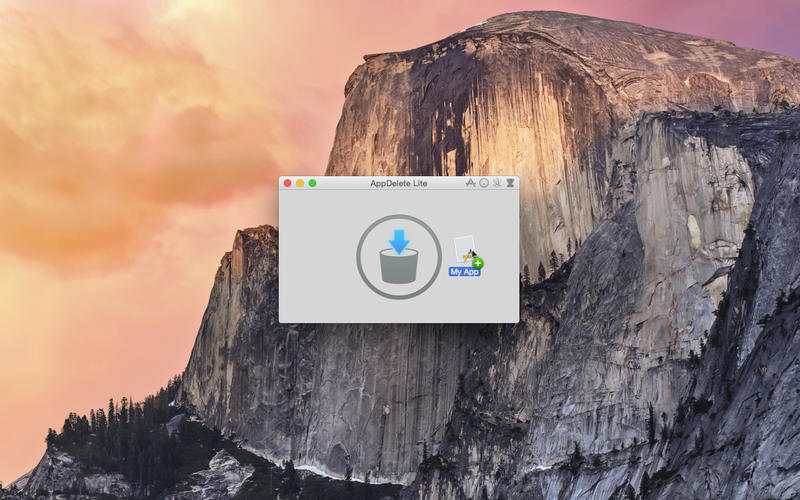
You can drag any item that can be uninstalled onto AppDelete Lite: Applications, Widgets, Preference Panes, Plugins, Screensavers, etc. You can also activate AppDelete Lite in many ways: dragging items onto main window, onto dock icon, selecting in menu, dragging from Launchpad, and throwing items in the trash. When the preview screen appears you can uncheck any items you would like to exclude.
You also have several choices: delete the items, log only the items, or archive (copy) the items to a .zip file for safekeeping or reinstall at a later date. The items you delete will be moved to the trash and arranged in a folder so that you can see exactly what was deleted and you know exactly where it came from. The items will not be removed from your computer until you empty them from your trash. Note: items requiring an administrator password must be deleted manually to comply with App Store guidelines, but this can be done quickly by clicking the reveal button in the AppDelete Lite Info panel, revealing in Finder, and moving them to the trash.
Version 4.0 has been 100% redesigned and updated and just one look will show you that this is an entirely new AppDelete Lite. AppDelete Lite Version 4.0.5 will run on Lion, Mountain Lion, Mavericks, Yosemite, and El Capitan, and here are a few of the new features included:
New in Version 4.0:
* All-New UI and revised workflow for the best AppDelete Lite experience ever
* Optimized for operation on El Capitan (still backwards compatible with Lion, Mountain Lion, Mavericks, Yosemite)
* Finds more files than ever before with new improved algorithm
* Now sandboxed to meet latest requirements for the Mac App Store
* File sizes and grouping for all items
* All latest technologies being utilized such as Automatic Reference Counting and Grand Central Dispatch
* All-New Genius Search
* Additional Preferences such as Ignore List and Protect Running Apps
* New Korean localization
* Updated Help file to make options more clear to user
* Brings Lite version up-to-date with AppDelete 4.2
* And More... (visit AppDelete Lite website for complete details)
Feature Highlights:
* Optimized for Lion/Mountain Lion/Mavericks/Yosemite/El Capitan
* Helps delete Apps, Widgets, Preference Panes, Plugins, Screensavers, or anything that can be uninstalled and their associated items
* Fifteen included languages (English, Chinese, Czech, Danish, Dutch, Finnish, French, German, Italian, Japanese, Korean, Portuguese (Brazilian), Russian, Spanish, and Swedish)
* 64-bit performance
* Finds associated items that are visible, invisible, or hidden automatically
* Quick panels with filtering in the menu (Name, Size, Kind, Creation Date, Last Used Date)
* Pathnames in AppDelete Lite Info panel are clickable and will Reveal in Finder
* Icons in AppDelete Lite Info panel are clickable and will show Finder Get Info panel
* Quick panels have a search field to find items fast
* Can drop folders onto AppDelete Lite to find items inside for deletion
* Detects Apps and other items placed in trash
* Archive feature for safekeeping and transferring items to another Mac
* Log to record all activity
* Preference to protect Default apps
* And more...
There are various options to make your AppDelete Lite experience complete: Quick search panels to help choose items for deletion, various options in Preferences, and more. AppDelete Lite is a must-have utility for software tinkerers or beta testers and the perfect companion to any Mac fanatic's toolbox.
AppDelete Lite Version 4.0.5 fixes an issue where some title bars might be missing messages along with other fixes and improvements. For full Release Notes visit website.
Language Support:
AppDelete Lite supports U.S. English, Chinese, Czech, Danish, Dutch, Finnish, French, German, Italian, Japanese, Korean, Portuguese (Brazilian), Russian, Spanish, and Swedish languages.
System Requirements:
* Mac OS X Version 10.7.3 Lion or later (El Capitan Compatible)
* Intel Mac and App Store
* 10.9 MB Hard Drive space
Pricing and Availability:
AppDelete Lite 4.0.5 is only $3.99 (USD) for purchase via the Mac App Store. It is also possible for AppDelete Lite users to upgrade to AppDelete for an additional $3.99 (USD) but only via the AppDelete/AppDelete Lite website. And users running OS 10.6.6 - 10.7.2 will still receive AppDelete Lite Version 3.2.10 from the App Store.
AppDelete Lite 4.0.5: http://www.reggieashworth.com/appdeletelite
Purchase and Download: http://itunes.apple.com/app/appdelete-lite/id451960925
Screenshot 1: http://a5.mzstatic.com/us/r30/Purple5/v4/70/9c/f4/709cf4a0-c588-47c3-facf-29da10caf239/screen800x500.jpeg
Screenshot 2: http://a5.mzstatic.com/us/r30/Purple3/v4/05/89/5a/05895a29-ad80-27e1-e67d-767e7b2c80bf/screen800x500.jpeg
Screenshot 3: http://a2.mzstatic.com/us/r30/Purple3/v4/96/c2/f7/96c2f7ca-557c-3be3-8a60-3e70b8137f88/screen800x500.jpeg
Application Icon: http://a3.mzstatic.com/us/r30/Purple3/v4/5c/64/33/5c64332d-9a35-08bb-336c-c7b076468f3c/icon256.png
Based in sunny Anaheim, California, Reggie Ashworth is an independent software developer whose passion for the Mac platform is only exceeded by his aim to craft simple, yet useful utilities. He is fanatical about total customer satisfaction. Copyright 2006-2016 Reggie Ashworth. All Rights Reserved. Apple, and the Apple logo, and Macintosh are registered trademarks of Apple Computer in the U.S. and/or other countries.
*******
Link To Article: http://prmac.com/release-id-79567.htm
*******
---------------------------------------------------------------------------------
Note that you can alter delivered distributions at any time.
Login to your account on prMac to alter your channel selection, or to opt-out at any time.
Reggie Ashworth releases MAS AppDelete Lite 4.0.5 - Uninstall Anything - Published on 05/26/16
Independent software developer Reggie Ashworth today announces MAS AppDelete Lite 4.0.5, an update to his popular Mac application deletion utility via the Mac App Store. With a simple Drag & Drop, AppDelete Lite will uninstall anything along with all of the associated items. Mac users will no longer have to hunt through their system to find and delete these items manually. AppDelete Lite is a must-have utility for beta testers and the perfect companion to any Mac fanatic's toolbox.
Anaheim, California - Independent software developer, Reggie Ashworth today is thrilled to announce the release and immediate availability of MAS AppDelete Lite 4.0.5, an update to his very popular application deletion utility for Mac OS X available via the Mac App Store. With a simple Drag & Drop, AppDelete Lite will uninstall anything along with all of the associated items. Mac users will no longer have to hunt through their system to find and delete these items manually.
You can drag any item that can be uninstalled onto AppDelete Lite: Applications, Widgets, Preference Panes, Plugins, Screensavers, etc. You can also activate AppDelete Lite in many ways: dragging items onto main window, onto dock icon, selecting in menu, dragging from Launchpad, and throwing items in the trash. When the preview screen appears you can uncheck any items you would like to exclude.
You also have several choices: delete the items, log only the items, or archive (copy) the items to a .zip file for safekeeping or reinstall at a later date. The items you delete will be moved to the trash and arranged in a folder so that you can see exactly what was deleted and you know exactly where it came from. The items will not be removed from your computer until you empty them from your trash. Note: items requiring an administrator password must be deleted manually to comply with App Store guidelines, but this can be done quickly by clicking the reveal button in the AppDelete Lite Info panel, revealing in Finder, and moving them to the trash.
Version 4.0 has been 100% redesigned and updated and just one look will show you that this is an entirely new AppDelete Lite. AppDelete Lite Version 4.0.5 will run on Lion, Mountain Lion, Mavericks, Yosemite, and El Capitan, and here are a few of the new features included:
New in Version 4.0:
* All-New UI and revised workflow for the best AppDelete Lite experience ever
* Optimized for operation on El Capitan (still backwards compatible with Lion, Mountain Lion, Mavericks, Yosemite)
* Finds more files than ever before with new improved algorithm
* Now sandboxed to meet latest requirements for the Mac App Store
* File sizes and grouping for all items
* All latest technologies being utilized such as Automatic Reference Counting and Grand Central Dispatch
* All-New Genius Search
* Additional Preferences such as Ignore List and Protect Running Apps
* New Korean localization
* Updated Help file to make options more clear to user
* Brings Lite version up-to-date with AppDelete 4.2
* And More... (visit AppDelete Lite website for complete details)
Feature Highlights:
* Optimized for Lion/Mountain Lion/Mavericks/Yosemite/El Capitan
* Helps delete Apps, Widgets, Preference Panes, Plugins, Screensavers, or anything that can be uninstalled and their associated items
* Fifteen included languages (English, Chinese, Czech, Danish, Dutch, Finnish, French, German, Italian, Japanese, Korean, Portuguese (Brazilian), Russian, Spanish, and Swedish)
* 64-bit performance
* Finds associated items that are visible, invisible, or hidden automatically
* Quick panels with filtering in the menu (Name, Size, Kind, Creation Date, Last Used Date)
* Pathnames in AppDelete Lite Info panel are clickable and will Reveal in Finder
* Icons in AppDelete Lite Info panel are clickable and will show Finder Get Info panel
* Quick panels have a search field to find items fast
* Can drop folders onto AppDelete Lite to find items inside for deletion
* Detects Apps and other items placed in trash
* Archive feature for safekeeping and transferring items to another Mac
* Log to record all activity
* Preference to protect Default apps
* And more...
There are various options to make your AppDelete Lite experience complete: Quick search panels to help choose items for deletion, various options in Preferences, and more. AppDelete Lite is a must-have utility for software tinkerers or beta testers and the perfect companion to any Mac fanatic's toolbox.
AppDelete Lite Version 4.0.5 fixes an issue where some title bars might be missing messages along with other fixes and improvements. For full Release Notes visit website.
Language Support:
AppDelete Lite supports U.S. English, Chinese, Czech, Danish, Dutch, Finnish, French, German, Italian, Japanese, Korean, Portuguese (Brazilian), Russian, Spanish, and Swedish languages.
System Requirements:
* Mac OS X Version 10.7.3 Lion or later (El Capitan Compatible)
* Intel Mac and App Store
* 10.9 MB Hard Drive space
Pricing and Availability:
AppDelete Lite 4.0.5 is only $3.99 (USD) for purchase via the Mac App Store. It is also possible for AppDelete Lite users to upgrade to AppDelete for an additional $3.99 (USD) but only via the AppDelete/AppDelete Lite website. And users running OS 10.6.6 - 10.7.2 will still receive AppDelete Lite Version 3.2.10 from the App Store.
AppDelete Lite 4.0.5: http://www.reggieashworth.com/appdeletelite
Purchase and Download: http://itunes.apple.com/app/appdelete-lite/id451960925
Screenshot 1: http://a5.mzstatic.com/us/r30/Purple5/v4/70/9c/f4/709cf4a0-c588-47c3-facf-29da10caf239/screen800x500.jpeg
Screenshot 2: http://a5.mzstatic.com/us/r30/Purple3/v4/05/89/5a/05895a29-ad80-27e1-e67d-767e7b2c80bf/screen800x500.jpeg

Screenshot 3: http://a2.mzstatic.com/us/r30/Purple3/v4/96/c2/f7/96c2f7ca-557c-3be3-8a60-3e70b8137f88/screen800x500.jpeg

Application Icon: http://a3.mzstatic.com/us/r30/Purple3/v4/5c/64/33/5c64332d-9a35-08bb-336c-c7b076468f3c/icon256.png

Based in sunny Anaheim, California, Reggie Ashworth is an independent software developer whose passion for the Mac platform is only exceeded by his aim to craft simple, yet useful utilities. He is fanatical about total customer satisfaction. Copyright 2006-2016 Reggie Ashworth. All Rights Reserved. Apple, and the Apple logo, and Macintosh are registered trademarks of Apple Computer in the U.S. and/or other countries.
*******
Link To Article: http://prmac.com/release-id-79567.htm
*******
---------------------------------------------------------------------------------
Note that you can alter delivered distributions at any time.
Login to your account on prMac to alter your channel selection, or to opt-out at any time.
LinkOptimizer for Adobe InDesign at 50% off on BitsDuJour on May 26
A new article has been published at prMac.
LinkOptimizer for Adobe InDesign at 50% off on BitsDuJour on May 26 - Published on 05/26/16
Zevrix Solutions announces that LinkOptimizer, its workflow automation solution for Adobe InDesign, is available at 50% off on the discount website BitsDuJour on May 26 only. LinkOptimizer allows users to reduce InDesign link size and speed up processing by eliminating excess image data, converting colors, performing essential image adjustments and converting file formats. As a result users can accelerate document output and save gigabytes of disk space and hours of production time.
Toronto (ON) Canada - Zevrix Solutions is proud to announce that LinkOptimizer, its popular workflow automation solution for Adobe InDesign, is available at 50% off on the discount website BitsDuJour today, May 26 only. Awarded 4 out of 5 starts by Computer Arts magazine, LinkOptimizer automates complex image manipulation tasks allowing to significantly reduce the size of InDesign links, save processing time and reduce production costs. The discount lets users save $130 on each license of LinkOptimizer.
"LinkOptimizer is the one product no creative studio can live without," says Wayne Guy from Edge Graphics studio in Lake Balboa, California. "It saves hours of time, tediously replacing linked images, resizing, batch processing... If you're a designer or production artist, you need this."
LinkOptimizer works automatically with Adobe Photoshop to eliminate the excess image data of InDesign links, perform essential image adjustments and convert image formats. For example, with just a click of a button users can:
* Scale and crop images to match their dimensions in InDesign
* Change their resolution to 300 dpi
* Convert RGB images to CMYK
* Resave JPEG images as TIFF
* Run a Photoshop Action on each image
At the end of processing, LinkOptimizer reimports images to InDesign at 100% in their precise position. In addition, the software can apply sharpening filters, merge layers and delete hidden ones, and process copies of InDesign documents and images instead of original files. As a result, users can save gigabytes of disk space and countless hours of optimizing images manually, accelerate document output, reduce job turnaround and cut costs through faster processing.
Pricing and Availability:
LinkOptimizer can be purchased form BitsDuJour at 50% off for $129.95 (USD) on May 26 only. Trial is also available for download. LinkOptimizer requires Mac OS X 10.6-10.11 and Adobe InDesign/Photoshop CS3-CC 2015.
Zevrix Solutions: http://zevrix.com
LinkOptimizer: http://www.bitsdujour.com/software/linkoptimizer
Download LinkOptimizer: http://zevrix.com/LinkOptimizer.dmg
Screenshot: http://zevrix.com/screenshots/lo4/res-win-ysmt.gif
Located in Toronto, Canada, Zevrix Solutions provides automation and productivity solutions for Adobe Creative Cloud and Creative Suite software, PDF workflows, graphic file diagnostics and Microsoft Office output on Mac OS. Zevrix is dedicated to help professionals increase their profits through automating everyday tasks, producing error-free documents, saving disk space and cutting production costs. For more information, visit their website. Copyright (C) 2016 Zevrix Solutions. All Rights Reserved. Other trademarks and registered trademarks may be the property of their respective owners.
*******
Link To Article: http://prmac.com/release-id-79566.htm
*******
---------------------------------------------------------------------------------
Note that you can alter delivered distributions at any time.
Login to your account on prMac to alter your channel selection, or to opt-out at any time.
LinkOptimizer for Adobe InDesign at 50% off on BitsDuJour on May 26 - Published on 05/26/16
Zevrix Solutions announces that LinkOptimizer, its workflow automation solution for Adobe InDesign, is available at 50% off on the discount website BitsDuJour on May 26 only. LinkOptimizer allows users to reduce InDesign link size and speed up processing by eliminating excess image data, converting colors, performing essential image adjustments and converting file formats. As a result users can accelerate document output and save gigabytes of disk space and hours of production time.
Toronto (ON) Canada - Zevrix Solutions is proud to announce that LinkOptimizer, its popular workflow automation solution for Adobe InDesign, is available at 50% off on the discount website BitsDuJour today, May 26 only. Awarded 4 out of 5 starts by Computer Arts magazine, LinkOptimizer automates complex image manipulation tasks allowing to significantly reduce the size of InDesign links, save processing time and reduce production costs. The discount lets users save $130 on each license of LinkOptimizer.
"LinkOptimizer is the one product no creative studio can live without," says Wayne Guy from Edge Graphics studio in Lake Balboa, California. "It saves hours of time, tediously replacing linked images, resizing, batch processing... If you're a designer or production artist, you need this."
LinkOptimizer works automatically with Adobe Photoshop to eliminate the excess image data of InDesign links, perform essential image adjustments and convert image formats. For example, with just a click of a button users can:
* Scale and crop images to match their dimensions in InDesign
* Change their resolution to 300 dpi
* Convert RGB images to CMYK
* Resave JPEG images as TIFF
* Run a Photoshop Action on each image
At the end of processing, LinkOptimizer reimports images to InDesign at 100% in their precise position. In addition, the software can apply sharpening filters, merge layers and delete hidden ones, and process copies of InDesign documents and images instead of original files. As a result, users can save gigabytes of disk space and countless hours of optimizing images manually, accelerate document output, reduce job turnaround and cut costs through faster processing.
Pricing and Availability:
LinkOptimizer can be purchased form BitsDuJour at 50% off for $129.95 (USD) on May 26 only. Trial is also available for download. LinkOptimizer requires Mac OS X 10.6-10.11 and Adobe InDesign/Photoshop CS3-CC 2015.
Zevrix Solutions: http://zevrix.com
LinkOptimizer: http://www.bitsdujour.com/software/linkoptimizer
Download LinkOptimizer: http://zevrix.com/LinkOptimizer.dmg
Screenshot: http://zevrix.com/screenshots/lo4/res-win-ysmt.gif

Located in Toronto, Canada, Zevrix Solutions provides automation and productivity solutions for Adobe Creative Cloud and Creative Suite software, PDF workflows, graphic file diagnostics and Microsoft Office output on Mac OS. Zevrix is dedicated to help professionals increase their profits through automating everyday tasks, producing error-free documents, saving disk space and cutting production costs. For more information, visit their website. Copyright (C) 2016 Zevrix Solutions. All Rights Reserved. Other trademarks and registered trademarks may be the property of their respective owners.
*******
Link To Article: http://prmac.com/release-id-79566.htm
*******
---------------------------------------------------------------------------------
Note that you can alter delivered distributions at any time.
Login to your account on prMac to alter your channel selection, or to opt-out at any time.
GraphicConverter 10 Adds Face Recognition, Live Photos, Collage, More
A new article has been published at prMac.
GraphicConverter 10 Adds Face Recognition, Live Photos, Collage, More - Published on 05/26/16
Lemke Software GmbH today announces GraphicConverter 10, the major update to their popular image editing utility for Mac OS X. The app offers users the ability to convert nearly any graphic file format into almost 80 graphic formats. This allows anyone to easily convert any photo for use on their Mac or other devices. Version 10 brings a number of new features, including face recognition, collage creation, custom brushes, and the ability to work with Apple's new Live Photos file format.
Peine, Germany - Lemke Software GmbH today is proud to announce the release and immediate availability of GraphicConverter 10, the major update to their popular image editing utility for Mac OS X. This "Swiss Army knife" of graphics programs offers users the ability to convert over 200 different graphic file formats into any of almost 80 graphic formats.
GraphicConverter has over 1.5 million users all over the world. The app makes it easy to work with almost any graphics format, from almost any source. GraphicConverter also fully supports Mac OS X 10.11 El Capitan, offering compatibility with the latest Macs.
Feature Highlights:
* Ability to open files in 200 graphics formats
* Ability to export in almost 80 different formats
* Import directly from camera (also RAW)
* Catalog generation (web, print, picture)
* TWAIN and image capture interface for scanners
* Direct support of the photo services Google+, Flickr, and Locr
* Graphical file and picture browser
* Slide show functions
* Powerful batch processor feature
* Support for Applescript
* Express picture enhancement function
* Powerful functions for editing pictures
* Advanced effects and filters
* Plug-in architecture
* Color management with ColorSync and ICC profiles
* 3D image support
* Supports the latest technologies of the different Mac OS versions
* Multilingual (12 available languages)
* Image verifier
* Ability to browse local copies on cloud services like Dropbox, SkyDrive, Copy, Amazon Cloud and Google Drive
"While GraphicConverter has always been the ultimate graphics utility available for the Mac, I believe this latest version really tops them all," says Thorsten Lemke, founder of Lemke Software GmbH. "With the addition of incredible new features like Face Recognition, Collage Creation, Custom Brushes, and the ability to work with the Apple's new Live Photos file format, GraphicConverter 10 offers the most bang for the buck than any competing photo apps out there!"
GraphicConverter 10 brings a number of great new features to the app, main highlights include:
Face Recognition:
GraphicConverter now offers Face Recognition abilities to help users find photos of certain people in their photo album. This makes it easy for users who want to include everyone in their family when they print their family photos for a photo album. They can simply enter the names of people they want to add, and GraphicConverter finds photos that include the selected people, and displays the pictures in the Browser.
Collage:
Putting together a collage of the best photos from a vacation is easy to do with the new Collage function. Simply select the desired image files in the GraphicConverter Browser and open the Collage window. That's where all the basic layout functions are found. It is so easy to use that even a child, (or even a computer-leery adult), could do it. That's a promise.
Picture Package:
Users who want to print several copies of a portrait or a passport photo on one sheet of paper will love the new Picture Package function. Just select a picture, open Picture Package, and it's time to print. This new feature is ridiculously simple to use. Plus, it even helps saves paper.
Custom Brushes:
Many GraphicConverter users have long requested this feature. Users can now use grayscale pictures as custom brushes when they paint with the brush. This professional tool will boost any user's creativity.
Metadata:
Users who work with metadata like EXIF and IPTC will love this new feature. GraphicConverter now offers simplified access to these functions. There's no need to use the context menu. Simply click the new menus with the camera and clipboard icons.
Apple Live Photos:
Users with an iPhone 6s are likely familiar with Apple's new Live Photos format, which offers a photo that includes a short three second movie showing the activity just before and just after when the photo was snapped. GraphicConverter 10 can now open Live Photos, with the movie portion intact. The app can then convert a Live Photo into an animated GIF, offering the ability to share the animation with others via email, or almost any social network.
The complete list of new features includes:
* Face detection
* Collage function
* Picture package function
* Select layers of PDFs from the layer menu
* Go to position in movie dialog
* Action to remove Finder Tags
* Reverse animation
* Append reversed animation to animation
* BLP export
* Auto Rotation to correct small rotations from the horizon
* Detects Apple Live Photos
* Convert Apple Live Photos to a GIF animation
* Photos extension
* RSR and RSRC from data fork import (support of many old resource types)
* Custom brush support
* Virtual rotation of files in the browser with the exif orientation tag
* File Info dialog inside browser: PageUp key does set the field to the content of the last edited file
* PGF import
* Convert animation to filmstrip
* Option to disable fullscreen support
* Smart cut
* Display of grid w/o snap
* Batch crop as percentage
* Optional display of ratio in browser
* Optional display of possible print quality in browser
* Function to extract mp4 cover art images
* Function to assign mp4 covert art images as custom icon
* APNG (Animated PNG) export
* Added "Movie to Animation conversion" options dialog
* Option change of folder in browser at the beginning/end of the file list with the cursor keys
* Option to open last/recent browsers automatically in flat view
* Added support for reading/writing XMP metadata in the browser to pdf, eps, ps, ai files
* New scaling algorithm: "Next Neighbour"
* Function to export the complete photos database to a flat folder structure
* Option to open only first frame of animated GIFs
* Basic BigTIFF import
* Sort files into subfolders by aspect ratio (browser context/action menu)
* Added function "Export Image Dimensions into dimensions.txt" file to convert and modify
* Function to check and correct the extensions of files in convert and modify
* Round rect effect
* Clear space function
* Context menu entry to enable/disable xmp pano viewer
* Opening of vcard (.vcf) images
* Batch function to scale large vcard images to max. 200 pixels
* Option to change default window position to centered
* Support for font faces in text palette
* Display of movie GPS data (if available) - requires 10.10 or later
* Torn edge effect
* Option to change parallax of red/cyan anaglyphs
* Batch creation from selection (context menu)
* Menu function to scale image to Facebook sizes
* Horizontal automatic correction (for grayscale scans)
Users love GraphicConverter:
"The slide show function alone has been a godsend to me. I have to handle about 6000 pictures a year for a high school yearbook and have found GC to be invaluable in sorting pictures." - Brian
"I've been using your program for years. I don't need to do all the things that Photoshop is designed to do, or the huge expense. Your program has done everything I need to do, and has been my go-to app for all manner of image adjustment that I require, and the low cost, along with all the free upgrades, is very meaningful to me. Thank you for this well designed app." - Ron
"Graphic Converter is almost the most useful application ever invented." - Sean Holland
In addition to the incredible list of brand new features, GraphicConverter 10 also offers users a huge number of updated features, they include:
* The option to enable/disable automatic color mode change upon saving of PNGs
* An option in slideshow to use a single color background color for the file path
* The option to display EXIF date below thumbs in the browser
* The LZW tiff export has been improved to offer higher performance
* Improved HP-GL/2 with RTL decoding
* The iptc/xmp/exif entries from the action submenu are now moved up for better accessibility
* The option to select color profile for new image
* Autocomplete of e-mail address has been added to the send e-mail dialog
* Option to delete automatically sidecar files in the browser und sideshow
* Optimized EXIF thumbnail creation after lossless JPEG rotation
* A button to open custom fill patterns in pattern palette
* Support for non-integer pen width (i.e. 1.4)
* Copy with soft edges much improved (alpha support)
* Enhanced smart crop with live preview
* PFM import will always import at 16 bit per channel
* Print catalog supports different colors for the first metadata line and the other ones
* Print catalog from browser uses selected browser sort order
* Page popup displays PDF page label (if it exists)
* Shadow command much enhanced
* Option to set pdf import resolution to highest contained picture resolution added
* Browser undo supports on volumes without versions support
* Create alias added to context menu in drop area of browser
* Option to select conversion priority in change color profile batch
* Complete deprecated QTKit code rewritten to use the new AVKit
* Color profile checking upon import
* CMYK profile name display in browser improved
* Multi scale supports scale to percentage
* Support for multiple underline styles added to text palette
* Updated links our website to use of https
"GraphicConverter 10 offers the largest and most comprehensive update to the app that I can recall. It offers an ease of use, along with a wealth of functions, that very few Mac graphic applications can offer," shares Lemke. "I am so excited to share this new update with our users. And as usual, we offer a 'try before you buy' fully-featured trial version for download, so anyone can try the app and see for themselves that it offers everything a user needs from a graphic editing utility, and without the high price of other applications!"
Language Support:
* English, Germany, French, Japanese, Chinese (simplified and traditional), Portuguese, Spanish, Danish, Swedish and Italian
System Requirements:
* Requires OS X 10.9 or higher
* 64-bit processor
* 85.4 MB
Pricing and Availability:
GraphicConverter 10 is available for $25.95 USD (or an equivalent amount in other currencies) until June 30, 2016, and is available worldwide through the Mac App Store in the Graphics and Design category. It can also be directly purchased online from the Lemkesoft website for $39.95 USD. Users of the current version of GraphicConverter can upgrade at the Lemkesoft website for $25.95 USD. Review copies are available upon request.
Lemke Software: http://www.lemkesoft.com
GraphicConverter 10.0: https://www.lemkesoft.de/en/products/graphicconverter/
Key Features: https://www.lemkesoft.de/en/products/graphicconverter/key-features/
Purchase and Download (MAS): https://itunes.apple.com/app/graphicconverter-10/id1090470302
Purchase from Lemke Software: https://www.lemkesoft.de/en/order/
Application Icon: http://www.lemkesoft.org/files/graphicconverter/GraphicConverter_128x128.png
Based in Peine, Germany, Lemke Software GmbH is a developer and publisher of Macintosh software. Founded by Thorsten Lemke in 2002, the main focus and passion of Lemke Software is centered on the maintenance and further development of GraphicConverter. Lemke Software also develops individual solutions for special customer requirements. All Material and Software (C) Copyright 2016 Lemke Software GmbH. All Rights Reserved. Apple, the Apple logo, Macintosh and Mac OS X are registered trademarks of Apple Inc. in the U.S. and/or other countries. Other trademarks and registered trademarks may be the property of their respective owners.
*******
Link To Article: http://prmac.com/release-id-79562.htm
*******
---------------------------------------------------------------------------------
Note that you can alter delivered distributions at any time.
Login to your account on prMac to alter your channel selection, or to opt-out at any time.
GraphicConverter 10 Adds Face Recognition, Live Photos, Collage, More - Published on 05/26/16
Lemke Software GmbH today announces GraphicConverter 10, the major update to their popular image editing utility for Mac OS X. The app offers users the ability to convert nearly any graphic file format into almost 80 graphic formats. This allows anyone to easily convert any photo for use on their Mac or other devices. Version 10 brings a number of new features, including face recognition, collage creation, custom brushes, and the ability to work with Apple's new Live Photos file format.
Peine, Germany - Lemke Software GmbH today is proud to announce the release and immediate availability of GraphicConverter 10, the major update to their popular image editing utility for Mac OS X. This "Swiss Army knife" of graphics programs offers users the ability to convert over 200 different graphic file formats into any of almost 80 graphic formats.
GraphicConverter has over 1.5 million users all over the world. The app makes it easy to work with almost any graphics format, from almost any source. GraphicConverter also fully supports Mac OS X 10.11 El Capitan, offering compatibility with the latest Macs.
Feature Highlights:
* Ability to open files in 200 graphics formats
* Ability to export in almost 80 different formats
* Import directly from camera (also RAW)
* Catalog generation (web, print, picture)
* TWAIN and image capture interface for scanners
* Direct support of the photo services Google+, Flickr, and Locr
* Graphical file and picture browser
* Slide show functions
* Powerful batch processor feature
* Support for Applescript
* Express picture enhancement function
* Powerful functions for editing pictures
* Advanced effects and filters
* Plug-in architecture
* Color management with ColorSync and ICC profiles
* 3D image support
* Supports the latest technologies of the different Mac OS versions
* Multilingual (12 available languages)
* Image verifier
* Ability to browse local copies on cloud services like Dropbox, SkyDrive, Copy, Amazon Cloud and Google Drive
"While GraphicConverter has always been the ultimate graphics utility available for the Mac, I believe this latest version really tops them all," says Thorsten Lemke, founder of Lemke Software GmbH. "With the addition of incredible new features like Face Recognition, Collage Creation, Custom Brushes, and the ability to work with the Apple's new Live Photos file format, GraphicConverter 10 offers the most bang for the buck than any competing photo apps out there!"
GraphicConverter 10 brings a number of great new features to the app, main highlights include:
Face Recognition:
GraphicConverter now offers Face Recognition abilities to help users find photos of certain people in their photo album. This makes it easy for users who want to include everyone in their family when they print their family photos for a photo album. They can simply enter the names of people they want to add, and GraphicConverter finds photos that include the selected people, and displays the pictures in the Browser.
Collage:
Putting together a collage of the best photos from a vacation is easy to do with the new Collage function. Simply select the desired image files in the GraphicConverter Browser and open the Collage window. That's where all the basic layout functions are found. It is so easy to use that even a child, (or even a computer-leery adult), could do it. That's a promise.
Picture Package:
Users who want to print several copies of a portrait or a passport photo on one sheet of paper will love the new Picture Package function. Just select a picture, open Picture Package, and it's time to print. This new feature is ridiculously simple to use. Plus, it even helps saves paper.
Custom Brushes:
Many GraphicConverter users have long requested this feature. Users can now use grayscale pictures as custom brushes when they paint with the brush. This professional tool will boost any user's creativity.
Metadata:
Users who work with metadata like EXIF and IPTC will love this new feature. GraphicConverter now offers simplified access to these functions. There's no need to use the context menu. Simply click the new menus with the camera and clipboard icons.
Apple Live Photos:
Users with an iPhone 6s are likely familiar with Apple's new Live Photos format, which offers a photo that includes a short three second movie showing the activity just before and just after when the photo was snapped. GraphicConverter 10 can now open Live Photos, with the movie portion intact. The app can then convert a Live Photo into an animated GIF, offering the ability to share the animation with others via email, or almost any social network.
The complete list of new features includes:
* Face detection
* Collage function
* Picture package function
* Select layers of PDFs from the layer menu
* Go to position in movie dialog
* Action to remove Finder Tags
* Reverse animation
* Append reversed animation to animation
* BLP export
* Auto Rotation to correct small rotations from the horizon
* Detects Apple Live Photos
* Convert Apple Live Photos to a GIF animation
* Photos extension
* RSR and RSRC from data fork import (support of many old resource types)
* Custom brush support
* Virtual rotation of files in the browser with the exif orientation tag
* File Info dialog inside browser: PageUp key does set the field to the content of the last edited file
* PGF import
* Convert animation to filmstrip
* Option to disable fullscreen support
* Smart cut
* Display of grid w/o snap
* Batch crop as percentage
* Optional display of ratio in browser
* Optional display of possible print quality in browser
* Function to extract mp4 cover art images
* Function to assign mp4 covert art images as custom icon
* APNG (Animated PNG) export
* Added "Movie to Animation conversion" options dialog
* Option change of folder in browser at the beginning/end of the file list with the cursor keys
* Option to open last/recent browsers automatically in flat view
* Added support for reading/writing XMP metadata in the browser to pdf, eps, ps, ai files
* New scaling algorithm: "Next Neighbour"
* Function to export the complete photos database to a flat folder structure
* Option to open only first frame of animated GIFs
* Basic BigTIFF import
* Sort files into subfolders by aspect ratio (browser context/action menu)
* Added function "Export Image Dimensions into dimensions.txt" file to convert and modify
* Function to check and correct the extensions of files in convert and modify
* Round rect effect
* Clear space function
* Context menu entry to enable/disable xmp pano viewer
* Opening of vcard (.vcf) images
* Batch function to scale large vcard images to max. 200 pixels
* Option to change default window position to centered
* Support for font faces in text palette
* Display of movie GPS data (if available) - requires 10.10 or later
* Torn edge effect
* Option to change parallax of red/cyan anaglyphs
* Batch creation from selection (context menu)
* Menu function to scale image to Facebook sizes
* Horizontal automatic correction (for grayscale scans)
Users love GraphicConverter:
"The slide show function alone has been a godsend to me. I have to handle about 6000 pictures a year for a high school yearbook and have found GC to be invaluable in sorting pictures." - Brian
"I've been using your program for years. I don't need to do all the things that Photoshop is designed to do, or the huge expense. Your program has done everything I need to do, and has been my go-to app for all manner of image adjustment that I require, and the low cost, along with all the free upgrades, is very meaningful to me. Thank you for this well designed app." - Ron
"Graphic Converter is almost the most useful application ever invented." - Sean Holland
In addition to the incredible list of brand new features, GraphicConverter 10 also offers users a huge number of updated features, they include:
* The option to enable/disable automatic color mode change upon saving of PNGs
* An option in slideshow to use a single color background color for the file path
* The option to display EXIF date below thumbs in the browser
* The LZW tiff export has been improved to offer higher performance
* Improved HP-GL/2 with RTL decoding
* The iptc/xmp/exif entries from the action submenu are now moved up for better accessibility
* The option to select color profile for new image
* Autocomplete of e-mail address has been added to the send e-mail dialog
* Option to delete automatically sidecar files in the browser und sideshow
* Optimized EXIF thumbnail creation after lossless JPEG rotation
* A button to open custom fill patterns in pattern palette
* Support for non-integer pen width (i.e. 1.4)
* Copy with soft edges much improved (alpha support)
* Enhanced smart crop with live preview
* PFM import will always import at 16 bit per channel
* Print catalog supports different colors for the first metadata line and the other ones
* Print catalog from browser uses selected browser sort order
* Page popup displays PDF page label (if it exists)
* Shadow command much enhanced
* Option to set pdf import resolution to highest contained picture resolution added
* Browser undo supports on volumes without versions support
* Create alias added to context menu in drop area of browser
* Option to select conversion priority in change color profile batch
* Complete deprecated QTKit code rewritten to use the new AVKit
* Color profile checking upon import
* CMYK profile name display in browser improved
* Multi scale supports scale to percentage
* Support for multiple underline styles added to text palette
* Updated links our website to use of https
"GraphicConverter 10 offers the largest and most comprehensive update to the app that I can recall. It offers an ease of use, along with a wealth of functions, that very few Mac graphic applications can offer," shares Lemke. "I am so excited to share this new update with our users. And as usual, we offer a 'try before you buy' fully-featured trial version for download, so anyone can try the app and see for themselves that it offers everything a user needs from a graphic editing utility, and without the high price of other applications!"
Language Support:
* English, Germany, French, Japanese, Chinese (simplified and traditional), Portuguese, Spanish, Danish, Swedish and Italian
System Requirements:
* Requires OS X 10.9 or higher
* 64-bit processor
* 85.4 MB
Pricing and Availability:
GraphicConverter 10 is available for $25.95 USD (or an equivalent amount in other currencies) until June 30, 2016, and is available worldwide through the Mac App Store in the Graphics and Design category. It can also be directly purchased online from the Lemkesoft website for $39.95 USD. Users of the current version of GraphicConverter can upgrade at the Lemkesoft website for $25.95 USD. Review copies are available upon request.
Lemke Software: http://www.lemkesoft.com
GraphicConverter 10.0: https://www.lemkesoft.de/en/products/graphicconverter/
Key Features: https://www.lemkesoft.de/en/products/graphicconverter/key-features/
Purchase and Download (MAS): https://itunes.apple.com/app/graphicconverter-10/id1090470302
Purchase from Lemke Software: https://www.lemkesoft.de/en/order/
Application Icon: http://www.lemkesoft.org/files/graphicconverter/GraphicConverter_128x128.png

Based in Peine, Germany, Lemke Software GmbH is a developer and publisher of Macintosh software. Founded by Thorsten Lemke in 2002, the main focus and passion of Lemke Software is centered on the maintenance and further development of GraphicConverter. Lemke Software also develops individual solutions for special customer requirements. All Material and Software (C) Copyright 2016 Lemke Software GmbH. All Rights Reserved. Apple, the Apple logo, Macintosh and Mac OS X are registered trademarks of Apple Inc. in the U.S. and/or other countries. Other trademarks and registered trademarks may be the property of their respective owners.
*******
Link To Article: http://prmac.com/release-id-79562.htm
*******
---------------------------------------------------------------------------------
Note that you can alter delivered distributions at any time.
Login to your account on prMac to alter your channel selection, or to opt-out at any time.
Kiismet App Provides Spiritual Inspiration for the Business Minded
A new article has been published at prMac.
Kiismet App Provides Spiritual Inspiration for the Business Minded - Published on 05/26/16
Cogitare Pty Ltd today announces Kiismet 1.1, a minor update to their innovative mobile app for iOS devices. Kiismet helps companies and individuals find their pathways to prosperity and positive energy. By tapping into universal positive energies, Kiismet guides users along their personal journeys to find their future, realize their destiny and ultimately achieve harmony that leads to renewed energy and success. Version 1.1 includes bug fixes and improvements.
Adelaide, Austrailia - Cogitare Pty Ltd today is proud to announce the release of Kiismet 1.1, a minor update to their unique mobile app developed for iPhone, iPad and iPod touch devices. Kiismet helps to bridge the modern and spiritual worlds to provide individuals and organizations the inspiration they need to find their paths to success. By tapping into universal positive energies, Kiismet guides users along their personal journeys to find their future, realize their destiny and ultimately achieve harmony that leads to renewed energy and success. It provides both individuals and organizations the direction to find answers to the most challenging problems they face in life with a simple yet comprehensive user interface.
Marina Pullin, Director of Cogitate, is the driving force behind the commercial investment of Kiismet and has championed the idea of creating business driven apps to reach more users.
"We're delighted to be a partner in this innovative application and be a part of this step forward in modern day business health," says Marina. "We all know organizations have their own unique atmosphere and energy, so it stands to reason, each would have an optimal path to follow. Applications like Kiismet can help people to clarify their mind and focus."
Built by a team of passionate experts in a variety of fields, Kiismet draws on both energies as old as time itself and the most modern technologies available today. Version 1.1 includes bug fixes and improvements.
Marina explains, "We have also been delighted with our cross functional global team who have respectfully honoured professions very different to their own and come together to create this very exciting way to access business guidance. Our software development capability and specifically in the areas of mobility application design and development, has been a delight to observe."
Device Requirements:
* iPhone, iPad, and iPod touch
* Requires iOS 8.0 or later
* 22.4 MB
Pricing and Availability:
Kiismet 1.1 is Free (with in-app purchases) and available worldwide exclusively through the App Store in the Entertainment category. Users may receieve Angel Advice for only $0.99 (USD). For more information, please contact Jenny Rea.
Kiismet 1.1: http://www.kiismet.com.au
Download from iTunes: https://itunes.apple.com/app/kiismet/id1087756188
Screenshot 1: http://a3.mzstatic.com/us/r30/Purple30/v4/af/75/39/af753983-ccf8-86b1-180d-e092170fedfa/screen322x572.jpeg
Screenshot 2: http://a1.mzstatic.com/us/r30/Purple18/v4/6c/76/13/6c761349-a818-f9ec-2627-c5cc4e14645f/screen322x572.jpeg
App Icon: http://a5.mzstatic.com/us/r30/Purple60/v4/1c/02/a7/1c02a768-d15b-e052-5f80-076d0bfb45b2/icon175x175.png
Located in Adelaide, Austrailia, Cogitare Pty Ltd was founded by Marina Pullin and the current managing director. Marina has worked throughout China, the United States, Australia and Germany as a management consultant and senior executive for global businesses including IBM, EDS and across Australian with Telstra. She earned a Master of Business Administration from the University of Adelaide in 2007, and enjoys working with organizations of all sizes to assist in improving financial outcomes, performance and productivity. All Material and Software (C) Copyright 2016 Cogitare Pty Ltd. All Rights Reserved. Apple, the Apple logo, iPhone, iPod and iPad are registered trademarks of Apple Inc. in the U.S. and/or other countries. Other trademarks and registered trademarks may be the property of their respective owners.
*******
Link To Article: http://prmac.com/release-id-79563.htm
*******
---------------------------------------------------------------------------------
Note that you can alter delivered distributions at any time.
Login to your account on prMac to alter your channel selection, or to opt-out at any time.
Kiismet App Provides Spiritual Inspiration for the Business Minded - Published on 05/26/16
Cogitare Pty Ltd today announces Kiismet 1.1, a minor update to their innovative mobile app for iOS devices. Kiismet helps companies and individuals find their pathways to prosperity and positive energy. By tapping into universal positive energies, Kiismet guides users along their personal journeys to find their future, realize their destiny and ultimately achieve harmony that leads to renewed energy and success. Version 1.1 includes bug fixes and improvements.
Adelaide, Austrailia - Cogitare Pty Ltd today is proud to announce the release of Kiismet 1.1, a minor update to their unique mobile app developed for iPhone, iPad and iPod touch devices. Kiismet helps to bridge the modern and spiritual worlds to provide individuals and organizations the inspiration they need to find their paths to success. By tapping into universal positive energies, Kiismet guides users along their personal journeys to find their future, realize their destiny and ultimately achieve harmony that leads to renewed energy and success. It provides both individuals and organizations the direction to find answers to the most challenging problems they face in life with a simple yet comprehensive user interface.
Marina Pullin, Director of Cogitate, is the driving force behind the commercial investment of Kiismet and has championed the idea of creating business driven apps to reach more users.
"We're delighted to be a partner in this innovative application and be a part of this step forward in modern day business health," says Marina. "We all know organizations have their own unique atmosphere and energy, so it stands to reason, each would have an optimal path to follow. Applications like Kiismet can help people to clarify their mind and focus."
Built by a team of passionate experts in a variety of fields, Kiismet draws on both energies as old as time itself and the most modern technologies available today. Version 1.1 includes bug fixes and improvements.
Marina explains, "We have also been delighted with our cross functional global team who have respectfully honoured professions very different to their own and come together to create this very exciting way to access business guidance. Our software development capability and specifically in the areas of mobility application design and development, has been a delight to observe."
Device Requirements:
* iPhone, iPad, and iPod touch
* Requires iOS 8.0 or later
* 22.4 MB
Pricing and Availability:
Kiismet 1.1 is Free (with in-app purchases) and available worldwide exclusively through the App Store in the Entertainment category. Users may receieve Angel Advice for only $0.99 (USD). For more information, please contact Jenny Rea.
Kiismet 1.1: http://www.kiismet.com.au
Download from iTunes: https://itunes.apple.com/app/kiismet/id1087756188
Screenshot 1: http://a3.mzstatic.com/us/r30/Purple30/v4/af/75/39/af753983-ccf8-86b1-180d-e092170fedfa/screen322x572.jpeg

Screenshot 2: http://a1.mzstatic.com/us/r30/Purple18/v4/6c/76/13/6c761349-a818-f9ec-2627-c5cc4e14645f/screen322x572.jpeg

App Icon: http://a5.mzstatic.com/us/r30/Purple60/v4/1c/02/a7/1c02a768-d15b-e052-5f80-076d0bfb45b2/icon175x175.png

Located in Adelaide, Austrailia, Cogitare Pty Ltd was founded by Marina Pullin and the current managing director. Marina has worked throughout China, the United States, Australia and Germany as a management consultant and senior executive for global businesses including IBM, EDS and across Australian with Telstra. She earned a Master of Business Administration from the University of Adelaide in 2007, and enjoys working with organizations of all sizes to assist in improving financial outcomes, performance and productivity. All Material and Software (C) Copyright 2016 Cogitare Pty Ltd. All Rights Reserved. Apple, the Apple logo, iPhone, iPod and iPad are registered trademarks of Apple Inc. in the U.S. and/or other countries. Other trademarks and registered trademarks may be the property of their respective owners.
*******
Link To Article: http://prmac.com/release-id-79563.htm
*******
---------------------------------------------------------------------------------
Note that you can alter delivered distributions at any time.
Login to your account on prMac to alter your channel selection, or to opt-out at any time.
Cisdem Releases PDFPasswordRemover 3 with PDF Password Recovery Support
A new article has been published at prMac.
Cisdem Releases PDFPasswordRemover 3 with PDF Password Recovery Support - Published on 05/26/16
Minnesota based Cisdem today announces Cisdem PDFPasswordRemover 3 for Mac, a significant upgrade to the ultimate PDF unlock tool to remove restrictions on any PDF document. Featuring an easy-to-use interface, PDFPasswordRemover now fully supports recovery of both user password and owner password, and crack PDFs in any language and any Adobe PDF version. No matter how complicated the password is, it's possible to restore by using brute force decryption.
Madelia, Minnesota - Cisdem today is proud to announce the release and immediate availability of Cisdem PDFPasswordRemover 3 for Mac, a significant upgrade to the ultimate PDF unlock tool to remove restrictions on any PDF document. Featuring an easy-to-use interface, PDFPasswordRemover now fully supports recovery of both user password and owner password, and crack PDFs in any language and any Adobe PDF version.
"Adobe PDF is an industry standard for document exchange and archiving. The success of the PDF file format is a great example of how a product becomes a global technical standard," said Karim Roumani, the Project Manager of Cisdem. "These years, our team has been committed to researching advanced file encryption and decryption technology. The release of PDFPasswordRemover 3 for Mac is the exhibition of our hard work. We're sure that the results will satisfy all customers troubled by PDF restrictions."
What's New?
Remove and Recover Both User Password & Owner Password:
Most related products in the market can only remove PDF owner password (required to print, copy and edit PDF files). PDFPasswordRemover 3 for Mac is powerful enough to remove or recover PDF user password (required to open PDF files) by using brute force decryption. No matter how complicate the password is, it's workable to restore the password though the time may differ a lot accordingly.
Search Preference Setting:
To save the search time, users can check or fill in the above options like user name, password length, additional characters, etc. The application will automatically remember your search preference for the settings.
Resume Decryption Progress:
When unlocking PDF files protected by complicated passwords, users can click on "Save for Later" to save the decryption process. Next time, when reopening the PDF file, users can choose to continue the saved decryption progress or not.
More Enhancements to Make it User-friendly:
* Provide the estimated remaining time of the whole decryption progress
* Unlock & Recover PDF password and restrictions with just 2 or 3 clicks
* Drag and Drop to add PDF files
* Don't require Adobe Acrobat Reader installed
Pricing and Availability:
PDFPasswordRemover 3.0 is available now through the Cisdem website. Now, two versions are available to meet different needs. A trial version available on the site also allows any user without a license to have a try with the App. The price for a Single License is $34.99 (USD) for PDFPasswordRemover (Standard Version) and $19.99 for PDFPasswordRemover Lite. Please refer to Cisdem online store for the detail price of other apps.
Cisdem: http://www.cisdem.com
PDFPasswordRemover 3.0: http://www.cisdem.com/pdf-password-remover-mac.html
Download PDFPasswordRemover: https://www.cisdem.com/download/cisdem-pdfpasswordremover.dmg
Purchase: http://www.cisdem.com/pdf-password-remover-mac/buy.html
Screenshot: https://www.cisdem.com/images/screens/pdfpasswordremover-scr-setting.png
Application Icon: http://www.cisdem.com/images/appicon/pdfpasswordremover-icon300.png
Cisdem provides productivity and business software that helps Mac users to get their job done faster. Cisdem products include top rated software centered on PDF Conversion, PDF Management, Data Recovery, and File Management. The company is dedicated in building highly efficient Mac software that make life easier and processes simpler. All Material and Software (C) Copyright 2016 Cisdem. All Rights Reserved. Apple, the Apple logo, Mac OS X and Macintosh are registered trademarks of Apple Inc. in the U.S. and/or other countries. Other trademarks and registered trademarks may be the property of their respective owners.
*******
Link To Article: http://prmac.com/release-id-79565.htm
*******
---------------------------------------------------------------------------------
Note that you can alter delivered distributions at any time.
Login to your account on prMac to alter your channel selection, or to opt-out at any time.
Cisdem Releases PDFPasswordRemover 3 with PDF Password Recovery Support - Published on 05/26/16
Minnesota based Cisdem today announces Cisdem PDFPasswordRemover 3 for Mac, a significant upgrade to the ultimate PDF unlock tool to remove restrictions on any PDF document. Featuring an easy-to-use interface, PDFPasswordRemover now fully supports recovery of both user password and owner password, and crack PDFs in any language and any Adobe PDF version. No matter how complicated the password is, it's possible to restore by using brute force decryption.
Madelia, Minnesota - Cisdem today is proud to announce the release and immediate availability of Cisdem PDFPasswordRemover 3 for Mac, a significant upgrade to the ultimate PDF unlock tool to remove restrictions on any PDF document. Featuring an easy-to-use interface, PDFPasswordRemover now fully supports recovery of both user password and owner password, and crack PDFs in any language and any Adobe PDF version.
"Adobe PDF is an industry standard for document exchange and archiving. The success of the PDF file format is a great example of how a product becomes a global technical standard," said Karim Roumani, the Project Manager of Cisdem. "These years, our team has been committed to researching advanced file encryption and decryption technology. The release of PDFPasswordRemover 3 for Mac is the exhibition of our hard work. We're sure that the results will satisfy all customers troubled by PDF restrictions."
What's New?
Remove and Recover Both User Password & Owner Password:
Most related products in the market can only remove PDF owner password (required to print, copy and edit PDF files). PDFPasswordRemover 3 for Mac is powerful enough to remove or recover PDF user password (required to open PDF files) by using brute force decryption. No matter how complicate the password is, it's workable to restore the password though the time may differ a lot accordingly.
Search Preference Setting:
To save the search time, users can check or fill in the above options like user name, password length, additional characters, etc. The application will automatically remember your search preference for the settings.
Resume Decryption Progress:
When unlocking PDF files protected by complicated passwords, users can click on "Save for Later" to save the decryption process. Next time, when reopening the PDF file, users can choose to continue the saved decryption progress or not.
More Enhancements to Make it User-friendly:
* Provide the estimated remaining time of the whole decryption progress
* Unlock & Recover PDF password and restrictions with just 2 or 3 clicks
* Drag and Drop to add PDF files
* Don't require Adobe Acrobat Reader installed
Pricing and Availability:
PDFPasswordRemover 3.0 is available now through the Cisdem website. Now, two versions are available to meet different needs. A trial version available on the site also allows any user without a license to have a try with the App. The price for a Single License is $34.99 (USD) for PDFPasswordRemover (Standard Version) and $19.99 for PDFPasswordRemover Lite. Please refer to Cisdem online store for the detail price of other apps.
Cisdem: http://www.cisdem.com
PDFPasswordRemover 3.0: http://www.cisdem.com/pdf-password-remover-mac.html
Download PDFPasswordRemover: https://www.cisdem.com/download/cisdem-pdfpasswordremover.dmg
Purchase: http://www.cisdem.com/pdf-password-remover-mac/buy.html
Screenshot: https://www.cisdem.com/images/screens/pdfpasswordremover-scr-setting.png
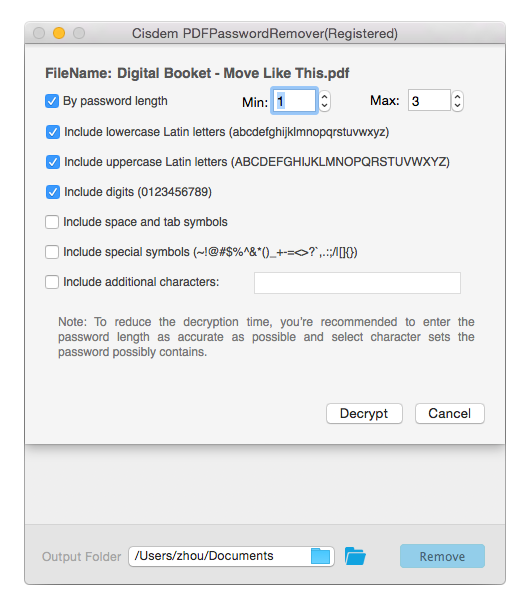
Application Icon: http://www.cisdem.com/images/appicon/pdfpasswordremover-icon300.png

Cisdem provides productivity and business software that helps Mac users to get their job done faster. Cisdem products include top rated software centered on PDF Conversion, PDF Management, Data Recovery, and File Management. The company is dedicated in building highly efficient Mac software that make life easier and processes simpler. All Material and Software (C) Copyright 2016 Cisdem. All Rights Reserved. Apple, the Apple logo, Mac OS X and Macintosh are registered trademarks of Apple Inc. in the U.S. and/or other countries. Other trademarks and registered trademarks may be the property of their respective owners.
*******
Link To Article: http://prmac.com/release-id-79565.htm
*******
---------------------------------------------------------------------------------
Note that you can alter delivered distributions at any time.
Login to your account on prMac to alter your channel selection, or to opt-out at any time.
Subscribe to:
Posts (Atom)